Hill AUDI Q5 2021 Owner´s Manual
[x] Cancel search | Manufacturer: AUDI, Model Year: 2021, Model line: Q5, Model: AUDI Q5 2021Pages: 332, PDF Size: 118.86 MB
Page 117 of 332
80B012721BA
Driving dynamic
Driving dynamic
Audi drive select
Introduction
Applies to: vehicles with Audi drive select
Drive select makes it possible to experience dif-
ferent types of vehicle characteristics in one vehi-
cle. With different driving modes, the driver can
switch the setting, for example from sporty to
comfortable. This allows you to adjust the set-
tings to your personal preferences. This makes it
possible to combine settings such as a sporty
drivetrain setting with comfortable steering.
Selecting an Audi drive select mode
Applies to: vehicles with Audi drive select
The size button is located above the selector lever
in the center console.
> Press the left or right arrow key until the de-
sired mode appears in the MMI. Or:
> Applies to MMI: Select on the home screen: VE-
HICLE > Audi drive select.
You can change the driving mode when the vehi-
cle is stationary or while driving. If traffic per-
mits, briefly remove your foot from the accelera-
tor pedal after changing modes so that the mode
you have selected will be activated for the drive
system.
The following modes may be available depending
on the equipment:
Offroad - Provides assistance when driving off-
road. The vehicle will be raised to the second-
highest level using the air suspension*. The ESC
will be restricted and the hill descent assist* will
be activated. The vehicle will exit this mode after
the ignition is switched off.
allroad - Provides balanced vehicle handling. The
vehicle will be raised to the second-highest level
using the air suspension*.
Comfort - Provides a comfort-oriented vehicle
setup and is suited for long drives on highways.
Auto - Provides an overall comfortable yet dy-
namic driving feel and is suited for everyday use.
Dynamic - Gives the driver a sporty driving feel
and is suited to a sporty driving style. The “S”
driving program is selected.
Individual - Provides the option for personalized
vehicle settings. Press ¥ to configure the mode
=> page 115, Individual settings.
G) Tips
When the ignition is being switched on, indi-
vidual systems, such as the drive system, will
be reset to a balanced setting. Select the cur-
rent mode again to attain its full configura-
tion.
Individual settings
Applies to: vehicles with Audi drive select
The equipment in your vehicle will determine
which settings you can adjust.
Drive
The drive system will react to accelerator pedal
moves more quickly or in a more balanced man-
ner. The shift points are located in higher or low-
er engine speed ranges on vehicles with automat-
ic transmissions.
Depending on the setting, the drive power at the
rear axle will be distributed with the sport differ-
ential* to be more sporty or moderate
=> page 118.
Steering
The power steering will adapt. Light steering is
suitable for long trips on highways or smooth
driving around curves, for example.
Suspension
The suspension adjusts to be tighter or more
comfort-oriented when it comes to compensat-
ing for uneven spots on the road.
The vehicle ground clearance is adjusted by the
air suspension* based on the setting.
Engine sound
The engine sound adapts and can be subtle to
sporty. In the automatic setting, the engine
sound depends on the selected driving program.
115
Page 122 of 332
Driving dynamic
these control systems are installed and this
can affect driving stability and increase the
risk of a collision.
— As the vehicle load increases, especially the
roof load, the vehicle's center of gravity also
increases along with the risk of the vehicle
tipping. To reduce the risk of an accident, al-
ways adapt your driving style to the current
conditions and avoid sudden driving maneu-
vers.
G) Tips
The ABS and ASR only function correctly when
all four wheels have a similar wear condition.
Different tire sizes can lead to a reduction in
motor power.
The So* button (or #, depending on the model)
for controlling the ESC is located in the center
console, in front of the selector lever. The ESC is
automatically switched on when the ignition is
switched on.
Limiting ESC
It may make sense in some situations to limit the
ESC stabilization functions so that the wheels can
spin:
— Rocking the vehicle to free it when it is stuck
— Driving in deep snow, on unpaved ground, or
with snow chains
— Driving downhill while braking on loose ground
— Driving with axle articulation
The ESC can be limited in order to allow the
wheels to spin.
—To limit the ESC, press the So button briefly.
The B indicator light will turn on.
—To completely reactivate the ESC stabilization
function, press the button again. The indicator
light turns off.
If you select the Offroad Audi drive select mode,
the Offroad ESC mode will be automatically
used. This mode is suited for driving offroad and
is designed for uneven terrain or loose ground.
120
Switching off ESC
For a more active control of the vehicle where the
stabilizing functions of the ESC cannot intervene,
the ESC can be switched off.
— To switch off the ESC, press and hold the Sor
button for more than three seconds. The B
and aa indicator lights turn on.
—To completely reactivate the ESC stabilization
function, press the button again. The indicator
lights turn off.
ZA\ WARNING
— When the ESC is switched off or limited,
there will be no vehicle stabilization or it will
be limited. The driving wheels could spin
and the vehicle could swerve, especially on
slick or slippery road surfaces. When there is
a heavy vehicle load and sudden driving ma-
neuvers, it may not be possible to prevent
the vehicle from tipping under certain cir-
cumstances, which increases the risk of an
accident.
— Because of the increased risk of an accident,
only drive with the ESC switched off or Limit-
ed when it is necessary. Reactivate the ESC
as soon as possible.
G) Tips
— If you select the Audi drive select* Offroad
mode, hill descent assist will switch on.
— If the ESC is limited, switched off, or mal-
functioning, systems with an automatic
braking intervention function may not be
fully available.
— If malfunctions occur in other systems or
certain driver assist systems are active, the
ESC must be switched on by the system. The
ESC
may switch on automatically and can-
not be operated with the button.
B fs / B © Stabilization control (ESC/
ABS): malfunction! See owner's manual
There is a malfunction in the ABS or EDL. This al-
so causes the ESC to malfunction. The brakes still >
Page 140 of 332
Trailer towing
Trailer towing
Driving with a trailer
er else)
Your vehicle is primarily intended for transport-
ing people and luggage. However, if you drive
with a trailer, follow the technical requirements,
the operation and driving tips, and the legal reg-
ulations.
Driving with a trailer affects the vehicle's energy
usage, performance, and wear. It also requires
higher concentration from the driver.
ZA\ WARNING
Do not transport any people in a trailer due to
the risk of fatal injury.
Technical requirements
Trailer hitch
Only use a trailer hitch with a removable ball
hitch mount and ball hitch. The trailer hitch must
be permitted for the vehicle, the trailer and the
permitted total weight of the trailer being
pulled. Above all, it must be securely and safely
attached to the vehicle trailer.
Never mount a trailer hitch on the bumper. The
trailer hitch must be mounted in a way that does
not impair the function of the bumper. Do not
make any changes to the exhaust system and the
brake system.
Check regularly if the trailer hitch is securely
mounted. Always follow the instructions given by
the trailer hitch manufacturer.
Trailer brakes
If the trailer has its own brake system, then fol-
low the manufacturer specifications. However,
the brake system on the trailer must never be
connected to the vehicle brake system.
Engine cooling system
Driving with a trailer means a higher load on the
engine and the cooling system. The cooling sys-
tem must be designed for additional load and
contain enough coolant > @.
138
ZA\ WARNING
— Never mount a "weight-distributing" or
"load-balancing" trailer coupler as the trailer
hitch. The vehicle was not designed for
these types of trailer hitches. The trailer
hitch can malfunction and the trailer can
break off from the vehicle.
— If the trailer is equipped with electronic
brakes, these brakes cannot be activated by
a factory-installed control system, which in-
creases the risk of an accident.
—To reduce the risk of injury, always remove
the ball hitch mount if no trailer is mount-
ed
@) Note
Longer inclines cannot be driven without a
suitable cooling system, especially if the out-
side temperatures are high. Otherwise, this
increases the risk of engine damage.
ey emia aCe
Towing capacity
The permitted towing capacity must not be ex-
ceeded under any circumstances > page 314.
You can drive up larger inclines if you are not us-
ing the maximum towing capacity.
The specified towing weights only apply at eleva-
tions up to 3,200 feet (1,000 m) above sea level.
As the elevation increases, the engine power de-
creases due to the decreasing air pressure. This
reduces the hill climbing ability and towing ca-
pacity. For every additional 3,200 ft (1,000 m),
the maximum permitted towing weight must be
reduced by approximately 10%. The permitted
towing weight is the combined weight of the
(loaded) vehicle and the (loaded) trailer.
Tongue weight
The maximum permitted tongue weight of the
trailer drawbar on the trailer hitch ball head must
not be exceeded.
For driving safety, Audi recommends always us-
ing
the maximum permitted tongue weight, but
do not exceed this weight. Distributing the cargo >
Page 142 of 332
Trailer towing
You can also increase ground clearance by select-
ing the Audi drive select* Offroad or allroad
modes > page 115.
@) Note
Applies to: vehicles with air suspension
— Changes in temperature or load can affect
the height of the vehicle.
— If the standard vehicle height is not used,
the tongue weight specification is no longer
applicable.
©) Note
Attachments retrofitted on the vehicle may
cause damage, especially on the trailer hitch
ball head. In cases of damage, have the func-
tion checked by an authorized Audi dealer or
authorized Audi Service Facility.
@) Tips
— Block the wheels with chocks when parking
on inclines if the trailer is loaded.
— Audi recommends having the vehicle in-
spected between the inspection intervals if
you tow a trailer frequently.
— Avoid driving with a trailer during the vehi-
cle break-in period.
PTL RR CT Coe
Driving with a trailer requires extra caution.
Speed
Adhere to the legal speed limits. Follow the legal
regulations that are applicable in the country
where you are operating the vehicle.
As the speed increases, the driving stability of
the trailer decreases. Therefore you should not
exceed the maximum legal speed limit when
there are unfavorable road, weather, and/or wind
conditions. This especially applies when driving
downhill.
Hill
When you start driving uphill or downhill, trailers
may tilt or sway sooner than when driving ona
level surface. If small swaying movements have
140
already occurred, you can stabilize the trailer by
firmly braking immediately. Never attempt to
“straighten out” the trailer by accelerating.
Downshift before driving on hills to utilize the en-
gine braking effect > A\.
Brakes
When using a trailer with overrun brakes, first
brake gently then quickly. This reduces the risk of
jerking while braking if the trailer wheels lock up.
Engine coolant temperature
Pay attention specifically to the coolant tempera-
ture display when there are high outside temper-
atures, and when driving on long inclines
= page 14. Shift to a higher gear in a timely man-
ner.
Z\ WARNING
Constant braking causes the brakes to over-
heat and can substantially reduce braking per-
formance, increase braking distance, or cause
complete failure of the brake system.
Page 153 of 332
Driver assistance
Switching the system on
Applies to: vehicles with cruise control system
Driver assistance
Cruise control system
Applies to: vehicles with cruise control system
BFV-0220
The cruise control system assists the driver in
80B012721BA
maintaining a constant speed above approxi-
mately 15 mph (20 km/h). The system maintains
the desired speed by braking and accelerating.
ZA WARNING
— Always pay attention to the traffic around
your vehicle when the cruise control system
is in operation. As the driver, you are always
responsible for controlling your vehicle
speed and the distance between your vehicle
and
other vehicles.
— For safety reasons, cruise control should not
be used in the city, in stop-and-go traffic, on
winding roads, and when road conditions are
poor (such as ice, fog, gravel, heavy rain,
and conditions that could lead to hydroplan-
ing), because this increases the risk of an ac-
cident.
— Switch the cruise control off temporarily
when driving in turning lanes, highway exits,
or in construction zones.
—To reduce the risk of an accident, you should
only resume the stored speed if it is suitable
for the current traffic conditions.
() Note
— Conventional drive system:Before driving
downhill a long distance on a steep hill, de-
crease your speed and select a lower gear.
This makes use of the engine braking effect
and reduces the load placed on the brakes.
— Plug-in hybrid drive: Before driving downhill
a long distance on a steep hill, decrease
your speed and use the recuperation braking
effect > page 104. This reduces the load on
the brakes.
@ Tips
The brake lights turn on when the brakes are
applied automatically.
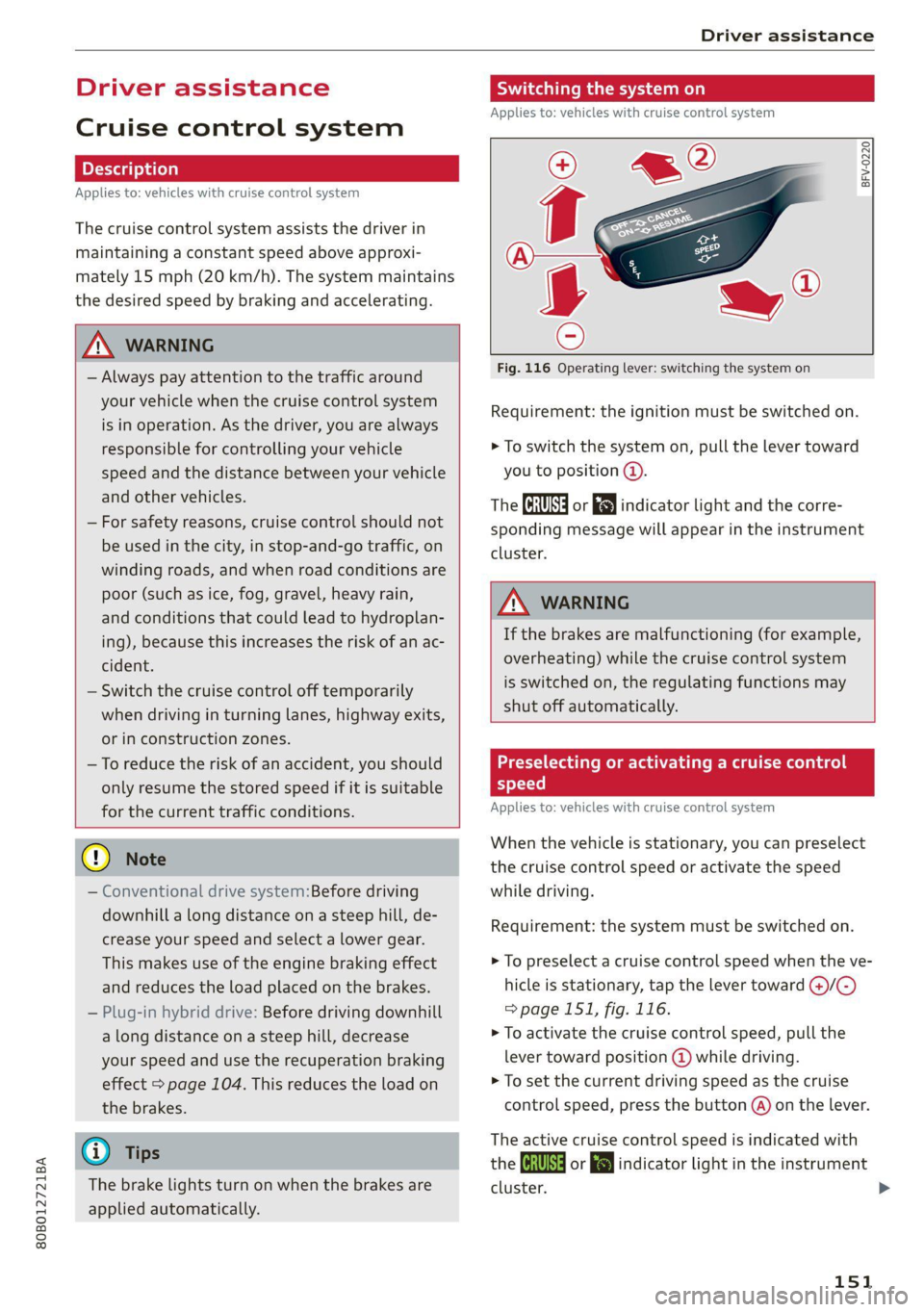
Fig. 116 Operating lever: switching the system on
Requirement: the ignition must be switched on.
> To switch the system on, pull the lever toward
you to position ©.
The Gia or i$) indicator light and the corre-
sponding message will appear in the instrument
cluster.
ZA\ WARNING
If the brakes are malfunctioning (for example,
overheating) while the cruise control system
is switched on, the regulating functions may
shut off automatically.
Preselecting or activating a cruise con
speed
Applies to: vehicles with cruise control system
When the vehicle is stationary, you can preselect
the cruise control speed or activate the speed
while driving.
Requirement: the system must be switched on.
> To preselect a cruise control speed when the ve-
hicle is stationary, tap the lever toward @)/G)
=>page 151, fig. 116.
> To activate the cruise control speed, pull the
lever
toward position @ while driving.
> To set the current driving speed as the cruise
control speed, press the button @) on the lever.
The active cruise control speed is indicated with
the Gg or kl indicator light in the instrument
cluster.
151
Page 171 of 332
80B012721BA
Driver assistance
taking risks. This could increase your risk of
a collision.
— Audi pre sense city does not react to certain
objects, such as animals, crossing or oncom-
ing vehicles, bars, railings, or railcars.
— Audi pre sense may be limited or unavailable
in curves or when it is dark.
— Loose objects can be thrown around the ve-
hicle interior during sudden driving or brak-
ing maneuvers, which increases the risk of
an accident. Store objects securely while
driving.
— In trailer mode, the braking behavior of the
trailer can be different than usual during au-
tomatic braking.
@) Tips
Certain system functions may not be available
if the ESC is limited or switched off
=> page 120, if there is a malfunction, or if the
hill hold assist* is switched on > page 114.
Audi pre sense front
Applies to: vehicles with Audi pre sense front
Audi pre sense front provides the same scope of
functions as Audi pre sense city, with a few ex-
ceptions > page 168. The system has an exten-
sive field of view due to additional sensors that
are installed. Because of this, vehicles that are
braking or traveling significantly more slowly can
be detected earlier and more clearly, depending
on the limits of the system.
The following features apply to Audi pre sense
front:
— Automatic braking interventions are available
at vehicle speeds up to approximately 155 mph
(250 km/h)
— The system does not detect pedestrians
Z\ WARNING
— Observe the safety precautions > A\ in Audi
pre sense city on page 168.
— Observe the safety precautions and note the
limits of the assist systems, sensors, and
cameras > page 141.
— Audi pre sense front does not react to cer-
tain objects, such as pedestrians, animals,
crossing or oncoming vehicles, bars, railings,
or railcars.
Audi pre sense rear
Applies to: vehicles with Audi pre sense rear
Within the limits of the system, Audi pre sense
rear uses data from radar sensors at the rear cor-
ners of the vehicle and calculates the probability
of a rear-end collision with the vehicle behind
you.
Audi pre sense preemptive safety measures can
be initiated if the risk of a collision with the vehi-
cle behind you is detected.
Z\ WARNING
— Observe the safety precautions and note the
limits of the assist systems, sensors, and
cameras > page 141.
— Audi pre sense rear does not react to pedes-
trians, animals, crossing objects, and ob-
jects not detected as vehicles.
@) Tips
— Audi pre sense rear functions switch off
when trailer mode is detected. There is no
guarantee the functions will switch off
when using a retrofitted trailer hitch.
— Audi pre sense rear functions may also
switch off if there is a malfunction in the
side assist system.
ai
Applies to: vehicles with swerve assist
The swerve assist can help you to steer the vehi-
cle around an obstacle detected in a critical area.
If you avoid an obstacle after the acute warning,
then the swerve assist assists you by applying
slight steering adjustment to correct your steer-
ing wheel angle as long as you are actively steer-
ing. Swerve assist is available at speeds between
approximately 20 mph (30 km/h) and 90 mph
(150 km/h).
169
Page 186 of 332

Parking and maneuvering
ZA\ WARNING
— Observe the safety precautions and note the
limits of the assist systems, sensors, and
cameras > page 141.
— The driver is always responsible when enter-
ing or exiting a parking space and during
similar maneuvers.
— Do not use this function if the vehicle cannot
move freely, for example when on a vehicle
jack.
— Sensors and cameras have spots in which
the surrounding area cannot be detected.
Objects, animals, and people may only be
detected with limitations may not be detect-
ed at all. Always monitor the traffic and the
vehicle's surroundings directly and do not
become distracted.
@) Note
— Do not use the park assist systems when
transporting cargo that extends out of the
vehicle, when snow chains are mounted, or
when the parking space is on a hill or in-
cline.
— Park assist guides the vehicle either away
from curbs or onto them if other vehicles
are parked on the curb. Make sure that your
vehicle's tires and rims are not damaged.
Resume control of the vehicle in time or
stop the parking process if needed to pre-
vent damage.
G) Tips
Follow the legal regulations in the country
where you are located when using Park assist.
dem Re eee
Applies to: vehicles with park assist
Requirement: a suitable parking space must be
found and selected > page 181. The vehicle must
initially be stationary.
In the center display, arrows and symbols on the
vehicle roof @) > page 182, fig. 145 indicate
what action is needed, such as applying the
brakes or changing the direction. Park assist au-
184
tomatically steers the vehicle into the parking
space while the driver presses the pedals.
> After stopping the vehicle briefly, make sure
the actual direction the vehicle is traveling
matches the direction indicated by the park as-
sist.
> Remove your hands from the steering wheel.
>» Pay attention to the path of the vehicle. If the
traffic situation permits, accelerate carefully
> AX. The maximum parking speed is approxi-
mately 4 mph (7 km/h).
> Follow the visual instructions in the center dis-
play and the warning tones until the parking
process
has ended.
Z\ WARNING
— Observe the safety precautions and note the
limits of the assist systems, sensors, and
cameras > page 141.
— The park assist is an assist system. The driv-
er is still responsible for monitoring the ve-
hicle's surroundings and preventing colli-
sions when using the system.
— When using park assist to drive into or out
of a parking space, the steering wheel turns
quickly on its own. Reaching into the steer-
ing wheel spokes while this is happening can
result in injury.
G) Tips
You can also cancel the driving direction set
by the system by shifting between a forward
gear and reverse gear. Based on the position
of the vehicle, the system then calculates the
additional steering and driving directions for
maneuvering.
ten Lei ek ace
Applies to: vehicles with park assist
If you parked the vehicle in a parallel parking
space, park assist can help you drive out of it.
Park assist automatically steers the vehicle out of
the parking space while the driver presses the
pedals.
» Start the engine.
> Press the Pe button in the center console.
Page 290 of 332
Emergency assistance
Emergency assistance
General information
> Park the vehicle as far as possible from moving
traffic in the event of a breakdown. In the event
of a flat tire, park the vehicle ona level surface.
If you are ona steep hill, be especially careful.
> Set the parking brake.
> Switch the emergency flashers on.
> Have the passengers exit the vehicle. They
should move to a safe place, for example be-
hind a guard rail.
_Z\ WARNING
Follow the steps given above. This is for your
protection and the for the safety of others on
the road.
Equipment
Vehicle tool kit, tire mobility kit, a
vehicle jack
Applies to: vehicles with the vehicle tool kit, tire mobility kit,
and vehicle jack
TT eee ee TTL
Applies to: vehicles with plug-in hybrid drive
Fig. 182 Luggage compartment: side trim panel and com-
partment
288
The vehicle tool kit, vehicle jack, tire mobility kit
and compressor are stored in the luggage com-
partment under the cargo floor cover.
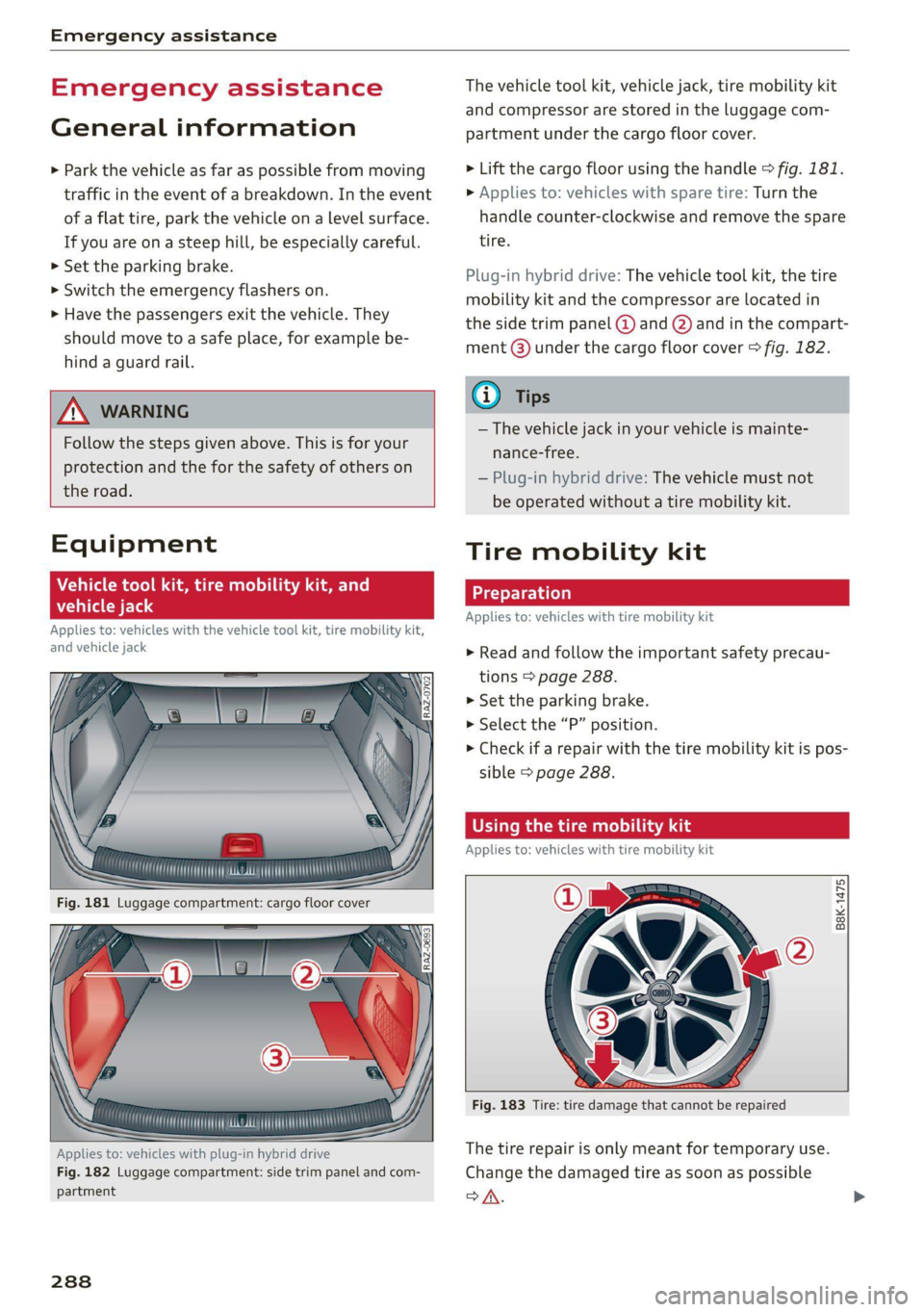
> Lift the cargo floor using the handle © fig. 181.
> Applies to: vehicles with spare tire: Turn the
handle counter-clockwise and remove the spare
tire.
Plug-in hybrid drive: The vehicle tool kit, the tire
mobility kit and the compressor are located in
the side trim panel @ and Q) and in the compart-
ment @) under the cargo floor cover > fig. 182.
@ Tips
— The vehicle jack in your vehicle is mainte-
nance-free.
— Plug-in hybrid drive: The vehicle must not
be operated without a tire mobility kit.
Tire mobility kit
Preparation
Applies to: vehicles with tire mobility kit
> Read and follow the important safety precau-
tions > page 288.
» Set the parking brake.
> Select the “P” position.
> Check if a repair with the tire mobility kit is pos-
sible > page 288.
ORT Ranma muie) isa
Applies to: vehicles with tire mobility kit
B8K-1475
Fig. 183 Tire: tire damage that cannot be repaired
The tire repair is only meant for temporary use.
Change the damaged tire as soon as possible
SA.
Page 320 of 332
Index
Diteetor yess 6 s cscaves ws sacewes v6 aneims v © sxeams 6 0 191
Business card... 6... eee eee eee 192
SCttinGSanww + wuwn x 3 mee ee ReUeE SE eee & 194
Display
Cleaning’s « «sew 2s seas © 2 eww vo ene woe 285
Displaying tooltips..................0.. 20
DispoSaliv: ss seus s ¢ sees av wees vv teen swe 308
DIStaHCO sas = » saeas + ¢ sacee @ 2 Sacee 7 a Hae Ya: 17
Distance warning............0.see ee eee 164
Doors
Child safety lock 22s ¢ 2 eee es geen ss eees 44
Doorcontactiswiteh « « sisi ss wes «6 mewn 2 6 53
Mechanically unlocking and locking....... 37
Driver information system................ 13
Drives
refer to Media................-4- 225,227
Drive select
refer to Audi drive select............... 115
Drive systeM... 0... cee eee eee 104
(Audi drive’select s coac 2 ¢ cawe ¢ s gence so ae LIS
Drive system (message)...............-. 109
Driving down hills............0.--00 ee 112
Driving program... .. 6... cee ee eee eee eee 161
Driving through water................5. 114
DGiVIMNG BIER. « » exesene « 0 ssinsocie © of emetinze © ovation» « 17
Driving tips
Driving through water.............00-- 114
Efficient driving » sxc. x» see: ss eee se eee 107
GFRrOAGNARIVING 2 cxcwie & wromenow » aresum « ¥ anaie 113)
Uphill and downhill................... 112
Drivinguphills................0...005. 112
Dust filter
refer to Pollutant filter..............00. 91
Dynamic steering...............0..000. 117
=
E-mail
Message Options: « < seas 5 = was 5 v ween s 195
SettinQSwasiess + wen ee aaron so meena & @ eae 8 195
EDL
refer to Electronic Differential Lock...... 119
EDR
refer to Event Data Recorder (EDR)...... 304
Efficiency assist... 0... eee ee 152
Electrical system. .........-.0 02 e ee eee 256
Electromechanical parking brake......... 111
318
Electronic Differential Lock.............. 119
Electronic immobilizer cvs. 6. ow sa sia ves 39
Electronic Stabilization Control........... 119
Embedded SIM: card « « secu + 2 gaye 4 2 ese « ¢ 198
Emergency assistance..............-.-. 288
Emergency braking function............. 112
Emergency call..............000.. 193, 202
Emergency flashers.............--..00-- 52
Emergency mode.............--.000005 103
Emergency operation
Doors... 2. eee eee B7
FUG TINLERAGOr ss « 2 wows x o yawn a a wows 4 ee 245
Luggage compartment lid............... 44
Panoramic glass roof...............000. 47
Emissions control system.............05 245
ENergy CONSUMENS i 6 6 ess © reseeee e eiee e o 8 17
Energy flowdisplay’s seas: o 6 cscs 2 6 eevee s vv 106
Energy management............--.00ee 107
Energy TECOVErYcews 5 s eave + o ewig + 5 ewe & 104
Engine
Breakingiinis « csv. + 2 ewe 2 6 wwe a 6 aes a 104
Coolant............... 00. cece 253
Emergency Stop ss « s ee.8 se ees s sees es we 97
JUMP Starting « = sce 5 x secre © 2 seweEe vo sore 294
Start/Stop system ........ eee eee ee eee 108
Starting/stopping.................0 ae 97
Engine braking effect
refer to Recuperation................. 104
Engine oil
AGING « seswies «vere © & oxaners a o Sensis ve oTIEENs 249
Changing.............. eee ee eee eee 252
Checking GILlEVEl: x = sase ys sae a 3 Beam 3 249
CONSUMPTION & & swe « 0 ors = 5 semen wo ome 249
Indicator light... 2... cece eee eee eee 250
Replacement interval................. 259
Temperature display................... 16
Engine sound
Audi driverselecti, «sisi s+ iusiest a a samen a LI5
Engine Start/Stop mode
refer to Start/Stop system............. 108
Engine Start:syStei vceca « cose o 6 econ @ x anon 98
Engine stop
refer to Start/Stop system............. 108
Entry/exit lighting................-.000- 52
EMtry ASSiStamGes. « « sesess 6 « samme © a samme oo mace 64
also refer to Exit assistance............. 64
Page 322 of 332
Index
Headlight range control................0. 50
Headlights: « scincs xo snes oe mms 2 o ones ow a0 50
Cleaning......... 0... e eee eee eee 283
Headlight range control................ 50
Washer'system « = ses09 + see ey eeru ee es 57
Washer system (filling washer fluid) ..... 259
Headsrestraints cies m + eassen wo iecwne © o aiemne so 3 67
Heated rear window.............0000 sees 94
Heated steering wheel................0.. 94
HOAtinG cer x = seas & s Kame Fe em ee ew ee 91
HFP
refer to Hands Free Profile............. 186
High:voltagebattery’s « ssw 4s asww s enews « 122
Audi e-tron compact charging system.... 131
Charging.............c eee eee eee 123,125
Charging display on the vehicle......... 127
Charging equipment.................. 129
Charging methods.................04. 123
Charging ports on the vehicle........... 123
Charging time iin: . aici ev eye 3 vere s vs 123
Connecting the charging cable.......... 125
Messages while driving................ 129
Not running for long periods of time..... 124
Opening the charging port door......... 125
Quick charginGiss « ¢ eas sv eee sy eee 2 we 123
Setting the timers. + circ a cane a a sane a ao 127
Transporting charging equipment....... 130
High-voltage system..............0000e 122
High beams
High beam assistant................... 51
Highway lights........ 0.0... eee eee ee eee 50
Hill descentiassist's ccciose oo scarce eo sonsee a a en 114
Hill descenticomtrol. « swssiwe sa ssaiia sv amen 112
Hill hold assist «cco so sewn 6 wane wv wea a oo 99
Home
refer to Home address................ 211
Hometaddnesss, « ws 4s isvawese i « onaseme ow ates 211
HomeLink
refer to Garage door opener............. 47
HOME:SEFEON:. 5 5 worn so cewtei « w veosen « wratess a oo 19
HORM w & ssccase oo asessie wo cecoans © or aoawne © stan B Bees 6
Hotspot
refer to Wi-Fi........ 0... cece eee eee 200
320
I
Idle
TOPE CO'GESISs ween x 3 wean a x woen se weeG ae 99
Ignition
Switching on and off................... 97
Imbalance (wheels) ...........00..00005 270
Immobilizer
refer to Electronic immobilizer........... 38
Tni¢linfometetios. « s eon so wenn vo womens oo nae L13
Indicator lights’; « ese. 5 ¢ eewe ee see se eee 7
Inspection interval..................00. 259
Instrument cluster.............0seeeeuee 12
Adjusting the layout................... 13
Cleaning... ... 2... ee eee eee eee eee ee 285
Failure... 0... eee eee eee eee 12,
MOtorcOdehis « sive « s wena o 2 wee a 2 wane 239
On-board computer............-..00-0- 17
Operating............... 0. cece ee eee 13
Service interval display................ 259
Software information.............0005 239
Switching
tabs......... 0... eee eee eee 13
Switching the VieWir. s + eses « eee xe exw» 13
Vehicle fUNGtIONS). 6 wiicaue as asiere sa uae ao ac 16
Version information.................. 239
Instruments
Adjusting illumination.............00005 55
Integrated Toll Module................. 149
Intelligent search
NaVigatiOticns + ney = yawe so mame x ¢ Hee 206
Interference-Causing Equipment Standard
CIGES) 5 0 mces so sami oe came oo somes 2 x one 312
Interior lighting... e.:3 secs s eee eee 53,54
INteriOr MONICOFING® ss ese « = eoee y 2 wees ae 37
Intermittent mode (windshield wipers) ..... 57
International travel.................5-5 201
Internet
refer to CONNECts « = secs es eeen ee eee ee: 197
Internet radio
refer to Online radio.............. 221, 222
iPhone
refer to Audi music interface........... 226
J
JUMpIStarting, ssw 6 vans a 6 aman w 6 sews ww ae 294