suspension AUDI Q5 2021 Owner´s Manual
[x] Cancel search | Manufacturer: AUDI, Model Year: 2021, Model line: Q5, Model: AUDI Q5 2021Pages: 332, PDF Size: 118.86 MB
Page 180 of 332

Parking and maneuvering
steering wheel until the orange orientation
lines align with the parking space.
@ You can use the horizontal blue markings to
help you estimate the distance to an obsta-
cle. Each marking represents approximately 3
feet (1 meter). The blue area represents an
extension of the vehicle's outline by approxi-
mately 16 feet (5 meters) to the rear.
@® You can recognize the rear bumper in the
lower display.
@ You should stop driving in reverse when the
red orientation line touches the edge of an
object, at the latest.
Trailer view
Applies to: vehicles with trailer view
The trailer view > fig. 139 assists you in position-
ing the vehicle in front of a trailer.
— Applies to: vehicles with peripheral cameras:
Switch to the Rear view > page 179, fig. 140.
— Select -| > Trailer view in the center display
when the parking system is active.
Now you can position your vehicle in front of the
trailer. The orange orientation line ©) > fig. 139
indicates the expected path toward the trailer
hitch. Use the blue markings ©) to help you esti-
mate the distance to the trailer hitch. Each mark-
ing represents approximately 1 foot (0.30 me-
ters). The width of the blue surface represents
the maximum steering wheel angle.
Symbols
Applies to: vehicles with peripheral cameras
If $2/&®/< is displayed and the display area
represented by that symbol is not available, then
the camera on the that side is not available. The
power exterior mirrors may have been folded in
or a door or the luggage compartment lid may
have been opened.
If # is displayed, there is a system malfunction
and the display area represented by that symbol
is not available. The camera is not working in this
area.
If one of the symbols continues to be displayed,
drive immediately to an authorized Audi dealer or
178
authorized Audi Service Facility to have the mal-
function repaired.
ZA\ WARNING
— Observe the safety precautions and note the
limits of the assist systems, sensors, and
cameras > page 141.
— Sensors and cameras have spots in which
the surrounding area cannot be detected.
Objects, animals, and people may only be
detected with limitations may not be detect-
ed at all. Always monitor the traffic and the
vehicle's surroundings directly and do not
become distracted.
@) Note
— The orange orientation lines @ show the di-
rection the rear of the vehicle will be travel-
ing, based on the steering wheel angle. The
front of the vehicle swings out more than
the rear of the vehicle. Maintain plenty of
distance so that an exterior mirror or a cor-
ner of the vehicle does not collide with any
obstacles.
— Keep enough distance from the curb to
avoid damage to the rims.
— Only use the images provided by the camera
on the rear of the vehicle when the luggage
compartment lid is completely closed. Make
sure any objects you may have mounted on
the luggage compartment lid do not block
the rearview camera.
G) Tips
— Applies to vehicles with air suspension: The
accuracy of the orientation lines and blue
surfaces on the camera display decreases
when the vehicle is raised or lowered with
the air suspension.
— There is no distance warning for the rear
and the sides* when trailer towing mode is
detected. The front sensors remain activat-
ed. The visual display switches to trailer
mode. There is no guarantee the functions
will be deactivated when using a retrofitted
trailer hitch.
Page 275 of 332
80B012721BA
Wheels
designation on the tire pressure tires according to the load and
label and the tire pressure table. the size of the tires installed.
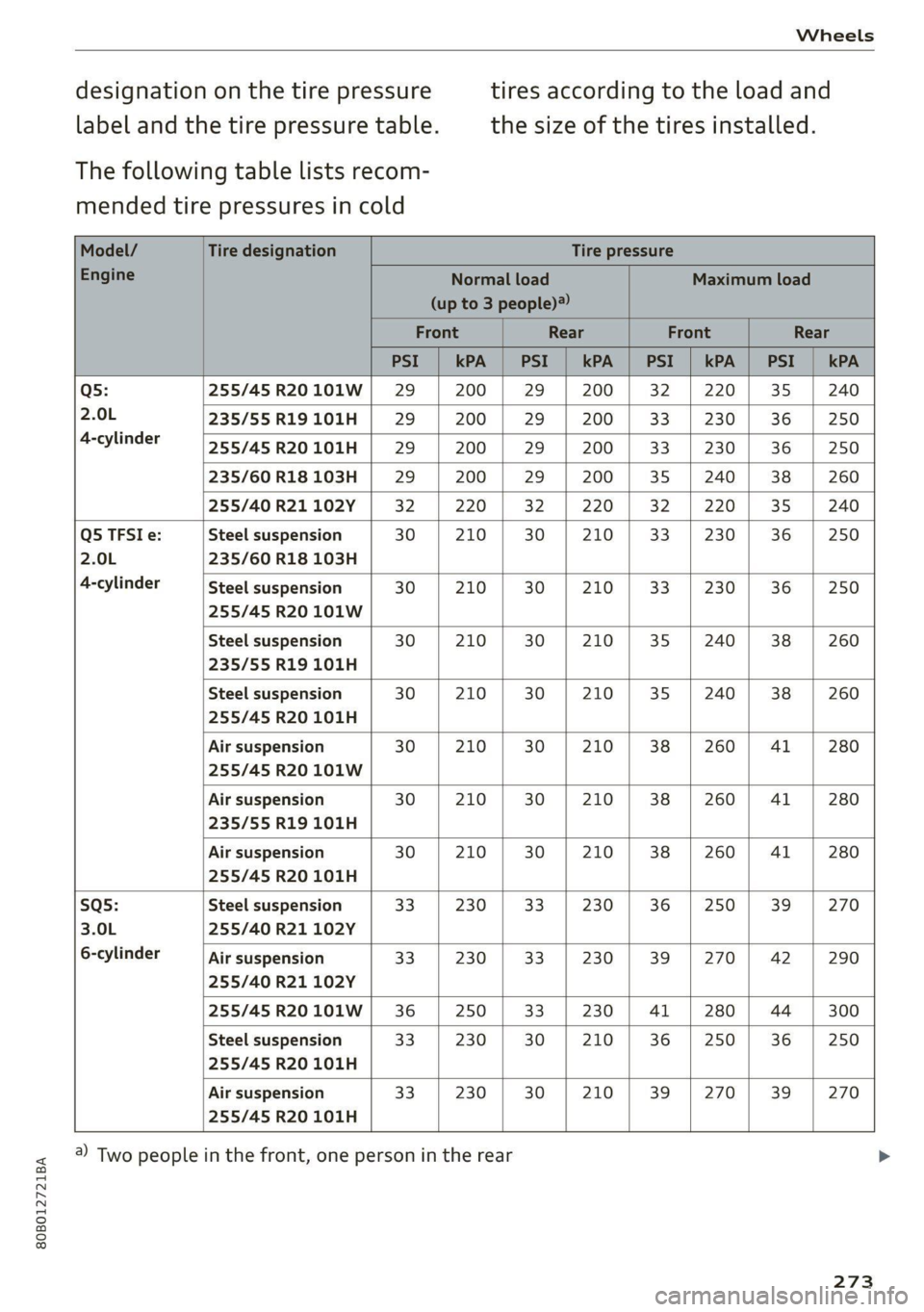
The following table lists recom-
mended tire pressures in cold
Q5: 255/45R20101W| 29 | 200 | 29 | 200 | 32 | 220] 35 | 240
2.0L 235/55R19101H | 29 200 | 29 | 200 | 33 | 230 | 36 | 250
4-cylinder
255/45 R20 101H 29 200 29 200 33 230 36 250
235/60 R18 103H 29 200 29 200 35 240 38 260
255/40 R21 102Y 32 220 32 220 32 220 35 240
Q5 TFSI e: Steel suspension 30 210 30 210 33 230 36 250
2.0L 235/60 R18 103H
4-cylinder Steel suspension 30 | 210 | 30 | 210 | 33 | 230 | 36 | 250
255/45 R20 101W
Steel suspension 30 | 210 | 30 | 210 | 35 | 240) 38 | 260
235/55 R19 101H
Steel suspension 30 210 30 210 35 240 38 260
255/45 R20 101H
Air suspension 30 | 210 | 30 | 210 | 38 | 260 | 41 | 280
255/45 R20 101W
Air suspension 30 | 210 | 30 | 210 | 38 | 260] 41 | 280
235/55 R19 101H
Air suspension 30 210 30 210 38 260 41 280
255/45 R20 101H
SQs: Steel suspension 33 230 33 230 36 250 39 270
3.0L 255/40 R21 102Y
6-cylinder Air suspension 33 | 230 | 33 | 230 | 39 | 270 | 42 | 290
255/40 R21 102Y
255/45 R20101W | 36 250 33 230 41 280 44 300
Steel suspension 33 230 30 210 36 250 36 250
255/45 R20 101H
Air suspension 33 230 30 210 39 270 39 270
255/45 R20 101H
a) Two people in the front, one person in the rear
273
Page 279 of 332
80B012721BA
Wheels
@) Tips
You can also use all season tires instead of
winter tires. Please note that in some coun-
tries where winter tires are required, only win-
ter tires with the 44 symbol may be permit-
ted.
Snow chains improve both driving and braking in
winter road conditions.
> Only install snow chains on the rear wheels.
> Check and correct the seating of the snow
chains after driving a few feet, if necessary. Fol-
low the instructions from the manufacturer.
> Note the maximum speed of 30 mph
(50 km/h). Observe the local regulations.
Use of snow chains is only permitted with certain
rim/tire combinations due to technical reasons.
Check with an authorized Audi dealer or author-
ized Audi Service Facility to see if you may use
snow chains.
Use fine-mesh snow chains. They must not add
more than 0.53 in (13.5 mm) in height, including
the chain lock.
You must remove the snow chains on roads with-
out snow. Otherwise, you could impair driving
ability and damage the tires.
ZA WARNING
Using incorrect snow chains or installing snow
chains incorrectly can result in loss of vehicle
control, which increases the risk of an acci-
dent.
@) Note
— Snow chains can damage the rims and
wheel covers* if the chains come into direct
contact with them. Remove the wheel cov-
ers* first. Use coated snow chains.
— Do not install and use snow chains if there is
a malfunction in the air suspension, be-
cause the vehicle height will be very low. If
you drive with snow chains anyway, the
wheel housings and other vehicle compo-
nents can be severely damaged.
G) Tips
When using snow chains, it may be advisable
to limit the ESC > page 120.
Low-profile tires
Applies to: vehicles with low-profile tires
Compared to other tire/rim combinations, low-
profile tires offer a wider tread surface and a
larger rim diameter with shorter tire sidewalls.
This results in an agile driving style. However, it
may reduce the level of comfort and increase
road noise when driving on roads in poor condi-
tion.
Low-profile tires can become damaged more
quickly than standard tires when driving over
large bumps, potholes, manhole covers, and
curbs. Therefore, it is particularly important to
maintain the correct tire pressure > page 271.
To reduce the risk of damage to the tires and
rims, drive very carefully on poor roads.
Check your wheels regularly every 2,000 mi
(3,000 km) for damage. For example, check for
bulges/cracks on the tires or deformations/cracks
on the rims.
After a heavy impact or damage, have the tires
and rims inspected or replaced immediately by
an authorized Audi dealer or authorized Audi
Service Facility.
Low-profile tires can wear out faster than stand-
ard tires.
Uniform tire quality grading
— Tread wear
— Traction AAABC
— Temperature A BC
Quality grades can be found where applicable on
the tire side wall between tread shoulder and
maximum section width > page 262, fig. 177.
For example: Tread wear 200, Traction AA, Tem-
perature A.
277
>
Page 282 of 332
Wheels
roads), the tire pressure monitoring system
indicator may be delayed.
@) Tips
— The tire pressure monitoring system can al-
so stop working when there is an ESC mal-
function.
— Using snow chains may result in a system
malfunction.
— The tire pressure monitoring system in your
Audi was calibrated with “Audi Original
Tires” > page 268. Audi recommends using
these tires.
Storing tire pressures
Applies to: vehicles with Tire Pressure Monitoring System in-
dicator
If the tire pressure changes or a tire is replaced,
it must be confirmed in the system.
> Before storing the tire pressures, make sure the
tire pressures in all four tires meet the speci-
fied values and are adapted to the load
> page 271.
> Switch the ignition on.
» Applies to MMI: Select on the home screen: VE-
HICLE > Settings & Service > Tire pressure
monitoring > Store tire pressure > Yes, store
now.
@ Tips
Do not store the tire pressures if snow chains
are installed.
Run-flat tires
Applies to: vehicles with run-flat tires
Run-flat tires can allow you to remain driving
when there is a loss of pressure.
Run-flat tires have reinforced sidewalls that pro-
tect the tire if there is a loss of pressure.
If the tire pressure monitoring system indicates a
loss of pressure in one or several tires, you can
continue driving on run-flat tires for at least
20 mi (30 km). Drive to an authorized Audi dealer
or authorized Audi Service Facility immediately to
have the problem corrected.
280
Continuing to drive on run-flat tires is no
longer possible if:
— There is visible damage to the tires, such as
cracks in the sidewalls
— Strong vibrations are felt while driving, or the
tire begins to smoke due to a strong build-up of
heat
— The tire has been heavily damaged, for example
in an accident. There is a risk that parts of the
tire tread will detach and damage important
vehicle components.
— The Electronic Stabilization Control (ESC) is not
working or is continuously running
— The tire pressure monitoring system is not
working
If it is no longer possible to continue driving de-
spite having run-flat tires, see an authorized Audi
dealer or authorized Audi Service Facility for as-
sistance.
ZA\ WARNING
Run-flat tires may only be used on vehicles
that were equipped with them at the factory.
— The vehicle must have suspension designed
for run-flat tires and a factory-installed tire
pressure monitoring system.
— Incorrect use of run-flat tires can lead to ve-
hicle damage or accidents. Contact an au-
thorized Audi dealer or authorized Audi
Service Facility to learn if run-flat tires may
be used on your vehicle and if so, which
ones.
—If run-flat tires are used, they must be in-
stalled on all four wheels. Mixing tire types
is not permitted.
— If you have to drive when the tire pressure is
too low or there is no tire pressure, note the
following:
— Do not drive faster than 50 mph (80 km/h)
because this increases the risk of an acci-
dent. Observe any laws specific to the
country where you are driving.
— Avoid full-throttle acceleration, heavy
braking, and fast cornering, because this
increases the risk of an accident.
—The vehicle may become more difficult to
control.
Page 292 of 332
Emergency assistance
> Switch the ignition on.
Inflating a tire
> Move the switch (8) > fig. 185 on the compres-
sor into position I.
> Inflate the tire to between 29 psi (200 kPA)
and 36 psi (250 kPA) and read the pressure on
the gauge.
> If this tire pressure is not reached, remove the
filler hose. Drive slowly approximately 33 feet
(10 m) forward or in reverse so that the sealant
can be distributed in the tire. Inflate the tire
again > A\.
ZA\ WARNING
— Read and follow the manufacturer's safety
precautions on the compressor and in the in-
structions on the bottle of sealant.
— Ifa tire pressure of 29 psi (200 kPA) cannot
reached after inflating for 6 minutes, then
the tire is too severely damaged. Do not con-
tinue driving.
— If the tire cannot be repaired with the tire
sealant, see an authorized Audi dealer or au-
thorized Audi Service Facility for assistance.
G@) Tips
Do not operate the compressor for more than
six minutes continuously, or it can overheat.
Once the compressor has cooled, you can con-
tinue to use it.
eet als}
Applies to: vehicles with tire mobility kit
> Affix the sticker that says "max. 50 mph (max.
80 km/h)" that is provided with the tire mobili-
ty kit within the driver's field of vision.
>» Stop the vehicle after driving for about 10 mi-
nutes and check the tire pressure.
> If the tire pressure is lower than 19 psi (130
kPA), then the tire is too severely damaged. Do
not continue driving.
Z\ WARNING
Pay attention to the following after repairing
the tire:
290
— Do not drive faster than 50 mph (80 km/h).
— Avoid hard acceleration or braking and driv-
ing fast around curves.
— The vehicle may become more difficult to
control.
— If the tire is too severely damaged, see an
authorized Audi dealer or authorized Audi
Service Facility for assistance.
(@) For the sake of the environment
You can give the used tire sealant bottle to an
authorized Audi dealer or authorized Audi
Service Facility for disposal.
Gi) Tips
Remember to obtain a new bottle of sealant
from an authorized Audi dealer or authorized
Audi Service Facility after repairing a tire.
Changing a tire
You must complete the preparation before
changing a tire.
> Read and follow the important safety precau-
tions > page 288.
> Set the parking brake.
> Select the “P” position.
» When towing a trailer: disconnect the trailer
from your vehicle.
> Lay out the vehicle tool kit > page 288 and the
spare tire > page 293.
> Applies to: vehicles with air suspension: Select
on the home screen: VEHICLE > Settings &
Service > Air suspension: wheel change.
> Switch the ignition off.
ZA\ WARNING
The vehicle must also be secured to prevent it
from rolling when using the vehicle jack*. Use
suitable objects to block the front and back of
the wheel that is diagonal from the wheel
with the flat tire.
Page 294 of 332

Emergency assistance
ZA\ WARNING
—To reduce the risk of injury, make sure no
one is in the vehicle before raising it.
— Make sure the vehicle jack is stable. The risk
of injury is increased when the ground is
slippery or soft, because the vehicle jack
could slide or sink.
— Only raise your vehicle with the vehicle jack
provided by the factory. If you use a vehicle
jack designed for another vehicle, your vehi-
cle could slip and cause injury.
— Position the vehicle jack only at the desig-
nated mounting points on the side sill and
align the jack. Otherwise, the vehicle jack
could slip and cause an injury if it does not
have sufficient hold on the vehicle.
—To reduce the risk of injury, do not raise any
other vehicles or other loads using the vehi-
cle jack provided by the factory.
— Applies to: vehicles with air suspension:
Changes in temperature or load can affect
the height of the stopped vehicle.
— To reduce the risk of an accident, never start
the
engine when the vehicle is raised.
—To reduce the risk of injury, no work should
be performed under the vehicle while it is
raised.
@) Note
Do not lift the vehicle by the sill. Position the
vehicle jack only at the designated mounting
points on the side sill. Otherwise, your vehicle
could be damaged.
moving and installing a wheel
i B8k-1479|
~~
Fig. 190 Wheel: internal hex socket to turn the wheel bolts
292
6 + 4
0 oO
Fig. 191 Wheel: alignment pin in the top hole
Removing a wheel
> Remove the top wheel bolt completely using
the hex socket in the screwdriver handle from
the vehicle tool kit > fig. 190 and place it ona
clean surface.
> Then install the alignment pin from the vehicle
tool kit in the empty wheel bolt hole by hand
> fig. 191.
> Remove the rest of the wheel bolts.
> Remove the wheel >(). The alignment pin re-
mains in the hole while doing this.
Installing a wheel
Read the directions on > page 293 when instal-
ling unidirectional tires.
> Slide the wheel on over the alignment pin >@.
> Install the wheel bolts and tighten them gently
using the hex socket.
> Remove the alignment pin and tighten the re-
maining wheel bolt.
> Carefully lower the vehicle using the vehicle
jack*.
> Tighten the wheel bolts in a diagonal pattern
using the wheel wrench*.
The wheel bolts must be clean and loosen and
tighten easily. Check the contact surfaces for the
wheel and hub. Contaminants on these surfaces
must be removed before installing the wheel.
Z\ WARNING
— Read and follow the important information
and notes under > page 268.
— Never use the hex socket in the screwdriver
handle or the hex socket wrench with the
ratchet to loosen or tighten the wheel bolts.
This increases the risk of an accident, >
Page 304 of 332
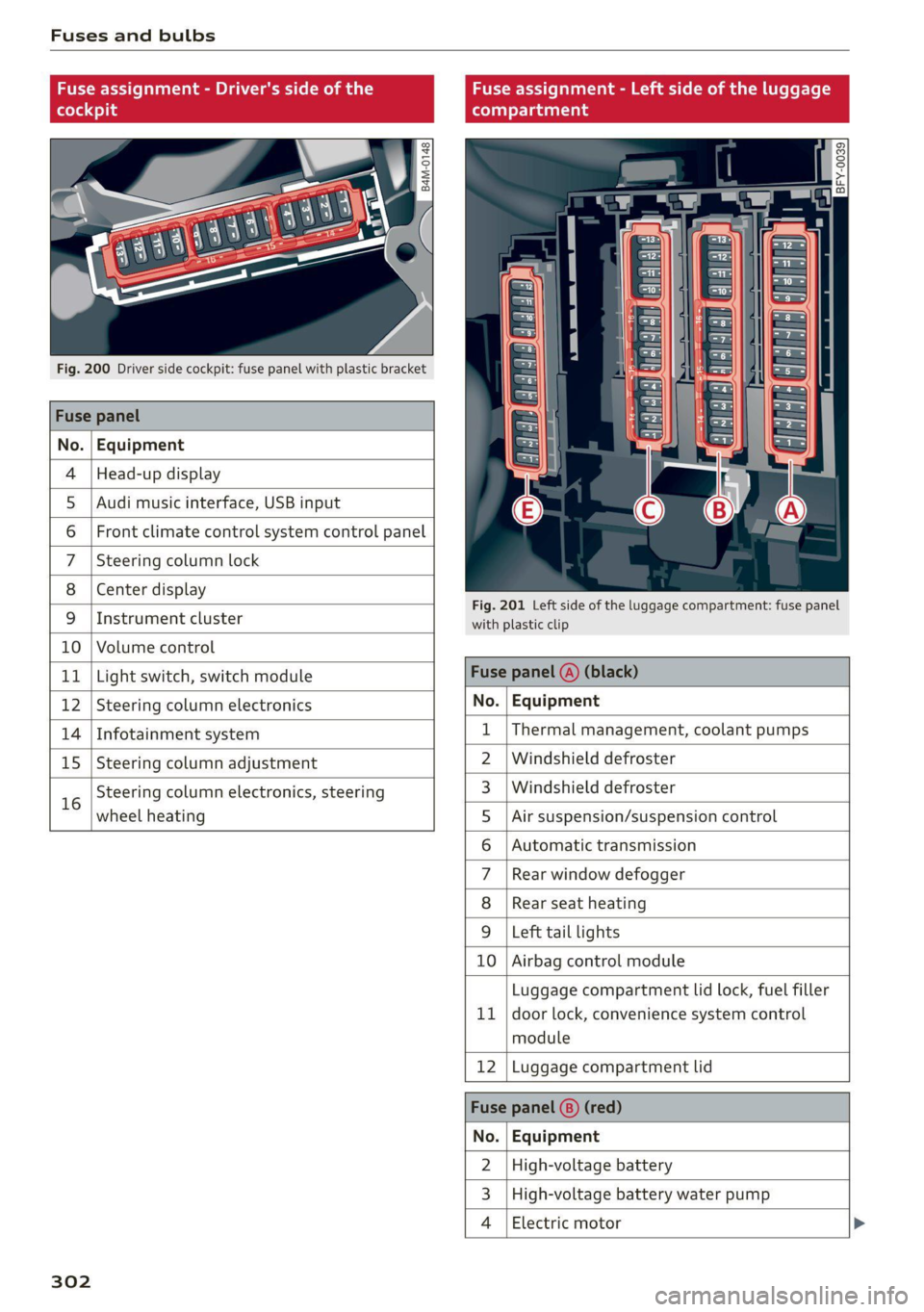
Fuses and bulbs
Fuse assignment - Driver's side of the Fuse assignment - Left side of the luggage
(ole 4) g (eT Tata ahg
Q oO
cy ¢
2
= = a
Fig. 200 Driver side cockpit: fuse panel with plastic bracket
Fuse panel
No. | Equipment
4 |Head-up display
5 |Audi music interface, USB input
6 | Front climate control system control panel
7 |Steering column lock
8 | Center display
Fig. 201 Left side of the luggage compartment: fuse panel
9 |Instrument cluster with plastic clip
10 | Volume control
11 | Light switch, switch module Fuse panel (@) (black)
12 | Steering column electronics No. | Equipment
14 | Infotainment system 1 |Thermal management, coolant pumps
15 | Steering column adjustment 2 | Windshield defroster
16 Steering column electronics, steering 3_|Windshield defroster
wheel heating 5 |Air suspension/suspension control
6 | Automatic transmission
7 |Rear window defogger
8 | Rear seat heating
9 |Left tail lights
10 | Airbag control module
Luggage compartment lid lock, fuel filler
11 | door lock, convenience system control
module
12 |Luggage compartment lid
Fuse panel (8) (red)
No. | Equipment
2 |High-voltage battery
3 | High-voltage battery water pump
4 | Electric motor
302
Page 317 of 332
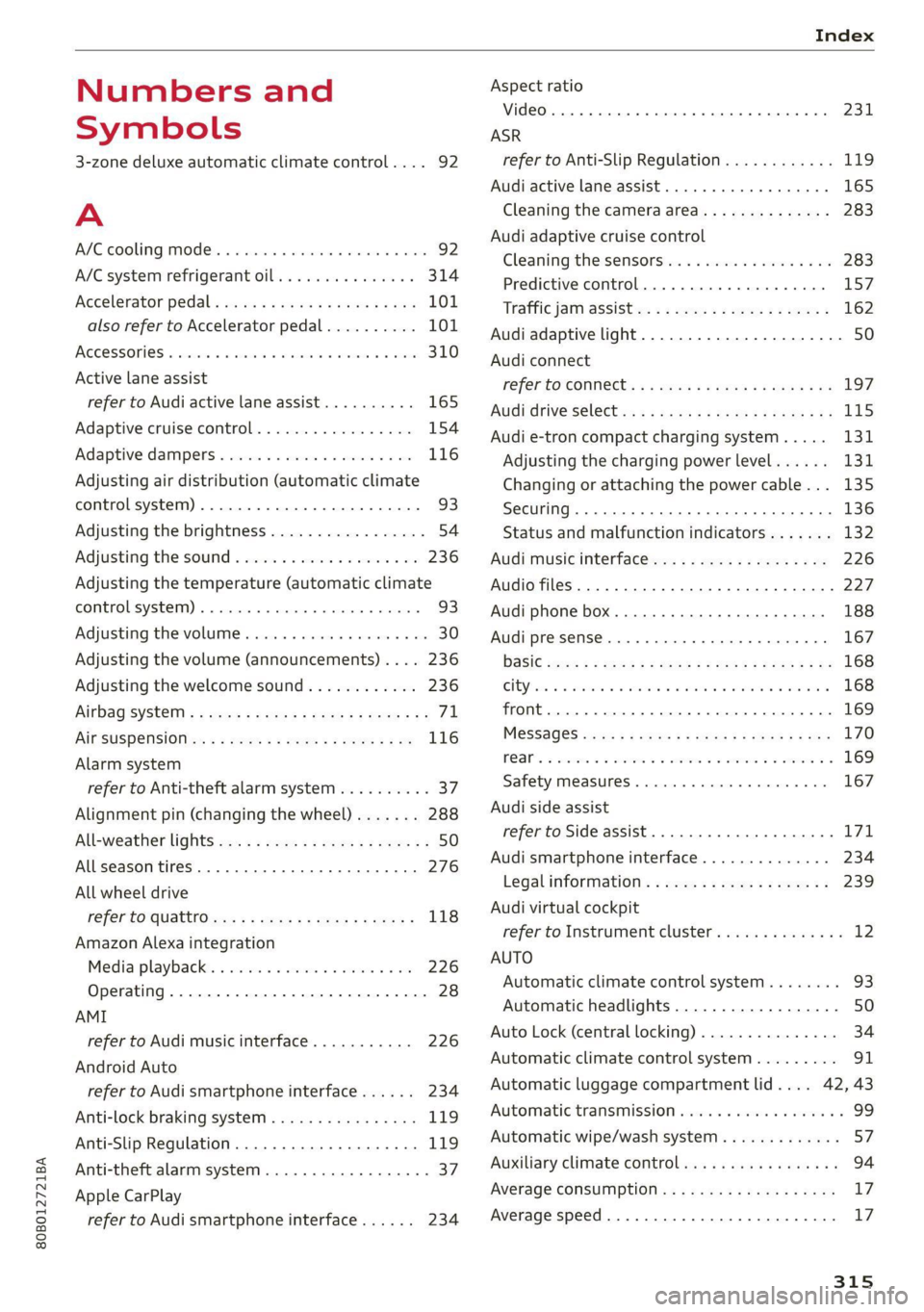
80B012721BA
Index
Numbers and
Symbols
3-zone deluxe automatic climate control.... 92
A
AIC cooling MOde:. « « vesiare «sas © wrens 6 avers 92
A/C system refrigerant oil............005 314
Accelerator pedals sseis so esas x & eases 8 & exes 101
also refer to Accelerator pedal.......... 101
ACCESSORIES « sssiers oo: seaues + exsusunn + wane a 6 esine 310
Active lane assist
refer to Audi active lane assist.......... 165
Adaptive cruise control................. 154
Adaptive dampers ............-..2+-05- 116
Adjusting air distribution (automatic climate
control system) ...... 0.0.0. e cee eee eee 93
Adjusting the brightness................. 54
Adjusting the sound..............-..00- 236
Adjusting the temperature (automatic climate
control system) ......... 0.0.00. e ee ee eee 93
Adjusting the volume ............ eee ee eee 30
Adjusting the volume (announcements) .... 236
Adjusting the welcome sound............ 236
Airbag'system ; « eses s saves s eee ss veep eee 71
AICSUSPENSION ex « = som « = nee Hg Ses SE Be 116
Alarm system
refer to Anti-theft alarm system.......... 37
Alignment pin (changing the wheel)....... 288
All-weather lights...............-..20--- 50
Allseason tires............220202220005 276
All wheel drive
refer tOQUAtEOmms: 5 = woos + 5 ewe so ewe 118
Amazon Alexa integration
Media playback’. « oii. eons 6 6 cris 6 0 ow 226
Operating...............0..0 000.0000. 28
AMI
refer to Audi music interface........... 226
Android Auto
refer to Audi smartphone interface...... 234
Anti-lock braking system............0005 119
Anti-Slip Regulation.................05. 119
Anti-theft alarm system...............00 37
Apple CarPlay
refer to Audi smartphone interface...... 234 ASR
refer to Anti-Slip Regulation.........
Audi active lane assist................
Cleaning the camera area............
Audi adaptive cruise control
Cleaning the sensors...............
Predictive control..............0005
Traffic jam assist............00.-00.
Audi adaptive light..................
Audi connect
FefEr LO CONNEC: = « gaws + = eames v news
Audi drive select =: ss g2c8 ss peau s i deme
Audi e-tron compact charging system...
Adjusting the charging power level....
Changing or attaching the power cable... .
SeCUrINg.. 2... cee eee eee eee
Status and malfunction indicators ....
Audi music interface.................
Audio files..............00 eee eee ee
Safety measures........ 0.0... e ee ee
Audi side assist
refer to Side assist..............0..
Audi smartphone interface............
Legalinformation..................
Audi virtual cockpit
refer to Instrument cluster..........
AUTO
Automatic climate control system.....
Automatic headlights...............
Auto Lock (central locking) ............
Automatic climate control system......
Automatic luggage compartment lid....
Automatic transmission..............
Automatic wipe/wash system..........
Auxiliary climate control..............
Average consumption................
Average speed... ..... 2.2.02
315
Page 328 of 332
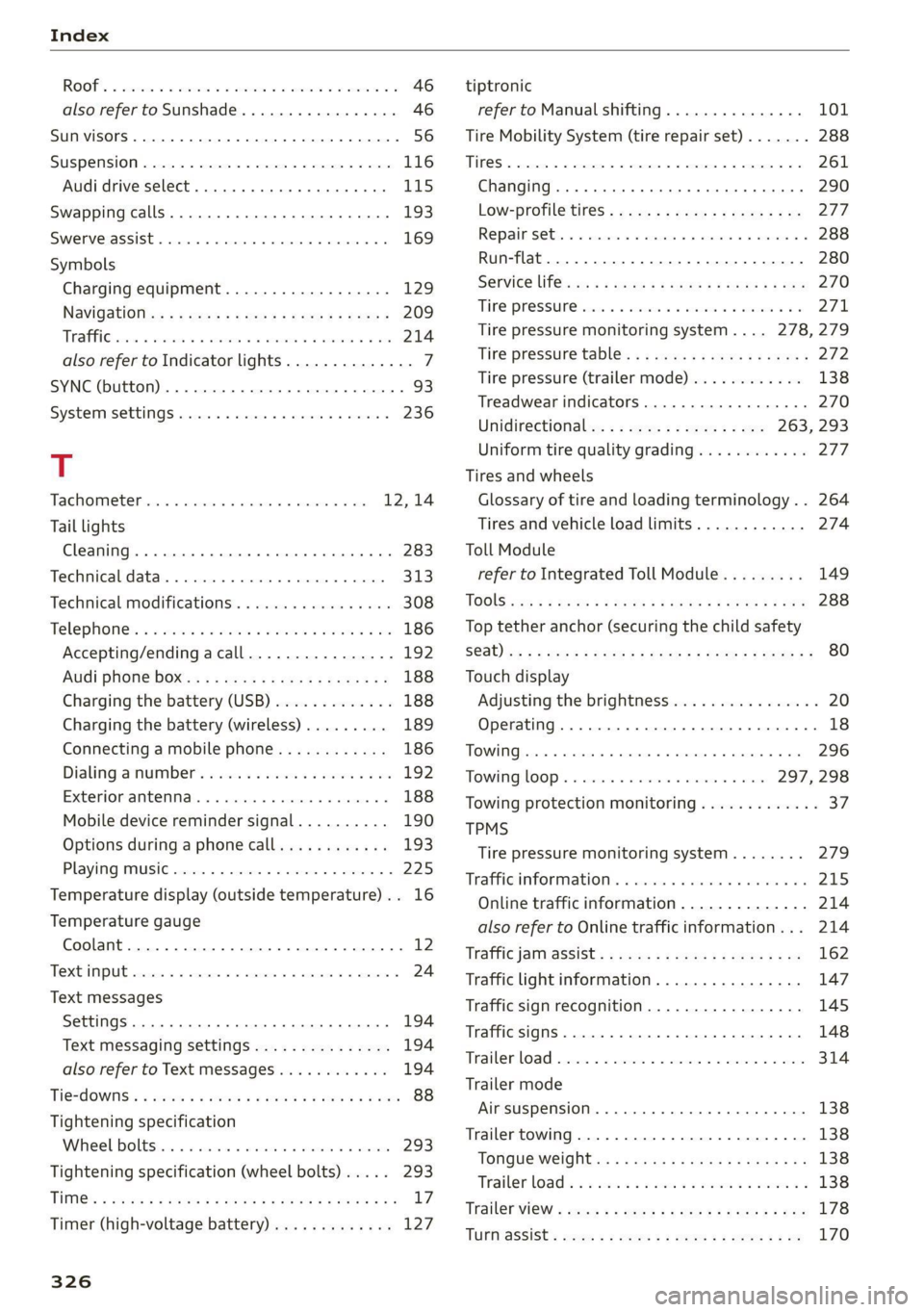
ROOF. = asec x avenue wo oewees o a awavi wo ame 46
also refer to Sunshade............-.04. 46
SUN VISOFS 2... eee eee 56
SUSPENSION s:csics x 0 exenem o> wm © 8 eR © «eee 116
Audi drive select. ..........ceeeee eee 115
Swapping calls...........0. 2. cee eee eee 193
Swerve assist... 0.00.00... cee eee eee 169
Symbols
Charging equipment.................. 129
NaVidatiOtie: « s sew 2 s eee + wees ee neem 5 209
TREE css x cman 4 x metas a x Kone we MRR 8 214
also refer to Indicator lights.............. 7
SYNC (button) ....................0.00005 93
SYSECIMMSEEEINGS siereroce » sswneze w 6 sswzers « & snowene 236
T
Tachometer........... 000 eee eee eae 12,14
Tail lights
Cleaning... .... eee eee eee eee 283
Techmicaldattar. . scausus x sexes « snanene oo sinses 313
Technical modifications ..........0..0005 308
Telephones ss sin <2 wimen 3 wm o orem a 3 a 186
Accepting/ending acall................ 192
Audi phone boxes « sssas cs esses ease eee 188
Charging the battery (USB)............. 188
Charging the battery (wireless) ......... 189
Connecting a mobile phone............ 186
Dialing anumber...............--.0.- 192
Exteriomamtenmas. . . cscs» 0 scene 6 a anni 0 6 188
Mobile device reminder signal.......... 190
Options during aphonecall............ 193
Playing music............ 0 0c 225
Temperature display (outside temperature) .. 16
Temperature gauge
Coolant...... 0.00.00... eee eee eee 12
TXCMPUIE cones 5 2 cmmccs # © oomeees 5 a mmeorane © mame 24
Text messages
SettingS .. 0.0... cece eee 194
Text messaging settings............6... 194
alsocreferto Text messages wo... 0% 0s vs 194
Tie=dOWiSis « seen + ¢ eeme ¢ 2 ews 2 2 wows 9 won 88
Tightening specification
Wheel Doltsiin oo sess w svavane to ivosiie a oniusne 293
Tightening specification (wheel bolts) .... . 293
TiM@s & cases x & sous & ears oo mews +o REIS eH 17
Timer (high-voltage battery)............. 127
326
tiptronic
refer to Manual shifting............... 101
Tire Mobility System (tire repair set)....... 288
THOS © crsscas we 6 worsen © wipcous © a seers oH cman © 261
Changing........ cece eee eee eee ee eee 290
Low-profile tires..............2--004- 277
Re pail S@t:. © = cnecsis © « senses» o ssssene © ¥ sesvenw © 288
Run-flat.. 0... eee ee 280
SERVICE lifsies = = acme 5 = seme se HOS 3c RE 270
THRE PFOSSUNC xis 6 & sissese s & sree @ & oto 6 5 271,
Tire pressure monitoring system.... 278,279
Tire pressure table..........00..2e0 ee 272
Tire pressure (trailer mode)............ 138
Treadwear indicators...............00. 270
Unidirectional; = 2 sae. ¢ e sees zs es 263, 293
Uniform tire quality grading............ 277
Tires and wheels
Glossary of tire and loading terminology... 264
Tires and vehicle load limits............ 274
Toll Module
refer to Integrated Toll Module......... 149
TOOIS css s & ease = & a0 5b cet & 2 Set Fd eS 288
Top tether anchor (securing the child safety
Sab) ioc : 2 woes s Rees gs meee Gof Hane o ZR 80
Touch display
Adjusting the brightness................ 20
Operating. ........ 0. cece eee eee eee 18
TOWING... eee ce ee eee 296
TowinglOop’s i ima + svenewive + nraueas 1 6 aves 297, 298
Towing protection monitoring............. 37
TPMS
Tire pressure monitoring system........ 279
Trafficinformations. « snes «sess « ¥ anvee vos 215
Online traffic information.............. 214
also refer to Online traffic information... 214
Traffic janmassist’s + ensue = : sows 2 meee 8 ew 162
Traffic light information................ 147
Traffic sign recognition................. 145
Traffic SignS.. 66... eee eee eee 148
Trailer load... 2... eee eee eee 314
Trailer mode
Air suspension...........00.00e ee eee 138
Trailer towing.................000 ee eee 138
Tongue weight.............eeeeeeeeee 138
Trailer load « = = sews s wean a 2 wena a 5 wees oo 138
TrailerView « ess = + mews 2s eee ge feee ee pes 178
TUPMaSSiSts sous x ¢ em sy eee & EE & 2 170