radio AUDI Q5 2021 Owner´s Manual
[x] Cancel search | Manufacturer: AUDI, Model Year: 2021, Model line: Q5, Model: AUDI Q5 2021Pages: 332, PDF Size: 118.86 MB
Page 245 of 332
80B012721BA
Checking and Filling
ing procedure
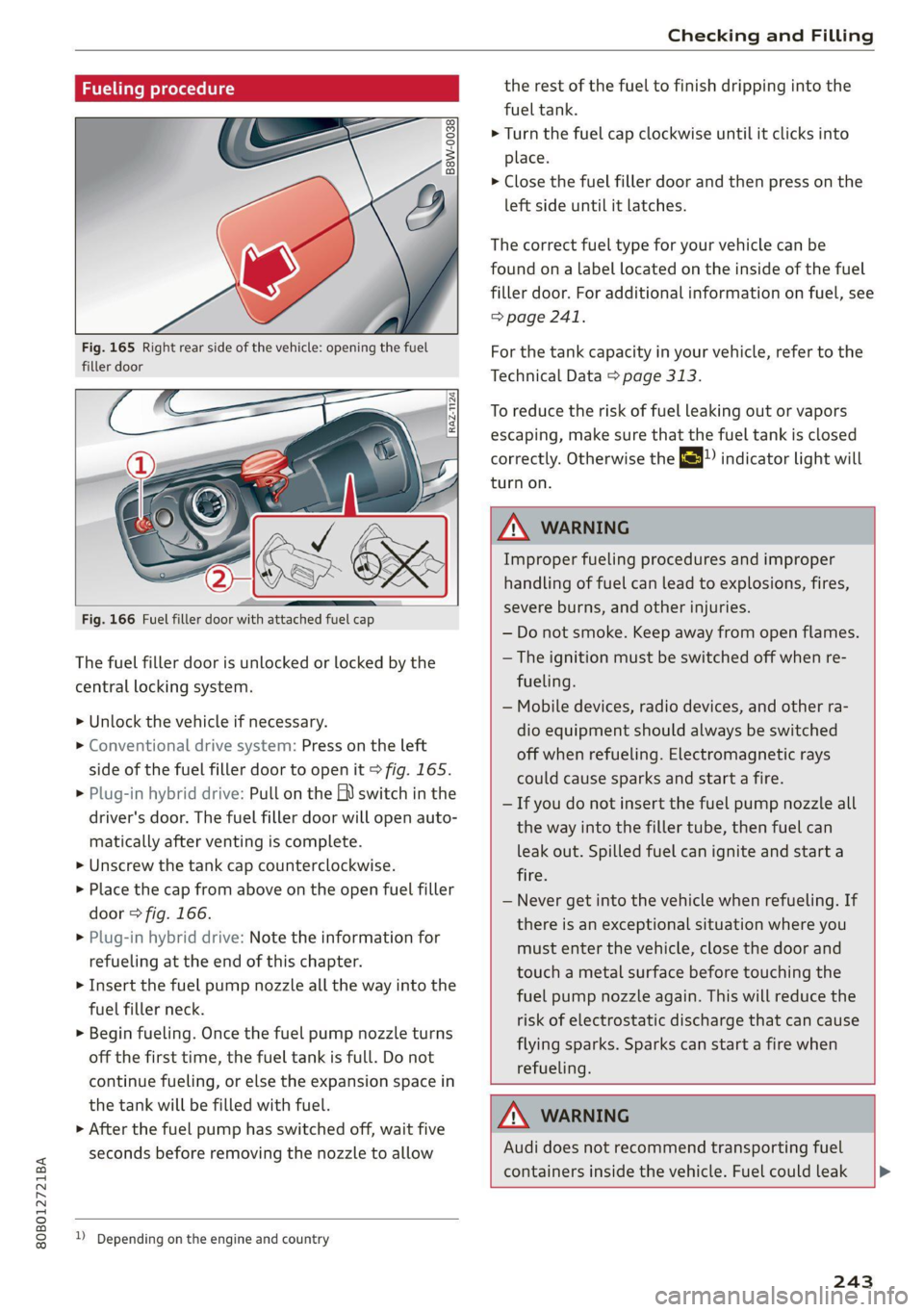
Fig. 165 Right rear side of the vehicle: opening the fuel
filler door
Fig. 166 Fuel filler door with attached fuel cap
The fuel filler door is unlocked or locked by the
central locking system.
>» Unlock the vehicle if necessary.
> Conventional drive system: Press on the left
side of the fuel filler door to open it > fig. 165.
> Plug-in hybrid drive: Pull on the EV switch in the
driver's door. The fuel filler door will open auto-
matically after venting is complete.
> Unscrew the tank cap counterclockwise.
> Place the cap from above on the open fuel filler
door > fig. 166.
> Plug-in hybrid drive: Note the information for
refueling at the end of this chapter.
> Insert the fuel pump nozzle all the way into the
fuel filler neck.
> Begin fueling. Once the fuel pump nozzle turns
off the first time, the fuel tank is full. Do not
continue fueling, or else the expansion space in
the tank will be filled with fuel.
> After the fuel pump has switched off, wait five
seconds before removing the nozzle to allow
1) Depending on the engine and country
the rest of the fuel to finish dripping into the
fuel tank.
> Turn the fuel cap clockwise until it clicks into
place.
> Close the fuel filler door and then press on the
left side until it latches.
The correct fuel type for your vehicle can be
found ona label located on the inside of the fuel
filler door. For additional information on fuel, see
=> page 241.
For the tank capacity in your vehicle, refer to the
Technical Data > page 313.
To reduce the risk of fuel leaking out or vapors
escaping, make sure that the fuel tank is closed
correctly. Otherwise the ES indicator light will
turn on.
ZA WARNING
Improper fueling procedures and improper
handling of fuel can lead to explosions, fires,
severe burns, and other injuries.
— Do not smoke. Keep away from open flames.
— The ignition must be switched off when re-
fueling.
— Mobile devices, radio devices, and other ra-
dio equipment should always be switched
off when refueling. Electromagnetic rays
could cause sparks and start a fire.
— If you do not insert the fuel pump nozzle all
the way into the filler tube, then fuel can
leak out. Spilled fuel can ignite and start a
fire.
— Never get into the vehicle when refueling. If
there is an exceptional situation where you
must enter the vehicle, close the door and
touch a metal surface before touching the
fuel pump nozzle again. This will reduce the
risk of electrostatic discharge that can cause
flying sparks. Sparks can start a fire when
refueling.
ZA WARNING
Audi does not recommend transporting fuel
containers inside the vehicle. Fuel could leak
243
Page 266 of 332
Wheels
Glossary of tire and loading
terminology
Accessory weight
means the combined weight (in
excess of those standard items
which may be replaced) of auto-
matic transmission, power steer-
ing, power brakes, power win-
dows, power seats, radio, and
heater, to the extent that these
items are available as factory-in-
stalled equipment (whether in-
stalled or not).
Aspect ratio
means the ratio of the height to
the width of the tire in percent.
Numbers of 55 or lower indicate a
low sidewall for improved steer-
ing response and better overall
handling on dry pavement.
Bead
means the part of the tire that is
made of steel wires, wrapped or
reinforced by ply cords and that is
shaped to fit the rim.
Bead separation
means a breakdown of the bond
between components in the bead.
264
Cord
means the strands forming the
plies in the tire.
Cold tire inflation pressure
means the tire pressure recom-
mended by the vehicle manufac-
turer for a tire of a designated
size that has not been driven for
more than a couple of miles (kilo-
meters) at low speeds in the three
hour period before the tire pres-
sure is measured or adjusted.
Curb weight
means the weight of a motor ve-
hicle with standard equipment in-
cluding the maximum capacity of
fuel, oil, and coolant, air condi-
tioning and additional weight of
optional equipment.
Extra load tire
means a tire designed to operate
at higher loads and at higher in-
flation pressures than the corre-
sponding standard tire. Extra load
tires may be identified as “XL”,
“xl”, “EXTRA LOAD”, or “RF” on
the sidewall.
Page 291 of 332
80B012721BA
Emergency assistance
If the tire is pierced by an object such as a nail,
do not remove the object from the tire.
The tire mobility kit can be used at temperatures
as low as -4 °F (-20 °C).
The tire mobility kit must not be used:
—If the tire has cuts or punctures that are larger
than 0.16 in (4 mm) @ © fig. 183
— If the rim is damaged (2)
— If you have driven with very low tire pressure or
without air in the tire @)
See an authorized Audi dealer or authorized Audi
Service Facility for assistance in these situations.
ZA WARNING
— Please note that the tire mobility kit cannot
be used in all situations, and that it may on-
ly be used temporarily.
— The tire sealant must not come in contact
with skin, eyes, or clothing.
— If tire sealant comes into contact with your
eyes or your skin, thoroughly rinse the af-
fected area immediately with clean water.
— Do not inhale the fumes.
— If you swallow any of the tire sealant, thor-
oughly rinse your mouth immediately and
drink a lot of water. Do not induce vomiting.
Seek medical attention immediately.
— Change your clothing immediately if it
comes into contact with tire sealant.
— If an allergic reaction occurs, seek medical
attention immediately.
— Keep the tire sealant away from children.
@ Tips
— If sealant leaks, allow it to dry in place. You
can then peel it off like a sticker.
— Note the expiration date on the sealant bot-
tle. Replace the tire sealant at an authorized
Audi dealer or authorized Audi Service Fa-
cility.
— Radio reception can be interrupted when
operating the compressor.
2) The compressor may look different. However, the way it is
operated is generally the same.
— Follow the legal regulations that are appli-
cable in the country where you are operating
the vehicle.
Repairing tires
Applies to: vehicles with tire mobility kit
[RAZ-0054]
[RAZ-0055]
Fig. 185 Tire mobility kit connection
Requirement: the tire mobility kit must be laid
out and ready for use > page 288.
Setting up the tire mobility kit
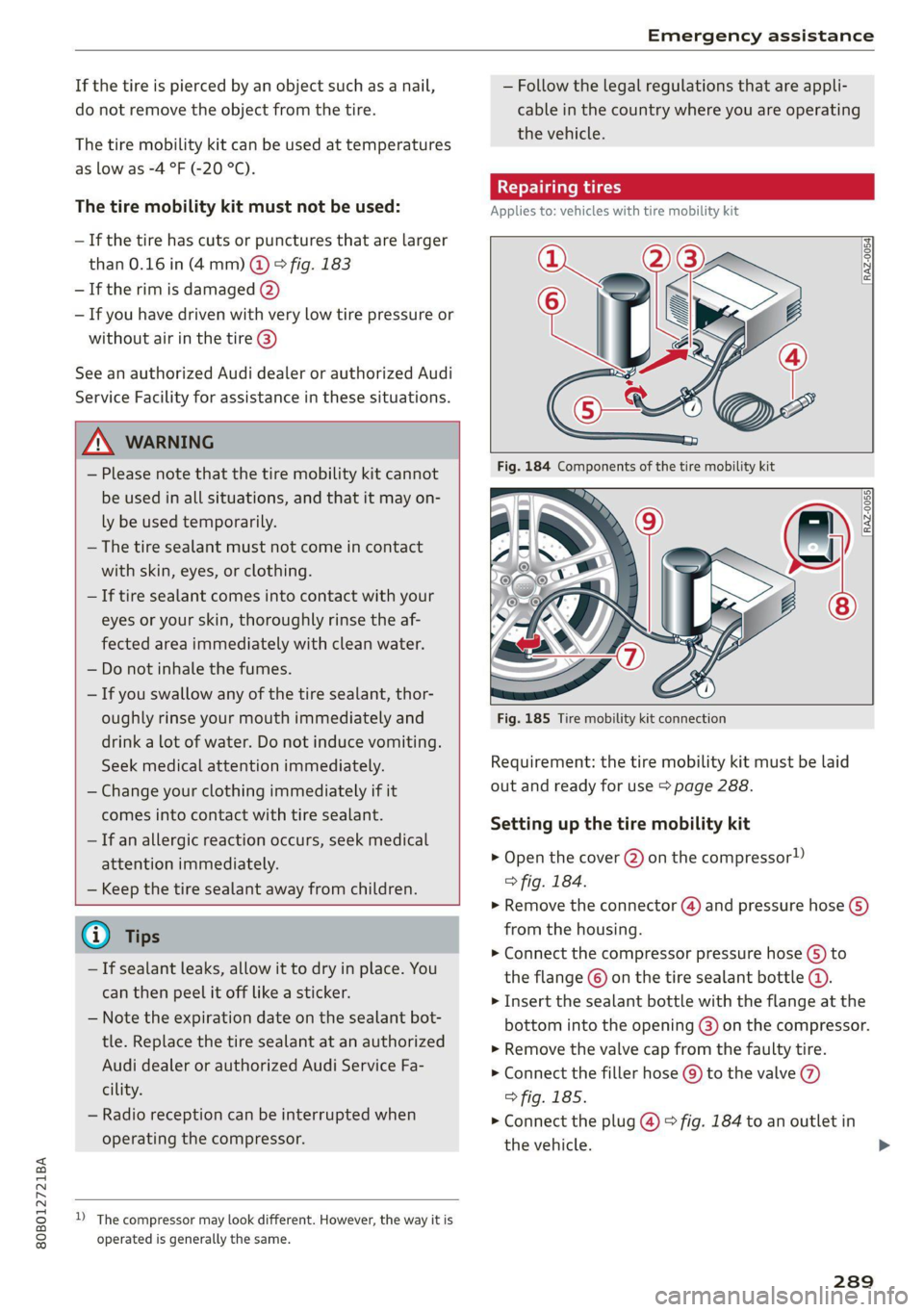
> Open the cover (2) on the compressor!)
> fig. 184.
> Remove the connector () and pressure hose (5)
from the housing.
> Connect the compressor pressure hose (5) to
the flange © on the tire sealant bottle @.
> Insert the sealant bottle with the flange at the
bottom into the opening @) on the compressor.
> Remove the valve cap from the faulty tire.
> Connect the filler hose @) to the valve ()
> fig. 185.
> Connect the plug @) > fig. 184 to an outlet in
the vehicle.
289
>
Page 312 of 332
Accessories and technical changes
@) Tips
Because of your vehicle's aluminum body de-
sign, all service and repair procedures affect-
ing the body should be performed by an au-
thorized Audi dealer or authorized Audi Serv-
ice Facility, who will perform the work accord-
ing to Audi factory specifications. Only Audi
Genuine Parts are used when Audi experts
perform repair or service procedures. Failure
to use Audi Genuine Parts or Audi Genuine Ac-
cessories or performing repairs incorrectly
may result in severe vehicle damage, such as
corrosion.
Accessories and parts
Consult with an authorized Audi dealer or author-
ized Audi Service Facility before purchasing ac-
cessories or replacement parts. Audi recom-
mends having your vehicle serviced by an author-
ized Audi dealer or authorized Audi Service Facili-
ty and using Audi Genuine Parts and Audi Genu-
ine Accessories.
Audi does not endorse the use of products and
accessories that it has not evaluated, even if the
product is approved by a certified testing agency
or government agency.
ZA WARNING
— Installing unapproved accessories or incor-
rect replacement parts can cause vehicle
damage and can increase the risk of an acci-
dent.
— On vehicles that have factory-installed li-
cense plate brackets on the front of the ve-
hicle, the brackets may only be replaced
with ones that are the same size and made
of the same material. Do not install any li-
cense plate brackets on the front of vehicles
that do not have factory-installed brackets.
Otherwise, the function of the system could
be impaired.
@) Note
A correctly-installed exterior antenna is re-
quired for operating radio equipment in the
vehicle. Otherwise, the increased electromag-
310
netic waves can cause malfunctions in the ve-
hicle. Observe the regulations in the country
where the vehicle is being operated and the
instructions from the radio equipment manu-
facturer.
Reporting Safety Defects
Applicable to U.S.A.
If you believe that your vehicle
has a defect which could cause a
crash or could cause injury or
death, you should immediately in-
form the National Highway Traffic
Safety Administration (NHTSA) in
addition to notifying
Audi of America, Inc.
2200 Ferdinand Porsche Drive
Herndon, VA 20171
If NHTSA receives similar com-
plaints, it may open an investiga-
tion, and if it finds that a safety
defect exists in a group of
vehicles, it may order a recall and
remedy campaign. However,
NHTSA cannot become involved in
individual problems between you,
your dealer, or Audi of America,
Inc.
To contact NHTSA, you may call
the Vehicle Safety Hotline toll-
free at 1-888-327-4236 (TTY: 1-
800-424-9153); go to http://
www.safercar.gov;
Page 313 of 332
80B012721BA
Accessories and technical changes
or write to:
Administrator NHTSA
1200 New Jersey Ave.,
S.E. West Building
Washington, DC
20590.
You can also obtain other infor-
mation about motor vehicle safe-
ty from http://www.safercar.gov.
Applicable to Canada
If you live in Canada and you be-
lieve that your vehicle has a de-
fect that could cause a crash, in-
jury or death, you should immedi-
ately inform Transport Canada,
Defect Investigations and Recalls.
You should also notify Audi Cana-
da.
Canadian customers who wish to
report a safety-related defect to
Transport Canada, Defect Investi-
gations and Recalls, may either
call Transport Canada toll-free at:
Tel.: 1-800-333-0510 or
Tel.: 1-819-994-3328 (Ottawa re-
gion and from other countries)
TTY for hearing impaired:
1-888-675-6863
or contact Transport Canada by
mail at:
Transport Canada
Motor Vehicle Safety Investiga-
tions Laboratory
80 Noel Street
Gatineau, QC
J8Z OA1
For additional road safety infor-
mation, please visit the Road
Safety website at:
English:
http://www.tc.gc.ca/eng/
motorvehiclesafety/menu.htm
French:
http://www.tc.gc.ca/fra/
securiteautomobile/menu.htm
Declaration of
compliance for telecom-
munications equipment
and electronic systems
The manufacturer is not liable for radio malfunc-
tions that are caused by unauthorized changes to
the equipment.
FCC Part 15.19
This device complies with part 15 of the FCC
Rules. Operation is subject to the following two
conditions: (1) This device may not cause harmful
interference, and (2) this device must accept any
interference received, including interference that
may cause undesired operation.
FCC Part 15.21
Changes or modifications not expressly approved
by the party responsible for compliance could
void the user's authority to operate the equip-
ment.
311
Page 314 of 332
Accessories and technical changes
RSS-Gen
This device contains licence-exempt transmit-
ter(s)/receiver(s) that comply with Innovation,
Science and Economic Development Canada’s li-
cence-exempt RSS(s). Operation is subject to the
following two conditions:
(1) This device may not cause interference; and
(2) This device must accept any interference, in-
cluding interference that may cause undesired
operation of the device.
RSS 102
Radiofrequency radiation exposure Information:
This equipment complies with FCC and ISED radi-
ation exposure limits set forth for an uncontrol-
led environment. This equipment should be in-
stalled and operated with minimum distance of
20 cm between the radiator and your body. This
transmitter must not be co-located or operating
in conjunction with any other antenna or trans-
mitter.
Class B devices
This equipment has been tested and found to
comply with the limits for a Class B digital device,
pursuant to part 15 of the FCC Rules. These lim-
its are designed to provide reasonable protection
against harmful interference in a residential in-
stallation. This equipment generates, uses and
can radiate radio frequency energy and, if not in-
stalled and used in accordance with the instruc-
tions, may cause harmful interference to radio
communications. However, there is no guarantee
that interference will not occur in a particular in-
stallation. If this equipment does cause harmful
interference to radio or television reception,
which can be determined by turning the equip-
ment off and on, the user is encouraged to try to
correct the interference by one or more of the
following measures:
— Reorient or relocate the receiving antenna.
— Increase the separation between the equip-
ment and receiver.
— Connect the equipment into an outlet on a cir-
cuit different from that to which the receiver is
connected.
312
— Consult the dealer or an experienced radio/TV
technician for help.
This Class B digital apparatus complies with
Canadian ICES-003.
Integrated Toll Module* - FCC (USA) and
ISED (Canada)
This device complies with FCC rules part 90 and
Innovation, Science, and Economic Development
Canada RSS-137. Operation is subject to the fol-
lowing two conditions: (1) This device may not
cause harmful interference, and (2) This device
must accept any interference that may be re-
ceived including interference that may cause un-
desired operation. WARNING: The transmitter
has been tested and complies with FCC and ISED
rules. Changes or modifications not expressly ap-
proved by the party responsible for compliance
could void the user’s authority to operate the de-
vice.
This equipment complies with FCC and ISED radi-
ation exposure limits set forth for an uncontrol-
led environment. End Users must follow the spe-
cific operating instructions for satisfying RF ex-
posure compliance. This transmitter must be at
least 20 cm (8 inches) from the user and must
not be coocated or operating in conjunction
with any other antenna or transmitter.
@ Tips
Additional information or supplements about
the radio systems based on the vehicle equip-
ment and country can be found on the follow-
ing website: www.audi.com/generalinfo
Page 322 of 332
Index
Headlight range control................0. 50
Headlights: « scincs xo snes oe mms 2 o ones ow a0 50
Cleaning......... 0... e eee eee eee 283
Headlight range control................ 50
Washer'system « = ses09 + see ey eeru ee es 57
Washer system (filling washer fluid) ..... 259
Headsrestraints cies m + eassen wo iecwne © o aiemne so 3 67
Heated rear window.............0000 sees 94
Heated steering wheel................0.. 94
HOAtinG cer x = seas & s Kame Fe em ee ew ee 91
HFP
refer to Hands Free Profile............. 186
High:voltagebattery’s « ssw 4s asww s enews « 122
Audi e-tron compact charging system.... 131
Charging.............c eee eee eee 123,125
Charging display on the vehicle......... 127
Charging equipment.................. 129
Charging methods.................04. 123
Charging ports on the vehicle........... 123
Charging time iin: . aici ev eye 3 vere s vs 123
Connecting the charging cable.......... 125
Messages while driving................ 129
Not running for long periods of time..... 124
Opening the charging port door......... 125
Quick charginGiss « ¢ eas sv eee sy eee 2 we 123
Setting the timers. + circ a cane a a sane a ao 127
Transporting charging equipment....... 130
High-voltage system..............0000e 122
High beams
High beam assistant................... 51
Highway lights........ 0.0... eee eee ee eee 50
Hill descentiassist's ccciose oo scarce eo sonsee a a en 114
Hill descenticomtrol. « swssiwe sa ssaiia sv amen 112
Hill hold assist «cco so sewn 6 wane wv wea a oo 99
Home
refer to Home address................ 211
Hometaddnesss, « ws 4s isvawese i « onaseme ow ates 211
HomeLink
refer to Garage door opener............. 47
HOME:SEFEON:. 5 5 worn so cewtei « w veosen « wratess a oo 19
HORM w & ssccase oo asessie wo cecoans © or aoawne © stan B Bees 6
Hotspot
refer to Wi-Fi........ 0... cece eee eee 200
320
I
Idle
TOPE CO'GESISs ween x 3 wean a x woen se weeG ae 99
Ignition
Switching on and off................... 97
Imbalance (wheels) ...........00..00005 270
Immobilizer
refer to Electronic immobilizer........... 38
Tni¢linfometetios. « s eon so wenn vo womens oo nae L13
Indicator lights’; « ese. 5 ¢ eewe ee see se eee 7
Inspection interval..................00. 259
Instrument cluster.............0seeeeuee 12
Adjusting the layout................... 13
Cleaning... ... 2... ee eee eee eee eee ee 285
Failure... 0... eee eee eee eee 12,
MOtorcOdehis « sive « s wena o 2 wee a 2 wane 239
On-board computer............-..00-0- 17
Operating............... 0. cece ee eee 13
Service interval display................ 259
Software information.............0005 239
Switching
tabs......... 0... eee eee eee 13
Switching the VieWir. s + eses « eee xe exw» 13
Vehicle fUNGtIONS). 6 wiicaue as asiere sa uae ao ac 16
Version information.................. 239
Instruments
Adjusting illumination.............00005 55
Integrated Toll Module................. 149
Intelligent search
NaVigatiOticns + ney = yawe so mame x ¢ Hee 206
Interference-Causing Equipment Standard
CIGES) 5 0 mces so sami oe came oo somes 2 x one 312
Interior lighting... e.:3 secs s eee eee 53,54
INteriOr MONICOFING® ss ese « = eoee y 2 wees ae 37
Intermittent mode (windshield wipers) ..... 57
International travel.................5-5 201
Internet
refer to CONNECts « = secs es eeen ee eee ee: 197
Internet radio
refer to Online radio.............. 221, 222
iPhone
refer to Audi music interface........... 226
J
JUMpIStarting, ssw 6 vans a 6 aman w 6 sews ww ae 294
Page 324 of 332
Media... . 2... cee eee eee ee 225,,.227
Supported formats............-00000- 231
Media center......................0000. 228
Memory function..............020000 ee 71
Menu language
refer to Setting the language........... 236
Menu paths. ............. 0000s cece 19
Message Access Profile................. 194
Messagesi: ss sacs 3 + anes ov wares a a same oo 194
Mirror cOMpass:. « sess 6 & come +o some oo woue 5 60
Mirrors
Adjusting exterior mirrors.............-. 55
Dimming ........ 6. cece cece eee 56
Vanity:mirrot’s sees « s sews x = ews x o oes a 57
MMI Navigation plus
refer to Multi Media Interface........... 20
MMI radio
refer to Multi Media Interface........... 20
MMI Radio plus
refer to Multi Media Interface........... 20
Mobile device
referto Telephone...........-.eeseeee 186
Mobile device reminder signal............ 190
Motor compartment
Opening and closing the hood.......... 247
OVERVIEW. wees «2 sonsees @ x sunsens ¥ 2 comene @ 2 sR 249
Safety precautions..............000005 246
Mountain passes...............00 eee ee 112
Mountainnoadsts « i issise sv aveveue 0 2 veicine oo on 112
Multifunction steering wheel
Buttons ..... 0... 0. ccc eee ee eee 13,30
QOPERACING’s = same ¢ = mae s E wae FE ROUNR o 2 we 13
Programming buttons.................. 30
Voice recognition system............... 27
Multi Media Interface................0.. 20
Menus andsymbols.............00+-005 21
Operating’: « sss 5 2 wwe « x wees sy eee 5 18,21
Switching OMOrMOffrsse x x cw v x evavere + « ome 20
MUI gins ic & aoswins oo seemnes «wana © ¥ sManews oF seH8 30
MYAUI ¢ « sewn so mewn oe ew 2 a cows Fw 31, 198
myAudi navigation................. 205, 208
MYAUGI USEFS ¢ seve sc eee se ees ge eee ewe 31
N
Natural leather care and cleaning......... 285
322
Navigation « & cscs + & ssceons wo seein 6 aman Ha 205
Better route... 6... 2. cece ee eee eee 214
COUIAG excsw + seer ss eee ae CoE ee ee a 208
Changing the scale win. «2 seen ve nee eee 208
also refertoMap..........0..ce ee eee 209
Navigation database
Version information.................- 239
Navigation (instrument cluster) .......... 211
SY 310
Notification center.............0 02. eee 23
Oo
Octane rating (gasoline)................ 241
Odometer’: « sesso. vv wre xv swan oi wmanane Yo omen 15
Resetting ............0 0.0. c cece eee eee 15
Office address
refer to Business address.............. 211
Offroad
refer to Offroad driving s ss aes sc cee ee Lia
Offroad AriVinG wax « « sewe 2 s meee sy seme : oe 113
OFF (button) ...................0000000. 92
Oil
réferto EnGin@ Oils s « racs ss news « x rows a 249
On-board computer..............2 ee eee 17:
On Board Diagnostic System (OBD)... 246, 304
Online map
refer to Satellite map................. 212
Online radio: : seas + 2 cows + 2 sees Fe ewe Fe 221
also refer to Online radio.......... 221, 222
Online roadside assistance.............. 203
Online services
PEfErCOVCONMECE is. « sencs as waren wx wanes wo 2 197
Online system update.................. 237
Online traffic information............... 214
OPGNiNGiss « = wees x y cess & eee Fe ee Fe oe 34
Automatic luggage compartment lid...... 42
Convenience opening............-...005
Fuel filler’'dOOr es « < gee s sows ss wes a ee
HOGG: 2 sevescs oo wens oo mes 2 eam s wee @
Luggage compartment lid
Luggage compartment lid with foot motion . 43
Panoramic glass roof...............2.4. 46
Sunshade (roof) ...........000 0c eee eee 46
Windows ......... 000 eee 45
Opening and closing
refer to Unlocking and locking........ 34, 39
Page 325 of 332

80B012721BA
Opening the charging port door.......... 125
Operating
Head-up display...............0000200. 26
Instrument cluster si. 6. sce a sees scene 13
Multifunction steering wheel............ 13
Multi Media Interface............... 18, 21
Text input.............0..0 002.020 24
Touch display: « = sess ss news 2s wees s opens 18
Voice recognition system............... 27:
Operating:mode’. « sisson x x eisww & eases eo erences 105
Optional equipment number............. 313
Options
Media. 2 sseioe wo stein wo cases oo enema oe © anetenus 231
Radio... eee eee eee eee 222
Outside noise. .... 6... 6. eee eee eee 107
Overview (cockpit) .......... 00. c cece eee ee 6
P
Paimbeodes, « a sense « senor 2 oneness @ = stenuie = oe 313)
Paint-damage’. « « secuis «a sxawera a seanave wo omsceis 284
PANIC BUttoMs. « asscea sc avis ae anise ew aoe 38,39.
Patti¢ FUNCLION + cas v « cams oo ews 2 x cow ae 38
Parioramic:glass roofs «wie ss caw x & eam a 46
Convenience opening and closing......... 46
Emergency closing.............0.000005 47
Quik Opening a: < s sees se sees s een 6s wes 47
ParkassiStass ss meee ¢ 5 ees s GR e Gam G 183
Parking
..... 0.00. cece cece ee eee eee 98
Parking aid... .. cece eee eee 174
Adjusting the volume...............-- 175
Automatic activation................0. 174
Cleaning the sensors/camera........... 283
Parkassist': sacs ¢ x seam = x seus & e aes ¢ 2 183
Parking aid plUS « saves & sions «2 ares & avers 174
Parking space search.................. 181
Peripheral cameras............-.00005 176
Rearview camera.........--..000-0 00 176
Trailereview’s « sovcese sw cauens oo susveme « senna 2 0 178
Parking and maneuvering.............-. 174
Parking brake
refer to Electromechanical parking brake. 111
Parking
lights. .......... 0... e eee eee eee 50
Parking lock
Manually releasing................0.. 103
also refer to Gears... eee eee eee 99
Partition Weta: << sees ¢ sees Fe ewe so RE 87
Pedal Stevi: «+ acenue eo emcee v anor ¥ ate we coe 101
Perchlorate’ « svc x «wwe ov nase ov wows < we 308
Peripheral cameras........0 see cee ences 176
Phone
Connecting a second mobile device...... 187
Disconnecting a mobile device.......... 188
SGttingS sac = s amie + HeeE Es ROE Fx SESE E 194
Phonebook
We fer tol DIreGtOry’s 2 sews 2 swan vv ere wos 191
PIN
A-digit MyAUdi PIN . wesc ee cee ee eae a ee 31
Protection................. 000.000 008 32
Playback (media) ............020200005. 227
Plug-in hybrid drive..............000005 104
Climate control... ... 2. eee eee eee eee 94
COOLANE seas 2 + cere + e aes ao we ¢ 253, 254
Powertmeter ies « 2 mses w x wmowee oo senate o 6 ate 15
Plug-in hybrid mode..............--000- 105
Podcast
refer to Online radio.............. 221, 222
BOLISHIDG cans x 2 cxceom so cmansus ¢ cestsm © weanstens = ¢ 284
Pollen filter
refer to Pollutant filter................. 91
Pollutant filter. .................0000008 91
POWER IMOECR*. sacwas « = cresune x m ames» a aamsens 6 ¥ ie 15
POWEr'SOULCeS'. « & siscns ae cess «seen a 82, 226
Power WindOWS.. 5 sews seuss eeu es ween ee 45
Malfunction... ....... 00... cee eee 45
Power windows malfunction.............. 45
Predictiveicomtrols + cscs © 2 wasn ae sense @ 2 sun 157
Predictive messages’: s wasws s eaea a ss 101, 153
pre sense
refer to Audi presense.............5.. 167
Presentation Mode... . 0.0... cece een eues 216
Presets
Radio... 2... ee eee eee eee 220
Presets list
refer to PresetS...... 0... cece eens 220
Pressure
Tire pressure monitoring system........ 279
TiN@Sis «+ wen 2s onsen 9 + eae oo eI o 6 saEEeS 271,
Profile picture « soc s sees ss wees ov eee sve 31
PROCECtING'x:: « = see 5 x seers 5 o eee oe ee ee 284
Pyrotechnic elements............-..005 308
323
Page 326 of 332
Index
Q
quattro... 2... eee 118
Selective wheel torque control.......... 119
QUICK CHANGING « seas sy sews & 2 weaG § yD 9 123
R
Radio... eee eee eee 217
Radiostexthss « s ase ¢ s caus a 2 meme a 9 eee 220
SEATON St rcvias » o cccmeme 2 = seman as simtene wo sen 217
Radio communications equipment........ 310
Radio equipment .............0 ee eee eee 310
Radio Standards Specification (RSS) ....... 311
Raibearrien: auwn xs warm 2 2 mown 8 2 meee + 8 ae 116
Rain/light sensor
Automatic headlights .................. 50
Intermittent mode (windshield wipers) .... 57
Random
refer to Shuffle...............0000005 229
Range monitor............ 0. cece ee eee 106
Range potential. ........ 2... eee eee eee 106
Range: (fuel-level)s. « « ccsseus « a esense © sveruene © wna 17
Reading lightst.s < csus as wean 2 2 ween o si 53:
Rear cross-traffic assist .............004. 180
Rear fog lights ss: = : sexs sy wees ev eee gs 50
Rear lid
refer to Luggage compartment lid........ 42
Rear lOWEriNGtes « = wos « ¢ waren & s rene & § Haun 85
Rear seatS..........-.-0-0 20 ee ee 65, 86, 87
Rearview Camera « = sss < : sees sy ean se os 176
Rear window defogger............-+-.05- 94
Rear wiper blades
ChanginGins « asm 5 s news 3 x deme s a ame a ae 59
Cleanings + « serve v 2 swawes + a evewere ¥ ot seevene ¥ eee 59
Recirculation Mode sass ss sissies soese 6 6 wee 93
Recuperation ses ¢ sway a 2 ose a 2 ewes = 17, 104
REfriGEFatit Olli x = wave xo eas @ x ewe Eas 314
RETUGLING « < cews sa wows se ees Fe ema a ee 242
Remote access authorization (key user)..... 32
Remote control
Garage door opener. .......se.ceee veces 47
Remote control key.........:eeeeee eres 38
Convenience opening and closing......... 46
Key replacement.............02-.00 eee 38
LED... ees 40
Replacing’ the battery sie. ss css vs sees aes 40
324
Unlocking and locking................-. 39
also refer to Vehicle key...........00005 38
Removing the caps (wheel bolts)......... 291
REPaitS « sincus » « uence mo ommens 5 # omnes Fa meENE 308
Repeatins + suse oo wee oo amuses 3 v ne oo ame 229
Replacement key..............--00 ee eee 38
Replacement parts.............eee eee 310
Replacing BULBS ssw s + sea « & eee ee weed 303
Reporting Safety Defects................ 310
Reverse gear
referto Gears : secs ss ween ss ees 2 v Hewes 99
RIMS’
& < wmeye & F Wem oP Gee & 2 Se oe ee 276
Cle AMIM irs « swawne vx smonsrs ¥ cvameme 2 a seamen eo 284
Road Canriel’. wcrc « 2 cmos s 2 osm oa avon es 116
RONG :cz = + sey = & oeoes 5 & Hews 5 Eee FE ee 98
Rolling ability
Electromechanical parking brake........ Lit
Transmission idle..................005 100
Roof
refer to Panoramic glass roof............ 46
Roof load... 2.22... ... 0.222 eee eee eee 314
Roof rack... 22.0... e eee eee eee ee 88
also refer to Roof rack..........-0000005 88
Route guidance
StOPPlng s sw x & wares ¢ & ees xo wR ee 209
also refer to Navigation............... 205
Runneflate (tires) 2 a sos < wanes ws voaniss 6% aman 280
Running direction (tires)..............-. 293
S
Safety belts cso < ccs s + gene & ¥ een x Hew a 67
Cleaning......... 00... cece eee eee 285
LOCKING... occ eee eee ee eee 79
Securing child safety seats.............. 79
Satellite: map « cess s » sens s ees ev BeeR es 212
Saving fuel
Energy: COnSuMe!S sieves oo crea se eee ao oes LZ:
RECUPERATION). . wicca © scceneas @ : primase «6 sno Ll?
Screen
refer to Touch display................-. 18
Screwdriver... 2.2.0... .. 000 e cece eee eee 288
Search function
refer to Free text search............... 230
Seat heating............. 0... c eee eee 93