service indicator AUDI Q5 2021 Owner´s Manual
[x] Cancel search | Manufacturer: AUDI, Model Year: 2021, Model line: Q5, Model: AUDI Q5 2021Pages: 332, PDF Size: 118.86 MB
Page 134 of 332
High-voltage system
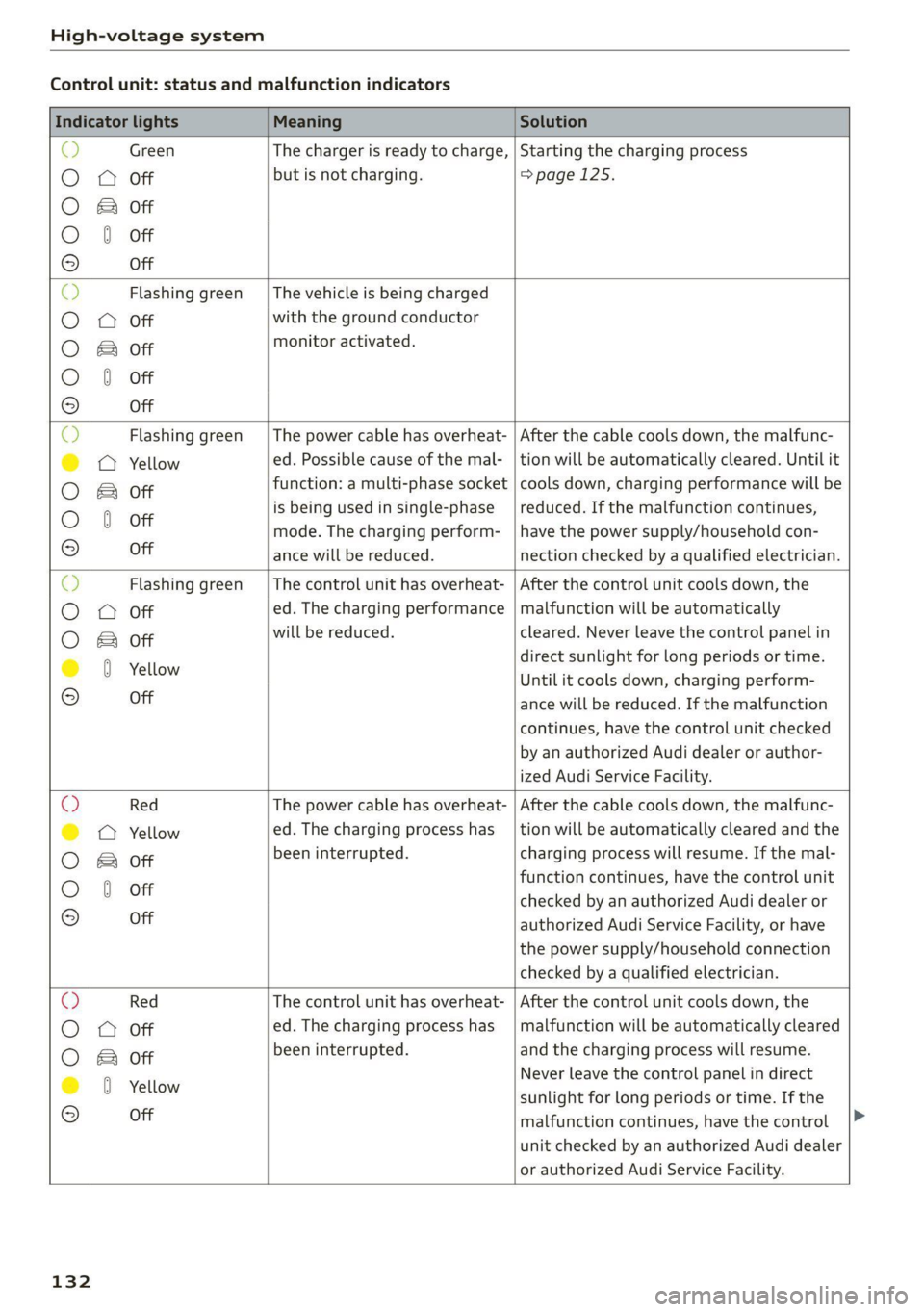
Control unit: status and malfunction indicators
Indicator lights Meaning Solution
& Green The charger is ready to charge, | Starting the charging process
O 0 Off but is not charging. =>page 125.
O & Off
O 0 of
9 Off
O Flashing green __| The vehicle is being charged
O 0 Off with the ground conductor
O Bot monitor activated.
O 0 of
9 Off
Flashing green | The power cable has overheat- | After the cable cools down, the malfunc-
© a Yellow ed. Possible cause of the mal- | tion will be automatically cleared. Until it
O B& otf function: a multi-phase socket | cools down, charging performance will be
O 0 of is being used in single-phase | reduced. If the malfunction continues,
mode. The charging perform- | have the power supply/household con-
9° Off ance will be reduced. nection checked by a qualified electrician.
O Flashing green |The control unit has overheat- | After the control unit cools down, the
O Q Off ed. The charging performance | malfunction will be automatically
O Bor will be reduced. cleared. Never leave the control panel in
@ 8 Yellow direct sunlight for long periods or time.
Until it cools down, charging perform-
© Off ance will be reduced. If the malfunction
continues, have the control unit checked
by an authorized Audi dealer or author-
ized Audi Service Facility.
O Red The power cable has overheat- | After the cable cools down, the malfunc-
© © Yellow ed. The charging process has __| tion will be automatically cleared and the
O B otf been interrupted. charging process will resume. If the mal-
function continues, have the control unit
O 0 off checked by an authorized Audi dealer or
© Off authorized Audi Service Facility, or have
the power supply/household connection
checked by a qualified electrician.
O Red The control unit has overheat- | After the control unit cools down, the
O O off ed. The charging process has_ | malfunction will be automatically cleared
O Bor been interrupted. and the charging process will resume.
@ 0 Yeltow Never leave the control panel in direct
© -_ sunlight for long periods or time. If the
malfunction continues, have the control
unit checked by an authorized Audi dealer
or authorized Audi Service Facility.
132
Page 135 of 332
80B012721BA
High-voltage system
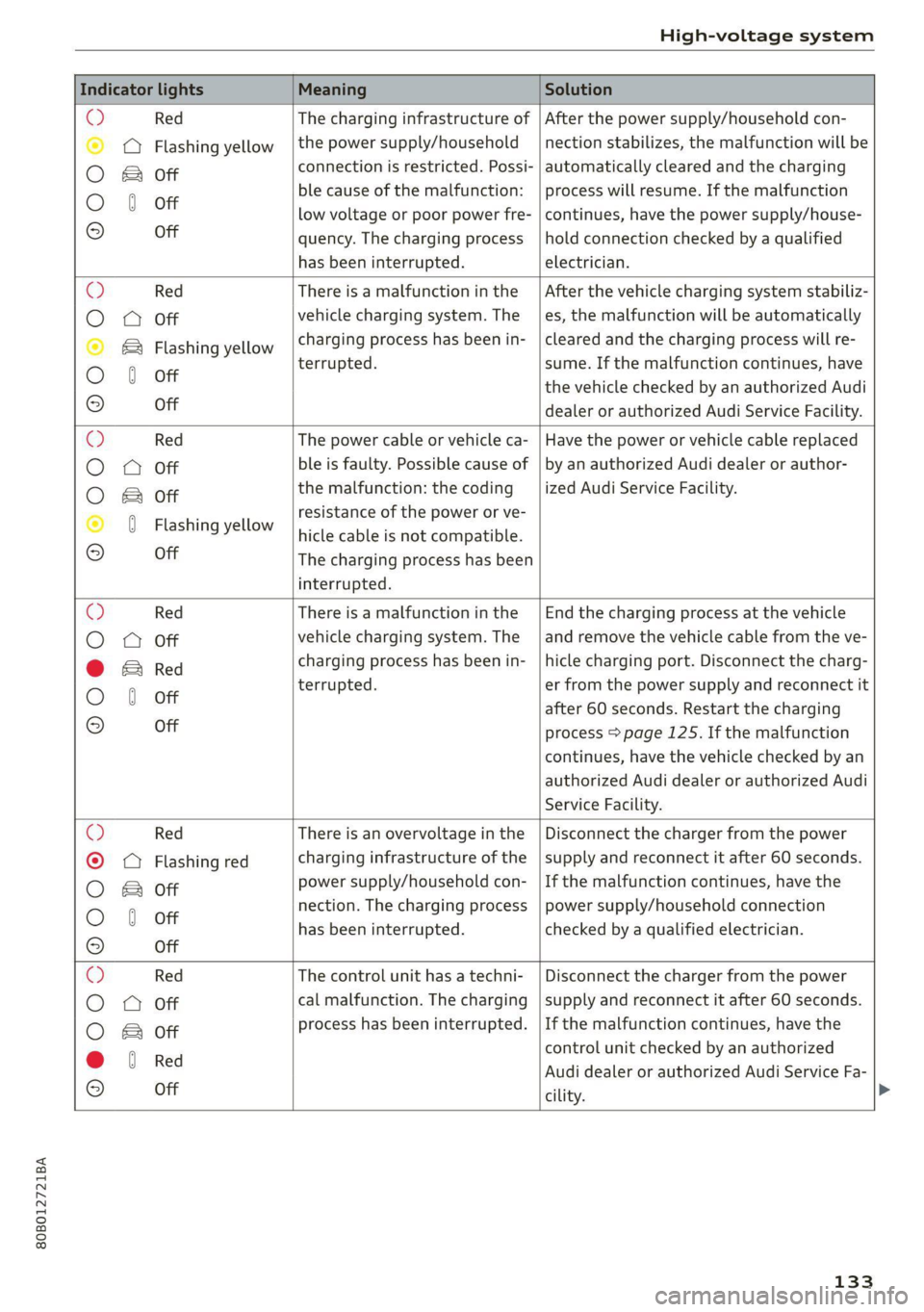
Indicator lights Meaning Solution
© Red The charging infrastructure of | After the power supply/household con-
© @ Flashing yellow |the power supply/household | nection stabilizes, the malfunction will be
O Bor connection is restricted. Possi- | automatically cleared and the charging
O 6 off ble cause of the malfunction: | process will resume. If the malfunction
low voltage or poor power fre- | continues, have the power supply/house-
© Off quency. The charging process | hold connection checked by a qualified
has been interrupted. electrician.
O Red There is a malfunction inthe | After the vehicle charging system stabiliz-
O Q Off vehicle charging system. The es, the malfunction will be automatically
© & Flashing yellow charging process has been in- | cleared and the charging process will re-
O 6 off terrupted. sume. If the malfunction continues, have
the vehicle checked by an authorized Audi
9 Off dealer or authorized Audi Service Facility.
© Red The power cable or vehicle ca- | Have the power or vehicle cable replaced
O 0 Off ble is faulty. Possible cause of | by an authorized Audi dealer or author-
O Bot the malfunction: the coding _| ized Audi Service Facility.
© 0 Flashi ll resistance of the power or ve-
asning YeNow | hicle cable is not compatible.
9 Off The charging process has been
interrupted.
O Red There is a malfunction in the | End the charging process at the vehicle
O 0 off vehicle charging system. The | and remove the vehicle cable from the ve-
@ E& Red charging process has been in- | hicle charging port. Disconnect the charg-
O 6 of terrupted. er from the power supply and reconnect it
after 60 seconds. Restart the charging
© Off process > page 125. If the malfunction
continues, have the vehicle checked by an
authorized Audi dealer or authorized Audi
Service Facility.
© Red There is an overvoltage inthe | Disconnect the charger from the power
© CQ Flashing red charging infrastructure of the | supply and reconnect it after 60 seconds.
O Bot power supply/household con- | If the malfunction continues, have the
O 6 of nection. The charging process | power supply/household connection
© has been interrupted. checked by a qualified electrician.
Off
©) Red The control unit has atechni- | Disconnect the charger from the power
O 0 Off cal malfunction. The charging | supply and reconnect it after 60 seconds.
process has been interrupted. | If the malfunction continues, have the
O & off
@ 8 Red control unit checked by an authorized
© e Audi dealer or authorized Audi Service Fa-
Off
cility.
133
Page 136 of 332
High-voltage system
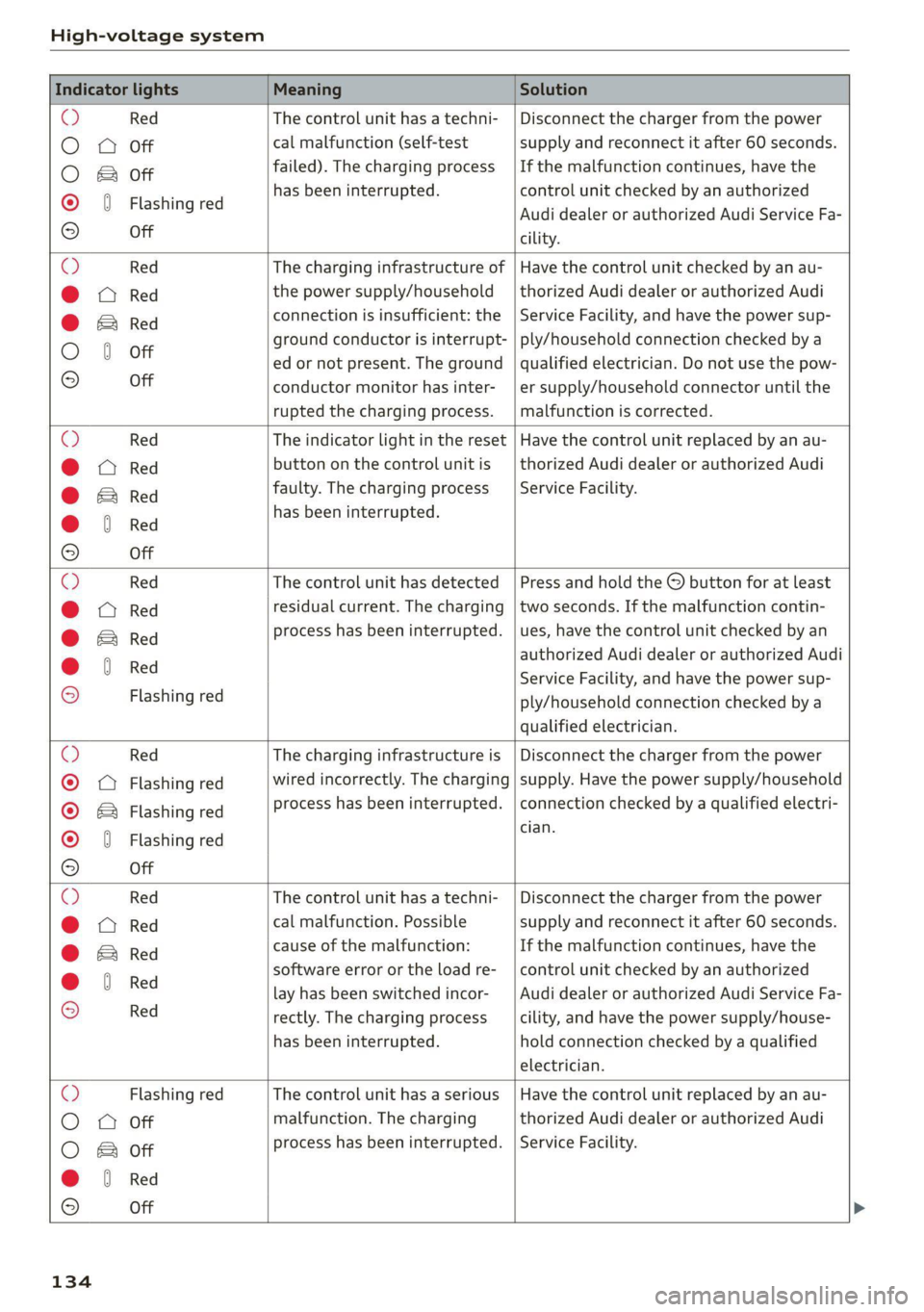
Indicator lights Meaning Solution
e e control unit has a techni- isconnect the charger from the power O Red Th Lunit h hni- | Di he ch from th
O 0 off cal malfunction (self-test supply and reconnect it after 60 seconds.
O Bor failed). The charging process _ | If the malfunction continues, have the
© 6 Flashi d has been interrupted. control unit checked by an authorized
ashing re Audi dealer or authorized Audi Service Fa-
9° Off cility.
e e charging infrastructure o ave the control unit checked by an au- O Red The charging inf f | Have th Lunit checked b'
@ CX Red the power supply/household | thorized Audi dealer or authorized Audi
connection is insufficient: the ervice Facility, and have the power sup- @ EB Red ion is insuffici he | Service Facili dh h
O 6 of ground conductor is interrupt- | ply/household connection checked by a
ed or not present. The ground | qualified electrician. Do not use the pow-
© Off conductor monitor has inter- | er supply/household connector until the
rupted the charging process. | malfunction is corrected.
e e indicator light in the reset | Have the control unit replaced by an au- O Red The indi light in th Have th Lunit replaced b
@ CX Red button on the control unit is | thorized Audi dealer or authorized Audi
@ & Red faulty. The charging process _| Service Facility.
@ 0 Red has been interrupted.
e
9 Off
e e control unit has detecte ress and hold the utton for at least O Red Th Lunit has d d |P d hold the © b for at l
@ X Red residual current. The charging | two seconds. If the malfunction contin-
rocess has been interrupted. | ues, have the control unit checke an @ Bred p has been i pted h h lLunit checked by
@ 8 Red authorized Audi dealer or authorized Audi
. ; Service Facility, and have the power sup-
9 Flashing red ply/household connection checked by a
qualified electrician.
O Red The charging infrastructure is | Disconnect the charger from the power
© © Flashing red wired incorrectly. The charging | supply. Have the power supply/household
© & Flashing red process has been interrupted. | connection checked by a qualified electri-
cian.
© 46 Flashing red 7
9 Off
©O Red The control unit has atechni- | Disconnect the charger from the power
@ CX Red cal malfunction. Possible supply and reconnect it after 60 seconds.
@ E& Re cause of the malfunction: If the malfunction continues, have the
@ 0 Red software error or the load re- | control unit checked by an authorized
C lay has been switched incor- _| Audi dealer or authorized Audi Service Fa-
9 Red rectly. The charging process cility, and have the power supply/house-
has been interrupted. hold connection checked by a qualified
electrician.
O Flashing red The control unit has a serious | Have the control unit replaced by an au-
O 0 off malfunction. The charging thorized Audi dealer or authorized Audi
O B or process has been interrupted. | Service Facility.
@ &§ Red
9 Off
134
Page 137 of 332
80B012721BA
High-voltage system
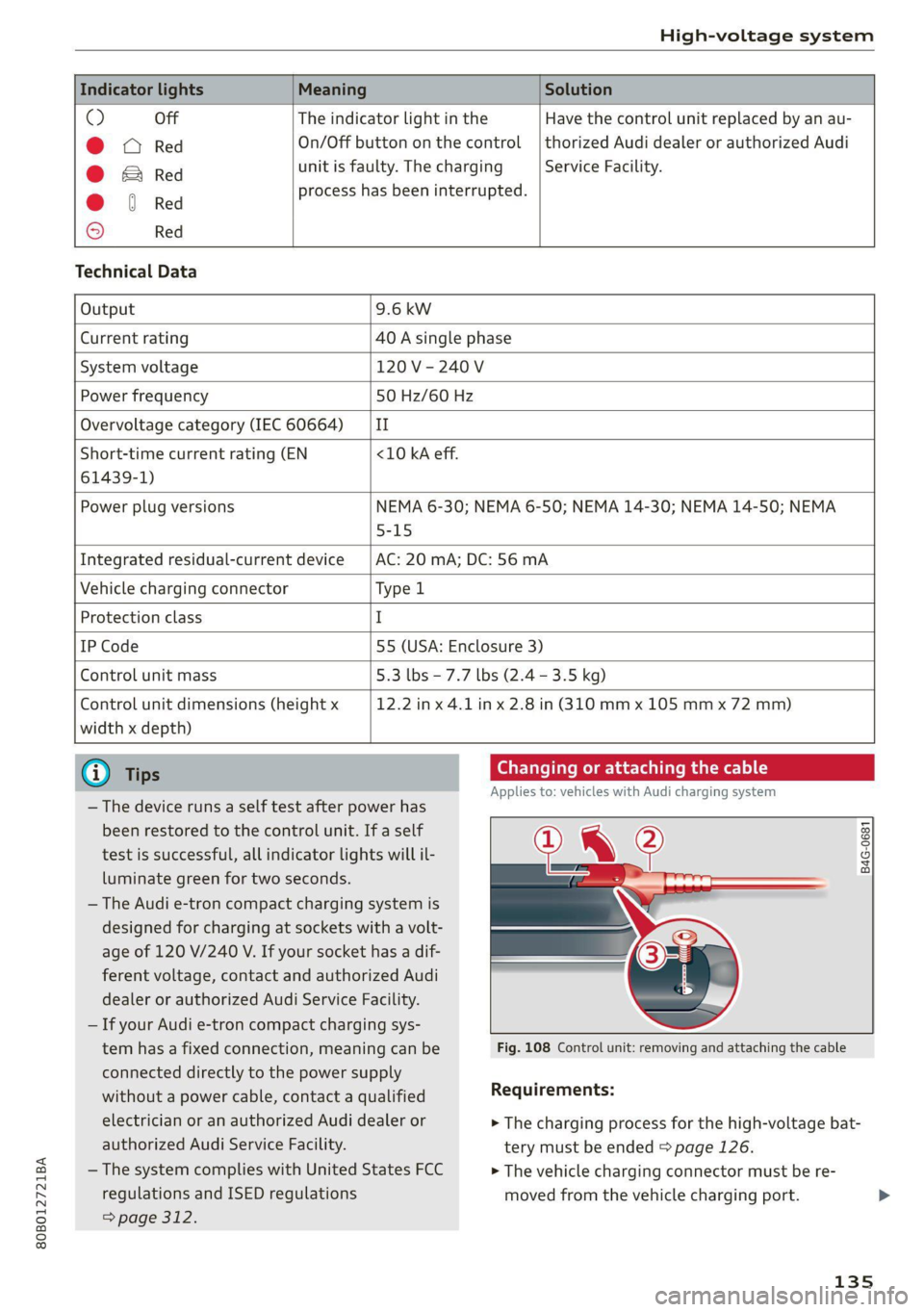
Indicator lights Meaning Solution
O Off The indicator light in the Have the control unit replaced by an au-
@ X Red On/Off button on the control | thorized Audi dealer or authorized Audi
@ B Red unit is faulty. The charging Service Facility.
@ © Red process has been interrupted.
© Red
Technical Data
Output 9.6 kw
Current rating 40 A single phase
System voltage 120V-240V
Power frequency 50 Hz/60 Hz
Overvoltage category (IEC 60664) ‘| II
Short-time current rating (EN <10 kA eff.
61439-1)
Power plug versions NEMA 6-30; NEMA 6-50; NEMA 14-30; NEMA 14-50; NEMA
5-15
Integrated residual-current device AC: 20 mA; DC: 56 mA
Vehicle charging connector Type l
Protection class I
IP Code 55 (USA: Enclosure 3)
Control unit mass 5.3 lbs - 7.7 lbs (2.4 - 3.5 kg)
Control unit dimensions (height x
width x depth)
12.2 in x 4.1 in x 2.8 in (310 mm x 105 mm x 72 mm)
@) Tips
— The device runs a self test after power has
been restored to the control unit. If a self
test is successful, all indicator lights will il-
luminate green for two seconds.
— The Audi e-tron compact charging system is
designed for charging at sockets with a volt-
age of 120 V/240 V. If your socket has a dif-
ferent voltage, contact and authorized Audi
dealer or authorized Audi Service Facility.
— If your Audi e-tron compact charging sys-
Changing or attaching the cable
Applies to: vehicles with Audi charging system
B4G-0681
tem has a fixed connection, meaning can be Fig. 108 Control unit: removing and attaching the cable
connected directly to the power supply
without a power cable, contact a qualified Requirements:
electrician or an authorized Audi dealer or > The charging process for the high-voltage bat-
authorized Audi Service Facility. tery must be ended > page 126.
— The system complies with United States FCC > The vehicle charging connector must be re-
regulations and ISED regulations
> page 312.
moved from the vehicle charging port.
135
Page 141 of 332
80B012721BA
Trailer towing
in the trailer correctly will help to achieve this
weight. Having the tongue weight too low affects
the vehicle's handling.
You can determine the tongue weight using a
tongue weight scale, a bathroom scale, or a pub-
lic weigh station, for example.
The permitted tongue weight of your vehicle can
be found in the vehicle documentation or in
=> page 314.
Load distribution
Poor cargo load and distribution can negatively
impact vehicle handling. Load the trailer based
on the following criteria as much as possible:
— Store objects in the vehicle luggage compart-
ment, if possible. The vehicle should always
carry the heaviest possible load and the trailer
should have the lightest possible load.
— Distribute the load in the trailer so that the
heavy objects are as close to the axle as possi-
ble.
— Secure objects so that they do not slide.
— Utilize the maximum permitted tongue weight
if possible.
Tires
Set the tire pressure on your vehicle for a “full
load”; see the tire pressure sticker > page 271. If
necessary, also adjust the tire pressure on the
trailer according to the manufacturer's specifica-
tions.
The trailer and the vehicle should be equipped
with winter tires when driving in winter tempera-
tures.
Outside mirrors
If you cannot see the traffic behind the trailer
with the standard exterior mirrors, then you
must attach additional exterior mirrors. Adjust
them so you have a sufficient visibility behind
you.
Exterior lighting
Follow the legal regulations for lighting on your
trailer that are applicable in the country where
you are operating the vehicle. Contact an author-
ized Audi dealer or authorized Audi Service Facili-
ty for more information.
Before you start driving, check all lighting equip-
ment on the trailer while it is hitched to the vehi-
cle.
The headlight range control automatically ad-
justs the light range of the headlights.
When the B indicator light blinks, then the turn
signals are activated in trailer mode. If a turn sig-
nal on the trailer or on the vehicle fails while in
trailer mode, the indicator light will not blink
twice as fast to indicate this.
Safety chains
Make sure the safety chains are correctly applied
when pulling a trailer. The chains should hang
enough so that the trailer can drive around
curves. However, they must not touch the
ground.
Air suspension
Applies to: vehicles with air suspension
The Audi drive select* Comfort mode > page 115
must be selected before you adjust the tongue
weight on the trailer and hitch the trailer >@,
=> page 116.
The air suspension trailer mode must be switched
on.
Applies to MMI: select on the home screen: VE-
HICLE > Settings & Service > Air suspension:
trailer.
Switch trailer mode off again when you are no
longer towing a trailer.
For vehicles with a factory-installed trailer hitch,
the air suspension trailer mode will automatically
switch on if you connect the trailer cable to the
socket.
When using carrier systems that are mounted di-
rectly on the trailer hitch ball head, you can also
switch trailer mode off manually.
If you must drive on roads that are in poor condi-
tion, you can raise the vehicle again after hitching
the trailer or after adjusting the tongue weight
> page 116.
139
Page 164 of 332
Driver assistance
handling with predictive control, for example the
speed for driving through curves.
@) Tips
Certain settings are automatically stored and
assigned to the remote control key being
used.
Applies to: vehicles with Audi adaptive cruise control
If or is displayed when there is a mal-
function, the adaptive cruise control or traffic
jam assist functions may be unavailable or may
be limited.
A message that indicates the cause and possible
solution may appear with some displays. The
weather conditions may be too poor or a sensor
may be covered. Clean the area in front of the
sensors > page 143 and try to turn on the sys-
tems again later.
If the malfunction remains, drive to an author-
ized Audi dealer or authorized Audi Service Facili-
ty immediately to have the malfunction correct-
ed.
Please take over!
This message appears if the vehicle rolls back
when starting on a slight incline, even though the
systems are active. Press the brake pedal to pre-
vent the vehicle from rolling or starting to move.
Traffic jam assist
Applies to: vehicles with traffic jam assist
B8V-0692
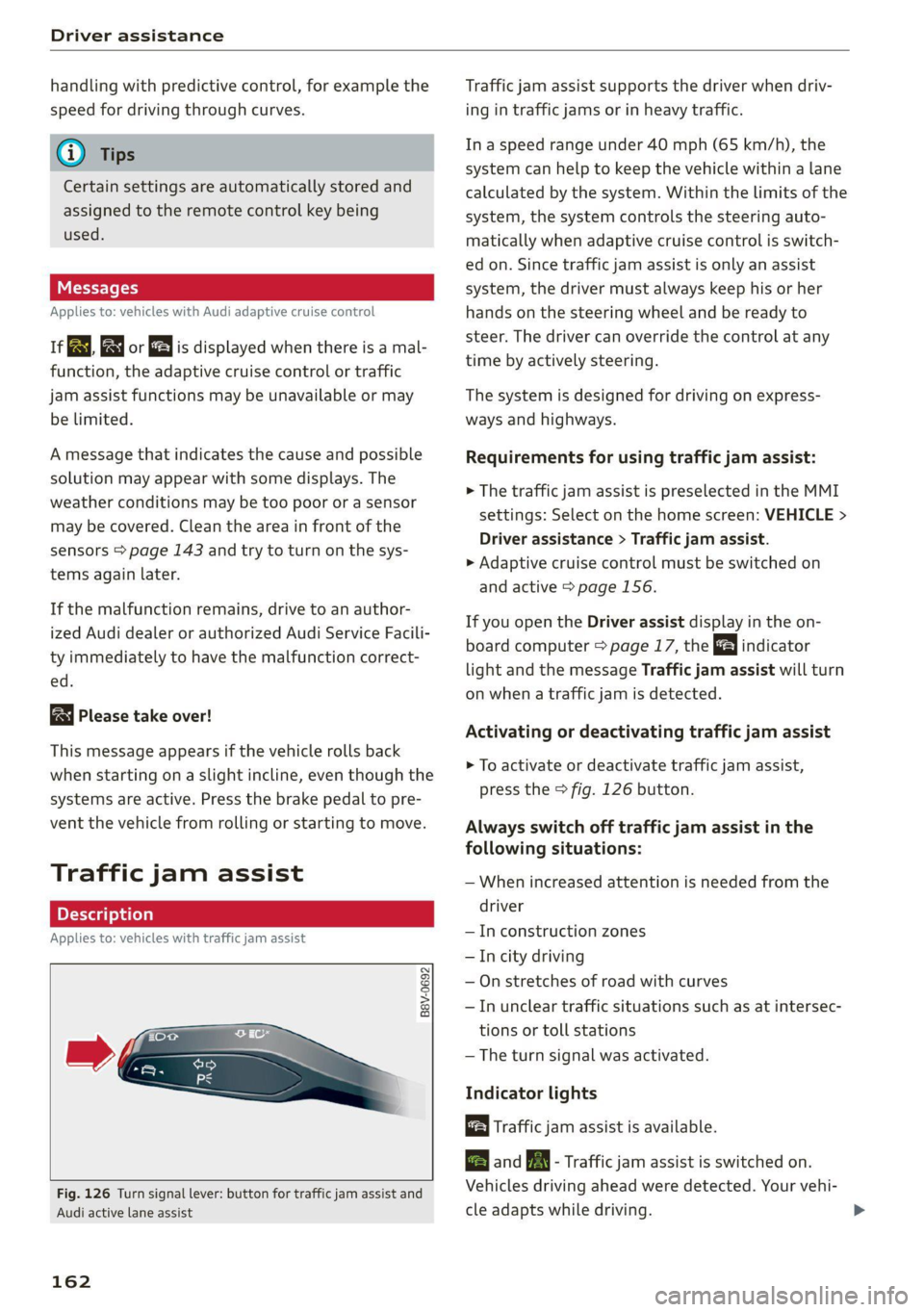
Fig. 126 Turn signal lever: button for traffic jam assist and
Audi active lane assist
162
Traffic jam assist supports the driver when driv-
ing in traffic jams or in heavy traffic.
In a speed range under 40 mph (65 km/h), the
system can help to keep the vehicle within a lane
calculated by the system. Within the limits of the
system, the system controls the steering auto-
matically when adaptive cruise control is switch-
ed on. Since traffic jam assist is only an assist
system, the driver must always keep his or her
hands on the steering wheel and be ready to
steer. The driver can override the control at any
time by actively steering.
The system is designed for driving on express-
ways and highways.
Requirements for using traffic jam assist:
> The traffic jam assist is preselected in the MMI
settings: Select on the home screen: VEHICLE >
Driver assistance > Traffic jam assist.
> Adaptive cruise control must be switched on
and active > page 156.
If you open the Driver assist display in the on-
board computer = page 17, the indicator
light and the message Traffic jam assist will turn
on when a traffic jam is detected.
Activating or deactivating traffic jam assist
> To activate or deactivate traffic jam assist,
press the > fig. 126 button.
Always switch off traffic jam assist in the
following situations:
— When increased attention is needed from the
driver
— In construction zones
— In city driving
— On stretches of road with curves
—In unclear traffic situations such as at intersec-
tions or toll stations
— The turn signal was activated.
Indicator lights
Traffic jam assist is available.
B and B - Traffic jam assist is switched on.
Vehicles driving ahead were detected. Your vehi-
cle adapts while driving.
Page 166 of 332
![AUDI Q5 2021 Owner´s Manual Driver assistance
Distance warning
Applies to: vehicles with distance warning
S| iS 9] nN ‘|
ja
Applies to: vehicles with adaptive cruise control:
Fig. 127 Instrument cluster: display o](/img/6/40263/w960_40263-165.png "AUDI Q5 2021 Owner´s Manual Driver assistance
Distance warning
Applies to: vehicles with distance warning
S| iS 9] nN ‘|
ja
Applies to: vehicles with adaptive cruise control:
Fig. 127 Instrument cluster: display o")
Driver assistance
Distance warning
Applies to: vehicles with distance warning
S| iS 9] nN ‘|
ja
Applies to: vehicles with adaptive cruise control:
Fig. 127 Instrument cluster: display of the current dis-
tance
RAZ-0400
Applies to: vehicles with Audi adaptive cruise control
Fig. 128 Instrument cluster: distance warning
General information
At speeds above approximately 40 mph (65
km/h), this function measures the distance to the
vehicle ahead as time. If the distance falls below
the warning threshold and remains there, the
system will warn you of the hazard with the &
indicator light.
Image in the Driver assistance display
Applies to: vehicles with Audi adaptive cruise control
The display only appears if the Driver assistance
display is selected in the on-board computer
= page 17 and the adaptive cruise control is not
actively controlling the vehicle.
@ Detected vehicle driving ahead
@ Use the markings to help you estimate the
distance to an obstacle. Each marking repre-
sents approximately one second.
@® Set warning threshold. Depending on the set-
tings, the display will be colored in from the
bottom to the top.
164
@ The actual distance is smaller than the set
distance and you will be informed about the
danger.
Adjusting the distance warning
The system can be switched off or on in the MMI
and you can customize the distance warning
threshold. The settings depend on the vehicle
equipment.
— Applies to: MMI: Select on the home screen:
VEHICLE > Driver assistance > Distance warn-
ing.
Messages
1f Bo is displayed when there is a malfunc-
tion, the distance warning functions may be un-
available or may be limited.
A message that indicates the cause and possible
solution
may appear with some displays. The
weather conditions may be too poor or a sensor
may be covered. Clean the area in front of the
sensors > page 143 and try to turn the system on
again later.
If the malfunction remains, drive to an author-
ized Audi dealer or authorized Audi Service Facili-
ty immediately to have the malfunction correct-
ed.
ZA\ WARNING
Observe the safety precautions and note the
limits of the assist systems, sensors, and
cameras > page 141.
Gi) Tips
— The driver is always responsible for adhering
to the regulations applicable in the country
where the vehicle is being operated.
— You may fall below the warning threshold
briefly when passing or when quickly ap-
proaching a vehicle driving ahead. There is
no warning in this scenario. A warning is giv-
en only if you fall below the warning thresh-
old for an extended period of time.
Page 169 of 332
80B012721BA
Driver assistance
occurs continuously in order to help the driver
keep the vehicle in the center of the lane. If the
steering correction cannot be set, the steering
correction will function in the Late setting.
— Vibration warning - You can select if you would
also like to be warned using a vibration in the
steering wheel.
@) Tips
Certain settings are automatically stored and
assigned to the remote control key being
used.
Applies to: vehicles with Audi active lane assist
iri or is displayed when there is a malfunc-
tion, the active lane assist functions may be un-
available or limited.
A message that indicates the cause and possible
solution may appear with some displays. The
weather conditions may be too poor or the cam-
era may be covered. Clean the area in front of the
camera > page 143 and try to turn on the sys-
tems again later.
If the malfunction remains, drive to an author-
ized Audi dealer or authorized Audi Service Facili-
ty immediately to have the malfunction correct-
ed.
Audi pre sense
Introduction
Applies to: vehicles with Audi pre sense
Within the limits of the system, the Audi pre
sense functions can initiate measures in certain
driving situations to protect the vehicle occu-
pants and other road users. Depending on the ve-
hicle equipment, various Audi pre sense systems
may
be installed:
— Audi pre sense basic can react during emergen-
cy and dangerous braking maneuvers and un-
stable driving situations (such as oversteering
or understeering).
— Audi pre sense city and Audi pre sense front
can detect an impending frontal impact and re-
act with warnings, braking interventions, and
preemptive safety measures for the vehicle oc-
cupants.
— Audi pre sense rear monitors the rear traffic
behind your vehicle and can react to an impend-
ing rear impact.
— The swerve assist can help you to steer the ve-
hicle around an obstacle during an evasive ma-
neuver that is detected as critical.
— The turn assist can detect vehicles in the oppo-
site lane as critical during a turning maneuver
and react with braking maneuvers.
PNM eA ELT)
Applies to: vehicles with Audi pre sense
Depending on the vehicle speed and the vehicle
equipment, the following functions may be initi-
ated in certain situations:
— Visual and audio warnings
— Reversible tensioning of safety belts
— Closing the windows and panoramic glass roof
— Adjusting the seats
— Other preemptive safety measures by individual
systems
Z\ WARNING
Observe the safety precautions and note the
limits of the assist systems, sensors, and
cameras > page 141.
@) Tips
— Depending on the risk situation that is de-
tected and the selected Audi drive select*
mode, not all preemptive safety measures
may be initiated under certain circumstan-
ces. Certain functions can be adjusted or
skipped if necessary.
— Audi pre sense may be restricted or unavail-
able under certain circumstances, for exam-
ple if:
— There are passengers with unfastened
safety belts
— After turning on the ignition, as long as
the [BJ or indicator light is on.
— When driving in reverse
— The front passenger's airbag is switched
off
167
Page 187 of 332

80B012721BA
Parking and maneuvering
> Wait until a message appears in the center dis-
play that specifies the direction of travel re-
quired to exit the parking space.
> Activate the turn signal on the desired side or
press that side next to the vehicle in the center
display.
» Make sure the actual direction the vehicle is
traveling matches the direction indicated by the
park assist. In the center display, arrows and
symbols on the vehicle roof (2) > page 182,
fig. 145 indicate what action is needed, such as
applying the brakes or changing the direction.
» Remove your hands from the steering wheel.
>» Pay attention to the path of the vehicle. If the
traffic situation permits, accelerate carefully
> AX. The maximum speed for exiting a parking
space is 3 mph (5 km/h).
> Follow the visual instructions in the display and
the warning tones until the vehicle has finished
exiting the parking space.
> The process of exiting the parking space has
ended if additional corrective movements are
no longer necessary and the specified steering
wheel angle is sufficient to drive out of the
parking space. Resume control of the steering
wheel >@).
Z\ WARNING
— Observe the safety precautions and note the
limits of the assist systems, sensors, and
cameras > page 141.
— The park assist is an assist system. The driv-
er is still responsible for monitoring the ve-
hicle's surroundings and preventing colli-
sions when using the system.
— When using park assist to drive into or out
of a parking space, the steering wheel turns
quickly on its own. Reaching into the steer-
ing wheel spokes while this is happening can
result in injury.
@) Note
Resume steering immediately after the last
corrective movement and the takeover
prompt, so that the specified steering wheel
angle is not recentered.
Interrupting the park assists
Applies to: vehicles with park assist
Park assist will be canceled automatically in the
following scenarios:
— You switch the system off.
— You start steering.
— The speed is too high.
—The time limit is exceeded.
— An obstacle is detected.
— ESC intervenes.
Resume control of the vehicle, end the parking
process manually, or:
— You can resume the parking process in some sit-
uations. Press the Pe button in the center con-
sole.
— To continue exiting the parking space, switch
the engine off and on. Press the Pe button.
Z\ WARNING
Observe the safety precautions and note the
limits of the assist systems, sensors, and
cameras > page 141.
Messages
Applies to: vehicles with park assist
If the prof i Pg Pa| indicator light turns on, the
park assist is not available or was interrupted.
A message that indicates the cause and possible
solution may appear with some displays. The
weather conditions may be too poor or a sensor
may be covered. Clean the area in front of the
sensors > page 143 and try to turn on the sys-
tems again later.
If the malfunction remains, drive to an author-
ized Audi dealer or authorized Audi Service Facili-
ty immediately to have the malfunction correct-
ed.
185
Page 202 of 332
Audi connect
Information about the services and the corre-
sponding app was accurate at the time this man-
ual was printed. The scope of services depends
on the country and equipment. There may be
changes over the service life of the vehicle.
ZA WARNING
— Always follow the information found in > AA
in General information on page 197.
— Driver messages, text messages, and illumi-
nated warning and indicator lights in the ve-
hicle always take priority over information
from the Audi connect services. The infor-
mation displayed by the Audi connect serv-
ices should not cause you to take safety
risks. This can result in the vehicle breaking
down in traffic and to serious injuries or ac-
cidents.
G) Tips
— Accessing specific data or controlling func-
tions remotely depends on the charge level
of the vehicle battery. Therefore, these
functions only have limited availability after
switching off the ignition.
— An eSIM card establishes the Internet con-
nection for Audi connect vehicle control
services. The costs for this are included in
the price of Audi connect vehicle control
services. The cell phone network, for exam-
ple, must be available to use these services.
Applies to: vehicles with Audi connect vehicle control
Create a myAudi account by registering in the
myAudi app or at my.audi.com, depending on
your country.
>» Set the key user > page 31.
> Install the myAudi app on your mobile device
and log in with your access information.
@ Tips
Some services require you to enter a 4-digit
PIN that you set up during registration.
200
Settings
Applies to: vehicles with Wi-Fi hotspot
Requirement: the ignition must be switched on.
> Applies to: MMI: Select on the home screen:
SETTINGS > Connection settings > Wi-Fi
Depending on the country and the vehicle equip-
ment, the following functions may be available:
Wi-Fi
When the function is switched on, the MMI's Wi-
Fi hotspot is active and Wi-Fi devices can be con-
nected to the hotspot.
Wi-Fi hotspot settings
The Wi-Fi connection between the MMI and your
Wi-Fi device is encrypted. You can change the fol-
lowing information if needed.
— Access point (SSID): name of the Wi-Fi hot-
spot.
— Password: an initial password was set at the
factory in the MMI. Audi recommends changing
the initial password. Only use secure passwords
that conform to the general guidelines for se-
cure passwords. For more information, refer to
reputable and current sources on password se-
curity.
Allow data connection through Wi-Fi
When the function is switched on, mobile devices
can use the Internet connection through the Wi-
Fi hotspot. A data plan is needed to do this.
ZA\ WARNING
Always follow the information found in > A\
in General information on page 197.
@) Note
Always follow the information found in >@ in
General information on page 197.