trailer AUDI Q5 2021 Owner´s Manual
[x] Cancel search | Manufacturer: AUDI, Model Year: 2021, Model line: Q5, Model: AUDI Q5 2021Pages: 332, PDF Size: 118.86 MB
Page 185 of 332

80B012721BA
Parking and maneuvering
be displayed. The system automatically suggests
a parking option @.
If the parking space allows different parking op-
tions, they can be selected manually. Press one of
the suggested parking options @ in the center
display.
Starting the parking process
As soon as the vehicle has reached the correct po-
sition, a P will appear in the center display above
the selected parking space @). The roof in the
parking aid display @) may show the required
braking or driving direction.
> Keep the vehicle as parallel as possible to the
parked vehicles or to the side of the road.
> Make sure that the parking space is suitable for
your vehicle >@.
> Start the assisted parking process > page 184.
Maneuvering area
The vehicle can go off course during the parking
process > A\. If there are obstacles within the
maneuvering area that block or endanger the
parking process, for example on the opposite
side of the street, a message may appear. You
may need to drive farther forward and stay closer
to the row of parking spaces.
ZA WARNING
— Observe the safety precautions and note the
limits of the assist systems, sensors, and
cameras > page 141.
— The driver is always responsible when enter-
ing or exiting a parking space and during
similar maneuvers.
— Sensors and cameras have spots in which
the surrounding area cannot be detected.
Objects, animals, and people may only be
detected with limitations may not be detect-
ed at all. Always monitor the traffic and the
vehicle's surroundings directly and do not
become distracted.
@) Note
— Parking spaces classified as suitable by the
system may have been detected incorrectly.
The driver must decide if the parking space
displayed is suitable for the vehicle.
— Certain conditions near the parking space
may cause the parking process to fail, such
as if the parking space is near trees or posts,
or if the ground is covered, for example,
with gravel, snow, or ice.
(i) Tips
— If you did not drive past a suitable parking
space
too quickly, the parking space search
can also be activated afterward by pressing
Pe.
—The Electronic Stabilization Control (ESC)
must not be switched off during the parking
process. If the ESC intervenes, the parking
process
will be canceled.
— You can also drive into a perpendicular park-
ing space yourself and then activate the sys-
tem. If this is the case, the front of the vehi-
cle should already be in the space @)
=> page 182, fig. 143 so that the sensors
can measure the space.
— You cannot park with the parking assist sys-
tems when you are towing a trailer or have
the connector inserted in the trailer socket.
— The system is not available when certain as-
sist systems are switched on.
—If there are suitable parking spaces on both
sides of the street, for example on a one-
way street, you can change the side where
the system is searching for parking spaces
by activating the turn signal for the other
side or by pressing on that side in the center
display.
— The park systems do not provide support for
assisted parking on tight curves.
Park assist
General information
Applies to: vehicles with park assist
The park assist helps you when parking and exit-
ing parking spaces after the parking space
search. The park assist takes over the steering of
the vehicle while the driver accelerates, brakes,
and monitors the vehicle's surroundings. Park as-
sist can be interrupted at any time.
183
>
Page 276 of 332
Wheels
Z\ WARNING
Please note the important safe-
ty precautions regarding tire
pressure > page 271 and load
limits > page 274.
Tires and vehicle load limits
There are limits to the amount of
load or weight that any vehicle
and any tire can carry. A vehicle
that is overloaded will not handle
well and is more difficult to stop.
Overloading can not only lead to
loss of vehicle control, but can al-
so damage important parts of the
vehicle and can lead to sudden
tire failure, including a blowout
and sudden deflation that can
cause the vehicle to crash.
Your safety and that of your pas-
sengers also depends on making
sure that load limits are not ex-
ceeded. Vehicle load includes ev-
erybody and everything in and on
the vehicle. These load limits are
technically referred to as the vehi-
cle’s Gross Vehicle Weight Rating
(“GVWR”).
The “GVWR” includes the weight
of the basic vehicle, all factory in-
stalled accessories, a full tank of
fuel, oil, coolant and other fluids
274
plus maximum load. The maxi-
mum load includes the number of
passengers that the vehicle is in-
tended to carry (“seating capaci-
ty”) with an assumed weight of
150 lbs. (68 kg) for each passen-
ger at a designated seating posi-
tion and the total weight of any
uggage in the vehicle. If you tow
a trailer, the weight of the trailer
hitch and the tongue weight of
the loaded trailer must be includ-
ed as part of the vehicle load.
The Gross Axle Weight Rating
(“GAWR’”) is the maximum load
that can be applied at each of the
vehicle’s two axles.
The fact that there is an upper
limit to your vehicle’s Gross Vehi-
cle Weight Rating means that the
total weight of whatever is being
carried in the vehicle (including
the weight of a trailer hitch and
the tongue weight of the loaded
trailer) is limited. The more pas-
sengers in the vehicle or passen-
gers who are heavier than the
standard weights assumed mean
that less weight can be carried as
luggage.
The Gross Vehicle Weight Rating
and the Gross Axle Weight Rating >
Page 277 of 332
80B012721BA
Wheels
are listed on the safety compli-
ance sticker label located on the
driver’s side B-pillar.
A WARNING
Overloading a vehicle can cause
loss of vehicle control, a crash
or other accident, serious per-
sonal injury, and even death.
—Carrying more weight than
your vehicle was designed to
carry will prevent the vehicle
from handling properly and in-
crease the risk of the loss of
vehicle control.
—The brakes on a vehicle that
has been overloaded may not
be able to stop the vehicle
within a safe distance.
—Tires on a vehicle that has
been overloaded can fail sud-
denly, including a blowout and
sudden deflation, causing loss
of control and a crash.
—Always make sure that the to-
tal load being transported -
including the weight of a trail-
er hitch and the tongue
weight of a loaded trailer -
does not make the vehicle
heavier than the vehicle’s
Gross Vehicle Weight Rating.
Determining correct load
limit
Use the example below to calcu-
late the total weight of the pas-
sengers and luggage or other
things that you plan to transport
so that you can make sure that
your vehicle will not be overload-
ed.
Steps for Determining Correct
Load Limit
1. Locate the statement “THE
COMBINED WEIGHT OF OCCU-
PANTS AND CARGO SHOULD
NEVER EXCEED XXX KG OR XXX
LBS” on your vehicle’s placard
(tire inflation pressure label)
=> page 271, fig. 180.
2. Determine the combined
weight of the driver and pas-
sengers that will be riding in
your vehicle.
3. Subtract the combined weight
of the driver and passengers
from “XXX” kilograms or “XXX”
pounds shown on the sticker
=> page 271, fig. 180.
4. The resulting figure equals the
available amount of cargo and
luggage load capacity. For ex-
ample, if the “XXX” amount
equals 1400 lbs. and there will >
275
Page 278 of 332
Wheels
be five 150 lbs. passengers in
your vehicle, the amount of
available cargo and luggage
load capacity is 650 lbs.
(1400-750 (5 x 150) = 650
lbs.)
5. Determine the combined
weight of luggage and cargo
being loaded on the vehicle.
That weight may not safely ex-
ceed the available cargo and
luggage load capacity calculat-
ed in Step 4.
6. If your vehicle will be towing a
trailer, load from your trailer
will be transferred to your vehi-
cle. Consult this manual to de-
termine how this reduces the
available cargo and luggage
load capacity of your vehicle.
>Check the tire sidewall
(=> page 262, fig. 177) to deter-
mine the designated load rating
for a specific tire.
Wheel bolts and rims
Wheel bolts
Wheel bolts must be clean and loosen/tighten
easily.
Rims
Rims with a bolted rim ring* or with bolted wheel
covers* consist of multiple pieces. These compo-
nents were bolted together using special bolts
and a special procedure. You must not repair or
disassemble them > A\.
276
ZA WARNING
Wheel bolts that are tightened or repaired in-
correctly can become loose and result in loss
of vehicle control, which increases the risk of
an accident. For the correct tightening specifi-
cation, see > page 293, Finishing.
— Always keep the wheel bolts and the threads
in the wheel hub clean and free of grease.
— Only use wheel bolts that fit the rim.
— Always have damaged rims repaired by an
authorized Audi dealer or authorized Audi
Service Facility. Never repair or disassemble
rims yourself, because this increases the risk
of an accident.
Winter tires significantly improve the vehicle's
handling when driving in winter conditions. Be-
cause of their construction (width, compound,
tread pattern), summer tires provide less traction
on ice and snow.
> Use winter tires on all four wheels.
> Only use winter tires that are approved for your
vehicle.
> Please note that the maximum permitted
speed may be lower with winter tires > A\ in
General information on page 261. An author-
ized Audi dealer or authorized Audi Service Fa-
cility can inform you about the maximum per-
mitted speed for your tires.
> Check the tire pressure after installing wheels
=> page 271.
The effectiveness of winter tires is reduced great-
ly when the tread is worn down to a depth of
0.16 in (4 mm). The characteristics of winter tires
also decrease greatly as the tire ages, regardless
of the remaining tread.
@) For the sake of the environment
Reinstall summer tires at the appropriate
time, because they provide better handling
when roads are free of snow and ice. Summer
tires cause less road noise, tire wear, and fuel
consumption.
Page 292 of 332
Emergency assistance
> Switch the ignition on.
Inflating a tire
> Move the switch (8) > fig. 185 on the compres-
sor into position I.
> Inflate the tire to between 29 psi (200 kPA)
and 36 psi (250 kPA) and read the pressure on
the gauge.
> If this tire pressure is not reached, remove the
filler hose. Drive slowly approximately 33 feet
(10 m) forward or in reverse so that the sealant
can be distributed in the tire. Inflate the tire
again > A\.
ZA\ WARNING
— Read and follow the manufacturer's safety
precautions on the compressor and in the in-
structions on the bottle of sealant.
— Ifa tire pressure of 29 psi (200 kPA) cannot
reached after inflating for 6 minutes, then
the tire is too severely damaged. Do not con-
tinue driving.
— If the tire cannot be repaired with the tire
sealant, see an authorized Audi dealer or au-
thorized Audi Service Facility for assistance.
G@) Tips
Do not operate the compressor for more than
six minutes continuously, or it can overheat.
Once the compressor has cooled, you can con-
tinue to use it.
eet als}
Applies to: vehicles with tire mobility kit
> Affix the sticker that says "max. 50 mph (max.
80 km/h)" that is provided with the tire mobili-
ty kit within the driver's field of vision.
>» Stop the vehicle after driving for about 10 mi-
nutes and check the tire pressure.
> If the tire pressure is lower than 19 psi (130
kPA), then the tire is too severely damaged. Do
not continue driving.
Z\ WARNING
Pay attention to the following after repairing
the tire:
290
— Do not drive faster than 50 mph (80 km/h).
— Avoid hard acceleration or braking and driv-
ing fast around curves.
— The vehicle may become more difficult to
control.
— If the tire is too severely damaged, see an
authorized Audi dealer or authorized Audi
Service Facility for assistance.
(@) For the sake of the environment
You can give the used tire sealant bottle to an
authorized Audi dealer or authorized Audi
Service Facility for disposal.
Gi) Tips
Remember to obtain a new bottle of sealant
from an authorized Audi dealer or authorized
Audi Service Facility after repairing a tire.
Changing a tire
You must complete the preparation before
changing a tire.
> Read and follow the important safety precau-
tions > page 288.
> Set the parking brake.
> Select the “P” position.
» When towing a trailer: disconnect the trailer
from your vehicle.
> Lay out the vehicle tool kit > page 288 and the
spare tire > page 293.
> Applies to: vehicles with air suspension: Select
on the home screen: VEHICLE > Settings &
Service > Air suspension: wheel change.
> Switch the ignition off.
ZA\ WARNING
The vehicle must also be secured to prevent it
from rolling when using the vehicle jack*. Use
suitable objects to block the front and back of
the wheel that is diagonal from the wheel
with the flat tire.
Page 305 of 332
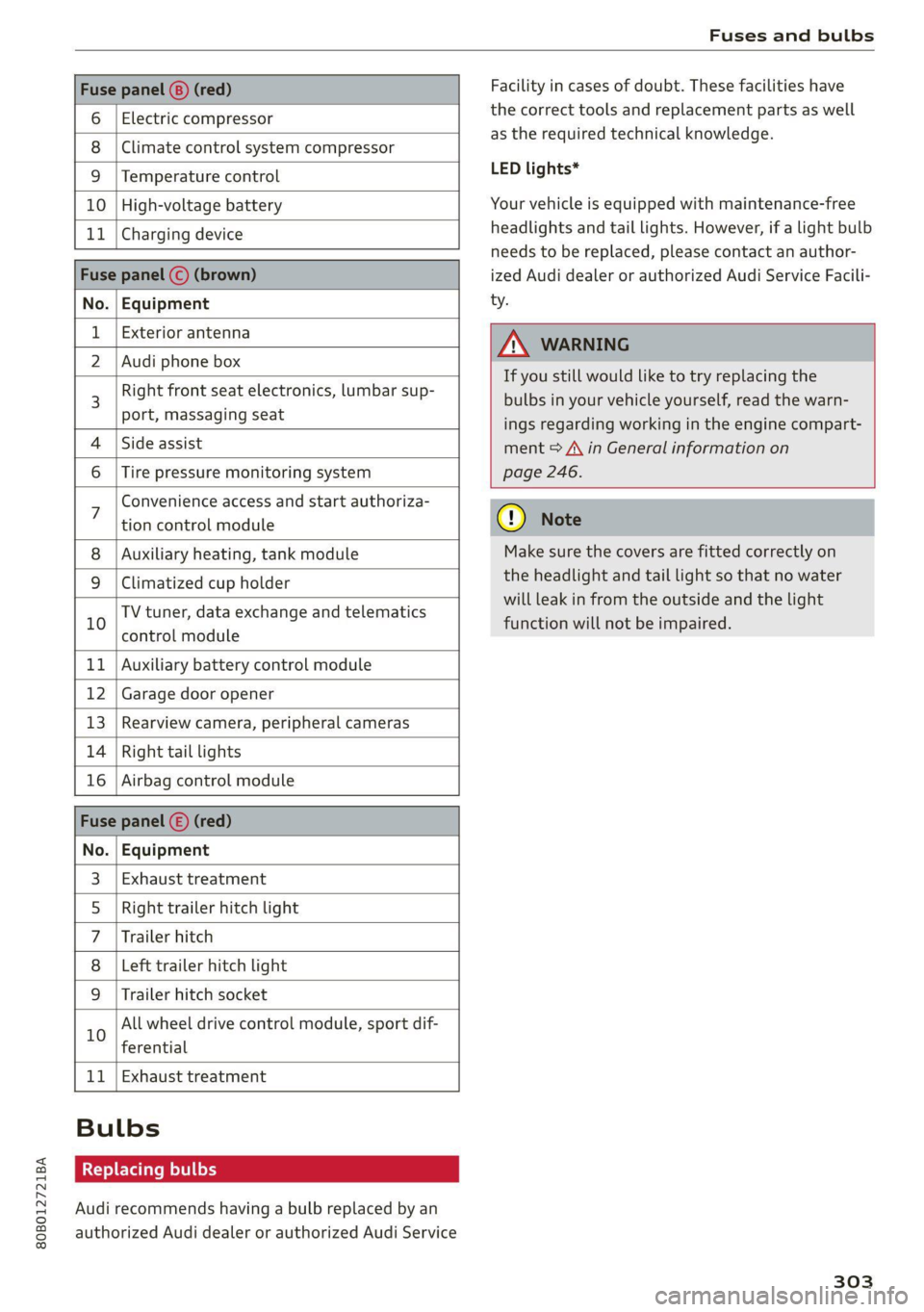
80B012721BA
Fuses and bulbs
Fuse panel (8) (red)
6 | Electric compressor
8 |Climate control system compressor
9 |Temperature control
10 | High-voltage battery
11 | Charging device
Fuse panel © (brown)
No. | Equipment
Exterior antenna
2 | Audi phone box
Right front seat electronics, lumbar sup-
port, massaging seat
4 |Side assist
6 | Tire pressure monitoring system
Facility in cases of doubt. These facilities have
the correct tools and replacement parts as well
as the required technical knowledge.
LED lights*
Your vehicle is equipped with maintenance-free
headlights and tail lights. However, if a light bulb
needs to be replaced, please contact an author-
ized Audi dealer or authorized Audi Service Facili-
ty.
Z\ WARNING
If you still would like to try replacing the
bulbs in your vehicle yourself, read the warn-
ings regarding working in the engine compart-
ment > A\ in General information on
page 246.
Convenience access and start authoriza-
tion control module
Auxiliary heating, tank module
9 |Climatized cup holder
TV tuner, data exchange and telematics
” control module
11 | Auxiliary battery control module
12 | Garage door opener
13 | Rearview camera, peripheral cameras
14 | Right tail lights
16 | Airbag control module
Fuse panel (£) (red)
No. | Equipment
Exhaust treatment
Right trailer hitch light
Trailer hitch
Left trailer hitch light
WO)
O;N]/
Mm|w
Trailer hitch socket
All wheel drive control module, sport dif-
10
ferential
11 | Exhaust treatment
Bulbs
Replacing bulbs
Audi recommends having a bulb replaced by an
authorized Audi dealer or authorized Audi Service
cy Note
Make sure the covers are fitted correctly on
the headlight and tail light so that no water
will leak in from the outside and the light
function will not be impaired.
303
Page 316 of 332
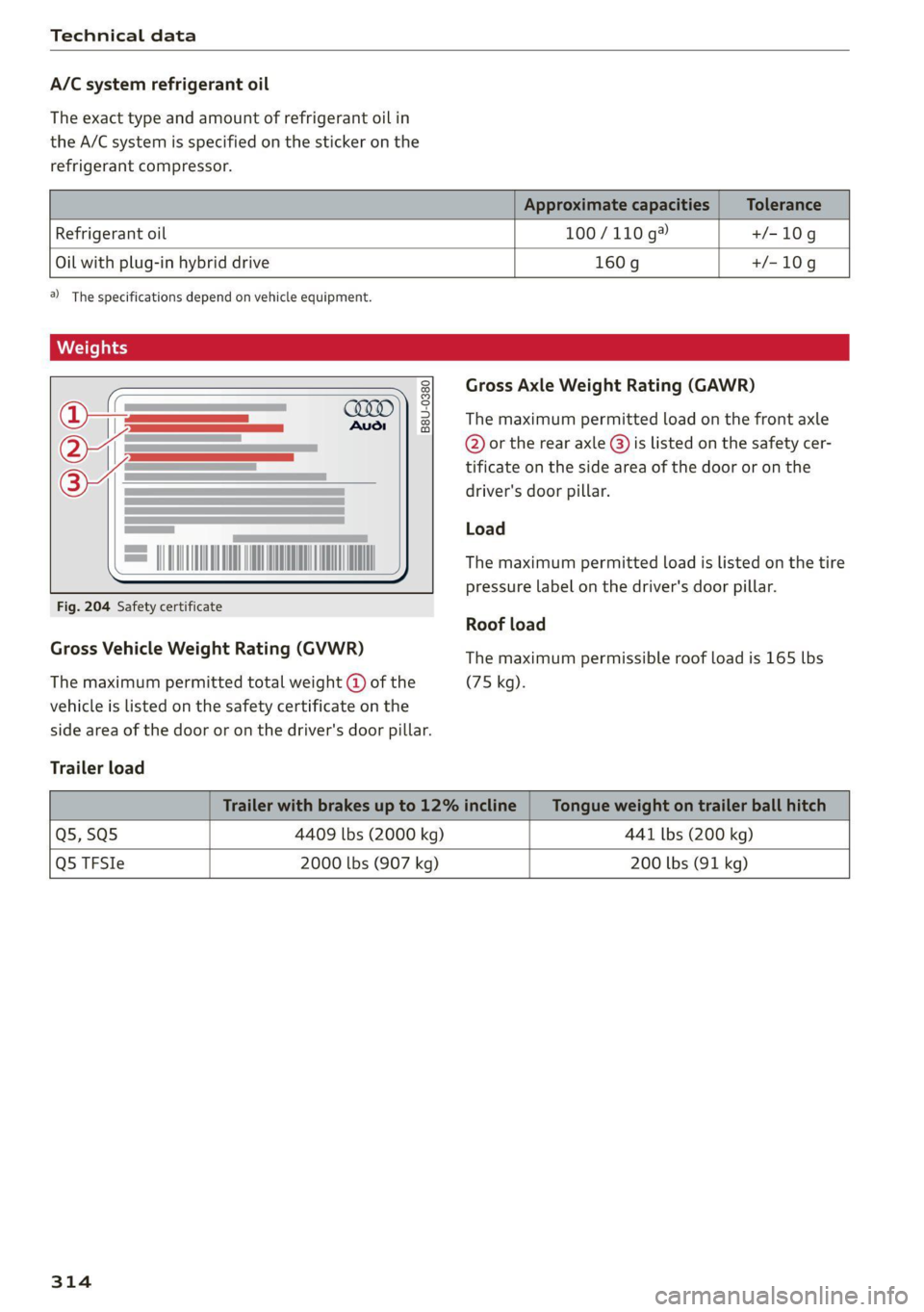
Technical data
A/C system refrigerant oil
The exact type and amount of refrigerant oil in
the A/C system is specified on the sticker on the
refrigerant compressor.
Refrigerant oil 100/110 g® +/-10g
Oil with plug-in hybrid drive
160g +/-10g
2) The specifications depend on vehicle equipment.
B8U-0380
= MINA AO
Fig. 204 Safety certificate
Gross Vehicle Weight Rating (GVWR)
The maximum permitted total weight @ of the
vehicle is listed on the safety certificate on the
side area of the door or on the driver's door pillar.
Trailer load
Gross Axle Weight Rating (GAWR)
The maximum permitted load on the front axle
@ or the rear axle @) is listed on the safety cer-
tificate on the side area of the door or on the
driver's door pillar.
Load
The maximum permitted load is listed on the tire
pressure label on the driver's door pillar.
Roof load
The maximum permissible roof load is 165 lbs
(75 kg).
Q5,SQ5 4409 lbs (2000 kg) 441 lbs (200 kg)
Q5 TFSIe 2000 lbs (907 kg)
200 lbs (91 kg)
314
Page 325 of 332

80B012721BA
Opening the charging port door.......... 125
Operating
Head-up display...............0000200. 26
Instrument cluster si. 6. sce a sees scene 13
Multifunction steering wheel............ 13
Multi Media Interface............... 18, 21
Text input.............0..0 002.020 24
Touch display: « = sess ss news 2s wees s opens 18
Voice recognition system............... 27:
Operating:mode’. « sisson x x eisww & eases eo erences 105
Optional equipment number............. 313
Options
Media. 2 sseioe wo stein wo cases oo enema oe © anetenus 231
Radio... eee eee eee eee 222
Outside noise. .... 6... 6. eee eee eee 107
Overview (cockpit) .......... 00. c cece eee ee 6
P
Paimbeodes, « a sense « senor 2 oneness @ = stenuie = oe 313)
Paint-damage’. « « secuis «a sxawera a seanave wo omsceis 284
PANIC BUttoMs. « asscea sc avis ae anise ew aoe 38,39.
Patti¢ FUNCLION + cas v « cams oo ews 2 x cow ae 38
Parioramic:glass roofs «wie ss caw x & eam a 46
Convenience opening and closing......... 46
Emergency closing.............0.000005 47
Quik Opening a: < s sees se sees s een 6s wes 47
ParkassiStass ss meee ¢ 5 ees s GR e Gam G 183
Parking
..... 0.00. cece cece ee eee eee 98
Parking aid... .. cece eee eee 174
Adjusting the volume...............-- 175
Automatic activation................0. 174
Cleaning the sensors/camera........... 283
Parkassist': sacs ¢ x seam = x seus & e aes ¢ 2 183
Parking aid plUS « saves & sions «2 ares & avers 174
Parking space search.................. 181
Peripheral cameras............-.00005 176
Rearview camera.........--..000-0 00 176
Trailereview’s « sovcese sw cauens oo susveme « senna 2 0 178
Parking and maneuvering.............-. 174
Parking brake
refer to Electromechanical parking brake. 111
Parking
lights. .......... 0... e eee eee eee 50
Parking lock
Manually releasing................0.. 103
also refer to Gears... eee eee eee 99
Partition Weta: << sees ¢ sees Fe ewe so RE 87
Pedal Stevi: «+ acenue eo emcee v anor ¥ ate we coe 101
Perchlorate’ « svc x «wwe ov nase ov wows < we 308
Peripheral cameras........0 see cee ences 176
Phone
Connecting a second mobile device...... 187
Disconnecting a mobile device.......... 188
SGttingS sac = s amie + HeeE Es ROE Fx SESE E 194
Phonebook
We fer tol DIreGtOry’s 2 sews 2 swan vv ere wos 191
PIN
A-digit MyAUdi PIN . wesc ee cee ee eae a ee 31
Protection................. 000.000 008 32
Playback (media) ............020200005. 227
Plug-in hybrid drive..............000005 104
Climate control... ... 2. eee eee eee eee 94
COOLANE seas 2 + cere + e aes ao we ¢ 253, 254
Powertmeter ies « 2 mses w x wmowee oo senate o 6 ate 15
Plug-in hybrid mode..............--000- 105
Podcast
refer to Online radio.............. 221, 222
BOLISHIDG cans x 2 cxceom so cmansus ¢ cestsm © weanstens = ¢ 284
Pollen filter
refer to Pollutant filter................. 91
Pollutant filter. .................0000008 91
POWER IMOECR*. sacwas « = cresune x m ames» a aamsens 6 ¥ ie 15
POWEr'SOULCeS'. « & siscns ae cess «seen a 82, 226
Power WindOWS.. 5 sews seuss eeu es ween ee 45
Malfunction... ....... 00... cee eee 45
Power windows malfunction.............. 45
Predictiveicomtrols + cscs © 2 wasn ae sense @ 2 sun 157
Predictive messages’: s wasws s eaea a ss 101, 153
pre sense
refer to Audi presense.............5.. 167
Presentation Mode... . 0.0... cece een eues 216
Presets
Radio... 2... ee eee eee eee 220
Presets list
refer to PresetS...... 0... cece eens 220
Pressure
Tire pressure monitoring system........ 279
TiN@Sis «+ wen 2s onsen 9 + eae oo eI o 6 saEEeS 271,
Profile picture « soc s sees ss wees ov eee sve 31
PROCECtING'x:: « = see 5 x seers 5 o eee oe ee ee 284
Pyrotechnic elements............-..005 308
323
Page 328 of 332
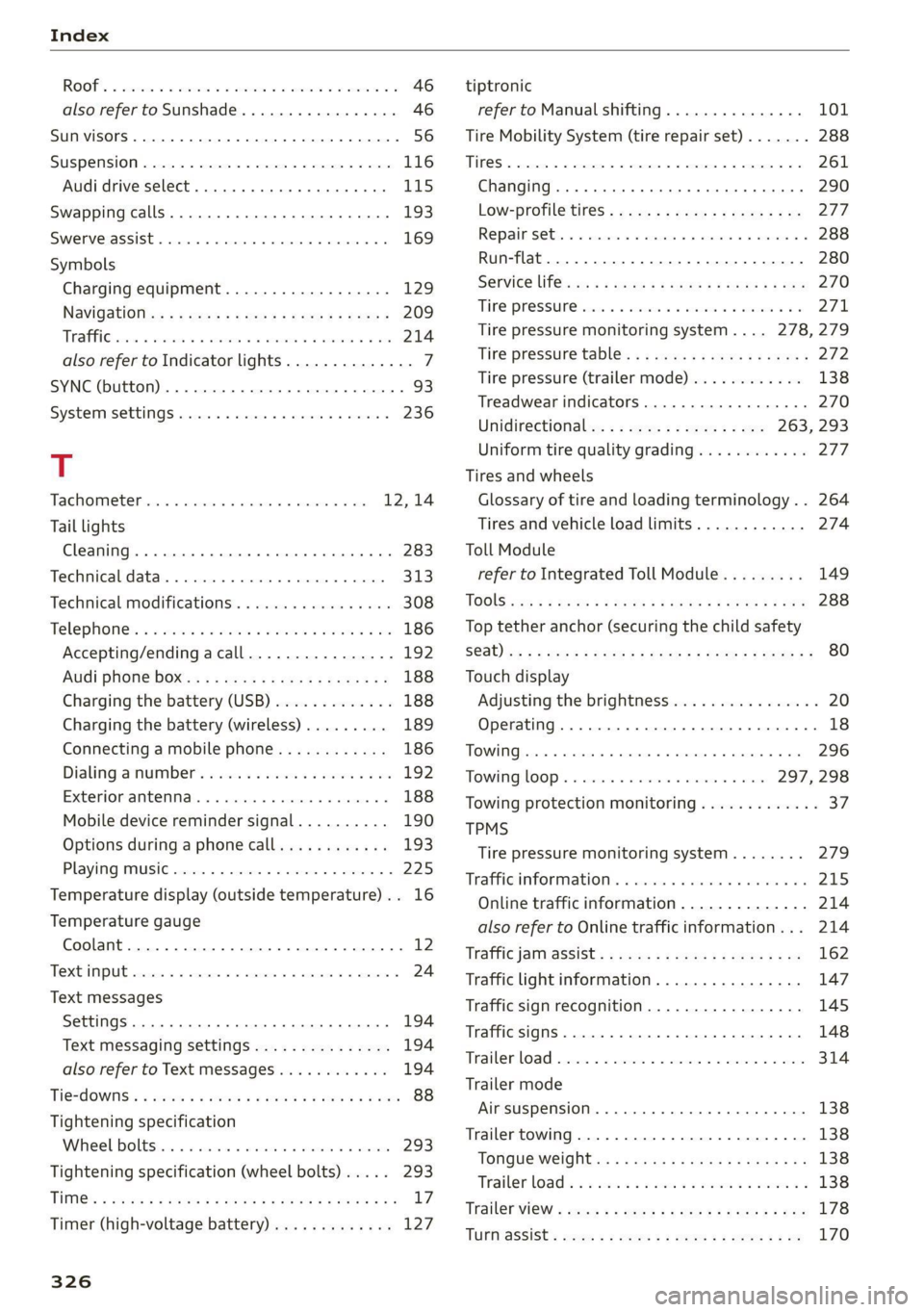
ROOF. = asec x avenue wo oewees o a awavi wo ame 46
also refer to Sunshade............-.04. 46
SUN VISOFS 2... eee eee 56
SUSPENSION s:csics x 0 exenem o> wm © 8 eR © «eee 116
Audi drive select. ..........ceeeee eee 115
Swapping calls...........0. 2. cee eee eee 193
Swerve assist... 0.00.00... cee eee eee 169
Symbols
Charging equipment.................. 129
NaVidatiOtie: « s sew 2 s eee + wees ee neem 5 209
TREE css x cman 4 x metas a x Kone we MRR 8 214
also refer to Indicator lights.............. 7
SYNC (button) ....................0.00005 93
SYSECIMMSEEEINGS siereroce » sswneze w 6 sswzers « & snowene 236
T
Tachometer........... 000 eee eee eae 12,14
Tail lights
Cleaning... .... eee eee eee eee 283
Techmicaldattar. . scausus x sexes « snanene oo sinses 313
Technical modifications ..........0..0005 308
Telephones ss sin <2 wimen 3 wm o orem a 3 a 186
Accepting/ending acall................ 192
Audi phone boxes « sssas cs esses ease eee 188
Charging the battery (USB)............. 188
Charging the battery (wireless) ......... 189
Connecting a mobile phone............ 186
Dialing anumber...............--.0.- 192
Exteriomamtenmas. . . cscs» 0 scene 6 a anni 0 6 188
Mobile device reminder signal.......... 190
Options during aphonecall............ 193
Playing music............ 0 0c 225
Temperature display (outside temperature) .. 16
Temperature gauge
Coolant...... 0.00.00... eee eee eee 12
TXCMPUIE cones 5 2 cmmccs # © oomeees 5 a mmeorane © mame 24
Text messages
SettingS .. 0.0... cece eee 194
Text messaging settings............6... 194
alsocreferto Text messages wo... 0% 0s vs 194
Tie=dOWiSis « seen + ¢ eeme ¢ 2 ews 2 2 wows 9 won 88
Tightening specification
Wheel Doltsiin oo sess w svavane to ivosiie a oniusne 293
Tightening specification (wheel bolts) .... . 293
TiM@s & cases x & sous & ears oo mews +o REIS eH 17
Timer (high-voltage battery)............. 127
326
tiptronic
refer to Manual shifting............... 101
Tire Mobility System (tire repair set)....... 288
THOS © crsscas we 6 worsen © wipcous © a seers oH cman © 261
Changing........ cece eee eee eee ee eee 290
Low-profile tires..............2--004- 277
Re pail S@t:. © = cnecsis © « senses» o ssssene © ¥ sesvenw © 288
Run-flat.. 0... eee ee 280
SERVICE lifsies = = acme 5 = seme se HOS 3c RE 270
THRE PFOSSUNC xis 6 & sissese s & sree @ & oto 6 5 271,
Tire pressure monitoring system.... 278,279
Tire pressure table..........00..2e0 ee 272
Tire pressure (trailer mode)............ 138
Treadwear indicators...............00. 270
Unidirectional; = 2 sae. ¢ e sees zs es 263, 293
Uniform tire quality grading............ 277
Tires and wheels
Glossary of tire and loading terminology... 264
Tires and vehicle load limits............ 274
Toll Module
refer to Integrated Toll Module......... 149
TOOIS css s & ease = & a0 5b cet & 2 Set Fd eS 288
Top tether anchor (securing the child safety
Sab) ioc : 2 woes s Rees gs meee Gof Hane o ZR 80
Touch display
Adjusting the brightness................ 20
Operating. ........ 0. cece eee eee eee 18
TOWING... eee ce ee eee 296
TowinglOop’s i ima + svenewive + nraueas 1 6 aves 297, 298
Towing protection monitoring............. 37
TPMS
Tire pressure monitoring system........ 279
Trafficinformations. « snes «sess « ¥ anvee vos 215
Online traffic information.............. 214
also refer to Online traffic information... 214
Traffic janmassist’s + ensue = : sows 2 meee 8 ew 162
Traffic light information................ 147
Traffic sign recognition................. 145
Traffic SignS.. 66... eee eee eee 148
Trailer load... 2... eee eee eee 314
Trailer mode
Air suspension...........00.00e ee eee 138
Trailer towing.................000 ee eee 138
Tongue weight.............eeeeeeeeee 138
Trailer load « = = sews s wean a 2 wena a 5 wees oo 138
TrailerView « ess = + mews 2s eee ge feee ee pes 178
TUPMaSSiSts sous x ¢ em sy eee & EE & 2 170