park assist AUDI Q5 2021 Owner´s Manual
[x] Cancel search | Manufacturer: AUDI, Model Year: 2021, Model line: Q5, Model: AUDI Q5 2021Pages: 332, PDF Size: 118.86 MB
Page 5 of 332
80B012721BA
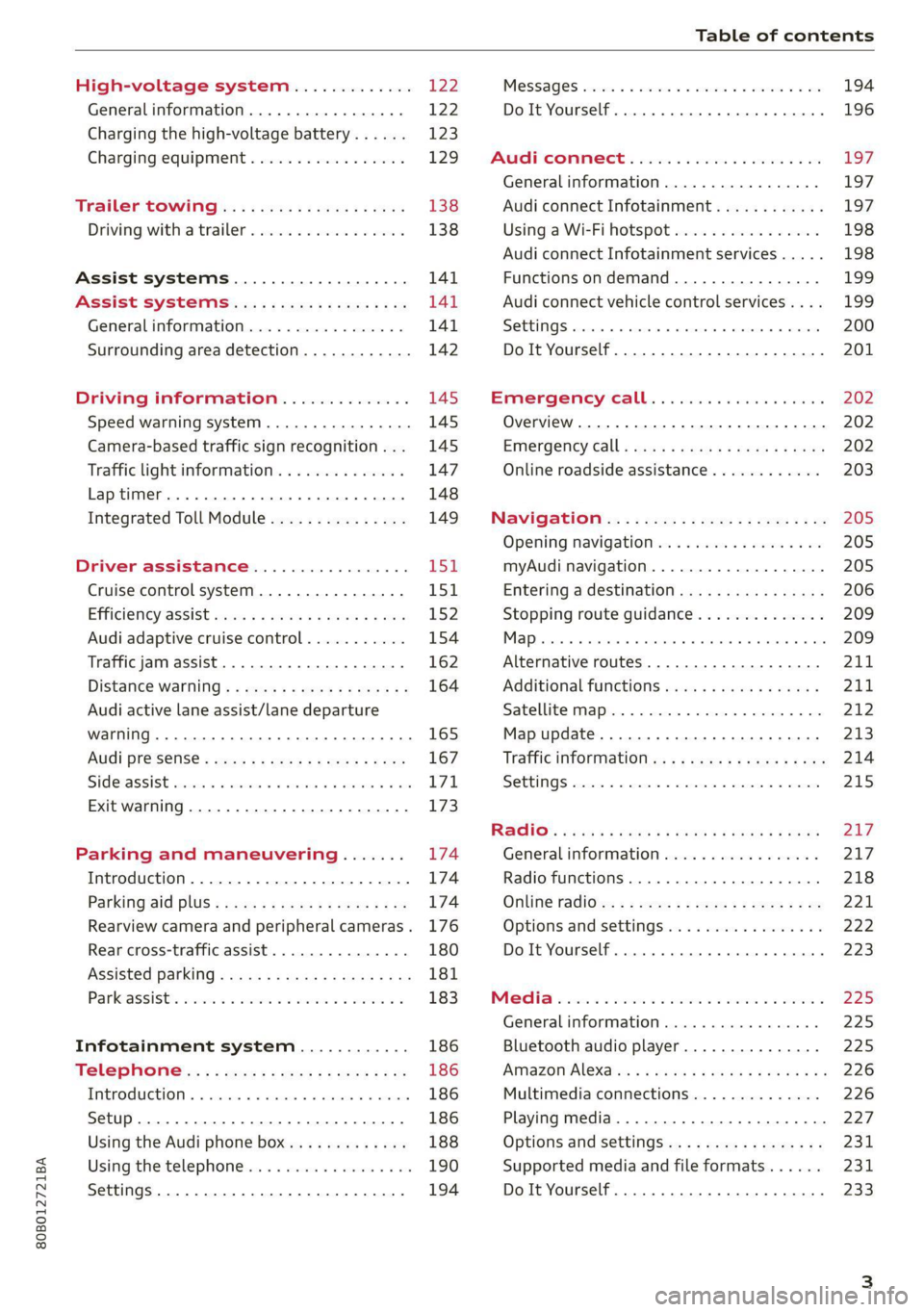
Table of contents
High-voltage system............. 122
Generalinformation................. 122
Charging the high-voltage battery...... 123
Charging equipment................. 129
Trailer ROwilne is «i wows «seas gs eeees 138
Driving witha trailer................. 138
Assist systems................... 141
ASSIST SYSTCINIS§ 65 6 i onws 5 can so oe 141
General information................. 141
Surrounding area detection............ 142
Driving information.............. 145
Speed warning system................ 145
Camera-based traffic sign recognition... 145
Traffic light information.............. 147
Laptimer..... 0.2... cee eee eee eee 148
Integrated Toll Module............... 149
DriVeEraSSISTAMGES .. 6. cies me oon 151
Cruise control system.............0-. 151
Efficiency @SSISl cass ¢ & news ¢ v wees as nwa 152
Audi adaptive cruise control........... 154
Traffic jam assist... 6.0.0... cee eee ee 162
Distance warning ..............00.08. 164
Audi active lane assist/lane departure
WarNing .... 22... eee ec 165
Audi presense...........--.0 eee eee 167
SIGEASSISE vce ow sani © seunie wv ree 6 8 ae T71,
Exit warning .................0.0000. 173
Parking and maneuvering....... 174
Introduction. ............ 2. eee eee eee 174
Parking aid DlUS ¢ cows ss news se mews sane 174
Rearview camera and peripheral cameras. 176
Rear cross-traffic assist............... 180
Assisted parking..............000e00- 181
Parkeassistts ew 2 omnom 2 2 anwon w 2 avons 6 ¢ 183
Infotainment system............ 186
Telephone..................-0-055 186
TEROGUCLION « « sccoane a woness o 0 varaim + vi nee 186
Setup ..... 0... cee eee ee eee eee 186
Using the Audi phone box............. 188
Using the telephone..........0.0. 000 190
Settings...............0 0000000000. 194
MeSSaQeS essscns sa cavswce ww amuses vo someone vw oe 194
Do It Yourself... 2... eee eee eee 196
AUP CONNECE « 6:65. 6 ev ee ews se os 197
General information................. 197
Audi connect Infotainment............ 197
Using a Wi-Fi hotspot................ 198
Audi connect Infotainment services..... 198
Functions on demand................ 199
Audi connect vehicle control services.... 199
SOTUIAGS cecssin « ws oseuwnn & prresenwin m iovewene @ n sexe 200
Do It Yourself. ...... 0.0... eee eee 201
EMErGéency CALL. . « ccc cs ses een 202
Overview... .... 2... eee eee ee 202
Emergency Call + wsws < nau 9 = seep 2 aOR 202
Online roadside assistance............ 203
Navigation’... « : ssc: <: soos ss eins ees 205
Opening navigation.................. 205
myAudi navigation.................0. 205
Entering adestination................ 206
Stopping route guidance.............. 209
1) on 209
Alternative routes.............2.-04. 211
Additional functions...............-. 211
Satellite map............... 0. eee 212
Map update................0.000 005 213
Traffic information...............0005 214
SettINGS cee: oo weaves © crerenee © wveeee = ese 215
Raqio:: « esc ss news se eee se eee 2 x BOS 217
General
information................. 217
Radio functions...............00000) 218
Online radio's: ss sees se eees a eee ve oe 221
Options and settingsion ss mew s 6 sows a vs 222
Do It Yourself. ........ cece eee eee 223
Mela wise: 2 2 were se were se mere se ween 2 225
Generalinformation................. 225
Bluetooth audio player............... 225
AiMaZOniAleXaion « = wisee 5 ¢ wavs a wove 4 @ 226
Multimedia connections.............. 226
Playing media...............2.20000- 227
Options and settings................. 231
Supported media and file formats...... 231
Do It Yourself. ......... 0.0... e eee eee 233
Page 8 of 332
Quick access
Quick access
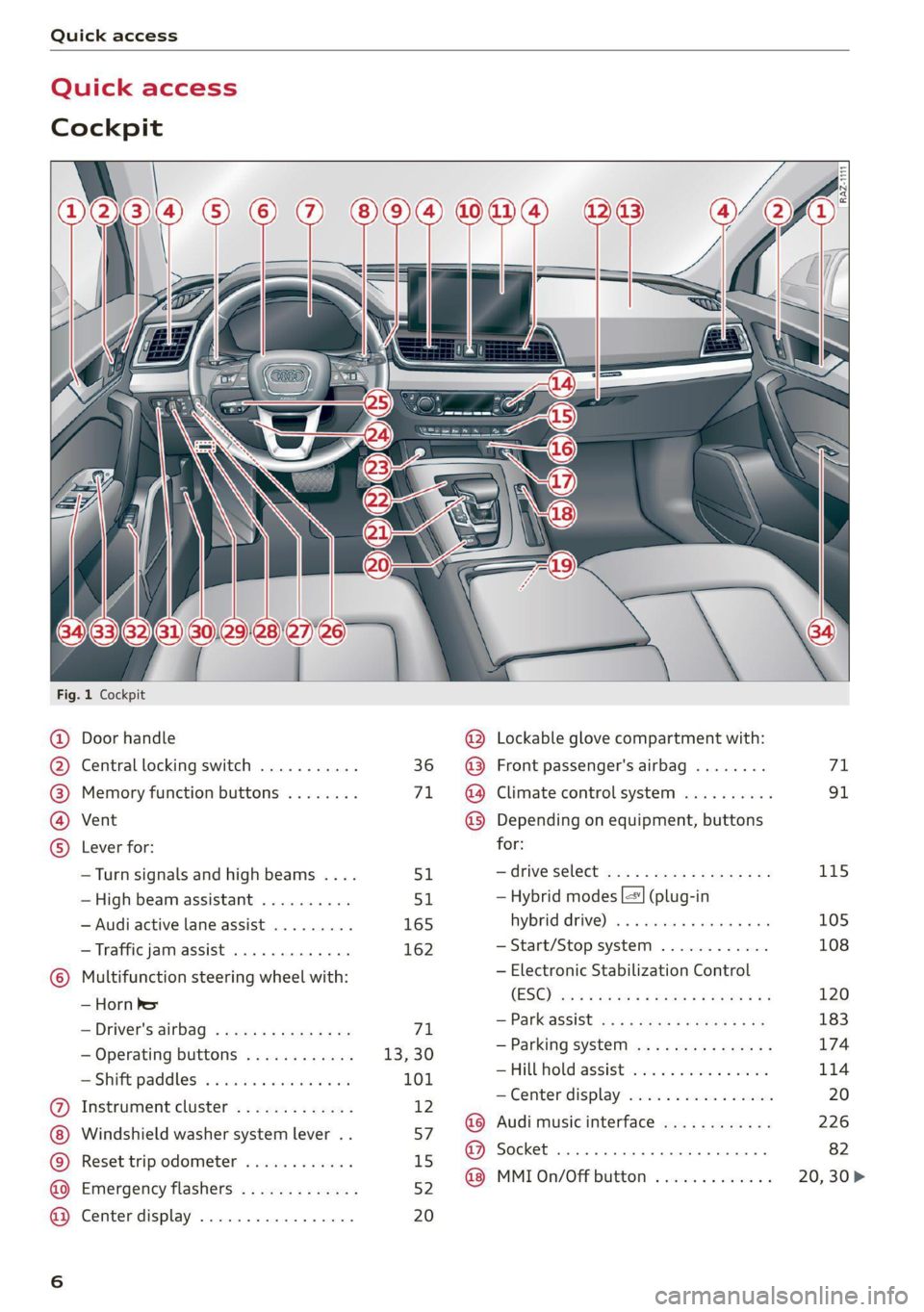
Cockpit
Fig. 1 Cockpit
@ @ @ @ ©
©
OOOO
Door handle
Central locking switch ...........
Memory function buttons ........
Vent
Lever for:
—Turn signals and high beams ....
—High beam assistant ..........
— Audi active lane assist .........
— Traffic jam assist .............
Multifunction steering wheel with:
— Horn be
— Driver's airbag ...............
— Operating buttons ............
= Shift paddles: « « coi e ewes sv ove
Instrument cluster .............
Windshield washer system lever ..
Reset trip odometer ............
Emergency flashers .............
Center display .................
51
165 162
71
13,30
101
12
57
15
52
20
@ Lockable glove compartment with:
@ Front passenger's airbag ........
@ Climate control system ..........
@ Depending on equipment, buttons
for:
—drive select ...............0..
— Hybrid modes |=] (plug-in
hybrid drive) ss i scsi ov sven 6 oa
— Start/Stop system ............
— Electronic Stabilization Control
(ESO) ca ss wuss 5 4 Hema a i eos a ee
— Parkeassist ws 3 ¢ avo » x eeay a y me
— Parking system ...............
Hill Hold assist ves: es sseose. 2 animes
—Center display .............00.
@ Audi music interface ............
@ Socket ......... 0... c eee eee
@ MMI On/Off button .............
115 105 108 120
183
174
114
Page 10 of 332
Quick access
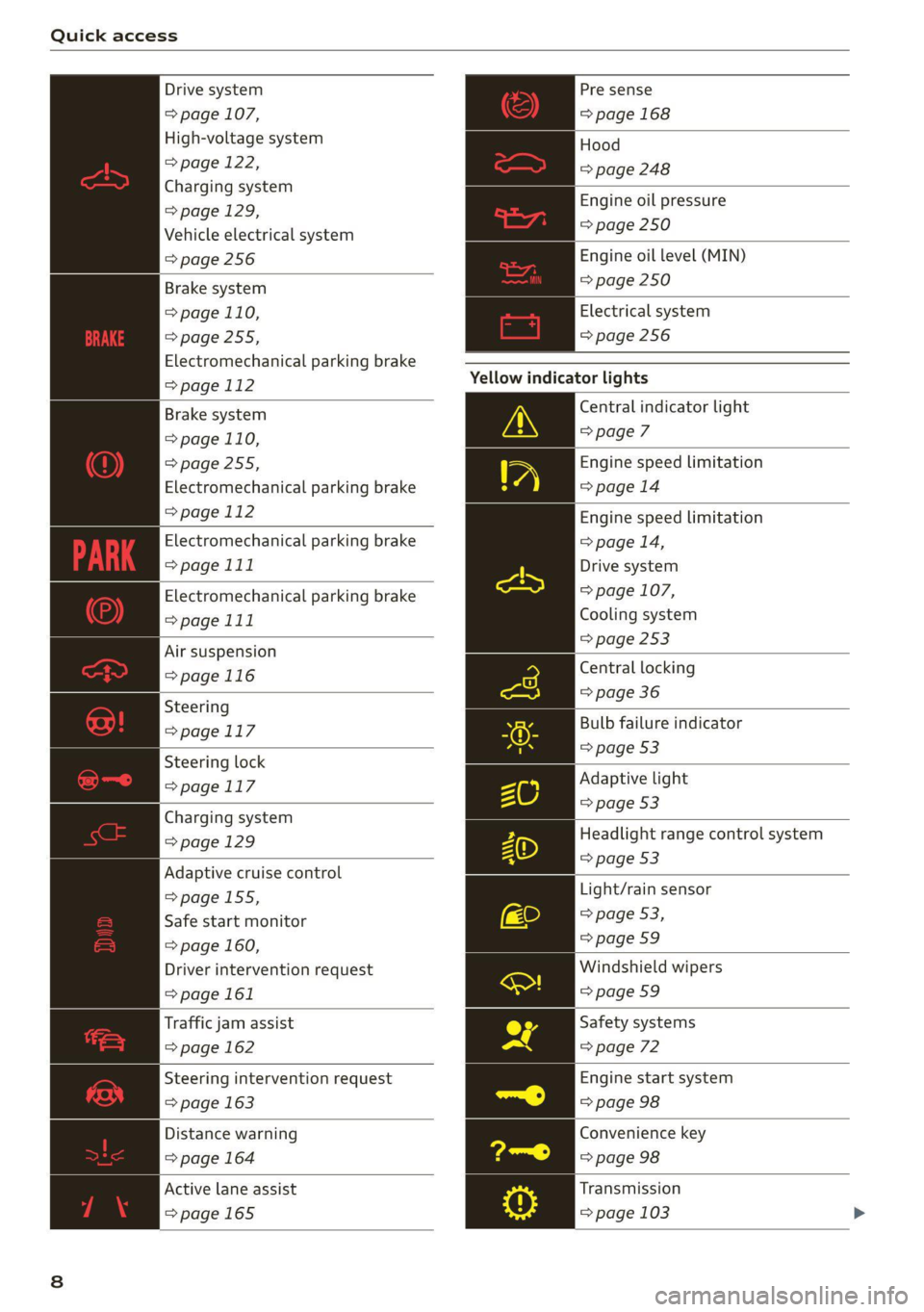
Drive system
=> page 107,
High-voltage system
> page 122,
Charging system
=>page 129,
Vehicle electrical system
=> page 256
Brake system
=> page 110,
=>page 255,
Electromechanical parking brake
=>page 112
Brake system
=> page 110,
=>page 255,
Electromechanical parking brake
=>page 112
Electromechanical parking brake
=>page 111
Electromechanical parking brake
= page 111
Air suspension
=>page 116
Steering
> page 117
Steering lock
=>page 117
Charging system
=> page 129
Adaptive cruise control
>page 155,
Safe start monitor
=> page 160,
Driver intervention request
> page 161
Traffic jam assist
=> page 162
Steering intervention request
=> page 163
Distance warning
=>page 164
Active lane assist
=>page 165
Pre sense
=> page 168
Hood
=> page 248
Engine oil pressure
=> page 250
Engine oil level (MIN)
=> page 250
Electrical system
=> page 256
Yellow indicator lights
Central indicator light
> page 7
Engine speed limitation
=>page 14
Engine speed limitation
> page 14,
Drive system
= page 107,
Cooling system
=> page 253
Central locking
=> page 36
Bulb failure indicator
=> page 53
Adaptive light
=> page 53
Headlight range control system
=> page 53
Light/rain sensor
> page 53,
=>page 59
Windshield wipers
=> page 59
Safety systems
=> page 72
Engine start system
=> page 98
Convenience key
=> page 98
Transmission
= page 103
Page 11 of 332
80B012721BA
Quick access
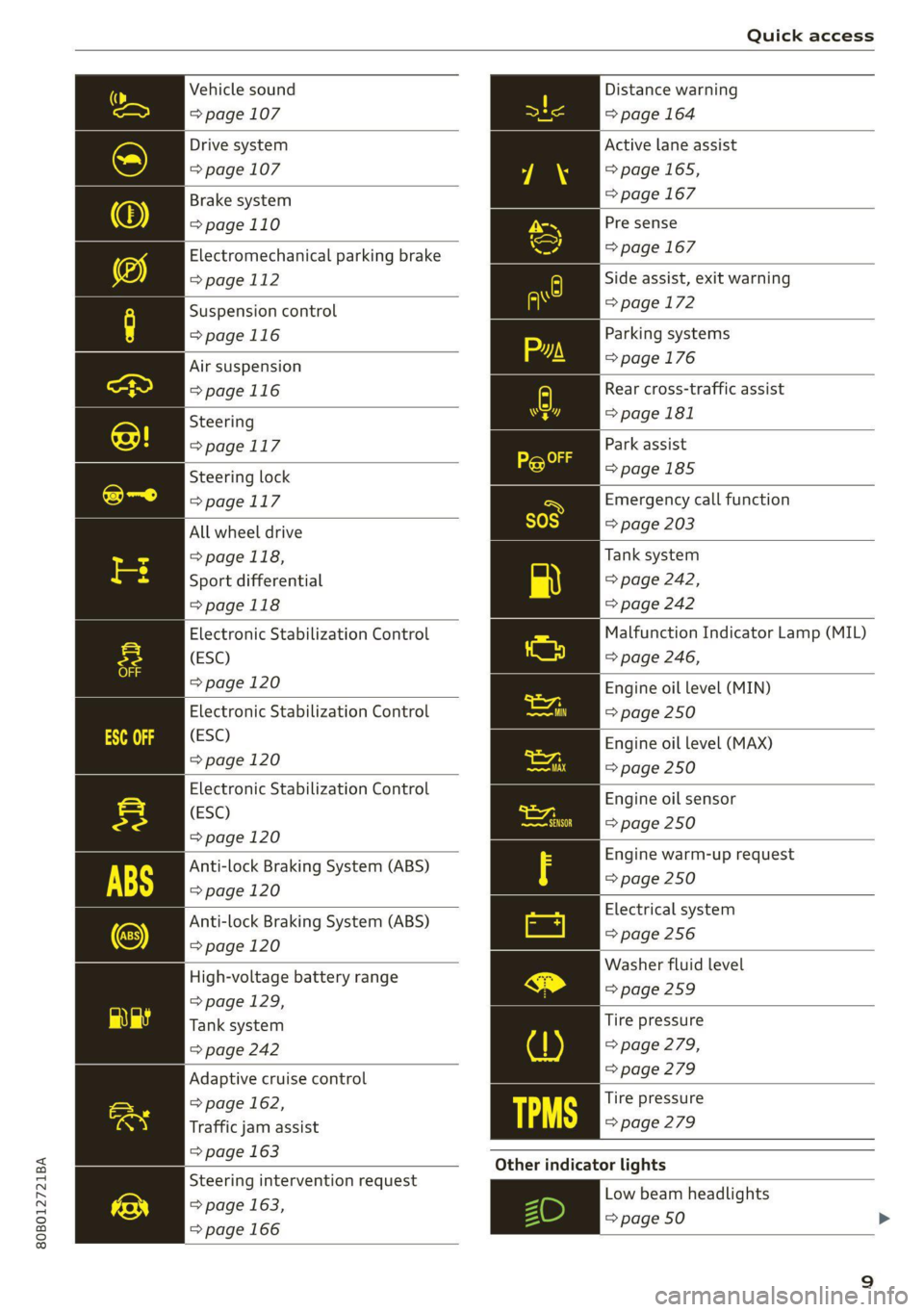
Vehicle sound
=> page 107
Drive system
=> page 107
Brake system
=>page 110
Electromechanical parking brake
=> page 112
Suspension control
=>page 116
Air suspension
=>page 116
Steering
>page 117
Steering lock
=> page 117
All wheel drive
> page 118,
Sport differential
=>page 118
Electronic Stabilization Control
(ESC)
=> page 120
Electronic Stabilization Control
(ESC)
=> page 120
Electronic Stabilization Control
(ESC)
=> page 120
Anti-lock Braking System (ABS)
=> page 120
Anti-lock Braking System (ABS)
=> page 120
High-voltage battery range
=>page 129,
Tank system
=> page 242
Adaptive cruise control
=> page 162,
Traffic jam assist
=> page 163
Steering intervention request
=> page 163,
=> page 166
Distance warning
=> page 164
Active lane assist
=>page 165,
= page 167
Pre sense
=> page 167
Side assist, exit warning
=>page 172
Parking systems
=>page 176
Rear cross-traffic assist
=> page 181
Park assist
=>page 185
Emergency call function
=> page 203
Tank system
=> page 242,
=> page 242
Malfunction Indicator Lamp (MIL)
=> page 246,
Engine oil level (MIN)
=> page 250
Engine oil level (MAX)
=> page 250
Engine oil sensor
=> page 250
Engine warm-up request
=> page 250
Electrical system
=> page 256
Washer fluid level
=>page 259
Tire pressure
=> page 279,
=> page 279
Tire pressure
=> page 279
Other indicator lights
Low beam headlights
=> page 50 >
9
Page 12 of 332
Quick access
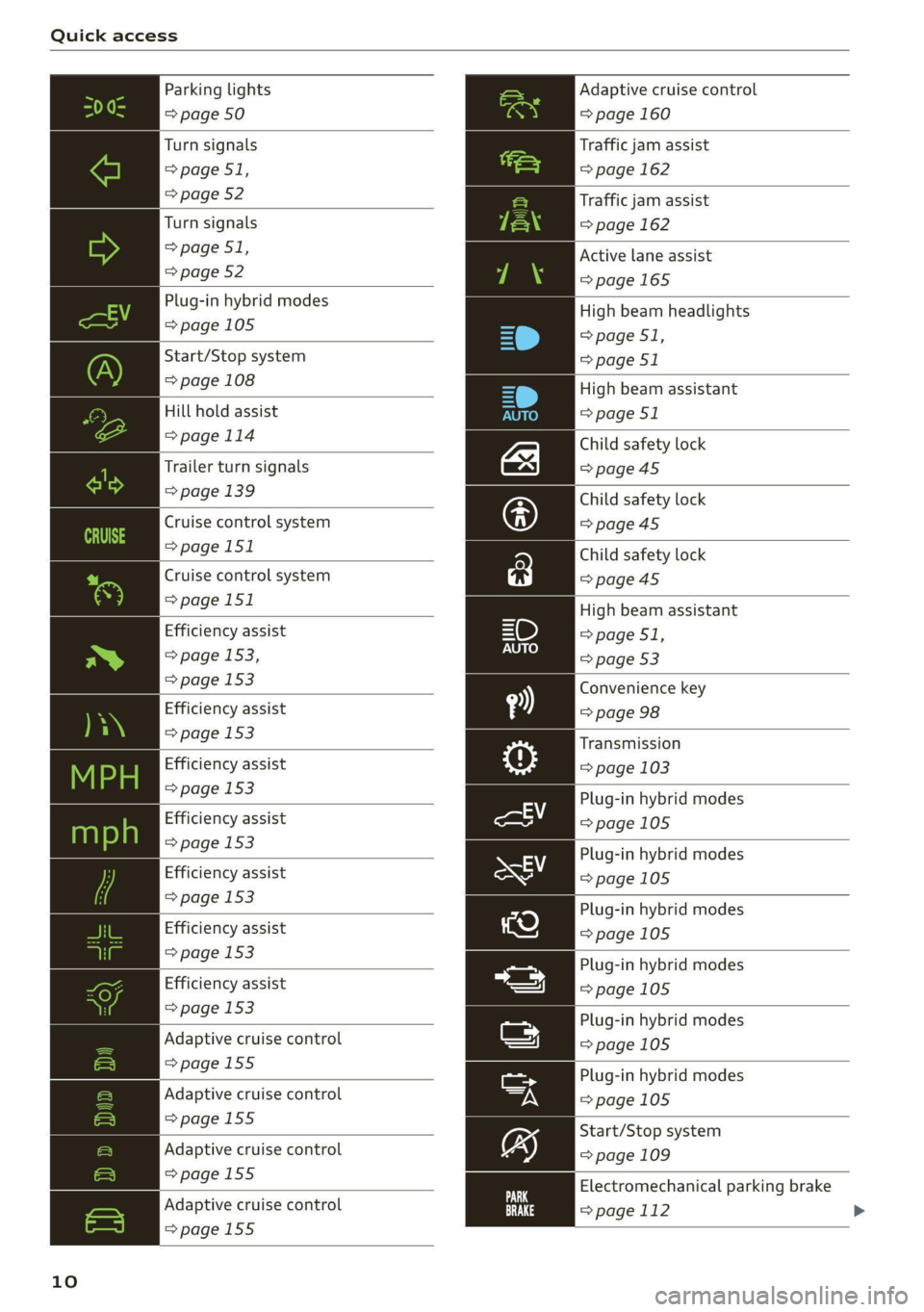
Parking lights
=> page 50
Turn signals
> page 51,
=> page 52
Turn signals
>page 51,
=> page 52
Plug-in hybrid modes
=>page 105
Start/Stop system
=> page 108
Hill hold assist
>page 114
Trailer turn signals
=> page 139
Cruise control system
=>page
151
Cruise control system
>page 151
Efficiency assist
=> page 153,
=> page 153
Efficiency assist
=> page 153
Efficiency assist
re => page 153
Efficiency assist
ou => page 153
Efficiency assist
=> page 153
Efficiency assist
=> page 153
Efficiency assist
=> page 153
Adaptive cruise control
=>page 155
Adaptive cruise control
=>page 155
Adaptive cruise control
>page 155
Adaptive cruise control
=>page 155
10
Adaptive cruise control
=> page 160
Traffic jam assist
=> page 162
Traffic jam assist
=> page 162
Active lane assist
=>page 165
High beam headlights
=> page 51,
=> page 51
High beam assistant
> page 51
Child safety lock
=>page 45
Child safety lock
>page 45
Child safety lock
=>page 45
High beam assistant
=>page 51,
=> page 53
Convenience key
=> page 98
Transmission
=> page 103
Plug-in hybrid modes
=>page 105
Plug-in hybrid modes
=>page 105
Plug-in hybrid modes
=>page 105
Plug-in hybrid modes
=>page 105
Plug-in hybrid modes
=>page 105
Plug-in hybrid modes
=>page 105
Start/Stop system
=> page 109
Electromechanical parking brake
=> page 112 >
Page 13 of 332
80B012721BA
Quick access
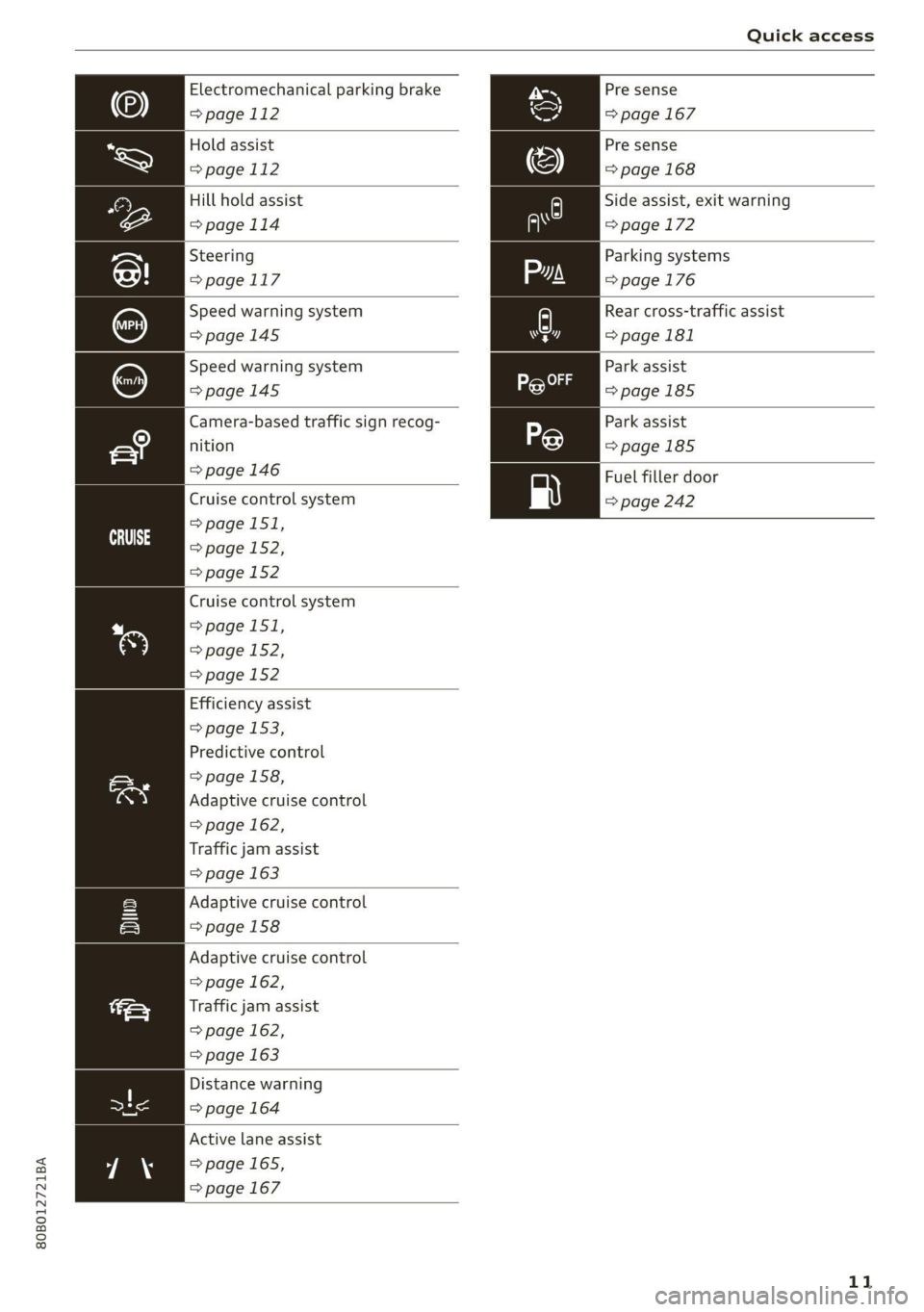
Pre sense
=> page 167
Electromechanical parking brake
=>page 112
Pre sense
=>page 168
Hold assist
=>page 112
Hill hold assist
=>page 114
Side assist, exit warning
=> page 172
Steering
=> page 117
Parking systems
=>page 176
Rear cross-traffic assist
> page 181
Speed warning system
=>page 145
Park assist
=>page 185
Speed warning system
=>page 145
Park assist
=>page 185
Fuel filler door
=> page 242
Camera-based traffic sign recog-
nition
=> page 146
Cruise control system
> page 151,
=> page 152,
=> page 152
eit
Cruise control system
> page 151,
=> page 152,
=> page 152
Efficiency assist
> page 153,
Predictive control
=> page 158,
Adaptive cruise control
=> page 162,
Traffic jam assist
=> page 163
Adaptive cruise control
>page 158
Adaptive cruise control
=> page 162,
rae Traffic jam assist
=> page 162,
=> page 163
Distance warning
=> page 164
Active lane assist
=> page 165,
=> page 167
11
Page 29 of 332
80B012721BA
Voice recognition system
Voice recognition system
General information
Applies to: vehicles with voice recognition system
You can operate many functions in the vehicle
easily using voice commands.
Using the voice recognition system optimally
> Speak clearly and distinctly at a normal volume.
Speak louder when driving faster.
» Emphasize the words in the commands evenly
and do not leave long pauses.
> Close the doors, the windows, and the sunroof*
to reduce background noise. Make sure that
passengers are not speaking when you are giv-
ing a voice command.
> Do not direct the vents toward the hands-free
microphone, which is in the roof headliner near
the front interior lights.
> Only the driver should speak to the system, be-
cause the handsfree microphone is aimed to-
ward this seating position.
ZA\ WARNING
— Direct your full attention to driving. As the
driver, you have complete responsibility for
safety in traffic. Only use the functions in
such a way that you always maintain com-
plete control over your vehicle in all traffic
situations.
— Do not use the voice recognition system in
emergencies because your voice may change
in stressful situations. The system may take
longer to dial the number or may not be
able to dial it at all. Dial the emergency
number manually.
G) Tips
There are no voice guidance* prompts when a
dialog is active.
Description
eye aU mame ees eR
Applies to: vehicles with voice recognition system
Se
Drive me to
Where is a a
Connect
Pre)
Play
Eg
Maes
coy
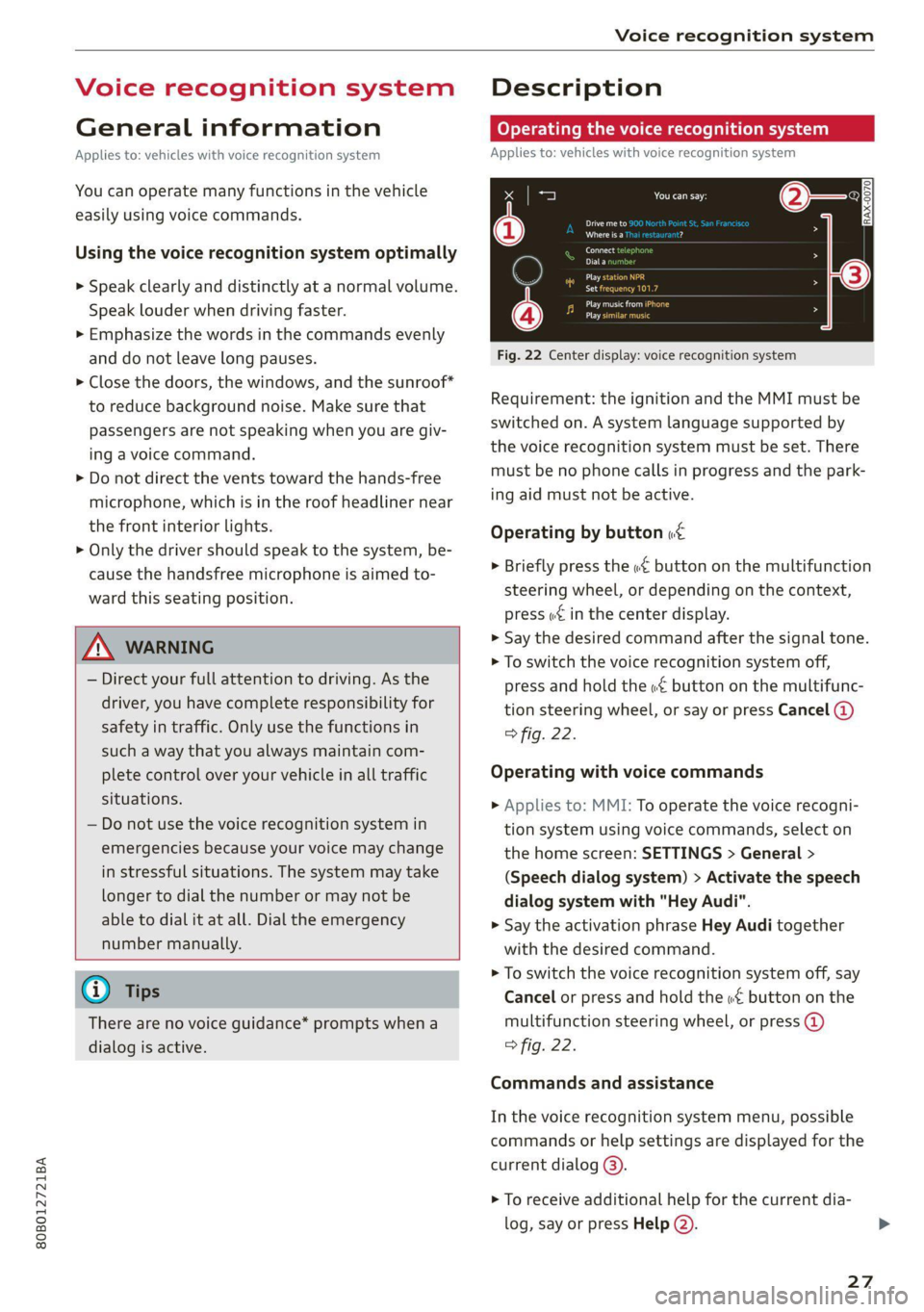
Fig. 22 Center display: voice recognition system
Requirement: the ignition and the MMI must be
switched on. A system language supported by
the voice recognition system must be set. There
must be no phone calls in progress and the park-
ing aid must not be active.
Operating by button «£
> Briefly press the «€ button on the multifunction
steering wheel, or depending on the context,
press we in the center display.
> Say the desired command after the signal tone.
> To switch the voice recognition system off,
press and hold the «€ button on the multifunc-
tion steering wheel, or say or press Cancel (@)
> fig. 22.
Operating with voice commands
> Applies to: MMI: To operate the voice recogni-
tion system using voice commands, select on
the home screen: SETTINGS > General >
(Speech dialog system) > Activate the speech
dialog system with "Hey Audi".
> Say the activation phrase Hey Audi together
with the desired command.
> To switch the voice recognition system off, say
Cancel or press and hold the «£ button on the
multifunction steering wheel, or press @)
> fig. 22.
Commands and assistance
In the voice recognition system menu, possible
commands or help settings are displayed for the
current dialog @).
> To receive additional help for the current dia-
log, say or press Help (2).
27
Page 52 of 332
Lights and Vision
Lights and Vision
Exterior lighting
Switching the lights on and off
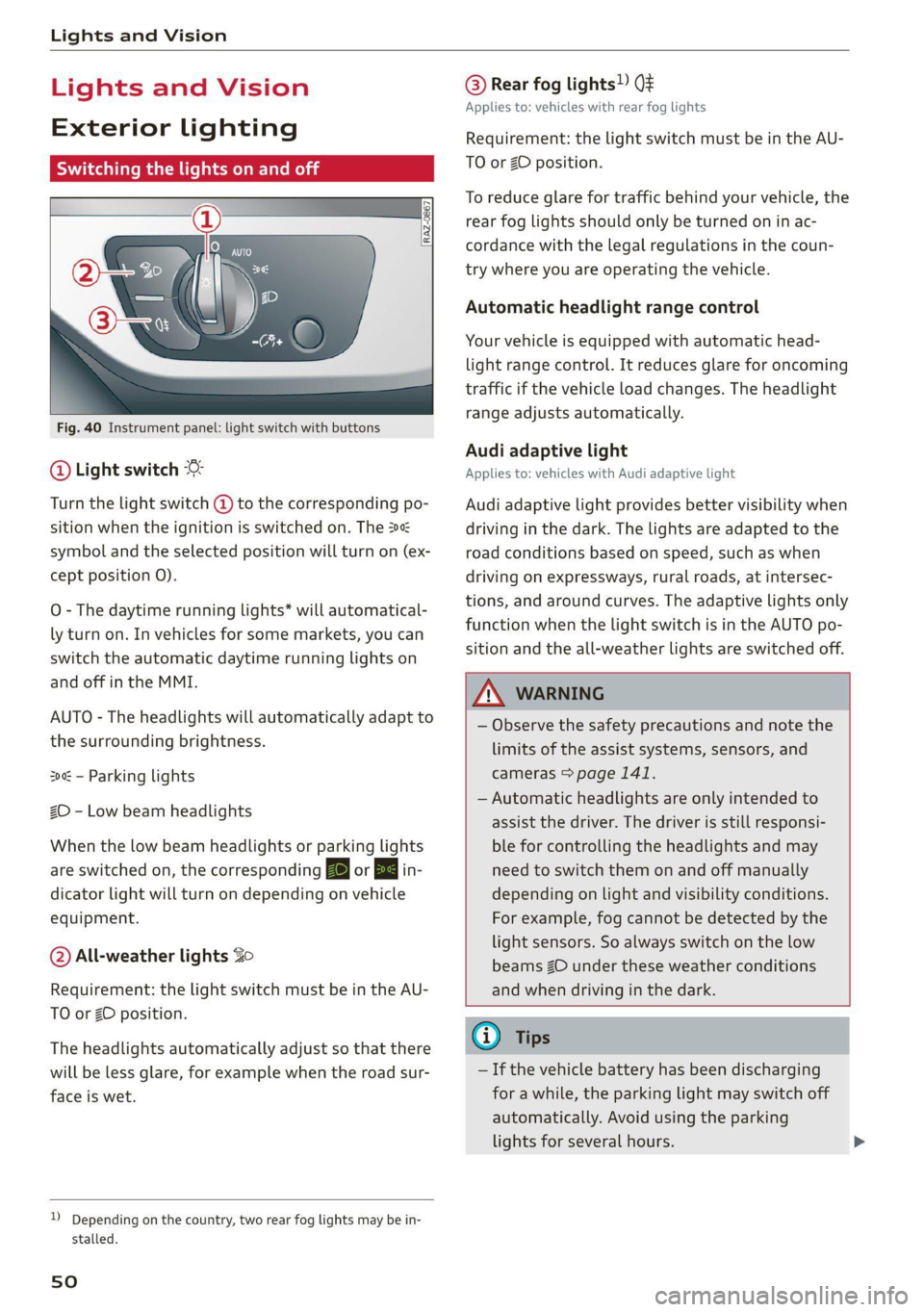
Fig. 40 Instrument panel: light switch with buttons
@ Light switch &
Turn the light switch @ to the corresponding po-
sition when the ignition is switched on. The 2
symbol and the selected position will turn on (ex-
cept position 0).
O - The daytime running lights* will automatical-
ly turn on. In vehicles for some markets, you can
switch the automatic daytime running lights on
and off in the MMI.
AUTO - The headlights will automatically adapt to
the surrounding brightness.
300: — Parking lights
2D - Low beam headlights
When the low beam headlights or parking lights
are switched on, the corresponding BB or 200 in-
dicator light will turn on depending on vehicle
equipment.
@ All-weather lights Zo
Requirement: the light switch must be in the AU-
TO or ZO position.
The headlights automatically adjust so that there
will be less glare, for example when the road sur-
face is wet.
D_ Depending on the country, two rear fog lights may be in-
stalled.
sO
@ Rear fog lights!) Qt
Applies to: vehicles with rear fog lights
Requirement: the light switch must be in the AU-
TO or ZO position.
To reduce glare for traffic behind your vehicle, the
rear fog lights should only be turned on in ac-
cordance with the legal regulations in the coun-
try where you are operating the vehicle.
Automatic headlight range control
Your vehicle is equipped with automatic head-
light range control. It reduces glare for oncoming
traffic if the vehicle load changes. The headlight
range adjusts automatically.
Audi adaptive light
Applies to: vehicles with Audi adaptive light
Audi adaptive light provides better visibility when
driving in the dark. The lights are adapted to the
road conditions based on speed, such as when
driving on expressways, rural roads, at intersec-
tions, and around curves. The adaptive lights only
function when the light switch is in the AUTO po-
sition and the all-weather lights are switched off.
A WARNING
— Observe the safety precautions and note the
limits of the assist systems, sensors, and
cameras > page 141.
— Automatic headlights are only intended to
assist the driver. The driver is still responsi-
ble for controlling the headlights and may
need to switch them on and off manually
depending on light and visibility conditions.
For example, fog cannot be detected by the
light sensors. So always switch on the low
beams ZO under these weather conditions
and when driving in the dark.
@ Tips
— If the vehicle battery has been discharging
for a while, the parking light may switch off
automatically. Avoid using the parking
lights for several hours.
Page 53 of 332
80B012721BA
Lights and Vision
— When using lighting equipment, the driver
is responsible for adhering to any local ap-
plicable regulations while driving and when
parking the vehicle.
— Only the front headlights turn on when the
daytime running lights are switched on*. In
vehicles in certain markets, the tail lights
will also turn on.
—Incool or damp weather, the inside of the
headlights, turn signals, and tail lights can
fog over due to the temperature difference
between the inside and outside. They will
clear shortly after switching them on. This
does not affect the service life of the light-
ing.
Turn signal and high beam lever
BFV-0012
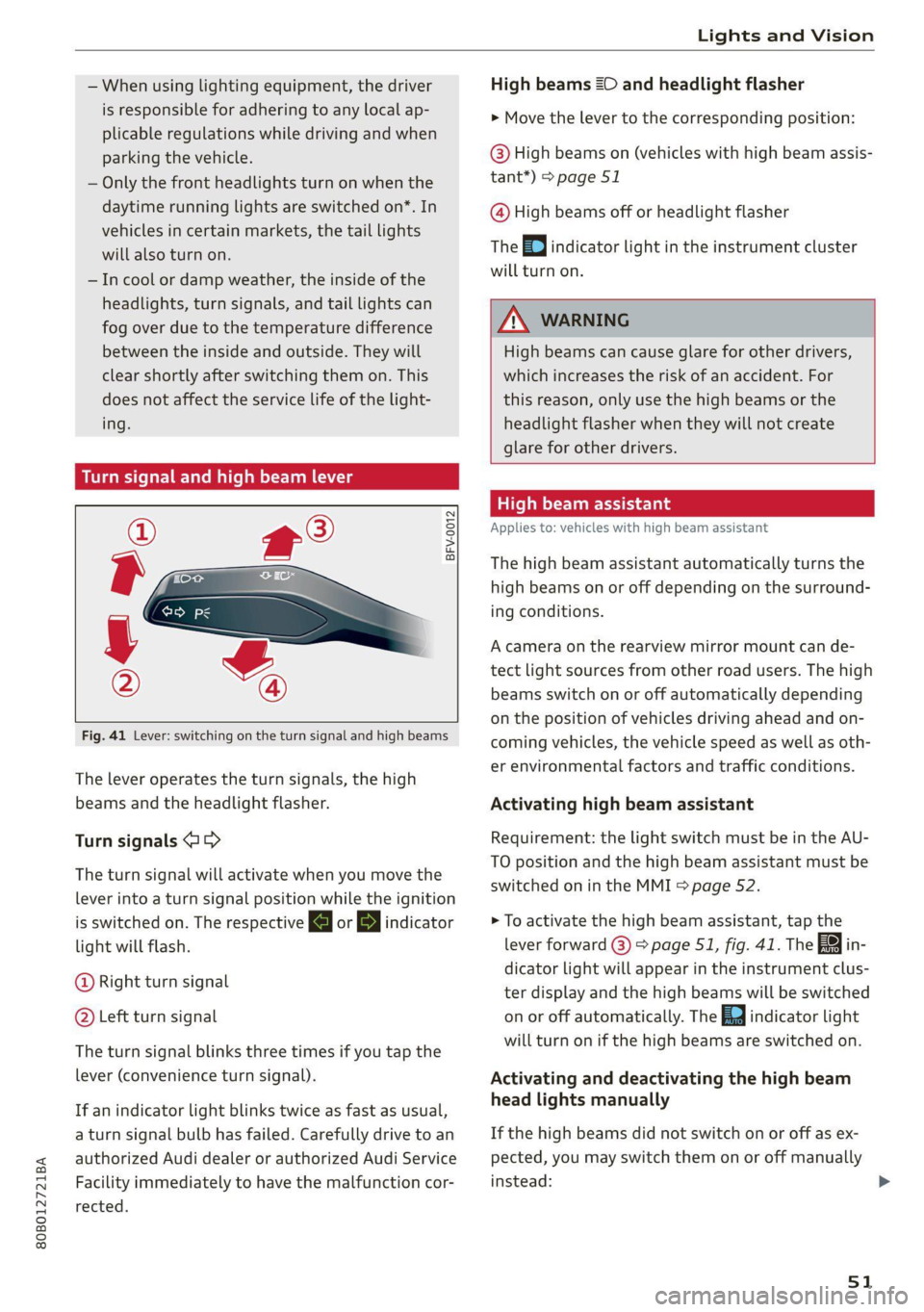
Fig. 41 Lever: switching on the turn signal and high beams
The lever operates the turn signals, the high
beams and the headlight flasher.
Turn signals @ >
The turn signal will activate when you move the
lever into a turn signal position while the ignition
is switched on. The respective KJ or By indicator
light will flash.
@ Right turn signal
@ Left turn signal
The turn signal blinks three times if you tap the
lever (convenience turn signal).
If an indicator light blinks twice as fast as usual,
a turn signal bulb has failed. Carefully drive to an
authorized Audi dealer or authorized Audi Service
Facility immediately to have the malfunction cor-
rected.
High beams =O and headlight flasher
> Move the lever to the corresponding position:
@) High beams on (vehicles with high beam assis-
tant”) > page 51
@ High beams off or headlight flasher
The
=o] indicator light in the instrument cluster
will turn on.
Z\ WARNING
High beams can cause glare for other drivers,
which increases the risk of an accident. For
this reason, only use the high beams or the
headlight flasher when they will not create
glare for other drivers.
ithe
Applies to: vehicles with high beam assistant
The high beam assistant automatically turns the
high beams on or off depending on the surround-
ing conditions.
A camera on the rearview mirror mount can de-
tect light sources from other road users. The high
beams switch on or off automatically depending
on the position of vehicles driving ahead and on-
coming vehicles, the vehicle speed as well as oth-
er environmental factors and traffic conditions.
Activating high beam assistant
Requirement: the light switch must be in the AU-
TO position and the high beam assistant must be
switched on in the MMI > page 52.
> To activate the high beam assistant, tap the
lever forward @) > page 51, fig. 41. The fa in-
dicator light will appear in the instrument clus-
ter display and the high beams will be switched
on or off automatically. The Ed indicator light
will turn on if the high beams are switched on.
Activating and deactivating the high beam
head lights manually
If the high beams did not switch on or off as ex-
pected, you may switch them on or off manually
instead:
51
Page 101 of 332
80B012721BA
Driving
ZA WARNING
— Always set the parking brake when leaving
your vehicle, even if for a short period of
time. If the parking brake is not set, the ve-
hicle could roll away, increasing the risk of
an accident.
— Do not leave your vehicle unattended while
the engine is running, because this increases
the risk of an accident.
— If the parking brake is set, it can release au-
tomatically when the accelerator pedal is
pressed. To reduce the risk of an accident,
do not inadvertently press the accelerator
pedal and always shift into “P” when the ve-
hicle is stopped.
— If you leave the vehicle, switch the ignition
off and take the key with you. This is espe-
cially important when leaving persons or an-
imals in the vehicle. Otherwise, the vehicle
could start unintentionally, the parking
brake could release, or electronic equipment
could activate, which increases the risk of an
accident.
— No persons or animals should be left in a
locked vehicle. Locked doors make it more
difficult for emergency workers to enter the
vehicle, which puts lives at risk.
— If you do not begin driving immediately af-
ter releasing the brake pedal, your vehicle
may begin to roll backward. Press the brake
pedal or set the parking brake immediately.
@ Note
If you have to stop on an incline, always press
the brake pedal to hold the vehicle in place to
reduce the risk of the vehicle rolling back-
ward. Do not try to hold the vehicle in place
by pressing and holding the accelerator pedal.
The transmission can overheat, which increas-
es the risk of damage.
Hill hold assist
If you take your foot off of the brake pedal when
driving on hills, the braking force will be held for
several seconds. At that time, you can start driv-
ing without the vehicle rolling backward.
Requirement: the driver's door must be closed,
the engine must be on, and the vehicle must be
traveling uphill.
> To activate hill hold assist, press and hold the
brake pedal for several seconds while the vehi-
cle is stationary.
Z\ WARNING
—If you do not begin driving immediately af-
ter releasing the brake pedal, your vehicle
may begin to roll backward. Press the brake
pedal
or set the parking brake immediately.
—The hill hold assist cannot hold the vehicle
on inclines in every scenario (for example,
on slippery or icy ground).
Gears and driving programs
Q)—
(2—*S
[RAZ-0410
R
N
tt
D/S
7 I
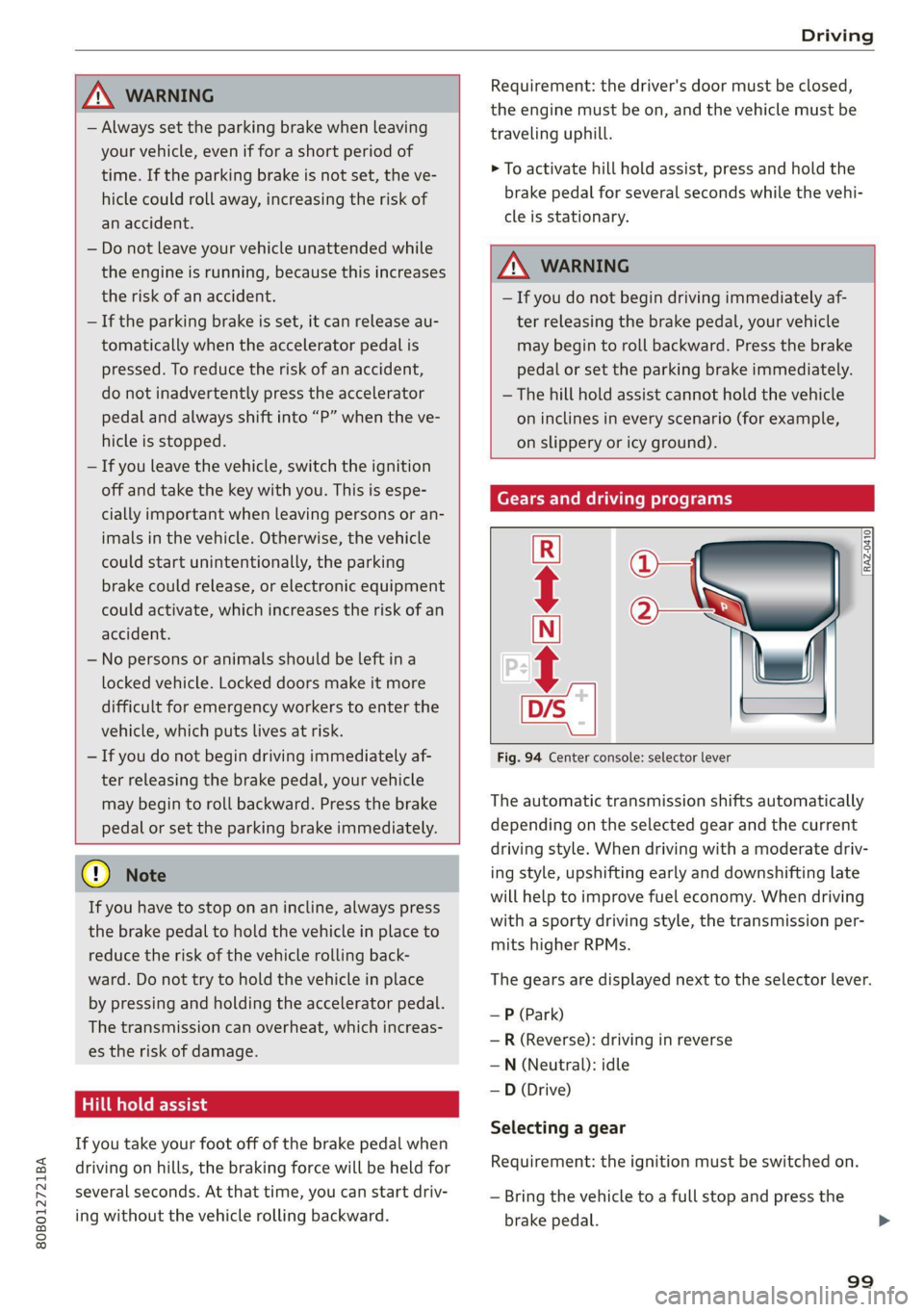
Fig. 94 Center console: selector lever
The automatic transmission shifts automatically
depending on the selected gear and the current
driving style. When driving with a moderate driv-
ing style, upshifting early and downshifting late
will help to improve fuel economy. When driving
with a sporty driving style, the transmission per-
mits higher RPMs.
The gears are displayed next to the selector lever.
— P (Park)
— R (Reverse): driving in reverse
—N (Neutral): idle
—D (Drive)
Selecting a gear
Requirement: the ignition must be switched on.
— Bring the vehicle to a full stop and press the
brake pedal.
99