heating AUDI Q7 2009 Owner´s Manual
[x] Cancel search | Manufacturer: AUDI, Model Year: 2009, Model line: Q7, Model: AUDI Q7 2009Pages: 426, PDF Size: 97.13 MB
Page 13 of 426
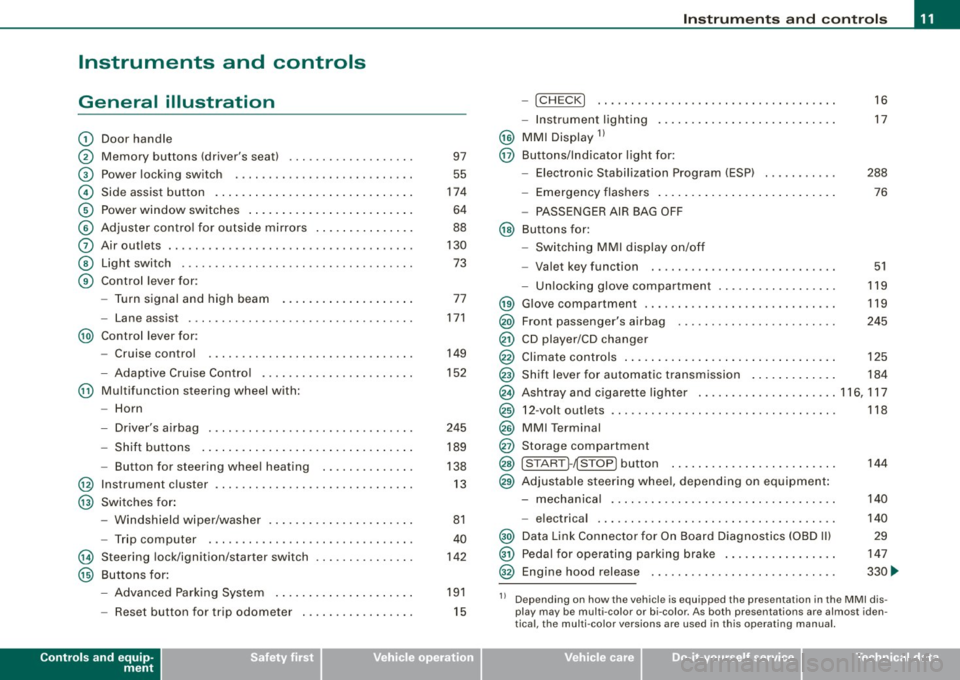
Instruments and controls
General illustration
G)
0
©
©
©
©
0
©
©
Door handle
Memory buttons (driver's seat)
Power locking switch
Side assist button .. ....... .. .... .... .... ... ... .
Power window switches .......... ..... .. .... ... .
Adjuster control for outside mirrors ...... .... .... .
Air outlets .. ...... ..... ........ .... .... .. ..... .
Light switch ...... .. ... ... . .. .. ..... ... .... ... .
Control lever for:
- Turn signal and high beam
- Lane assist ................. ........... ..... .
@) Control lever for:
-Cruise control
- Adaptive Cruise Contro l .... ... ..... .... .... .. .
@ Multifunction steering wheel with:
- Horn
- Driver's airbag .............................. .
- Shift buttons ............. ........ ... .... ... .
- Button for steering wheel heating
@ Instrument cluster ... .... ....... ...... ......... .
@ Switches for :
@
@
-Windshield wiper/washer ... .... .... .... ... ... .
- Trip computer ..... .. .... ......... ... ....... .
Steering lock/ignition /starter switch
Buttons for:
- Advanced Parking System .......... .......... .
- Reset button for trip odometer . .... .... .... ... .
Controls and equip
ment 97
55
174
64
88
130 73
77
171
149
152
245 189
138 13
81
40
142
191
15
Instruments and controls
-!CHECK] .......... ........ ... .... .... ..... . .
- Instrument lighting ......... .... ....... .... .. .
@ MMI Display 11
@ Buttons/Indicator light for:
- Elec tronic Stabilization Program (ESP) .. ..... .. . .
- Emergency flashers ............. ....... ...... .
- PASSENGER AIR BAG OFF
@ Buttons for:
- Switching MMI display on/off
- Valet key function . ........ .... .... .......... .
- Unlocking glove compartment .............. ... . 16
17
288 76
51
119
@ Glove compartment . . . . . . . . . . . . . . . . . . . . . . . . . . . . . 119
@) Front passenger's airbag . . . . . . . . . . . . . . . . . . . . . . . . 245
@ CD player/CD changer
@ Climate controls . . . . . . . . . . . . . . . . . . . . . . . . . . . . . . . . 125
@ Shift lever for automatic transmission . . . . . . . . . . . . . 184
@ Ashtray and cigarette lighter .. .... ............... 116, 117
@ 12-volt outlets . . . . . . . . . . . . . . . . . . . . . . . . . . . . . . . . . . 118
@ MMI Terminal
@ Storage compartment
@ [START ]-~STOP ] button . . . . . . . . . . . . . . . . . . . . . . . . . 144
@ Adjustable steering whee l, depending on equipment :
- mechanical . . . . . . . . . . . . . . . . . . . . . . . . . . . . . . . . . . 140
- electrical . ........ .... ... .. .... .... ...... ... .
@) Data Link Connector for On Board Diagnostics (OBD Ill
@ Pedal for operating parking brake ...... .... ...... .
@ Engine hood release ...... .... .... .... ...... ... . 140
29
147
330 ...
11 Depending on how the vehicle is equipped the presentation in the MMI dis
play may be multi -color or bi-co lor. As both presentations are almost iden
tical , the multi -color versions are used in this operating manual.
I • •
Page 51 of 426
• For security reasons, replacement keys are only available from
Audi dea lers. •
Master key with remote control
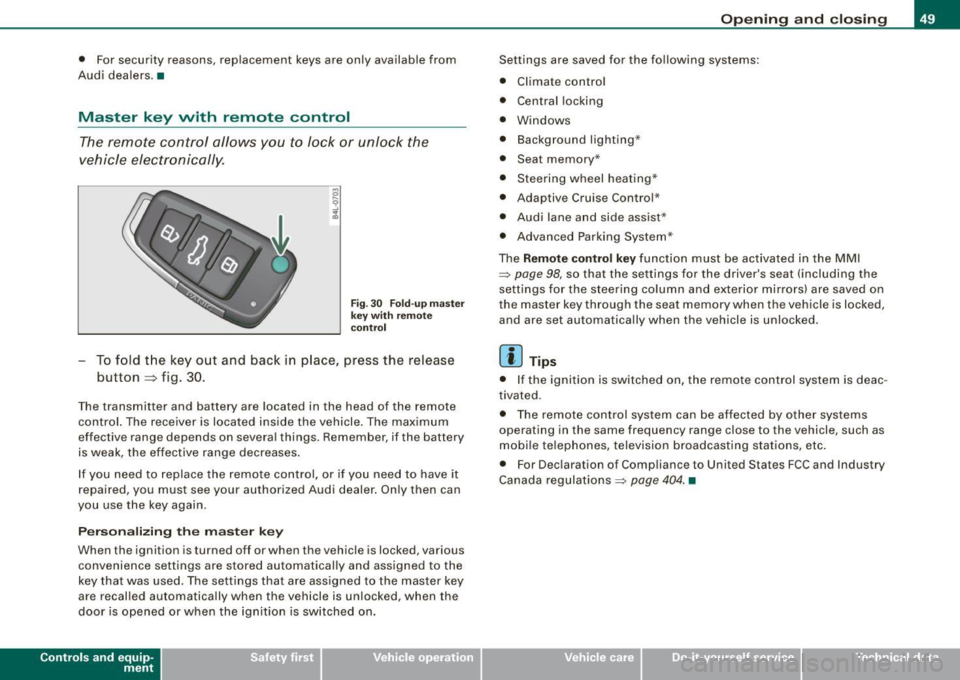
The remote control allows you to lock or unlock the
vehicle electr onically .
Fig . 3 0 F old -u p mas ter
ke y w ith re mo te
co ntro l
To fold the key out and back in place, press the release
button
~ f ig . 30 .
The transmitter and battery are located in the head of the remote
control. The receiver is loca ted inside the vehicle. The maximum
effective range depends on several things. Remember, if the battery
is weak, the effective range decreases .
I f you need to replace the remote contro l, or if you need to have it
repaired, you must see your authorized Audi dealer . Only then can
you use the key again.
P erson alizing the master key
When the ignition is turned off or when the vehicle is locked, various
convenience settings are stored automatically and assigned to the
key that was used. The se tti ngs that are assigned to the master key
are recalled automatically when the vehicle is unlocked, when the
door is opened or when the ignition is sw itched on .
Contro ls and eq uip
ment
Op ening and clo sing
Settings are saved for the fo llowing systems:
• Climate contro l
• Central locking
• Windows
• Background lighting·"
• Seat memory *
• Steering wheel heating*
• Adaptiv e Cruise Control *
• Audi lane and side assist*
• Advanced Parking System *
The
Remote control key function must be activa ted in the MMI
~ page 98, so that the settings for the driver's seat (including the
settings for the steering column and exterio r mirro rs) are saved on
the master key through the seat m emory when the vehicl e is locked,
and are set automatically whe n the vehicle is unlocked.
[ i ] Tips
• I f the igni tion is switched on, the remote cont rol system is deac
tivated .
• The remote control system can be affected by other sys tems
operating in the same frequency range close to the vehicle, such as
mobi le te lephones, television broadcasting stations, etc .
• For Dec laration o f Compliance to United States FCC and Industry
Canada regulations ~
page 404. •
Vehicle care I I irechnical data
Page 72 of 426
Opening and closing
C ,
(Bo~oBJ
$ .... 9 ..,
.ii
Fig. 55 Section of
headliner in rear:
Switch for sunshade
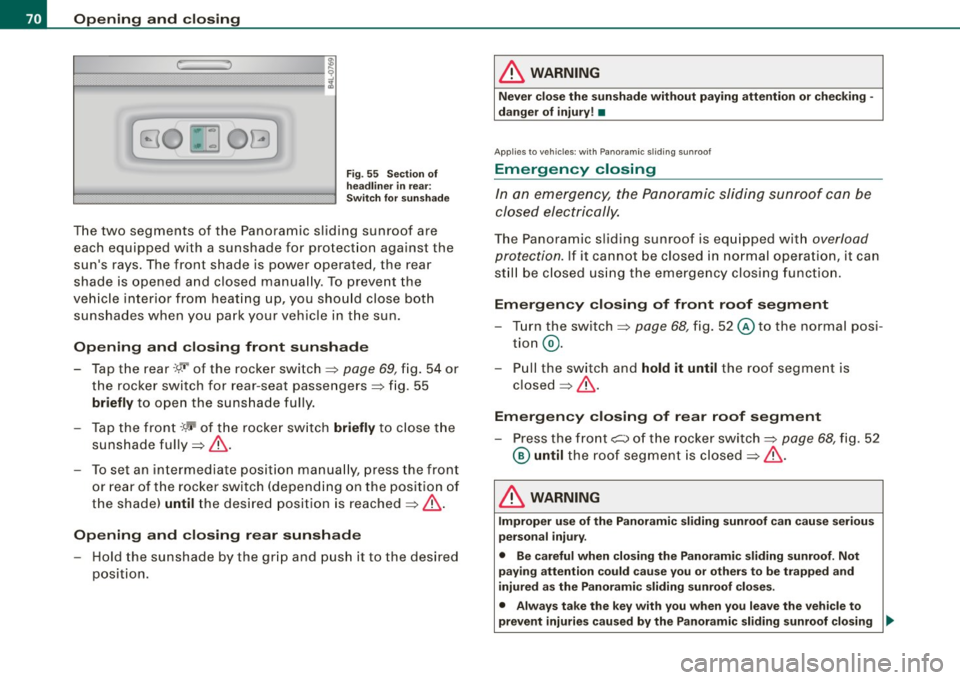
The two segments of the Panoramic sliding sunroof are
each equipped with a sunshade for protection against the
sun's rays. The front shade is power operated, the rear
shade is opened and closed manually . To prevent the
vehicle interior from heating up, you should close both
sunshades when you park your veh icle in the sun.
Opening and closing front sunshade
-Tap the rear -M r of the rocker switch :::::, page 69, fig. 54 or
the rocker switch for rear-seat passengers :::::, fig. 55
briefly to open the sunshade fully.
- Tap the front-~ of the rocke r switch
briefly to close the
sunshade fully:::::,& .
- To set an intermediate position manually, press the front
or rear of the rocker switch (depending on the position of
the shade)
until the desired position is reached :::::, & .
Opening and closing rear sunshade
-Hold the sunshade by the grip and push it to the desired
position.
& WARNING
Never close the sunshade without paying attention or checking -
danger of injury! •
Applies to vehicles: with Panoram ic s liding sunroof
Emergency closing
In an emergency, the Panoramic sliding sunroof can be
closed electrically.
The Panoramic sliding sunroof is equipped with overload
protection.
If it cannot be closed in normal operation, it can
still be closed using the emergency closing function.
Emergency closing of front roof segment
- Turn the switch :::::, page 68, fig. 52@ to the normal posi
tion @.
- Pull the switch and
hold it until the roof segment is
closed :::::, & -
Emergency closing of rear roof segment
-Press the front C:> of the rocker switch:::::, page 68, fig. 52
@ until the roof segment is closed :::::, & -
& WARNING
Improper use of the Panoramic sliding sunroof can cause serious
personal injury.
• Be careful when closing the Panoramic sliding sunroof. Not
paying attention could cause you or others to be trapped and
injured as the Panoramic sliding sunroof closes.
• Always take the key with you when you leave the vehicle to
prevent injuries caused by the Panoramic sliding sunroof closing .,,_
Page 107 of 426
__________________________________________________ S_ e_ a_t _s _ a_n _ d_ s_ t _ o_ r_a ...;:g ::;.. e _ __.lffllll
Raising the seatba ck
- P ull the lever up=> page 104, fig. 102 and raise the seat
b ack u ntil it is secure ly latched=> &.
Folding center seat back down
-Press the re lease button => page 104, fig. 103. The red
mark on the re lease lever is visible.
- Tilt the sea tbac k fo rwa rd.
Raising center seat back
- Raise the seatback unti l it is securely latched=>& . It is
secure ly latched when the red mark on the release button
is no longer visible.
The center seat back can be fo lded forward separately . Using this
loading opt ion, long objects (e.g. skis) can be carr ied in the interior.
& WARNING
• The backre st mus t alway s be s ecurely lat ched so tha t the
s a fety belt of the center seating po sition can work properly to help
protect the o ccupant.
• The ba ckrest must be secu rely l atc hed in po sition so that n o
item s contained in the lugga ge compartment can slide forward
upon sudden brak ing .
• Alway s check whe ther the latch i s fully engaged by pulling the
se at ba ck forw ard .
• On veh icle s w ith third row se atin g*, the center seat back mu st
be in the upright posit ion and se curely latched when per son s are
being carried in the third row se ats • danger injury !
• Nev er allow safet y belt s to be come d amaged b y being caught
in door or seat ha rd w ar e.
• Torn or fr ayed safety belt s can tear and damaged belt hardware
c a n break in a cra sh. In spe ct the belt s per iod ic ally. Belts showing
Con tro ls and eq uip
ment
& WARNING !continued )
dama ge to webbing , bindings , buckles , or retractors must be
replaced .
& WARNING
Always rea d and heed WARNIN GS ~ & in "Lo ading the lu ggage
c omp artment " on page
227.
0 Note
• When folding the backrest back into place, make sure the safety
belt does not get caught, because it can be da maged . A damaged
belt can fail to provide safe restraint .
• The heating wires in the rear window can be damaged by abra
sive objects on the parcel shelf. •
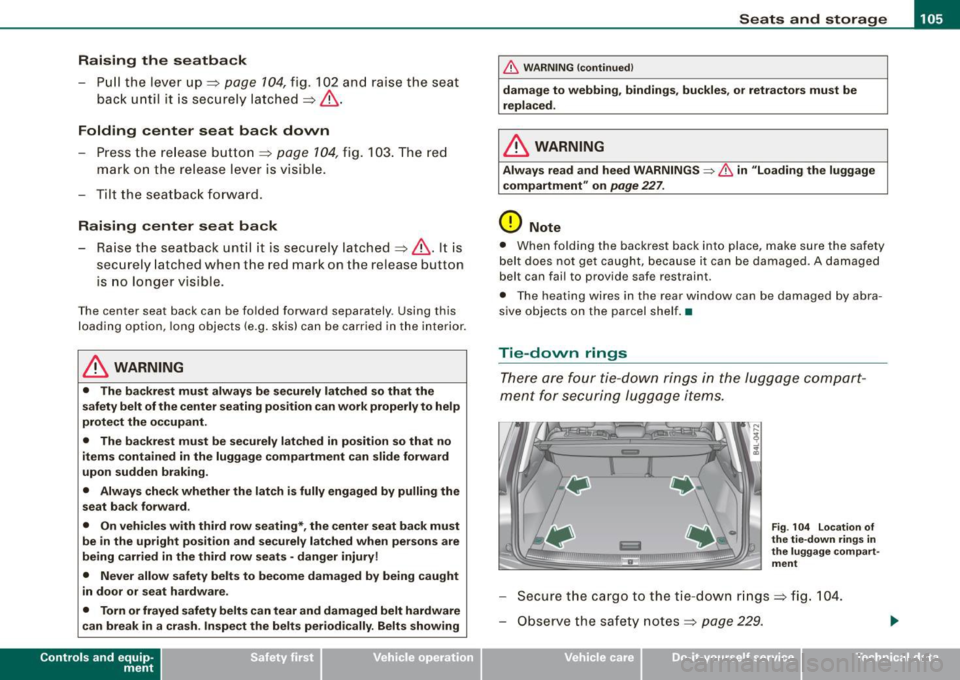
Tie-dovvn rings
There are four tie -down rings in the luggage compart
ment for securing luggage items .
Fig . 104 Lo cation o f
the ti e-down rings in
the l ugga ge co mpart
m ent
- Secure the cargo to the tie -down rin gs => fig . 104.
- Observe the safety notes=>
page 229.
Vehicle care I I irechnical data
Page 110 of 426
• ..__S_ e_a _ t_ s_ a_ n_ d_ s_t _o _r_ a-' g==- e ________________________________________________ _
Retractable luggage compartment cover
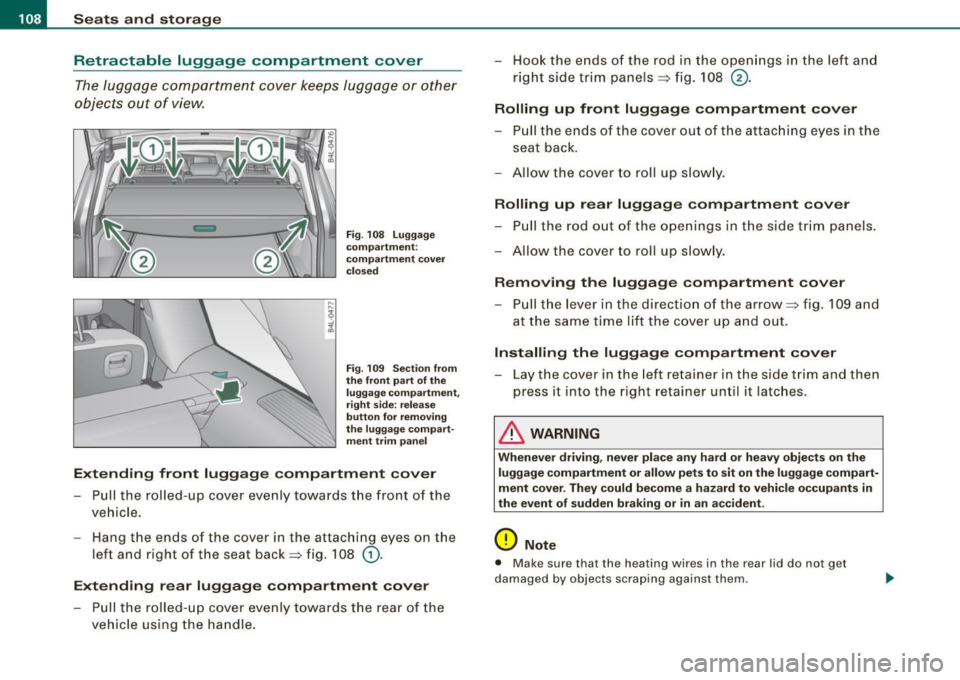
The luggage compartment cover keeps luggage or other
objects out of view.
Fig . 108 Luggage
compartment :
compartment cover
closed
Fig . 109 Section from
the front part of the
luggage compartment,
right side: release
button for removing
the luggage compart ment trim panel
Extending front luggage compartment cover
Pull the rolled-up cover evenly towards the front of the
vehicle.
- Hang the ends of the cover in the attaching eyes on the
left and right of the seat back=> fig. 108
G).
Extending rear luggage compartment cover
- Pull the rolled-up cover evenly towards the rear of the
vehicle using the handle. - Hook the ends of the rod in the openings in the left and
right side trim panels=> fig. 108
®·
Rolling up front luggage compartment cover
-Pull the ends of the cover out of the attaching eyes in the
seat back.
- Allow the cover to roll up slowly.
Rolling up rear luggage compartment cover
- Pull the rod out of the openings in the side trim panels.
-Allow the cover to roll up slowly.
Removing the luggage compartment cover
- Pull the lever in the direction of the arrow=> fig. 109 and
at the same time lift the cover up and out.
Installing the luggage compartment cover
-Lay the cover in the left retainer in the side trim and then
press it into the right retainer until it latches .
& WARNING
Whenever driving, never place any hard or heavy objects on the
luggage compartment or allow pets to sit on the luggage compart
ment cover. They could become a hazard to vehicle occupants in
the event of sudden braking or in an accident.
0 Note
• Make sure that the heating wires in the rear lid do not get
damaged by objects scraping against them.
Page 122 of 426
• ..__S_ e_a _ t_ s_ a_ n_ d_ s_t _o _r_ a-' g==- e ________________________________________________ _
Cooling box in glove compartment
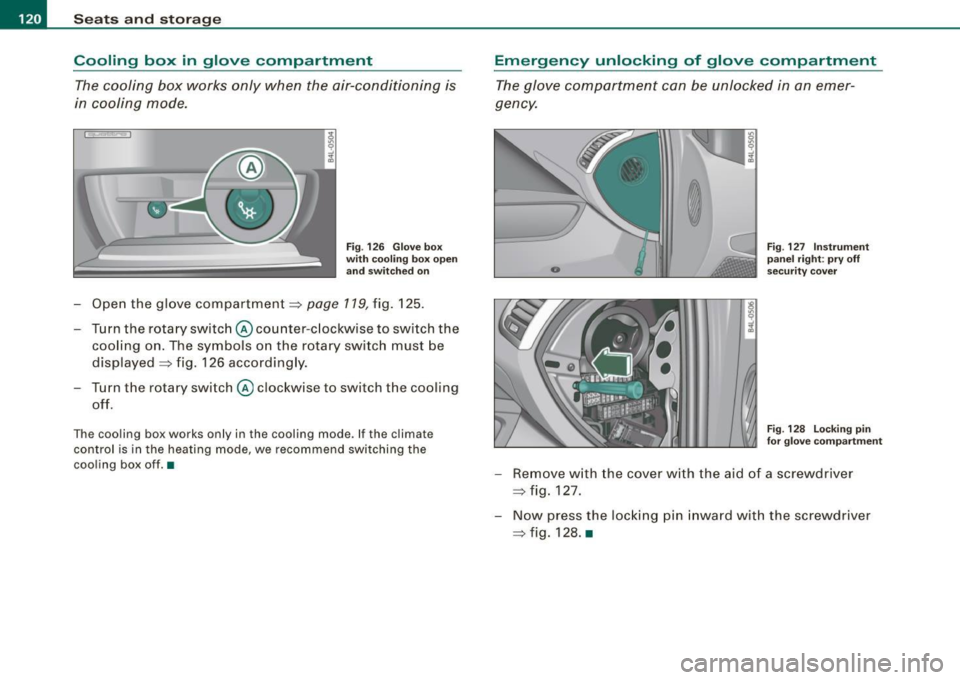
The cooling box works only when the air-conditioning is
in cooling mode.
Fig . 126 Glove box
with cooling box open and switched on
-Open the glove compartment=> page 119, fig. 125.
Turn the rotary switch @ counter-clockwise to switch the
cooling on. The symbols on the rotary switch must be
displayed => fig. 126 accordingly.
Turn the rotary switch@ clockwise to switch the cooling
off.
The cooling box works only in the cooling mode. If the climate
control is in the heating mode, we recommend switching the
cooling box off.•
Emergency unlocking of glove compartment
The glove compartment can be unlocked in an emer
gency.
Fig . 127 Instrument
panel right: pry off
security cover
F ig . 128 Locking pin
for glove compartment
- Remove with the cover with the aid of a screwdriver
=> fig. 127.
- Now press the locking pin inward with the screwdriver
=> fig. 128. •
Page 125 of 426
Warm and cold -______________ ....:...:...:..:..;______
Warm and cold
Climate control
Description
The air conditioner is fully automatic and is designed to
maintain a comfortable and uniform climate inside the
vehicle.
We recommend the following settings:
- Set the temperature to 72 °F (+22 °C).
- Press the [AUTO
I button.
With this setting, you attain maximum comfort in the least amount
of time. Change this setting, as desired, to meet your personal
needs .
The climate controls are a combination of heating, ventilation and cooling systems, which automatically reduce humidity and cool the
air inside your vehicle.
The air temperature, air flow and air distribution are automatically
regulated to achieve and maintain the desired passenger compart
ment temperature as quickly as possible.
The system automatically compensates for changes in outside
temperature and for the intensity of the sunlight entering the
vehicle. We recommend you use the
Automatic mode:::::, page 126
for year -round comfort.
Please note the following:
Turn on the air conditioner to reduce humidity in the vehicle. This
also prevents the windows from fogging up.
When the outside temperature is high and the air is very humid,
condensation from the evaporator may drip under the vehicle . Th is
is normal and does not indicate a leak.
Controls and equip
ment
If the outside temperature is low, the fan normally only switches to
a higher speed once the engine coolant has warmed up sufficiently.
The air conditioner temporarily switches off when you drive off from
a standstill using full throttle to save engine power.
The compressor also switches off if the coolant temperature is too
high, so that the engine can be adequately cooled under extreme
loads.
Air pollutants filter
The air pollutants filter (a combined particle filter and activated
charcoal filter) reduces or prevents outside air pollution (dust, or
pollen) from entering the vehicle. The air is also filtered in air recir
culation mode.
The air pollutants filter must be changed at the intervals specified in your Warranty
& Maintenance booklet, so that the air conditioner
can properly work.
If you drive your vehicle in an area with high air pollution, the filter
may need to be changed more frequently than specified in your
Audi Warranty
& Maintenance booklet . If in doubt, ask your autho
rized Audi Service Advisor for advice.
Key coded settings
The air conditioner settings selected are automatically stored and assigned to the key being used. When the vehicle is started, the air
conditioner automatically selects the settings assigned to that key.
This way every driver will maintain his/her own personal settings
and does not have to reset them manually.
If a different driver uses your key and changes the air conditioner
settings, the latest adjustments will erase and replace the settings
you have stored. _.,
I • •
Page 126 of 426
• .___w_ a_ rm __ a_ n_ d_ c_o _l_d ________________________________________________ _
Energ y man ag em ent
To prevent the battery from being discharged and to restore the
balance of energy, components which require large amounts of
energy are temporarily cut back or switched off=>
page 295.
Heating systems in particular require a great deal of energy. If you
notice, for example, that the seat * or rear window heating is not
heating, they have been temporarily cut back or switched off by
ene rg y m anage ment. These systems are available again as soon as
the energy balance has been res tored .
& WARNING
Reduced visi bilit y is da ng ero us a nd can cau se a ccidents.
• For sa fe driving it i s very imp orta nt that all window s be fr ee of
ic e, s now a nd conde nsation .
• Completely familiarize your self with the proper use and fun c
tion of the heat ing and ventilat ion system and e spe cia lly how to
defog and defrost the windows .
• Neve r use the wind shield wipe r/w asher syste m in free zing
weather until y ou have warmed the wind shield first , usi ng the
heat ing and ventil ation system . The wash er solution m ay freeze
on the wind shield and r educe vi sibilit y.
0 Note
• If you suspect that the air conditioner has been damaged, turn
on ECON and contact an authorized Audi dealer to have the system
inspected.
• Repairs to the Audi air conditioner require special technical
know ledge and special to ols. Contact an authorized Audi dea ler for
assistance.
[ i ] T ip s
• Keep the air intake slots (in front of the windsh ie ld) free from ice,
snow and debris in order to maintain the proper function of the
climate contro l system.
• Air inside the vehicle escapes through air vents located in the
s ide tr im panels beneath the rear side windows. Make sure that the
out let slots are not covered by clothing, etc.
• Climate control works most effectively if the windows and the
Panoramic s liding sunroof* are c losed. However, if the interior of a
parked vehic le is extreme ly hot from the sun's rays, briefly opening
the windows can speed up the cooling process. •
Page 127 of 426

Warm and cold -___________________ __:_:__: ___ _____,J
Controls
This overview will help you to familiarize yourself with the
air conditioning controls.
-
~ udi _cd _c !! anger
.. ECON 01'4/0FF
Fig. 135 Air conditioning control elements
-
The left display indicates the temperature selected for the driver's
side, the right display indicates the temperature selected for the
passenger's side .
If the settings for seat heating*, air distribution , or the air condi
tioning fan ar e changed, the relevant indicator w ill appear br iefly on
the MMI Display.
Each function is turned on or off by briefly pressing the corre
sponding button. The indicator light in the button illuminates when
the function is active .
Controls and equip
ment Button(s)
!
ECON ON /OFF]
!AUTO] Control knob
G)
[SETUP]
Residual heat Function
Page
Switch climate control on => page 726
and off,
switch cooling system on
and off
Automatic mode
Temperature selection
Seat heating*
Air distribution
Blower
Defrost
Manual recirculation
Heated rear window
Basic settings
=> page 126
=> page 127
=> page 136
=> page 127
=> page 128
=> page 727
=> page 128
=> page 129
=> page 134
With the ignition turned off, you can activate the residual heat func
tion by pressing the !E CON ON /OFF] but ton . The residual heat from
the coolant can be used to heat the vehicle interior. The residual
hea t function is turned off au tomatically after 30 minutes.
Synchronizing climate control
By pressing and holding th e control knob on the driver's side, the
temperature setting on the driver's side can be switched to the
passenger's side , and vice versa. The new temperature is shown in
the display.
Synchronizing four-zone automatic comfort air
conditioning*
By pressing and holding the control knob on the driver's side, the
temperature setting on the driver's side can be switched to the
~
Vehicle care I I Technical data
Page 128 of 426
• .___w_ a_ rm __ a_ n_ d_ c_o _l_d ________________________________________________ _
passenger's side and to the outer rear seats. The new temperature
is shown in the display .
By simultaneously pressing and holding the contro l knobs on the
driver's side and front passenger's side, the temperature setting on
the driver's side can be switched to the front passenger's side. The new temperature is shown in the disp lay.
[ i J Tip s
The gri lle between the (ECON ON/OFF] and (SETUP] buttons must
remain unobstructed and must not be taped over. Measur ing
sensors are located behind it. •
Turning on and off [ECON ON/OFF]
Turning the air conditioning on
- Press [ECON ON/O FF] briefly, or
- Press [AUTO].
Turning the air conditioning off
Press the I ECON ON/OFF I button for at least 2 seconds to
switch the a ir cond itioning off and to block the air supply
f rom t he ou tside .
"OFF" appears in the display .
Switching air conditioning on /off
- Switching the a ir conditioning system on/off is done wit h
c limate control switched on .
- Press the [ECON ON/OFF] button just
briefly.
The air conditioner tu rns back on if you press one of the control
buttons or the control knob.
ECON operation is indicated by the glowing LED on the right next to
the word ECON. T
he air conditioning (compressor) is turned off in ECON mode.
"ECON" means "Economy". You save fuel by switching off the air
conditioning=>
page 131.
Please note that vehic le interior temperature cannot be lower than
t he outside temperature in the ECON mode. The air is not cooled or
dehumidified. This can cause the windows to fog up.
[ i J Tip s
With the ignition turned off, you can activate the residual heat func
tion by pressing the
[ECON ON/OFF] button . The residual heat from
the coolant can be used to heat the vehicle interior. •
Automatic mode [AUTO)
The automatic mode is the standard setting for all
seasons.
Turning on AUTO
Select temperature between 60 °F (+16 °C) and 84 °F
(+28 °C).
P ress [ AUTO I => page 125, fig . 135.
Automatic operation ensures constant temperatures in the interior
and dehumidifies the air inside the vehicle. Air temperature, vo lume
and distribution are contro lled automatica lly to reach or maintain
the desired inter ior temperature as quickly as possible. Fluctuations
in exterior temperature and the effects of temperature from the
pos ition o f the sun are compensated for automatica lly.
T his operating mode works only in the adjustable temperature
r ange, from 60 °F (+ 16 °C) to 84 °F (+28 °C). If a temperature below
60 °F
( + 16 °C) is selected, LO appears in the disp lay. At temperatures
above 84 °F ( +28 °C),
HI is d isplayed . At both extreme settings,
climate contro l runs continuously at maximum cooling or heating
power. There is no temperature regu lation .•