brakes AUDI Q7 2009 Owner´s Manual
[x] Cancel search | Manufacturer: AUDI, Model Year: 2009, Model line: Q7, Model: AUDI Q7 2009Pages: 426, PDF Size: 97.13 MB
Page 165 of 426
Adaptiv e Crui se Contro l ""' __________________________ ___;__;~-------
Applies to vehic les: w it h Ad aptive Crui se Co nt rol
System status indicator
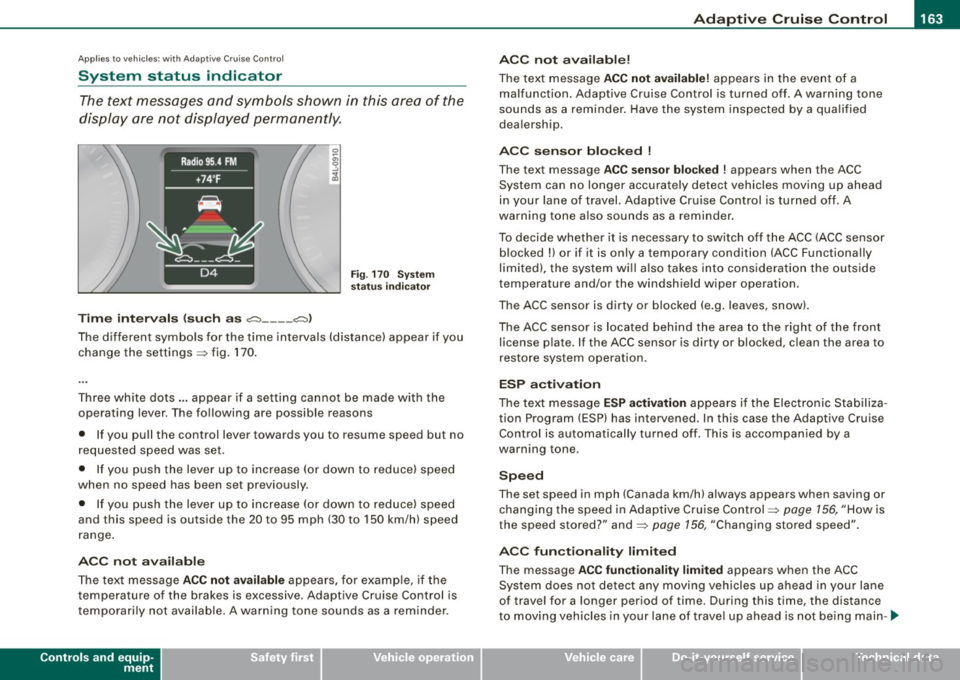
The text messages and symbols shown in this area of the
display are not displayed permanently.
T ime in ter va ls (s uch a s c::;, __ __ c::;, }
Fig . 170 System
sta tus in dicator
The different symbols for the time intervals (distance) appear if you
change the settings:::;, fig. 170 .
Three white dots .. . appear if a setting canno t be made with the
operating lever . The following are possible reasons
• If you pull the control lever towards you to resume speed but no
requested speed was set.
• I f you push the lever up to increase (or down to reduce) speed
when no speed has been set previously.
• If you push the lever up to increase (or dow n to reduce) speed
and this speed is outside the 20 to 95 mph (30 to 150 km/h) speed
range .
A CC no t ava ila bl e
The text message ACC not av aila ble appears, for examp le, if the
temperature of the brakes is excessive. Adaptive Cruise Control is
t emporarily not available . A warning tone sounds as a reminder.
Controls and equip
ment A
CC not ava ilable!
The text message ACC not availabl e! appears in the event of a
malfunction. Adaptive Cruise Control is turned off. A warning tone
sounds as a reminder . Have the system inspected by a qua lified
dea lership.
ACC s ensor bl ocked
!
The text message ACC se nsor blo cke d ! appears when the ACC
System can no longer accurately detect vehicles moving up ahead
in your lane of
travel. Adaptive Cruise Control is turned off. A
warning tone a lso sounds as a reminder.
To decide whether it is necessary to switch off the ACC (ACC sensor b locked
!) or if it is only a temporary condition (ACC Functionally
limited), the system wi ll also takes into consideration the ou tside
temperature and/or the windshield wiper operation.
The ACC sensor is dirty or b locked (e .g . leaves, snow).
The ACC sensor is located behind the area to the right of the front license p late. If the ACC sensor is dirty or b locked, c lean the area to
restore system operat ion.
ESP activ at ion
The text message ES P activ ation appears i f the E lectronic Stabiliza
tion Program (ESP} has intervened. In this case the Adaptive Cruise
Control is automatically turned off . This is accompanied by a
warning tone.
S peed
The set speed in mph (Canada km/h) always appears when saving or
changing the speed in Adaptive Cru ise Control :::;, page 156, "How is
the speed stored?" and:::;, page 156, "Changing stored speed".
A CC function alit y limited
The message ACC functionalit y lim ited appears when the ACC
System does not detect any moving vehicles up ahead in your lane
of trave l for a longer period of time. During this time, the distance
t o moving vehicles in your lane of trave l up ahead is not be ing main -~
I • •
Page 168 of 426
• ..__A_ d_a...: p:,..._ ti_v _ e_ C_ ru_ is_ e_ C_ o_n_ t_ r_ o _ l ___________________________________________ _
• when other vehicles are difficu lt to dete ct~ page 167
• when vehicles up ahead are not moving or obs tacles are in your
trave l lane ~ page
167
& WARNING
The radar sensor's fun ction and range can be redu ced by rain ,
s now and hea vy spray. Mo ving vehicle s up ahead may not be
promptl y dete cted or m ay not be detected at all.
• Alway s pay careful attention to the traffic situ atio n and be
ready to inter vene and be ready to take compl ete control wh en
ever ne ce ssa ry . •
App lies to vehicles : wi th Ada ptive Cruise Contro l
When driving around curves
Fig . 17 3 Ve hicle
e nt erin g a curv e
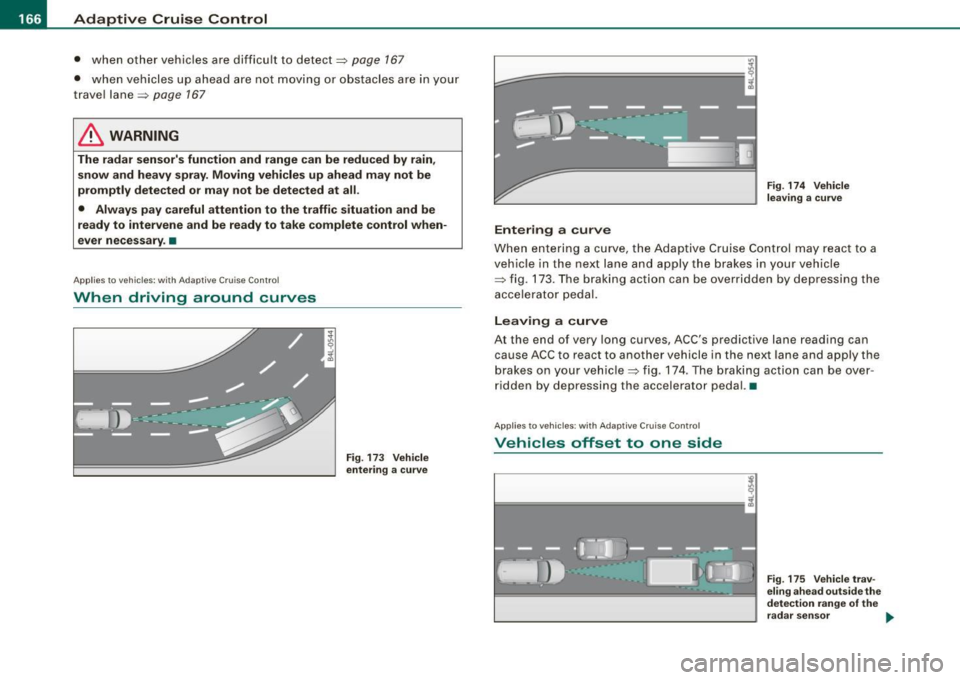
Entering a cur ve
Fig . 174 Vehicle
l eav ing a curve
When entering a curve, the Adaptive Cruise Control may react to a
vehicle in the next lane and apply the brakes in your vehicle
~ fig. 173. The braking action can be overridden by depressing the
accelerator pedal.
Leaving a curve
At the end of very long curves, ACC's predictive lane reading can
cause ACC to react to another vehicle in the next lane and apply the
brakes on your vehicle~ fig. 174. The braking action can be over
ridden by depressing the accelerator pedal. •
Applie s to vehic les : w ith Ad aptiv e Crui se Cont rol
Vehicles offset to one side
~
l==================1 i
Fig. 175 V ehicle trav
e lin g ahe ad o uts ide th e
de tec tion rang e of th e
r ad ar sen sor ..
Page 170 of 426
• .___A_ d_a_ p:- t_i v_ e_ C_ r_u _is _ e_C_ o_ n_ t_ r_ o_ l --------------------------------------------
Audi braking guard
App lies to vehicles: with Adaptive Cruise Contro l
Description
Audi braking guard warns you of a possible collision with
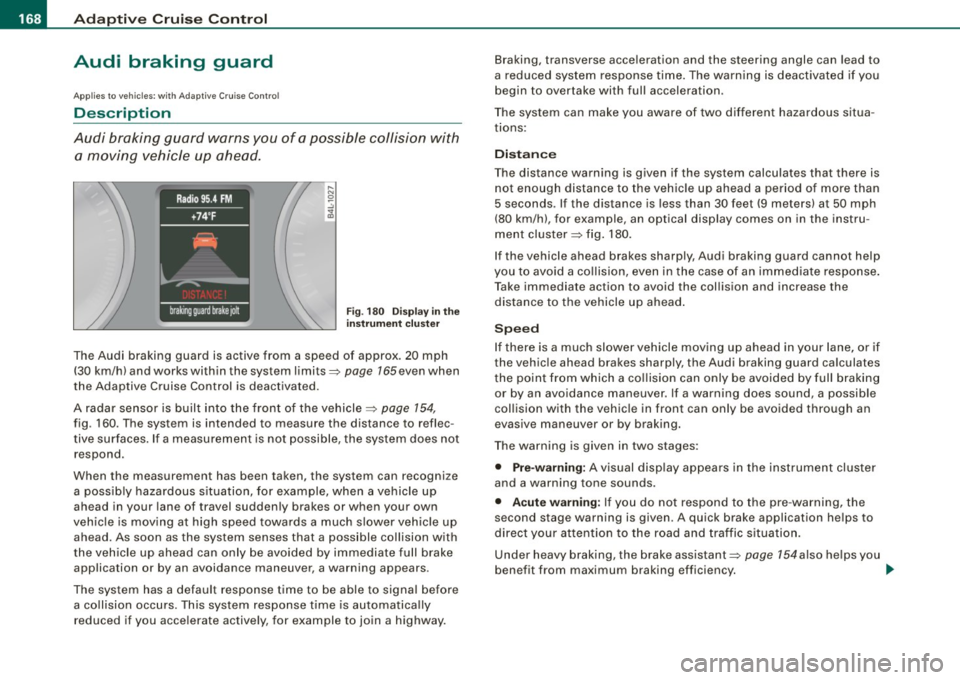
a moving vehicle up ahead.
F ig. 180 Disp lay in t he
i nstrumen t cluster
The Audi braking guard is active from a speed of approx. 20 mph
(30 km/h) and works within the system limits=>
page 165 even when
the Adaptive Cruise Control is deactivated.
A radar sensor is built into the front of the vehicle=>
page 154,
fig. 160. The system is intended to measure the distance to reflec
tive surfaces. If a measurement is not possible, the system does not respond.
When the measurement has been taken, the system can recognize a possib ly hazardous s ituation, for example, when a vehicle up
ahead in your lane of travel sudden ly brakes or when your own
vehic le is mov ing at high speed towards a much s lower vehic le up
ahead. As soon as the system senses that a possible collision with
t he vehicle up ahead can only be avoided by immediate full brake
application or by an avoidance maneuver, a warning appears.
The system has a default response time to be able to signal before a co llision occurs. This system response time is automatica lly
reduced if you acce lerate actively, for example to join a highway. Braking, transverse acceleration and the steering angle can lead to
a reduced system response time. The warning is deact
ivated if you
begin to overtake with full acceleration.
The system can make you aware of two different hazardous situa
t ions:
Distan ce
The distance warning is g iven if the system calculates that there is
not enough distance to the vehic le up ahead a period of more than
5 seconds . If the distance is less than 30 feet (9 meters) at 50 mph
(80 km/h), for example, an optical display comes on in the instru
ment cluster=> fig. 180.
If the vehicle ahead brakes sharply, Audi braking guard cannot help
you to avoid a co llision, even in the case of an immed iate response .
T ake immediate action to avoid the collision and increase the
distance to the vehicle up ahead .
Speed
If there is a much slower vehicle moving up ahead in your lane, or if
the vehic le ahead brakes sharply, the Aud i braking guard calculates
t he point from which a co llision can only be avoided by full braking
or by an avoidance maneuver. If a warning does sound, a possible
collision with the vehicle in front can only be avoided through an
evasive maneuver or by braking.
The warning is given in two stages :
• Pre-warning: A visual disp lay appears in the instrument cl uster
and a warning tone sounds.
• Acut e warning : If you do not respond to the pre -warning, the
second stage warning is given . A quick brake application helps to
direct your attention to the road and traffic situation .
Under heavy braking, the brake assistant::::>
page 154also he lps you
benefit from maximum braking efficiency. _..
Page 171 of 426
_____________________________________________ A_ d_a ...: pc.. t _i_ v _e_ C_ ru_ is_ e_ C_ o_n_ t_ r_ o _ l __ lfflll
& WARNING
Inattention can cause collisions, other accidents and serious
personal injuries.
• Always pay close attention to the traffic , even when the Audi
braking guard is switched on. The Audi braking guard provides a
warning but does not brake the car for you. You must apply the
brakes yourself!
• Always keep the safe and legal distance between your vehicle
and vehicles up ahead.
• Audi braking guard works within limits and will not respond
outside the system limits, for example when approaching a
stopped vehicle or stationary obstacle (end of a traffic jam or
vehicle that has broken down in traffic ).
• Always remember that the radar sensor for the Audi brak ing
guard works within defined detection and range limits that may
prevent the proper detection of other vehicles .
• The radar sensor's function and range can be reduced by rain,
snow and heavy spray . Moving vehicles up ahead may not be
promptly detected or may not be detected at all.
• Always pay careful attention to the traffic situation and be
ready to intervene and be ready to take complete control when
ever necessary .
• Reflective surfaces including crash barriers or tunnel entrances
may impair the function of the radar sensor . •
Controls and equip
ment
App lies to veh ic les: with Adap tive Cru ise Contro l
Settings in the MMI
The sett ing s of the Aud i braking guard are performe d in
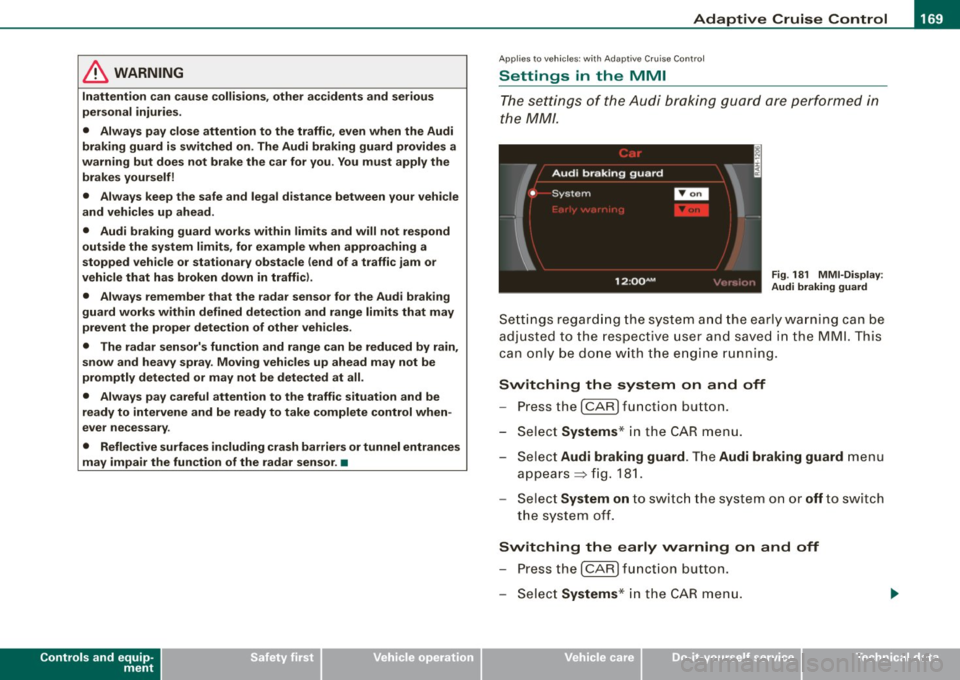
the MM/ .
Fig. 181 MMI -Display :
Audi braking guard
Settings regarding the system and the ear ly warn ing can be
adju sted to the respect ive u ser and saved in the MML This
can on ly be done with the engine run ning.
Switching the system on and off
- Press the I CAR ] func tion b utton .
- Se lect Systems * in the
CAR menu .
Se lect Audi braking guard . The Audi braking guard menu
appears => fig. 181.
Se lect System on to switch the system on or off t o swi tch
the system off.
Switching the early warning on and off
P res s the I CAR I functio n button .
Select Systems * in the
CAR menu .
I • •
Page 172 of 426
• .___A_ d_a_ p:- t_iv _ e_ C_ r_u _is _ e_C_ o_ n_ t_ r_ o_ l --------------------------------------------
- Select Audi braking guard. The Audi braking guard menu
appears.
Select
Early warning on to switch the acoustic and visual
warning on or
off to switch the system off.
[ i] Tips
When handing over the keys to another person, the previous
settings are adopted if the Audi braking guard is activated
=> page 53. •
Applies to vehicles: with Adaptive Cruise Contro l
Driver's information in the instrument cluster
display
braking guard brake jolt
This message appears when the Audi braking guard applies the
brakes during a second stage (acute) warning.
braking guard off
This message appears when the system has been deactivated via
the MMI. This message also appears briefly at each beginning of a
trip if the system is switched off.
This message also appears when the system is not available
because of a malfunction or if ESP is switched to the Offroad
mode :::>
page 288. The system can no longer warn of an impending
collision. •
Page 188 of 426
• ..__A_ u_ t _o_ m_ a_ t_ i_ c _ t_r _a _n_ s_ m_ is_ s_io _ n ________________________________________________ _
Select R only when the vehicle is at a full stop and the engine is
running at idle speed=>
& in "Driving the automatic transmission"
on
page 184.
Before you move the selector lever to R, press both the button in the
handle of the selector lever
and the brake pedal at the same time.
When the ignition is on, the backup lights illuminate when the
selector lever is moved into R.
N -Neutral
The transmission is in neutral in this position. Shift to this position
for standing with the brakes applied =>
page 186 .
When the vehicle is stationary or at speeds below 3 mph (5 km/h),
you must always apply the footbrake before and while moving the
lever out of
N.
D -Normal position for driving forward
Position Dis for normal city and highway driving. It ranges from zero
to top speed and all gears shift automatically, depending on engine
load, driving speed and automatically selected shift programs.
When the vehicle is stationary or at speeds below 3 mph (5 km/h),
you must always apply the foot brake before and while moving the lever to
D out of N.
In certain circumstances it may be advantageous to temporarily
switch to the manual shift program to manually select gear ratios to
match specific driving conditions=>
page 788.
S -Sport position
Select this position for sportier performance. In this position, the
transmission will not upshift as soon, allowing the vehicle to use the
increased power available at higher engine speeds to achieve live
lier acceleration.
When the vehicle is stationary or at speeds below 3 mph (5 km/h),
you must always apply the foot brake before and while moving the lever to
S out of N.
& WARNING
Read and follow all WARNINGS => & in "Driving the automatic
transmission" on
page 184.
0 Note
Coasting downhill with the transmission in N and the engine not
running will result in damage to the automatic transmission and
possibly the catalytic converter. •
Automatic Shift Lock (ASL)
The Automatic Shift Lock safeguards you against acciden
tally shifting into a forward or the reverse gear and
causing the vehicle to move unintentionally.
Fig. 199 Shift gate:
selector lever lock
positions and interlock
button highlighted
The selector lever lock is released as follows:
- Turn the ignition on.
Step on the brake pedal.
At the same time press and hold
the interlock button on the side of the gear selector knob
=> fig. 199 with your thumb until you have moved the
selector lever to the desired position.
~
Page 291 of 426
•
The direction in which the driver wishes to travel is determined with
t he aid of the steering angle and vehicle speed and is continua lly
compared with the actual behavior of the vehicle. If the two do not
match, for example, when the vehic le starts hydrop laning on a wet
road, ESP will automatically brake the appropriate whee l to correct
the prob lem.
The vehicle is then stab ilized by the forces acting on the whee l
during braking. If the vehicle is
oversteering (rear tends to skid out
of the turn), the brakes are mainly app lied on the wheel that is on
the outside of the curve. In the case of a vehicle that is
understeering
(tendency to sl ide out of the curve), the brakes are applied as
needed on the wheel that is on the inside of the curve or additionally
on the other wheels . An acoustic signal indicates when ESP brake
application cuts in
~ & .
The system operates across the entire speed range in combination
with the ABS system
~ page 292 . If the Anti-Lock Brake System
(ABS) malfunctions, the ESP will b e out of action as well.
Ac tiva tin g
When you turn on the engine, ESP will automatically be activated
and wil l perform a se lf-tes t. As soon as the test is comp leted, the
system is in norma l operating mode.
Offro ad m ode
ESP should normally be operated in normal mode because this
ensures maximum vehicle stabil ity . If necessary, you can activate
the ESP offroad mode by pressing the button
~ page 288, fig. 275
to obtain maxi mum traction and braking abil ity when dr iving off
paved roads at low speeds . In ESP offroad mode , the ESP indicator
l ight ~
page 19 illuminates and the message E S P Offroad appears
briefly in the display.
The ESP offroad mode can be usefu l in the fo llowing exceptional
s ituat ions when slip or a high ly effective differential locking func
tion is desirable. Examples:
• when driv ing with t ire chains,
• when driving in deep snow or on loose ground,
Inte llig ent tec hn olo gy
• when driving on uneven surfaces with the wheels severely
unloaded (articulation), and
• when rocking the vehicle loose after it has become stuck .
When the unusual situation is pas t, you should shift back to the
normal ESP operating mode by pushing the button again. The
message
ESP /A SR on then appears briefly in the display.
Hill d escent contr ol
The hil l descent control is swi tched on in ESP offroad mode . When
s lowly descending steep gradients on loose ground or when the
ax les are a rticulated, h ill descent control provides assistance by
automatically applying the brakes to keep vehicle speed constant.
The vehicle is also rendered easier to steer by se lective distribution
of braking force . Hi ll descent control intervenes when:
• the accelerator pedal is not pressed,
• the veh ic le is trave lling less than 12 mph (20 km/hl,
• a steep gradient is detected,
• whee l behavior indicates loose ground or conditions with poor
adhesion (e .g . also axle articulation).
Hi ll descent control operates both driving forward and in reverse.
Active hill descent contro l is deactivated by pressing the accelerator
pedal until the conditions for activat ion a lready listed are met again .
& WARNING
• The Elect roni c Sta bil izati on Progr am is ne ve rt hele ss subject to
th e law s of phy sics. It is particul arly important to pay attention to
t hi s fa ct on we t and slippery ro ads . It i s therefore i mpo rtant th at
yo u a lw ays adapt your dri vin g to the condition of the ro ad and
traffi c conditions . Do n ot allo w the in cre ased sa fety provided by
the Elect roni c Stabili zation Progr am system to lull you into
ac cepting additional safety r isks.
• Please be aw are th at in ESP offroad mo de, parti cularl y on a
s m ooth and slippery road , the wheel s m ay have an incr eased •
I t •
Page 292 of 426
--~ln~ t ~e~ ll~ig ;t e~ n~t ...:t~ e::_: c::,: h '..!.'..: n~o ~ l.!::o
3g
:t; yL __________________________________________ _
& WARNING (continued)
tendency to spin and the vehicle may break away -danger of skid
ding!
• Stability is limited in the ESP offroad mode. •
Electronic differential lock (EDL)
The electronic differential lock monitors the rotational
speed of the drive wheels.
General notes
The electronic differential lock (EDU helps the car to start moving,
accelerate and climb a gradient on surfaces providing poor or
almost no grip . Without EDL, this would be difficult, if not impos
sible.
How the system works
The EDL operates automatically. It monitors the rotational speed of
wheels with the help of the ABS sensors=> page 292. If a noticeable
slip is detected at the wheels (e.g. on slippery ground on one side),
the spinning wheels are braked and power is transferred to the
other wheels. This is done up to a speed of about 60 mph (100 km/h).
Noises from the brake system signal that wheel spin is being
controlled.
Driving off
When driving off, always be sure to keep road conditions in mind as
you accelerate. If one drive wheel spins because it is on a surface
with less grip, apply plenty of throttle until the car starts to move.
Overheating of brakes
To prevent the disc brake of the braked wheel from overheating if
subjected to excessive loads on this wheel, the EDL cuts out tempo
rarily. The vehicle remains operational and behaves in the same way
as a vehicle without EDL. As soon as the brake has cooled down, EDL switches on again auto
matically.
& WARNING
• When accelerating on slippery surfaces, such as on ice or snow,
always be careful when depressing the accelerator pedal . Even
with the EDL working, the drive wheels can spin and reduce your ability to control your car. Risk of crash!
• The increased safety afforded by EDL does not mean that you
can take safety risks. Always adapt your driving style to the road
conditions and traffic situation.
[ i] Tips
If a fault occurs in the ABS, the EDL is also not functioning. This is
indicated by the ABS warning light=> page 22. •
Anti-Slip Regulat ion System (ASR)
The Anti-Slip Regulation System prevents the driven
wheels from spinning when the car is accelerating.
General notes
The Anti -Slip Regulation System (ASR) is integrated in the electronic
stabilization program (ESP) . When the vehicle starts up and acceler
ates, the wheels are prevented from spinning by adjusting the
engine power to match the amount of grip available from the road
surface.
How the system works
ASR performs automatically, i.e. without the driver's intervention.
With the aid of the ABS sensors=> page 292, ASR monitors the
speed of the driven wheels. If the wheels start to spin, engine torque
is reduced automatically until the tires find enough grip to lock onto
the road surface. The system is active across the entire speed range . ..,
Page 293 of 426

The ASR works in conjunction with the ABS. If a malfunction should
occur in the ABS, the ASR wil l also be out of action.
& WARNING
The increased safety afforded by ASR does not mean that you can
take safety risks. Always adapt your driving style to the road
conditions and traffic situation.
[ i ] Tips
To ensure that the ASR works properly, all four wheels must be fitted
with identica l tires. Any differences in rolling radius of the tires can
cause the system to reduce engine power when this is not desired.
See also~
page 359, "New tires and rep lacing tires and wheels". •
Braking
General information
What affects braking efficiency?
Operating conditions and driving habits
The brakes on today's automobiles are still subject to wear,
depending large ly on operating conditions and driving habits~& .
On vehicles that are either driven mostly in stop-and-go city traffic
or are driven hard, the brake pads shou ld be checked by your autho
rized Audi dealer more often than specified in the
Warranty & Main
tenance booklet.
Failure to have your brake pads inspected can
result in reduced brake performance.
On steep slopes, you shou ld use the braking effect of the engine .
This way, you prevent unnecessary wear on the brake system. If you
must use your brakes, do not hold the brakes down continuously.
Pump the brakes at intervals.
Controls and equip
ment Safety first Vehicle operation
Intelligent technology
Moisture
or road salt
If you are driving faster than 3 1 mph (50 km/h) and the windshield
wipers are on, the brake pads will briefly touch the brake discs in
regular intervals so as to improve reaction time when braking on
wet surfaces. You, the driver, will not notice anything.
Under certain conditions, for example, when driving through water
or very heavy rain, or even after washing your vehicle, the braking
effect can be reduced due to moisture (or in freezing conditions ice)
on the brake pads. A few careful brake applications sho uld dry off
the brake pads or remove any ice coatings .
The effectiveness of the brakes can be reduced when the vehicle is driven on a salt -covered road and the brakes are not used. Here too,
you should clean off accumulated salt coating from brake discs and
pads with a few carefu l app lications of the brake ~& .
Corrosion
There may be a tendency for dirt to build up on the brake pads and
corrosion to form on the discs if the car is not driven regularly or
only for short trips with litt le use of the brakes.
If the brakes are not used frequently, or if corrosion has formed on
t he discs, it is advisable to clean off the pads and discs by braking
firm ly a few times from a moderately high speed~&.
Faults in the brake system
If you shou ld notice a sudden increase in brake peda l trave l, then
one of the two brake circuits may have failed~& .
Low brake fluid le vel
Malfunctions can occur in the brake system if the brake fluid level is
too low . The brake fluid level is monitored electronically .
Brake lining wear status
Brake lining wear may be checked by visual inspection of the condi
tion of the brake pads through the openings in the wheel. If neces
sary, the wheel may be removed for this inspection
~ page 373,
"Changing a whee l" . ._.
Vehicle care Do-it-yourself service Technical data
Page 294 of 426
___ ln_ t _e_ ll-'"ig ...,_ e_ n_t _t_ e_ c_ h _ n_o _ l_o _,.g= y,_ __________________________________________ _
& WARNING
• You should perform braking maneu vers for the purpose of
cleaning the brake system only if road conditions permit . Other
road u sers mu st not be put at r isk -you may cause an a ccident!
• Before des cending a steep grade, reduce speed and shift trans
mission into a lower gear or lower dr iving range . Do not ride the
brakes or hold the pedal down too long or too often. This could
cause the brake s to get hot and diminish braking effi ciency .
• Do not "ride the brakes " by resting your foot on the pedal when
you do not intend to b rake. This may cause the br ake s to ove rheat ,
premature wear and increased stopping distance.
• Under ce rtain climat ic and operating condit ions such as
passing through water , driving in heavy rain or after washing the
vehi cle , the effectiveness of the brakes can be reduced . In winter ,
ice can a ccumulate on the brake pads , linings , discs and drums .
Carefully apply bra kes fo r a test . Brakes will dry and ice coatings
will be cleaned off after a few careful brake appli cations .
• Driving for an extended period of time on salt -co vered roads
without using your brakes can also affect braking effic iency. Clean
off accumulated salt coating from brake dis cs and pads with a few
c areful brake applications .
• If you damage the front spoile r, or if you install a different
spoiler, be sure the air flow to the front brakes is not ob structed.
Otherw ise the brake sy stem could overheat reducing the effective
ness of the entire brake system .
• Failure of one bra ke cir cuit will impair the braking capability
resulting in an increased stopping distance. Avoid driving the
vehicle and ha ve it towed to the nearest authorized Audi dealer or
qualified workshop . •
Brake booster
T he b rake boost er ad ds extra b ra kin g powe r.
The brake booster works with vacuum pressure which is created
o nly w he n t he e ngine is ru nnin g=> & .
& WARNING
• Never let the vehicle roll to a stop with the engine shut off.
• If the brake booster is not working, for example when towing
your vehicle, or because the brake boo ster has somehow been
damaged , the brake pedal must be pressed considerably harder to
make up for the lack of booster assistance . •
Functioning of A!"lt"-Lock Brake System (ABS)
ABS p revents the wheels from locking up unde r brakin g.
Th e ABS co ntribu tes effect ively to vehicle cont ro l since it preve nts
the whee ls from
locking when the brakes are app lied. This means
t h at the ve hicle rema ins steerable and is less l ikely to s kid.
With ABS you do not need to pump the brake . Just hold the brake
pedal down .
However, do not expec t the A BS to s hor ten bra king d istance u nder
all circumstances. When driving o n grave l or on newly fallen snow
o n t op o f icy sur faces, brak ing d istance may be ev en lon ger, the re
fore, under these c ircumstances, it is especially important that you
driv e slow ly an d with gre at ca re.
How the ABS system works
An a utomatic c heck is m ade w hen a speed of about 1 2 mph (2 0
km/h) is reached. When this happens, a pumping noise can be
h ea rd.