rear view mirror AUDI Q7 2009 Owner´s Manual
[x] Cancel search | Manufacturer: AUDI, Model Year: 2009, Model line: Q7, Model: AUDI Q7 2009Pages: 426, PDF Size: 97.13 MB
Page 195 of 426

____________________________________________ A_d_ v_ a_n_ c_ e_d _ P_a_ r_ k_ i_ n ..::g==-- S_ y=- s_t _e _m __ lllll
T he image in the visua l display can be switched off on the MMI
display ::::> page
203. The acoustic distance warning remains active.
If you press a function button on the MMI termina l, the visual
display disappears . Manually switching the parking assist on again
via the
p ,y 1 switch shows the visual image on the MM I display aga in.
Further information regarding the MMI terminal is included in the
MMI user's manual.
R ear-view camera (rear view )
The rear-view camera picture::::> page 196, fig. 2 12 appears on the
MM I display as a mirror image. The rear -view camera picture has
orientation lines and marked s urfaces projected into it as an aid to
the parking process ::::> page
194. The red line in the picture
::::> pag e
194, fig. 208 or ::::, page 194, fig. 209 indicates th e collis ion
area . You shou ld stop backing up, preferably before you reach this
point ::::>
&.
If your vehicle is close to an obstacle, the visual distance display
a lso appears in the picture from the rear -view camera . This superim
posed display is intended to help d isplay the relevan t critica l vehicle
area.
I f the visual d isplay is shown on the MMI display and you press the
control button with the Rear view function::::> page
191, fig. 207, the
pictu re from the rear -v iew came ra is displayed.
If the picture from the rear -view camera is s hown a nd you press the
control button w ith the Graphic function ::::, page
196, fig. 212, the
visual display is shown.
T he picture from the rear -view camera can be switched off on the
M MI display ::::, page
203 . The acoustic distance warn ing re mains
active.
I f you press a function button on the MMI te rmina l, the rear-view
camera p icture disappears. The rear -v iew came ra picture reappears
the next time you park. But the picture from the rear -view camera
can also be shown aga in on the MM I display by manually switching
off and on with the
P •1A switch . Further information regarding the
MMI terminal is included in the MM I user's ma nual.
Controls and equip
ment
& WARNING
• Sensor s have dead space s in which obje cts cannot be
detected. Be e spe cially careful to check for small children and
an imals before ba cking up . Small children and animals will not
always be detected by the sensors.
• The Audi parking system is not a substitute for being careful
and alert when backing up. Be e spe cially careful during parking
and similar maneuver s. A lways watch where you are dri ving and
make sure that nothing is in the way.
• Remember that low ob sta cles which have already been
s ignaled may pass below the system' s sen sing zone when the
v ehi cle is ba cking up . The fa ct that the signal stop s doe s not mean
that you have cleared the obstacle . When the signal stops , impact
is imminent . Obje cts su ch as trailer hit che s, chain s, narrow posts
or fences covered by a thin l ayer of paint may not always be
detected by the sy stem. They can still damage your vehicle
without warning .
• Alway s make sure that the volume and frequency of the chime s
is adjusted so that you can eas ily hear the acoustic distance signal
even if the radio is playing , the air -conditioner blower is on High or
there is a high level of out side noise .
- Check the setting s whenever someone else has dri ven the
vehicle before you.
• Improper relian ce on the Aud i parking sy stem can cau se colli
sions and serious per sonal injury .
- Never rely only on parking assi st when ba cking up .
- Always check rear view mirrors to make sure it is safe to back
up .
[ i ] Tips
• The rear -view camera picture is available as soon as the MMI
Disp lay or the MMI is swi tch ed o n, or the start -up phase is
completed.
I • •
Page 197 of 426

__________________________________________ A___;_ d_v _a_ n___;_ c __ e _d _ P_a_ r_ k_ i_n -=g ~ S_,y:... s_ t_ e_ m ___ llll
T he rear -v iew cam era can be turned on and off in the MMI
~ page 203 . The acous tic dista nce wa rning rem ains ac tive .
& WARNING
• The rear -view camera has blind spots, in which objects cannot
be detected . Be especially careful to check for small children and
animals before backing up. Small children and animals will not
always be detected by the sensors .
• The Audi parking system is not a substitute for being careful
and alert when backing up. Be especially careful during parking
and similar maneuvers . Always watch where you are driving and
make sure that nothing is in the way .
• Remember that low obstacles which have already been
signaled may pass below the system's sensing zone when the
vehicle is backing up . The fact that the signal stops does not mean
that you have cleared the obstacle. When the signal stops , impact
is imminent . Objects such as trailer hitches, chains , narrow posts
or fences covered by a thin layer of paint may not always be
detected by the system. They can still damage your vehicle
without warning .
• Always make sure that the volume and frequency of the chimes
is adjusted so that you can easily hear the acoustic distan ce signal
even if the radio is playing , the air-conditioner blower is on High or
there is a high level of outs ide noise .
- Check the settings whenever someone else has driven the
vehicle before you.
• Improper reliance on the Audi parking system can cause colli
sions and serious personal injury .
- Never rely only on parking assist when changing backing up.
- Always check rear view mirrors to make sure it is safe to back
up.
Controls and equip
ment
[ i ] Tips
• B efore par king w it h the rea r-view camera, the Adapti ve Ai r
S uspen sion * co mfort or automatic mode m ust be switched on
~ page 2 1.
• The rea r-vie w camera p ict ure i s avai la ble as soon as the M MI
Di sp lay or t he MMI is sw itched o n, o r the sta rt- up p hase is
completed.
• I n order for th e rear -view camera to function properly, the
came ra lens ~
page 191, fig. 205 mus t be ke pt clean, and free of
s n ow and ice . P lease fo llo w th e ad ditional notes on
~ p age 204.
• The camera c ove rage a ngle c hange s w hen the trun k lid is ope n.
Therefore, the rear -view camera picture is disp layed without orien
tati on lines an d without b lue s urfaces .
• Observe and fol low th e not es on towing mode * on~
page 201 . •
A pplies to vehic les : w it h Ad va nced Par kin g Sys te m with re ar view camer a
Rear-view camera coverage area
I • •
Fig. 210 Top view:
Rear-view camera
coverage area
Page 201 of 426

__________________________________________ A_ d_v _a_ n_ c_e _d _ P_a_ r_ k_ i_n ..:g =-- S...:y:- s_ t_ e_ m ___ JIII
When the turn signal is switched on, only the necessary surfaces
and curves are shown . To change the s ide that is shown, simp ly
change the turn signa l.
The displayed light b lue
0 or dark blue © curved line identifies the
turn-around point when maneuvering to park. If the curved line
touches the curb, the steering wheel turn -around point has been
reached => page 198, fig. 215.
T he distance from the rear bumper © to the red line © is approxi
mate ly 1.3 ft (40 cm). Here, at the latest, you shou ld s top bac king up
=> page
200 .
& WARNING
Please note that objects not tou ching the g round ca n appear to be
further away than they really are (for example , the bumper of a
parked vehi cle , a trailer hitch , or the re ar of a truck ). In th is case ,
you should not u se the guide h elp lines to mea sure distance -
danger of a ccident !
0 Note
In the MMI Display, the direction of travel of the vehicle rear is repre
sented depending on the steering w heel angle. The veh ic le front
swings out more than the veh icle rear.
[ i ] Tips
• I n order for the rear -v iew camera to function properly, the
camera lens=> page 191, fig. 205 must be kept clean, and free of
snow and ice . P lease follow the additional notes on => page
204 .
• T he positions of the orientation lines/ surfaces are disp laced up
or down if the pa rk ing process is carried out with the rear-view
camera in Adaptive Air Suspension*=> page 21 dynamic, off road, or
l if t m ode. Therefore, the accuracy is reduced. •
Controls and equip
ment
Special parking situations
A pplies to veh ic les : wit h Advance d Pa rk in g S yste m w it h rear view c amera
Parking next to obstacles
When parking next to an obstacle, enough distance mus t
left on the side.
Fig . 216 Top view:
P arki ng ne xt t o a brick
wall
With "parking mode 2", you can park very c losely to a sidewalk curb
with your vehicle=> page 194, fig. 209.
However, when parking next to an obstacle, such as a brick wall , a
larger side distance must be selected in order to prevent col lisio n
damage to the vehicle. Position the long side of the marked blue
s u rface so that there is enoug h distance from the curb; the surface
must not touch the curb=> fig. 216.
A lso, the turning process has to occur considerab ly sooner . This
means that the corresponding blue curved line=> page 198, fig. 215
must not touch the curb, but shou ld rather be at a distance far
enough from the curb=>& .
& WARNING
• Keep plenty of di sta nce from an obstacle , so that your out side
mirror or a corner of your vehi cle does not collide with any obsta-
cle s -danger of accident!
~
I • •
Page 202 of 426
IIIII..__A_ d_v _ a_ n_c _e _ d_ P_ a_r _k _in ---== g'-- S...:y _ s_ t_ e_ m ___________________________________________ _
& WARNING (continued )
• The Audi parking system is not a substitute for being careful
and alert when backing up. Be especially careful during parking
and similar maneuvers . Always watch where you are driving and
make sure that nothing is in the way.
• When maneuvering or parking, do not only use the MMI Display
for orientation . Certain objects • depending on the screen resolu
tion -may not , or not entirely , be displayed ; for example trailer
hitches , chains , narrow posts , or fence s.
• Improper reliance on the Audi parking system can cause colli
sions and serious personal injury.
- Never rely only on parking assist when changing backing up .
- Always check rear view mirrors to make sure it is safe to ba ck
up. •
Applies to veh icles : wit h Ad vanced Pa rk ing System w ith rea r view c ame ra
Notes on distance information
Fig . 21 7 MMI Displ ay:
di splayed red l ine
touche s the bumpe r F
ig . 218 Actu al
distan ce from bumpe r
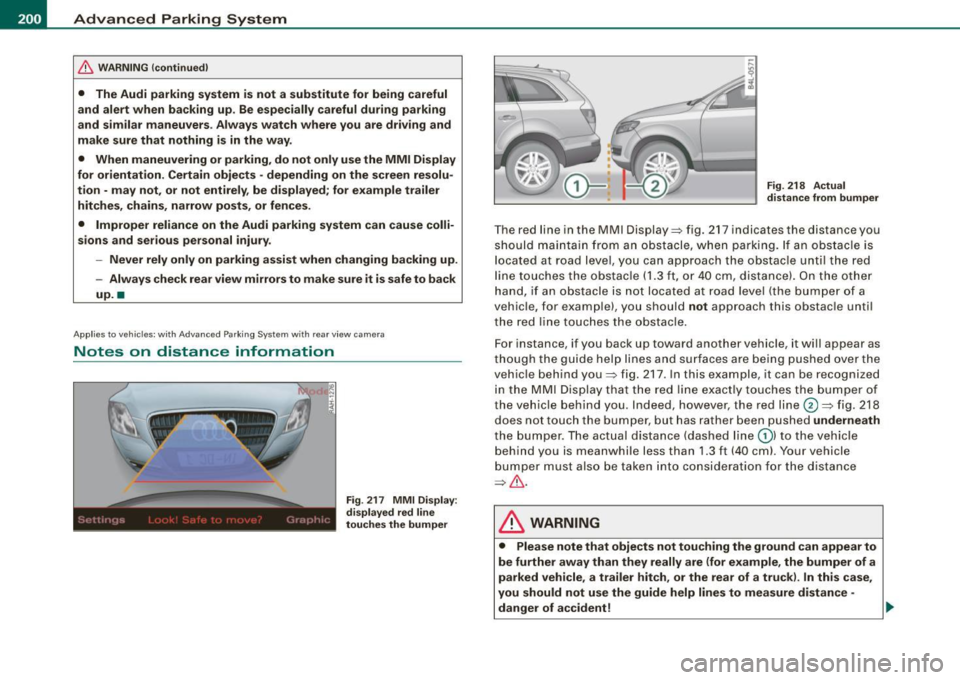
The red line in the MMI Display~ fig. 217 indicates the distance you
should maintain from an obstacle, when parking. If an obs tac le is
l ocated at road l eve l, you can approach the obstacle unti l the red
l ine to uche s the obstac le ( 1.3
ft, or 4 0 cm , distance). On the o the r
h a n d, if an obstacle is no t locat ed a t road level (the bu mpe r of a
vehic le, for examp le), you should not approach this obstac le unti l
t h e red line touc hes the obstacle.
F or instance, if you back u p toward another vehicle, it will a ppear as
thou gh the gui de help line s and s urface s are be ing pushed over the
vehic le behind you~ fig. 217. In this example, it can be reco gnized
in the M MI Display that t he re d l in e exac tly touc hes the bum per o f
th e ve hicle behind you . Ind eed, however, the red line@~ fig. 218
does not touch the bumper, b ut has rather been pushed underneath
t h e b umpe r. T h e actual d istance (dashed line G) l to the vehicle
behind you is meanwhile less than 1.3 ft ( 40 cm). Your vehicle
bu mper must als o be taken into co nsiderat ion for the d istance
~&. .
& WARNING
• Please note that objects not touch ing the ground can appear to
be further away than they really are (for example , the bumper of a
parked vehicle , a trailer hitch, or the rear of a truck) . In this case ,
you should not use the guide help lines to measure distance -
danger of accident ! .,_
Page 203 of 426
____________________________________________ A_d_ v_ a_n_ c_ e_d _ P_a_ r_ k_ i_ n ..::g==-- S_ y=- s_t _e _m __ lJII
& WARNING (continued)
• Maintain plenty of distance from an obstacle, so that your
outside mirror or a corner of your vehicle does not collide with any
obstacles -danger of accident!
• The Audi parking system is not a substitute for being careful
and alert when backing up. Be especially careful during parking
and similar maneuvers. Always watch where you are driving and
make sure that nothing is in the way.
• When maneuvering or parking , do not only use the MMI Display
for orientation. Certain objects -depending on the screen resolu
tion -may not, or not entirely, be displayed; for example trailer
hitches , chains, narrow posts, or fences . •
Appl ies to vehic les : with Audi Pa rk ing System and factory insta lled tow ing h itch
Towing hitch
For vehicles with a factory installed towing hitch, or a trailer hitch
installed according to factory specifications , the rear acoustic
parking sensors are not activated when the vehicle is put in reverse
gear while an electrical connection to the trailer socket* is estab
lished. No distance alert occurs in the rear =:>
page 191. The rear
view camera picture=:>
page 194 is displayed without orientation
lines and without blue surfaces. •
Controls and equip
ment
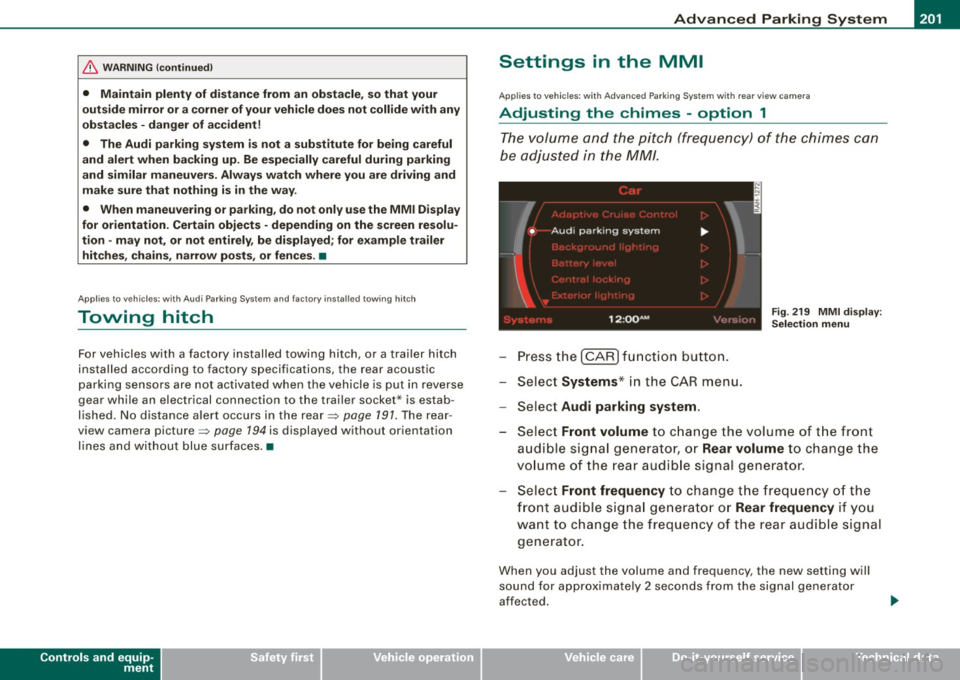
Settings in the MMI
A pplies to v ehicles: with A dvanc ed Park ing System with rear view camera
Adjusting the chimes -option 1
The volume and the pitch (frequency) of the chimes can
be adjusted in the MM!.
Press the [CAR] function button.
Select
Systems* in the CAR menu.
- Select
Audi parking system .
Fig. 219 MMI display :
Selection menu
- Select Front volume to change the volume of the front
audible signal generator, or
Rear volume to change the
volume of the rear audible signal generator.
Select
Front frequency to change the frequency of the
front audible signal generator or
Rear frequency if you
want to change the frequency of the rear audible signal
generator.
When you adjust the volume and frequency, the new setting will
sound for approximately 2 seconds from the signal generator
affected.
I • •
Page 206 of 426
IIII.___A_ d_v_ a_ n_c_ e_ d_ P _a_r_k _i_ n -=g ,_ S-=y"- s_ t_ e_ m __________________________________________ _
"Off" sett ing
If you have set the off function, both the rear -view camera and the
visual display will be deac tiva ted . The acous tic pa rking assist
remains active .
[ i J Tip s
If you change the sett ings in the MM I, the new settings do not
become active unti l the parking assist is switched on aga in. •
Safety tips
Applie s to ve hic le s: wit h Advance d Par king Sy ste m wit h re ar vie w ca me ra
Acoustic parking system error message
If you hear a continuous tone for several seconds while the front
and back parking assist with visual display is activated and the LED
in the switch
P wA flashes when you engage the reverse gear , there is
a malfunction in the acoustic parking assist .
This system error is immediately output after: • Every manual activation via the switch
P wA ~ pag e 191,
• Reverse gear is engaged for the first time during an ign ition
cycle, or
• An error is detected during operation.
[ i J Tips
If the system reports an error, have an Audi dea ler or an authorized
dea le rship corr ect this system error. •
Applies to vehicles: w it h A dvanced Par king S ystem w it h rea r view ca mera
Rear-view camera tips
We recommend that you practice park ing with the rear -view camera
in a traffic -free location , or parking lot , to become familiar with the
system, the orientation lines, and their function . When doing this,
there should be good light and weather conditions .
I n the MM I Display, objects or vehicles appea r c loser or further away
if :
• you are driving in reverse g ear from a level surface onto an
incline, or a downward slope,
• you are driv ing in reverse gear toward protruding objects,
• the vehic le is carrying too much load in the rear.
T he accuracy of the orientation lines and b lue surfaces diminishes
if :
• the Adaptive Air Suspension * is defective, or the dynamic,
off road, o r lift mode is sw itched on,
• the rear -view camera does not provide a reliable image, for
example, in poor visibility condit ions or if the lens is d irty,
• the image on the screen is not visible due to sun glare and reflec
tion .
Car ing for the rear- vie w c amera l en s:
• Damp en the lens with a hous ehold a lcohol -based glass cleaner,
and c lean the lens w ith a dry cloth.
• Remove snow with a hand brush.
• Remove ice , preferably with de -icing spray~
0.
ln. WARNING
• The rear-view ca m era doe s not replace the view to the rear and
the rear view mirror s.
• The rea r-view camer a - be cause of t echni cal limit ation s - does
not show the ent ire area behind the vehicle~
page 196 , fig. 211. ~
Page 417 of 426
______________________________________________ A_ l_,_ p _h_ a_ b_e _t_i c_ a _ l _in _ d_e _ x __ ffllll
How many airbags does my vehicle have? ..
248
How often should I check my tire pressures? 354
How safety be lt pretensioners work .... 239
Hydroplaning .... .... ....... .. .. .... 358
I
Ignition key .... .... .... .... ... .... . 142
Ignition lock .. .... ...... .... ... .... . 142
Malfunction .. ... .... ...... .... 34, 38
Ignition lock positions ... .... ...... .. 142
Immobilizer . .... .... .... ... .... .... . 15
Important things to do be fore d riving .. 221
Improper ly worn safety belts ..... ... .. 239
I ndicator lights ..... ... .. ........... . 17
Airbag system . ........ ...... 252, 253
PASSENGER A IR BAG OFF ... .. ... .. 253
Infant seats . .... ... .... .... .... .... 268
How do I properly install an infant seat in
my vehicle? .... ..... .... ..... .. 268
Safety instructions ... .... ... .... . 268
I nflatable spare tire ...... ... ... .... .. 372
I nflating .... . ... ... . .. .. .. .... .. 378
Inside rear view m irror . ...... ... ... 86, 87
Ins ta lling child sa fe ty sea ts
Safety belts ....... ......... ..... 273
I nstrument cluster i lluminat ion ... ..... . 17
I nstruments and controls .... .... .... .. 13
General il lustration ... .... ....... .. 11
Int erior lights .... .... .... ... .... ..... 78
Rear . ....... ... .... .... ....... 78, 79
Controls and equip
ment Safety first
I
ntermittent wiping LATCH ...... .... ... . ... ... . .. .. .. . . 278
Rain sensor ... ...... .... ... .. .... . 81 Descrip tion ... ... ... ... .. .... .... 278
Guidance fix tures for lower anchorages .
J 279
Installing a child restraint ...... .... 281
Jack .... .... .... ...... ..... ..... .. . 370
Location . .... .... .... ... .... .... 278
Jumper cab les . ...... .... ... .... .... 388 Mounting and releasing the anchorage
Jump -starting ... ...... ... .. .... .... 387 hook .
..... .. ... .... ... .... .. .. 282
Lateral angle .. ... ...... .... ..... .. . 302
K Leather ...... .... .... ... .. .. ... .. .. 321
Cleaning .. .... .... ... ........ ... 322
Key .... .... .... .... ... ...... ....... 48
Level adjustment
Battery rep lacement .. .... .... .... . 50
See Adaptive Air Suspension ... .. .. 206
Coded settings . ... .... .... ... .... 123
Lifting jack ... .... .... ... .... .... ... 376
Convenience opening a nd closing of
windows ... .... .. .. ..... .. . .... . 66
Emergency key ...... ........ ..... . 48
Key replacement . .... .... .... .... . 48
Master key ... ....... .... .... .... . 48
Valet key ... .. .... .... .... ... .... . 48
Key coded settings Climate controls ... .... ..... .. .... 123 Lifting vehicle .
....... ... .. .. .... ... 392
Light Exterior light ing in the mirror housing 76
leaving home ..... .... ... .... .... . 76
See also Background lighting ...... .. 79
Light sensor defective ....... ... .. ..... 36
Lighting
Key less entry remote control ... .. .... .. 49
Kick -down
See Background lighting ... .... .... . 79
Ligh ting in the mirror hous ing ..... ... .. 76
tiptronic® .... .... .... .... .... ... 187 Lights
.. .. .. .... .... .... ... .... .... . 73
Coming home . .... .... ...... .... .. 74
L
Daytime running lights ............. 74
Emergency flashers ... .... .... ... .. 76
L ane assist Exterior lights ..
... .... ... ..... .... 74
Activating and deact ivating 171 Front fog l
ights ... .... .... .... ... .. 75
Description ... .. .. .... .... .... ... 1 71 Headlights ..
...... .... .. . .. .. .... . 73
Instrument cluster indicator light . .. 171 H
igh beam .... .... ... .. .. .... . 73, 77
MMI settings ... .. .... .... .... ... 172 High beam warning/indicator light
... 22
Notes on instrument c luster disp lay . 171 Leaving h
ome ...... ... .. .. ... .. .. . 7 4
Vehicle operation Vehicle care Do-it-yourself service Technical data
Page 419 of 426

______________________________________________ A_ l_,_ p _h_ a_ b_e _t_ic _ a _ l _in _ d_e _ x __ ffllll
s liding open ..... ........ ...... ... 68
Sunshade ... .... .... ....... .... .. 69
tilting .... .... .... .... ... .... .... . 68
Parking ............................ 147
Automatic transmission ... ... .... . 184
Caution when parking near a parking bar -
rier or curb ...... .... ........... 147
Low bumper cover, spoi lers and
suspension .... .... .... ...... .. 147
Parking brake ..... ...... .... ..... .. . 147
Parking ...... .... .... ... .... .... 147
Warning/indicator lights .. .... .... .. 23
Parking on a decline (downhill) .. ...... 147
Parking on an incline (uphill) .. ... .... . 147
Parts replacement ... .... .... ...... .. 403
PASSENGER AIR BAG OFF light ... .. ... 253
Passenger's seat ..... .... ... .... .. 93, 96
Passive safety system .. .............. 220
Pedals ... ......... ... ........ .... .. 226
Perimeter lighting ... .... .... .... .... . 76
Physical principles of a frontal collision 232
Polishing ...... .... .... .... ... .... . 315
Po llen filter
Climate controls ...... ....... .... . 123
Power locking switch ... .... .... .... .. 55
Power locking system ... .... .... .... .. 52
Convenience close/open feature .... . 66
Locking and unlocking the vehicle from inside . ... .. .... .... ............ 55
Opening and c losing the windows ... 66
Rear lid/trunk lid .... .... .......... 57
Remote control key ................ 49
Se lective unlock feature ............ 55
Controls and equip
ment Safety first
Settings ...
... .... ........ .. . .. .. . 55
Unlocking and locking vehicle ... ... . 53
Power outlets ........... ............ 118
Power seat
Contro ls ... .. .... ........ ....... . 93
Seat adjustment ..... ....... .. .... . 94
Power steering ......... .... .... ... .. 293
Power window switches .... ....... .... 64
In the driver's door .. ......... .... . 65
In the front passenger 's door ... .... . 66
Reactivating the system .. .... .... .. 67
Pregnant women Special considerations when wearing a safety belt ....... .... ....... ... 237
Programming the Homelink® universal re-
mote control .... .... .... .... ... 214
Proper occupant seatiing positions .. ... 222
Proper safety belt position ...... .. .... 236
Proper seating position
Front passenger ... .... .... .... ... 223
Occupants .... .... .... ... .... .... 222
Rear passengers .. ... .... .... .... 224
Protective tray 109
a
Quartz clock .... .... ... .... .... .... .. 14
quattro®
See All Wheel Drive ............... 294
Question What happens to unbelted occupants? .
233
Why safety belts? . .... .... .... .... 23 1
R
Radiator fan .... .... .... .... .... .... 340
Rain sensor ...... .... ..... .. .... ... . 81
Rain sensor defective . .... ... .... .... . 36
Reading lights
Front ... ... ........ ... .... .... ... 78
Rear . .... ..... .. .... .... .... ... .. 79
Rear ashtray ... .. .... .... ... ... ... .. 116
Rear fog lights .. .... ........ .... .... . 75
Rear lid
Automatic operation .... ..... ...... 58
Emergency unlocking . .... ... .... .. 60
Opening and closing ... ... .... ..... 57
Valet key function .... .... .... ... .. 51
Rear light
Defective . ........ .... .... ...... ..
27
Rear operation
Four -zone automatic comfort air
conditioning ... .. ....... .... .... 135
Rear seats Adjusting seat .................... 99
Entry assist ... .... .... ... .... ..... 99
Fo lding seat back up and down . .... 100
Rear view
See Rear-view camera ............. 191
Rear view mirror Inside rear view mirror ..... .... . 86, 87
Rear window defogger ... .... ... .... . 129
Rear -view camera .. ... .. .... .... 191, 194
Parking mode 1 .... .... ........ .. 196
Parking mode 2 .... ...... .... .... 198
Red symbols ...... ....... .... ... ..... 31
Vehicle operation Vehicle care Do-it-yourself service Technical data