reset AUDI Q7 2009 Owner´s Manual
[x] Cancel search | Manufacturer: AUDI, Model Year: 2009, Model line: Q7, Model: AUDI Q7 2009Pages: 426, PDF Size: 97.13 MB
Page 130 of 426
![AUDI Q7 2009 Owner´s Manual • ..__w_ a_ r_m _ a_ n_d_ c_ o_ ld __________________________________________________ _
Blower[&&]
The automatically preset fan speed can be reduced or
increased.
Fi g. 137 MM I D is p](/img/6/40274/w960_40274-129.png "AUDI Q7 2009 Owner´s Manual • ..__w_ a_ r_m _ a_ n_d_ c_ o_ ld __________________________________________________ _
Blower[&&]
The automatically preset fan speed can be reduced or
increased.
Fi g. 137 MM I D is p")
• ..__w_ a_ r_m _ a_ n_d_ c_ o_ ld __________________________________________________ _
Blower[&&]
The automatically preset fan speed can be reduced or
increased.
Fi g. 137 MM I D is pl ay :
Blower
- Press the Blower [<%'] button.
- Rotate t he climat e co ntro l knob to the desired fa n speed
=:> fig . 137.
The climate control system automatical ly regulates fan speed
d e pending on interior tempera ture. You can adjus t the volume of air
produced by the fan to your own requirements.
[ i ] Tips
If the difference between the desired temperature set by you and
the vehicle's interior tempera ture is too great , the fan speed wi ll
change automatically . This occurs so that the desired temperature
setting is reached as quickly as possible .•
Manual air circulation I~]
Air recirculation prevents exhaust fumes or other pollu
tion from entering the vehicle.
Turning on air recirculation
- Press[~] =:>page 725,fi g. 135 =:>&
Turning off air recir culation
Press~ again, or
- Press [AUTO], or
Press [®].
I n the air rec irculation mode, the air in the passenger compartment
is recirculated and filtered to prevent exhaust fumes and other
pollution from entering the vehic le. We recommend that you use the
manual air recirculation under the follow ing condit ions :
• when driving through tunnels
• in a traffic jam.
& WARNING
Do not u se thi s setting f or exte nded pe riod s of time . Th e w in dows
c ould fog up sin ce no fre sh air can enter the veh icle . If th e
window s fog up , p res s the air recirculation butt on ag ain imm edi
a tely to switch off the air re circ ula tion function or sele ct defr ost. •
Page 135 of 426
Warm and cold -
-------------------'
Applies to vehic les: w ith fou r-zo ne automat ic comfort air cond ition ing
Setting rear temperature
The temperature can be separately adjusted for the rear
left and right sides.
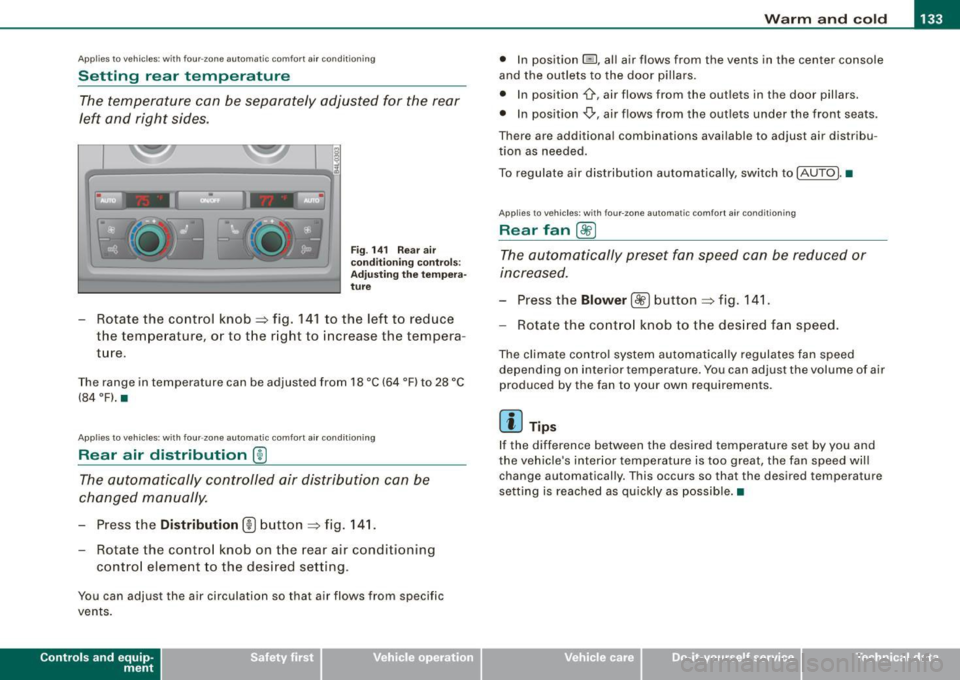
Fig . 14 1 Rear a ir
conditio ning co ntro ls:
A djust ing the te mp era
tu re
- Rotate the control knob=:, fig . 14 1 to the left to reduce
the temperature, or to the r ight to increase the tempera
ture.
T he range in temperature can be adjusted from 18 °C (64 °F) to 28 °C
(84 °Fl.•
Applies to vehic les: w ith four -zone automat ic comfort air cond it ioning
Rear air distribution ®
The automatically controlled air distribution can be
changed manually.
- Press the Di stribution (!) button => fig. 14 1.
- Rotate the contro l knob on the rear air conditioning
contro l element to the desi red setting.
You can adjust the air circulation so that air flows from specific
vents .
Contro ls and eq uip
ment
• In position @l, all air flows from the vents in the center console
and the ou tlets to the door pillars.
• In position '\},airflows from the out lets in the door pillars.
• In position
,0., air flows from the outlets under the front seats.
There are additional combinations available to adjust air distribu
tion as needed.
To regulate air distribution automatically , switch to !AUTO] .•
App lie s to veh icles: with fo ur-zone automat ic comfort air condit ioning
Rear fan [8fr ]
The automatically preset fan speed can be reduced or
increased.
Press the Blower [ c9fJ] button => fig. 141.
Rotate the contro l knob to the des ired fan speed.
The climate contro l system automatical ly regulates fan speed
depending on interior temperature. You can adjust the volume of air
produced by the fan to your own requirements .
[ i ] Tips
If the difference between the desired temperature set by you and
the vehicle's inter ior temperature is too great, the fan speed wil l
change automatically. This occurs so that the desired temperature
setting is reached as quickly as possible. •
Vehicle care I I irechnical data
Page 152 of 426
• .___O_ n_ t_ h_ e_ r_ o_ a_d ____________________________________________________ _
& WARNING (continued)
• Never use the cruise control when driving off-road or on
unpaved roads. The Cruise control is intended for use only when
the vehicle is being operated on paved roads , and is not suitable
for use off -road or on unpaved roads .
[ i J Tips
The cruise control cannot maintain a constant speed when driving
downhill. The vehicle will accelerate under its own weight. Down
shift to a lower gear or use the brakes to slow down. •
Changing speed
-Press lever in the 0 or O direction ~ page 149, fig. 157
to increase or decrease your speed.
- Release the lever to save that speed.
Change speed in increments of 1 mph (1 km/h) by lightly pressing
the lever . If you keep the lever pressed down, you will alter your
speed in 5 mph (10 km/h) increments.
You can also press the accelerator pedal down to increase your
speed, e.g. if you want to pass someone. The speed you saved
earlier will resume as soon as you release the accelerator pedal.
If, however, you exceed your saved speed by 5 mph (10 km/h) for
longer than 5 minutes, the cruise control will turn off temporarily.
The symbol will go out but the saved speed will be retained. •
Presetting your speed
You can preset your desired speed while the vehicle is not
moving.
- Turn on the ignition.
- Pull lever into position
G) ~ page 149, fig. 157.
- Press the lever in the
0 or O direction to increase or
decrease your speed.
- Release the lever to save that speed.
This function makes it possible, for example, to save the speed you
want before driving on the highway. Once on the highway, activate
the cruise control by pulling the lever toward
G). •
Swit ching th e syst em off
Temporary deactivation
- Press the brake pedal, or
- Press the lever into posit ion
0 (not clicked into place)
~ page 149, fig. 157, or
- Drive for longer than 5 minutes at more than 5 mph
(10 km/h) above the stored speed .
Switching off completely
- Press lever into position
0 (clicked into place), or
- Switch the ignition off.
The system retains the saved speed if you deactivate the cruise
control temporarily . To resume the saved speed, release the brake
pedal and pull the lever to position
G).
Switching the ignition off erases the saved speed.
Page 164 of 426
• ..__A_ d_a...: p:,..._ ti_v _ e_ C_ ru_ is_ e_ C_ o_n_ t_ r_ o _ l ___________________________________________ _
Applies to veh ic les: with Adapt ive Cruise Contro l
Display in the instrument cluster
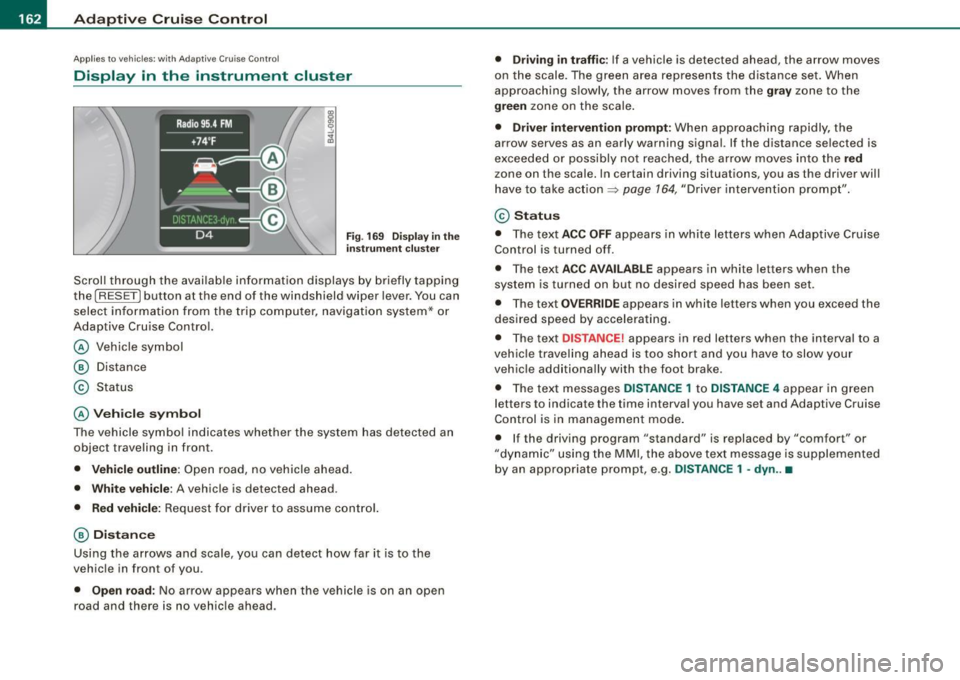
Fig . 169 Displ ay in the
in strumen t cluster
Scroll through the avai lab le information displays by briefly tapping
the
I RESET] button at the end of the windshield wiper lever. You can
select information from the trip compu ter, navigation system* or
Adaptive Cruise Contro l.
@ Vehicle symbol
@ Dis tance
© Status
@ Veh icle sy mbol
The vehicle symbol indicates whether the system has detected an
object traveling in front.
• Vehicle outl in e: Open road, no vehicle ahead .
• Whit e vehi cle : A vehicle is detec ted ahead .
• Red vehicle: Request for driver to assume contro l.
@ Distance
Using the arrows and scale, you can detect how far it is to the
vehic le in front of you .
• Open road: No arrow appears when the vehicle is on an open
road and there is no vehicle ahead .
• Driving in traff ic: If a vehicle is detected ahead, the arrow moves
on the scale . The green area represents the d istance set . When
approaching s lowly, the arrow moves from the
gray zone to the
green zone on the scale .
• Driver intervention prompt : When approaching rapidly, the
arrow serves as an early warning signal. If the distance selected is
exceeded or possibly no t reached, the arrow
moves into the red
z one on the scale. In certain driving situations, you as the driver will
have to take action ::::,
page 764, "Driver interventio n prompt" .
© Status
• The tex t ACC OFF appears in white letters when Adaptive Cruise
Control is turned off.
• The text
ACC AVAILABL E appears in white letters when the
system is turned on but no desired speed has been set .
• The text
OVE RRIDE appears in white letters when you exceed the
desired speed by accelerating .
• The text
DISTANCE! appears in red letters when the interval to a
vehic le trave ling ahead is too short and you have to slow y our
vehic le additionally with the foot brake .
• The text messages
DISTANCE 1 to DISTANCE 4 appear in green
letters to indicate the time interval you have set and Adaptive Cruise
Control is in management mode .
• I f the driving program "standard" is replaced by "comfor t" or
"dynamic" using the MMI, the
above text message is supplemented
by an appropriate prompt, e .g.
DISTANCE 1 -dyn .. •
Page 196 of 426
• ..__A_ d_v _ a_ n_c _e _ d_ P_ a_r _k _in ---== g'-- S...:y _ s_ t_ e_ m ___________________________________________ _
• Keep the sensors in the rear bumper and the rear-view camera
lens clean and free of snow and ice, so that the Audi parking system
can work properly. P lease follow the additional notes on
=>
page 204 . •
Ap plie s to v ehic les: wit h Advance d Par kin g Syst em wit h re ar v ie w c am era
Rear -view camera (Rear View)
The rear -vie w camera picture, appearing in the MM/
Dis play, sh ows the area behind the vehicle .
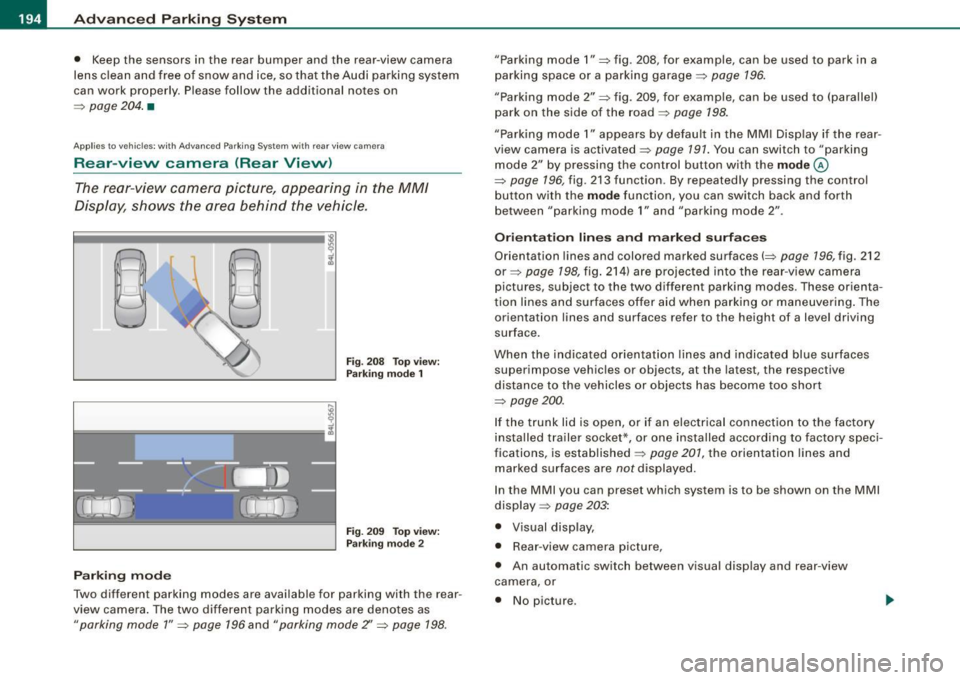
Fig . 20 8 Top view:
Par king mode 1
Fig. 209 To p view:
P arki ng m od e 2
Parking m od e
Two different parking modes are available for parking with the rear
view camera . The two different parking modes are denotes as
"parking mode 1" => page 196 and " parking mode Z' => page 198.
"Parking mode 1" => fig . 208, for example, can be used to park in a
parking space or a parking garage=>
page 196.
"Parking mode 2" => fig . 209, for example, can be used to (parallel)
park on the side of the road=>
page 198.
"Parking mode 1" appears by defau lt in the MM I Disp lay if the rear
view camera is activated=>
page 191. You can switch to "parking
mode
2" by pressing the control button with the mode ©
=> page 196, fig . 213 function. By repeated ly pressing the control
bu tton with the
mode function, you can switch back and forth
between "parking mode
1" and "parking mode 2" .
Or ientat ion lines and marked surface s
Orientation lines and colored marked surfaces(=> page 196, fig. 212
or=> page 198, fig . 214) a re projected into the rear -view camera
pictures , subject to the two different parking modes . These orienta
t ion lines and surfaces offer aid when parking or maneuvering . The
orientation lines and surfaces refer to the height of a level driving
surface.
When the indicated orientat ion lines and indicated blue surfaces
superimpose vehicles or objects, at the latest, the respective
distance to the vehicles or objects has become too short
=>
page 200 .
If the trunk lid is open, or if an electrical connection to the factory
installed trailer socket*, or one installed according to factory speci
fications, is established=>
page 201, the orientation lines and
marked surfaces are
not displayed.
In the MMI you can preset which system is to be shown on the MMI
display =>
page 203:
• Visual display ,
• Rear -view camera pic ture,
• An automatic switch between visual display and rear -view
camera, or
• No picture.
Page 205 of 426

___________________________________________ A_ d_ v_ a_n _ c_ e_ d_ P_a _ r_ k_ i_n -=g=-- S_ yc..,_ s_t _ e _m _ __.fflll
& WARNING
Alwa ys make sure that the volu me and frequen cy of the ch ime s is
adjusted so that y ou can ea sily he ar the a coustic di stance signal
eve n if the r adi o i s pl aying , the air -condit io ne r blo wer i s on High o r
there i s a high level of outside noi se . Check the settings when ever
s omeon e el se ha s dri ven th e vehi cle before you .•
A pp lies to vehicles: w ith Adva nce d Par kin g S ystem with rear view camera
Switching the visual display /rear-view
camera on and off
The visual display and rear-view camera are preset in the
MM!.
Con tro ls and eq uip
ment
F ig . 2 2 2 MMI di splay:
Dis play A PS -su bmenu
Fig . 2 2 3 M MI di spl ay:
vi su al di splay o f
di sta nce to a detec te d
ob st ac le
Press the I CAR I function b utton.
Selec t Systems * in the
CAR menu .
Select Audi parking system .
Select Display APS
=> fig. 222 .
Select Graphic , Rear View , automati c or off.
The rear-view camera and the visual display can be used separately
or in combination for parking .
When you switch manually to the rear -view camera v ia the control
button with the
Rear V ie w function => fig. 223, the control button
with the
Graphic function => page 198, fig. 215 appears . You can
switch back and forth between the rear-view camera and visua l
parking assist at any
time via the disp layed control button function .
The presettings in the MMI are retained .
"Graphic " setting
If you have set the Graphi c function, the visual display will be
displayed in the MMI display by defau lt upon activation of the
parking assis t system => fig . 223 .
"Rear Vi evv " s ett ing
If you have set the R ear View function , the picture from the rear
v iew camera =>
page 196, fig. 213 will be displayed when driving
backward and forward whenever the parking assist system is acti
vated.
" Autom atic" sett in g
If you have set the automat ic function, the picture fro m the rear
view camera will automatically be displayed when reverse gear is engaged and the visual disp lay will be displayed on the MM I display
when you drive forward . .,.
Vehicle care I I Technical data
Page 384 of 426
lllftl.,___F_ u_ s_ e_s _ a_n _ d_ b_ u_lb _ s _______________________________________________ _
[ i J Tips
You are well advised to keep a supply of spare fuses in your vehicle .
Fuses with the proper ampere ratings are available at your autho
rized Audi dealer. •
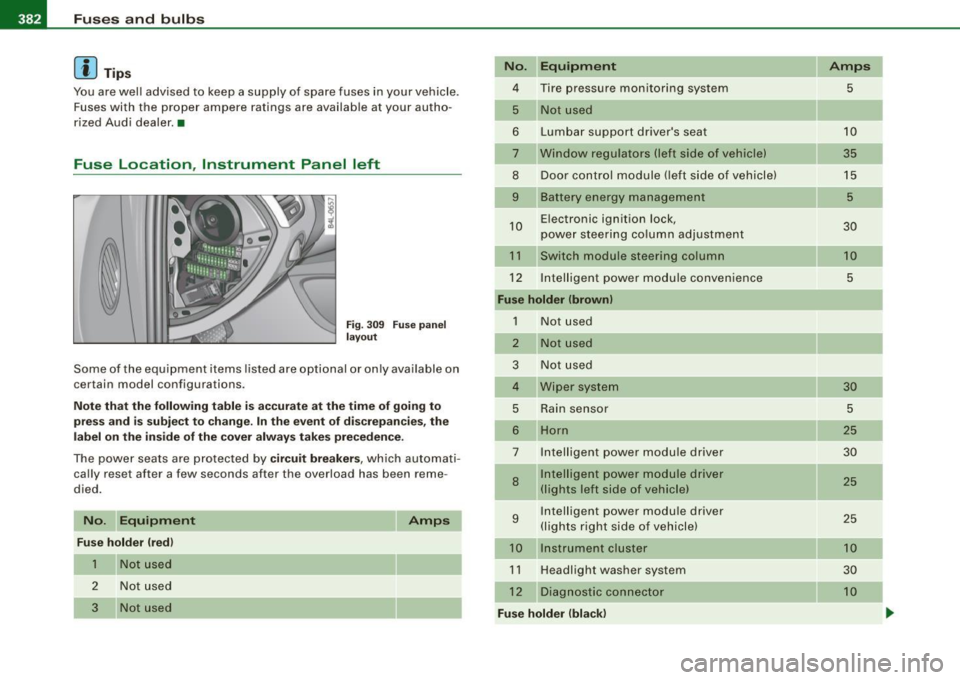
Fuse Location, Instrument Panel left
Fig . 309 Fuse panel
layout
Some of the equipment items listed are optional or only available on
certain model configurations .
Note that the following table is accurate at the time of going to
press and is subject to change. In the event of discrepancies, the
label on the inside of the cover always takes precedence.
The power seats are protected by circuit breakers, which automati
cally reset after a few seconds after the overload has been reme
died.
No.
Equipment
Fuse holder (red)
1
2
3
Not used
Not used
Not used
Amps
No. Equipment
4 Tire pressure monitoring system
5 Not used
6 Lumbar support driver's seat
7 Window regulators (left side of vehicle)
8 Door control module (left side of vehicle)
9 Battery energy management
10 Electronic ignition lock,
power steering column adjustment
11 Switch module steering column
12 Intelligent
power module convenience
Fuse holder (brown)
1
2
Not used
Not used
3 Not used
4 Wiper system
5 Rain sensor
6 Horn
7
8
9
Intelligent power module driver
Intelligent power module driver
(lights left side of vehicle)
Intelligent power module driver
(lights right side of vehicle)
10 Instrument cluster
11 Headlight washer system
12 Diagnostic connector
Fuse holder (black) Amps
5
10
35 15
5
30
10 5
30
5
25
30
25 25
10
30
10
-
Page 385 of 426
Fuses and bul bs 11111 ________________________________ ..:....:,:_=-.::..:....:.;.:_.:..:..,_,;__,;____,J
....
No.
1
-
2
3
4
5
6
Eq uipm ent
Headlight electronic system (left side of vehi -
cle)
Adaptive Cruise Control
Not used
Audi lane assis t
Not used
Terminal 15 (interior)
Oil level sensor
8 Diagnostic connector
9 Automatic dipping interior mirror
10 Homelink
1 1 Control module Gateway
12 Headlight range adjustment
Amps
10
5
10
5
5
5
5
5
5
5
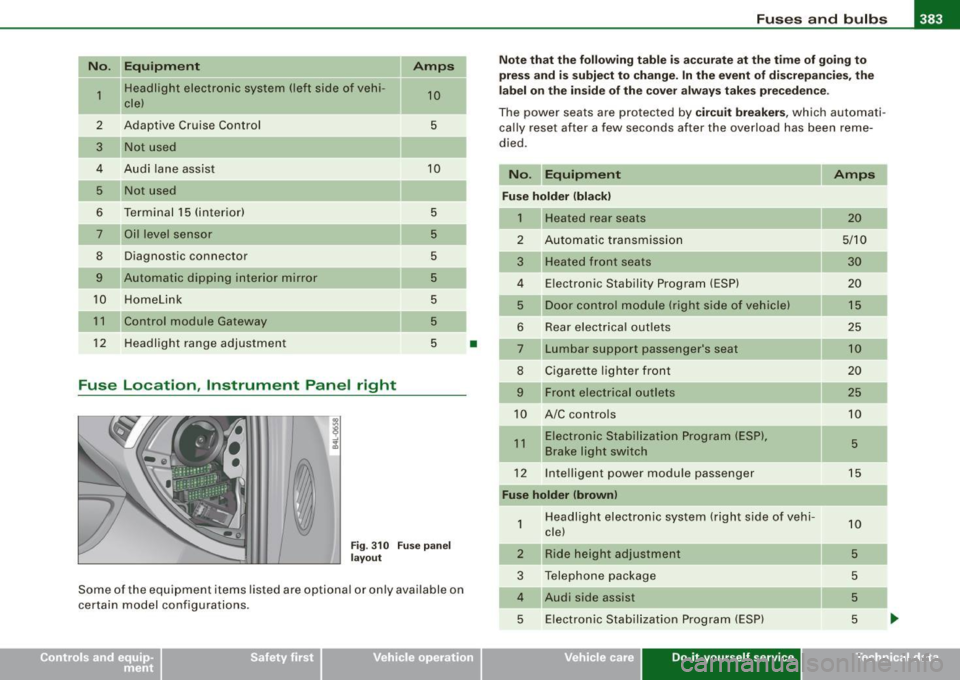
Fuse Location , Instrument Panel right
Fi g. 310 F use pane l
l ayo ut
Some of the equipment items listed are optional or only avai lable on
certain model configurations .
•
Note that th e fo llo wi ng ta ble is acc urate a t the time of goi ng to
pre ss and is subject to change. In th e event of di screpan cies, t he
l a b el on the ins ide o f th e cover a lw ays ta ke s prec eden ce.
The power seats are protected by circ uit breakers , which automati
ca lly reset af ter a few seconds after the overload has been reme
died .
No. Equipm ent
Fu se holder (bla ck )
1 Heated rear seats
2 Automatic transmission
3 Heated front seats
4 E lectronic Stability Program (ESP)
5 Door control module (right side of vehicle)
6 Rear electrical out
lets
7 Lumbar support passenger's seat
8 Cigarette lighter front
9 Front electrical outlets
10 A/C controls
1 1 Electronic Stabilization Prog ram (ESP),
Brake light switch
12 Inte lligent power modu le passenger
Fuse holder (brown )
1
2
3
Headlight electronic system (right side of vehi
cle)
Ride height adjustment
Telephone package
4 Audi side assist 5 E lectronic Stab ilizat ion Program (ESP)
Vehicle care Do-it-yourself service
Amps
20
5/10
30 20
15
25
10
20
25
10
5
15
1 0
5
5
5
5
-
irechnical data
Page 413 of 426

______________________________________________ A_ l_,_ p _h_ a_ b_e _t_ic _ a _ l _in _ d_e _ x __ _
Child safety lock
rear doors (powe r) .. ... .. ... ... .... 61
Child safety seats . ................. . 268
Convertible locking retractor .... ... 273
Danger of using child restraints in the front seat ...... .... .... ...... .. 243
How do I properly install a child safety
s e at in my vehicle? .. .... ... .... . 266
Installing .. .. .... ... ..... ...... .. 273
LATCH system ...... .. ... .. .. ... . 281
Safety instructions .. ... ....... ... 266
Cigar ette light er ... ... ... .. ... .... .. 117
Cleaning Alcantara (synthetic suede) ... .. ... 323
Engine compartment .. ...... .... . 324
Fabrics and fabric coverings ....... 319
Ins trument pane l ...... ........... 320
Int erior ... ....... .... .... ... .... 319
L eather .... .... ......... ........ 322
MMI display ..... .. ... ... .... .... 319
MMI terminal ...... ....... .... ... 319
Plastic and vinyl ......... .... ..... 316
Plas tic parts .. .. .... .... ... .. ... . 320
Safety belts .. .... ....... .... .... 323
Trim strips ... .... .... ... .... .... 315
trim strips .. ...... .... ..... ...... 316
Cleaning and pro tection .. .... ... ... .. 312
Climate control ..... .... .... ....... . 123
Synchronizing .. ...... ...... ..... 125
Warm and cold .. .... .... .... .... . 123
Climate controls Air distribution ... .... .... .... .... 127
Air outlets .... ... .... .... .... .... 130
Air outlets (rear) .... ........... ... 130
Controls and equip
ment Safety first
Air recirculation
...... .... .... .... 128 Starting engine ....... .. .. ... .... 144
AUTO (standard set ting) .. .... ..... 126 STOP button .. .. ... ... .... ..... .. 145
Basic settings .... .... ... .... ..... 134 Switching engine off ... ... ... ... .. 145
Blower ...... ... .... .... .... ..... 128 Switching on ignition ... .. .... .... 144
Controls . .... .... .... .... ... .... 125 Unlocking vehicle ...... ... .... .... . 62
Defrosting/defogging ...... ....... 127
Convertible child seats
Description .. ...... ... .... .... ... 123
How do I properly install a convertib le
ECON mode .... . .. .. ..... ... .... 126 child seat in my vehic le? ...... ... 269
ECON operation ........... ....... 134 Safety instructions ........ ........ 269
Energy manageme int .. .... .... .... 123
Convertible locking retractor
Heated seats, fron t .... ... ..... ... 136
Activating ........ .... ... .... .... 275
Key coded setting ........ ........ 123
Deactivating ... ... .... .... .... ... 276
Recirculation mode (automatic) ... .. 134
Using to secure a chi ld safety seat . 273,
Recommended settings .. ... .... .. 123 275
Residual heat ................... . 126
Coolant system ....... ... ........... 337
Setting the temper .ature .. ... ... .. . 127
Cooling box in glove compartment .... . 120
SETUP ...... ... .. .... .... .... ... 134
Synchronization ... .... .... .... ... 135 Cooling System
Expansion tank ... ..... .. .... .... . 338
Turning on and off ......... ... .... 126
Using climate control economically . 131 Cornering
light ....................... 76
Cruise control
Clock ......... .... . ...... ........ ... 14
Changing speed ............ .. .... 150
Closing Presetting your speed ........ ..... 150
Panoramic sliding sunroof .......... 68
Switching off ..... ... .... .... .... 150
Coat hooks ... .. .... .... ........ .... 121
Switching on ... .... ... ..... ... ... 149
Cold tire inflation pressur e ..... ... ... 351
Warning/indicator lights ........ .... 22
Compass mirror ........... ......... .. 89
See also Adaptive Cruise Control . ... 152
Compliance ......... ...... ... .. .... 404 Cruising range ......... ....... .. ..... 40
Consumer Information ........... 229, 401 Cupholder ........... ....... 103,114,115
Contacting NHTSA ... .... ... .... .... 229
Convenience key ..... ...... .... ... ... 61
D
Driver messages ... ... .... .. .. ... 146
Locking vehicle ... .... .... .... ..... 63
START button .................... 144 Damping
See Adaptive Air
Suspension .... ... 206
Vehicle operation Vehicle care Do-it-yourself service Technical data
Page 420 of 426
llffl Alphabetical index
-----=-------------------------------------
Refuelling . .... ... .... .. ...... . .. .. 327
Release lever for hood . . . . . . . . . . . . . . . 330
Remote control garage door opener
(Homelink®) . . . . . . . . . . . . . . . . . . .
214
Remote control key . . . . . . . . . . . . . . . . . . 49
Un locking and locking .... .... .... . 53
Remote rear lid release ............. .. 57
Repair manuals . . . . . . . . . . . . . . . . . . . . . 401
Repairs
Airbag system . . . . . . . . . . . . . . . . . . .
255
Replacing
Wheel rims ......................
361
Replacing a fuse . . . . . . . . . . . . . . . . . . . . 381
Replacing light bulbs ................ 385
Replacing tires and wheels .... ....... 359
Reporting Safety Defects . . . . . . . . . 229, 230
Reset button . . . . . . . . . . . . . . . . . . . . . . . . 1 5
Residual heat . . . . . . . . . . . . . . . . . . . . . .
125
Retractor . . . . . . . . . . . . . . . . . . . . . . . . . . 235
Rims
Cast alloy .. ... .... ....... .......
318
Replacing ....................... 361
Roof rack . . . . . . . . . . . . . . . . . . . . . . . . . . 112
Loading . . . . . . . . . . . . . . . . . . . . . . . . 113
Mounting locations .............. .
Roof weight ............. ... .... ... .
Rule of behavior offroad
s
113
113
302
SAFE ............................... 15
Safe driving habits . ...... .... ....... 220
Safety belt height adjustment ... .. .... 238
Safety be lt position . . . . . . . . . . . . . . . . . 236
Safety belt height adjustment ...... 238
Safety belts worn by pregnant women ..
237
Safety belt pretensioner . . . . . . . . . . . . . 239
Service and disposal .... .... .... .. 240
Safety belt warning light .... .... .. 21,231
Safety belts . . . . . . . . . . . . . . . . . . . . . . . . 235
cleaning .. .... ........ ... ....... 323
Danger to passengers who do not wear a
safety belt . . . . . . . . . . . . . . . . . . . . .
233
Fastening ........ .......... .. ... 235
Improperly worn ................. 239
Not worn . . . . . . . . . . . . . . . . . . . . . . . 233
Safety belt position . . . . . . . . . . . . . . . 236
Safety instructions .... ...... ..... 234
Securing child safety seats ........ 273
Special considerations for pregnant
women ........................
237
Unfastening . . . . . . . . . . . . . . . . . . . . . 238
Warning/indicator light ........... 231
Why YOU MUST wear them ........ 231
Worn properly ..... .... .......... 234
Safety comp liance sticker ..... .... ... 396
Safety equipment .. ........ ....... .. 220
Safety features for occupant restraint and
protection . . . . . . . . . . . . . . . . . . . . .
220
Safety guide lines
Seat adjustment .. .... .... ... .... .
92
Safety instructions
Engine compartment .............
331
for booster seats ............... .. 271 f
'd
. . b or s1 e curtain air ags .... .... .. .
for using child safety seats . .... .. .
for using convertible child seats ... . 262
266
269
for using infant seats ...... .... ... 268
for using safety belts ...... .... ... 234
Monitoring the Advanced Airbag System
254
Safety lock
Ignition key, automatic transmission
143
Seat adjustment
Adjusting the seat height manually ..
96
Adjusting the seatback .. ........... 94
Adjusting the seatback manually .. .. 96
Driver's seat . . . . . . . . . . . . . . . . . . . . . . 92
Driver's seat memory . ...... .... ... 97
Front passenger's seat ......... .... 93
Front seats . . . . . . . . . . . . . . . . . . . . . . . 92
Head restraints . .... ......... 101, 225
Lumbar support ........... .... ... . 95
Manual controls ... .... ..... ... ... . 96
Moving the seat forward or backward
manually .... .... .... ... .... ....
96
Seat belts
See Safety belts .................. 231
Seat memory . . . . . . . . . . . . . . . . . . . . . . . . 97
Seating capacity ... .. .... .... .... ... 231
Seating position
Driver .... .... .... .... ...... ... .
222
Front passenger ................. 223
How to adjust the front seats ... ... 223
Incorrect seat position ... .... ... .. 225
Occupants .. ...... .... ... .... ... 222
Rear passengers ....... ... .... ... 224