turn signal AUDI Q7 2009 Owner´s Manual
[x] Cancel search | Manufacturer: AUDI, Model Year: 2009, Model line: Q7, Model: AUDI Q7 2009Pages: 426, PDF Size: 97.13 MB
Page 182 of 426
• ..__A_ u_ d_ i _s _i_d _e_ a_ s_ s _ is_ t __________________________________________________ _
G) Signal on outside mirror does not light up
If you activate your turn signal in driving situation@, the signal still
does not ligh t up on the outside mirror::::;,
& in "Safety tips" on
page 782 . •
A pplies t o vehi cles : w it h side assist
MMI settings
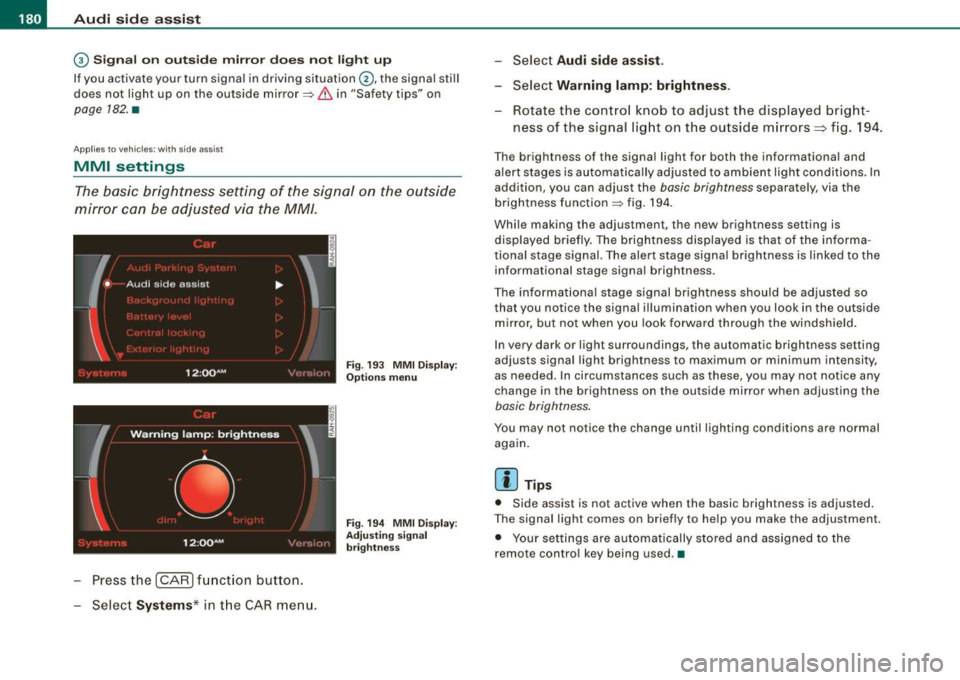
The basic brightness setting of the signal on the outside
mirror can be adjusted via the MM/.
- Pressthe!CAR)function button.
Select Systems* in the
CAR menu.
Fig. 193 MMI Display:
Options menu
Fig . 194 MMI Display :
Adjusting signal
brightness
Select Audi side assist.
- Select Warning lamp: brightness .
Rotate the control knob to adjust the displayed bright
ness of the signal light on the outside mirrors:::::, fig. 194 .
The brightness of the signal light for both the informational and
alert stages is automatically adjusted to ambient light conditions . In
addition, you can adjust the
basic brightness separat ely, via th e
brightness function::::;, fig. 194.
While making the adjustment, the new brightness setting is displayed briefly. The brightness displayed is that of the informa
tional stage signal. The alert stage signal brightness is linked to the
informational stage signal brightness.
The informational stage signal brightness should be adjusted so
that you notice the signal illumination wh en you look in the outside
mirror, but not when you look forward through the windshield.
In very dark or light surroundings, the automatic brightness setting
adjusts signal light brightness to maximum or minimum intensity,
as needed . In circumstances such as these, you may not notice any
change in the brightness on the outside mirror when adjusting the
basic brightness.
You may not notice the change until lighting conditions are normal
again.
[ i ] Tips
• Side assist is not active when the basic brightness is adjusted.
The signal light comes on briefly to help you make the adjustment .
• Your settings are automatically stored and assigned to the
remote con trol key being used .•
Page 183 of 426
___________________________________________________ A_u_ d_i_ s_ id_e_ a_ s_s _i_s _t _ __._
Ap plies to vehicle s: with side assist
General information
Side assist has lim its and cannot detect vehic les under all road and
weather conditions. P lease remember system limitations and
never
rely on the system, especially when:
• driving through curves=>
page 181,
• lanes are of different widths=> page 181. •
Ap plie s to vehicles: with side ass ist
When driving through curves
Side assist cannot detect vehicles in curves with a turning radius of
less than 328 feet (100 m).
When driving through a curve , it is possible that side assist may
register a vehicle two lanes
over, and the signal on the outside
m irror will ligh t up .•
A pplies to vehicle s: with side ass is t
Lane width
Controls and eq uip
ment
,
' ' ' '
• •
Fi g. 19 5 Lanes o f a
n orm al w idth are in
d etec tion a re a
Fig . 19 6 Narrow l anes:
Si de ass is t m ay d etec t
v ehicle s tw o la n es
a w ay
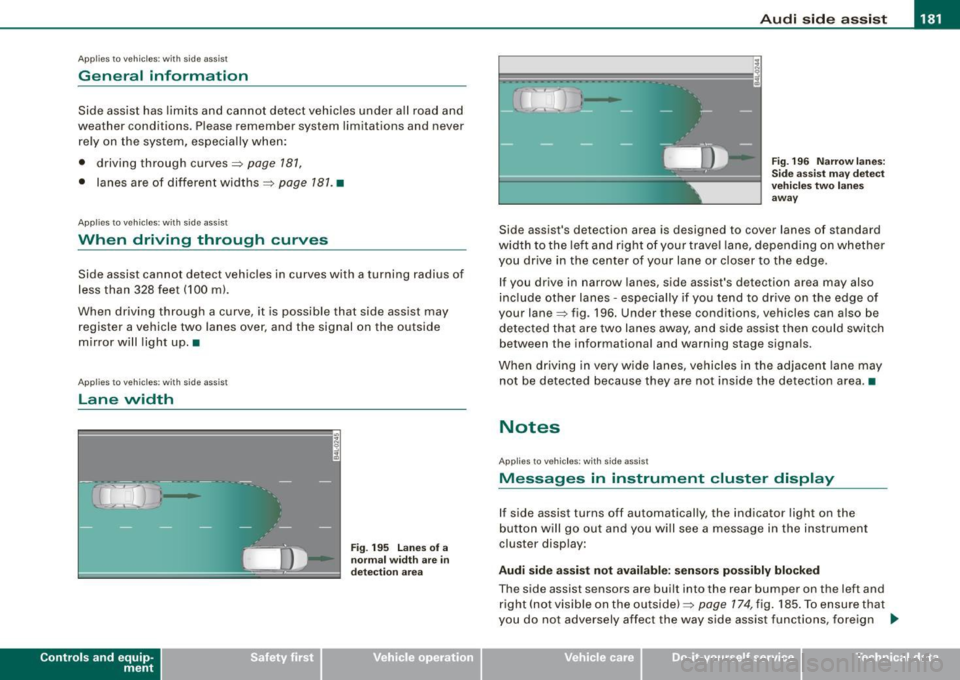
Side assist's detection area is designed to cover lanes of standard
width to the le ft and right o f your trave l lane, depending on whethe r
you drive in the center of your lane or c loser to the edge.
If you drive in narrow lanes, side assist's detection area may also
inc lude other lanes -especially if you tend to dr ive on the edge o f
your lane=> fig . 196. Under these conditions, vehicles can also be
de tected tha t are two lanes away, and s ide assist then could switch
between the informational and warning stage signa ls.
When d riving in very wide lanes, vehicles in the adjacent lane may
not be detected because they are not inside the detection area. •
Notes
Applies to veh ic les : with side assist
Messages in instrument cluster display
If side assist turns off automatically, the indicator light on the
button will go out and you will see a message in the instr ument
cluster display:
Audi side a ssist not available : sensors po ssibly blocked
The side assist sensors are built into the rear bumper on the left and
right ( not visible on the outside) =>
page 174, fig. 185 . To ensure that
you do not adversely affect the way side assist functions, foreign .,_
Vehicle care I I irechnical data
Page 184 of 426

• .___A_ u_ d_ i_s_ i_ d _e_ a_ s_ s_is _ t __________________________________________________ _
objects (such as stic kers o r bicyc le rac ks) shou ld no t be attach ed to
th e ar ea on the rea r bump er where t he sen so rs ar e loca ted. I f side
assist functions are adve rsely aff ect ed, you will see this m essage in
th e ins trum ent clu ster dis pla y. Remove an ything that may be
blocking the sensors.
If no veh ic le is detected for a longer period of time while d riving,
s id e ass ist w ill a lso sw itc h off aut omat ica lly.
Audi side assist currently not available If th ere is a tem porary prob le m (such as the veh ic le 's battery char ge
being low), side ass ist cannot be activated tem porar ily .
Audi side assist: system fault H ave the sys te m chec ked by an a uthorize d A udi dea ler o r qua lified
wor ks h op.
Audi side assist not available when towing
T he radar sensor 's view is limited when towing a trailer . Fo r vehicles
wi th a fac tory insta lle d t owi ng hitc h or a tra ile r h it c h th at was
install ed later according to factory specificat ions, side assist is
a uto matica lly deact iva te d as so on as the e lect ric a l c onn ectio n to
t h e trai ler's elect rical soc ket is m ade, and th is sta tus m essage
a ppears in the instrument c luster disp lay . Deactivat ion cannot be
gua ra nte ed w hen usin g a retro fitted to wi ng hitch that was not
insta lled according to factory specifications .•
Ap plies to vehic les : w it h side assist
Safety tips
T he s ide ass is t de tect io n may be limited whe n drivi ng a round
narrow street corners, on hilly streets, and under poor weather
c o ndition s.
It is possibl e that the radar sensors may also detect other ob jects,
suc h as h igh or s tagge re d guar drails. S
ide assist does not measure actua l lane width . The sys tem
assumes a fixed la ne wid th. Dete cti on in th e le ft an d rig ht l anes is
based on this assumed lane width . When d riv ing on narrow roads or
w hen driving to t he left or right of the ce nte r of a travel la ne, it i s
possible that vehicles will be detected that are
not in th e lane next
to the lane yo u are us ing.
& WARNING
• Improper reliance on the side assist system can cause colli
sions and serious personal injury :
- Never rely only on side assist when changing lanes.
- Always check rear view mirrors to make sure that it is safe to
change lanes .
• Side assist cannot detect all vehicles under all conditions
danger of accident!
• Side assist cannot detect vehicles in time to alert you when
they approach from behind at very high speed , or fall drop back
very quickly .
• The radar sensor's
vision can be reduced or entirely blocked by
rain , snow , and heavy spray . This can result in side assist not
adequately detecting vehicles or , in some cases, not detecting
them at all . Always keep an eye on the direction you are traveling
and the relevant area around the vehicle .
• Please note that side assist indicates there are approaching
vehicles , or vehicles in your blind spot , only after your vehicle has
reached a driving speed of at least 19 mph (30 km /h).
• Side assist signal does not work around tight corners (turning
radius less than 328 feet , or 100 ml.
• Side assist is no replacement for the driver's full attention. The
driver alone is responsible for lane changes and similar driving
maneuvers . Always keep an eye on the direction you are traveling
and the relevant area around the vehicle. .,,_
Page 194 of 426
• .___A_ d_v_ a_ n_c_ e_ d_ P _a_r_k _i_ n -=g,_ S-=y"- s_ t_ e_ m __________________________________________ _
-Press the sw itch PJJJ! in the cente r console ~ page 191,
fig. 206 t o activate the A udi pa rking system m anually .
Activation of the acoustic parking system is confirmed by
a brief acknowledgement sound . The indicator light in
the switch lights up.
D ea ctivation
If you drive forwards faster tha n approx. 6 mph (10 km/h),
or
- if you switch the ign ition off, the entire acoustic parking
assist is automatically deactivated, or
- you can press the sw itch
P111! i n the center console
=> page 191, fig. 206 to deact ivate the Audi parking
system. The indicator light in the switch goes out.
You have to turn on the acoustic parking assist m anuall y if you wish
to park the vehicle forwards or if you w ish to approach an obstacle
forwards and want a distance warning .
The range at which the sensors start to measu re is
about:
Front
Rear
W arning ton es side
cen
te r
side
cen ter 3 ft (0
.90 ml
4ft (1.20 ml
2 ft (0.60 ml
5 .2 ft (1.60 ml
Distance warning is given by chimes which are generated by a
signal generator . The volume and the pitch of the chimes can be
adjusted in the MMI => page 201.
Mute In the case of vehic les with automa tic transmission, an acoustic
distance warning is discontinued when the transmission selector lever is moved to the P position. However, the system remains
active
. As soon as the selector lever is moved from the
P posi tion
and the vehicle approaches an obstacle, the acoustic distance
warning resumes .
Dri ving fo rward/ba ckvv ard
Distance warning when driving forward/backward is based o n
detection of an obstacle in the range of the parking assist . As the
distance dec reases, the time interval between the audible tones
becomes shorter.
When the distance is less than approx . 1 ft (0.30 m), the tone
becomes continuous. At this point you shou ld s top backing up or
driving forward .
If the distance to an obstac le remains the same, the vo lume of the
distance warning is gradually reduced after about
4 seconds (does
not app ly to the zone for the cont inuous tone). If you sta rt to
approach the detected obstacle again, the distance warning will
sound at the normal volume again .
P a rk ing
When you selec t ano ther gear when parki ng (e .g . reverse/forward),
the warning tones are temporarily suppressed, but the visual display remains on the MMI display . If you start approaching a
detected obstacle again, the distance warning wi ll sound at the
normal vo lume again .
Vi sual disp lay
T he segments on the MMI display indicate a change in the distance
between the vehicle and an obstacle . The number of segments
displayed depends on the obstacles in front of or behind the
vehic le. The c loser the vehic le comes to the obstacle, the closer the
segments approach the vehic le => page 191, fig. 207. When the
segment before last is disp layed, the veh icle has reached the colli
sion zone. At this point you should stop backing up or driving
forward =>
&,. ..,.
Page 197 of 426

__________________________________________ A___;_ d_v _a_ n___;_ c __ e _d _ P_a_ r_ k_ i_n -=g ~ S_,y:... s_ t_ e_ m ___ llll
T he rear -v iew cam era can be turned on and off in the MMI
~ page 203 . The acous tic dista nce wa rning rem ains ac tive .
& WARNING
• The rear -view camera has blind spots, in which objects cannot
be detected . Be especially careful to check for small children and
animals before backing up. Small children and animals will not
always be detected by the sensors .
• The Audi parking system is not a substitute for being careful
and alert when backing up. Be especially careful during parking
and similar maneuvers . Always watch where you are driving and
make sure that nothing is in the way .
• Remember that low obstacles which have already been
signaled may pass below the system's sensing zone when the
vehicle is backing up . The fact that the signal stops does not mean
that you have cleared the obstacle. When the signal stops , impact
is imminent . Objects such as trailer hitches, chains , narrow posts
or fences covered by a thin layer of paint may not always be
detected by the system. They can still damage your vehicle
without warning .
• Always make sure that the volume and frequency of the chimes
is adjusted so that you can easily hear the acoustic distan ce signal
even if the radio is playing , the air-conditioner blower is on High or
there is a high level of outs ide noise .
- Check the settings whenever someone else has driven the
vehicle before you.
• Improper reliance on the Audi parking system can cause colli
sions and serious personal injury .
- Never rely only on parking assist when changing backing up.
- Always check rear view mirrors to make sure it is safe to back
up.
Controls and equip
ment
[ i ] Tips
• B efore par king w it h the rea r-view camera, the Adapti ve Ai r
S uspen sion * co mfort or automatic mode m ust be switched on
~ page 2 1.
• The rea r-vie w camera p ict ure i s avai la ble as soon as the M MI
Di sp lay or t he MMI is sw itched o n, o r the sta rt- up p hase is
completed.
• I n order for th e rear -view camera to function properly, the
came ra lens ~
page 191, fig. 205 mus t be ke pt clean, and free of
s n ow and ice . P lease fo llo w th e ad ditional notes on
~ p age 204.
• The camera c ove rage a ngle c hange s w hen the trun k lid is ope n.
Therefore, the rear -view camera picture is disp layed without orien
tati on lines an d without b lue s urfaces .
• Observe and fol low th e not es on towing mode * on~
page 201 . •
A pplies to vehic les : w it h Ad va nced Par kin g Sys te m with re ar view camer a
Rear-view camera coverage area
I • •
Fig. 210 Top view:
Rear-view camera
coverage area
Page 201 of 426

__________________________________________ A_ d_v _a_ n_ c_e _d _ P_a_ r_ k_ i_n ..:g =-- S...:y:- s_ t_ e_ m ___ JIII
When the turn signal is switched on, only the necessary surfaces
and curves are shown . To change the s ide that is shown, simp ly
change the turn signa l.
The displayed light b lue
0 or dark blue © curved line identifies the
turn-around point when maneuvering to park. If the curved line
touches the curb, the steering wheel turn -around point has been
reached => page 198, fig. 215.
T he distance from the rear bumper © to the red line © is approxi
mate ly 1.3 ft (40 cm). Here, at the latest, you shou ld s top bac king up
=> page
200 .
& WARNING
Please note that objects not tou ching the g round ca n appear to be
further away than they really are (for example , the bumper of a
parked vehi cle , a trailer hitch , or the re ar of a truck ). In th is case ,
you should not u se the guide h elp lines to mea sure distance -
danger of a ccident !
0 Note
In the MMI Display, the direction of travel of the vehicle rear is repre
sented depending on the steering w heel angle. The veh ic le front
swings out more than the veh icle rear.
[ i ] Tips
• I n order for the rear -v iew camera to function properly, the
camera lens=> page 191, fig. 205 must be kept clean, and free of
snow and ice . P lease follow the additional notes on => page
204 .
• T he positions of the orientation lines/ surfaces are disp laced up
or down if the pa rk ing process is carried out with the rear-view
camera in Adaptive Air Suspension*=> page 21 dynamic, off road, or
l if t m ode. Therefore, the accuracy is reduced. •
Controls and equip
ment
Special parking situations
A pplies to veh ic les : wit h Advance d Pa rk in g S yste m w it h rear view c amera
Parking next to obstacles
When parking next to an obstacle, enough distance mus t
left on the side.
Fig . 216 Top view:
P arki ng ne xt t o a brick
wall
With "parking mode 2", you can park very c losely to a sidewalk curb
with your vehicle=> page 194, fig. 209.
However, when parking next to an obstacle, such as a brick wall , a
larger side distance must be selected in order to prevent col lisio n
damage to the vehicle. Position the long side of the marked blue
s u rface so that there is enoug h distance from the curb; the surface
must not touch the curb=> fig. 216.
A lso, the turning process has to occur considerab ly sooner . This
means that the corresponding blue curved line=> page 198, fig. 215
must not touch the curb, but shou ld rather be at a distance far
enough from the curb=>& .
& WARNING
• Keep plenty of di sta nce from an obstacle , so that your out side
mirror or a corner of your vehi cle does not collide with any obsta-
cle s -danger of accident!
~
I • •
Page 204 of 426
IIIII..__A_ d_v _ a_ n_c _e _ d_ P_ a_r _k _in ---== g'-- S...:y _ s_ t_ e_ m ___________________________________________ _
The volume and frequency settings are automatically stored and
assigned to the remote master key.
& WARNING
Always make sure that the volume and frequency of the chimes is
adjusted so that you can easily hear the acoustic distance signal
even if the radio is playing, the air-conditioner blower is on High or
there is a high level of outside noise. Check the settings whenever
someone else has driven the vehicle before you. •
Applies to veh icles: with Advanced Parking System with rear view ca me ra
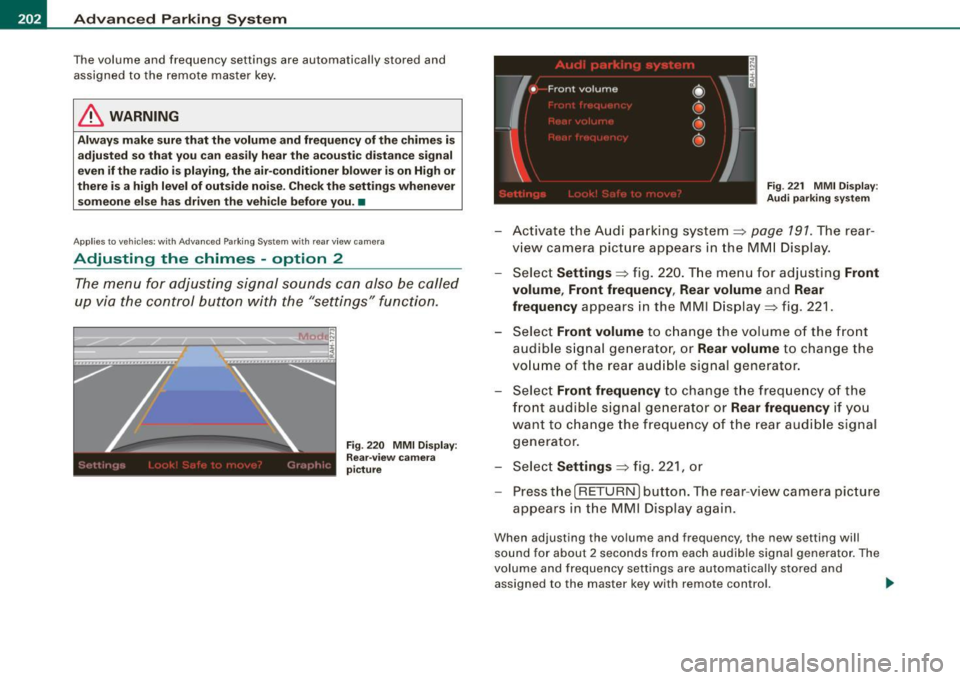
Adjusting the chimes -option 2
The menu for adjusting signal sounds can also be called
up via the control button with the "settings" function.
Fig . 220 MMI Display:
Rear-view camera
picture Fig
. 221 MMI Display:
Audi parking system
-Activate the Audi parking system:::::, page 791 . The rear
view camera picture appears in the MMI Display.
- Select
Settings :::::, fig. 220. The menu for adjusting Front
volume, Front frequency , Rear volume
and Rear
frequency
appears in the MMI Display:::::, fig. 221.
Select
Front volume to change the volume of the front
audible signal generator, or
Rear volume to change the
volume of the rear audible signal generator.
- Select
Front frequency to change the frequency of the
front audible signal generator or
Rear frequency if you
want to change the frequency of the rear audible signal
generator.
- Select
Settings :::::, fig. 221, or
- Pressthe[RETURN]button. The rear -view camera picture
appears in the MMI Display again.
When adjusting the volume and frequency, the new setting will
sound for about 2 seconds from each audible signal generator. The
volume and frequency settings are automatically stored and
assigned to the master key with remote control. _..
Page 267 of 426

-------------------------------------------~C::._! h~ i~ ld ~ S~ a~ f~e :_!t tY ~--
restraints and for the different models of the same kind of child
restraint offered by child restraint manufacturers.
The weight ranges for the individual types, makes and models of
child restraints that the NHTSA has specified in the Safety Standard
together with the weight ranges of typ ical infants and typical 1 year
old child have been stored in the control unit of the Advanced
Airbag System. When a child restraint is being used on the front
passenger seat with a typical 1 year -old child, the Advanced Airbag
System compares the weight measured by the weight sensing mat
with the information stored in the electronic control unit.
The electronic control unit also registers the tension on the front
passenger safety belt. The tension on the safety belt for the front
passenger seat will be different for an adult who is properly using
the safety belt as compared to the tension on the belt when it is
used to attach a child restraint to the seat. The sensor below the
latch for the safety belt for the front seat passenger measures the
tension on the belt . The input from this sensor is then used with the
weight to "decide" , whether there is a child restraint with a typical 1
year-old child on the front passenger seat and whether or not the airbag must be turned off.•
Child restraints and Advanced Airbags
Regardless of the child restraint that you use, make sure that it has
been certified to meet United States Federal Motor Vehicle Safety
Standards and has been certified by its manufacturer for use with
an airbag. Always be sure that the chi ld restraint is properly
installed at one of the rear seating positions. If in exceptiona l
circumstances you must use it on the front passenger seat, carefully
read all of the information on child safety and Advanced Airbags
and heed a ll of the applicable WARNINGS. Make certain that the
child restraint is correctly recognized by the weight -sensing mat
inside the front passenger seat, that the front passenger airbag is
turned off and that the airbag status is always correctly signaled by
th e
PASSENGER AIR BAG OFF light .
Controls and equip
ment Safety first Vehicle operation
Many
types and models of child restraints have been available over
the years, new mode ls are introduced regularly incorporating new
and improved designs and older mode ls are taken out of produc
tion. Child restraints are not standardized . Child restraints of the
same type typically have different weights and sizes and different
'footprints,' the size and shape of the bottom of the chi ld restraint
that sits on the seat, when they are installed on a vehicle sea t. These
differences make it virtual ly impossible to certify comp liance with
the requirements for advanced airbags with each and every child
restraint that has ever been sold in the past or will be sold over the
course of the usefu l life of your vehic le.
For this reason, the United States National Highway Traffic Safety
Administration has pub lished a list of specific type, makes and
models of child restraints that must be used to certify compliance
of the Advanced Airbag System in your vehicle with the suppression
requirements of Federal Motor Vehicle Safety Standard 208. These
child restraints are:
A. Car beds, manufactured on or after September 1,
2004:
• Cosco Dream Ride 02-719
B. Rear facing child restraint systems, manufactured
on or after September 1, 2004:
(When the restraint system comes equipped with a removable base,
compliance has to be certified with or without the base) .
• Britax Handle with Care 191
• Century Assura 4553
• Century Smart Fit 4543
• Cosco Arriva 02727
• Evenflo Discovery Adjust Right 212
• Evenflo First Choice 204
• Graco lnfant8457
Vehicle care Do-it-yourself service Technical data
Page 291 of 426
•
The direction in which the driver wishes to travel is determined with
t he aid of the steering angle and vehicle speed and is continua lly
compared with the actual behavior of the vehicle. If the two do not
match, for example, when the vehic le starts hydrop laning on a wet
road, ESP will automatically brake the appropriate whee l to correct
the prob lem.
The vehicle is then stab ilized by the forces acting on the whee l
during braking. If the vehicle is
oversteering (rear tends to skid out
of the turn), the brakes are mainly app lied on the wheel that is on
the outside of the curve. In the case of a vehicle that is
understeering
(tendency to sl ide out of the curve), the brakes are applied as
needed on the wheel that is on the inside of the curve or additionally
on the other wheels . An acoustic signal indicates when ESP brake
application cuts in
~ & .
The system operates across the entire speed range in combination
with the ABS system
~ page 292 . If the Anti-Lock Brake System
(ABS) malfunctions, the ESP will b e out of action as well.
Ac tiva tin g
When you turn on the engine, ESP will automatically be activated
and wil l perform a se lf-tes t. As soon as the test is comp leted, the
system is in norma l operating mode.
Offro ad m ode
ESP should normally be operated in normal mode because this
ensures maximum vehicle stabil ity . If necessary, you can activate
the ESP offroad mode by pressing the button
~ page 288, fig. 275
to obtain maxi mum traction and braking abil ity when dr iving off
paved roads at low speeds . In ESP offroad mode , the ESP indicator
l ight ~
page 19 illuminates and the message E S P Offroad appears
briefly in the display.
The ESP offroad mode can be usefu l in the fo llowing exceptional
s ituat ions when slip or a high ly effective differential locking func
tion is desirable. Examples:
• when driv ing with t ire chains,
• when driving in deep snow or on loose ground,
Inte llig ent tec hn olo gy
• when driving on uneven surfaces with the wheels severely
unloaded (articulation), and
• when rocking the vehicle loose after it has become stuck .
When the unusual situation is pas t, you should shift back to the
normal ESP operating mode by pushing the button again. The
message
ESP /A SR on then appears briefly in the display.
Hill d escent contr ol
The hil l descent control is swi tched on in ESP offroad mode . When
s lowly descending steep gradients on loose ground or when the
ax les are a rticulated, h ill descent control provides assistance by
automatically applying the brakes to keep vehicle speed constant.
The vehicle is also rendered easier to steer by se lective distribution
of braking force . Hi ll descent control intervenes when:
• the accelerator pedal is not pressed,
• the veh ic le is trave lling less than 12 mph (20 km/hl,
• a steep gradient is detected,
• whee l behavior indicates loose ground or conditions with poor
adhesion (e .g . also axle articulation).
Hi ll descent control operates both driving forward and in reverse.
Active hill descent contro l is deactivated by pressing the accelerator
pedal until the conditions for activat ion a lready listed are met again .
& WARNING
• The Elect roni c Sta bil izati on Progr am is ne ve rt hele ss subject to
th e law s of phy sics. It is particul arly important to pay attention to
t hi s fa ct on we t and slippery ro ads . It i s therefore i mpo rtant th at
yo u a lw ays adapt your dri vin g to the condition of the ro ad and
traffi c conditions . Do n ot allo w the in cre ased sa fety provided by
the Elect roni c Stabili zation Progr am system to lull you into
ac cepting additional safety r isks.
• Please be aw are th at in ESP offroad mo de, parti cularl y on a
s m ooth and slippery road , the wheel s m ay have an incr eased •
I t •
Page 418 of 426
lffll __ A_l.:. p _h_ a_ b_e _t _ic _ a_l _in _ d_e _x ____________________________________________ _
Rear fog lights ... .. ... ... .... ... .. 75
Side marker lights . . . . . . . . . . . . . . . . . 73
Turn signals ... ... ..... ... ....... . 77
Xenon headlights ...... .. .... .... . 73
Loading the luggage compartment .... 227
Loadi ng the roof rack ... .. .... ...... . 113
Locking Power locking switch . . . . . . . . . . . . . . 55
Rear lid/trunk lid .. .... .... ...... .. 57
Remote control key . . . . . . . . . . . . . . . . 53
Using the key ... .. .... .... ...... .. 54
Lower anchorage locator button .. .... 278
Lower universa l anchorage bars (Canada) ..
278
Lower universa l anchorages (Canada} .. 278
Luggage Stowing . . . . . . . . . . . . . . . . . . . . . . . . 227
Luggage compartment ... .... ...... . 104
Cargo net ............... ........ 107
Expanding ...................... 104
Retractable cover . . . . . . . . . . . . . . . . 108
Sk i sack . . . . . . . . . . . . . . . . . . . . . . . . 111
Tie -down rings (adjustab le} . . . . . . . . 106
See also Loading the luggage
compartment ... ...... ........ . 227
luggage compartment Tie -down rings .. ...... .......... 105
Lumbar support .. .... .... ..... .. .... 95
M
Maintenance . ..... ... .... ... .... ... 401
Malfunction Indicator Lamp (MIU .. . 20, 29 Master
key ... .... ..... .. ..... .. . .... 49
Battery replacement . . . . . . . . . . . . . . . 50
Check light .......... ...... .... ... 50
Mi leage
Average .. .... ... .... .... .... .... 40
Instantaneous .... .... .... .... .... 40
Mirrors Activating the digital compass ... .. . 89
Adjusting the anti-g lare .. .... ... 86, 87
Automatic dimm ing for the outside
mirrors .. ..... ... .... .... .... ... 89
Automatical ly dimming inside mirror. 87
Inside day -night mirror ....... ...... 86
Interior mirror ....... ...... .... 86, 87
Outside mirrors ............ ....... 88
Recalling position of outside mirrors . 97
Storing position of outside mirrors .. 97
Monitoring the Advanced Airbag System 252
N
Natural leath er ...... ..... .. .... .... 321
New tires and wheels .... .... ..... ... 359
NHTSA Contacting .... .... .... .... .... .. 229
Number of seats . .... ... .... .... .... 231
0
Occupant seating positions ... .. .... .. 222
Octane rating ...................... 325
Odometer . . . . . . . . . . . . . . . . . . . . . . . . . . . 15
Offroad mode . . . . . . . . . . . . . . . . . . . . . . 288 Oil
See Engine oil .
.... .... ... .... ... 333
Older children and safety belts .... .... 272
On-Board Diagnostic System (080)
Data Link Connector (DLC) ..... .... . 29
Electronic speed limiter ........... . 29
Malfunction Indicator Lamp (MIU .... 29
Open door or rear lid warning .. .... .... 27
open sky system
See Panoramic sliding sunroof .. .... 67
Operate your vehic le economically and mini-
mize pollution ... .... .... ... .... 299
Optional equipment Marked with an asterisk .. ...... ..... 6
Outlets . . . . . . . . . . . . . . . . . . . . . . . . . . . . 118
Outside air pollution How to prevent from entering the vehic le
128
Outside mirrors ......... ........ ..... 88
Outside temperature display ... .... .... 26
Owner's manual How the Owner's Manual is organized . 6
p
Paint
Touch -up 316
Paint No. . . ......... ... ....... ..... 396
Panoramic sliding sunroof .... .... .... 67
Closing .. ... .. .... .... ...... ... .. 68
closing ..... ...... ....... ... ... .. 68
Convenience closing ... .... .... ... . 69
Emergency operation . . . . . . . . 70, 7 1, 72