heating AUDI Q7 2011 Owner´s Manual
[x] Cancel search | Manufacturer: AUDI, Model Year: 2011, Model line: Q7, Model: AUDI Q7 2011Pages: 392, PDF Size: 93.29 MB
Page 120 of 392
llffl..__w __ a _r _m __ a_n _ d_ c_ o_ ld ________________________________________________ _
Rear Air Conditioning
Applies to veh icles: with fou r-zone automat ic co mfort air condit ioning
Rear air conditioning -controls
This overview is to assist you in familiarizing yourself with
the rear air conditioning controls.
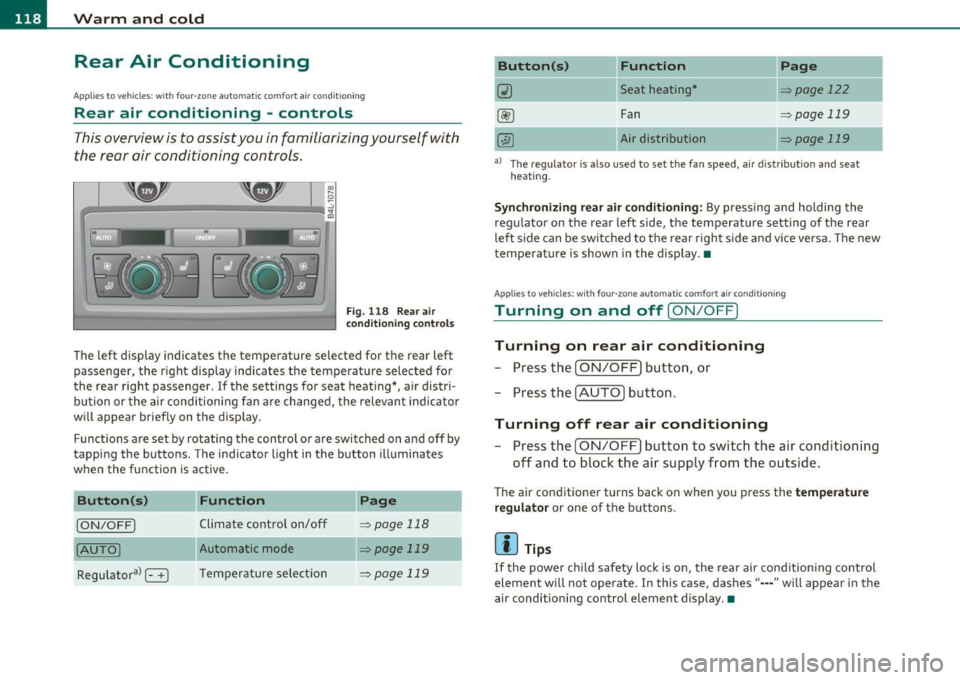
F ig. 1 18 Rear air
con diti on in g con trol s
The left display indicates the temperature selected for the rear left
passenger, the right display indicates the tempe rature selected fo r
the rear right passenger. If the settings for seat heat ing *, air distr i
bu tion or the a ir conditioni ng fan are changed, the relev ant indicator
w ill appear briefly on the disp lay.
Func tions are set by rotating the contro l o r are swi tched o n and
off by
tapping the butto ns. The indicator light in the button illuminates
when the function is active .
Button(s)
Function Page
[ON/OFF) Climate control on/off => page 118
(AU TO ) Automa tic mode => page 119
Regulatora> G T emper ature se lec tion => page 119
Button(s) Function
~ Seat heating*
-
Fan
Air dis tribution
Page
::!> page 122
-
=> page 119
::!> page 119
al T he regulator is also used to set the fan speed, a ir d istr ibut ion and seat
heating.
-
Synchronizing r ear air conditioning: By pressing and holding the
regu lator on the rear left side, the temperature setting of the rear
left side can be switched to the rear right s ide a nd v ice versa. The new
temperature is shown in the display. •
Appli es to vehicles : with four -zone auto matic co mfort air condition ing
Turning on and off [ ON/OFF ]
Turning on rear air conditioning
-Press th e I ON/OFF) butt on, o r
- Press the !A UTO] button .
Turning off rear air conditioning
- Press the [ O N/OFF] but ton to sw itch the air condition ing
off and to bloc k th e air supply from the outs ide .
The air conditioner turns back on when yo u press the temperature
regu lator
or one of t he buttons .
[ i ] Tips
If the power child safety loc k is o n, the rear ai r cond ition ing contro l
element wi ll not operate. In this case, dashes" ••• " will appear in the
a ir conditioning con trol element display. •
Page 121 of 392
_______________________________________________ w __ a _r _m _ a_ n_d _ c_o _ l_ d __ _
Applies to vehicles : with four-zone automatic comfort ai r cond ition ing
Automatic mode in rear [AUTO )
The automatic mode is the standard setting for all
seasons.
- Select temperature between 60 °F (+16 °() and 84 °F
(+28 °().
-Press the [AUTO] button.
Automatic operation ensures constant tempe ratures in the interior
and dehumidifies the air inside the vehicle. Air temperature, volume
and distribution are controlled automatically to reach or maintain the
desired interior temperature as quickly as possible. Fluctuations in
exterior temperature and the effects of temperature from the posi
tion of the sun are compensated for automatically.
This operating mode works only in the adjustable temperature range,
from
60 °F (+16 °() to 84 °F (+28 °C). If a temperat ure below 60 °F
(+16 °() is selected, LO appears in the display. At temperatures above
84 °F (+ 28 °C), HI is displayed. At both extreme settings, climate
control runs continuously at maximum cooling or heating power.
There is no temperature regu lation. •
Applies to vehicles : w ith four -zone automat ic comfort air condition ing
Setting rear temperature
The temperature can be separately adjusted for the rear
left and right sides .
-Rotate the regulator to the left to reduce the tempera
ture, or to the r ight to increase the temperature.
T he selected temperature appears on the climate control disp lay. •
Controls and equip
ment Safety first
Applies
to vehicles : with four-zone automatic comfort air cond itio ning
Rear fan[~ )
The automatically preset fan speed can be reduced or
increased_
- Press the[~] button.
- Rotate the regulator to the desired fan speed .
The climate co ntrol system a utomatically regu lates fan speed
depending on interior temperature. You can adjust the volume of air
produced by the fan to your own requirements.
[ i ] Tips
It is possible that the fan speed may change automatically . This
occurs to ensure that the desired temperature setting is reached as
quickly as possib le .•
Applies to vehicles : w ith four -zone automat ic co mfort air cond itio ning
Rear air distribution [..Y ]
The automatically controlled air distribution can be
changed manually .
-Press the [·JAi button .
- Rotate the regulator to the desired setting.
You can adjust the air circulation so that air flows from specific vents.
• In position
;J, all air flows from the vents in the center console
and the outlets to the door pi llars .
• In position
:,J, air flows from the outlets in the door pillars.
• In position
}O, air flows from the outlets under the front seats.
There are additional combinations available to adjust air distribut ion
as needed. .,_
Vehicle care Technical data
Page 122 of 392
![AUDI Q7 2011 Owner´s Manual lffl!l.___w __ a _r_ m __ a_n_ d_ c_ o _ l_d _______________________________________________ _
To regulate air distribution automatically, switch to [AUTO].•
Basic settings
General
The ba](/img/6/40276/w960_40276-121.png "AUDI Q7 2011 Owner´s Manual lffl!l.___w __ a _r_ m __ a_n_ d_ c_ o _ l_d _______________________________________________ _
To regulate air distribution automatically, switch to [AUTO].•
Basic settings
General
The ba")
lffl!l.___w __ a _r_ m __ a_n_ d_ c_ o _ l_d _______________________________________________ _
To regulate air distribution automatically, switch to [AUTO].•
Basic settings
General
The basic climate control settings can be adjusted in the
fv1fv1I.
-Select: Function button I CAR]> Control button AC.
The following functions can be selected:
• Auto recirculate=>
page 120
• Synchronization :::::, page 120
• Supply. heater*=> page 121
• Rear operation*=> page 121 •
Automatic recirculation mode
An air quality sensor detects increased concentrations of
pollutants in the outside air and automatically switches
to recirculation mode.
We recommend that you always keep automatic air recirculation ON
to prevent polluted outside air from entering the vehicle inter io r.
If the
air quality sensor located in the air cond it ion ing system detects
polluted outside air, the sensor decides whether the air pollution can
be reduced by the factory-installed pollutant filter or whether it is
necessary to switch to air recirculation. With heavy concentrations of
pollutants, the a ir cond it ion ing system is switched automat ically to
recircu lation mode and the supply of outside air is b locked . As soon
as the concentration of pollutants in the outside air drops , fresh air is
supplied to the vehicle interior again. In the event that the windows fog up during automatic air recircula
tion, you must press the® button immediately.
Under certa in operating conditions, automatic a ir recirculation is
switched off automatically. With outside temperatures below about
SO °F
(+10 °C), automatic air recirculation is lim ited to 30 seconds.
With outside temperatures below about
30 °F (-1 °() and with the air
conditioner switched off, the automatic air recirculation is limited to
15 seconds. •
Synchronization
One climate control setting for the driver and front
passenger seats.
With synchronization active, the driver's settings are adopted for the
passenger or vic e versa. All the other sett ings that were made are
transferred to the other seat. Th is includes a ll the climate control
settings , except fo r the seat heating/ventilation* .
If a different setting is selected at a "synchronized seat", synchroni
zation is cancelled. •
Applies to veh icles : with four -zone a uto ma tic c om fo rt air co nd itionin g
Synchronization
One climate control setting for all seats.
With synchron izat ion act ive, the driver's settings are adopted for the
front passenger and the rear left and right seats . All the other
sett ings that were made are transferred to the other seats . This
includes a ll the climate control settings, except for the seat
heating/ventilation*.
If a different setting is selected at a "synchronized seat", synchroni
zation is cancelled .•
Page 123 of 392
![AUDI Q7 2011 Owner´s Manual Warm and cold -
----------------
App lies to veh icles : with di esel e ngine
Supplementary heater
- Select: Function button !CAR]> Control button AC>
Suppl. h eat er.
Vehicles with](/img/6/40276/w960_40276-122.png "AUDI Q7 2011 Owner´s Manual Warm and cold -
----------------
App lies to veh icles : with di esel e ngine
Supplementary heater
- Select: Function button !CAR]> Control button AC>
Suppl. h eat er.
Vehicles with")
Warm and cold -
----------------
App lies to veh icles : with di esel e ngine
Supplementary heater
- Select: Function button !CAR]> Control button AC>
Suppl. h eat er.
Vehicles with diesel engines are equipped with a supplementary
heater to warm the inte rior of the veh icle more qu ickly. The supple
mentary heater switches itself on and off automatically when the
outs ide temperature is below SO
°F (10 °() and the engine is running,
depending on the coolant temperature, interior temperature and the
selected temperature .•
Applies to veh icles: with four -zone automat ic co mfort air co nditioning
Rear operation
The air conditioning in the rear of the vehicle can be
controlled from the cockpit.
-Select: Function button I CAR]> Control button AC > Re ar
operat ion.
T he d river or front passenger can contro l the a ir co ndit ion ing in the
rear of the vehicle using
his/her own contro ls. •
Heated Seats
Applies to vehicles: with ele ctrica lly heated front seats
Heated front seats ~
The seat cushion and the seatback of the front seats can
be heated electrically.
- Press the~ button.
- Rotate the regulator to the desired setting .
Controls and equip
ment Safety first
In
position O the heating for the seats is turned off. The range of
adjustment is between 1 and 6.
The heater for the front seats can be turned on when the weight of
the particular seat's occupant is detected. However, the front seats
can be pre-heated for about 10 minutes using the activated seat
heater. After this time has e lapsed, the seat heater automatically
t u rns off if it does not detect an occupant's weight for the particular
seat.
0 Note
To avoid damage to the heating elements in the seats, do not kneel
on the seats or p lace heavy loads on a small area of the seat.
[I] Tips
Please no te that the weight of objects placed on the seat wi ll also be
detected. This weight may be enough to cause the seat heater to turn
on. •
Applies to vehicles: w it h front seat ventilat ion
Front seat ventilation [~]
The seat cushion and the seatback on the front seats can
be ventilated.
- Press the Iv] button .
- Rotate the regulator to the desired setting.
When the regulator is in the O position, the seat ventilat ion is
switched off . The range of adjustment is between 1 and 6. •
Vehicle care Technical data
Page 124 of 392
-Warm and cold .Ml..__ ______________ _
Applie s to vehicles : wi th heated rear seats
Heated rear seats [JI
The seat cushions and seatbacks of the two outer rear
seats can be heated electrically.
Rear seat heating
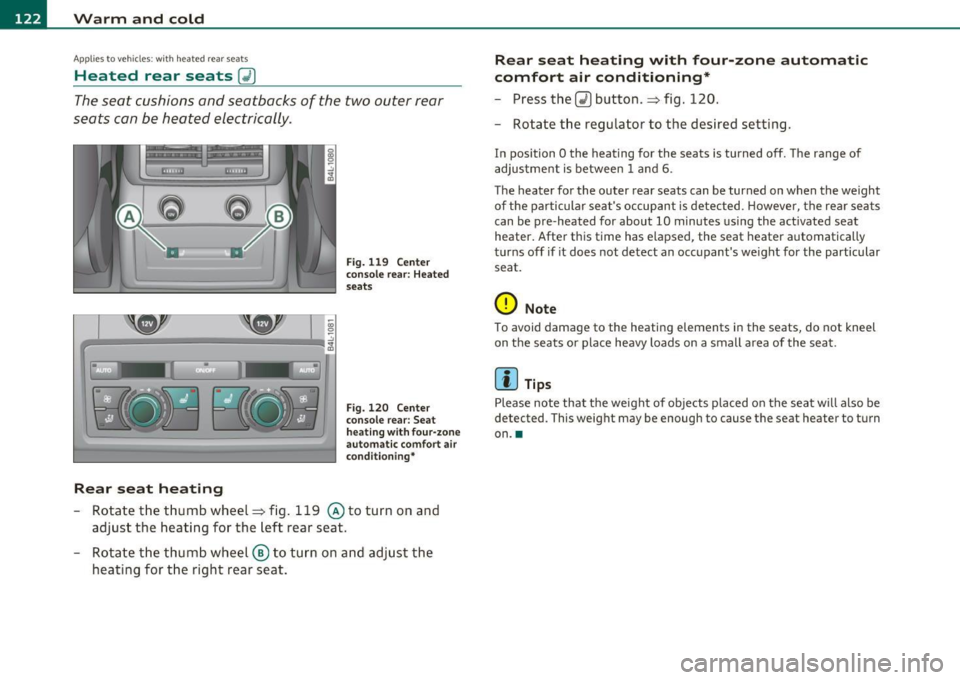
Fig. 119 Center
conso le rear: Heated
seats
Fig. 120 Center
console rear: Seat
h eat ing with four-zone
automa tic comfort air
condi tioning*
-Rotate the thumb wheel~ fig. 119 @to turn on and
adjust the heating for the left rear seat.
- Rotate the thumb wheel ® to turn on and adjust the
heating for the right rear seat.
Rear seat heating with four -zone automatic
comfort air conditioning*
- Press the Q) button .~ fig. 120.
- Rotate the regulator to the desired setting.
In position O the heating for the seats is turned off. The range of
adjustment is between
1 and 6.
The heater for the outer rear seats can be turned on when the weight
of the particular seat's occupant is detected. However, the rear seats
can be pre-heated for about
10 minutes using the act ivated seat
heater. After this time has elapsed, the seat heater automatically
turns off if it does not detect an occupant's weight for the particular
seat.
0 Note
To avoid damage to the heating elements in the seats, do not kneel
on the seats or place heavy loads on a small a rea of the seat.
[I] Tips
Please note that the weight of objects placed on the seat will also be
detected . This weight may be enough to cause the seat hea ter to turn
on .•
Page 125 of 392

Warm and cold Ill _______________ __.
Appli es to veh icles: wi th st eering whee l he atin g
Steering wheel heat ing (j)
The steering wheel can be heated electrically.
F ig . 12 1 Stee rin g
wheel: butto n for
st ee rin g whe el heati ng
-Press the I~] button to turn the steering wheel heating on
and off=> fig. 121 . The message
Steering wheel heat ing on ! or
Steering whee l heat ing off ! appears in the instrument
cluster display .
A nearly constant temperature is maintained when the steer ing
wheel heating is switched on.
T he last sett ing se lected for the steer ing wheel heat ing (on or off) is
automatically saved when the veh icle is shut off and is assigned to the
remote key. •
Contro ls a nd e quip
m en t Vehicle
OP-eration Vehicle care Do-it-yourselt service iTechnical data
Page 128 of 392
1111..__0_ n_ t_h _e_ r_o _ a_ d _________________________________________________ _
Easy entry feature
The easy entry feature makes it easier to enter and e xit
the vehicle by automatically adjusting the steering
wheel.
Press the button®~ page 125, fig. 123 to turn the easy
entry feature on or off .
When the easy entry feature is turned on (button depressed), the
steering wheel moves up to the parked position when the ignition is
t urned off . After you enter the vehicle, the steer ing wheel moves to
the stored pos ition as soon as you t urn on the ign ition .
Easy entry feature on vehi cles with memory seat *
For the stored steering whee l position to be recalled, t he driver's seat
memory must be switched on ( ( ON/OFFI switch in depressed posi
tion) .
If the easy e ntry feature i s sw itched off, the steer ing wheel mov es to
the stored pos ition as soon as you press the seat memory button. •
Ignition Lock and ignition switch
Ignition key positions
The engine can be st arted or turned off with the ign ition
key .
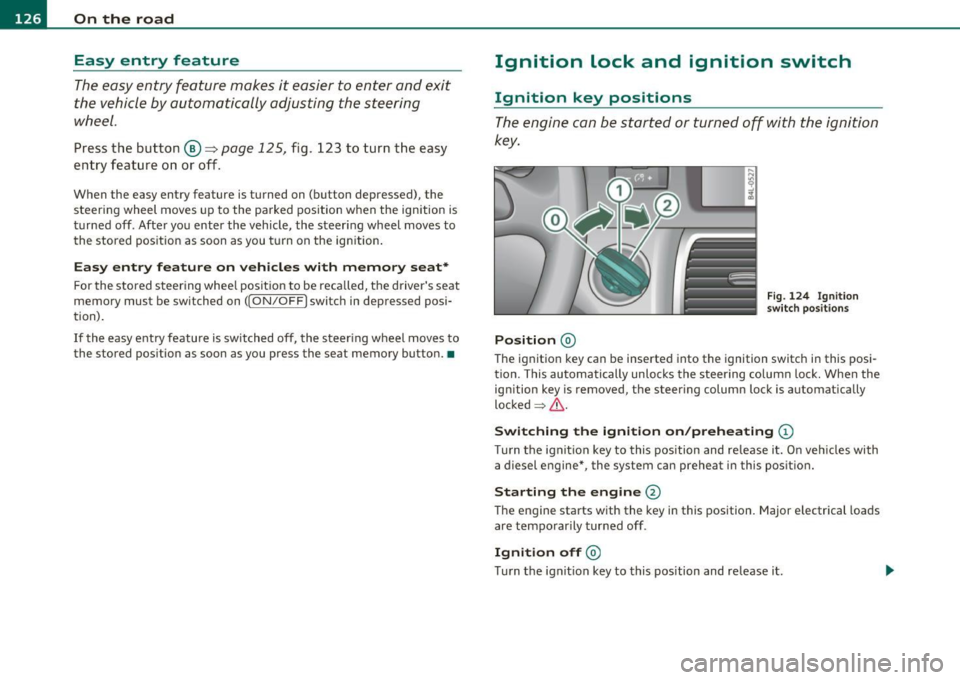
Position @
Fig. 124 Ign ition
sw itch position s
The ig nition key can be inserted into the ignition switch i n this posi
tion. This automatically unlo cks the steering co lumn lo ck. When the
ign ition key is removed, the steer ing colum n lock is automat ically
lo ck ed
~ & .
Switching the ignition on /preheating (D
Tu rn the ignit ion key to this position and re lease i t. On veh icles wi th
a diesel engine *, the system can preheat in this position.
Starting the engine@
The engine starts with the key in this position. Major e lectrical loads
are tempo rar ily tur ned off .
Ignition off@
Turn t he ign it ion key to this pos ition and re lease i t.
Page 130 of 392
1111....__0_ n_ t_h_ e_ r_ o_ a _ d _________________________________________________ _
Vehicles with diesel engine:
- Step o n the brake .
- Move the selector lever into P or N
~ &.
- Turn the ig nition key to position (D -th e g low plu g i nd i-
cator lig ht ill uminates when t he g low plug sys tem is
active.
- When the in dicator light " swi tch es off , turn t he ignition
k ey to posit ion @ but do not p ress the acce lerator pedal.
- Release the ignition key o nce the e ngin e s tarts. The
s ta rt er mus t not conti nue r unning .
A cold eng ine may sound loud after it has been s tarted . This is due to
the hydra ulic valves b uilding up o il pressure. Th is is norma l and is not
a need for concern .
If the engine does not start immediately, stop trying afte r 10 seconds
and then try to rest art the eng ine about 30 seco nds la te r.
Glow plug system*
Diesel engines are eq uipped with a glow p lug sys tem whose
preheating t ime is controlled by the coo lant and outs ide tempera
tu re. Start t he engine
immedia tely a ft er the glow plug indicator ligh t
sw itches off.
T he g low pl ug indicator light w ill on ly ill umina te for approximately 1
second when the engine is warm o r the ou tside temperatur e is hig her
than 46 °F (8 °C). That means yo u can start the eng ine
immediately.
& WARNING
Never start or let the engine run in a confined or enclosed area.
Exhaust fumes from the engine contain carbon monoxide, a color
less and odorless gas. Carbon monoxide can be fatal if inhaled.
& WARNING (co ntinued )
• Never leave the engine idling unattended. An unattended
vehicle w ith a running engine poses a danger of personal injury or
theft .
0 Note
• Avoid high engine speeds, fast acce leration or heavy eng ine loads
w hil e the eng ine is st ill co ld. Th is could dam age t he e ng ine .
• T he engine ca nnot be sta rted by p ushi ng o r tow ing the veh icle.
~ For the sake of the environment
T o avoid unnecessary engine wea r and to reduce exhaust emiss ions,
do not let your vehicle stand and w arm up . B e re ady to dr ive off i mme
diately after sta rting yo ur vehicle. Maintain mode rate speed unt il the
eng ine i s co mpl ete ly w arm . R emembe r, the eng ine pe rfor ms best at
operat ing temperature. •
Stopping the engine
- Turn the ign it ion k ey to posit ion ®~ page 12 7, fig. 125.
& WARNING
• Never turn off the engine until the vehicle has come to a
complete stop.
• The brake booster and servotronic only work when the engine
is running . With the ignition turned off, you have to apply more
force when steering or braking. Since you cannot steer and stop no rmally , this can lead to accidents and serious injuries .
• The radiator fan can continue to run for up to 10 minutes even
after you have turned off the engine and removed the ignition key.
The radiator fan can also turn on again if the engine coolant heats .,,,
Page 131 of 392

_________________________________________________ O_ n_ t_ h_ e_ r _o_ a_d _ __.ffl'I
& WARN ING (conti nued)
up be cause of intense s unlig ht or h eat build -up in the engin e
co mp artmen t.
0 Note
Do not stop the engine immediate ly after hard or extended driving .
Keep the engine running for approximately two minutes to prevent
excessive heat build -up. •
Starting and stopping the engine
with Convenience key
A ppli es to veh icles : w it h Con venien ce ke y
Starting the engine with the (START ) button
This button switches on the ignition and starts the
engine.
Fig. 126 C onven ience
k ey : E N GI NE STA RT
but ton
The [S TART] button is provided with two -stag e op eration
=:> fig. 126 .
Con tro ls a nd e quip
m en t Vehicle
OP-eration
Switching the ignition on
-Press the I ST ART] button once to the first stage to switch
on only the ignition.
Gasoline engine: Starting the engine
- Step on the brake.
- Move the selector lever to the P or N position:::::,.
&-
- Press the I START ] button to the second stage to start the
engine.
Diesel engine : Starting the engine
- Step on the brake.
- Move the selector lever to the P or N position::::;,
&-
- Press the [START] button down to the first level to begin
the preheating process. The glow p lug indicator light
~
illuminates when the glow plug system is active .
- When the indicator light switches off, press the
[START] button down to the sec ond level to start the
engine.
After a cold engine is started, there may be a brief period of increased
noise because oil pressure must first build up in the hydraulic valve
adjusters . This is normal and not a cause for concern.
If the engine does not start immed iately, stop trying after 10 seconds
and then try to restart the engine about 30 seconds later.
Glow plu g syste m *
Diese l en gin es are equipped with a glow p lug system whose
preheating time is controlled by the coolant and outside tempera
ture . Start the engine
immediately after the glow plug indicator light
switches off. .,,_
Vehicle care Do-it-yourselt service iTechnical data
Page 260 of 392

Intelligent technology
'-----------------------------------------------
& WA RNING (conti nu ed )
• Plea se be aware th at in ESP offroad mode , particularly on a
s mooth and slippery road, the wheels may have an incr eased
tendency to spin and the vehicle may break awa y -danger of skid
ding!
• Stabilit y is limited in the ESP offroad mode. •
Electronic differential lock (EDL)
The electronic differential lock monitors the rotational
speed of the drive wheels.
General notes
The electronic differe ntia l lock (EDL) helps the ca r to sta rt moving,
acce lerate and climb a gradient on surfaces provi ding poor or almost
no grip. W ithout ED L, th is would be d iff ic ul t, if not impossible .
How the system works
The EDL operates automatically . It mo nitors the rotational speed of
w heels wi th the help of the ABS sensors ==>
page 260. If a not iceab le
slip is detected at the wheels (e .g . o n slippery g round on one side),
the spin ning whee ls are braked and power is transferred to the other
wheels. This is done up to a speed of about 60 mph ( 100 km/h) .
Noises from the brake system signa l that wheel spin is being
cont rolled.
Driv ing off
W hen d rivi ng off, always be sure to keep road conditions in mind as
you acce lerate. If one drive wheel spins because it is on a surface with
less grip, apply
plenty of th rottle until t he car starts to move .
Overheating of brakes
To prevent the disc b rake of the bra ked wheel from overhea ting if
subjected to excessive loads on this whee l, t he EDL cuts out tempo
ra rily. The vehicle rema ins operat iona l and behaves in the same way
as a veh icle without EDL. As soon as the brake has coo
led down, EDL sw itches on again auto
m atically.
& WARNING
• When accelerating on slippery surfaces, such as on ice or snow,
always be careful when depressing the accele rator pedal. Even
with the EDL working , the drive wheels c an spin and reduce your
ability to control your car . Risk of crash!
• The increased safety afforded by EDL does not mean that you
can take safety risks . Always adapt your d riv ing style to the road
c ondition s and traffic situation.
[ i ] Tips
If a fa ult occurs in the A BS, the ED L is also no t fu nct io ni ng. This is
ind icated by the ABS warn ing light==>
page 19. •
Anti-Slip Regulation System (ASR)
The Anti- S lip Re gula tion System preven ts the drive n
w heels from spin ning wh en the car is acc ele rating .
General notes
The Anti-S lip Reg ulation Sys tem (ASR) is in tegr ated in the ele ctroni c
stabilization program (ESP) . When the ve hicle starts up and acceler
a tes, the whee ls are p reven ted from sp inning by adjust ing t he engine
power to match the amoun t of grip ava ilable from the road surface.
How the system works
ASR performs automatica lly, i.e. witho ut the driver 's intervent ion.
With the aid o f th e ABS sensors ==>
page 260, ASR moni to rs the speed
of the driven wheels. If the whee ls start to spin, engine torque is
reduced automatically unt il the tires find enough gri p to lock onto
the road s urface. The system is active ac ross the en tire speed range .
'1>