mirror AUDI Q7 2011 Owner´s Manual
[x] Cancel search | Manufacturer: AUDI, Model Year: 2011, Model line: Q7, Model: AUDI Q7 2011Pages: 392, PDF Size: 93.29 MB
Page 174 of 392

IIIJL-___;P:....:: a:.:.r..:.k .:.: i.:..n .:.:g:!....: s:.: y~ s..:t ..:e ..:.m .:..:... _______________________________________________ _
The closer you get to the obstacle, the shorter the interval between
t he audible s ignals. A contin uous tone sounds whe n the obstacle is
less than approximately 1 foot (0 .30 meters) away . Do not co ntin ue
driving farther.
If the distance to an obstacle remains constant, the volume of the
distance warning gradually drops after about four seconds (this does
no t a pply in the co nti nuous to ne range).
Rear view camer a coverage area
The MMI display shows the area covered by the rear v iew camera
=.> page 171, fig . 171 (D . Objects that are not in the area covered@
are not shown on the M MI display.
We recommend that you practice parking with the rear v iew camera
in a traff ic -free location o r parki ng lo t to become fam iliar wi th t he
system, the orientation lines, and the ir funct ion . When do ing th is,
there should be good lig ht and weather cond itions.
In the MM I disp lay, objects o r vehicles appea r closer or fu rther away
if:
• you are dr iv ing in r everse gea r from a level surface onto an incline,
or a downwa rd slope,
• you a re driving i n reve rse gear toward p rot ruding objec ts,
• the vehicle is carry ing too much load in the rear.
T he accur acy of the or ien tat io n lines and blue su rf a ces dimin ishes if:
• the Adaptive Air Suspens ion* is faulty or the dynamic, offroad or
lift mode is on,
• the rear view camera does not prov ide a reliable image, for
example, in poor visib ility conditions or if the lens is dirty,
• the image on the screen is not visible due to sun g lare and ref lec
ti on .
Caring for the rear view camera lens
The rear view came ra is lo cated above the rea r license plate bracke t.
For the parking system to ope rate, the lens=>
page 171, fig. 172
must be kept clean: •
Dampen the lens with a househo ld alcoho l-based glass cleaner,
and then wipe the lens clean with a dry cloth =>
CD.
• Remove snow with a hand brush and ice preferably with a de-ic ing
spray =>
CD.
& WARNING
• The parking sy stem cannot replace the dri ver's attention . The
d river alone i s respo nsible for p arking and sim ila r dri ving maneu
ver s.
• Sensor s hav e blind spots in which objects cannot be detected.
Pa y s peci al att ention to small children and animal s beca u se the
sen so rs cannot al ways detect them.
• Alway s keep your e yes on the v ehicle's surr ound ing s, u sing the
r ear view mirror as well.
• Do not all ow your self to be distract ed from traffic by the r ear
v iew camera pictu res .
• If the position and the installation angle of th e camera has
changed , for e xample, after a rear end colli sion, do not continu e
to use th e system for safety r ea son s. Hav e it check ed by a qualified
deale rship.
0 Note
• Low obstacles a lready signaled by a warning can disappear from
the system's detection range as they are approached and will not
continue to be signaled . Objects such as barrier chains, trai ler draw
bars, th in pa inted vertical po les or fences may not be detec ted by the
system, posing risk of damage.
• Never use warm or hot water to remove snow or ice from the rear
view camera lens -this co uld cause the lens to crack!
• When cleaning the lens , never use products that are abrasive .•
Page 177 of 392
Parking system -
----------------=-------'
& WARNING (continued )
you should not use the help lines to help with parking, which
poses danger of an accident!
0 Note
In the MMI display , the direction of travel of the vehicle rear is repre
sen te d dependin g on the s teering wheel ang le . The vehicle fron t
swings out more than the vehicle rear. Maintain plenty of distance so
that your outside mirror or a corner of your vehicle does not collide
with any obstacles. This can damage to your vehicle. •
Applies to ve hicles : w ith pa rk ing system advanced
Parallel Parking
Use parking mode 2 to help you parallel pork along the
side of a street.
Con tro ls a nd e quip
m en t
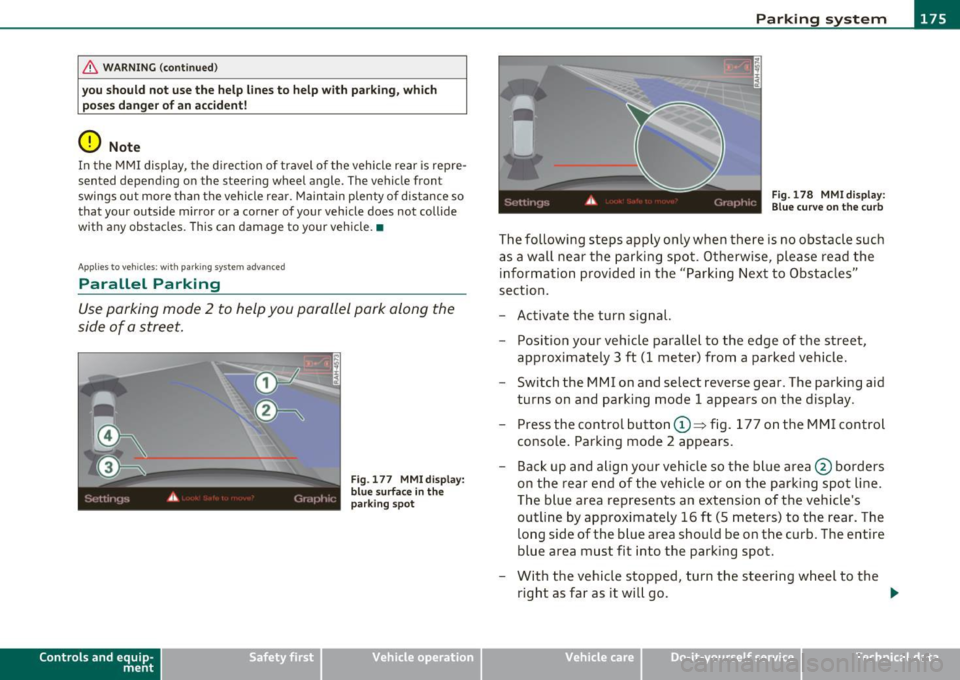
Fig . 177 MMI display:
blue surface in the
parking spot
Vehicle OP-eration
Fig. 178 MMI display:
Blue curve on the curb
The following steps apply only when there is no obstacle such
as a wall near the parking spot. Otherwise, please read the information provided in the "Parking Next to Obstacles"
section.
- Activate the turn signal.
- Position your vehicle parallel to the edge of the street,
approximately 3 ft (1 meter) from a parked vehicle.
- Switch the MMI on and select reverse gear . The parking aid
turns on and parking mode 1 appears on the display .
Press the control button©~ fig. 177 on the MMI control
console. Parking mode 2 appears.
- Back up and align your vehicle so the blue area @ borders
on the rear end of the vehicle or on the parking spot line.
The blue area represents an extension of the vehicle's
outline by approximately 16 ft (5 meters) to the rear. The
long side of the blue area should be on the curb. The entire
blue area must fit into the parking spot.
- With the vehicle stopped, turn the steering wheel to the
right as far as it will go. _.,
Vehicle care Do-it-yourselt service iTechnical data
Page 178 of 392

lfflJ.___P_ a_r_k _ i_n ...::g::- s-= y...._ s_t _e _m ________________________________________________ _
- Back into the parking spot until the blue c urve touches t he
curb==>
page 175, fig. 178 . Stop the vehicle .
- With t he vehicle stopped, turn the steeri ng whee l to the
left as far as it wi ll go.
- Continue to back into the parking spot until the vehicle is
parked paralle l to the curb.@ marks the rear bumper .
Stop the vehic le w hen t he re d orientation line© borders
an object ==>& . Ke ~ an eye on the fro nt o f your ve hicle
whi le doing this==><.!).
Parking next to ob stacles
When there is an obstacle (such as a wall) next to the parking spot,
choose a spo t w it h more space on the sides. Position t he long side of
the blue area so that there is sufficient space from the curb. The area
must not be on the curb. You will also need to star t turning the
steer ing wheel much earlier. There should be a suff icie nt amount of
space between the c urb and the b lue c urve, and t he b lue c urve
=> page 175, fig . 178 must not touch the curb .
& WARNING
• The rear view camer a does not show the entire area beh ind the
vehicle =>
page 171, fig. 171 . Watch out e specially for small chil
dr en and animals. The rear view camera cannot always detect
them, p osing ri sk of an ac cident!
• Please note that object s not touching the g round can appear to
be further away than th ey r eally are (for example, the bumper of
a parked vehicle, a trailer hitch, or th e rear of a t ruck) . In this case,
you should not us e the help line s to h elp with parking , which
po se s danger of an accid ent !
0 Note
In the MMI display, the direct io n of travel of the vehicle rea r is rep re
sented depending on the steering wheel angle . The vehicle front sw
ings out more than the vehicle rear . Maintain plenty of d istance so
t ha t your ou tside mirror or a corner of your vehicle does no t collide
w ith any obstacles . This can damage to you r vehicle.
(I] Tips
The left or right or ientation lines and surfaces w ill be displayed,
depending on the turn signa l being used. •
Applies to vehicles: w it h rear park ass ist/pa rking sys tem advance d
Adjusting the display and warning
tones
T he display * and warning tones can be adjusted in the
fv1 fv1I.
- Select: Function but ton [CAR ]> System s*> Parking
system.
Displ ay*
• Off -when the parking system is switched off, only audible signals
are g iven .
• On -when the parking system is switched on, either the visual
display o r the picture from the rear v iew c amera is displayed.
Warning tones
• Front volume * -front sensor vol ume
• Front frequen cy * -front sensor frequency
• Rear volume -rear sensor vo lume
• Rear frequenc y-rear senso r freq uency
• In-car entertainment fader -when the parking system is switched
on, the vol ume of t he active audio source is lowered.
The newly adjusted va lue is briefly heard from the signal generator . .,
Page 193 of 392
________________________________________________ D_ r_ i_ v _i_n ""'g "-- S_a_ f_ e_ l _,,y'-- __
Important things to do before driving
Safety is everybody's job! Vehicle and occupant safety always depends on the informed and careful driver.
For your safety and the safety of your passengers, before
driving always:
- Make sure that all lights and signals are operating
correctly.
- Make sure that the tire pressure is correct.
- Make sure that all windows are clean and afford good visi-
bility to the outside.
- Secure all luggage and other items carefully::::>
page 107.
-Make sure that nothing can interfere with the pedals.
- Adjust front seat, head restraint and mirrors correctly for your height .
- Instruct passengers to adjust the head restraints according to their height.
- Make sure to use the right child restraint correctly to
protect children ::::,
page 233, "Child Safety".
- Sit properly in your seat and make sure that your passen gers do the same::::,
page 85, "General recommenda
tions".
- Fasten your safety belt and wear it properly. Also instruct
your passengers to fasten their safety belts properly
=:> page 201. •
Controls and equip
ment Safety first Vehicle operation
What impairs driving safety?
Safe driving is directly related to the condition of the
vehicle, the driver as well as the driver's ability to concen
trate on the road without being distracted .
The driver is responsible for the safety of the vehicle and all
of its occupants. If your ability to drive is impaired, safety
risks for everybody in the vehicle increase and you also
become a hazard to everyone else on the road::::,,& . There
fore:
Do not let yourself be distracted by passengers or by using
a cellular telephone.
NEVER drive when your driving ability is impaired (by
medications, alcohol, drugs, etc.).
- Observe all traffic laws, rules of the road and speed limits
and plain common sense .
- ALWAYS adjust your speed to road, traffic and weather
conditions.
- Take frequent breaks on long trips. Do not drive for more than two hours at a stretch.
- Do NOT drive when you are tired, under pressure or when
you are stressed .
& WARNING
Impaired driving safety increases the risk of serious personal
injury and death whenever a vehicle is being used.•
Vehicle care Do-it-yourself service Technical data
Page 275 of 392

Trailer towing
Driving with a trailer
General information Your Audi was design ed primarily for passenger transpor
tation .
If you plan to tow a t rai ler, p lease rem emb er that the add itiona l load
wi ll affect durab ility, economy and performance.
T railer tow ing not on ly p laces mo re s tress on the vehicle, it a lso calls
for more concentrat ion from the driver.
For this reason, a lways follow the ope rating and dr iv ing instr uctions
prov ided and use common sense .
(D Note
If you are going to tow a t ra iler , you must ac tivate the tra ile r ope ra
tion mode ::::;,
page 182, "Towing a trailer". •
Technical requirements
Trailer hitch
Use a we igh t-car rying hit ch confo rm ing to the g ross tra ile r weig ht.
The hitch must be suitable for your vehicle and tra iler and must be
mou nted secure ly o n th e veh icle's chassis a t a
te chnically sound loca
tion. Use only a trailer hitch with a removab le ba ll mount. Always
check w ith the tra iler h itch manufacturer to ma ke sure tha t you are
using the correct hitch .
Do not use a bumper hitch .
The hitch must be i nstalled in such a way t hat i t does not interfe re
w ith the impact-absorbing bumper system. No mod ificat ions should
Controls and equip
ment Safety first Vehicle operation
be made to the vehicle exhaust and b
rake systems. From time to
time, check that all hitc h mounting bo lts rema in securely fastened.
Whe n you are no t towing a trai ler, remove the trailer hi tch ba ll
mount. This prevents the hitch from caus ing damage should your
vehicle be s truck from behind::::;,& .
Trailer brakes
If your trailer i s eq uipped w ith a b raking system, che ck to be s ure that
it conforms to all regulat ions.
T he tra iler hyd raulic brake system must not be directly connected to
the vehi cle's hydraul ic brake system ::::;, & .
Safety chains
Always use safety chains betwee n your vehicle and t he tra iler .
Trailer lights
Trailer lights must meet all regulat ions. Be sure to check w ith your
au thor ized A udi deale r for co rrect wi ring, switc hes, and re lays.
Mirrors
If you are unab le to see the traff ic beh ind you us ing t he regular
outside m irro rs, then you
must install extended mirro rs. It is impor
t an t th at yo u
always have cle ar vision to the re a r.
& WARNING
• If a trailer has electrical brakes please note that these brakes
are not activated by the factory-fitted control unit -ri sk of acci ·
dent!
• Afte r removing the trailer hitch, do not store it in your vehicle .
In case of sudden braking, the hitch could fly forward and injure
you or your passengers .
Vehicle care Do-it-yourself service Technical data
Page 281 of 392

____________________________________________ C_l_e _a_ n_ i n--= g=--- a_n_ d----' p,__ r_o _t_ e_ c_ t_ i _o_ n __ _
Under certain circumstances, weekly washing may be necessary .
Under o ther conditions, a mont hly w ashi ng and waxi ng may be
adequate.
After the winter, the underside of the vehicle s hou ld be tho roughly
washed, p refe rably in a profess ional car was h.
& WARNING
Always read and heed all WARNINGS and other information
~ page 278. •
Automatic car wash
The vehicle can be washed in almost any mod ern auto
matic car wash.
T he vehi cle p aint is so dura ble tha t the vehicle c an norm ally be
washed without problems in an automatic car wash . H owever, the
effect on t he pa int depends to a la rge ex ten t on t he desig n of the
facility, the filter ing of the was h water, t he type of wash and care
material, etc . If t he pa int has a dull appearance after going through
t he ca r wash or is sc ratched, bring this to the attention of the ope r
ator immediately . If necessary, use a different car wash .
Be fore goi ng th ro ugh a car wash, be s ure to take the usual precau
tions such as clos ing the windows and the Panoramic s lid in g su nroof.
Fa cto ry inst alled a ntennas must no t be removed .
If you have installed addit ional accessories on the vehicle -such as
spoilers, roof rack, etc . - it is best to ask the car wash ope rator if these
sho uld be removed.
& WARNING
Please take note of the following points before going through an
automatic car wa sh with your vehicle , so that you can avoid
damage to your veh icle.
Safety first
& WARNING (co ntinued )
• Compare the tra ck of your vehicle with the d istance between
the guide rails of the facility -there is a risk of damage to the
wheels and tires.
• Compare the height and width of your vehicle with the height
and width of the tunnel at the facility.
• Fold the exterior mirrors flat -there is a risk of damaging the
e xterior mirrors . Power folding e xterior mirrors* must not be
folded in or out by hand. Use the power function!
• Do not allow the wiper blade to fall onto the wind shield after
the vehicle is dr ied · there is a risk of damag ing the paint on the
hood .
• Always read and heed all WARNINGS and other information
~page 278. •
Washing the vehicle by hand
A lot of water is needed wh en washing a vehicl e by hand.
- Before you start washing , ma ke sure you have read and
u nders tood the WARNIN GS =>
& in "General informa
t io n" o n page
278.
- Fir s t soak all dried dir t until it is soft, the n rinse it off.
- As yo u clean yo ur vehic le, start w ith th e roof and work you r
way do wn to the bottom, us ing a sponge , a sponge g love
or a clean bru sh .
- Rin se the sp ong e or t he s po nge glo ve o ften, flushing it
cl ean each t im e.
- U se spe cia l car shampoo only for ve ry pe rsiste nt dirt .
- Rinse the car thoroug hly with wate r.
- U se a ch amo is leat her to gently w ipe t he ex ter ior d ry . •
Vehicle care Technical data
Page 285 of 392

____________________________________________ C_l_e _a_ n_ i n--= g=--- a_n_ d----' p,__ r_o _t_ e_ c_ t_ i _o_ n __ _
Windows
Clear vision to all sides.
Clean all windows regularly to remove road film and carwash
wax buildup.
- Remove snow from windows using a brush.
- Use a plastic ice scraper to remove ice from windows and
mirrors.
- Remove other residue on the w indows with a spray-on
glass cleaner .
- Wipe the windows dry with a clean piece of cloth or
kitchen paper towel.
T he best way to remove snow from w indows and mirrors is to use a
brush. Use a non-abrasive plastic ice s craper - be tter st ill, a spray
deicer -to remove ice from windows and mirrors.
Th e w indows must not be cleaned with insect remover or wax since
these can interfere with the function of the w indshield wiper blades
(chatte r) .
Oil, grease, or silicone residue can be removed with glass cleaner or
s ili cone remover. Howeve r, wax residue requires the use of a specially
formulated solvent . Please contact your author ized Aud i dealer for
advice on safe products for wax remova l.
W indows shou ld also be cleaned on the inside at regu lar i nte rvals.
Never dry windows w ith the same chamo is that you use to dry painted
surfaces. Wax res idue on the chamois ca n impa ir v is ion t hrough the
windows .
& WARNING
• Alw ays read and h eed all WARNINGS and other information
~ page 278 .
Safety first
& WARNING (continu ed)
• The windshield must not b e tre ated with w ater-repellent
m aterial s. They c an increa se g lare und er poor visibilit y condit ions
s uch as w etnes s, dar kne ss, or when the sun i s low on the ho rizon .
In addition, they can cau se the wind shi eld wip ers to chatter.
0 Note
• Never use warm o r hot wate r to remove snow and ice from
windows and mirrors . This could cause the glass to crack.
• To prevent damage to the w ires of the rear defogger, do not place
any adhesive stickers on the inside of the rear window over the wires.
• T o help prevent dirt from scratching the w indow, always scrape in
a forward direction - pushing the scraper away from you - never back
and forth .•
Weatherstrips
Complete car care includes the weatherstrips as well .
-Apply a suitable rubber conditioner to the weatherstrips
from time to t ime .
To be able sea l properly, the weatherstrips around the hood, doors,
rear l id, etc. must remain pliable . Spray the weatherstrips with sili
cone or coat t hem with talc um powder or g lycerine to retain the flex
ibility of the rubber and to p ro tect them agai nst free zing in the
winter .
& WARNING
Alway s read and heed all WARNINGS and other inform ation
~ page 278 .
Vehicle care Technical data
Page 353 of 392

____________________________________________ .!:F~u~s~e~s ~a~n~d~b~u~l~b~S ~_J-
• The crank in the fuse cover is used for emergency operation of the
Panoramic slid ing sunroof*. •
Left cockpit fuse assignment
Fig . 26 1 L eft coc kpit : fu se panel w ith p lastic clip
Amps
Fu se panel © (re d )
1 DC/DC converter
5
3 MMI 7,5
6 Lumbar support driver's seat 10
7 Window regulators (left side of vehicle)
35
8 Door control module (left side of vehicle)
15
9 Tire pressure monitoring system
5
Vehicle OP-eration
No. Consume r
10
11
.,
Electronic ignition lock,
power steering column adjustment
Switch module steering column
12 Intelligent power module convenience
Fu se pa nel© {b row n)
3 Seat ventilation (left)
4
5
6
7
8
9
10
Wiper system
Rain sensor
Horn
Intelligen t power module driver
Intelligent power modu le dr iver
(lights left side of vehicle)
Intelligen t power module driver
(lights right side of vehicle)
I nstrument cluster
11 Headlight washer system
12 Diagnostic connector
Fuse panel © {black )
1 Headlight electronic system (left side of vehicle)
2 Adaptive Cruise Control
6 Term
inal 15 (interior)
7 Oil level sensor
8 Diagnostic connector
9 Automatic dipping interior mirror
Vehicle care Do-it-yourself service
Amps
30
10
5
15
30
5
25
30
25
25
10
30
10
10 5
5
5
5
5
iTechnical data
Page 368 of 392
___ D_ a_ t_a ___________________________________________________ _
333 hp, 6-cylinder engine, with all wheel drive
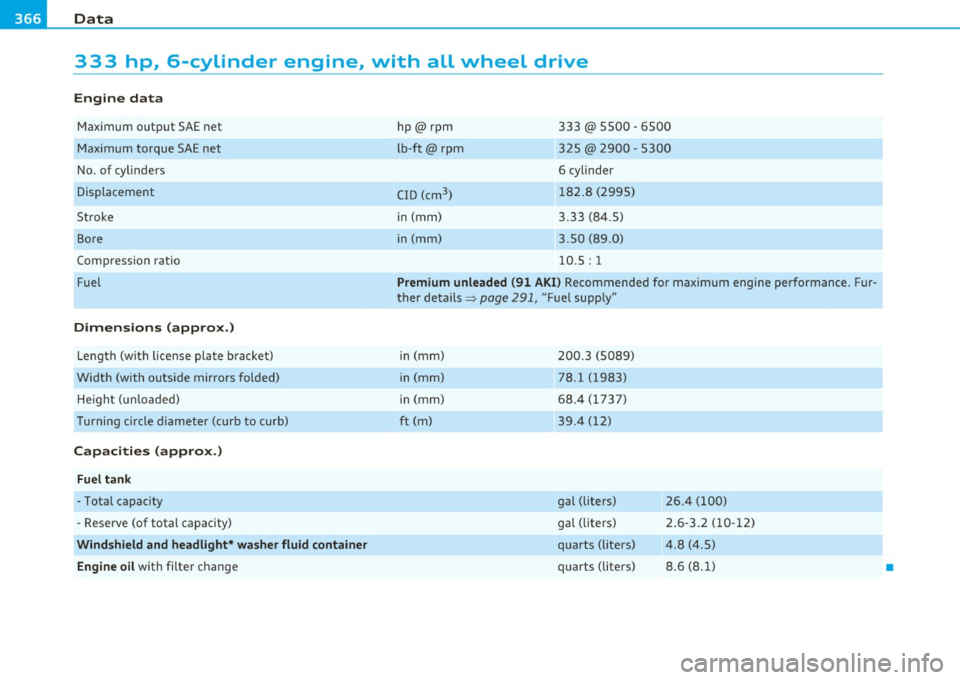
Engine data
Maximum output SAE net
Maximum torque SAE net
No. of cylinders
Displacement
Stroke
Bore
Compression ratio
Fuel
Dimensions (approx.)
Length (with license plate bracket)
Width (with outside mirrors folded) He ight (unloaded)
Turning circle diameter (curb to curb)
Capacities (approx.)
Fuel tank
-Total capacity
- Reserve (of total capacity)
Windshield and headlight* washer fluid container
Engine oil with filter change hp @rpm
lb
-ft@ rpm
CID (cm
3 )
in (mm)
in (mm)
333 @ 5500 -6500
325
@ 2900 -5300
6 cylinder
182.8 (2995)
3.33 (84.5)
3.50 (89 .0)
10.5: 1
Premium unleaded (91 AKI) Recommended for maximum engine pe rformance . Fur
ther details~
page 291, "Fuel supply"
in (mm)
in (mm)
in (mm)
ft (m)
200 .3 (5089)
78.1 (1983)
68.4 (1737)
39 .4 (12)
gal (liters)
gal (liters)
quarts ( liters)
quarts (liters) 26 .4 (100)
2.6-3.2 (10-12)
4 .8 (4.5)
8.6 (8.1)
•
Page 369 of 392
_________________________________________________ D_a_ t_ a __ __
App lies to veh icles : with di esel e ngine
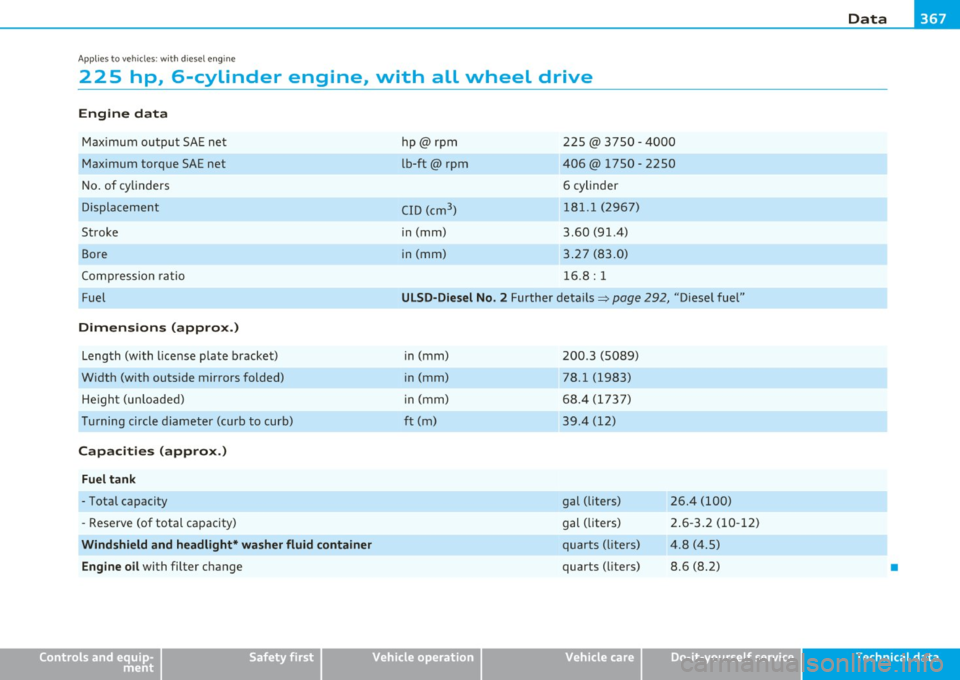
225 hp, 6-cylinder engine, with all wheel drive
Engine data
Max imum outpu t SA E net
Maximum torque SAE net
N o. of cy linders
Displaceme nt
Stroke Bore
Com pression ra tio
Fuel
Dimensions (approx.)
Leng th (with license p late bracke t)
W idth (w ith outs ide mirrors folded)
He igh t (u nloade d)
Turning circle diameter (curb to curb)
Capacities (approx.)
Fuel tank
- Tota l capacity
- R eserve (of total capacity)
Windshield and headlight* washer fluid container
Engine oil
with filter c hange
Safety first
hp@rpm
lb-ft@ rpm
C ID (cm
3
)
in (mm)
in (mm) 22
5@ 3750 - 4000
406@ 1750 - 2250
6 cylinder
181. 1 (2967)
3 .60 (91.4)
3 .27 (83.0)
16 .8: 1
ULSD-Diesel No . 2 Further details=> page 292, "Diese l fuel"
i n (mm)
in (mm)
i n (mm)
ft (m) 200
.3 (5089)
78 .l (1983)
68 .4 (17 37)
39 .4 (12)
gal (liters)
gal ( liters)
qu arts (lite rs)
quarts ( liters) 26.4 (100)
2
.6- 3.2 (10 -12)
4.8 (4.5)
8.6 (8.2)
Do-it,yourself service
•
Technical data