climate settings AUDI Q7 2011 Owner´s Manual
[x] Cancel search | Manufacturer: AUDI, Model Year: 2011, Model line: Q7, Model: AUDI Q7 2011Pages: 392, PDF Size: 93.29 MB
Page 4 of 392
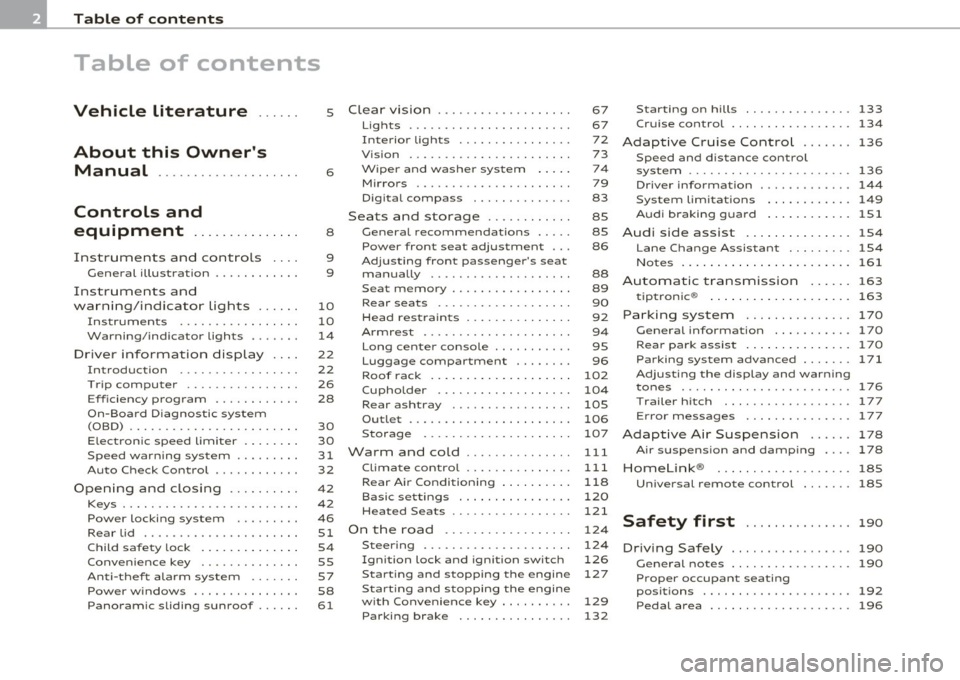
Table of contents
Table of contents
Vehicle literature ..... .
About this Owner's Manual .......... ....... .. .
Controls and
equipment .............. .
Instruments and controls ... .
General illustration ........... .
Instruments and
warning/indicator Lights ..... .
Instruments ... ... .......... .
Warning/indicator ligh ts ..... . .
Driver information display ... .
Introduction ...... ......... . .
T rip comput er . .... .......... .
E fficiency program ........... .
On-Board D iagnostic system
(OBD) .. .... ..... ............ .
Elec tronic speed limiter ....... .
Speed warning system ........ .
Auto Check Control ........... .
Opening and closing ......... .
Keys ....... ..... ............ .
Powe r locking sys tem ....... . .
Rear lid .... ................. .
Child safe ty lock ............. .
Conve nience key . ............ .
Anti -theft alarm system .. .... .
P o w er wind ow s ......... ..... .
Panoram ic sliding sunroof . .... .
5
6
8
9
9
10
10
14
22
22
26
28
30
30
31
32
42
42
46
51
54
55
57
58
61
Clear vision . .... ... .......... .
Lights ... ................... .
Int erior ligh ts ......... ...... .
V ision .. ..... ............... .
W iper and washer sys tem .... .
Mirrors ... ..... ... .......... .
D igital compass ............. .
Seats and storage ........... .
General recommendations .... .
Pow er fron t seat adju stm ent .. .
Adjusting fron t passenger's sea t
manually ........ .... ....... .
S eat m emory . ............... .
Rear seats ........ .......... .
Head res train ts .............. .
Armrest ...... .............. .
L ong cente r con so le ... .. ..... .
L uggage compar tment ....... .
Roof rack ................... .
Cupholder .................. .
Rear ash tray ......... ....... .
Outl et ..... ................. .
Storage ..... ............... .
Warm and cold .... ....... ... .
Climate con tro l .............. .
Rear Air Condition ing ...... ... .
Basic settings ............... .
Hea ted Sea ts ... ... ...... .... .
On the road ... .... .......... .
Steering .. ...... ..... ....... .
Ignition lock and igni tion switch
S tar ting and s topp ing the engin e
Start ing and stopping the engine
with Conv eni ence key ... ...... .
Parking brake ............... . 67
67
72
73
74
79
83
85
85
86
88
89
90
92
94
95
96
102
104
105
106
107
111
111
118
120
121
124
124
126
127
129
132 S
tar ting on hill s ............... 133
Cruise control ........... ..... . 134
Adaptive Cruise Control ....... 136
Sp eed and di stan ce con trol
system ....... ...... ...... .... 136
Driv er information . . . . . . . . . . . . . 144
Sys tem limi tations ............ 149
A udi braking guard ............ lSl
Audi side assist ............... 1S4
L ane Change Assistant ......... 154
Notes ..... ................... 161
Automatic transmission
tiptronic ® 163
163
Parking system .............
.. 170
General informa tion . . . . . . . . . . . 170
Rear park assist . . . . . . . . . . . . . . . 17 0
Parking system advanced .... ... 171
Adjusting th e di splay and warning
tones ................ ..... .. . 176
T rail er hi tch . . . . . . . . . . . . . . . . . . 177
E rror messages . . . . . . . . . . . . . . . 1 77
Adaptive Air Suspension 178
Air su sp en sio n and dam ping . . . . 178
Homelink ® ............. .... .. 185
Univ ersal remote control 18S
Safety first . . . . . . . . . . . . . . . 190
Driving Safely ................. 190
G eneral not es . . . . . . . . . . . . . . . . . 190
Proper occupant seating
p os itions . . . . . . . . . . . . . . . . . . . . . 192
Pedal area ................. ... 196
Page 45 of 392
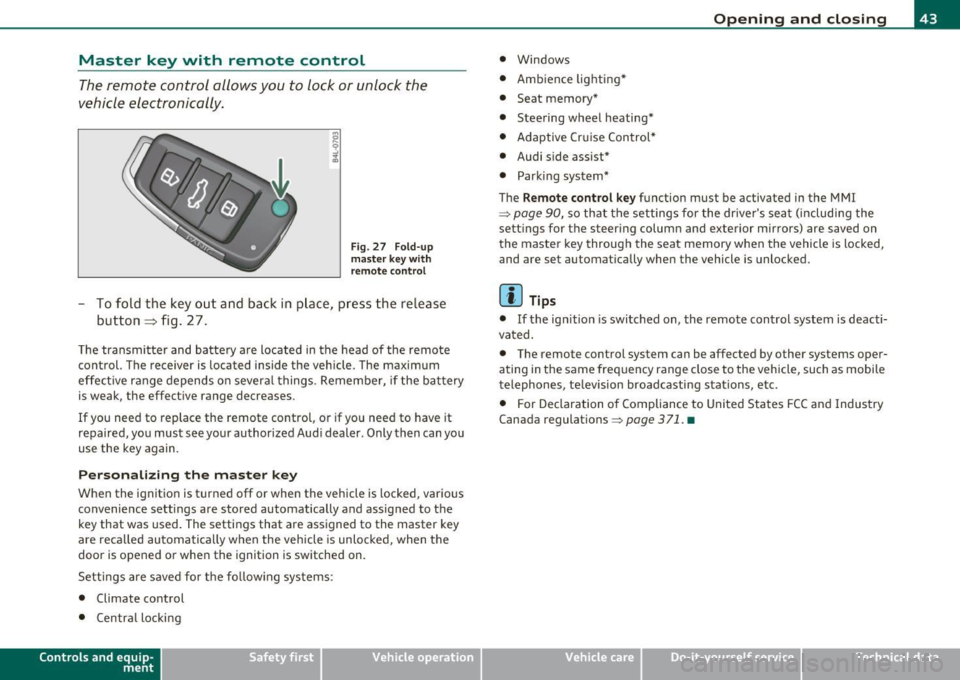
Master key with remote control
The remote control allows you to lock or unlock the
vehicle electronically .
Fig. 27 F old-u p
ma ster key w ith
re mote co ntrol
- To fold the key out and ba ck in pl ace, pre ss the re lease
button => fig . 27 .
The transmi tter and batte ry a re located in the head of the remote
control. The receiver is located inside the veh icle. The maximum
effe ct ive range depends o n severa l things . Remember, if the ba ttery
is weak, the effect ive range decreases .
If you need to replace the remote control, or if you need to have it
repaired, yo u must see your author ized Aud i dealer. Only then can yo u
use the key again.
Personalizing the ma ster key
When the ignition is turned off or when the vehicle is locked, vario us
convenience sett ings are stored automatically and assigned to the
key that was used. The settings that are ass igned to the master key
are reca lled automatica lly when the vehicle is unlocked , when the
door is opened or whe n the ignition is switched on.
Setti ngs are saved for the fo llow ing sys tems :
• Climate control
• Centra l loc king
Con tro ls a nd e quip
m en t Vehicle
OP-eration
Opening and closing
• Windows
• Amb ien ce lig hti ng*
• Seat memory*
• Steering wheel heating*
• Adaptive Cr uise Control*
• Audi side assist*
• Parking sys tem*
The
Remo te control ke y function must be activated in the MM I
~ page 90, so that the settings for the driver's sea t (includi ng the
sett ings for the steer ing column and exterior mirrors) are saved on
the master key through the seat memory when the vehicle is locked,
and are set automat ically when the vehicle is unlocked.
[ i ] Tips
• If the ign ition is switched on, the remote control system is deacti
vated .
• The remote control system can be affected by other systems oper
ating in the same frequency range close to the vehicle, such as mobi le
telephones, television broadcasting stations, etc.
• For Declaration o f Compliance to United Sta tes FCC and Industry
Canada regulations ~
page 371 . •
Vehicle care Do-it-yourselt service iTechnical data
Page 113 of 392
Warm and cold -
----------------
Warm and cold
Climate control
Description
The air conditioner is fully automatic and is designed to
maintain a comfortable and uniform climate inside the
vehicle.
We recommend the following settings:
- Set the temperature to 72
°F (+22 °C).
- Press the
[AUTO] button.
With this setting, you attain maximum comfort in the least amount
of time. Change this setting , as desired , to meet your personal needs.
The climate controls are a combination of heating, ventilation and cooling systems, which automatically reduce humidity and cool the
air inside your vehicle .
The air temperature, air flow and air distribution are automatically regulated to achieve and maintain the desired passenger compart
ment temperature as quickly as possible.
The system automatically compensates for changes in outside
temperature and for the intensity of the sunlight entering the
vehicle. We recommend you use the
Automatic mode ~ page 114
for year-round comfort .
Please note the following:
Turn on the air conditioner to reduce humidity in the vehicle. This also
prevents the windows from fogging up.
When the outside temperature is high and the air is very humid,
condensation from the evaporator may drip under the vehicle . This is
normal and does not indicate a leak.
Controls and equip
ment Safety first
If the outside temperature is
low, the fan normally only switches to a
higher speed once the engine coolant has warmed up sufficiently .
The air conditioner temporarily switches off when you drive off from
a standstill using full throttle to save engine power.
The compressor also switches off if the coolant temperature is too
high, so that the engine can be adequately cooled under extreme
loads.
Air pollutants filter
The air pollutants filter (a combined particle filter and activated char
coal filter) reduces or prevents outside air pollution (dust, or pollen)
from entering the vehicle. The air is also filtered in air recirculation
mode.
The air pollutants filter must be changed at the intervals specified in
your Warranty
& Maintenance booklet, so that the air conditioner can
properly work.
If you drive your vehicle in an area with high air pollution, the filter
may need to be changed more frequently than specified in your Audi
Warranty
& Maintenance booklet. If in doubt, ask your authorized
Audi Service Advisor for advice .
Key coded settings
The air conditioner settings selected are automatically stored and
assigned to the key being used. When the vehicle is started, the air
conditioner automatically selects the settings assigned to that key.
This way every driver will maintain his/her own personal settings and
does not have to reset them manually.
If a different driver uses your key and changes the air conditioner
settings, the latest adjustments will erase and replace the settings
you have stored. _.,
Vehicle care Technical data
Page 115 of 392
Warm and cold -
----------------
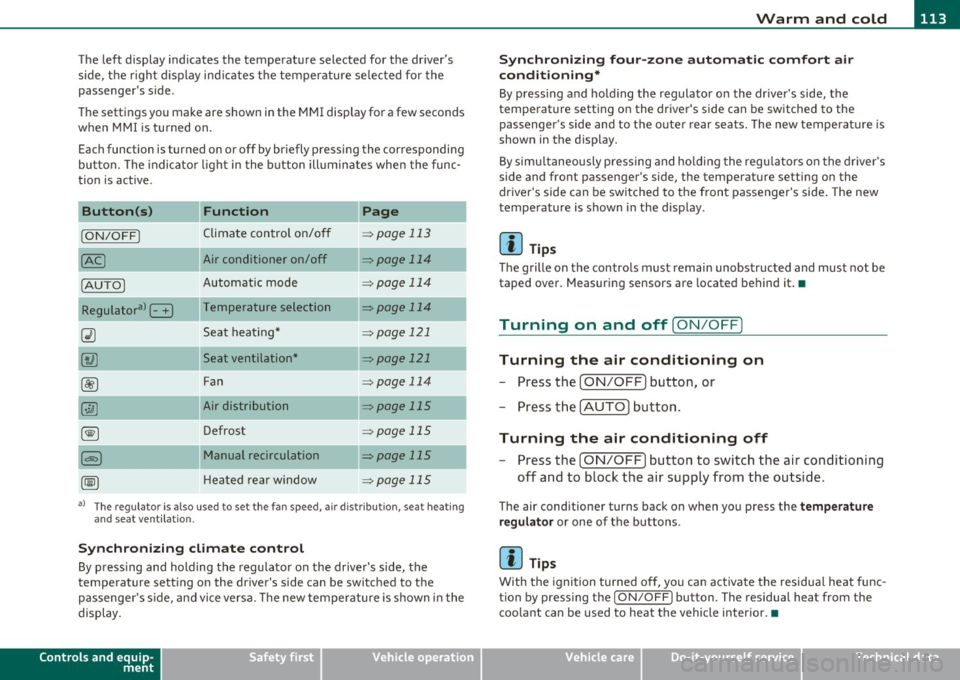
The left display indicates the temperature selected for the driver's
side, the r ight d isplay ind icates the temperature se lected for the
passenger's side.
T he settings you make are shown in the MMI display for a few seconds
when MMI is tu rned on.
Each function is turned on or off by briefly pressing the corresponding
button. The indicator l ight in the b utton ill uminates when the func
tion is act ive.
Button (s)
Function Page
ION/OFFI Climate control on/off => page 113
Air conditioner on/off =:;,page 114
Automatic mode => page 114
Temperature selection => page 114
Seat heating* => page 121
Seat ventilation* -::::;, page 121
Fan => page 114
Air distribution => page 115
Defrost => page 115
Manual recirculation -::::;, page 115
Heated rear window ::::> page 115
a) The regulator is also used to set the fan speed, air dis tr ibution, seat heating
and seat ventilation.
Synch ro nizing clim ate co ntr ol
By pressing and holding the regulator on the driver's side, the
temperature setting on the driver's side can be sw itched to the
passenge r's s ide, and vice ve rsa. T he new temperature is shown in the
display.
Controls and equip
ment Safety first
S
ynchr onizing four-z one a utom ati c c omfor t air
c ondi tioning *
By press ing and ho ld ing the regulator on the dr iver's side, the
temperature sett ing on the driver 's side can be switched to the
passenger 's side and to the outer rear seats . The new temperature is
shown in the display.
By simu ltaneously pressing and ho lding the regu lators o n the driver 's
side and front passenger's side, the temperature setting on the
driver's side can be switched to the front passenger's side . The new
temperature is shown in the display .
[I] Tips
The grille on the controls must remain unobstructed and must not be
taped over. Measuring sensors are located behind it.•
Turning on and off [ ON/OFF]
Turning the air conditioning on
-Press the [ ON/OFF] button , or
- Press the [AUTO] button.
Turning the air conditioning off
-Press the [ ON/OFF] button to switch the air conditioning
off and to block the air supply from the outside.
The air conditioner turns back on when you press the te mper ature
reg ulato r
or one of the buttons.
[I] Tips
With the ignition turned off, you can activate the residua l heat func
tion by pressing the
I ON/OFF) button. The residual heat from the
coo lant can be used to heat the vehicle interior.•
Vehicle care Technical data
Page 116 of 392
![AUDI Q7 2011 Owner´s Manual 1111....__w __ a _r_ m __ a_n_ d_ c_ o _ l_d _______________________________________________ _
Air Condition er On /Off
!AC]
Switching off the air conditioner saves fuel.
- Press the [](/img/6/40276/w960_40276-115.png "AUDI Q7 2011 Owner´s Manual 1111....__w __ a _r_ m __ a_n_ d_ c_ o _ l_d _______________________________________________ _
Air Condition er On /Off
!AC]
Switching off the air conditioner saves fuel.
- Press the [")
1111....__w __ a _r_ m __ a_n_ d_ c_ o _ l_d _______________________________________________ _
Air Condition er On /Off
!AC]
Switching off the air conditioner saves fuel.
- Press the [AC] button to switch the air conditioner on or
off.
When the air conditioner is switched on, the indicator lamp in the
button will illuminate and the heating/ventilation system is
controlled automatically.
Please keep in mind that with the air conditioner switched off, the
interior temperature cannot be lower than the outside temperature.
The air will not be cooled or dehumidified. The windows can fog up.•
Automatic mode !AUTO]
The automatic mode is the standard setting for all
seasons.
- Select temperature between 60 °F (+16 °() and 84 °F
(+28 °().
- Press the [AUTO] button.
Automatic operation ensures constant temperatures in the interior
and dehumidifies the air inside the vehicle. Air temperature, volume
and distribution are controlled automatically to reach or maintain the
desired interior temperature as quickly as poss ible. Fluctuations in
exterior temperature and the effects of temperature from the posi
tion of the sun are compensated for automatically.
This operating mode works only in the adjustable temperature range,
from
60 °F (+16 °() to 84 °F ( + 28 °() . If a temperature below 60 °F
( + 16 °C) is selected, LO appears in the display. At temperatures above
84 °F (+28 °C) , HI is displayed. At both extreme settings , climate
control runs continuously at maximum cooling or heating power.
There is no temperature regulation. •
Setting the temperatur e
Separate temperatures can be selected for the driver's
and front passenger's side.
- Rotate the regulator to the left to reduce the tempera-
ture, or to the right to increase the temperature.
The selected temperature appears on the climate control display . The
temperature setting will also appear for a few seconds in the MMI
display .•
Fan @
The automatically preset fan speed can be reduced or
increased.
- Press the I~] button.
- Rotate the regulator to the desired fan speed.
The climate control system automatically regulates fan speed
depending on interior temperature. You can adjust the volume of air
produced by the fan to your own requirements.
The fan speed setting will appear for a few seconds in the MMI display.
[ i] Tips
It is possible that the fan speed may change automatically. This
occurs to ensure that the desired temperature setting is reached as
quickly as possible.•
Page 120 of 392
llffl..__w __ a _r _m __ a_n _ d_ c_ o_ ld ________________________________________________ _
Rear Air Conditioning
Applies to veh icles: with fou r-zone automat ic co mfort air condit ioning
Rear air conditioning -controls
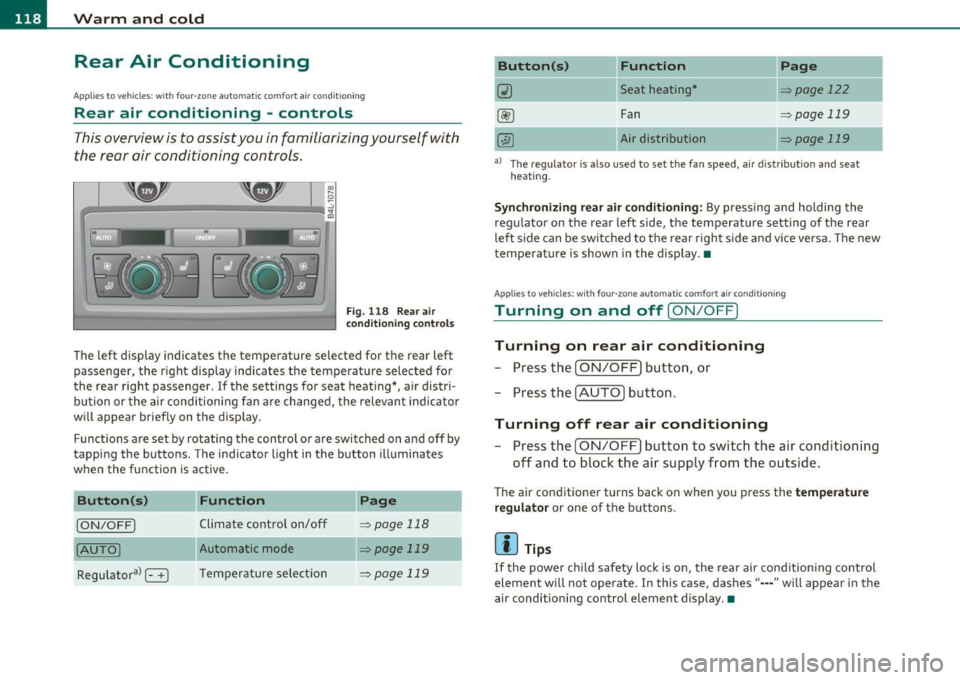
This overview is to assist you in familiarizing yourself with
the rear air conditioning controls.
F ig. 1 18 Rear air
con diti on in g con trol s
The left display indicates the temperature selected for the rear left
passenger, the right display indicates the tempe rature selected fo r
the rear right passenger. If the settings for seat heat ing *, air distr i
bu tion or the a ir conditioni ng fan are changed, the relev ant indicator
w ill appear briefly on the disp lay.
Func tions are set by rotating the contro l o r are swi tched o n and
off by
tapping the butto ns. The indicator light in the button illuminates
when the function is active .
Button(s)
Function Page
[ON/OFF) Climate control on/off => page 118
(AU TO ) Automa tic mode => page 119
Regulatora> G T emper ature se lec tion => page 119
Button(s) Function
~ Seat heating*
-
Fan
Air dis tribution
Page
::!> page 122
-
=> page 119
::!> page 119
al T he regulator is also used to set the fan speed, a ir d istr ibut ion and seat
heating.
-
Synchronizing r ear air conditioning: By pressing and holding the
regu lator on the rear left side, the temperature setting of the rear
left side can be switched to the rear right s ide a nd v ice versa. The new
temperature is shown in the display. •
Appli es to vehicles : with four -zone auto matic co mfort air condition ing
Turning on and off [ ON/OFF ]
Turning on rear air conditioning
-Press th e I ON/OFF) butt on, o r
- Press the !A UTO] button .
Turning off rear air conditioning
- Press the [ O N/OFF] but ton to sw itch the air condition ing
off and to bloc k th e air supply from the outs ide .
The air conditioner turns back on when yo u press the temperature
regu lator
or one of t he buttons .
[ i ] Tips
If the power child safety loc k is o n, the rear ai r cond ition ing contro l
element wi ll not operate. In this case, dashes" ••• " will appear in the
a ir conditioning con trol element display. •
Page 121 of 392
_______________________________________________ w __ a _r _m _ a_ n_d _ c_o _ l_ d __ _
Applies to vehicles : with four-zone automatic comfort ai r cond ition ing
Automatic mode in rear [AUTO )
The automatic mode is the standard setting for all
seasons.
- Select temperature between 60 °F (+16 °() and 84 °F
(+28 °().
-Press the [AUTO] button.
Automatic operation ensures constant tempe ratures in the interior
and dehumidifies the air inside the vehicle. Air temperature, volume
and distribution are controlled automatically to reach or maintain the
desired interior temperature as quickly as possible. Fluctuations in
exterior temperature and the effects of temperature from the posi
tion of the sun are compensated for automatically.
This operating mode works only in the adjustable temperature range,
from
60 °F (+16 °() to 84 °F (+28 °C). If a temperat ure below 60 °F
(+16 °() is selected, LO appears in the display. At temperatures above
84 °F (+ 28 °C), HI is displayed. At both extreme settings, climate
control runs continuously at maximum cooling or heating power.
There is no temperature regu lation. •
Applies to vehicles : w ith four -zone automat ic comfort air condition ing
Setting rear temperature
The temperature can be separately adjusted for the rear
left and right sides .
-Rotate the regulator to the left to reduce the tempera
ture, or to the r ight to increase the temperature.
T he selected temperature appears on the climate control disp lay. •
Controls and equip
ment Safety first
Applies
to vehicles : with four-zone automatic comfort air cond itio ning
Rear fan[~ )
The automatically preset fan speed can be reduced or
increased_
- Press the[~] button.
- Rotate the regulator to the desired fan speed .
The climate co ntrol system a utomatically regu lates fan speed
depending on interior temperature. You can adjust the volume of air
produced by the fan to your own requirements.
[ i ] Tips
It is possible that the fan speed may change automatically . This
occurs to ensure that the desired temperature setting is reached as
quickly as possib le .•
Applies to vehicles : w ith four -zone automat ic co mfort air cond itio ning
Rear air distribution [..Y ]
The automatically controlled air distribution can be
changed manually .
-Press the [·JAi button .
- Rotate the regulator to the desired setting.
You can adjust the air circulation so that air flows from specific vents.
• In position
;J, all air flows from the vents in the center console
and the outlets to the door pi llars .
• In position
:,J, air flows from the outlets in the door pillars.
• In position
}O, air flows from the outlets under the front seats.
There are additional combinations available to adjust air distribut ion
as needed. .,_
Vehicle care Technical data
Page 122 of 392
![AUDI Q7 2011 Owner´s Manual lffl!l.___w __ a _r_ m __ a_n_ d_ c_ o _ l_d _______________________________________________ _
To regulate air distribution automatically, switch to [AUTO].•
Basic settings
General
The ba](/img/6/40276/w960_40276-121.png "AUDI Q7 2011 Owner´s Manual lffl!l.___w __ a _r_ m __ a_n_ d_ c_ o _ l_d _______________________________________________ _
To regulate air distribution automatically, switch to [AUTO].•
Basic settings
General
The ba")
lffl!l.___w __ a _r_ m __ a_n_ d_ c_ o _ l_d _______________________________________________ _
To regulate air distribution automatically, switch to [AUTO].•
Basic settings
General
The basic climate control settings can be adjusted in the
fv1fv1I.
-Select: Function button I CAR]> Control button AC.
The following functions can be selected:
• Auto recirculate=>
page 120
• Synchronization :::::, page 120
• Supply. heater*=> page 121
• Rear operation*=> page 121 •
Automatic recirculation mode
An air quality sensor detects increased concentrations of
pollutants in the outside air and automatically switches
to recirculation mode.
We recommend that you always keep automatic air recirculation ON
to prevent polluted outside air from entering the vehicle inter io r.
If the
air quality sensor located in the air cond it ion ing system detects
polluted outside air, the sensor decides whether the air pollution can
be reduced by the factory-installed pollutant filter or whether it is
necessary to switch to air recirculation. With heavy concentrations of
pollutants, the a ir cond it ion ing system is switched automat ically to
recircu lation mode and the supply of outside air is b locked . As soon
as the concentration of pollutants in the outside air drops , fresh air is
supplied to the vehicle interior again. In the event that the windows fog up during automatic air recircula
tion, you must press the® button immediately.
Under certa in operating conditions, automatic a ir recirculation is
switched off automatically. With outside temperatures below about
SO °F
(+10 °C), automatic air recirculation is lim ited to 30 seconds.
With outside temperatures below about
30 °F (-1 °() and with the air
conditioner switched off, the automatic air recirculation is limited to
15 seconds. •
Synchronization
One climate control setting for the driver and front
passenger seats.
With synchronization active, the driver's settings are adopted for the
passenger or vic e versa. All the other sett ings that were made are
transferred to the other seat. Th is includes a ll the climate control
settings , except fo r the seat heating/ventilation* .
If a different setting is selected at a "synchronized seat", synchroni
zation is cancelled. •
Applies to veh icles : with four -zone a uto ma tic c om fo rt air co nd itionin g
Synchronization
One climate control setting for all seats.
With synchron izat ion act ive, the driver's settings are adopted for the
front passenger and the rear left and right seats . All the other
sett ings that were made are transferred to the other seats . This
includes a ll the climate control settings, except for the seat
heating/ventilation*.
If a different setting is selected at a "synchronized seat", synchroni
zation is cancelled .•
Page 377 of 392

Alphabetical index -________________ fWI
Alternator Auto-Check Control ..... .. .. .... ...... 32 State of charge ......... ..... .... 263
Malfunction ............. ........ . 34 Automatic belt retractor ............. 205 Voltage
......................... . 39
Ambience lighting Lighting profiles ................. . 73
Anti -freeze
See Engine coolant system ......... 308
Anti-glare inside day-night mirror . . . 79, 80
Anti -lock brake system
How the ABS system works ......... 260
Warning/indicator lights ... .. .... .. 19
Anti-S lip Regulation System (ASR)
How the system works ... .... .. .. . 258
Anti-theft systems
Anti-theft alarm system ........ .. .. 57
Electronic immobilizer ............. 45
Approach/departure angle ............ 270
Ashtray . ............. .. .. .. .. .... . 105
ASR How the Anti-Slip Regulation System works . ..... ... ... .. .. ......... 258
Asterisk What does it mean when something is
marked with an asterisk? ........... 6
Audi braking guard .................. 151
Error messages ............... ... 153
Settings ................ ..... ... 153
Status messages ................. 153
Switching on and off .............. 153
Audi Service Repair Manuals and Literature
368
AU TO mode
AC climate contro ls ...... .... .. .. . 114
Auto Safety Hotline .... .... ......... 199
Controls and equip
ment Safety first
Automatic car wash
See Washing
.................... 279
Automatic mode Four-zone automatic comfort air
conditioning ........... ...... .. 119
Automatic Sh ift Lock (ASL) ............ 165
Automatic transmission ... .. ......... 163
Automatic Shift Lock (ASL) ......... 165
Driving ......................... 163
Dynamic shift program ... .. .. ..... 166
Emergency release for selector lever . 168
Fail-safe mode ................ ... 168
Ignition key safety lock ............ 127
K ick-down .. ... .... .. .. .. ... .... 166
Manual shift program .. .. .. .. .. ... 167
Selector lever ............ ...... .. 164
Shift buttons . .. ................. 168
Steering wheel with tiptronic ® .... .. 168
Average speed ......... .. .. .......... 26
Avoid damaging the vehicle ........... 267
B
Bass box ... .. .. .... ............... 341
Battery . .. .... .. ... ....... ......... 312
Batte ry location ..... .. .. .... ..... 313
Charging ................ .. ... ... 315
Important warnings when working on the battery . .................... ... 313
Jump start ing ... ....... ....... ... 355
Low .... ........ ............. ... 263
Replacing the battery .... .. .. .. ... 316 Winter operation
................. 312
Working on the battery .. .......... 313
Before driving .. ................... . 191
Blended gasoline . .. .. ...... ....... . 291
Body cavity seal ing .................. 284
Booster seats .................... .. 241
Brake assistant . .. .................. 261
Brake booster ...................... 260
Brake fluid
Changing the b rake fluid .......... . 312
Checking the brake fluid level ....... 311
Reservoir ..... ................ .. 311
What is the correct brake fluid level? . 311
What should I do if the brake fluid warning
light comes on? . .. .... .......... 311
Brake light
Defective ... .. ................... 24
Brake system ..... .......... ...... .. 311
Anti-lock brake system ... .......... 19
Brake fluid .. .. ................ .. 311
Brake fluid spec ificat ions for refill and
replacement . .. .. ...... ....... . 312
Brake pads . ... ................ .. 265
General information ............ .. 259
How does moisture or road salt affect the brakes? . .... .. .. ..... ..... ... . 259
Ma lfunction .............. ...... .. 34
Parking brake .................... 132
Wa rning/indicator lights ... .... .. .. 20
Worn brake pads symbol ........... 39
Vehicle operation Vehicle care Do-it-yourself service Technical data
Page 379 of 392
___________________________________________ A_ l::.. p _h _a_ b_ e_t _ic _a_ l_ in_ d _ e_x __ __
Plastic and vinyl .............. ... . 282
Plast ic parts ........... .......... 286
Safety belts ..................... 289
Trim strips ...................... 281
trim strips ... ...... .. ... ........ 282
Cleaning and protection .............. 278
Climate control ........ ........ .. .. . 111
Synchroniz ing ... .. .......... .... 112
Warm and co ld .............. .... 111
Climate controls
Air conditioner on/off .......... .. . 114
Air distr ibution .................. 115
Air outlets ........ ... .. .. .. ..... 116
Air outlets (rear) ........ .... .. .. . 117
Air recirculation .............. ... . 115
AUTO (standard setting) ... ... ..... 114
Basic settings ............. .. ..... 120
Controls ..................... .. . 112
Defrosting/defogging ... .......... 115
Description ............. .. ....... 111
Energy management .............. 111
Fan .. .. ... ....... .. ... .. .. .. .. . 114
Front seat ventilat ion ... .......... 121
Heated seats, front ............ .. . 121
Key coded setting ................ 111
Recircu lation mode (automatic) ..... 120
Recommended settings ... ... .. .. . 111
Residual heat ...... ... .. .. .. ..... 113
Setting the temperature ... ... .. .. . 114
Supplementary heater .......... ... 121
Synchronization .................. 120
Turning on and off ................ 113
Using climate control economically .. 117
Clock .................... .......... 11
Controls and equip
ment Safety first
Closing
Warning/indicator lights ... .. .. .. .. 19
Panoramic sliding sunroof .......... 62
See also Adaptive Cruise Control .... 136
Coat hooks .. .................... ... 109 Cruising range
... .... ................ 26
Cold tire inflation pressure ... ......... 322 (upholder ................. 95, 104, 105
Compass mirror ..................... 83
Compliance ........................ 371
D
Consumer Information ... .. .. .. . 199, 368
Contacting NH TSA .................. 199
Convenience key ....... ....... .. .. .. . 55
Dr iver messages ................. 131
Locking vehicle .. ............. .... . 56
START button ................. ... 129 Damp
ing
See Adapt ive A ir Suspens ion ........ 178
Data .............................. 36S
Data recorder .. .. .... ............ .. 256
Date display .... .................... 11
Starting engine .. .. . .. ........... 129 Daytime running
lights ............ 67, 68
STOP button ..................... 130 Declaration of compl
iance
Switching engine off ... .. ..... .... 130 Adaptive Cru
ise Control ............ 371
Switching on ignition ........ .. ... 129 Audi side assist ................
.. 371
Unlocking vehicle .................. 56 Cell phone package
............... 371
Convertible child safety seats ....... .. 239
Convertible locking retractor
Activating .......... .. .. ......... 245
Deactivating ..................... 246
Us ing to secure a chi ld safety seat .. 243,
245 Convenience
key ................ . 371
Electronic immobilizer .... ........ 371
Homelink ® universal remote control. 371
Remote control key .. .. .. .. .. . ... . 371
def What does this mean when it appears in
Coolant system .................. ... 308 the trip odometer display?
........ . 12
Cooling box in glove compartment ... .. 108
Cooling System Defective light bulb warning ........... 24
Defrosting/defogging the windows
..... 115
Expansion tank ..... .. .. ......... 309 Defrosting/defogging windows
........ 116
Cornering light ...................... 70 Determining correct load
limit ....... .. 327
Cruise control Diesel fuel
...... ........... ... .. .. . 292
Changing speed ..... .. .. .. .... ... 134 Diesel particulate filter
.... ...... 40, 267
Presetting your speed ............. 135 Digital
clock ......... ............... 11
Switching off .................... 135
Digital compass ..................... 83
Switching on .................... 134
Digital speedometer .................. 24
Vehicle operation Vehicle care Do-it-yourself service Technical data