garage door opener AUDI Q7 2011 Owner´s Manual
[x] Cancel search | Manufacturer: AUDI, Model Year: 2011, Model line: Q7, Model: AUDI Q7 2011Pages: 392, PDF Size: 93.29 MB
Page 187 of 392
_____________________________________________________ H_ o_m_ e_ L_i_n _k_ ®_ • __ _
Homelink ®
Universal remote control
Applies to veh icles: w ith Hom eli nk ® universal remote control
General information
The Homelink ® feature can learn up to three radio
frequency codes for most current transmitters used for
operating garage doors, estate gates, home or outdoor
lighting systems, and other devices.
You must first program the Homelink ® transm itter before you can
use the system=>
page 186, "Programming the Home link® trans
mitter".
I n order to program the Homelink ® transmitter for devices utilizing
rolling code, a second person on a ladder who can safe ly reach the
garage door opener motor is recommended. It is also necessary to
locate the "learn" button on your garage door opener motor. Refer to
the operating instructions for the opener, as the location and color of
this button may vary by manufacturer.
You can still use the original remote control for the device at any
time.
& WARNING
• Never use the Homelink'"' transmitter with any garage door
opener that does have not the safety stop and reverse feature as
required by federal safety standards. This includes any garage
door opener model manufactured before Aprill, 1982.
• A garage door opener which cannot detect an object, signaling
the door to stop and reverse does not meet current federal safety
standards. Using a garage door opener without these features
increases risk of serious injury or death.
Controls and equip
ment Safety first
& WARNING
(continued)
• For safety reasons never release the parking brake or start the
engine while anyone is standing in front of the vehicle.
• A garage door or an estate gate may sometimes be set in
motion when the Homelink ® remote control is being
programmed. If the device is repeatedly activated, this can over
strain motor and damage its electrical components -an over
heated motor is a fire hazard!
• To avoid possible injuries or property damage, please always
make absolutely certain that no persons or objects are located in
the range of motion of any equipment being operated.
rn Tips
• If you would like more information on Homelink ®, where to
purchase the Homelink ® compatible products, or would like to
purchase the Homelink ® Home Lighting Package, please call toll
free: 1-800-355-3515.
• For Declaration of Compliance to United States FCC and Industry
Canada regulations=>
page 371 . •
Vehicle care Technical data
Page 188 of 392
ffl..__H_ o_m_ e_ L_ i _n_ k_ ® _______________________________________________ _
Applies to veh icles : w ith Homelin k® un iversa l remote control
Programming the Homel ink ® transmitter
The transmitter is programmed in two phases . For rolling
code transmitters, a third phase is also necessary .
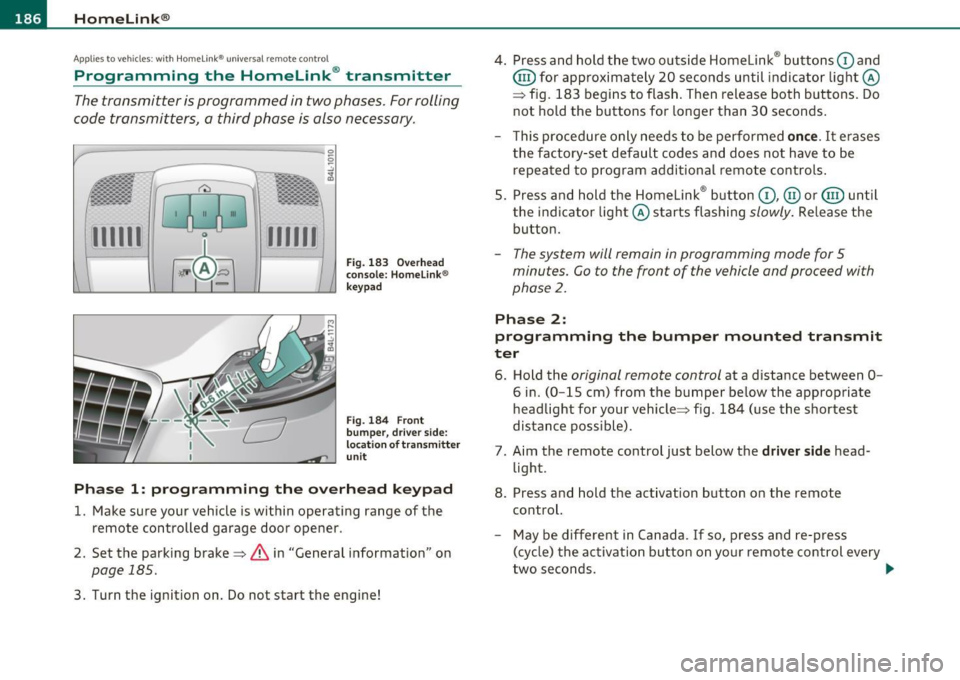
111111
-
1111111
Fig. 183 Over head
console: Homelink ®
keypad
Fig. 184 F ront
bumper, dri ver side:
locat ion of transmitter
unit
Phase 1: progr amming th e overhead k eypad
1. Make sure your vehicle is within operating range of the
remote controlled garage door opener .
2. Set the parking brake~
& in "General information " on
page 185 .
3. Turn the ignition on . Do not start the engine! 4
. Press and hold the two outside Homelink ® buttons
G) and
@ for approximately 20 seconds until indicator light@
=> fig. 183 begins to flash . Then release both buttons. Do
not hold the buttons for longer than 30 seconds .
- This procedure only needs to be performed
once. It erases
the factory-set default codes and does not have to be repeated to program additional remote controls .
5. Press and hold the Homelink ® button
G) , @ or@ until
the indicator light@ starts flashing
slowly . Release the
button .
-The system will remain in programming mode for 5
minutes. Co to the front of the vehicle and proceed with
phase
2 .
Phase 2:
programming the bumper mounted transmit
ter
6. Hold the original remote control at a distance between 0-
6 in. (0 -15 cm) from the bumper below the appropriate
headlight for your vehicle => fig . 184 (use the shortest
distance possible) .
7. Aim the remote control just below the
driver side head
light .
8. Press and hold the activation button on the remote control.
- May be different in Canada . If so, press and re-press
(cycle) the activation button on yo ur remote control every
two seconds. .-,,
Page 189 of 392
___________________________________________________ H_ o_ m __ e_L_ i_n _k_ ®_ R _ __.fflll
9. The emergency flashers will flash thr ee time s (after about
15-60 seconds) when the programming is successful.
Release the button on the remote control.
- To program more devices, repeat steps 4 to 9.
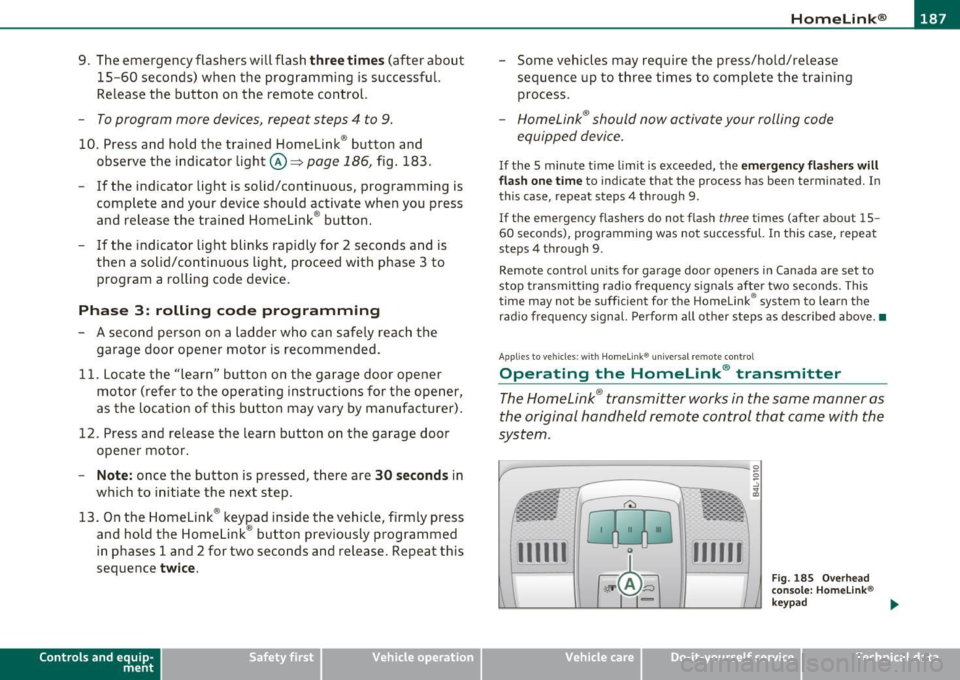
10. Press and hold the trained Homelink ® button and
observe the indicator light©~
page 186, fig. 183.
- If the indicator light is solid/continuous, programming is
complete and your device should activate when you press
and release the trained Homelink ® button.
- If the indicator light blinks rapidly for 2 seconds and is then a solid/continuous light, proceed with phase 3 to program a rolling code device.
Ph ase 3: r olling cod e programming
- A second person on a ladder who can safely reach the
garage door opener motor is recommended.
11 . Locate the "learn" button on the garage door opener
motor (refer to the operating instructions for the opener,
as the location of this button may vary by manufacturer) .
12 . Press and release the learn button on the garage door
opener motor .
-Not e: once the button is pressed, there are 30 second s in
which to initiate the next step .
13. On the Homelink ® keypad inside the vehicle, firmly press
and hold the Homelink ® button previously programmed
in phases 1 and 2 for two seconds and release. Repeat this
sequence
twi ce .
Con tro ls a nd e quip
m en t Vehicle
OP-eration
- Some vehicles may require the press/hold/release
sequence up to three times to complete the training
process.
-Homelink ® should now activate your rolling code
equipped device.
If the 5 minute time limit is exceeded, the e m erge ncy fla s h ers w ill
fl ash o ne ti me
to indicate that the process has been terminated. In
this case, repeat steps 4 through 9.
If the emergency flashers do not flash t hree times (after about 15 -
60 seconds), programming was not successful. In this case, repeat
steps 4 through 9 .
Remote control units for garage door openers in Canada are set to
stop transmitt ing radio frequency signals after two seconds . This
time may not be sufficient for the Home link® system to learn the
radio frequency signal. Perform all other steps as described above. •
Ap plies to veh icles : with H om elink ® un iv ersal re m ot e contro l
Operating the Homelink ® transmitter
The HomeLink ® transmitter works in the same manner as
the original hand held remote control that came with the
system.
-
Vehicle care
Fig. 185 Overhead
conso le : Homeli nk®
key pad
Do-it-yourselt service iTechnical data
Page 382 of 392
--~A~l± p ~ h~ a~ b'..::e ~t~ i~c ~a ~l ....'..i~n ~d ~e:..:x~ ------------------------------------------
Recommendation ..... .... .... ... 291
Refuel ling ...................... 294
Reserve ..................... .... 12
Tank capacity . ............. ...... 365
Unlocking the fue l filler flap by hand 2 96
Fuel economy messages (efficiency program)
29
Fuse arrangement ... .. .. ..... ...... 350
G
Garage door opener (Homelink®) ...... 185
Gas d ischa rge lamps .. .... ... ... .. .. 354
Gauges
Engine coo lant tempe rature ........
10
Fue l gauge . .. .. .. .. .. .. .... ...... 12
S peedometer ... .. .. ...... .. .. . ... 1 2
Tachometer . ... .... .. .... .. .. . ... 1 1
Trip odometer ... .... ..... ... .. .. . 1 2
General illust rat ion
Inst ruments and co ntrols ............ 9
General rules and dr iving tips .........
270
Before driving offroad ... .... ..... 270
Dr iv ing offroad .................. 270
Glossary of tire and loading terminology 319
Glove compa rtme nt ................. 1 07
Cooling box ..................... 108
Valet key func tion .... .. .... .... .. . 45
Glove compartment - emergency unlocking ..
108
Glow plug system
Indicato r light ................ ....
16
Gradient angle ..................... 270
Gross Vehicle Weight Rating (GVWR) ... 363
Ground clearance ...... ...... .. .. ... 2 70
H
Head restraints ... .. ..... ..... ..... . 19 4
Adjusting . .... .. ..... .. .. .. .. ... 194
Front seats ... ...... ... . ... .. .. . . 92
Rear seats .. ..................... 93
Headligh t washer rese rvoir .......... . 316
Headlights ... ... ... .... .. .. .. .. .. .. 67
Adaptive Light ......... ........ ... 70
Defective . . . . . . . . . . . . . . . . . . . . . . . . 24
Front fog lights ................... 69
Headlight range con trol ... ........ . 39
Switching off ..................... 67
Switching on .... ..... .. . ... .... .. 6 7
Was her system .. ..... .. . ... .... .. 77
Xenon headlights . ... .. .. ...... ... 67
Heated outside mirrors ............... 81
Heated seats
Front
121
Rear ... ................. .. .. .. . 122
Rear (four-zone automat ic comfort air
conditioning) ..... .... . ... .. .. .
122
Heated steer ing whee l ..... ... ....... 123
Heated washer jets
Wiper and washer system .. .. .. .. ..
74
Heat ing
Climate controls ...... ..... .. .. ..
111
Heavy clot hing and safety belts ....... 204
H igh beam ...................... 67, 71
Warning/indicator l ights . .. .. .. .. .. 19
H igh voltage warning label .. .. .. .. ... 362
H ill descent control
H ill hold 256
Sta rting on h ills 133
Homelink ® uni versal remote control ... 185
Hood
Ope ning ... .... ... ... . .... .... ..
300
Release lever ... .. .. .. ... .. .... .. 300
Horn .................. .... ... ...... 9
How are child restra int system anchors related
to child safety ............ .. .. ..
2 46
How many airbags does my vehicle have? ...
218
How ofte n should I check my t ire pressures? .
325
How safety belt pre te nsione rs wo rk .. .. 20 9
Hydroplaning . .... .. .. .... ......... 329
I
Ignition key ........... ...... .. . ... 126
Igni tion lock ....................... 126
Ma lf u nct ion .... .. .. .. .. .. ..... 37, 4 1
Ignition lock positions . .... .. .... .. .. 126
Important things to do before driving .. 191
Imprope rly wor n safety bel ts ... .. .. .. 209
Indicator lights . . . . . . . . . . . . . . . . . . . . . . 14
Airbag system ...... .... .... . 222, 223
PASS ENG ER A IR BAG OFF ...... . ... 223
In fant seats ....................... 238
Inflatable spare tire ................. 342
Inflating ....................... 343
Inside rear view mirror .. ........... 79, 80
Page 385 of 392
_____________________________________________ A_ L .... p_ h _ a_b_ e_ t_ ic_a_ l_ in_ d_e _ x __ _
Pollen filter
Climate controls ......... ... ..... 111
Power locking switch ............ ... .. 49
Power locking system ................ . 46
Convenience close/open feature .. .. .. 60
Locking and unlocking the vehicle from
inside ...... ...... .. .. .. .. .... .. 49
Opening and closing the windows .... 60
Rear lid/trunk lid ......... ... ...... 51
Remote control key .......... ...... 43
Select ive unlock feature ........ .. .. 49
Sett ings ..................... .. .. 49
Unlocking and locking vehicle .... .. .. 47
Power outlets ............. .. .. .. .. . 106
Power seat Controls ... ................. ... .. 86
Seat adjustment ...... .... .. .. .. .. 86
Power steering .......... .. .. .. .... . 261
Power window switches .... .. ... ...... 58
In the driver 's door ....... .... ... .. 58
In the front passenger 's door ....... . 59
Reactivating the system ...... .. .. .. 61
Pregnant women Special considerations when wearing a safety belt .......... .. .. .. .... . 207
Programming the Homelink ® universal re-
mote control ................ ... 185
Proper occupant seating pos it ions . .. .. . 192
Proper safety belt position ....... .. .. . 206
Proper seating position
Front passenger .. .... .. .......... 193
Occupants ......... .. ... ..... ... 192
Rear passengers . ..... ........ .... 194
Controls and equip
ment Safety first
Protective tray
... .. ..... .... ... ..... . 99
Q
Quartz clock ...... .................. 11
quattro ®
See All Wheel Drive ............... 262
Question What happens to unbelted occupants? ..
203
Why safety belts? ................ 201
R
Radiator fan .. .. .. ................. 311
Rain sensor ................. ..... ... 7 4
Rain sensor defective ............. ... . 38
Reading lights Front . ................. .. .. .. .. . 72
Rear .. .. .. .. ... ........ ...... .. . 72
Rear ashtray .. .. .. .... ... .......... 105
Rear fog lights .. .. ... ...... .. .. .. .. . 69
Rear lid Automatic operation ............ .. . 52
Emergency unlocking .. .. .......... 54
Opening and closing ............ ... 51
Valet key function ...... ... ........ 45
Rear light
Defective .... .. ... ............... 24
Rear ope ration
Four-zone automatic comfort air
condi tioning ................. .. 121 Rear park assist ...
....... ... ... .. .. . 170
Adjusting the display ....... .. .. ... 176
Adjusting the warning tones ........ 176
Trailer hitch . .. .. .. .. .. ... ..... .. 177
Rear seats Adjusting seat ...... ...... .. . ... .. 90
Entry assist ... .. .. ............... 91
Folding seatback up and down .. ... .. 92
Rear view camera
Parking mode 1 ................ .. 174
Parking mode 2 ................ .. 175
Rear view mirror
Inside rear view mirror . . . . . . . . . 79, 80
Rear window defogger ............. .. 115
Red symbols ........................ 33
Refue lling ... .... ........... .... .. . 294
Gasoline inhibitor flap ............. 294
Release lever for hood . ....... .. .. .. . 300
Remote control garage door opener
(Homelink ®) ........... ... .. ... 185
Remote control key ................... 43
Unlocking and locking .............. 47
Remote rear lid release ............... 51
Repair manuals ..... .... ... .. .. .. ... 368
Repairs Airbag system ................ ... 225
Replacing a fuse ......... .. .. .. .. .. . 350
Replacing light bulbs .. .. .. .......... 354
Replacing tires and wheels ............ 330
Report ing Safety Defects ............. 199
Reset button ...... . .. ............... 12
Residual heat .. .. .. .. .............. 112
Vehicle operation Vehicle care Do-it-yourself service Technical data