horn AUDI Q7 2011 Owner´s Manual
[x] Cancel search | Manufacturer: AUDI, Model Year: 2011, Model line: Q7, Model: AUDI Q7 2011Pages: 392, PDF Size: 93.29 MB
Page 11 of 392
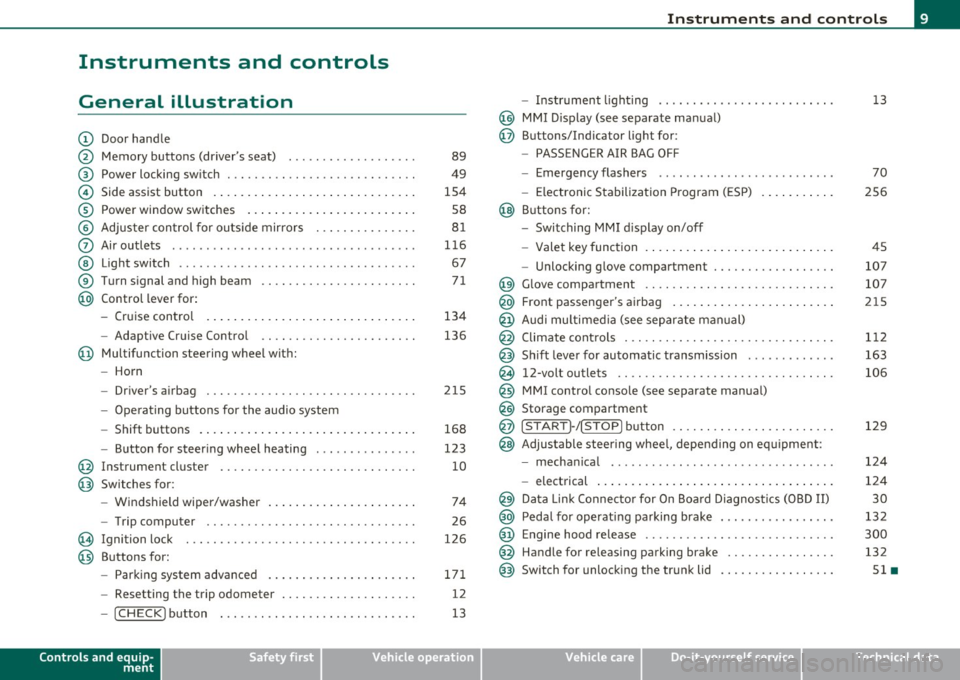
Instruments and controls
General illustration
(D Door handle
@ Memory buttons (driver's seat) .................. .
@ Power locking sw itch ........................... .
© Side assist button ... .. ... ... ... .. .. .. ... . .. ... .
® Power window sw itches ... .... .. .. .. .. .. ... ... . .
© Adjuster con trol for outs ide mir rors .............. .
0 Air outlets .......... .... .. .... ............... .
@ Light switch ...... .. .... ... .. .. .. ... ... .. .. ... .
® Turn s ignal and high beam ...................... .
@ Control lever for:
- Cru ise control . .... ... ... .. .. .. .. .. .. .. .. ... .
-Adaptive Cruise Control .. .. ................ .. .
@ Mu ltifunction steering wheel with:
- Horn
- Driver's airbag .............................. .
- O pera ti ng butto ns for the audio system
- Shift buttons . ... .. .. .. .... .. .. .. .. .. ...... . .
- Button for steer ing whee l heating ..... ... ...... .
@ Instrument cluster ............................ .
@ Switches for:
- Windshield wiper/washer ... ...... .. ..... .... . .
- Trip computer .............................. .
@ Ignition lock ................................. .
@ Buttons for:
- Par king sys tem advance d .... ..... .. .. ... .. .. . .
- Resetting the trip odometer ................... .
- ICHECK ]button ......................... ... .
Controls and equip
ment Safety first
89
49
1S4
S8
8 1
11 6
67
7 1
134
136
2 1S
168
123
10
74
26
126
171 12
13
Instruments and controls
- Instr ument lighting ......................... .
@ MMI Disp lay (see separate ma nual)
@ Buttons/Indicator light for:
- PASSENGER AIR BAG OFF
- Emergency flashers ...... .. ................. .
- Electroni c Stabilization Progr am ( ESP)
@ B uttons for:
- Switching MMI d isplay on/off
- Valet key function .. .. .. .. .. .. .. ...... ... .. .. .
- Unlocking g love compartment ................. .
@ Glove compartment ........................... .
@ Front passenger's airbag ...... ..... .. ..... .. .. . .
@ Audi mu ltime dia (see separate man ual)
@ Climate cont rols .............................. .
@ Shift leve r for automatic transmission ............ .
@ 12-volt outlets ............................... .
@ MMI contro l console (see separate manua l)
@ Storage compartment
@ ISTART]-/ISTOP] button ....................... .
@ Adjustable stee ring whee l, depending on eq uipme nt:
- mecha nical .... .. .... ... .. .. .. ... .... ..... . .
- electrical ..... . ... .. .. .. .... .... .. .. .. ... .. .
@ Da ta Lin k Connecto r for On Boa rd Diagnos tics (OBD II)
@ Peda l for operating pa rking brake ................ .
@ Engine hood release ............. ... .. ......... .
@ Handle for releasing parking brake ............... .
@ Switch for unlocking the trunk lid ................ .
Vehicle care
13
70
2S6
45
107
107
215
1 12
163
106
129
12 4
124
30
13 2
300
132
Sl •
Technical data
Page 48 of 392

Opening and closing
When the function is switched on, the buttons for opening the rear lid
and glove compartment have no function. The vehicle can be driven
and locked and unlocked with the master key.
[I] Tips
Be sure to activate the function before handing over the valet key to
someone e lse . The valet key only fits the lock in the driver's door and
the ignition lock.•
Power locking system
General description
The power locking system locks or unlocks all doors and
the rear lid simultaneously.
Th e power locking system in your veh icle incorporates the following
functions :
• Central locking f unction
• Selective unlock feature =>
page 49
• Remote contro l feature=> page 43
• Convenience key*=> page 55
• Anti-theft alarm system=> page 57
All the doors and the rear lid are locked by the central locking system
when you lock the vehicle. You can set whether generally only the driver 's door or all doors and the rear lid should be unlocked when you
open the vehicle in the MMI menu
Central locking to suit your indi
vidual desires=>
page 49.
Unlocking the vehicle
You can unlock the vehicle from outside either by using the remote
control
or by insert ing and turning the key in the driver's door lock.
When you
unlock your vehicle: •
The anti-theft alarm system is deact ivated briefly .
• Th e vehicle inter ior lights illuminate for approximately 30
seconds.
• All turn signal lights will flash twice when the car is un locked .
• After unlocking the vehicle, you have 60 seconds to open a door or
the rear lid. After 60 seconds, the veh icle automatically locks and the
anti-theft alarm system activates again.
Th e rear lid can be locked or unlocked e ither by using the remote
control
or by insert ing and turning the key in the driver's door lock .
Unlocking the vehicle with the remote contro l will on ly
unlock the
rear lid, to
open it, the lid handle needs to be pressed .
Locking the vehicle
You can lock the vehicle from outside either by using the remote
control
or by insert ing and turning the key in the drivers's door lock.
When you
lock the vehicle:
• All doors and the rear lid are locked.
• All turn signal lights will flash once when the car is locked.
• Th e anti-theft alarm system is activated. The horn of the anti
theft alarm system will sound and the anti-theft alarm system readi
ness light, located in the upper part of the driver 's door panel, will
start to blink.
• Th e vehicle inter ior lights turn off.
Unlocking and locking with Convenience key*
On vehicles which are equipped with the Convenience key* authoriza
tion system, the doors are unlocked
without a key by means of a prox
im ity sensor in the door handle. The doors are sim ilarly locked
without a key using the locking button. Each door has a prox imity
sensor and a lo cking butto n.
Automatic locking
Th e automat ic locking feature locks all the vehicle doors and the rear
lid when you drive faster than 9 mph (15 km/h). This function can be
turned on and off in the MMI
Central locking Menu => page 49. ~
Page 50 of 392

Opening and closing PANIC Button
- Push the red button @to activate t he panic function. The
horn sounds and the turn signals flash .
- P ush the button @ again to deact ivate t he panic function.
On vehicles with Convenience key *, the se lector lever must be in the P
position, o therwise the vehi cle can no t be locked.
& WARNING
Read and follow all WARNINGS~ & in "General description " on
page 46.
[I) Tips
• In order to make sure the locking function is work ing, you s hou ld
always keep your eye o n the vehi cle to ma ke su re it is p roperly locked .
• Do not use the remote control if you a re insi de the car, otherwise
you may un intentionally lock the vehicle, and then you wou ld set off
the anti-theft alarm when you try to start the engine or open a door .
In case t his happe ns any how, push the unloc k bu tton @.
• Use the panic function on ly i f you a re in an emergency situation.•
Operating tocks with the key
To loc k and unloc k the vehicle fr om the outsi de, t urn the
key in the l ock of th e driver 's d oor .
To unlock the vehicle
Fig. 32 K ey turn s for
o pe nin g and clos ing .
-Insert the key in to t he loc k of th e driver's door.
- Tur n th e key one
time to position @to unlock t he driver's
doo r.
- Tur n the key
two times to pos ition @ => fig. 3 2 to u nloc k
al l doors and t he rear lid.
To lock the vehicle
- Close a ll windows and doo rs properly.
- Turn the key in t he lock of the driver's door to the lock
posit ion @ =>
& in "Ge neral desc rip tion" on page 4 6.
& WARNING
Read and follow all WARNINGS~ & in "General description " on
page 46. •
Page 59 of 392
& WARNING
• Wh en you lock your vehicle from outs ide , nobody - especially
c hildren - should remain in side the vehicle . Remember , when you
lo ck the vehicle from the outside the windows cannot b e opened
from the inside .
• When you lea ve the vehicle, always remove the ignit ion key
and take it with you. This will prevent pa ssenger s (c hildren, for
e xample ) from a ccidentally be ing locked in the vehicle should
they accidentally pres s the power locking switch in the front
doors .
• Do not leave children inside the vehicle unsuperv ised . In an
e mergency it would be impossible to open the door s from the
outside without the key.
[I] Tips
It is not possible to re -open the door fo r a b rief period directly after
clos ing it . This a llows you to ensure that the doors are p roper ly
loc ked .•
Anti-theft alarm system
The an ti-theft alarm triggers an al arm if any one
attempts to break into the vehicle .
The a nti-theft alarm system trigge rs an a udible a larm and t urns o n
th e emergen cy flas her if an unau thori zed inte rfe rence wi th t he
vehicle is sensed by the system.
How is the anti-theft alarm system sw itched on?
T he anti-theft alarm system is switched on when you lock the vehicle.
Th e system is activa ted app rox ima tely 30 seconds after the vehicle is
locked. The indicator light on top o f the doo r trim start flashing
r a pidly fo r 30 seconds and then blink s low ly .
Controls and equip
ment Safety first
Opening and closing
How is the anti-theft alarm system switched off?
Th
e an ti- the ft alarm system is switche d off on ly when yo u unlock your
veh icle . If you do not o pen a door wit hin 60 seconds after you have
unlocked wit h the remote control , the vehicle will lock itself again
automa tically .
When will the anti-theft alarm system be
triggered?
When the vehicle is locked, the a larm system monitors and protects
the following parts of the veh icle:
• engine compartment
• lu ggage compa rtment
• doors
• ignition
Whe n the system is activated, the alarm will be triggered if one of the
doors, the engine hood or the rear lid are opened, or if the ignition is
t ur ne d on . The anti-t heft a la rm system will a lso go off when the
ba ttery is d isco nnected.
You can also trigger the alarm by pressing the PANIC button on your remote con trol. This will alert o ther peop le in case of eme rge ncy.
Press the
PANIC butto n aga in to turn off the a larm .
How is the anti-theft alarm switched off when
triggered?
Th e alarm sys tem is swi tched off whe n yo u un lo ck the veh icle o r whe n
the ignit ion is sw itched on . The a larm will also switch itself off when
i t comes to the end o f its cy cl e.
Emergency flasher and horn
Th e emerge ncy fl ashe r will blink briefly and the hor n sounds whe n
the doo rs, engine hood and rear lid a re prope rly closed.
If the eme rgency flashers do not blink, o r th e horn does no t soun d,
check the doo rs, eng ine hood and rear lid to make s ure they a re prop
er ly closed.
If you close a door, the hood o r the rear lid with the anti -
Vehicle care Technical data
Page 60 of 392
![AUDI Q7 2011 Owner´s Manual Opening and closing
theft alarm switched on, the emergency flashers will blink and the ....
horn will so und only after you have closed the doo r o r li d.
[ i ] Tips
For the](/img/6/40276/w960_40276-59.png "AUDI Q7 2011 Owner´s Manual Opening and closing
theft alarm switched on, the emergency flashers will blink and the ....
horn will so und only after you have closed the doo r o r li d.
[ i ] Tips
For the")
Opening and closing
theft alarm switched on, the emergency flashers will blink and the ....
horn will so und only after you have closed the doo r o r li d.
[ i ] Tips
For the anti -t h eft a larm system to function p rope rly, ma ke sure all
vehicle doors a nd windows are closed before leaving the vehicle .•
Power windows
Controls
Switches for front door windows
@ operates the window in the driver's door.
F ig. 45 D rive r's doo r:
power wind ow
switche s
® operates the window in the front passenger 's door .
Switches for rear w indows
© operates the left rear window .
® operates the right rear window .
Safety switch
© Safety switch for rear w indow operat io n.
& WARNING
• Do not leav e children unatt ended in the vehicle , especially with
a cces s to vehicle key s. Un supervi sed use of the keys can re sult in
starting of the engine and use of vehicle sy stems such as power
window s, etc . which could result in seriou s injury .
• Remember -you can still open or close the power windows for
about ten minutes after the ignition is switched off . Only when
e ith er of the front doors are opened are the power windows
s witched off.
• Be careful when clos ing th e window s. Check to see that no one
is in the way, or serious injury could re sult !
• Always remo ve the ign ition key whenever you leave your
vehicle.
• If you lock your vehicle f rom the outside, no one, especially
children, should remain in the vehicle.
• Do not st ick anything on the windows o r the windshield that
may interfere with the driver 's field of vi sion .
[I] Tips
In a ddit ion to the sw itches in t he driver's doo r there is a separate
switch in eac h door for the power window in that door=>
page 59,
fig. 46. a
Switches in the driver 's door
The driver can operate all windows.
If the respective sw itch is pus hed or pu lled the w indow will
open or close . T he power window switches have a
two-posi-
tion function : ..,
Page 227 of 392
Airbag system Ill
----------------=--=---
& WARNING (co ntinued )
• Always install forward or rear-facing child safety seats on the
rear seat - even with an Advanced Airbag System .
• If you must install a rearward-facing child safety seat on the
front passenger seat because of exceptional circum stances and
the PASSENGER AIR BAG OFF light does not appear and stay on ,
immediately install the rear-facing child safety seat in a rear
seating pos ition and have the airbag system inspected by your
authorized Audi dealer.
• A tight tether or other strap on a rearward-facing child
restraint attached to the front passenger seat can put too much
pressure on the weight-sensing mat in the seat and register more
weight than is actually on the seat. The heavier weight registered can make the system work as though an adult were on the seat
and deploy the Advan ced Airbag when it must be suppres sed
caus ing serious or e ven fatal injury to the child.
• If, in exceptional circumstances, you must install a forward
facing child restraint on the front passenger seat, always move
the seat into its rearmost position in the seat' s fore and aft adju st
ment range , as far away from the airbag as possible . The backrest
must be adjusted to an upright position. Make sure that the PASSENGER AIR BAG OFF light comes on and stays on all the time
whenever the ignition is switched on.
& WARNING
• If the PASSENGER AIR BAG OFF light doe s not go out when an
adult is sitting on the front passenger seat after taking the steps
described above, make sure the adult is properly seated and
restrained at one of the rear seating posit ions.
• Have the airbag system inspected by your authorized Audi
dealer before transporting anyone on the front passenger seat.
Controls and equip ment Safety first Vehicle operation
(I] Tips
If the we
ight-se nsin g mat in the fro nt passenge r seat detec ts a n
empty seat , the front airbag on the passenger s ide will be t urned off,
a nd the PASSENGER AIR BAG OFF light will sta y on .
a
Repair, care and disposal of the airbags
Parts of the ai rbag syste m are inst alled a t many diffe re nt pla ces on
your Audi. Installing, removing, serv ic ing o r repairing a part in a n
area of t he vehicle c an damage a par t of an a irbag sys tem and preve nt
that system from working proper ly in a coll is ion.
Th ere are some importa nt things you have to know to ma ke sure t hat
t he effectiv eness of the system will not be impai red and that
discarde d components do not cause injury or pollute t he env iron
m en t.
& WARNING
Improper care , servicing and repair procedures can increase the
risk of personal injury and death by preventing an airbag from
deploying when needed or deploying an airbag unexpectedly:
• Never cover, obstru ct, or change the steering wheel horn pad or
a irbag cover or the instrument panel or modify them in any way .
• Never atta ch any objects such as cupholders or telephone
mountings to the surfaces covering the airbag units .
• For cleaning the horn pad or instrument panel, use only a soft,
dry cloth or one moistened with plain wate r. Solvents or cleaners
c ould damage the airbag cover or change the stiffne ss or strength
of the mater ial so that the airbag cannot deploy and protect prop
erly.
• Never repair, adjust , or change any parts of the airbag system .
• All work on the steering wheel, instrument panel, front seats
or electrical system (including the installation of audio equip -
~
Vehicle care Do-it-yourself service Technical data
Page 353 of 392

____________________________________________ .!:F~u~s~e~s ~a~n~d~b~u~l~b~S ~_J-
• The crank in the fuse cover is used for emergency operation of the
Panoramic slid ing sunroof*. •
Left cockpit fuse assignment
Fig . 26 1 L eft coc kpit : fu se panel w ith p lastic clip
Amps
Fu se panel © (re d )
1 DC/DC converter
5
3 MMI 7,5
6 Lumbar support driver's seat 10
7 Window regulators (left side of vehicle)
35
8 Door control module (left side of vehicle)
15
9 Tire pressure monitoring system
5
Vehicle OP-eration
No. Consume r
10
11
.,
Electronic ignition lock,
power steering column adjustment
Switch module steering column
12 Intelligent power module convenience
Fu se pa nel© {b row n)
3 Seat ventilation (left)
4
5
6
7
8
9
10
Wiper system
Rain sensor
Horn
Intelligen t power module driver
Intelligent power modu le dr iver
(lights left side of vehicle)
Intelligen t power module driver
(lights right side of vehicle)
I nstrument cluster
11 Headlight washer system
12 Diagnostic connector
Fuse panel © {black )
1 Headlight electronic system (left side of vehicle)
2 Adaptive Cruise Control
6 Term
inal 15 (interior)
7 Oil level sensor
8 Diagnostic connector
9 Automatic dipping interior mirror
Vehicle care Do-it-yourself service
Amps
30
10
5
15
30
5
25
30
25
25
10
30
10
10 5
5
5
5
5
iTechnical data
Page 382 of 392
--~A~l± p ~ h~ a~ b'..::e ~t~ i~c ~a ~l ....'..i~n ~d ~e:..:x~ ------------------------------------------
Recommendation ..... .... .... ... 291
Refuel ling ...................... 294
Reserve ..................... .... 12
Tank capacity . ............. ...... 365
Unlocking the fue l filler flap by hand 2 96
Fuel economy messages (efficiency program)
29
Fuse arrangement ... .. .. ..... ...... 350
G
Garage door opener (Homelink®) ...... 185
Gas d ischa rge lamps .. .... ... ... .. .. 354
Gauges
Engine coo lant tempe rature ........
10
Fue l gauge . .. .. .. .. .. .. .... ...... 12
S peedometer ... .. .. ...... .. .. . ... 1 2
Tachometer . ... .... .. .... .. .. . ... 1 1
Trip odometer ... .... ..... ... .. .. . 1 2
General illust rat ion
Inst ruments and co ntrols ............ 9
General rules and dr iving tips .........
270
Before driving offroad ... .... ..... 270
Dr iv ing offroad .................. 270
Glossary of tire and loading terminology 319
Glove compa rtme nt ................. 1 07
Cooling box ..................... 108
Valet key func tion .... .. .... .... .. . 45
Glove compartment - emergency unlocking ..
108
Glow plug system
Indicato r light ................ ....
16
Gradient angle ..................... 270
Gross Vehicle Weight Rating (GVWR) ... 363
Ground clearance ...... ...... .. .. ... 2 70
H
Head restraints ... .. ..... ..... ..... . 19 4
Adjusting . .... .. ..... .. .. .. .. ... 194
Front seats ... ...... ... . ... .. .. . . 92
Rear seats .. ..................... 93
Headligh t washer rese rvoir .......... . 316
Headlights ... ... ... .... .. .. .. .. .. .. 67
Adaptive Light ......... ........ ... 70
Defective . . . . . . . . . . . . . . . . . . . . . . . . 24
Front fog lights ................... 69
Headlight range con trol ... ........ . 39
Switching off ..................... 67
Switching on .... ..... .. . ... .... .. 6 7
Was her system .. ..... .. . ... .... .. 77
Xenon headlights . ... .. .. ...... ... 67
Heated outside mirrors ............... 81
Heated seats
Front
121
Rear ... ................. .. .. .. . 122
Rear (four-zone automat ic comfort air
conditioning) ..... .... . ... .. .. .
122
Heated steer ing whee l ..... ... ....... 123
Heated washer jets
Wiper and washer system .. .. .. .. ..
74
Heat ing
Climate controls ...... ..... .. .. ..
111
Heavy clot hing and safety belts ....... 204
H igh beam ...................... 67, 71
Warning/indicator l ights . .. .. .. .. .. 19
H igh voltage warning label .. .. .. .. ... 362
H ill descent control
H ill hold 256
Sta rting on h ills 133
Homelink ® uni versal remote control ... 185
Hood
Ope ning ... .... ... ... . .... .... ..
300
Release lever ... .. .. .. ... .. .... .. 300
Horn .................. .... ... ...... 9
How are child restra int system anchors related
to child safety ............ .. .. ..
2 46
How many airbags does my vehicle have? ...
218
How ofte n should I check my t ire pressures? .
325
How safety belt pre te nsione rs wo rk .. .. 20 9
Hydroplaning . .... .. .. .... ......... 329
I
Ignition key ........... ...... .. . ... 126
Igni tion lock ....................... 126
Ma lf u nct ion .... .. .. .. .. .. ..... 37, 4 1
Ignition lock positions . .... .. .... .. .. 126
Important things to do before driving .. 191
Imprope rly wor n safety bel ts ... .. .. .. 209
Indicator lights . . . . . . . . . . . . . . . . . . . . . . 14
Airbag system ...... .... .... . 222, 223
PASS ENG ER A IR BAG OFF ...... . ... 223
In fant seats ....................... 238
Inflatable spare tire ................. 342
Inflating ....................... 343
Inside rear view mirror .. ........... 79, 80