warning lights AUDI Q7 2014 Owner´s Manual
[x] Cancel search | Manufacturer: AUDI, Model Year: 2014, Model line: Q7, Model: AUDI Q7 2014Pages: 340, PDF Size: 85.02 MB
Page 63 of 340
Notes o n these featur es
- The turn signals only work with t he ignition
turned on . T he indicator light s
II or Ill in
the instrument cluster
¢ page 14 also b link.
- After you have turned a corner , the tur n sig-
nal switches off automatica lly.
- The
high beam works only when the head
lights are on. The indicator light
II in t he
instrument cluster i lluminates when the
high beams a re on.
- The
headlight flasher wo rks only as long as
you hold the lever -even if there are no
lights turned on . The indicator light
II in
the ins trument cluster illuminate s when you
u se the headlight flasher .
A WARNING
-
Do not use the high beam or headlight
flasher if you know that thes e cou ld blind
oncoming traffic.
Interior lights
Front interior lights
The interior lights include reading lights for
both the driver and the front passenger .
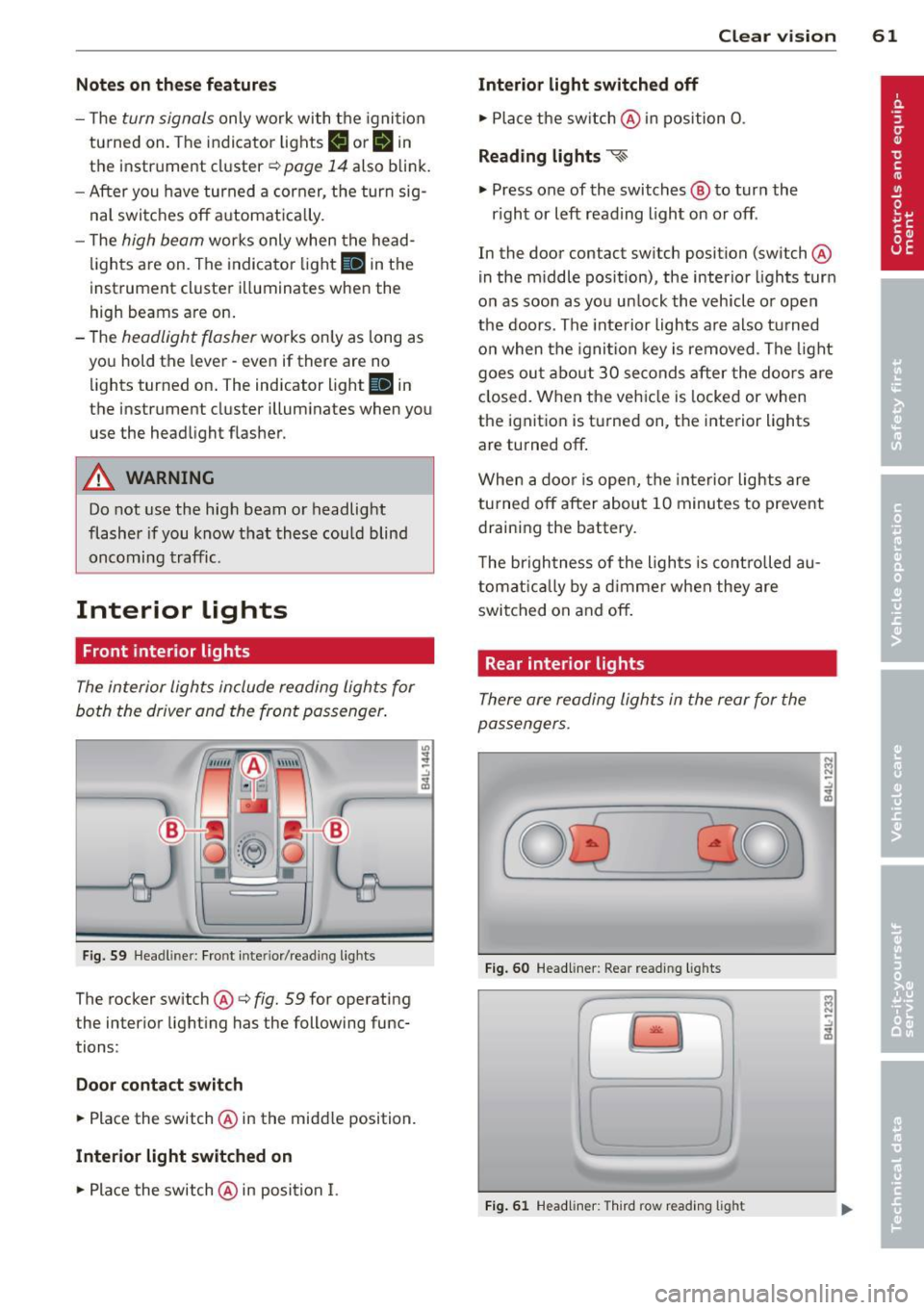
Fig. 59 Headlin er: Fro nt in te rior /re adi ng light s
The rocker switch @¢ fig. 59 for ope rating
the in ter ior lighting has the follow ing func
tions :
Door cont act switch
.,. Place the switch @ in the midd le position.
Interior light switched on
.,. Pla ce the switch @ in posi tion I.
.,,
:! .:,
1A
Clear vision 61
Interior light switched off
.,. Place the sw itch @ in position 0 .
Reading lights ~
.,. Press one of the switches @ to turn the
r ight or left reading light on or off .
In the door contact swi tch position (switch @
in the m iddle position), the interior l ights tur n
o n as soon as you unlock the vehicle o r open
the doors . The inte rior lights are also turned
o n when the igni tion key is removed . The light
goes ou t about 30 seconds after the doo rs are
closed. When the veh icle is locked or when
the igni tion is turned on, the i nterior lights
are turned off .
When a door is open, the interior lights are
tu rned off after about 10 minutes to prevent
draining the battery.
T he brigh tness of the lights is cont rolled au
tomat ic all y by a d imme r when they are
switched on and off.
Rear interior lights
There are reading ligh ts in the rear for the
passengers .
0
...
Fig . 60 Headli ner: Rear read ing light s
>l!i:.
r -
' \.
Fig. 61 Headlin er: Third row r eading light
N .., N
.:,
1A
:::i N
-.:,
1A
Page 68 of 340
66 Clear vis ion
Headlight washer system
Ap plies to vehicles: with hea dlig ht washer syste m
The headlight washer system cleans the
headlights .
.. Operate the windshield wiper/washer sys
tem
q page 63, fig. 65 ® with the head
lights turned on by holding the lever for lon
ger than one second .
The washer jets extend forward out of the
front bumper driven by water pressure to
spray the front headlights with water .
You shou ld inspect the headlights regularly
(for example when refueling) and clean off
any solid dirt or insects from the lenses .
To ensure the system works proper ly in winter,
keep the washer jets free of snow and remove
any ice using a de- ic ing spray.
Service position
The wiper blades can only be changed in the
service position.
.. If the wiper blades are not frozen to the
windshield, bring the windshield wiper lever
to the basic position@¢
page 63 , fig. 65 .
.. Se lect :
I CAR I function button> S ystems *
control button> Windshi eld w ip e rs > S er v
ice positi on.
Or
.. Se lect :
I CAR ! funct io n button > Car sy stems *
control button > Servicing & checks > Wiper
servic e po sition .
-On -chang ing the windshield w iper b lades
can on ly be done if you bring the wiper a rms
to the se rv ice posi tion. You w ill also avoid
paint damage to t he hood when working on
the wipers in this pos ition.
- Off -the wi ndshield wipe rs a re moved to
their initial pos ition aga in.
(D Note
N ever maneuve r your vehicle with the
front windshield wipe r arms ra ised si nce
they wi ll a utomat ica lly be moved back to the
ir basic position above a speed of 3
mph
(6 km/h) and ca n scratch the hood.
(D Tips
- Yo u can also use the se rv ice posi tion, for
examp le, i f you want to p rotec t the
windshield from icing by using a cover .
- T he service posit ion automatically
switches to
Off when you operate the
w indshield wiper lever, or speed exceeds
3 mph (6 km/h).
Cleaning windshield wiper blades
Clean the windshie ld w iper b lades when they
begin to leave st reaks .
.. Place the windsh ie ld w iper arms in the serv
ice pos it ion. Refer to ¢
page 66.
.. Lift the wiper arm away from the rear win
dow .
.. Use a soft cloth and glass cleane r to clean
the wi ndshield wipe r blades.
.&_ WARNING
Dir ty windsh ield wipe r blades can impair
your view. This can lead to accidents.
.
Page 71 of 340
the selector lever must be in the P position
and the ignition must be off. This will now be
come the stored setting when the vehicle is
put in reverse gear again.
Tilting th e pa sseng er's si de exte ri or
m irror (only with se at mem ory )
When you move the selector lever into R (Re
verse), the mirror on the front passenger's door (knob turned to ®
c::> fig. 70) will tilt
slightly downward. This make is easier for you
to see the curb when you are backing into a
parking space .
The mirror returns to its initial position as soon as reverse gear is disengaged and vehicle
speed is above about
9 mph (15 km/h). The
mirror a lso returns to its in itia l posit ion if the
sw itch is moved to the drive r's exte rior mi rror
© o r the ignit ion is switched off.
0 Note
- Curved (i.e . convex) mirror surfaces in
crease your field of view. Remembe r th at
vehicles or o ther objects w ill appear
smaller and farther away than when
seen in a flat mirro r. If yo u use this mir
ror to est imate distances of following
vehicles when changing lanes, you could
estimate incorrect ly and cause an acci
dent.
- If the mirror hous ing is moved un inten
tionally (for example, while park ing your
vehicle), then you must first fo ld the mir
ro r electrically . Do not readjust the mir
ror hous ing manually. You could damage
the motor which controls the mi rror.
- If you wash t he veh icle in an automatic
car wash, you must fold the exte rior m ir
r o rs in to redu ce the r is k of damage to
the mirrors. Never fold power folding ex
te rior mi rrors* by hand . Only fold them
in and out using the power cont ro ls.
(D Tips
If there should be a malfunc tion in the
elec trical system, you can still ad just the
exterior m irrors by pressing the edge o f
the mirror.
Clear vis ion 69
Dimming the mirrors
0 ~
-.:,
~
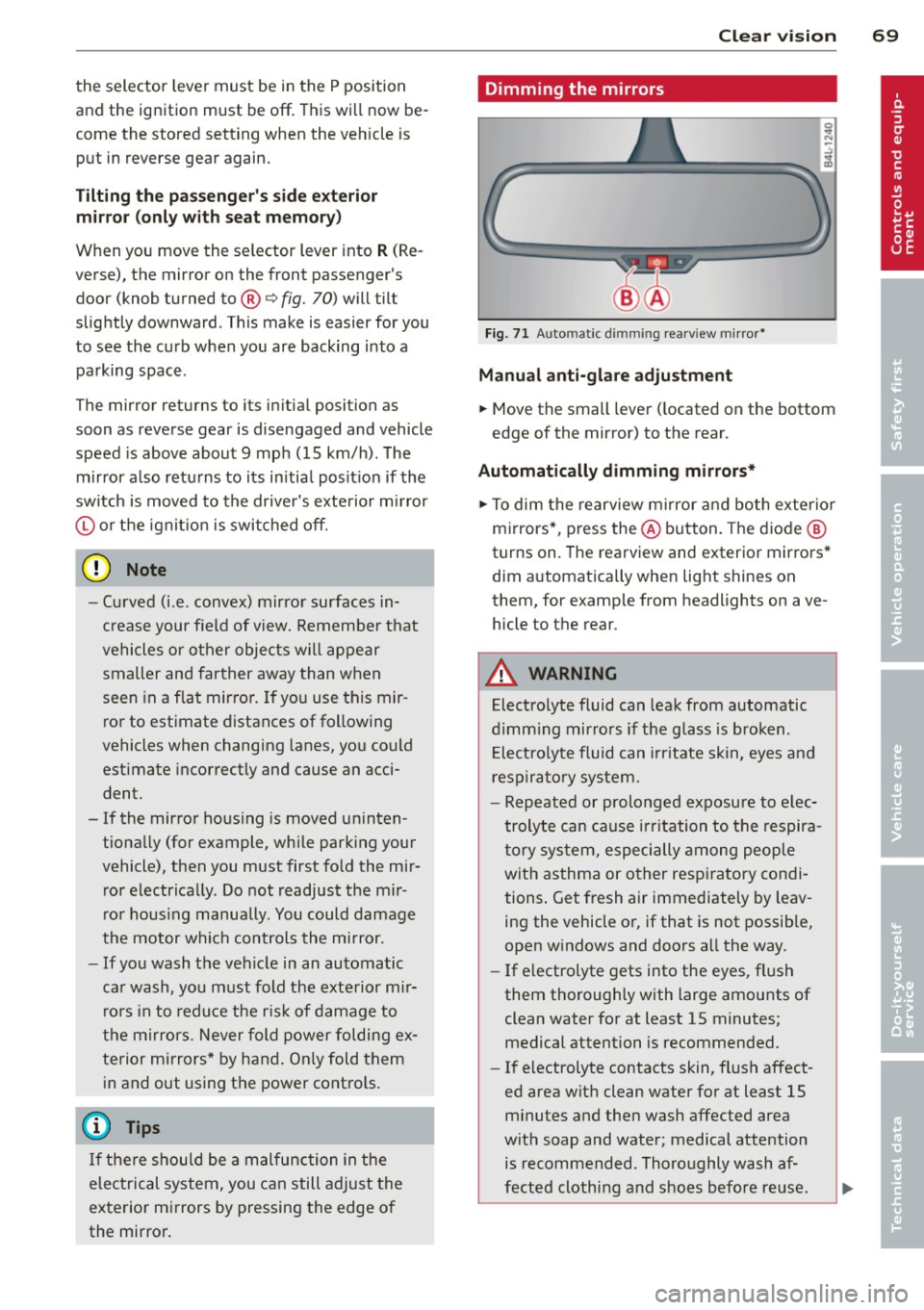
Fig. 71 Auto mat ic d immin g rea rv iew m ir ror *
Manu al a nti-gl are adju stment
... Move the small lever ( located on the bottom
edge of the mirror) to the rear .
Automatically dimming mirro rs*
... To dim the rearview mirror and both exterior
m irrors*, press the @button . T he diode @
turns on. The rearview and exterior mirrors *
dim automatically when light shines on
them, for examp le from headlights on ave
hicle to the rear.
A WARNING
-Electro lyte fluid can leak from automatic
d imm ing mirro rs if the glass is broken.
E lect ro lyte fluid can irritate skin, eyes and
respira to ry system.
- Repeated or prolonged exposu re to e lec
trolyte can cause irritation to the respira
t ory sys tem, especially among people
with asthma or o ther resp iratory condi
tions . Get fresh air immediately by leav
ing the vehicle or, if that is not possib le,
open w indows and doors a ll the way.
- If electrolyte gets into the eyes, flush
them thorough ly with large amounts of
clean water for at least
15 minutes;
medical attention is recommended.
- If electrolyte contacts skin, flush affect
ed area with clean water for at least 15 minutes and then wash affected area
with soap and water; medical attention is recommended. Thoroughly wash af
fected clothing and shoes before reuse.
Page 122 of 340
120 Adapti ve crui se control
_&. WARNING
-
Following other vehicles too closely in
creases the risk of a crash and serious per
sonal injury .
- Following other vehicles too closely, par
ticu larly at higher speeds increases the
risk of coll is ions and serious personal in
jury.
- Setting short distances to the traffic
ahead reduces the time and distance
available to bring your vehicle to a safe
stop and makes it even more necessary
to pay close attention to traffic .
- Always select a speed and distance to
traffic ahead that is safe and appropriate
under the prevailing traff ic, road, weath
er and lighting conditions.
- Never rely on the distance control fea
ture of ACC a lone to prevent rear-end col
lis ions. Always be prepared to b rake and
take evasive act io n to avoid co llisions
and other ac cident situations.
- Never allow the clos ing speed between
yo u a nd other vehicles to be so h igh that
the adaptive cruise control may not be
able to slow your vehicle safe ly . If clos
ing speed is too high, yo u m ust app ly the
brakes yourself to reduce the risk of a
rear-end crash.
- Always select a greater following dis
tance to the veh icle ahead on wet roads
than on dry roads.
- Always read and heed the information
and WARNINGS
¢ &. in Description on
page 113.
(D Tips
The distance setting is reset to the factory
default
DIS TANCE 3 the next time the ig
nition is turned on.
Driver information
Displays in the instrument cluster
Applies to veh icles: w ith adaptive cruise contro l
Depending on the driving situation, driver in
formation is displayed in the instrument clus
ter .
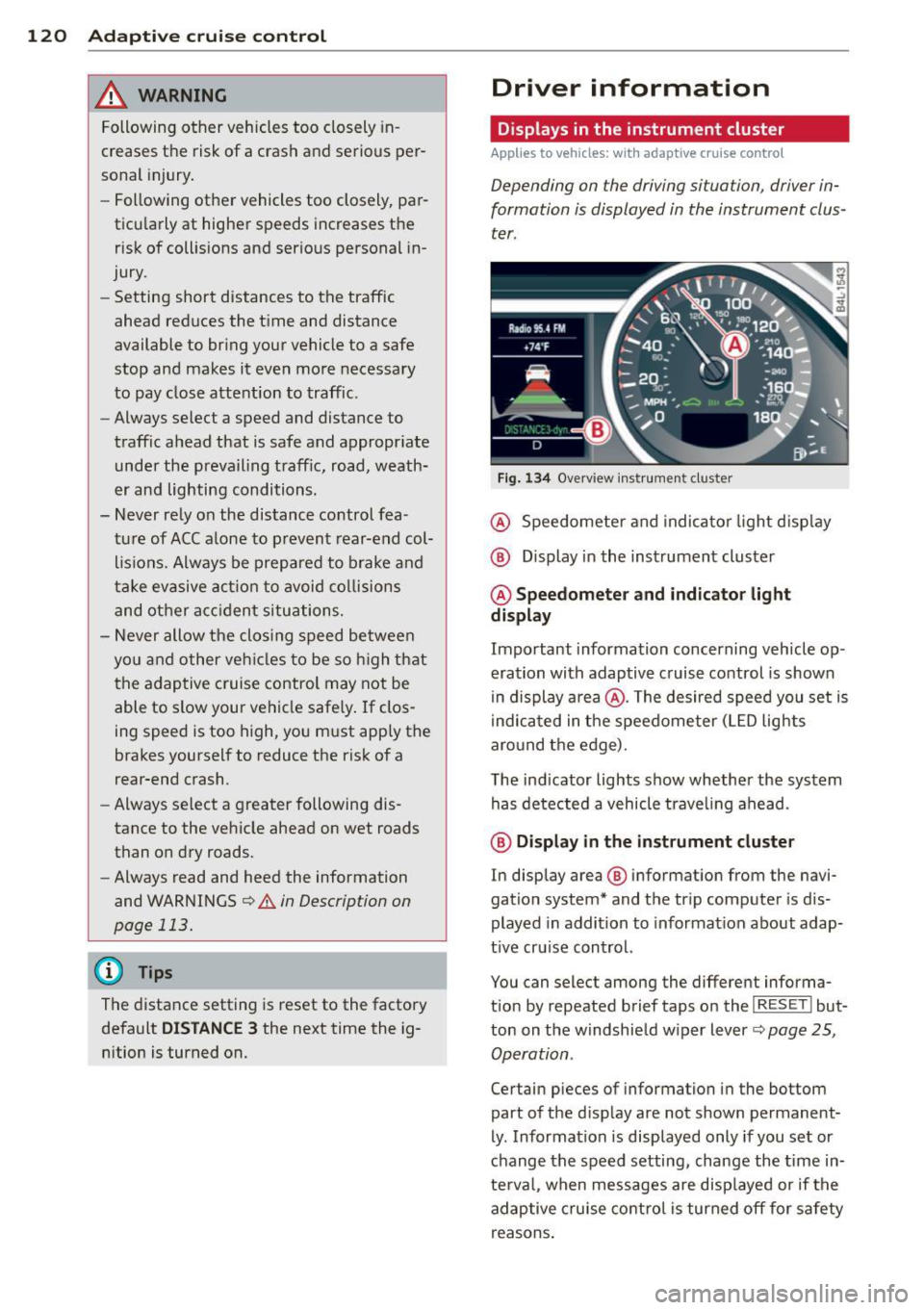
Fig . 1 34 Overview ins tr u me nt cluster
@ Speedometer and indica to r li ght d isp lay
@ Display in the instrument cluster
@ Speedometer and indi cato r light
display
Important information concerning vehicle op
eration with adaptive cruise control is shown
in display a rea @. The desired speed you set is
i ndica ted in the speedometer (L ED lights
aro und the edge).
T he ind icator lights show whether the system
has detected a vehicle trave ling ahead .
@ Display in the in strument cluster
In display area @ information from the navi
gation system* and the tr ip computer is dis
played in addition to informat ion about adap
t ive cru ise control.
You can select among the different informa
t io n by repeated brief taps on the
I RESET I but
ton on the w indshie ld w iper lever
c::> page 25,
Operation .
Certain pieces of information in the bottom
part of the d isplay are not shown permanent
ly . Information is displayed only if you set or
change the speed setting, change the time in
te rva l, when messages are disp layed or if the
adaptive cruise contro l is turned off for safety
reasons .
Page 123 of 340
Display in the speedometer
Applies to vehicles: with adaptive cruise control
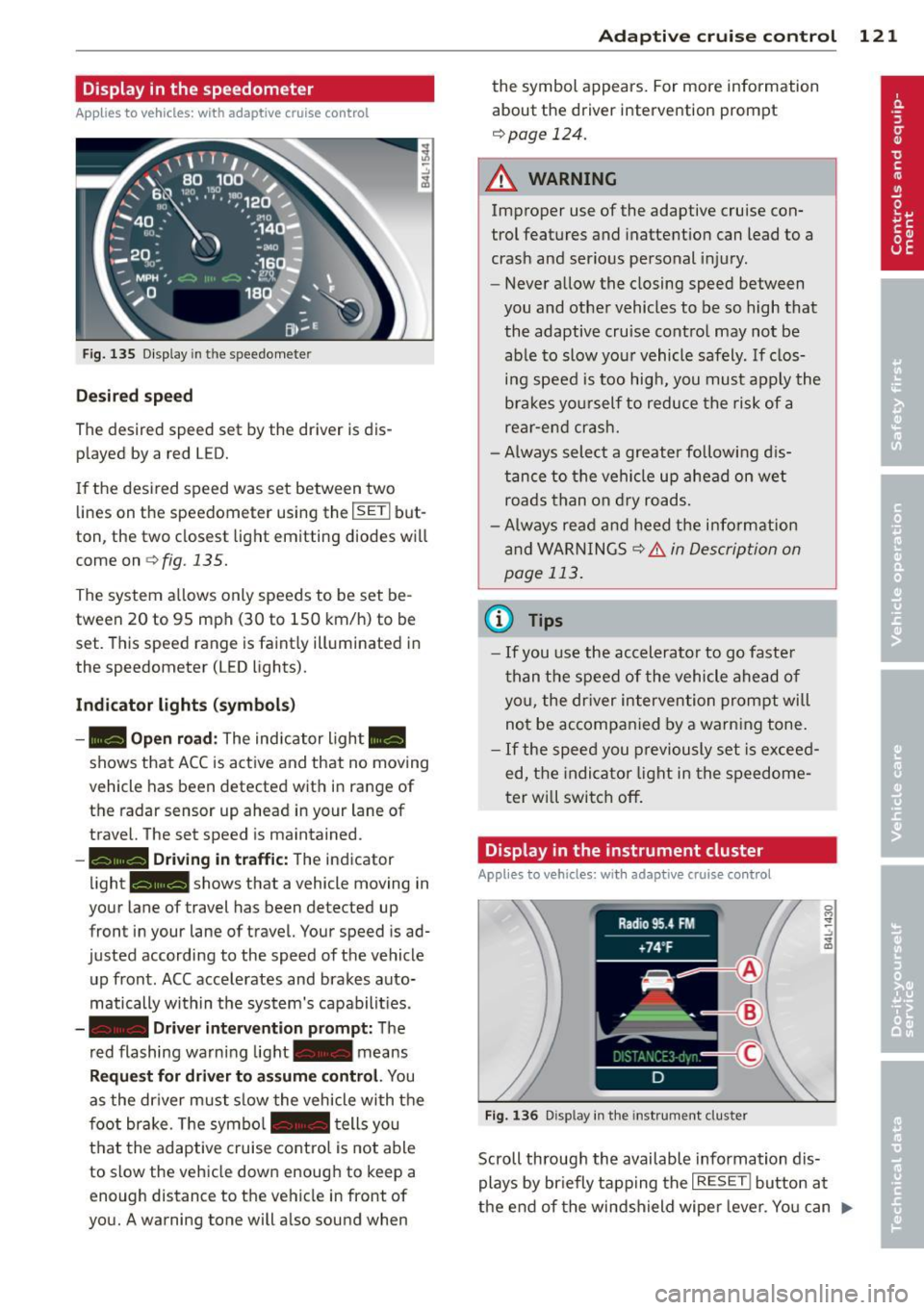
Fig. 135 D isplay in the speedomete r
Des ired spe ed
The desired speed set by the driver is dis
p layed by a red LED.
If the desi red speed was set between two
lines on the speedometer using the
I SETI but
ton, the two closest light emitting diodes will
come on <=>
fig. 135.
The system a llows only speeds to be set be
tween 20 to 95 mph (30 to 150 km/h) to be
set. This speed range is faint ly illuminated in
the speedometer (LED lights).
Ind icator light s (symbol s)
-- Open road :
The indicator light _
shows that ACC is active and that no moving
vehicle has been detected with in range of the radar sensor up ahead in your lane of
travel. The set speed is maintained.
- - Driving in tr aff ic: The indicator
light - shows that a vehicle moving in
your lane of travel has been detected up
front in your lane of travel. Your speed is ad
justed according to the speed of the vehicle
up front . ACC accelerates and brakes auto
matically within the system's capabilit ies .
-- Driver int erv ent ion prompt: The
red flashing warning light- means
Reque st for dri ver to assum e co ntr ol. You
as the dr iver must slow the vehicle with the
f oot brake. The symbol - tells you
t h at the adaptive cruise co ntrol is not able
to slow the vehicle down enough to keep a
enough distance to the vehicle in front of
you. A warning tone will also sound when
Ad apti ve crui se control 121
the symbol appears. For more information
about the driver intervention prompt
r::!) page 124.
_& WARNING
Improper use of the adaptive cruise con
trol features and inattention can lead to a
crash and serious personal injury.
- Never allow the closing speed between
you and othe r vehicles to be so high that
the adaptive cruise contro l may not be
able to slow your vehicle safely. If clos
ing speed is too high, you must apply the
brakes yo urself to reduce the risk of a
rear-end crash.
- Always select a greater following d is
tance to the vehicle up ahead on wet
roads than on dry roads.
- Always read and heed the information
and WARNINGS <=>
& in Description on
page 113 .
(D Tips
-If you use the accelerator to go faste r
t han t he speed of the vehicle ahead of
you, the dr iver intervention prompt will
not be accompan ied by a warn ing tone.
- If the speed you previously set is exceed
ed, the indicator light in the speedome
ter will switch off.
Display in the instrument cluster
Appl ies to vehicles: wit h adaptive cruise control
F ig. 136 D isp lay in the instrument cluster
-
Scroll through the available information dis
plays by br iefly tapp ing the
I RESET ! button at
the end of the windshield wipe r lever. You can ..,.
Page 131 of 340
Audi side assist Lane Change Assistant
Description
App lies to vehicles: with side assist
The side assist helps you when changing
lanes .
AUDl Q7
Fig. 147 Rear b umper: Pos it ion of radar sensors (not
v isib le on outside)
Fig . 148 Signal light on the outside mirror -driver 's
s ide
~ -..:, .. (D
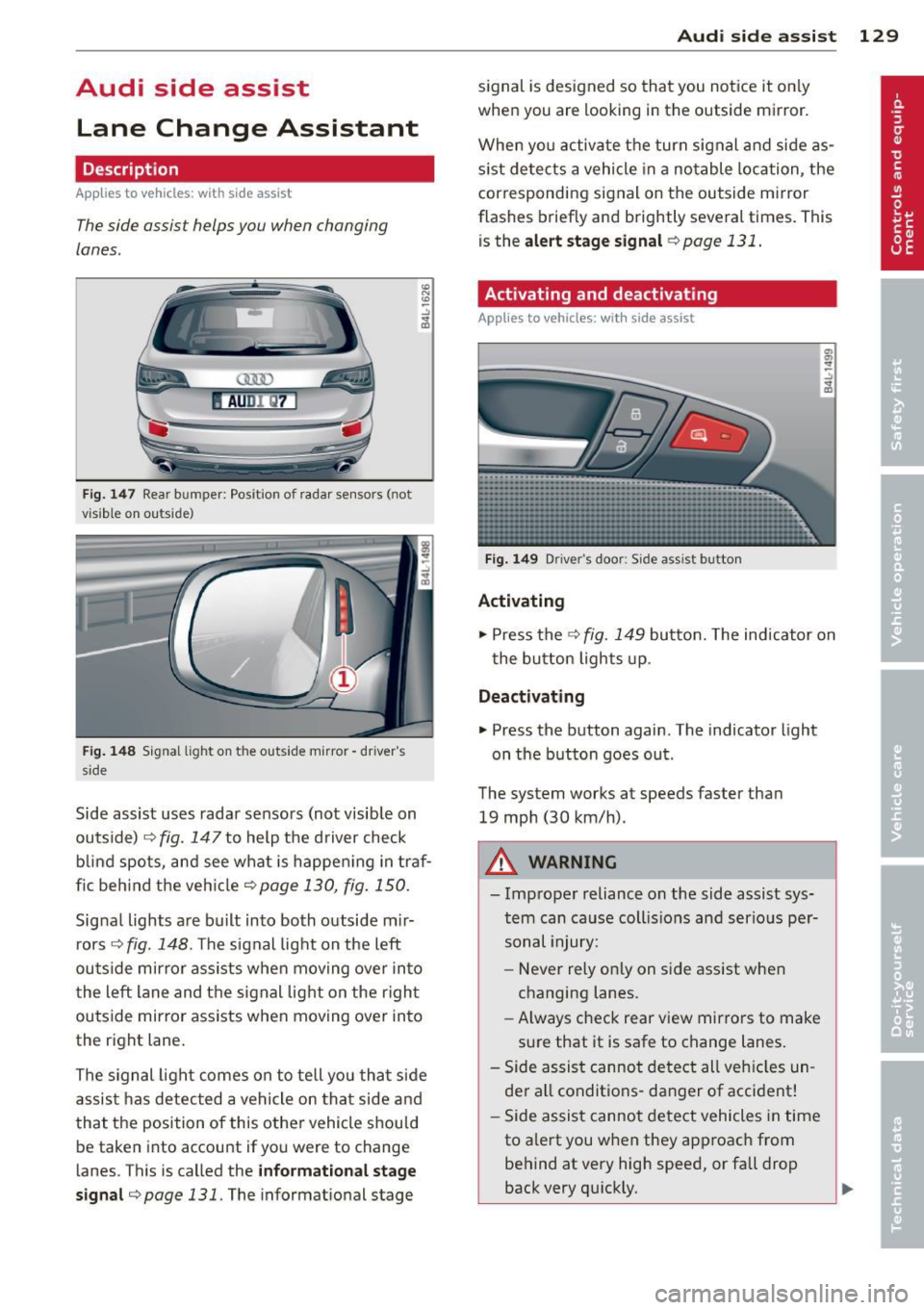
Side assist uses radar sensors (not visib le on
outside) ¢
fig. 147 to help the driver check
b lind spots, and see what is happen ing in traf
fic beh ind the veh icle
¢ page 130, fig. 150.
Signal lights are bu ilt into both outside m ir
r ors ¢
fig. 148. The signal light on the left
outside mirror assists when moving over into
the left lane and the signal light on the r igh t
ou tside mirror assists when moving over in to
the right lane .
The s ignal light comes on to tell you that side
assis t has detec ted a vehicle on tha t side and
that t he position of this othe r vehicle should
be taken into account if yo u were to change
lanes . This is called the
informatio nal st age
sign al¢
page 131. The informat ional stage
Aud i side assist 129
signal is designed so that you notice it on ly
when you are looking in the outside mirror.
When yo u activate the turn signal and side as
s ist de tects a vehicle in a no table location, the
corresponding signal on the outside mi rror
flashes briefly and brightly several times. This
is the
a lert stage signal ¢ page 131 .
Activating and deactivating
Applies to vehicles: wit h side assist
Fi g. 14 9 Drive r's doo r: Side assist button
Activating
.,. Press the ¢ fig. 149 button. The indicator on
t he button lights up .
Deactivating
.,. Press the button again. The indicator light
on the button goes out .
The system works at speeds faster than
19 mph (30 km/h) .
A WARNING
-Imp roper reliance on the side assist sys
tem can cause coll is ions and serio us pe r
sonal injury:
- Never rely on ly on side assist when
changing lanes.
- Always check rear view mirrors to make
su re that it is safe to change lanes.
- Side assist canno t detect all veh icles un
de r all conditions- danger of accident!
- Side assist cannot detect vehicles in time
to a lert you w hen they app roac h from
behind at very hig h speed, or fall drop
back very qu ickly.
~
Page 141 of 340

Driving the automatic transmission
Fig. 159 Shift g ate on the center co nso le: se lector lev
er wi th release butt on
Starting the engine
~ The selector lever must be in P or N .
Starting off
~ Press and hold the brake pedal.
~ Press and hold the release button in these
lector lever handle , select the desired selec
tor lever pos ition such as D and release the
button .
~ Wait briefly until the transmission has shift
ed (you will feel a slight movement).
~ Remove your foot from the brake pedal and
acce lerate .
Stopping temporarily
~ Keep the vehicle stationary us ing the brak
ing pedal, for examp le at traffic lights.
~ Do not press the accelerato r pedal when do -
ing this.
Stopping /parking
If the selector lever is not in the P position
when you open the driver's door, the vehicle
could roll. The message
Transmi ssion : Car
may roll! Shift to park!
appears.
~ Press and hold the brake pedal unt il the ve
hicle has come to a complete stop.
~ Set the parking brake firmly 9 page 110,
Parking.
~ Se lect the P selector lever position 9 &.-
Stopping on an incline
~ Always press the brake pedal to hold the ve
hicle in place and prevent it from "rolling
back"
9 ,& . Do not try to prevent the vehi-
Autom atic transm ission 139
cle from "rolling back" when a gear is en
gaged by increasing the engine speed
c::>(D.
Under certain circumstances, such as driving
in the mountains, it may be usefu l to switch
temporarily to the manual shift program in or
der to adjust the gears to the driving condi
tions by hand
c::> page 140 .
On slopes, activate the parking brake first and
then move the selector lever to the P position.
This prevents too much stress from being
placed on the locking mechanism.
A WARNING
- Unintended vehicle movement can cause
serious injury.
- Never leave your vehicle with the engine
running while in gear.
If you must leave
your veh icle when the engine is running,
apply the park ing brake firmly and move
the selector lever to P.
- Power is still transmitted to the wheels
when the engine is running at idle. To
prevent the vehicle from "c reeping ", you
must keep your foot on the brake when
the engine is running and the selector
lever is in D, Sor R or "tiptronic" mode is
selected.
- Do not press the accelerator pedal when
changing the se lector lever position
while the vehicle is stationary and the engine is running.
- Never shift into R or P while driving.
- Before driving down a steep slope, re-
duce your speed and shift into a lower
gear with "tiptronic".
- Do not ride the brakes or press the bra ke
pedal too often or too long when driving
down a hi ll. Constant braking causes the
brakes to overheat and substantially re
duces braking performance, increases braking distance or causes complete fa il·
ure of the brake system.
- To prevent the vehicle from rolling back
when stopping on inclines, always hold it
in place with the brake pedal or parking
brake . .,..
Page 148 of 340
146 Parking sy stems
- The came ra lens en larges and distorts
the field of vision. The object appears
both altered and inaccurate on the
screen.
- In certa in s ituations, people or objects in
the display appear closer or further
away:
- objects th at do no t touch the gro und,
such as the bumper o f a parked vehicle,
a trailer hitch o r the rea r of a truck. Do
not use the help lines in this case.
- If driven from a leve l su rface onto an
incline, or a downward slope .
- I f driven toward protr uding objec ts.
- I f the veh icle is ca rrying too much load
in t he rear.
(D Note
-Always read and fo llow the applicab le
warnings
¢ (D in General information on
page 143 .
-The o range colored orientation lines in
t h e M MI disp lay show t he ve hicl e path
depend ing o n the steering wheel angle .
The front of the vehicle fron t swings out
more than the rea r of the vehicle. Main
ta in p lenty of distance so that your o ut
s ide mirror or a corner of your veh icle
does not collide with any obstacles.
Switching on and off
Applies to vehicles: with Audi parking system p lus w ith
rearview camera
F ig . 167 Center co nsole: P"A button
F ig . 1 68 MMI display: Visual distance display
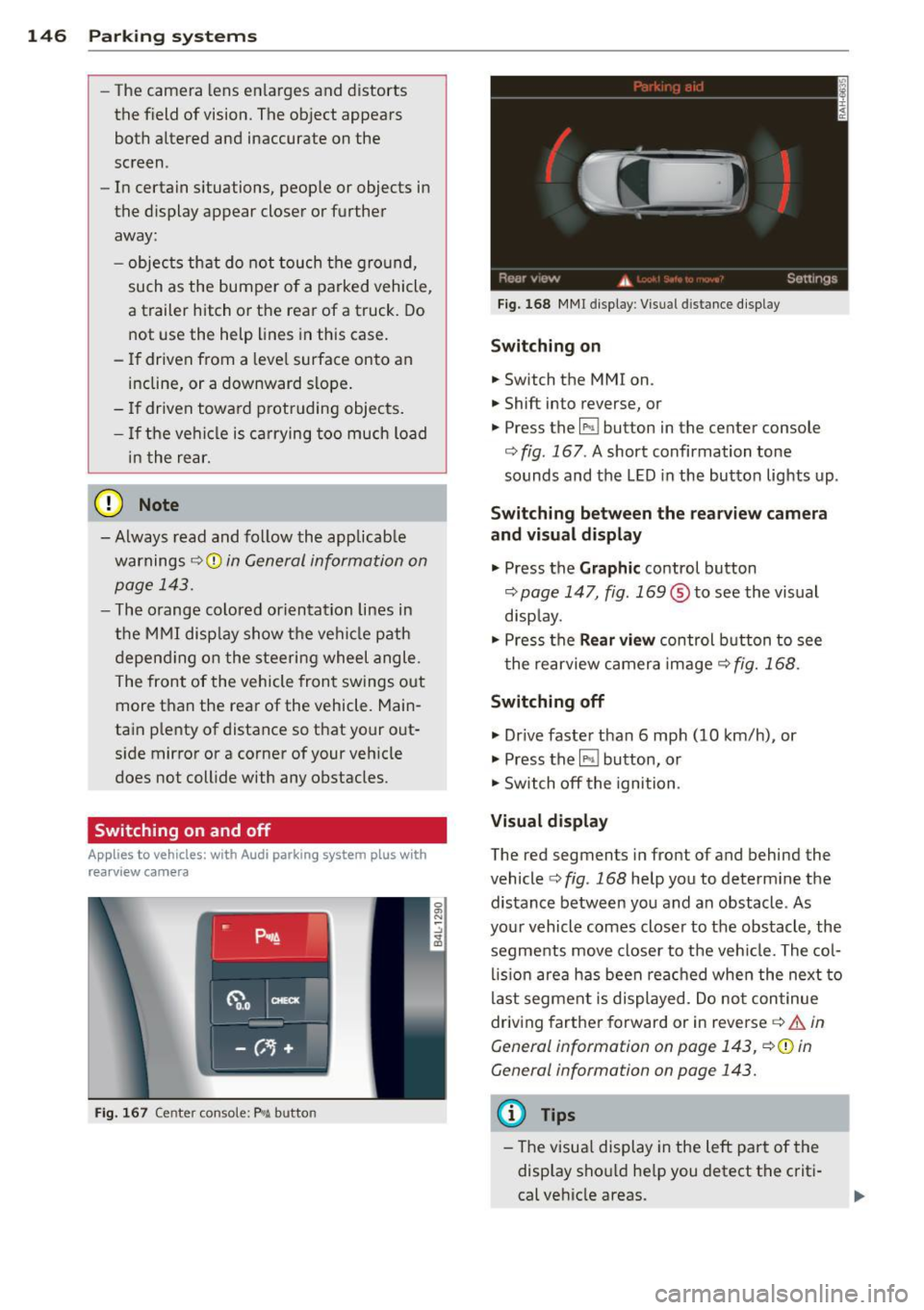
Switching on
.. Switch the MMI on .
.. Shift into reverse, or
.. Press the
l" •I button in the center console
c:;, fig. 167 . A short confirmation tone
sounds and the LED in the button lights up .
Switching between the rearv iew camera
and visual display
.. Press the Graphic control button
c:;, page 147, fig. 169 ® to see the vis ual
disp lay.
.. Press the
Rear vi ew control b utton to see
t he rearview c amera image
c:;, fig. 168 .
Switching off
.. Dr ive faster than 6 mph (10 km/h) , or
.. Press the~ button, or
.. Switch off the ignition .
Visual displ ay
The red segments in front of and behind the
vehicle
c> fig. 168 help you to determ ine the
distance between you and an obstacle . As
your vehicle comes closer to the obstacle , the
segments move closer to t he veh icle. The col
lis ion are a has been rea ched when the next to
last segment is displayed . Do no t con tinue
driving farther forward or in reverse
c:;, .&. in
General information on page 143, c:;,@ in
General information on page 143.
(D Tips
-The visua l display in the left part of the
disp lay sho uld he lp you detect t he crit i
cal ve hicle areas .
Page 151 of 340
-If the position or the installation angle
of a camera was changed, after a colli
sion for example, do not continue to use
the system for safety reasons . Have it
checked by your authorized Audi dealer
ship .
- Use the
Rear mode and the Corner view
(rear)
mode only when the rear lid is
completely closed, otherwise the image
in the display will be inaccurate.
- Objects and obstacles
above the camera
are not displayed.
- Camera lenses enlarge and distort the
field of vision. The objects appear both altered and inaccurate on the screen.
(0 Note
- Always read and follow the applicable
warnings ¢0
in General information on
page 143 .
-The MMI display shows the direction in
which the rear of the vehicle is traveling
based on the steering wheel angle. The
vehicle front swings out more than the
vehicle rear. Maintain plenty of distance
so that your outside mirror or a corner of
your vehicle does not collide with any ob
stacles .
@ Tips
If the rear lid is open, the image in the
rearview camera is displayed without ori
entation lines and without blue surfac es.
Switching on or off
Applies to vehicles: with Audi parking system plus w ith
front- and rearview camera
Fig. 174 Center console : P,•A button
Parking systems 149
Fig. 175 MMI display: Select mode
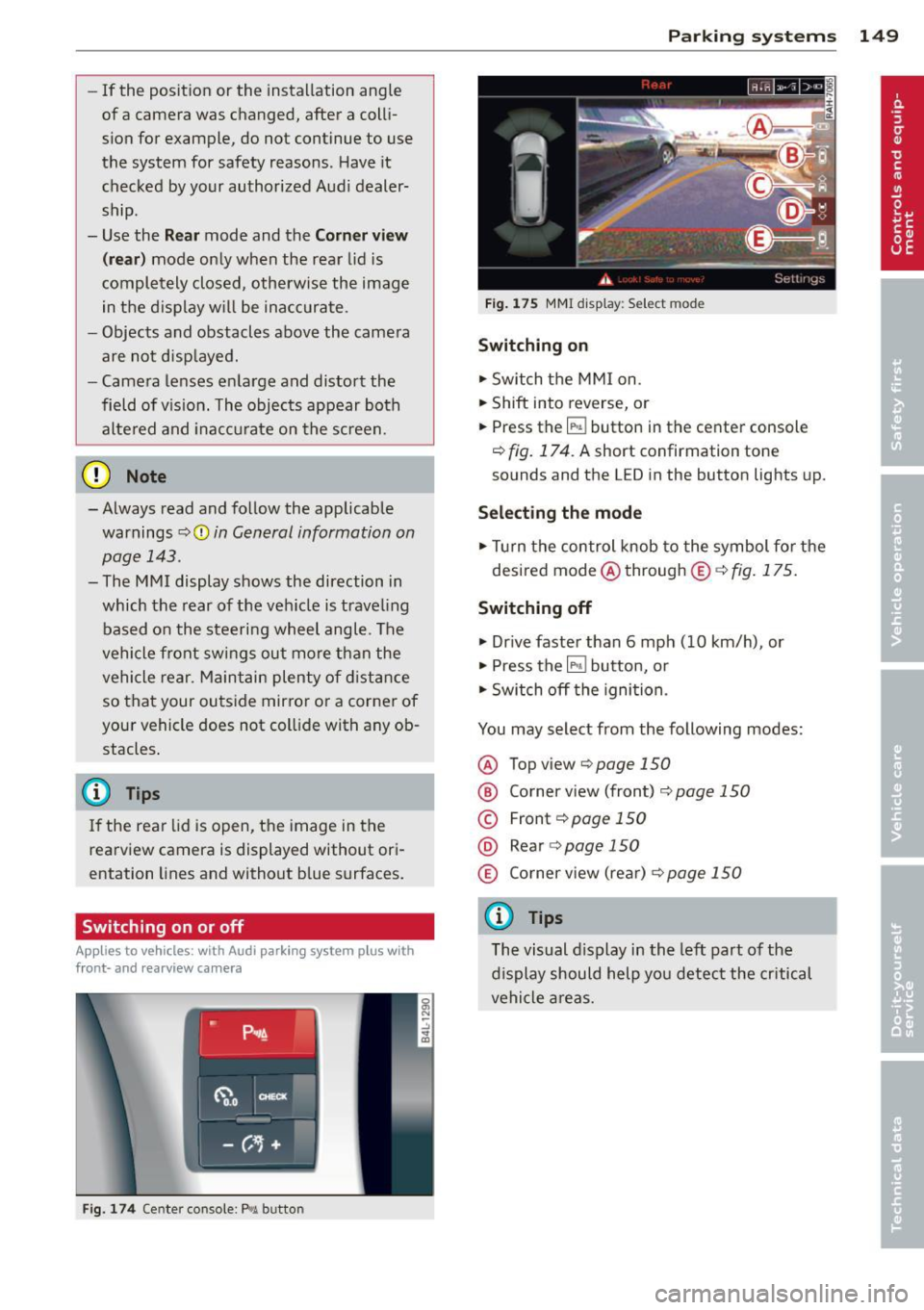
Switching on
.,. Switch the MMI on.
.,. Shift into reverse, or
.,. Press the
IP.1! button in the center console
¢
fig. 174. A short confirmation tone
sounds and the LED in the button lights up.
Selecting the mode
.,. Turn the control knob to the symbol for the
desired mode @through @¢fig.175.
Switching off
.,. Drive faster than 6 mph (10 km/h) , or
.,. Press the
l""'I button, or
.,. Switch off the ignition .
You may select from the following modes:
@ Topview ¢page150
@ Corner view (front) ¢ page 150
© Front¢ page 150
@ Rear o page 150
® Corner view (rear)¢ page 150
(D Tips
The visual display in the left part of the
display should help you detect the critical
vehicle areas.
Page 163 of 340

Homelink
Universal remote
control
Description
Applies to vehicles: with Home link
The HomeLink universal remote control can
be programmed with the remote control for
devices that are already present.
With Home Link, you can control devices such
as the garage door, security systems, house
lights , etc. comfortably from the inside of you
vehicle.
Homelink makes it possible for you to rep lace
three different remote controls from devices
in your home with one universal remote. This
feature works for most garage door and exte
rior door motor signals. Programming the in
dividual remote control for your remote con
trol takes place on the left side of the front bumper. There is a control module attached at
this location .
A one-time programming of the sensor must be performed before you are able to use sys
tems with Homelink. If the system does not activate after performing the one-time pro
gramming, check whether the system uses a rolling code
¢ page 163 .
A WARNING
-Never use the Homelink transmitter
with any garage door opener that does
have not the safety stop and reverse fea
ture as required by federa l safety stand
ards. This includes any garage door open
er model manufactured before April 1,
1982.
- A garage door opener which cannot de
tect an object, signaling the door to stop
and reverse does not meet current feder
al safety standards . Using a garage door
opener without these features increases
risk of serious injury or death.
Homelink 161
- For safety reasons never release the
parking brake or start the engine while
anyone is standing in front of the vehicle .
- A garage door or an estate gate may
sometimes be set in motion when the
Homelink remote control is being pro
grammed. If the device is repeatedly ac
tivated, th is can overstrain motor and
damage its electrical components - an
overheated mo to r i s a fire hazard!
- To avoid possib le injuries or property
damage, please always make abso lutely
certa in that no persons or objects are lo
cated in the range of motion of any
equipment being operated.
(0 Tips
- If you would like more information on
Homelink, where to purchase the Home
Link compat ible products, or would like
to purchase the Home Link Home Light
ing Package, please call toll-free :
1-800-355-3515.
- For Declaration of Compliance to United
States FCC and Industry Canada regula
tions
¢page 319.
-For security reasons, we recommend that
you clear the programmed buttons be
fore selling the vehicle.
Operation
App lies to vehicles : with Homeli nk
111111 111111
-
Fig. 191 Headl iner: controls
Req uirement: The buttons must be program
med
<:!)page 162.