center console AUDI Q7 2014 Owner´s Manual
[x] Cancel search | Manufacturer: AUDI, Model Year: 2014, Model line: Q7, Model: AUDI Q7 2014Pages: 340, PDF Size: 85.02 MB
Page 15 of 340

Instrument s and warning /indicator lights 13
can be switched on for about 30 seconds by
pressing the
I CH ECKi button ¢ fig. 6.
Starting the Auto-Check sequence
The Auto-Check system ¢ page 30 constant
l y monitors certai n ind iv idual funct ions and
components of the ve hicl e when the ignit ion
is t urned on and when the vehicle is moving.
W ith the ignition turned on, you can start the
"Au to-C hec k seque nce" by p res sing the
I CH ECKi button. Yo u ca n pe rform an A uto
Check sequence when the vehi cle is stationary
and the ign ition is turned on or when the vehi
cle is mov ing not faster than
3 mph (5 km/h).
The number of keys progr ammed to the vehi
cle is also displayed. The disp lay
3 \3 indicates
that th ree keys have been programmed . This
allows yo u to make sure you have rece ived a ll
of the keys when you purchase a used vehicle.
F or exam ple, if you on ly receive two keys, you
should take those keys to your a uth orized
Aud i dea ler to have the miss ing key deactivat
ed so it cannot be used. You sho uld also re
port the m issi ng key to your insurance compa
ny.
Calling up the driver informati on
A yellow or red symbol appears in the instru
ment cluster display, usua lly w ith a driver
message . T he driver message display disap
pears after about 5 seconds. The driver mes
sage can be displayed agai n by briefly press
in g the
!CHECK I button.
Setting the speed warning
By pressing the ICHECK I button briefly, yo u
can set thres ho ld 1 of the speed warning
while you are driving
o page 29 . By main
tain ing press ure on the
I CHECK I button, you
de lete th e warning threshold .
Instrument cluster illumination
The basic brightness of the illumination for
the instruments, the center console and the
display can be adjusted.
Fi g. 7 In strument cluster ill um ination
.,. Press the"+" but ton to in cr ease the b right
ness during the hours of darkness.
... Press t he "-" button to dec rease the bright-
ness dur ing the hours of darkness.
A lig ht sensor in the instrument cl uster con
tro ls t he illumination for the instrument clus
te r, the center conso le and the displays . In a
bright env ironment, us ing the b uttons to
c hange the brightness has no effect .
{l) Tips
The illumination for the inst rument cluster
lights up w henever you switch on the igni
tion with the vehicle headlights off. As the
day light fades, the inst rument cluste r illu
mination l ikewise dims automa tica lly and
will go out comp let ely when the o utsi de
li g ht is very low. T his feature is meant t o
r emi nd you t o switch on t he he adlight s
whe n outs ide lig ht con ditions become
p oor .
Page 62 of 340
60 Clear vis ion
Emergency flasher
The emergency flasher makes other motorists
aware that you or your vehicle are in an emer
gency situation .
. ..----.,
------------------
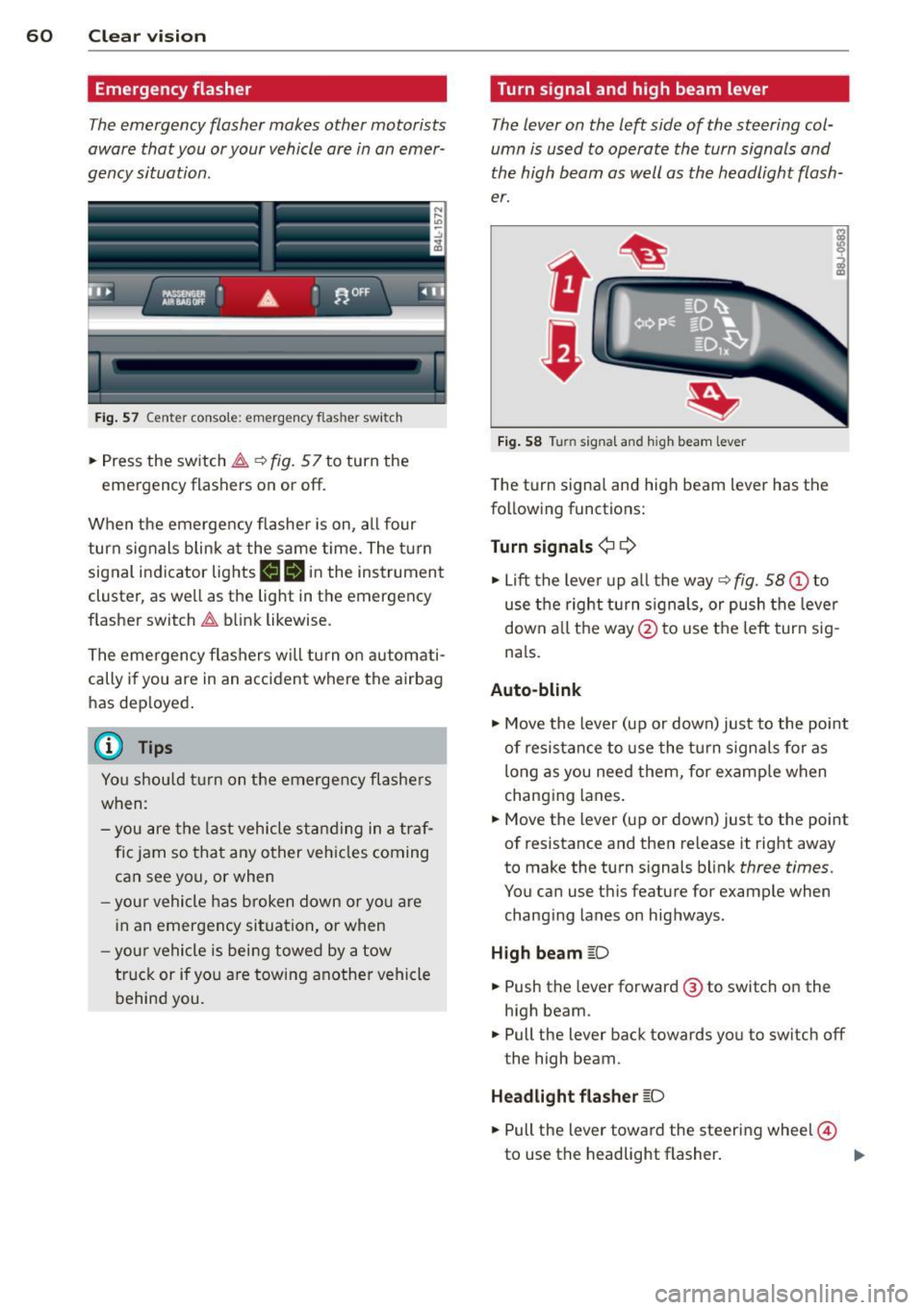
Fig. 57 Center console: emergency flasher switch
.. Press the sw itch ~ ~fig. 57 to turn the
emergency flashers on or off.
When the emergency flasher is on, a ll four
turn signals b link a t the same time. The turn
signal indicator lights
II B in the instrument
cluster, as we ll as the light in the emergency
f lasher switch ~ blink likewise .
The eme rgency flashers will turn on automati
cally if you are in an accident where the airbag
has dep loyed .
(D} Tips
You shou ld tu rn on the emergency flashe rs
when:
- you are the last vehicle st anding in a tr af
fic jam so that any o ther veh icles coming
can see you, or when
- you r vehicle has broken down or yo u are
i n an emergency situation, or when
- you r vehicle is being towed by a tow
truc k or if yo u are tow ing a nothe r vehicle
behind you.
Turn signal and high beam lever
The lever on the left side of the steering col
umn is used to operate the turn signals and
the high beam as well as the headlight flash
er.
t
'
Fi g. 5 8 Turn signal and high beam lever
The turn signal and high beam lever has the
following functions:
Turn signals ¢¢
.. Lift the leve r up a ll the way ~ fig. 58 (D to
use t he right turn s ignals, or push the lever
down a ll th e way @ to use the left turn sig
n a ls.
Auto-blink
"" Move the lever (up or down) just to the point
of resistance to use the turn signals fo r as
long as you need them, for examp le when
chang ing lanes .
"" Move the lever (up or down) just to the point
of resistance and then re lease it right away
to make the turn signals b link
three times.
You can use this feature for example when
chang ing lanes on highways.
High beam [D
"" Push the lever forward @ to switch o n the
high beam .
"" Pull the lever back towards you to switch off
the high beam.
Headlight fla sher [D
"" Pull the lever toward the steering wheel@
to use the headlight flasher .
IJJ>
Page 81 of 340
A maximum of two beverages can be accom
modated in the armrest. The second cup ho ld
er is located under a cover .
.&_ WARNING
Spilled hot liquid can cause an accident
and personal injury.
-
- Never carry any beverage containers with
hot liquids, such as hot coffee or hot tea,
in the vehicle while it is moving. In case
of an accident, sudden braking or other
vehicle movement, hot liqu id could spill,
caus ing scald ing burns . Sp illed hot liquid
can a lso ca use an accident and personal
injury .
- Use only soft cups in the cupholder. Hard
c u ps and g lasses can cause injury in an
acc ident.
@ Note
On ly drink containe rs with lids should be
carried in the cupho lder. Liquid could spill
out and damage your veh icle's e lectronic
equ ipment or sta in the upholstery, etc.
Long center console
Applies to vehicles : wit h long cente r console
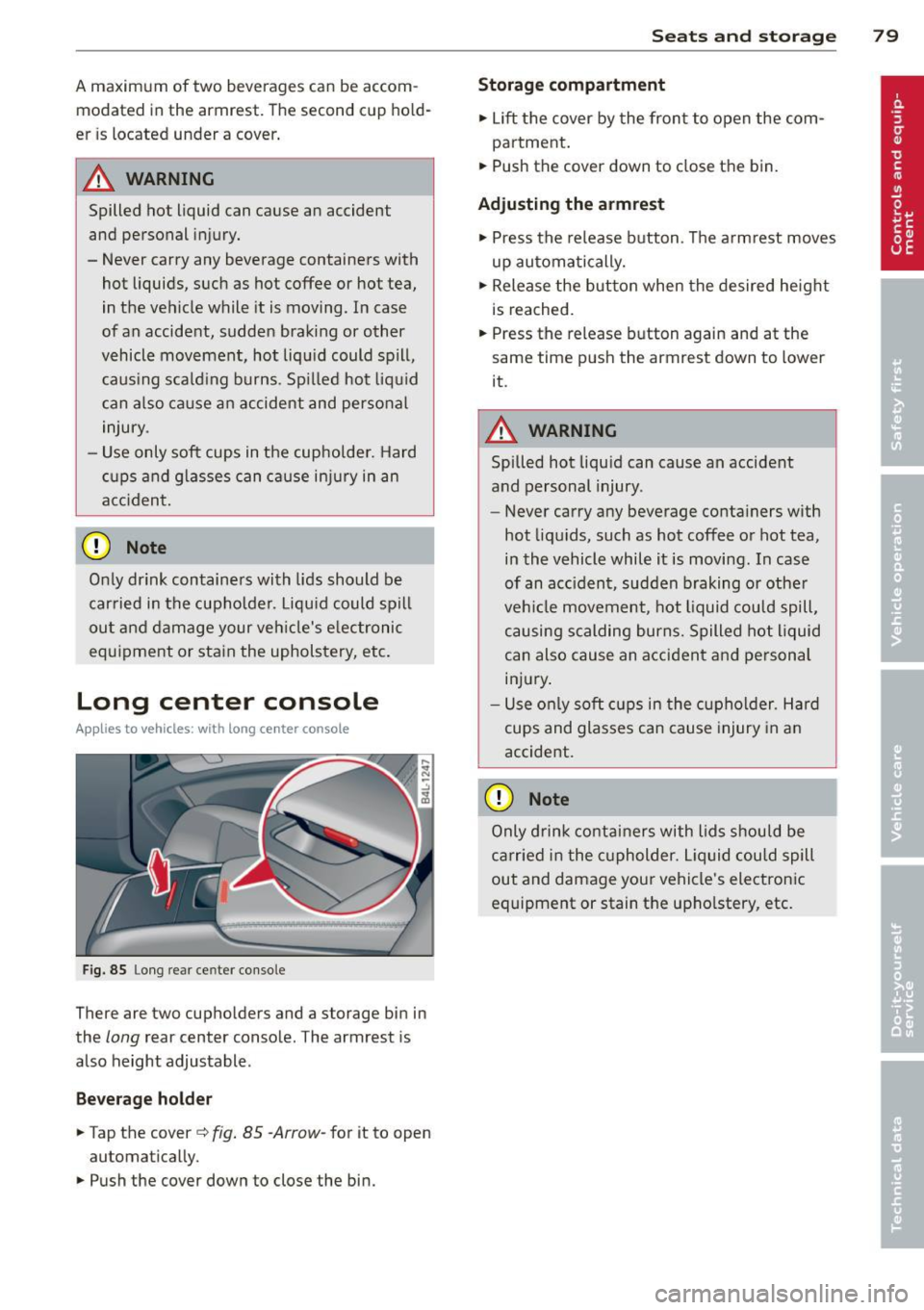
Fig. 85 Long rea r ce nter console
There are two cupholders and a storage bin in
the
long rear center console. The armrest is
also height adjustable .
Bever ag e hold er
.,. Tap the cover c::> fig. 85 -Arrow-for it to open
automatically .
.,. Push the cover down to close the bin.
Sea ts a nd s to rage 7 9
Storage compartm ent
.,. Lift the cover by the front to open the com-
partment .
.,. Push the cover down to close the bin .
Adju sting the a rmrest
.,. Press the release button . The a rmrest moves
up automatically .
.,. Release the button when the desired height
is reached.
.,. Press the release b utton again and at the
same time push the armrest down to lower
it.
.&_ WARNING
Spilled hot liqu id can cause an accident
and personal injury .
- Never carry any beverage conta iners with
hot liqu ids, such as hot coffee or hot tea,
in the vehicle while it is moving. In case
of an acc ident, sudden braking or other
veh icle movement, hot liquid could spill,
causing scalding burns. Spilled hot liquid
can also cause an accident and personal
injury .
- Use o nly soft cups in the cupholder . Hard
cups and glasses can cause injury in a n
accident.
(D Note
Only d rink co ntai ners with lids should be
carried in the c upholder. Liquid could spill
out and damage your vehicle's electronic
equipment or stain the upho lstery, etc.
Page 90 of 340
88 Seats and storage
Outlet
An electrical accessory can be connected to the 12-vol t power outlet.
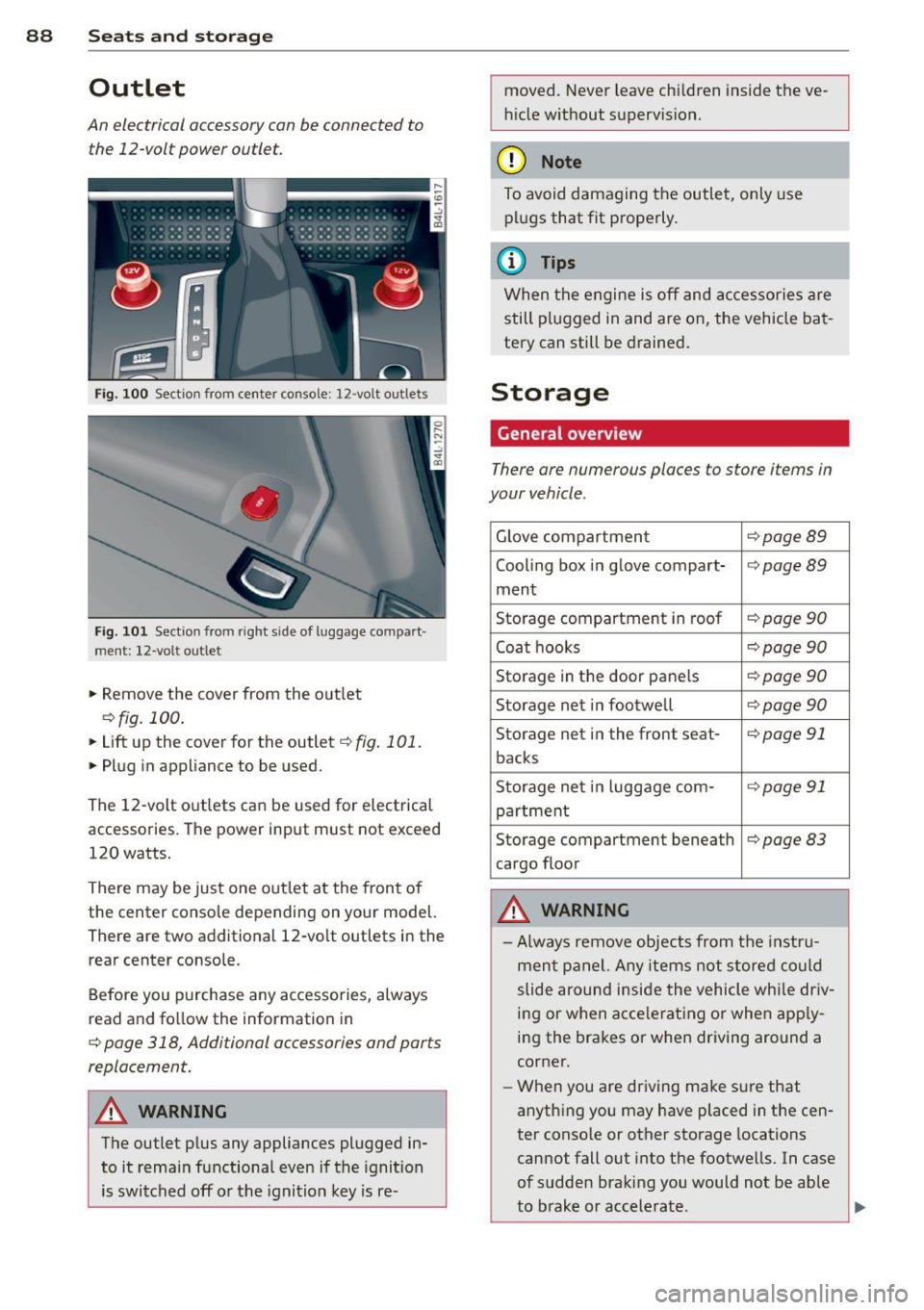
Fi g. 10 0 Section from center console: 12-volt ou tlets
Fig. 101 Sect ion from righ t sid e of lu ggage compar t
ment: 12-vol t outle t
• Remove the cover from the o utlet
¢ fig. 100.
• Lift up the cover for the outlet ¢ fig . 101.
• Pl ug in appliance to be used.
The 12-volt outlets can be used for electrical
accessories. The power input must not exceed
120 watts.
There may be just one out let at the front of
the center conso le depending on your model.
There are two additional 12-vo lt outlets in the
rear center console.
Before you purchase any accessories, always
read and fo llow the information in
¢ page 318, Additional accessories and parts
replacement.
_&. WARNING
The outlet p lus any appliances plugged in
to it rema in functiona l even if the ignition
is switched off or the ignit ion key is re- moved. Never leave chi
ld ren inside the ve
h icle w ithout supervision.
(D Note
To avoid damaging the outlet, only use
p lu gs that fit properly .
(D Tips
When the engine is off and accessories are
still plugged in and are on, the vehicle ba t
tery can still be d rained .
Storage
General overview
There are numerous places to store items in
your vehicle .
Glove compartmen t ¢page89
Cooling box i n glove compart-¢page89
ment
Sto rage compartment in roof
¢ page 90
Coat hooks ¢page90
Storage in th e door panels ¢ page 90
Storage net in footwell ¢ page 90
Storage net i n the front seat -¢page 91
backs
S to rage net i n luggage com-
¢ page91
pa rtment
Storage compartment beneath
¢page83
cargo floor
A WARNING
-Always remove objects fro m the inst ru
men t pa nel. Any items not stored could
slide around inside the vehicle whi le dr iv
i n g or when acce le rating o r when app ly
i n g the brakes or when driving around a
corner.
- W hen you are driving make sure that
anyth ing you may have placed in the cen
ter conso le or other storage locations
cannot fall out i nto t he footwells. In case
of sudden braki ng you would not be able
-
to b rake or accelerate. liJ,,
Page 102 of 340
100 Warm and cold
Rear air distribution ~
Applies to vehicles: wit h fou r-zone a utomat ic comfort a ir
co ndit io ning
The automatically controlled air distribution
con be changed manually.
., Press the [a button.
., Rotate the regulator to the desired setting.
You can adjust the air circulation so that air
flows from specific vents.
- In position
:J, all air flows from the vents in
the center console and the outlets to the
door pillars.
- In position
:0, air flows from the outlets in
the door pillars.
- In position~, air flows from the outlets un-
der the front seats.
There are additional combinations available to
adjust air distribution as needed.
To regulate air distribution automatically,
switch to IAUTOI.
Basic settings
General
The basic climate control settings con be ad
justed in the MMI.
., Select : I CAR ! function button > AC control
button . Or
., Select : ICAR !function button>
Car systems*
control button > AC.
The following functions can be selected:
- Auto recirculation
r::;, page 100
-Synchronization r::;, page 100
- Supplementary heater* c;,poge 101
- Rear operation* c;,poge 101
Automatic recirculation mode '
An air quality sensor detects increased con
centrations of pollutants in the outside air
and automatically switches to recirculation
mode .
We recommend that you always keep auto
matic air recirculation ON to prevent polluted
outside air from entering the vehicle interior.
If the
air quality sensor located in the air con
ditioning system detects polluted outside air,
the sensor decides whether the air pollution
can be reduced by the factory-installed pollu
tant filter or whether it is necessary to switch
to air recirculation. With heavy concentrations
of pollutants, the air conditioning system is
switched automatically to recirculation mode
and the supply of outside air is blocked. As
soon as the concentration of pollutants in the
outside air drops, fresh air is supplied to the
vehicle interior again.
In the event that the windows fog up during
automatic air recirculation, you must press
the® button immediately .
Under certain operating conditions, automatic
air recirculation is switched off automatically.
With outside temperatures below about SO °F
(+10 °(), automatic air recirculation is limited
to 30 seconds. With outside temperatures be low about 30 °F
( - 1 °() and with the air condi
tioner switched off, the automatic air recircu lation is limited to 15 seconds.
Synchronization
One climate control setting for the driver and
front passenger seats .
With synchronization active, the driver's set
tings are adopted for the passenger or vice
versa. All the other settings that were made
are transferred to the other seat . This in
cludes all the climate control settings, except
for the seat heating/ventilation* .
If a different setting is selected at a
"synchronized seat ", synchronization is can
celled.
Page 104 of 340
![AUDI Q7 2014 Owner´s Manual 102 Warm and cold
Heated rear seats [i]
Applies to vehicles: with heated rear seats
The seat cushions and seatbacks of the two
outer rear seats can be heated electrically.
Fig. 11](/img/6/40279/w960_40279-103.png "AUDI Q7 2014 Owner´s Manual 102 Warm and cold
Heated rear seats [i]
Applies to vehicles: with heated rear seats
The seat cushions and seatbacks of the two
outer rear seats can be heated electrically.
Fig. 11")
102 Warm and cold
Heated rear seats [i]
Applies to vehicles: with heated rear seats
The seat cushions and seatbacks of the two
outer rear seats can be heated electrically.
Fig. 114 Center console rea r: Heated seats
lo
=" ..,
---- ------- ------,,;g
Fig. 115 Cente r console rea r: Seat heat ing wit h fou r
zone automatic comfort
air cond it io nin g*
Rear seat heating
.. Rotat e the thumb wheel ¢ fig. 114 @to
turn on and adjust the heating for the left
rear seat .
• Rotate the thumb wheel® to turn on and
adjust the heating for the r ight rear seat.
Rear seat heating with four- zone
automatic comfort air conditioning*
.. Press the~ button.¢ fig. 115 .
.. Rotate the regulator to the desired setting .
In position O the heating for the seats is
turned off. The range of adjustment is be
tween 1 and 6.
A WARNING
Individuals with reduced sensitivity to pain
or temperature could develop burns when
using the seat heating function. To reduce
the risk of injury, these individuals should
not use seat heating.
(D Note
To avoid damage to the heating elements
in the seats, do not kneel on the seats or
place heavy loads on a small area of the
seat.
Steering wheel heating~
Applies to vehicles: wit h stee ring wheel heat ing
The steering wheel can be heated electrically.
Fig. 1 16 Stee ring whee l: butto n for steer ing w heel
h e atin g
.. Press the [ii button to turn the steering
wheel heat ing on and off
¢fig. 116 . The
message
Steering wheel heating on ! or
Steering wheel heating off! appears in the
instr umen t cluster disp lay.
A nearly constant temperature is maintained
when the steering wheel heating is switched
on.
T he last setting se lected for the steering
whee l heating (on or off) is automatically
saved when the vehicle is shut off and is as
s igned to the remote key .
Page 142 of 340
140 Automatic transmission
-Never hold the vehicle on an incline with
a slipping clutch. The clutch opens auto
matically when it becomes too hot from
the overload. An indicator lamp
[O] illu
minates and a driver message appears
c!;> page 141 when the clutch is overload
ed.
- If the engine must remain running, never
have any driving position engaged when
checking under the hood. Make sure the
selector lever has securely engaged and
is locked in P with the parking brake
firmly set¢
page 257. Otherwise, any
increase in engine speed may set the ve
hicle in motion, even with the parking
brake applied.
(D Note
- When stopping on an incline, do not try
to hold the vehicle in place by pressing
the accelerator peda l while a driving gear
is selected. This can cause the transmis
sion to overheat and can damage it. Acti
vate the park ing brake or press the brake
pedal to prevent the vehicle from rolling.
- Allowing the vehicle to roll when the en
gine is stopped and the selector lever is
in
N will damage the transmiss ion be
cause it is not lubricated under those cir
cumstances.
Hill descent control
The hill descent control system assists the
driver when driving down declines.
H ill descent control is activated when these
lector lever is in D/S and you press the brake
pedal. The transmission automatically selects
a gear that is suitab le for the incline. Hill de
scent control tries to maintain the speed ach
ieved at the time of braking, within physical
and technical limitations . It may st ill be nec
essary to adjust the speed with the brakes.
Hill descent control switches off once the de
cline levels out or you press the accelerator pedal. When the speed
is set in the cruise control
system
c!;>page 111, hill descent control is al
so activated.
A WARNING
--
Hill descent control cannot overcome
physical limitations, so it may not be able
to maintain a constant speed under all
conditions. Always be ready to apply the brakes.
· Manual shift program
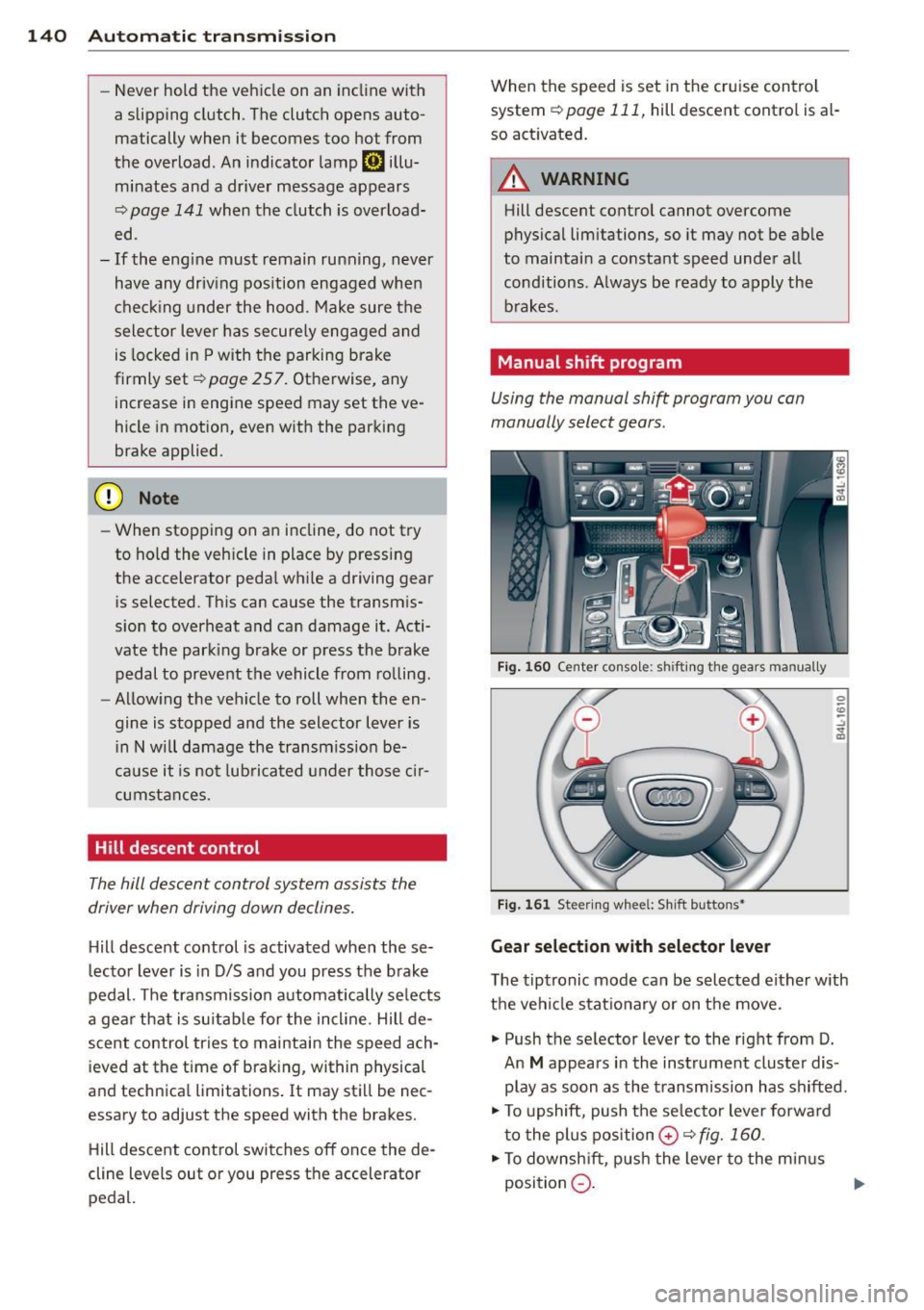
Using the manual shift program you can
manually select gears.
Fig. 160 Center console: shift ing the gears manually
Fig. 161 Steering wheel: Sh ift buttons•
Gear selection with selector lever
The tiptronic mode can be selected either with
the vehicle stationary or on the move.
.,. Push the selector lever to the right from D.
An
M appears in the instrument cluster dis
play as soon as the transmission has shifted .
.,. To upshift, push the se lecto r lever forward
to the plus position
0 c!;> fig. 160 .
.,. To downshift, push the lever to the minus
position
Q . 1J>-
Page 148 of 340
146 Parking sy stems
- The came ra lens en larges and distorts
the field of vision. The object appears
both altered and inaccurate on the
screen.
- In certa in s ituations, people or objects in
the display appear closer or further
away:
- objects th at do no t touch the gro und,
such as the bumper o f a parked vehicle,
a trailer hitch o r the rea r of a truck. Do
not use the help lines in this case.
- If driven from a leve l su rface onto an
incline, or a downward slope .
- I f driven toward protr uding objec ts.
- I f the veh icle is ca rrying too much load
in t he rear.
(D Note
-Always read and fo llow the applicab le
warnings
¢ (D in General information on
page 143 .
-The o range colored orientation lines in
t h e M MI disp lay show t he ve hicl e path
depend ing o n the steering wheel angle .
The front of the vehicle fron t swings out
more than the rea r of the vehicle. Main
ta in p lenty of distance so that your o ut
s ide mirror or a corner of your veh icle
does not collide with any obstacles.
Switching on and off
Applies to vehicles: with Audi parking system p lus w ith
rearview camera
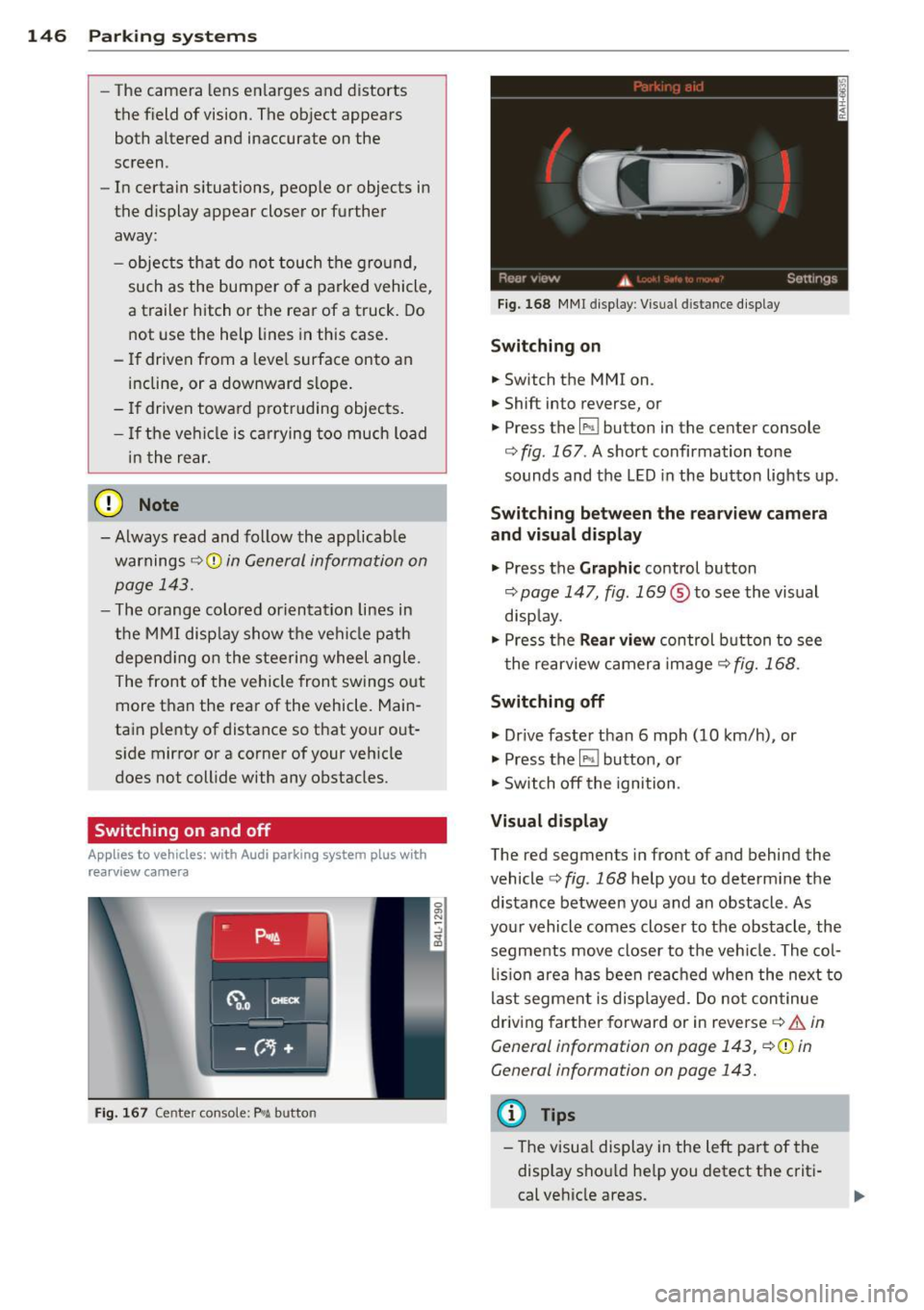
F ig . 167 Center co nsole: P"A button
F ig . 1 68 MMI display: Visual distance display
Switching on
.. Switch the MMI on .
.. Shift into reverse, or
.. Press the
l" •I button in the center console
c:;, fig. 167 . A short confirmation tone
sounds and the LED in the button lights up .
Switching between the rearv iew camera
and visual display
.. Press the Graphic control button
c:;, page 147, fig. 169 ® to see the vis ual
disp lay.
.. Press the
Rear vi ew control b utton to see
t he rearview c amera image
c:;, fig. 168 .
Switching off
.. Dr ive faster than 6 mph (10 km/h) , or
.. Press the~ button, or
.. Switch off the ignition .
Visual displ ay
The red segments in front of and behind the
vehicle
c> fig. 168 help you to determ ine the
distance between you and an obstacle . As
your vehicle comes closer to the obstacle , the
segments move closer to t he veh icle. The col
lis ion are a has been rea ched when the next to
last segment is displayed . Do no t con tinue
driving farther forward or in reverse
c:;, .&. in
General information on page 143, c:;,@ in
General information on page 143.
(D Tips
-The visua l display in the left part of the
disp lay sho uld he lp you detect t he crit i
cal ve hicle areas .
Page 151 of 340
-If the position or the installation angle
of a camera was changed, after a colli
sion for example, do not continue to use
the system for safety reasons . Have it
checked by your authorized Audi dealer
ship .
- Use the
Rear mode and the Corner view
(rear)
mode only when the rear lid is
completely closed, otherwise the image
in the display will be inaccurate.
- Objects and obstacles
above the camera
are not displayed.
- Camera lenses enlarge and distort the
field of vision. The objects appear both altered and inaccurate on the screen.
(0 Note
- Always read and follow the applicable
warnings ¢0
in General information on
page 143 .
-The MMI display shows the direction in
which the rear of the vehicle is traveling
based on the steering wheel angle. The
vehicle front swings out more than the
vehicle rear. Maintain plenty of distance
so that your outside mirror or a corner of
your vehicle does not collide with any ob
stacles .
@ Tips
If the rear lid is open, the image in the
rearview camera is displayed without ori
entation lines and without blue surfac es.
Switching on or off
Applies to vehicles: with Audi parking system plus w ith
front- and rearview camera
Fig. 174 Center console : P,•A button
Parking systems 149
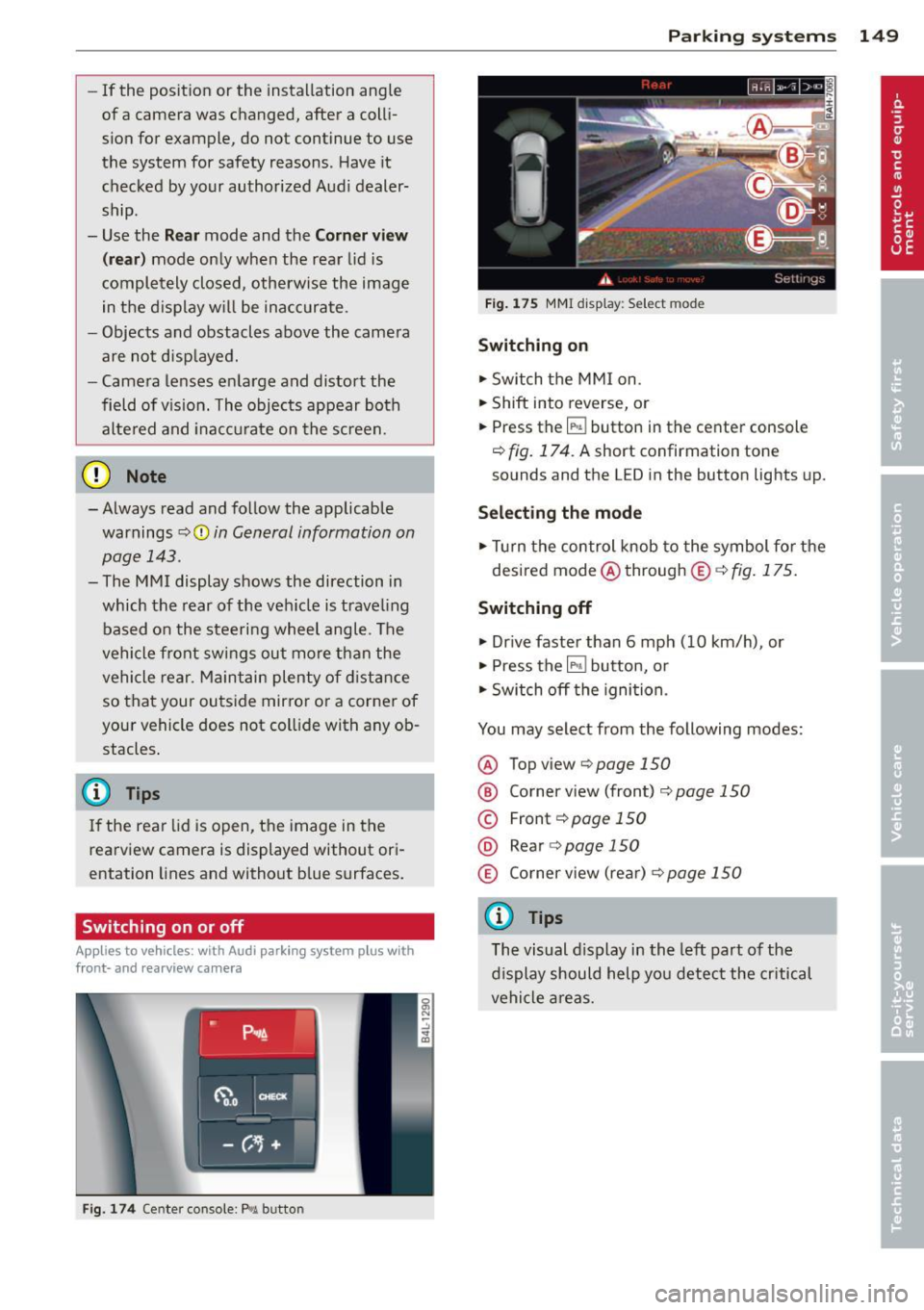
Fig. 175 MMI display: Select mode
Switching on
.,. Switch the MMI on.
.,. Shift into reverse, or
.,. Press the
IP.1! button in the center console
¢
fig. 174. A short confirmation tone
sounds and the LED in the button lights up.
Selecting the mode
.,. Turn the control knob to the symbol for the
desired mode @through @¢fig.175.
Switching off
.,. Drive faster than 6 mph (10 km/h) , or
.,. Press the
l""'I button, or
.,. Switch off the ignition .
You may select from the following modes:
@ Topview ¢page150
@ Corner view (front) ¢ page 150
© Front¢ page 150
@ Rear o page 150
® Corner view (rear)¢ page 150
(D Tips
The visual display in the left part of the
display should help you detect the critical
vehicle areas.
Page 200 of 340
198 Airbag system
@ For the sake of the environment
Undep loyed airbag modu les and preten
sioners might be classified as Perchlorate Material -special handling may app ly, see
www.dtsc.ca.gov/haza rdouswaste/per chlorate. When the vehicle or parts of the
restraint system including airbag modules
and safety belts w ith pretens ioners are
scrapped, all applicable laws and regula
tions must be observed. Your authori zed
Audi dea ler is familiar with these requ ire
ments and we recommend that you have
your dea ler perform this service for you.
Other things that can affect Advanced
Airbag performance
Changing the vehicle's suspension system can
change the way that the Advanced Airbag Sys
tem performs in a crash. For example, using
tire-r im combinations not approved by Aud i,
l owering the vehicle, changing the stiffness o f
the suspension, including the springs, s uspen
sion struts, shock absorbers etc. can change
the forces that are measured by the airbag
sensors and sent to the electronic control
un it. Some suspension changes can, for exam
ple, increase the force levels measured by the
sensors and make the airbag system deploy in
crashes in wh ich it would not deploy if the
changes had not been made. Other kinds of
changes may reduce the force levels meas
u red by the sensors and prevent the airbag
from deploying when it should .
The sensors in the safety belt buckle for the
driver and front passenger sea t tell the elec
tronic control module if the safety belt is
latched or not. If the safety belt is being used,
the front airbag will deploy at a slightly high
er rate of vehicle deceleration than if the safe
ty belt is not being used. Therefore, in a par
ticular collision, it is possible that an airbag
will not deploy at a seating position where the safety belt is being used but will inflate at the
position where the safety belt is not being
used.
It is important that nothing interfere
with the safety belt buckles so that the sen- sors can send the correct info
rmation about
safety belt use to the electronic control unit.
.&_ WARNING
-
Changing the vehicle's suspension includ- ing use of unapproved tire-rim combina
tions can change Advanced Airbag per
formance and increase the risk of serious
personal injury in a crash.
- Never install suspension components
that do not have the same performance
characteristics as the components origi
nally installed on your vehicle.
- Never use tire-rim combinations that
have not been approved by Audi.
&_ WARNING
--
Items stored between the safety be lt
buckle and the center console can cause
the sensors in the buckle to send the
wrong information to the e lectronic con
trol module and prevent the Advanced Air
bag System from working properly.
- Always make sure that nothing can inter
fere with the safety belt buckles and that
they are not obstructed.
Side airbags
Description of side airbag s
The airbag system can provide supplemental
protection to properly restrained occupants.
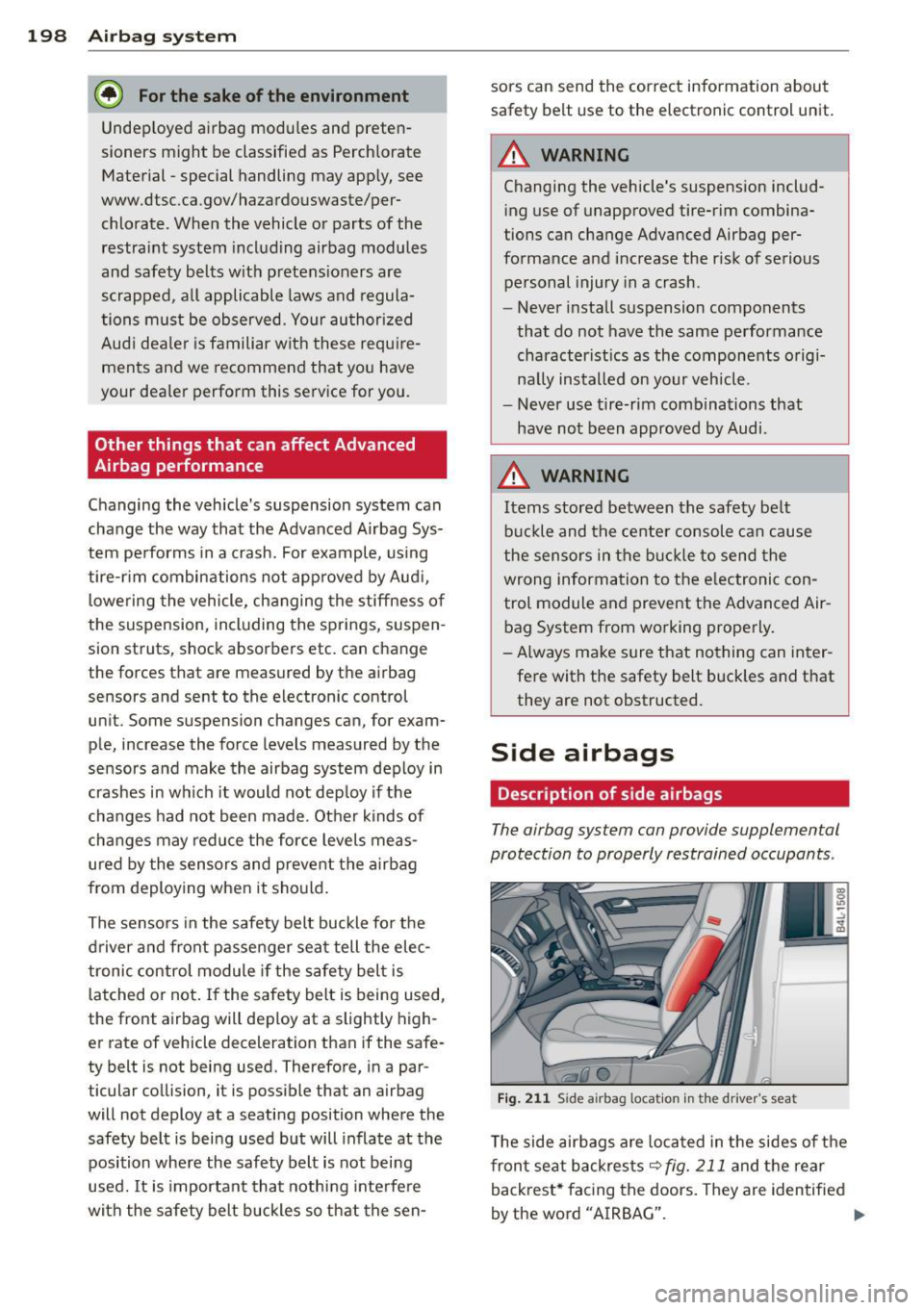
Fig. 211 Side airbag location in th e drive r's seat
The side airbags are located in the sides of the
front seat backrests
~fig. 211 and the rear
backrest* facing the doors. They are identified
by the word "AIRBAG". ....