buttons AUDI Q7 2015 Owner´s Manual
[x] Cancel search | Manufacturer: AUDI, Model Year: 2015, Model line: Q7, Model: AUDI Q7 2015Pages: 350, PDF Size: 86 MB
Page 79 of 350
M N
0 ...J
'SI: ,...., \!) ..,.,
,...., ..,., ,....,
~ If the driver's door is closed or the ignition is
switched on, press the corresponding mem
ory button until the stored posit ion is
reached.
Successful storage is confirmed audibly and by the light in the
I SE TI button illuminating.
When the veh icle is
lo cke d, the current se t
tings are stored and assigned to the remote
contro l key. But the settings stored on memo
ry buttons 1 and 2 are not deleted. They can
be recalled at any time. When the vehicle is
unl ocked , the settings assigned to the remote
control key are restored.
If your vehicle is driven by other persons using
your remote control key, you shou ld save your
individual seat position on one of the memory
buttons. You can recall your settings again
simply and conven iently by pressing the corre
spond ing memory button . When the vehicle is
l ocked, these settings are automatically re-as
signed to the remote control key and stored.
_& WARNING
- For safety reasons, the seat se tting c an
only be recalled when the vehicle is sta
tionary -otherwise you risk having an ac
cident.
- In an emergency, the recall operation can be stopped by pressing the
ION/OFF I
button or by briefly pressing any given
memory button.
Activating remote control key memory
App lies to vehicles: with seat memo ry
To assign the driver's seat settings to the re
mote control key when locking the vehicle, the
function must be activated in the MMI.
~ Se lect : ICARI funct ion button > Sy stems *
control button > Seat adju stm ent > Dr iver 's
se at > Key mem. profi le> On.
Or
~ Select: I CARI funct ion button > Car syste m s*
control button > Vehicle setting s > Seats >
Driv er' s se at> Rem ote c ontrol k ey > On .
Seat s an d sto rage 77
(D Tips
If you do not want anothe r driver's set
tings to be assigned to the remote control key, switch off the memory function using
the MMI or the
I ON/OF F I button
-=> page 76.
Rear seats
General information
Safe transportation of passengers on the rear
seats requires proper safety pre cautions .
All passengers on the rear seats must be seat
ed in compliance with the safety guide lines
exp la ined in
-=> page 173 and -=>page 182 .
The correc t seat ing position is cr it ica l for the
sa fety of front
and rear seat passenge rs alike
-=> page 166 .
A WARNING
-Occupants in the front and rear seats
must always be properly restrained.
- Do not let anyone ride in the vehicle
without the head restraints prov ided.
Head restraints help to reduce injuries.
- Loose items inside the passenger com
partment, can fly forward in a crash or
sudden maneuver and injure occupants.
Always store articles in the luggage com
partment and use the fastening eyes, es
pecially when the rear seatbac ks have
been fo lded down .
- Read and heed all WARNINGS
-=> page 166, Proper seating positions
for passengers in rear seats .
Page 98 of 350

96 Warm and cold
Each function is turned on or off by briefly
pressing the corresponding button . The indi
cator light in the button illum inates when the
function is active.
Button(s ) Function
ION/OFFI Climate control on/off
c> page96
IA/Cl Air conditioner on/off
c>page96
IAU TO I Automatic mode
¢page 97
Regulatora) G Temperature selection
c>page 97
[tl Seat heating*
¢page 103
~
Seat ventilation*
i=>page 103
~ Fan
¢ page 97
Qi] Air distr ibut ion
c> page 97
~ Defrost
i=>page 97
~ Manua l recircu lation
c>page98
~ Heated rear window
i=>page 98
al The re gula tor is also used to set th e fan speed, air dis
t ribution, seat heating and seat vent ilat ion.
Synchroniz ing clim ate control
By pressing and holding the regu lator on the
d river's s ide, the temperature setting on the
driver's side can be switched to the passeng
e r's side, and vice versa. The new temperature
is shown in the display.
Synchronizing four-zone automatic
comfort air conditi oning*
By pressing and holding the regu lator on the
driver's side, the temperature setting on the
driver's side can be switched to the passeng
er's side and to the outer rear seats. The new
temperature is shown in the disp lay. By sim
ultaneously pressing and holding the
regulators o n the driver's side and front pas
senger's s ide, the temperature setting on the
driver's side can be switched to the front pas
senger's side . The new temperature is shown
i n the disp lay .
(D Tips
The gr ille on the controls m ust rema in un
obstr ucted and m ust not be taped over.
Measur ing sensors are located behind it.
Turning on and off~
Turning the climate control on
.,. Press the ION/O FF! button, or
.,. Press the
IAUTO I button.
Turning the climate control off
.,. Press the ION/O FFj button to sw itch the cli
mate contro l off and to block the air supply
from the outside.
The air conditioner turns bac k on when you
press the
temperature regulator or one of the
buttons.
(D Tips
With the ign ition t urned off, you can acti
vate the residua l heat funct ion by pressing
the
ION/O FF I button. The res idual heat
from the coolant can be used to heat the
vehicle interior .
Air Conditioner On/Off~
Switching off the air conditioner saves fuel.
.,. Press the IAIC I button to switch the air con-
ditioner on or off.
When the air conditioner is switched on, the
indicator lamp in the button will illum inate
and the heat ing/venti lation system is control
led automatically.
P lease keep in mind that with the air condi
tione r switched off, the interior tempe rat ure ..,_
Page 103 of 350
M N
0 ..J
'SI: ,...., \!) ..,.,
,...., ..,., ,....,
Synchronizing rear air conditioning: By
pressing and holding the regulator on the rear
left side, the temperature sett ing of the rear
left side can be switched to the rear right side
and v ice versa. The new temperature is shown
in the display .
Turning on and off~
App lies to vehicles: with four-zone automatic comfort air
cond it ioning
Turning the climate control on
• Press the !ON/OFF I button, or
• Press the
!AU TO I button.
Turning the climate control off
• Press the !ON/O FF I button to switch the cli
mate control off and to block the air supply
from the outside .
The air conditioner turns back on when you
press the
temperature regulator or one of the
buttons.
(D Tips
If the power child safety lock is on, the
rea r air conditioning control element will
not operate . In this case, dashes" ••• " wi ll
appear in the air conditioning control ele
ment disp lay.
Automatic mode in rear~
Applies to vehicles: with four-zone automatic comfort air
conditioning
The automatic mode is the standard setting
for all seasons.
• Se lect temperature between 60 °F (+16 °C)
and
84 °F (+28 °().
• Press the
!AUTO I button.
Automatic operation ensures constant tem peratu res in the inter ior and dehumidifies the
air inside the vehicle. Ai r temperature, volume
and distribution are controlled automatically
to reach or maintain the desired interior tem
perature as quickly as possible. Fluctuations
in exterior temperature and the effects of
Warm and cold 101
temperature from the position of the sun a re
compensated for automatically .
T his operating mode works on ly in the adjust
able temperature range, from
60 °F (+ 16 °()
to
84 °F ( +28 °C) . If a temperature below 60
°F (+ 16 °C) is se lected, LO appears in the dis
play . At temperatures above
84 °F (+ 28 °(),
HI is displayed . At both extreme sett ings, cli
mate control runs continuously at maximum
cooling or heating power . There is no temper
ature regulat ion .
Setting rear temperature
Applies to vehicles: with four -zone automatic comfort air
conditioning
The temperature can be separately adjusted
for the rear left and right sides.
• Rotate the regulator to the left to reduce
the temperature, or to the right to increase
the temperature .
T he selected temperature appears on the cli
mate control display.
Rear fan~
Applies to vehicles: with four-zon e automatic comfort air
conditioning
The automatically preset fan speed can be re
duced or increased.
• Press the~ button .
• Rotate the regulator to the desired fan
speed .
The climate control system automatically reg
ulates fan speed depending on inter ior tem
perature. You ca n adjust the volume of air pro
duced by the fan to your own requirements .
(D Tips
It is possible that the fan speed may
change automatically. This occurs to en
sure that the desired temperature setting
i s reached as quickly as possible.
Page 219 of 350
-Always follow the instructions provided
by the manufacturer of the child re
straint you intend to install in your vehi
cle .
- Never install a child restraint without a
properly attached top tether strap if the
child restraint manufacturer's instruc
t ions req uire the top tether strap to be
used.
- Improper use of child restra int LATCH
lower anchorage po ints can lead to injury
in a collis ion. The LA TCH lower anchorage
poin ts are des igned to w ithstand only
those loads imposed by correct ly fit ted
child restraints.
- Never mount two chi ld restraint systems
on one LA TCH lower anchorage point .
- Never secure o r attach any l uggage or
other i tem to the LATC H lower anchorag
es .
{i) Tips
-In Canada, the terms "top tether" with
"lowe r universa l anchorages" (or "lower
universa l anchorage bars") are used to
desc ribe the system .
- In ot her countries, the term "ISOFIX" is
u sed to describe the lower anchorages.
Location
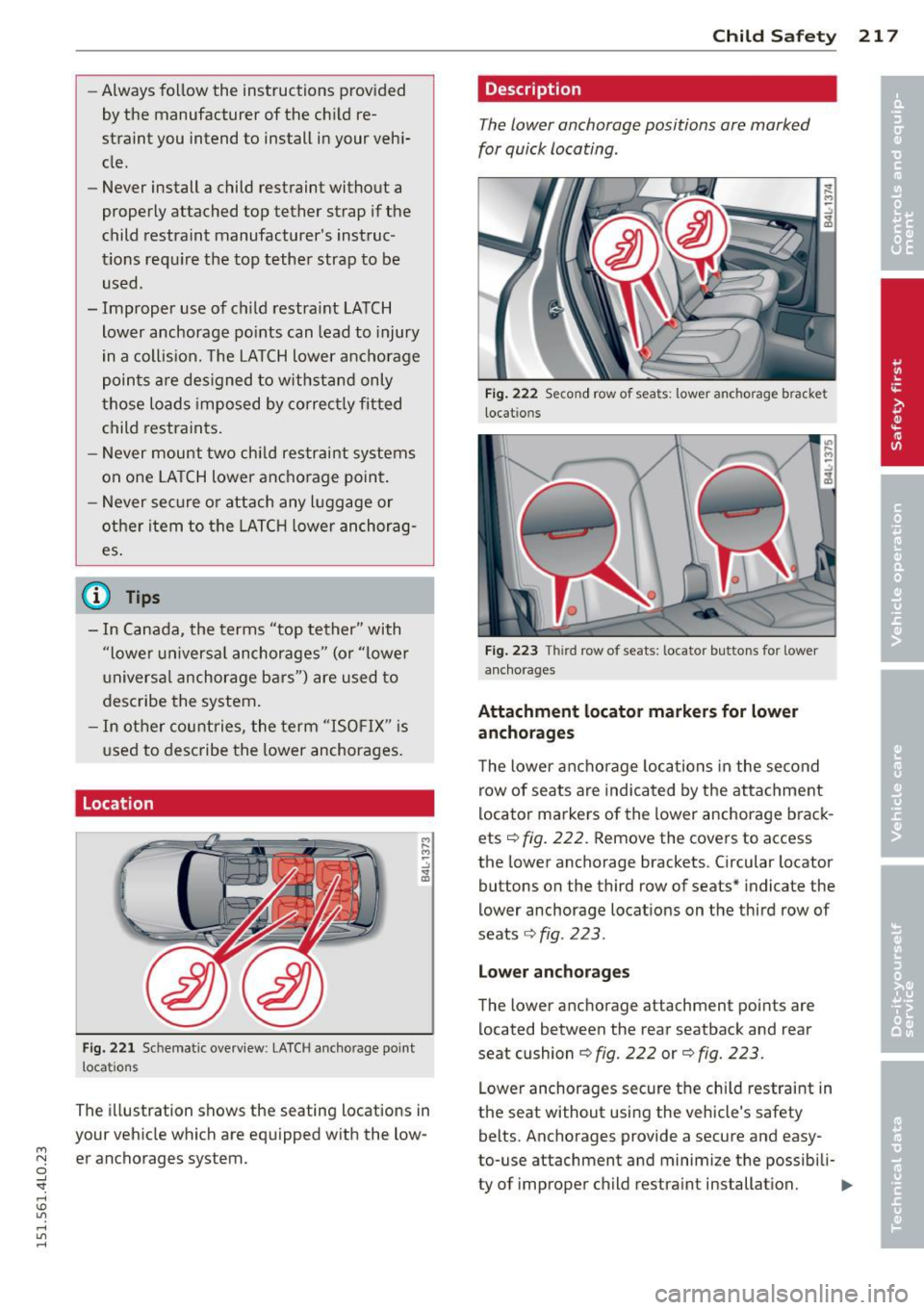
F ig. 22 1 Schematic overview : LATCH anc horage point
locations
The ill ustration shows the seating locations in
your vehicle which are equipped with the low-
M "' er anchorages system. 0 ..J
"". rl I.O
"' rl
"' rl
Child S afety 21 7
Description
The lower anchorage positions are marked
for quick locating .
Fig . 222 Second row of seats: lower anchorage bracket
locat ions
F ig . 223 Thir d row of seats: locator buttons for lower
a nch orages
Attachment locato r markers for lower
anchorages
T he lower anchorage locations in the second
row of seats are indicated by the attachment
locator marke rs of the lower anchorage brack
ets¢
fig. 222. Remove the covers to access
the lower anchorage brackets. Circular locator
buttons on the third row of seats" indicate the
lower anchorage locations on the third row of
seats
¢ fig . 223.
L o w er anch orag es
The lower anc horage attachment points are
located between the rear seatback and rear
seat cushion ¢
fig. 222 or¢ fig. 223.
Lower anchorages secure the child restraint in
the seat without using the vehicle's safety
belts. Anchorages provide a secure and easy
to-use attachment and minimize the possibili-
ty of improper child restra int installation. .,..