instrument cluster AUDI Q7 2015 Owner´s Manual
[x] Cancel search | Manufacturer: AUDI, Model Year: 2015, Model line: Q7, Model: AUDI Q7 2015Pages: 350, PDF Size: 86 MB
Page 32 of 350

30 Driver in formation d ispl ay
(30 km/h to 240 km/h) . Settings can each be
adj usted in intervals of S mph (10 km/h) .
Auto Check Control
Introduction
The Auto-Check control monitors the function
of certain veh icle featu res and components . It
simply makes sure these features and compo nents are work ing proper ly . The Auto -Check
contro l wo rks as long as the ignition is on, as
well as whenever the vehicle is driven.
If a componen t is ma lf u nctioning or if the
n eed for an urgent repair has been detected,
this will appear in the instrument cluster dis
p lay . You w ill a lso hear an audible warn ing
tone . The displays are co lor coded in e ither
red or yellow depending on their level of prior
ity .
A red symbo l means
Dange r, a yellow symbo l
indic ates
Warning . In certain s ituations, in
formation message for the dr iver appear in
addit ion to the red and yellow symbols.
Function te st : automat ic transmi ssion
The Auto -Check Control will automat ica lly
perform a test each time you switch on the ig
n ition. With the selector lever in P or N, the
following message appears in the display :
When station ary apply brake pedal while se
lecting gear
When you select a different gear (for exam
p le : R, D, etc.), the message will d isappear
and the Auto-Check function is d isplayed .
I f the re is a m alfu nction, then the malfunc
tion message w ill appear about 15 seconds af
ter the yo u start the vehicle. At t he same time
you will hear a warning tone .
Driver information messages
Driver information messages are shown in the
instrument cluster display in addition to the
red and yellow symbols .
Fig. 24 Ins trume nt cl ust er: CHECK b utto n
For example, if the transmiss ion selec to r l ever
is not in the P position when the engine is
turned off, the following message appears :
Shift to P otherwise vehicle can roll away.
Door s do not l ock if you are not in P .
The ig nition key can only be removed with the
selector in this position . Th is and other mes
sages are bro ugh t up if a func tion cannot be
carr ied out.
Driver messages and red symbols
If a red symbol appea rs in the display, a d river
message can be shown by pressing the
I CH ECK I button.
For example, the symbo l for a problem w ith
engine oil p ressure . appears in the d isp lay .
If you then p ress the
I CHECK I button , the fol
lowing dr iver mess age appears in the display:
Switch off engine ! Oil pr essure too low
The driver message in the display goes out af
ter about 5 seconds . The driver message can
be displayed again by briefly press ing the
I CH ECKi button.
Driver messages and yellow symbol s
If a yellow symbol appears in the display, a
driver message is also displayed automatical-
~ ~
Page 33 of 350
M N
0 ...J
'SI: ,...., \!) 1.1"1 ,...., 1.1"1 ,....,
For example, the symbol II appears in the
display, indicating low windshield washer flu
id level. The follow ing message also appears:
Please refill washer fluid
The driver message disappears after a few
seconds. The driver message can be d isp layed
again by briefly pressing the
!CHECK I button.
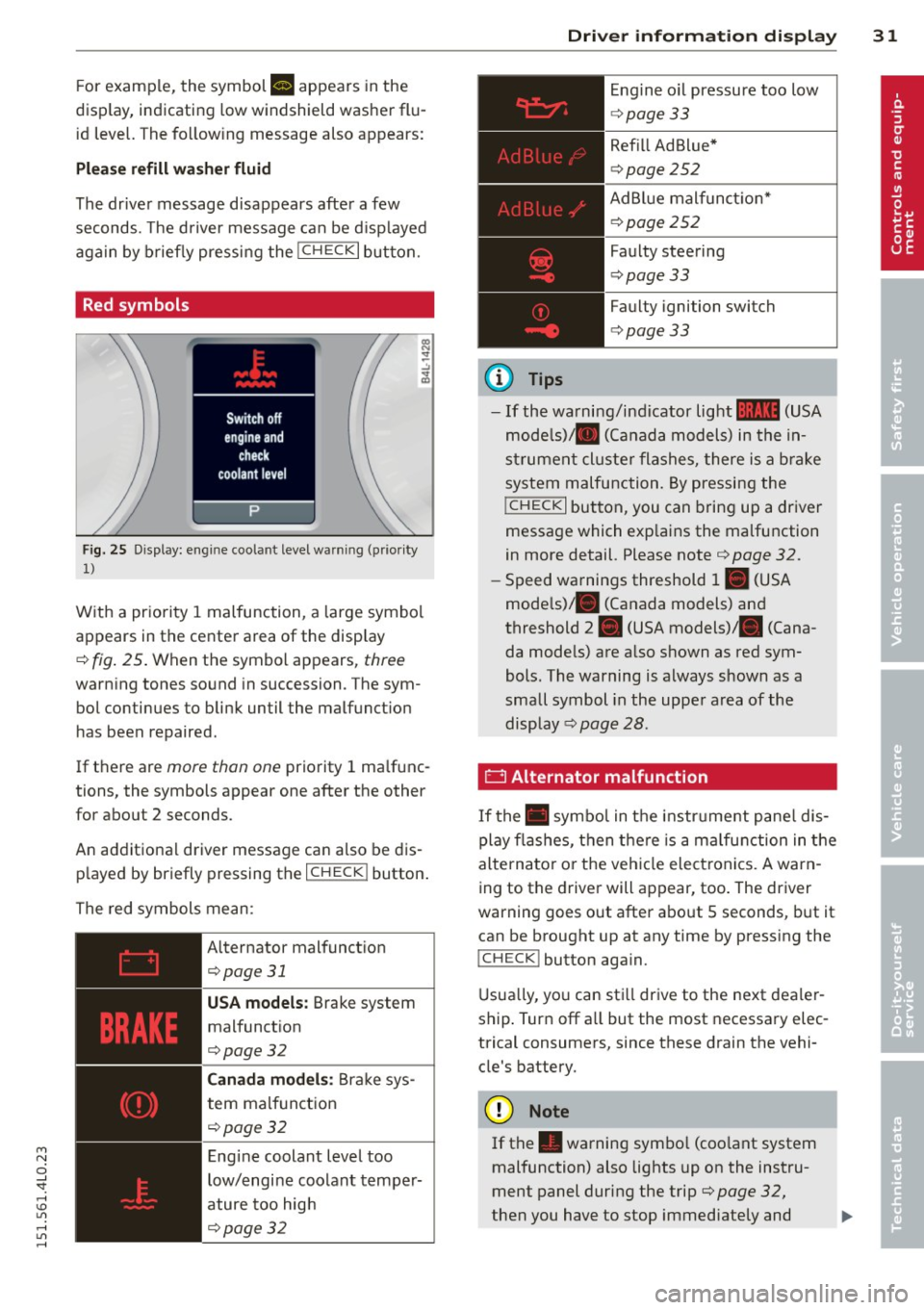
Red symbols
Fig. 25 Display: engine coolant level warning (prio rity
1)
With a priority 1 malfunction, a large symbol
appears in the center area of the display
¢ fig . 25 . Wh en the symbo l appears, three
warning tones sound in succession. The sym
bol continues to blink until the malfunct ion
has been repaired.
If there are
more than one priority 1 ma lfunc
tions, the symbols appear one after the other for about 2 seconds.
An additional driver message can also be dis
played by briefly pressing the
I CHECK ! button.
The red symbols mean:
Alternator malfunct ion
¢page31
USA models: Brake system
malfunction
¢page32
Canada models: Brake sys
tem malfunction
¢pa ge32
Engine coolant level too
low/engine coolant temper
ature too high
¢page32
Driver information display 31
@ Tips
Engine oil pressure too low
¢page 33
Refill Ad Blue*
¢page 252
AdBlue malfunct ion*
c!>page252
Faulty steering
c!>page 33
Faulty ignition switch
¢page 33
-If the warning/indicator light 11111 (USA
models)/ . (Canada models) in the in
strument cluster flashes, there is a brake
system malfunction. By pressing the
!CHECK I button, you can bring up a driver
message which exp lains the malfunction
in more detail. Please note ¢
page 32.
-Speed warnings threshold 1. (USA
mode ls)/ . (Canada models) and
threshold 2. (USA models) . (Cana
da models) are a lso shown as red sym
bols. The warning is always shown as a
small symbol in the uppe r area of the
display
c!> page 28.
0 Alternator malfunction
If the . symbol in the instrument panel dis
play flashes, then there is a malfunction in the
alternator o r the vehicle elect ronics. A warn
ing to the driver will appear, too . The driver
warning goes out after about 5 seconds, but it
can be brought up at any time by pressing the
ICHECK I button aga in.
Usually, you can still drive to the next deale r
ship . Turn off all but the most necessary elec
trical consumers, since these drain the vehi
cle's battery.
([) Note
If the . warning symbo l (coo lant system
malfunction) also lights up on the instru
ment panel during the trip¢
page 32,
then you have to stop immediately and ..,_
Page 38 of 350
36 Driver in formation d isplay
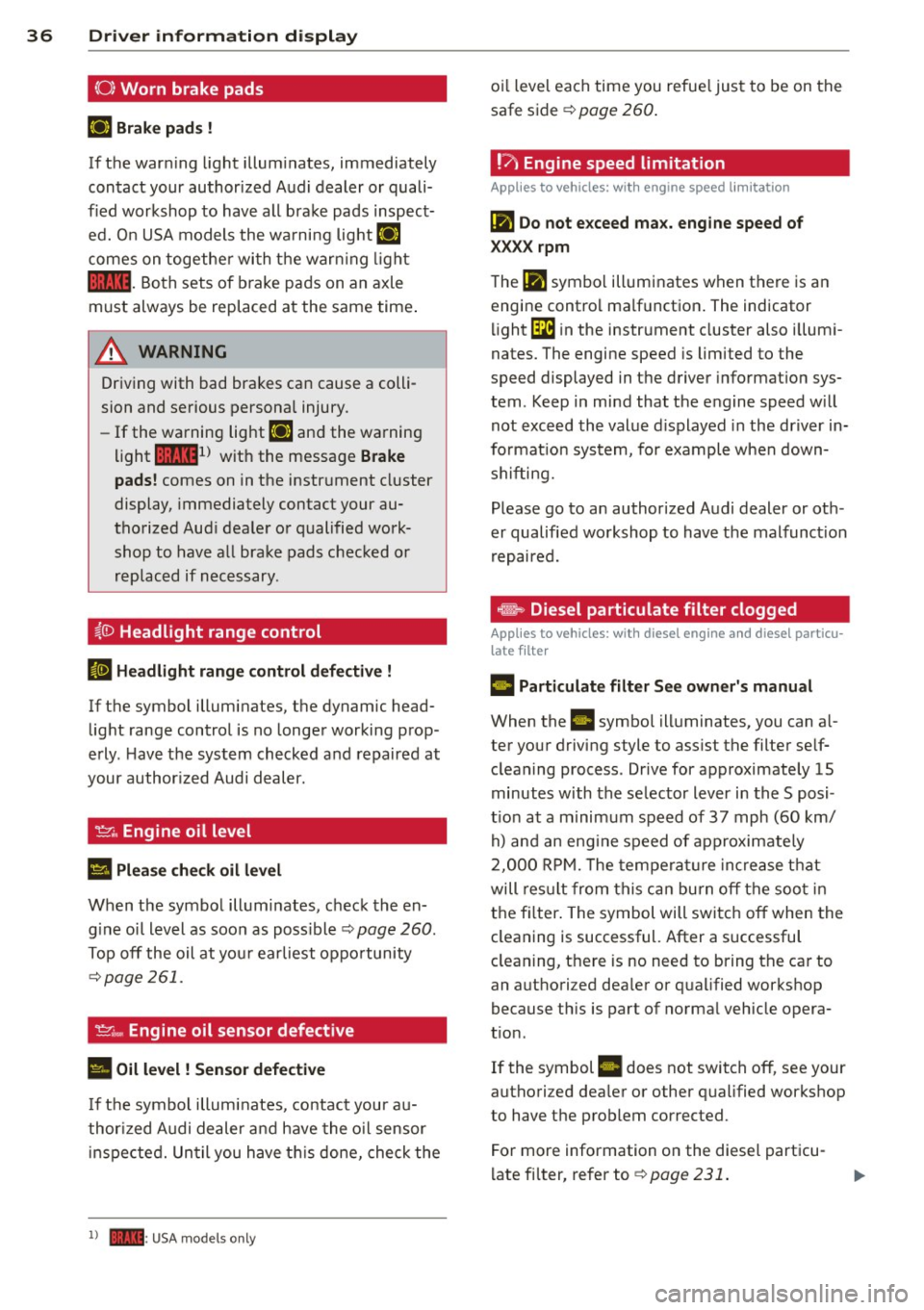
(0 ) Worn brake pads
rlJ Br ake pa ds !
If the warn ing light illum inates, immediately
contact your authorized Audi dealer or quali
fied workshop to have all brake pads inspect
ed. On USA models the wa rning light
rlJ
comes on together wi th the warn ing ligh t
1111 -Both sets of b rake pads on an axle
must always be replaced at the same time .
A WARNING
Driving with bad brakes can cause a colli
sion and serious personal injury .
- If the warning light
rlJ and the warning
light
11111 ) with the message B rake
pads !
comes on in the instr ument cluster
display, immediately contact your au
thorized Aud i dealer or qualified work
shop to have all brake pads checked or
replaced if necessary .
~(]) Headlight range control
El Head light rang e control d efe ctiv e !
-
If the symbol illuminates, the dynamic head
light range control is no longer working prop
erly . Have the system checked and repaired at
your author ized Audi dealer.
'I=?; , Engine oil level
Ill Pleas e che ck oil l evel
When the symbol illuminates, check the en
gine o il level as soon as poss ible
¢ page 260 .
Top off the oil at you r earliest oppo rtunity
~ page 261.
't'.:r .., Engine oil sensor defective
• Oil l evel ! Sensor d efe ctive
If the symbol illuminates, contact your au
thor ized A udi dealer and have the o il sensor
i nspected. Un til you have th is done, check the
l ) - : USA mod els onl y
oil level each time you refue l just to be on the
safe side ¢
page 260.
!?' Engine speed limitation
Applies to vehicles: wit h engine speed li mitatio n
(Pl Do not e xceed ma x. engine speed of
XXXX rpm
The (Pl symbol illuminates when there is an
engine contro l malfunction. The indicator
li ght
GB in the instrument cluster also illumi
nates. The engine speed is limited to the
speed displayed in the driver informa tion sys
tem . Keep in mind that the engine speed w ill
not exceed the value d isplayed in the dr iver in
format ion system, for example when down
shifting.
Please go to an author ized Audi dealer or oth
er qualified workshop to have the malfunct ion
repaired.
~ Diesel particulate filter clogged
Applies to vehicles: wi th diese l eng ine a nd diese l par ticu
late filter
II Particulate filt er See o wner' s manua l
When the II symbol illuminates, you can a l
ter your driving style to ass ist the filter sel f
cleaning process . Drive for approximately 15
minutes with the selector lever in the S posi
t ion at a m inimum speed of 37 mph (60 km/
h) and an eng ine speed of approximately
2,000 RP M. T he temperat ure increase that
will res ult from this can burn off the soo t in
the fi lter . The symbol will switch off when the
cleaning is successful. After a successful
cleaning, there is no need to bring the car to
an authori zed dea ler or qualified workshop
because th is is part of normal vehicle opera
t ion .
If the symbol
II does not switch off, see your
authori zed dea ler or other qualified workshop
to have the problem corrected.
For more information on the diesel particu
l ate fi lter, refer to ¢
page 231.
Page 49 of 350
M N
0 ...J
'SI: ,...., \!) 1.1"1 ,...., 1.1"1 ,....,
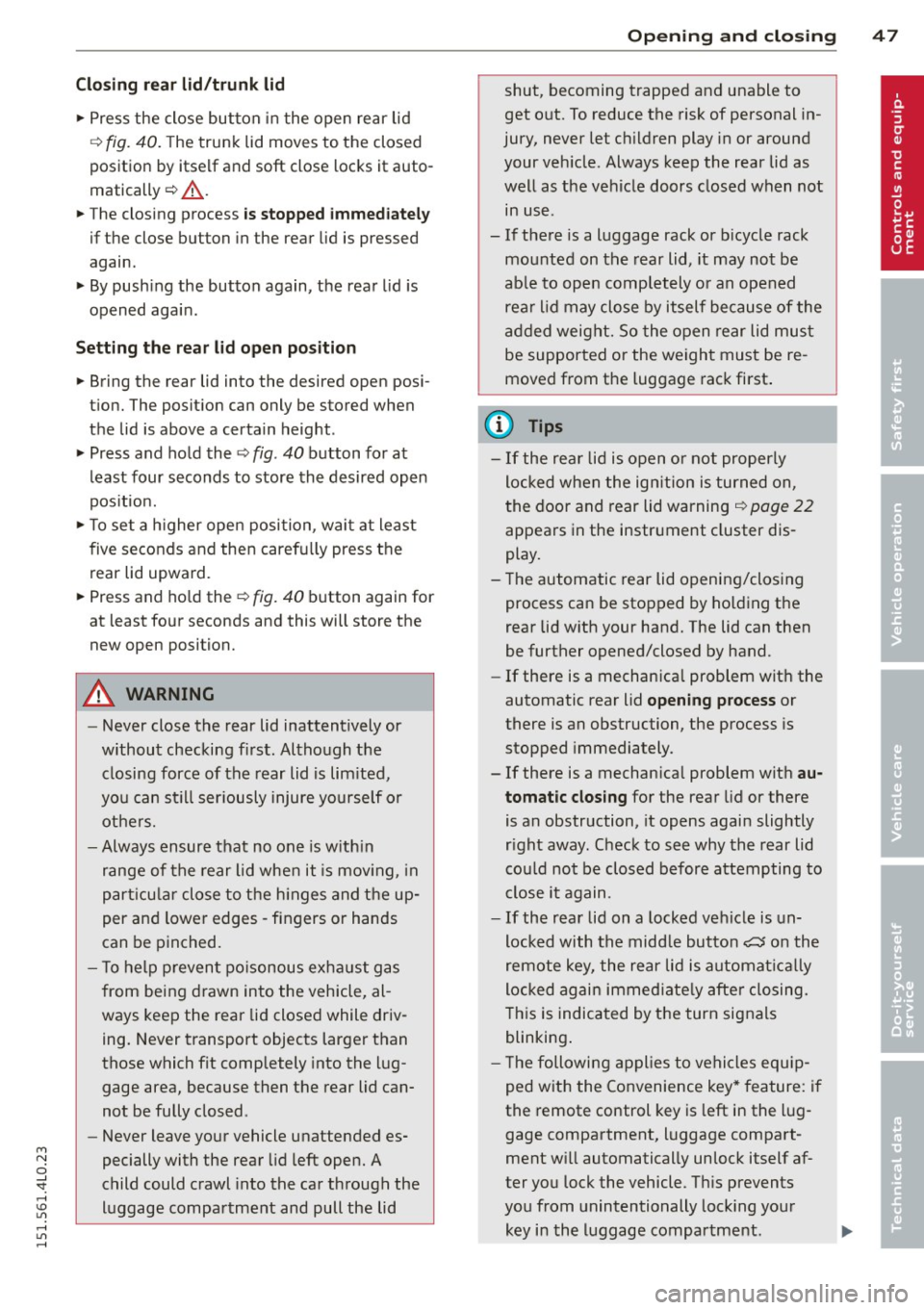
Clos ing re ar lid /trunk lid
"' Press the close button in the open rear lid
~ fig. 40. The trun k lid moves to the closed
posit ion by itself and soft close locks it auto
matically ~&_ .
"' The closing process
is stopp ed immediately
if the close button in the rear lid is pressed
again.
"' By push ing the button again, the rear lid is
opened again .
Setting the rear lid o pen po sition
"' Bring the rear lid into the desired open posi
t ion. The posit ion can only be stored when
the lid is above a certain height .
"' Press and hold the
~fig . 40 button for at
least four seconds to store the desired open
pos ition.
"'T o set a h igher open position , wait at lea st
five seconds and then carefu lly press the
rear lid upward.
"' Press and ho ld the ~
fig. 40 button again for
at least four seconds and this will store the
new open position.
A WARNING
- Never close the rear lid inattentively or
without checking fi rst . Although the
closing force of the rear lid is lim ited,
yo u can st ill ser iously injure yourself or
others.
- Always ensure that no one is w ith in
range of the rear lid when it is mov ing, in
part icu lar close to the h inges and the up
per and lowe r edges -fingers or hands
can be p inched.
- T o help p reven t po isonous exha ust gas
from being d rawn into the vehicle, al
ways keep the rear lid closed while driv ing. Never transport objects larger than
those which fit completely into the lug
gage area, because then the rear lid can
not be fully closed .
- Never leave your vehicle unattended es
pecially with the rear lid left open. A
child could crawl into the car through the
luggage compartment and pull the lid
-
Opening and clo sin g 47
shut, becoming trapped and unable to
get out. To reduce the risk of personal in
jury, never let ch ildren play in or around
your veh icle . Always keep the rear lid as
well as the vehicle doors closed when not in use .
- If there is a l uggage rack or b icycle rack
mounted on the rear lid, it may not be
ab le to open completely o r an opened
rea r lid may close by itself because of the
ad ded weight. So the open rear lid mus t
be supported or the weigh t must be re
moved from the luggage rac k first .
(D Tips
- If the rear lid is open o r not properly
locked when the ign ition is turned on ,
t he door and rear lid warning ~
page 22
appears in the instrument cluster dis
play.
- The automatic rear lid opening/clos ing
process can be stopped by ho ld ing the
rear lid w ith your hand. The lid can then
be further opened/closed by hand.
- If there is a mechan ica l problem wit h the
automatic rear lid
opening process or
there is an obstruction, the process is
stopped immediately .
- If there is a mechan ica l problem with
au
tomatic closing for the rear lid or there
is an obstruction, it ope ns again slightly
r ight away. Check to see why the rear lid
cou ld not be closed before attempting to
close it again .
- If the rear lid on a locked vehicle is un
locked with the midd le button
c:5 on the
remote key, the rear lid i s automat ically
locked agai n immed iate ly afte r closing.
T his is indicated by the turn signals
blinking .
- T he followin g applies to vehicles equ ip
ped with the Convenience key* feature: i f
the remote control key is left in the lug
gage compartment, luggage compart
ment w ill automatically unlock itself a f
ter you lock the vehicle. Th is prevents
you from unintentionally lock ing you r
key in the luggage compartment. ...,
Page 62 of 350
60 Clear vision
Clear vision
Lights
Switching the headlights on and off
In the "AUTO" position, a light sensor auto
matically switches the head -and taillights on
and off in response to light conditions .
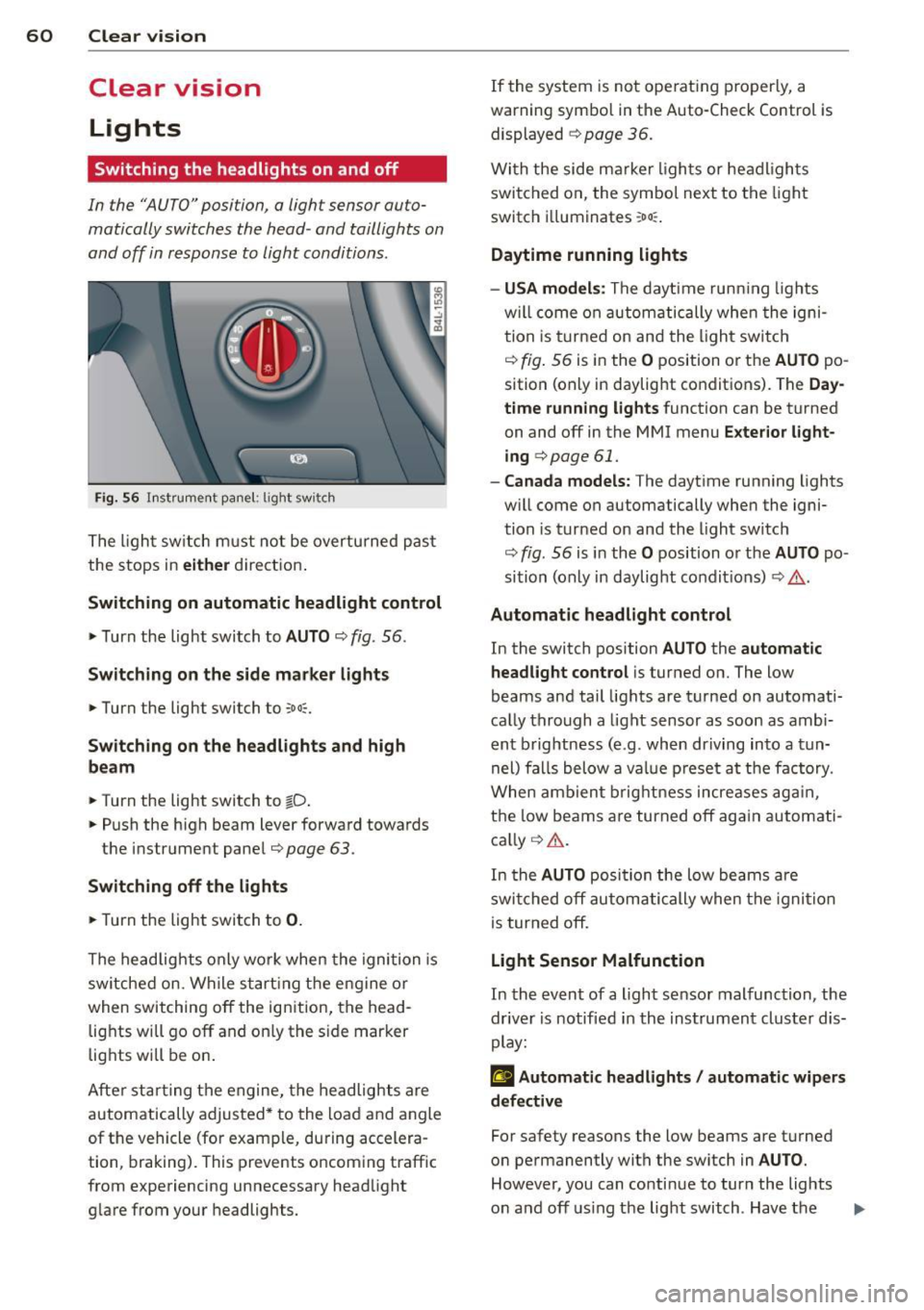
Fig. 56 Instrument pane l: lig ht sw it ch
The light switch must not be overturned past
the stops in
either direction.
Switching on automatic headlight control
.,. Turn the light switch to AUTO ¢ fig. 56.
Switching on the side marker lights
... Turn the light switch to :o o:.
Switching on the headlights and high
beam
... Turn the light switch to tD .
... Push the high beam lever forward towards
the instrument panel¢
page 63 .
Switching off the lights
... Turn the light switch to 0.
The headlights only work when the ignition is
switched on. While starting the engine or
when switching off the ignition, the head
lights will go off and on ly the side marker
lights will be on.
After starting the engine, the headlights are
automatically adjusted* to the load and angle
of the vehicle (for example, during accelera
tion, braking). This prevents oncoming traff ic
from experiencing unnecessary headlight
glare from your headlights. If the
system is not ope rating properly, a
warn ing symbol in the Auto-Check Control is
displayed
¢ page 36.
With the side marker lights or headlights
switched on, the symbol next to the light
switch i lluminates
:oo :.
Daytime running lights
- USA models :
The daytime running lights
w ill come on automatically when the igni
tion is turned on and the light switch
¢ fig. 56 is in the O position or the AUTO po
sition (only in daylight conditions). The
Day
time running lights
function can be turned
on and off in the MMI menu
Exterior light
ing
c> page 61.
- Canada models: The daytime running lights
w ill come on automatically when the igni
tion is turned on and the light switch
¢ fig. 56 is in the O position or the AUTO po
sition (only in daylight condit ions) ¢
.&..
Automatic headlight control
In the switch position AUTO the automatic
headlight control
is turned on. The low
beams and tail lights are turned on automati
cally through
a light sensor as soon as ambi
ent brightness (e .g . when driving into
a tun
nel) falls below
a value preset at the factory .
When ambient brightness increases again,
the low beams are turned off again automati
cally ¢
A.
In the AUTO position the low beams are
switched off automatically when the ignition
is turned off.
Light Sensor Malfunction
In the event of a light sensor malfunction , the
driver is notified in the instrument cluster dis
play:
£I Automatic headlights / automatic wipers
defective
For safety reasons the low beams are turned
on permanently with the sw itch in
AUTO.
However, you can conti nue to turn the lights
on and off using the light switch . Have the ..,.
Page 63 of 350
light sensor checked as soon as possible at an
authorized Audi dealer or qualified workshop.
A WARNING
- Daytime running lights and automatic
headlights are only intended to assist
the driver. They do not relieve the driver
of his responsibility to check the head
lights and to turn them on manually ac
cording to the current light and visibility
conditions. For example, fog cannot be
detected by the light sensors*. So always
switch on the headlights
~D under these
weather conditions and when driving in
the dark.
- Crashes can happen when you cannot see
the road ahead and when you cannot be
seen by other motorists. Always turn on
the headlights so that you can see ahead
and so that others can see your car from
the back.
- Please obey all laws when using the
lighting systems described here.
@ Tips
-With the switch in AUTO front fog lights
and rear fog lights cannot be turned on in addition.
- The light sensor for headlight control is
located in the rear view mirror mount.
You should therefore not apply any stick
ers to the windshield in this area in order
to prevent malfunctions or failures.
- Some exterior lighting functions can be
adjusted ¢
page 61.
-When you remove your key from the igni
tion while the vehicle's lights are turned
on, a buzzer sounds as long as the driv
er's door is open.
- In cool or damp weather, the inside of
the headlights, turn signals and tail
lights can fog over due to the tempera
ture difference between the inside and
outside. They will clear shortly after
M "' switching them on. This does not affect 0
~ the service life of the lighting.
rl I.O
"' rl
"' rl
Clear vision 61
-In the event of a light sensor malfunc
tion, the driver is notified in the instru
ment cluster display¢
page 35.
Adjusting exterior lighting
The functions are set in the MMI.
.,. Select: !CAR ! function button > Systems*
control button > Exterior lighting. Or
.,. Select:
I CAR I function button > Car systems*
control button > Vehicle settings > Exterior
light ing.
Coming home (Lights when leaving car),
Leaving home (Lights when unlocking car)
The coming home function illuminates the
area outside the vehicle when you turn the ig
nition off and open the driver's door. Depend
ing on vehicle equipment, the function can be
switched on and off or the length of ti me the lights remain on* can be adjusted .
The leaving home illuminates the area outside
the vehicle when you unlock the vehicle . This
function can be switched on and off .
The Coming home and Leaving home func
tions only operate when it is dark and the light switch is in the
AUTO position.
Daytime running lights
USA models: The daytime running lights can
be turned on or off using this function.
Canada models: The function cannot be
turned
off. It is activated automatically each
time the ignition is turned on. This menu item is shown "greyed out" .
Front fog lights
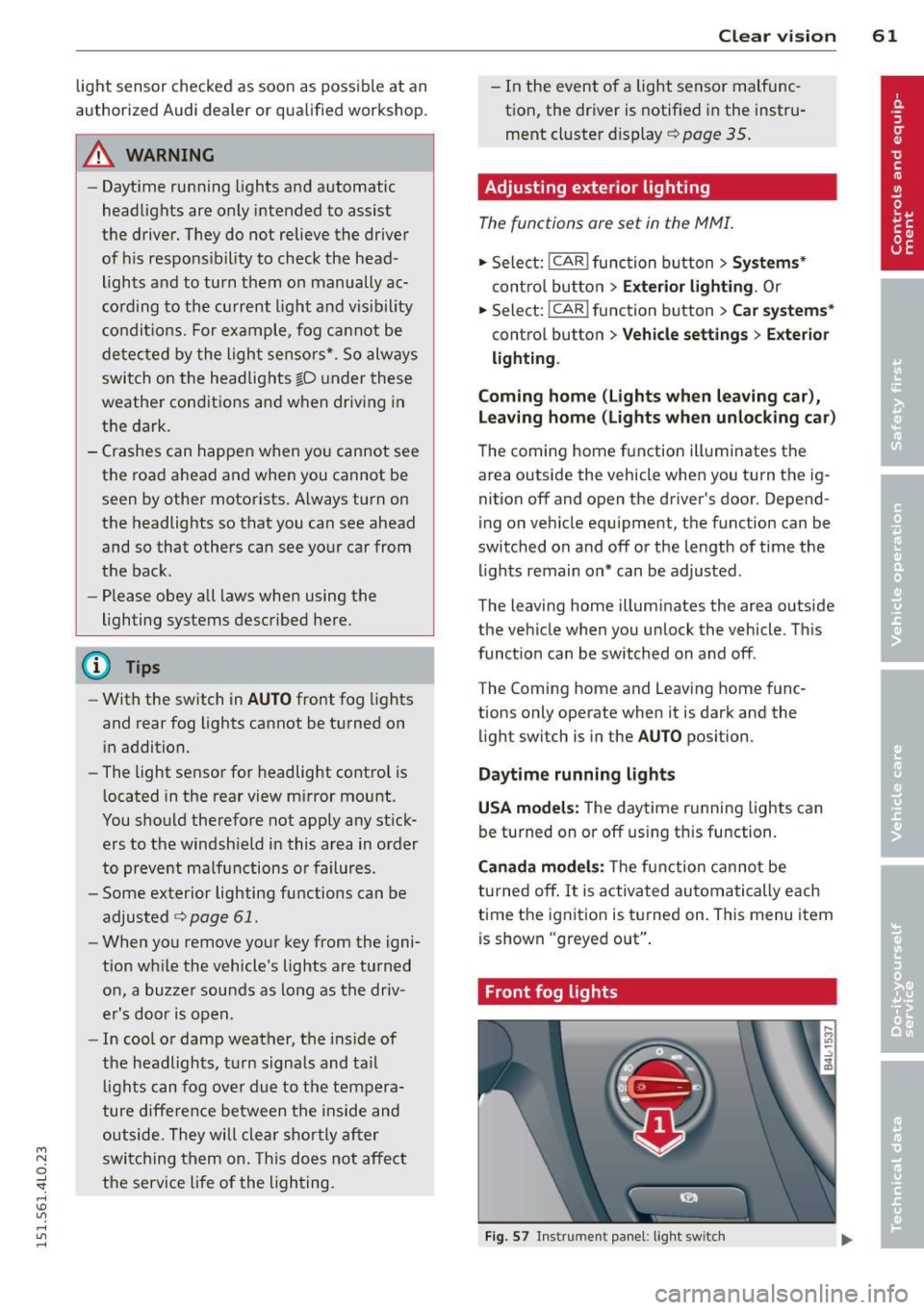
Fig. 57 Instrument panel: light switch
Page 66 of 350
64 Clear vision
Notes on the se feature s
- The turn signals only work with the ignition
tu rned on. The indicator lights
II or ii in
the instr ument cluster ¢
page 14 also b link .
- After you have turned a corner, the turn sig -
nal switches off a utomat ically.
- T he
high beam works only when the head
lights are on. The indicator light
SI in the
instrument cluste r illuminates when the
high beams a re on.
- The
headlight flasher works on ly as long as
yo u hold the leve r - even if there are no
lights turned on . The ind icator light
SI in
the instrument cl uster illum inates when you
use the head light flasher.
A WARNING
Do not use the hig h beam o r headlight
flasher if you know that th ese cou ld blind
oncoming traffic.
Interior lights
Front interior lights
-
The interior ligh ts include reading lights for
bo th the driver and the front passenger .
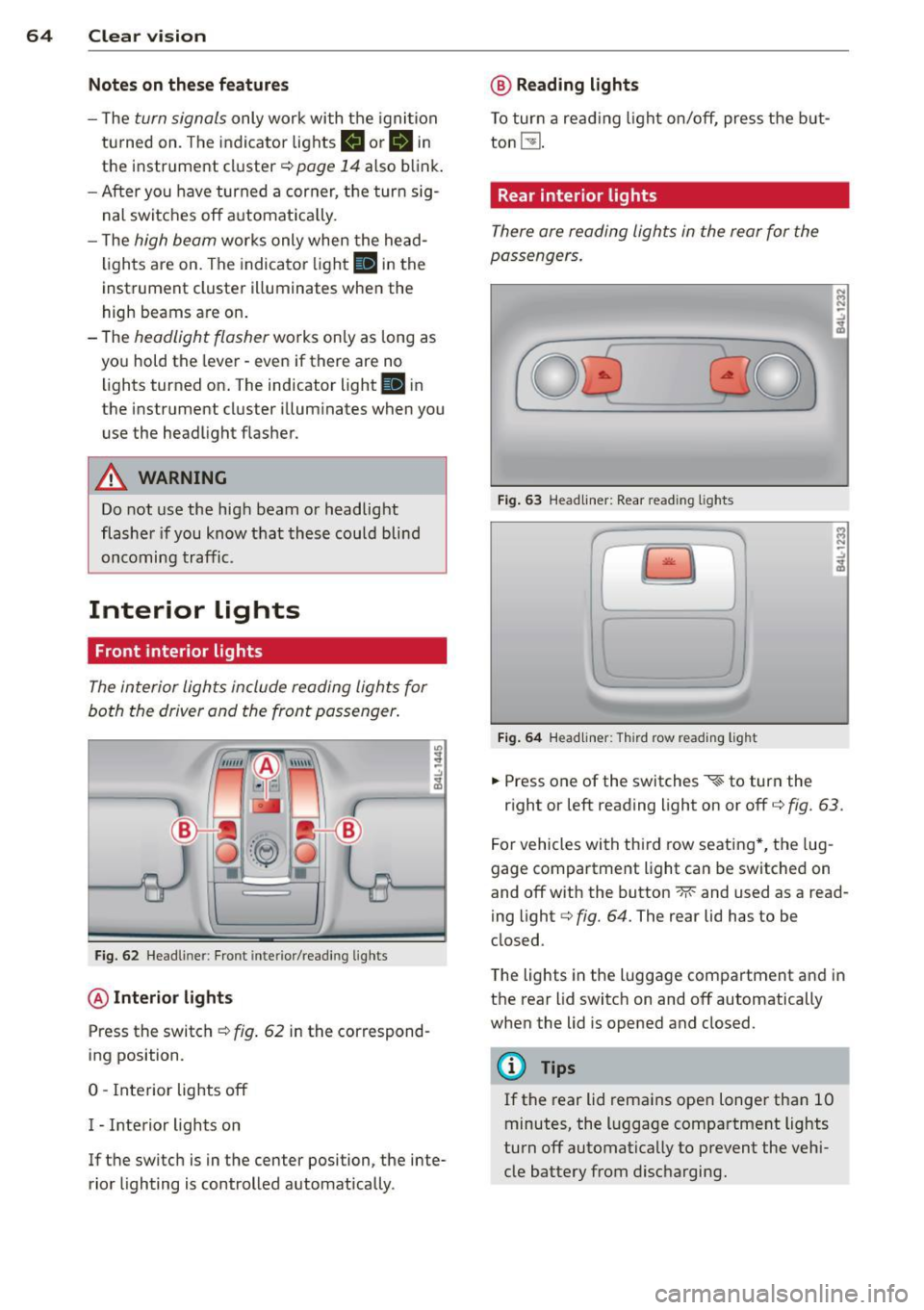
Fig. 6 2 Headli ner: Fro nt inte rior/read ing lights
@ Interior lights
Press the switch ¢ fig. 62 in the correspond
ing position.
0 -Interior lights off
I - Inte rior lights on
If the switch is in the center position, the inte
rior lighting is controlled automatica lly.
@ Reading lights
T o tur n a read ing light on/off, press the b ut
ton
t!J .
Rear interior lights
There are reading lights in the rear for the
passengers .
Fig. 63 Head liner: Rear read ing lights
~
--
' ~ '-
Fig . 64 Head liner: Third row read ing light
.. Press one of the switches ~ to turn the
N .., N
.:,
~
::i N -.:,
~
right or left reading light on or off c::;, fig. 63.
For vehicles with thi rd row seating *, the lug
gage compartment light can be switched on
and off with the button -M-and used as a read
ing light
c::;, fig. 64. The rear lid has to be
closed.
The lights in the luggage compartment and in
t h e rear lid switch on and off automatically
when the lid is opened and closed.
@ Tips
If the rear lid remains ope n longer than 10
minutes, the l uggage compartment lights
turn off automatically to prevent the vehi
cle battery from disc harging .
Page 106 of 350
![AUDI Q7 2015 Owner´s Manual 104 Warm and cold
Heated rear seats [i]
Applies to vehicles: with heated rear seats
The seat cushions and seatbacks of the two
outer rear seats can be heated electrically.
Fig. 11](/img/6/40280/w960_40280-105.png "AUDI Q7 2015 Owner´s Manual 104 Warm and cold
Heated rear seats [i]
Applies to vehicles: with heated rear seats
The seat cushions and seatbacks of the two
outer rear seats can be heated electrically.
Fig. 11")
104 Warm and cold
Heated rear seats [i]
Applies to vehicles: with heated rear seats
The seat cushions and seatbacks of the two
outer rear seats can be heated electrically.
Fig. 117 Center console rear: Heated seats
lo
=" ..,
---- ------- ------,,;g
Fig. 118 Center console rear: Seat heating with fou r
zone automatic comfort
a ir cond it io nin g*
Rear seat heating
.. Rotate the thumb wheel ¢fig. 117 @to
turn on and adjust the heating for the left
rear seat .
• Rotate the thumb wheel ® to turn on and
adjust the heating for the r ight rear seat .
Rear seat heating with four- zone
automatic comfort air conditioning*
.. Press the~ button. ¢fig. 118 .
.. Rotate the regulator to the desired setting .
In position O the heating for the seats is
turned off . The range of adjustment is be
tween 1 and 6.
A WARNING
Individuals with reduced sensitivity to pain
or temperature could develop burns when
using the seat heating function. To reduce
the risk of injury, these individuals should
not use seat heating.
(D Note
To avoid damage to the heating elements
in the seats, do not kneel on the seats or
place heavy loads on a small area of the
seat.
Steering wheel heating~
Applies to vehicles: wit h stee ring wheel heat ing
The steering wheel can be heated electrically.
Fig . 1 19 Stee ring whee l: button for steer ing w heel
h e atin g
.. Press the [ii button to turn the steering
wheel heating on and off
¢fig. 119 . The
message
Steering wheel heating on ! or
Steering wheel heating off! appears in the
instrument cluster disp lay.
A nearly constant temperature is maintained
when the steering wheel heating is switched on.
T he last setting se lected for the steering
whee l heating (on or off) is automatically
saved when the vehicle is shut off and is as
s igned to the remote key .
Page 109 of 350
M
"' 0 _,
"". rl I.O
"' rl
"' rl
Ignition lock and ignition switch
Ignition key positions
The engine con be started or turned off with
the ignition key.
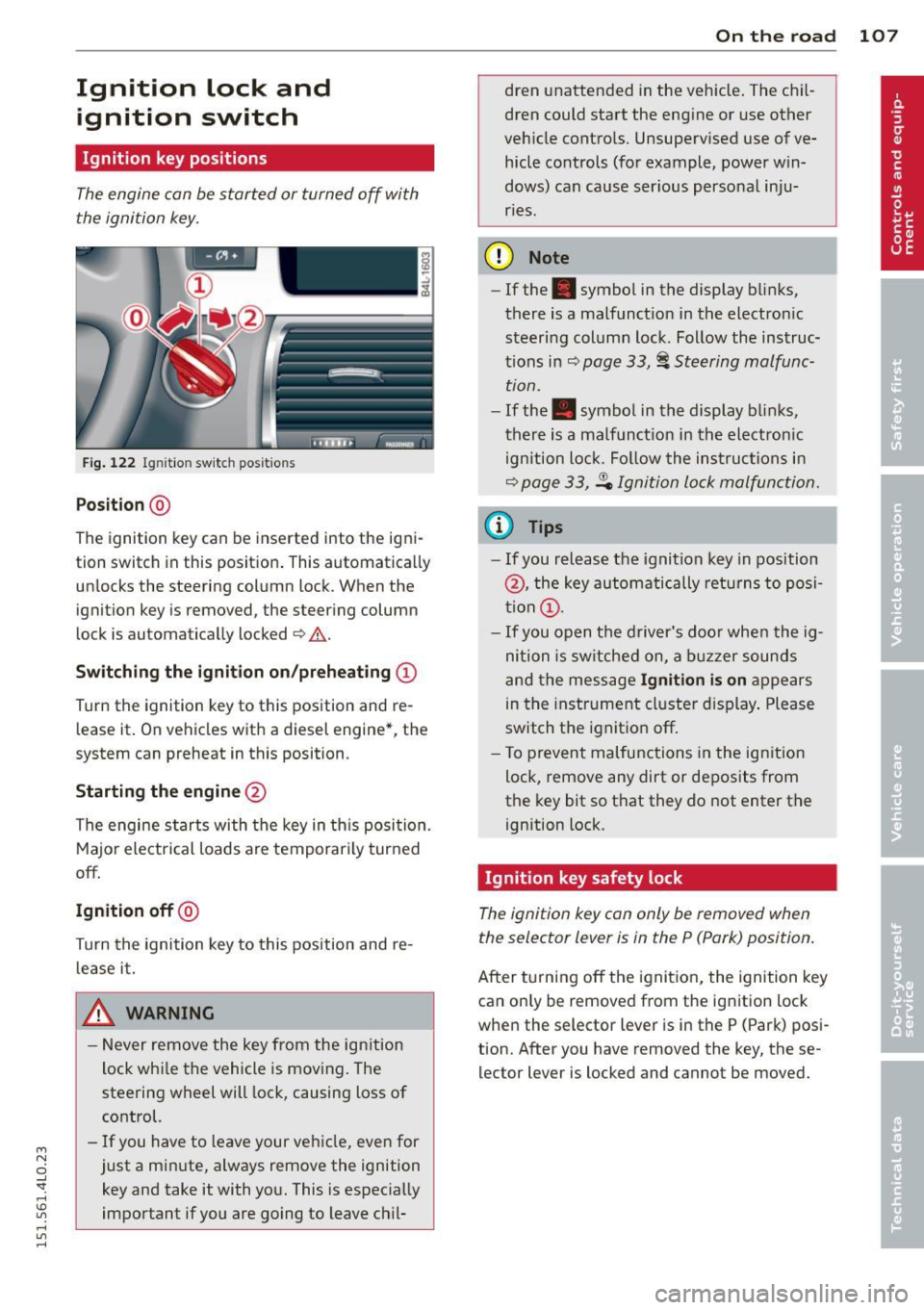
Fig. 122 Igni tion switch pos it io n s
Position @
The ignition key can be inserted into the igni
tion switch in this position . This automatically
unlocks the steering column lock . When the
ignition key is removed, the steering column
lock is automatically locked
Q .&. .
Switching the ignition on/preheating (D
Turn the ignition key to this position and re
lease it. On vehicles with a d iesel engine*, the
system can preheat in this position .
Starting the engine@
The engine starts with the key in this position.
Major electrical loads are temporarily turned
off.
Ignition off@
Turn the ignition key to this position and re
lease it.
A WARNING ,~ ~
- Never remove the key from the ign ition
lock whi le the vehicle is moving. The
steering wheel will lock, causing loss of
control.
- If you have to leave your vehicle, even for
just a minute, always remove the ignition key and take it with you. This is especially
important if you are going to leave chil-
On the road 107
dren unattended in the vehicle. The chil
dren could start the engine or use other
vehicle controls. Unsupervised use of ve
hicle controls (for example, power win
dows) can cause ser ious personal inju
ries.
(D Note
- If the . symbol in the display blinks,
there is a malfunction in the electronic
steering column lock . Follow the instruc
tions in
Q page 33, i Steering malfunc
tion .
-If the . symbol in the display blinks,
there is a malfunct ion in the electronic
ignition lock. Fol low the instructions in
Q page 33, .Pe Ignition lock malfunction.
a) Tips
-If you release the ignition key in position
@, the key automatically returns to posi
tion (!).
- If you open the driver's door when the ig
nition is sw itched on, a buzzer sounds
and the message
Ignition is on appears
in the instrument cluster display. Please
switch the ignition off.
- T o prevent malfunctions in the ign ition
lock, remove any dirt or deposits from
the key bit so that they do not enter the
ignition lock.
Ignition key safety lock
The ignition key con only be removed when
the selector lever is in the P (Pork) position.
After turning off the ignition, the ignition key
can only be removed from the ignition lock
when the selector lever is in the P (Park) posi
tion. Afte r you have removed the key, these
lector lever is locked and cannot be moved.
Page 112 of 350
110 On the road
reac hed o per ating temperature -other
wise you risk engine damage.
- The eng ine cannot be started by pushing
or towing the vehicle.
@ For the sake of the environment
Do not allow the engine to warm up with
t he vehicle stationary. Start driving right
away . In th is way you avoid unnecessary
emissions.
@ Tips
If you open the drive r's door when the ig
nition is switched o n, a buzze r sounds and
the message
Ignition is on appears i n the
instrument cluster disp lay. Please switch
the ignition off.
Switching engine off with the~
button
App lies to veh icles: wit h Co nvenience key
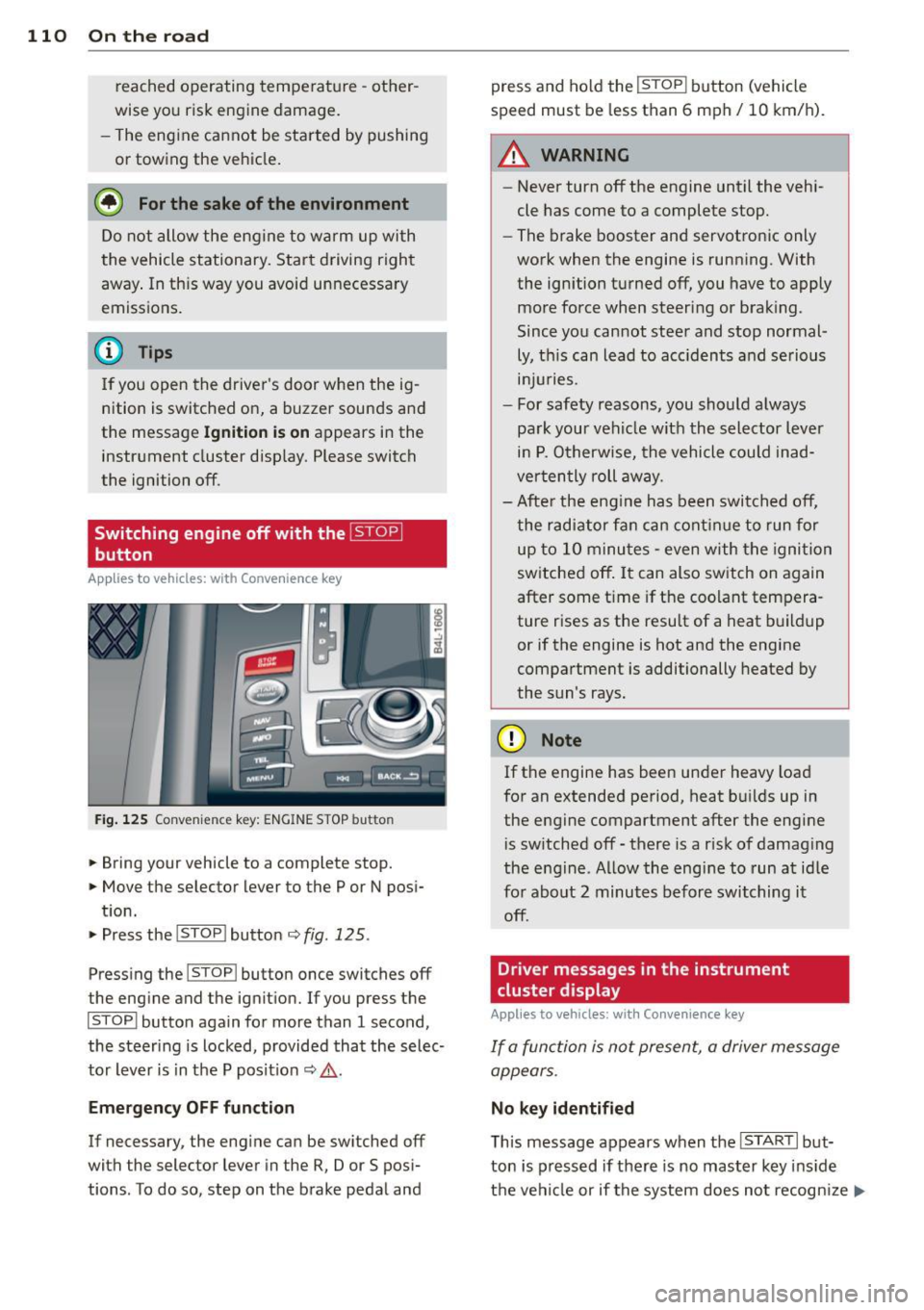
Fig . 125 Convenience key: ENGINE STOP button
.. Bring your vehicle to a complete stop.
.. Move the selector lever to the P or N pos i-
t ion.
.. Press the
!STOP ! button c;, fig. 125.
Pressing the ! STOP ! button once switches off
the eng ine and the ignition. If you press t he
!STOPI button again for more than 1 second,
the steering is locked , provided that the selec
tor lever is in t he P pos it ion
c;, & .
Emergency OFF function
If necessary, the eng ine can be sw itched off
with the selector lever in the R, Dor S posi
tions . To do so, step on the brake pedal and press and ho
ld the
! STOP ! button (vehicle
speed must be less than 6 mph/ 10 km/h).
.&_ WARNING
-
- Never turn off the engine until the vehi-
cle has come to a complete stop.
- The brake booster and servotronic only
work when the engine is running. With
the ignition turned off, you have to apply mo re force when steeri ng or brak ing.
Since you cannot stee r and stop normal
ly, t his can lead to acc idents and se rious
. . . in Juries.
- For safety reasons, you sho uld a lways
pa rk your vehicle wit h the selector lever
in P. O therwise, the vehicle could inad
ver ten tly roll aw ay.
- Afte r the eng ine has been switch ed off,
t he r adi ator fa n can cont in ue to run f or
up to 10 minu tes -even with the igni tion
switched off . It can also switch on again
after some t ime if the coolant tempera
ture rises as the resu lt of a heat b uildup
or if the engine is hot and the engine
compartment is additionally heated by
the sun's rays.
(D Note
If the engine has been under heavy load
for an extended pe rio d, heat b uilds up in
the engine compartment after the engi ne
i s sw itched off -there is a r isk of damag ing
the e ngine. A llow the engi ne to run a t id le
fo r about 2 minutes before switching it
off .
Driver messages in the instrument
cluster display
Applies to veh icles: w it h Co nvenience key
If a func tion is not present, a driver message
appears.
No key identified
T his message appears when the I STAR T I but-
ton is pr essed if there is no master key ins id e
the vehi cle or if the system does not recogn ize
IJ,-