remote control AUDI Q7 2015 Owner´s Manual
[x] Cancel search | Manufacturer: AUDI, Model Year: 2015, Model line: Q7, Model: AUDI Q7 2015Pages: 350, PDF Size: 86 MB
Page 78 of 350
76 Seats and storage
unattended in the vehicle -they could be
injured!
- Exercise caution when adjusting the seat
height. Unsupervised or careless seat ad
justment can pinch fingers or hands
causing injuries.
- While the vehicle is moving, the seat
backs of the front seats must not be in
clined too far to the rear because the ef
fectiveness of the safety belts and the
airbag system is severely compromised -
there is a risk of injury.
- To reduce the risk of injury in the case of
sudden braking or accident, front pas
sengers must never ride in a moving ve
hicle with the seatback reclined. Safety
belts and the airbag system only offer
maximum protection when the seatback
is upright and the safety belts are prop
erly positioned on the body. The more
the seatback is reclined, the greater the
risk of personal injury from an incorrect
seating position and improperly posi
tioned safety belts.
Seat memory
Driver's seat memory
A ppl ies to vehicles: w ith sea t memo ry
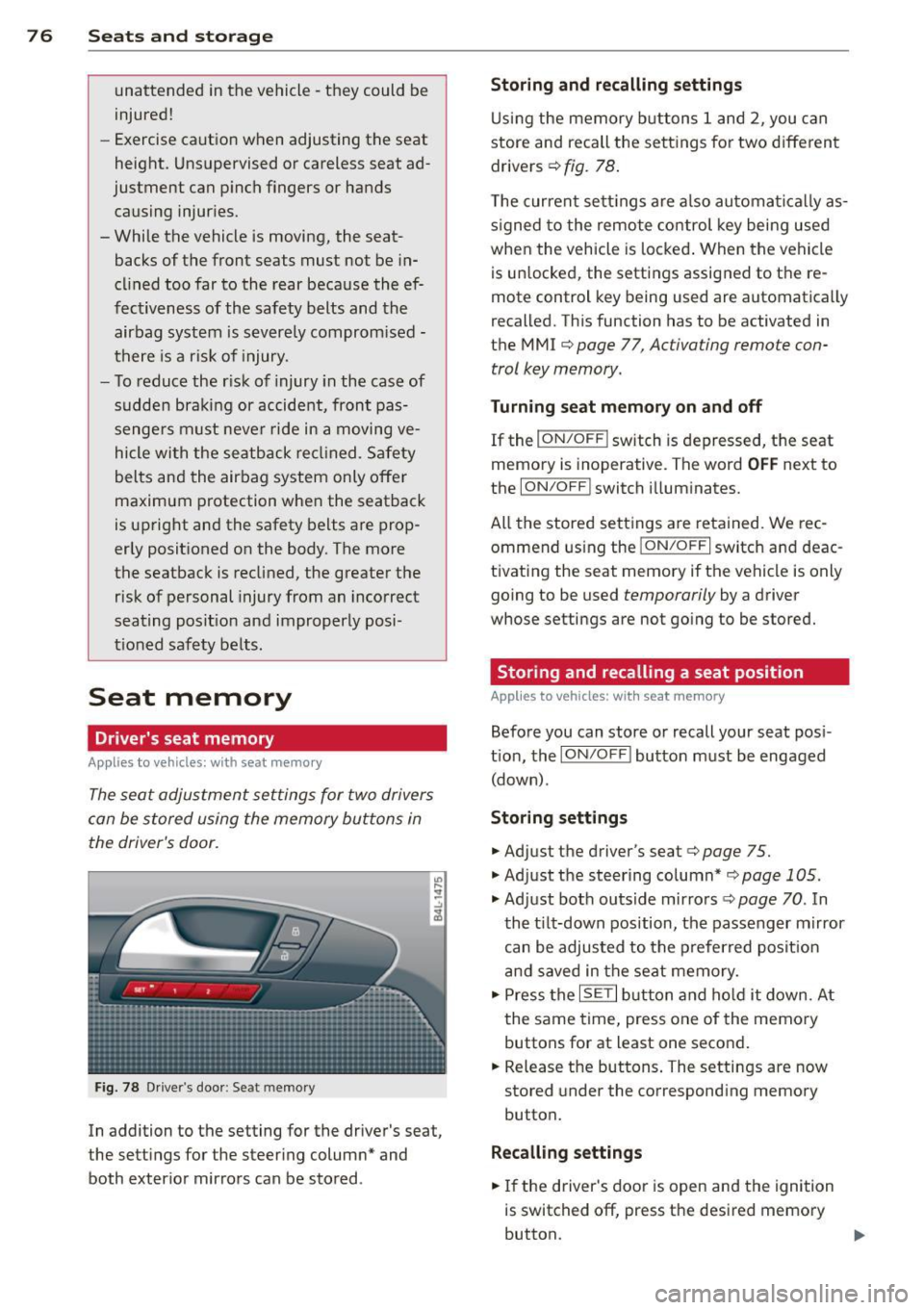
The seat adjustment settings for two drivers
can be stored using the memory buttons in
the driver's door.
Fig. 78 Driver's door : Seat memory
In addition to the setting for the driver's seat,
the settings for the steering column* and
both exterior mirrors can be stored .
Storing and recalling settings
Using the memory buttons 1 and 2, you can
store and recall the settings for two different
drivers¢
fig. 78.
The current settings are also automatically as
signed to the remote control key being used
when the vehicle is locked. When the vehicle
is unlocked, the settings assigned to the re
mote control key being used are automatically
recalled. This function has to be activated in
the MMI ¢
page 77, Activating remote con
trol key memory.
Turning seat memory on and off
If the I ON/OFF I switch is depressed, the seat
memory is inoperative. The word
OFF next to
the
ION/OFF ! switch illuminates.
All the stored settings are retained. We rec
ommend using the
ION/OFF I switch and deac
tivating the seat memory if the vehicle is only
going to be used
temporarily by a driver
whose settings are not going to be stored.
Storing and recalling a seat position
Applies to vehicles: with seat memory
Before you can store or recall your seat posi
tion, the
ION/OFF I button must be engaged
(down) .
Storing settings
.,. Adjust the driver's seat¢ page 75 .
.,. Adjust the steering column*¢ page 105 .
.,. Adjust both outside mirrors¢ page 70. In
the tilt-down position, the passenger mirror
can be adjusted to the preferred position
and saved in the seat memory .
.,. Press the
ISETI button and hold it down. At
the same time, press one of the memory
buttons for at least one second .
.,. Release the buttons. The settings are now
stored under the corresponding memory
button.
Recalling settings
.,. If the driver's door is open and the ignition
is switched off, press the desired memory
button.
...
Page 79 of 350
M N
0 ...J
'SI: ,...., \!) ..,.,
,...., ..,., ,....,
~ If the driver's door is closed or the ignition is
switched on, press the corresponding mem
ory button until the stored posit ion is
reached.
Successful storage is confirmed audibly and by the light in the
I SE TI button illuminating.
When the veh icle is
lo cke d, the current se t
tings are stored and assigned to the remote
contro l key. But the settings stored on memo
ry buttons 1 and 2 are not deleted. They can
be recalled at any time. When the vehicle is
unl ocked , the settings assigned to the remote
control key are restored.
If your vehicle is driven by other persons using
your remote control key, you shou ld save your
individual seat position on one of the memory
buttons. You can recall your settings again
simply and conven iently by pressing the corre
spond ing memory button . When the vehicle is
l ocked, these settings are automatically re-as
signed to the remote control key and stored.
_& WARNING
- For safety reasons, the seat se tting c an
only be recalled when the vehicle is sta
tionary -otherwise you risk having an ac
cident.
- In an emergency, the recall operation can be stopped by pressing the
ION/OFF I
button or by briefly pressing any given
memory button.
Activating remote control key memory
App lies to vehicles: with seat memo ry
To assign the driver's seat settings to the re
mote control key when locking the vehicle, the
function must be activated in the MMI.
~ Se lect : ICARI funct ion button > Sy stems *
control button > Seat adju stm ent > Dr iver 's
se at > Key mem. profi le> On.
Or
~ Select: I CARI funct ion button > Car syste m s*
control button > Vehicle setting s > Seats >
Driv er' s se at> Rem ote c ontrol k ey > On .
Seat s an d sto rage 77
(D Tips
If you do not want anothe r driver's set
tings to be assigned to the remote control key, switch off the memory function using
the MMI or the
I ON/OF F I button
-=> page 76.
Rear seats
General information
Safe transportation of passengers on the rear
seats requires proper safety pre cautions .
All passengers on the rear seats must be seat
ed in compliance with the safety guide lines
exp la ined in
-=> page 173 and -=>page 182 .
The correc t seat ing position is cr it ica l for the
sa fety of front
and rear seat passenge rs alike
-=> page 166 .
A WARNING
-Occupants in the front and rear seats
must always be properly restrained.
- Do not let anyone ride in the vehicle
without the head restraints prov ided.
Head restraints help to reduce injuries.
- Loose items inside the passenger com
partment, can fly forward in a crash or
sudden maneuver and injure occupants.
Always store articles in the luggage com
partment and use the fastening eyes, es
pecially when the rear seatbac ks have
been fo lded down .
- Read and heed all WARNINGS
-=> page 166, Proper seating positions
for passengers in rear seats .
Page 128 of 350
126 Adaptive cruise control
Stationary object ahead
The text message Stationary object ahead ap
pears, when you want to activate the system
and there is a stationary vehicle or an object
immediately in front of you .
Gradient too steep
The text message Gradient too steep appears
when the max imum gradient for proper ACC
operation has been exceeded. Adaptive cru ise
contro l is turned
off . A warning tone also
sounds as a reminder.
Shift lever position!
The text message Shift lever position! ap
pears when the selector lever is moved to po
sition
N . In this position, adapt ive cruise con
trol is not ava ilab le .
Driver intervention prompt
Applies to vehicles: with adaptive cruise co ntrol
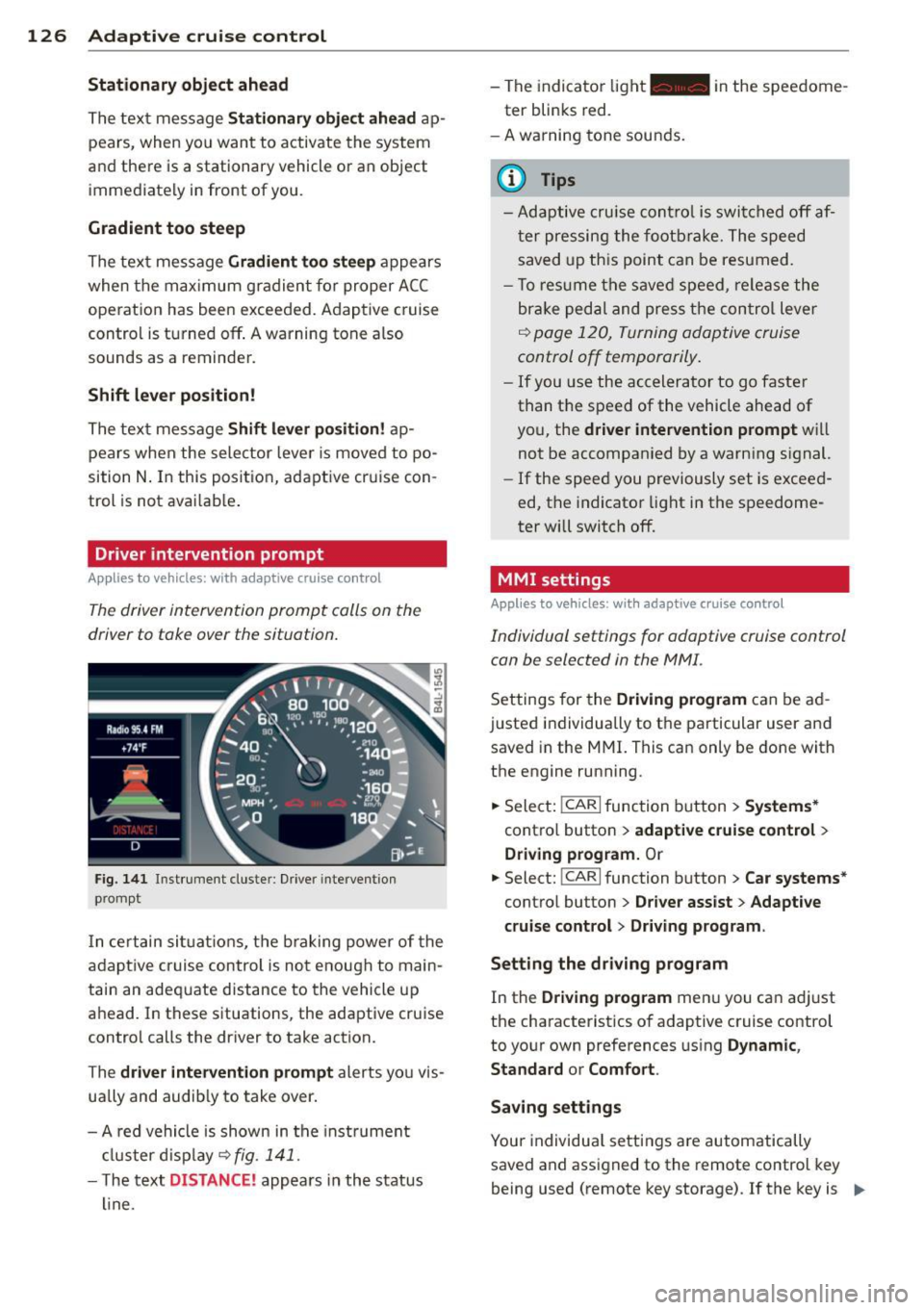
The driver intervention prompt calls on the
driver to toke over the situation.
Fig. 141 I n st rument clus te r: Drive r in terven tion
p romp t
In certain situations, the braking power of the
adapt ive cr uise control is not enough to main
tain an adequate distance to the vehicle up
ahead. In these situations, the adaptive cruise
control calls the driver to take action.
The
driver intervention prompt alerts you vis
ually and audib ly to take over.
- A red vehicle is shown in the instrument
cluster display ~
fig. 141 .
- The text DIS TANCE! appears in the status
line. -
The indicator light- in the speedome
ter blinks red.
- A warning tone sounds.
0) Tips
-Adaptive cruise control is switched off af
ter pressing the footbrake. The speed
saved up this point can be resumed.
- To res um e the saved speed , release the
brake pedal and press the control lever
~ page 120, Turning adoptive cruise
control off temporarily .
-If you use the accelerator to go faster
than the speed of the vehicle ahead of
you, the
driver intervention prompt will
not be accompanied by a warn ing s ignal.
- If the speed you previously set is exceed
ed, the indicator light in the speedome
ter will switch
off.
MMI settings
Applies to vehicles : with adaptive cruise contro l
Individual settings for adoptive cruise control
con be selected in the MMI.
Settings for the Driving program can be ad
justed individually to the particular user and
saved in the MMI. This can only be done with
the engine running .
.,. Select:
!CAR I function button> Systems*
cont ro l button > adaptive cruise control >
Driving program. Or
.,. Select: !CAR I function button > Car systems *
control button > Driver assist > Adaptive
cruise control
> Driving program .
Setting the driving program
In the Driving program menu you can ad just
the characteristics of adaptive cruise control
to your own preferences using
Dynamic,
Standard
or Comfort .
Saving settings
Your individual settings are automatically
saved and assigned to the remote control key
being used (remote key storage) . If the key is ..,_
Page 138 of 350

136 Audi side assist
but is not considered notable in the event of a
lane change, because it is dropping back so
quickly. The signal on the outside mirror does not light up¢.&.
in Safety tips on page 138.
@ Signal on outside mirror does not light
up
If you activate your turn signal in driving sit
uation @, the signal still does not light up on
the outside mirror¢.&.
in Safety tips on
page 138.
MMI settings
App lies to vehicles: with side assist
The basic brightness setting of the signal on
the outside mirror can be adjusted via the
MMI.
.. Select : I CARI function button> Systems*
control button > Audi side assist. Or
.. Select :
I CAR ! function button > Car systems*
control button > Driver assist > Audi side
assist.
The brightness of the signal light for both the
informational and alert stages is automatical
ly adjusted to ambient light conditions. In ad
dition, you can adjust the
basic brightness
separately, via the brightness function.
While making the adjustment, the new
brightness setting is displayed briefly . The
brightness displayed is that of the informa
tional stage signal. The alert stage signal
brightness is linked to the informational stage
signal brightness.
The informational stage signal brightness
should be adjusted so that you notice the sig
nal illumination when you look in the outside
mirror, but not when you look forward
through the windshield.
In very dark or light surroundings, the auto
matic brightness setting adjusts signal light
brightness to maximum or minimum intensi
ty, as needed. In circumstances such as these,
you may not notice any change in the bright
ness on the outside mirror when adjusting the
basic brightness.
You may not notice the change until lighting
conditions are normal again.
(D Tips
- Side assist is not active when the basic
brightness is adjusted. The signal light
comes on briefly to help you make the
adjustment.
- Your settings are automatically stored
and assigned to the remote control key
being used.
· General information '
App lies to vehicles : wit h side assist
Side assist has limits and cannot detect
vehicles under all road and weather condi
tions . Please remember system limitations
and never rely on the system, especially when:
- driving through curves¢
page 136,
-lanes are of different widths¢ page 137.
' When driving through curves
Applies to vehicles: wit h side assist
Side assist cannot detect vehicles in curves
with a turning radius of less than 328 feet
(100 m).
When driving through a curve, it is possible
that side assist may register a vehicle two
lanes over, and the signal on the outside mir
ror will light up.
Page 157 of 350

M N
0 ...J
'SI: ,...., \!) ..,.,
,...., ..,., ,....,
Adjusting the display and warning tones
Applies to vehicles: with rear park assist/Audi parking sys
tem plus with rearview camera/front- and rearview cam
era
The display* and warning tones can be ad
justed in the MMI.
~ Select: ICARI function button> Systems*
control button > Parking system. Or
~ Select: ICARI function button> Car systems*
control button > Driver assist> Parking aid.
Display*
- Off -when the parking system is switched
on, only audible signals are given.
-On -when the parking system is switched
on, either the visua l display or the picture
from the rearview camera is disp layed.
Warning tones
- Front volume* -front sensor volume
- Front frequency* -front sensor frequency
- Rear volume -rear sensor volume
- Rear frequency -rear sensor frequency
- In-car entertainment fader/Music volume
while parking -when the parking system is
switched on, the volume of the active audio
source is lowered.
The new ly adjusted value is briefly heard from
the signal generator .
(D Tips
- The warning tones can also be adjusted
direct ly by the visual disp lay* or the pic
ture from the camera*. Simply press the
Settings* control button.
- Changed settings are activated when
parking system is switched on again.
- The settings are automatically stored
and assigned to the remote control key
being used. Parking
systems 155
Error messages
Applies to vehicles: with
rear park assist/Audi parking sys
tem plus with rearview camera/front- and rearview cam
era
There is an error in the system if the LED in
the~ button* is blinking and you hear a con
tinuous alarm for a few seconds after switch ing on the park ing system or when the park
ing system is already activated .
If the error is
not corrected before you switch off the igni
tion, when you switch on the parking system
again, the LED in the ~ button* will blink. If
you activate the parking system with the but
ton in this case, the continuous warning tone
will continue to sound.
Parking system plus with front and
rearview camera*
There is another system error if:
- the~·· symbol appears in the display and
the corresponding display area is shown in
blue. The camera is not working in this area.
- all segments around the vehicles are red or
if no segments are displayed.
Drive to your authorized Audi dealer or au
thorized repa ir facility immediately to have
the malfunction corrected .
Trailer hitch
Applies to vehicles: with rear park assist/Audi parking sys
tem plus with rearview camera/front- and rearview cam
era and trailer hitch
For vehicles using the trailer socket, the park
ing system rear sensors do not turn on when
you shift into reverse gear or when you press
the~ button*. This results in the follow ing
restrictions:
Rear park assist*
There is no warning for distances to the rear.
Audi parking system plus with rearview
camera/front and rearview camera*
There is no distance warning for the rear. The
front sensors remain activated. The visual dis play switches to the trailer towing mode. The
rearview camera image will not show the ori-
entat ion lines and the blue surfaces . ..,.
Page 331 of 350

M N
0 ..J
'SI: ,...., \!) 1.1'1 ,...., 1.1'1 ,....,
Technical Modifications
Our guidelines must be complied with when technical modifications are made .
Always consult an authorized Aud i dealer be
fore starting work on any modifications.
This will he lp ensure that vehicle function,
performance and safety are not impaired
¢ .&. .
Attempting to work on electronic components
and the software used with them can cause
malfunctions. Beca use of the way electronic
components are interconnected with each
other, such malfunctions can also have an ad
verse affect on other systems that are not di
rectly involved . Th is means that you r isk both
a substantial reduction in the operational
safety of you r vehicle and an inc reased wea r of
vehi cle parts¢ _&..
Author ized Audi dealers w ill perform th is
wo rk in a professiona l and competent ma nner
or, in spec ial cases, refer you to a p rofessional
company that specializes in such mod ifi ca
tions .
_& WARNING t= -
Improper repairs and modifications can
change the way vehicle systems wo rk and
cause damage to the veh icle and ser ious
personal injury.
(D Note
If emergency repairs must be performed
elsewhere, have the veh icle examined by
an authorized A udi dealer as soon as possi
ble.
Con sumer In formation 329
Declaration of
Compliance, Telecom
munications and
Electronic Systems
Radio Frequency Devices and Radio Communi
cation Equipment User Manual Notice.
The manufact urer is not responsib le for any
radio or TV interference caused by unauthor
ized modifications to this equipment.
Device s
The following devices each comply wi th FCC
Part 15 .19, FCC Part 15.2 1 and RSS -Gen Iss ue
1:
- Adaptive cr uise con trol
- Conven ience key
- Aud i side assist
- Cell phone package
- Electron ic immobilizer
- Homelink universa l remote control
- Remote control key
FCC Part 15.19
Th is device complies with part 15 of the FCC
Ru les . Operation is subject to the fo llow ing
t wo conditions:
(1) This device may not cause harmful i nter
ference, and
(2) this device must accept any interference
received, including interference that may
cause undes ired operation .
FCC Part 15 .21
CAUTION:
Changes or mod ificat ions no t expressly ap
proved by the pa rty responsible fo r compli
ance could void the user's aut hority to operate
the eq uipment .
RSS-Gen Issue 1
Operation is sub ject to the fo llow ing two con
di tions :
(1) this device may not ca use inte rference,
and
•
•
Page 336 of 350
334 Index
Controls .... .. .. ..... ... .. .. .... .. 95
Defrosting/defogging . . . . . . . . . . . . . . . 97
Descr ipt ion .. .. ... .... ... .. .. .... .. 94
Energy management . . . . . . . . . . . . . . . . 94
Fan . .. .. .... ........... ........ .. 97
Front seat ventilation ...... ... .. ... 103
H eated seats, front ....... .. .. .. .. . 103
Key coded sett ing .............. ..... 94
Recircu lation mode (automatic) . .. ... 102
Recommended se ttings .............. 94
Residua l heat ... ...... ... .. .. .... .. 96
Setting the temperature ... .. .. .... . .
9 7
Supp lementary heater ... .. .. ... ... . 103
Synchron izat ion ............ .. .... . 102
Turn ing on and off ........ .. .. .... .. 96
Using climate control economically .. .
100
Clock ... .... ... . ...... ... .. .. .... .. 1 1
C losing
P anoramic slid ing su nroof .. .. .. .. .. . .
55
Coat hooks . . . . . . . . . . . . . . . . . . . . . . . . . 92
Cold ti re inflat ion p ressure ... .. .. .... . 278
Compass m irror ..... ...... .. .. .. .. .. 72
Comp liance .. ............. .. .. .. ... 329
Consumer Info rmation . . . . . . . . . . 1 70, 326
Contact ing NHTSA ...... .... ... .... .
170
Controls
Cleaning ... ... .. ..... ... .. .. .... .
245
Conve nience key ........... .. .. .... .. 49
Dr iver messages ........ .. .. .. .. .. . 1 10
Lock ing vehicle . .. ..... ... .. .. .... .. 50
START button .. .. ..... ... .. .. .... . 109
Starting engine ....... ... .. .. .... . 109
STOP button ............... .. .... . 110
Switching engine off ............... 110
Switching on ignition .. ..... ..... .. . 109
Unlock ing vehicle .......... ... .. .... 49
Convertible c hil d safety seats . ... .. .. . 210
Conve rtible locking retracto r
Activating ........................
215
Deactivating . .. .. ..... ... .. .. .... . 216
Using to secure a chi ld safety seat
213, 2 15
Coolant system ................. .... 262
Cooling box in g love compartment .. ....
91
Cooling System
Expansion tank . .. ..... ... .. .. .... . 263
Corner ing light .. .... ...... .. .. .. .. .. 62 Cruise cont
ro l
Changing speed .. .. ... ..... ... .. ..
113
Presett ing your speed . . . . . . . . . . . . . . 114
Switching off ..................... 114
Switching on ..... ............. .... 113
Warning/ind icator lights ........... .. 18
also refer to Adaptive cruise control ... 115
Cruising range . . . . . . . . . . . . . . . . . . . . . . . 24
(u pholder . . . . . . . . . . . . . . . . . . . 81, 88, 89
D
Damp ing
refer to Adapt ive A ir Suspension . 157, 159
Data recorder ... .. ............. .. .. 223
Date d is p lay . . . . . . . . . . . . . . . . . . . . . . . . 11
Daytime run ning l ights. . . . . . . . . . . . 60, 61
Declarat ion of compliance
Adaptive cruise control .............
329
Audi side ass ist ................... 329
Cell phone package ................ 329
Convenience key .. .. ... ....... ... .. 329
E lectronic immob ilizer ............. . 329
Homelin k universal remo te control ... 3 29
Remote con tro l key ............ .... 3 29
Decorative parts/tr im
Cleaning ...... .................. .
244
def
What does this mean when it appears in
the tr ip odometer display? ...........
12
Defective light bu lb warning . ... .. .. .. . 23
Defrost ing/defogg ing the w indows ... .. . 97
Defrost ing/defogging windows ......... 99
De term ining co rrect load limit ........
288
Diesel fuel . . . . . . . . . . . . . . . . . . . . . . . . . 249
Diesel pa rticulate f ilter . . . . . . . . . . 36, 231
Digital cloc k . . . . . . . . . . . . . . . . . . . . . . . . 11
Digital compass . . . . . . . . . . . . . . . . . . . . .
72
Digital speedometer . . . . . . . . . . . . . . . . . . 22
Dime nsio ns .. ... ...................
324
D imming the rearview mirror ... .. .. .. . 71
D ip st ick
Reading the d ipst ic k properly ........ 260
Displays Cleaning . . . . . . . . . . . . . . . . . . . . . . . . .
245
Distance control system
refer to Adapt ive cruise control ..... .. 115
Page 337 of 350
M N
0 ...J
'SI: ,...., \!) 1.1'1 ,...., 1.1'1 ,....,
Doors
Power child saf ety lock . ... .. .. .. .. .. 48
Dr iver information system ... .. .. .. .. .. 2 1
Di gita l speedomete r ...... .. .. .. .. .. 22
D river info rmation messages . . . . . . . . . 30
Open door or rear lid warning . . . . . . . . . 22
Outside temperature display . ... .. .. .. 22
Sound system display .. ... .. .. .. .. .. 21
D river seat
refer to Seat ing pos it ion ... .. .. .. .. . 164
Driver's seat ................. .... ... 75
Driver's seat memory . . . . . . . . . . . . . . . . . 76
Activating remote control key . . . . . . . . . 77
Recall ing a seat posit ion ... .. .. .. .. .. 76
Sto ring a seat position . . . . . . . . . . . . . . . 76
D riving messages . . . . . . . . . . . . . . . . . . . . 30
Driving mode
refer to Adaptive Air Suspe nsion. 157, 1 59
Driving offroad Driving through water ......... ... .. 236
Driving tips .... ........... ... ... .. 235
Rul es of behav io r ............ .. .... 235
S and and m ud ........... .... .. .. . 236
Snow-covered groun d ..... .. .. .. .. .
236
Unpaved roads ........... .... .. ... 23 6
Driving safe ly .......... ...... .... .. 163
Driving through water ... ... .. .. .. .. . 236
D riving t ime . . . . . . . . . . . . . . . . . . . . . . . . 24
Duplicate key . . . . . . . . . . . . . . . . . . . . . . . 38
D ust filter
Climate controls . . . . . . . . . . . . . . . . . . . . 94
E
Easy en try featu re .. ..... ... .. .. .. .. . 10 6
E fficiency program . . . . . . . . . . . . . . . . . . . 26
Fue l economy messages . ...... ... ... 27
M emory levels . . . . . . . . . . . . . . . . . . . . . 25
Othe r equipmen t ......... .. .. .. .. .. 2 7
Electric seat adjustment
refer to Power seat . . . . . . . . . . . . . . . . . 7 5
Electro nic differential lock (EDL) . ... .. . 223
Warn ing/ indicator lights . . . . . . . . . 16, 18
E le ctr onic immobili ze r ...... .. .. .. .. .. 40
Electronic power co ntrol
( E PC) wa rn ing/indicator light ... ... ... 15
Electronic speed limiter . . . . . . . . . . . . . . . 28
Inde x 335
Electronic Stabilization Cont ro l (E SC) ... 223
Hill descent contro l ..... .... ... .. .. 224
•
Offroad mode .. .. .. . .. ... .... ... .. 224 •
Warning/ind icator lights .......... .. . 16
E merge ncy flashe r . . . . . . . . . . . . . . . . . . . 63
Wa rning/ind icator lights ..... ... .. .. . 16
Emergency locking of doors ............ 45
Emergency operation Rear lid . .. .. .. .. .. ............... . 48
Emergency starting . .. .. ..... ... .. .. 317
Emerge ncy towing ... . .. .. .. ... ... .. 319
Energy management ... .. .... ... .. .. 228
Battery power . .. .... ........... .. 229
Driver notification ................. 229
Engine Compartment .... .. . .. .. ..... ... .. 258
Coolant ... .. .... .. . .. .. ..... ... .. 262
Data ..... .. .. .. ... ............ .. 325
Hood ..... .. .. .. ................. 256
Start ing . . . . . . . . . . . . . . . . . . . . 107, 108
Starting with jumpe r cables ........ . 317
Stopping ........ .. ............... 108
Engine compartment
Safety instr uctions .. ........... .... 256
Work ing the eng ine compartment .. .. 256
Engine coolant system . .. ..... ... .. .. 262
Adding coo lant ..... . .. .. ..... ... .. 264
Checking coolant level .............. 263
Checking the engine coolant level ... .. 263
Malfunction . . . . . . . . . . . . . . . . . . . . . . . 32
Radiator fan ..... .. ............... 265
E ngine coolant temperature
Temperat ure gauge ............ .... . 10
E ngine hood
Closing ... .. .... .. . .. .. ..... ... .. 2 56
How to re lease the hood ..... ... .. .. 256
Engine o il ..... ... .. ............... 258
Adding ... .. .. .. ............... .. 261
Addi tives .... .. ...... ........... .. 261
Chang ing ... .. .... .. ... ..... ... .. 261
Checking the engine oil leve l .. ... .. .. 260
Consumption . ..... . .. .. ..... ... .. 259
Ind ications and conditions requir ing ex-
tra checking . .. .. ............... .. 260
Oil grades . .. .. .. ................. 258
Recommended oil check intervals . .. .. 260
Spec ificat io n and viscosity .......... . 258
Page 338 of 350

336 Index
Engine oil level ................ .... .. 36 Fan
Engine oil pressure
M alfunct ion .. ........... .... .... .. 33
Eng ine oil sensor defective .. .. .. .... .. 36
E ngine speed limitation ..... .. ... ... .. 36
Entry assist
Rear seats . . . . . . . . . . . . . . . . . . . . . . . . . 78
Environment Break- in period ........... .... .... . 230
Cata lytic converter ............ .. ... 231
D iesel particulate filter . ... .. .. .. .. . 231
Disposing of your vehicle battery .. .. . 270
Dr iving at high speeds ... .. .. .. .. .. . 232
Dr iving to minim ize pollution and noise 232
Fu el ... .. .. .. . .. ........ .. .. .... . 250
Fu el economy .. ........ .. .. .. .... . 232
Leaks under your vehicle ... .. ... ... . 256
Lett ing the vehicle stand and warm up . 233
Proper disposal of dra ined brake fluid . 266
Proper disposal of dra ined engine coo l-
ant ..... .. ................ ... ... 264
Proper disposal of dra ined engine oil .. 261
Recycling used engine oil ... .. .. .. .. . 261
Unleaded fuel ................ ..... 248
What should I do with an old battery? 270
EPC
refer to Electron ic power control .. .. . . 1 5
E SC
refer to E lectronic Stab ilizat ion Control
(ESC) .. .. ................. .. .... .. 16
E vent Data Recorder (EDR) ... .. ... ... . 223
Exhaust tail pipes Cleaning ................ .. .. .... . 244
Expansion tank ............ .. .. .... . 263
E xplanation of some technical terms ... 235
Exterior lighting in the mirror housing 62
Exterior m irrors
Ad justing ............... .... .... .. 70
Dimming . .. ............. .. .. .. ... . 71
H eating .. .. ... .. .. ... ... .. .. .. .. .. 70
Eyeg lasses compartment .......... .. . . 92
F
Fal l lin e ... ... ............ .... .. .. . 235 Four-zone
automatic comfort air condi-
t ion ing ... .. .. .. ... .......... .. .. 101
Radiator .. .... .. ............. .... 265
Fastening Booster seats . . . . . . . . . . . . . . . . . . . . . 211
Convertible child safety seats ...... .. 210
Infant seats ..... ... .......... .. .. 209
Flat tire
Changing . .. .. . .. ............ .. .. 307
Floor mats ...... .. .......... ...... . 168
Fog lights . ..... .. .. ........... .. .. . 61
Folding chocks .. . .. ............ .. .. 304
Folding master key with remote control .. 38
F oot pedals ..... .. .. ........... .. .. 168
For the sake of the environment
Gasoline fumes and the env ironment .. 250
Letting your eng ine warm up .... .. .. 108
Reducing engine noise by early upshift-
ing ............................... 10
Refueling ..... .. ... .......... .. .. 250
Sav ing f uel by early ups hifting ... .. .. . 10
Using the rear window defogger ...... . 98
Four -zon e automatic comfort air condi-
tioning ... .. .... .. ... .. .......... .. 100
Automatic mode in rear ............. 101
Heated rear seats ... ........... .. .. 104
Rear air distrib ution . . . . . . . . . . . . . . . . 102
Rear controls .. .. ............. .... 100
Rear fan .... ... . ... ... .... ... .. .. 101
Rear operation . .. ................ . 103
Rear temperature ...... ........... . 101
Synchronization ............... .... 103
T urning on/off . .. ............. .... 101
Front a irbags
Description ...... ................ . 186
How they work ... ... ... .... ..... .. 191
Frontal coll is ions and the laws of phys ics 17 4
F ron t fog lights .. .. ............. .. .. . 61
Front seats . . . . . . . . . . . . . . . . . . . . . . . . . 7 4
Adjusting ..... .. .......... ...... . 165
Child restraints in the front seat ...... 184
Fuel Additives ...... .. ............. .... 248
B len ded gaso line ...... .. ... ..... .. 248
Consumption .. .. ................ .. 24
Filler neck ..... .. ..... ........... . 250
Page 340 of 350
338 Index
Improperly worn safety belts ..... .... . 180
Indicator lights . . . . . . . . . . . . . . . . . . . . . . 14
Airbag system ........... .... .. .. . 193
PASSENGER AIR BAG OFF .. .. .. .. .. . 193
Infant seats ....................... 209
In flatable spare tir e ............ .... . 305
Inflating .................. .. .... . 306
Installing child safety seats
Safety belts . . . . . . . . . . . . . . . . . . . . . . 213
Installing the upper tether strap on the
anchorage ... ... .. ..... ......... .. . 221
Instrument cluster illumination ..... ... 13
Instruments and controls ... .. .. .... .. 10
General illustration .................. 8
Interior lights Front ........... ............. ... .. 64
Rear .. .. .. .. . .......... .. .. .... .. 64
Intermittent wiping Rain sensor .............. .. .. .. .. .. 66
l
Jack .. .. .. .. ................. .... . 304
Jump -starting .............. ........ 317
Jumper cables .................. ... . 318
K
Key ... .. .. .. .. . .......... .. .. .... .. 38
Ba ttery replacement . . . . . . . . . . . . . . . . 40
Coded settings ................ ... .. 94
Convenience opening and closing of win-
dows .... ..... .... ..... ... .. .. .. .. 53
Emergency key . . . . . . . . . . . . . . . . . . . . . 38
Key replacement . . . . . . . . . . . . . . . . . . . 38
Master key . . . . . . . . . . . . . . . . . . . . . . . . 38
Valet key . . . . . . . . . . . . . . . . . . . . . . . . . . 38
Key coded settings Climate controls . . . . . . . . . . . . . . . . . . . . 94
Keyless entry remote control ... .. .. .. . . 38
Kick-down tiptronic ................... ...... 143
L
LATCH 216
D escription ................. ..... . 217
Guidance fixtures for lower anchorages 218 Installing a child restraint .......
.. .. 219
Location . . . . . . . . . . . . . . . . . . . . . . . . . 217
Mounting and releasing the anchorage
hook . .... .... .. ............. .... 219
Lateral angle .... .. ............. .... 235
Leather cleaning/protection ......... . 245
Level adjustment
refer to Adaptive Air Suspension. 157, 159
Lifting jack . .. .. .. ... .......... .. .. 309
Lifting vehicle ..... ................ . 321
Light
refer to Ambience lighting . . . . . . . . . . . 65
Lighting
refer to Ambience lighting . . . . . . . . . . . 65
Lighting in the mirror housing . .. ....... 62
Lights ......... .. ................ .. 60
Coming home ...................... 61
Daytime running lights ....... .. .... . 61
Emergency flashers . . . . . . . . . . . . . . . . . 63
Exterior lighting in the mirror housing . . 62
Exterior lights ........ ........... .. 61
Front fog lights .. .......... ...... .. 61
Headlights .... .. ............. .... . 60
High beam . . . . . . . . . . . . . . . . . . . . 60, 63
High beam warning/indicator light .. .. . 18
Interior/reading . . . . . . . . . . . . . . . . . . . . 64
Leaving home .... ................ .. 61
Rear fog lights ... ............... .. . 62
Side marker lights . . . . . . . . . . . . . . . . . . 60
Turn signals . ... . ... ... .... ... .. .. . 63
Xenon headlights . . . . . . . . . . . . . . . . . . . 60
Light sensor defective .............. .. 35
Loading the luggage compartment . .... 169
Loading the roof rack ............ .... . 87
Locking Power locking switch .............. .. 44
Rear lid/trunk lid ................ .. . 45
Remote control key ............ .... . 43
Using the key .. .. ............. .. .. . 43
Low er universal anchorage bars (Canada) 216
Lower universal anchorages (Canada) 216
Luggage Stowing ......................... 169
luggage compartment
Tie-down rings ... ................ .. 83