ignition AUDI Q7 2017 Owner´s Manual
[x] Cancel search | Manufacturer: AUDI, Model Year: 2017, Model line: Q7, Model: AUDI Q7 2017Pages: 402, PDF Size: 100.39 MB
Page 47 of 402
Panorama glass roof
Panorama glass roof, opening/closing the
sunshade
Applies to: vehicles with panorama glass roof
The front segment can tilt and slide open.
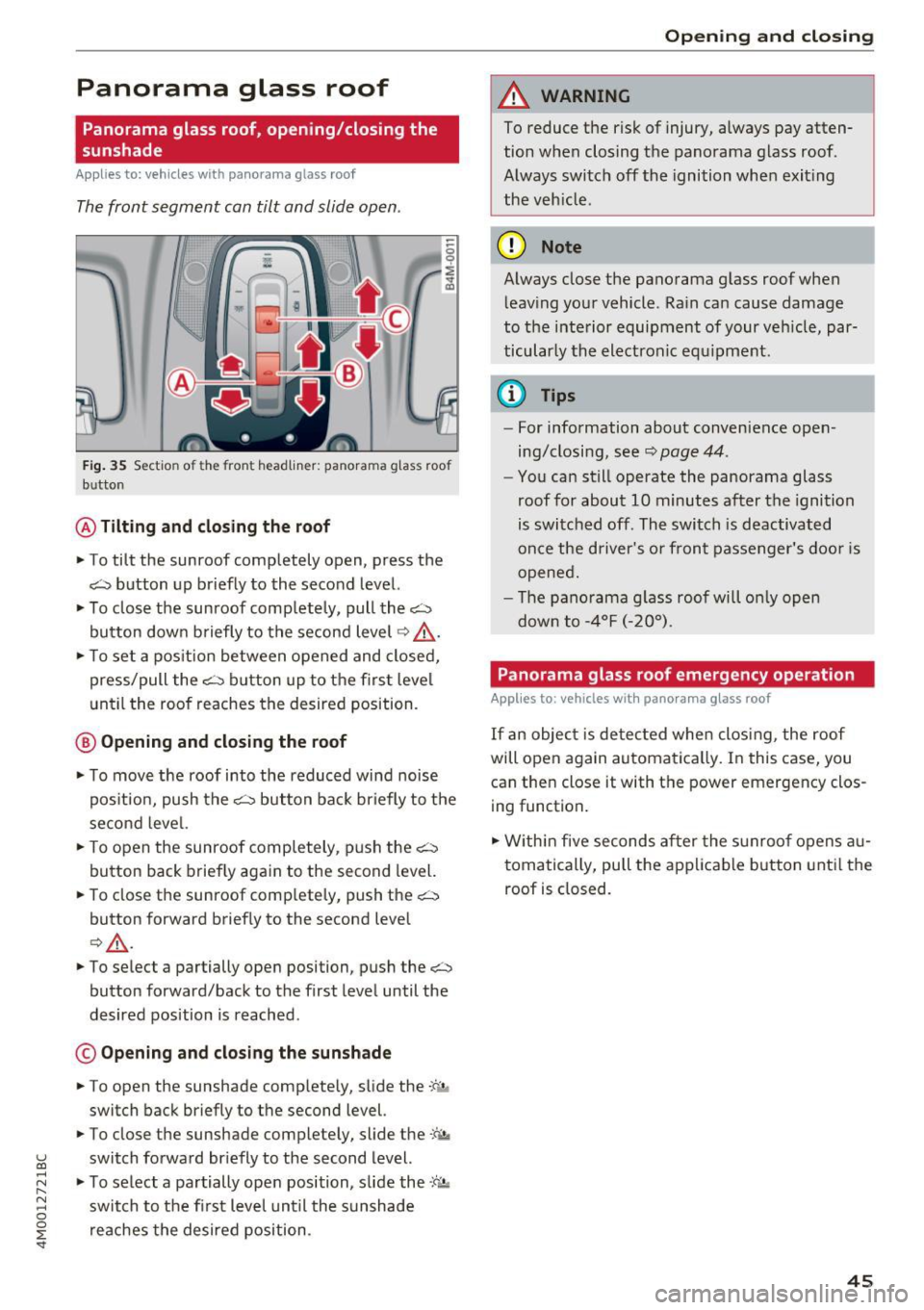
Fig. 35 Section of the front headliner: panorama glass roof
b utton
@ Tilting and closing the roof
• To tilt the sunroof completely open, press the
~ button up briefly to the second level.
• To close the sunroof comp letely, pull the~
button down briefly to the second level ¢&,. .
• To set a position between opened and closed,
press/pull the~ button up to the first level
until the roof reaches the desired position.
@ Opening and closing the roof
• To move the roof into the reduced wind noise
pos ition, push the~ button back briefly to the
second level.
• To open the sunroof completely, push the~
button back briefly again to the second level.
• To close the sunroof completely, push the~
button forward briefly to the second level
Q A .
• To select a partially open position, push the~
button forward/back to the first level until the
desired position is reached.
© Opening and clos ing the sunshade
• To open the sunshade comp letely, slide the .;r- ;,.
switch back briefly to the second level.
• To close the sunshade completely, slide the
:ft.,,
~ switch forward briefly to the second level.
...... ~ • To select a partially open position, slide the ~c-'.!.
~ switch to the first level until the sunshade 0
~ reaches the desired position .
A WARNING
-To reduce the risk of injury, always pay atten-
tion when closing the panorama glass roof.
Always switch off the ignition whe n exiting
the vehicle.
(D Note
Always close the panorama glass roof when
leaving your vehicle . Rain can cause damage
to the interior equipment of your vehicle, par
ticularly the electronic equ ipment.
{D Tips
- For information about convenience open
ing/closing, seer;::;,
page 44.
-You can still operate the panorama glass
roof for about 10 minutes after the ignition
is switched off. The switch is deactivated
once the driver's or front passenger's door is
opened.
- The panorama g lass roof will on ly open
down to -4°F (-20°).
Panorama glass roof emergency operation
Applies to: vehicles with panorama glass roof
If an object is detected when closing, the roof
will open again automatically. In this case, you
can then close it with the power emergency clos
ing function.
• Within five seconds after the sunroof opens au
tomatically, pull the applicable button until the
roof is closed.
45
Page 49 of 402
u co ...... N r--... N ...... 0
0
:E: '
rage door opener> Program button 1 /Pro
gram button 2 /Program button 3
(repro
gram). The yellow LE D ® blinks .
.,. Follow the instructions in the Infota inment sys-
tem .
Synchronizing a button1>
Requirement: the button must already be pro
grammed and must be synchronized with the
system that you would like to program .
.,. Switch the ignition on .
.,. Press the button in the headliner that you
would like to synchroni ze .
.,. Follow the instructions in the Infota inment sys-
tem .
Deleting button programming
The programmed buttons cannot be deleted indi
vidually . They must be deleted all at once . Repro
gram the buttons if necessary .
.,. Switch the ignition on .
.,. Select in the Infotainment system:
!MENUI but
ton
> Vehicle > left contro l button > Vehicle
settings > Garage door opener > Delete button
programming > Yes, delete now.
Displaying the version/status/country code
.,. Select in the Infotainment system: !MENUI but
ton
>V ehicle > left contro l button >Vehicle set
tings > Garage door opener > Version informa
tion .
{D) Tips
-The garage door opener may need to be
synchronized with the system motor after
the programming. Follow the manufactur
er 's instructions for doing this.
- The programming process can take up to 30 seconds. The hand transmitter may need to
be operated again during the process.
- Make sure the batteries in the hand trans
mitter are charged before starting the pro
gramming process.
l) Onl y appl ie s to rolling code systems
Opening and closing
- In some cases, the system must be pro
grammed using an alternative mode. Select
in the Infotainment system:
!MENU !> Vehi
cle
> left control button > Vehicle settings >
Garage door opener > Program garage door
opener >
right control button > UR-Mode/
D-Mode .
47
Page 50 of 402
Lights and Vision
Lights and Vision
Exterior lighting
Switching the lights on and off
M
::== === =----======= ~!
:,
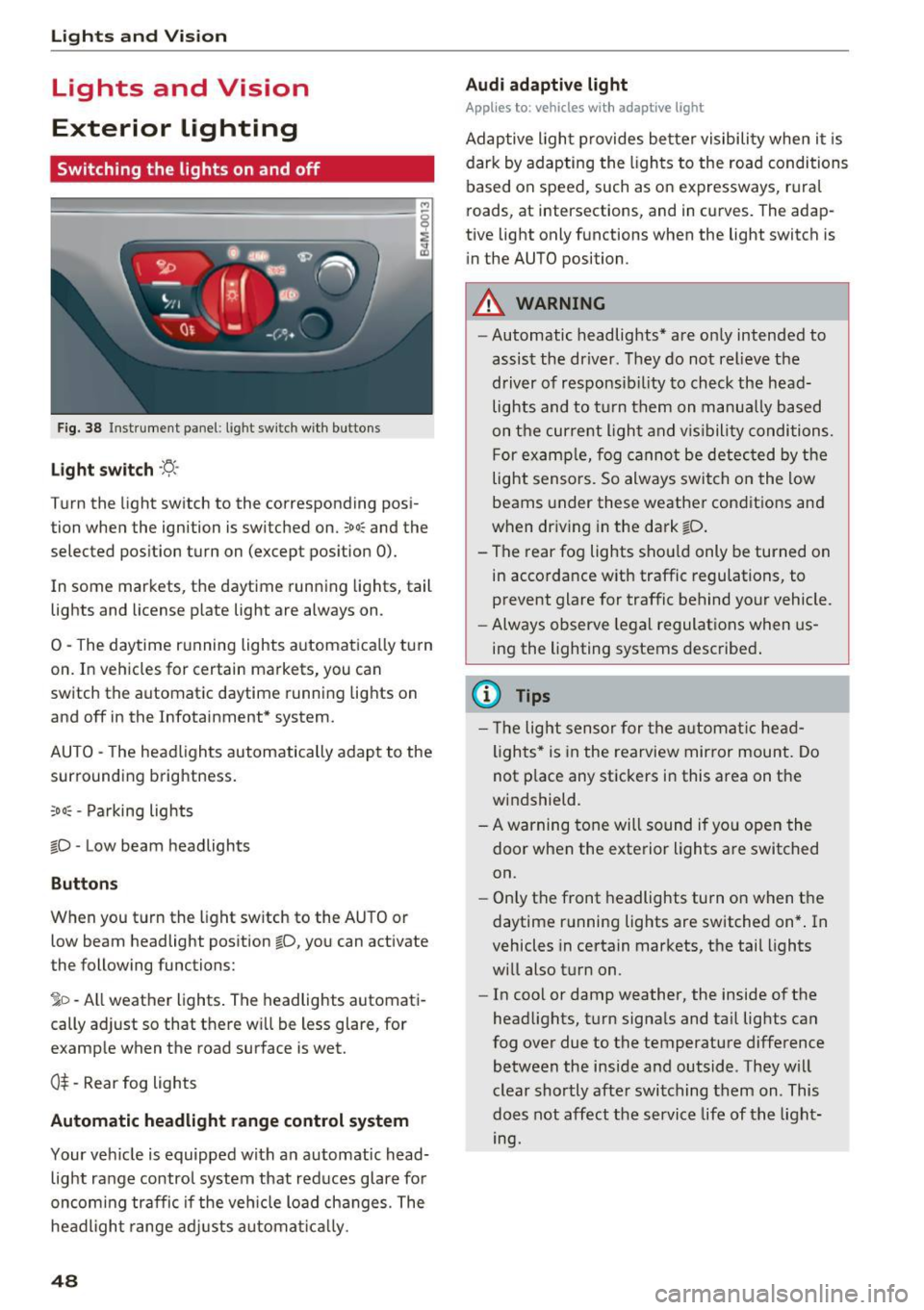
Fig. 38 Instrument panel : lig ht sw it c h w ith buttons
Li ght switch ·ti:
Turn the light switch to the corresponding posi
tion when the ignition is switched on.
;oo: and the
selected pos ition turn on (except pos ition 0).
In some markets, the daytime running lights, tail lights and license p late light are always on .
0 -The daytime r unning lights a utomatica lly turn
on. In veh icles for certain markets, you can
sw itch the automatic daytime runn ing lights on
and off in the Infotainment* system.
AUTO - The headlights automatically adap t to the
surrounding brightness.
;o o: -Pa rking lights
tD -Low beam headlights
Buttons
When you t urn the light sw itch to the AUTO or
low beam headlight position
tD , yo u can activate
the following functions:
jD -All weather lights . The headlights automati
cally ad just so that there w ill be less glare, for
example when the road surface is wet.
0$ -Rear fog lights
Automatic headlight range control system
Your vehicle is equipped with a n automatic head
light range contro l system that red uces glare for
oncom ing traffic if the veh icle load changes. The
headligh t range ad justs a utoma tically .
48
Audi adaptive light
App lies to: vehicles with adaptive light
Adaptive ligh t provides be tter visibility when i t is
dark by adapting the ligh ts to the roa d conditions
based on speed, such as on expressways, r ura l
roads, at intersections, and in curves. The adap
tive light only functions when the light switch is
i n the AUTO position .
A WARNING
-Automatic headlig hts* are on ly intended to
assist the driver . They do not relieve the
driver of responsib il ity to check the head
lights and to t urn them on manua lly b ased
on t he curre nt ligh t and v is ibility conditions.
F or exa mple, fog cannot be detec ted by the
light sensors. So always switch on the low
beams under these weather condit ions and
when dr iv ing in the dark
tD .
- T he rear fog lights shou ld only be turned on
in acco rdance w ith traffic regulations, to
prevent glare for traffic behind your vehicle.
- Always observe le g al regulat ions when us
ing the lighting systems desc ribe d.
{l) Tips
- Th e light sensor for the a utomat ic he ad
ligh ts * is in the rearview mir ror mount. Do
not p lace any stickers in this area on the
w indshield .
- A warning tone will sound if yo u ope n the
door when the exte rior Lights a re switched
on.
- Only the front headlights turn on when t he
daytime running lights are switched on* . In
vehicles in certain markets, t he tail lights
w ill also t urn on .
- In cool or damp weather, the inside of t he
head lights, t urn signa ls and ta il lig hts can
fog over due to the temperature difference
between the inside and outside . They w ill
clear shortly afte r swi tching them on . This
does not affect the service life of t he light
mg.
Page 55 of 402
u co ...... N r-... N ...... 0
0
:E: '
Q/ P -adjusting the left/right exter io r mir ror.
Move the knob in the desired direction .
®-Heating* the mirror glass depending on the
outside temperature .
8 - Folding exterior mirrors* . To fold the mirrors
out, turn the knob to one of the other pos itions .
In the Infotainment system, you can select if the mirrors fo ld in automatically when you lock the
ve hicle
9 page 39.
Front pa ssenger' s exterio r mirror tilt
function*
To help you see the curb when back ing into a
pa rking space, the surface of the mirror tilts
slightly . Fo r th is to happen, the knob m ust be in
the posit io n for the front passenger's exterior
mirror.
You can adjust the t ilted m irror surface by turn
ing the knob in the desi red direction. When you
move ou t of reverse and into another gear, the
new mirror position is stored and assigned to the
key you are using.
The mir ror goes back into its orig inal position
once yo u drive forward faster than 9 mph
(15 km/h) or turn the ignition off .
A WARNING
Curved mirror surfaces (for examp le convex)
enlarge the f ield of vision . However, they
make objects in the mirror appear sma ller
and farther away. Your may estimate incor
rectly whe n you use these m irrors to gauge
your distance from the vehicles behind you
when changing lanes, wh ich increases the r is k
of an accident.
(D Note
- Applies to vehicles with power folding exte
rior mirrors: if the mirror housing was
moved by outside forces (such as an impact
whe n maneuvering), yo u m ust use the pow
e r folding func tion to fo ld the mi rror all the
way o ut. The mirro rs will make a loud no ise
when they latch into place . The mir ror hous
ing must not be moved back into place by
Light s and Vision
hand because this would impai r the func
tion of the mirror mechanism.
- Applies to vehicles without power folding
exterior mirrors: if the mirror housing was
moved by outside forces (such as an impact
when maneuvering), you must move it back
in place by hand .
- If you wash the vehicle in an automatic car
wash, you must fold the exter ior mirrors in
to reduce the r isk of damage to the m irrors.
Never fold power fo ld ing exter ior mirrors*
by hand . On ly fold them in and out us ing
the power controls.
(D Tips
- If the power adjusting function malfunc
tions, the glass in both mirrors can be ad
justed by p ressing on the edge of it by hand .
- The exterior m irror settings are stored w ith
the memory funct io n*
9 page 64 .
Dimming the mirrors
Your vehicle is equipped with a manual or auto
matic* dimming rearview mirror .
Manual dimming rearview m irror
.. Pull the lever on the bottom of the m irror back.
Automat ic dimming rearview mirror*
.. The inte rior and exte rior m irrors d im a utomat i
cally when light s hines on them, for examp le
from headlights on a veh icle beh ind you.
A WARNING
=
If the g lass on an a utomatic dimming m irro r
b reaks, electro lyte can leak out. This liquid
can irritate the skin, eyes and respiratory sys
tem. If there is contact w ith the fluid, flush
immediately w ith p lenty of water. Consult a
physic ian if necessa ry .
- Repeated or long-term exposure to e lectro
lyte fl uid can lead to ir ritation of the air
ways, especia lly in peopl e with ast hma o r
o ther respiratory condi tions. Take deep
b rea ths immedi ately afte r leaving the vehi
cle or, if this is not poss ible, open all of the
doors and windows as wide as possib le .
53
Page 58 of 402

Lights and Vi sion
from switching on unintentionally and ca us
ing damage to the windshield wiper system.
@ Tips
- The windshield wipers switch off when the
ignition is switched off. You can activate the
windshield wipers after the ignition is
switched back on by moving the windshield
wiper lever to any pos it ion.
- Worn or dirty windshield wiper blades result
in streaking. This can affect the rain sensor
funct ion. Check your windshield wiper
blades regularly.
- The washer fluid nozzles for the windshield
washer system are heated at low tempera
tures when the ignition is on .
- When stopp ing temporarily, such as at a
traffic light, the speed of the windshield
wipers automatically reduces by one level.
Cleaning the wiper blades
Clean the wiper blades when you see wiper
streaks. Use a soft cloth and a glass clea ne r.
Windshield wiper
"' Place the windshield wiper arms in the service
pos ition
¢ page 56 .
"'Fold the windshield wiper arms away from the
winds hield.
Rear window wiper
"' Fo ld the wiper arm away from the rear window.
A WARNING
Dirty windshield wiper blades can impair vi
sion, which increases the risk of an accident.
56
-
· Replacing wiper blades
Fig. 51 Removing windshie ld wiper blades
Windshield wiper service position/blade
replacement position
"'T o br ing the windshield w ipers into the serv ice
position, turn the ign ition off and move the
w indshie ld wiper lever into position@
¢page 55, fig. 49.
"'To bring the wip ers into the starting position ,
turn the ignition on and move the windshield
wiper lever into position @for at least two sec
onds
¢ page 55, fig. 49.
You can also turn the service position on or off in
the Infotainment system:
"' Switch the windshie ld wipers off (position @
¢page 55, fig . 49).
"' Select: the IM ENU I button > Vehicle > left con
trol button
> Service & checks > Wiper change
position .
Removing the wiper blade
"'Fold the windshie ld wiper arm away from the
windshield.
"' Press the locking knob
(D ¢ fig. 51 on the w iper
blade. Hold the wiper blade firmly.
"' Remove the wiper blade in the direction of the
arrow.
Installing the wiper blade
"' Insert the new wiper blade into the mount on
the wiper arm @until it clicks into place.
"' Place the wiper arm back on the windsh ield.
"' Turn the service position off.
1111>
Page 59 of 402
A WARNING
For safety reasons, the windshield wiper
blades should be replaced once or tw ice each
year .
(D Note
-Only fold the windshield wipers away when
they are in the service position . Otherwise,
you r isk damaging the paint on the hood or
the windshie ld wiper motor.
- You should not move your vehicle or operate
the windshield w iper lever when the wiper
arms are fo lded away from the w indshield.
The windshield wipe rs would move back in
to their original position and could damage
the hood and w indshield.
- To reduce the risk of damage to the wiper
system, always loosen blades which are fro
zen to the windsh ield before operating the
wipe rs .
- To reduce the risk of damage to the wiper
blades, do not use gasoline, kerosene, paint
thinner, or other so lvents on or near the
wiper blades.
- To reduce the risk of damage to the wiper arms or other components, do not attempt
to move the wipers by hand.
@ Tips
- You can also use the service position, for ex
ample, if you want to protect the windsh ield
from icing by using a cover.
- You cannot activate the service position
when the hood is open.
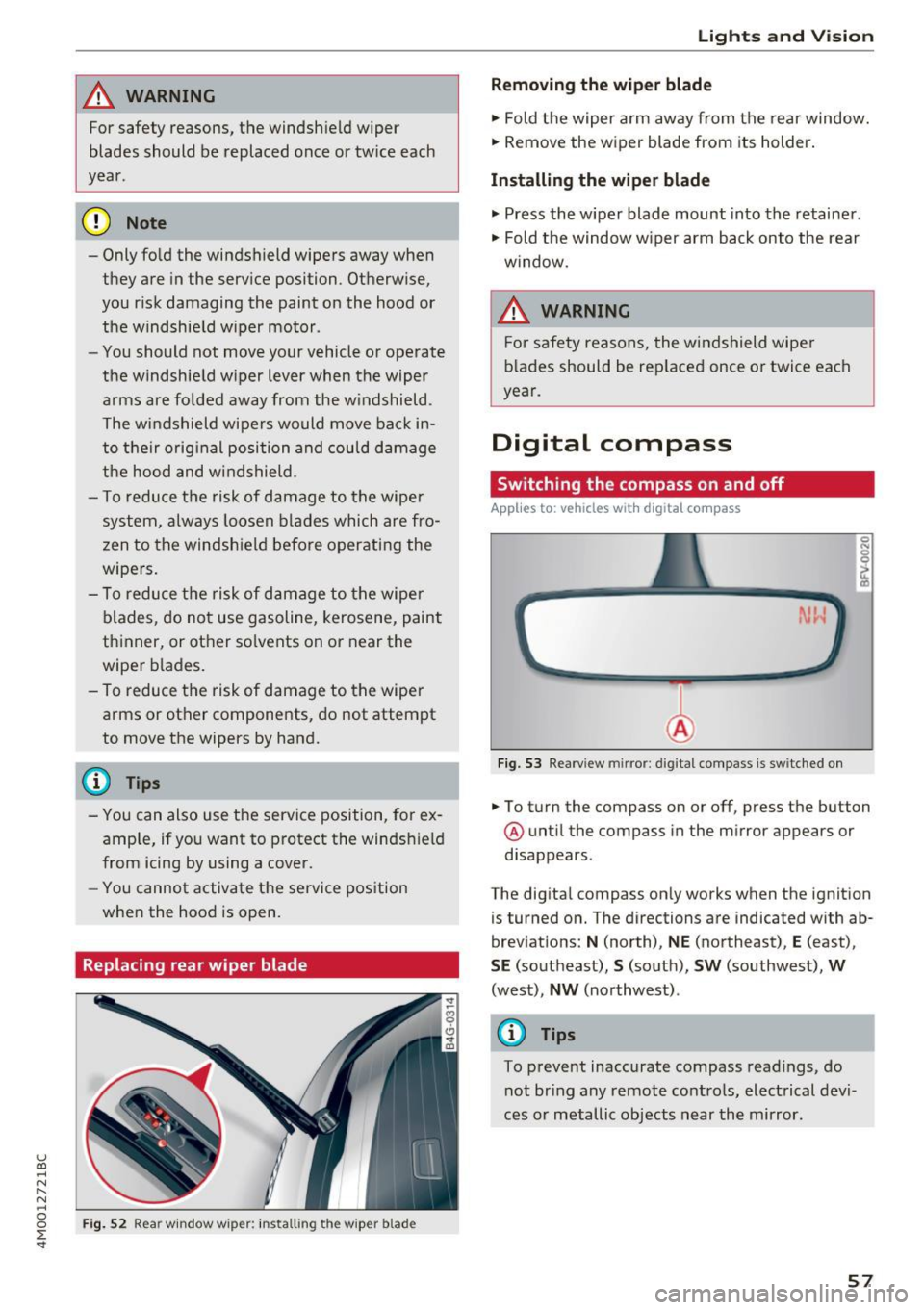
Replacing rear wiper blade
Fig . 52 Rear w indow wiper : in stalling the wiper blade
Lights and V ision
Removing the wiper blade
.,. Fold the wiper arm away from the rear window.
.,. Remove the wiper blade from its holder.
Installing the wiper blade
.,. Press the w iper blade mount into the retainer .
.,. Fold the window w iper arm back onto the rear
w indow.
A WARNING
F or safety reasons, the windshield wiper
b lades should be rep laced once or twice each
year.
Digital compass
Switching the compass on and off
Applies to: vehicles with digita l compass
Fig. 53 Rearview mirror: digita l compass is sw itched on
0 N 0
l Cl)
.,. To turn the compass on or off, press the button
@ until the compass in the mirror appears or
disappears .
The digital compass only works when the ignition
is turned on. The directions are indicated with ab
breviations:
N (north), NE (northeast), E (east),
SE (southeast), S (south), SW (southwest), W
(west), NW (northwest) .
@ Tips
To prevent inaccurate compass readings, do
not bring any remote controls, electrical devi
ces or metallic objects near the mirror.
57
Page 61 of 402
u (0 ...... N r--. N ...... 0
0
:E
General information
A WARNING
See¢ page 256, Driving safety for important
information, tips, suggestions and warnings
that you should read and follow for your own
safety and the safety of your passengers.
Front seats
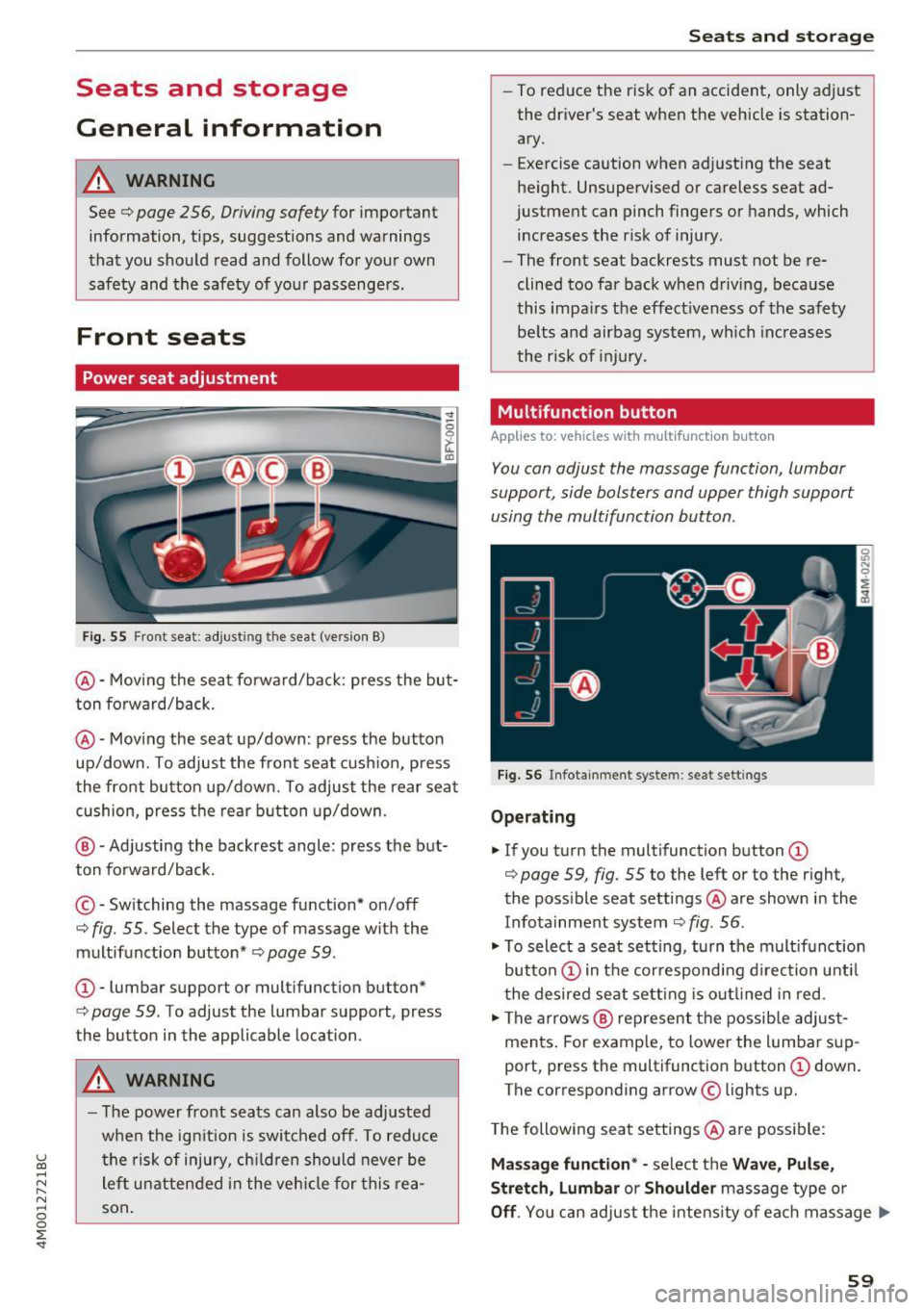
Power seat adjustment
Fig. 55 Fro nt seat: adjus ting the seat (ver sion B)
@ -Moving the seat forward/back: press the but
ton forward/back.
@ -Moving the seat up/down : press the button
up/down. To adjust the front seat cushion, press
the front button up/down. To adjust the rear seat cushion, press the rear button up/down .
@ -Adjusting the backrest angle : press the but
ton forward/back.
© -Switching the massage fun ction* on/off
c::> fig. 55. Select the type of massage with the
multifunction button*
c::> page 59 .
CD-lumbar support or multifunction but ton*
c:> page 59 . To adjust the lumbar support , press
the button in the applicable location .
A WARNING
- The power front seats can also be adjusted
when the ignition is switched off. To reduce
the risk of injury, children should never be
left unattended in the vehicle for this rea
son.
Seats and storage
- To reduce the risk of an accident, only adjust
the driver's seat when the vehicle is station
ary.
- E xercise caution when adjusting the seat
height. Unsupervised or careless seat ad
justment can pinch fingers or hands, which
increases the risk of injury .
- The front seat backrests must not be re
clined too far back when driving, because
this impairs the effectiveness of the safety
belts and airbag system, which increases
the risk of injury.
Multifunction button
Applies to : vehicles wi th mult if un ction b utto n
You can adjust the massage function, lumbar
support, side bolsters and upper thigh support
using the multifunction button .
Fig. 56 Infotainment syste m : seat sett ings
Operating
"'If you turn the multifunction button CD
c::> page 59, fig. 55 to the left or to the right,
the possible seat settings @ are shown in the
Infotainment system
c::> fig . 56 .
.,. To select a seat setting, turn the multifunction
button
CD in the corresponding direction until
the desired seat setting is outlined in red.
.,. The arrows @ represent the possible adjust
ments. For example, to lower the lumbar sup
port, press the multifunction button
CD down.
T he corresponding arrow © lights up.
The following seat settings @ are possible:
Massage function* -select the Wave, Pulse,
Stretch, Lumbar or Shoulder massage type or
Off. You can adjust the intensity of each massage ..,.
59
Page 66 of 402
Sea ts and stor age
_& WARNING
- Always read and follow the applicable warn
ings
q pag e 259, Proper adjustm ent of
head restraints .
-Only remove the head restraints for the sec
ond row seats when it is necessary for in
sta lling a child safety seat~
page 295,
Child safety.
Install the head rest rai nt again
immediately once the child s afety seat is re
moved. Driv ing with the head res traints re
moved or not in the upright position in
creases the risk of serious injury .
Memory function
Description
Applies to: veh icles with memory function
Using the memory funct ion , you can qu ickly and
easi ly store a pe rsonal seat profile for the driver
and fron t passenger and recall the settings. The
memory function is controlled by t he remo te
control key and the memory buttons in the driv
er's/front passenger's* door .
The drive r's seat profile is stored aga in and as
signed to the remo te control key each time the
ve hicl e is locked. When you open the door, the
seat profi le is automatica lly recalled.
If two peo
p le use the ve hicle, it is recommended that each
person a lways uses their "own" remote contro l
key.
Two seat profiles can be stored each using the memory buttons . Once they are stored, these
seat profiles can be selected at any time.
The fo llowing settings are stored:
Remote Memory button
control
key
Driver Dri ver Front pas-
senger
Seat X X X
Steering
X X wheel*
Both exte rior
X X mirrors
*
64
Remote control key
Applies to: vehicles with memory function
The driver 's seat profile can be assigned to the
remote control key when the vehicle is locked .
.. Select in the Infotainment system: IMENUj but
ton
> Ve hicle > left control button > Vehicle
se tting s > Se ats > Driver 's seat> S tore se t
t ing s on remo te control k ey.
@ Tips
If you do not wish to have the seat profile for
another driver ass igned to the remote control
key, switch the memory f unction off in the In
fotainment system.
Memory buttons
Applies to: vehicles with memory funct ion
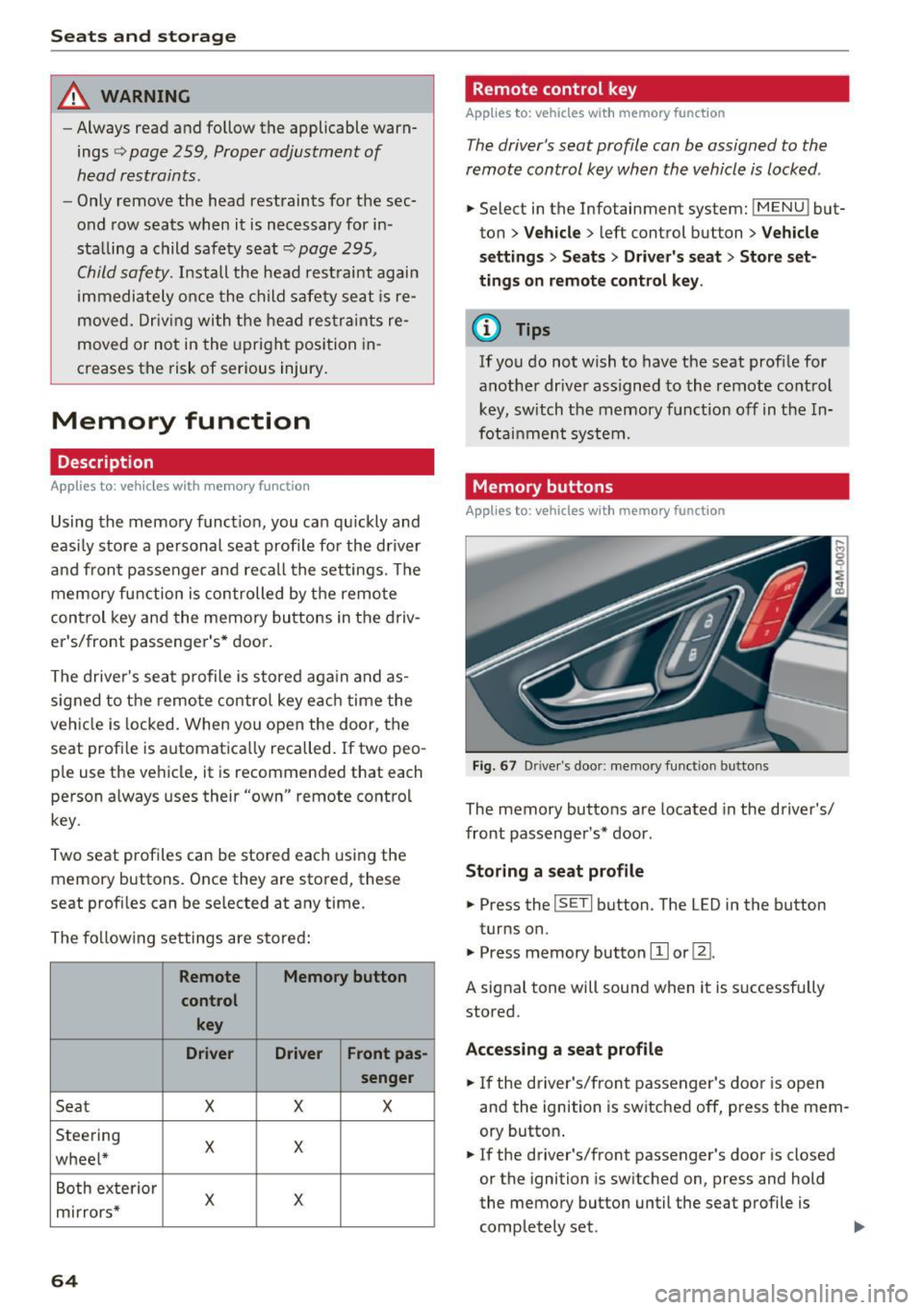
Fig . 67 D rive r's doo r: memory function b utto ns
The memory buttons are located in the driver's/
front passenger's * door .
Storing a sea t p rofile
.. Press the ISETI button . The LED in the button
turns on.
"' Press memory button
[I] or ~-
A signal tone will sound when it is s uccessfully
stored.
Acc essing a s eat profil e
"' If the driver's/front passenger's door is open
and the ignition is switched off, press the mem
ory button .
.. If the driver's/front passenger's door is closed
or the ignition is sw itched on, press and hold
the memory button until the seat profile is comp letely set. .,..
Page 76 of 402
Warm and cold
Vents
You can open or close the center and rear vents in
the cockpit and the vents in the rear center con
sole and door pillars using the ridged thumb
wheels. The levers adjust the direction of the air
flow from the vents.
Residual heat
You can activate the residual heat function when
the ignition is switched
off by pressing the knob
@ (left side). The residual heat from the coolant
is used to heat the vehicle inter ior. The residual
heat function switches
off automatically after
about 15 minutes.
A WARNING
- You should not use the recirculation mode
for an extended period of time, because no
fresh air is drawn in and the windows can
fog when coo ling mode is sw itched
off. This
increases the risk of an accident.
- Individuals with reduced sensitivity to pain
or temperature could develop burns when
using the seat heating function. To reduce
74
the risk of injury, these individuals should
not use seat heating.
(D Note
To avoid damage to the heating elements in
the seats, do not knee l on the seats or place
heavy loads on a small area of the seat .
Setup
Applies to : vehicles wit h 3-zo ne de luxe automatic climate
control
The climate control system basic settings are ac
cessed in the Infotainment system.
"'Select in the Infotainment system: IMENU ! but
ton
> Vehicle > l eft control button > Air condi
tioning
Seat heating/seat ventilation*
You can adjust the seat heating/ventilation bal
ance for the driver and front passenger.
Automatic auxiliary heater*
The aux iliary heater he lps to warm the vehicle in
terior more quickly.
Page 79 of 402
u co ...... N r-... N ...... 0
0
:E: '
Use the rocker switch(;) to select the funct io n.
When synchronization is switched on, the set
tings for the driver's side are applied to the front
passenger's side and the rear (except for seat
heating/ventilation*). When the settings on the
front passenger 's side or in the rear are changed,
the synchron izat ion is automatically sw itched off
and
4-zone appears in the display .
SET REAR
function
Use the rocker switch (D to select the funct ion .
When the function is switched on, you can adjust
all settings for the rear using the climate control
system controls in the cockpit . The rear climate
control system controls cannot be operated at
the same time. This function switches off auto
matically after a certain period of time or after
l eaving the menu.
Vents
You can open or close the center and rear vents in
the cockpit and the vents in the rear center con
sole and door pillars using the ridged thumb
wheels. The levers adjust the direct io n of the air
flow from the vents. The w ide ven t is opened and
closed using the~ button ~
page 8, fig. 2@ .
Residual heat
You can activate the residual heat funct ion when
the ignition is switched off by pressing the knob
@ (left side). The residual heat from the coolant
is used to heat the vehicle inter io r. The resid ual
heat function switches off automatically after
about 15 min utes.
& WARNING
- You should not use the recirculation mode
for an extended period of time, because no
fresh a ir is drawn in and the windows can
fog when coo ling mode is switched off . This
increases the risk of an accident .
- Individuals with reduced sensitivity to pain
or temperature could develop burns when
using the seat heating function . To reduce
the risk of injury, these ind iv iduals should
not use seat heating.
Warm and cold
(D Note
To avoid damage to the heating elements in
the seats, do not kneel on the seats or place
heavy loads on a small area of the seat.
(D Tips
It is not possible to operate the rear climate
control system controls when the power ch ild
safety lock is switched on. With With the
SET REAR function, you can apply all settings
to the rear using the climate control system
controls in the cockpit
~ page 43.
Setup
Applies to: vehicles with 4 -zone deluxe automat ic climate
contro l
The climate control system basic settings are ac
cessed in the Infotainment system .
.. Select in the Infotainment system: I MENU! but
ton
> Vehicle > l eft control b utton > Air condi
tioning
Seat heating/seat ventilation*
You can adjust the seat heating/ventilation bal
ance fo r the driver, front passenger and rear pas
sengers .
Footwell temperature
You can adjust the footwell temperature so that
it is cooler or warmer.
Auto recirculation
When switched on, automat ic rec irculat ion con
trols the recirculation mode automatically . You
must press the
® MAX button if fog forms on
the windows.
Automatic auxiliary heater*
The aux iliary heater he lps to warm the vehicle in
terior more quickly.
Steering wheel heating
Applies to: vehicles with stee ring wheel heating
The steering wheel rim can be heated .
.. Press the button on the multifunction steering
wheel to switch the steering wheel heating on ..,_
77