parking brake AUDI Q7 2017 Owner´s Manual
[x] Cancel search | Manufacturer: AUDI, Model Year: 2017, Model line: Q7, Model: AUDI Q7 2017Pages: 402, PDF Size: 100.39 MB
Page 90 of 402
Driving
"'Turn the engine off¢.&, .
"'Turn the steering wheel when parking on in
clines so that the wheels will roll into the curb
if the vehicle starts moving .
A WARNING
-Do not press the accelerator pedal inadver
tently if a gear is selected when the vehicle is stationary and the engine is running . Oth
erwise, the vehicle will start to move imme
diately and this could result in an accident.
- Emergency braking should only be used in
an emergency, when the normal brake pedal
has failed or the brake pedal is obstructed .
During emergency braking, your vehicle will
brake similar to heavy braking. ESC and the
associated components (ABS, ASR, EDL)
cannot overcome the laws of physics.
Around curves and when road or weather conditions are bad, a full brake application
can cause the vehicle to skid or the rear end
to swerve, which increases the risk of an ac
cident.
- If the power supply fails, you cannot set the
parking brake if it is released. In this case ,
park the vehicle on level ground and secure
it by placing the selector lever in the P posi
tion. See an authorized Audi dealer or au
thorized Audi Service Facility for assistance.
- Always take the vehicle key with you when
leaving your vehicle, even if for a short peri
od of time. This applies particularly when
children remain in the vehicle. Otherwise,
children could start the engine, release the
parking brake or operate electrical equip
ment such as power windows, which in
creases the risk of an accident .
- No one, especially children, should remain
in the vehicle when it is locked . Locked
doors make it more difficult for emergency
workers to get into the vehicle, which puts lives at risk .
{D) Tips
When stopping at a traffic signal or stopping
in city traffic, you can set the parking brake
manually. The vehicle does not have to be
held with the brake pedal. The parking brake
88
eliminates the tendency to creep when a se
lector lever position is engaged. As soon as
you press the accelerator pedal, the parking
brake releases automatically and your vehicle
starts to move¢
page 88.
(D Tips
-Occasional noises when the parking brake is
set and released are normal and are not a
cause for concern.
- The parking brake goes through a self-test cycle at regular intervals when the vehicle is
stopped . Any noises associated with this are
normal.
- If there is a power failure, the parking brake
will not set if it is released, and it will not release if it is set ¢& . See an authorized
Audi dealer or authorized Audi Service Fa
cility for assistance.
Starting to drive
Various convenience and safety functions may be
available when the vehicle begins driving, de
pending on vehicle equipment.
Starting on hills with the parking brake set
Requirement: the driver's door must be closed .
"'To start driving comfortably when on a hill, set
the parking brake and begin driving as usual.
The braking force of the parking brake does not release automatically until the wheels build up
enough driving force .
Starting on hills with hill hold assist
Hill hold assist makes it easier to start on hills.
Requirement: the driver's door must be closed
and the engine must be running.
"'To activate hill hold assist , press and hold the
brake pedal for several seconds. The vehicle
must be in an uphill direction of travel.
After releasing the brake pedal , the braking pow
er is maintained for a brief moment¢
A to pre
vent the vehicle from rolling back when starting.
During this time, you can easily begin to move
your vehicle.
111>
Page 94 of 402
Driving
Sel ector l ev e r lo ck
The se lector lever lock prevents you from se lect
ing a position unintentionally, causing the vehicle
to ro ll. When engaging some selector lever posi
tions, you must press th e locking button
CD on
the selecto r lever and/or press the brake pedal
¢fig. 92.
You must press the brake pedal to engage a se
lector lever position when the engine is running
and the vehicle is stationary.
You do not have to press the brake peda l if you
shift from a drive gear (D/S) to reverse gear
(R)
w ithin one second. This allows you to "rock" the
veh icle to free it when it is stuck .
P - Park
This se lector lever posi tion p revents the vehi cle
from rolling . Only shift into park when the vehi
cle is stationary ¢.&. . To select the P se lector lev
er position, press th e P button @on the selector
lever ¢
fig. 92. P appears next to the selector lev
er.
You can on ly shift out of park when the engine is
r u nning and you are pr ess ing the brake p edal. To
release the parking lock, press the brake peda l,
press the locking button
CD on the selector lever
and select the desired pos it ion ¢
fig. 92 .
P engag es automatically if you switch the engine
off while the selector lever is in D, E, S, R or man
ual mode.
If you switch the engine off when the N se lector
lever position is select ed, the transmission re
mains in N for approximately
30 minutes and
then Pis engaged. The vehicle is not secured
from rolling in the N selector lever position, so
you need to set the parking brake<®>¢
page 87.
You must use the parking lock emergency release
before towing the vehicle¢
page 96.
R- Reve rse
The reverse gear is engaged in this pos ition . On ly
select reverse gear when the vehicle is stationary
and the engine is running at idle speed¢.&. . To
engage the R selector lever pos ition, press the
92
brake peda l, press the locking button CD on the
se lector lever and select the R position ¢
fig. 92.
A confirm ation tone will sound when the reverse
gear is engaged.
N -Neutral (idle )
The transmission is in idle in th is position. To en
gage the
N selector lever position, press the lock
i ng button
CD on the selector lever and sh ift into
the
N pos ition ¢ fig. 92 .
If you switch the eng ine off when the N selector
l ever posit io n is selected, the transm iss ion re
mai ns in
N for approx imately 30 minutes and
then Pis engaged.
You cannot se lect the
N pos ition when the igni
tion is switched off . When dr iv ing through an au
tomat ic car wash, fi rst select the
N position and
then turn the eng ine off.
For safety reasons , the veh icle cannot be locked
when the t ransmiss ion is in the
N pos it ion .
D/S - Driving forward
When the transm ission is in the D/S posit ion, it
can be operated either in the normal D mode or
i n the S sport mode . Move the selector lever back
to engage the S sport mode. You ca n only select
the S selector lever position when the Dor E pos i
tion is se lected. To select the Dor E position
again w hen S is engaged, move the selector lever
ba ck ¢ .&. . To sh ift from N to D when traveling at
speeds below 1 mph (2 km/h), press the brake pedal and shift into the D position¢.&. .
In the
n o rmal mode D, the transmission auto
matically selects the suitable gear ratio. It de
pends on engine load, vehicle speed and driving
style.
Se lec t the
sport mode S for spo rty d riving. The
vehicle makes f ull use of the engine 's power.
Shifting may become noticeable when accelerat
ing .
The S se lec to r lever posit io n engages automat i
ca lly when you select
Dynamic mode in d rive se -
l ect* . .,.
Page 95 of 402
A WARNING ,~
Read and follow all WARNINGS.
- The vehicle can roll even if the ignition is switched off.
- Power is st ill transmitted to the wheels
when the engine is running at idle. To pre
vent the veh icle from "creeping", you must
keep your foot on the brake in all selector
lever positions (except P and N) when the
engine is running.
- Before opening the hood, select the P selec tor lever position and set the parking brake.
T his reduces the risk of an accident. Always
read and follow the applicable warnings
¢ page 322, Working in the engine com
partment.
@ Tips
If you accidentally se lect N while d riving, take
your foot off the acce le rator pedal and wa it
for the engine to slow down to idle before se
lect ing Dor S.
Driving tips
Starting the engine
.. Th e P or N position must be selected.
Starting from a stop
.. Press and hold the brake pedal.
.. Start the engine
c:> page 82.
.. Press the lock ing button @on the selector lev
er and select the D, E, Sor R position
¢page 91.
.. Wait a moment until the transmission shifts.
You wi ll notice a slight movement when the
gear engages .
.. Release the brake pedal and press the accelera-
tor pedal ¢
&-
Various convenience functions are avai lab le for
starting on hills
c:> page 88.
Stopping temporarily
~ .. Press the brake pedal to stop the vehicle, for
~ example at a traffic light. Do not press the ac-
~ celerator peda l when doing this. 0
0
:E: '
.. To prevent the vehicle from ro ll ing when you
start driving, set the parking brake when stop
ping on steep hills¢
A-
.. The parking brake will release automatically
and the vehicle will start moving once you press
the accelerator pedal.
Stopping/parking
If the selector lever is not in the P position when
you open the driver's door, the vehicle could roll.
.. Press and hold the brake pedal
c:> A-
.. Set the parking brake.
.. To select the P se lector lever position, press the
P button
@ on the selector lever c:> page 91 ,
fig. 92.
Under certain conditions, such as driving in the
mountains or when towing a trailer, it may be
helpful to switch to manua l mode temporarily
and shift
manually to adapt to the driving condi
tions
c:> page 94.
On hills, activate the parking brake first and then
shift into the P position
c:> page 87. This prevents
too much stress from being p laced on the lock ing
mechanism .
A WARNING
--The vehicle can roll even when the eng ine is
sw itched off.
- Unintended vehicle movement can lead to
serious injuries .
- To reduce the r isk of an accident, do not
press the accelerator pedal when changing
the selector lever position while the vehicle
is stationa ry and the engine is running .
- To reduce the r isk of an accident, never se
lect the R or P positions while dr iv ing.
- Do not inadvertently press the accelerator pedal when the vehicle is stationary . Other
wise the r is k of an accident increases be
cause the vehicle will start to move immedi
ately, even if the parking brake is set.
(D Tips
Fo r safety reasons, the park ing brake only re
leases automatically when the drive r's door is
closed.
93
Page 98 of 402
Driving
ab le to select any other selecto r lever posit ions
after starting the engine again. Drive to an au
thor ized Audi dealer or authorized A udi Service
Facility immediately to have the malfunction cor
rected.
r;] Transmi ssion : malfunct ion ! You can contin
ue driving with limited function. Plea se conta ct
Service
There is a system mal function in the t ransmis
s ion. The transm ission is switching to emergency
mode . This mode on ly shifts into certain gears or
will no longer shift at all. The engine may stall.
Drive to an authorized Audi dealer or authori zed
Audi Serv ice Facility immediately to have the
malfunct io n corrected.
r;] Transmission : malfunct ion! You may contin
ue driving . No reverse gear
There is a system malfunction in the transmis
sion . The transmission is switching to emergency
mode. This mode only shifts into certain gears or
will no longer shift at all. The engine may stall.
You cannot engage the reverse gea r. Drive to an
author ized Audi dealer or author ized Audi Service
Facility immediately to have the malfunction cor
rected.
r;] Danger of rolling away! P not possible .
Ple ase apply parking brake
- The park ing lock was released using the emer
gency release ¢
page 96. Or
- The parking lock can no longer be engaged.
Drive to an authorized A udi dealer or author
i z ed Audi Service Facility immed iately to have
the malfunc tion corrected .
r;] Move selector le ve r to automati c position
There is a mal func tion in the tip tronic mode. End
tiptronic mode by pushi ng the selector lever to
the left i nto t he D/S position.
96
Parking lock emergency release
The parking lock must be released with the
emergency release when driving through moun
tains/maneuvering.
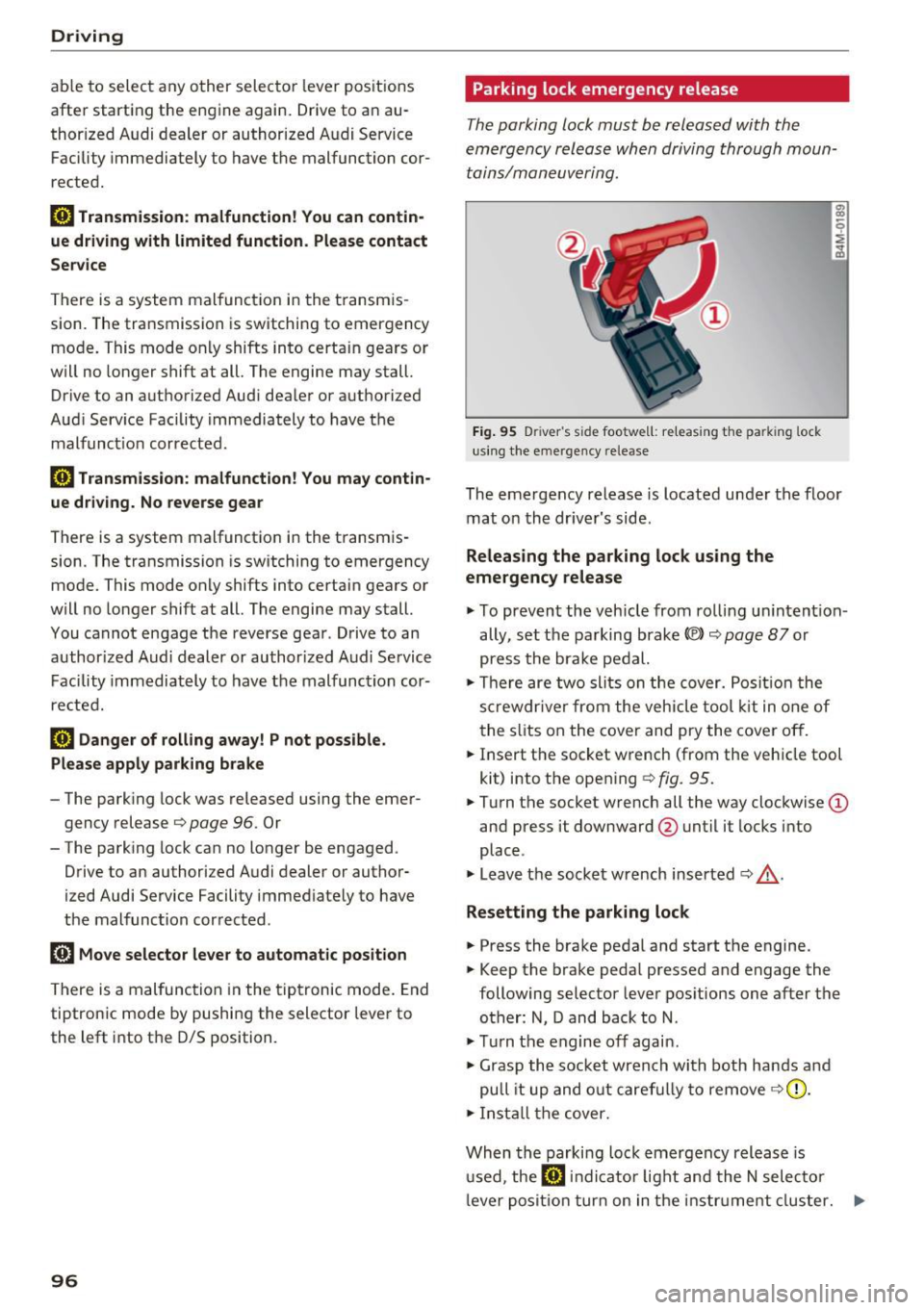
Fi g. 9 5 Driver 's s id e footwe ll: re leas ing the pa rk ing lock
us ing the e mergency release
The emergency release is located under the floor
mat on the dr iver's side .
Releasing the parking lock using the
emergency release
"' To preven t the vehicle from rol ling un intent ion
ally, set the parking brake ®l ¢
page 87 or
press the bra ke pedal.
"' There are two slits on the cover. Posit io n t he
s cr ewdr ive r from the veh icle tool kit in one of
the s lits on the cover and pry the cover off.
"' Insert the socket wrench (from the vehicle tool
kit) into the open ing
¢ fig. 95.
"'Turn the socket wrench all the way clockwise (D
and press it downward @until it locks into
place .
"' Leave the socket w rench inserted
i=:> &_ .
Resetting the parking lock
"'Press the brake pedal and start the engine.
"' Keep the brake peda l pressed and engage the
following selector lever pos it ions one after the
other: N, D and back to N .
"' Tu rn the engine off again.
"' Grasp the socket wrench with both ha nds and
pu ll it up and o ut caref ully to remove
i=:> (D.
"' In st all the cover.
When the parki ng loc k emergency release is
u sed, the
r;J in dicator light an d the N selec to r
l eve r posi tion tur n on in the i nstr ument cluster. ..,.
Page 99 of 402
u co ...... N r-... N ...... 0
0
:E: '
sible. Please apply parking brake
also appears.
A WARNING
- Only activate the emergency release while
on a level surface or a slight slope.
- The parking tock may only be released using
the emergency release if the parking brake
is set. If it is not functioning, secure the ve
hicle from rolling using the brake pedal or
other suitable means, such as blocking a
front and a rear wheel. An unsecured vehicle
may roll away, which increases the risk of an
accident.
- To reduce the risk of an accident, you must
not drive when the emergency release is ac
tivated.
(D Note
- Read and follow the important instructions
about towing
c::;, page 3 74.
- The risk of damage increases if you do not
remove the socket wrench carefully when
resetting the parking lock.
Driving
97
Page 103 of 402
u co ...... N r-... N ...... 0
0
:E: '
and the one in front of you. You wi ll need more
room to stop. To compensate fo r the tra iler, yo u
will need a larger than normal turn ing rad ius.
When pass ing, remember t hat you cannot accel
erate as fast as you norma lly wou ld because of
the added load. Make s ure you have eno ugh room
to pass. After passing , allow plenty of room fo r
your tra iler before changing lanes again.
Avoid jerky starts, s harp turns or rapid lane
changes .
(D Tips
-Do not tow a trailer during t he br ea k-in per i
o d of yo ur vehicle .
- If you tow a trailer, your Audi may require
more frequent maintenance due to the ex
tra load
~ page 381.
Parking on a slope
Do not pork on o slope with o trailer . If it cannot
be avoided, do so only ofter doing the following:
When parking:
" Apply the f oot brake.
" Have someone p lace chocks under both the ve
hicle and the tra il e r whee ls .
" Wi th chocks in p lace, slowly release t he b rakes
u nti l the w hee l chocks absor b the load.
" Turn the wheels towa rds the curb.
" Apply the pa rking brake.
" Move the se lector lever to P .
When restarting after parking:
"Apply the foot b rake.
" Start the engine .
" Move t he se lecto r lever to D/S.
" Release the parking brake and slowly pull out
and away from t he whee l chocks.
" Stop and have someone retrieve t he wheel
chocks .
Trailer towing
101
Page 118 of 402

Assistance systems
Distance indicator and
distance warning
Description
Applies to: vehicles with Aud i adapt ive cruise control
F ig. 114 In stru ment cl uste r: dis tance indica tor/wa rning
At speeds above 40 mph (65 km/h), this funct ion
measures the time betwee n the vehicle driv ing
ahead and s hows th is in the instrument cl uster
d isp lay¢
fig. 114 .
You can set a warning t hreshold between 0 .6 and
3.0 seconds . The . indicator light t urns on if
you fall be low the set d istance.
Switching the distance indicator/warning on
and off
.. In the Infotainment system, selec t: I MENU !
button > Vehicle > left contro l button > Driver
assistance > Distance warning.
A WARNING
- Read an d follow th e war nings on ¢.&. in
Gen eral in for ma tion on page 1 08.
-The driv er is always r espons ib le for a dhering
to the regulations applicable in th at co un
t ry .
{!) Tips
You may fall b elow he warn ing t hreshold
briefly whe n pass ing or when quickly ap
proac hing a s low veh icle . T h er e is no wa rni ng
in this scen ario . A warn ing is gi ven only if you
f al l b elow the war ning thr eshold f or an ex
t en ded pe rio d o f tim e.
116
Messages
Appl ies to: vehicles with Audi adaptive cruise control
ii ACC with traffic jam assist: unavailable . See
owner's manual
The sy stem cannot gu aran tee t hat i t will dete ct
vehicle s cor re ctl y an d it h as sw itched
off . The ra
dar sensors have shifted or are fau lty . D rive to an
aut ho rize d Audi dea le r o r a uth orized Audi Service
Facility immed iate ly to have the malfunct ion cor
r ected .
ii ACC with traffic jam assist: currently un
available. See owner's manual
This mes sage ap pears if the ada ptive cruise con
t ro l canno t be activ ated, for example i f th e hood
is ope n.
fl ACC with traffic jam assist : currently un
available. Sensor vision restricted due to sur roundings. See owner 's manual
This message ap pears if the radar se nsor v iew is
obstr ucted, for e xamp le by leaves, snow, heavy
s p ra y or dir t. Cle an the senso rs ¢
pa ge 107 ,
fi g. 101.
ill ACC with traffic jam assist: currently un
available. Grade too steep
T he road exceeds the maxim um poss ible g rade
for saf e operation . The systems cannot be sw itch
ed o n.
ill ACC with traffic jam assist: only available in
D, Sor M
Se lect t he D/S or M se lector lever position.
flJ ACC with traffic jam assist: currently un·
available. Parking brake applied
The sys tems swi tch off i f you set the parking
bra ke. Th e sys tems are av ailab le ag ai n afte r yo u
rele ase the parkin g bra ke .
ill ACC with traffic jam assist: currently un
available. Stabilization control (ESC ) input
This message appears if the e lectron ic stabiliza
t ion cont rol ( ESC) is tak ing act ion to stabiliz e the
vehicle . The systems switch
off in this scena rio .
ill ACC with traffic jam ass ist: manual control! .,.
Page 132 of 402

Assistance systems
Rear cross-traffic assist
Applies to: vehicles w ith rear cross -traff ic ass ist
Fig . 125 Example display
Fig. 126 Infotainment system: rear cross-traffic assist dis
play
The rear cross-traffic assist can warn the driver of
a potential collision with approaching cross-traf
fic when driving in reverse. Within its limits, the
system monitors the areas behind and next to
the vehicle using the radar sensors when leaving
a parking space
r::!.>page 127, fig. 122. Moving ob
jects that are approaching, such as cars, are de
tected
r::!.>fig. 125.
If the system detects critical cross traffic when
backing out of a parking space, it will react as fol
lows:
- Visual indicator : an indicator appears in the In
fotainment system display with a red arrow
symbol. The arrow points in the direction from
which the object is approaching
r::!.> fig. 126.
-Audible warning signal : a continuous tone may
sound as an additional indicator when driving in
reverse.
- Automatic brake activation : a brief activation
of the brakes may also warn you of a potential
collision with an approaching object.
130
Requirements for using the rear cross-traffic
assist:
- The parking aid must be switched on
c>page 138.
-Reverse gear must be engaged.
- The speed must not be higher than approxi-
mately 9 mph (15 km/h).
A WARNING
- The rear cross-traffic assist is an assist sys
tem and cannot prevent a collision by itself.
The driver must always intervene. The driver
is always responsible for braking at the cor
rect time.
- Please note that the rear cross-traffic assist
may activate the brakes unexpectedly. Se
cure any cargo that you are transporting to reduce the risk of damage or injury.
- An additional brake activation may be trig gered within 20 seconds after an automatic
brake activation.
- If there is an acoustic warning signal from the rear cross-traffic assist, then the parking system may not warn you of detected
obstacles under certain circumstances.
- The view of the radar sensors may be im
paired by leaves, snow, heavy spray or dirt.
Clean the area in front of the sensors
r::!.>page 127, fig. 122.
A WARNING
The rear cross-traffic assist is subject to limi
tations and cannot warn you before every im pending collision:
- If the vehicle is too wide for the parking
space and covered by the neighboring
vehicles.
- People, such as cyclists, joggers, in line skat
ers and pedestrians, may not be detected
under certain circumstances.
- If you are in a parallel parking space or diag
onal parking space.
(D Note
Also read the information in r::!.>0 in General
information on page 128.
Page 133 of 402

@ Tips
-You can cancel the automatic brake activa
tion w ith increasing bra king fo rce if you ap
ply the brakes yourse lf or accelerate cons id
erab ly.
- In some situations, rea r cross-traffic assist
may warn yo u even if there is no cross traffic
i n a cr itical a rea , for examp le w hen back ing
i nto a parki ng space or ma neuver ing.
- The rea r cross-traffic ass ist also switches off
whe n you switch off the ESC.
- The rea r cross traffic assist switches on and
off thro ugh the pa rking aid
qpag e 138.
- The system is not available when towin g a
trailer.
Messages
A ppl ies to: ve hicles with Audi side assist
A message appears in the inst rument cluste r dis
p lay if the s ide ass ist swi tches off autom atically .
@j Audi side assist: malfunction! Please contact
Service
@j Audi side assist and exit warning : malfunc
tion! Please contact Service
The system ca nnot gu ara nt ee th at i t w ill detec t
ve hicl es co rrectly and it has switched off. The
sensors have been moved o r are faulty . Have t he
system checked by an a uthorized Audi dealer or
author ized Audi Se rvice Facility s oon.
@j Audi side assist: currently unavailable. Sen
sor vision restricted due to surroundings . See
owner 's manual
@j Audi side assist and exit warning : currently
unavailable. Sensor vision restricted due to sur
roundings
The rad ar senso r vis io n i s im paire d. T he ar ea in
fr on t of the senso rs must no t be covered by bik e
r ac ks, st ic kers, leaves, snow or any other o bjects.
C lea n the area i n front of the senso rs, if necessa
ry
¢ page 127, fig. 122.
~ @j Audi side assist: currently unavailable. See ......
~ owner 's manual
N ...... 0
0
:E: '
@j Audi side assist and exit warning: currently
unavailable. See owner's manual
S id e assi st cann ot be sw itche d on a t this tim e be
cau se the re is a m alfu nct ion ( for e xample, the
ba tte ry c harge leve l may be to o low) .
@j Audi side assist: unavailable in towing mode
@j Audi side assist and exit warning: currently
unavailable. Towing mode
S ide assist switches off automatically when the
electrical connecto r in t he factory-installed trail
er hitch is connected . There is no guarantee the
system will sw itch o ff when us ing a ret rofi tted
t rail er h itch . Do not u se side assist and the ex it
warni ng w hen tow ing a tra ile r.
[II Rear parking aid : obstacle detection restrict
ed
The rear c ross-traffic ass ist is not available. E i
t h er the ESC is sw itched off, or the rada r senso rs
may be cove re d by a b ike rack, stic ke rs, leaves,
snow o r other objects . Swi tc h the ESC on, or
cle an the area in fron t of th e senso rs if necessa ry
~ page 127, fig. 122. If thi s m essage co ntin ue s
to be displayed, dr ive imme dia tely to an author
i z ed Audi deal er or author ized Audi Service Facili
ty to have the ma lf u nction re paire d.
Night vision assist
Description
App lies to : vehicles wit h night vision assist
The night vision assist can detect, highlight and,
if necessary , warn about pedestrians and large
wild animals .
Nigh t vision assist he lps yo u when it is dark by
u sing an infra red came ra to monit or the a rea in
front of your ve hicle , w ith in the limits of the sys
tem .
It can disp lay objec ts up to a dis tance of ap
prox ima tely 1 000 feet (300 m) . T he thermal im
age dete cted by the came ra is show n in t he in
s tru me nt clus ter di sp lay . W arm a reas appea r
lig hter a nd co ld ar eas ap pea r dar ker.
131
Page 142 of 402
Parking systems
sound was muted, no tone will sound. Pay atten
tion to the vehicle's surroundings when you start
to drive.
Switching on /off
A pp lies to: ve hicles w ith pa rkin g system plus
~ --- ---=--
-§
- --:,j;
--~------ --------- ~
,c
., r~ . "'.::. ..:: r~ "
- - -~l ~i~~
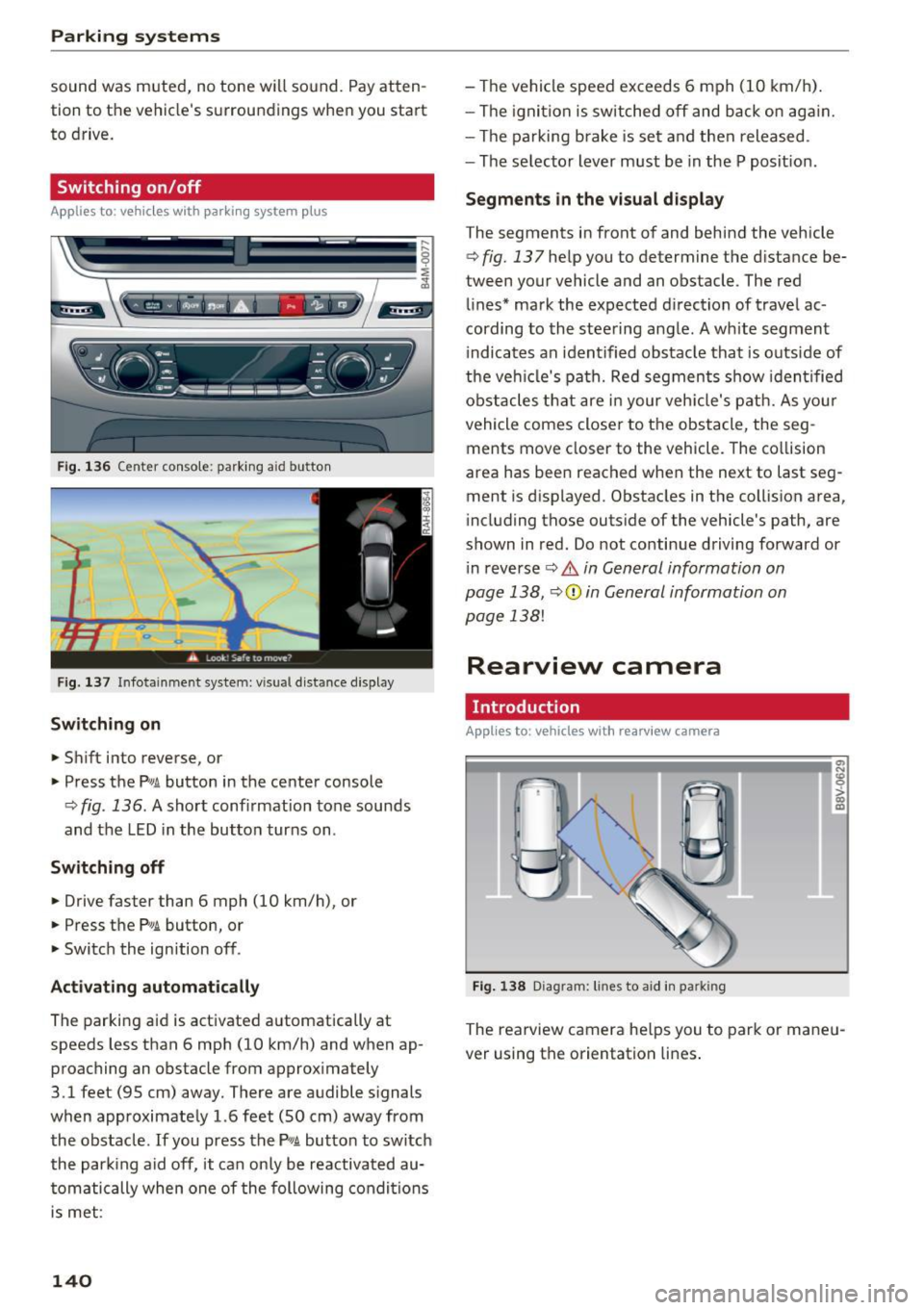
Fig . 136 Center console: parking aid button
Fig. 137 In fotainment system: vi sual distance d isplay
Switching on
... Shift into reverse, or
" Press the
P'"A button in the center console
¢
fig . 136 . A short conf irmation tone sounds
and the LED in the button turns on .
Switching off
"Drive faster than 6 mph (10 km/h), or
" Press the
Pw .6. button , or
" Switch the ign ition off.
Activating automatically
The parking aid is activated automatically at
speeds less than 6 mph (10 km/h) and when ap
proaching an obstacle from approximately
3.1 feet (95 cm) away. There are audible signals
when approximately 1.6 feet (SO cm) away from
the obstacle.
If you press the P,,1A button to switch
the park ing aid off, it can only be reactivated au
tomatically when one of the following conditions
is met :
140
-The vehicle speed exceeds 6 mph (10 km/h).
- The ignition is switched off and back on again.
- The parking brake is set and then released .
- The se lector lever must be in the P posit ion .
Segments in the visual display
The segments in front of and behind the vehicle
¢
fig. 137 help you to determine the d istance be
tween your vehicle and an obstacle . The red
lines* mark the expected d irection of travel ac
cording to the steering angle . A white segment
i ndicates an identified obstacle that is outside of
the vehicl e's path. Red segments show iden tified
obstacles that are in your veh icle's path. As you r
vehicle comes closer to the obstacle, the seg
ments move closer to the vehicle. The collision
area has been reached when the next to last seg
ment is displayed. Obstacles in the collision area,
i ncluding those outs ide of the vehicle's path, are
shown in red. Do not continue driving forward or
i n reverse ¢
& in General information on
page 138,
¢ (1) in General information on
page 138!
Rearview camera
Introduction
App lies to : vehicles with rearv iew camera
Fig. 138 Diagram : lines to aid in pa rkin g
0,
"'
~ co a,
The rearview camera he lps you to park or maneu
ver using the orientation lines .