wheel AUDI Q7 2017 Owner´s Manual
[x] Cancel search | Manufacturer: AUDI, Model Year: 2017, Model line: Q7, Model: AUDI Q7 2017Pages: 402, PDF Size: 100.39 MB
Page 20 of 402
Cockpit overv iew
@ Tips
-The telephone functions can only be con
tro lled with the multifunction steering
whee l if the telephone equipment was in
stalled
at the factory.
- The telephone functions depend on the cell
phone and whether they are supported by
your cell phone service provider or not.
- The
Call w ait ing function must be activated
i n your cell phone and in the MMI to be
alerted when there is an incoming call dur
i ng an active call. The call options depe nd
o n the cell phone and serv ice provider. You
can obtain more informat ion from yo ur cell
phone se rvice provider.
Navigation
App lies to: ve hicles w ith navigation system
Requirement: a destination must be entered
r::!> page 206, route g uidance must be started and
the navigation tab must be disp layed.
"' Press the left control button on the mult ifunc-
tion s teering wheel
r:!>page 13.
Depending on vehicle eq uipment, the following
fu nctions may be available in the d river informa
tion system .
-Di splaying nav igation dur ing acti ve route
guidance :
select and confirm Map or Str eet
view *
(analog instrument clus ter).
- Showing the map when route guidanc e is not
active :
select and co nfirm Map .
- Acce ssin g last destinations :
select and confirm
La st de stination s > the desired destination .
-Ac ce ss ing f avorite s: select and confirm Favor
it es>
the desired destination.
- Starting route guidance to the stored home
addre ss :
se lect and confi rm C ancel route guid
anc e
if necessary and then Home addre ss.
If you have not started route guidance, a com
pass (in the analog instr ument cluster) or a map
(Aud i virtua l cockp it)* will be disp layed.
- Can celing active route guidance : on the multi
funct ion steer ing wheel, select: right control
button
> Cancel route guidance .
18
Additional settings
-Select: righ t con trol b utton> desired entry.
Depend ing on the function selected, the follow
i ng addi tional settings may be possible :
- Map display
r::!> page 216
- Day/night map r::!>page 216
-Map or ientat ion r::!> page 216
-Automatic zoom r::!> page 217
Navigation view with route guidance
started
Appl ies to: vehicles with navigat ion syste m and A ud i vi rt u a l
cockp it
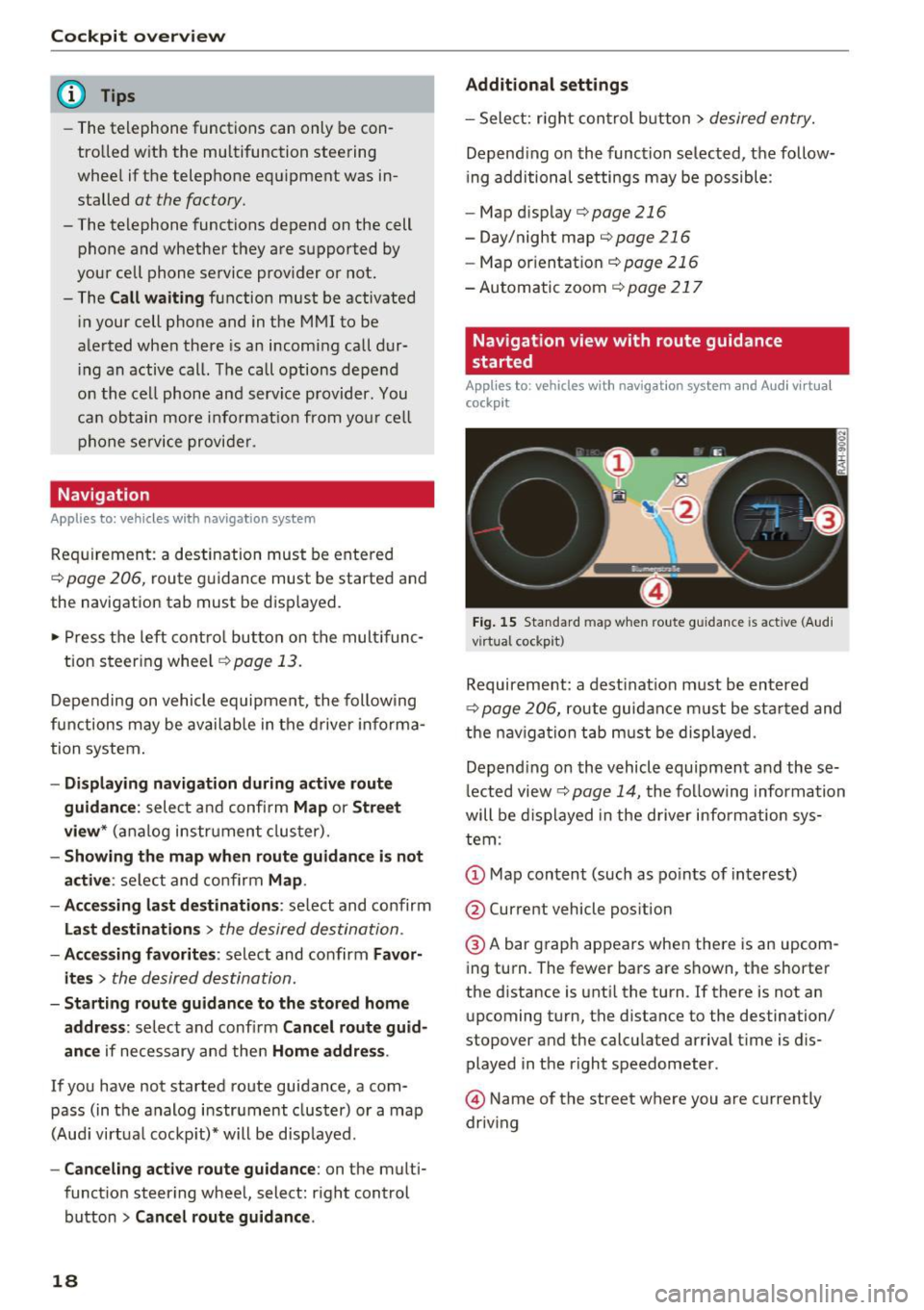
Fig . 15 Sta ndard map w hen route guidance is active (A ud i
virtual cockpit)
Requireme nt: a dest inat ion must be entered
r::!> page 206, route guidance m ust be sta rted and
t h e nav iga tion tab must be displayed.
Depend ing o n the vehicle equipment and these
l ected view
r::!> page 14, t he following informa tion
will be displayed in the d river information sys
tem :
@ A bar graph appears when there is an upcom
ing turn. The fewer bars are shown, the shorter
the d istance is unt il the turn . If there is not an
upcoming turn, the distance to the destination/
stopover and the calcu lated arriva l t ime is dis
played in the right speedometer.
@ Name of the street where you are currently
driving
Page 21 of 402
u (0 ...... N r--. N ...... 0
0
:E
Applies to: vehicles with navigation system and map view
Depending on the vehicle equipment, you can al
so have the active route guidance display in the
map view* in the driver information system .
W 1 St
Ill
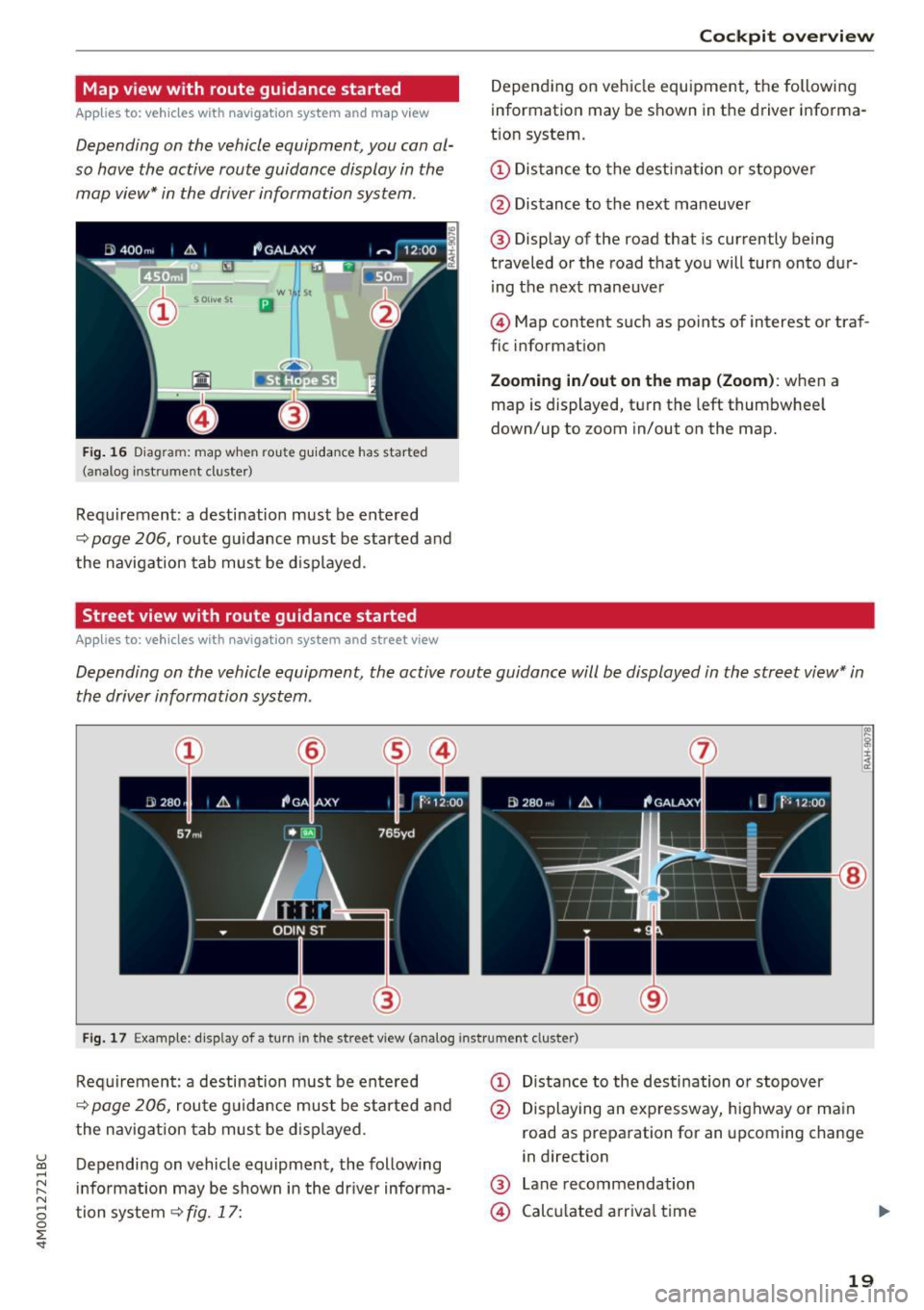
Fig. 16 Diagra m: map when rou te guidanc e has started
(ana log inst ru me nt cluster )
Requirement : a destination must be entered
q page 206, route guidance must be started and
the navigation tab must be displayed.
Street view with route guidance started
Applies to: vehicles with navigation system and street view
Cockpit overview
Depending on vehicle equ ipment, the following
information may be shown in the driver informa
t ion system .
(D Distance to the destination or stopover
@ Distance to the next maneuver
® Display of the road that is currently being
traveled or the road that you will turn onto dur
ing the next maneuver
@ Map content such as points of interest or traf
fic information
Zooming in/out on the map (Zoom): when a
map is displayed, turn the left thumbwheel
down/up to zoom in/out on the map.
Depending on the vehicle equipment, the active route guidance will be displayed in the street view* in
the driver information system .
I~ lg !:r;
:~
@
Fig. 17 Example: display of a turn in the street vi ew (analog instr ument clus te r)
Requirement: a destination must be entered
q page 206, route guidance must be started and
the navigation tab must be displayed.
Depending on vehicle equipment, the following
information may be shown in the driver informa
tion system
9 fig. 17:
(D Distance to the destination or stopover
@ Displaying an expressway, highway or main
road as preparation for an upcoming change
in direction
® Lane recommendation
@ Calculated arrival time
19
Page 24 of 402
Cockpit over view
Indicator lights
Description
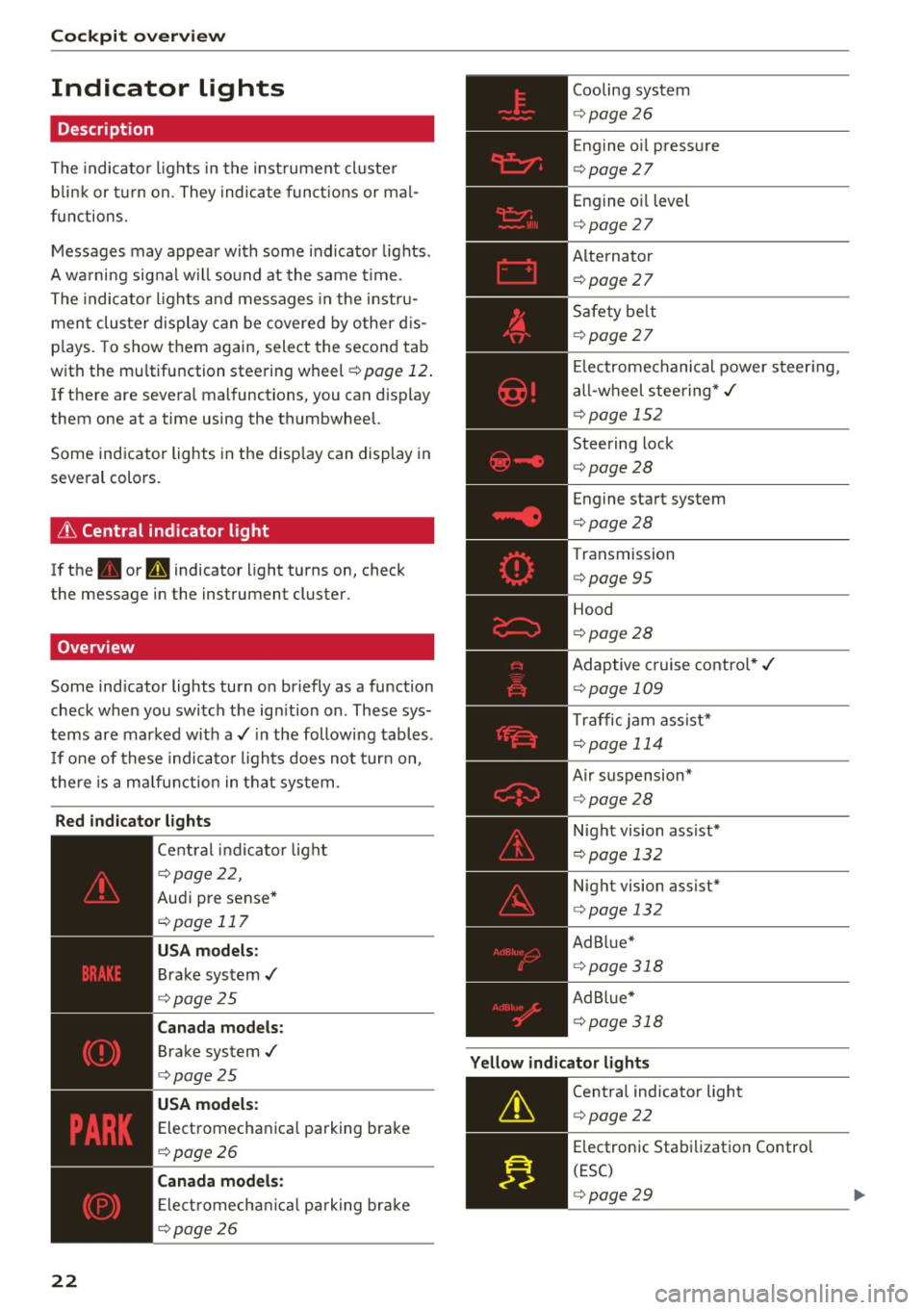
The indicato r lights in the inst rument cluste r
b link or t urn on. They indicate funct ions or ma l
functions .
Messages may appear with some indicator lights .
A wa rni ng signal w ill sound at the same time.
The indica to r lights and messages in the instru
ment cluster display can be covered by other d is
p lays. To show them again, select the second tab
with the mu ltifunction steering wheel
¢ page 12 .
If there are several malfunctions, you can display
them one at a time using the thumbwheel.
Some ind icator lights in the disp lay can display in
several colors .
& Central indicator light
If the . or Q indicator light turns on, check
the message in the instrument cluster .
Overview
Some indicator lights turn on briefly as a function
check when you switch the ign ition on . These sys
tems are marked with a./ in the following tables .
I f one of these indicato r lights does not turn on,
there is a malfunction in that system .
Red indicator lights
22
--------------
Central indicator light
r=;, page 2 2,
Aud i pre sense*
r=;, page 117
USA models :
Brake system ,/
r=;, page 25
Canada models:
Brake system .I
r=;, page 25
USA models :
Electromechanica l parking brake
r=;, page 26
C anada models:
Ele ct romecha nical park ing brake
r=;, page 26
Cooling system
r=;, page 26
Engine o il pressure
r=;, page 27
Engine oil level
¢ page 27
Alterna tor
¢ page 27
Safety be lt
¢ page 27
El ectromechanical power steer ing,
a ll-wheel steering* ,/
¢page 152
Steering lock
¢page 28
Engine start system
r=;, page 28
Transmission
¢ page 95
Hood
¢page 28
Adaptive cruise contro l* ,/
r=;, page 109
Traffic jam ass ist*
¢ page 114
Air suspension*
r=;, page 28
Night vision assist*
r=;, page 132
Night vision assist*
r=;, page 132
Ad B lue*
r=;, page 318
Ad Bl ue*
¢ page 318
Yellow indicator lights
--------------
Centra l indicator light
r=;, page 22
Electronic Stabilization Contro l
(ESC)
¢ page 29
Page 26 of 402
Cockpit over view
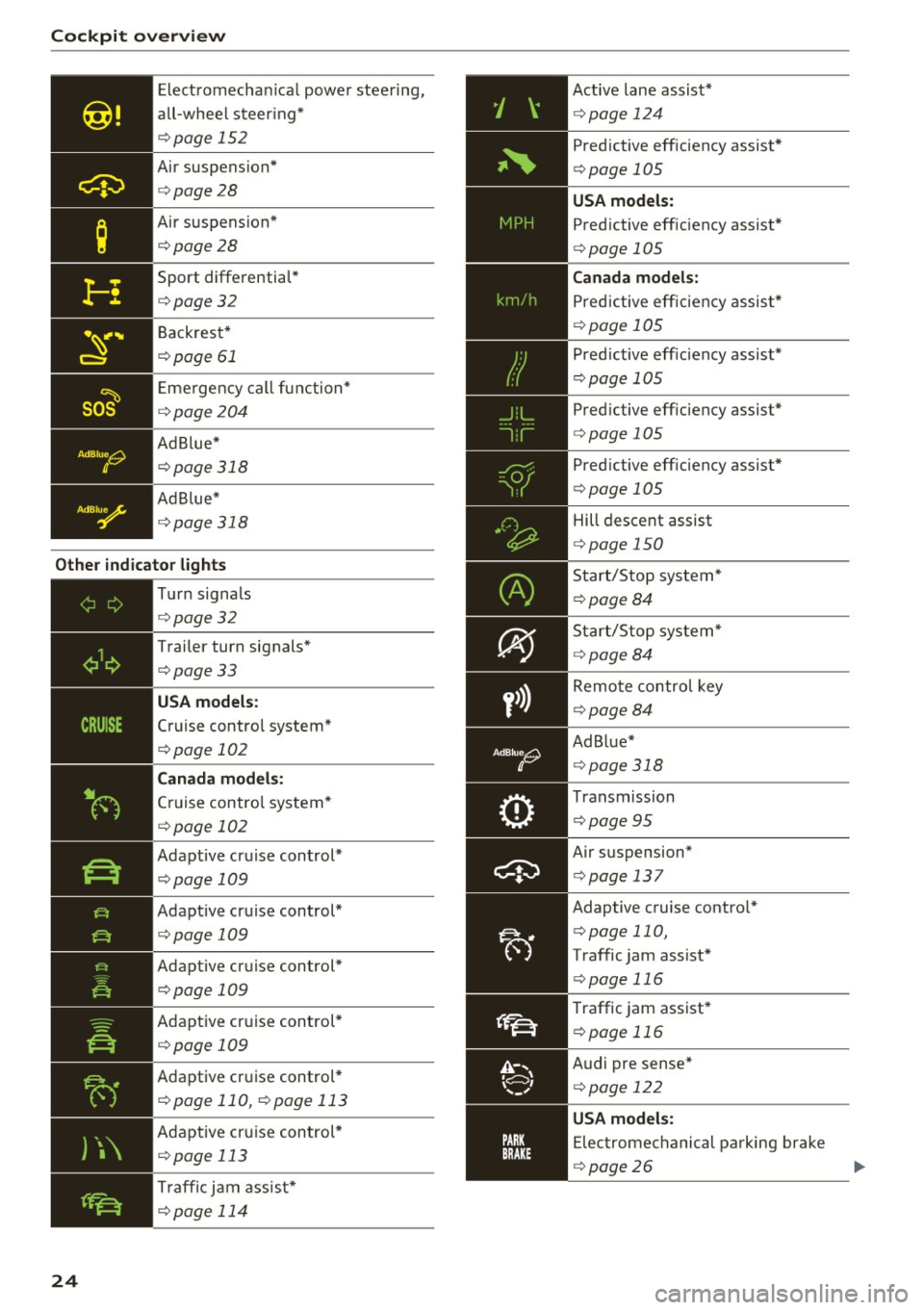
Electromechan ica l power stee ring,
all-wheel steer ing*
<=:> page 152
Air suspension*
c::>page28
Air suspension*
c::>page28
Sport differentia l*
c::> page32
Backrest*
c::> page 61
Eme rgency call function*
c::> page204
Ad B lue*
c::> page 318
Ad Blue *
c::> page 318
Other indicator lights
)\
24
- -------------Tu rn signa ls
<=:> page 32
Trailer turn signals*
c::>page33
USA models :
Cruise control system*
<=:>page 102
Canada mod els:
Cruise control system*
<=:> page 102
Adapt ive cruise control*
<=:> page 109
Adapt ive cruise control*
<=:> page 109
Adapt ive cruise control*
<=:>page 109
Adaptive cruise control*
<=:>page 109
Adaptive cr uise control *
c::> page 110, c::> page 113
Adaptive cruise control *
c::> page 113
Traffi c jam assist*
c::> page 114
Active lane assist*
c::> page 124
Predictive eff iciency assist*
<=:> page 105
USA models:
Predictive efficiency assist *
<=:>page 105
Canad a model s:
Predictive eff ic iency assis t*
<=:> page 105
Predictive eff iciency assist*
¢ page 105
Pred ictive eff iciency assist*
c::> page 105
Predictive eff iciency assist*
<=:> page 105
Hill descent assist
c::>page 150
Start/Stop system*
c::>page 84
Start/Stop system*
~page 84
Remote control key
c::> page 84
Ad Blue*
c::> page 318
Transmission
c::> page 95
Air suspension*
c::> page 13 7
Adaptive cruise contro l*
c::> page 110,
Traffic jam assist*
¢ page 116
Traffic jam assist*
c::> page 116
Audi pre sense*
<=:> page 122
USA mode ls:
Elec tromechanical parking brake
c::> page 26
Page 30 of 402
Cockpit over view
Add the maximum amount of oil indicated in the
disp lay as soon as possible¢
page 326.
~- Steering lock
• Steerin g: malfunction ! Plea se stop vehicle
There is a malfunction in the electronic stee ring
lock . You cannot t urn the ignition on .
Do
not tow your vehicle because i t cannot be
s teered. See an au thori zed A udi dealer o r au tho r
ized Aud i Service Faci lity for assistance .
Ell Steering lock : malfunc tion! Plea se contact
Service
There is a malfunction in the electronic steering
lock .
Drive to an authori zed Aud i dea ler or authori zed
Aud i Serv ice Facility immediately to have the
malfunct ion corrected.
A WARNING
-
Do not tow your veh icle when the re is a mal
function in the electronic stee ring loc k - this
increases the risk of an accident.
~ Engine start system
• Engin e s tart system : malfunction ! Plea se
c on tact Service
Do not switch the ignit ion off because you may
not be able to switc h it o n aga in.
Drive to an authorized Aud i dealer or authorized
Aud i Serv ice Fac ility immediately to have the
malfunct ion corrected .
= Engine start system : malfunction ! Plea se
c ontact Service
There is a malfunction in the engine start ing sys
tem.
D rive to an a uthorized Audi dea ler or authorized
Aud i Service Facility imm ediately to have t he
malfunct ion corrected.
28
· c:::::::, Hood
• Warning! Hood i s not lo cked. Stop vehicl e
and ch eck the lo ck
If the indicator light turns on and the message
appears , the hood lock ing mechanism is not en
gaged co rrectly .
Stop immediately and close the hood
¢ page 323 .
0/Q Air suspension
Applies to: vehicles with air suspension
• Air suspension : malfunction . Saf ely stop ve
hi cle. St ee ring and ground clearan ce limited
Due to a system malfunction, you r vehicle's
ground clearance is very low at the front or rea r
axle* (in veh icles with all-wheel stee ring). Be
ca use of this, the wheels no longer have enoug h
clea rance to steer co rrectly.
See an author ized Audi dealer or authorized Audi
Se rvice Facility for assis tance .
• Air s uspens ion: mal func tion! You can con
t inu e driv ing slowl y. Speed limited to max .
35 mph
(60 k m /h)
There is a ma lfunction that can resu lt in restrict
ed driving s tabili ty . T he speed is limited to a
max imum of 35 mph (60 km/h) .
Drive to an authorized Audi dealer or authorized
Audi Service Facility immediate ly to have the
malfunc tion corrected .
• Air suspens ion: malfunction! You m ay con
tinue dri ving slowl y at m ax. 3 5 mph
(60 km /h )
There is a ma lfunction that can res ult in restric t
ed driving stability .
D rive to an authori zed A udi dealer or authori zed
Audi Se rvice Fac il ity immediate ly a t a maxim um
speed of 35 mph (60 km/h) to have the mal func
tion corrected .
• Air su spen sion: service mode. Vehicle can b e
m oved but han dling may be impaired
Carefully drive to an a uthorized Aud i dealer or
autho rized Aud i Serv ice Facility immediately to
have the service mode deactivated.
jll,,
Page 66 of 402
Sea ts and stor age
_& WARNING
- Always read and follow the applicable warn
ings
q pag e 259, Proper adjustm ent of
head restraints .
-Only remove the head restraints for the sec
ond row seats when it is necessary for in
sta lling a child safety seat~
page 295,
Child safety.
Install the head rest rai nt again
immediately once the child s afety seat is re
moved. Driv ing with the head res traints re
moved or not in the upright position in
creases the risk of serious injury .
Memory function
Description
Applies to: veh icles with memory function
Using the memory funct ion , you can qu ickly and
easi ly store a pe rsonal seat profile for the driver
and fron t passenger and recall the settings. The
memory function is controlled by t he remo te
control key and the memory buttons in the driv
er's/front passenger's* door .
The drive r's seat profile is stored aga in and as
signed to the remo te control key each time the
ve hicl e is locked. When you open the door, the
seat profi le is automatica lly recalled.
If two peo
p le use the ve hicle, it is recommended that each
person a lways uses their "own" remote contro l
key.
Two seat profiles can be stored each using the memory buttons . Once they are stored, these
seat profiles can be selected at any time.
The fo llowing settings are stored:
Remote Memory button
control
key
Driver Dri ver Front pas-
senger
Seat X X X
Steering
X X wheel*
Both exte rior
X X mirrors
*
64
Remote control key
Applies to: vehicles with memory function
The driver 's seat profile can be assigned to the
remote control key when the vehicle is locked .
.. Select in the Infotainment system: IMENUj but
ton
> Ve hicle > left control button > Vehicle
se tting s > Se ats > Driver 's seat> S tore se t
t ing s on remo te control k ey.
@ Tips
If you do not wish to have the seat profile for
another driver ass igned to the remote control
key, switch the memory f unction off in the In
fotainment system.
Memory buttons
Applies to: vehicles with memory funct ion
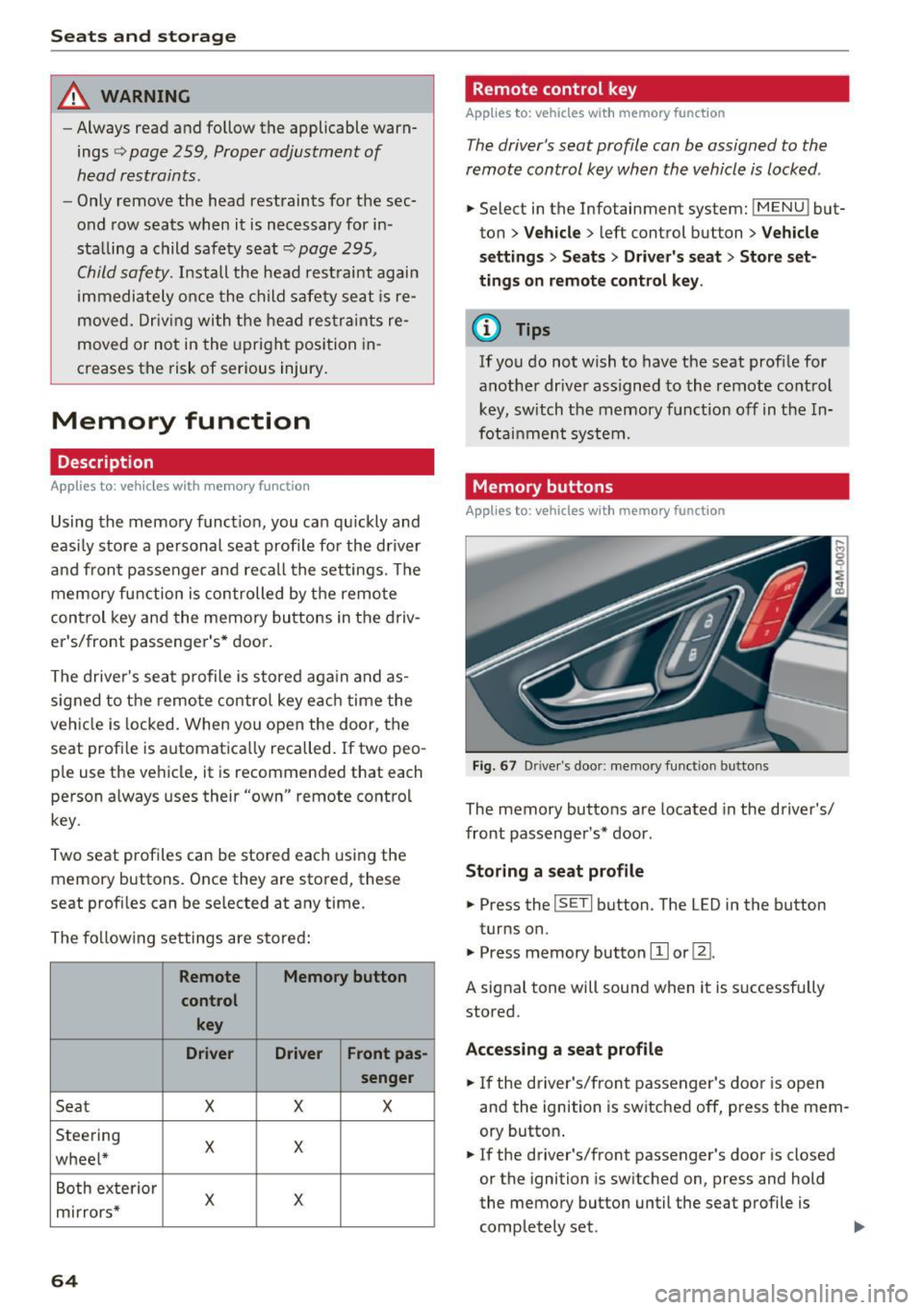
Fig . 67 D rive r's doo r: memory function b utto ns
The memory buttons are located in the driver's/
front passenger's * door .
Storing a sea t p rofile
.. Press the ISETI button . The LED in the button
turns on.
"' Press memory button
[I] or ~-
A signal tone will sound when it is s uccessfully
stored.
Acc essing a s eat profil e
"' If the driver's/front passenger's door is open
and the ignition is switched off, press the mem
ory button .
.. If the driver's/front passenger's door is closed
or the ignition is sw itched on, press and hold
the memory button until the seat profile is comp letely set. .,..
Page 76 of 402
Warm and cold
Vents
You can open or close the center and rear vents in
the cockpit and the vents in the rear center con
sole and door pillars using the ridged thumb
wheels. The levers adjust the direction of the air
flow from the vents.
Residual heat
You can activate the residual heat function when
the ignition is switched
off by pressing the knob
@ (left side). The residual heat from the coolant
is used to heat the vehicle inter ior. The residual
heat function switches
off automatically after
about 15 minutes.
A WARNING
- You should not use the recirculation mode
for an extended period of time, because no
fresh air is drawn in and the windows can
fog when coo ling mode is sw itched
off. This
increases the risk of an accident.
- Individuals with reduced sensitivity to pain
or temperature could develop burns when
using the seat heating function. To reduce
74
the risk of injury, these individuals should
not use seat heating.
(D Note
To avoid damage to the heating elements in
the seats, do not knee l on the seats or place
heavy loads on a small area of the seat .
Setup
Applies to : vehicles wit h 3-zo ne de luxe automatic climate
control
The climate control system basic settings are ac
cessed in the Infotainment system.
"'Select in the Infotainment system: IMENU ! but
ton
> Vehicle > l eft control button > Air condi
tioning
Seat heating/seat ventilation*
You can adjust the seat heating/ventilation bal
ance for the driver and front passenger.
Automatic auxiliary heater*
The aux iliary heater he lps to warm the vehicle in
terior more quickly.
Page 79 of 402
u co ...... N r-... N ...... 0
0
:E: '
Use the rocker switch(;) to select the funct io n.
When synchronization is switched on, the set
tings for the driver's side are applied to the front
passenger's side and the rear (except for seat
heating/ventilation*). When the settings on the
front passenger 's side or in the rear are changed,
the synchron izat ion is automatically sw itched off
and
4-zone appears in the display .
SET REAR
function
Use the rocker switch (D to select the funct ion .
When the function is switched on, you can adjust
all settings for the rear using the climate control
system controls in the cockpit . The rear climate
control system controls cannot be operated at
the same time. This function switches off auto
matically after a certain period of time or after
l eaving the menu.
Vents
You can open or close the center and rear vents in
the cockpit and the vents in the rear center con
sole and door pillars using the ridged thumb
wheels. The levers adjust the direct io n of the air
flow from the vents. The w ide ven t is opened and
closed using the~ button ~
page 8, fig. 2@ .
Residual heat
You can activate the residual heat funct ion when
the ignition is switched off by pressing the knob
@ (left side). The residual heat from the coolant
is used to heat the vehicle inter io r. The resid ual
heat function switches off automatically after
about 15 min utes.
& WARNING
- You should not use the recirculation mode
for an extended period of time, because no
fresh a ir is drawn in and the windows can
fog when coo ling mode is switched off . This
increases the risk of an accident .
- Individuals with reduced sensitivity to pain
or temperature could develop burns when
using the seat heating function . To reduce
the risk of injury, these ind iv iduals should
not use seat heating.
Warm and cold
(D Note
To avoid damage to the heating elements in
the seats, do not kneel on the seats or place
heavy loads on a small area of the seat.
(D Tips
It is not possible to operate the rear climate
control system controls when the power ch ild
safety lock is switched on. With With the
SET REAR function, you can apply all settings
to the rear using the climate control system
controls in the cockpit
~ page 43.
Setup
Applies to: vehicles with 4 -zone deluxe automat ic climate
contro l
The climate control system basic settings are ac
cessed in the Infotainment system .
.. Select in the Infotainment system: I MENU! but
ton
> Vehicle > l eft control b utton > Air condi
tioning
Seat heating/seat ventilation*
You can adjust the seat heating/ventilation bal
ance fo r the driver, front passenger and rear pas
sengers .
Footwell temperature
You can adjust the footwell temperature so that
it is cooler or warmer.
Auto recirculation
When switched on, automat ic rec irculat ion con
trols the recirculation mode automatically . You
must press the
® MAX button if fog forms on
the windows.
Automatic auxiliary heater*
The aux iliary heater he lps to warm the vehicle in
terior more quickly.
Steering wheel heating
Applies to: vehicles with stee ring wheel heating
The steering wheel rim can be heated .
.. Press the button on the multifunction steering
wheel to switch the steering wheel heating on ..,_
77
Page 80 of 402
Warm and cold
and off ~ ¢ page 14, fig. 11. The message
Steering wheel heating: on /Stee ring wheel
heating : off
appears in t he instr ument cluster
display.
The temperatu re is maintaine d at a constant lev
e l when steering whee l heating is switched on.
T he stee ring wheel heat ing settings are s to re d
a utomatically and ass igned to the remote cont ro l
key that is in use .
78
Page 83 of 402
u (0 ...... N r--. N ...... 0
0
:E
-Have your vehicle maintained properly and
in accordance with the service recommenda
tions in your Warranty
& Maintenance book
let. lack of proper maintenance as well as
improper use of the vehicle will impair the
function of the emission control system and
could lead to damage .
- Do not alter or
remove any component of
the Emission Control System unless ap proved by the manufacturer.
- Do not alter or
remove any device, such as
heat shields, switches, ignition wires,
valves, which are designed to protect your
vehicle's Emission Control System and other important vehicle components.
{t) Tips
The consumption estimates as published by
ENVIRONMENTAL PROTECTION AGENCY
(EPA) and Transport Canada may not corre
spond to your actual consumption on the
road, which will vary depending upon veh icle
load and speed, road and weather conditions,
trip length, etc.
Steering
Manual steering wheel position adjustment
Applies to: vehicles with manual steering wheel adjustment
The steering wheel position is adjustable up and
down and forward and back .
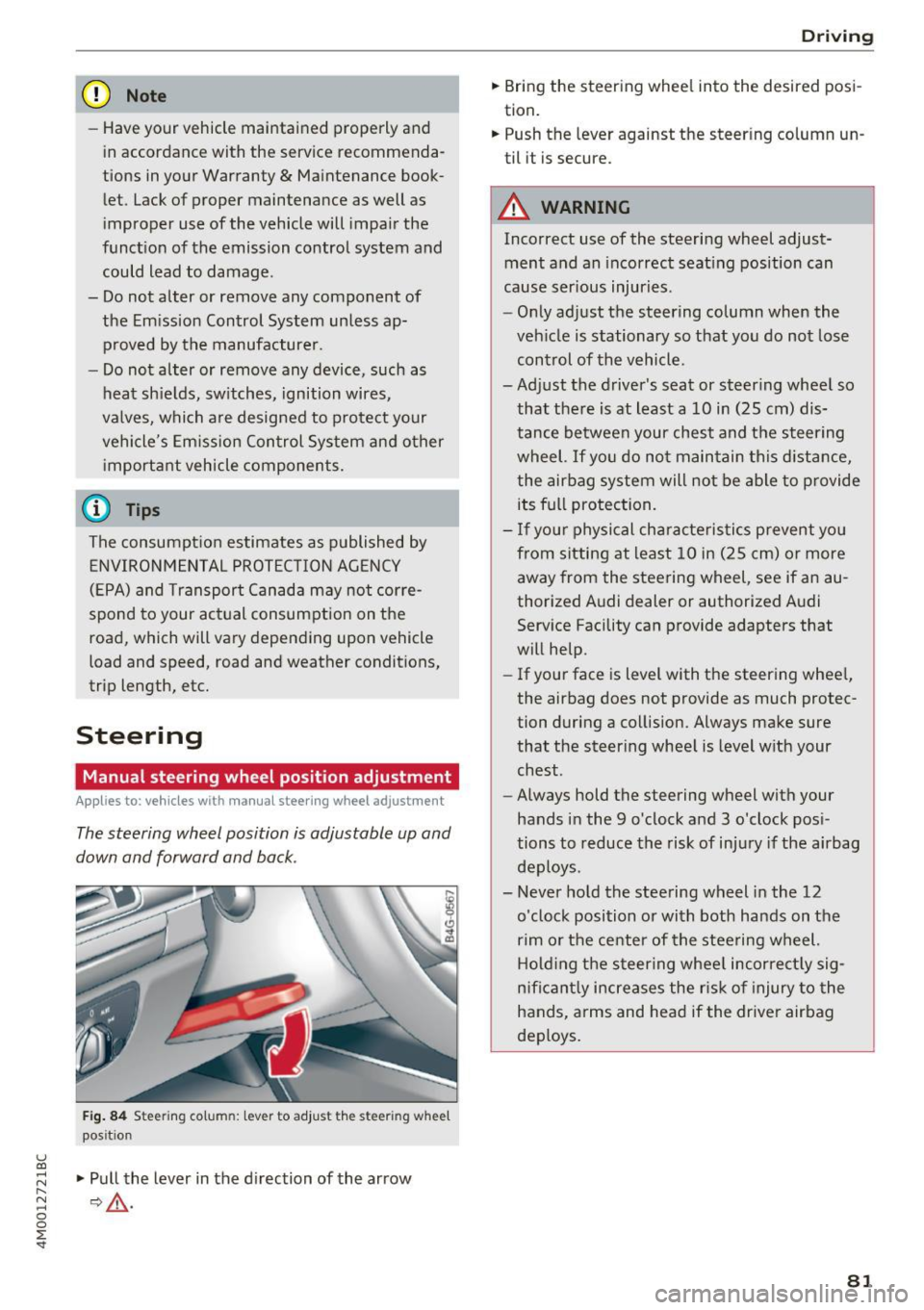
Fig. 84 Steerin g col umn : le ve r to adjus t the stee rin g w heel
pos it ion
.,. Pull the lever in the direction of the arrow
¢,& .
Driving
.,. Bring the steering wheel into the desired posi
tion.
.,. Push the lever against the steering column un
til it i s secu re.
A WARNING
= Incorrect use of the steering wheel adjust-
ment and an incorrect seating position can
cause serious injuries .
- Only adjust the steering column when the
vehicle is stationary so that you do not lose
control of the vehicle.
-
-Adjust the driver's seat or steering wheel so that there is at least a 10 in (25 cm) dis
tance between your chest and the steering
wheel. If you do not maintain this distance
I
the airbag system will not be able to provide
its full protection.
- If your physical characteristics prevent you
from sitting at least 10 in (25 cm) or more
away from the steering wheel, see if an au
thorized Audi dealer or authorized Audi Service Facility can provide adapters that
will help.
- If your face is level with the steering wheel,
the airbag does not provide as much protec
tion during a collision. Always make sure
that the steering wheel is level with your
chest.
- Always hold the steering wheel with your
hands in the 9 o'clock and 3 o'clock posi
tions to reduce the risk of injury if the airbag
deploys .
- Never hold the steering wheel in the 12
o'clock position or with both hands on the
rim or the center of the steering wheel.
Holding the steering wheel incorrectly sig
nificantly increases the risk of injury to the
hands, arms and head if the driver airbag
deploys.
81