trailer AUDI Q7 2017 Owner´s Manual
[x] Cancel search | Manufacturer: AUDI, Model Year: 2017, Model line: Q7, Model: AUDI Q7 2017Pages: 402, PDF Size: 100.39 MB
Page 216 of 402
Navig ation
a list o f gas stations in the area. When a gas sta
tion is selected, route guidance from the current
veh icle position is calc ulated.
Trail er mode *
Trailer mode is sw itched off at the factory.
When the function is switched on~' the maxi
m um permitted speed for vehicles with trailers is
incorpo ra ted into the rou te g uidance and the ca l
culated arrival time is adjusted according ly. Trail
e r mode is disp layed using symbols-"' in the side
menu on the map .
Personal route assistance *
Personal route assistance is sw itched off at the
factory.
Your trips are recorded and destinations are sug
gested by the MMI when this f unct ion is switched
on~
¢ page 211 .
The personal route ass istance is indicated by the
~ symbol in the status line of the Infotainment
system display.
Notification when n ea rby *
The notification when nearby is switched off at
the factory .
The MMI notifies you when you are approaching
selected po ints of int erest whe n this function is
sw itched on~- You can a lso have a
Notification
tone .
Presentation mode
The Presentation mode helps yo u to effect ively
p lan a trip and follow the p lanned route without
moving the ve hicle . You can
Select starting point
when, for example , you would like to ca lculate a
route star ting from a locat ion other than the ve
h icle pos it io n. Start
Presentation mod e to simu
late route gu idance .
1> High occu pan cy vehi cle
214
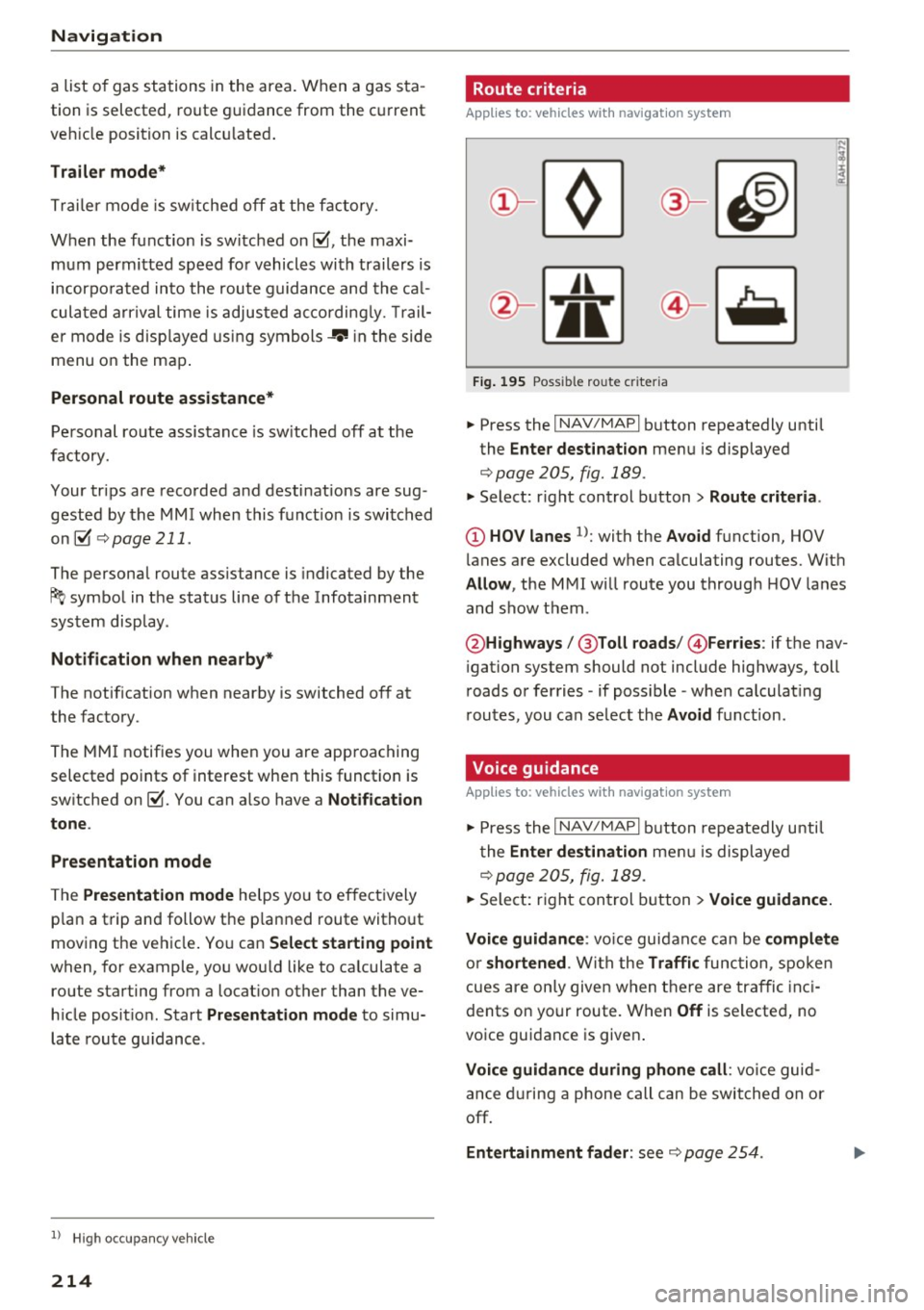
' Route criteria
Applies to: vehicles with navigation system
J(
Fig . 195 Poss ible ro ute c riter ia
.. Press the I NAV /MAP I button repeatedly until
the
Enter des tinat ion menu is displayed
¢page 205, fig. 189 .
.. Select: r ight control button> Rout e criteria .
(D HOV lanes 1>: with the Avoid function, HOV
l anes are excluded when ca lculating routes. With
Allow , the MMI will route you through HOV lanes
and show them .
@Highways /@ Toll roads /@ Ferries : if the nav
i gation system should not include highways, toll
roads or ferries -if poss ible -when calculat ing
routes, you can select the
Avoid f u nction.
Voice guidance
Applies to: vehicles with navigation system
.. Press the I NAV /MAPI button repeatedly unti l
the
En ter de stination me nu is displayed
¢page 205, fig. 189 .
.. Select: r ight con trol b utton> Voice guidance.
Voic e guidan ce :
vo ice guidance can be compl ete
o r shortened . With the Traffic func tion , spoken
cues are on ly given when there are traffic inc i
dents on your route. When
Off is se lected, no
voice guidance is given .
Voice guidan ce during phone call : voice guid
ance d uring a phone call can be swi tched on or
off.
Entertainment fader : see c::> page 254.
Page 217 of 402
u (0 ...... N r--. N ...... 0
0
:E
ume d uring voice guidance using the On/Off knob
c::> page 156 Yo u can also f ind additional in fo rma
tion under
c::> page 254.
Map
Operating the map
A ppl ies to: ve hicles with naviga tion system
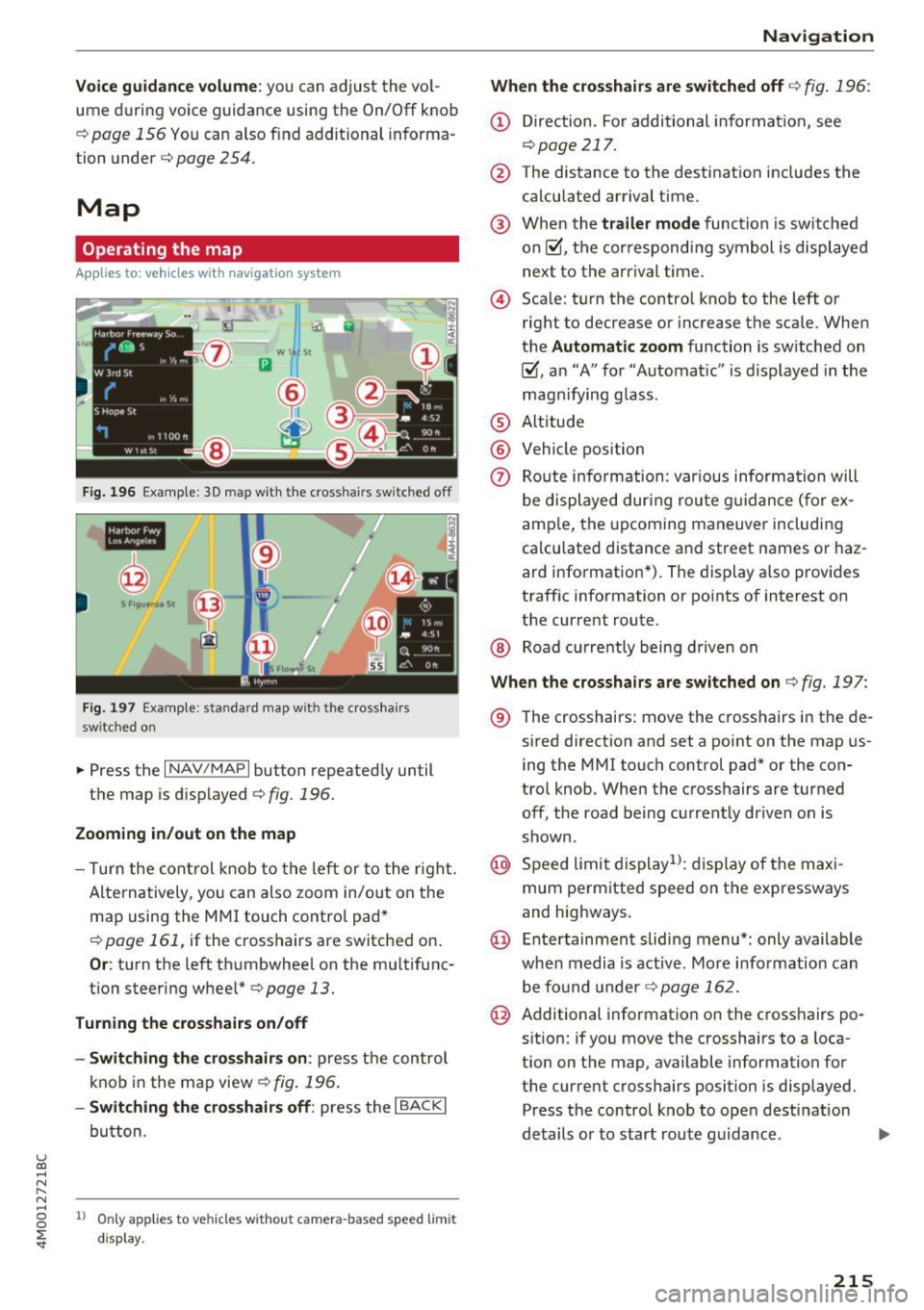
F ig. 19 6 Exam ple: 30 map with th e cross hairs sw itched off
H4M
~
S FIQUt ra• St
F ig . 197 Exa mpl e: sta n dard m ap with t he cros sha ir s
sw itc hed o n
.. Press the I NAV/MAPI button repeated ly until
the map is d isplayed
<=> fig. 196.
Zoom ing in /out on the map
- T urn the cont rol k nob to the le ft or to the r ight.
Alte rn atively , you can also zoom in/out on the
map using the MM I touch contro l pad*
<=> page 161, if the c ross hairs are switched on .
Or: turn the left thumbwheel on the mu ltifunc
t ion steer ing whee l*<=>
page 13.
Turning the crosshairs on/off
- Switching th e crosshairs on :
press t he control
k no b in t he ma p view
c::> fig. 19 6.
- Switching the crosshairs off : press the I BACKI
button.
1l Only app lies to ve hicles w it h ou t camer a-based speed limit
disp lay .
Navigation
When the crosshairs are switched off
c::> fig. 196:
(D D irection . Fo r additional informa tion, see
c::>page 21 7.
@ The distance to the destinat ion includes the
calculated arrival time .
@ When the trailer mode func tion is sw itched
on~, the cor respond ing sy mbol is displayed
n ext to the arrival time.
@ Sca le: t urn the control knob to the left o r
right to decrease or increase the sca le . When
the
Automatic zoom function is sw itched on
~, an "A" for "A utomat ic" is d isplayed in the
magn ifying g lass .
® Altitude
@ Vehicle position
0 Route info rmation: var ious informa tion will
be displayed dur ing rou te g uidance ( fo r ex
amp le, the upcoming maneuver includin g
ca lculated distance and street names o r haz
ard info rmation*) . The display a lso provi des
traff ic information or po ints of interest on
the current route .
@ Road currently being d rive n on
When the crosshairs are switched on <=> fig. 197:
® The crosshairs: move the c rosshairs in the de-
s ired direct ion and set a point on the map us
i ng the MMI touc h control pad* or the con
trol knob . When the crosshairs are tur ned
off, the road be ing curren tly driven on is
shown .
@ Speed limit display1>: dis play of the max i
mum pe rm itted speed on t he expressways
and highways.
@ Ente rtain men t slidi ng menu*: only available
when media is active. More i nfo rmat ion can
b e fo und under
c::> page 162.
@ Additional information on the c ross hairs po
s it ion: if you move the crosshairs to a loca
t ion on the map, available information fo r
the current crosshairs position is displayed. Press the control knob to open desti nat ion
de tails or to start rou te g uidance.
215
Page 348 of 402
Wheels
&_ WARNING
Please note the important safe
ty precautions regarding tire
pressure¢
page 343 and load
limits¢
page 346.
Tires and vehicle load limits
There are limits to the amount of load or weight that any vehicle
and any tire can carry . A vehicle
that is overloaded will not handle
well and is more difficult to stop .
Overloading can not only lead to loss of vehicle control, but can al
so damage important parts of the
vehicle and can lead to sudden
tire failure, including a blowout
and sudden deflat ion that can
cause the vehicle to crash.
Your safety and that of your pas
sengers also depends on making
sure that load limits are not ex
ceeded. Vehicle load includes ev
erybody and everything in and on
the vehicle . These load limits a re
technically referred to as the vehi
cle's
Gross Vehicle Weight Rat
ing
("GVWR") .
The "GVWR" includes the weight of the basic vehicle, all factory in
stalled accessories, a full tan k of
fuel, oil, coolant and other fluids
3 4 6
plus maximum load. The maxi
mum load includes the number of
passengers that the veh icle is in
tended to carry ("seating capaci
ty") with an assumed weight o f
150 lbs (68 kg) for each passen
ger at a designated seat ing pos i
tion and the total weight of any luggage in the veh icle. If you tow
a trailer, the weight of the trailer
hitch and the tongue we ight of
the loaded trailer must be includ ed as part of the vehicle load.
The
Gross Axle Weight Rating
("GAWR") is the maximum load
that can be applied at each of the
vehicle's two axles .
The fact that there is an upper
limit to your vehicle's Gross Vehi
cle Weight Rating means that the
total weight of whatever is being
carried in the vehicle (inc luding
the weight of a trailer h itch and
the tongue weight of the loaded
trailer) is limited . The more pas
sengers in the vehicle or passen
gers who are heavier than the
standard weights assumed mean
that less weight can be carried as luggage .
The Gross Vehicle Weight Rating and the Gross Axle Weight Rat ing .,.
Page 349 of 402
u
"' ... N
" N ... 0
~ ...
are listed on the safety compli
ance sticker label located on the
driver's side 8-pillar.
.&_ WARNING
Overloading a vehicle can cause loss of vehicle control, a crash
or other accident, serious per
sonal injury, and even death.
-Carrying more weight than
your vehicle was designed to carry will prevent the vehicle
from handling properly and increase the risk of the loss of
vehicle control.
-The brakes on a vehicle that
has been overloaded may not
be able to stop the vehicle
within a safe distance.
-Tires on a vehicle that has
been overloaded can fail sud
denly, including a blowout and
sudden deflation, causing loss
of control and a crash.
-Always make sure that the to
tal load being transported - incl uding the weight of a trail
er hitch and the tongue
weight of a loaded trailer -
does not make the vehicle heavier than the vehicle's
Gross Vehicle Weight Rating.
Wheels
Determining correct load
limit
Use the example below to calcu
late the total weight of the pas
sengers and luggage or other
things that you plan to transport
so that you can make sure that
your vehicle will not be overload
ed.
Steps for Determining Correct Load Limit
1. Locate the statement "THE
COMBINED WEIGHT OF OCCU
PANTS AND CARGO SHOULD
NEVER EXCEED XXX KG OR XXX
LBS" on your vehicle's placard
(tire inflation pressure label)
¢ page 343, fig. 2 76.
2. Determine the combined
weight of the driver and pas
sengers that will be riding in
your vehicle.
3. Subtract the combined weight of the driver and passengers
from
"XXX" kilograms or "XXX"
pounds shown on the stick
er ¢
page 343, fig. 2 76.
4. The resulting figure equals the
available amount of cargo and
luggage load capacity. For ex
ample, if the
"XXX" amount
equals 1400 lbs. and there will.,,.
347
Page 364 of 402
Emergency assistance
-If a tire pressure of 29 psi (200 kPA) cannot
reached after inflating for 6 minutes, then
the tire is too severely damaged. Do not
continue driving.
- If the tire cannot be repaired with the tire
sealant, see an authorized Audi dealer or au
thorized Audi Service Facility for ass istance.
(D} Tips
Do not operate the compressor for more than
six minutes continuously, or it can overheat.
Once the compressor has cooled, you can con
tinue to use it .
Completing
"' Adhere the sticke r that says "max . SO mph
(max. 80 km/h)" that is provided w ith the tir e
mobility kit within the driver's fie ld of vision.
"'S top the vehicle after driving for about 10 mi
nutes and check the tire pressure .
"' If the tire pressure is lower than 19 psi (130
kPA), then the tire is too severely damaged. Do
not continue driving.
A WARNING
Pay attention to the following after repairing
the tire :
- Do not drive faster than SO mph (80 km/h).
- Avoid hard acceleration, braking sharply, and fast cornering.
- The vehicle may become more difficult to
control.
- If the tire is too severely damaged, see an
authorized Audi dealer or authorized Aud i
Service Facility for assistance .
@ For the sake of the environment
You can give the used tire sealant bottle to an
authorized Audi dealer or authorized Audi
Service Facility for disposal.
@ Tips
Remember to obtain a new bottle of sealant
from an authorized Audi dea ler or authorized
Audi Service Facility after repairing a tire.
362
Replacing a wheel
' Preparation
You must complete the preparation before
changing a tire .
"'Read and follow the important safety precau-
tions¢
page 360.
"' Set the park ing brake.
"' Select the P selector lever posit ion.
"' When towing a trailer: disconnect the trailer
from your vehicle.
"' Lay out the vehicle tool kit¢
page 360 and the
spare tire.
"' Switch on wheel change mode* in the Infotain
ment system:
! MENUI button> Vehicle> left
control button >
Service & checks > Air suspen
sion: wheel change.
"'Switch the ignition off.
The vehicle jack mode* switches off automatical ly at speeds above 6 mph (10 km/h).
A WARNING
When using the ve hicle jack* on a road with a
steep hill or offroad, you must take extra pre
cautions to prevent the vehicle from rolling. Use suitable objects to block the front and
back of the wheel that is diagonal from the
wheel with the flat tire.
A WARNING
You or your passengers could be injured while
changing a whee l if you do not follow these
safety precautions:
- If you have a flat tire, move a safe distance
off the road. Turn off the engine, turn the
emergency f lashers on and use other warn
ing devices to alert other motorists.
- Make sure that passengers wait in a safe
place away from the vehicle and well away
from the road and traffic.
- To help prevent the vehicle from moving
suddenly and possibly slipping off the jack*,
always fully set the parking brake and block
the front and back of the wheel diagonally opposite the wheel being changed. When
one front wheel is lifted off the ground,
~
Page 372 of 402
Fuses and bulbs
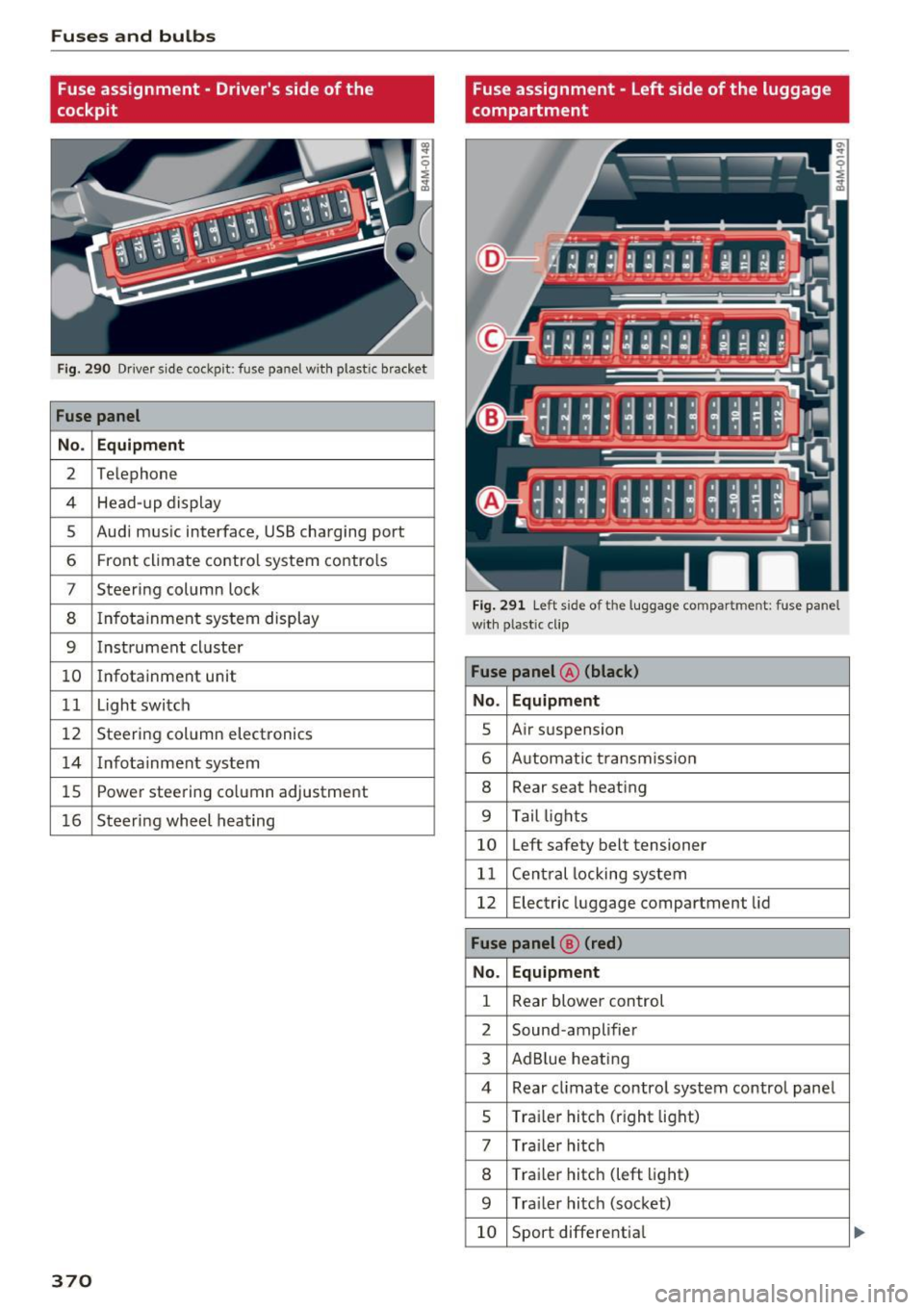
Fuse assignment - Driver's side of the
cockpit
Fig . 290 D river side cockpit: fuse panel wit h plastic bracket
Fuse panel
No . Equipment
2 Te lep hone
4 Head-up display
5 Audi mus ic interface, USB charging port
6 Front climate contro l system contro ls
7 Steering column lock
8 Infotainment system display
9 Instrument cl uster
10 Infotainment unit
11 Light switch
12 Steer ing column electronics
14 Infotainment system
lS Powe
r steering co lumn adjustme nt
1 6 Steer ing wheel heating
370
Fuse assignment - Left side of the luggage
compartment
Fig. 291 L eft side of the lu ggage compartment: fuse panel
wi th plastic cl ip
Fuse panel @ (black)
No. Equipment
5 Air suspension
6 Automat ic t ransmiss ion
8 Rear seat heating
9 Tail lights
10 Left safety belt tensioner
11 Central locking system
12 Electric luggage compartment lid
Fuse panel@ (red)
No . Equipment
1 Rear blower control
2 Sound-amplifier
3 AdBlue heating
4 Rear cl imate contro l system control panel
5 Traile r hitch (right light)
7 Tra iler hitch
8 Trai le r hitch (left light)
9 Trailer hitch (socket)
10 Sport differential
Page 377 of 402
u (0 ...... N r--. N ...... 0
0
:E
the arrow to remove
c:> fig. 295.
.. Insert the towing loop all the way into the
threaded opening and tighten it with a wheel
wrench .
.. After using, place the towing loop back in the
vehicle tool kit.
_& WARNING
If the towing loop is not tightened unti l it
stops when installing, the threads may be
pulled o ut when towing the vehicle and that
cou ld cause an acc ident .
(D Note
The trim is attached to the bumper with sev
eral hooks. To reduce the risk of damage, do
no t use any force when remov ing and instal
ling .
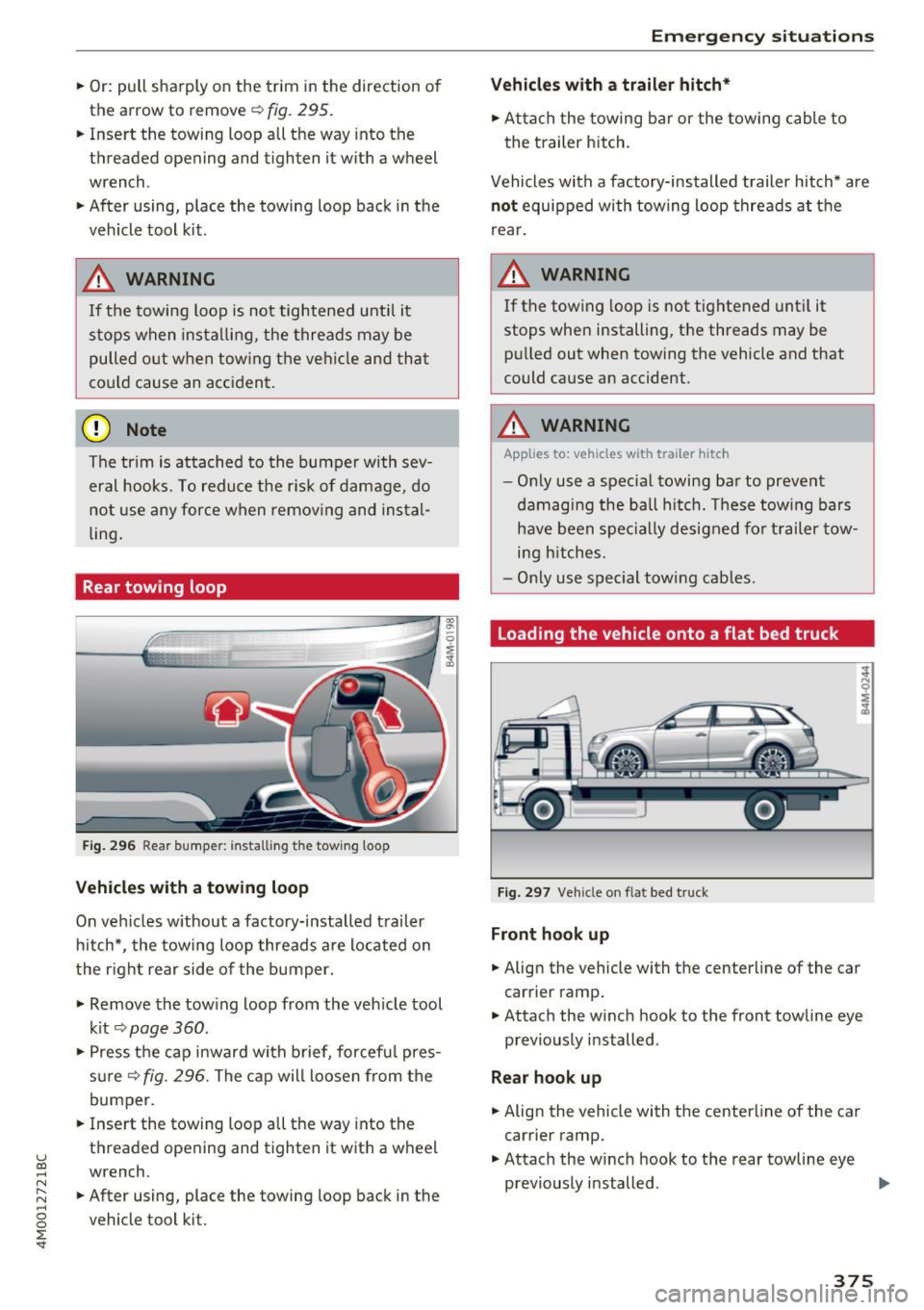
Rear towing loop
Fig. 296 Rear bumper: installi ng the tow ing loop
Vehicles with a towing loop
On vehicles w ithout a factory-installed trailer
hitch*, the towing loop threads a re located on
the right rear side of the bumper.
-
.,. Remove the tow ing loop from the veh icle tool
k it
c:> page 360 .
.. Press the cap inward wi th brief, forcef ul pres
s ur e
c:>fig. 296. The cap will loosen from the
bumper.
.. Inse rt the towing loop all the way into the
threaded opening and tighten it with a wheel
wrench .
.. After using, place the towing loop back in the
vehicle tool kit.
Emergency situations
Vehicles with a trailer hitch*
.. Attach the towing bar or the towing cable to
the trailer hitch.
Vehicles with a facto ry -installed trailer hitch* are
not equipped with towing loop threads at the
rear.
_& WARNING
If the towing loop is not tightened until it
stops when installing, the threads may be pulled out when towing the vehicle and that
could cause an accident.
_& WARNING
-Applies to: vehicles with trailer hitch
- Only use a spec ial towing bar to prevent
damaging the ball hitch. These towing bars
have been specially designed for trailer tow
i ng hitches.
- Only use special towing cables.
Loading the vehicle onto a flat bed truck
Fig. 297 Vehicle on flat bed truck
Front hook up
.. Align the vehicle with the centerline of the car
carrier ramp .
.,. Attach the w inch hook to the front towline eye
previously installed .
Rear hook up
.. Align the vehicle with the centerline of the car
carrier ramp.
.. Attach the w inch hook to the rear towline eye
previously installed . .,.
375
Page 395 of 402
u co ...... N r-... N ...... 0
0
:E: '
Parking location
Aud i connect vehicle control . . . . . . . . . . . 200
Parking sy stem
refer to Parking systems . . . . . . . . . . 139, 140
Parking systems . . . . . . . . . . . . . . . . . . . . . . 138
Peripheral cameras . . . . . . . . . . . . . . . . . . 143
Rearview came ra . . . . . . . . . . . . . . . . . . . . 140
Se ttings . . . . . . . . . . . . . . . . . . . . . . . . . . . 146
Trailer hitch . . . . . . . . . . . . . . . . . . . . . . . . 147
Particulate filter (diesel) ......... ..... .
Parts replaceme nt ................ ... .
PASSENGER AIR BAG light ....... .. .. .. .
Paths (Owner's Manual)
Pause (audio/video file) ............... .
Pedals . ... .. .. ................ ..... . 321
383
285 159
237
261
Index
Prompt
refer to Command (voice recognition sys-
tem) . . . . . . . . . . . . . . . . . . . . . . . . . . . . . . 168
Proper occupant seat ing pos itions . . . . . . . 257
Proper safety belt position . . . . . . . . . . . . . . 269
Proper seating position Front passenger . . . . . . . . . . . . . . . . . . . . . 258
Occupants. . . . . . . . . . . . . . . . . . . . . . . . . . 25 7
Rear passengers . . . . . . . . . . . . . . . . . . . . . 258
Protecting . . . . . . . . . . . . . . . . . . . . . . . . . . . 356
Q
quattro .... .... .. ................. . .
Selective wheel torque control ..... .. . .
Question What happens to unbelted occupants? 152
148
266
Pedestrian detection . . . . . . . . . . . . . . . . . . 131
Peripheral display . . . . . . . . . . . . . . . . . . . . . 139
R
Personal route assistance
Phonebook 211
refer to Contacts . . . . .
. . . . . . . . . . . . . . . 184
Physical principles of a frontal collision . . . 266
Picture format (video) . . . . . . . . . . . . . . . . . 240
Playback (med ia) . . . . . . . . . . . . . . . . . . . . . 237
Playlist . . . . . . . . . . . . . . . . . . . . . . . . . . . . . 240
Point of interest . . . . . . . . . . . . . . . . . . . . . . 208
Point of interest search . . . . . . . . . . . . . . . . 209
also refer to Point of interest . . . . . . . . . . 208
Polishing . . . . . . . . . . . . . . . . . . . . . . . . . . . . 356
Pollutant filter (automatic A/C system) . . . . 71
Predictive efficiency assist . . . . . . . . . . . . . . 105
Pregnant women
Special considerations when wearing a safe-
ty belt . . . . . . . . . . . . . . . . . . . . . . . . . . . . . 270
pre sense
refer to Audi pre sense .. .. .. .. .. .. .. . 117
Presentation mode . . . . . . . . . . . . . . . . . . . . 214
Presets (radio) . . . . . . . . . . . . . . . . . . . . . . . 226
Pressure Tire pressure monitoring system . . . . . . . 351
Prewarming . . . . . . . . . . . . . . . . . . . . . . . . . . 82
Program guide
Radio ... .. .. ................ ..... . 224
Programming buttons (multifunct ion steer ing
wheel) . . . . . . . . . . . . . . . . . . . . . . . . . . . . . . . 14 Radio ..
.. .. .. ... ... ... .. ..... ... .. .. 223
Additional station information . . . . . . . . . 225
Presets 226
Radio text . . . . . . . . . . . . . . . . . . . . . . . . . . 224
Station list . . . . . . . . . . . . . . . . . . . . . . . . . 223
Rail carrier. . . . . . . . . . . . . . . . . . . . . . . . . . . 377
Rain/light sensor Headlights . . . . . . . . . . . . . . . . . . . . . . . . . . 48
I nterval mode (wipers) . . . . . . . . . . . . . . . . 55
Raising the vehicle . . . . . . . . . . . . . . . . . . . . 376
Random
refer to Shuffle . . . . . . . . . . . . . . . . . . . . . 240
Range (fuel lev el) . . . . . . . . . . . . . . . . . . . . . . 15
Reading lights . . . . . . . . . . . . . . . . . . . . . . . . . 51
Rear axle steering
refer to All-wheel steering . . . . . . . . . . . . 152
Rear fog lights . . . . . . . . . . . . . . . . . . . . . . . . 48
Rear lid
refer to L uggage compartment lid . . . . . . . 40
Rear lowering . . . . . . . . . . . . . . . . . . . . . . . . 137
Rear Seat Entertainment preparation
refer to Audi Entertainment mobile
Rearv iew camera 236
refer to Par
king systems . . . . . . . . . . 139, 140
Rear window defogger . . . . . . . . . . . . . . . 73, 76
Rear window washer system . . . . . . . . . . . . . 55
REAR (button) . . . . . . . . . . . . . . . . . . . . . . . . . 76
393
Page 399 of 402
u co ...... N r-... N ...... 0
0
:E: '
refer to MMI touch
Towing 160
Tow trucks . .. .. ........... .. .. .... . 374
T owing loop ..... .. .. .... ... .. .. . 374,375
TPMS Tire pressure monitoring system . ..... . 351
Traffic information . . . . . . . . . . . . . . . . 220 , 221
Traffic messages ............... .. .... . 216
Traffic sign recognition . . . . . . . . . . . . . . . . 104
Trailer mode (navigation) . . . . . . . . . . . . . . . 214
T railer towing . . . . . . . . . . . . . . . . . . . . . . . . . 98
Information . . . . . . . . . . . . . . . . . . . . . . . . 100
Parking systems . . . . . . . . . . . . . . . . . . . . . 147
Technical requirements . . . . . . . . . . . . . . . . 98
Trailer mode (air suspension) . . . . . . . . . . 100
Turn signa ls . . . . . . . . . . . . . . . . . . . . . . . . . 33
Transport Canada . . . . . . . . . . . . . . . . . . . . . 264
Travel guide
refer to Travel (travel guide) . . . . . . . . . . . 193
Travel (travel guide) . . . . . . . . . . . . . . . . . . . 193
Treb le (sound) . . . . . . . . . . . . . . . . . . . . . . . 253
Turnassist . .. .. ............... .. .... . 119
T urn signal . . . . . . . . . . . . . . . . . . . . . . . . . . . 49
u
ULSD No. 2 (Diesel fuel) ....... .. .. .... . 315
Unfastening safety belts . . . . . . . . . . . . . . . 270
Uniform tire quality grad ing . . . . . . . . . . . . 3S0
Unlocking/locking By remote control . . . . . . . . . . . . . . . . . . . . 3 7
With the central locking switch . . . . . . . . . 38
With the convenience key . . . . . . . . . . . . . . 37
With the lock cylinder . . . . . . . . . . . . . . . . . 39
Updating stations (radio) . . . . . . . . . . . . . . . 223
USB stick
refer to Audi music interface ...... . 234, 23S
V
Vanity m irror. . . . . . . . . . . . . . . . . . . . . . . . . . S4
Vehicle Care/cleaning . . . . . . . . . . . . . . . . . . . . . . . 3S4
D. ' 1mens1ons .
.. ................ .... . . 379
Out of service . . . . . . . . . . . . . . . . . . . . . . . 3S9
Raising . . . . . . . . . . . . . . . . . . . . . . . . . . . . 363
Index
Specifications . . . . . . . . . . . . . . . . . . . . . . . 3 78
Transporting . . . . . . . . . . . . . . . . . . . . . . . 3 77
Vehicle battery . . . . . . . . . . . . . . . . . . . . . . . 330
Charge level . . . . . . . . . . . . . . . . . . . . . . . . 153
Charging . . . . . . . . . . . . . . . . . . . . . . . . . . . 331
Winter operation . . . . . . . . . . . . . . . . . . . . 330
Vehicle control modules . . . . . . . . . . . . . . . . 154
Vehicle jack . . . . . . . . . . . . . . . . . . . . . . . . . . 360
Lifting points . . . . . . . . . . . . . . . . . . . . . . . 363
Wheel change mode . . . . . . . . . . . . . . . . . 362
Vehicle key . . . . . . . . . . . . . . . . . . . . . . . . . . . 35
Vehicle status report Audi connect vehicle contro l . . . . . . . . . . . 200
Vehicle tool kit . . . . . . . . . . . . . . . . . . . . . . . 360
Ventilation . . . . . . . . . . . . . . . . . . . . . . . . . . . 71
Version information . . . . . . . . . . . . . . . . . . . 252
VI EW button . . . . . . . . . . . . . . . . . . . . . . . . . . 12
VIN . . . . . . . . . . . . . . . . . . . . . . . . . . . . . . . . 378
Voice guidance
refer to Multifunction steering wheel . . 12, 14
Voicemail . . . . . . . . . . . . . . . . . . . . . . . . . . . 184
Vo ice recognit ion system . . . . . . . . . . . . . . . 169
Commands . . . . . . . . . . . . . . . . . . . . . . . . . 170
External . . . . . . . . . . . . . . . . . . . . . . . . . . . 174
Operating . . . . . . . . . . . . . . . . . . . . . . . . . . 169
Settings . . . . . . . . . . . . . . . . . . . . . . . . . . . 249
Volume . . . . . . . . . . . . . . . . . . . . . . . . . . . . 254
Volume 253
w
Warning lights
refer to Indicator lights . . . . . . . . . . . . . . . . 22
Warranty coverages . . . . . . . . . . . . . . . . . . . 381
Washing matte finish paint . . . . . . . . . . . . . 354
Web radio . . . . . . . . . . . . . . . . . . . . . . . . . . . 233
Weights.... .... .. ................. .. 379
What happens if you wear your safety belt too
loose? . . . . . . . . . . . . . . . . . . . . . . . . . . . . . . 269
What happens to unbelted occupants? . . . . 266
What impairs driving safety? . . . . . . . . . . . . 256
Wheel bolts . . . . . . . . . . . . . . . . . . . . . . . . . 348
Wheel rep lacement . . . . . . . . . . . . . . . . . . 362
Wheels . . . . . . . . . . . . . . . . . . . . . . . . . . . . . 333
Cleaning . . . . . . . . . . . . . . . . . . . . . . . . . . . 355
Glossary of t ire and loading terminology . 335
Replacing . . . . . . . . . . . . . . . . . . . . . . . . . . 362
397