seats AUDI Q7 2017 Owner´s Manual
[x] Cancel search | Manufacturer: AUDI, Model Year: 2017, Model line: Q7, Model: AUDI Q7 2017Pages: 402, PDF Size: 100.39 MB
Page 4 of 402
Table of contents
About this Owner's Manual ... .. .
Cockpit ... .. ............... .... .. .
Cockpit overview ................ .
Controls at a glance ... .......... .. .. .
Instrument cluster .. .......... .. .. .. .
Multifunction steering wheel ... .. .. .. .
Driver information system ............ .
H ead-up display .... .. ..... ... .. .... .
On -Board Diagnostic System (OBD) .. .. .
Indicato r lights . ................ ... .
Starting and driving ......... ... .
6
8
8
8
10
12
15
20
21
22
34
Opening and closing . . . . . . . . . . . . . 34
Central lock ing . . . . . . . . . . . . . . . . . . . . . . 34
L uggage compartment lid . . . . . . . . . . . . . 40
Ch ild safety lock . . . . . . . . . . . . . . . . . . . . . 43
Power windows . . . . . . . . . . . . . . . . . . . . . 43
Panorama glass roof . . . . . . . . . . . . . . . . . 45
Garage door opener (Homelink) . . . . . . . . 46
Lights and Vision . . . . . . . . . . . . . . . . . 48
Exterior lighting . . . . . . . . . . . . . . . . . . . . . 48
Interior lighting . . . . . . . . . . . . . . . . . . . . . 51
V1s1on . . . . . . . . . . . . . . . . . . . . . . . . . . . . . 52
Windshield wipers . . . . . . . . . . . . . . . . . . . 55
Dig ital compass . . . . . . . . . . . . . . . . . . . . . 57
Seats and storage . . . . . . . . . . . . . . . . 59
General information . . . . . . . . . . . . . . . . . 59
Front seats . . . . . . . . . . . . . . . . . . . . . . . . . 59
Rear seats . . . . . . . . . . . . . . . . . . . . . . . . . . 60
H ead restraints . . . . . . . . . . . . . . . . . . . . . 63
M emory function . . . . . . . . . . . . . . . . . . . . 64
Ashtray . . . . . . . . . . . . . . . . . . . . . . . . . . . . 65
Sockets . . . . . . . . . . . . . . . . . . . . . . . . . . . . 66
Sto rage . . . . . . . . . . . . . . . . . . . . . . . . . . . . 66
Luggage compartment . . . . . . . . . . . . . . . 67
Roof rack . . . . . . . . . . . . . . . . . . . . . . . . . . 70
Warm and cold .. .......... .. .. .. . 71
Climate control system . . . . . . . . . . . . . . . 71
3 zone deluxe automatic climate control . 72
4-zone deluxe automatic climate control . 7 5
Steer ing wheel heating . . . . . . . . . . . . . . . 77
2
Driving ..... .. .. .. .. ... .......... . .
General information . ... ........... . .
Steering .......... .. .. . .......... . .
Start ing and stopping the eng ine ..... . .
Start/Stop system .. .. ............. . .
E le ctromechanical parking brake ...... .
Start ing to drive .. .. .. ........ ..... . .
Offroad driving ... ... ...... ....... .. .
T ilt angle display . .. .. ... .......... . .
Automat ic transmission
Trailer towing ... .. ............. . .
Driving with a trail er .. .. ........... . .
T railer towing information
79
79
81
82
84
87
88
89
90
91
98
98
100
Driver assistance . . . . . . . . . . . . . . . . . 102
Assistance systems . . . . . . . . . . . . . . 102
Electronic speed limiter . . . . . . . . . . . . . . . 102
Speed warning system . . . . . . . . . . . . . . . . 102
Cruise control system . . . . . . . . . . . . . . . . 102
Camera-based traffic sign recognit ion . . . 104
Pred ictive efficiency assist. . . . . . . . . . . . . 105
Audi adaptive cruise contro l . . . . . . . . . . . 107
Pred ictive control (eff ic ie ncy assist) . . . . . 113
Traffic jam assist . . . . . . . . . . . . . . . . . . . . 114
Distance indicat or and distance warnin g 116
Messages . . . . . . . . . . . . . . . . . . . . . . . . . . 116
Audi pre sense . . . . . . . . . . . . . . . . . . . . . . 117
Audi pre sense basic . . . . . . . . . . . . . . . . . . 118
Audi pre sense front . . . . . . . . . . . . . . . . . 118
Audi pre sense rea r . . . . . . . . . . . . . . . . . . 120
Audi pre sense city . . . . . . . . . . . . . . . . . . . 121
Settings in the Infotainment system . . . . 122
Messages . . . . . . . . . . . . . . . . . . . . . . . . . . 122
Audi active lane assist . . . . . . . . . . . . . . . . 123
Audi s ide assist . . . . . . . . . . . . . . . . . . . . . 126
Night vision assist . . . . . . . . . . . . . . . . . . . 131
Audi drive select . . . . . . . . . . . . . . . . . . . . . 134
Parking systems 138
General information . . . . . . . . . . . . . . . . . 138
Rear parking system . . . . . . . . . . . . . . . . . 139
Parking aid plus . . . . . . . . . . . . . . . . . . . . . 139
Rearview camera . . . . . . . . . . . . . . . . . . . . 140
Periphera l cameras . . . . . . . . . . . . . . . . . . 143
Adjusting the parking aid . . . . . . . . . . . . . 146
Page 6 of 402
Table of contents Media ... . ... ... .. .......... .. .. ...
228
Introduction . . . . . . . . . . . . . . . . . . . . . . . . 228
Notes ... .. .. .. ... .......... .. .. .. . 228
Media drives . . . . . . . . . . . . . . . . . . . . . . . . 229
Bluetooth audio player . . . . . . . . . . . . . . . 231
Wi -F i aud io player . . . . . . . . . . . . . . . . . . . 232
Online media and Internet radio . . . . . . . . 233
Multimedia connections . . . . . . . . . . . . . . 234
Pla ying media. .. ............. .... .. . 237
Additional settings . . . . . . . . . . . . . . . . . . 240
Supported media and file formats . . . . . . 243
Troubleshooting . . . . . . . . . . . . . . . . . . . . . 244
Audi smartphone interface . . . . . . 247
Setup ... .. .... ... .......... .. .. ... 247
Operating . . . . . . . . . . . . . . . . . . . . . . . . . . 247
Troubleshoot ing. . . . . . . . . . . . . . . . . . . . . 248
System settings . . . . . . . . . . . . . . . . . . 249
Setting the date and time . . . . . . . . . . . . . 249
MMI settings . . . . . . . . . . . . . . . . . . . . . . . 249
Connection manager . . . . . . . . . . . . . . . . . 250
System update . . . . . . . . . . . . . . . . . . . . . . 252
Sound settings . . . . . . . . . . . . . . . . . . . . . . 253
Volume settings . . . . . . . . . . . . . . . . . . . . . 253
Restarting the MMI . . . . . . . . . . . . . . . . . . 254
Software license i nformat ion 254
Safety first . . . . . . . . . . . . . . . . . . . . . . . 256
Driving safety . . . . . . . . . . . . . . . . . . . . 256
Bas ics . . . . . . . . . . . . . . . . . . . . . . . . . . . . . 256
Correct passenger seating positions . . . . . 257
D river's and front passenger's footwell . . 260
Pedal area . . . . . . . . . . . . . . . . . . . . . . . . . . 261
Storing cargo correctly . . . . . . . . . . . . . . . 261
Reporting Safety Defects . . . . . . . . . . . . . . 263
Safety belts . . . . . . . . . . . . . . . . . . . . . . 265
Gene ral information . . . . . . . . . . . . . . . . . 265
Why use safety belts? . . . . . . . . . . . . . . . . 266
Safety belts . . . . . . . . . . . . . . . . . . . . . . . . 268
Belt tensioners . . . . . . . . . . . . . . . . . . . . . . 271
Airbag system . . . . . . . . . . . . . . . . . . . . 273
Important information . . . . . . . . . . . . . . . 273
Front airbags . . . . . . . . . . . . . . . . . . . . . . . 277
Mo nito ring the Advanced Airbag System . 285
4
Side airbags . . . . . . . . . . . . . . . . . . . . . . . . 289
Side curtain airbags . . . . . . . . . . . . . . . . . . 292
Child safety . . . . . . . . . . . . . . . . . . . . . . 295
Important information . . . . . . . . . . . . . . . 295
Child safety seats . . . . . . . . . . . . . . . . . . . . 301
Securing child safety seats . . . . . . . . . . . . 306
LATCH system (lower anchorages and
tethers for c hildren) . . . . . . . . . . . . . . . . . 309
Additional information . . . . . . . . . . . . . . . 313
Maintenance and Care ........... 314
Checking and Filling . . . . . . . . . . . . . 314
Gasoline . . . . . . . . . . . . . . . . . . . . . . . . . . . 314
Diesel fuel . . . . . . . . . . . . . . . . . . . . . . . . . 315
Refueling ..... .. .. .. .. ........... .. 316
Selective catalytic reduction (AdBlue/
DEF) . . . . . . . . . . . . . . . . . . . . . . . . . . . . . . 318
Emissions control systems . . . . . . . . . . . . 321
Engine compartment . . . . . . . . . . . . . . . . . 322
Engine o il . . . . . . . . . . . . . . . . . . . . . . . . . . 324
Cooling system . . . . . . . . . . . . . . . . . . . . . . 328
Brake fluid . . . . . . . . . . . . . . . . . . . . . . . . . 329
Battery . . . . . . . . . . . . . . . . . . . . . . . . . . . . 330
Windshield washer system . . . . . . . . . . . . 331
Service interva l display 332
Wheels ........ ... ...... ....... ... 333
Wheels and Tires . . . . . . . . . . . . . . . . . . . . 333
T ire pressure monitoring system . . . . . . . 351
Run-flat tires . . . . . . . . . . . . . . . . . . . . . . . 352
Care and cleaning .... .......... .. 354
General informat ion . . . . . . . . . . . . . . . . . 354
Car washes . . . . . . . . . . . . . . . . . . . . . . . . . 354
Cleaning and care information . . . . . . . . . 355
P lac ing your vehicle out of service . . . . . . 359
Troubleshooting . . . . . . . . . . . . . . . . . 360
Emergency assistance . . . . . . . . . . . 360
Genera l information . . . . . . . . . . . . . . . . . 360
Eq uip ment . . . . . . . . . . . . . . . . . . . . . . . . . 360
Tire mobility kit . . . . . . . . . . . . . . . . . . . . . 360
Replacing a whee l . . . . . . . . . . . . . . . . . . . 362
Page 53 of 402
u (0 ...... N r--. N ...... 0
0
:E
tion is turned off.
@ Tips
You should switch the emergency flashers on
if:
- you are the last car in a traffic jam so that
all other vehicles approaching from behind
can see you, or if
-your vehicle has broken down or you are
having an emergency, or if
-your vehicle is being towed or if you are tow
ing another vehicle
Interior Lighting
Front interior lighting
~ 0 9
!
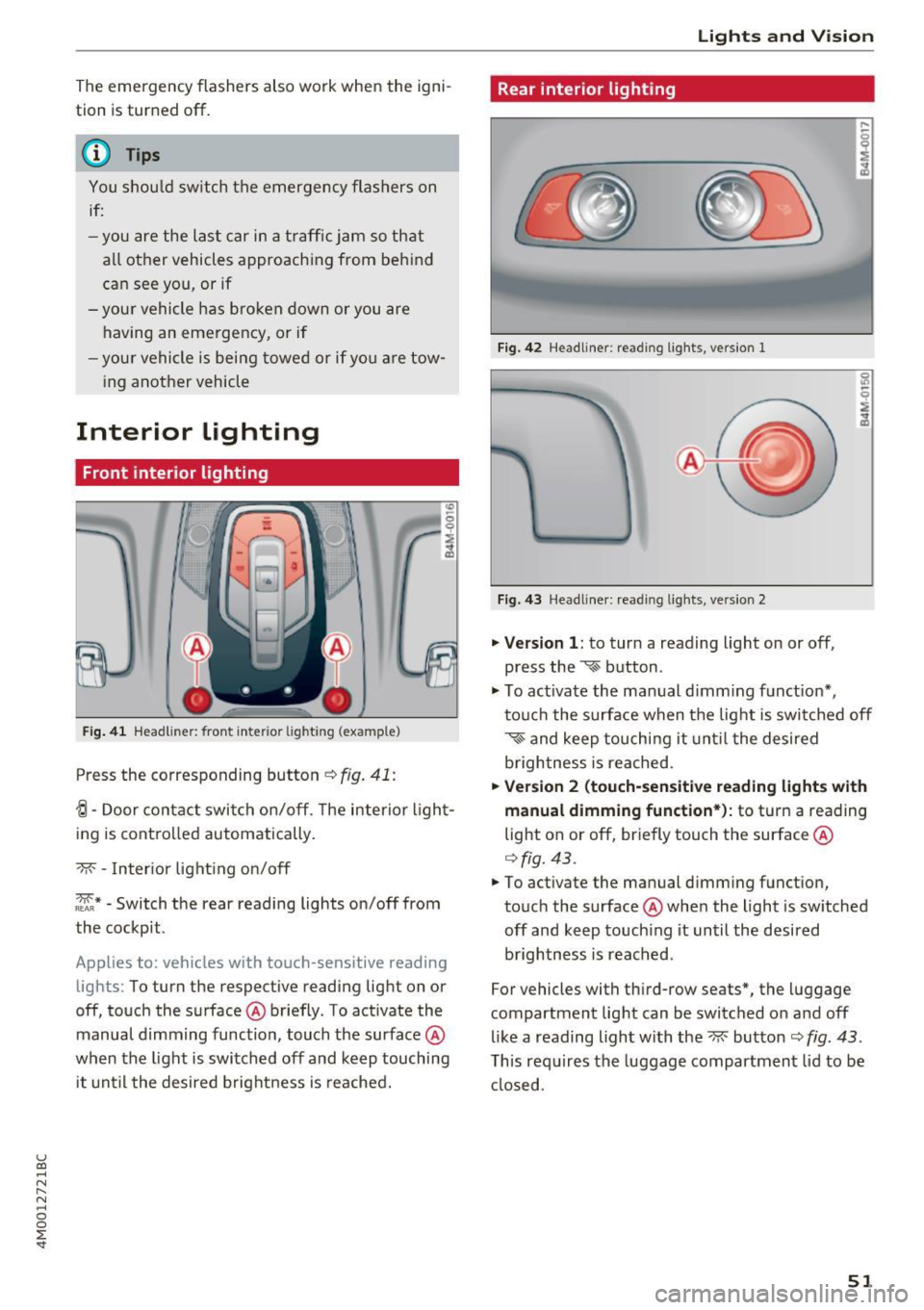
Fig. 41 Headl iner: front interior lighting (example)
Press the corresponding button c:-:> fig. 41:
-!;I -Door contact switch on/off. The interior light
ing is controlled automatically.
-M- -Interior lighting on/off
~* -Switch the rear reading lights on/off from
the cockpit.
Applies to: vehicles with touch-sensitive reading lights : To turn the respective reading light on or
off, touch the surface @briefly. To activate the
manual dimming function, touch the surface @
when the light is switched off and keep touching
it until the desired brightness is reached.
Lights and Vision
Rear interior lighting
Fig. 42 Headliner: reading lights, version 1
Fig. 43 Headliner: reading lights, version 2
.,. Version 1: to turn a reading light on or off,
press the
~ button .
.,. To activate the manual dimming function*,
touch the surface when the light is switched off
~~ and keep touching it until the desired
brightness is reached.
.,. Version 2 (touch-sensitive reading lights with
manual dimming function*):
to turn a reading
light on or off, briefly touch the surface @
¢fig. 43.
.,. To activate the manual dimming function,
touch the surface @when the light is switched
off and keep touching it until the desired
brightness is reached.
For vehicles with third-row seats*, the luggage
compartment light can be switched on and off
like a reading light with the~ button
c:-:> fig. 43.
This requires the luggage compartment lid to be
closed .
51
Page 61 of 402
u (0 ...... N r--. N ...... 0
0
:E
General information
A WARNING
See¢ page 256, Driving safety for important
information, tips, suggestions and warnings
that you should read and follow for your own
safety and the safety of your passengers.
Front seats
Power seat adjustment
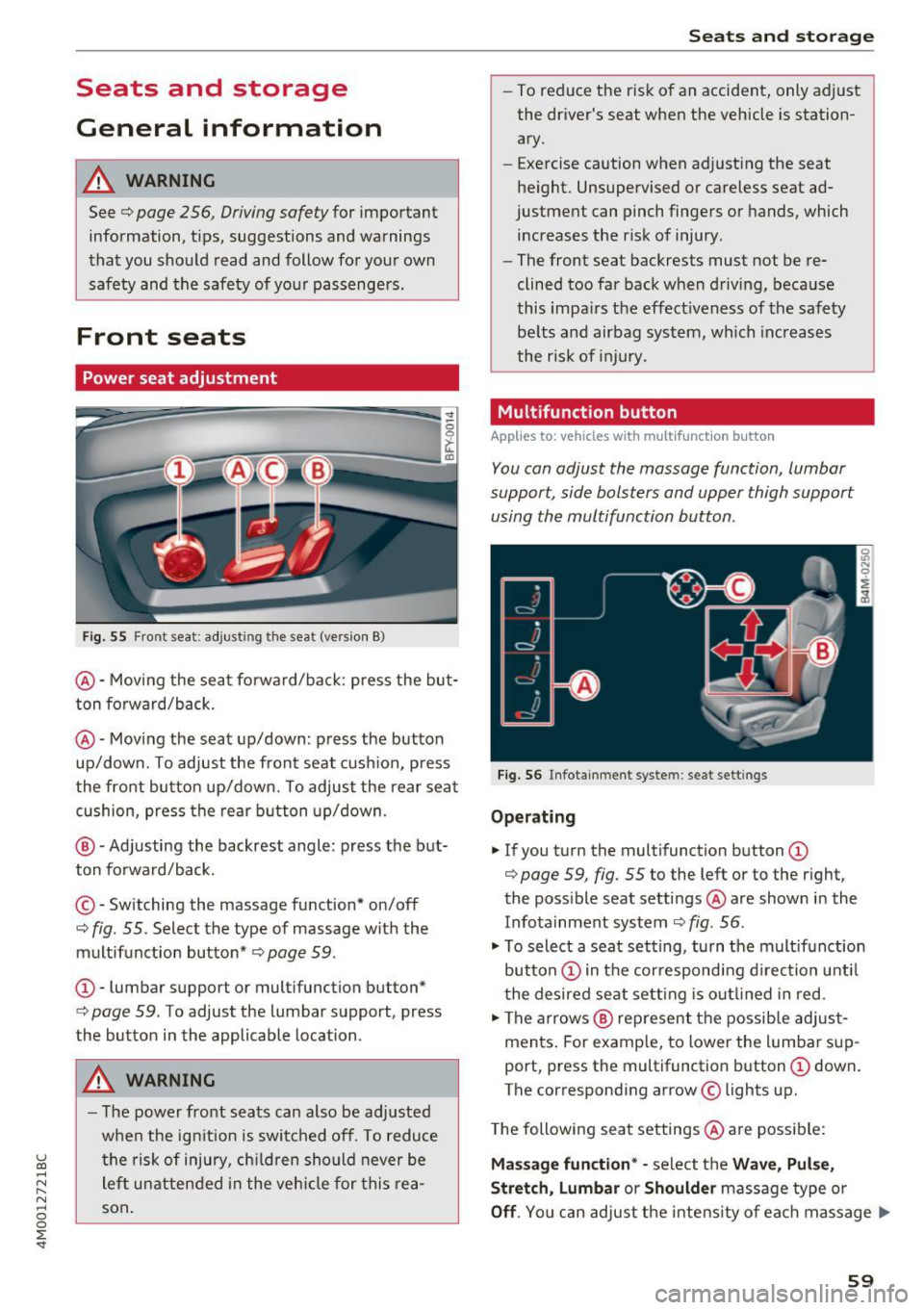
Fig. 55 Fro nt seat: adjus ting the seat (ver sion B)
@ -Moving the seat forward/back: press the but
ton forward/back.
@ -Moving the seat up/down : press the button
up/down. To adjust the front seat cushion, press
the front button up/down. To adjust the rear seat cushion, press the rear button up/down .
@ -Adjusting the backrest angle : press the but
ton forward/back.
© -Switching the massage fun ction* on/off
c::> fig. 55. Select the type of massage with the
multifunction button*
c::> page 59 .
CD-lumbar support or multifunction but ton*
c:> page 59 . To adjust the lumbar support , press
the button in the applicable location .
A WARNING
- The power front seats can also be adjusted
when the ignition is switched off. To reduce
the risk of injury, children should never be
left unattended in the vehicle for this rea
son.
Seats and storage
- To reduce the risk of an accident, only adjust
the driver's seat when the vehicle is station
ary.
- E xercise caution when adjusting the seat
height. Unsupervised or careless seat ad
justment can pinch fingers or hands, which
increases the risk of injury .
- The front seat backrests must not be re
clined too far back when driving, because
this impairs the effectiveness of the safety
belts and airbag system, which increases
the risk of injury.
Multifunction button
Applies to : vehicles wi th mult if un ction b utto n
You can adjust the massage function, lumbar
support, side bolsters and upper thigh support
using the multifunction button .
Fig. 56 Infotainment syste m : seat sett ings
Operating
"'If you turn the multifunction button CD
c::> page 59, fig. 55 to the left or to the right,
the possible seat settings @ are shown in the
Infotainment system
c::> fig . 56 .
.,. To select a seat setting, turn the multifunction
button
CD in the corresponding direction until
the desired seat setting is outlined in red.
.,. The arrows @ represent the possible adjust
ments. For example, to lower the lumbar sup
port, press the multifunction button
CD down.
T he corresponding arrow © lights up.
The following seat settings @ are possible:
Massage function* -select the Wave, Pulse,
Stretch, Lumbar or Shoulder massage type or
Off. You can adjust the intensity of each massage ..,.
59
Page 62 of 402
Sea ts and stor age
from 1 through 5 . You can switch the selected
massage on/off using the button @
¢fig . 56 .
Lumb ar support -you can adjust the lumbar sup
port up/down and to be s tronge r/weaker.
Side bol ster s* -you can increase/decrease the
latera l support in the seat using the s ide bo lsters
on the seat surface and the backrest.
Upp er thigh support* -you can increase/de
crease the upper th igh support .
(D Tips
-The massage function switches off auto
matically after approx imately 10 minutes .
- The air in the side bolsters* is released as
soon as the driver's door opens. This makes
is possible to enter and exit the vehicle
more comfortab ly. As soon as you sta rt d riv
i ng the veh icle, the s ide bo lsters fi ll.
Center armrest
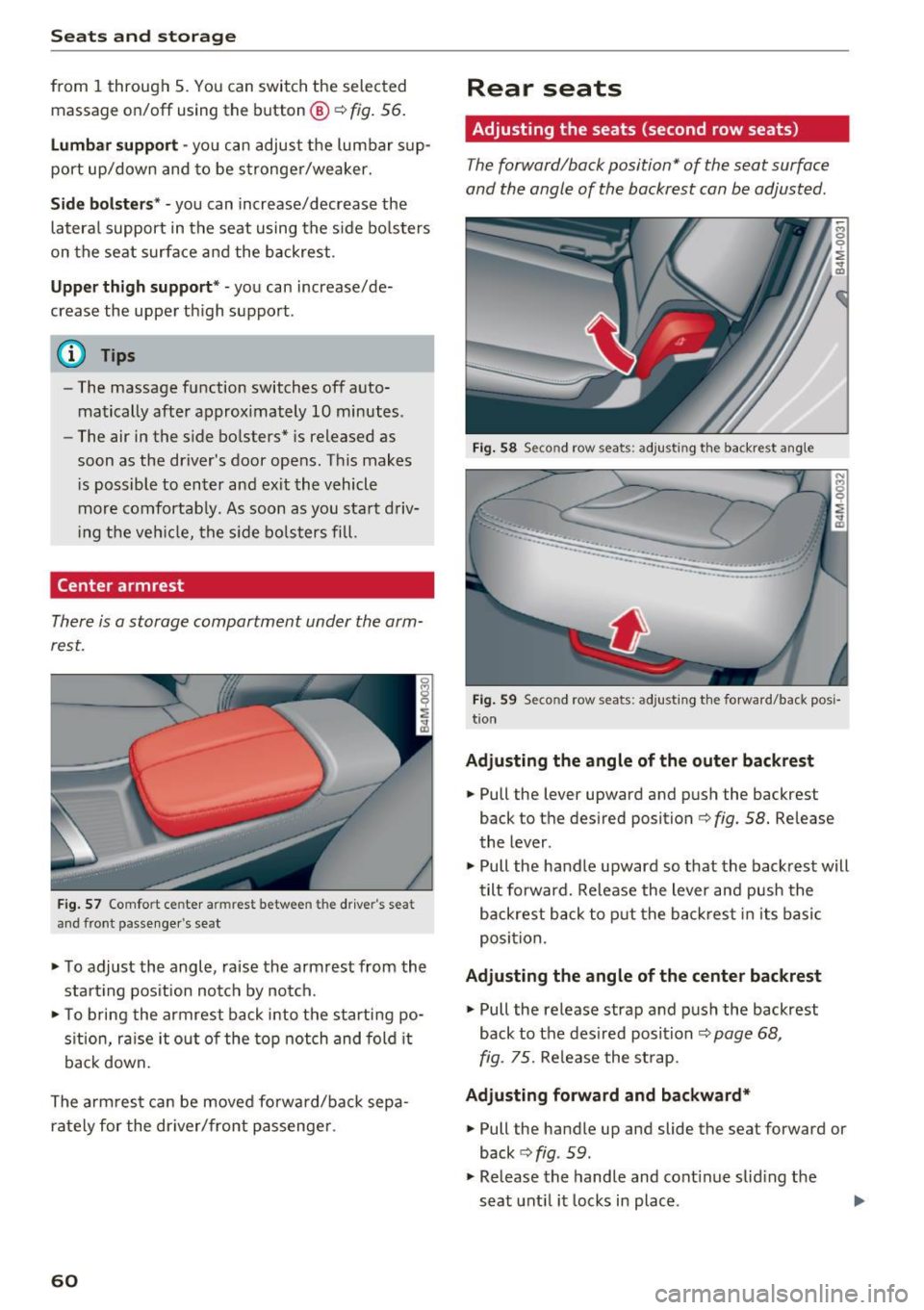
There is a storage compartment under the arm
rest.
F ig . 57 Comfort center armrest between the driver's seat
and front passe nger's seat
• To adjust the angle, raise the armrest from the
start ing pos it ion notch by no tch.
• To bring the armrest back i nto the starti ng po
s ition, ra ise it out o f the top notch and fold it
back down.
The arm rest can be moved forward/back sepa
rately for the dr iver/front passenge r.
60
Rear seats
Adjusting the seats (second row seats)
The forward/back position" of the seat surface
and the angle of the backrest can be adjusted.
Fig. 58 Se con d row seats: adjusting th e ba ckrest angle
··-·-·--··-.. ____ .. _,,,___ ____
-... ···-----...... _ ..... _____ ..
Fig. 59 Seco nd row seats: adjusting t he forward/back posi
t io n
Adju sting the angle of the outer back rest
• Pull the lever upward and push the backrest
back to the desired position¢
fig. 58. Release
the lever.
• Pull the handle upward so that the backrest will
tilt forward. Re lease the lever and push the
backrest back to p ut the back res t in i ts basic
posi tion .
Adju sting the angle of the center backrest
• Pull the release strap and p ush the backrest
back to the des ired position
¢page 68,
fig. 75.
Re lease the st rap.
Adju sting forward and backward*
• Pull the handle up and slide the seat forward or
back
c> fig . 59.
• Release the handle and cont inue sliding the
seat unt il it locks in place .
Page 63 of 402
u (0 ...... N r--. N ...... 0
0
:E
-To reduce the risk of an accident, the seat
can only be adjusted when the vehicle is sta
tionary .
- Be careful when adjusting the seat. Adjust
ing the seat without paying attention can
pinch fingers or limbs, which increases the
risk of injury.
-A lways pull forward on the backrest to make
sure it is check if it is correctly locked in
place.
Entry /exit assistance (second row seats )
Applies to: vehicles with entry assistance
Entry/exit assistance creates easier access to the
third-row seating*.
•
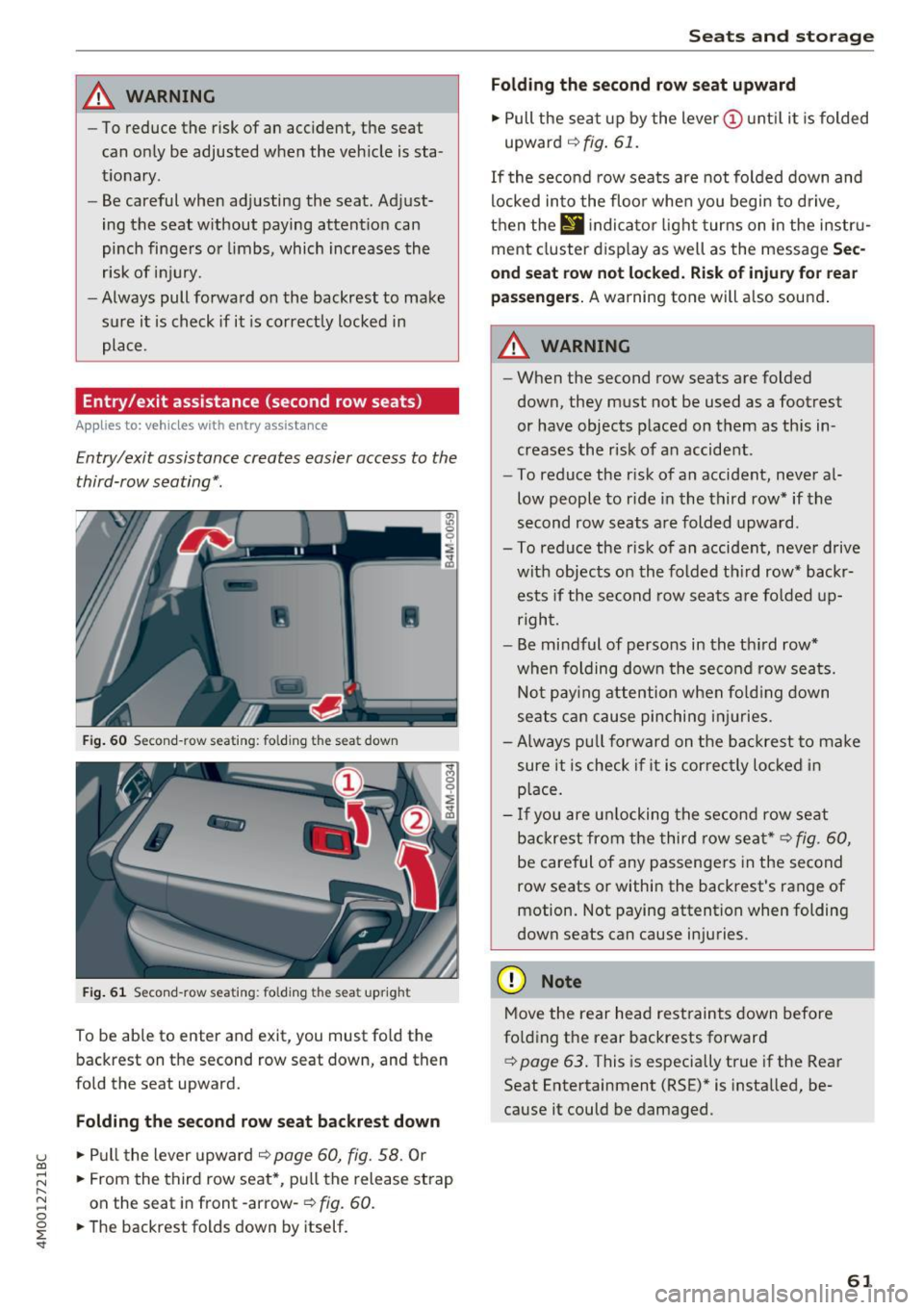
Fig. 60 Second-row seat ing: folding th e seat down
Fig. 61 Second-row seating : fo lding the seat upright
To be able to enter and exit, you must fold the
backrest on the second row seat down, and then
fold the seat upward.
Folding the second row seat backrest down
.,. Pull the lever upward o:::> page 60, fig. 58. Or
.,. From the third row seat*, pull the release strap
on the seat in front -arrow-
o:::> fig. 60.
.,. The backrest folds down by itself.
Seats and storage
Folding the second row seat upward
.,. Pull the seat up by the lever(!) until it is folded
upward
o:::> fig. 61.
If the second row seats are not folded down and
locked into the floor when you begin to drive,
then the
II ind icator light turns on in the instru
ment cluster display as well as the message
Sec
ond seat row not locked. Risk of injury for rear
passengers.
A warning tone will also sound.
A WARNING
-- When the second row seats are folded
down, they must not be used as a footrest
or have objects placed on them as this in
creases the risk of an accident.
- To reduce the risk of an accident, never al
low people to ride in the third row* if the
second row seats are folded upward.
- To reduce the risk of an accident, never drive with objects on the folded third row* backrests if the second row seats are folded up
right.
- Be mindful of persons in the third row*
when folding down the second row seats.
Not paying attention when folding down
seats can cause pinching injuries.
- Always pull forward on the backrest to make
sure it is check if it is correctly locked in
place.
- If you are unlocking the second row seat
backrest from the third row seat*
o:::> fig. 60,
be careful of any passengers in the second
row seats or within the backrest's range of
motion. Not paying attention when folding
down seats can cause injuries .
(D Note
Move the rear head restraints down before
folding the rear backrests forward
¢ page 63. This is especially true if the Rear
Seat Entertainment (RSE)* is installed, be
cause it could be damaged.
61
Page 64 of 402
Sea ts and stor age
Folding the backrest down/up (third row
seats)
Applies to veh icles with third row seats
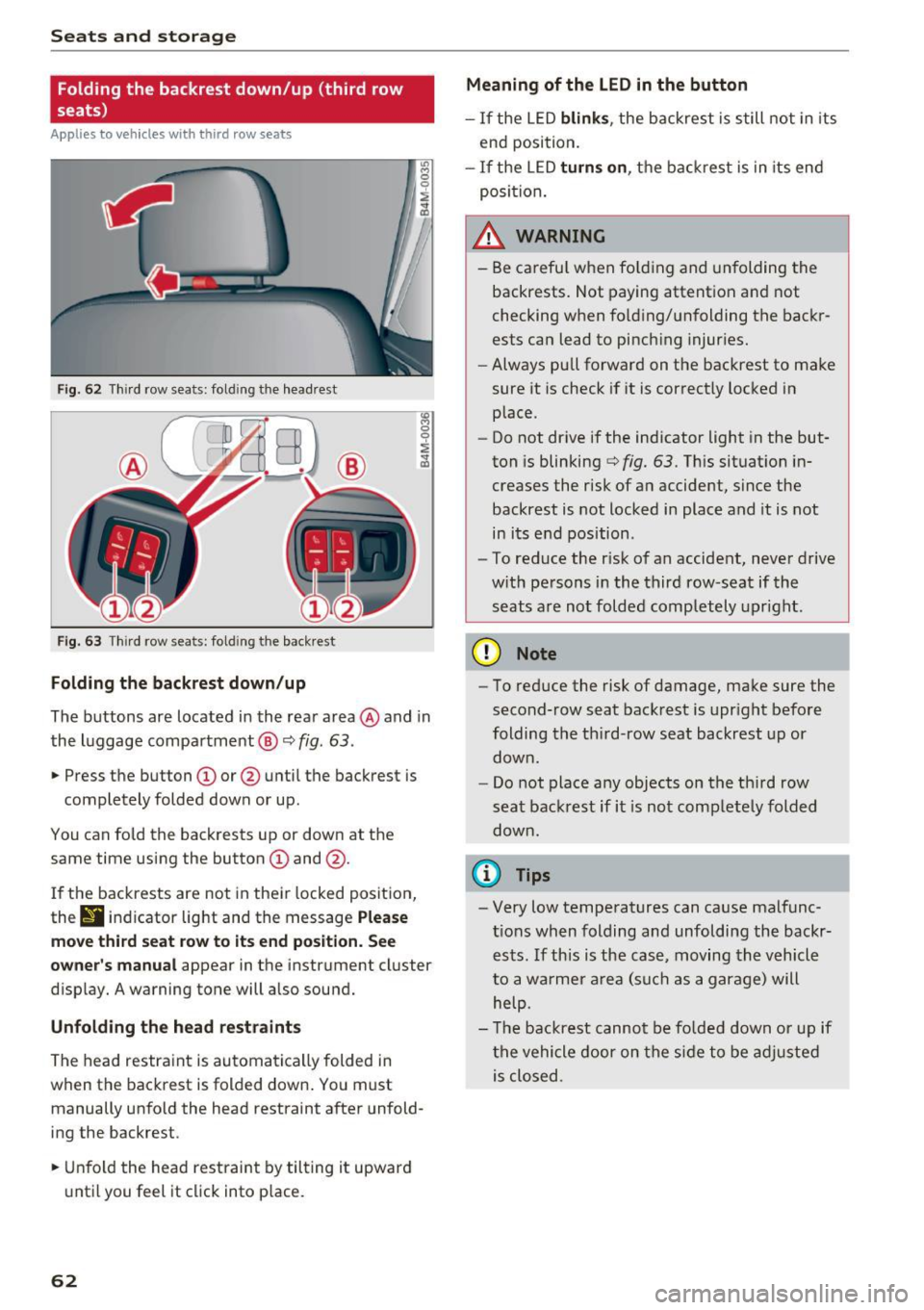
Fig. 62 T hir d row seats: fold ing the headrest
F ig . 63 Thir d row seats: fold ing the backrest
Folding the backre st down /up
The buttons are located in the rear area @and in
the luggage compartment @¢
fig. 63.
.,. Press the button CD or @ until the backrest is
completely folded down or up.
You can fo ld the backrests up or down at the
same time using the button
CD and @.
I f the backrests are not in their locked position,
thr
9 indicator light and the message P lea se
mo ve third seat r ow to it s end po sition . S ee
owner 's manual
appear in the instrument cluster
disp lay. A warning tone will a lso sound.
Unfold ing th e head re st ra int s
The head restraint is automatically folded in
when the backrest is folded down . You must
manually unfo ld the head restraint after unfold
ing the backrest .
.,. Unfold the head restraint by tilting it upward
until you feel it click into p lace.
62
Meaning of the LED in the button
- If the LED blink s, the backrest is still not in its
end position.
- If the LED turn s on, the backrest is in its end
posi tion.
_& WARNING
- Be carefu l when fo lding and unfolding the
backrests. Not paying attention and not
checking when fo ld ing/unfolding the backr
ests can lead to pinch ing injuries.
- Always pull forward on the backrest to make
sure it is check if it is correctly locked in
place.
- Do not drive if the indicator light in the but
ton is blinking
¢ fig. 63. Th is situation in
creases the risk of an accident, since the
backrest is not locked in place and it is not
in its e nd position .
- To reduce the r isk of an accident, never drive
w ith persons in the third row-seat if the
seats a re not folded comp letely upright .
(D Note
-To reduce the risk of damage, make sure the
second-row seat backrest is upr ight before
folding the th ird-row seat backrest up or
down .
- Do not place any objects on the third row
seat backrest if it is not completely folded
down.
(I} Tips
- Very low temperatures can cause malfunc
t ions when folding and unfolding the backr
ests . If this is the case, moving the vehicle
to a warmer a rea (such as a garage) will
help.
- T he backrest cannot be fo lded down or up if
the vehicle door on the side to be adjusted is closed .
Page 65 of 402
u (0 ...... N r--. N ...... 0
0
:E
Front head restraints
Applies to: vehicles with adjustable head restra ints
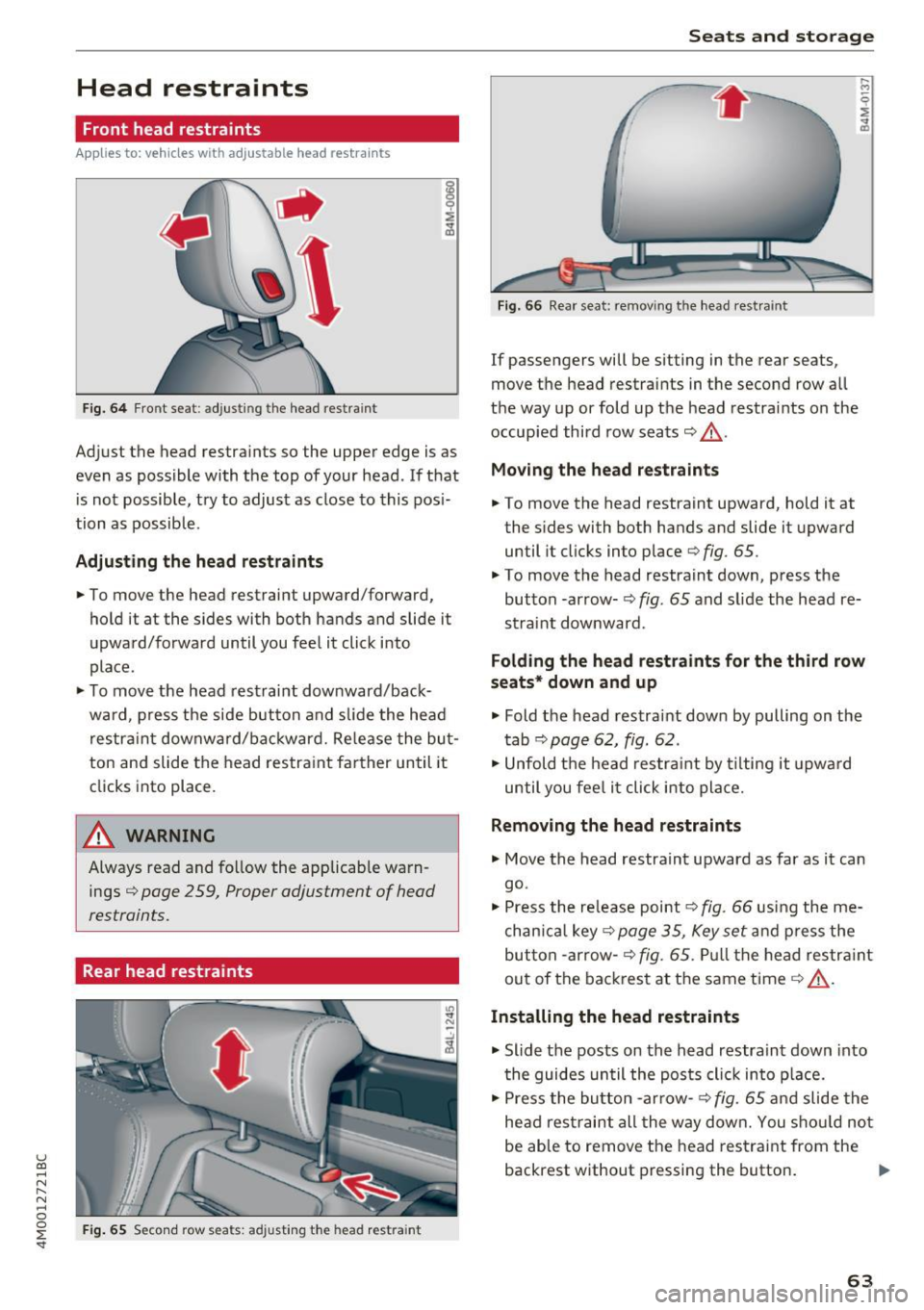
Fig. 6 4 Front seat: adjusting the head restraint
Adjust the head restraints so the upper edge is as
even as possible with the top of your head. If that
i s not possible, try to adjust as close to this pos i·
tion as possible.
Adjusting the head rest raints
.,. To move the head restraint upward/forward,
hold it at the sides with both hands and slide it
upward/forward until you feel it click into
place.
.,. To move the head restrai nt downward/back·
ward, p ress t he side button and sli de the head
res trai nt downward/bac kward. Re lease the bu t
ton and slide the head restra in t farther until it
clicks into place.
A WARNING
Always read and follow the applicab le warn
ings ¢
page 2 59, Proper adjustment of head
restraints.
Rear head restraints
I
F ig. 65 Seco nd row seats: adjusting the head restra int
-
"' "' N
Seats and storag e
Fig. 66 Rear seat: remov ing the head rest raint
If passengers will be sitting in the rear seats,
move the head restraints in the second row all
the way up or fold up t he head restra ints on the
occupied third row seats¢_&.
Moving the head restraint s
.,. To move the head restraint upward, hold it at
the sides with both hands and slide it upward
until it clicks into place ¢
fig. 65.
.,. To move the head restrain t down, p ress the
button -arrow· ¢
fig. 65 and slide the head re·
straint downward.
Folding the head restraints for the third row
seats * down and up
.,. Fold the head restraint down by pulling on the
t ab ¢
page 62, fig. 62.
.,. Unfold t he head res tra int by t ilting it upwa rd
until you fee l it click into pla ce.
Removing the head restraints
.,. Move the head restraint upward as far as it can
go.
.,. Press the re lease point¢
fig. 66 using the me
chan ica l key
<=>page 35, Key set and p ress the
but ton -arrow-
¢fig. 65. Pull the head restr aint
out of the bac kres t at the same time¢_& .
Installing the head restraints
.,. Slide t he posts on the head restra in t down into
t he guides un til the posts clic k in to p lace .
.,. Press the bu tton -arrow-
r=> fig. 65 a nd slide the
he ad res traint all the way dow n. You s ho ul d no t
be able to remove the head restrai nt from the
backrest without pressing the button . .,.
63
Page 66 of 402
Sea ts and stor age
_& WARNING
- Always read and follow the applicable warn
ings
q pag e 259, Proper adjustm ent of
head restraints .
-Only remove the head restraints for the sec
ond row seats when it is necessary for in
sta lling a child safety seat~
page 295,
Child safety.
Install the head rest rai nt again
immediately once the child s afety seat is re
moved. Driv ing with the head res traints re
moved or not in the upright position in
creases the risk of serious injury .
Memory function
Description
Applies to: veh icles with memory function
Using the memory funct ion , you can qu ickly and
easi ly store a pe rsonal seat profile for the driver
and fron t passenger and recall the settings. The
memory function is controlled by t he remo te
control key and the memory buttons in the driv
er's/front passenger's* door .
The drive r's seat profile is stored aga in and as
signed to the remo te control key each time the
ve hicl e is locked. When you open the door, the
seat profi le is automatica lly recalled.
If two peo
p le use the ve hicle, it is recommended that each
person a lways uses their "own" remote contro l
key.
Two seat profiles can be stored each using the memory buttons . Once they are stored, these
seat profiles can be selected at any time.
The fo llowing settings are stored:
Remote Memory button
control
key
Driver Dri ver Front pas-
senger
Seat X X X
Steering
X X wheel*
Both exte rior
X X mirrors
*
64
Remote control key
Applies to: vehicles with memory function
The driver 's seat profile can be assigned to the
remote control key when the vehicle is locked .
.. Select in the Infotainment system: IMENUj but
ton
> Ve hicle > left control button > Vehicle
se tting s > Se ats > Driver 's seat> S tore se t
t ing s on remo te control k ey.
@ Tips
If you do not wish to have the seat profile for
another driver ass igned to the remote control
key, switch the memory f unction off in the In
fotainment system.
Memory buttons
Applies to: vehicles with memory funct ion
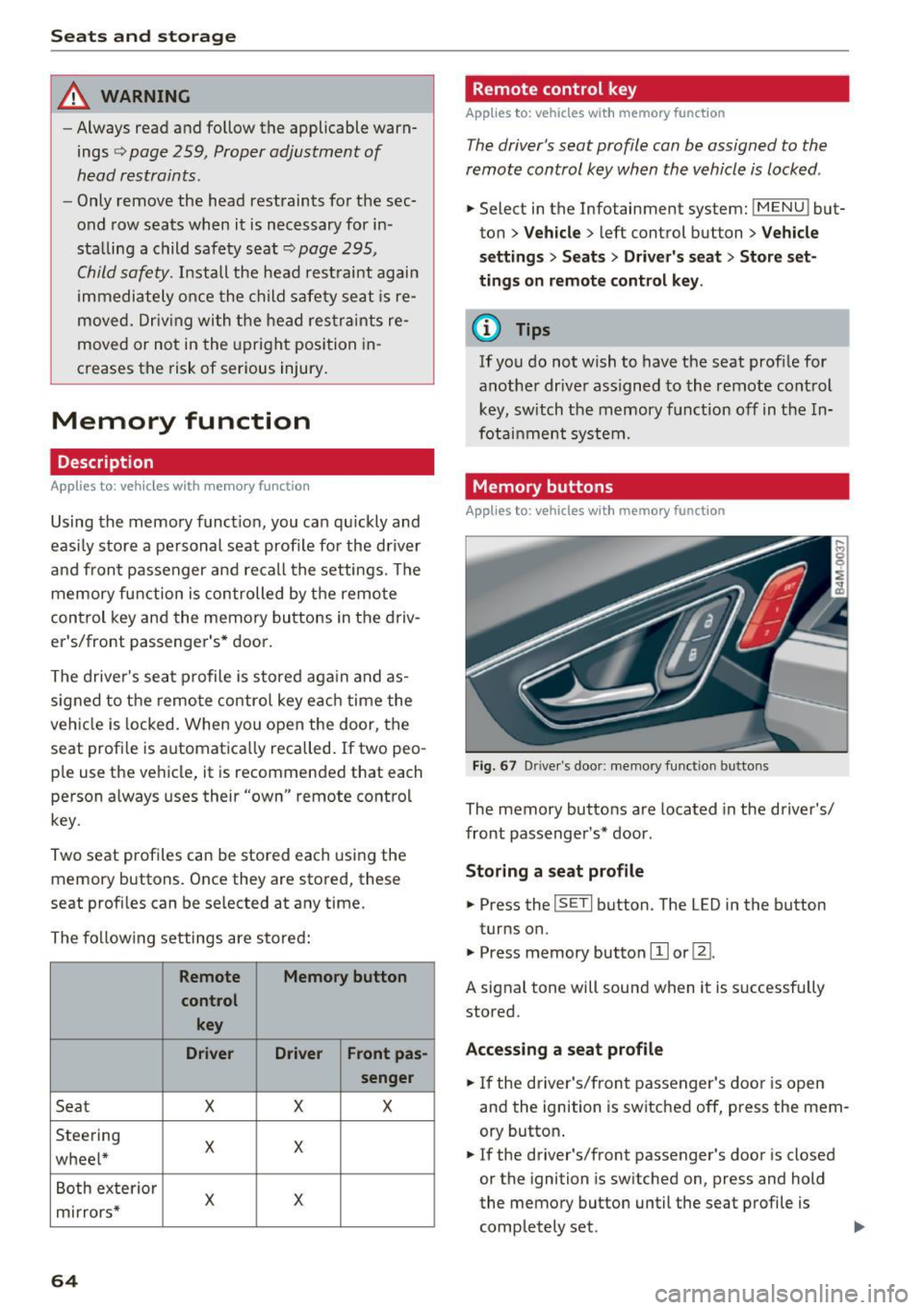
Fig . 67 D rive r's doo r: memory function b utto ns
The memory buttons are located in the driver's/
front passenger's * door .
Storing a sea t p rofile
.. Press the ISETI button . The LED in the button
turns on.
"' Press memory button
[I] or ~-
A signal tone will sound when it is s uccessfully
stored.
Acc essing a s eat profil e
"' If the driver's/front passenger's door is open
and the ignition is switched off, press the mem
ory button .
.. If the driver's/front passenger's door is closed
or the ignition is sw itched on, press and hold
the memory button until the seat profile is comp letely set. .,..
Page 67 of 402
u (0 .-I N r--. N .-I 0
0
:E
-For safety reasons, th e seat setting can only
be recalled when the veh icle is stationary to
red uce the risk of a n accident.
- I n an emergency, seat adjustment operation
can be stopped by press ing the
ISETI button
o r the buttons @or@
¢ pag e 59, fig. 55.
Adjusting the front passenger's seat in the
Infotainment system
Applies to: vehicles with memory function
The driver can move the front passeng er's seat
into various positions.
Adjusting the front passenger's seat from
the driver's seat
~ Se lect in the Info tainment sys tem: !MENU I but
ton
> Vehicle > left contro l butto n > Vehicle
s ettings > Seats
> Front pa ssenger' s seat > Ad
ju st seat position .
~ You can now adjust the front passenger's seat
u sing the d river 's seat buttons
¢ page 64,
fig .
67 .
Align with driver's seat
~ Select in the Info tainment sys tem: !MENUI bu t
ton
> Vehicle > left co ntro l bu tto n > Vehicle
settings
> Seats > Front pas senger' s seat >
Align with driver 's seat > Set now .
~ Press and hold the control knob until the ad
j ust ing process is complete.
@ Tips
The lumbar support an d upper t high s upport
sett ings are not transferred when a ligning
th e front passenger's seat with the driver's
seat.
Seats and storag e
Ashtray
Applies to: vehicles with ashtray
619
---
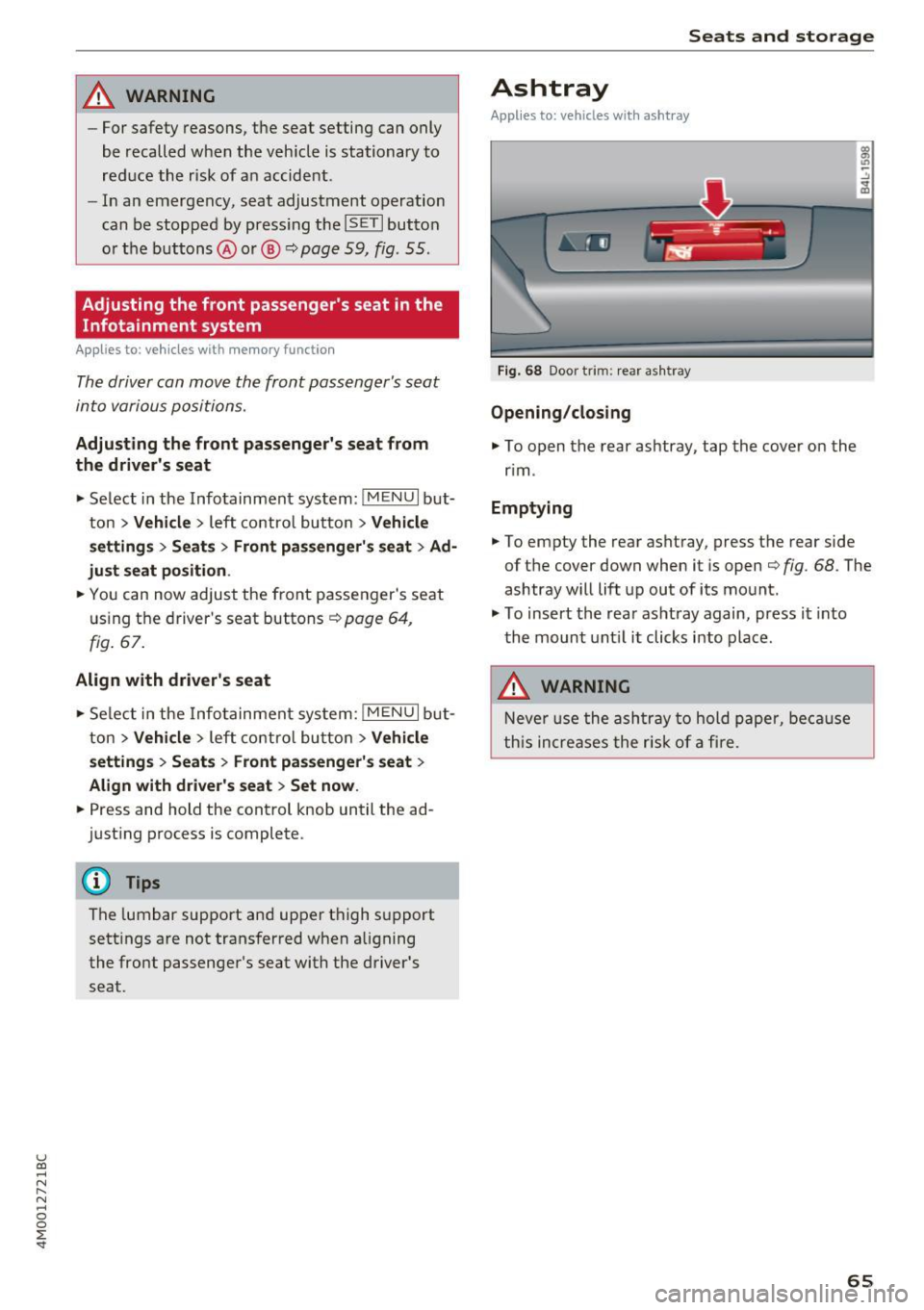
Fig. 68 Door trim: rear as htray
Opening /closing
~ To open the rear ashtray, tap the cover on the
r im .
Emptying
~ To empty the rear ashtray, press the rear side
of th e cover down when it is open
¢ fig. 68. The
ashtray will lift up out of its mo unt.
~ To insert the rear as htray again, press i t into
the mount unt il it clicks into place.
A WARNING
Neve r us e the a sh tra y to hold paper, be cause
t his increases the r isk of a fire.
65