wiper blades AUDI Q7 2017 Owner´s Manual
[x] Cancel search | Manufacturer: AUDI, Model Year: 2017, Model line: Q7, Model: AUDI Q7 2017Pages: 402, PDF Size: 100.39 MB
Page 57 of 402

Windshield wipers
Switching the wipers on
•® !
• @ cb
Fig. 49 Windshield wiper lever
Fig. SO Rea r w indow wiper operat ion
• @
• @
•®
Move the windshield wiper lever to the corre·
spond ing pos ition:
@ · Windshield wipers off
en
-0 9 :i
cb
(D -Rain sensor mode. The winds hield wipers
switch on once the vehicle speed exceeds app rox
imately 2 mph (4 km/h) and it is raining. The
h igher the sensitivity of the rain sensor that is set
(switch ® to the right), the earlier the wind·
shie ld wipers react to moisture on the wind
shield . You ca n deactivate the rain sensor mode
in the Infota inment system, which switches the
intermittent mode on. To do th is, select :
!MENU !
button > Vehicle > lef t con trol b utton > Driver
a ssistan ce
> Rain sensor . In intermittent mode ,
you can adjust the interva l time using the switch
® ·
@ · Slow wip ing
@ -Fast wip ing
u
~ @ -Single wipe. If you hold the lever in th is posi-
~ tion longer, the wipers switch from slow wiping ~ g to fast w iping.
:E
® -Clean the w indshield . The wipers w ipe one
time after several seconds of d riv ing to remove
water droplets . Yo u can sw itch this funct ion off
by moving the lever to posit ion ® within 10 sec
onds of the afterwipe . The afterwipe function is
reactivated the next time you switch the ignit ion
o n .
Clean the headlights*. The headlight washer sys
tem* operates only when the low beam head lights are o n. If you move t he lever to posit io n
® · the headlights and the night v is io n assist
camera* are cleaned at inte rva ls .
® -Wipe t he rear window. The number of w ipes
depe nds on the windsh ield wiper movement .
The rear wiper automat ica lly switches on when
the reverse gear is selected and the front wind
shield wipers are on and running.
(J) -Clean the rear window . The number of wipes
depends on how long the lever is held in pos ition
(J) .
A WARNING
-The rain sensor is on ly intended to ass ist the
d river. The drive r may still be responsib le
for manually switching the wipers on based on visibili ty cond itions .
- The winds hield may not be t reated w ith wa
ter- repelling w indshield coating agents. Un
f a vorable co ndit io ns, su ch as wet ness, da rk
ness o r low su n, can resu lt in increased
g la re, which increases the risk of an acci
dent . Wiper blade chatter is also possib le.
- P roperly func tioning w indshield wiper
b lad es are requ ired for a clear view and safe
driving<:::>
page 56, Replacing wiper
blades .
(D Note
-If there is frost, m ake sure the win dsh ield
w iper bl ades are not froze n to the wind
shield. Switching on the w indshie ld w ipers
w hen the b lades are frozen to the wind
shield can damage the wiper blades.
- The windshie ld wiper system must be
switched off (lever in position 0) before us
ing a car wash. Th is prevents the w ipers
55
Page 58 of 402

Lights and Vi sion
from switching on unintentionally and ca us
ing damage to the windshield wiper system.
@ Tips
- The windshield wipers switch off when the
ignition is switched off. You can activate the
windshield wipers after the ignition is
switched back on by moving the windshield
wiper lever to any pos it ion.
- Worn or dirty windshield wiper blades result
in streaking. This can affect the rain sensor
funct ion. Check your windshield wiper
blades regularly.
- The washer fluid nozzles for the windshield
washer system are heated at low tempera
tures when the ignition is on .
- When stopp ing temporarily, such as at a
traffic light, the speed of the windshield
wipers automatically reduces by one level.
Cleaning the wiper blades
Clean the wiper blades when you see wiper
streaks. Use a soft cloth and a glass clea ne r.
Windshield wiper
"' Place the windshield wiper arms in the service
pos ition
¢ page 56 .
"'Fold the windshield wiper arms away from the
winds hield.
Rear window wiper
"' Fo ld the wiper arm away from the rear window.
A WARNING
Dirty windshield wiper blades can impair vi
sion, which increases the risk of an accident.
56
-
· Replacing wiper blades
Fig. 51 Removing windshie ld wiper blades
Windshield wiper service position/blade
replacement position
"'T o br ing the windshield w ipers into the serv ice
position, turn the ign ition off and move the
w indshie ld wiper lever into position@
¢page 55, fig. 49.
"'To bring the wip ers into the starting position ,
turn the ignition on and move the windshield
wiper lever into position @for at least two sec
onds
¢ page 55, fig. 49.
You can also turn the service position on or off in
the Infotainment system:
"' Switch the windshie ld wipers off (position @
¢page 55, fig . 49).
"' Select: the IM ENU I button > Vehicle > left con
trol button
> Service & checks > Wiper change
position .
Removing the wiper blade
"'Fold the windshie ld wiper arm away from the
windshield.
"' Press the locking knob
(D ¢ fig. 51 on the w iper
blade. Hold the wiper blade firmly.
"' Remove the wiper blade in the direction of the
arrow.
Installing the wiper blade
"' Insert the new wiper blade into the mount on
the wiper arm @until it clicks into place.
"' Place the wiper arm back on the windsh ield.
"' Turn the service position off.
1111>
Page 59 of 402
A WARNING
For safety reasons, the windshield wiper
blades should be replaced once or tw ice each
year .
(D Note
-Only fold the windshield wipers away when
they are in the service position . Otherwise,
you r isk damaging the paint on the hood or
the windshie ld wiper motor.
- You should not move your vehicle or operate
the windshield w iper lever when the wiper
arms are fo lded away from the w indshield.
The windshield wipe rs would move back in
to their original position and could damage
the hood and w indshield.
- To reduce the risk of damage to the wiper
system, always loosen blades which are fro
zen to the windsh ield before operating the
wipe rs .
- To reduce the risk of damage to the wiper
blades, do not use gasoline, kerosene, paint
thinner, or other so lvents on or near the
wiper blades.
- To reduce the risk of damage to the wiper arms or other components, do not attempt
to move the wipers by hand.
@ Tips
- You can also use the service position, for ex
ample, if you want to protect the windsh ield
from icing by using a cover.
- You cannot activate the service position
when the hood is open.
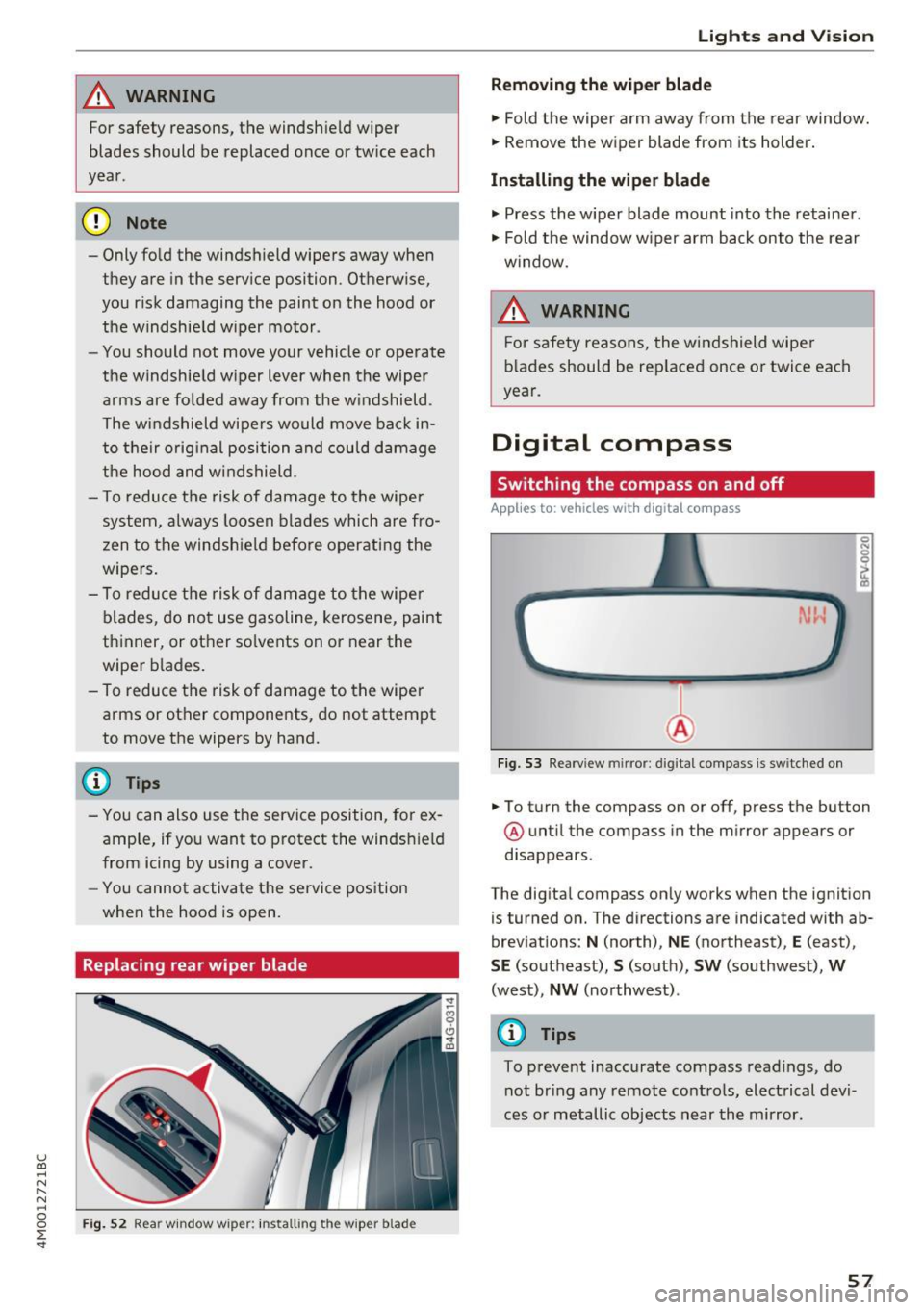
Replacing rear wiper blade
Fig . 52 Rear w indow wiper : in stalling the wiper blade
Lights and V ision
Removing the wiper blade
.,. Fold the wiper arm away from the rear window.
.,. Remove the wiper blade from its holder.
Installing the wiper blade
.,. Press the w iper blade mount into the retainer .
.,. Fold the window w iper arm back onto the rear
w indow.
A WARNING
F or safety reasons, the windshield wiper
b lades should be rep laced once or twice each
year.
Digital compass
Switching the compass on and off
Applies to: vehicles with digita l compass
Fig. 53 Rearview mirror: digita l compass is sw itched on
0 N 0
l Cl)
.,. To turn the compass on or off, press the button
@ until the compass in the mirror appears or
disappears .
The digital compass only works when the ignition
is turned on. The directions are indicated with ab
breviations:
N (north), NE (northeast), E (east),
SE (southeast), S (south), SW (southwest), W
(west), NW (northwest) .
@ Tips
To prevent inaccurate compass readings, do
not bring any remote controls, electrical devi
ces or metallic objects near the mirror.
57
Page 357 of 402

u co ...... N r--... N ...... 0
0
:E: '
- To reduce the risk of cuts, protect yourself
from sharp metal components when wash
ing the underbody or the inside of the wheel
housings .
- After washing the vehicle, the brak ing effect
may be delayed due to mo isture on the
brake rotors or ice in the w inter . This in
creases the risk of an acc ident. The brakes
must be d ried fi rst w ith a few careful b rake
applications.
(D Note
- If you wash t he vehicle in an automatic car
wash, yo u m ust fold the exte rior m irrors in
to reduce the risk of damage to the mirrors.
Power folding exte rior m irrors* must on ly
be fo lded in a nd out using the power folding
fu nct ion.
- To reduce the risk of damage to the rims
and tires, compare the width between the
whee ls on your vehi cle w it h t he dis tan ce be
tween the g uide rai ls in the car wash.
- To reduce t he risk of damage, compare the
height and width o f you r vehicle wi th the
Ca re and cleaning
height and w idth of the inside of the car
was h.
- T o red uce the risk of pa int damage, do not
was h the vehicle in d irect sun light .
- T o red uce the risk of d am age to the s urf ace,
do not use insect removing sponges, k itche n
sponges or similar items .
- Mat te finish painted veh icle components:
- To reduce the risk of damage to the sur-
face, do not use polishing agents or hard
wax .
- Never use protective wax. It can destroy
the matte finish effect .
- Do not place any stickers or magnetic
signs on vehicle parts painted with matte
finish paint . The paint cou ld be damaged
when the stickers or magne ts are re
moved .
@ For the sake of the environment
Only wash t he vehicle in facilities s pec ially de
s ign ed for that pu rpose . This will reduce the
r isk of dirty wate r contaminated with oil from
ente ring the sewe r sys tem.
Cleaning and care information
W hen cleani ng and ca ring for individua l vehicle
components, refer to the follow ing tables . The
i n formation contained there is simply recom
mendations. For quest ions or for components t
h at are not liste d, co n su lt an autho riz ed Au di
dealer or authorized A udi Se rvice Fac ility . Also
fo llow the information found in ¢ .&. .
Exterior cleaning
Component Situation Solution
Windshield wiper
Deposits c:> page 56, Cleaning the wiper blades
blades
Headlights /
Deposi ts So
ft spo nge wi th a mild so ap sol ution3>
tail lights
S ensors /
Deposits Sensors: soft cloth w it h solvent-free cleaning solut ion
camera lenses Camera le nses: soft clot h w ith alcohol-free cleaning solu-
tion
Snow/ice H
and br ush/solvent-free de-icing spray
Wheels Road salt Water
Brake dust Acid-free special cleaning solution
355
Page 396 of 402
Index
Recirculation mode (automatic climate con-
trol) . . . . . . . . . . . . . . . . . . . . . . . . . . . . . . 73, 76
Recuperation . . . . . . . . . . . . . . . . . . . . . . . . . 15
Refueling .. .. .. ................... ... 316
Fuel filler door emergency release . . . . . . 318
Remote control
refer to Remote control key . . . . . . . . . . . . 35
Remote control key . . . . . . . . . . . . . . . . . . . . 35
Remote control operation Garage door opener (Home link) . . . . . . . . . 46
Remote locking and unlocking
Audi connect vehicle control . . . . . . . . . . . 200
Removing the caps (wheel bolts) . . . . . . . . . 363
Repair manuals . . . . . . . . . . . . . . . . . . . . . . . 381
Repairs Airbag system . . . . . . . . . . . . . . . . . . . . . . 288
Replacement key . . . . . . . . . . . . . . . . . . . . . . 35
Replacing Light bulbs . . . . . . . . . . . . . . . . . . . . . . . . . 371
Replacing wiper blades . . . . . . . . . . . . . . 56, 57
Reporting Safety Defects . . . . . . . . . . . 263, 264
Reset
refer to Restart (MMI) . . . . . . . . . . . . . . . . 254
Reset button (trip odometer) . . . . . . . . . . . . 12
Resetting the trip odometer . . . . . . . . . . . . . 12
Residual heat (automatic climate control) 74, 77
Restart (MMI) . . . . . . . . . . . . . . . . . . . . . . . . 254
Retractor . . . . . . . . . . . . . . . . . . . . . . . . . . . . 268
Reverse gear . . . . . . . . . . . . . . . . . . . . . . . . . . 91
Rewinding (audio/video file) . . . . . . . . . . . . 237
Right control button . . . . . . . . . . . . . . . . . . . . 13
Rims . . . . . . . . . . . . . . . . . . . . . . . . . . . . . . . 348
Cleaning . . . . . . . . . . . . . . . . . . . . . . . . . . . 355
Ringtone settings . . . . . . . . . . . . . . . . . . . . . 186
Road carrier . . . . . . . . . . . . . . . . . . . . . . . . . 377
Road noise compensation . . . . . . . . . . . . . . 253
Roaming
refer to Data connection . . . . . . . . . . . . . . 196
Roof rack . . . . . . . . . . . . . . . . . . . . . . . . . . . . . 70
Roof load . . . . . . . . . . . . . . . . . . . . . . . . . . . 70
also refer to Roof rack . . . . . . . . . . . . . . . . . 70
Route criteria . . . . . . . . . . . . . . . . . . . . . . . . 214
Route guidance
refer to Navigation ............ ...... .
Run-flat (tires) . .. ................... .
Running direction (tires)
394
205
352
365
s
Safe driving habits
Safety 256
A irbag system . . . . . . . . . . . . . . . . . . . . . . 273
Belts . . . . . . . . . . . . . . . . . . . . . . . . . . . . . . 265
Cargo . . . . . . . . . . . . . . . . . . . . . . . . . . . . . 261
Correct seating position . . . . . . . . . . . . . . 257
Pedal area . . . . . . . . . . . . . . . . . . . . . . . . . . 261
Telephone.... ... .. .. ............... 176
Safety belt height adjustment . . . . . . . . . . . 271
Safety belt position . . . . . . . . . . . . . . . . . . . 269
Safety belt height adjustment . . . . . . . . . 271
Safety belts worn by pregnant women . . . 270
Safety belt pretensioner Service and disposal. . . . . . . . . . . . . . . . . . 272
Safety belts . . . . . . . . . . . . . . . . . . . . . . 265, 268
Cleaning . . . . . . . . . . . . . . . . . . . . . . . . . . . 356
Danger to passengers who do not wear a
safety belt . . . . . . . . . . . . . . . . . . . . . . . . . 266
Fastening . . . . . . . . . . . . . . . . . . . . . . . . . . 268
Improperly worn . . . . . . . . . . . . . . . . . . . . 271
Not worn . . . . . . . . . . . . . . . . . . . . . . . . . . 266
Safety belt position . . . . . . . . . . . . . . . . . . 269
Safety instructions . . . . . . . . . . . . . . . . . . . 268
Securing child safety seats . . . . . . . . . . . . 306
Spec ial considerat ions for pregnant wom-
en . . . . . . . . . . . . . . . . . . . . . . . . . . . . . . . . 270
Unfastening . . . . . . . . . . . . . . . . . . . . . . . . 270
Warning/indicator light . . . . . . . . . . . . . . 265
Worn properly . . . . . . . . . . . . . . . . . . . . . . 267
Safety belt warning light Safety instructions 265
for side curtain airbags . . . . . . . . . . . . . . . 294
for using child safety seats . . . . . . . . . . . . 299
for using safety belts . . . . . . . . . . . . . . . . . 268
Monitoring the Advanced Airbag System 287
Saving fuel Energy consumers . . . . . . . . . . . . . . . . . . . . 16
Recuperation . . . . . . . . . . . . . . . . . . . . . . . . 15
Scan (radio) . . . . . . . . . . . . . . . . . . . . . . . . . . 224
Screen
refer to Disp lay . . . . . . . . . . . . . . . . . . . . . . 12
Screwdriver . . . . . . . . . . . . . . . . . . . . . . . . . . 360
SD card reader (MMI) . . . . . . . . . . . . . . . . . . 229
SDS
refer to Voice recognition system . . . . . . . 168
Search area (point of interest) . . . . . . . . . . . 208