battery AUDI Q7 2018 Owner´s Manual
[x] Cancel search | Manufacturer: AUDI, Model Year: 2018, Model line: Q7, Model: AUDI Q7 2018Pages: 398, PDF Size: 185.58 MB
Page 149 of 398
Cl a:, ...... N
" N ,-1 0
0
::r '
power variably to the front and rear ax le . It works
together with se lective whee l torque contro l,
which activates when driving through curves
c:::;, page 142. With the sport differentia l", power
distribution to the rear wheels is variable and can be adjusted using the drive select
¢ page 128.
The all wheel drive concept is designed for high
engine power. Your vehicle is exceptionally pow
erful and has excellent driving characteristics
both under normal driving condit ions and on
snow and ice . Always read and fo llow safety pre
cautions
c:::;, /1),.. .
Winter tires
By us ing all wheel drive, your vehicle has good
forward motion with standard tires in w inter con
ditions . However, using winter or all season tires
on
all four wheels in the winter is recommended,
because this will improve the
braking effect.
Snow chains
If there are snow chain laws, snow chains must
also be used on vehicles with all wheel drive
c:::;, page 346, Snow chains .
Replacing tires
For vehicles with all wheel dr ive, only wheels w ith
the same rolling circumference should be used .
Avoid using tires w ith different tread depths
c:::;, page 33 7, New tires or wheels.
A WARNING
- Also, in vehicles with al l wheel drive, adapt
yo ur driv in g style to the current road and
traffic conditions. Do not let the increased
safety provided tempt you into taking risks,
because this increases the risk of an acci
dent.
- T he braking ability of your vehicle is limited
to the traction of the wheels. In this way, it
is not different from a two whee l drive vehi
cle. Do not be tempted to accelerate to a
high speed when the road is slippery, be
cause this increases the risk of a n accident.
- Note that on wet streets, the front wheels
can "hydroplane" if driving at speeds that
are too high. Unlike front wheel drive
Intelligent Technology
vehicles, the engine does not rev higher sud
denly when the vehicle begins hydroplaning.
For this reason, adapt your speed to the
road conditions to reduce the risk of an acci
dent.
Energy management
Your vehicle is equipped with an intelligent ener
gy management system for distributing electrici
ty. This significantly improves the start ing ability
and increases the vehicle battery life.
(D Tips
-If you dr ive short distances frequently, the
vehicle battery may not charge enough
w hile driving . As a result, convenience func
tions for e lectr ical equipment may be tem
porarily unavailable.
- The vehicle battery w ill gradually drain if
the vehicle is not driven for long periods of
time, or if electr ical eq uipm ent is used
when the engine is not running. To ensure
that the vehicle can still be started, the
electrical equipment wi ll be reduced or
switched off.
Notice about data
recorded by the Event
Data Recorder and
vehicle control modules
Event Data Recorder
This vehicle is equipped with an Event Data Re
corder (EDR). The main purpose of an EDR is to
record, in certain crash or near crash-like situa
t ions, such as an airbag deployment or hitt ing a
road obstacle, data that w ill ass ist in understand
ing how a vehicle's systems performed. The EDR
is des igned to record data related to vehicle dy
nam ics and safety systems for a short per iod of
time, typicall y 30 seconds or less. The EDR in this
vehicle is designed to record such data as:
- How various systems in your veh icle were oper
ating;
- Whether or not the driver and passenger safety
be lts were buckled/fastened; .,.
147
Page 152 of 398
Multi Media Interface
-Switching off manually : press and hold the
On/Off knob@¢
fig. 150 until the MMI
switches off . If the M MI has been sw itched off
manually, it does
not switch on again automati
ca lly the next time the ignition is switched on.
Additional functions:
- Adjusting the volume:
turn the On/Off knob (D
¢fig . 150 .
-Muting : press the On/Off knob (D ¢ fig. 150
briefly.
-Selecting the previous/next function (for ex
ample, a radio station/track):
press the On/Off
knob
(D ¢ fig . 150 briefly toward the left l
-Fast forwarding/rewinding (for example
songs) :
press and hold the On/Off knob (D
¢ fig. 150 toward the left l
.8. WARNING
Adjust the volume of the audio system so that
signals from outside the vehicle, such as po
lice and fire sirens, can be heard easily at all
times.
(D Tips
The MMI switch es off automatically if the en
gine is not r unning and the vehicle battery is
low.
Infotainment system
display
Switching on/off
" Press the to l button to switch the Info tainment
system on and off.
When the MMI is switched on and the display is
switched off, you can operate ce rtain funct ions
using the On/Off knob with the MMI joystick
function
¢ page 149.
(D Tips
There may be delays when switching on the
display.
150
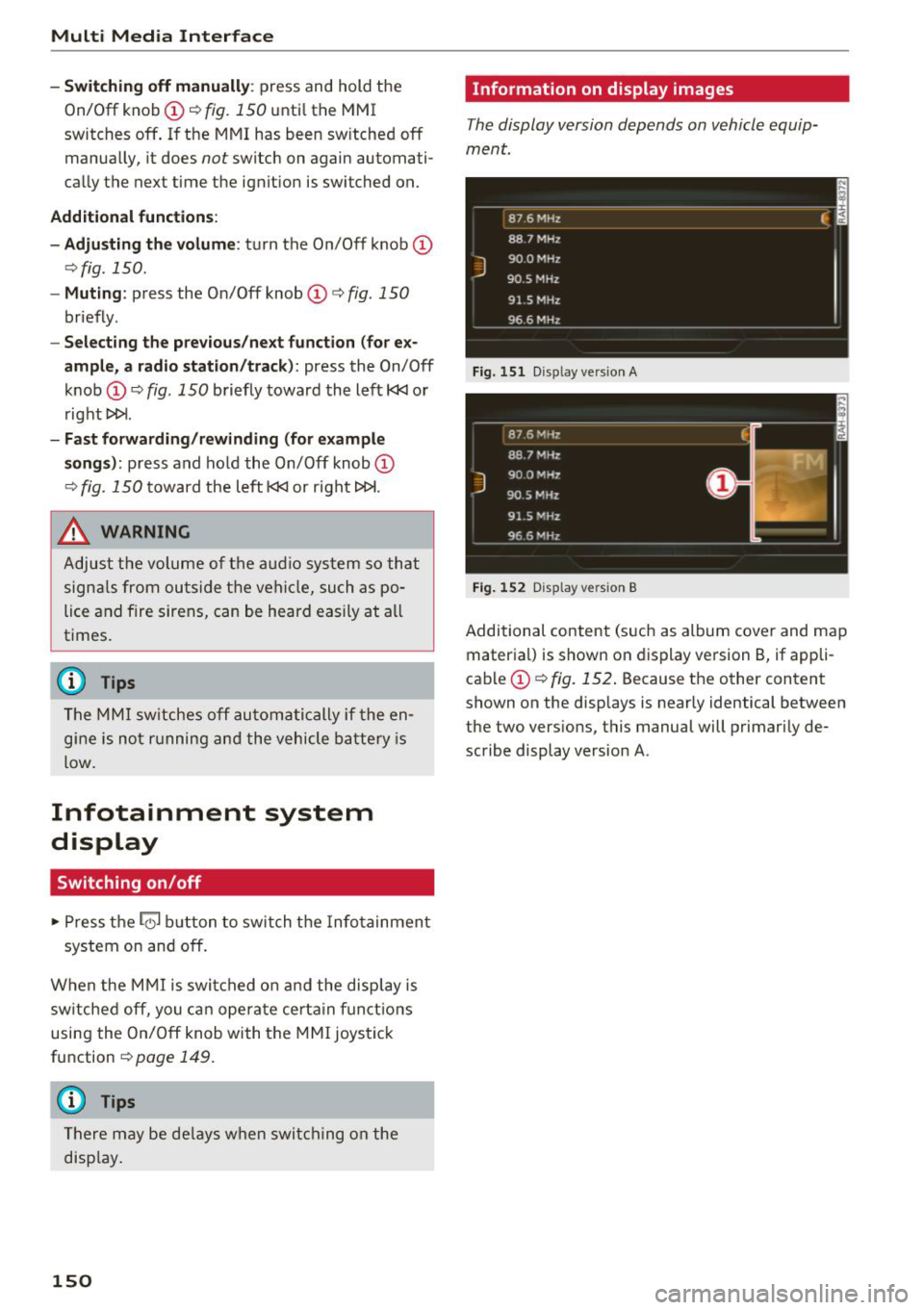
Information on display images
The display version depends on vehicle equip
ment.
Fig. 151 Disp lay ve rs ion A
Fig. 15 2 Disp lay ve rs ion B
Additional content (such as album cover and map
material) is shown on display version B, if appli
cable
(D ¢ fig. 152. Because the other content
shown on the displays is nearly identical between
the two vers ions, this manual will primarily de
scribe display version A.
Page 199 of 398
Cl a:, ...... N
" N ...... 0
0
::r '
Introduction
Applies to vehicles with Audi connect vehicle control
With the Audi connect vehicle control services l) ,
you can access various information or use individ
ual functions in the
Audi MMI connect app or in
myAudi .
Audi connect vehicle control includes the follow
ing services:
- Remote locking and unlocking ¢
page 198.
-Vehicle status report¢ page 198.
-Parking location ¢ page 198 .
-Geofencing Alert ¢ page 199.
-Speed Alert ¢ page 199.
-Valet Alert ¢ page 199.
- Stolen Vehicle Locator ¢ page 199.
-Online Audi service request ¢page 199.
(D Tips
-Accessing specific data or controlling func
tions remote ly depends on the charge leve l
of the vehicle battery. Therefore, these
functions only have limited availability after
switching off the ignit ion.
- The services are provided through a SIM
card installed in the vehicle. The cost of the
call and data connections is included in the
price for the services. Services are provided
assuming that the cell phone network re
quired for the installed S IM card is function
in g and ready to operate. The available serv
ic es set by Audi AG are only available within
the cell phone network coverage area for
the cell phone service provider selected by
Audi AG .
- You can also find more information on Audi
connect on line at www.audiusa.com.
l) In pre parat io n at t he time of p rinting. T he a vailab ilit y o f
the services o ffered depends o n the co untry and may
c hang e over tim e.
Audi connect vehicle control
Setup
Applies to vehicles with Audi connect vehicle control
To use Audi connect vehicle control services 1>,
please note the fo llowing :
Creating and verifying a user account
"'Create an account at www.aud iusa.com/myaudi
and verify it.
Setting a key user in the vehicle
Requirements: the ignition must be switched on .
Another key user must not be set in the veh icle .
If necessary, reset the key user ¢
page 198.
.. Select in the Infotainment system: I M ENU ! but
ton
> Audi connect > if necessary, Display
available functions >
right control button >
Audi connect user management > Key user >
Set key user .
"' Enter the user name for your ve rified account
and enter the IO-digit vehicle code. You can rub
the key tag for your remote control key to re
veal the vehicle code ¢
page 30.
.. Select and confirm Log in.
You can now use the vehicle control services
through the
Audi MMI connect app or through
www .audiusa.com/myaudi.
Using vehicle control services in the Audi
MMI connect app
Requirement: your mobile devices must be com
patible.
.. Install and start the
Audi MMI connect app on
your mobi le device .
.. Log in to the
Audi MMI connect app using your
user name and password and se lect your vehi
cle.
(D Tips
- Store the vehicle code in a secure place . It
may be necessary to re-enter the vehicle
code.
197
Page 233 of 398
a co ...... N r--. N ...... 0
0
:E '
serious injuries. Store these types of devices
securely while driving.
- Do not use any wireless devices on the front
seats within range of the airbags while driv
ing. Also read and follow the warnings in
c::> page 2 73 , Front airbags .
CD Note
-Always follow the information found inc:>@
in Wi-Fi hotspot on page 194 .
-Please note that there generally are addi
tional costs when using an online media
service account, especially when it is used internationally .
(D Tips
-Depending on the Internet connection and
network traffic, a connection loss can occur
during playback of on line media services .
-Online media and Internet radio usage de
pends on the service availability of the third
party provider .
- Audi AG simply makes the access to online
media services possible through the MMI
and does not take any respons ibility for the
contents of the online media services .
- Always read the chapter
c::> page 194, Audi
connect (Infotainment) general informa
tion .
- Depending on the mobile device used, there
may be interruptions during media playback
and when using the
Audi MMI connect app.
To avoid interruptions when using a mobile
device , do not lock the screen on your mo
bile device and keep the
Audi MMI connect
app in the foreground .
- Contact an authorized Audi dealer or au
thorized Audi Service Facility for additional
information about online media .
Media
Multimedia connections
USB adapter for Audi music interface o r
USB charging port
Depending on the vehicle equipment, you can
connect your mobile devices (such as a smart
phone or MP3 player) to the Audi music interface
or a
USB charging port using a special USB
adapter.
@-
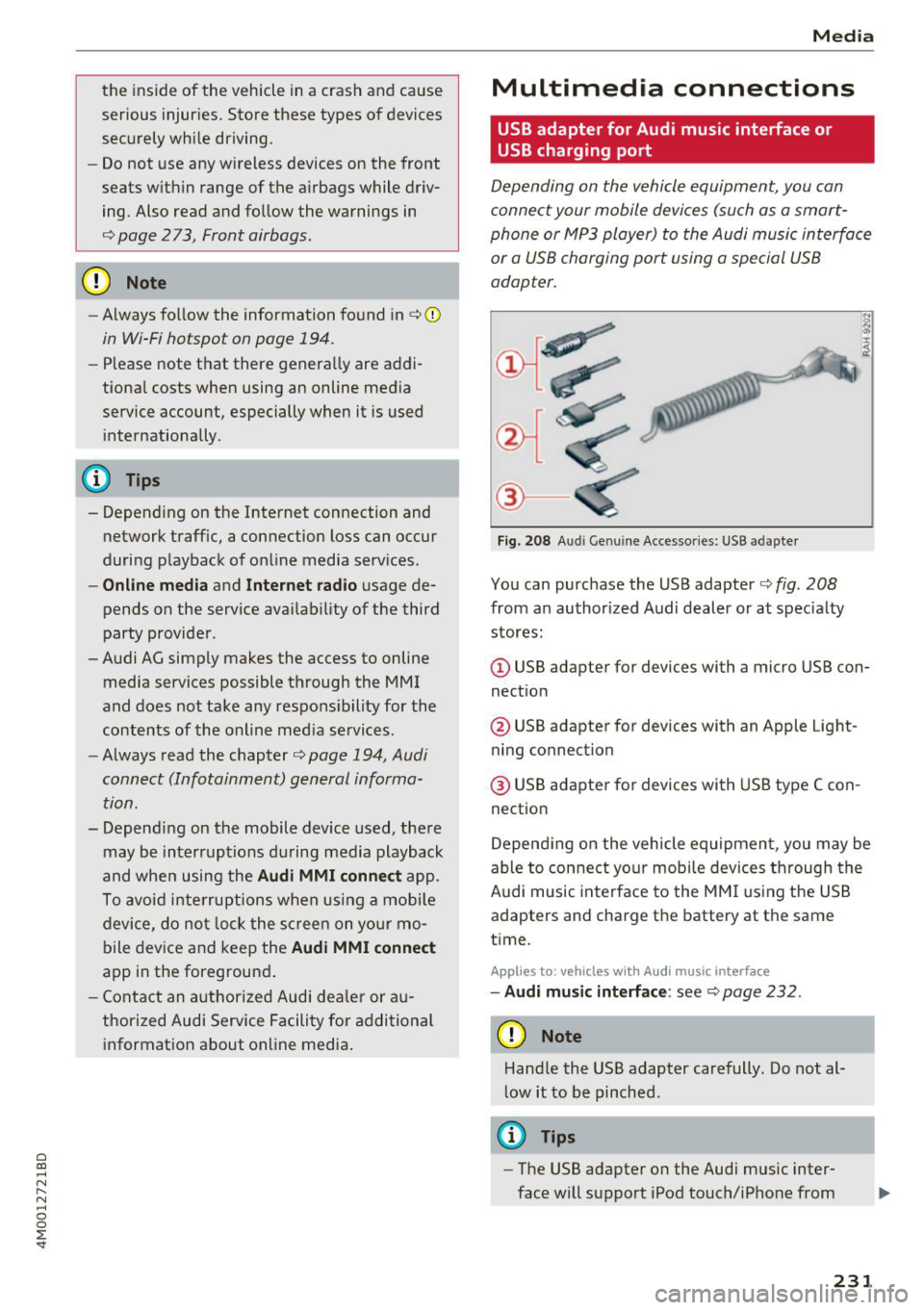
Fig. 208 A udi Genuin e Acce ssories: USB a dapter
You can purchase the USB adapter c::> fig. 208
from an authorized Audi dealer or at specialty
stores:
I
(D USB adapter for devices with a micro USB con
nection
@ USB adapter for devices with an Apple Light
ning connection
@ USB adapter for devices with USB type C con
nection
Depending on the vehicle equipment, you may be
able to connect your mobile devices through the
Audi music interface to the MMI using the USB
adapters and charge the battery at th e same
time .
Applies to : vehicles wit h Aud i music interface
-Audi music interface : see c::> page 232.
CD Note
Handle the USB adapter carefully. Do not al
low it to be pinched.
@ Tips
-The USB adapter on the Audi music inter
face will support iPod touch/iPhone from
231
Page 234 of 398
Media
the 5th generation or later with the light
ning connector .
- Mobile devices with an Apple Dock connec
tor can only be charged with a USB adapter
fo r devices with an Apple Dock connector
and cannot transmit data.
Audi music interface
Applies to: vehicles with Aud i mus ic in terface
Connect your mobil e de vices to the Audi music
interface in order to op era te them through the
MM I and charge the battery.
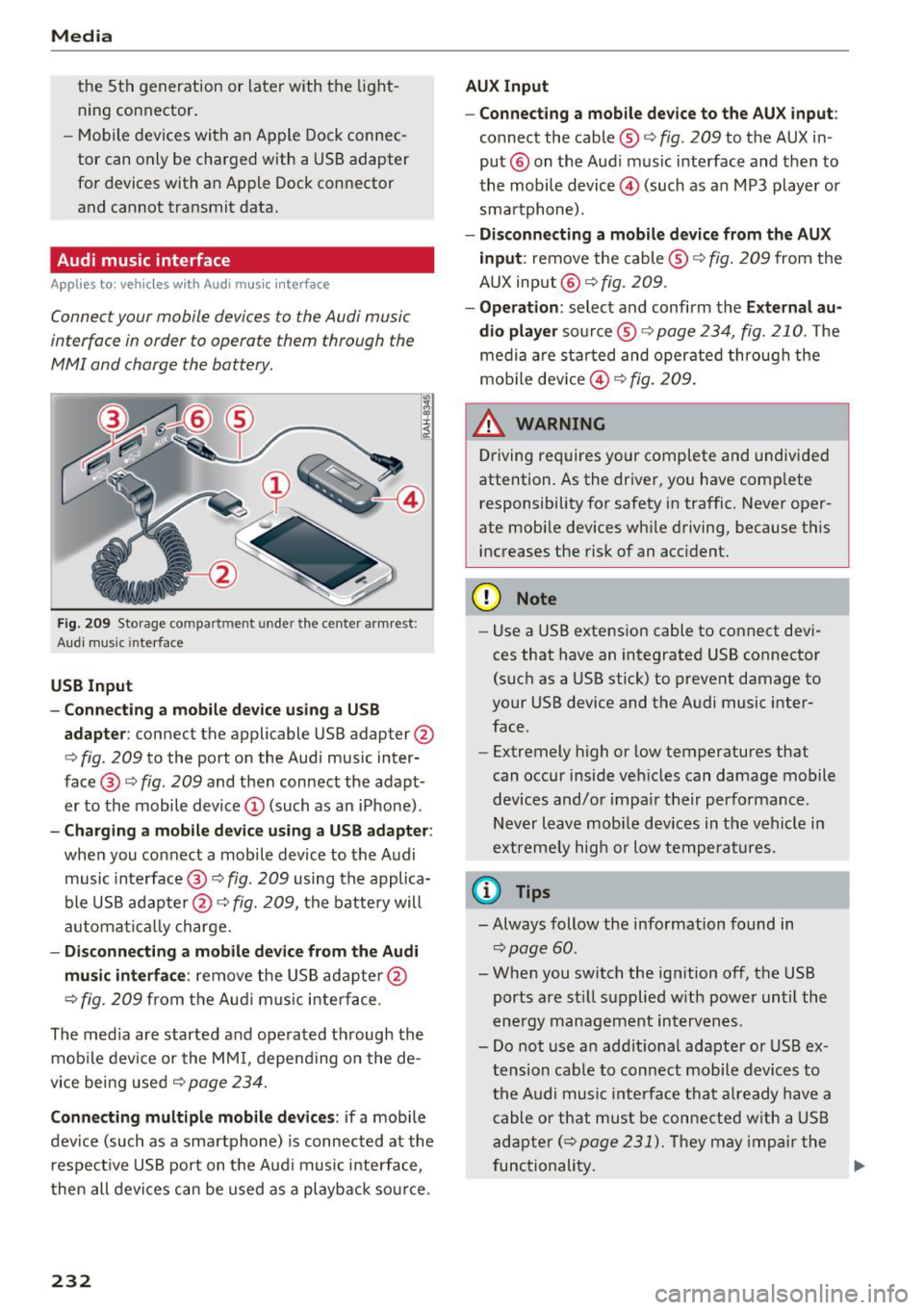
Fig . 2 09 Sto rage co mp artment u nde r the center a rm re st:
Aud i m usi c in terface
USB Input
- Connecting a mobil e device u sing a USB
adapte r:
connect the applic able USB adapter @
c>
fig . 209 to the port on the Audi music inter
face @ c>
fig. 209 and then connect the adapt
er to the mobile device © (such as an iPhone) .
-Charging a mobile device using a U SB adapter:
when you connect a mobile device to the Audi
music inte rface @ c>
fig. 209 using the applica
ble USB adap ter @ c>
fig. 209, the battery will
a utomat ically charge.
- Di sconnecting a mobile device from the Audi
mu sic int erface :
remove the US B adapte r@
¢
fig. 209 fr om the A udi music inter face .
The media a re started a nd ope rated t hrough the
mob ile devi ce or the MM I, depend ing on the de
vice bei ng used c>
page 234 .
Connecting multiple mobile devices : if a mobile
dev ice (such as a sma rtphone) is connected at the
respect ive USB port on t he A ud i music interface,
then all devi ces can be u sed as a playback so urce.
232
AUX Input
-Connect ing a mobile device to the AUX input:
connect the cable ® c> fig. 209 to t he AUX in
put ® on the Aud i music interface and then to
the mobile device@) (such as a n MP3 player or
sma rtphone) .
-Di sconnecting a mobile device from the AUX
input :
remove the cable®¢ fig. 209 from the
AUX input @¢
fig. 209 .
-Oper ation : select and confirm the External au
dio player
so urce ® ¢ page 234, fig. 210. The
medi a are sta rted and operate d through the
mob ile dev ice @ ¢
fig. 209 .
_&. WARNING
Driving requires your complete and undivided
attention. As the driver, yo u have comp lete
responsibility for safety in traffic. Never oper
ate mobi le dev ices wh ile driving, because this
i n creases the risk of an acc ident.
(D Note
- Use a USB extens ion cable to co nnect devi
ces that have an in tegrated USB connector
(such as a USB stick) to prevent damage to
your USB device and the Audi music inter
face .
- Extremely high o r low temperatures that
can occur inside ve hicles can damage mobile
devices and/o r impa ir their performance .
Never l eave mobi le devices in t he vehicle i n
extremely high or low tempe ra tur es.
(D Tips
- Always follow the info rmation found in
c> page60 .
- When you switch the ign ition off, the USB
ports a re st ill supplied w ith power unt il the
e n ergy managem ent interven es.
- Do not use a n addit iona l adapter o r USB ex
tension cab le to connect mobile devices to
the A udi music i nte rfa ce tha t already have a
cable or that must be connected w ith a USB
ad apter( ¢
page 231). Th ey may imp air the
fu nctionality . .,.
Page 244 of 398
Media
Problem Solution
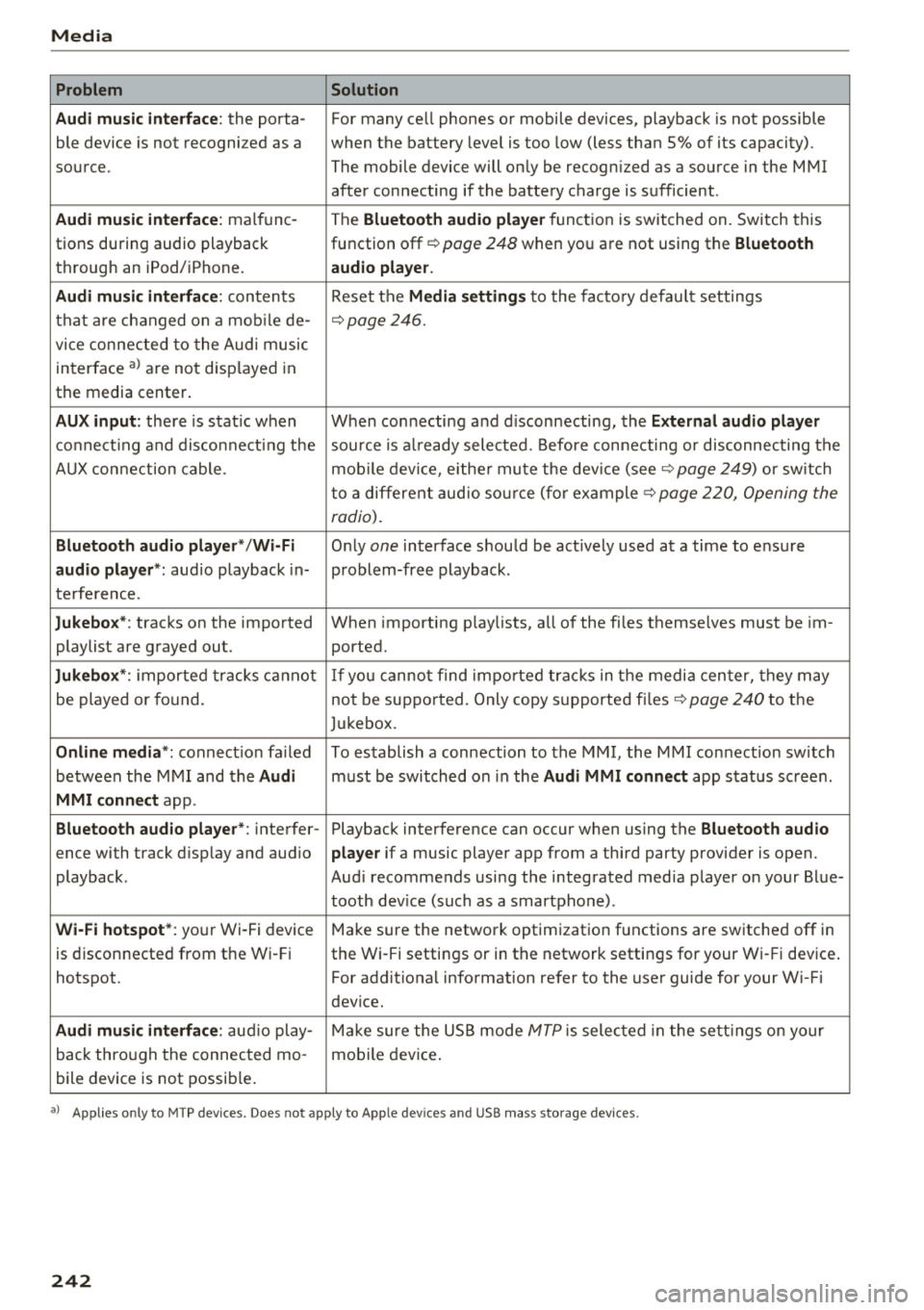
Audi music interface :
the porta-For many ce ll phones or mobile devices, playback is not possible
ble device is not recogni zed as a when the battery level is too low (less than 5% of its capacity).
source. The mobile device will only be recogn ized as a source in the MMI
after connecting if the battery charge is sufficient .
Audi music interface: malfunc-
The Bluetooth audio player function is switched on. Switch this
tions during audio playback function off¢
page 248 when you are not using the Bluetooth
through an iPod/ iPhone. audio player.
Audi music interface:
contents Reset the Media settings to the factory default settings
that are changed on a mobile de -
¢page 246.
vice connected to the Audi music
interface al are not disp layed in
the media center .
AUX input: there is stat ic when When connecting a nd disconnecting, the External audio player
connecting and disconnect ing the source is already selected. Before connecting or disconnecting the
AUX connection cable. mobile device, either mute the device (see ¢
page 249) or sw itch
to a different audio source (for example ¢
page 220, Opening the
radio).
Bluetooth audio player* /Wi-Fi
Only one interface should be act ively used at a time to ensure
audio player*: audio playback in- problem-free playback.
terference.
Jukebox* : tracks on the imported When importing playlists, a ll of the files themselves must be im-
playlist are grayed out. ported.
Jukebox*: imported tracks cannot If you cannot find imported tracks in the media center, they may
be played or found. not be supported. Only copy supported files"*
page 240 to the
Jukebox.
Online media *: connection fa iled To establish a connection to the MMI, the MMI connection switch
between the MMI and the
Audi must be switched on in the Audi MMI connect app status sc ree n.
MMI connect app.
Bluetooth audio player *: interfer- Playback interference can occur when using the Bluetooth audio
ence with track d isp lay and aud io player if a music player app from a third party provider is open.
playback . Audi recommends using the integrated media player on your Blue-
tooth device (such as a smartphone) .
Wi-Fi hotspot*: your Wi-Fi device
Make sure the network optimization functions are switched off in
is disconnected from the Wi -Fi the Wi-Fi settings or in the network settings for your Wi -Fi device .
hotspot . For additional information refer to the user guide for your Wi-Fi
dev ice.
Audi music interface: audio play-Make sure the USB mode MTP is selected in the settings on your
back through the connected mo- mobile device.
bile device is not possible.
al Applie s onl y to MTP dev ice s. Does not apply to App le dev ices and USB mass s torage dev ice s.
242
Page 246 of 398
Audi smartphone interface
Opening a menu item
Select and confirm a menu item using the MMI
control panel.
Troubleshooting
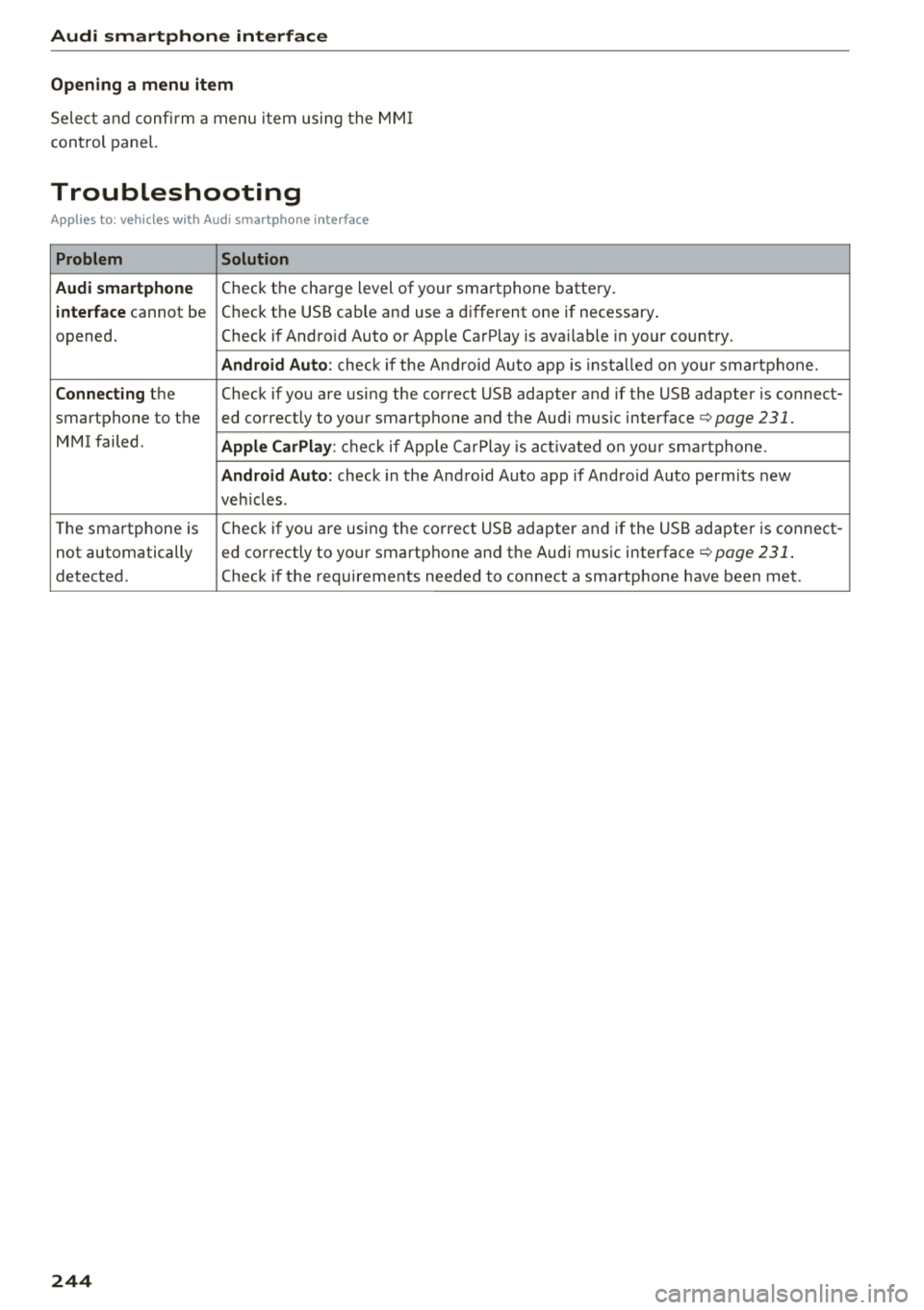
Applies to: vehicles with Audi smartphone interface
Problem Solution
Audi smartphone
Check the charge level of your smartphone battery.
interface cannot be Check the USB cable and use a different one if necessary
.
opened. Check if Android Auto or Apple CarPlay is available in your country.
Android Auto : check if the Android Auto app is installed on you r smartphone .
Connecting the Check if you are using the correct USB adapter and if the USB adapter is connect-
smartphone to the ed correctly to your smartphone and the Aud i mus ic interface ¢
page 231.
MMI failed . Apple CarPlay: check if App le CarPlay is activated on your sma rtphone .
Android Auto: check in the And raid Auto app if Android Auto permits new
veh icles .
T he smartphone is Check if you are using the correct USB adapter and
if the USB adapter is connect -
not automatically ed correctly to your smartphone and the Audi music
interface¢
page 231.
detected. Check if the requirements needed to connect a smartphone have been met.
244
Page 287 of 398
a co ...... N r--. N ...... 0
0
:E '
alternator and starter are separated from
the vehicle battery with a pyrotechnic circuit
interrupter.
- Work on the pyrotechnic circuit interrupt
er must only be performed by a qualified
technicians who have the experience, in
formation and special tools necessary to
perform the work safely.
- If the vehicle or the circuit interrupter is
scrapped, all applicable safety precautions
must be followed .
@ For the sake of the environment
Undeployed airbag modules and pretension
ers might be classified as Perchlorate Materi
al -special handling may apply, see
www.dtsc.ca.gov/hazardouswaste/perchlo rate. When the vehicle or parts of the re
straint system including airbag modules and
safety belts with pretensioners are scrapped,
all applicable laws and regulations must be
observed. Your authorized Audi dealer is fa
miliar with these requirements and we recom
mend that you have your dealer perform this
service for you.
Other things that can affect Advanced
Airbag performance
Changing the vehicle's suspension system can
change the way that the Advanced Airbag System
performs in a crash . For example, using tire-rim
combinations not approved by Audi, lowering the
veh icle, chang ing the stiffness of the suspens ion,
including the springs, suspension struts, shock
absorbers etc. can change the forces that are
measured by the airbag sensors and sent to the
electronic contro l unit. Some suspension changes
can, for example, increase the force levels meas
ured by the sensors and make the airbag system
deploy in crashes in which it would not deploy if
the changes had not been made. Other kinds of changes may reduce the force levels measured by
the sensors and prevent the airbag from deploy
ing when it should .
Airbag system
A WARNING
Changing the vehicle's suspension including
use of unapproved tire-rim combinations can
change Advanced Airbag performance and in
crease the risk of serious personal injury in a
crash.
- Never install suspension components that
do not have the same performance charac
teristics as the components originally instal
led on your vehicle.
- Never use tire-rim combinations that have
not been approved by Audi.
Side airbags
· Description of side airbags
The airbag system can provide supplemental
protection to properly restrained occupants.
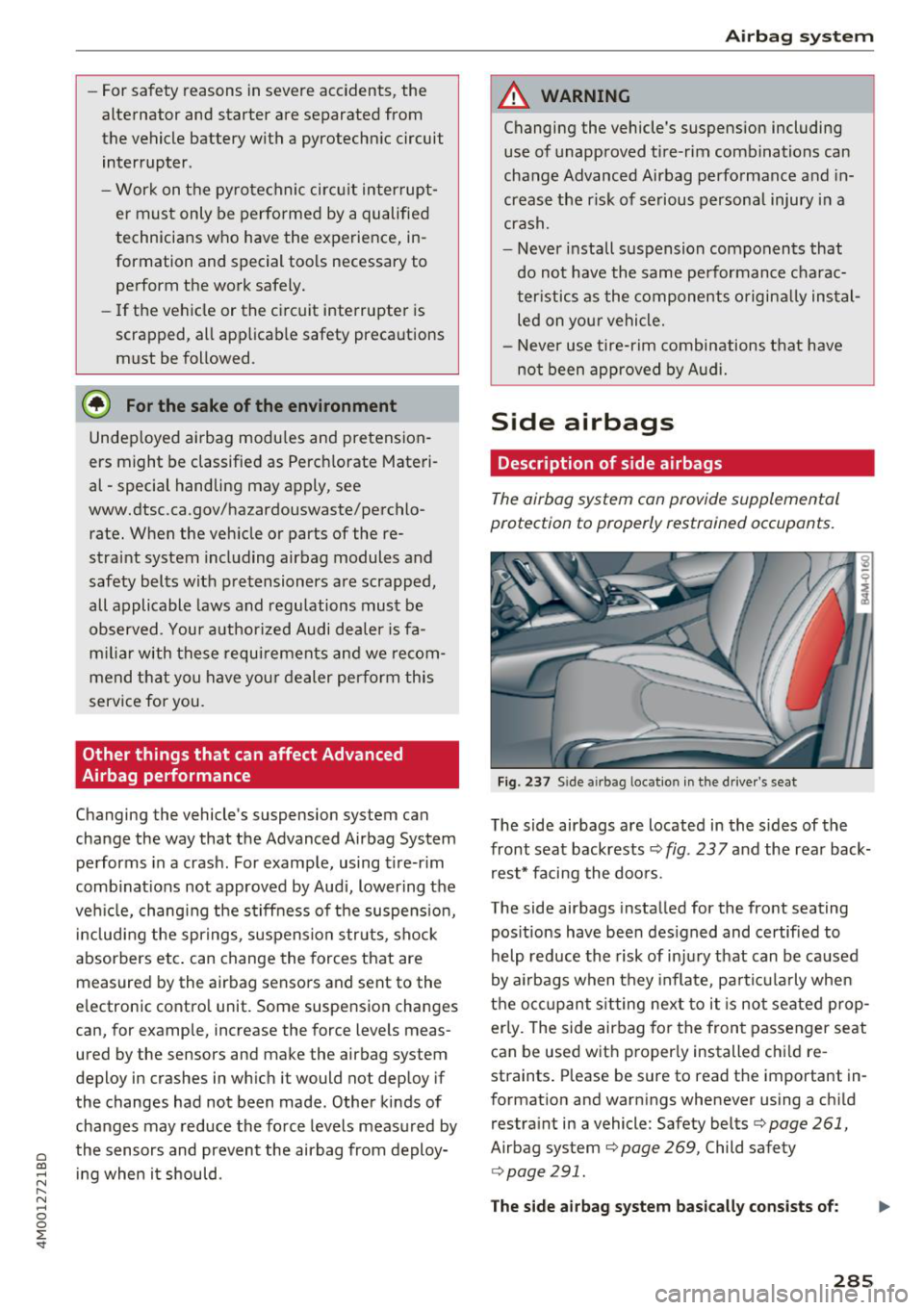
Fig. 237 Side a irbag locatio n in the driver's seat
The side airbags are located in the sides of the
front seat backrests ¢
fig. 23 7 and the rear back
rest* facing the doors.
The side airbags installed for the front seating
pos itions have been des igned and certified to
help reduce the risk of injury that can be caused
by airbags when they inflate, particularly when
the occupant s itting next to it is not seated prop
erly. The side airbag for the front passenger seat
can be used w ith proper ly installed chi ld re
straints . Please be sure to read the important in
formation and warnings whenever using a child
restraint in a vehicle: Safety belts¢
page 261,
Airbag system ¢ page 269, Child safety
r:=> page 291.
The side airbag system basically consists of: .,..
285
Page 321 of 398
Cl a:, ...... N
" N ...... 0
0
::r -
Working in the engine compartment
Special care is required if you are working in the engine compartment
F or wo rk in th e en gine co mpartm en t, suc h as
ch eck ing and filli ng flu id s, th ere is a r isk o f in
jur y, sca lding, ac cident s, a nd b urn s. Fo r this
re aso n, follow all the warning s and gener al
s af ety pr ecau tions pr ovided in the f ollowin g in
f o rm ation . The engine comp artm en t is a d an
g ero us ar ea .
¢ ,&. .
A WARNING
- T urn the engine off.
- Swit ch the ign ition off.
- Set the parking brake .
- Select the "P" selector lever posit ion .
- Let the engine cool down.
- Never open the hood when there is steam or coolant escaping from the eng ine compart
ment, because there is a risk that you could
be burned . Wait until no steam or coolant is
escaping.
- Keep children away from the engine com
partment .
- Never spill flu ids on a hot engine. These flu
ids (such as the anti -freezing agent con
tained in the coolant) can ignite .
- Avoid short circu its in the electrical system .
- When working in the engine compartment,
remember that the radiator fan can sw itch
on even if the ign ition is switched off, which
increases the risk of injury .
- Never open the cap on the coolant expan
sion tank when the eng ine is warm. The
cooling system is under pressure .
- To protect your face, hands, and arms from hot steam or coolant, cover the cap with a
large cloth when opening.
- Do not remove the engine cover under any circumstances . This increases the risk of
burns.
- If tests need to be performed w ith the en
gine running, there is additional danger due
to moving components (such as the ribbed
Ch eck ing and F illing
be lt, alternator and radiator fan) and from
the high-voltage ignition system.
- Do not under any circumstances activate the
throttle inadvertently (for example, by hand
from the engine compartment) if the veh i
cle is stat ionary but the eng ine is running
and a gear is engaged . Otherwise, the veh i
cle will start to move immed iately and this
could result in an acc ident.
- Pay attent ion to the following warnings
when work on the fue l system is required :
- Do not smoke .
- Never wor k nea r open flames .
- Always have a working fi re extingu isher
nearby.
- All work on the battery or electrical system
in your veh icle can result in inju ries, chemi
cal burns, acc iden ts or bu rns . Because of
this, all work m ust be performed
onl y by an
authorized Audi dealer or authorized Audi
Service Facility.
- To reduce the risk o f electric shock and in
jury, never touch the following components
when the engine is running or is being start
ed:
- Ign it ion cable
- Other components in the electronic high -
voltage ign ition system
- If you must check or perform work on the
engine wh ile it is running:
- Set the parking brake first and then se lect
the "P" selector lever position .
- Always proceed w ith extreme caution so
that clothing, jewelry or long hair do not
become caught in the radiator fan, fan
belt or other moving components or do
not come into contact with hot compo
nents. Tie back long hair before beginning
work and do not wear clothing that can hang down into the engine .
- lim it your exposure to exhaust and chemi
cals to as short a time as possible
¢ ,&. .
A WARNING
California Proposition 65 Warning:
319
Page 322 of 398
Checking and Filling
- Engine exhaust, some of its constituents,
and certain vehicle components contain or
emit chemicals known to the State of Cali
forn ia to cause cancer and birth defects and
reproduct ive harm . In addition, certain flu
ids contained in veh icles and certain prod
ucts of compo nent wear contain or emit
chemicals known to the State of California
to cause cancer and birth defects or other reproductive harm .
- Battery posts, termina ls and related acces
sories contain lead and lead compounds, chemicals known to the State of California
to cause cancer and reproductive harms.
Wash hands after handling .
(D Note
When filling flu ids, be sure not to mix the flu
ids up . Otherwise severe ma lfunctions and en
gine damage w ill occur .
@ For the sake of the environment
You shou ld regularly check the ground under
your vehicle in order to detect leaks quickly. If
there are visible spots from oil or other fluids,
bring your vehicle to an authorized Audi deal
er or author ized Audi Service Facility to be
checked .
Opening/closing the hood
The hood is released from inside the vehicle.
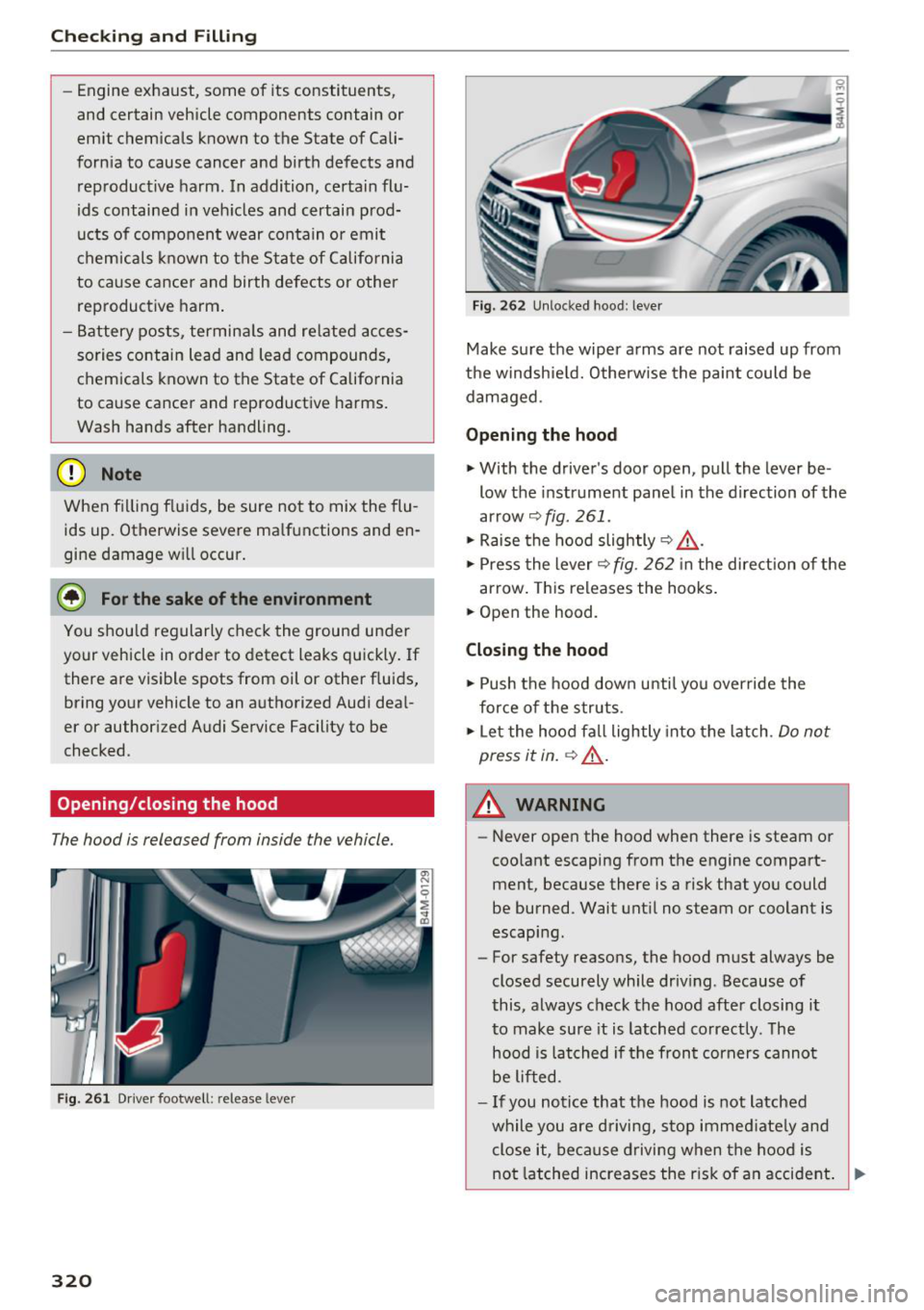
Fig . 261 D river footwell : release leve r
320
Fig. 262 Unlocked hood : lev er
Make sure the wiper arms are not raised up from
the windshie ld. Otherw ise the paint could be
damaged .
Opening the hood
"'With the driver's door open, pull the lever be
low the instrument panel in the direction of the
arrow ~
fig. 261 .
"' Raise the hood slightly~ &-
"' Press the lever~ fig. 262 in the direction of the
arrow. This releases the hooks .
"' Open the hood.
Closing the hood
"' Push the hood down until you over ride the
force of the struts .
"' Let the hood fall lightly into the latch .
Do not
press it in.
~ .&_ .
A WARNING
-Never open the hood when there is steam or
coo lant escaping from the engine compart
ment, because there is a risk that you could
be burned. Wait until no steam or coolant is
escaping.
- For safety reasons, the hood must always be
closed securely while driving . Because of
this, always check the hood after closing it
to make sure it is latched correctly . The
hood is latched if the front corners canno t
be lifted .
- If you notice that the hood is not latched
while you are driving, stop immed iate ly and
close it, because driving when the hood is
not latched increases the r isk of an accident . ..,.