brake sensor AUDI Q7 2018 Owner´s Manual
[x] Cancel search | Manufacturer: AUDI, Model Year: 2018, Model line: Q7, Model: AUDI Q7 2018Pages: 398, PDF Size: 185.58 MB
Page 127 of 398
(D Tips
-You can cance l the automatic brake activa
t ion w ith increas ing bra king fo rce if you ap
p ly the brakes yourse lf or accelerate cons id
erab ly.
- In some situations, rear cross-traffic assist may warn you even if there is no cross traffic
in a cr itical area, for examp le when back ing
i nto a parking space or maneuver ing .
- The rea r cross-traffic ass ist also switches off
when you switch off the ESC.
- The system is not available when towing a
trailer.
Messages
Applies to: vehicles with Audi side assist
A message appears in the inst rument cluste r dis
p lay if the s ide ass ist switches off automatically .
@j Audi side assist: malfunction! Please contact
Service
@j Audi side assi st and e xit warning: malfunc
tion! Please contact Service
The system cannot guarantee that it will detec t
ve hicles correctly and it has switched off. The
sensors have been mov ed or a re faulty. Have t he
system checked by an a uthori zed Audi dea ler or
author ized Audi Service Facility soon.
@j Audi side assi st: cu rrently unavailable. Sen
sor vision restricted due to surroundings . See
owner 's manual
($j Audi side as sist and e xit warning: currently
unavailable. Sensor vision restricted due to su r
roundings
The rad ar senso r vis io n i s impa ired. The area in
fron t of the senso rs must no t be covered by b ike
rac ks, stic kers, leaves, snow or any other ob jects.
C lea n the area in f ront of th e sensors, if necessa
ry ¢
page 121, fig. 115.
($j Audi side as sist: currentl y unavailable. See
owner 's manual
Cl
~ ($j Audi side ass ist and exit warning : currently N
~ unavailable . See owner 's manual ,-1 0
0
::r '
S ide assist cannot be switched on at this time be
ca use there is a ma lfunction (for example, the
batte ry c harge leve l may be too low).
($1 Audi side assi st: unavailable in t owing mode
($j Audi side assist and ex it warning: currently
unavailable . Towing mode
S ide ass ist switches off automatically when the
electrical connecto r in t he factory-installed trail
er hitch is connected . There is no guarantee the
system will sw itch off w hen us ing a ret rofitted
t railer h itch . Do no t use side assist and the ex it
warning when tow ing a tra ile r.
Ill Rear parking aid: obstacle detect ion restrict
ed
The rear cross-traffic ass ist is not available . E i
ther the ESC is sw itched off, or the rada r senso rs
may be cove red by a b ike rack, st icke rs , leaves,
snow o r othe r objects . Switc h the ESC on, o r
cl ea n the area in fron t of the senso rs if necess ary
¢page 12 1, fig . 115. If thi s message con tinues
to be displayed, drive imme dia tely to an author
ized Audi dea ler or authorized Audi Service Facili
ty to have the ma lf u nction repaired.
Night vision assist
Description
Applies to: vehicles with night vision assist
The night vision assist can detect, highlight and,
if necessary, warn about pedestrians and large
wild animals.
N ight vision assist he lps yo u when it is dark by
u sing an infra red camera to mon itor the area in
front of your ve hicle, w ith in the limits of the sys
tem . It ca n disp lay objects up to a distance of ap
prox ima tely 1 000 feet (300 m). The thermal im
age de te cte d by t he came ra is show n in t he in
str ument cluster disp lay . Wa rm areas appear
li ghter and co ld areas a ppear da rker.
125
Page 136 of 398
Parking systems
sound was muted, no tone will sound. Pay atten
t ion to the vehicle's surroundings when you start
to drive.
Switching on /off
Applies to: ve hicles w ith parkin g system plus
~- ---- - --=--
·-~ -----
C
- --"I:, J r~-, .,_ ... r-= J
' ' 1
, -. :;;;; 1~ ,~~
Fig. 129 C en ter consol e: park ing a id butt on
Fig. 130 In fot ainme nt system: v is ual d ist ance d is play
Switching on/off
.,. Press the Pw A button in the center console . A
short confirmation tone sounds and the L ED in
the button turns on.
Switching on automatically
The system switches on automatically when re
verse gear is engaged while the engine is run ning. A brief confirmation tone will sound.
If the veh icle approaches an obstacle at speeds
under approximate ly 6 mph (10 km/h), the park
ing aid will switch on automatically . Audible sig
na ls will sound only when the obstacle is already
clearly in the sensor detection range .
Switching off automatically
The system switches off automatically when driv
ing forward faster than 6 mph (10 km/h).
134
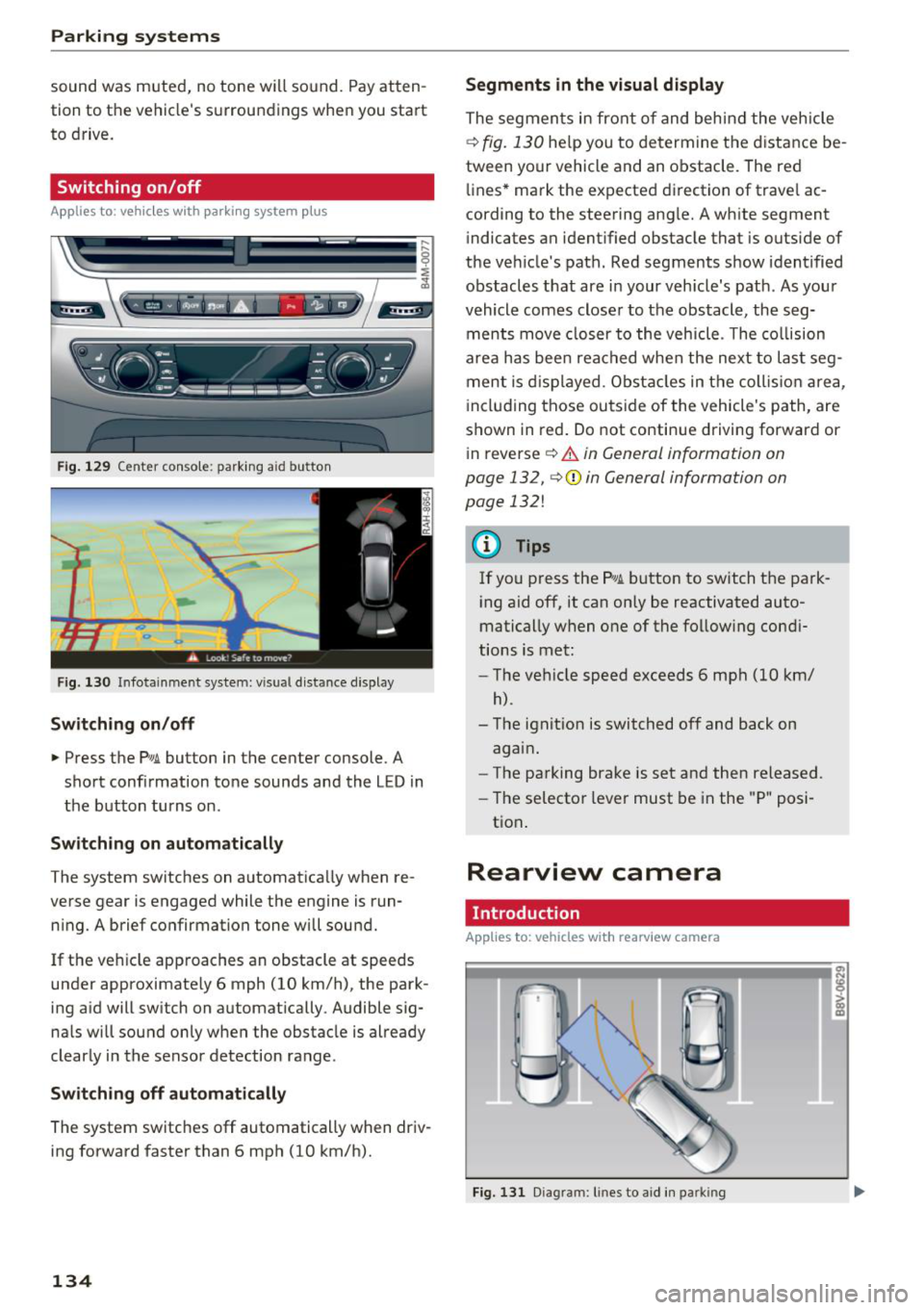
Segments in the visual display
The segments in front of and behind the vehicle
i::> fig. 130 help you to determine the distance be
tween your vehicle and an obstacle . The red
lines* mark the expected d irection of trave l ac
cording to the steering ang le. A white segment
indicates an identified obstacle that is outside of
the veh icle 's path. Red segments show identified
obstacles that are in your veh icle's path . As your
vehicle comes closer to the obstacle , the seg
ments move closer to the vehicle . T he collision
area has been reached when the next to last seg
ment is displayed . Obstacles in the collis ion area,
i ncluding those outside of the vehicle's path, are
shown in red. Do not continue driving forward or
in reverse
i::> .&. in General information on
page 132,
i::> Q) in General information on
page 132!
(D Tips
If you press the P,qA button to switch the park
ing aid off, it can only be reactivated auto
matically when one of the following condi
tions is met:
- The vehicle speed exceeds 6 mph (10 km/
h) .
-The ignit ion is switched off and back on
again .
- The parking brake is set and then released .
- The selector lever must be in the "P" posi-
tion .
Rearview camera
Introduct ion
Applies to: vehicles with rearview camera
Fig. 131 D iagram: lin es to aid in parkin g
Page 354 of 398
Care and cl eaning
wash operator to reduce the risk of acci
dents.
- To reduce the risk of cuts, protect yourself
from sharp metal components when was h
ing the underbody or the inside of the wheel
housings .
- After washing the vehicle, the braking effect may be delayed due to mo isture on the
brake rotors or ice in the winter . This in
creases the risk of an acc ident . The brakes
must be d ried first w it h a few careful b rake
applications.
@ Note
- If you wash the ve hicle in an automatic car
wash, you must fold the exterior m irrors in
to reduce the risk of damage to the mirrors .
P ower folding exte rior m irrors* must o nly
be fo lded in and out using the powe r folding
f u nct io n.
- To reduce t he risk of damage to the rims
and t ires , compare the width be tween the
whee ls on your ve hicl e w it h t he distance be
tween the g uide rai ls in the car wash .
- To reduce t he risk of damage, compare the
height and width o f you r vehicle with the heig
ht and w idth of the inside o f the car
was h.
- T o red uce the risk of pa in t damage, do not
was h the vehicle in direct sun light .
- T o red uce the risk of d amage to the s urf ace,
do not use insect removing sponges, k itchen
sponges or similar items .
- Matte finish painted vehicle components:
- To reduce the r isk of damage to the sur-
face, do not use polis hing agents or hard
wax .
- Never use protective wax. It can destroy
the matte finish effect .
- Do not place any stickers or magnet ic
signs on vehicle parts painted with matte
finish paint . The paint cou ld be damaged
when the stickers or magnets are re
moved .
@ For the sake of the environment
Only wash the ve hicle in facilities spec ia lly de
s igned for that pu rpose . This will reduce the
r isk of dirty wate r contaminated with o il from
ente ring the sewe r system.
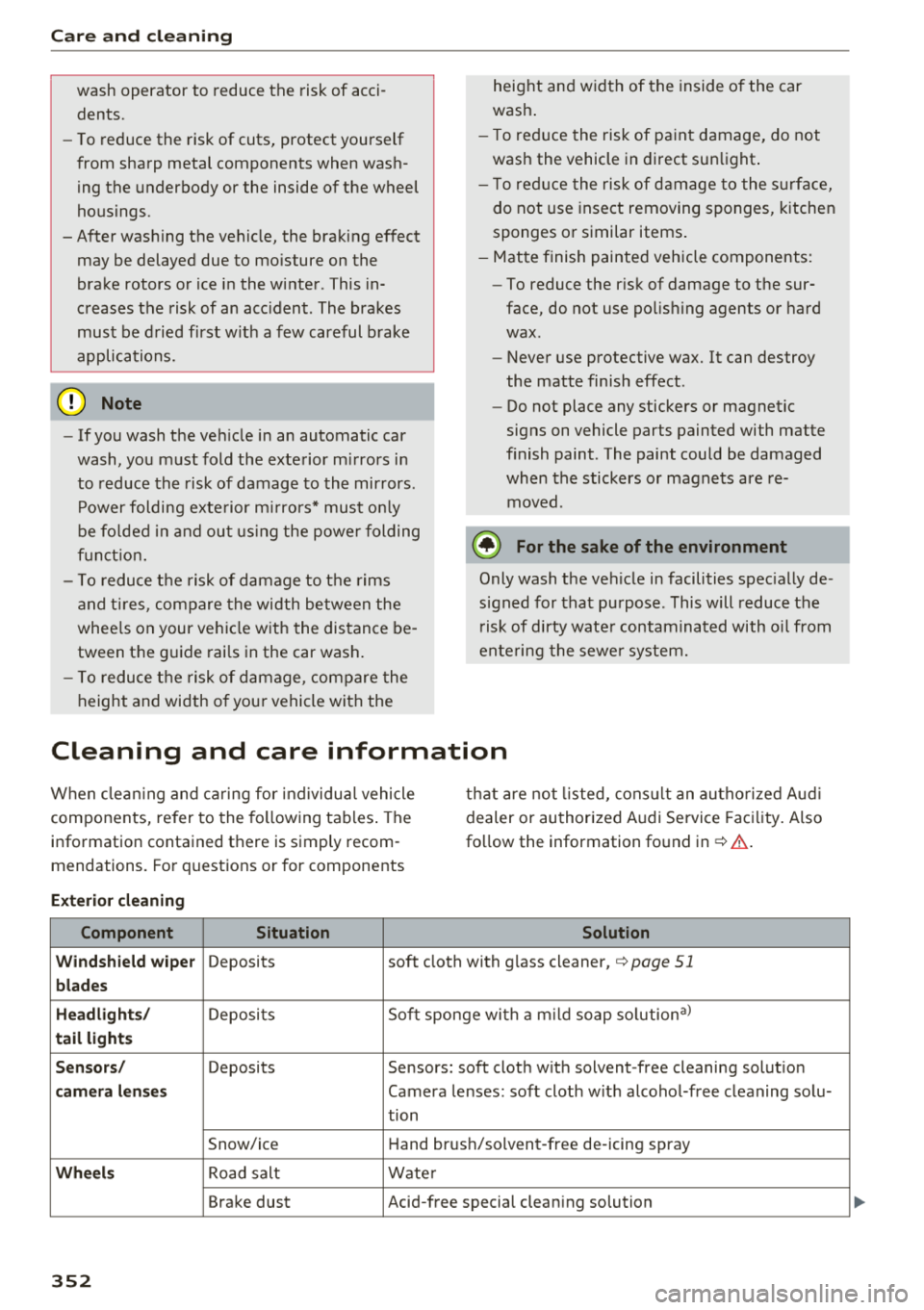
Cleaning and care information
W hen clea ning and ca ring for ind ividua l vehicle
components, refer to the fo llowing tables . The
information contained there is simply recom
m endations. Fo r qu estions or for compon ents t
h at are not listed, cons ult an autho rized Aud i
dealer or authorized A udi Service Fac ility. Also
fo llow the information fo und inc:>.&. .
Ext erior cleaning
Component Situation Solution
Windshield wiper
Deposits soft cloth with glass cleane r, c:> page 51
blades
Headlights /
Deposits Soft sponge with
a m ild soap solution a)
tail light s
S ensors /
Deposits Sensors: soft cloth with solvent -free cleaning solut ion
camera lenses Camera lenses: soft cloth w it h alcohol-free cleaning solu-
tion
Snow/ic e Hand brush/solv ent-free de -icing spray
Wheels Road salt Water
Brake dust Acid-free special cleaning solution
352
Page 368 of 398
Fuses and bulbs
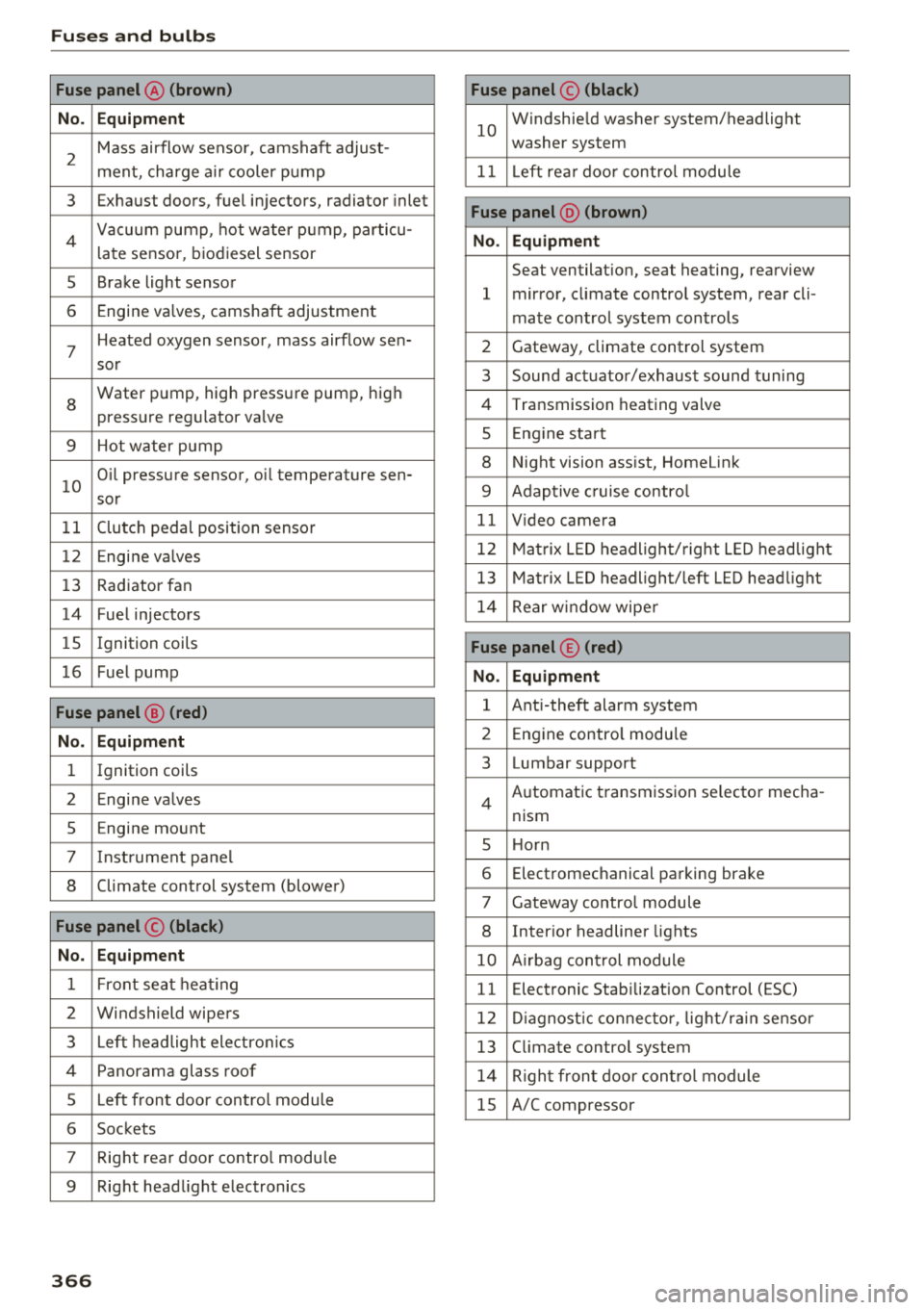
Fuse panel@ (brown) Fuse panel© (black)
No. Equipment
2
Mass airflow sensor, camshaft adjust-
ment, charge air cooler pump
10
Windshie ld washer system/headlight
washer system
11 L eft rea r door control module
3 Exhaust doors, fuel injectors, radiator inlet
4 Vacuum pump, hot water p ump, particu-
late sensor, biodiesel sensor
Fuse panel @ (brown)
No. Equipment
5 Brake light sensor
6 Engine valves, camshaft adjustment Seat ventilation, seat heating, rearview
1 mirror, climate control system, rear cli-
mate control system controls
7
Heated oxygen sensor, mass airflow sen-2 Gateway, climate control system
sor
8
Water pump, high pressure pump, high
pressure regulator va lve
9 Hot water pump
10
Oil pressure sensor, oil temperature sen-
sor
3 Sound actuator/exhaust sound tuning
4 Transmission heat ing valve
5 Engin e start
8 Night vision assist, HomeLink
9 Adaptive c ruise control
11 Clutch pedal position sensor 11 Video camera
12 Engine valves 12 Matrix LED headlight/right LED headlight
13 Radiator fan 13 Matrix LED headlight/left LED headlight
14 Fuel injectors 14 Rear window wipe r
15 Ignition coils Fuse panel © (red)
16 Fuel pump No. Equipment
Fuse panel @ (red)
1 Ant i-theft alarm system
No. Equipment 2 Engine control modu le
1 Ignition coils 3 Lumbar support
2 Engine va lves
5 En gine mount
7 Instrument panel
8 Climate control system (blower) Automatic transmission se
lector mecha-
4
nism
5 H orn
6 Electromechanical parking brake
7 Gateway control module
Fuse panel © (black) 8 Interior headliner lights
No. Equipment 10 Airbag control module
1 Front seat heating 11 Electronic Stab ilizat ion Control (ESC)
2 Windshield wipers 12 Diagnostic connector , light/rain sensor
3 Left headlight electronics 13 Climate control system
4 Panorama glass roof 14 Right front door control module
5 Left front door control module 15 A/C compressor
6 Sockets
7 Right rear door contro l modu le
9 Right headl ight electronics
366
Page 391 of 398
Cl a:, ...... N
" N ...... 0
0
::r '
re fer to Audi connect (Infotainment) . . . . 187
Opening. .. .. .. ............... .. .. .. .. 29
Fuel filler door . . . . . . . . . . . . . . . . . . . . . . 312
H ood . . . . . . . . . . . . . . . . . . . . . . . . . . . . . . 320
Opening/closing
refer to Unlocking/locking . . . . . . . . . . . . . 29
Operating Multifunction steering wheel . . . . . . . . . . . 12
Multi Media Interface . . . . . . . . . . . . . . . . 151
Voice recognition system . . . . . . . . . . . . . 167
Options menu . . . . . . . . . . . . . . . . . . . . 152, 156
Other consumers . . . . . . . . . . . . . . . . . . . . . . 16
Outside temperature displ ay . . . . . . . . . . . . . 10
Overview (Cockpit) . . . . . . . . . . . . . . . . . . . . . . 8
p
Pai nt damage . . . . . . . . . . . . . . . . . . . . . . . . 353
Paint number . . . . . . . . . . . . . . . . . . . . . . . . 375
Panorama glass roof. . . . . . . . . . . . . . . . . . . . 40
Emergency operation . . . . . . . . . . . . . . . . . . 40
Parental control
DVD... .. .. .. ............. .. .. .. .. . 237
Parking aid Cleaning sensors/camera . . . . . . . . . . . . . 352
Parking brake
refer to Electromechanical parking brake . 81
Parking lights . . . . . . . . . . . . . . . . . . . . . . . . . 43
Parking location Audi connect vehicle control . . . . . . . . . . . 198
Parking system
Index
Physical princip les of a fronta l co llision . . . 262
Picture format (video) . . . . . . . . . . . . . . . . . 23 7
Pl ayback (media) . . . . . . . . . . . . . . . . . . . . . 234
Playl ist . . . . . . . . . . . . . . . . . . . . . . . . . . . . . 23 7
Point of interest . . . . . . . . . . . . . . . . . . . . . . 206
Point of int erest search . . . . . . . . . . . . . . . . 207
also r efer to Point of interest . . . . . . . . . . 206
Polish ing . . . . . . . . . . . . . . . . . . . . . . . . . . . . 353
Pollutant filter (automatic A/C system) . . . . 66
Power sources . . . . . . . . . . . . . . . . . . . . . 60, 232
Predictive efficiency assist . . . . . . . . . . . . . . 100
Pregnant women Special considerations when wearing a s afe-
ty belt . . . . . . . . . . . . . . . . . . . . . . . . . . . . . 266
pre sense
r e fe r to Audi pre sense . . . . . . . . . . . . . . . 112
Presentation mode . . . . . . . . . . . . . . . . . . . . 212
Presets (radio) . . . . . . . . . . . . . . . . . . . . . . . 223
Pressure Tire pressure mon itoring system . . . . . . . 348
Tires . . . . . . . . . . . . . . . . . . . . . . . . . . . . . . 340
Program guide Radio . . . . . . . . . . . . . . . . . . . . . . . . . . . . . 221
Programming buttons (multifunction steering
wheel) . . . . . . . . . . . . . . . . . . . . . . . . . . . . . . . 15
Proper occupant seating positions . . . . . . . 253
Proper safety be lt pos ition . . . . . . . . . . . . . . 265
Proper seating position Front passenger . . . . . . . . . . . . . . . . . . . . . 254
Occupants. . . . . . . . . . . . . . . . . . . . . . . . . . 253
Rear passengers . . . . . . . . . . . . . . . . . . . . . 254
Protecting . . . . . . . . . . . . . . . . . . . . . . . . . . . 353
refer to Parking sys tems . . . . . . . . . . 133, 134
Parking systems . . . . . . . . . . . . . . . . . . . . . . 132
Peripheral cameras . . . . . . . . . . . . . . . . . . 137
Q
Rearview camera . . . . . . . . . . . . . . . . . . . . 134
Settings . . . . . . . . . . . . . . . . . . . . . . . . . . . 140
Trailer hitch . . . . . . . . . . . . . . . . . . . . . . . . 141
Particulate filter (diesel) . . . . . . . . . . . . . . . 317
Parts replacement . . . . . . . . . . . . . . . . . . . . 379
PASSENGER AIR BAG light . . . . . . . . . . . . . . 281
Pause (audio/video file) . . . . . . . . . . . . . . . . 234
Pedals . . . . . . . . . . . . . . . . . . . . . . . . . . . . . . 256
Pedestrian detection . . . . . . . . . . . . . . . . . . 125
Personal route assistance . . . . . . . . . . . . . . 209
Phonebook
refer to Contacts . . . . . . . . . . . . . . . . . . . . 183 quattro
146
Selective wheel torque control . . . . . . . . . 142
Question What happens to unbelted occupants? 262
R
Radio . . . . . . . . . . . . . . . . . . . . . . . . . . . . . . . 220
Additional station information . . . . . . . . . 222
Presets . . . . . . . . . . . . . . . . . . . . . . . . . . . . 223
Radio text . . . . . . . . . . . . . . . . . . . . . . . . . . 221
Station list . . . . . . . . . . . . . . . . . . . . . . . . . 220
389