lane assist AUDI Q7 2018 Owner´s Manual
[x] Cancel search | Manufacturer: AUDI, Model Year: 2018, Model line: Q7, Model: AUDI Q7 2018Pages: 398, PDF Size: 185.58 MB
Page 112 of 398
Ass is tance sy stem s
and follow the warni ngs on c::, &. in General
information on page 103.
N ever use traffic
jam assist in the following situat ions or you
w ill increase the risk of an accident .
- Drivi ng offroad or on unpaved roads . Traffic
jam assist is only designed for use on paved
roads .
- In city driving or in construction zones.
- On curving stretches of road.
- In narrow lanes .
- In unclear traffic situations s uch as a t inter-
sections or toll stations.
(D Tips
You are not necessarily gu ided to the cente r
of yo ur lane .
Distance display and distance warning
Applies to: vehicles with Audi adaptive cruise control
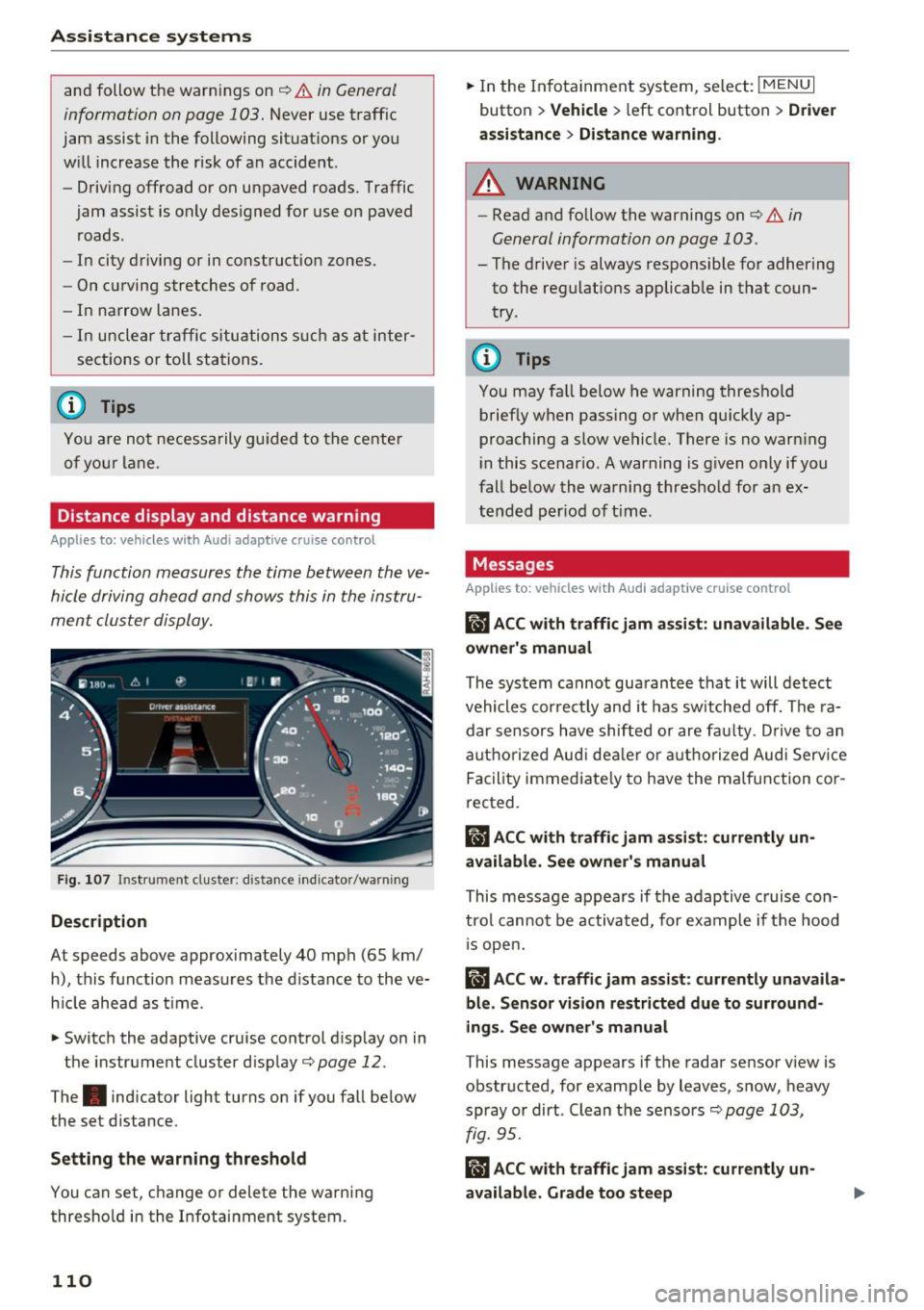
This function measures the time between the ve
hicle driving ahead and shows this in the instru
ment cluster display.
F ig . 10 7 Instru m ent clust er : di stance indic ato r/warn in g
Description
At speeds above approximately 40 mph (65 km/
h), this f unction meas ures the d istance to the ve
h icle ahead as time.
.,. Switch the adaptive cruise control d isplay on in
the instr ume nt cluster d isp lay
c::, page 12 .
The. indicator light turns on if you fall be low
the set distance.
Setting the warn ing threshold
You can set, c hange or delete the warning
thresho ld in the Infotainment system.
110
.,. In the In fotainment system, select : I MENU I
button > Vehicle > left control button > Dri ver
a ssi stan ce
> Di stan ce warning .
A WARNING
-Read and follow the warnings on c::, &. in
General information on page 103.
- The driver is always responsible for adhering
to the regulat ions applicab le in that coun
try .
(D Tips
You may fa ll below he warning threshold
brief ly when passing or when qu ickly ap
proaching a slow vehicle. There is no warn ing
i n this scenar io . A warning is g iven o nly if you
fall be low the warning thresho ld for a n ex
tended per iod of t ime .
Messages
Applies to: vehicles with Audi adaptive cruise control
ii ACC with traffic jam assi st : unavailable . Se e
owner's manual
The system cannot gua rantee that it will detect
vehicles correc tly and it has sw itched off. The ra
dar sensors have shifted or are fa ulty . D rive to an
authorized Aud i dea le r o r a uthorized Aud i Serv ice
Facility immediate ly to have the ma lfunction co r
rected.
ii ACC with traffic jam assi st : c urrently un
available . See owner's manual
This message appears if the adap tive c ruise con
t rol canno t be activated, for example if the hood
1 s open.
ii ACC w . traffi c jam assist: currently unav aila
ble. Sensor vision re stricted du e to surround
ings. See owner's manual
T his message appears if the radar sensor v iew is
obstructed, for examp le by leaves, snow, heavy
spray or dirt . Clean the sensors
c::, page 103,
fig. 95.
RI) ACC with traffic jam ass ist: currently un
available. Grade too steep
Page 113 of 398
Cl a:, ...... N
" N ...... 0
0
::r '
for safe operation. The systems cannot be switch
ed on.
Ill AC C with traffic jam a ssis t: only availabl e in
D, Sor M
Select the "D/S " or " M" selector leve r pos it ion.
Ill A CC w ith tr affic j am ass is t: currentl y un
available . Parking brake applied
The systems sw itch off if you set the parking
brake . The systems are available again after you
release the parking brake .
llJ ACC with traffic jam a ssist: currentl y un·
av ailable. Stabili zation cont rol (E SC) input
This message appears if the electronic stab iliza
tion contro l (ESC) is taking action to stabilize the
ve hicle . The systems switch off in this scenario .
Ill ACC with traffic jam a ssis t: manu al control!
This message appea rs if the veh icle rolls back
when sta rting on a slight incl ine, even t hough the
systems are active . P ress t he b rake peda l to pre
ve nt the vehicle from rolling or sta rting to move.
IIJ ACC w ith tr affic jam a ssis t: curr entl y un
availabl e. Downhill a ssis t activated
You cannot activate the system when hill hold as
sist is act ive .
II!! ACC with traffic jam assist: manual control!
This message appears if the driver does not take
over steering after mu ltip le driver intervention
requests and the system switches off . The vehicle
brakes unt il it is stationary .
ii Traffic jam a ssis t : una vailable. S ee o wner' s
manual
The system can no longer ensure that t he ve hicle
w ill stay in the lane and sw itches off. Have yo ur
vehicle checked by an a uth orized Audi dea ler or
authorized Audi Service Facility if the ma lfunc
tion is continuous .
14§ Traffic jam assis t : Plea se take over steering!
This message appea rs as soon as the system
stops detecting steer ing activ ity when the system
limits are rea ched. Always keep yo ur hands on
Ass istance systems
the steering whee l so you can be ready to steer at
any time.
14§ Traffic jam a ssis t : currentl y unavailable .
Pl ea se f asten se at belt
T he system switches off when the drive r's safety
belt is unfastened.
Ill AC C: eff iciency assist not available in thi s
countr y
The adaptation to speed lim its and routes ahead
is not available in this country .
IIJ ACC: predictive control currentl y una vaila
ble . See owne r's m anual
T he ad aptation to speed lim its and routes ahead
swi tches off at speed limits under 20 mph
(30 km/h) .
T he message ca n also appear if the adaptation to
speed limi ts and routes a head has a temporary
f ailure . Have your vehicle checked by an autho r
ized Audi dea ler or authorized Audi Service Facili
ty if the malfunction is continuous .
Distance warning : malfunction! Please contact
S erv ice
T he system cannot gua rantee that it will detect
vehicles correct ly and it has switc hed off. The ra
dar sensors have shifted or are fa ulty . Drive to an
authorized Aud i dea ler o r authorized Audi Serv ice
Facility immediate ly to have the ma lfunction cor
rected .
Distance warning : currentl y unavailable . Sen sor
view re stricted due to surrounding s. See own
e r' s manual
T his message appears if the rada r senso r view is
obstructed, for examp le by leaves, snow, heavy
spray or dirt. Clean the sensors
¢ page 103,
fig . 95 .
Distance warning : curr entl y unavailable . See
owner' s manual
This message appears if the system has a tempo
r a ry fa il ur e. If this occurs m ultip le t imes, drive to
an a uth orized Aud i dea le r o r auth orized Aud i
Se rvice Facility immed iate ly to have the ma lfunc -
t ion corrected .
liJ,,
111
Page 116 of 398

Ass is tanc e system s
your steering whee l ang le as long as you are ac
tively steering . Evasive steering support is availa
b le at speeds between approximate ly 20 mph
(30 km/h) and 90 mph (150 km/h).
Tu rn as sist
When start ing to drive and up to speeds of maxi
mum
6 mph (10 km/h), the turn assist uses a
braking intervention to prevent your vehicle from
colliding with an oncoming vehicle when turning
left or right (available in certain countries). The
braking in tervent ion causes your vehicle to stay
in its lane .
A WARNING
-Pre sense front cannot overcome the laws of
physics. It is a system des igned to assist a nd
i t cannot prevent a collision in every c ircum
sta nce. The d rive r must a lways i nte rvene.
T he driver is always responsib le for b raking
at the correct time. Do not let the increased
safety provided tempt you into taking risks .
This cou ld increase your risk of a collision.
- The system can deploy incorrectly due to
system -specific limits .
- Please note that the sensors and the camera
do not always detect all objects or lane
markings. This increases the risk of an acci
dent.
- Pre sense front does not react to people, an
ima ls or ob jects that are crossing the veh i
cle's path or that are diff icu lt to detect¢
&
in General information on page 103.
-Reflective objects suc h as guard rails or the
entrance to a tunnel, heavy rain and ice can
affect the function of the radar sensors and
the system's ability to detect a coll is ion risk.
@ Note
The sensors can be displaced by impacts or
damage to the bumper, whee l housing and
underbody . Pre sense fro nt can be impa ired
by this. Have an autho rized Aud i dea le r or a u
thorized A ud i Service Fac ility check the ir func
tion.
l) Th is is not available in so m e co un tri es.
114
(D Tips
- You can cancel the braking with increasing
force that is initiated by t he system by brak
ing yourself, by acce lerating not iceably or
by swerving.
- Keep in mind that pre sense front can brake unexpectedly. Always secure any cargo or
objects that you are transporting to reduce
the risk of damage or injury .
- Specific pre sense front functions switch
off
when the ESC is restricted or sw itched off
¢ page 143 or the hi ll hold assist is switch
ed on
¢ page 144.
Audi pre sense rear
App lies to : vehicles wi th Audi side ass ist
If the risk of a co llision with a vehicle ahead is de
tec ted, the fo llow ing f unct ions can be t rigge red:
- Reversible tens ion ing of the front safety belts
at the corresponding speeds.
- Clos ing the windows and sunroof* .
- Inflating the side bo lsters* i n the seat backrest
and seat surface .
- Activat ing the emergency flashers with in-
creased frequency
ll .
The message Audi pre sense. ¢ page 113,
fig. 108
will warn you about the danger.
Audi drive select* : the function is not act ive de
pending on the mode selected .
A WARNING
-To reduce the risk of an accident, please
note that the s ide assist* radar sensors do
not a lways detect every object.
-
- Pre sense rear does not react to people, ani
mals or objects that a re c ross ing t he vehi
cle's path or that are d ifficult to detect.
- Reflective objects such as guard ra ils, heavy
rain and ice can impair the function of the
radar sensors and the ability to detect a col-
lision risk .
~
Page 117 of 398
Cl a:, ...... N
" N ...... 0
0
::r '
The radar sensors can be displaced by impacts
or damage to the bumper, wheel housing and
underbody. Pre sense rear can be impaired by
this. Have an authorized Audi dealer or au
thorized Audi Service Facility check their func
tion.
(D Tips
- The pre sense rear functions switch off
when towing a trailer.
- The pre sense rear functions may also
switch off if there is a malfunction in the
side assist* system.
Audi pre sense city
Applies to: vehicles with Audi pre sense city
Description
Within the limits of the system, pre sense city
can warn you of impending collisions with
vehicles and pedestrians and initiate the applica
ble braking maneuver if needed. Pre sense city is
active at speeds of approximately 6 mph (10 km/
h) and higher.
A pedestrian warning can occur at speeds up to
SO mph (85 km/h), and vehicle warnings can oc
cur at speeds up to 155 mph (250 km/h). A pre
sense city braking maneuver is possible at speeds up to SO mph (85 km/h).
Warnings
The system recognizes various dangerous situa
tions. The
early warning occurs if:
- a vehicle driving ahead brakes suddenly,
- your own vehicle approaches a significantly
slower vehicle or stationary vehicle in the direc
tion of travel.
- a pedestrian is standing in the lane or is moving
into the lane .
When this warning occurs, it may only be possi ble to avoid a collision by swerving or braking
strongly. The message
Audi pre sense.
r:=;, page 113, fig. 108 and a warning tone will
warn you about the danger .
Assistance systems
Additionally, a jerk on the brakes may occur as an
acute warning when there is an impending colli
sion. If you do not react to the acute warning, pre
sense city can brake to the point of complete de
celeration within the limits of the system. This
reduces the vehicle speed in the event of a colli
sion. The message
Audi pre sense. also ap
pears.
The following functions are triggered in conjunc
tion with pre sense basic/rear:
- Reversible tensioning of the front safety belts.
- Closing the windows and sunroof*.
- Inflating the side bolsters* in the seat backrest
and seat surface.
Audi drive select*: the function is not active de pending on the mode selected.
_&. WARNING
- Pre sense city cannot overcome the laws of
physics.
It is a system designed to assist and
it cannot prevent a collision in every circum
stance. The driver must always intervene.
The driver is always responsible for braking
at the correct time. Do not let the increased
safety provided tempt you into taking risks .
This could increase your risk of a collision.
- The system can deploy incorrectly due to
system-specific limits .
- To reduce the risk of an accident, please
note that the camera does not always detect
every object.
- Pre sense city does not react to animals,
crossing or oncoming vehicles, objects such
as bars, railings or railcars, and objects that
are difficult to detect
r:=;, _& in General infor
mation on page 103.
- In trailer mode, the braking behavior of the
trailer can be different than usual during au
tomatic braking.
_&. WARNING
Pre sense city may be restricted or not availa
ble in the following example situations:
- in heavy fog, rain, spray or snow
- when there are visual obstructions, such as
glare, reflections or variations in light
115
Page 119 of 398
Cl a:, ,-I N
" N ,-I 0
0
::r '
er 's manual
This message appea rs whe n there is a tempora ry
fa il ur e in a subsys tem, such as the ESC. If th is
message appears repeated ly, dr ive to an aut hor
ized A udi dealer or authorized Audi Service Facili
ty to have the malfunction cor rected.
II Audi pre sens e: emergency braking sy ste m
off
This message appea rs if the pre sense f unct ions
are switched off th rough the Info tainment sys
tem or if the system is not ready .
Audi active Lane assist
Description
Applies to: ve hicles with Audi active lane assist
Active lane ass ist (lane departure warning) de
tects lane marker lines with in the l imits of the
system using a camera in the w indshield . If you
a re approac hing a detected lane ma rke r line and
it appea rs like ly that you will leave the lane, t he
system w ill wa rn yo u w it h correct ive steer ing .
You can override this steering at any time. If you pass over a line , the steering whee l wi ll vibrate
lightly. In order for this warn ing vibration to oc
cur, it must first be sw itched on in the Infotain
ment system. Active lane assist is ready for oper
ation when the lane marker line is detected on at least one side of the vehicle .
The system is designed for driv ing on express
ways and highways and therefore only activates
at speeds above approximately 40 mph (65 km/
h).
Applies to: vehicles w ith side assist: if you acti
vate a turn s ignal when active lane ass ist is ready
and it class if ies a lane change as critical because
of vehicles traveling alongside you or approach i ng you, there w ill be not iceable correct ive steer
in g short ly before you leave t he la n e. This will at
temp t to keep your veh icle in t he la n e.
Appl ies to: veh icles w ithout s ide ass ist : the ready
sys tem does not wa rn yo u if you activate a tu rn
sig nal befo re cr oss ing t he lane ma rker line. In
A ss istance systems
thi s case, it assumes that you are chang ing lanes
intentionally .
Applies to: vehicles wi th adaptive c ruise co ntro l:
there is no correct ive s teer ing or warn ings if th e
system recogni zes a dist inct passing maneuver .
If the conditions are met, traffic jam assist
switches on at speeds under app roximately
40 mp h (65 km/h)
q page 109.
A WARNING ,--
-The system warns the driver t hat the vehicle
is leaving the lane using cor rective steering.
The drive r is always responsible fo r keeping
the vehicle within the lane.
- The system can assist the dr iver in keeping
the vehicle in the lane, but it does not dr ive
by itself. A lways keep your hands o n the
s teer ing whee l.
- Cor rect ive stee ring may not occur in certain
si tua tions, such as d uring heavy b raking.
- There may be cases whe re the camera does
not recogni ze all la n e m ar ker lines. Correc
tive stee ring can only take pla ce on the s ide
of the vehi cle where lane marker lines are
detected.
- Othe r road st ru ct ures o r obje cts could poss i
b ly be identifie d uni nten tionally as lane
marker lines . As a res ult, co rrective steerin g
may be unexpected o r may not occ ur.
- T he camera v iew c an be restricte d, for ex
ample by vehi cles dr iving ahea d or by ra in,
snow, heavy spray or lig ht shini ng into the
camera. Th is can result in active lane ass ist
not detecting the lane marker lines or de
tect ing t hem inco rrectly .
- In ce rtain s ituations w he re visibility is low,
the vehicle may switch from an "early" to
"late" steering correct ion.
- Under certain condit ions such as r uts in the
road, a n inclined roadway or crosswinds, the
correct ive steer ing alone may not be enough
to kee p the vehicle in the m iddle of the lane .
- For safety reasons, act ive lane assist must
not be used when there are poor road and/
or weather condit ions such as slippe ry
ro ads, fog, gravel, heavy rain, s now and t he
117
Page 120 of 398
Ass is tance sy stem s
potential for hydroplaning . Using active lane
assist under these conditions may increase
the risk of a crash.
Switching on /off
A pp lies to: ve hicles w ith Audi active lane assist
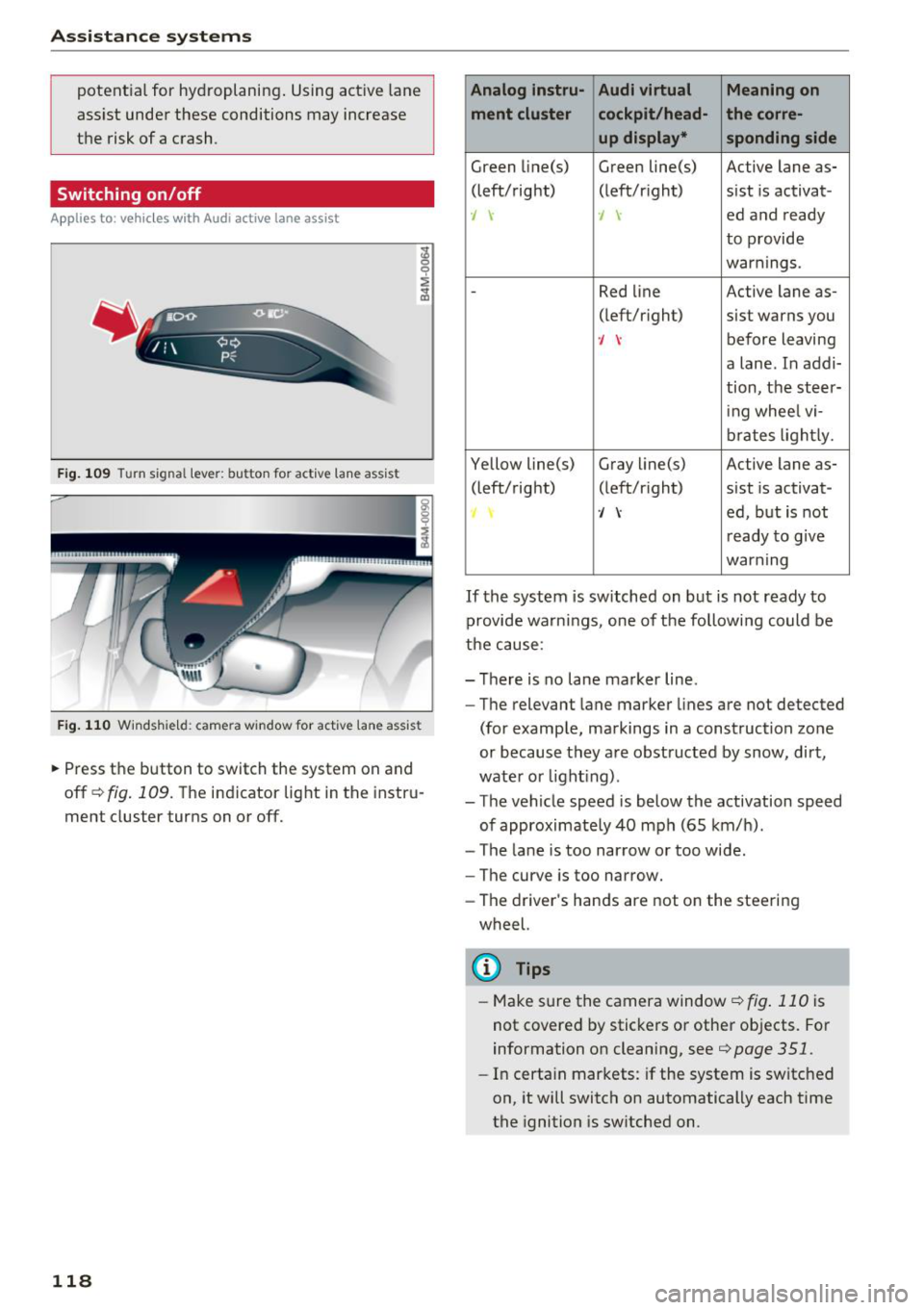
F ig. 109 Turn signal lever: button for active lane ass ist
F ig .1 10 Windsh ie ld: camera window for act ive lane ass ist
.,.. Press the button to switch the system on and
off
c!;> fig. 109. The indicator light in the instru
ment cluster turns on or off.
118
Analog lnstru- Audi virtual Meaning on
ment cluster cockpit /head- the corre-
up display* sponding side
Green Li ne(s) Green line(s) Active lane as-
(left/right) (left/r ight) sist is activat-
., -J ed and ready
to provide
warnings.
-Red line Active lane as-
(left/r ight) sist warns you
-J before leaving
a lane. In addi-
tion, the steer-
i ng whee l vi-
brates light ly.
Yellow line(s) Gray
li ne(s) Active lane as-
(left/right) (left/r ight) sist is activat-
·/ ed, but is not
r eady to g ive
warning
If the system is switched on but is not ready to
provide warnings, one of the following could be
the cause:
- There is no lane marker line .
- The relevant lane marker lines are not detected
(for example, markings in a construction zo ne
or because they are obstructed by snow, dirt,
wate r or light ing) .
- The vehicle speed is below the activation speed
of approximately 40 mph (65 km/h).
- The lane is too narrow or too wide .
- The curve is too narrow.
- The driver's hands are not on the steering
wheel.
(D Tips
- Make sure the camera window ¢fig . 110 is
not covered by stickers or other objects. For
information on cleaning, see
¢ page 351.
- In certain markets: if the system is switched
on, it will switch on automatically each time
the ignition is sw itched on.
Page 121 of 398
a
Display in the instrument cluster
Applies to: ve hicles with Audi active lane assist
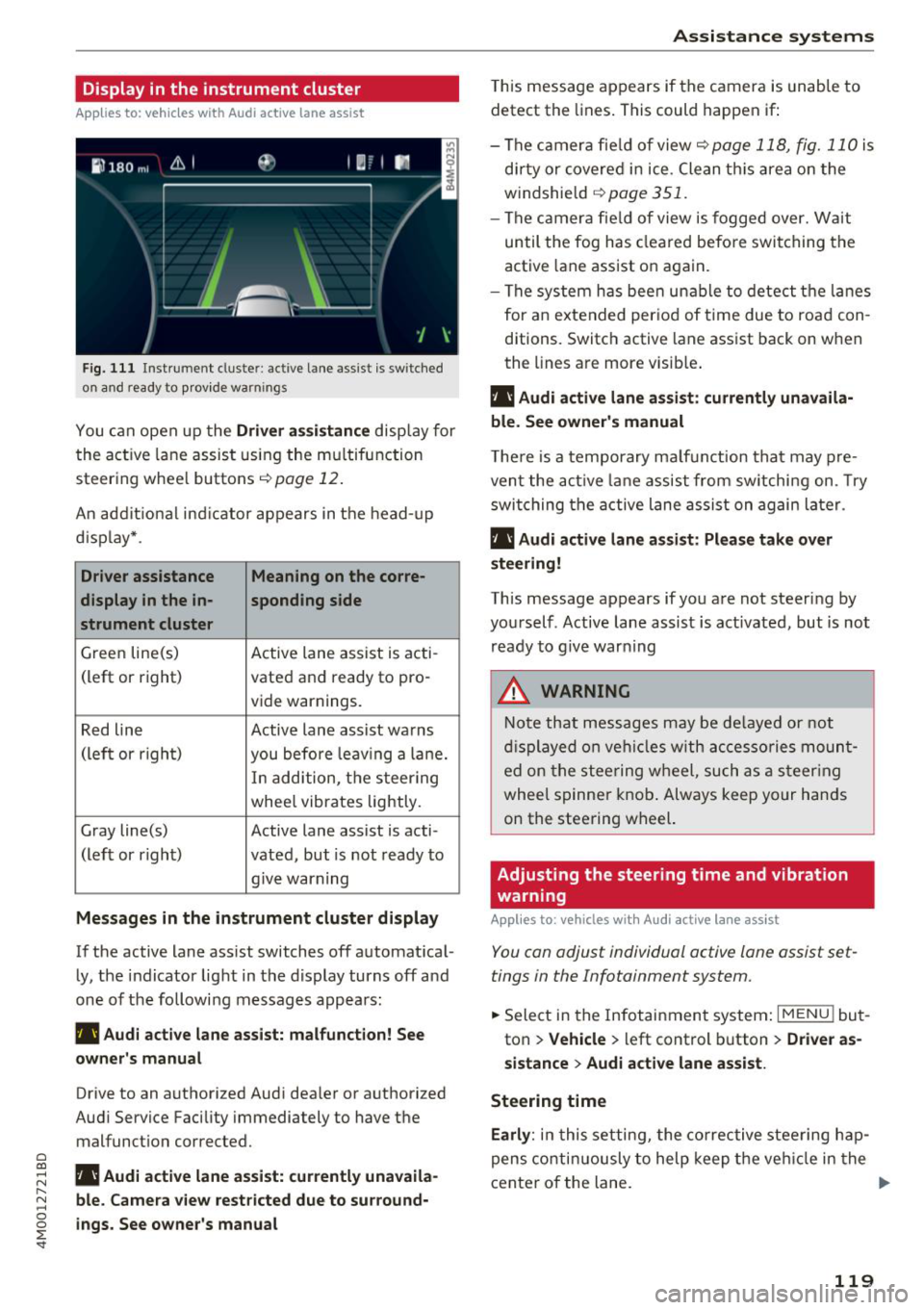
Fig. 1 11 Instrument cluster: active lane ass ist is switched
on a nd ready to provid e warn ings
You can open up the Driver a ssis tanc e display for
the act ive lane assist us ing the mu ltifunction
steer ing whee l buttons
c;,page 12 .
An addit ional ind icator appears in the head-up
d isp lay* .
Driver assistance Meaning on the corre-
display in the in -sponding side
s t rument cluster
Green line(s) Active lane assist is acti-
(left or right) vated and ready to pro-
vide warnings.
Red line Active lane assist warns
(left or righ t)
you before leav ing a la ne.
In add ition, t he steering
whee l vibrates lightly.
Gray line(s) Active lane assist is acti-
(left or r ight) vated, but is not ready to
. . give warning
Messages in the instrument cluster display
If the active lane ass ist switches off automat ical
ly, the indicator light in the display turns off and
one of the followi ng messages appears :
rl1 Audi acti ve lane assist: m alfunction! See
owner 's manual
Drive to an authorized Aud i dea ler or authorized
Aud i Service Facility immediately to have the
malfunct ion corrected.
~ rl1 Aud i a ctive lane assist: currently unavaila
r---N ble. Came ra vie w restricted due to su rround-~ 0 ~ ings. See owne r's manual
'
T his message appears if the camera is unable to
detect the lines . This could happen if:
- The camera fie ld of view
c;, page 118, fig. 110 is
di rty or covered in ice . Clean th is area on the
windshield
c;, page 351.
- The c amera fie ld of view is fogged over. Wait
until the fog has cleared befo re switching the
active lane assist on again.
- The system has bee n unable to detect t he la nes
for an e xtended per iod of time due to road con
ditions. Switch active lane assist back on when
the lines are more visib le .
rl1 Audi active lane a ssist : currently unavaila
ble. See owner's manual
T he re is a temporary ma lf u nction tha t may p re
vent the act ive lane assist from sw itchi ng on. Try
swi tching the active lane assist on again later.
rl1 Audi active lane a ssist : Pl ease take over
steering!
This message appears if you are not steering by
you rself . Active lane assist is activated, but is not
ready to g ive warning
A WARNING
N ote that messages may be de layed or not
d isplayed o n ve hicl es w ith ac cessories moun t
ed on the stee ring w heel, such as a steer ing
wheel spinne r knob . Always keep your hands
on the steering wheel.
Adjusting the steering time and vibration
warning
App lies to : vehicles with Audi active la ne ass ist
You can adjust individual active lane assist set
tings in the Infotainment system.
-
.. Select in the Infotainment system: I MENU ! but
ton
> Vehicle > left control b utton > Dri ver as
si stance
> Audi a ctive l ane assist.
Steering time Earl y:
in t his setting, the corrective stee ring hap
pens contin uously to help keep the veh icle in the
center of the lane. ..,_
119
Page 122 of 398

Assistance systems
Late: in this setting, the system provides correc
tive steering just before a wheel goes over a de
tected lane marker line.
Vibration warning
You can switch the additional vibration warning
in the steering wheel on or off.
&_ WARNING
With the vibration warning switched off,
there will also be no visual warning in the in
strument cluster display when crossing a lane
marker line.
(D Tips
In certain markets: you r settings are stored
automatically and assigned to the remote
control key in use.
Audi side assist
Description
Applies to: vehicles with Aud i side ass ist
Fig . 112 Senso r de tection range
Fig. 113 D isplay on the exte rior mirror
Side assist (lane change assist) helps you monitor
your blind spot and traffic behind your vehicle.
Within the limits of the system, it warns you
120
about vehicles that are coming closer or that are
traveling with you within sensor range
(D
¢ fig. 112 . If a lane change is classif ied as cr iti
ca l, the display @in the exterior mirror turns on
¢fig. 113.
The display in the left exterior mirror provides as
s istance when making a lane change to the left,
while the display in the right exterior m irror pro
vides assistance when making a lane change to
the right.
Information stage
As long as you do not activate the turn signal,
s ide assist
informs you about vehicles that are
detected and classified as critical. The display in
the mirror turns on, but is dim.
The display remains dim in the information stage
so that your view toward the front is not distur
bed.
Warning stage
If the display in a mirror blinks brightly when you
activate a turn signal, side assist is
warning you
about detected vehicles that it has classified as
critica l. If this happens, check traffic by glancing
in the exterior m irrors and over your shoulder
¢ .& in General information on page 121 .
Applies to: vehicles with active lane assist: the
display in the m irror can a lso b link if you have not
activated a turn signal: if you are approaching a
detected lane marker line and it appears you will be leaving the lane, side assist will warn you
about detected vehicles that it has classified as
critical.
@ Tips
You can adjust the brightness on of the dis
play on the rearview mirror¢
page 122.
Page 123 of 398

a co ...... N r--. N ...... 0
0
:E '
Applies to: ve hicles with Audi side assist
@
®
©
Fig . 11 4 Driving situatio ns
Fi g. 11 5 Rear of the vehicle: position of the sensors
Side assis t fun ctions at speeds above app roxi
mate ly 9 mph ( 15 km/h) .
® Vehicles that are approaching
N
0
0
:i; ..
"'
In certain cases, a vehicle will be classified as
cr itica l for a lane change even if it is still some
what far away. The faste r a ve hicle app roaches,
the soo ner the display in the exterio r mirror w ill
turn on.
@ Vehicles traveling with you
Ve hicles traveli ng w ith you are ind icated i n the
exte rior m irro r if they are classified as critical for
a lane change. All vehi cles detec ted by side assist
A ssi st a nce systems
are indicated by the time they enter your "blind
spot", at the latest.
© Vehicles you are passing
If you s low ly pass a vehi cle that s ide assist has
de tected (the difference in speed between t he
vehicle and you r vehicle is less than app roximate
ly 9 mph ( 15 km/h)), the disp lay in the exterior
mirror turns on as soon as the vehicle enters you r
blind spot.
T he disp lay w ill not turn on if you quickly pass a
vehicle that side assist has detected (the differ ence in speed is greater than approximate ly 9
mph (15 km/h)) .
Functional limitat ions
T he radar sensors are des igned to de tec t t he lef t
and right adjacent lanes when the road lanes are
the normal width . In some situations, the display
in the exte rior mirror may turn on even though
there is no veh icle located in the area that is criti
ca l for a lane change. For example :
- If the lanes are narrow or if you are dr iving on
the edge of your lane. If t his is the case, the
system may have detected a vehicle in another
lane that is
not adjacent to your current lane .
- If you are d riving through a curve . Side assist
may react to a vehicle that is in the same lane
or one lane over from the adjacent lane .
- If side assist reacts to other objects (such as
roads ide str uctures like guard rails).
- In poor weather conditions. The side assist
functions are limited.
Do not cover the radar sensors
c;, fig. 115 wit h
stickers, deposits, bicycle wheels or other ob
jects, because t his w ill impair the funct io n. Do
not use s ide ass ist when towing a trai ler. For in
format ion on cleaning, see
c;, page 351 .
A WARNING
--Always pay attention to traffic and to the
area around your vehicle. S ide assist cannot
replace a driver's atte ntion. The driver alone
i s always re spon sible for lane changes and
-
sim ila r dr iv ing mane uve rs. ~
121
Page 124 of 398

Ass is tanc e system s
-In some situations, the system may not
function or its funct ion may be limited. For
example:
- I f vehicles a re approac hing o r be ing left
beh ind very quickly. The display may not
turn on in time .
- I n poor weather conditions s uch as heavy
rain, s now o r heavy mis t.
- On very wide lanes, in tight curves, o r if
there is a rise in the road s urface. Vehicles
in the adjacent lane may not be detec ted
because they are outside of the sensor
range.
(Ud) Note
The se nso rs can be displaced by impacts o r
damage to the bumper, whee l housing and
underbody. This can impair the system . Have
an authorized A udi dealer or authorized A udi
Serv ice Facility check their function.
(D Tips
- If the window g lass in the driver's door or
front passenger's door has been tinted, the
display in the exterior mirror may be incor
rect.
- For an explanation on conformity with t he
FCC regulations in the United States and the
Industry Canada regu lations, see
c:> page380.
Switching on/off
Applies to: ve hicles w ith Audi side assist
The system can be switched on/off in the Info
tainment system.
.. Se lect in the Infotainment system: IMENU I but
ton
> V ehicle > left contro l button > Driver a s·
sistance
> Audi side ass ist . O ff switches the
system off.
If the system is activated, the displays in the ex
ter ior mirrors will turn on briefly when the ign i
tion is sw itched on.
122
(D Tips
When yo u switch side assist on or off, the exit
warn ing system activates o r deact ivates
c:> page 123.
Setting the display brightness
App lies to : vehicles wit h Audi side ass ist
The display brightness can be adjusted in the In
fotainment system.
.. Select in the Infotainment system : IMENU! but
ton
> Vehicle > l eft control button > Dri ver as
sistance
> Audi side a ssist.
The disp lay br igh tness adjusts automatically to
the brightness of the surroundings, both in the
information and in the warning stage. I n very
dark or very bright surround ings, the automatic
adjustment will set the display to the minimum or max imum level. In such cases, you may notice
no change when ad justing the br ightness, or the
change may only be noticeable once the sur
r ound ings change.
Adjust the br ightness to a leve l where the display
i n the information stage will not disrupt your
v iew ahead. If you change the br ightness, the dis
play in the exterio r mirror w ill br iefly show the
br ightness leve l in t he i nfo rmat ion stage . The
br ightness of the warn ing st age is linked to the
brightness in the information stage and is adjust
ed a long with the information stage .
(D Tips
- The side assis t fu nct ions are no t active dur
ing the adjus tment process.
- Th e exit war ning indica to rs turn o n du ring
the adjustment process.
- Yo ur sett ings a re a utomat ic all y stored and
assigned to the remo te con trol key be ing
used .