brake light AUDI Q7 2018 Owner´s Manual
[x] Cancel search | Manufacturer: AUDI, Model Year: 2018, Model line: Q7, Model: AUDI Q7 2018Pages: 398, PDF Size: 185.58 MB
Page 103 of 398

Cl a:, ...... N
" N ...... 0
0
::r '
The predictive cont rol 1 l uses the map info rma
tion from the navigation system in order to react proactive ly when driving. Information from the
cam era-based traffic sign recognition * is a lso ap
plied to recognize traffic signs¢ page 97. When
coming up to areas wi th speed limits or changes
in the course of the road (such as curves, inter
sections or traffic c ircles), the system brakes au
tomatically and then accelerates back up to the
set speed .
Overriding control
The driver can override the predict ive control at
a ny time by press ing the accelerator or brake
pedal. If the system changes the vehicle speed to
adapt to speed limits, you ca n cha nge the speed
usi ng the lever ¢page 106, fig. 100 .
Always switch off the predictive control in
the following situations:
-When increased atte ntion is needed from the
drive r.
- In poor weat her cond it ions such as snow or
heavy ra in.
- When driving on roads in poor condition .
Indicator in the instrument cluster display
When switching on the adaptive cru ise cont rol
for the first time, the message
ACC: R + B ac
ti ve
in the instrument cluste r indicates the ava il
ab ility of the predictive control.
T he
'?·;SOmh symbo l appears when the system
is reg ulating the speed to match a speed lim it. If
this is the case, the system is regulating a speed
of SO mph (80 km/h) . The speed is then taken
over by the adaptive cru ise control. The speed in
the speedomete r LE D ring ad justs to the speed to
be maintained ¢page 104, fig. 99.
Thell.II
¢ fig. 93 symbo l appe ars whe n there is an adap
ta tion to t he ro ute ahea d.
I f you are in the
Driver assistance d isp lay in the
in str ument cluster, then the fo llow ing symbols
w ill in dica te w hic h oc currence t he sys tem is cu r
r en tly responding to:
ll This is not availa ble in s om e co untri es.
A ss istance systems
Symbol Meaning
MPH
USA models:
Speed limit
km/h
Canada model s:
Speed limi t
ll
Curve
_J!L Intersection
,:r
w
T raffic ci rcle
A WARNING
-
- Read the wa rnin gs on ¢.&. in General infor
mation on page 103 and on¢
& in De
scription on page 97.
- Pay attent ion to traffic and the a rea around
your veh icle when pred ictive cont rol is
sw itched on. The driver is always responsi
ble for assessing the traffic situation.
- There is an increase in the risk of an acci
dent, because the system does not consider
"right of way" rules and also does not re
spond to traffic lights .
- The system only cons iders t raff ic signs that
g ive a speed lim it .
- The permitted speed can be exceeded if the
adaptation to a speed lim it is incorrect . The
d river is responsible for adher ing to the pe r
mitte d speed .
- The s peed at w hich a curve is dr iven th rough
does not necessarily match your own driving
s tyle. Brake the vehicle yo urself whe n need
e d t o redu ce the risk of an a ccid en t.
0) Tips
- If a speed lim it is detected, the stored
speed is also adjusted in the speedometer LE D line when the ada ptive cru ise control is
n ot a ctive .
- The adaptat ion by the system depends on
t he driving mode se t in dr ive se lec t*.
- Switching off predict ive con trol, fo r exam
ple whe n driving in low t raff ic zones, does
101
Page 107 of 398
You can set any speed between 20 mph and 95 mph (30 km/h and 150 km/h).
I ndicato r lights and messages in t he i nstr ument
cluste r display inform you abou t the cur ren t sit
uation and setting.
An addit ional ind icator appears in the head- up
d isp lay* .
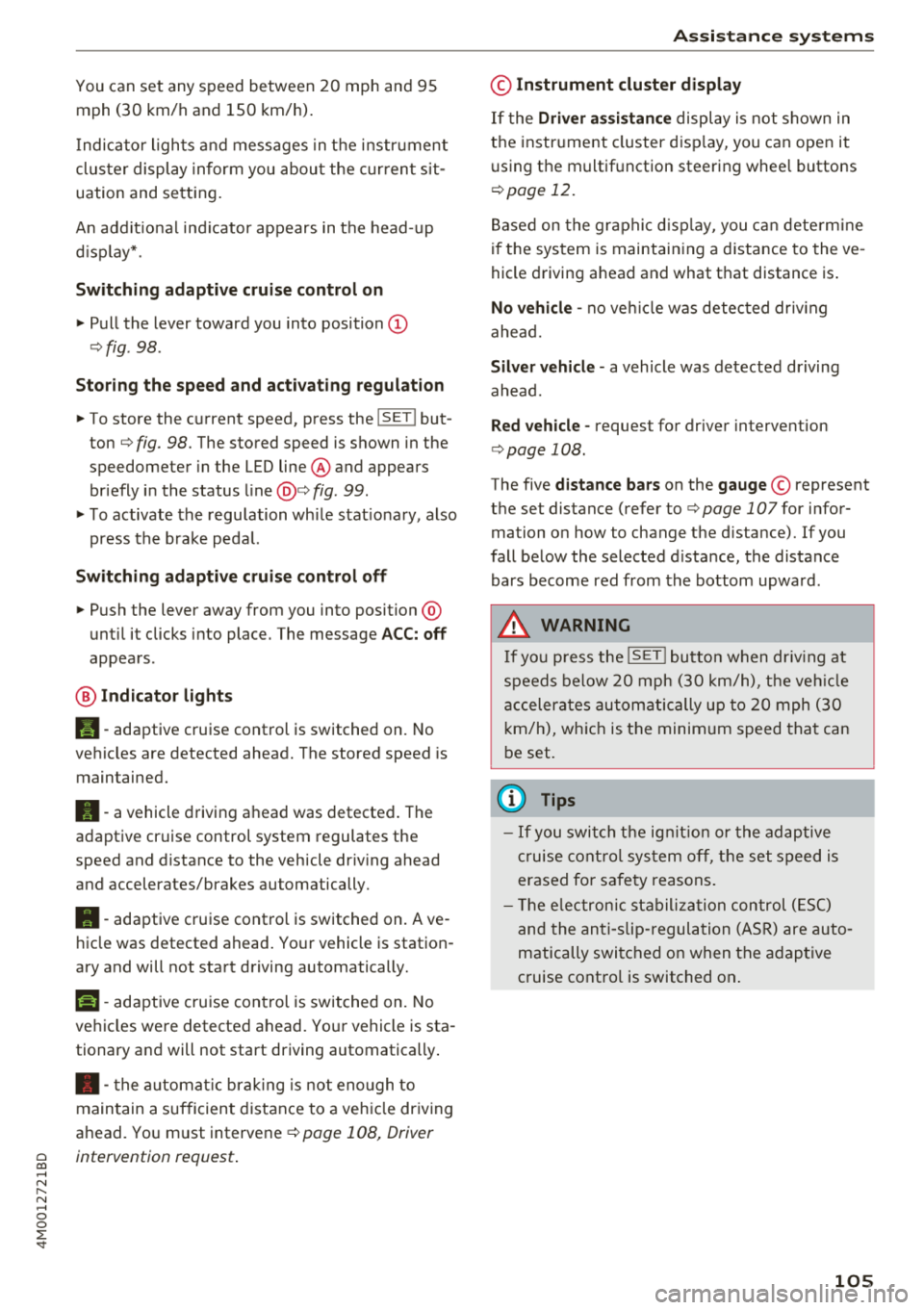
Switching adaptive cruise control on
"' Pull the lever toward you into position@
¢fig . 98 .
Storing the speed and acti vating regulation
"' To store the c urrent speed, press the !SE TI but
ton ¢
fig. 98 . The stored speed is shown in the
speedometer in the LED line@ and appears
briefly i n the status line@¢
fig . 99.
"'T o activate the regu lation wh ile stat ionary, also
press the b rake peda l.
Switching adapti ve cruise control off
"' Push the lever away from you into position @
unt il i t clicks i nto place . The message
ACC: off
appears .
® Indicator light s
II-adaptive cruise control is switched on. No
ve hicles are detected ahead. The stored speed is
maintained.
•- a vehicle driving ahead was detected . The
adaptiv e cruis e control system regulates the
speed and distance to the vehicle dr iv ing ahead
and accelerates/brakes automatically.
•- adaptive cruise control is switched on. Ave
h icle was detect ed ahead. You r vehicle is station
ary and will not start driving automatically.
ti)-adaptive cru ise con trol is switched on. No
ve hicles were detected ahead. Yo ur vehicle is sta
tionary and will not start driving automatically .
• -the automat ic brak ing is not eno ugh to
main tain a sufficient distance to a veh icle dr iving
ahead. You must intervene
c:!;> page 108, Driver
~ intervention request .
...... N
" N ...... 0
0
::r '
© Instrument cluster display
If the Driver a ssistance displ ay is not shown in
the instr ument cluster d isp lay, you can open it
u sing the m ultif unction steering whee l buttons
¢ page 12.
Based on the gr aphic disp lay, you c an dete rm ine
i f th e system is maintain ing a d istance to the ve
hicle driving a head and what t hat distance is .
No vehicle -no vehicle was detec ted dr iv ing
ahe ad.
Silver vehicle -a vehicle was detected driving
ahead.
Red v ehicle -reques t for driver interve ntion
¢ page 108 .
The five distance bars on the gauge© represent
the set distance (refer to
c:!;> page 107for infor
ma tion o n how to change t he d istance). If you
fall below the selected d ista nce, the distance
bars become red from the bottom upwa rd .
A WARNING
If yo u press the !SET I butto n w hen dr iv ing at
speed s below 20 mph (30 km/h), t he ve hicle
a ccelera tes au tom atic ally u p to 2 0 mph (30
k m/h), w hich is the minim um speed tha t can
b e set.
(D Tips
- If you swi tch t he ig nit io n o r th e adaptive
cr uise cont ro l sys tem o ff, t he set s peed is
erased fo r safe ty reasons .
- Th e elec tron ic st abili za tion con trol ( ESC)
and the an ti- slip -regul ation (ASR) are auto
matically swi tched o n when the adap tive
c ruise cont ro l is switched on .
105
Page 108 of 398
Assistance systems
Changing the speed
Applies to: vehicles with Audi adaptive cruise contro l
0
f
'
0
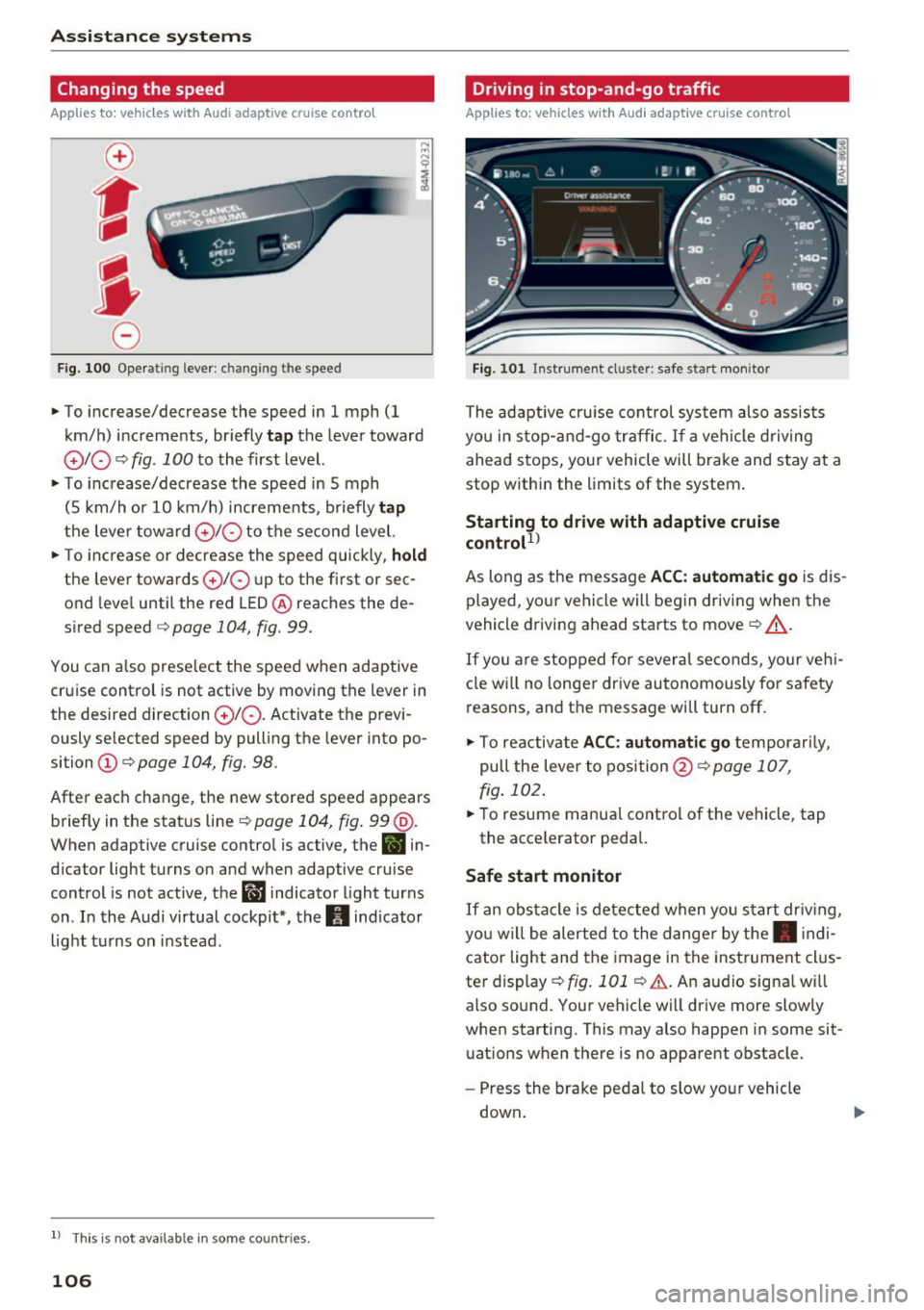
F ig. 100 Oper ating lever : c han ging th e speed
~ To increase/decrease the speed in 1 mph (1
km/h) increments, br iefly
tap the lever toward
010 ¢ fig . 100 to the first level.
~ To increase/decrease the speed in 5 mph
(5 km/h or 10 km/h) increments, briefly
tap
the leve r toward 0 10 to the second level.
~ To increase or decrease the speed quickly, hold
the lever towards 010 up to the first or sec
ond level until the red LED@ reaches the de
s ir ed speed
¢ page 104 , fig. 99.
You can also preselect the speed when adaptive
cruise control is not active by moving the lev er in
the desi red direction
010 . Activate the previ
ously selected speed by pulling the lever into po
si tion
(D ¢ page 104, fig. 98.
After each change, the new stored speed appears
briefly in the status line¢
page 104, fig. 99 @.
When adaptive cruise control is active, the
B in
dicator light turns on and when adaptive cruise
control is not active, the
ll'J indicator light turns
on . In the Audi virtual cockpit*, the
II indicator
light turns on instead.
ll Thi s is no t a vail able in som e coun tries.
106
Driving in stop-and-go traffic
Applies to: vehicles with Audi adaptive cruise control
Fig. 101 In st rumen t cl uster: safe start mo nitor
The adaptive cruise con trol system also assists
you in stop-and-go traffic.
If a vehicle driving
ahead stops, your vehicle will brake and stay at a
stop within the limits of the system.
Starting to drive with adaptive cruise
controt
1>
As long as the message ACC: automatic go is dis
played, your vehicle will begin driving when the
vehicle driving ahead starts to move
c::> A_.
If you are stopped for several seconds, your vehi
cle will no lon ger drive autonomously for safety
reasons, and the message will turn off.
~ To reactivate ACC: automatic go temporari ly,
pull the lever to posit ion@¢
page 107,
fig. 102.
~ To resume manual control of the vehicle, tap
the accele rator pedal.
Safe start monitor
If
an obstacle is detected when you start driv in g,
yo u w ill be alerted to the danger by the. indi
cator light and the image in the instrument clus
te r display
c::> fig. 101 c::> &. . An audio sig na l w ill
also sound. Your vehicle will driv e more slowly
when starting. This may also happen in some sit
uations when there is no apparent obstacle .
- Press the brake pedal to slow your vehicle
down .
Page 113 of 398
Cl a:, ...... N
" N ...... 0
0
::r '
for safe operation. The systems cannot be switch
ed on.
Ill AC C with traffic jam a ssis t: only availabl e in
D, Sor M
Select the "D/S " or " M" selector leve r pos it ion.
Ill A CC w ith tr affic j am ass is t: currentl y un
available . Parking brake applied
The systems sw itch off if you set the parking
brake . The systems are available again after you
release the parking brake .
llJ ACC with traffic jam a ssist: currentl y un·
av ailable. Stabili zation cont rol (E SC) input
This message appears if the electronic stab iliza
tion contro l (ESC) is taking action to stabilize the
ve hicle . The systems switch off in this scenario .
Ill ACC with traffic jam a ssis t: manu al control!
This message appea rs if the veh icle rolls back
when sta rting on a slight incl ine, even t hough the
systems are active . P ress t he b rake peda l to pre
ve nt the vehicle from rolling or sta rting to move.
IIJ ACC w ith tr affic jam a ssis t: curr entl y un
availabl e. Downhill a ssis t activated
You cannot activate the system when hill hold as
sist is act ive .
II!! ACC with traffic jam assist: manual control!
This message appears if the driver does not take
over steering after mu ltip le driver intervention
requests and the system switches off . The vehicle
brakes unt il it is stationary .
ii Traffic jam a ssis t : una vailable. S ee o wner' s
manual
The system can no longer ensure that t he ve hicle
w ill stay in the lane and sw itches off. Have yo ur
vehicle checked by an a uth orized Audi dea ler or
authorized Audi Service Facility if the ma lfunc
tion is continuous .
14§ Traffic jam assis t : Plea se take over steering!
This message appea rs as soon as the system
stops detecting steer ing activ ity when the system
limits are rea ched. Always keep yo ur hands on
Ass istance systems
the steering whee l so you can be ready to steer at
any time.
14§ Traffic jam a ssis t : currentl y unavailable .
Pl ea se f asten se at belt
T he system switches off when the drive r's safety
belt is unfastened.
Ill AC C: eff iciency assist not available in thi s
countr y
The adaptation to speed lim its and routes ahead
is not available in this country .
IIJ ACC: predictive control currentl y una vaila
ble . See owne r's m anual
T he ad aptation to speed lim its and routes ahead
swi tches off at speed limits under 20 mph
(30 km/h) .
T he message ca n also appear if the adaptation to
speed limi ts and routes a head has a temporary
f ailure . Have your vehicle checked by an autho r
ized Audi dea ler or authorized Audi Service Facili
ty if the malfunction is continuous .
Distance warning : malfunction! Please contact
S erv ice
T he system cannot gua rantee that it will detect
vehicles correct ly and it has switc hed off. The ra
dar sensors have shifted or are fa ulty . Drive to an
authorized Aud i dea ler o r authorized Audi Serv ice
Facility immediate ly to have the ma lfunction cor
rected .
Distance warning : currentl y unavailable . Sen sor
view re stricted due to surrounding s. See own
e r' s manual
T his message appears if the rada r senso r view is
obstructed, for examp le by leaves, snow, heavy
spray or dirt. Clean the sensors
¢ page 103,
fig . 95 .
Distance warning : curr entl y unavailable . See
owner' s manual
This message appears if the system has a tempo
r a ry fa il ur e. If this occurs m ultip le t imes, drive to
an a uth orized Aud i dea le r o r auth orized Aud i
Se rvice Facility immed iate ly to have the ma lfunc -
t ion corrected .
liJ,,
111
Page 115 of 398
Cl a:, ...... N
" N ...... 0
0
::r '
- Activ ati ng the eme rgency fl ashe rs
l ).
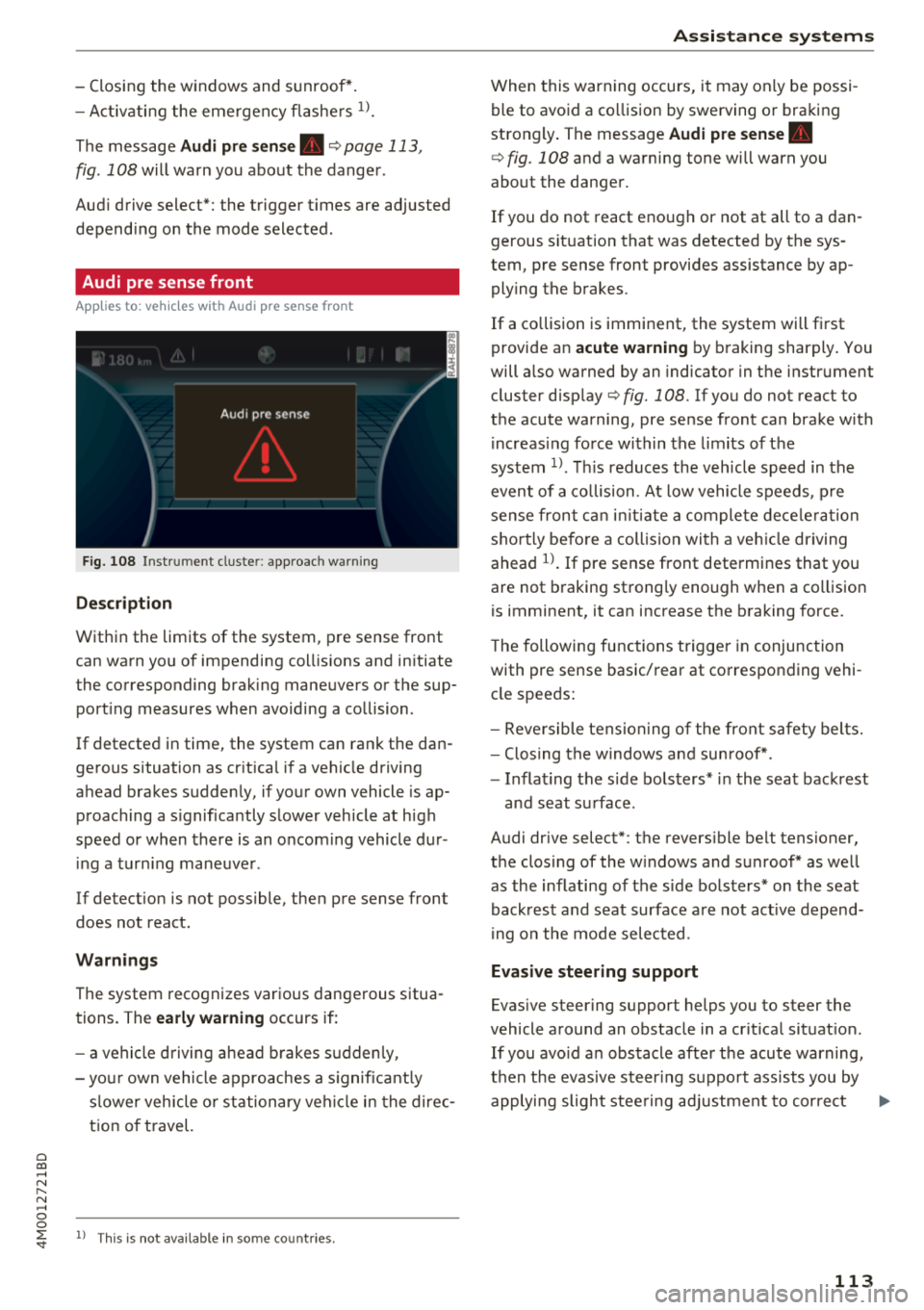
The message Audi pre sen se. ¢ page 113,
fig . 108 will warn you about the dange r.
Aud i drive select*: the trigger t imes are adjusted
depend ing on the mode selected .
Audi pre sense front
Applies to: vehicles with Audi pre sense front
Fig . 108 In strumen t clu ste r: approac h warn ing
Descr iption
Within the limits of the system, pre sense front
can warn yo u of impending coll is ions and in itiate
the corresponding brak ing maneuvers or the sup
port ing measures when avoiding a co llision .
If detected in time, the system can rank the dan
gerous situation as cr itica l if a vehicle driving
ahead brakes sudden ly, if you r own vehicle is ap
proaching a s ignificantly s lower vehicle at h igh
speed or when there is an oncom ing vehicle dur
i ng a tur ning maneuve r.
If detection is not poss ible, then pre sense front
does not react.
Warnings
The system recognizes various dange rous situa
tions. The
early warning occurs if:
- a vehicle d riving ahe ad brakes s udden ly,
- yo ur own vehicle approaches a s ignificant ly
s lower veh icle o r st ation ary veh icle in the dire c
t ion of t ravel.
ll This is not availa ble in so m e co untrie s.
A ss istance systems
When this warning occurs, it may on ly be possi
ble to avoid a co llision by swerving o r braking
strongly . The message
Audi pre sense.
¢ fig . 108 and a wa rning tone will warn you
about the danger .
If you do not react enough or not at all to a dan
gerous sit uat ion that was detected by the sys
tem, p re sense front provides assistance by ap
ply ing the b rakes .
If a collision is imminent, the system will first
provide a n
acute warning by braking sharply . You
will a lso warned by an indicato r in the instr ument
cluster display¢
fig. 108 . If you do not react to
the acute warning, pre sense front can brake w ith
i ncreas ing fo rce wi thin the limits of the
system
1> . Thi s reduces the veh icle speed in the
even t of a co llision . At low vehicle speeds, p re
sense fron t can ini tia te a complete dece le ra tion
shor tly be fore a collision wi th a ve hicle dr iving
ahead
l)_ If pre sense front determi nes that you
are not braking strong ly enough when a co llision
is imminent, it can increase t he b raking force.
T he following fu nctions t rigge r in conjunction
with pre sense basic/rea r at co rresponding vehi
cle speeds:
- Reve rsible tens ion ing of the front safety bel ts.
- Clos ing the windows and sun roof* .
- Infla ting the s ide bo lsters* in the sea t backrest
and seat s urface .
Audi drive select*: the revers ible belt tensioner,
the clos ing of the w indows and s unroof * as we ll
as the inflating of the s ide bols ters* on the seat
back res t and seat surface are not act ive depen d
i ng on the mode selected .
Evasive steering support
Evasive s teer ing s upport helps you to steer the
vehicle a round an obstacle in a cr it ica l sit uat io n.
If you avo id an obs tacle afte r th e acute warning,
t h en the evasive steer ing s uppo rt ass ists you by
applying slight stee ring adjust men t t o correct ..,
113
Page 117 of 398
Cl a:, ...... N
" N ...... 0
0
::r '
The radar sensors can be displaced by impacts
or damage to the bumper, wheel housing and
underbody. Pre sense rear can be impaired by
this. Have an authorized Audi dealer or au
thorized Audi Service Facility check their func
tion.
(D Tips
- The pre sense rear functions switch off
when towing a trailer.
- The pre sense rear functions may also
switch off if there is a malfunction in the
side assist* system.
Audi pre sense city
Applies to: vehicles with Audi pre sense city
Description
Within the limits of the system, pre sense city
can warn you of impending collisions with
vehicles and pedestrians and initiate the applica
ble braking maneuver if needed. Pre sense city is
active at speeds of approximately 6 mph (10 km/
h) and higher.
A pedestrian warning can occur at speeds up to
SO mph (85 km/h), and vehicle warnings can oc
cur at speeds up to 155 mph (250 km/h). A pre
sense city braking maneuver is possible at speeds up to SO mph (85 km/h).
Warnings
The system recognizes various dangerous situa
tions. The
early warning occurs if:
- a vehicle driving ahead brakes suddenly,
- your own vehicle approaches a significantly
slower vehicle or stationary vehicle in the direc
tion of travel.
- a pedestrian is standing in the lane or is moving
into the lane .
When this warning occurs, it may only be possi ble to avoid a collision by swerving or braking
strongly. The message
Audi pre sense.
r:=;, page 113, fig. 108 and a warning tone will
warn you about the danger .
Assistance systems
Additionally, a jerk on the brakes may occur as an
acute warning when there is an impending colli
sion. If you do not react to the acute warning, pre
sense city can brake to the point of complete de
celeration within the limits of the system. This
reduces the vehicle speed in the event of a colli
sion. The message
Audi pre sense. also ap
pears.
The following functions are triggered in conjunc
tion with pre sense basic/rear:
- Reversible tensioning of the front safety belts.
- Closing the windows and sunroof*.
- Inflating the side bolsters* in the seat backrest
and seat surface.
Audi drive select*: the function is not active de pending on the mode selected.
_&. WARNING
- Pre sense city cannot overcome the laws of
physics.
It is a system designed to assist and
it cannot prevent a collision in every circum
stance. The driver must always intervene.
The driver is always responsible for braking
at the correct time. Do not let the increased
safety provided tempt you into taking risks .
This could increase your risk of a collision.
- The system can deploy incorrectly due to
system-specific limits .
- To reduce the risk of an accident, please
note that the camera does not always detect
every object.
- Pre sense city does not react to animals,
crossing or oncoming vehicles, objects such
as bars, railings or railcars, and objects that
are difficult to detect
r:=;, _& in General infor
mation on page 103.
- In trailer mode, the braking behavior of the
trailer can be different than usual during au
tomatic braking.
_&. WARNING
Pre sense city may be restricted or not availa
ble in the following example situations:
- in heavy fog, rain, spray or snow
- when there are visual obstructions, such as
glare, reflections or variations in light
115
Page 127 of 398
(D Tips
-You can cance l the automatic brake activa
t ion w ith increas ing bra king fo rce if you ap
p ly the brakes yourse lf or accelerate cons id
erab ly.
- In some situations, rear cross-traffic assist may warn you even if there is no cross traffic
in a cr itical area, for examp le when back ing
i nto a parking space or maneuver ing .
- The rea r cross-traffic ass ist also switches off
when you switch off the ESC.
- The system is not available when towing a
trailer.
Messages
Applies to: vehicles with Audi side assist
A message appears in the inst rument cluste r dis
p lay if the s ide ass ist switches off automatically .
@j Audi side assist: malfunction! Please contact
Service
@j Audi side assi st and e xit warning: malfunc
tion! Please contact Service
The system cannot guarantee that it will detec t
ve hicles correctly and it has switched off. The
sensors have been mov ed or a re faulty. Have t he
system checked by an a uthori zed Audi dea ler or
author ized Audi Service Facility soon.
@j Audi side assi st: cu rrently unavailable. Sen
sor vision restricted due to surroundings . See
owner 's manual
($j Audi side as sist and e xit warning: currently
unavailable. Sensor vision restricted due to su r
roundings
The rad ar senso r vis io n i s impa ired. The area in
fron t of the senso rs must no t be covered by b ike
rac ks, stic kers, leaves, snow or any other ob jects.
C lea n the area in f ront of th e sensors, if necessa
ry ¢
page 121, fig. 115.
($j Audi side as sist: currentl y unavailable. See
owner 's manual
Cl
~ ($j Audi side ass ist and exit warning : currently N
~ unavailable . See owner 's manual ,-1 0
0
::r '
S ide assist cannot be switched on at this time be
ca use there is a ma lfunction (for example, the
batte ry c harge leve l may be too low).
($1 Audi side assi st: unavailable in t owing mode
($j Audi side assist and ex it warning: currently
unavailable . Towing mode
S ide ass ist switches off automatically when the
electrical connecto r in t he factory-installed trail
er hitch is connected . There is no guarantee the
system will sw itch off w hen us ing a ret rofitted
t railer h itch . Do no t use side assist and the ex it
warning when tow ing a tra ile r.
Ill Rear parking aid: obstacle detect ion restrict
ed
The rear cross-traffic ass ist is not available . E i
ther the ESC is sw itched off, or the rada r senso rs
may be cove red by a b ike rack, st icke rs , leaves,
snow o r othe r objects . Switc h the ESC on, o r
cl ea n the area in fron t of the senso rs if necess ary
¢page 12 1, fig . 115. If thi s message con tinues
to be displayed, drive imme dia tely to an author
ized Audi dea ler or authorized Audi Service Facili
ty to have the ma lf u nction repaired.
Night vision assist
Description
Applies to: vehicles with night vision assist
The night vision assist can detect, highlight and,
if necessary, warn about pedestrians and large
wild animals.
N ight vision assist he lps yo u when it is dark by
u sing an infra red camera to mon itor the area in
front of your ve hicle, w ith in the limits of the sys
tem . It ca n disp lay objects up to a distance of ap
prox ima tely 1 000 feet (300 m). The thermal im
age de te cte d by t he came ra is show n in t he in
str ument cluster disp lay . Wa rm areas appear
li ghter and co ld areas a ppear da rker.
125
Page 146 of 398
Intelligent Technology
A WARNING
You should only switch offroad mode on or switch ESC/ ASR off if your driving abilities
and the traff ic conditions perm it. There is a
r isk of slid ing.
- The stabilization function is limited when
offroad mode is switched on. The dr iving
wheels co uld spin and the vehicle could
swerve, especially on slick or slippery road
surfaces.
- T here is no vehicle stab ilizat ion when ESC/
ASR are switched off.
Hill descent assist
Hill descent assist makes it possible to drive
down a hill at a constant speed.
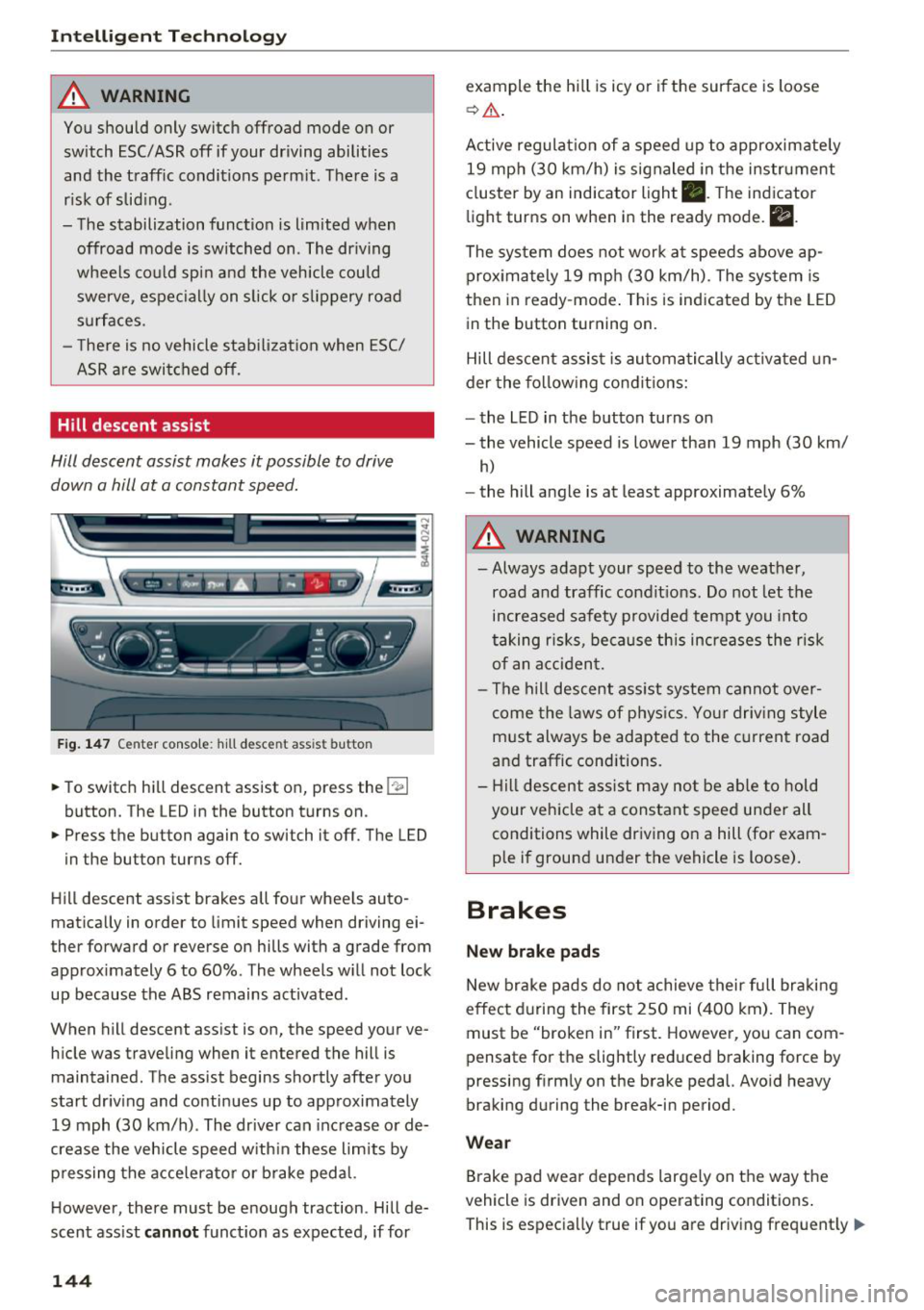
Fig. 147 Center console: hill desce nt ass ist button
.. To switch hill descent assist on, press the !~ I
button. The LED in the button turns on.
.. Press the button again to switch it off. The LED
in the button turns off.
Hill descent assist brakes all four wheels auto
matically in order to limit speed when driving ei
ther forward or reverse on hills with a grade from
approximately 6 to 60%. The wheels w ill not lock
up because the ABS remains activated.
When hill descent assist is on, the speed your ve
hicle was traveling when it entered the hill is maintained. The assist begins shortly after you
start driv ing and continues up to approximately
19 mph (30 km/h) . The driver can increase or de
crease the vehicle speed w ith in these limits by
pressing the accelerator or brake pedal.
However, there must be enough traction . Hill de
scent assist
cannot function as expected, if for
144
example the hill is icy or if the surface is loose
~ .&. .
Active regulat ion of a speed up to approximately
19 mph (30 km/h) is signaled in the instrument
cluster by an indicator light •. T he indicator
light turns on when in the ready mode.
II.
The system does not work at speeds above ap
prox imately 19 mph (30 km/h) . The system is
then in ready-mode . This is indicated by the LED
in the button turning on.
Hill descent assist is automatically activated un
der the following conditions:
- the LED in the button turns on
- the vehicle speed is lower than 19 mph (30 km/
h)
-the hill angle is at least approximately 6%
A WARNING
-
- Always adapt your speed to the weather,
road and traffic conditions. Do not let the
increased safety provided tempt you into
taking risks, because this increases the risk
of an accident.
- The hill descent assist system cannot over
come the laws of phys ics. Your driving style
must always be adapted to the current road
and traffic cond itions .
- Hill descent assist may not be able to hold
your veh icle at a constant speed under all
conditions while driving on a hill (for exam
ple if ground under the vehicle is loose).
Brakes
New brake pads
New brake pads do not achieve their full braking
effect during the first 250 mi (400 km). They
must be "broken in" first. However, you can com
pensate for the slightly reduced braking force by
pressing f irmly on the brake pedal. Avo id heavy
braking during the break-in period.
Wear
Brake pad wear depends largely on the way the
vehicle is driven and on operating conditions .
This is especially true if you are driving frequently .,.
Page 148 of 398
Intellig ent T echn olo gy
{QJ Note
- Never let the brakes "rub" by pressing the
pedal light ly when braking is not actually
necessary. This causes the brakes to over
heat and increases braking d istance and
causes wear .
- Before driv ing downhill a long distance on a
steep hill, decrease your speed and select a
lower gear. This makes use of the engine
braking effect and rel ieves the brakes. If
you need to b rake additionally, b rake in in
te rvals a nd not conti nuously.
@ Tips
-If the brake booster is not wo rking, you
must press the brake pedal with much more
fo rce than no rma l.
- If you ret rofit your vehicle with a front spoil
e r, whee l cove rs o r similar items, ma ke sure
th at the a ir flow to the front whee ls is not
i nterr upted. Ot herw ise the bra ke sys tem
can become too hot.
Electromechanical
steering, all-wheel
steering
The electromechanical steering supports the
driver's steering movements.
Power steering adapts electronically based on
the vehicle speed.
Indicator lights and me ssa ges
• Steering: malfuncti on! Plea se st o p vehicle
If this indicator light turns on and stays on and
this message appears, the power steering may
have failed.
Stop the vehicle in a safe location as soon as pos
sib le. Do
not continue driving. See an authorized
Audi dea ler or authorized Audi Service Facility for
assistance .
• Stee ring: malfunction! Plea se stop vehicle.
Pa y attention t o di sta nce at sid e
If t his ind icator light tu rns o n and stays o n and
this message appears, t he a ll-wheel steer ing*
146
may have fai led . The side of the vehicle may need
more space on the road .
Reduce you r speed and stop the vehicle in a safe
l oca tion with eno ugh space on the s ides as soon
as possible. Do
n ot continue driving. See an au
thorized Audi dea ler or authorized Audi Service
Facility for assistance.
'I-ij S te e ring : m alfun cti on! You can c ontinue
dri ving
If the indicato r light turns on and the message
appears, the steeri ng wheel may be more d iffi
cu lt to move or more sensitive than usu al. The
steering wheel may a lso be at an ang le when
driving straight.
D rive slowly to an a uth orized Audi dea ler or au
t h orized Aud i Serv ice Facili ty to have t he mal
f unction corrected .
l:r-ij Stee ring : malfun ction! Adapt driving sty le .
Lar ger turnin g radiu s
If the indicator l ight turns on and this message
appears, the all-whee l stee ring* may have fa iled .
Please note that the vehicle has a larger t urning
r ad ius and the st abil ity w hen turning a corner is
lik e tha t of a vehicle wi thout a ll -wheel s teer ing.
The steering whee l may also be at an angle when
driving straight.
D rive slowly to an a uth o rized Audi dea ler or au
t h orized Aud i Serv ice Facili ty to have t he mal
function corrected .
(D Tips
-If the . or l;rfl indi cato r light only stays on
for a sho rt time, you may cont inue driv ing.
- For add itiona l information o n all-wheel
steeri ng*, see
r=.>page 128.
ALL-wheel drive (quattro)
General information
In all whee l dr ive, the dr iv ing power is distr ibut
ed between all fou r whee ls when needed. This
happe ns automatically depend ing on your dr iving
behav ior as we ll as the curren t road cond it ions.
A lso see
r=.> page 142, Electronic stabilization
control (ESC). ..,.
Page 354 of 398
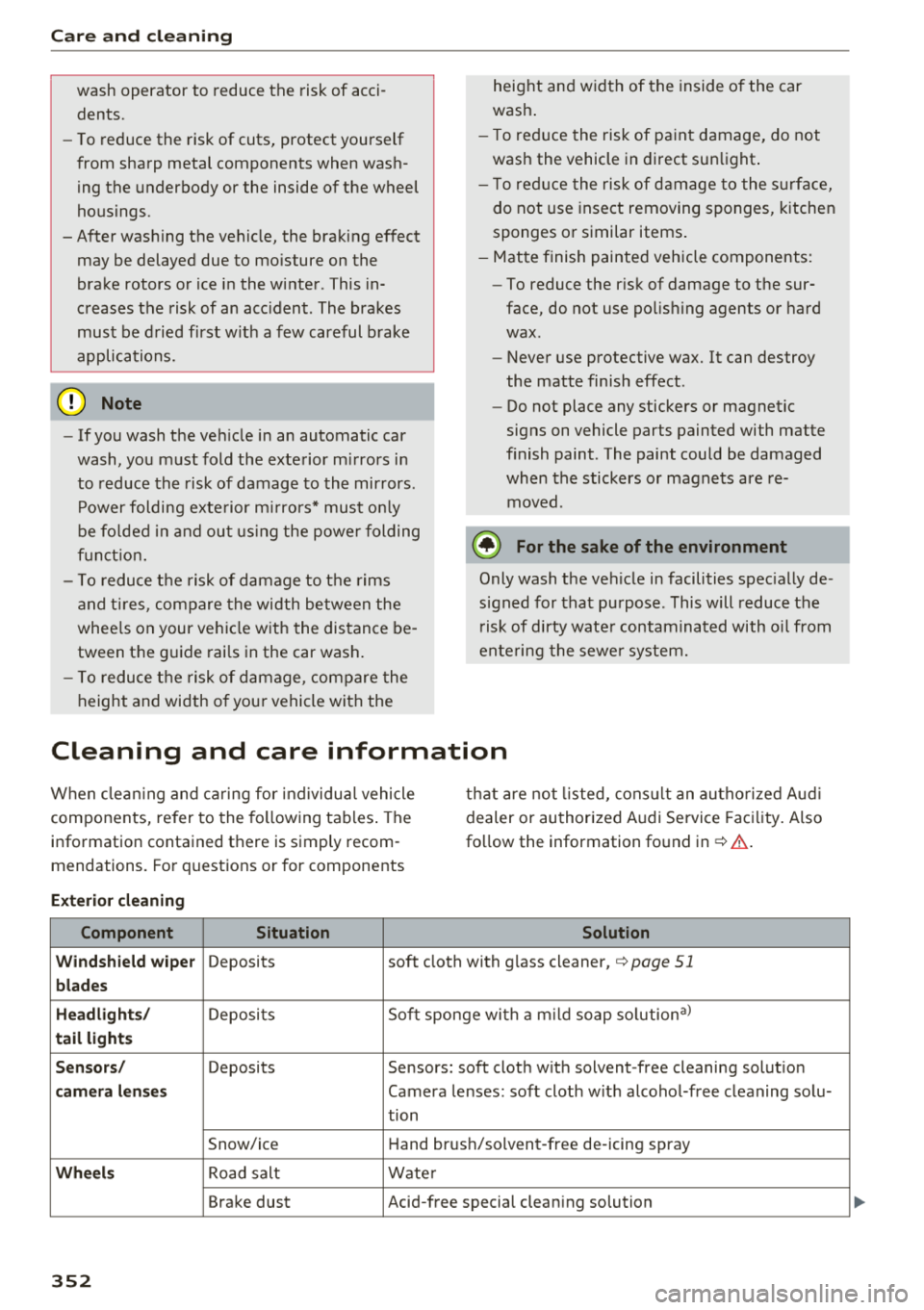
Care and cl eaning
wash operator to reduce the risk of acci
dents.
- To reduce the risk of cuts, protect yourself
from sharp metal components when was h
ing the underbody or the inside of the wheel
housings .
- After washing the vehicle, the braking effect may be delayed due to mo isture on the
brake rotors or ice in the winter . This in
creases the risk of an acc ident . The brakes
must be d ried first w it h a few careful b rake
applications.
@ Note
- If you wash the ve hicle in an automatic car
wash, you must fold the exterior m irrors in
to reduce the risk of damage to the mirrors .
P ower folding exte rior m irrors* must o nly
be fo lded in and out using the powe r folding
f u nct io n.
- To reduce t he risk of damage to the rims
and t ires , compare the width be tween the
whee ls on your ve hicl e w it h t he distance be
tween the g uide rai ls in the car wash .
- To reduce t he risk of damage, compare the
height and width o f you r vehicle with the heig
ht and w idth of the inside o f the car
was h.
- T o red uce the risk of pa in t damage, do not
was h the vehicle in direct sun light .
- T o red uce the risk of d amage to the s urf ace,
do not use insect removing sponges, k itchen
sponges or similar items .
- Matte finish painted vehicle components:
- To reduce the r isk of damage to the sur-
face, do not use polis hing agents or hard
wax .
- Never use protective wax. It can destroy
the matte finish effect .
- Do not place any stickers or magnet ic
signs on vehicle parts painted with matte
finish paint . The paint cou ld be damaged
when the stickers or magnets are re
moved .
@ For the sake of the environment
Only wash the ve hicle in facilities spec ia lly de
s igned for that pu rpose . This will reduce the
r isk of dirty wate r contaminated with o il from
ente ring the sewe r system.
Cleaning and care information
W hen clea ning and ca ring for ind ividua l vehicle
components, refer to the fo llowing tables . The
information contained there is simply recom
m endations. Fo r qu estions or for compon ents t
h at are not listed, cons ult an autho rized Aud i
dealer or authorized A udi Service Fac ility. Also
fo llow the information fo und inc:>.&. .
Ext erior cleaning
Component Situation Solution
Windshield wiper
Deposits soft cloth with glass cleane r, c:> page 51
blades
Headlights /
Deposits Soft sponge with
a m ild soap solution a)
tail light s
S ensors /
Deposits Sensors: soft cloth with solvent -free cleaning solut ion
camera lenses Camera lenses: soft cloth w it h alcohol-free cleaning solu-
tion
Snow/ic e Hand brush/solv ent-free de -icing spray
Wheels Road salt Water
Brake dust Acid-free special cleaning solution
352