brakes AUDI Q7 2018 Owner´s Manual
[x] Cancel search | Manufacturer: AUDI, Model Year: 2018, Model line: Q7, Model: AUDI Q7 2018Pages: 398, PDF Size: 185.58 MB
Page 117 of 398
Cl a:, ...... N
" N ...... 0
0
::r '
The radar sensors can be displaced by impacts
or damage to the bumper, wheel housing and
underbody. Pre sense rear can be impaired by
this. Have an authorized Audi dealer or au
thorized Audi Service Facility check their func
tion.
(D Tips
- The pre sense rear functions switch off
when towing a trailer.
- The pre sense rear functions may also
switch off if there is a malfunction in the
side assist* system.
Audi pre sense city
Applies to: vehicles with Audi pre sense city
Description
Within the limits of the system, pre sense city
can warn you of impending collisions with
vehicles and pedestrians and initiate the applica
ble braking maneuver if needed. Pre sense city is
active at speeds of approximately 6 mph (10 km/
h) and higher.
A pedestrian warning can occur at speeds up to
SO mph (85 km/h), and vehicle warnings can oc
cur at speeds up to 155 mph (250 km/h). A pre
sense city braking maneuver is possible at speeds up to SO mph (85 km/h).
Warnings
The system recognizes various dangerous situa
tions. The
early warning occurs if:
- a vehicle driving ahead brakes suddenly,
- your own vehicle approaches a significantly
slower vehicle or stationary vehicle in the direc
tion of travel.
- a pedestrian is standing in the lane or is moving
into the lane .
When this warning occurs, it may only be possi ble to avoid a collision by swerving or braking
strongly. The message
Audi pre sense.
r:=;, page 113, fig. 108 and a warning tone will
warn you about the danger .
Assistance systems
Additionally, a jerk on the brakes may occur as an
acute warning when there is an impending colli
sion. If you do not react to the acute warning, pre
sense city can brake to the point of complete de
celeration within the limits of the system. This
reduces the vehicle speed in the event of a colli
sion. The message
Audi pre sense. also ap
pears.
The following functions are triggered in conjunc
tion with pre sense basic/rear:
- Reversible tensioning of the front safety belts.
- Closing the windows and sunroof*.
- Inflating the side bolsters* in the seat backrest
and seat surface.
Audi drive select*: the function is not active de pending on the mode selected.
_&. WARNING
- Pre sense city cannot overcome the laws of
physics.
It is a system designed to assist and
it cannot prevent a collision in every circum
stance. The driver must always intervene.
The driver is always responsible for braking
at the correct time. Do not let the increased
safety provided tempt you into taking risks .
This could increase your risk of a collision.
- The system can deploy incorrectly due to
system-specific limits .
- To reduce the risk of an accident, please
note that the camera does not always detect
every object.
- Pre sense city does not react to animals,
crossing or oncoming vehicles, objects such
as bars, railings or railcars, and objects that
are difficult to detect
r:=;, _& in General infor
mation on page 103.
- In trailer mode, the braking behavior of the
trailer can be different than usual during au
tomatic braking.
_&. WARNING
Pre sense city may be restricted or not availa
ble in the following example situations:
- in heavy fog, rain, spray or snow
- when there are visual obstructions, such as
glare, reflections or variations in light
115
Page 126 of 398
Ass is tance sy stem s
Rear cross-traffic assist
Applies to: ve hicles w ith rear cross -traff ic ass ist
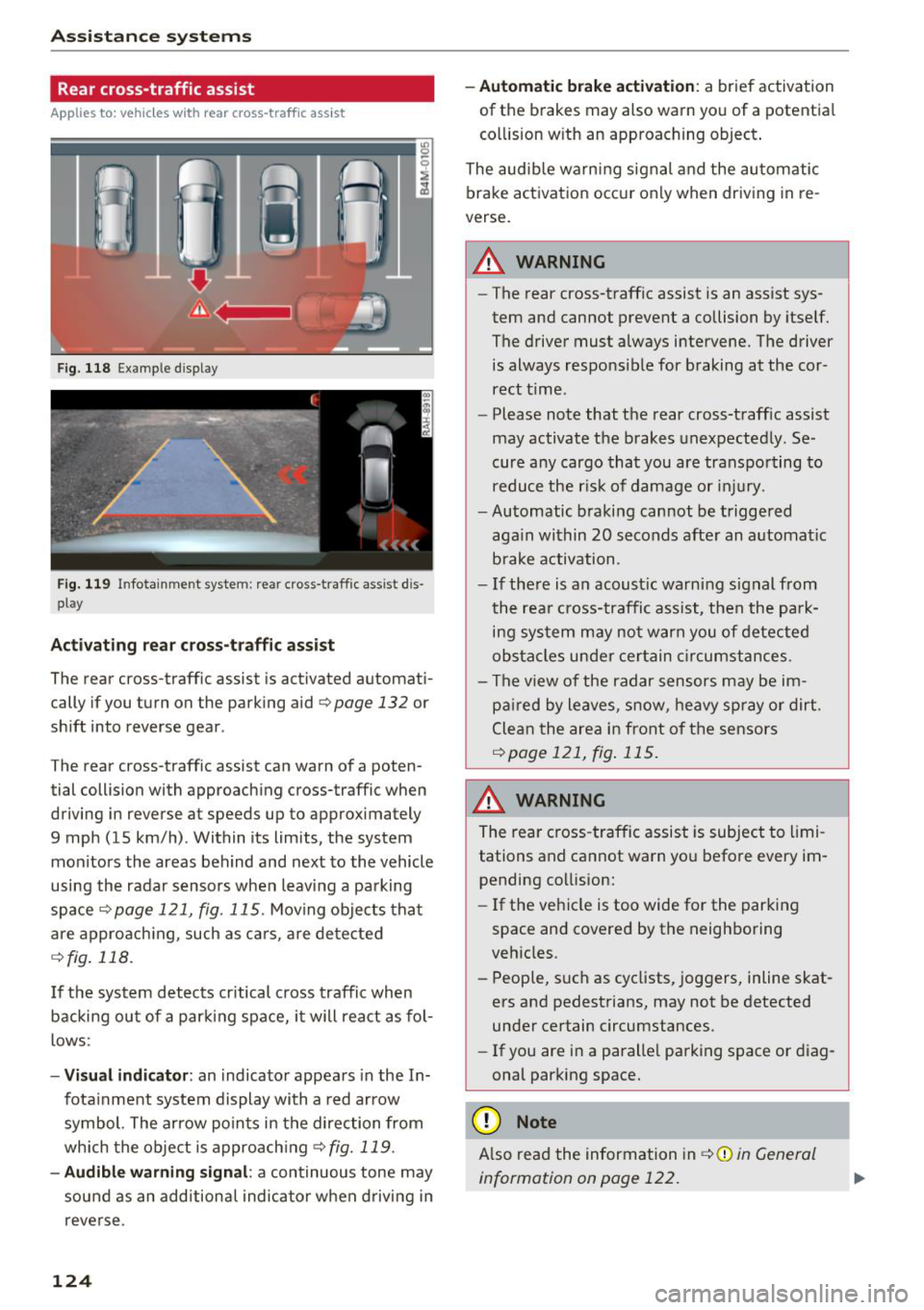
F ig. 118 Example display
Fig . 119 Infotainment system: rear cross-traffic assist dis
play
Acti vating re ar c ro ss -tr affic assist
The rear cross-traffic assist is act ivated automat i
cally if you turn on the parking aid
Qpage 132 or
shift into reverse gear .
The rear cross-traffic assist can warn of a poten
tial collision with approaching cross-traffic when
driving in reverse at speeds up to approximately
9 mph (15 km/h) . Within its limits, the system
monitors the areas behind and next to the vehicle
using the radar sensors when leav ing a parking
space
Qpage 121, fig. 115. Moving objects tha t
are appro ach ing, such as ca rs, a re detected
Q fig . 118.
If the sys tem detects cr itical cross traffic when
backing ou t of a par king space, i t will react as fol
lows:
- Vi sua l indicator : an indicator appea rs in the In
fota inment system display with a red arrow
symbol. The ar row points in the direction from
which the object is approach ing
Q fig. 119.
- Audib le warning signal :
a continuous tone may
sound as an additional indicator when driving i n
reve rse .
124 -
Automat ic brake act ivation :
a brief activation
of the brakes may also warn you of a potentia l
co llision w ith an approaching object .
The audib le warn ing signal and the automatic
brake activation occ ur only when driving in re
verse.
A WARNING
- The rear cross-traffic assist is an assist sys
tem and cannot prevent a collision by itself.
The driver must always intervene. The driver
is always responsible for braking at the cor rect t ime.
- Please note that the rear cross-traff ic assist
may activate the brakes unexpectedly. Se
cure a ny cargo that you are transpo rting to
reduce the r is k of damage or inju ry.
- Automatic braking cannot be triggered
aga in within 20 seconds afte r an a utomat ic
brake activation.
- If the re is a n acoust ic warning signal from
the rea r cross-traffic assist, then the park
ing system may no t w arn you of detected
obstacles under ce rtain c ircumstances.
- The v iew of the radar sensors may be im
pa ired by leaves, snow, heavy spray or dirt.
Clea n the area i n front of t he sensors
Qpage 121, fig . 115.
,&. WARNING
The rear cross-traffic assist is subject to limi
tations and cannot warn you befo re every im
pending collision:
- If the vehicle is too wide for the parking
space and covered by the neighboring
veh icles.
- People, s uch as cyclists, joggers, inline skat
ers and pedestrians, may not be detected
under certain circumstances.
- If you are in a paralle l parking space or diag
onal parking space.
(D Note
A lso read the information in Q (D in General
information on page 122.
-
Page 127 of 398
(D Tips
-You can cance l the automatic brake activa
t ion w ith increas ing bra king fo rce if you ap
p ly the brakes yourse lf or accelerate cons id
erab ly.
- In some situations, rear cross-traffic assist may warn you even if there is no cross traffic
in a cr itical area, for examp le when back ing
i nto a parking space or maneuver ing .
- The rea r cross-traffic ass ist also switches off
when you switch off the ESC.
- The system is not available when towing a
trailer.
Messages
Applies to: vehicles with Audi side assist
A message appears in the inst rument cluste r dis
p lay if the s ide ass ist switches off automatically .
@j Audi side assist: malfunction! Please contact
Service
@j Audi side assi st and e xit warning: malfunc
tion! Please contact Service
The system cannot guarantee that it will detec t
ve hicles correctly and it has switched off. The
sensors have been mov ed or a re faulty. Have t he
system checked by an a uthori zed Audi dea ler or
author ized Audi Service Facility soon.
@j Audi side assi st: cu rrently unavailable. Sen
sor vision restricted due to surroundings . See
owner 's manual
($j Audi side as sist and e xit warning: currently
unavailable. Sensor vision restricted due to su r
roundings
The rad ar senso r vis io n i s impa ired. The area in
fron t of the senso rs must no t be covered by b ike
rac ks, stic kers, leaves, snow or any other ob jects.
C lea n the area in f ront of th e sensors, if necessa
ry ¢
page 121, fig. 115.
($j Audi side as sist: currentl y unavailable. See
owner 's manual
Cl
~ ($j Audi side ass ist and exit warning : currently N
~ unavailable . See owner 's manual ,-1 0
0
::r '
S ide assist cannot be switched on at this time be
ca use there is a ma lfunction (for example, the
batte ry c harge leve l may be too low).
($1 Audi side assi st: unavailable in t owing mode
($j Audi side assist and ex it warning: currently
unavailable . Towing mode
S ide ass ist switches off automatically when the
electrical connecto r in t he factory-installed trail
er hitch is connected . There is no guarantee the
system will sw itch off w hen us ing a ret rofitted
t railer h itch . Do no t use side assist and the ex it
warning when tow ing a tra ile r.
Ill Rear parking aid: obstacle detect ion restrict
ed
The rear cross-traffic ass ist is not available . E i
ther the ESC is sw itched off, or the rada r senso rs
may be cove red by a b ike rack, st icke rs , leaves,
snow o r othe r objects . Switc h the ESC on, o r
cl ea n the area in fron t of the senso rs if necess ary
¢page 12 1, fig . 115. If thi s message con tinues
to be displayed, drive imme dia tely to an author
ized Audi dea ler or authorized Audi Service Facili
ty to have the ma lf u nction repaired.
Night vision assist
Description
Applies to: vehicles with night vision assist
The night vision assist can detect, highlight and,
if necessary, warn about pedestrians and large
wild animals.
N ight vision assist he lps yo u when it is dark by
u sing an infra red camera to mon itor the area in
front of your ve hicle, w ith in the limits of the sys
tem . It ca n disp lay objects up to a distance of ap
prox ima tely 1 000 feet (300 m). The thermal im
age de te cte d by t he came ra is show n in t he in
str ument cluster disp lay . Wa rm areas appear
li ghter and co ld areas a ppear da rker.
125
Page 144 of 398
Intelligent Technology
Intelligent Technology Electronic stabilization
control (ESC)
Description
Elect ronic stabili zation control ( ESC) suppo rts
driver safety. It red uces the risk of slipping and
improves dr iving stabi lity. ESC detects crit ica l sit
uations such as when the vehicle is overstee ring
and understeer ing or the wheels a re spinning.
The vehicle is stabilized by applying the brakes or
reducing eng ine torq ue. When t he ESC engages,
the
D.1 ind icator lig ht blinks in the ins trument
cluste r.
The fo llow ing systems are in tegrated in the ESC:
Anti-lock braking system (ABS)
ABS p reve nts the whee ls from lock ing whe n brak
ing. The vehicle can st ill be steered even d uring
hard brak ing. Apply steady press ure to the bra ke
pedal. Do not pump the pedal. A puls ing in t he
b rake pedal indicates that the system is act ing to
s tabili ze the vehicle .
Brake assist system
The brake assist system can decrease brak ing dis
tance. It inc reases brak ing power when the d river
presses the brake pedal q uick ly in eme rgency sit
uations . You must press and hold t he b rake pedal
until the dangerous si tuatio n is ove r. In veh icles
w ith adapt ive c ruise con trol*, the bra ke assist
sys te m is more sensitive if t he di stan ce detec ted
t o the veh icle dr iv ing a head is too small.
O n ve hicl es w ith ac tiva ted and funct io ni ng night
vision assist*, the b rake ass ist system ca n re
spon d mo re sens it ively if there is a w arn ing.
Anti-Slip Regulation (ASR)
ASR red uces eng ine power when the drive wheels
beg in sp inning a nd adap ts the force to the road
conditions . This makes it easie r to start, acceler
ate and dr ive u p hill s.
Electronic differential lock (EDL)
EDL applies the brakes to a wheel that sta rts
sp inning and transfers the drive power to t he
142
othe r driving whee ls. This func tion is no t ava ila
ble at higher s peeds .
I n extre me cases , EDL au tomat ic al ly swi tches off
to keep t he b rake o n the br aked whee l from ove r
h eating. The ve hicle is still wo rking co rrect ly. EDL
will switc h on agai n automatically when condi
tions have returned to normal.
Power steering
The ES C ca n also support veh icle st ability
t hr ough stee ring .
Selective wheel torque control
Selective w heel to rque con trol is used when d riv
i ng on curves. Bra king is targeted towa rd t he
whee ls on the ins ide of the cu rve as needed . T his
a llows mo re pre cise dr iv ing in curves .
Automatic post -collision braking system
The "automat ic post -coll is io n braking system"
can hel p t o reduce the risk of sl iding and of addi
tiona l co llisions after an acc iden t. If th e a irbag
c ontro l modu le de tects a collision, t he ve hicle is
bra ked by th e ESC.
The veh icle does not brake automatically if :
- the drive r presses t he acce lerator pedal, or
- the ESC, the brake system or the ve hicle elect ri-
cal system are not functioning.
A WARNING
- The ESC and its integ rated systems can not
overcom e the lim its impos ed by natura l
p hys ica l laws . Thi s is es pec ially impo rtan t
on s lippery or w et roa ds. If th e sys tems be
g in a cting to s tabili ze y our v ehicle, you
s hould immedi ately alter your speed to
mat ch the ro ad and traffic condition s. D o
not let the i ncreased safety provide d tem pt
you into taking risks . This could increase
your r is k of a coll is io n.
- Please note the r is k of a col lision increases
w hen dr iv in g fast, especia lly t hrough c urves
a nd on s lippery or wet roa ds, an d when dr iv
ing too close to objects ahead. The ESC and
its integrated sys tems ca nnot always pre
v en t co llisions -there is st ill a risk of acc i
dents!
Page 146 of 398
Intelligent Technology
A WARNING
You should only switch offroad mode on or switch ESC/ ASR off if your driving abilities
and the traff ic conditions perm it. There is a
r isk of slid ing.
- The stabilization function is limited when
offroad mode is switched on. The dr iving
wheels co uld spin and the vehicle could
swerve, especially on slick or slippery road
surfaces.
- T here is no vehicle stab ilizat ion when ESC/
ASR are switched off.
Hill descent assist
Hill descent assist makes it possible to drive
down a hill at a constant speed.
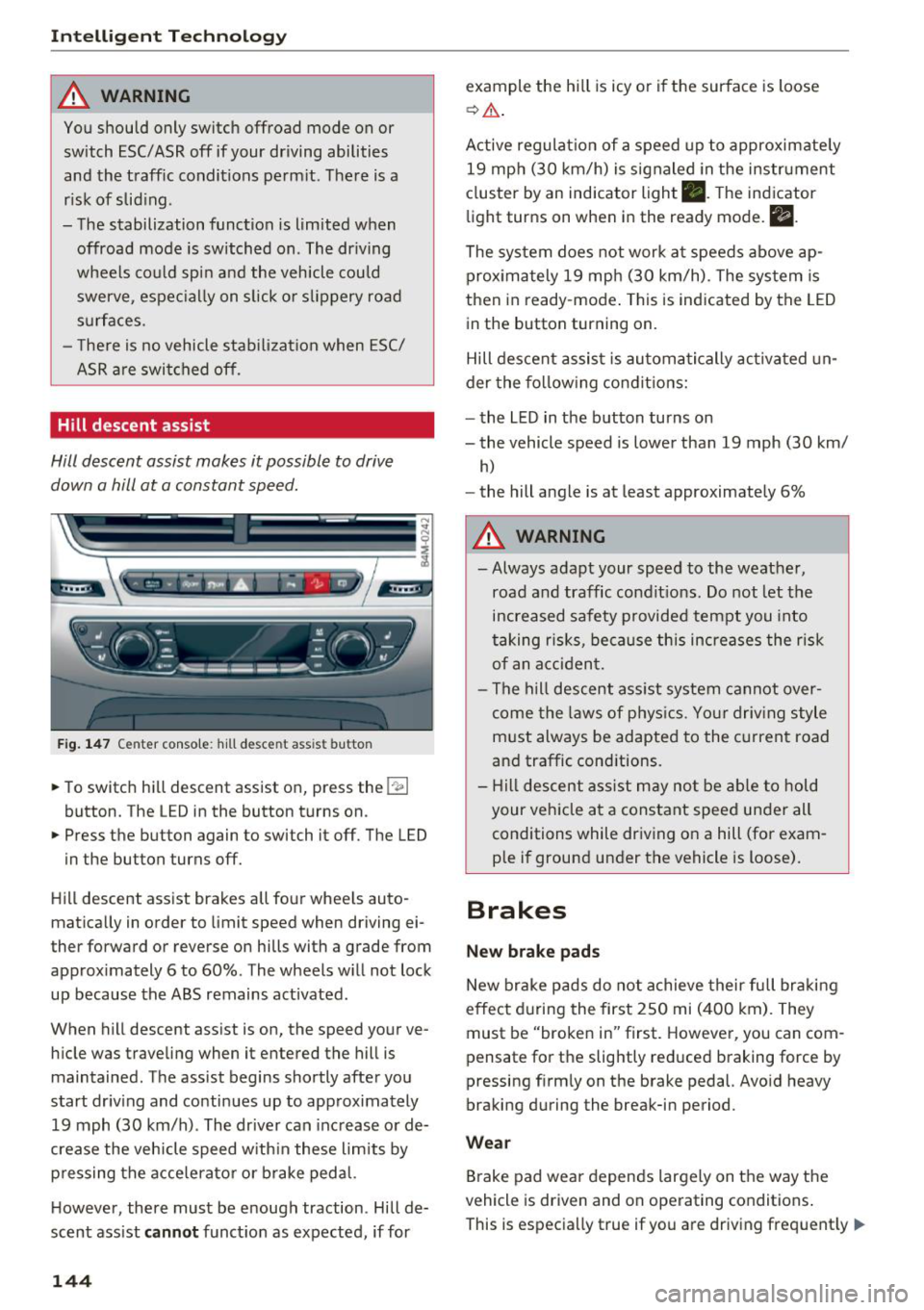
Fig. 147 Center console: hill desce nt ass ist button
.. To switch hill descent assist on, press the !~ I
button. The LED in the button turns on.
.. Press the button again to switch it off. The LED
in the button turns off.
Hill descent assist brakes all four wheels auto
matically in order to limit speed when driving ei
ther forward or reverse on hills with a grade from
approximately 6 to 60%. The wheels w ill not lock
up because the ABS remains activated.
When hill descent assist is on, the speed your ve
hicle was traveling when it entered the hill is maintained. The assist begins shortly after you
start driv ing and continues up to approximately
19 mph (30 km/h) . The driver can increase or de
crease the vehicle speed w ith in these limits by
pressing the accelerator or brake pedal.
However, there must be enough traction . Hill de
scent assist
cannot function as expected, if for
144
example the hill is icy or if the surface is loose
~ .&. .
Active regulat ion of a speed up to approximately
19 mph (30 km/h) is signaled in the instrument
cluster by an indicator light •. T he indicator
light turns on when in the ready mode.
II.
The system does not work at speeds above ap
prox imately 19 mph (30 km/h) . The system is
then in ready-mode . This is indicated by the LED
in the button turning on.
Hill descent assist is automatically activated un
der the following conditions:
- the LED in the button turns on
- the vehicle speed is lower than 19 mph (30 km/
h)
-the hill angle is at least approximately 6%
A WARNING
-
- Always adapt your speed to the weather,
road and traffic conditions. Do not let the
increased safety provided tempt you into
taking risks, because this increases the risk
of an accident.
- The hill descent assist system cannot over
come the laws of phys ics. Your driving style
must always be adapted to the current road
and traffic cond itions .
- Hill descent assist may not be able to hold
your veh icle at a constant speed under all
conditions while driving on a hill (for exam
ple if ground under the vehicle is loose).
Brakes
New brake pads
New brake pads do not achieve their full braking
effect during the first 250 mi (400 km). They
must be "broken in" first. However, you can com
pensate for the slightly reduced braking force by
pressing f irmly on the brake pedal. Avo id heavy
braking during the break-in period.
Wear
Brake pad wear depends largely on the way the
vehicle is driven and on operating conditions .
This is especially true if you are driving frequently .,.
Page 147 of 398
Cl a:, ...... N
" N ...... 0
0
::r '
style.
Operating noise
Noises may occur when braking depending on the
speed , braking force and outside conditions such
as temperature and humidity.
Wet conditions or road salt
In certain situations, for example after driving
through water, in heavy ra in or after washing
your car, the braking effect may be reduced due
to moisture or ice on the brake rotors and brake
pads . The brakes must be "dried" first with a few
careful brake applications.
At higher speeds and with the windsh ie ld wipers
turned on, the brake pads press against the brake
rotors for a short amount of time. This action,
which is not felt by the driver, happens at regular
intervals and ensures a better reaction time for
the brakes in wet weather.
The braking effect can also be reduced if you are
driving on salted roads and you do not apply the
brakes for long periods of time . The layer of sa lt
on the brake rotors and pads must be worn off
first when the brakes are applied.
Corrosion
Leaving the vehicle parked for long periods of
time, low mi leage and avoiding heavy braking
can contribute to corrosion on the brake rotors
and to dirty brake pads.
If you usually avoid heavy braking or if there is
corrosion present, occasional heavy braking at
high speeds is recommended to clean the brake
rotors and pads¢
A.
Brake system malfunction
If you notice that the brake pedal travel has sud
denly increased, then a brake circuit in the dual
circuit brake system may have malfunctioned.
Drive to an authorized Audi dea ler or authorized
Audi Service Facility immediately to have the
problem corrected. On the way there, drive with
reduced speed and keep in mind that you will
need a longer distance to stop and you w ill need
to press the brake pedal harder .
Intelligent Technology
Low brake fluid level
When the brake fluid level is low, malfunctions in
the brake system may occur. The brake fluid level
is e lectronica lly monitored.
Brake booster
T he brake booster amplifies the pressure you ap
ply to the brake pedal.
Ceramic brakes
Applies to: vehicles with ceramic brakes
Ceramic brakes provide excellent deceleration
rates .
The break-in period for new ceramic brakes may
be significantly longer than for standard brake
rotors. Due to the properties of the material,
they may cause noises at lower speeds. Ceramic
brakes also absorb more moisture in wet condi
tions. Therefore, there will temporarily be less
braking force than when the brakes are dry. You
can compensate for this by pressing the brake
peda l harder.
& WARNING ~ -
- On ly app ly the brakes for the purpose of
cleaning the brake system when road and
traffic cond itions permit. You must not en
danger other road users. This increases the
risk of an accident .
- Never let the vehicle roll while the engine is
stopped because this increases the risk of an
accident.
- Never place objects in the dr iver's footwell.
An object could end up in the area around
the pedals and prevent you from using
them. You would not be able to use the ped
als if sudden driv in g or braking maneuvers
were needed, which increases the ris k of an
accident.
- Only use floor mats that do not obstruct the
area around the pedals and that can be se
curely fastened in the footwells.
- To reduce the risk of injury, do not place
your foot under the brake pedal.
145
Page 148 of 398
Intellig ent T echn olo gy
{QJ Note
- Never let the brakes "rub" by pressing the
pedal light ly when braking is not actually
necessary. This causes the brakes to over
heat and increases braking d istance and
causes wear .
- Before driv ing downhill a long distance on a
steep hill, decrease your speed and select a
lower gear. This makes use of the engine
braking effect and rel ieves the brakes. If
you need to b rake additionally, b rake in in
te rvals a nd not conti nuously.
@ Tips
-If the brake booster is not wo rking, you
must press the brake pedal with much more
fo rce than no rma l.
- If you ret rofit your vehicle with a front spoil
e r, whee l cove rs o r similar items, ma ke sure
th at the a ir flow to the front whee ls is not
i nterr upted. Ot herw ise the bra ke sys tem
can become too hot.
Electromechanical
steering, all-wheel
steering
The electromechanical steering supports the
driver's steering movements.
Power steering adapts electronically based on
the vehicle speed.
Indicator lights and me ssa ges
• Steering: malfuncti on! Plea se st o p vehicle
If this indicator light turns on and stays on and
this message appears, the power steering may
have failed.
Stop the vehicle in a safe location as soon as pos
sib le. Do
not continue driving. See an authorized
Audi dea ler or authorized Audi Service Facility for
assistance .
• Stee ring: malfunction! Plea se stop vehicle.
Pa y attention t o di sta nce at sid e
If t his ind icator light tu rns o n and stays o n and
this message appears, t he a ll-wheel steer ing*
146
may have fai led . The side of the vehicle may need
more space on the road .
Reduce you r speed and stop the vehicle in a safe
l oca tion with eno ugh space on the s ides as soon
as possible. Do
n ot continue driving. See an au
thorized Audi dea ler or authorized Audi Service
Facility for assistance.
'I-ij S te e ring : m alfun cti on! You can c ontinue
dri ving
If the indicato r light turns on and the message
appears, the steeri ng wheel may be more d iffi
cu lt to move or more sensitive than usu al. The
steering wheel may a lso be at an ang le when
driving straight.
D rive slowly to an a uth orized Audi dea ler or au
t h orized Aud i Serv ice Facili ty to have t he mal
f unction corrected .
l:r-ij Stee ring : malfun ction! Adapt driving sty le .
Lar ger turnin g radiu s
If the indicator l ight turns on and this message
appears, the all-whee l stee ring* may have fa iled .
Please note that the vehicle has a larger t urning
r ad ius and the st abil ity w hen turning a corner is
lik e tha t of a vehicle wi thout a ll -wheel s teer ing.
The steering whee l may also be at an angle when
driving straight.
D rive slowly to an a uth o rized Audi dea ler or au
t h orized Aud i Serv ice Facili ty to have t he mal
function corrected .
(D Tips
-If the . or l;rfl indi cato r light only stays on
for a sho rt time, you may cont inue driv ing.
- For add itiona l information o n all-wheel
steeri ng*, see
r=.>page 128.
ALL-wheel drive (quattro)
General information
In all whee l dr ive, the dr iv ing power is distr ibut
ed between all fou r whee ls when needed. This
happe ns automatically depend ing on your dr iving
behav ior as we ll as the curren t road cond it ions.
A lso see
r=.> page 142, Electronic stabilization
control (ESC). ..,.
Page 335 of 398
0 a, .... N
" N .... 0
0
l: ..
Glossary of tire and loading
terminology
Accessory weight
means the combined weight (in
excess of those standard items
which may be replaced) of auto matic transmission, power steer
ing, power brakes, power win
dows, power seats, radio, and
heater, to the extent that these
items a re available as factory- in
stalled equipment (whether i n
stalled or not) .
Aspect ratio
means the ratio of the height to
the width of the tire in percent .
Numbers of 55 or lower indicate a
low s idewall for improved steer
ing response and better overall
handling on dry pavement.
Bead
means the part of the tire that is
made of steel wires, wrapped or
reinforced by ply cords and that is
shaped to fit the rim .
Bead separation
means a breakdown of the bond
between components in the bead .
Wheel s
Cord
means the strands forming the
plies in the tire .
Cold tire inflation pressure
means the tire pressure recom
mended by the vehicle manufac
turer for a tire of a designated
size that has not been driven for more than a couple of miles (kilo
meters) at low speeds in the
three hour period before the tire pressure is measured or adjusted .
Curb weight
means the weight of a motor ve
hicle with standard equipment in
cluding the maximum capacity of
fuel, oil , and coolant, air condi
tioning and additional weight of
optional eq uipment .
Extra load tire
means a tire designed to operate
at higher loads and at highe r in
flation pressures than the corre
sponding standard tire . Extra load
tires may be identified as "X L",
"xl", "EXTRA LOAD", or "RF" on
the sidewall. .,.
333
Page 337 of 398
0 a, .... N
" N .... 0
0
l: ..
Production options weight
means the combined weight of
those installed regular production
options weighing over 5 lbs .
(2.3 kg) in excess of those stand
ard items which they replace, not
previously considered in curb
weight or accessory we ight, in
c luding heavy duty brakes, ride
levelers, roof rack, heavy duty
battery, and special trim .
Radial ply tire
means a pneumatic tire in which
the ply cords that extend to the beads are laid at substantially
90 degrees to the centerline of
the tread .
Recommended inflation
pressure
see ¢ page 333, Cold tire infla
tion pressure .
Reinforced tire
means a tire designed to operate
at higher loads and at h igher in
flat ion pressures than the corre
sponding standard tire. Rein
forced t ires may be identified as
"XL " "xl" "EXT RA LOA D" or "RF" , , ,
on the sidewall.
Wheels
Rim
means a metal support for a tire
or a tire and tube assembly upon
which the tire beads are seated .
Rim diameter
means nominal diameter of the
bead seat. If you change your
whee l size, you will have to pur
chase new tires to match the new
rim diameter .
Rim size designation
means rim diameter and width .
Rim width
means nominal distance between
rim flanges.
Sidewall
means that portion of a ti re be
tween the tread and bead.
Speed rating (letter code)
means the speed at which a tire is
designed to be driven for extend
ed periods of time . The rat ings
range from
93 mph (150 km/h)
to
186 mph (298 km/h) ¢ table
on page 331.
You may no t find
this info rmat ion on all tires be
cause it is not required by law.
T he speed rating letter code,
where applicable, is molded on
the tire sidewall and indicates t he
11>
335
Page 346 of 398
Wheels
are listed on the safety compli
ance sticker label located on the
driver's side B-pillar.
A WARNING ,-= · -
Overloading a vehicle can cause
loss of vehicle control, a crash
or other accident, serious per
sonal injury, and even death .
-Carrying more weight than your vehicle was designed to carry will prevent the vehicle
from handling properly and i ncrease the risk of the loss of
vehicle control.
-The brakes on a veh icle that
has been overloaded may not
be able to stop the vehicle
within a safe distance.
-Tires on a vehicle that has been overloaded can fail sud
denly, including a b lowout and
sudden deflation, causing loss
of contro l and a crash.
-Always make sure that the to tal load being transported -i nc luding the weight of a tra il
er hitch and the tongue
weight of a loaded trailer
does not make the vehicle
h eavier than the vehicle's
Gross Vehicle Weight Rating.
3 44
Determining correct load
limit
Use the example below to calcu
late the tota l weight of the pas
sengers and luggage or other
things that you plan to transport
so that you can make sure that
your vehicle will not be over load
ed.
Steps for Determining Correct Load Limit
1 . Locate the statement " TH E
COMBIN ED WE IGH T OF OCC U
PANTS AND CARGO SHOU LD
NEVER EXCEED XXX KG OR XXX
LBS" on your vehic le's placard
(tire inflation pressure label)
¢ page 340, fig . 272 .
2. Determine the combined
weight of the drive r and pas
sengers that will be riding in
your vehicle.
3. Subtract the combined weight
of the driver and passengers
from
"XXX" kilograms or "XXX"
pounds shown on the stick
er ¢
page 340, fig. 272 .
4. The resu lting figure equa ls the
available amount of cargo and
luggage load capacity . For ex
ample, if the "XXX" amount
eq uals 1400 lbs. and there will~