key AUDI Q7 2018 Owner´s Manual
[x] Cancel search | Manufacturer: AUDI, Model Year: 2018, Model line: Q7, Model: AUDI Q7 2018Pages: 398, PDF Size: 185.58 MB
Page 64 of 398
Seats and stor age
If the heat ing is sw itched on, switching the glove
compartment cooling mode off is recommended.
Additional storage compartments
You will find a variety of storage compartments
and holders at various locations in the vehicle.
- Glove compartment: the glove compartment
can be locked using the mechanical key
q page 30, Key set.
-In the door trim pane ls
- Safety vest compartment in the doo r trim pan-
els on the driver 's side and front passenger's
s ide
- Storage compartment* in the center conso le
- Storage compartment unde r the fron t center
armrest
- Ga rment hooks above the rea r doo rs
- Nets on the backrests of the front seats
- Net on the left luggage compartment trim pan-
el
.&, WARNING
-
- Always keep t he g love compartment lid
cl osed while d riving to reduce the risk of in
jury.
- Only use the storage compartments in the
doo r trim pane ls to sto re small objects that
will not st ick o ut of the compartment and
impair the range of the side airbags.
- Make s ure tha t the view to the rear is not
obstructed by hanging garments.
- Hang only lightwe ight cloth ing and be sure
that there a re no heavy or sha rp-edged ob
jects in the pockets.
- Do not use coat h angers to ha ng the cloth
ing because t his could impair the effective
ness of the s ide cu rtain airbags .
Luggage compartment
General information
.&, WARNING
-
Read and follow the important sa fety precau
tions in
q page 257, Storing cargo correctly.
62
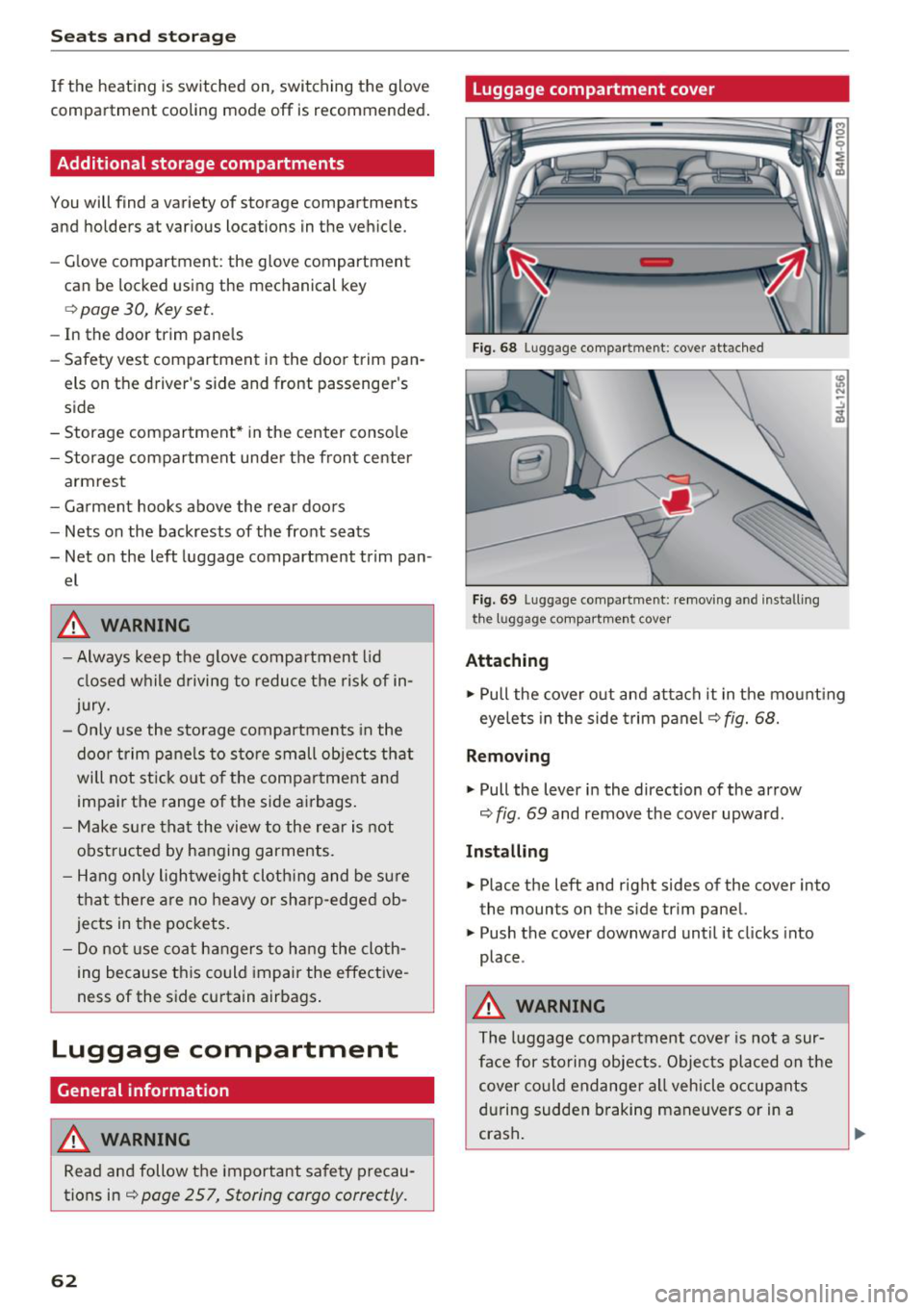
Luggage compartment cover
Fig. 68 Luggage compartment: cover attached
Fi g. 69 Luggage compa rtment: removi ng and install ing
the l1,1ggage compart ment cover
Attaching
.,. Pull the cover o ut and attach it in the mount ing
eyelets in the side t rim panel
q fig. 68.
Removing
.,. Pull the lever in the direction of the arrow
q fig. 69 and remove the cover upward.
Installing
.,. Place the left and right sides of the cover into
the mounts on the side trim panel.
.,. Push the cover downward until it clicks into
place .
.&, WARNING
The luggage compartment cove r is no t a sur
face for storing objects. Objects placed on the cover could endange r a ll vehicle occupants
during sudden braking maneuvers or in a
crash .
Page 68 of 398
Warm and cold
Warm and cold
Climate control system
Description
A pp lies to: ve hicles w ith 3 -zo ne del uxe automatic c limate
co ntrol or 4-zo ne de luxe au tomatic cl imate co ntrol
The climate control system warms, cools and re
moves humidity from the air in the vehicle interi
or.
It is the most effective when the windows and
sunroof* are closed . If there is a bu ild-up of heat
inside the vehicle, ventilat ion can he lp to speed
up the cooling process.
In all heating mode functions except for
defrost,
the blower on ly switches to a h igher speed once
the engine coolant has reached a suffic ient tem
perature.
Pollut ant filt er
The pollutant filter removes pollutants such as
dust and pollen from the a ir .
K ey recognit ion
The climate control settings are automatically
stored and assigned to the remote control key
that is in use .
66
@ For the sake of the environment
- If you would like to reduce fuel consump
t ion, sw itch the air conditioning off. This
will also reduce emissions.
- In vehicles with a diesel engine, you can
switch the auxiliary heater off in the Info
tainment system.
(D Tips
- To prevent interference with the heating
and cooling output and to prevent the win
dows from fogging over, the a ir intake in
front of the windshield must be free of ice,
snow or leaves.
- Condensation from the cooling system can
dr ip and form a puddle of water under the
vehicle . This is normal and does not mean
there is a leak.
- The energy management system may tem porarily switch off certain functions, such as
the seat heating* or rear window defogger.
T hese systems are ava ilable again as soon
as the ene rgy supply has been restored.
Page 80 of 398
Drivin g
Start /Stop syst em *
See the informat io n in q page 79 , Start/Stop
syst em .
A WARNING
To reduce the risk of poisoning, never allow
the engine to run in confined spaces .
(LlJ) Note
Avoid high eng ine speed, full throttle, a nd
heavy engine load if the engine has not
reached operating temperature yet. You could
damage the engine .
@ For the sake of the environment
Do not let the engine run while parked to
warm up . Begin driving immediately. This re
duces unnecessary emissions .
(D Tips
-Some noise after s tarting the engine is nor
mal and is no ca use fo r concern .
- If yo u leave the vehicle with t he ignit ion
switched on, the ignition will switc h off af
ter a certain amo unt of time. Make s ure that
e lectr ica l equipment s uch as the exterior
li ghts are switched off.
Starting the engine
"' Bring the vehicle to a fu ll stop .
"' Press the I STAR T
EN GI NE ST OPI button
r::!) page 77 , fig . 81 .
Emergency off function*
-
If it is abso lutely necessary, the engine can also
be turned off while driv ing at speeds starting at
4 mph ( 7 km/h) . To switch the eng ine off , press
the lSTART
E NGINE STOPlbutto n tw ice in a row
briefly o r press and hold fo r lo nger than two sec
onds.
A WARNING
- Never turn off the engine befo re the ve hicle
has come to a comp lete stop . The full func
tion of the brake booster and the powe r
steering is not guaranteed. Yo u must use
78
more force to turn or brake . Because you
cannot steer and brake as you usually
wou ld, this could lead to accidents and seri
ous injuries .
- If you leave the vehicle, sw itch the ignition
off and take the ve hicle key with you. Other
wise, the eng ine could be started or electr i
cal equipment such as the powe r windows
could be ope rated . This can lead to se rious
lnJ Ury.
- For safety reasons, always park the vehicle
w it h the sele ctor lever in the "P " pos it io n.
Othe rw ise, there is the risk that t he veh icle
co uld r oll uninte ntionally .
(0} Note
If the engine has been unde r heavy load for
an extended pe riod of time, heat builds up in
the eng ine com partmen t afte r th e e ng ine is
swi tched o ff and the re is a ris k of damag ing
the eng ine. For t his reason, let the engine run
for at id le for approximate ly two min utes be
fo re shutting it off .
(D Tips
For up to 10 minutes a fter stopping the en
gine, t he radiator fan may turn on again auto
matically or it may continue to r un (even if
the ign it ion is switched off) fo r the following
reasons :
- The coo lant temperature is increas ing due
to trapped heat.
- If the eng ine is wa rm and the eng ine com
partment a lso heats up from strong sun
light.
- Applies to: vehicles with particulate filter:
The emissions control system is heated
throug h the regeneration process, even if
the engine has not reached its operat ing
tempe ra ture yet .
Messages
Engine running . Warning! Turn off ignition be -
fore leaving vehicle
II>-
Page 81 of 398
a co ...... N r--. N ...... 0
0
:E '
if you open the d river's doo r when the engine is
running .
Please press the brake pedal
This message appea rs if you do no t press the
b ra ke pedal whe n star tin g the eng ine.
Ill Remote control key : key not detected. Is the
key still in the vehicle?
This indicato r light turns on and t his message ap
pears if the ignit ion key was removed from the
ve hicle when the e ngine was ru nning. If the ign i
tion key is no longe r in the ve hicle, yo u ca nn ot
sw itch on t he ign it ion or s tart the e ngine once
you s top i t. You also canno t lock the vehicle from
the outs id e.
Shift to P, otherwise vehicle can roll away.
Doors do not lock if gearshift is not in P
This message appea rs for safety reasons if the
selecto r lever is in the "N" pos ition w hen you
sw itch the ign ition off. Move the selector leve r to
the "P " pos it io n. Otherwise the vehicle is no t pro
tec ted fro m rol ling an d it ca nnot be lo cke d.
II Remote control key : hold back of key
against the designated area . See owner's man
ual
If t he indicator lig ht turns on and th is message
appears , th ere is a mal function
c:> page 79 .
Shift to P before leaving vehicle , otherwise vehi
cle can roll away
This message appears if the driver's door is
opened while t he ignitio n is switched on and t he
transmission has not been shifted to the "P" pos i
tion. Sh ift the transmiss ion i nto the "P" position
and turn off the ignition if you are leav ing t he ve
h icle. Otherwise t he ve hicle could ro ll. Also see
c:> page 80 .
Driving
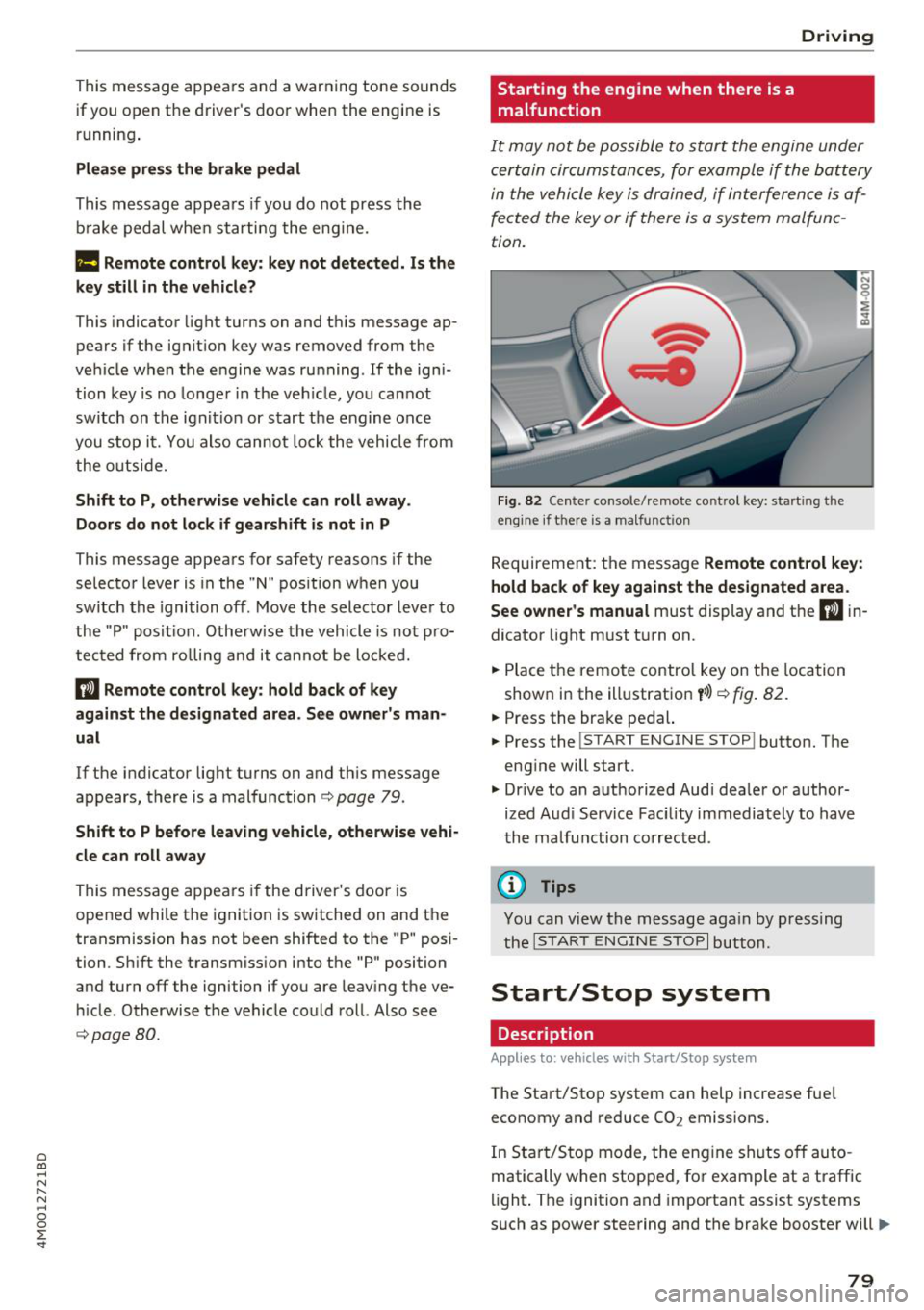
Starting the engine when there is a malfunction
It may not be possibl e to sta rt the e ngine under
ce rta in circ um stance s, for exam ple if the bat te ry
in the vehicle key is dr ained, if in terfere nce is af
fected the key or if there is a system malfunc
tion.
Fig . 82 Ce nter console/ re m ote contro l key: starting the
e n g in e if there is a ma lfunction
R eq uirement: the message Remote control key :
hold back of key against the designated area .
See owner's manual
must display and the II i n
dicator light m ust t urn on.
.. Place t he remote contro l key on the loc ation
show n in the illustrat ion
y >l) c:> fig . 82.
.. Press the bra ke pe dal.
.. Press the
!S TART ENGINE STOP ! button. T he
eng ine will start.
.,. Dr ive to an a uth orized Audi dea ler or a uthor
ized Aud i Serv ice Fac ility immediately to have
t he ma lfu nction corrected.
(D Tips
You can view the message aga in by pr essing
th e
I S TA RT ENGI NE ST OP I button.
Start/Stop system
Description
Applies to: vehicles wi th Start/Stop syste m
The Start/Stop system can help increase fue l
economy and reduce CO
2 emissions.
In Sta rt/S to p mode, the eng ine shuts o ff au to
matically when stop ped, fo r example at a t raff ic
li ght . The ignition and importa nt assist systems
s uch as power steering and the brake booste r will
IJI,,,
79
Page 84 of 398
Drivin g
are available when you start driving r=:> poge 83,
Starting to drive .
Preventing th e automatic parking brake
r e leas e
The vehicle could begin rolling unintentiona lly,
depending on the hill or if towing a trailer .
.,. To preve nt the parking b rake from releasing au
tomat ica lly, pull and hold the© switch and
press the acce lerator pedal. The parking brake
remains set and prevents the vehicle from ro ll
ing backward.
.,. You can release the(®) switch again once you
are sure that you are g iv ing enough dr iv ing
force to the wheels by pressing the accelerator
pedal.
Emer gency br aking fun ction
You can use the emergency braking function in an
emergency situation, or if the standard brake op
eration malfunctions or is disabled.
.,. Pu ll and hold the(®) switch.
.,. As soon as you release the © switch or acceler -
ate, the braking stops .
Pulling and holding the<®> switch while driving
the vehicle activates the emergency braking func
tion . The vehicle is braked at all four wheels by
activating the hydraulic brake system. The brak ing effect is s imilar to heavy braking
r=:> ,&. .
To reduce the risk of activating the emergency
braking by mistake, a warning tone (buzzer)
sounds when the(®) switch is pulled. Emergency
braking stops as soon as the(®) switch is released
or the accelerator pedal is pressed .
Parking
.,. Press the brake peda l to stop the vehicle.
.,. Pu ll the(®) switch to set the parking brake.
.,. Se lect the "P" selector lever pos it ion.
.,. Turn the eng ine off
r=:> ,&. .
.,. Turn the steering wheel when parking on in
clines so that the wheels will roll into the curb
i f the veh icle sta rts mov ing .
82
A WARNING
-Do not press the accelerator pedal inadver
tently if a gear is selected when the vehicle
is stationary and the eng ine is runni ng . Oth
erwise, the vehicle will start to move imme
d iate ly and this could result in an accident.
- Eme rgency brak ing shou ld only be used in
a n emergency, when the no rma l bra ke pedal
h as fa iled or the bra ke peda l is obstr ucted.
Dur ing eme rgency brak ing, you r vehicle w ill
brake s imilar to heavy b raking. ESC and the
associated components (ABS, ASR, EDL)
cannot overcome the laws of physics.
Around curves and when road or weather
conditions are bad, a full brake applicat ion
can cause the veh icle to skid or the rear end
to swerve, wh ich increases the risk of an ac
cident .
- If the power supply fails, you cannot set the parking brake if it is released . In this case,
pa rk the veh icle on leve l ground and secure
it by p lac ing the sele ctor l eve r in the "P " po
si tion. See an au thor ized A udi dealer o r au
thorized A udi Se rvice Fac ility for assis tance.
- Always set the pa rking brake when leaving
your veh icle, even if for a sho rt period of
time . Otherwise the vehicle could roll away,
increasing the risk of an accident.
- If you leave the vehi cle, sw itch the ignition
off and take the ve hicle key with you . This
applies partic ularly when children remain in
the vehicle. Otherwise, chi ldren co uld start
the engine, release the parking brake or op
erate e lectr ica l equipment such as power
w indows, wh ich increases the r isk of an acci
dent.
- No one, especially ch ildren, should remain
in the vehicle when it is locked . Locked
doors make it more diff icu lt for eme rgency
wo rkers to get into the vehicle, which puts
lives at r is k .
0) Tips
When stopp ing at a traff ic signa l or stopp ing
i n city traffic, you can set the park ing brake
manua lly . The veh icle does not have to be
h eld wi th the b rake pedal. The par king b rake
Page 100 of 398

Ass is tance sy stem s
Operating
Applies to: vehicles with camera -based traffic sign recogni
tion
F ig . 92 Instrument clus te r: addi tiona l d isplay
Ac ces sing traffic sign recogn iti on
... Se lect: the first tab> T ra ffic si gns.
Setting a speed warning
You can set a warn ing th reshold down to 10 mph
(15 km/h). The traffic sign for the current detect
ed speed limit w ill blink in the disp lay if you ex
ceed the set thresho ld.
... Select in the Infotainment system:
IM ENU I but
ton >
V ehi cle> left contro l button > Driver a s·
s is tan ce
> S pe ed war ning > Tr affic sign ba sed
w arning .
Add itional display
If a view other than the traffic sign recognit ion is
selected in the instrument cluster disp lay, the
speed limit w ill be shown in another disp lay
~ fig. 92 . The cur rent applicable speed limit will
be shown there , if possib le with in the limits of
the system.
(D Tips
- An additional indicator appears in the head
up d isplay*.
- Your speed warning settings a re stored au
tomatically and ass igned to the remote con
tro l key in use .
Messages
Applies to: vehicles with camera-based traffic sign recogn i
tion
P!\i Traffi c sign recognition : curren tly unavaila
ble _ Camera view limit ed du e to su rrounding s
98
Function currentl y una va ilable. Camera view re
stricted due to surroun ding s
This message appears if the camera's v is ual fie ld
i s covered ~
page 97, fig. 91. The system will
switch itself o ff.
la Tr affic sign r ecog nition : currentl y limit ed .
Se e owner' s manua l
This message appears if there is a malfunct ion in
the nav igation system, for example . The speed
li mit d isplay is limited, wh ich inc reases the risk
of an incorrect d isp lay.
P!\i Traffic sign based speed warnin g: current ly
una vail able . Se e own er' s manual
There is no warning when the set threshold is ex
ceeded .
No traffic sign inf ormation available
There is no valid navigation data and do speed
li mits were detected. Or there is a recommended
speed but there is not a speed lim it (for examp le
driv ing on and off the expr essway) .
Malfun ction! S ee owner's manu al
The system cannot guarantee correct funct ion
and is switched off. See an autho rized Aud i dea l
er or autho rized Aud i Serv ice Faci lity for assis
tance.
Functi on not av ailable in this country
The vehicle is in a country where the function is
not availab le .
Lap timer
Introduction
Applies to: vehicles with lap t imer
You can measure and analyze lap times with the
lap timer in the display.
Opening the lap timer
... Open the first Vehicle tab (trip computer) using
the
l <1 1>I button on the multifunction steering
wheel.
... Sele ct on the m ultifunction steering wheel : lef t
cont rol b utton
> Lap time s. Ill-
Page 110 of 398
Assistance systems
The distances provided are specified values . De
pending on the driving situation and how the ve
h icle ahead is dr iv ing, the actual d istance may be
more or less than these target d istances.
If you change the time gaps, the newly set value
appears briefly in the instrument cluster disp lay
II for Distance 3. T his only occurs if the Driver
assistance
display is not currently shown in the
d isplay
c::;, page 104, fig. 99.
Distance 1: this setting corresponds to a distance
of 92 ft (28 m) when traveling at 62 mph (100 km/h), or a time d istance of 1 second.
Distance 2 : this setting corresponds to a distance
of 118 ft (36 m) when traveling at 62 mph (100
km/h), or a time d istance of 1.3 seconds .
Distance 3: this setting corresponds to a distance
of 164 ft (SO m) when traveling at 62 mph (100
km/h), or a time distance of 1.8 seconds .
Distance 4: this setting corresponds to a distance
of 219 ft (67 m) when traveling at 62 mph (100
km/h), or a time dista nce o f 2.4 seconds .
Distance 5 : this setting corresponds to a distance
of 328 ft (100 m) when traveling at 62 mph (100
km/h), o r a time distance of 3.6 seco nds.
A WARNING
When setting the distance, the driver is re
sponsible for adhering to any applicab le lega l
regulations.
(D Tips
Depending on the selected driving mode in
drive se lect* and the set distance, the driving
behavior will vary from dynamic to comforta
ble when accelerating
c::;, page 129.
Setting Audi adaptive cruise control
App lies to: ve hicles w ith Aud i adapt ive cruise co ntro l
-
.. Se lect in the Infotainment system: I MENU I but
ton
> Vehicle > left control button > Driver as
sistance
> Audi adaptive cruise control.
1) In prepa ra tio n at the t ime of print ing. T his funct ion is not
ava ilable in every vehicle .
108
Storing the last distance1
)
The last distance that was set will be stored after
the ignition is switched off. If the distance is not
stored,
Distance 3 is a utomatica lly set eve ry time
the ignit ion is switched on.
(D Tips
Your settings are automatically stored and as
signed to the remote control key being used.
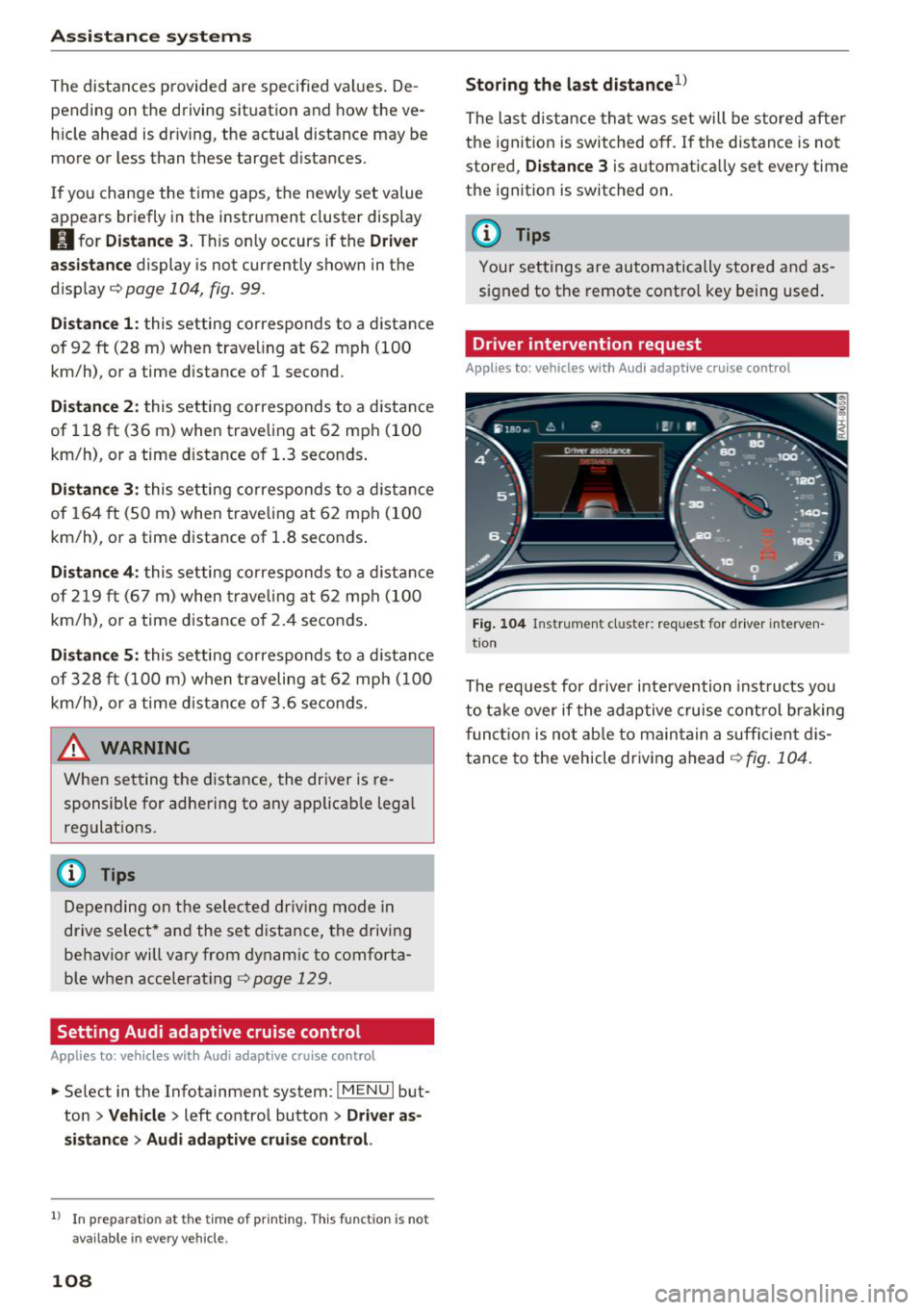
Driver intervention request
Applies to : vehicles wi th Aud i adap tive c ru ise con trol
Fig. 104 Instrument cluster: request for driver interve n
t ion
The reques t for driver in tervention inst ructs you
to take over if the adaptive cruise control braking
function is not able to maintain a suffic ient dis
tance to the vehicle driving ahead
r:!> fig. 104.
Page 118 of 398

Ass is tanc e system s
-when it is dark
- if the camera window or the windshie ld is
dirty, iced over, damaged or covered
- when driving on snow, ice or loose gro und
- i n cu rves
- if t he ESC was restr icted o r switched off
- when tow ing a tra ile r
- when the driver's seat belt is unfastened
- up to ten seconds after sw itching on the ig-
nition
@ Note
Impacts or damage to the camera mount on
the windshield can disp lace the sensor . Pre
sense city can be impa ired by this. Have an au
thorized Audi dealer or authorized Aud i Serv
ice Facility check the ir funct ion.
(D Tips
- You can cancel the system braking interven
tion if you accelerate considerably or swerve
away .
- Keep in m ind that pre sense city can brake
unexpected ly. Always secure any cargo or
objects that you are transport ing to reduce
the r isk of damage or injur y.
- Specific pre sense city funct ions sw itch off
when the ESC is limited o r switched off
~ page 143 or the hill desce nt assist is
switched on
~ page 144 .
-When there is a malfunct ion in the camera,
the pre sense city funct ions also sw itc h off.
Settings in the Infotainment system
Applies to: vehicles with Aud i pre sense
.,. Se lect in the Infota inment system: IMENU I but
t on
> Vehicle > left contro l bu tton > Driv er a s
si stance
> Audi pre s ense .
Turn on/ off Audi pre s ense -
the pre sense fu nc
tions c an be t urned o n and off.
If t he system is switched off, it switches o n aga in
automatically once the ignition is sw itched on
again.
116
Prewarning -the early warning can be sw itched
off or the pre sense city/front warning point can
be set
( Early /Medium /Late) .
Set the warn ing t ime for the early wa rning to
Earl y at first . If this causes undesi red ear ly warn
ings to appear, then set the warning time to
Me
dium .
The Late warning time should on ly be set
i n spec ial circumstances, for examp le, when driv
i ng with a very dynamic style.
(D Tips
Your settings are automatically stored and as
signed to the remote contro l key being used.
Messages
Applies to: vehicles with Audi pre sense
IIJ Audi pre se n se: mal function! Pl ease con tac t
Service
This message appears when the pre sense func
tion is affected . For example, th is cou ld be
caused by a faulty sensor. Drive to an authorized
Audi dealer or author ized Audi Service Fac il ity im
med iate ly to have the ma lfu nction corrected .
II] Audi pre sense: currently limited . Sensor
v iew lim ited due to surroundings. See owner 's
manual
This message appears if the radar sensor and camera view is obstructed, for example by leaves,
snow, heavy spray or dirt . If necessary, clean the
sensors and the area around the camera
~ page 103, fig . 95 or ~page 121, fig . 115 .
II] Audi pre sense: currently limited . Trailer
towing mod e
For vehicles with a trai ler hitch installed at the
factory, the pre sense rear functions switc h off
when the electrical connector at the socket is
plugged in . There is no guarantee the functions
will switc h off when us ing a retrofitted trailer
hitc h.
II] Audi pre sense: currently restricted
This message appears if the ESC is restricted or
switched off, for example. .,,.
Page 122 of 398

Assistance systems
Late: in this setting, the system provides correc
tive steering just before a wheel goes over a de
tected lane marker line.
Vibration warning
You can switch the additional vibration warning
in the steering wheel on or off.
&_ WARNING
With the vibration warning switched off,
there will also be no visual warning in the in
strument cluster display when crossing a lane
marker line.
(D Tips
In certain markets: you r settings are stored
automatically and assigned to the remote
control key in use.
Audi side assist
Description
Applies to: vehicles with Aud i side ass ist
Fig . 112 Senso r de tection range
Fig. 113 D isplay on the exte rior mirror
Side assist (lane change assist) helps you monitor
your blind spot and traffic behind your vehicle.
Within the limits of the system, it warns you
120
about vehicles that are coming closer or that are
traveling with you within sensor range
(D
¢ fig. 112 . If a lane change is classif ied as cr iti
ca l, the display @in the exterior mirror turns on
¢fig. 113.
The display in the left exterior mirror provides as
s istance when making a lane change to the left,
while the display in the right exterior m irror pro
vides assistance when making a lane change to
the right.
Information stage
As long as you do not activate the turn signal,
s ide assist
informs you about vehicles that are
detected and classified as critical. The display in
the mirror turns on, but is dim.
The display remains dim in the information stage
so that your view toward the front is not distur
bed.
Warning stage
If the display in a mirror blinks brightly when you
activate a turn signal, side assist is
warning you
about detected vehicles that it has classified as
critica l. If this happens, check traffic by glancing
in the exterior m irrors and over your shoulder
¢ .& in General information on page 121 .
Applies to: vehicles with active lane assist: the
display in the m irror can a lso b link if you have not
activated a turn signal: if you are approaching a
detected lane marker line and it appears you will be leaving the lane, side assist will warn you
about detected vehicles that it has classified as
critical.
@ Tips
You can adjust the brightness on of the dis
play on the rearview mirror¢
page 122.
Page 124 of 398

Ass is tanc e system s
-In some situations, the system may not
function or its funct ion may be limited. For
example:
- I f vehicles a re approac hing o r be ing left
beh ind very quickly. The display may not
turn on in time .
- I n poor weather conditions s uch as heavy
rain, s now o r heavy mis t.
- On very wide lanes, in tight curves, o r if
there is a rise in the road s urface. Vehicles
in the adjacent lane may not be detec ted
because they are outside of the sensor
range.
(Ud) Note
The se nso rs can be displaced by impacts o r
damage to the bumper, whee l housing and
underbody. This can impair the system . Have
an authorized A udi dealer or authorized A udi
Serv ice Facility check their function.
(D Tips
- If the window g lass in the driver's door or
front passenger's door has been tinted, the
display in the exterior mirror may be incor
rect.
- For an explanation on conformity with t he
FCC regulations in the United States and the
Industry Canada regu lations, see
c:> page380.
Switching on/off
Applies to: ve hicles w ith Audi side assist
The system can be switched on/off in the Info
tainment system.
.. Se lect in the Infotainment system: IMENU I but
ton
> V ehicle > left contro l button > Driver a s·
sistance
> Audi side ass ist . O ff switches the
system off.
If the system is activated, the displays in the ex
ter ior mirrors will turn on briefly when the ign i
tion is sw itched on.
122
(D Tips
When yo u switch side assist on or off, the exit
warn ing system activates o r deact ivates
c:> page 123.
Setting the display brightness
App lies to : vehicles wit h Audi side ass ist
The display brightness can be adjusted in the In
fotainment system.
.. Select in the Infotainment system : IMENU! but
ton
> Vehicle > l eft control button > Dri ver as
sistance
> Audi side a ssist.
The disp lay br igh tness adjusts automatically to
the brightness of the surroundings, both in the
information and in the warning stage. I n very
dark or very bright surround ings, the automatic
adjustment will set the display to the minimum or max imum level. In such cases, you may notice
no change when ad justing the br ightness, or the
change may only be noticeable once the sur
r ound ings change.
Adjust the br ightness to a leve l where the display
i n the information stage will not disrupt your
v iew ahead. If you change the br ightness, the dis
play in the exterio r mirror w ill br iefly show the
br ightness leve l in t he i nfo rmat ion stage . The
br ightness of the warn ing st age is linked to the
brightness in the information stage and is adjust
ed a long with the information stage .
(D Tips
- The side assis t fu nct ions are no t active dur
ing the adjus tment process.
- Th e exit war ning indica to rs turn o n du ring
the adjustment process.
- Yo ur sett ings a re a utomat ic all y stored and
assigned to the remo te con trol key be ing
used .