wheel AUDI Q7 2018 Owner´s Manual
[x] Cancel search | Manufacturer: AUDI, Model Year: 2018, Model line: Q7, Model: AUDI Q7 2018Pages: 398, PDF Size: 185.58 MB
Page 84 of 398
Drivin g
are available when you start driving r=:> poge 83,
Starting to drive .
Preventing th e automatic parking brake
r e leas e
The vehicle could begin rolling unintentiona lly,
depending on the hill or if towing a trailer .
.,. To preve nt the parking b rake from releasing au
tomat ica lly, pull and hold the© switch and
press the acce lerator pedal. The parking brake
remains set and prevents the vehicle from ro ll
ing backward.
.,. You can release the(®) switch again once you
are sure that you are g iv ing enough dr iv ing
force to the wheels by pressing the accelerator
pedal.
Emer gency br aking fun ction
You can use the emergency braking function in an
emergency situation, or if the standard brake op
eration malfunctions or is disabled.
.,. Pu ll and hold the(®) switch.
.,. As soon as you release the © switch or acceler -
ate, the braking stops .
Pulling and holding the<®> switch while driving
the vehicle activates the emergency braking func
tion . The vehicle is braked at all four wheels by
activating the hydraulic brake system. The brak ing effect is s imilar to heavy braking
r=:> ,&. .
To reduce the risk of activating the emergency
braking by mistake, a warning tone (buzzer)
sounds when the(®) switch is pulled. Emergency
braking stops as soon as the(®) switch is released
or the accelerator pedal is pressed .
Parking
.,. Press the brake peda l to stop the vehicle.
.,. Pu ll the(®) switch to set the parking brake.
.,. Se lect the "P" selector lever pos it ion.
.,. Turn the eng ine off
r=:> ,&. .
.,. Turn the steering wheel when parking on in
clines so that the wheels will roll into the curb
i f the veh icle sta rts mov ing .
82
A WARNING
-Do not press the accelerator pedal inadver
tently if a gear is selected when the vehicle
is stationary and the eng ine is runni ng . Oth
erwise, the vehicle will start to move imme
d iate ly and this could result in an accident.
- Eme rgency brak ing shou ld only be used in
a n emergency, when the no rma l bra ke pedal
h as fa iled or the bra ke peda l is obstr ucted.
Dur ing eme rgency brak ing, you r vehicle w ill
brake s imilar to heavy b raking. ESC and the
associated components (ABS, ASR, EDL)
cannot overcome the laws of physics.
Around curves and when road or weather
conditions are bad, a full brake applicat ion
can cause the veh icle to skid or the rear end
to swerve, wh ich increases the risk of an ac
cident .
- If the power supply fails, you cannot set the parking brake if it is released . In this case,
pa rk the veh icle on leve l ground and secure
it by p lac ing the sele ctor l eve r in the "P " po
si tion. See an au thor ized A udi dealer o r au
thorized A udi Se rvice Fac ility for assis tance.
- Always set the pa rking brake when leaving
your veh icle, even if for a sho rt period of
time . Otherwise the vehicle could roll away,
increasing the risk of an accident.
- If you leave the vehi cle, sw itch the ignition
off and take the ve hicle key with you . This
applies partic ularly when children remain in
the vehicle. Otherwise, chi ldren co uld start
the engine, release the parking brake or op
erate e lectr ica l equipment such as power
w indows, wh ich increases the r isk of an acci
dent.
- No one, especially ch ildren, should remain
in the vehicle when it is locked . Locked
doors make it more diff icu lt for eme rgency
wo rkers to get into the vehicle, which puts
lives at r is k .
0) Tips
When stopp ing at a traff ic signa l or stopp ing
i n city traffic, you can set the park ing brake
manua lly . The veh icle does not have to be
h eld wi th the b rake pedal. The par king b rake
Page 85 of 398

Cl a:, ...... N
" N ...... 0
0
::r '
lector lever position is engaged . As soon as
you press the accelerator pedal, the park ing
brake releases automat ica lly and your vehicle
starts to move
r=> page 83.
(D Tips
- Occas iona l noises when the par king b ra ke is
set and re leased a re normal and a re not a
ca use for concer n.
- The park ing bra ke goes th rough a se lf-test
cycle at regular intervals when the vehicle is
stopped. Any noises associated w it h this are
normal.
- If there is a power fa ilure, the parking brake
will not set if it is re leased, and it will not
r elease if it is set
r=> ..&, . See a n author ized
A udi dealer or autho riz ed A ud i Service Fa
cil ity fo r ass is tan ce.
Starting to drive
Various conven ience and safety functions may be
ava ilable when t he vehicle begins dr iv ing, de
pending on vehicle eq uipment.
Starting on hills with the parking brake set
Requirement: the doors must be closed and the
driver's safety belt must be fastened .
~ To start driving comfortably when on a hill, set
the parking brake and begin dr iving as usual.
The braking force of the parking brake does not
release automatically u ntil the wheels build up
enough dr iv ing fo rce .
St arting on hills with hill hold a ssist
Hill hold ass ist makes it eas ier to start on hills.
Requirement: the driver's door must be closed
and the engine must be r unning .
~ To activate hill hold assist, press a nd hold the
brake peda l for seve ral seconds. The ve hicle
must be in an up hill direction of travel.
Afte r releasing the bra ke pedal, the bra king pow
e r i s ma inta ined for a br ief moment
r=> & t o p re
ve nt the vehicle from rolling back when starting .
During this time, you can easi ly begin to move
your ve hicle .
Driving
A WARNING
--
-If you do not beg in driving immed iate ly or
the engine stalls afte r releasing the brake
pedal, your veh icle may beg in to roll back
ward. Press the brake pedal or set the park
i n g br ake immedia tely.
- The intelligent technology of h ill hold assist
can not ove rcome the limitat io ns imposed by
n atural physical laws. The increased comfort
offe red by hill ho ld assist should not cause
you to ta ke safety risks .
- Hi ll hold ass ist canno t hold the vehi cle in
p lace on all hills (for examp le, if the ground
is s lippery or icy).
- T o re duce the r is k of an accident, alw ays
make su re the ve hicle is situated safe ly
while stationary .
Offroad driving
General information
The electronic stab il izat io n control (ESC) func
tions were enhanced for driving offroad . Offroad
mode can be activated when driv ing in situa tions
whe re s lippage o r a d iffe ren tial lock f unct ion is
ne cessary
r:=>page 143. The hill desce nt assist is
also availab le, w hic h automatically brakes the ve
hicle and maintains a constant speed as a res ult
r:=> page 144. In addition, your A udi provides con
t inuous all wheel dr ive.
However, yo ur Audi is not a purely offroad vehi
cle . Yo ur vehicle was not designed to drive under
extreme operating conditions s uch as driv ing in
an expedit ion style.
Onl y drive in terrain that is su itable fo r the vehi
cle and you r dri ving ability. Never take any un
ne cessa ry risks!
Befor e driving offroad
-Check the engine o il leve l, the tire p ressure, the
coo lant level and t he fluid leve l in t he washer
fluid reservoir .
- Sto re pieces of luggage and other objects in the
luggage compartment and secure them from
sliding out of place. .,.
83
Page 86 of 398
Drivin g
Aft er d riv ing offroad
- After dr iv ing offroad, remove branches and
other debris from the radiator gri lle, under
body, and whee ls. Look especia lly for foreign
obj ects (such as stones) that may be stuck in
the tire tread.
- Clean th e ve hicle body and underbody and in
spect the vehicle for possib le damage.
- Clean t he windows, headlights, tail lights and
the license plate if they are dirty.
- Perform a brake test (especia lly after driving
through water) .
A WARNING
-Be especia lly cautious and aware when driv
ing under d ifficult conditions and when off
road. Vehicle damage and injuries may occur
when driving at excessively high speeds or
with incorrect dr iv ing ma neuvers .
- Always adjust your speed and driving style
to the roads, terra in, traffic and weather
cond it ions. Dr ive espec ially slowly if there is
low v is ib ility when offroad.
- Please note that the wheels can spin more
and the vehicle can swerve when in off road
mode, especially whe n the road is s lippery
o r has loose su rface material.
- Driv ing stab ility is reduced w hen in off road
mode.
@ For the sake of the environment
Avoid harming the environment and show
cons iderat io n for nature .
(D Tips
Only dr ive where it is permitted and always
stay on the provided roads and paths .
Explanation of technical terms
The follow ing data is based on ideal cond itions .
The va lues may va ry depe nd ing on the load ,
g ro und compos it io n and the environment. The
d river is therefore responsib le for decid ing
whether a vehicle can handle a specific situation
¢ .&_ .
84
Incline angle
A rising diffe re nce in al titude (i ncline) on a 109
yard ( 100 m) stretch is given in pe rcentage or de
grees . Data indicating whet her the vehicle can
drive up an incline by itse lf (dependent on the
road surface and the engine power among other
factors). Maximum permitted incline angle: 31
°
Gr ound cl ea rance
The distance between the road surface and the
l owest point on the vehicle underbody.
- Vehicles with steel su spen sion : ground clear
ance: 8.3 in (210 mm)
- Vehicl es with air su spen sion* : maximum
gro und clea rance : 9. 7 in (245 mm)
A WARNING
E xceeding the spec ified maximum va lues can
l ead to severe persona l injuries or vehicle
damage .
- All data was collected on flat, firm, non slippery road s urfaces and under dry weath
er conditions .
- Ideal conditions do not app ly to offroad
driving . Never go all the way up to the maxi
m um val ues, b ut rather a lways leave a safe
ty margin.
Messages
There is only one motto when driving in difficult
conditions and off road: drive slowly and with
caution !
Observe the following when driving on unpaved
roads:
.,. Onl y dr ive in ter rai n t hat is suitable fo r the ve
hicle and yo ur driv ing ability . Never take any
unnecessa ry risks!
.,. Drive s low ly and carefu lly .
.,. Pay attent ion to the
g round clear ance of your
veh icle.
.,. Activate the
offroad mode as needed
¢ page 143.
.,. Use the hill de scent as sist when d riving down
steep hills ¢
page 144. .,..
Page 87 of 398
Difficult terrain and off-road
When driving in unfamiliar areas and offroad,
drive slowly and keep on the watch for unexpect
ed obstacles (such as potholes, rocks, tree
stumps, etc.).
To prevent the vehicle from bottoming out and to
reduce the risk of underbody damage, you should
drive across uneven ground on only one side of
the vehicle so that only two of your wheels cross
the uneven area, instead of driving across the
center of the uneven area with all four wheels.
Drive quickly through sandy or marshy off-road
sections and do not stop , if at all possible.
Driving through water
Also read the information found in r=;, page 74.
Driving on a slope
If you are ever unable to drive up a hill, do not try
to turn around . Drive back down in
reverse in
stead . Otherwise you run the risk of t ipping over.
If the vehicle threatens to tip over when driving
across a slope, you must immediately steer
downhill in the direction of the slope.
Do not park your vehicle on steep hills .
To reduce the r isk of tipping over, drive on hills in
the direction of the downward slope (fa ll line) -
never crosswise.
Tilt angle display
Description
Applies to: vehicles wit h a tilt ang le display
110 · I l 1ft / offrnortr1 ( ~ ....
All road
!r
-
Q
l " __,.._
Comfort 4 ~
J
ll" 11• Auto O" •
Dynamic
~ ~
Individual 11• I/"
~t-;s
Fig. 84 Infotainment system : tilt angle d isplay
a
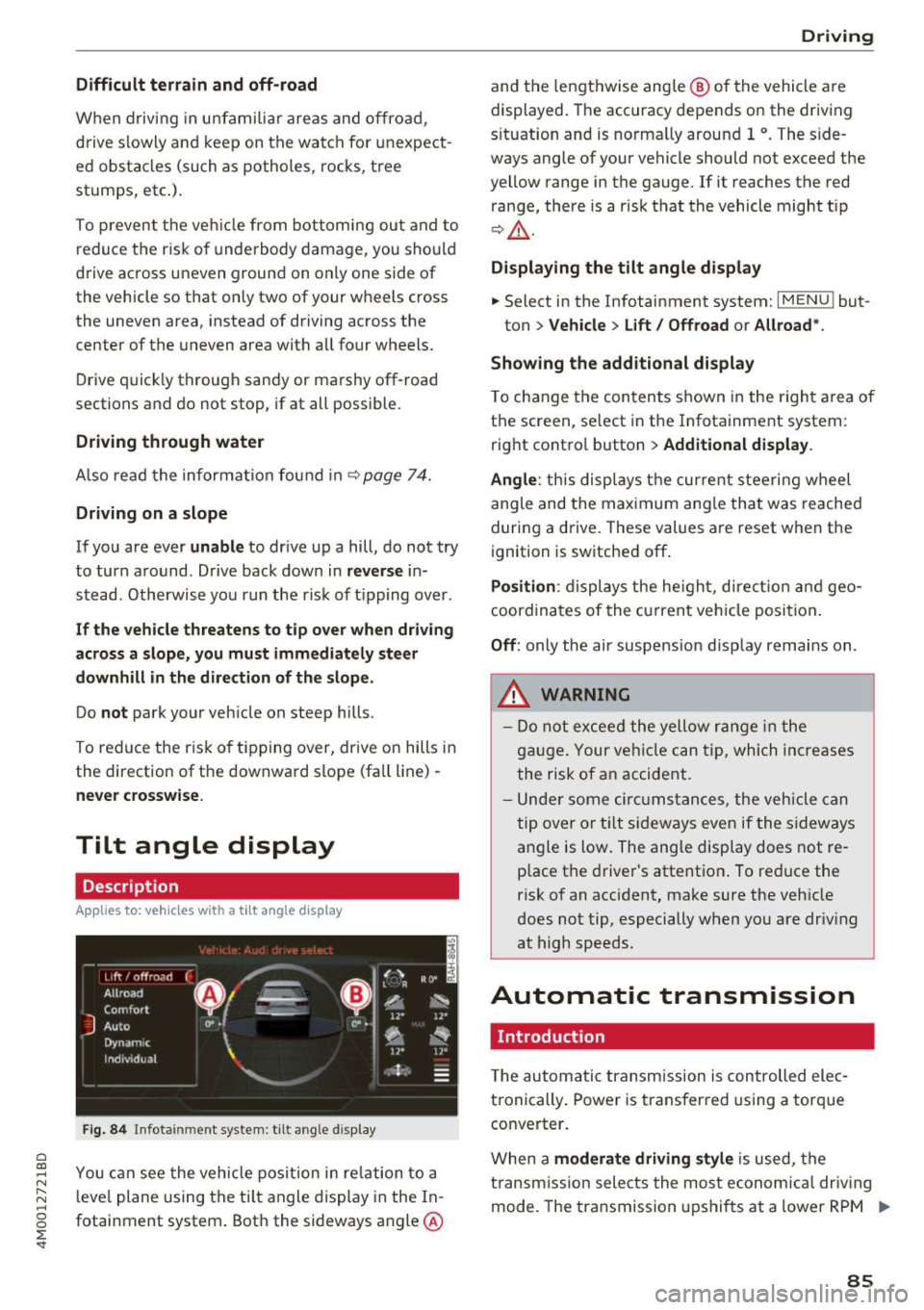
~ You can see the vehicle position in relation to a N
~ leve l plane using the tilt angle display in the In-~
g fotainment system . Both the sideways angle @
:E '
and the lengthwise ang le @ of the vehicle are
displayed. The accuracy depends on the driving
s ituation and is norma lly around 1
°. The side
ways angle of your vehicle should not exceed the
yellow range in the gauge. If it reaches the red
range, there is a risk that the vehicle might tip
r=;,_& .
Displaying the tilt angle display
.. Select in the Infotainment system: I MENU ! but-
ton>
Vehicle > Lift/ Offroad or Allroad*.
Showing the additional display
To change the contents shown in the right area of
the screen, se lect in the Infotainment system:
right control button>
Additional display.
Angle :
this disp lays the current steering wheel
angle and the maximum angle that was reached
during a drive . These values are reset when the
ignition is switched off .
Position: displays the height, direct ion and geo
coordinates of the current vehicle posit ion.
Off : only the air suspension display remains on .
.&_ WARNING
- Do not exceed the yellow range in the
gauge. Your vehicle can tip, which increases
the risk of an accident.
- Under some circumstances , the vehicle can
tip over or tilt sideways even if the sideways
angle is low. The angle display does not re
p lace the driver's attention . To reduce the
risk of an accident, make sure the vehicle
does not tip, especially when you are driv ing
at high speeds.
Automatic transmission
Introduction
T he automatic transmission is controlled elec
tronically . Power is transferred using a torque
converter.
When a
moderate driving style is used, the
transmission selects the most economical driving
mode. The transmission upshifts at a lower RPM .,.
85
Page 91 of 398
a co ...... N r--. N ...... 0
0
:E '
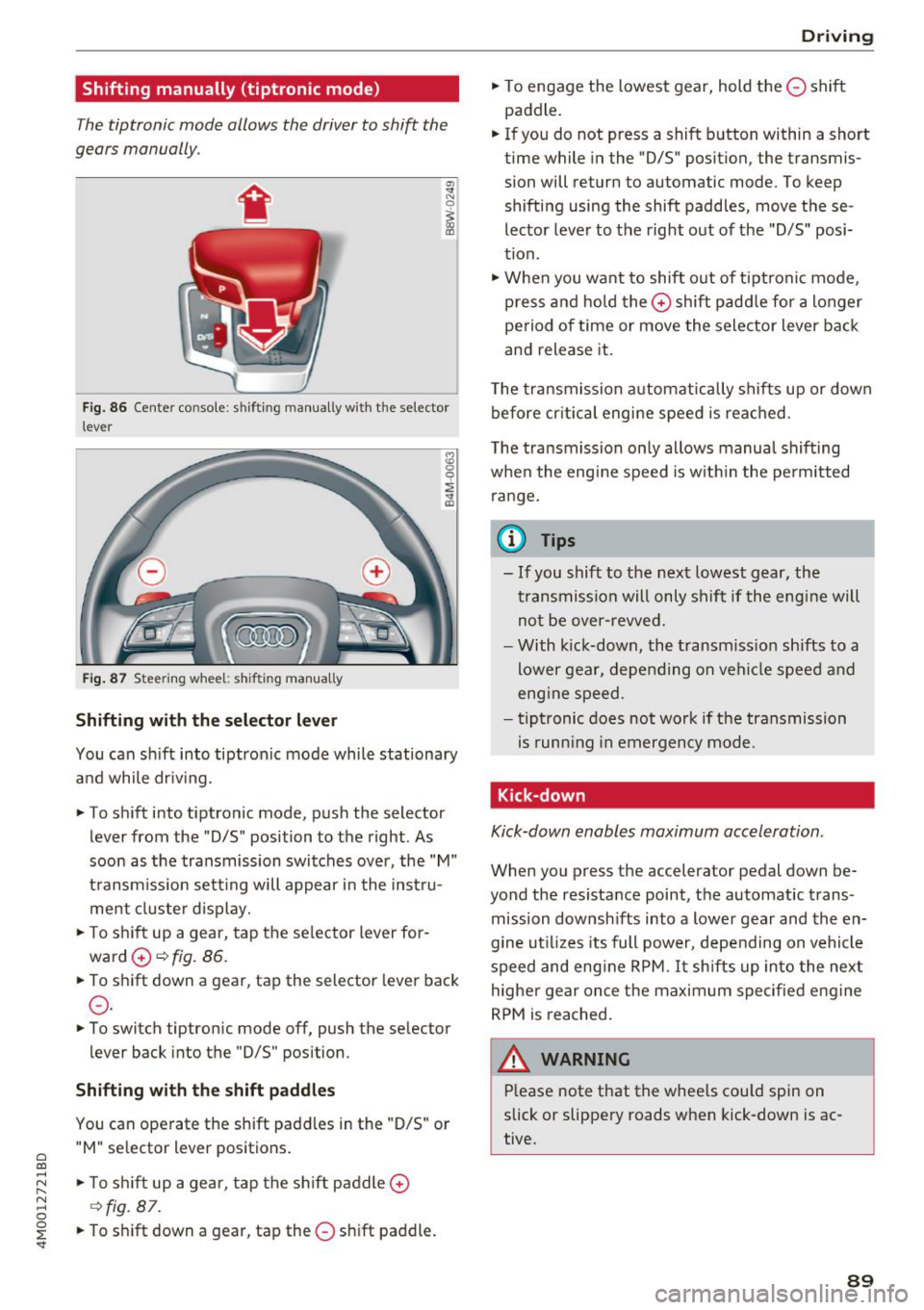
The tiptronic mode allows the driver to shift the
gears manually .
Fig. 86 Center console : sh ifti ng manually with the selector
l ever
Fig. 87 Steeri ng wheel: shifti ng manual ly
Shifting with th e selector leve r
You can shift into tiptronic mode while stationary
and while driv ing.
• To shift into tiptronic mode, push the selector
lever from the "D/S" position to the right . As
soon as the transmission switches over, the "M"
transm iss ion sett ing will appear i n the instru
ment cluster d isplay.
• To sh ift up a gear, tap the se lector lever for
ward
0 ~ fig. 86.
• To shift down a gear, tap the selector lever back
0 -
• To switch tiptron ic mode off, push the selector
lever back into the "D/S" pos ition.
Shifting with th e s hift paddle s
You can operate the shift padd les in the "D/S" or
" M " se lector lever positions.
• To s hift up a gear, tap the sh ift paddle
0
~ fig. 87 .
• To s hift down a gear, tap the 0 shift paddle.
D rivi ng
• To engage the lowest gear, hold the 0 shift
paddle.
• If you do not press a shift button within a short
time while in the "D/S" position, the transmis
sion will return to automatic mode. To keep
shifting using the shift paddles, move these
lector lever to the right out of the "D/S" posi
tion .
• When you want to shift out of tiptronic mode ,
press and hold the
0 shift padd le for a longer
period of time or move the selector lever back
and release it.
T he transmission automatically shifts up or down
before cr itica l engine speed is reached .
T he transmission on ly allows manua l shifting
when the eng ine speed is w ith in the perm itted
range.
(D Tips
- If you shift to the next lowest gear, the
transmission will only shif t if the engine will
not be over-revved.
- With kick-down, the transmission shifts to a
lower gear, depending on vehicle speed and
eng ine speed .
- tiptronic does not work if the transmission
is runn ing in emergency mode .
Kick-down
Kick-down enables maximum acceleration .
When you press the accelerator pedal down be
yond the resista nce point, the automatic trans
mission downsh ifts into a lower gear and the en
gine ut il iz es its full power, depending on vehicle
speed and eng ine RPM.
It sh ifts up into the next
highe r gear once the maximum specified eng ine
RPM is reached .
A WARNING ~
Please note that the whee ls cou ld spin on
slick or slippery roads when kick-down is ac
tive.
89
Page 93 of 398

-The parking lock was released using the emer
gency release
¢ page 91. Or
- The parking lock can no longer be engaged.
Drive to an authorized Audi dealer or author
ized Audi Service Facility immediately to have
the malfunction corrected .
[il Move selector lever to automatic position
There is a malfunction in the tiptronic mode . End
tiptron ic mode by pushing the selector lever to
the left into the "D/S" position.
Parking lock emergency release
The parking lock must be released with the
emergency release when driving through moun tains/maneuvering.
Fig. 88 Drive r's side footwell : releas ing th e parking lock
us ing the eme rgency re lease
The emergency release is located under the floor
mat on the driver 's side .
Releasing the parking lock using the
emergency release
"'To prevent the vehicle from rolling unintent ion
ally, set the parking brake(®)¢
page Bl or
press the brake pedal.
"' There are two slits on the cover. Position the
screwdriver from the vehicle tool kit in one of
the slits on the cover and pry the cover off.
"' Insert the socket wrench (from the vehicle tool
k it) into the opening
c:> fig . 88.
"'T urn the socket wrench all the way clockw ise @
and press it downward @unti l it locks into
place.
~ "'L eave the socket wrench inserted c:> .&_ . ...... N r--.
~ Resetting the parking lock
0
0
~ "'Press the brake pedal and start the engine .
Driving
"' Keep the brake pedal pressed and engage the
following selector lever positions one after the
other: "N" , "D" and back to "N".
"' Turn the engine off again.
"' Grasp the socket wrench with both hands and
pull it up and out carefully to remove
c:>(D .
"'Install the cover .
When the parking lock emergency release is
used, the
[il indicator light and the "N " selector
lever posit ion turn on in the instrument cluster.
The message
Danger of rolling away! P not pos
sible. Please apply parking brake
also appears.
_& WARNING
-Only activate the emergency release while
on a level surface or a slight slope.
- The parking lock may only be released using
the eme rgency release if the parking brake
is set . If it is not functioning, secure the ve
hicle from rolling using the brake pedal or
other suitable means, such as blocking a
front and a rear wheel. An unsecured vehicle
may roll away, which increases the risk of an
accident.
- To reduce the r isk of an accident, you must
not drive when the emergency release is ac
tivated .
@ Note
-Read and follow the important instructions
about tow ing
<=> page 371.
-The risk of damage increases if you do not
remove the socket wrench carefully when
resetting the parking lock.
91
Page 96 of 398
Trail er to wing
If you have to drive th rough diffic ult road condi
tions, you can raise the vehicle again after hitch
ing the trai ler or after adjust ing the tongue
weight .
{QJ Note
Applies to: vehicles with air suspension
-Changes in temperature or load can affect
the he ight of the vehicle.
- Set the a ir suspension to the standard vehi
cle heig ht, otherwise the applicab le tongue
weig ht no longer applies to your vehicle .
(D Tips
-Use chocks when parking on incl ines if the
trailer is loaded.
- We recommend also having the vehicle in spected between the inspection intervals if
you are towing a trai ler frequently.
- Avo id driving wit h a trailer du ring the vehi
cle break-i n period .
Driving with a trailer
Driving with a trailer requires extra caution.
Speed
Adhere to the legal speed l imi ts. Follow t he lega l
regulations specif ic to the country.
As the speed inc reases, the d riving stability of
the t railer dec reases . The refore you sho uld not
exceed t he max imum legal speed limit when
there are unfavorable road, weather and/or wind
conditions. This especially applies when driving
downhill.
You must a lways reduce yo ur speed as soon as
you not ice even the s lightest swinging motion of
the trailer . Never try to "straighten out" the trail
er by accelerating.
The weig ht dis trib ution is very poo r if t he ve hicle
is empty and the trailer is loaded. However if you
must drive under these circumstances, t hen drive
especia lly slowly.
94
Brak es
Brake in a time ly manner. Downs hift be fo re dr iv
i ng down hill so that the engine can assist with
braking ~&, .
When using a t railer w it h over run bra kes, fi rst
brake ge ntly t hen q uickl y. This red uces the r isk o f
jerking while braking if the trailer wheels lock up .
Engine coolant temperatur e
Pay attention specifically to the coolant tempera
ture display when there a re high outs ide temper
at ures , and whe n driving on long i nclines
~ page 11. Shift to a highe r gear in a t imely man
ner .
A WARNING
Constant braking causes the b rakes to over
h eat and substantially reduces bra king per
formance, increases b raking distance o r caus
es complete failure of the brake system.
-
Page 100 of 398

Ass is tance sy stem s
Operating
Applies to: vehicles with camera -based traffic sign recogni
tion
F ig . 92 Instrument clus te r: addi tiona l d isplay
Ac ces sing traffic sign recogn iti on
... Se lect: the first tab> T ra ffic si gns.
Setting a speed warning
You can set a warn ing th reshold down to 10 mph
(15 km/h). The traffic sign for the current detect
ed speed limit w ill blink in the disp lay if you ex
ceed the set thresho ld.
... Select in the Infotainment system:
IM ENU I but
ton >
V ehi cle> left contro l button > Driver a s·
s is tan ce
> S pe ed war ning > Tr affic sign ba sed
w arning .
Add itional display
If a view other than the traffic sign recognit ion is
selected in the instrument cluster disp lay, the
speed limit w ill be shown in another disp lay
~ fig. 92 . The cur rent applicable speed limit will
be shown there , if possib le with in the limits of
the system.
(D Tips
- An additional indicator appears in the head
up d isplay*.
- Your speed warning settings a re stored au
tomatically and ass igned to the remote con
tro l key in use .
Messages
Applies to: vehicles with camera-based traffic sign recogn i
tion
P!\i Traffi c sign recognition : curren tly unavaila
ble _ Camera view limit ed du e to su rrounding s
98
Function currentl y una va ilable. Camera view re
stricted due to surroun ding s
This message appears if the camera's v is ual fie ld
i s covered ~
page 97, fig. 91. The system will
switch itself o ff.
la Tr affic sign r ecog nition : currentl y limit ed .
Se e owner' s manua l
This message appears if there is a malfunct ion in
the nav igation system, for example . The speed
li mit d isplay is limited, wh ich inc reases the risk
of an incorrect d isp lay.
P!\i Traffic sign based speed warnin g: current ly
una vail able . Se e own er' s manual
There is no warning when the set threshold is ex
ceeded .
No traffic sign inf ormation available
There is no valid navigation data and do speed
li mits were detected. Or there is a recommended
speed but there is not a speed lim it (for examp le
driv ing on and off the expr essway) .
Malfun ction! S ee owner's manu al
The system cannot guarantee correct funct ion
and is switched off. See an autho rized Aud i dea l
er or autho rized Aud i Serv ice Faci lity for assis
tance.
Functi on not av ailable in this country
The vehicle is in a country where the function is
not availab le .
Lap timer
Introduction
Applies to: vehicles with lap t imer
You can measure and analyze lap times with the
lap timer in the display.
Opening the lap timer
... Open the first Vehicle tab (trip computer) using
the
l <1 1>I button on the multifunction steering
wheel.
... Sele ct on the m ultifunction steering wheel : lef t
cont rol b utton
> Lap time s. Ill-
Page 101 of 398
Cl a:, ...... N
" N ...... 0
0
::r '
.,. On t he mult if u nct ion s teer ing whee l, tur n the
l e ft thumbw hee l
0 ~ page 12 unt il t he desired
menu item is displayed in the instrument cl us
ter .
.,. Press the left thumbwhee l to confirm the selec
t ion.
A WARNING
Your focus should always be on driving your
veh icle safely . As the dr ive r, yo u have com
plete responsib ility for safety in traffic. Only
use t he f unctions s uch as the lap time r in s uch
a way tha t you alw ays ma int ain com plete con
tr ol ove r your vehicle in all tra ffic s itu ations.
(D Tips
You ca n ret rieve information from the t rip
computer while t he lap t ime r stopwatch i s
r u nning.
Lap times and timing
Applies to: vehicles with lap timer
Requirement: the lap t imer must be o pen
~ page 98 .
Timing laps
.,. To start tim ing manually, se lect Start lap 1 in
the menu .
-
.,. To start tim ing a utomat ica lly as soon as you
begin to drive, select
Drive off to start lap 1 or
Start by driving off in the men u .
.,. To measure the lap t ime, select
New lap in the
menu. T his starts timing the next lap at the
same t ime.
After completing a lap, the difference between
the last lap and the previous best lap time w ill be
ind icated with a"-" or" +".
Pausing timing and displaying a split time
.,. To insert a pa use m , se lect Pau se in t he menu.
.,. To resume timing, se lect
Re sume in the men u .
.,. To display a split time, se lect
Split time in the
men u. The split t ime
[fw] appears for approxi
mately 10 seconds in the instrument cluste r.
The timing of the current lap continues.
A ss istance systems
Resetting timing
.,. Using the mul tifun cti on steer ing whee l, sele ct
Re set time s in the menu.
(D Tips
- A m axim um of 99 lap t imes can be meas
ure d.
- If tim ing is pa used, you can continue i t later
even if yo u swi tc h t he ign ition o ff.
- Saved lap ti mes ca nnot be indiv id ua lly de
le ted from the tot al results.
- Th e saved lap t ime r va lues w ill remain after
sw itching the ign ition off.
Lap statistics
Applies to: vehicles with lap timer
Displaying lap statistics
You can display the numbe r of laps dr iven, the
fas test lap" +", the slowes t lap" -", and the aver
age t ime "0" in the instr ument cluster .
.,. On the multifunc tion steering w heel, select the
left contro l bu tton
> Lap stati stic s o r Sta tis
tics .
.,. Turn the thumbwheel down o r up to display the
individual lap times .
.,. To return to t he lap timing that was begun,
press the left thumbwheel.
Resetting lap statistics
.,. On the mul tif unc tion stee ring w heel, selec t:
the right control button
> Reset statistics.
(D Tips
The lap st atis tic s lis t the lap t imes fo r th e l ast
3 0 l aps . The fastest and slowes t lap time o ut
of up to 99 meas ured laps are a lso d isplayed.
Predictive efficiency
assist
Introduction
T he predict ive e fficiency assist he lps the driver to
drive with anticipation and therefore helps to
save fuel. The system accesses p redictive t rip da -
ta (including speed limits, inclines and the radius
Iii"
99
Page 106 of 398
Assistance systems
-When approaching stationary obstacles
such as stopped traffic, adaptive cruise con
trol will respond with limited function.
- Adaptive cruise control does not respond to
people, animals, or cross ing or oncoming
objects.
- The function of the radar sensors can be af
fected by reflective objects such as guard
rails, the entrance to a tunnel, heavy rain or
ice.
(D Note
The sensors can be displaced by impacts or
damage to the bumper, wheel housing and
underbody . Th is can impair the adaptive
cruise control. Have an authorized Audi dealer
or authorized Audi Service Facility check their
function.
@ Tips
For an explanation on conformity with the
FCC regulations in the United States and the
Industry Canada regulations, see
¢page 380.
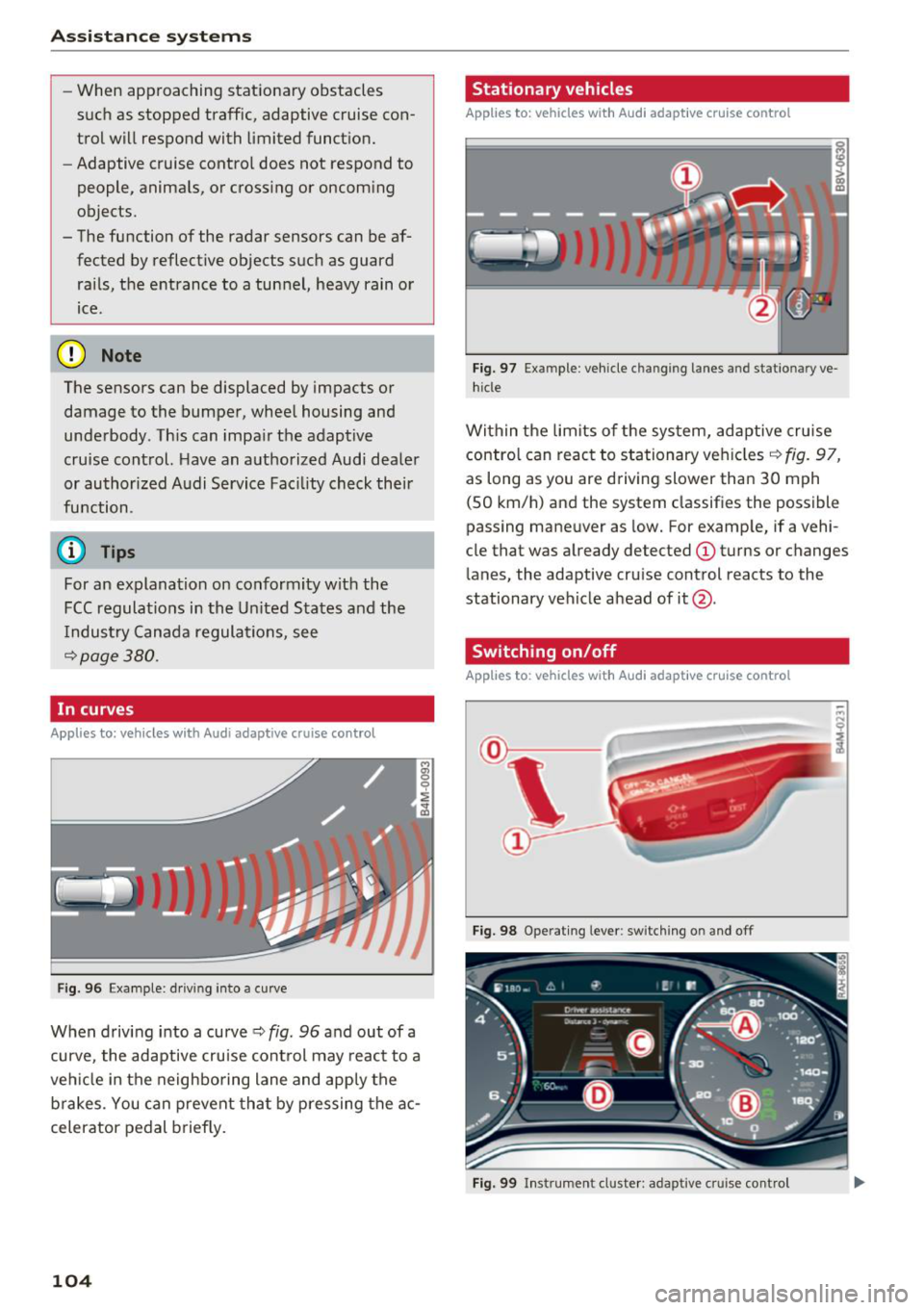
In curves
A pp lies to: ve hicles w ith Audi adaptive cruise co ntrol
Fig . 96 Exam ple: driving into a curve
When driving into a curve ¢ fig. 96 and out of a
curve, the adaptive cruise control may react to a
vehicle in the neighboring lane and apply the
brakes. You can prevent that by pressing the ac
celerator pedal briefly.
104
Stationary vehicles
App lies to : vehicles wit h Audi adap tive cruise control
))
Fig . 97 Exa mple : ve hicl e ch an gi ng la nes a nd statio nary ve
hicle
Within the limits of the system, adaptive cruise control can react to stationary vehicles ¢
fig. 97,
as long as you are driving slower than 30 mph
(SO km/h) and the system classifies the possible
passing maneuver as low. For example, if a vehi
cle that was already detected
(D turns or changes
lane s, the adaptive cruise control reacts to the
stationary vehicle ahead of it@ .
Switching on/off
App lies to: vehicles wit h Audi ada ptive c ru ise contro l
Fig. 98 Operating lever: switching on and off
Fig. 99 In strumen t cluster: adapt ive cru ise control