ECO mode AUDI Q7 2018 Owner´s Manual
[x] Cancel search | Manufacturer: AUDI, Model Year: 2018, Model line: Q7, Model: AUDI Q7 2018Pages: 398, PDF Size: 185.58 MB
Page 254 of 398
Drivin g saf ety
Driving safety
Basics
Safe driving habits
Please remember -safety first!
The individua l safety features of your vehicle can
work together as a system to help protect you
and your passengers in a wide range of accidents.
These features cannot work as a system if they
are not always correctly adjusted and correctly
used .
This chapter contains important informat ion,
tips, instruct ions and warn ings that you need to
read and observe for your own safety, the safety
of you r passengers and others . We have summar
ized here w hat you need to know about safety
be lts, a irbags, child restra ints as well as child
safety. Yo ur safety is for us priority number 1. Al
ways observe the information and warnings in
this section -for your own safety as we ll as that
of your passengers.
The information in this section applies to all
model versions of your vehicle . Some of the fea
tures described in this sections may be standard
equipment on some models, or may be optional
equ ipment on others. If you are not sure, ask
your author ized Audi dealer.
A WARNING
- Always make sure that you follow the in
structions and heed the WARNINGS in th is
manual.
It is in your inte rest and in the in
te rest of your passengers .
-
-Always keep all of the Owner's L iterature
manuals in yo ur Audi when you lend o r sell
yo ur vehicle so that this import ant informa
t ion w ill alw ays be availab le to the dr iver
and passengers.
- Always keep the Owner 's Lite ra ture han dy
so that you can find it easi ly if yo u have
questions .
252
Important things to do before driving
Safety is everybody's job! Vehicle and occupant
safety always depends on the informed and care
ful driver.
For your safety and the safety of your passen
gers,
bef ore dri ving alw ays:
.. Make sure that a ll lights and signals are operat
ing correctly .
.. Make sure that the tire pressure is correct.
.. Make sure that all windows are clean and afford
good vis ibility to the outs ide .
.. Sec ure all luggage and othe r items ca refully
¢ page
257 .
.. Make sure tha t noth ing ca n interfere wi th the
peda ls .
.. Adjust front seat, head restraint and mirrors
correctly for your height.
.. Instruct passengers to adjust the head re
straints according to their he ight.
.. Make sure to use the right child restraint cor
rectly to protect children¢ page 291, Child
safety .
• Sit proper ly in yo ur seat a nd make sure t hat
your passenge rs do the same ¢ page 54, Front
seats .
.. Fasten your sa fety belt and wear it p roperly . Al
so instruct your passengers to fasten their safe
ty be lts properly ¢ page 261 .
What impairs driving safety?
Safe driving is directly related to the condition of
the vehicle, the driver as well as the driver's abili
ty to concentrate on the rood without being dis
tracted.
The driver is responsib le for the safety of the ve
hicle and a ll of its occupants. If your ability to
drive is impa ired, safety risks for everybody in the
vehicle increase and you a lso become a hazard to
everyone else on the road ¢
_&.. Therefore:
.. Do not let yourse lf be distracted by passenge rs
or by using a cellular telephone .
.. NEVER drive when your driving ability is im
paired (by med ications, alcohol, drugs, etc .) .
.. Observe all traffic laws, rules of the road and
speed lim its and plain common sense . .,.
Page 286 of 398
Airbag syste m
Make sure that the PASSENGER AIR B AG
OFF ,;;
light comes on and stays on all the
t ime whenever the ignition is switched on.
A WARNING
- If the PASS ENGER AIR B AG O FF 1'i; light
does not go out when an adult is sitting on
the front passenger seat after tak ing the
steps described above, make sure the adult
is p roperly seated and restrained at one of
the rear seating positions.
- Have the airbag system inspected by your
authorized Aud i dealer before transporting
anyone on the front passenger seat.
(D Tips
If the capacitive passenger detection system
determines that the front passenger seat is
empty, the frontal airbag on the passenge r
side w ill be tu rned off, and the
PA SSENGER
AIR BAG OFF
1'i ; light will stay on.
-
Repair, care and disposal of the airbags
Parts of the airbag system are installed at many
different places on your Audi. Installing, remov
ing, servic ing or repa iring a part in an area of the
veh icle can damage a part of an airbag system
and prevent that system from working properly
in a collision .
There are some important things you have to
know to make sure that the effectiveness of the
system w ill not be impaired and that discarded
components do not cause injury or pollute the
env ironment.
A WARNING
Improper care, serv icing and repai r proce
dures can increase the r is k of personal injury
and death by preventing an airbag from de
ploying when needed or dep loying an airbag
unexpectedly:
-
- Never cover, obstruct, or change the steer
ing wheel horn pad or airbag cover or the in
strument pane l or modify them in any way.
284
- Never attach any objects such as cupholders
or telephone mountings to the surfaces cov
ering the a irbag un its.
- For cleaning the horn pad or instrument
panel, use only a soft, dry cloth or one mois
tened w ith plain water. Solvents or cleaners
could damage the airbag cover or change
the st iffness or strength of the material so
that the airbag cannot deploy and protect
properly.
- Never repair, adjust, or change any parts of
the airbag system.
- All work on the steering wheel, instrument
panel, front seats or e lectr ica l system ( in
cluding the installation of a udio eq uipment,
cellular telephones and CB radios, etc.) m ust be performed by a qualified techn ician
who has the training and specia l equipment
necessary.
- For any work on the airbag system, we strong ly recommend that you see your au
thorized Audi dealer or qualified workshop.
- Never modify the front b umper or parts of
the vehicle body.
- Always make sure that the side a irbag can
inflate without interference:
- Never install seat covers or replacement
upholstery over the front seatbacks that
have not been specifically approved by
A udi.
- Never use additional seat c ushions that
cover the areas where the side airbags in
flate.
- Damage to the orig inal seat cove rs or to
the seam in the area of the s ide airbag
module mus t always be repaired immedi
ate ly by an autho rized Aud i dealer .
- The a irbag sys tem can deploy on ly once. Af
ter an airbag has been deployed, it m ust be
replaced with new replacement parts de
signed and approved especia lly for your
Audi model version . Replacement of com
plete airbag systems or airbag components
must be performed by qua lified workshops
only . Make sure that any airbag service ac
tion is entered in your Audi Warranty
&
Ma intenance booklet under AIRBAG RE-
PLAC EMENT RECORD.
Ii)-
Page 296 of 398
Child sa fety
one o f th e rear seating positions . If in exception
a l circumstances you must use it on the front
passenger seat, carefully read all of the informa
tion on child safety and Advanced Airbags and
heed all of the app licab le WARNINGS. Make cer
tain that the child and child restraint are correct
ly recogn ized by the capacitive passenger detec
tion system in the front passenge r seat, that the
front passenger airbag is turned off, and t hat the
a ir bag stat us is a lways cor rectly signaled by the
PASSENGER AIR BA G OFF ~; light.
Many types and models of c hild rest raints have
been ava ilable ove r th e yea rs, new mode ls are in
troduced regularly incorporat ing new and im
p roved designs and o lder mode ls are taken o ut of
p roduction . Chi ld restraints are not standardized .
Chi ld restraints of the same type typically have
d ifferent weights and sizes and d ifferent "foot
prints", the s ize and shape of the bottom of the
chi ld restraint that s its on the seat, when they
are installed on a vehicle seat . These differences
make it virtually impossible to ce rtify compliance
with the requ irements fo r advanced airbags with
each and eve ry c hild rest raint that has ever been
sold in the pas t or will be sold ove r the co urse of
the useful life of your vehicle.
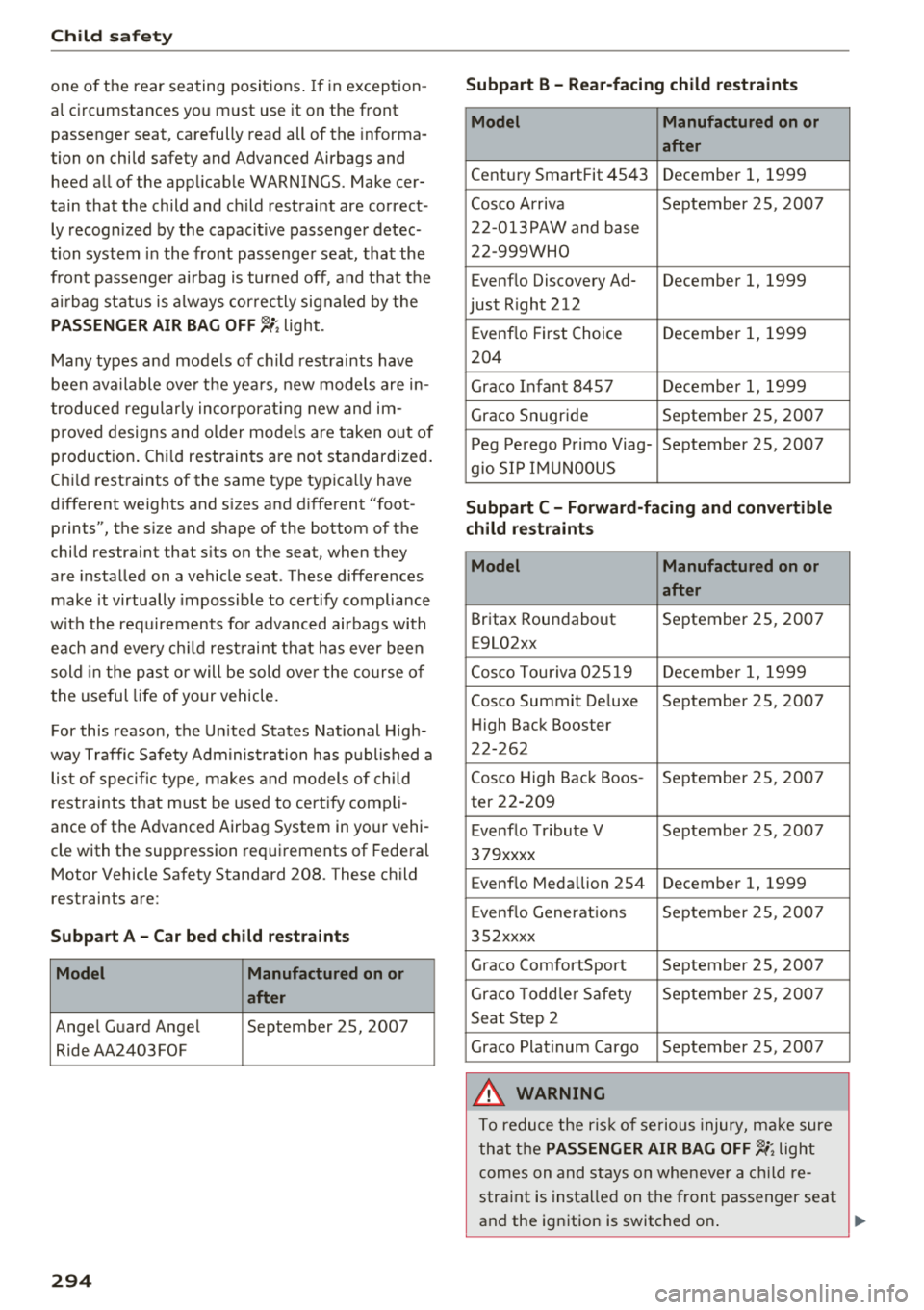
For this reason, the Un ited States Nat ional High
way Traffic Safety Adm inist ration has p ublished a
lis t of specific type, makes and models of child
rest raints that must be used to cert ify comp li
ance of the Advanced Airbag System in your vehi
cle with th e suppression requirements of Federal
Motor Vehicle Safety Standard 208. These child
restraints are:
Subpart A -Car bed child restraint s
Model Manufactured on or
after
Angel Guard Ange l September 25, 2007
Ride AA2403FOF
294
Subpart B -Rear-facing child rest raints
Model Manufactured on or
after
Century SmartFit 4543 December 1, 1999
Cosco Arriva September 25, 2007
22-013PAW and base
22 -999WHO
Evenflo Discovery Ad- December
1, 1999
just R ight 212
E venflo First Choice December
1, 1999
204
Graco Infant 8457 December 1, 1999
Graco Snugride September 25, 2007
P eg Perego P rimo Viag- September 25, 2007
g io SI P IMU NOOUS
Subpart C -Forward-facing and convertible
child restraints
Model Manufactured on or
after
Britax Roundabout September 25, 2007
E9L02xx
Cosco Tou riva 025 19 December 1, 1999
Cosco Summit Deluxe September 25, 2007
H igh Back Booster
22-262
Cosco High Back Boos -September 25, 2007
ter 22-209
E venflo Tribute V September 25, 2007
379xxxx
Evenflo Medallion 254 December
1, 1999
E venflo Generat ions September 25, 200 7
35 2xxxx
Graco ComfortSport September 25, 2007
Graco Todd le r Safety September 25, 200 7
Seat Step 2
Graco Plat inum Cargo September 25, 2007
A WARNING
To reduce the ris k of se rious injury, ma ke sure
that t he
PASSENGER AIR BAG OFF~; light
comes on and stays on whenever a c hild re
straint is insta lled on the front passenger seat
and the ignition is switched on .
Page 339 of 398
0 a, .... N
" N .... 0
0
l: ..
by the tire manufacturer. This in
formation is used to contact con sumers if a tire defect requires a
recall.
Vehicle capacity weight
means the rated cargo and lug
gage load plus 150 lbs . (68 kilo
grams) times the vehicle's desig
nated seating capacity.
Vehicle ma ximum load on the
tire
means that load on an indiv idual
tire that is determined by distrib
uting to each axle its share of the
maximum loaded vehicle weight
and dividing by two.
Vehicle normal load on the tire
means that load on an indiv idual
tire that is determined by distrib uting to each axle its share of the
curb weight, accessory weight,
and normal occupant weight (dis
tributed in accordance with¢
ta
ble on page 342)
and dividing by
two .
Occupant loading and distr i
bution for vehicle normal load
for various designated seating
capacities
Refer to the tire inflation pres
s u re label
¢page 340, fig . 272
Wheels
for the n umber of seating posi
tions . Refer to the table ¢
table
on page 34 2
for the number of
people tha t correspond to the ve
hicle normal load.
New tires or wheels
Audi recommends having all work
on tires o r wheels performed by
an authorized Audi dealer or au
thorized Audi Service Facility.
These facilities have the proper
knowle dge and are eq uipped with
the requ ired too ls and replace
ment parts.
.,. New tires do not yet have the
optimum g ripping properties .
Drive carefully and at mode rate
speeds for the first 350 miles
(500 km) with new tires.
.,. Only use tires with the same de
s ign , size (rolling circumfer
ence), and as close to the same
tread pattern as possible on all
four whee ls .
.,. Do not replace tires indiv idually .
At least replace both tires on the
same ax le at the same time .
.,. Audi recommends that you use
A udi Original Tires . If you would
like to use different tires , please
note that the tires may perform ...
337
Page 344 of 398
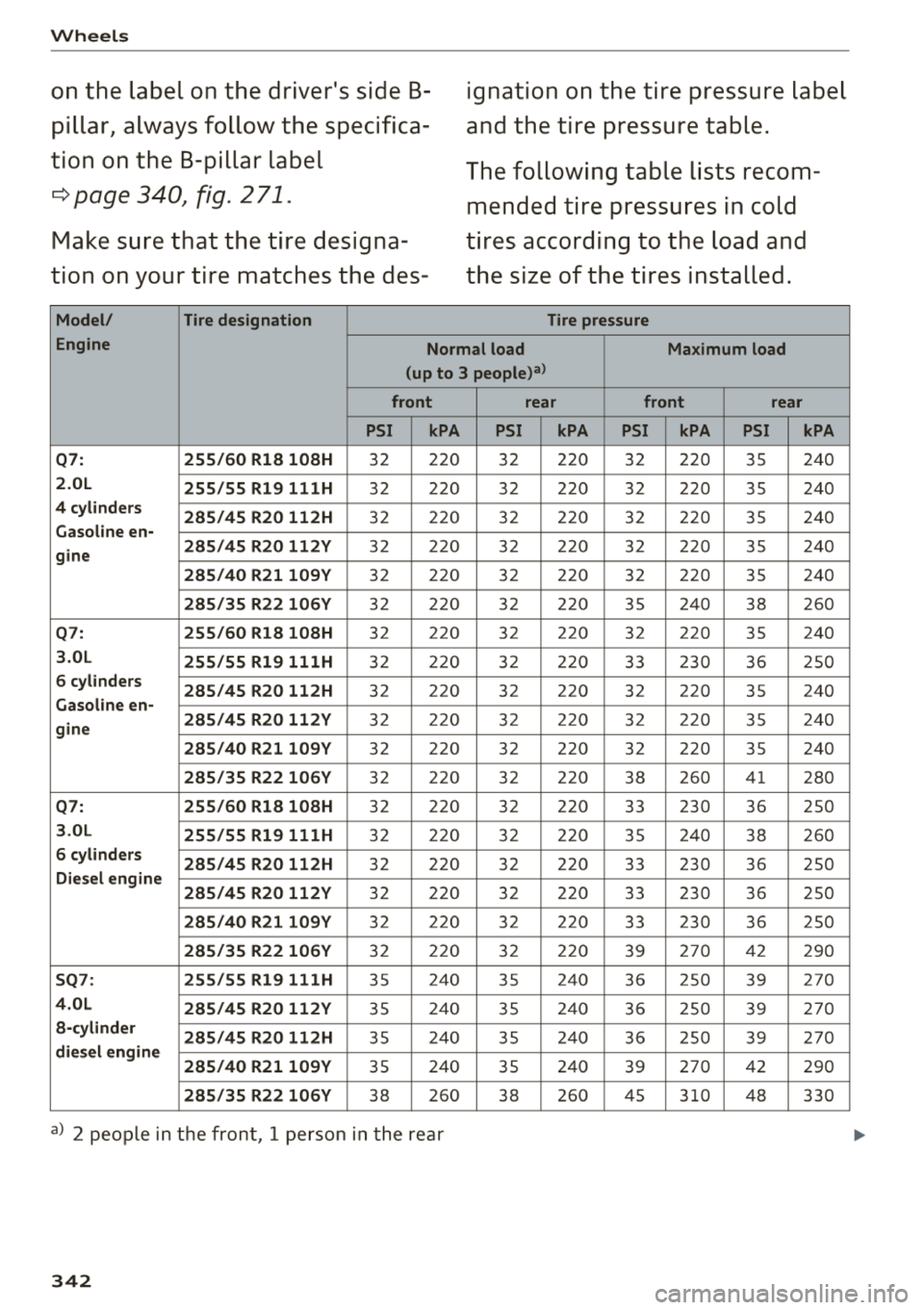
Wheels
on the label on the driver's side B
pillar, always follow the specifica
tion on the B-pillar label
r::=> page 340, fig. 271.
Make sure that the tire designa
tion on your tire matches the des-
Model/ Tire designation
ignation on the tire pressure label
and the tire pressure table.
The following table lists recom mended tire pressures in cold
tires according to the load and
the size of the tires installed.
Tire pressure
Engine Normal load Maximum load
(up to 3 people)a)
front rear front rear
PSI kPA PSI kPA PSI kPA PSI kPA
Q7:
255/60 R18 108H 32 220 32 220 32 220 35 240
2.0L 255/55 R19 111H 32 220 32 220 32 220 35 240
4 cylinders
285/45 R20 112H 32 220 32 220 32 220 35 240
Gasoline en-
gine 285/45 R20 112V
32 220 32 220 32 220 35 240
285/40 R21109Y 32 220 32 220 32 220 35 240
285/35 R22 106V 32 220 3
2 220 35 240 38 260
Q7: 255/60 R18 108H 32 22 0 32 22 0 32 22 0 35 2
40
3.0L 255/55 R19 111H 32 220 32 220 33 230 36 250
6 cylinders
285/45 R20 112H 32 22 0 32 22 0 32 22 0 35 2
40
Gasoline en-
gine 285/45 R20 112V
32 220 32 220 32 220 35 240
285/40
R21109Y 32 220 32 220 3 2 220 35 240
285/35 R22 106V 32 220 32 220 38 260 41 280
Q7: 255/60 R18 108H 32 2
20 32 220 33 230 3 6 250
3.0L
255/55 R19 111H 32 220 32 220 35 240 38 260
6 cylinders
285/45 R20 112H 32 220 32 220 33 230 36 250
Diesel engine
285/45 R20 112V
32 220 32 220 33 230 36 250
285/40 R21109Y 32 22 0 32 22 0
33 2
30
36 2
50
285/35 R22 106V 32 220 32 220 39 270 42
290
SQ7: 255/55 R19 111H 35 2
4 0
35 24
0
36 25
0
39 27
0
4.0L
285/45 R20 112V 35 240 35 240
36 250 39 270
a-cylinder
285/45 R20 112H 35 240
35 240
36 250
39 270
diesel engine
285/40 R21109Y
35 240 35 240
39 270 42
290
285/35 R22 106V 38 2 60 38 260 45 310 48 330
a) 2 peop le in the front , 1 person in the rear
342
Page 348 of 398
Wheels
tires cause less road noise, tire wear and fuel
consumption.
(D Tips
You can also use all season tires instead of
winter tires. Please note that in some coun
tries where winter tires are required, only
winter tires with the
& symbol may be per
mitted.
Snow chains
Snow chains not only improve the driving in win
ter road conditions, but also the braking .
~ Only install snow chains on the front wheels.
~ Check and correct the seating of the snow
chains after driving a few feet, if necessary . Fol
low the instructions from the manufacturer.
~ Note the maximum speed of 30 mph (SO km/
h). Note the local regulations.
Use of snow chains is only permitted with certain
rim/tire combinations due to technical reasons.
Check with an authorized Audi dealer or author
ized Audi Service Facility to see if you may use
snow chains.
Use
fine-mesh snow chains . They must not add
more than 0 .53 in (13.5 mm) in height, including
the chain lock.
You must remove the snow chains on roads with
out snow. Otherwise, you could impair driving
ability and damage the tires.
.&_ WARNING
Using incorrect snow chains or installing snow
chains incorrectly can result in loss of vehicle
control, which increases the risk of an acci
dent.
(LlJ) Note
- Snow chains can damage the rims/wheel
covers* if the chains come into direct con
tact with them. Remove the wheel covers*
first. Use coated snow chains.
- Do not install and use snow chains if there is
a malfunction in the air suspension*, be
cause the vehicle height will be
very low. If
346
you drive with snow chains anyway, the
wheel housings and other vehicle compo nents can be severely damaged.
(D Tips
When using snow chains, it may be useful to
switch the offroad mode on
r=> page 143.
Low-profile tires
Applies to: vehicles with low-profile tires
Compared to other tire/rim combinations, low
profile tires offer a wider tread surface and a
larger rim diameter with shorter tire sidewalls.
This results in an agile driving style. However, it
may reduce the level of comfort and increase
road noise when driving on roads in poor condi
tion.
Low -profile tires can become damaged more
quickly than standard tires when driving
over
large bumps, potholes, manhole covers, and
curbs . Therefore, it is particularly important to
maintain the correct tire pressure
r=.> page 340.
To reduce the risk of damage to the tires and
rims, drive
very carefully on poor roads.
Check your wheels regularly every 2,000 mi
(3,000 km) for damage . For example, check for
bulges/cracks on the tires or deformations/
cracks on the rims.
After a heavy impact or damage, have the tires
and rims inspected or replaced immediately by
an authorized Audi dealer or authorized Audi
Service Facility.
Low-profile tires can wear out faster than stand
ard tires .
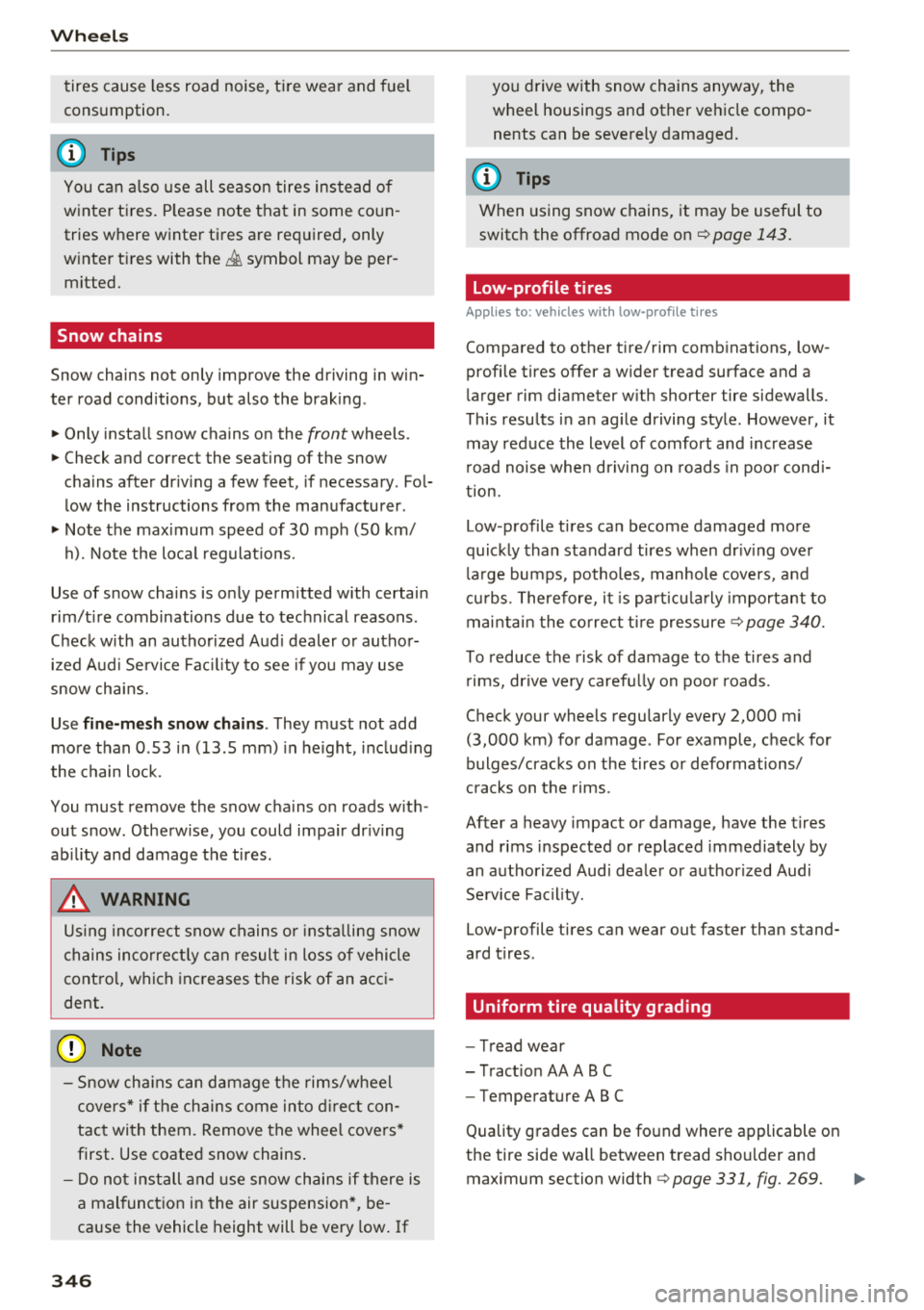
Uniform tire quality grading
- Tread wear
- Traction AA ABC
- Temperature ABC
Quality grades can be found where applicable on
the tire side wall between tread shoulder and maximum section width
r=.> page 331, fig. 269.
Page 361 of 398
Cl a:, ...... N
" N ,-1 0
0
::r '
reached after inflating for 6 minutes, then
the tire is too severely damaged. Do not
continue driving .
- If the t ire cannot be repaired with the tire
sealant, see an authorized Audi dealer or au
thorized Aud i Serv ice Facility for ass istance .
(D Tips
Do not operate the compressor for more than
six m inutes continuously, or it can overheat.
Once the compressor has cooled, you ca n con
tinue to use it .
Completing
"'Adhere the sticker that says "max . SO mph
(max. 80 km/h)" that is p rovided w it h the t ire
mobility kit within the dr ive r's fie ld of vision.
"' Stop the vehicle afte r driving for about 10 m i
nutes and check the tire pressure .
"' If the tire pressure is lower than 19 psi ( 130
kPA), then the tire is too severely damaged. Do
not cont inue driving.
A WARNING
Pay attent ion to the following after repair ing
the t ire :
- Do not drive faster than SO mph (80 km/h).
- Avoid hard acceleration, brak ing sharply,
and fast cornering.
- The vehicle may become more difficu lt to
contro l.
- If the tire is too severely damaged, see an
authorized Audi dealer or authorized Audi
Service Facility for assistance.
@ For the sake of the environment
You can give the used tire sealant bottle to an
authorized Audi dealer or authorized Audi
Service Facility for disposal.
(D Tips
Remember to obtain a new bottle of sea lant
from an authorized Audi dea ler or authorized
Audi Service Facility after repairing a tire.
Em ergenc y ass is tanc e
Replacing a wheel
Preparation
You must complete the preparation before
changing a tire .
"'Read and follow the impor tant safe ty precau-
tions
¢ page 357.
"'Set the park ing brake .
"' Select the "P" selector lever position .
"' When towing a tra iler : disconnect the trailer
from you r vehicle.
"' Lay out t he vehicle too l kit ¢
page 357 and the
spare tire.
"' Switch on wheel change mode* in the Infotain
ment syst em:
!MENUI button> V ehicle > left
control button >
S erv ic e & ch ecks > Air s uspen
s io n: w heel chang e.
"'Switch the ignit ion off.
The vehicle jack mod e* switches off automatica l
ly at speeds above 6 mph ( 10 km/h).
A WARNING "---
When us ing the ve hicle jack" on a road with a
steep hill or offroad, you must take extra pre
cautions to prevent the vehicle from rolling .
Use su itable objects to block the front and
back of t he wheel t hat is diagonal from the
whee l with the flat t ire.
A WARNING
You o r yo ur passenge rs could be injured while
changing a whee l if you do no t follow these
safety precautions :
- I f yo u have a flat tire, move a safe dis tance
off the road. Turn off the eng ine, turn the
emergency flashers on and use other warn
ing devices to a lert other motorists.
- Make sure that passengers wait in a safe place away from the vehicle and well away
from the road and traff ic.
- To he lp prevent the vehicle from moving
suddenly and possib ly slipping off the jack*,
a lways f ully set the park ing brake and block
the front and back of the wheel diagonally
opposite the wheel being changed. When
one front wheel is lifted off the ground,
~
359
Page 386 of 398
Index
Contacts . . . . . . . . . . . . . . . . . . . . . . . . . . . . 183
Additional directory . . . . . . . . . . . . . . . . . . 247
Importing/exporting . . . . . . . . . . . . . . . . . 184
Memory capacity . . . . . . . . . . . . . . . . . . . . 185
Storing as destination . . . . . . . . . . . . . . . . 211
Control buttons (operating the MMI) . . . . . 152
Control knob with joystick function (MMI op
eration) . . . . . . . . . . . . . . . . . . . . . . . . . . . . . 155
Convenience key Switching the ignition on . . . . . . . . . . . . . . 77
Unlocking/locking . . . . . . . . . . . . . . . . . . . . 32
Convenience opening/closing . . . . . . . . . . . . 39
Convertible child safety seats . . . . . . . . . . . 299
Convertible locking retractor
Activating . . . . . . . . . . . . . . . . . . . . . . . . . . 304
Deactivating . . . . . . . . . . . . . . . . . . . . . . . . 305
Using to secure a child safety seat . . . . . . 304
Cooled glove compartment . . . . . . . . . . . . . . 61
Cooling mode (automatic climate
control) ........................ 67, 70, 71
Cooling system Adding coolant . . . . . . . . . . . . . . . . . . . . . . 325
Coolant . . . . . . . . . . . . . . . . . . . . . . . . . . . . 324
Coolant level checking . . . . . . . . . . . . . . . . 325
Coolant temperature indicator . . . . . . . . . . 11
Crosshairs . . . . . . . . . . . . . . . . . . . . . . . . . . . 205
Cruise control system . . . . . . . . . . . . . . . . . . . 95
Cup holders . . . . . . . . . . . . . . . . . . . . . . . . . . . 61
Current consumption 16
D
Data connection . . . . . . . . . . . . . . . . . . . . . . 194
Data protection . . . . . . . . . . . . . . . . . . . . . . . 195
Data recorder . . . . . . . . . . . . . . . . . . . . . . . . 14 7
Date . . . . . . . . . . . . . . . . . . . . . . . . . . . . . 16, 245
Date display . . . . . . . . . . . . . . . . . . . . . . . . . 245
Daytime running lights . . . . . . . . . . . . . . . . . 43
Declaration of compliance . . . . . . . . . . . . . . 380
DEF
refer to Ad Blue . . . . . . . . . . . . . . . . . . . . . . 314
Defrosting (windows) . . . . . . . . . . . . . . . . 68, 71
DEF (instrument cluster) . . . . . . . . . . . . . . . . 12
Demo mode
refer to Presentation mode . . . . . . . . . . . . 21 1
Destination on the map . . . . . . . . . . . . . . . . 205
Determining correct load limit 344
384
Diesel
Diesel particulate filter
Diesel Exhaust Fluid (DEF) 317
refertoAdBlue ... .. .. ............. .. 314
Diesel fuel . . . . . . . . . . . . . . . . . . . . . . . . . . . 311
Digital compass . . . . . . . . . . . . . . . . . . . . . . . 52
Digital Rights Management . . . . . . . . . . . . . 225
Dimensions . . . . . . . . . . . . . . . . . . . . . . . . . . 375
Dimming the exterior mirrors . . . . . . . . . . . . 48
Dimming the rearview mirror . . . . . . . . . . . . 48
Directory
refer to Contacts . . . . . . . . . . . . . . . . . . . . 183
Display . . . . . . . . . . . . . . . . . . . . . . . . . . . . . . 12
Cleaning . . . . . . . . . . . . . . . . . . . . . . . . . . . 353
Infotainment system display . . . . . . 150, 246
Multifunction steering wheel . . . . . . . . . . . 12
Versions (MMI) . . . . . . . . . . . . . . . . . . . . . . 150
Distance . . . . . . . . . . . . . . . . . . . . . . . . . . . . . 16
Doors Closing aid . . . . . . . . . . . . . . . . . . . . . . . . . . 29
Mechanically locking . . . . . . . . . . . . . . . . . . 34
Driver information system
Changing views . . . . . . . . . . . . . . . . . . . . . . 12
Energy consumers . . . . . . . . . . . . . . . . . . . . 16
On-board computer . . . . . . . . . . . . . . . . . . . 16
Outside temperature display . . . . . . . . . . . . 10
Service interval display . . . . . . . . . . . . . . . 328
V iew . . . . . . . . . . . . . . . . . . . . . . . . . . . . . . . 14
Driver seat
refer to Seating position 253
Drives
refer to Media . . . . . . . . . . . . . . . . . . 225, 234
Drive select
refer to Audi drive select . . . . . . . . . . . . . . 128
Driving economically . . . . . . . . . . . . . . . . . . . 74
Driving offroad . . . . . . . . . . . . . . . . . . . . . . . . 83
Driving on hills . . . . . . . . . . . . . . . . . . . . . . . . 84
Driving safely . . . . . . . . . . . . . . . . . . . . . . . . 252
Driving through water . . . . . . . . . . . . . . . . . . 74
Driving time . . . . . . . . . . . . . . . . . . . . . . . . . . 16
DVD drive (media drives) . . . . . . . . . . . . . . . 226
Dynamic volume
refer to System volume . . . . . . . . . . . . . . . 250
E
E-mail
181
Page 387 of 398
Cl a:, ...... N
" N ...... 0
0
::r '
Economical route . . . . . . . . . . . . . . . . . . . . . 210
E DS . . . . . . . . . . . . . . . . . . . . . . . . . . . . . . . . 142
E lectromechanical parking brake . . . . . . . . . 81
Electromechanical steering . . . . . . . . . . . . . 146
Electronic immobilizer . . . . . . . . . . . . . . . . . . 30
E lectronic stab ilization control
refer to ESC . . . . . . . . . . . . . . . . . . . . 142 , 143
Emergency assistance . . . . . . . . . . . . . . . . . 357
Emergency braking function . . . . . . . . . . . . . 82
Emergency call function
Aud i connect emergency cal l and serv ice . 201
Emergency flashers . . . . . . . . . . . . . . . . . . . . 45
Emergency operation
Fu el fi ller door . . . . . . . . . . . . . . . . . . . . . . 314
E mergency starting . . . . . . . . . . . . . . . . . . . 369
Emissions control system . . . . . . . . . . . . . . 317
Energy management . . . . . . . . . . . . . . . . . . 147
Engine Coolant . . . . . . . . . . . . . . . . . . . . . . . . . . . . 324
Start/Stop system . . . . . . . . . . . . . . . . . . . . 79
Starting/stopping . . . . . . . . . . . . . . . . . . . . 77
Starting with jumper cab les . . . . . . . . . . . 369
Engine compartment
Opening/closing the hood . . . . . . . . . . . . . 320
Overview. .. .. ............. .. .. .. .. . 321
Safety precautions . . . . . . . . . . . . . . . . . . . 319
Engine oil Adding . . . . . . . . . . . . . . . . . . . . . . . . . . . . 321
Changing . . . . . . . . . . . . . . . . . . . . . . . . . . 323
Checking oi l level . . . . . . . . . . . . . . . . . . . . 321
Consumption . . . . . . . . . . . . . . . . . . . . . . . 321
Temperature display . . . . . . . . . . . . . . . . . . 17
Engine sound . . . . . . . . . . . . . . . . . . . . . . . . 128
Engine Start/Stop mode
refer to Start/Stop system . . . . . . . . . . 79, 81
E ng ine stop
refer to Sta rt/Stop system 79,81
Enhanced view . . . . . . . . . . . . . . . . . . . . . . . . 14
Entering characters/numbers (speller) . . . . 157
E nter ing letters (speller) . . . . . . . . . . . . . . . 157
Entertainment sliding menu . . . . . . . . . . . . 155
Entry/exit lighting . . . . . . . . . . . . . . . . . . . . . 45
Entry assistance
Rear seats . . . . . . . . . . . . . . . . . . . . . . . . . . . 56
Index
Environment
Proper disposa l of drained engine oil 323
Unleaded gasoline . . . . . . . . . . . . . . . . . . . 310
ESC . . . . . . . . . . . . . . . . . . . . . . . . . . . . . . . . 142
Hi ll descent assist . . . . . . . . . . . . . . . . . . . 144
Offroad mode . . . . . . . . . . . . . . . . . . . . . . . 143
Evasive steering support . . . . . . . . . . . . . . . 113
Event Data Recorder ( EDR) . . . . . . . . . . . . . 14 7
Exterior lighting . . . . . . . . . . . . . . . . . . . . . . . 43
Exterior mirrors . . . . . . . . . . . . . . . . . . . . . . . 4 7
Externa l voice operation . . . . . . . . . . . . . . . . 172
F
Factory default settings
Multi Media Interface . . . . . . . . . . . . . . . . 246
Fader (sound) . . . . . . . . . . . . . . . . . . . . . . . . 249
Fastening Booster seats . . . . . . . . . . . . . . . . . . . . . . . 301
Convertible child safety seats . . . . . . . . . . 299
Infant seats . . . . . . . . . . . . . . . . . . . . . . . . 297
Fast forwarding/rewinding (audio/video
file) . . . . . . . . . . . . . . . . . . . . . . . . . . . . . . . . 234
Fast forwarding (audio/video file) . . . . . . . . 234
Fast route 210
Favorites Media . . . . . . . . . . . . . . . . . . . . . . . . . . . . . 237
Navigation . . . . . . . . . . . . . . . . . . . . . . . . . 205
Telephone. .. .. .. ................. .. 179
Federal Communications Commission (FCC) 380
File formats (media drives) . . . . . . . . . . . . . 240
Floor mats . . . . . . . . . . . . . . . . . . . . . . . . . . . 257
Folding the backrest down/up . . . . . . . . . . . . 57
Foot pedals . . . . . . . . . . . . . . . . . . . . . . . . . . 256
For the sake of the environment Environmentally-friendly driving . . . . . . . . 74
Fueling . . . . . . . . . . . . . . . . . . . . . . . . . . . . 312
Leaks. .... .. .. .. ................. .. 320
Warming up the engine . . . . . . . . . . . . . . . . 77
Free text search . . . . . . . . . . . . . . . . . . . . . . 158
Media . . . . . . . . . . . . . . . . . . . . . . . . . . . . . 236
Navigation . . . . . . . . . . . . . . . . . . . . . . . . . 204
Radio . . . . . . . . . . . . . . . . . . . . . . . . . . . . . 221
Telephone . . . . . . . . . . . . . . . . . . . . . . . . . . 183
Freeze protection Coolant . . . . . . . . . . . . . . . . . . . . . . . . . . . . 324
Frequency band . . . . . . . . . . . . . . . . . . 220, 223
385
Page 389 of 398

Cl a:, ...... N
" N ...... 0
0
::r '
C leaning . . . . . . . . . . . . . . . . . . . . . . . . . . . 353
Messages . . . . . . . . . . . . . . . . . . . . . . . . . . . 18
Inst rument illum inat io n . . . . . . . . . . . . . . . . 47
Inter ior lighting . . . . . . . . . . . . . . . . . . . . 46, 47
Internet
refer to Audi connect (Infotainment) . . . . 187
In ter net radio . . . . . . . . . . . . . . . . . . . . . . . . 230
Interva l mode (w ipers) . . . . . . . . . . . . . . . . . . SO
iPhone
refer to Audi music interface . . . . . . . 23 1, 232
J
Jukebox 227
369
370
J ump-starting .. ................ ... .. .
Jump start cab le . .. .. ..... ... .. .. .... .
K
Key ... .. .... .. ... .. ..... ... .. .. ...... 30
Key not recogni zed . . . . . . . . . . . . . . . . . . . 79
Key rep lacement . . . . . . . . . . . . . . . . . . . . . 30
Mechanical key . . . . . . . . . . . . . . . . . . . . 30, 31
Replac ing the battery . . . . . . . . . . . . . . . . . 31
Unlock ing/ locking . . . . . . . . . . . . . . . . . 32, 34
Veh icle code . . . . . . . . . . . . . . . . . . . . . . . . . 30
Kick -down (automatic transmission) . . . . . . . 89
L
Lane assist
refer to Audi active lane assist . . . . . . . . . 117
Lap t ime r. . . . . . . . . . . . . . . . . . . . . . . . . . . . . 98
Evaluating . . . . . . . . . . . . . . . . . . . . . . . . . . 99
S tarting . . . . . . . . . . . . . . . . . . . . . . . . . . . . 99
LATCH . . . . . . . . . . . . . . . . . . . . . . . . . . . . . . 305
Descr ipt ion . . . . . . . . . . . . . . . . . . . . . . . . . 306
Install ing a chi ld restra int . . . . . . . . . . . . . 307
Lo cat ion . . . . . . . . . . . . . . . . . . . . . . . . . . . 306
M ounti ng and releasing the anchorage
h ook . . . . . . . . . . . . . . . . . . . . . . . . . . . . . .
307
Leather care/clean ing . . . . . . . . . . . . . . . . . 354
Left contro l button . . . . . . . . . . . . . . . . . . . . . 13
Licensing ag reemen ts (M MI) . . . . . . . . . . . . 25 1
Lifting points (vehicle jack) . . . . . . . . . . . . . 360
Ind ex
Light/rain sensor
Head lights . . . . . . . . . . . . . . . . . . . . . . . . . .
43
Interval mode (wipers) . . . . . . . . . . . . . . . . SO
L ight fu nctions . . . . . . . . . . . . . . . . . . . . . . . .
43
High beam assistant . . . . . . . . . . . . . . . . . . 44
In str ument illumination . . . . . . . . . . . . . . . 4 7
Interior lighting . . . . . . . . . . . . . . . . . . . . . . 46
Light ing
E xterior . . . . . . . . . . . . . . . . . . . . . . . . . . . . .
43
Inte rior . . . . . . . . . . . . . . . . . . . . . . . . . . . . . 46
Lights
Headl ight range cont rol system . . . . . . . . .
43
Listening to music
refer to Media . . . . . . . . . . . . . . . . . . 225, 234
Load.. ... .. .. .... .. ... .. ..... ... .. .. 3 76
Load ing the luggage compartment ....... 257
Locking/unlocking
By remote control . . . . . . . . . . . . . . . . . . . .
32
With the convenience key . . . . . . . . . . . . . . 32
With the lock cylinder . . . . . . . . . . . . . . . . . 34
Low beam headlig hts . . . . . . . . . . . . . . . . . . . 43
Lowering the rear of the veh icle . . . . . . . . . 131
Luggage compartment . . . . . . . . . . . . . . . . . . 62
Cover (ma nual) . . . . . . . . . . . . . . . . . . . . . . . 62
Power sources . . . . . . . . . . . . . . . . . . . . . . .
60
Stor ing cargo cor rectly . . . . . . . . . . . . . . . 257
T ie-downs . . . . . . . . . . . . . . . . . . . . . . . . . . . 64
also refer to Load ing t he luggage compart-
ment... .. .. .. .. ............... .. ..
2 57
Luggage compartment lid . . . . . . . . . . . . . . . 35
Emergency release . . . . . . . . . . . . . . . . . . . . 38
Lumbar support . . . . . . . . . . . . . . . . . . . . . . . 54
M
Maintenance . . . . . . . . . . . . . . . . . . . . . . . . . 377
Maintenance i ntervals . . . . . . . . . . . . . . . . . 328
Making an emergency call . . . . . . . . . . . . . . 179
Malfunction Ind ic a tor Lamp (M IL) . . . . . . . 3 18
Map
Chang ing t he scale . . . . . . . . . . . . . . . . . . .
205
D isplay . . . . . . . . . . . . . . . . . . . . . . . . . . . . 2 18
Operat ing . . . . . . . . . . . . . . . . . . . . . . . . . . 2 13
Settings . . . . . . . . . . . . . . . . . . . . . . . . . . . 2 14
Setting the destination . . . . . . . . . . . . . . . 205
U pdate . . . . . . . . . . . . . . . . . . . . . . . . . . . . 203
Map update . .. .. .. .. ... .. ..... ... .. .. 216
387