page 34 AUDI Q7 2018 Owner´s Manual
[x] Cancel search | Manufacturer: AUDI, Model Year: 2018, Model line: Q7, Model: AUDI Q7 2018Pages: 398, PDF Size: 185.58 MB
Page 62 of 398
Seats and stor age
Acc essing a seat profile
• If the driver's door is open and the ignit ion is
switched off, press the memory button.
• If the driver's door is closed or the ignition is
switched on, press and hold the memory but
ton until the seat adjustment is complete.
A WARNING
- For safety reasons, the seat setting can only
be recalled when the vehicle is stationary to
reduce the risk of an accident.
- In an emergency, seat adjustment operation
can be stopped by pressing the
!SETI button
or the buttons @or@
c::> page 54, fig. 50 .
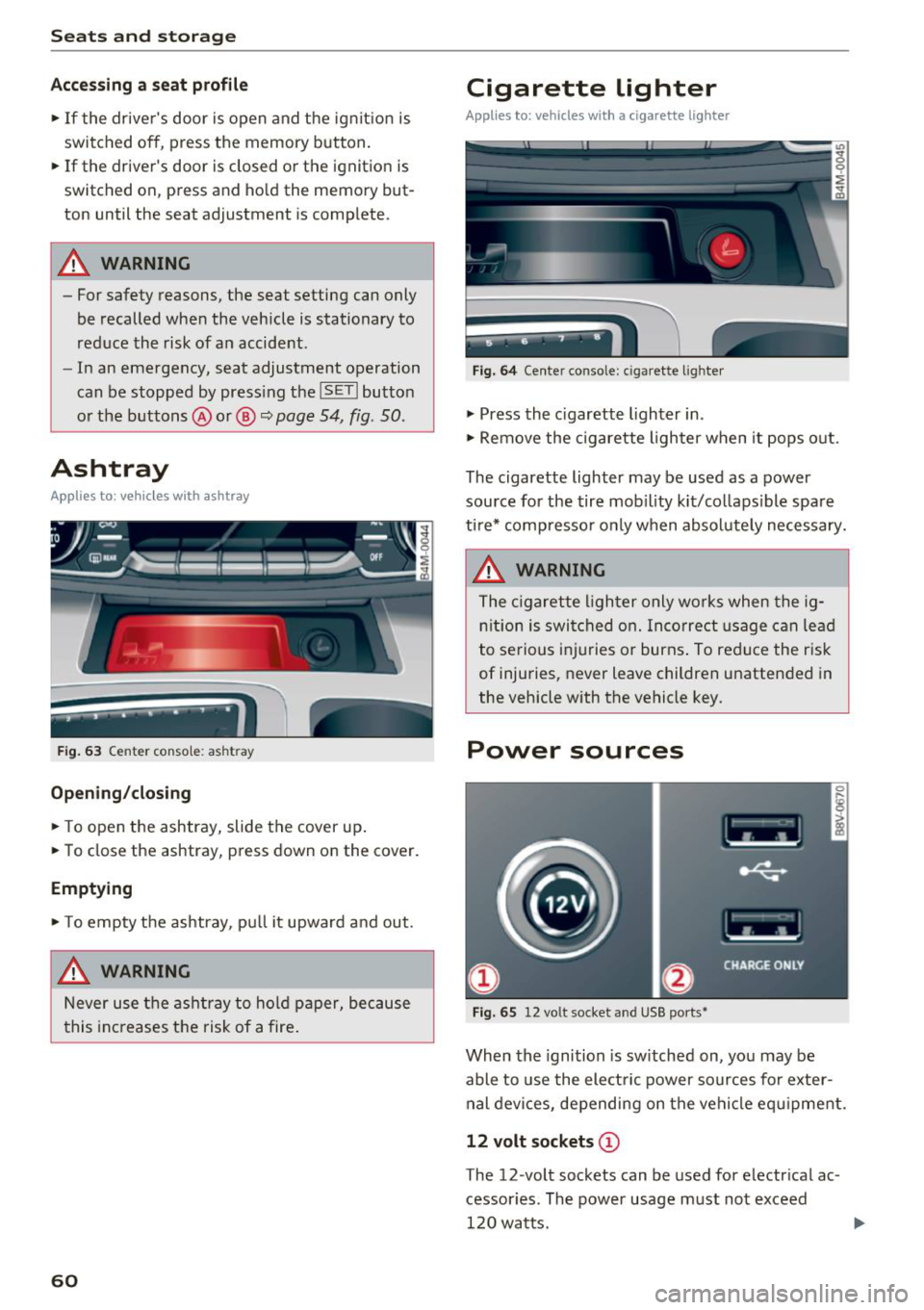
Ashtray
App lies to: ve hicles w ith ashtray
Fig. 63 Center conso le: ashtr ay
Open ing /closing
• To open the ashtray, slide the cover up .
• To close the ashtray, press down on the cover.
Empt ying
• To empty the ashtray, pu ll it upward and out.
A WARNING
Never use the asht ray to hold paper, because
t his increases the risk of a fire .
60
Cigarette lighter
Applies to: vehicles with a cigarette lighter
Fig. 64 Center conso le : cigarette ligh ter
• Press the c igarette lighter in .
• Remove the cigarette lighter when it pops o ut.
The cigarette lighter may be used as a power source for the tire mob ility kit/collaps ible spare
ti re* compresso r o nly when absolute ly necessary.
A WARNING
The c igarette lighter only works when the ig
n ition is switched on. Incorrect usage can lead
to serious i njuries or burns . To reduce the risk
of injuries, never leave children unattended in
the vehicle with the vehicle key.
Power sources
Fig. 65 12 vo lt socket and USB ports•
When the ignition is sw itched on, you may be
able to use the elect ric power sources for exter
nal devices, depending on the vehicle eq uipment.
12 volt sockets (D
The 12-volt sockets can be used for electr ical ac
cessor ies. The power usage m ust not exceed
120 watts.
Page 63 of 398
a co ...... N r--. N ...... 0
0
:E '
sole*, in the rear* and on the luggage compart
ment side tr im panel* .
USB ports @
You can cha rge mobi le devices and/or connect to
the Audi music interface* us ing t he USB ports*.
F or additional information about the USB ports,
see
¢ page 2 31, Multimedia connections.
.8, WARNING
Incorrect usage ca n lead to serio us injuries or
burns . To reduce the risk of injuries, never
leave children unattended in the vehicle with
the vehicle key.
CD Note
- D isconnect the connectors from the power
sources carefully to reduce the risk of dam
aging them .
- To reduce the risk of damage to the vehicle
electrical system, never attempt to charge
the vehicle battery by connecting accesso
ries that prov ide power, such as solar panels
or battery chargers, to the power sources.
- To reduce t he risk of damage to the power
sources, only use plugs and connectors that
fit correctly.
Storage
Cup holde rs
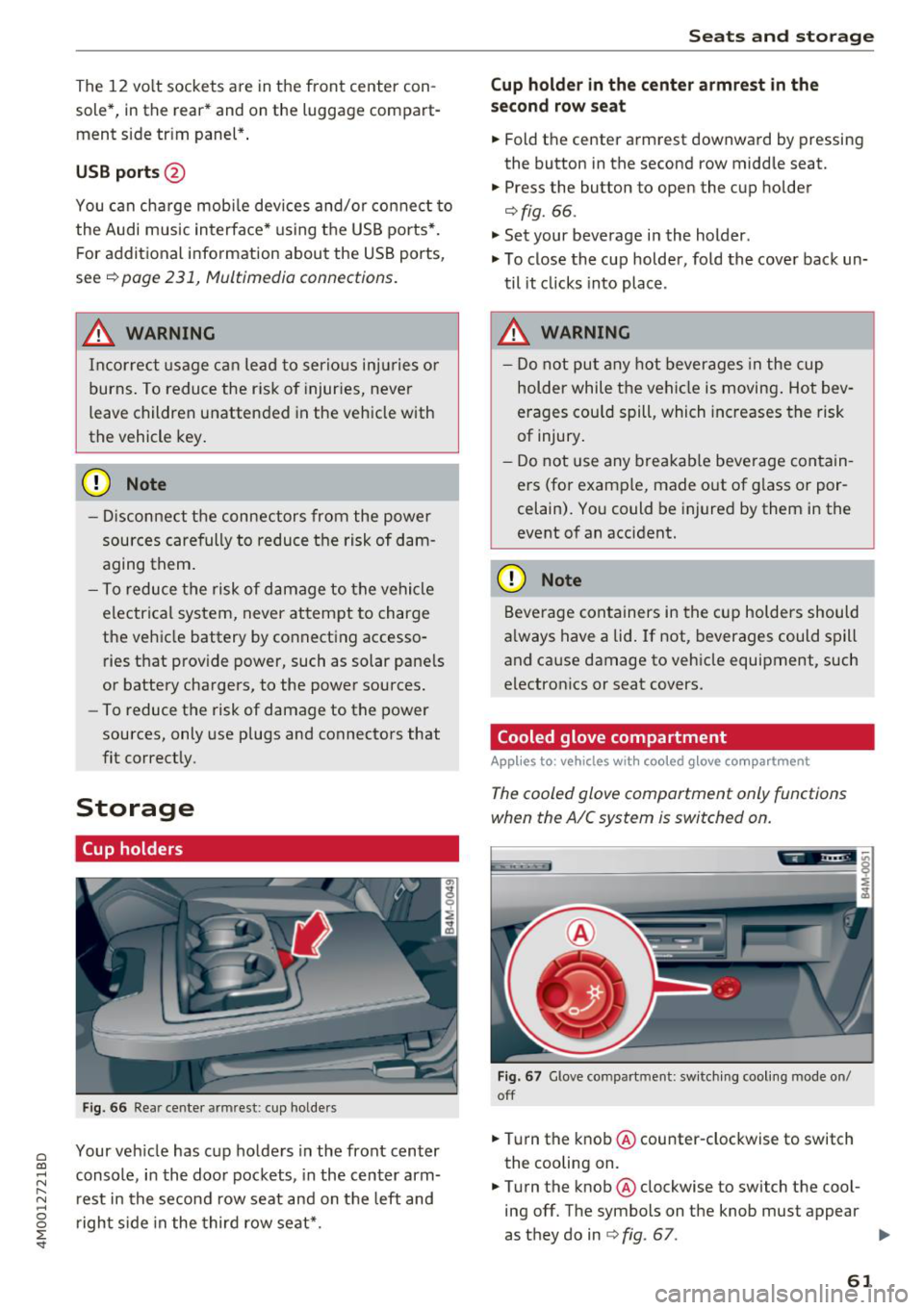
F ig . 66 Rear center armrest: cup holde rs
Your vehicle has c up holders in the front center
console, in the door pockets, in the center arm
rest in the second row seat and on the left and
right s ide in the third row seat*.
S eats and storag e
Cup holde r in the cent er ar mrest in th e
s e co nd row seat
.,. Fold the center armrest downward by pressing
the button in the second row middle seat.
.,. Press the button to open the cup holder
¢ fig. 66.
"'Set your beverage in the holder.
"' To close the cup holder, fold the cover back un
til it clicks into place .
.8, WARNING
-
-Do not put any hot beverages in the cup
holder while the vehicle is moving . Hot bev
erages cou ld spill, which increases the risk
of injury .
- Do not use any breakab le beverage contain
ers (for example, made out of g lass or por
celain). You could be injured by them in the
event of an accident.
CD Note
Beverage containers in the cup holders should
a lways have a lid . If not, beverages could spill
and cause damage to vehicle equipment, such
electron ics or seat covers.
Cooled glove compartment
Applies to : vehicles wi th coo led g love co mpartment
The cooled glove comportment only functions
when the AIC system is switched on.
Fig . 67 G love compartment: sw itch ing cool ing mode on/
off
.,. Turn the knob @counter-clockwise to switch
the cooling on.
.,. Turn the knob@clockwise to switch the cool
ing off. The symbols on the knob must appear
as they do in
¢ fig. 67. ..,.
61
Page 64 of 398
Seats and stor age
If the heat ing is sw itched on, switching the glove
compartment cooling mode off is recommended.
Additional storage compartments
You will find a variety of storage compartments
and holders at various locations in the vehicle.
- Glove compartment: the glove compartment
can be locked using the mechanical key
q page 30, Key set.
-In the door trim pane ls
- Safety vest compartment in the doo r trim pan-
els on the driver 's side and front passenger's
s ide
- Storage compartment* in the center conso le
- Storage compartment unde r the fron t center
armrest
- Ga rment hooks above the rea r doo rs
- Nets on the backrests of the front seats
- Net on the left luggage compartment trim pan-
el
.&, WARNING
-
- Always keep t he g love compartment lid
cl osed while d riving to reduce the risk of in
jury.
- Only use the storage compartments in the
doo r trim pane ls to sto re small objects that
will not st ick o ut of the compartment and
impair the range of the side airbags.
- Make s ure tha t the view to the rear is not
obstructed by hanging garments.
- Hang only lightwe ight cloth ing and be sure
that there a re no heavy or sha rp-edged ob
jects in the pockets.
- Do not use coat h angers to ha ng the cloth
ing because t his could impair the effective
ness of the s ide cu rtain airbags .
Luggage compartment
General information
.&, WARNING
-
Read and follow the important sa fety precau
tions in
q page 257, Storing cargo correctly.
62
Luggage compartment cover
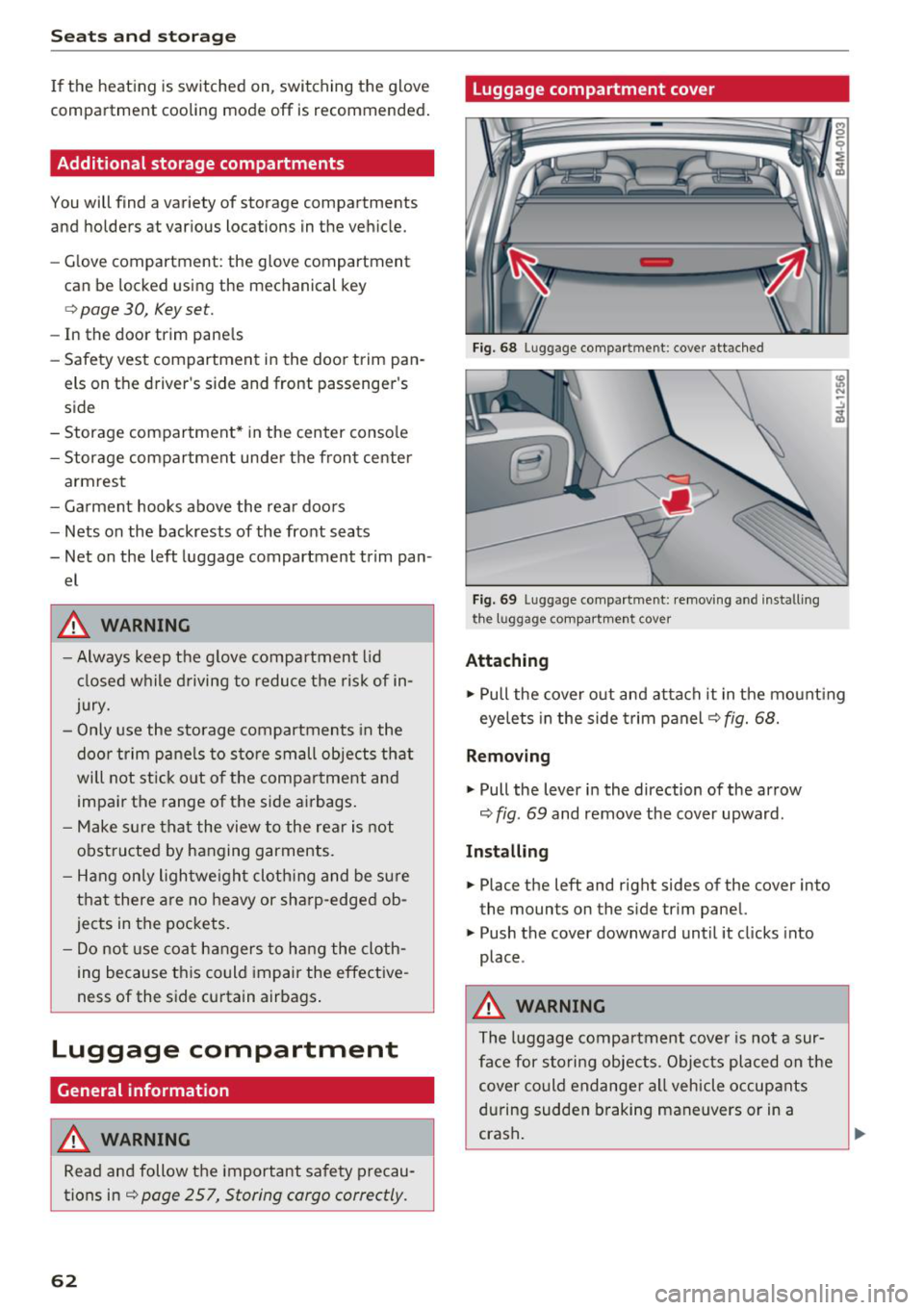
Fig. 68 Luggage compartment: cover attached
Fi g. 69 Luggage compa rtment: removi ng and install ing
the l1,1ggage compart ment cover
Attaching
.,. Pull the cover o ut and attach it in the mount ing
eyelets in the side t rim panel
q fig. 68.
Removing
.,. Pull the lever in the direction of the arrow
q fig. 69 and remove the cover upward.
Installing
.,. Place the left and right sides of the cover into
the mounts on the side trim panel.
.,. Push the cover downward until it clicks into
place .
.&, WARNING
The luggage compartment cove r is no t a sur
face for storing objects. Objects placed on the cover could endange r a ll vehicle occupants
during sudden braking maneuvers or in a
crash .
Page 65 of 398
a co ...... N r--. N ...... 0
0
:E -
-Let the luggage compartment cover ro ll up
s low ly to reduce the r isk of damage.
- Also read and fo llow the applicable warn
ings
c;> 0 in Folding the backrest down/up
(third row seats) on page 57.
Increasing the size of the luggage
compartment
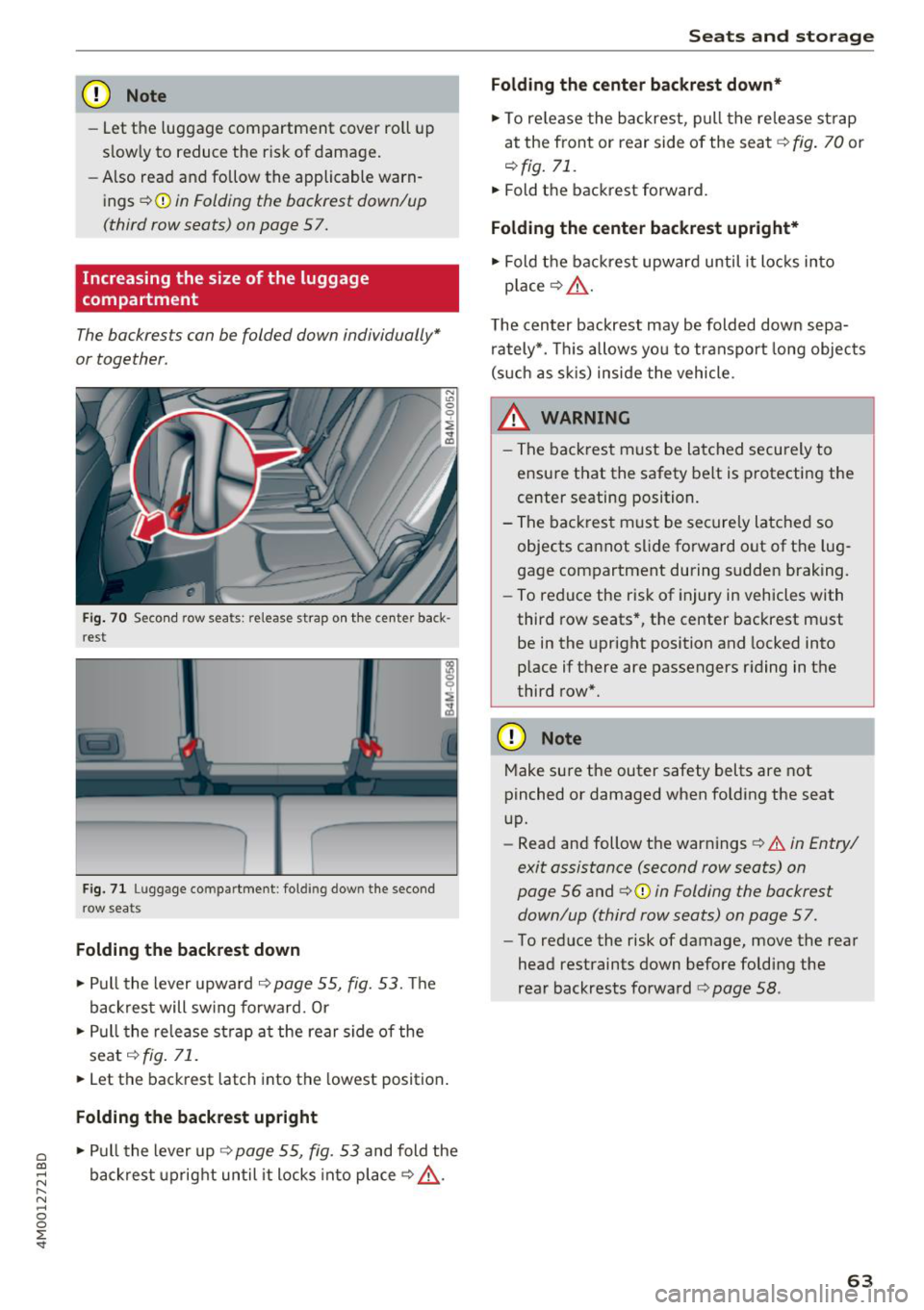
The backrests can be folded down individually*
or together.
F ig. 70 Seco nd row seats: release strap o n th e center back
r est
F ig. 71 Luggage compartment : fold ing dow n the second
row seats
Folding the backrest down
.. Pull the lever upward c;> page 55, fig. 53. Th e
backrest will sw ing fo rward. Or
.. Pull the release strap at the rear side of the
seat
c;> fig . 71 .
.. Let the backrest latch into the lowest position .
Folding the backrest upright
.. Pull the lever up c;> page 55, fig. 53 and fold the
backrest upright until it locks into place
c;> ,.&. .
Seats and storag e
Folding the center b ackrest down *
.. To re lease the backrest, p ull the release st rap
at the front or rear side of the seat
c;> fig. 70 or
r::!> fig. 71.
.. Fold the backrest forward.
Folding the center backrest upr ight*
.. Fold t he backrest upward until it locks into
place
c;> .&, .
The center backrest may be folded down sepa
rately*. This allows yo u to transport long objects
(s uch as s kis) inside the vehicle.
A WARNING
-- The backrest must be latched securely to
ensure that the safety belt is protecting the
center seating position.
- The backrest must be securely latched so objects cannot slide forward out of the lug
gage compartment during sudden braking.
- To reduce the risk of injury in vehicles with
third row seats*, the center backrest must
be in the upright position and locked into
p lace if there are passengers riding in the
third row*.
CD Note
Make su re the outer safety belts are not
pinched or damaged when folding the seat
up.
- Read and follow the warnings
c;> .&. in Entry/
exit assistance (second row seats) on
page 56
and ¢ 0 in Folding the backrest
down/up (third row seats) on page 57.
- To reduce the risk of damage, move the rear
head restraints down before folding the
rear backrests fo rwa rd
r::!> page 58 .
63
Page 66 of 398
Seats and stor age
Luggage compartment net
App lies to: vehicles with luggage compartment net
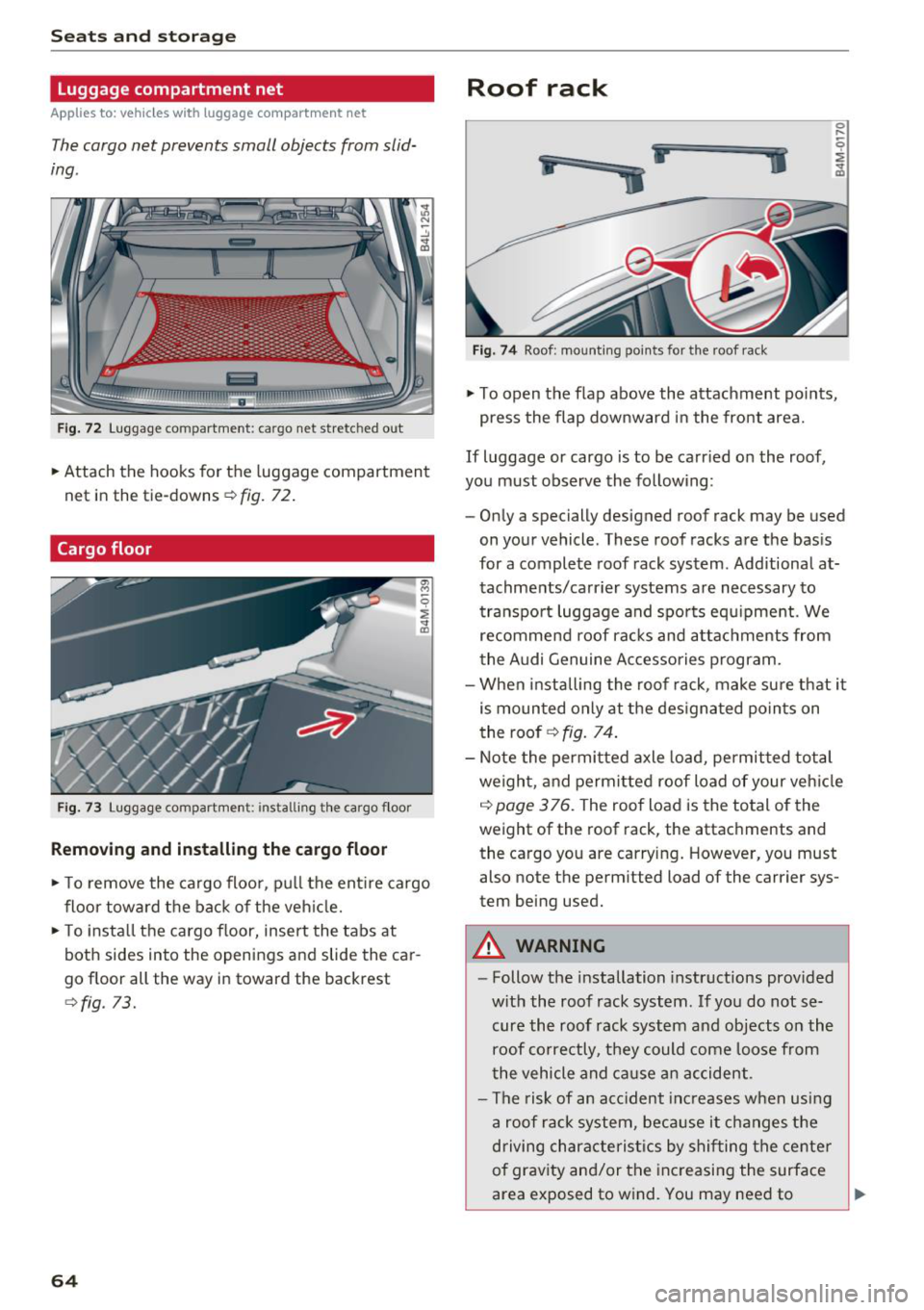
The cargo net prevents small objects from slid
ing .
Fig. 72 L uggage compartment: cargo net stretched out
.. Attach the hooks for the luggage compartmen t
net in the tie-downs
r::!> fig. 72 .
Cargo floor
Fig . 73 Luggage compartme nt: insta ll ing th e ca rgo f loor
Removing and installing the cargo floor
.. To remove the ca rgo floor, p ull the ent ire cargo
floor towa rd the back of the veh icle .
.. To insta ll the cargo floor, insert the tabs at
both sides into the openings and slide the car
go floor all the way in toward the backrest
<::!>fig. 73.
64
Roof rack
i
ii
.. j
Fig. 7 4 Roof: mount ing points for the roof rack
.. To open the flap above the attachment po ints,
press the flap downward in the front area.
If Luggage or cargo is to be carr ied on the roof,
you must observe the follow ing:
- Only a specially designed roof rack may be used
on your vehicle . These roof racks a re the bas is
for a complete roof rack system . Additional at
tachme nts/carr ier systems are necessary to
transpo rt luggage and spo rts equ ipment. We
recommend roof rac ks and a ttac hments from
the Audi Genuine Ac cessories program.
- When installing the roof rack, make su re that it
is mounted only at the des ignated po ints on
the roof
r::!> fig. 74.
- Note the permitted axle load, permitted total
weigh t, and permitted roof Load of your veh icle
c::> page 3 76. The roof Load is the total of the
weight of the roof rack, the attachments and
the cargo you are carry ing. However, you must
also note the perm itted Load of the carrier sys
tem being used.
A WARNING
- Follow the installation instructions prov ided
w ith the roof rack system . If yo u do not se
cure the roof rack system and objects on the
roof co rrectly, they could come Loose from
the vehicle and ca use a n accident.
- The risk of an acc ident inc reases w hen usi ng
a roof rack system, bec ause it changes the
driving characte ris tics by shi fting the center
of grav ity and/or the inc reasing the surface
area exposed to w ind. You may need to
~
Page 74 of 398
Warm and cold
SYNC Syn chr oniz ation
Use t he rocker sw itc h CD to select the f unct ion.
When synchronization is switched on, the set
tings for the driver's side are applied to the front
passenger's side and the rear (except for seat
heating/venti lation*). When the settings on the
front passenger's side or in the rear are changed,
the synchron izat ion is automatically switched off
and
4- zone appears in the display .
SET REAR function
Use the rocker switch CD to select the function .
When the function is switched on, you can adjust
all settings for the rear us ing the climate control
system controls in the cockpit . The rear climate
control system controls cannot be operated at
the same time . T his function switches off auto
mat ica lly after a ce rtain per iod of t ime or after
leav ing the menu.
Vents
You can open or close the center and rear vents in
the cockpit and the vents in the rear center con
sole and door p illars using the r idged thumb
wheels. The levers adjust the d irect io n of the a ir
flow from the vents. The w ide vent is opened and
closed using the~ button ~
page 8, fig. 2@ .
Residual heat
You can activate the residual heat function when
the ignition is switched off by pressing the knob
© (left side). The residual heat from the coolant
is used to heat the ve hicle in ter io r. The res id ual
heat function switches off automatically after
about 15 minutes.
A WARNING
- You should not use the recirculation mode
for an extended period of time, because no
fresh air is drawn in and the windows can
fog when cooling mode is sw itched off . This
i ncreases the risk of an accident .
- Individuals with reduced sensitivity to pain
or temperature could develop burns when
us ing the seat heating function . To reduce
the risk of injury, these ind iv iduals should
not use seat heat ing.
72
@ Note
To avoid damage to the heating elements in
the seats, do not knee l on the seats or p lace
heavy loads on a small area of the seat.
(D Tips
It is not possib le to operate the rear climate
control system controls when the power chi ld
safety lock is switched on. W ith the SET REAR
funct ion, you can apply all settings to the rear
using the climate control system controls in
the cockp it~
page 38 .
Setup
Applies to: vehicles with 4 -zone de luxe automat ic climate
contro l
The climate control system basic settings are ac
cessed in the Infotainment system.
.. Select in the Infotainment system : IMENU! but
ton
> V eh icle > left control button > Air condi
t ioning
Seat heating /seat ventilation *
You can adjus t the seat heat ing/vent ilat io n ba l
an ce for t he d river, front passenger and rear pas
sengers .
Footwell temperature
You can adjust the footwell temperature so that
i t is cooler or wa rme r.
Auto recir culat ion
When switched on, automat ic recirculation con
trols the recirculation mode automatically . You
must press the®
MAX button if fog forms on
the w indows .
Automat ic au xili ary heater *
The aux iliary heater he lps to warm the vehicle in
terior more qu ickly.
Steering wheel heating
App lies to: vehicles wit h stee ring w heel heat ing
The steering wheel rim can be heated .
.. Press the button on the multifunction steering
wheel to switch the steering wheel heating on .,..
Page 75 of 398
Cl a:, ...... N
" N ...... 0
0
::r '
Steering wheel heating: on /Steering wheel
heating: off
appears in t he instr ument cluster
display.
The temperat ure is maintaine d at a constant lev
e l w hen steering w heel heating is switched on.
The stee ring w heel hea ting setti ngs are store d
autom atically and ass igned to the remote cont ro l
k ey that is in use .
Warm and cold
73
Page 76 of 398
Drivin g
Driving
General information
Breaking in
A new vehicle must be broken in for the first 1,000 mi les (1,500 km). Do not dr ive at speeds
t hat will exceed 2/3 of the max imum pe rm itted
engine speed (RPM) for the first 600 miles
(1,000 km), and avoid fu ll acceleration during
this period . You may gradually start increasing
the RPM and the speed between 600 miles
(1,000 km) and 1,000 miles (1,500 km) .
During the first hours of use, the engine has a
higher internal friction than later on when all
moving parts have settled into place with each
other.
How the vehicle is driven d uring the first 1,000
miles (1,500 km) a lso affects the engine quality .
Drive at moderate engine speeds after the initial
break-in per iod, part icu larly when running a cold
eng ine . Th is will reduce eng ine wear and improve
the m ileage.
Do not drive at too low of an engine speed (RPM) .
Shift down if the engine stops running "smooth ly". Extremely high eng ine speeds are automati
cally reduced .
Reducing the risk of vehicle damage
@ Note
When driving on poo r roads, by cu rbs and on
s teep ramps, make su re t hat low-hang ing
compone nts such as the spo ile r and exha ust
system do not come into contact with these
or they could be damaged. This especially ap
plies to vehicles with low ground clearance
and veh icles that are heavily loaded.
Driving through water on roads
Note the following to reduce the r isk of vehicle
damage when driv ing through water, for example
on flooded roads :
- The water must not be any higher than the bot
tom of the vehicle body .
74
-Do not drive faster than walking speed .
A WARNING
After driving through water or m ud, the effec
tiveness of the brakes may be red uced due to
mo isture on the brake rotors and brake pads.
A few careful brake applications shou ld dry
off the brakes and restore the full braking ef
fect .
@ Note
- Vehicle components such as the eng ine,
transmiss ion, suspens ion or electrical sys-
tem can be severely damaged by drivi ng
throug h water .
- Always switch the Start/Stop system* off
when driv ing through water¢ page 79.
(D Tips
-Determine the depth before driving throug h
water.
- Do not stop the vehicle, drive in reverse or
switch t he engine off when driving through
water.
- Keep in mind that oncom ing vehicles may
create waves that raise the water level and
make it too deep fo r yo ur vehicle to drive
throug h safe ly.
- Avoid dr iv ing through salt water, beca use
this can cause corrosion .
Economical and environmentally-friendly
driving
The amou nt o f fuel consumption, the environ
mental impact and the wear to the engine,
brakes and tires depends mostly on your driving
sty le. With an ant icipatory and economic driving
style, fuel consumpt ion can be reduced by ap
prox imately 10-15%. The fol low ing t ips will help
you conserve the environment and your money at the same time .
Anticipatory dri ving
A vehicle uses the most fuel when accelerating.
When you drive with anticipation, you do not
need to brake as often and so you acce lerate less .
When poss ible, let your vehicle coast with a gear .,.
Page 77 of 398

Cl a:, ...... N
" N ...... 0
0
::r '
next traffic light is red . This produces an engine
b raking effect, wh ich he lps to protect the brakes
and tires and reduces the emissions and f uel con
sumpt ion to zero (fuel shut-off dur ing decelera
tion) .
Shift efficientl y
Upshifting earlier is an effective way to save fue l.
Staying in a gear too long uses fue l unnecessari
ly .
Press down on the acce lerator peda l slowly and
avoid "kick -down".
Avoid full acceleration
You sho uld rare ly t rave l at the maxim um vehicle
speed. High speeds cause a d isp roportiona tely
hi gh increase in fuel consump tion, emissions and
traffic noise . Driving more slowly saves f uel.
Reduce idling time
The Start/Stop system* he lps to reduce the id ling
time automatically. In vehicles wi thout the Sta rt/
Stop system*, it is efficient to switch the engine
off when stopped at ra ilroad crossings and long
red lights . Stopping the engine for
30 -40 sec
onds already saves more fuel than the amount of
extra fuel needed to restart the eng ine.
I t takes a very long time in idle to wa rm the en
gine up to operating temperature . Wear and
emissions are especially high in the warm -up
phase. Therefore, you should begin driving im
mediately after starting the engine. Avoid high
RPMs while do ing th is .
Have maintenance perf ormed regularly
By having maintenance performed regu larly on
your ve hicle, you can he lp to reduce fuel con
sumpt ion before you even start to drive. The
maintenance condition of your vehicle not only
affects traffic safety and long-term value but a l
so impacts fuel consumption . A poorly main
tained engine can lead to fuel consumpt ion that
i s
1 0% hi gher tha n normal.
Driving
Avoid short trips
T he eng ine and exh aust cleaning system mus t
r each their optima l operat ing temperatu re to ef
fectively reduce consumption and emissions.
A cold engine uses a d isp roportionately high
amoun t of fue l. The engine re ac h es operat ing
temperat ure and cons umption norma lizes on ly
after approximate ly 2.5 mi les (4 km) .
Check the tire pressure
To save fuel, ma ke sure the t ires are always i n
flated to t he correct pressure~
page 340. The
fuel consumpt io n can increase by
5% if the pres
s u re is on ly
0 .5 bar too low. Due to the increased
rolling resistance, low tire pressures wi ll also
l ead to greater tire wear and will affect driving
behavior.
Do not drive on winter tires year -round, as this
will consume up to
10% more fuel.
Eliminate unnecessary weight
S ince eve ry po und of ext ra weight increases f uel
co nsump tion , a quick inspect io n of the luggage
compartment may be worth it to avoid unneces
sary weight .
When not be ing used , a roof rac k sho uld be re
moved to decrease the w ind resis tance of the ve
hicle . This will save you approximately
12% fu el
at speeds from
62 -75 mph (100 -120 km/h) .
Save energy
The eng ine d rives the generator, which generates
electric ity; the fuel consumpt io n also increases
wi th the dema nd for e lec tric ity . T he refore, sw itch
electrical eq uipment off when you no longer
need it . Examples of eq uipment that uses a lot of
energy are air blowers at a high setting, the rear
window defogger and seat heating* .
@ Note
Do not leave engine idling unattended after
starting. If warning lights sho uld come on to
i ndicate improper operation, they would go
unheeded. Extended idling also produces
heat, which could resu lt in overheating or
other damage to the veh icle or other proper
ty .
75
Page 80 of 398
Drivin g
Start /Stop syst em *
See the informat io n in q page 79 , Start/Stop
syst em .
A WARNING
To reduce the risk of poisoning, never allow
the engine to run in confined spaces .
(LlJ) Note
Avoid high eng ine speed, full throttle, a nd
heavy engine load if the engine has not
reached operating temperature yet. You could
damage the engine .
@ For the sake of the environment
Do not let the engine run while parked to
warm up . Begin driving immediately. This re
duces unnecessary emissions .
(D Tips
-Some noise after s tarting the engine is nor
mal and is no ca use fo r concern .
- If yo u leave the vehicle with t he ignit ion
switched on, the ignition will switc h off af
ter a certain amo unt of time. Make s ure that
e lectr ica l equipment s uch as the exterior
li ghts are switched off.
Starting the engine
"' Bring the vehicle to a fu ll stop .
"' Press the I STAR T
EN GI NE ST OPI button
r::!) page 77 , fig . 81 .
Emergency off function*
-
If it is abso lutely necessary, the engine can also
be turned off while driv ing at speeds starting at
4 mph ( 7 km/h) . To switch the eng ine off , press
the lSTART
E NGINE STOPlbutto n tw ice in a row
briefly o r press and hold fo r lo nger than two sec
onds.
A WARNING
- Never turn off the engine befo re the ve hicle
has come to a comp lete stop . The full func
tion of the brake booster and the powe r
steering is not guaranteed. Yo u must use
78
more force to turn or brake . Because you
cannot steer and brake as you usually
wou ld, this could lead to accidents and seri
ous injuries .
- If you leave the vehicle, sw itch the ignition
off and take the ve hicle key with you. Other
wise, the eng ine could be started or electr i
cal equipment such as the powe r windows
could be ope rated . This can lead to se rious
lnJ Ury.
- For safety reasons, always park the vehicle
w it h the sele ctor lever in the "P " pos it io n.
Othe rw ise, there is the risk that t he veh icle
co uld r oll uninte ntionally .
(0} Note
If the engine has been unde r heavy load for
an extended pe riod of time, heat builds up in
the eng ine com partmen t afte r th e e ng ine is
swi tched o ff and the re is a ris k of damag ing
the eng ine. For t his reason, let the engine run
for at id le for approximate ly two min utes be
fo re shutting it off .
(D Tips
For up to 10 minutes a fter stopping the en
gine, t he radiator fan may turn on again auto
matically or it may continue to r un (even if
the ign it ion is switched off) fo r the following
reasons :
- The coo lant temperature is increas ing due
to trapped heat.
- If the eng ine is wa rm and the eng ine com
partment a lso heats up from strong sun
light.
- Applies to: vehicles with particulate filter:
The emissions control system is heated
throug h the regeneration process, even if
the engine has not reached its operat ing
tempe ra ture yet .
Messages
Engine running . Warning! Turn off ignition be -
fore leaving vehicle
II>-