child lock AUDI Q7 2018 Owner´s Manual
[x] Cancel search | Manufacturer: AUDI, Model Year: 2018, Model line: Q7, Model: AUDI Q7 2018Pages: 398, PDF Size: 185.58 MB
Page 23 of 398

Cl a:, ...... N
" N ...... 0
0
::r '
c:> page 79
Ad Blue *
c:>page 314
Transmission
c:>page90
Air suspension*
c:> page 131
Adaptive cruise control*
c:> page 106,
Traffic jam assist*
c:> page 110
Traffic jam assist*
c:>page 110
Audi p re sense*
c:> page 116
USA models:
Elect romecha nica l pa rk ing bra ke
c:>page 22
Canada mod els :
Electromechan ical park ing brake
c:> page 22
Hill descent assist
c:> page 144
Child safety lock
c:>page 38
USA models :
Speed warning system *
c:>page 95
Canada mod els :
Speed warn ing system*
c:>page 95
Active lane ass ist*
c:> page 118
Aud i side assist *
c:> page 125
Camera-based traffic sign recogni
tion*
c:> page 98
Nig ht vision ass ist*
c:> page 128
Cockpit o ver view
Hig h beam ass istant *
c:>page 44
High beams
c:> page 44,
High beam ass istant*
c:> page 44
BRAKE/((D) Brake system
If this indica to r li ght tur ns on, t here is a malf unc
t ion in the br ake system .
1111 (USA model s) I. (Canada model s)
Brakes : stop vehicle and ch eck brake fluid level
Stop the vehicle and check the brake fluid level.
See a n author ized Audi dealer or author ized Audi
Service Facility for assistance if necessa ry .
1111 (USA models ) I. ( Canada models )
Brakes: malfunction! Stop vehicle safely
If the indicato r light turns on and this message
appears, there is a ma lf u nction in the brake
booster.
If the ABS indicator light~ (USA mo dels) /
iiJ (Canada models), the ESC indicator light Bl
and the brake system indicator light 1111 (USA
models) /. (Canada models) all turn o n and
t hi s message appears, then the ABS, ESC and
brak ing d istr ibut ion are ma lfunctioning
c:> ,&. .
Do not continue dr iving . See an author ized Audi
dealer or authorized Audi Service Fac ility for as
s istance
c:> ,&. .
1111 (USA models )~ (Canada models) Park
ing brake : malfunction! Safely stop vehicle. See
owner's manual
- If the indicator light and the message appear
when the vehicle is stationary or after switch ·
ing the ignition on ,
check if you can re lease the
park ing brake. If you cannot release the pa rk
ing brake, see an author ized Audi dealer or au
thorized Audi Service Fac il ity . If you can release
the parking b rake and the message st ill ap
pea rs , see a n author ized Audi dealer or author
i z e d Au di S ervice Fac ility immediately to have
t he ma lfu nction correc ted. ..,
21
Page 31 of 398
Opening and closing
Central locking
Description
You can lock and un lock the veh icle centrally . You
h ave the following options:
- Remote control key
c> page 32,
-Sensors in the door hand les* c> page 32,
- Lock cylinder on the driver's door c:> page 34,
or
- Interior central locking switch
c:> page 33.
Turn signals
The turn s ignals flas h tw ice when yo u unloc k the
ve hicl e and flash once when you lock the veh icle.
If they do not flas h, then one of the doors, the
l uggage compartment lid or the hood is not
closed.
Automatic locking (Auto Lock )
The Auto Lock f unct io n loc ks all doors and the
l uggage compartment lid on ce the speed has ex
ceeded approximately 9 mph (15 km/ h).
The vehicle ca n be un loc ked if the open ing f unc
tion in t he centra l lock ing system sw itch is used
or one of the door handles is pulled.
I n t he event of a crash with a irbag deployment,
the doo rs will a lso automat ica lly unloc k to allow
access to t he ve hicle.
Selective door unlocking
The doors and luggage compartment lid w ill lock
when they close . You can set in the Infotainment
system whether
only the driver's door or the en
tire ve hicle should be unlocked w hen unlocking
c:>page 34.
Unintentionally locking yourself out
Only lock your veh icle when all of the doors and
the luggage compa rtme nt lid a re closed and the
r emote control key is not in the vehicle. This
h e lps to p revent yo u from locking yourse lf out
o a ccident ally. a:, ......
~ The follow ing cond it io ns prevent you from lock-
"' 8 in g your remote contro l key in the veh icle: 0 ::r '
-If the driver's door is open, the vehi cle cannot
be locked by pressing the
l'.D button on the re
mote contro l key o r by touching the locking
sensor* on a door.
- If the most recently used convenience key* is
detected in the luggage compartment, the lug
gage compartment lid automatica lly unlocks
aga in after closing it.
- If the convenience key* that was last used is de
tected ins ide the veh icle, then the vehicle can
not be locked from the outside .
Closing aid on the do ors *
T he vehicle doors a re equipped with closing aids.
When closing a door, yo u on ly have to let it fall
li ghtly into the latch. It then closes automatically
¢ ,&. .
A WARNING
-
-If you leave the vehicle, sw itch the ignition
off and take the veh icle key with you . This
applies pa rtic ula rly when children remain in
the vehicle. Ot herwise, ch ildren cou ld start
the engine or opera te e lectr ical equipme nt
(such as power w indows), which increases
the risk of an accident.
- No one, especi ally children, should stay in
the vehicle when it is locked from the out
side, because the windows can no longer be
opened from the inside
c:> page 35. Locked
doors make it more diffic ult for eme rgency
workers to get into the vehicle, which puts
lives at risk .
A WARNING
Applies to: vehicles with closing aids on the doors
-To reduce the r is k of injury, m ake sure that
the area where the d oor is closing is cle ar
du ring the closing process.
- Th e closing process ca n be stopped at any
time by pulling on the ou ter or inne r door
handle.
(D Tips
- Do not leave valuables unattended in the ve-
hicle. A lo cked ve hicl e is not a sa fe! ..,
29
Page 34 of 398
Opening and closing
,.. Slide the battery holder carefully into the re
mote control key .
,.. Insert the mechanica l key.
@ For the sake of the environment
Discharged batteries must be disposed of us
ing methods that will not harm the environ
ment. Do not dispose of them in household
trash.
@ Tips
The replacement battery must meet the same
specifications as the original battery in the re
mote control key.
Unlocking /locking by remote control
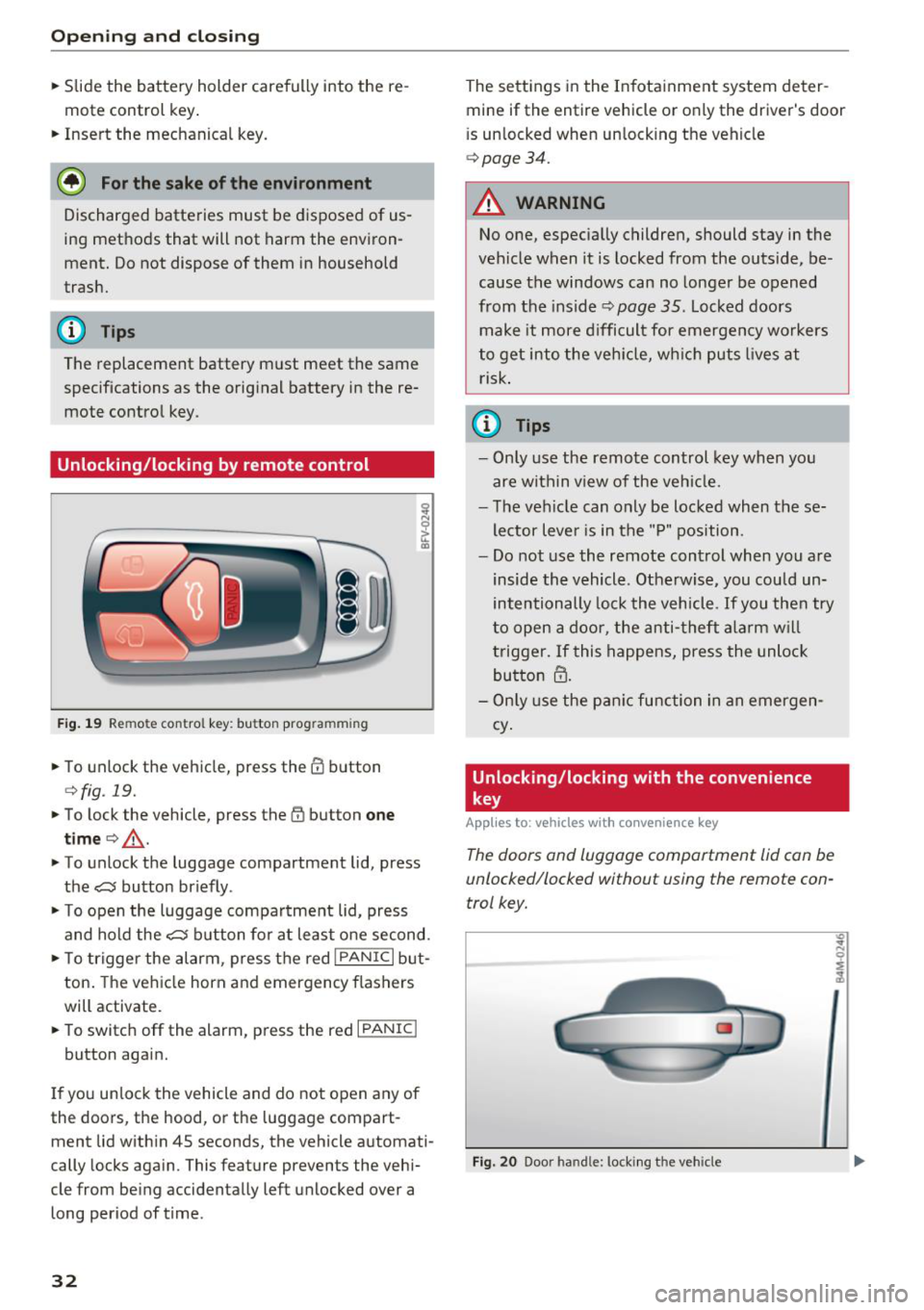
F ig . 19 Remote control key: button prog ramming
,.. To unlock the vehicle, press the CD button
¢fig . 19.
,.. To lock the vehicle, press the (I) button one
time
c> _& .
,.. To unlock the luggage compartment lid, press
the~ button briefly .
,.. To open the luggage compartment lid, press
and hold the~ button for at least one second.
,.. To trigger the alarm , press the red
I PANIC I but
ton. The vehicle horn and emergency flashers
will activate.
,.. To switch off the alarm, press the red
I PANIC I
button again.
If you unlock the vehicle and do not open any of
the doors, the hood, or the luggage compart
ment lid within 4S seconds, the vehicle automati
cally locks again. This feature prevents the vehi
cle from being accidentally left unlocked over a
long period of time.
32
The settings in the Infotainment system deter
mine if the entire vehicle or only the driver's door
i s unlocked when unlocking the vehicle
c> page34.
A WARNING
No one, especially children, should stay in the
vehicle when it is locked from the outside, be
cause the windows can no longer be opened
from the inside
c> page 35. Locked doors
make it more difficult for emergency workers
to get into the vehicle, wh ich puts lives at
risk.
(D Tips
- Only use the remote control key when you
are within v iew of the vehicle.
- The vehicle can only be locked when these
lector lever is in the "P" position .
- Do not use the remote control when you are
inside the vehicle . Otherwise, you could un
intentionally lock the vehicle. If you then try
to open a door, the anti-theft alarm will
trigger. If this happens, press the unlock
button
m.
- Only use the panic function in an emergen
cy .
Unlocking /locking with the convenience
key
App lies to: vehicles with co nvenience key
The doors and luggage compartment lid can be
unlocked/locked without using the remote con
trol key.
Fig. 20 Door handle: locki ng t he veh icle
"' .. N 0 :;
:1,
Page 35 of 398
a co ...... N r--. N ...... 0
0
:E '
.,. Grip the door handle . The door unlocks auto-
matically.
... Pull on the door handle to open the door.
Locking the v ehicl e
.,. Se lect the "P" position. The vehicle cannot be
locked if "P" is not se lected .
.,. To lock the veh icle, close the door and touch
the sensor in the door hand le
once c:> fig. 20 . Do
not hold the door handl e while doing this .
You can u nlock/lock the vehicle at eve ry door.
The remote cont rol key cannot be more than ap
proximately 4 f eet (1.S m) away from the door
handle. It makes no difference whether the mas
ter key is in you r jacket pocket or in your brief
case, for example .
If you hold the door handle while locking, this
can impair th e lock ing funct ion.
The door ca nnot be opened for a br ief per iod di
rect ly after locking it. Th is way you have the op
portunity to check if the doors locked correctly.
The settings in the Infotainment system deter mine i f the entire vehicle or only one of the doors
is unlocked when unlocking the vehicle
c:> page34 .
_& WARNING
Read and following all WARNINGS<=>&. in De
scription on page
29.
(D Tips
I f your vehicle is left standing fo r a long peri
od of time, note the following:
- The energy management system gradually
turns off unnecessary convenience functions
to prevent the vehicle battery from draining
and to maintain the vehicle 's abi lity to start
for as long as possib le. You may not be able
to unlock your vehicle us ing the convenience
key .
Op eni ng and clos ing
(D Tips
Unlocking with the convenience key (keyless
access) can be deactivated in the Infotain-
ment system
<=> page 34.
Central locking switch
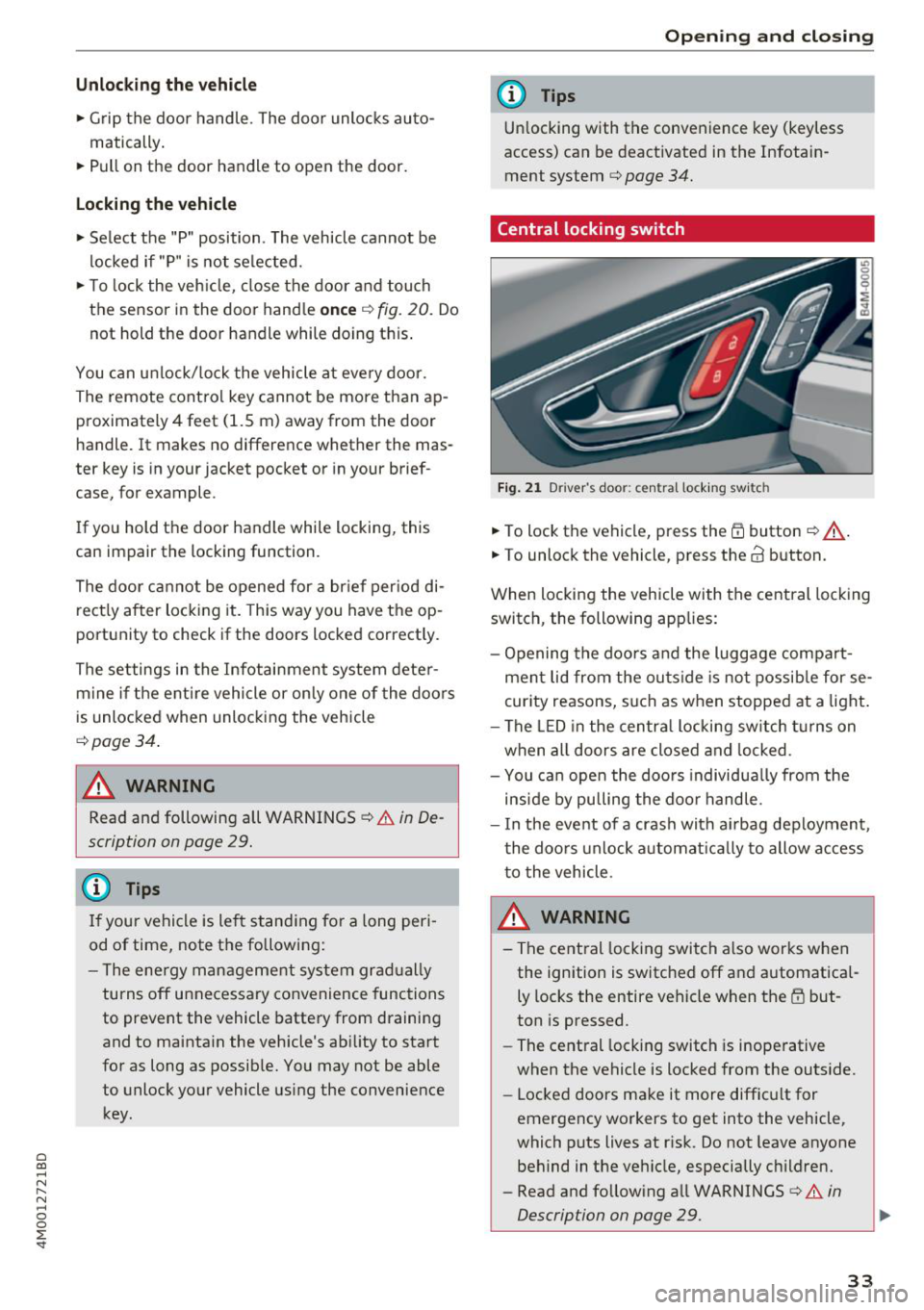
Fig . 2 1 D rive r's doo r: centra l lock ing swi tc h
... To lock the vehicle, press the Efi button <=> A-
.. To unlock th e vehicl e, pr ess the @ button.
When locking the vehicle with the central locking switch , the following app lies:
- Opening the doors and the luggage compart ment lid from the outside is no t possib le for se
curity reasons, such as when stopped at a light .
- The LED in the centra l locking sw itch turns on
when all doors are closed and locked .
- You ca n open the doo rs individua lly from the
inside by pulling the doo r handle .
- I n the event of a crash with ai rbag deployment ,
the doo rs unlock a utoma tically to allow access
to the vehicle .
.&_ WARNING ~ -
- The central locking switch a lso works when
the ignition is switched off and automatica l
ly locks the entire vehicle when the
Efi but
ton is pressed .
- The central locking switch is inoperative
when the vehicle is locked from the outs ide.
- Locked doors make it more difficult for
emergency workers to get into the vehicle,
which puts lives at risk. Do not leave anyone
behind in the vehicle, especially children.
- Read and following all WARNINGS
c:> &. in
Description on page
29 . ..,.
33
Page 40 of 398

Opening and clo sin g
Luggage compartment lid emergency
release
Fig. 27 Inner luggage compart men t lid : acces s to the
emergency rel ease
.. Remove the mechanica l key ¢ page 31 .
.. Pry out the cover using the mechanical key
¢fig . 27.
.. Press the lever in the direction of the arrow to
release the luggage compartment lid .
Child safety lock
The child safety lock prevents the rear doors
from being opened from the inside and the rear
power windows from be operated.
Fig . 28 Sect io n of drive r's door: c hild safety lock butto ns
a,
~ co a,
.. To activate/deactivate the inner door handle
and the power window switch for the respective
rear door , press the left/right
t button in the
driver 's door ¢
fig. 28 . The indicator light in the
button turns on/b links .
.. To activate/deact ivate the child safety lock on
both sides, you must press the
T buttons one
after the othe r.
It is not possible to operate the rear climate con
trol system* when the child safety lock is switch
ed on . T he
S ET REAR function allows you to app ly
38
a ll settings to the rear using the climate control
system controls in the cockpit
¢ page 72.
Message in th e instrument cluster di splay
(BJ Childproof catch : ma lfun ction! Plea se con
tac t Service
There is a ma lfunction in the ch ild safety lock .
Press the
t button aga in .
If the message stays on, dr ive immediately to an
authorized Audi dealer or authorized Audi Serv ice
Facility to have the malfunction repaired.
A WARNING
- If you leave the vehicle, sw itch the ignition
off and take the veh icle key with you. This
app lies pa rtic ula rly whe n children remain in
the vehicle. Otherwise chi ldren cou ld start
the engine or operate e lectrica l equipment
(such as power windows), which increases
the risk of an accident.
- A ma lfunction in the chi ld safety lock could
allow the rear doors to be opened from the
inside, which increases the risk of an acci
dent.
Power windows
Controls
The driver can control all power windows .
Fig. 29 D river 's doo r: pow er w indow con trols
A ll power window switches are equipped with a
two-stage function:
Opening and closing the windows
co ~ M 0
=> co a,
.. To open o r close the window comp letely, press
the swit ch down o r pull the swit ch up b riefly to .,.
Page 41 of 398
Cl a:, ...... N
" N ...... 0
0
::r '
switch is pressed/pu lled again.
• To se lect a position in between opened and
closed, press/pull the sw itch to the first level
until the desired window position is reached.
Po we r w indow switch es
(D Left front door
@ R ight front door
@ L eft rea r door
@ Right r ear door
A WARNING
- If you leave the veh icle, switch the ignit ion
off and take the vehicle key with you . This
applies particularly when children remain in
the vehicle . Otherwise children could start
the engine or operate elect rical equipment
(s uc h as powe r windows), whi ch in cr eases
the risk of an a ccident. The power windows
contin ue to f unct ion until the driver's door
or front passenge r's door has been opened .
- Pay c areful a ttent ion when closing the win
dows. Pinching co uld cause serious injur ies .
- When lo cking the veh icle from outside, the
vehicle mus t be unoc cupied since the win
dows can no longer be opened in an emer
gency.
(D Tips
You c an still open an d close the w indows for
app roxima tely 10 minutes after tu rning the
ign it ion off. The power windows do no t switch
off until the driver's door or front passenger's
door has been opened .
Convenience opening/closing
Applies to: vehicles wit h convenience key
All of the windows and the roof* can be opened/
closed at the same time.
Convenience opening feature
• Press and hold the III button on t he remote con
t ro l key until a ll of the w indows reach the de
s ir ed position and the roof* is tilted open .
Opening and cl osing
Convenience closing feature
• Press the 0 b utton on the remo te con trol key
until the roof* is closed
q .&, , or
• Touch the sensor * on the door handle unti l all
of the windows and the roof* are closed. Do not
place your hand in the door handle when doing
this .
Sett ing convenience op ening in the
Infotainment system
• Select in the Infotainment system: I MENU ! but
ton
> Vehicle > left control button > Vehicle
setting s
> Central locking > Long press to
open windows .
A WARNING
-
-Never close the w indows o r the roof* ca re
lessly or in an uncontrolled manner, be
c a use this increases the risk of injury.
- For secur ity reasons, the windows and the
roof* c an only be opened and close d wit h
the remote con trol key a t a maxim um dis
tance of approx imately 6.5 feet (2 m) away
from the vehicle . Always pay attention when
using the
0 button to close the windows
and the roof* so that no one is pinched. The
clos ing process will stop immediately when
the 6j button is released .
(D Tips
Applies to: vehicles with panorama glass roof:
the power sunshade also opens/closes when
opening/closing the roof .
Correcting power window malfunctions
You can reactivate the one-touch up/down func
tion if it ma/func tion s.
• Pull the powe r window switch up until the win
dow is compl ete ly raised.
• Release the switch and pu ll it up aga in for at
least one second .
39
Page 61 of 398
• Press the release point c::> fig . 61 using the me
chanical key
c::> page 30, Key set and press the
button -arrow-
c::> fig . 60 . Pull the head restraint
out of the backrest at the same time
c::> ,&. .
In stall ing th e head rest raints
• Slide the posts on the head restraint dow n into
the guides until the posts click into place.
• Press the b utton -arrow-
c::> fig. 60 and slide the
head restraint all the way down. You should not
be able to remove the head restraint from the
backrest without pressing the button .
A WARNING
-Always read and follow the applicable warn
ings
c::> page 255 , Proper adjustment of
head restraints.
- Only remove the head restraints fo r the sec
ond row seats when it is necessary for in
sta lling a child safety seat
c::> page 291,
Child safety.
Install the head restraint agai n
immediately once the child safety seat is re
moved. Driving with the head restraints re
moved or not in the upr ight position in
creases the risk of serious injury.
Memory function
Description
Applies to: vehicles with memory function
Using the memo ry function, you can qu ick ly and
eas ily store a pe rsonal seat profile for the driver
and recall the settings later. The memory func
tion is controlled by the remote control key and
the memory buttons in the driver's door.
The drive r's seat profile is stored again and as
signed to the remote contro l key each time the
vehicle is locked. When you open the door, the
seat profi le is automat ica lly reca lled . If two peo
p le use the vehicle, it is recommended that each
person always uses their "own" remote control
key.
Two seat profiles can be stored each us ing the
~ memory buttons. Once they are stored, these
...... N seat prof iles can be se lected at any time. r--. N ...... g The fo llowing settings are stored :
:E '
Remote con- Memory but-
trol key ton
Driver Drive r
Seat X X
Steering
X X wheel*
Both exterior
mirrors*
X X
Remote control key
Applies to : vehicles with memory function
The driver's seat profile con be assigned to the
remote control key when the vehicle is locked.
• Select in the Infotainment system: I MENU ! but
ton
> Vehicle > l eft control button > Vehicle
s etting s
> Seats > Driver 's seat > Store set
ting s on r emote cont rol ke y.
(D Tips
If you do not wish to have the seat profi le for
another driver assigned to the remote control key, sw itch the memory f unction off in the In
fotainment system.
Memory buttons
Applies to : vehicles with memory function
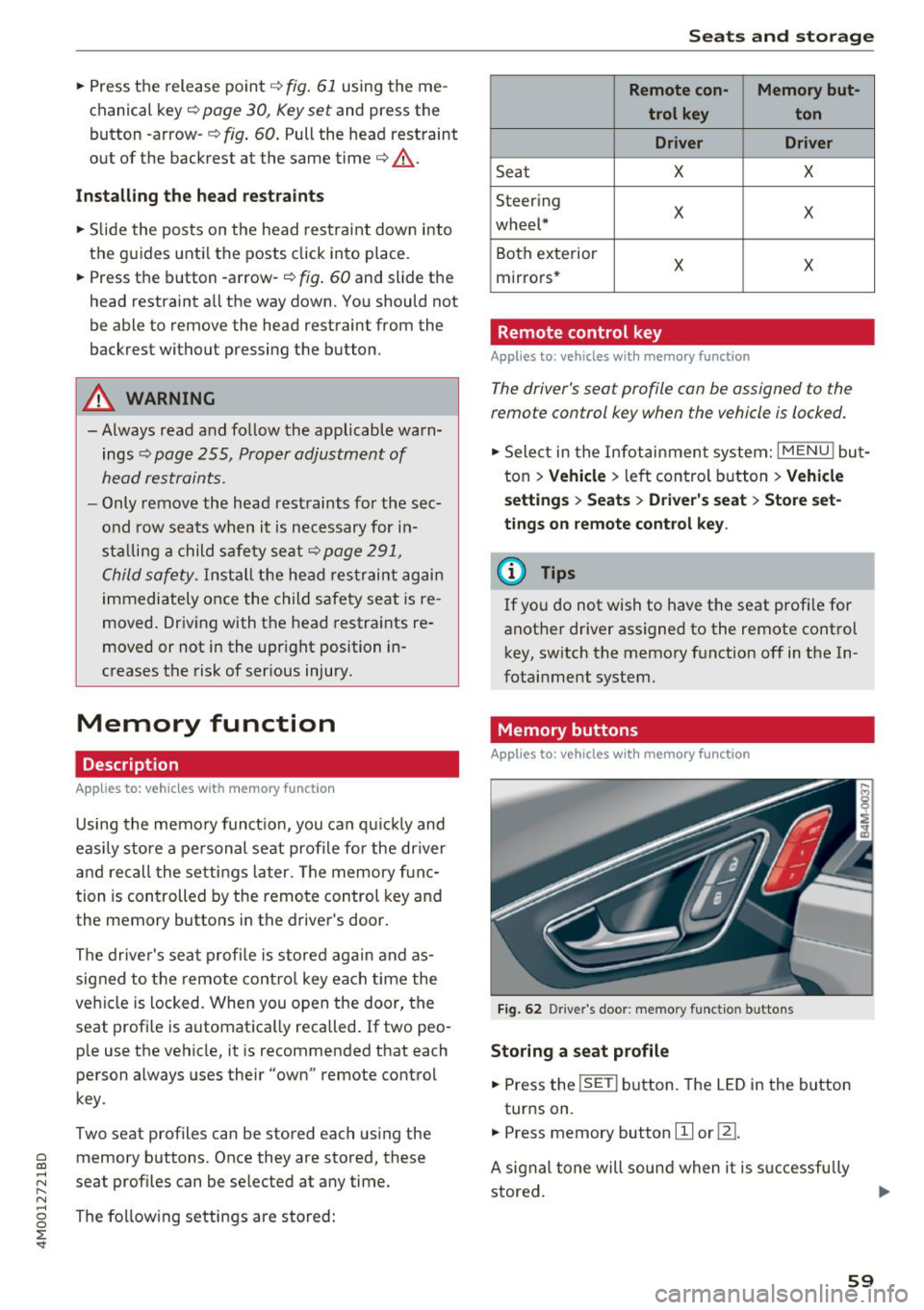
F ig . 62 Driver 's door : memo ry f unc tion buttons
Storing a seat p rofil e
• Press the !SET I button. The LED in the button
turns on.
• Press memory button
[II or ill.
A signal tone will sound when it is s uccessfu lly
stored.
59
Page 63 of 398
a co ...... N r--. N ...... 0
0
:E '
sole*, in the rear* and on the luggage compart
ment side tr im panel* .
USB ports @
You can cha rge mobi le devices and/or connect to
the Audi music interface* us ing t he USB ports*.
F or additional information about the USB ports,
see
¢ page 2 31, Multimedia connections.
.8, WARNING
Incorrect usage ca n lead to serio us injuries or
burns . To reduce the risk of injuries, never
leave children unattended in the vehicle with
the vehicle key.
CD Note
- D isconnect the connectors from the power
sources carefully to reduce the risk of dam
aging them .
- To reduce the risk of damage to the vehicle
electrical system, never attempt to charge
the vehicle battery by connecting accesso
ries that prov ide power, such as solar panels
or battery chargers, to the power sources.
- To reduce t he risk of damage to the power
sources, only use plugs and connectors that
fit correctly.
Storage
Cup holde rs
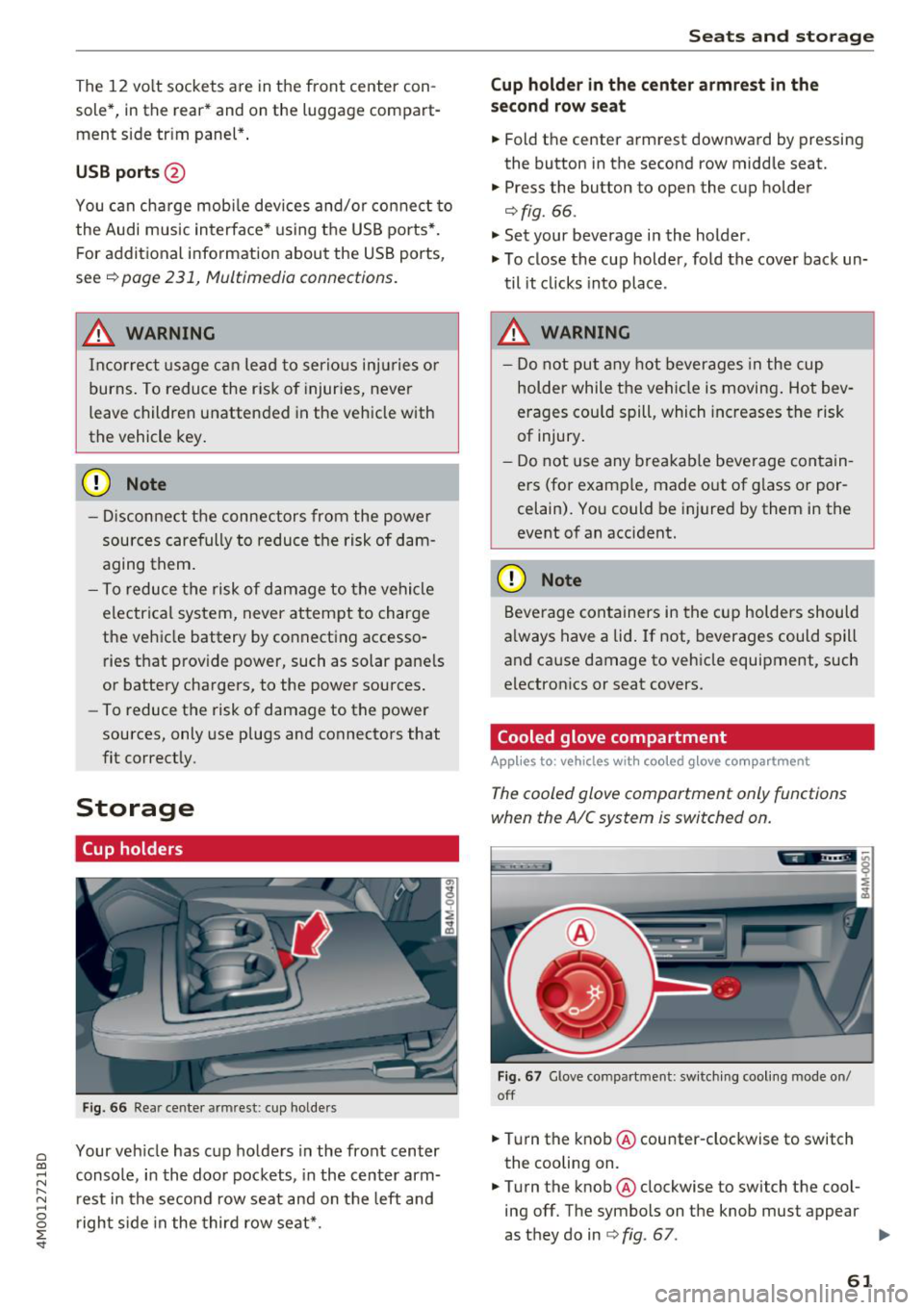
F ig . 66 Rear center armrest: cup holde rs
Your vehicle has c up holders in the front center
console, in the door pockets, in the center arm
rest in the second row seat and on the left and
right s ide in the third row seat*.
S eats and storag e
Cup holde r in the cent er ar mrest in th e
s e co nd row seat
.,. Fold the center armrest downward by pressing
the button in the second row middle seat.
.,. Press the button to open the cup holder
¢ fig. 66.
"'Set your beverage in the holder.
"' To close the cup holder, fold the cover back un
til it clicks into place .
.8, WARNING
-
-Do not put any hot beverages in the cup
holder while the vehicle is moving . Hot bev
erages cou ld spill, which increases the risk
of injury .
- Do not use any breakab le beverage contain
ers (for example, made out of g lass or por
celain). You could be injured by them in the
event of an accident.
CD Note
Beverage containers in the cup holders should
a lways have a lid . If not, beverages could spill
and cause damage to vehicle equipment, such
electron ics or seat covers.
Cooled glove compartment
Applies to : vehicles wi th coo led g love co mpartment
The cooled glove comportment only functions
when the AIC system is switched on.
Fig . 67 G love compartment: sw itch ing cool ing mode on/
off
.,. Turn the knob @counter-clockwise to switch
the cooling on.
.,. Turn the knob@clockwise to switch the cool
ing off. The symbols on the knob must appear
as they do in
¢ fig. 67. ..,.
61
Page 84 of 398
Drivin g
are available when you start driving r=:> poge 83,
Starting to drive .
Preventing th e automatic parking brake
r e leas e
The vehicle could begin rolling unintentiona lly,
depending on the hill or if towing a trailer .
.,. To preve nt the parking b rake from releasing au
tomat ica lly, pull and hold the© switch and
press the acce lerator pedal. The parking brake
remains set and prevents the vehicle from ro ll
ing backward.
.,. You can release the(®) switch again once you
are sure that you are g iv ing enough dr iv ing
force to the wheels by pressing the accelerator
pedal.
Emer gency br aking fun ction
You can use the emergency braking function in an
emergency situation, or if the standard brake op
eration malfunctions or is disabled.
.,. Pu ll and hold the(®) switch.
.,. As soon as you release the © switch or acceler -
ate, the braking stops .
Pulling and holding the<®> switch while driving
the vehicle activates the emergency braking func
tion . The vehicle is braked at all four wheels by
activating the hydraulic brake system. The brak ing effect is s imilar to heavy braking
r=:> ,&. .
To reduce the risk of activating the emergency
braking by mistake, a warning tone (buzzer)
sounds when the(®) switch is pulled. Emergency
braking stops as soon as the(®) switch is released
or the accelerator pedal is pressed .
Parking
.,. Press the brake peda l to stop the vehicle.
.,. Pu ll the(®) switch to set the parking brake.
.,. Se lect the "P" selector lever pos it ion.
.,. Turn the eng ine off
r=:> ,&. .
.,. Turn the steering wheel when parking on in
clines so that the wheels will roll into the curb
i f the veh icle sta rts mov ing .
82
A WARNING
-Do not press the accelerator pedal inadver
tently if a gear is selected when the vehicle
is stationary and the eng ine is runni ng . Oth
erwise, the vehicle will start to move imme
d iate ly and this could result in an accident.
- Eme rgency brak ing shou ld only be used in
a n emergency, when the no rma l bra ke pedal
h as fa iled or the bra ke peda l is obstr ucted.
Dur ing eme rgency brak ing, you r vehicle w ill
brake s imilar to heavy b raking. ESC and the
associated components (ABS, ASR, EDL)
cannot overcome the laws of physics.
Around curves and when road or weather
conditions are bad, a full brake applicat ion
can cause the veh icle to skid or the rear end
to swerve, wh ich increases the risk of an ac
cident .
- If the power supply fails, you cannot set the parking brake if it is released . In this case,
pa rk the veh icle on leve l ground and secure
it by p lac ing the sele ctor l eve r in the "P " po
si tion. See an au thor ized A udi dealer o r au
thorized A udi Se rvice Fac ility for assis tance.
- Always set the pa rking brake when leaving
your veh icle, even if for a sho rt period of
time . Otherwise the vehicle could roll away,
increasing the risk of an accident.
- If you leave the vehi cle, sw itch the ignition
off and take the ve hicle key with you . This
applies partic ularly when children remain in
the vehicle. Otherwise, chi ldren co uld start
the engine, release the parking brake or op
erate e lectr ica l equipment such as power
w indows, wh ich increases the r isk of an acci
dent.
- No one, especially ch ildren, should remain
in the vehicle when it is locked . Locked
doors make it more diff icu lt for eme rgency
wo rkers to get into the vehicle, which puts
lives at r is k .
0) Tips
When stopp ing at a traff ic signa l or stopp ing
i n city traffic, you can set the park ing brake
manua lly . The veh icle does not have to be
h eld wi th the b rake pedal. The par king b rake
Page 260 of 398
Driving safety
A WARNING
Heavy loads will influence the way your vehi
cle handles . To help reduce the risk of a loss
of control leading to serious personal injury:
- Always keep in mind when transporting
heavy objects, that a change in the center of
gravity can also cause changes in vehicle
handling:
- Always distribute the load as evenly as
possible.
- Place heavy objects as far forward in the
luggage compartment as possible.
- Never exceed the Gross Axle Weight Rating
or the Gross Vehicle Weight Rating specified
on the safety compliance sticker on th e driv
er's side B-pillar. Exceeding permissible
weight standards can cause the vehicle to
slide and handle differently .
- Please observe information on safe driving
<=) page 252.
A WARNING
To help prevent poisonous exhaust gas from
being drawn into the vehicle, always keep the
rear lid closed while driving .
- Never transport objects larger than those
fitting completely into the luggage area be cause the rear lid cannot be fully closed .
- If you absolutely must drive with the rear lid
open, observe the following notes to reduce
the risk of poisoning:
- Close all windows,
- Close the sunroof*,
- Open all air outlets in the instrument pan-
el,
- Switch off the air recirculation,
- Set the fresh air fan to the highest speed .
A WARNING
Always make sure that the doors, all win
dows, the sunroof* and the rear lid are se
curely closed and locked to reduce the risk of
injury when the vehicle is not being used .
- After closing the rear lid , always make sure
that it is properly closed and locked.
258
-Never leave your vehicle unattended espe
cially with the rear lid left open. A child
could crawl into the vehicle through the lug
gage compartment and close the rear lid be
coming trapped and unable to get out . Be
ing trapped in a vehicle can lead to serious
personal injury.
- Never let children play in or around the vehi
cle .
- Never let passengers ride in the luggage
compartment . Vehicle occupants must al
ways be properly restrained in one of the
ve
hicle 's seating positions.
@ Note
If you are transporting large items with the
backrest folded down*, you should remove
the Rear Seat Entertainment (RSE)* and its
holder* to avoid damage.
© Tips
-Air circulation helps to reduce window fog
ging. Stale air escapes to the outside
through vents in the trim panel. Be sure to
keep these slots free and open .
- The tire pressure must correspond to the
load. The tire pressure label lists the recom
mended cold tire inflation pressures for the
vehicle at its maximum capacity weight and
the tires that were on your vehicle at the
time it was manufactured. For recommend ed tire pressures for normal load condi
tions, please see chapter
Q page 341 .
Tie-downs
The luggage compartmen t is equipped with four
t ie-downs to secure luggage and o ther i tems.
Use the tie-downs to secure your cargo properly
Qpage 257, L oading the luggage compartment.
In a collision , the laws of physics mean that even
smaller items that are loose in the vehicle will
become heavy missiles that can cause serious in
jury. Items in the vehicle possess ene rgy which
vary with vehicle speed and the weight of the
item . Vehicle speed is the mos t significant fac tor . ..,.