oil AUDI Q7 2018 Owner´s Manual
[x] Cancel search | Manufacturer: AUDI, Model Year: 2018, Model line: Q7, Model: AUDI Q7 2018Pages: 398, PDF Size: 185.58 MB
Page 13 of 398
Cl a:, ...... N
" N ...... 0
0
::r '
displayed in the head-up display*
¢page 17.
A WARNING
Do not assume the roads are free of ice based
on the outside temperature display . Be aware
that there may be ice on roads even when the
outside temperature is around 41 °F (+5 °C)
and that ice can increase the risk of accidents .
(D Tips
- Depending on vehicle equipment, the in
strument illumination (needles and gauges) may turn on when the lights are
off and the
ignition is switched on . The illumination for
the gauges reduces automatically and even
tually turns off as brightness outside in
creases. This function reminds the driver to
turn the low beams on at the appropriate
time.
- You can select the units used for tempera
ture, speed and other measurements in the
Infotainment system¢
page 245.
-If your vehicle is stationary or if you are driv
ing at very low speeds, the temperature dis
played may be slightly higher than the ac
tual temperature outside due to the heat ra
diating from the engine.
- At temperatures below 41 °F (+5 °C), a
snowflake symbol appears in front of the
temperature display¢,&. .
Coolant temperature indicator
The coolant temperature display@¢ page 10,
fig . 3
or ¢ page 10, fig . 4 only functions when
the ignition is switched on. To prevent engine
damage, please observe the following notes
about the temperature ranges.
Cold range
If only the LEDs at the bottom of the gauge turn
on, the engine has not reached operating tem perature yet . Avoid high engine speeds, full ac
celeration and heavy engine loads.
Cockpit overview
Normal range
The engine has reached its operating tempera
ture once the LEDs up to the center of the gauge
turn on. If the. indicator light in the instru
ment cluster display turns on, the coolant tem
perature is too high ¢
page 22.
@ Note
-Auxiliary headlights and other accessories in
front of the cooling-air intake impair the
cooling effect of the coolant. This increases
the risk of the engine overheating during
high outside temperatures and heavy en
gine load .
- The front spoiler also helps to distribute
cooling air correctly while driving. If the
spoiler is damaged, the cooling effect will
be impaired and the risk of the engine over
heating will increase. See an authorized
Audi dealer or authorized Audi Service Fa
cility for assistance.
{D Tips
Applies to: vehicles with diesel engines
Due to the high efficiency of these engines,
the engine may not always reach operating
temperature in cold outside temperatures.
This is normal and not a cause for concern.
Tachometer
The tachometer displays the engine speed in rev
olutions per minute (RPM).
The beginning of the red zone in the tachometer
indicates the maximum permissible engine speed
for all gears once the engine has been broken in.
Before reaching this zone, you should shift into
the next highest gear, select the "D/S" selector
lever position, or remove your foot from the ac
celerator pedal.
@ Note
The needle in the tachometer@¢ page 10,
fig. 3
or ¢ page 10, fig. 4 may only be in the
red area of the gauge for a short time or there
is a risk of engine damage . The location where .,.
11
Page 19 of 398
a co ...... N r--. N ...... 0
0
:E -
indicator
Applies to: vehicles with engine oil temperature display/boost
indicator
Applies to: vehicles with analog instrument cluster
The engine oil temperature and boost indicator
are only show n in the lap timer disp lay
~ page 98 .
Engine oil temperature indicator
Applies to: vehicles with Audi virtual cockpit
The engine oil temperatu re is only shown in t he
e nhanced view or in the spo rt view ~
page 14.
When engine oil temperatures are low, the dis
p lay -- -°F ( ---
0
() appears in the inst rumen t clus
ter .
The engine has reached its operating tempera
ture when the engine oil temperature is between
176 °F (80 °() and 248 °F (120 °() under normal
d riving conditions . The eng ine oil temperatu re
may be hi gher if there is heavy eng ine load and
hi gh temperat ures outside. This is not a ca use for
concer n as long as the . ~
page 23 or II
~ page 24 ind icator lights do no t tu rn o n.
Boost indicator
Applies to: vehicles with Audi virtual cockpit
The boost indica to r is only displayed in the sport
v iew ~
page 14.
The current engine load (meaning the c urrent
boost p ressure) is indicated by a ba r.
Head-up display
Applies to: vehicles with head-up display
Fig . 14 In st rum ent pa ne l: kn ob for the hea d-up d is pl ay
Cockpit overview
T he head -up d isp lay pro jects certain wa rnings or
se lected information from the assist systems* or
navigation* on the windsh ield . The display ap
pears w ith in the driver's field of vision .
Switching on/off
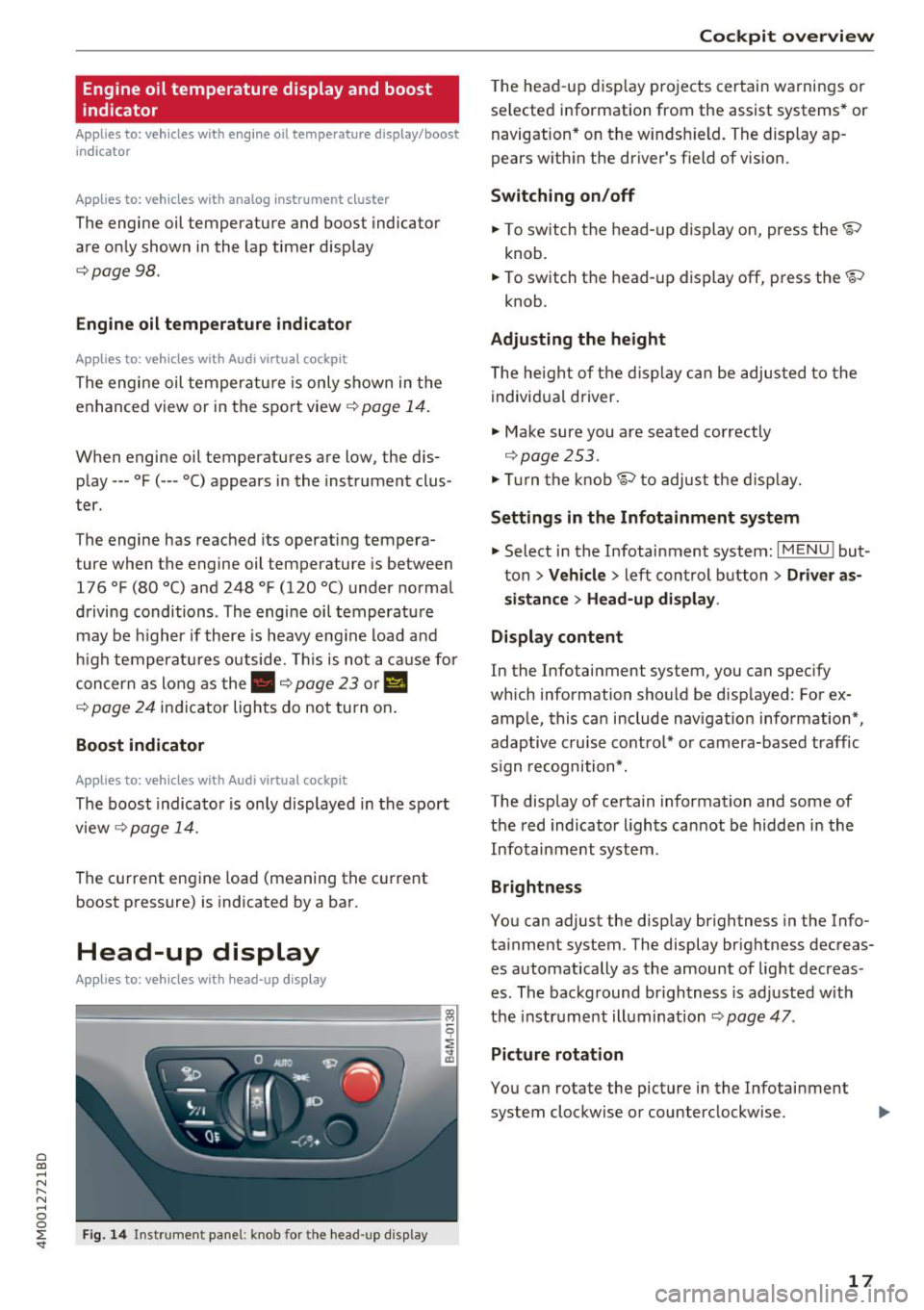
"" To switch t he head- up display on, press the~
knob.
.. To switch t he head -up display off, press the~
knob .
Adjusting the height
The he igh t of t he d isplay can be adjus ted to the
individ ual d river .
"" Ma ke sure you are seat ed co rrectly
~ page 253.
""Tur n the knob~ to adjus t the disp lay.
Settings in the Infotainment system
"" Select in the Infotainment system: I MENU ! but
ton
> Vehicle > left control b utton > Driver as
sistance > Head-up display .
Display content
In the Infotainment system, you can specify
which information should be d isp layed: For ex
amp le , this ca n include navigatio n information *,
adaptive c ruise co ntro l* or camera-based traffic
s ign recognition*.
The display o f ce rtain information and some of
the red indicator l igh ts can not be hidden in the
Infota inment system.
Brightness
You can adjust the disp lay br ightness in the Info
ta inment system . The display br ightness decreas
es automatically as the amount of light decreas
es. The backg round br ightness is ad justed w ith
the instr ument illumination ~
page 47.
Picture rotation
You can rotate the picture in the Infotainment
system clockwise or counterclockwise.
17
Page 25 of 398
Cl a:, ...... N
" N ...... 0
0
::r '
Do not cont inue d riving a nd switc h the eng ine
off. Check the coolant leve l£:=?
page 324.
- If the coolant level is too low, add coolant
C? page 325. Only cont inue dr iv ing once the in
dicato r light tur ns off.
• Coolant temperature: too high . Let engin e
run with vehicle stationary
Let the eng ine run at id le for a few minutes to
cool off, until the ind icator light turns off.
- If the indicator light does not turn off, do not
contin ue driving the vehicle. See an authorized
Audi dealer or authorized A udi Service Faci lity
for assistance.
A WARNING
- Never open the hood if you ca n see o r hear
steam o r coolan t escap ing from the eng ine
compartment. This inc reases the risk of
burns. Wa it unti l you no longe r see or he ar
ste am o r coolan t esca ping.
- The e ng ine compartmen t in any ve hicle can
be a dange ro u s area. Stop the eng ine and
a llow it to coo l before wo rking in the engine
compartmen t. A lways fo llow the informa
t ion foun d in£:=?
page 319, Working in the
engine comportment .
{Q) Note
Do not co ntinu e dr iving if the . indi ca tor
light tu rns o n as th is in creases t he ris k of en
gine damage .
,ft Safety belt
The . indicator light stays on unt il the driver's
and front passenger's safety be lts are fastened.
Above a certain speed, there w ill also be a warn
in g tone .
(D Tips
For addit iona l information on safety be lts,
see£:=?
page 261.
Coc kpit o ver view
0 Generator/vehicle battery
If the . or(•) in d icator light t urns on, the re is a
malfu nction in t he gener ator or the vehicle e lec
t rical sys tem .
• Electrical system: malfunction! Safel y stop
vehicle
Do not continue dr iv ing and switch the engine
off . See an author ized Audi dealer or au thorized
A udi Se rvice Fac ility for assistance .
(•) Electrical system: malfunction! Restart not
possible . Please contact Service
The veh icle batte ry was disconnected from the
vehicle e lectr ica l system and will no longer
c h arge. Dr ive to an authorized Audi dea ler or au
thorized Aud i Serv ice Facility immediately.
Do not stop t he eng ine, o r you w ill not be ab le to
start it again. If you can no longer start the en gine, see an aut horized Audi dea ler or authorized
Audi Service Fac ility for assistance .
(•) Electri cal system: malfunction! Ple ase con
ta ct Service
Drive to an authorized A udi dealer or authorized
Audi Service Facility immediate ly. Because the ve
hicle battery is discharging, t urn off a ll unneces
sary electrical eq uipment such as the rad io. See
an authorized Aud i dea ler or authorized Audi
Service Facility if the battery cha rge leve l is too
low.
(•) Electrical system: low battery cha rge. Bat
tery will be charged while driving
T he sta rting ability may be impai red .
If this message turns off after a little whi le, the
vehicle batte ry cha rged enough while driv ing.
If the message does not turn off and stay off
whe n driving, have an author ized A udi dealer or
a ut ho rize d Aud i Serv ice Facility rep air the mal
f unc tion.
"1::7-: Engine oil pressure
• Turn off engine. Oil pressure too low
23
Page 26 of 398

Cockpit overv ie w
Stop the engine and do not continue driving.
Check the engine oil leve l¢
page 322.
- If the engi ne oil leve l is too low, add engine o il
r:!> page 322. On ly cont inue driv ing once the in
dicator light turns
off.
- If the engi ne oil level is cor rect and t he i nd ica
tor lig ht st ill tur ns on, tur n the eng ine
off a nd
do no t continue driving. See an authorized Audi
dealer or authori zed A udi Se rvice Fac ility for as
sistance .
(D Tips
The oil pressu re warning is not an o il level in
dicator. Always check the o il level reg ularly .
'1'.::r,. Engine oil level (MIN)
Applies to: vehicles with oil level warning
• Please add oil immediately .
Add engine oil immed iate ly r:!> page 322.
Ill Plea se add ma x. x qt (l) oil. You can contin
u e dri ving
Add the maximum amoun t of oil indicated in the
d isplay as soon as possible ¢
page 322 .
@-Steering lock
• Steering: malfunction! Please stop vehicle
There is a malfunction in the electronic steering
lock . You cannot turn the ignition on .
Do
not tow your vehicle because it cannot be
steered. See an authorized Audi dealer or author
ized Audi Service Fac ility for assistance.
!\II Steering lock: malfunct ion! Please contact
Service
There is a malfunc tion in the elec tronic stee ring
loc k.
Dr ive to an a uth o rized Aud i dea le r or a uth o rized
Aud i Serv ice Fac ility immediately to have the
malfun ct io n corre cte d.
24
A WARNING
Do not tow your vehicle when there is a mal
function in the electron ic steer ing lock -thi s
i ncreases the risk of an acc ident.
-e Engine start system
• Engin e start sy st e m: malfunction! Plea se
contact Service
Do not sw itch the ignition off because you may
not be able to switch it on again .
Drive to an authorized Audi dealer or authorized
Audi Service Facility immediate ly to have the
malfunction corrected .
=:3 Engine start system: malfunct ion! Please
conta ct Ser vice
-
There is a ma lf u nction in the engine star ting sys
tem.
D rive to an author ized A udi dealer or au tho riz ed
A udi Se rvice Fac ility immed iate ly to have the
malfunction correc ted.
~ Hood
• Warning! Hood i s not locked . Stop vehicle
and che ck the lock
If the indicato r light turns on and the message
appears, the hood locking mechanism is not en
gaged correctly .
Stop immediately and close t he hood
¢ page 32 0.
0 /Q Air suspension
Applies to: vehicles with air suspension
• Air suspension: malfunction. Safel y stop ve
hicle. Steering and ground clearance limited
D ue to a sys tem m alfu nct ion, yo ur vehicle's
ground clearance is very low at the front or rear
axle* (in vehicles with all-wheel steering) . Be
ca use of this, the w heels no long er have enoug h
clearance to steer correctly.
See an author ized Audi dealer or au thori zed A udi
Service Facility for assistance.
...
Page 28 of 398

Cockpit overview
A WARNING
Have the safety systems inspected immedi
ately. Otherwise, there is a risk that the sys
tems may not activate during a collision,
which increases the risk of serious injury or
death.
( CD ) Brake system
[I] Brakes overheating. Please shift to D
-
There was a heavy load on the brakes. Place the
selector lever in the "D/S" position in order to use
the engine braking effect and reduce the load on
the brakes.
~t~J/(O : Brake pads
II (USA models)/EiJ (Canada models) Brake
pads: wear limit reached. You can continue driv
ing. Please contact Service
The brake pads are worn .
Drive to an authorized Audi dealer or authorized
Audi Service Facility as soon as possible to have
the malfunction corrected.
~ Engine control
II Drive system: malfunction! Please contact
Service
There is an engine control malfunction.
Drive slowly to an authorized Audi dealer or au
thorized Audi Service Facility to have the engine
checked .
W Engine control (diesel engine)
Applies to: vehicles with diesel engines
The engine is preheating if the II indicator light
turns on when the ignition is switched on.
If the indicator light does not turn on or blinks
while driving, there is an engine control malfunc
tion.
Immediately drive slowly to an authorized Audi
dealer or authorized Audi Service Facility to have
the malfunction corrected.
26
!?i Engine speed limitation
(II Maximum engine speed: XXXX rpm
The engine speed is automatically limited to the
speed displayed in the instrument cluster. This
protects the engine from overheating.
The engine speed limitation deactivates once the
engine is no longer in the critical temperature
range and you have released the accelerator ped
al once .
If the engine speed limitation was activated by
an engine control malfunction, the
II indicator
light also turns on . Make sure the engine speed
does not go above the speed displayed, for exam
ple when downshifting . Drive to an authorized
Audi dealer or authorized Audi Service Facility im
mediately to have the malfunction corrected.
(D Tips
Depending on the engine: the engine speed
may be limited when the engine is cold -the
full engine output will not be available. When
the engine is at operating temperature, the
red area in the tachometer moves to a higher
RPM range.
~ ... Engine oil sensor
• Oil level system: malfunction! Please con
tact Service
The sensor to check the engine oil level has
failed . Drive to an authorized Audi dealer or au
thorized Audi Service Facility immediately to have
the malfunction corrected.
• Oil level sensor: oil change necessary. Please
contact Service
Fuel has entered the engine oil as a result of fre
quent short drives. Avoid high engine speeds, full
acceleration and heavy engine loads. Drive to an
authorized Audi dealer or authorized Audi Service
Facility immediately to have the oil changed.
• Oil pressure sensor: malfunction! Please
contact Service
There is a malfunction in the oil pressure sensor.
Drive to an authorized Audi dealer or authorized .,.
Page 30 of 398

Cockpit overv ie w
Drive to an authorized Audi dea le r or a uth orized
Audi Service Facility immediately to have the
malfunct ion corrected .
go Audi adaptive light
Applies to: ve hicles w ith Audi adaptive light
mil Audi adaptive light: malfunction! See o wn
e r's manual
Adaptive light is not working. The headlights sti ll
function.
Drive to an a utho rized Aud i dea le r or a uth o rized
Audi Service Facility immediately to have the
malfunction corrected .
~D Light/rain sensor
El Automatic headlight s: malfunction! See
o w ner's manual
El Automatic wipe rs: malfunction! See owner 's
ma nual
The light/ra in senso r is malf unct ion ing.
The low beams remain switched on at all times
for safety reasons when the lig ht switch is in the
AUTO posi tion. Howeve r, you can continue to
t ur n t he ligh ts on and off using the light sw itch.
You can still control a ll functions that are inde
pendent of the rain sensor through the wind
shie ld w iper lever.
Dr ive to an a uth o rized Aud i dea le r or a uth orized
Audi Service Facility immediately to have the
malfunction corrected .
I-: Sport differential
Applies to: veh icles w ith sport differential
II) Sport differential : malfunction! Plea se con
tact Ser vice
There is a malfunction.
Dr ive to an a uth o rized Aud i dea le r or a uth orized
Aud i Serv ice Facility immediately to have t he
malfunct ion corrected .
II) Sport differential : temperature too high .
Pleas e adapt driving sty le
28
The transmission temperature has increased sig
nificantly due to the sporty driving manner. Drive
i n a less sporty manner unti l the temperature re
turns to the normal range and the indicator light
switches of.
A WARNING
Contact an author ized Audi dealer or author
ized A udi Service Fac il ity if the sport differen
tial is fa ulty o r malfunctioning . The repai r
must be performed by trained personnel us
ing the corre ct oil in order to ensure safety.
¢ ¢Turn signals
If the . or. indicator lig ht blinks, a tur n sig
nal is t urned on. If both indica tor lights are b link
ing, the emergency flashers are on.
If an ind icator light bl inks tw ice as fast as us ual,
a turn signal bu lb has fai led. Carefully d rive to an
authorized Aud i dea ler or a uth orized Audi Serv ice
Facility immediate ly to have the ma lfunction cor
rected .
¢\~ Trailer turn signals
App lies to : vehicles wit h trailer hitch
The turn signa ls are activated in trailer mode if
the . indicator light blinks.
If a turn signal on the trailer or on the vehicle
fails while in trailer mode, the indicator light will
not blink twice as fast to indicate th is.
Page 148 of 398
Intellig ent T echn olo gy
{QJ Note
- Never let the brakes "rub" by pressing the
pedal light ly when braking is not actually
necessary. This causes the brakes to over
heat and increases braking d istance and
causes wear .
- Before driv ing downhill a long distance on a
steep hill, decrease your speed and select a
lower gear. This makes use of the engine
braking effect and rel ieves the brakes. If
you need to b rake additionally, b rake in in
te rvals a nd not conti nuously.
@ Tips
-If the brake booster is not wo rking, you
must press the brake pedal with much more
fo rce than no rma l.
- If you ret rofit your vehicle with a front spoil
e r, whee l cove rs o r similar items, ma ke sure
th at the a ir flow to the front whee ls is not
i nterr upted. Ot herw ise the bra ke sys tem
can become too hot.
Electromechanical
steering, all-wheel
steering
The electromechanical steering supports the
driver's steering movements.
Power steering adapts electronically based on
the vehicle speed.
Indicator lights and me ssa ges
• Steering: malfuncti on! Plea se st o p vehicle
If this indicator light turns on and stays on and
this message appears, the power steering may
have failed.
Stop the vehicle in a safe location as soon as pos
sib le. Do
not continue driving. See an authorized
Audi dea ler or authorized Audi Service Facility for
assistance .
• Stee ring: malfunction! Plea se stop vehicle.
Pa y attention t o di sta nce at sid e
If t his ind icator light tu rns o n and stays o n and
this message appears, t he a ll-wheel steer ing*
146
may have fai led . The side of the vehicle may need
more space on the road .
Reduce you r speed and stop the vehicle in a safe
l oca tion with eno ugh space on the s ides as soon
as possible. Do
n ot continue driving. See an au
thorized Audi dea ler or authorized Audi Service
Facility for assistance.
'I-ij S te e ring : m alfun cti on! You can c ontinue
dri ving
If the indicato r light turns on and the message
appears, the steeri ng wheel may be more d iffi
cu lt to move or more sensitive than usu al. The
steering wheel may a lso be at an ang le when
driving straight.
D rive slowly to an a uth orized Audi dea ler or au
t h orized Aud i Serv ice Facili ty to have t he mal
f unction corrected .
l:r-ij Stee ring : malfun ction! Adapt driving sty le .
Lar ger turnin g radiu s
If the indicator l ight turns on and this message
appears, the all-whee l stee ring* may have fa iled .
Please note that the vehicle has a larger t urning
r ad ius and the st abil ity w hen turning a corner is
lik e tha t of a vehicle wi thout a ll -wheel s teer ing.
The steering whee l may also be at an angle when
driving straight.
D rive slowly to an a uth o rized Audi dea ler or au
t h orized Aud i Serv ice Facili ty to have t he mal
function corrected .
(D Tips
-If the . or l;rfl indi cato r light only stays on
for a sho rt time, you may cont inue driv ing.
- For add itiona l information o n all-wheel
steeri ng*, see
r=.>page 128.
ALL-wheel drive (quattro)
General information
In all whee l dr ive, the dr iv ing power is distr ibut
ed between all fou r whee ls when needed. This
happe ns automatically depend ing on your dr iving
behav ior as we ll as the curren t road cond it ions.
A lso see
r=.> page 142, Electronic stabilization
control (ESC). ..,.
Page 176 of 398

Tele phone
Telephone
Introduction
Applies to: vehicles with telephone
To make phone coils in your vehicle using the
/11/111, connect your cell phone to the /11/111 via
Bluetooth.
Hand sfree
After you have connected your ce ll phone to the
MMI via Bluetooth, you can use the handsfree
system and operate telephone functions through
your MMI. You can make calls using the antenna
on your cell phone.
A WARNING
- Medical experts warn that cell phones can
interfere w ith the funct ion of pacemakers .
Always mainta in a m inimum d istance of
about 8 inches (20 cm) between the ce ll
phone antenna and the pacemaker.
- Do not carry the cell phone in a pocket di
rectly over the pacemaker when the phone
is switched on.
- Sw itch the cell phone off immediately if
you suspect it may be interfering w ith the
pacemaker.
- Do not use the vo ice recognit ion system*
<=) page 167 in emergencies because your
vo ice may change in stressful situations. It
may take longer to dial the number or the
system may not be able to dia l it at all. Dial
the emergency n umbe r manua lly.
- Switch your cell phone off in areas where
there is a ris k of an exp losion . These loca
tions are not always clearly mar ked. This
may include gas stations, fuel and chemical
storage facilities or transport vehicles, o r lo
cations where fue l vapors (such as propane
or gaso line vapor in vehicles or bui ldings),
chemicals or large quantities of dust parti
cles (such as flour, sawdust or metal) may
be present in the air . This also applies to all
other locations where you would normally
turn your vehicle engine off .
- The demands of traffic requ ire your full at
tent io n. Always read the chapter
Q page 149, Traffic safety information.
174
-
@ Note
Always fo llow the information found in Q @ in
Wi -Fi hotspot on page 194.
(D Tips
- Th e Bluetooth connect ion range is limited
to inside the vehicle. It can also be affected by local conditions and interference with
other devices .
- To learn which Bluetooth connections and
wh ich of the funct ions in your ce ll phone are
supported, check with your cell phone serv
ice provider or the database for mob ile devi
ces at www .aud iusa .com/bluetooth.
Setup
Connecting a cell phone using Bluetooth
Applies to: vehicles with telephone
Fig . 172 D isp layin g the PIN for enter ing in t he cell phone
R equi rem ent
The vehicle must be stationary and the ignition
must be switched on.
The Bl uetooth settings m ust be open on your cell
phone during the connection setup.
The Bluetooth funct io n and v is ib il ity of the MMI
Q page 248 and cell phone must be sw itched on.
The cell phone to be connected must not be con nected to any other Bluetooth device .
The MMI must not be connected to a cell phone.
Conn ecting a c ell phon e
.. Select: IMENU I button> Telephone > Connect
mobile de vice > Find new de vic es > Next.
The
avai lab le Bluetooth devices are shown in the In-
fotainment system display.
Or select: ! MENUI 1111-
Page 200 of 398
Audi connect vehicle control
-Pay attention to upper-and lower -case let
ters when entering the vehicle code.
- If you do not have the 10-digit vehicl e code,
contact an authorized Audi dealer or author
ized Audi Service Facility .
Additional options
Applies to vehicles with Audi co nnect vehicle control
License subscription
The validity and expirat ion date of you r subscrip
tions are displayed. When
Warning before sub
scription expires
is activated, a message wi ll be
disp layed warning you that your license is about
to expire.
Select :
!MENU ! button> Audi connect > Display
available functions >
right control button> Li
cense subscription.
Resetting the primary user
F or examp le, you ca n reset the key user when
selling your vehicle in order to deactivate these
services .
Requirement: the ignition must be switched o n.
Select :
!M ENU ! button> Audi connect > right
control button
> Audi connect user management
> Key user > Reset key user .
Warning levels
Requirement: the primary user must have set one
or more warning levels. Secondary users can only
see if a warning level is active or not .
Select:
! MENU ! button> Audi connect > right
control button
> Alerts.
Remote locking and
unlocking
Applies to veh icles with Audi connect vehicle control
You can lock and unlock your veh icle using this
service .
Requirement
-This requires the 4-dig it PIN that you specified
during the verification on www.audiusa.com/
myaud i.
- The vehicle must be stationary.
198
-The ignition must be switched off.
Vehicle status report
Applies to vehicles w ith Aud i connect ve hicle control
The Dr iver Informat ion System collects data un
der certain conditions and sends it to a server.
When data is sto red, you can access va lues such
as these using the service :
- Remaining range,
- Fue l tank level,
- Oil level,
- If the vehicle doors are open/closed or locked/
un locked,
- mi leage,
- Next oil change
- Next service,
- Warning messages,
- If the parking lights are on/off .
A WARNING
Do not ignore messages and warning or ind i
cator lights that turn on in the vehicle be
cause of the info rmation in the status report.
This could lead to break downs in on the road ,
accidents and serious injuries.
Parking location
Applies to vehicles w it h Aud i connect ve hicle co ntrol
The vehicle collects data unde r ce rta in cond it ions
and sends it to a server .
When data is stored, you can access values such
as these using the service :
- Vehicle location display,
- Display of one's own location,
- Route to your vehicle .
If your mob ile dev ice also has a navigation func
tion, you can nav igate to your last known parking
l ocation.
Deactivating and activating parking position
- Select: !MENU!> Audi connect> Car Finder
parking position .
If you do not set./, no location information will
be sent to the server.
Page 211 of 398
a co ...... N r--. N ...... 0
0
:E '
must have selected a destination from the re
sults list . Allows yo u to search for items in the vi
cinity of the selected location, such as
Travel in
formation.
Online traffic data* :
the on line traffic informa
tion
r::;, page 219 can be switched on or off .
Add destination to contact : see r::;, page 211.
Store as favorite : see r::;, page 211.
Voice guidance : see r::;,page 212.
Navigation settings: seer::;, page 211.
(D Tips
Information on online traffic data* can also
be found online at www.audiusa.com.
Personal route
assistance
Applies to: vehicles with navigation system and personal
route assistance
Your MMI con learn the routes you drive fre
quently and, depending on the current vehicle
position, suggest route guidance (for example,
your doily commute to work and back).
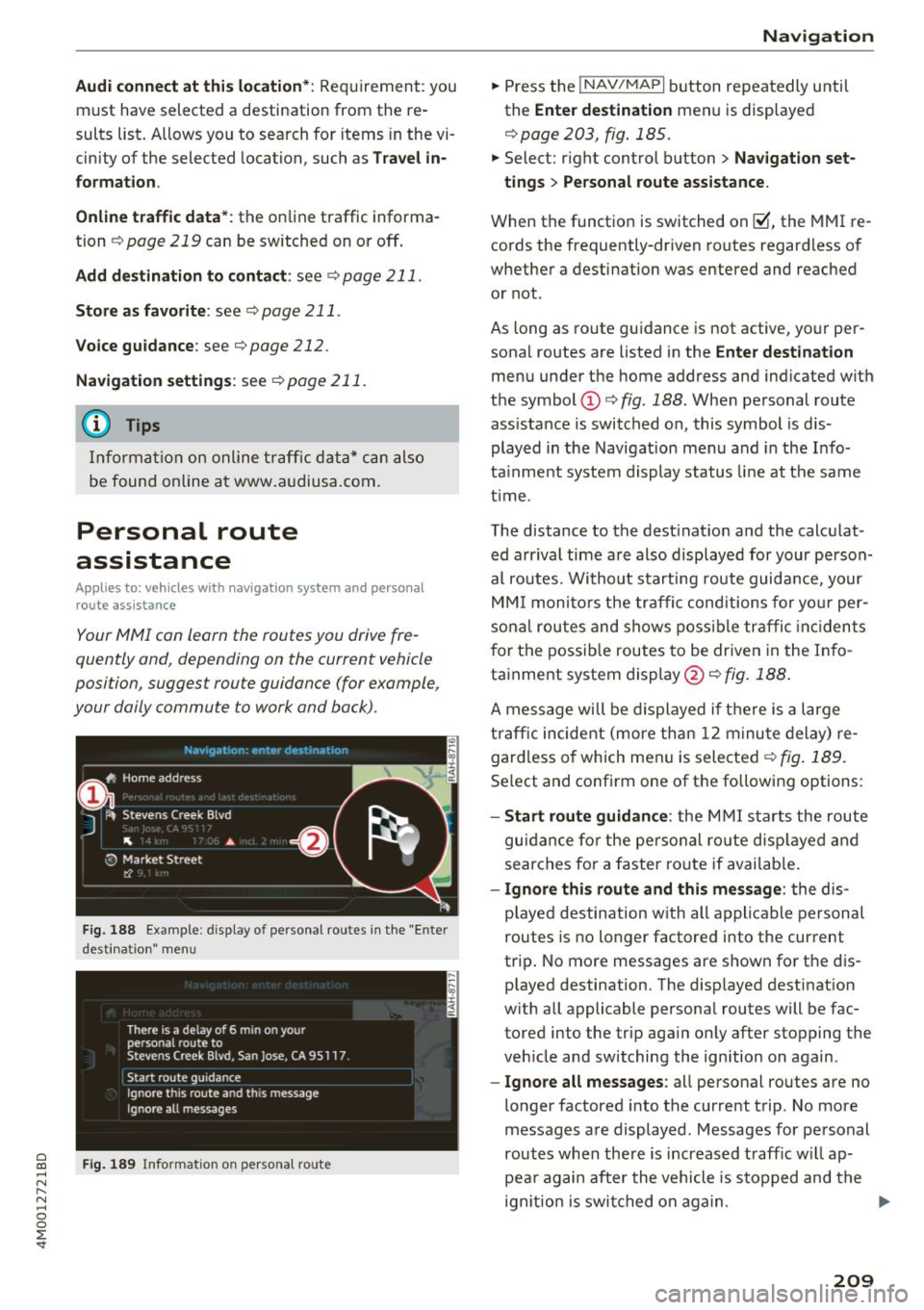
Fig. 188 Example : d isplay of personal routes in the "Enter
desti natio n" me nu
Fig. 189 Info rmation on perso nal route
Navigation
"Press the !NAV/MAPI button repeatedly until
the
Enter destination menu is displayed
r::;, page 203, fig . 185.
" Select: right control button > Navigation set-
tings > Personal route assistance.
When the function is switched on~. the MMI re
cords the frequently-driven routes regardless of
whether a destination was entered and reached
or not.
As long as route guidance is not active, your per
sonal routes are listed in the
Enter destination
menu under the home address and indicated with
the symbol
(D r::;, fig. 188. When personal route
ass istance is switched on, this symbol is dis
played in the Navigation menu and in the Info
tainment system display status line at the same
time .
The distance to the destination and the calculat
ed arrival time are also displayed for your person
al routes. Without starting route guidance, your
MMI monitors the traffic conditions for your per
sonal routes and shows possible traffic incidents
for the possible routes to be driven in the Info
tainment system display@r::;,
fig. 188.
A message will be displayed if there is a large
traffic incident (more than 12 minute delay) re
gardless of which men u is selected
r::;, fig . 189.
Select and confirm one of the following options:
-Start route guidance : the MMI starts the route
guidance for the personal ro ut e displayed and
searches for a faster route if available.
- Ignore this route and this message : the dis
played destination w ith all applicable personal
routes is no longer factored into the cur rent
trip . No more messages are shown for the dis
played destination. The disp layed destination
with all applicable personal routes will be fac
tored into the trip aga in only after stopping the
veh icle and switching the ign ition on again .
-Ignore all messages : all personal routes are no
longer factored into the current trip. No more
messages are displayed. Messages for personal
routes when there is increased traff ic w ill ap
pea r again after the vehicle is stopped and the
ign ition is switched on again . .,.
209