seat adjustment AUDI Q7 2018 Owner´s Manual
[x] Cancel search | Manufacturer: AUDI, Model Year: 2018, Model line: Q7, Model: AUDI Q7 2018Pages: 398, PDF Size: 185.58 MB
Page 20 of 398

Cockpit overv ie w
{QJ Note
To prevent scratches on the g lass covering the
head -up d isp lay, do not place any ob jects in
the projection opening.
(D Tips
- Sung lasses with polarization fi lters and un
favorab le lighting conditions can have a
negative effect on the display.
- An optimum display depends on t he seat
position and the height adjustment of the
head-up display.
- A specia l windshield is needed for the head
u p d isp lay f unction.
- For information on cleaning, see¢
table In
terior cleaning on page 353.
Indicator lights
Description
The indicato r lights in the inst rument cl uste r
blink or t urn on. They indica te funct ions or ma l
f u nctions.
M essages may appea r with some indicator lights.
A wa rni ng sig nal w ill sound at the same t ime.
The indicato r lights and messages in the ins tru
ment cluster display can be covered by other d is
p lays. To show them again, select the second tab
with the mu ltifunction stee ring wheel
¢ page 12.
If there are several malfunctions, you can d isplay
them one at a time using the thumbwheel.
Some indicator lights in the disp lay can display in
several colors.
& Central indicator light
If the . or Q indicator light turns on, check
the message in the instrument cluster .
Overview
Some indicator lights turn on briefly as a function
check when you switch the ign ition on . These sys
tems are marked wit h a./ in the following tables.
I f one of these indica to r ligh ts does not tur n on,
there is a ma lfu nction in t hat system.
18
Red indicator lights
--------------
Centra l indicator light
¢ page 18,
Audi pre sense*
¢page 112
USA models:
Brake system ./
¢page 21
Canada mod els:
B rake system ./
¢page 21
USA models:
Electromechanical parking brake
¢ page22
Ca nada model s:
E lectromechanical parking brake
¢ page 22
Cooling sys tem
¢page 22
Eng ine o il p ress ure
¢page 23
Engine o il level (MI N)*
¢ page24
Alternator
¢page 23
Safety be lt
¢ page 23
Electromechanical power steering,
all-wheel steering* ./
¢page 146
Steering lock
¢ page24
Eng ine sta rt system
¢page24
Transmission
¢page 90
Hood
¢page24
Adaptive cruise contro l*./
¢ page 104
Traffic jam assist*
¢page 109
Page 56 of 398
Seats and stor age
Seats and storage
General information
A WARNING
See c> page 252, Driving safety for important
information, tips, suggestions and warnings
that you should read and follow for your own
safety and the safety of yo ur passengers .
Front seats
Power seat adjustment
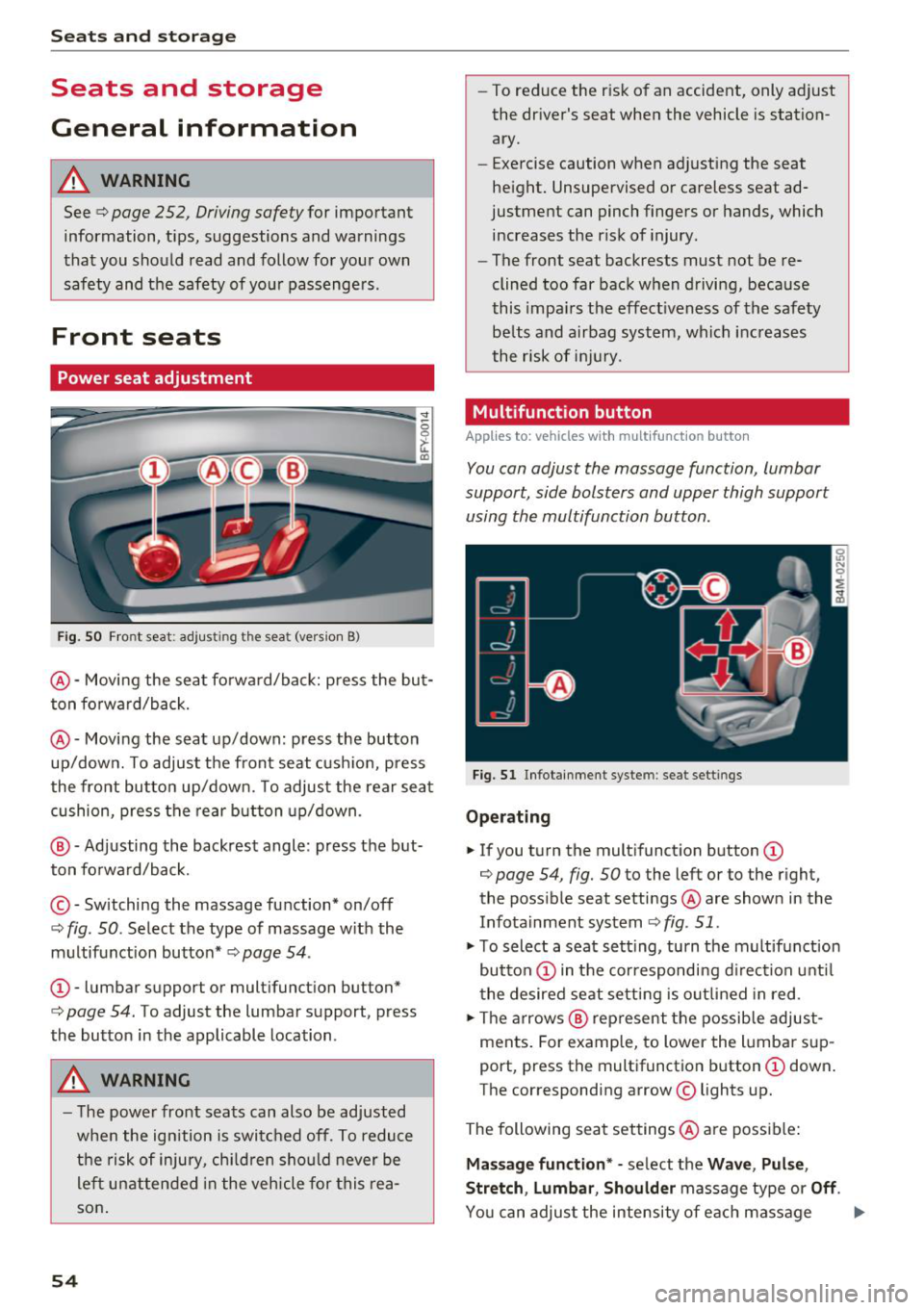
Fig. SO Front seat : adjust ing the seat (vers ion 8)
@ -Moving the seat fo rward/back: press the but
ton fo rward/back.
@ -Moving the seat up/down: press the button
up/down. To adjust the front seat cush ion, press
the front button up/down. To adjust the rear seat
cushion, press the rear button up/down .
@ -Adjusting the backrest angle: press the but
ton fo rwa rd/back.
© - Switching the massage function* on/off
¢ fig. 50. Select the type of massage w ith the
m ultifunction button*
c> page 54 .
CD-lumbar support or mult ifunction button*
¢ page 54. To adjust the lumbar support, press
the button in the applicable location .
A WARNING
-The power front seats can also be adjusted
when the ign ition is switched off. To reduce
the risk of injury, chi ld ren should never be
le ft unattended in the vehicle for this rea
son .
54
-To reduce the risk of an accident, only adjust
the dr iver's seat when the vehicle is station
ary.
- Exercise caution when adjusting the seat
he ight. Unsupervised or careless seat ad
justment can pinch fingers or hands, which
increases the risk of injury.
- The front seat backrests must not be re
clined too far back when driving, because
this impa irs the effect iveness of the safety
be lts and airbag system, which increases
the risk of inj ury.
Multifunction button
App lies to : vehicles wi th mu lt ifunct ion b utto n
You can adjust the massage function, lumbar
support, side bolsters and upper thigh support
using the multifunction button.
Fig. 51 Infotainment syste m: seat settings
Ope rating
.,. If you turn the mult ifunct ion b utton CD
¢ page 54, fig. 50 to the left or to the r ight,
the poss ible seat settings @are shown in the
Infota inment system
c> fig . 51 .
.,. To select a seat sett ing, turn the multifunction
button
CD in the cor respondi ng d irection unti l
the desired seat setting is outlined in red .
.,. The arrows @ rep resent the possib le adjust
ments. For example, to lower the lumba r sup
port, press the multifunction button
CD down .
The corresponding arrow © lights up.
The following seat settings @are poss ible:
Ma ssa ge fun ction * -se lect the Wave , Pul se ,
Stretch , Lumbar , Shoulder
massage type or Off.
You can adjus t the intensity of each massage
Page 60 of 398
Seats and storage
Head restraints
Front head restraints
Applies to: vehicles with adjustable head restraints
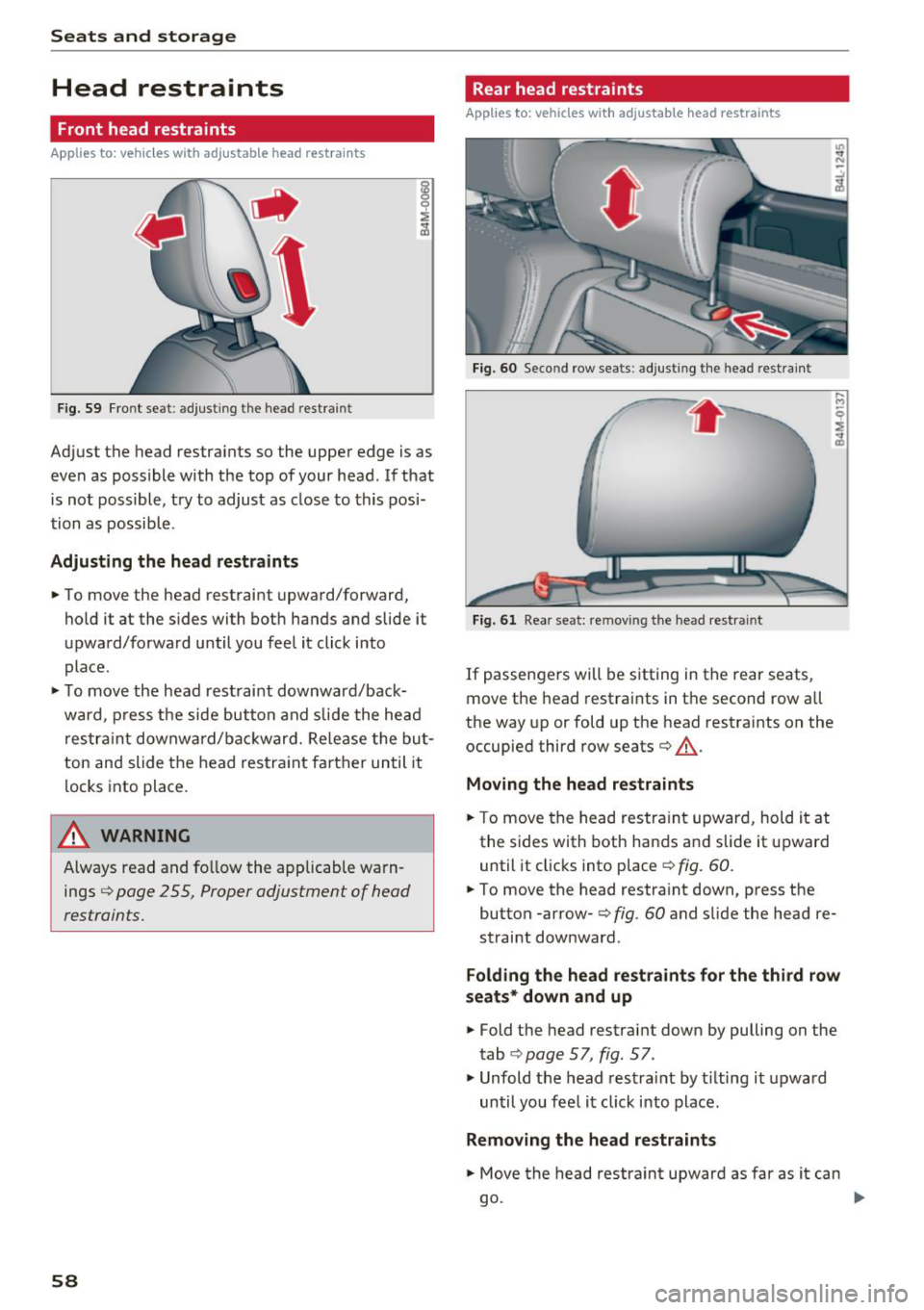
Fig. 59 Front seat: adjust in g the head restrain t
Adjust the head restraints so the upper edge is as
even as possible with the top of your head . If that
is not possible, try to adjust as close to this posi
tion as possible .
Adjusting the head rest raints
.. To move the head restraint upward/forward,
hold it at the s ides with both hands and slide it
upward/forward until you feel it click into
place .
.. To move the head restraint downward/back
ward , press the side button and slide the head
restraint downward/bac kward. Release the but
ton and slide the head restraint farther until it
locks into place.
_& WARNING
Always read and fo llow the applicable warn
ings
¢ page 2 55, Proper adjustment of head
restraints.
58
Rear head restraints
Applies to: vehicles with adjustable head restraints
Fig. 60 Second row sea ts : adjus ting the head restr ain t
Fig. 61 Rear seat : rem ovin g the head re str ain t
If passengers will be sitting in the rear seats,
move the head restraints in the second row all
the way up or fold up the head restraints on the
occupied third row seats¢_&.
Moving the head restraints
.. To move the head restraint upward, hold it at
the sides with both hands and slide it upward
until it clicks into place
¢ fig . 60.
.. To move the head restraint down, press the
button -arrow-
c> fig . 60 and slide the head re
straint downward .
Folding the head restraints for the third row
seats* down and up
.. Fold the head restraint down by pulling on the
tab
¢ page 57, fig. 57 .
., Unfold the head restrai nt by t ilting it upward
until you feel it click into place.
Removing the head restraints
.. Move the head restraint upward as far as it can
go . ..,
Page 61 of 398
• Press the release point c::> fig . 61 using the me
chanical key
c::> page 30, Key set and press the
button -arrow-
c::> fig . 60 . Pull the head restraint
out of the backrest at the same time
c::> ,&. .
In stall ing th e head rest raints
• Slide the posts on the head restraint dow n into
the guides until the posts click into place.
• Press the b utton -arrow-
c::> fig. 60 and slide the
head restraint all the way down. You should not
be able to remove the head restraint from the
backrest without pressing the button .
A WARNING
-Always read and follow the applicable warn
ings
c::> page 255 , Proper adjustment of
head restraints.
- Only remove the head restraints fo r the sec
ond row seats when it is necessary for in
sta lling a child safety seat
c::> page 291,
Child safety.
Install the head restraint agai n
immediately once the child safety seat is re
moved. Driving with the head restraints re
moved or not in the upr ight position in
creases the risk of serious injury.
Memory function
Description
Applies to: vehicles with memory function
Using the memo ry function, you can qu ick ly and
eas ily store a pe rsonal seat profile for the driver
and recall the settings later. The memory func
tion is controlled by the remote control key and
the memory buttons in the driver's door.
The drive r's seat profile is stored again and as
signed to the remote contro l key each time the
vehicle is locked. When you open the door, the
seat profi le is automat ica lly reca lled . If two peo
p le use the vehicle, it is recommended that each
person always uses their "own" remote control
key.
Two seat profiles can be stored each us ing the
~ memory buttons. Once they are stored, these
...... N seat prof iles can be se lected at any time. r--. N ...... g The fo llowing settings are stored :
:E '
Remote con- Memory but-
trol key ton
Driver Drive r
Seat X X
Steering
X X wheel*
Both exterior
mirrors*
X X
Remote control key
Applies to : vehicles with memory function
The driver's seat profile con be assigned to the
remote control key when the vehicle is locked.
• Select in the Infotainment system: I MENU ! but
ton
> Vehicle > l eft control button > Vehicle
s etting s
> Seats > Driver 's seat > Store set
ting s on r emote cont rol ke y.
(D Tips
If you do not wish to have the seat profi le for
another driver assigned to the remote control key, sw itch the memory f unction off in the In
fotainment system.
Memory buttons
Applies to : vehicles with memory function
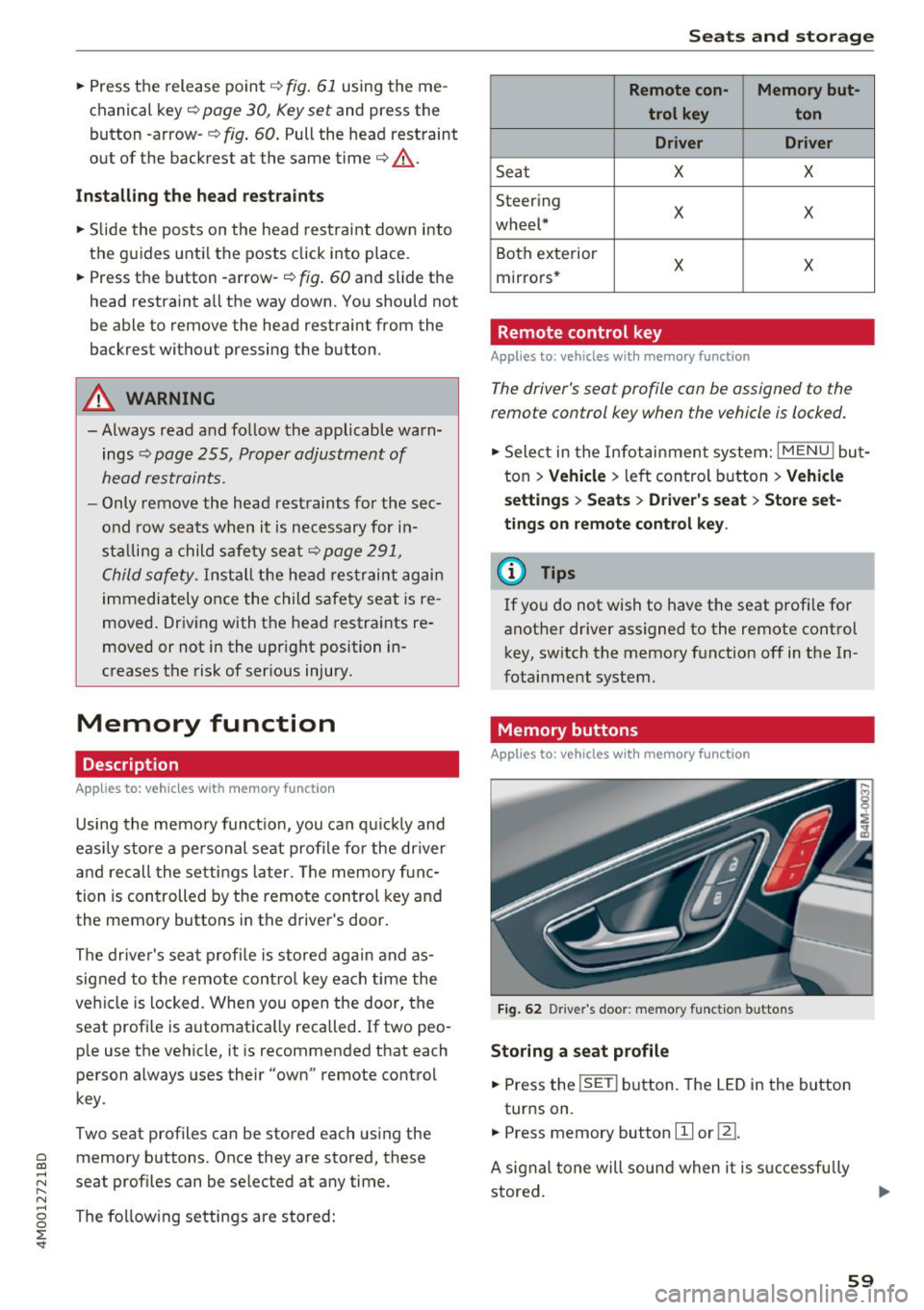
F ig . 62 Driver 's door : memo ry f unc tion buttons
Storing a seat p rofil e
• Press the !SET I button. The LED in the button
turns on.
• Press memory button
[II or ill.
A signal tone will sound when it is s uccessfu lly
stored.
59
Page 62 of 398
Seats and stor age
Acc essing a seat profile
• If the driver's door is open and the ignit ion is
switched off, press the memory button.
• If the driver's door is closed or the ignition is
switched on, press and hold the memory but
ton until the seat adjustment is complete.
A WARNING
- For safety reasons, the seat setting can only
be recalled when the vehicle is stationary to
reduce the risk of an accident.
- In an emergency, seat adjustment operation
can be stopped by pressing the
!SETI button
or the buttons @or@
c::> page 54, fig. 50 .
Ashtray
App lies to: ve hicles w ith ashtray
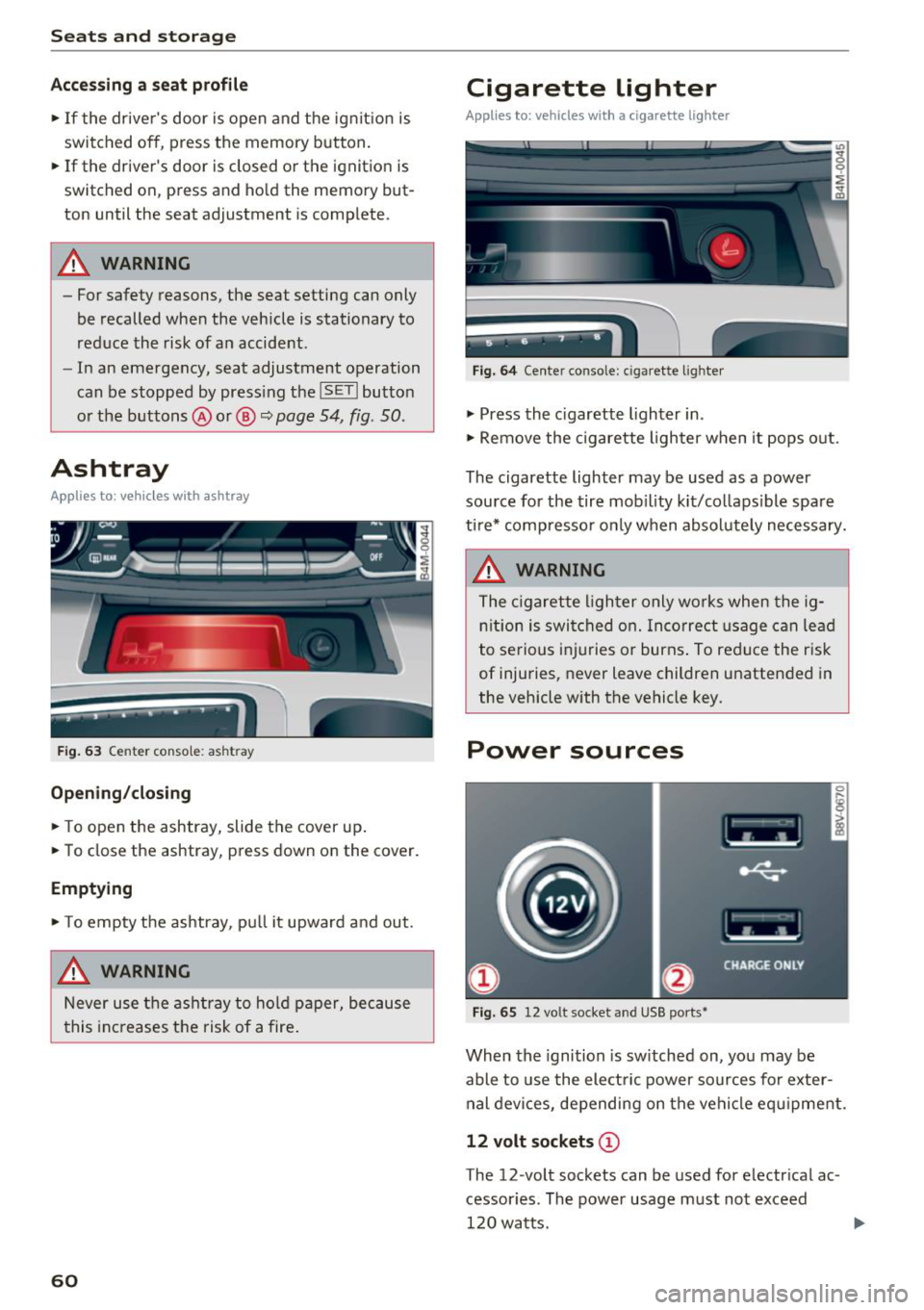
Fig. 63 Center conso le: ashtr ay
Open ing /closing
• To open the ashtray, slide the cover up .
• To close the ashtray, press down on the cover.
Empt ying
• To empty the ashtray, pu ll it upward and out.
A WARNING
Never use the asht ray to hold paper, because
t his increases the risk of a fire .
60
Cigarette lighter
Applies to: vehicles with a cigarette lighter
Fig. 64 Center conso le : cigarette ligh ter
• Press the c igarette lighter in .
• Remove the cigarette lighter when it pops o ut.
The cigarette lighter may be used as a power source for the tire mob ility kit/collaps ible spare
ti re* compresso r o nly when absolute ly necessary.
A WARNING
The c igarette lighter only works when the ig
n ition is switched on. Incorrect usage can lead
to serious i njuries or burns . To reduce the risk
of injuries, never leave children unattended in
the vehicle with the vehicle key.
Power sources
Fig. 65 12 vo lt socket and USB ports•
When the ignition is sw itched on, you may be
able to use the elect ric power sources for exter
nal devices, depending on the vehicle eq uipment.
12 volt sockets (D
The 12-volt sockets can be used for electr ical ac
cessor ies. The power usage m ust not exceed
120 watts.
Page 78 of 398
Driving
(D Note
-Have your vehicle maintained properly and
in accordance with the service recommenda ·
tions in your Warranty & Maintenance book
let . La.ck of proper maintenance as well as
improper use of the vehicle will impair the
function of the emission control system and
could lead to damage.
- Do not alter or remove any component of the Emission Control System unless ap·
proved by the manufacturer .
- Do not alter or remove any device, such as
heat shields, switches, ignition wires,
valves, which are designed to protect your
vehicle's Emission Control System and other
important vehicle components.
(0 Tips
The consumption estimates as published by
ENVIRONMENTAL PROTECTION AGENCY
(EPA) and Transport Canada may not corre
spond to your actual consumption on the
road, which will vary depending upon vehicle
load and speed, road and weather conditions,
trip length, etc.
Steering
Manual steering wheel position adjustment
Applies to: vehicles with manual steering wheel adjustment
The steering wheel position is adjustable up and
down and forward and back.
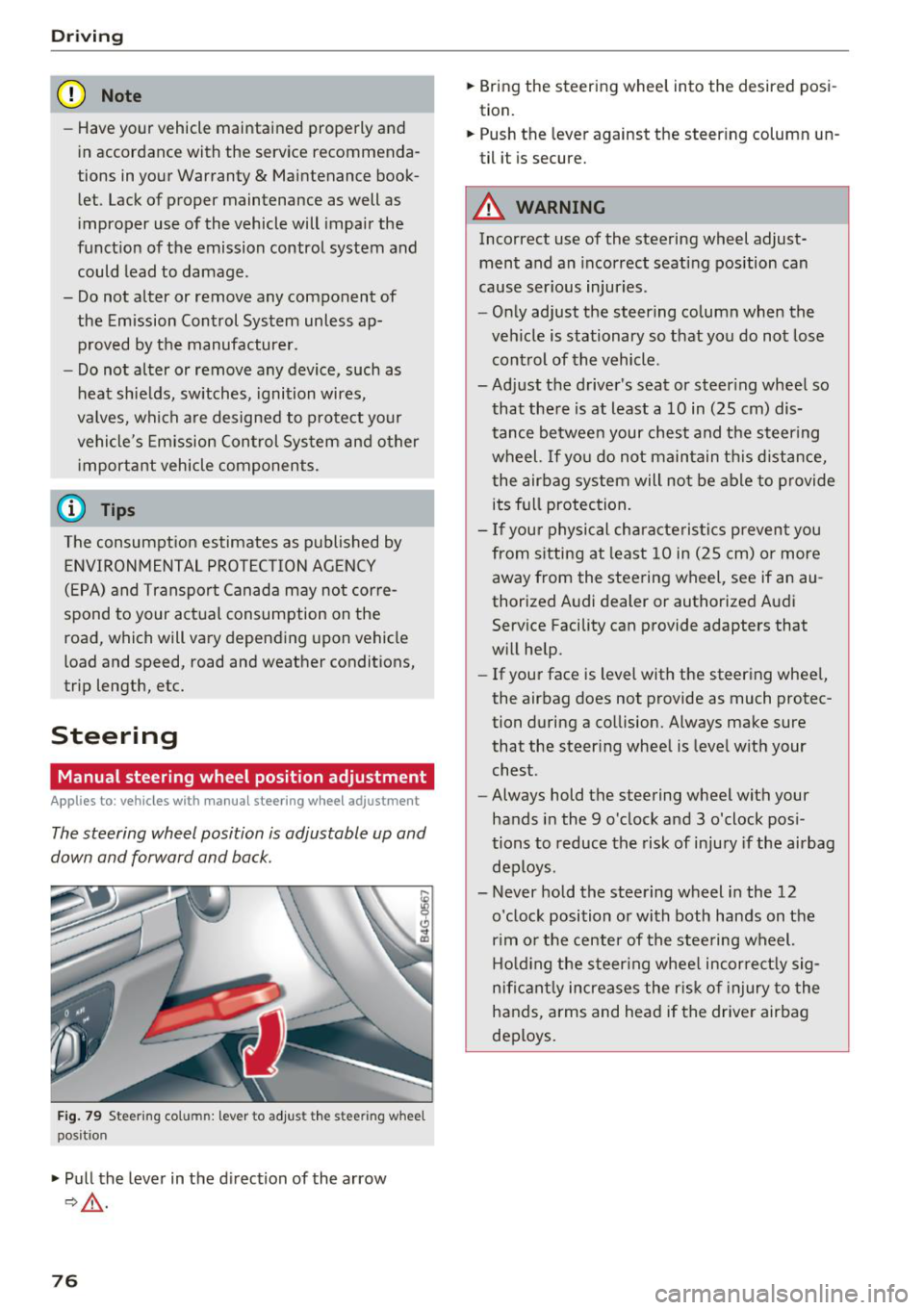
Fig. 79 Ste eri ng col umn : lev er to adjus t the stee rin g whe el
p os it ion
.,. Pull the lever in the direction of the arrow
9,&. .
76
.,. Bring the steering wheel into the desired posi
tion.
.,. Push the lever against the steering column un
til it is secure.
A WARNING
Incorrect use of the steering wheel adjust ment and an incorrect seating position can
cause serious injuries.
- Only adjust the steering column when the
vehicle is stationary so that you do not lose control of the vehicle .
-
-Adjust the driver's seat or steering wheel so
that there is at least a 10 in (25 cm) dis
tance between your chest and the steering wheel. If you do not maintain this distance
I
the airbag system will not be able to provide
its full protection.
- If your physical characteristics prevent you
from sitting at least 10 in (25 cm) or more
away from the steering wheel, see if an au
thorized Audi dealer or authorized Audi
Service Facility can provide adapters that
will help.
- If your face is level with the steering wheel,
the airbag does not provide as much protec
tion during a collision. Always make sure
that the steering wheel is level with your
chest .
- Always hold the steering wheel with your
hands in the 9 o'clock and 3 o'clock posi
tions to reduce the risk of injury if the airbag
deploys .
- Never hold the steering wheel in the 12 o'clock position or with both hands on the
rim or the center of the steering wheel.
Holding the steering wheel incorrectly sig
nificantly increases the risk of injury to the
hands, arms and head if the driver airbag
deploys.
Page 79 of 398
a co .... N r--. N .... 0
0
:E '
Applies to: vehicles with power steering wheel adjustment
The steering wheel position con be adjusted elec
trically up and down and forward and bock.
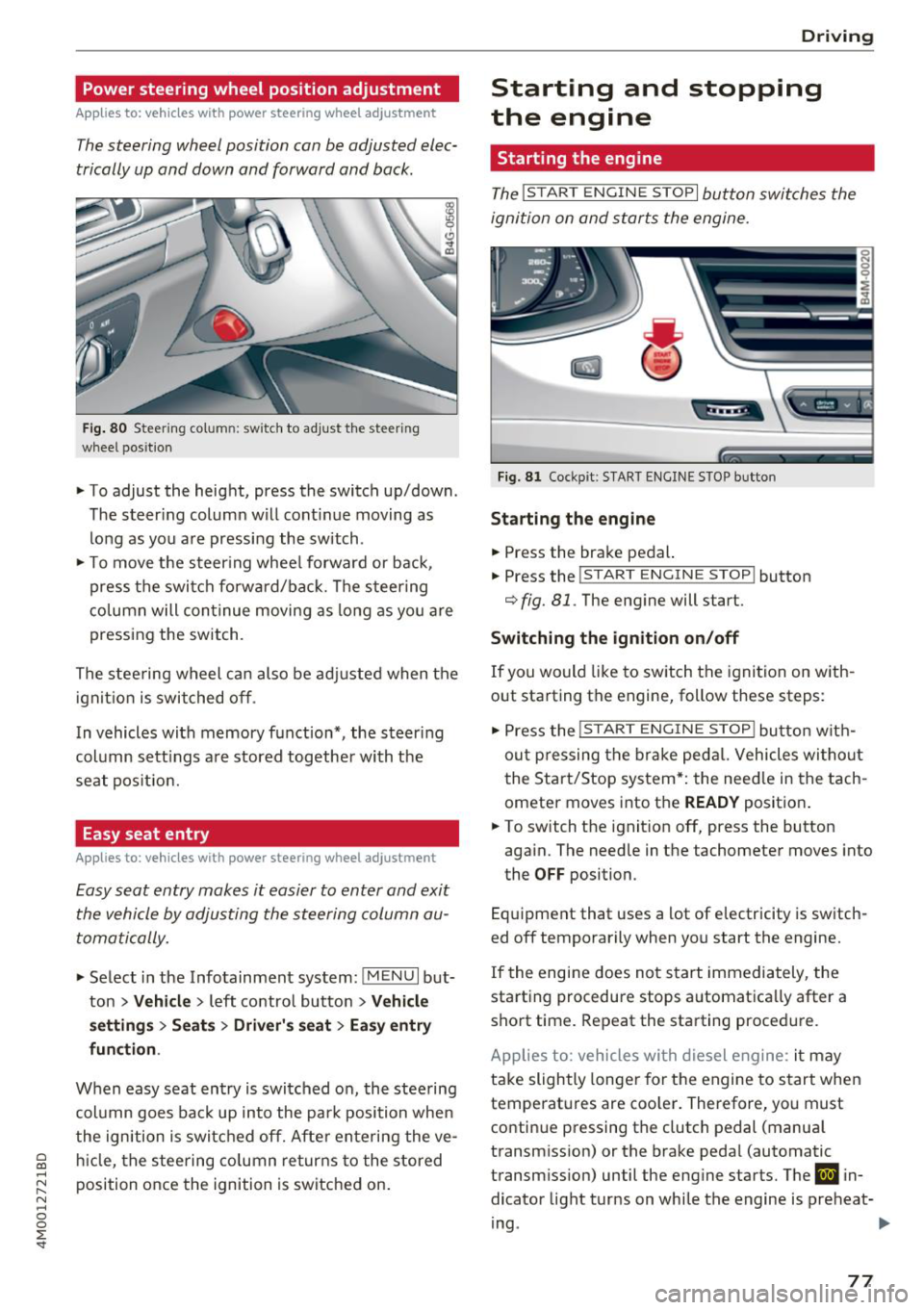
Fig. 80 Steerin g co lu m n: sw itch to adjust th e steeri ng
whee l pos ition
.. To adjust the height, press the switch up/down .
The steer ing column will cont inue moving as
long as you are pressing the switch .
.. To move the steering wheel forward or back,
press the switch forward/back. The steering
column will continue moving as long as you are
pressing the switch.
The steering wheel can also be adjusted when the
ignition is switched off .
In vehicles with memory function*, the steer ing
column sett ings are stored together with the
seat position.
Easy seat entry
Applies to: vehicles with power steering wheel adjustment
Easy seat entry makes it easier to enter and exit
the vehicle by adjusting the steering column au
tomatically.
.. Select in the Infotainment system: !MENUI but
ton
> Vehicle > left contro l button > Vehicle
settings> Seats> Driver's seat> Easy entry
function .
When easy seat entry is switched on, the steering
column goes back up into the park position when
the ignition is switched off. After entering the ve
hicle, the steering column returns to the stored
position once the ignition is switched on.
Driving
Starting and stopping
the engine
Starting the engine
The ! STAR T ENGINE ST OPI button switches the
ignition on and starts the engine.
Fig. 81 Cockpit : S TART ENGINE STOP butto n
Starting the engine
.. Press the brake pedal.
.. Press the
!START ENGINE STOP ! button
c;, fig. 81. The engine will start.
Switching the ignition on/off
If you would like to switch the ignition on with
out starting the engine, follow these steps:
"' Press the
!S T AR T ENGINE S T OP I button with
out pressing the brake pedal. Vehicles without
the Start/Stop system*: the need le in the tach
ometer moves into the
READY position .
.. To switch the ignition off, press the button
again. The needle in the tachometer moves into
the
OFF position.
Equipment that uses a lot of electricity is switch
ed off temporarily when you start the engine.
If the engine does not start immediately, the
starting procedure stops automatica lly after a
short time. Repeat the starting procedure.
Applies to: vehicles with diesel engine: it may
take slightly longer for the engine to start when
temperatures are coo ler. Therefore, you must
continue pressing the clutch pedal (manual
transmission) or the brake pedal (automatic
transmission) until the engine starts. The
IJ in
dicator light turns on while the engine is preheat-
ing .
IJJI>
77
Page 257 of 398
a co ...... N r--. N ...... 0
0
:E '
that is not possible, try to adjust the head re
straint so that it is as close to this position as
possible. If there is a passenger in the center
rear seat, slide the head restraint upward
c:>page 58.
• Make sure that the seatback is securely latched
in the upright pos ition
r:::;, page 63 .
• Keep both feet flat in the footwell in front of
the rear seat .
• Fasten and wear safety be lts properly
,:;;;,page 264.
• Make sure that children are always properly re
strained in a child restraint that is appropriate
for their size and ager:::;,
page 291.
A WARNING
Passengers who are improperly seated on the
rear seat can be seriously injured in a crash.
- Each passenger must always sit on a seat of
their own and properly fasten and wear the
safety belt belonging to that seat .
- Safety belts only offer max imum p rotection
when the seatback is securely latched in the
upr ight position and the safety be lts are
prope rly pos itioned on the body. By not sit
t ing upright, a rea r seat passenger increases
the risk of personal in jury from improperly
posit ioned safety belts !
- Always adjust the head rest raint properly so
that it can g ive maximum protection.
Dri ving safety
Proper adjustment of head restraints
Correctly adjusted head restraints are an impor
tant part of your vehicle's occupant restraint sys
tem and can help to reduce the risk of injuries in
accident situations.
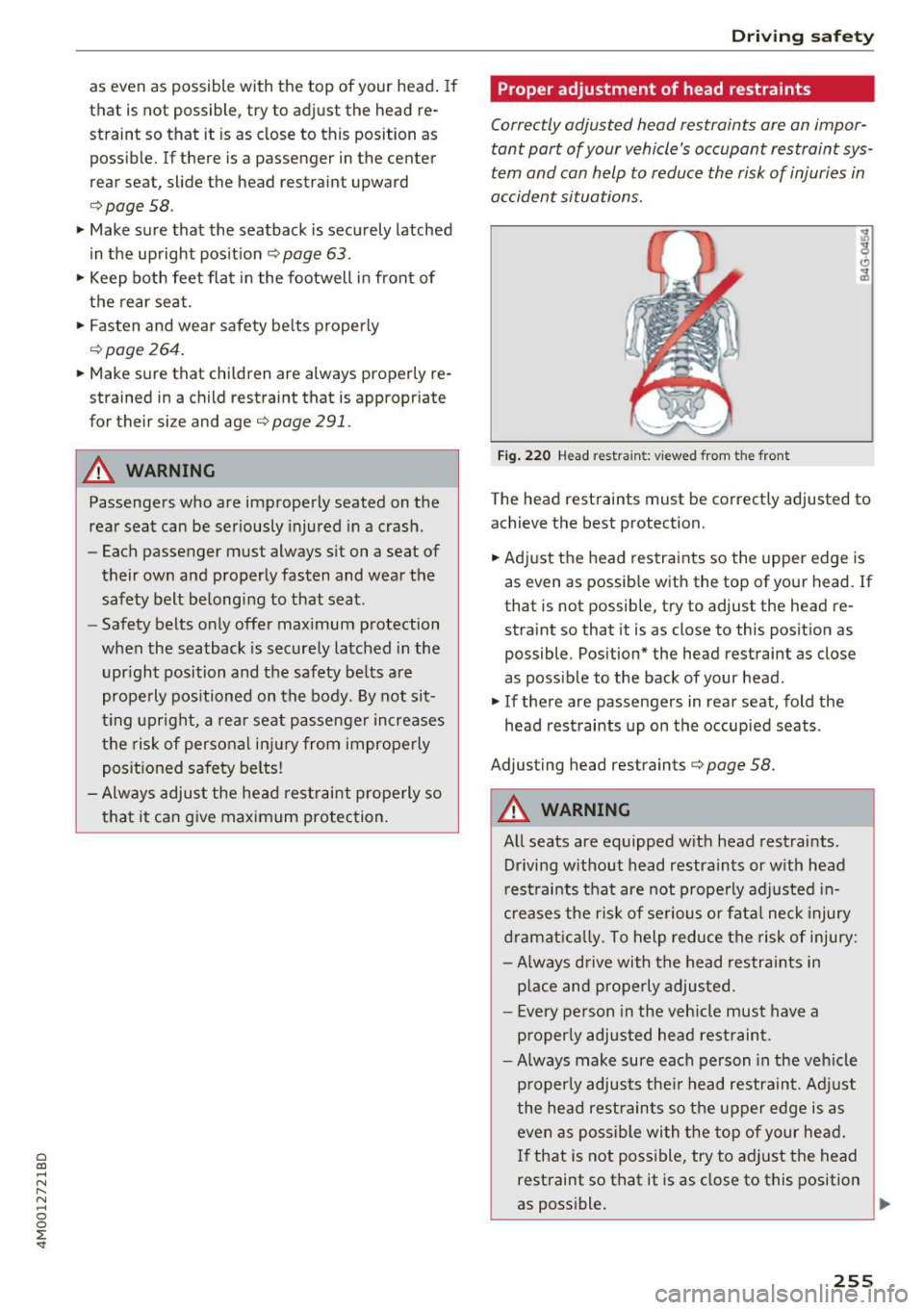
F ig . 2 2 0 Head restraint: v iewed from t he front
The head restraints must be correctly adjusted to
achieve the best protection.
• Adjust the head restraints so the upper edge is
as even as possib le with the top of your head. If
that is not possible, try to adjust the head re
straint so that it is as close to this position as
possible . Position* the head restraint as close
as possible to the back of your head.
• If there are passengers in rear seat, fold the
head restraints up on the occupied seats .
Adjusting head restraints
r:::;, page 58.
A WARNING
All seats are equipped with head restraints .
Driving w ithout head restraints or w ith head
r est raints that are not properly adjusted in
creases the r is k of se rious or fata l neck injury
dramat ic al ly. To help reduce the risk of inju ry:
- Always d rive with the head restra ints in
p lace and properly adjusted.
- Every pe rson in the veh icle must have a
p roperly adjusted head restraint.
- Always make sure each person in the veh icle
p roperly adjusts the ir head restraint. Adj ust
the head restraints so the upper edge is as
even as possible wi th the top of your head.
I f that is not poss ible, try to ad just the head
rest raint so that it is as close to this position
as poss ible.
Ill>
255
Page 269 of 398
a co ...... N r--. N ...... 0
0
:E '
With the aid of the safety belt height adjust
ment, the three point safety belt strap routing
can be fitted to the shoulder area, according to
body size.
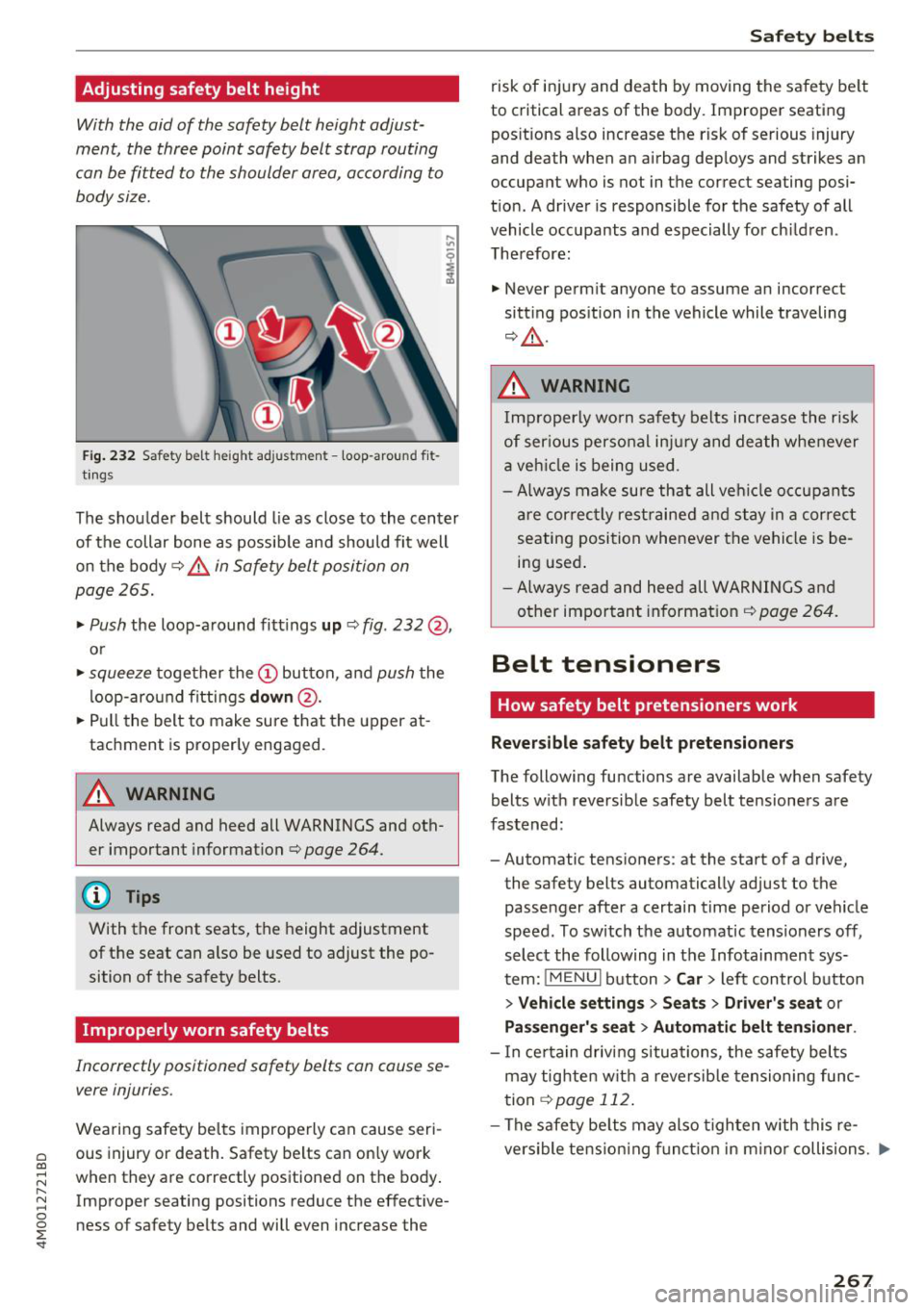
F ig . 2 32 Safety belt height adjustment -loop -around fit
t ings
The shou lder belt should lie as close to the center
of the collar bone as possib le and should fit well
on the body
¢ .&. in Safety belt position on
page 265.
~ Push the loop-a round fitt ings up ¢ fig. 232 @,
or
~ squeeze together the(!) button, and push the
l oop-arou nd fittings
down @.
~ Pull the belt to make sure that the upper at
tachment is properly engaged.
A WARNING
Always read and heed all WARNINGS and oth
er important informat ion¢
page 264.
(D Tips
With the front seats, the height adjustment
of the seat can also be used to adjust the po
sition of the safety belts.
Improperly worn safety belts
Incorrectly positioned safety belts can cause se
vere injuries.
Wearing safety be lts improperly can cause seri
ous injury or death. Safety belts can on ly work
when they are co rrectly positioned on the body .
Improper seating positions reduce the effective
ness of safety belts and will even increase the
Safet y bel ts
risk of in jury and death by moving the safety be lt
to critical areas of the body. Improper seating
pos itions also increase the risk of serious injury
and death when an airbag dep loys and strikes an
occupant who is not in the correct seating posi
t ion. A driver is responsible for the safety of all
vehicle occupants and especially for ch ildren.
Therefore:
~ Never perm it anyone to assume an incorrect
sitting position in the vehicle while traveling
¢ .&_ .
.&, WARNING
Imp roperly wo rn safety belts increase the risk
of ser ious personal inj ury and death whenever
a veh icle is being used .
- Always make sure that all ve hicle occupants
are cor rec tly rest rained and stay in a corre ct
seating posi tion whenever the vehicle is be
ing used .
- Always read and heed all WARNINGS and
other impor tant informat ion¢
page 264.
Belt tensioners
How safety belt pretensioners work
Rever sible safety belt pretensioners
The following functions are available when safety
belts w ith reversible safety belt tensioners are
fastened:
-Automatic tensioners: at the start of a drive,
the safety belts automatically adjust to the
passenger after a certain time period or veh icle
speed. To switch the automatic tensioners off,
select the following in the Infotainment sys
tem:
! ME NUI button> Car > left control b utton
> Vehicle setting s> Seat s > Driver' s seat or
Pa ssenger' s seat > Automati c be lt ten sion er.
- I n ce rta in driving situations, the safety bel ts
may tighten wit h a reversib le tensioning func
tion
¢ page 112.
-The safety be lts may also tighten with this re
versible te nsion ing funct ion in m inor collisions . .,._
267
Page 271 of 398
Cl a:, ...... N
" N ...... 0
0
::r '
Importance of wearing safety belts and
sitting properly
Airbags are only supplemental restraints. For
airbags to do their job, occupants must always
properly wear their safety belts and be in a prop er seating position.
For your safety and the safety of your passen
gers, before driving off, always :
.,. Adjust the driver's seat and steering wheel
properly ~
page 253,
.,. Adjust the front passenger's seat properly
~page 254,
.,. Wear safety belts properly~ page 264,
.. Always properly use the proper child restraint
to protect children ¢
page 291.
In a collision, airbags must inflate within the
blink of an eye and with considerable force. The
supplemental airbags can cause injuries if the
driver or the front seat passenger is not seated
properly. Therefore in order to help the airbag to
do its job, it is important, both as a driver and as
a passenger to sit properly at all times .
By keeping room between your body and the
steering wheel and the front of the passenger
compartment, the airbag can inflate fully and
completely and provide supplemental protection in certain frontal collisions¢
page 253, Correct
passenger seating positions .
For details on the
operation of the seat adjustment controls
¢page 54.
It's especially important that children are proper
ly restrained ¢
page 291.
There is a lot that the driver and the passengers
can and must do to help the individual safety fea
tures installed in your Audi work together as a
system .
Proper seating position is important so that the
front airbag on the driver side can do its job. If
you have a physical impairment or condition that prevents you from sitting properly on the driver
seat with the safety belt properly fastened and
Airbag system
reaching the pedals, or if you have concerns with
regard to the function or operation of the Ad
vanced Airbag System, please contact your au
thori zed Audi dealer or qualified workshop, or
call Audi Customer Relations at 1-800-822-2834
for possible modifications to your vehicle.
When the airbag system deploys, a gas generator
will fill the airbags, break open the padded cov ers, and inflate between the steering wheel and
the driver and between the instrument panel and
the front passenger. The airbags will deflate im
mediately after deployment so that the front oc
cupants can see through the windshield again
without interruption.
All of this takes place in the blink of an eye, so
fast that many people don't even realize that the
airbags have deployed. The airbags also inflate
with a great deal of force and nothing should be
in their way when they deploy. Front airbags in
combination with properly worn safety belts slow
down and limit the occupant's forward move
ment . Together they help to prevent the driver
and front seat passenger from hitting parts of
the inside of the vehicle while reducing the forces acting on the occupant during the crash . In this
way they help to reduce the risk of injury to the
head and upper body in the crash. Airbags do not
protect the arms or the lower parts of the body.
Both front airbags will not inflate in all frontal
collisions . The triggering of the airbag system de
pends on the vehicle deceleration rate caused by
the collision and registered by the electronic con
trol unit . If this rate is below the reference value
programmed into the control unit, the airbags
will not be triggered, even though the car may be badly damaged as a result of the collision. Vehi
cle damage, repair costs or even the lack of vehi
cle damage is not necessarily an indication of
whether an airbag should inflate or not .
Since the circumstances will vary considerably between one collision and another, it is not possi
ble to define a range of vehicle speeds that will
cover every possible kind and angle of impact
that will always trigger the airbags . Important
factors include, for example, the nature (hard or
soft) of the object which the car hits, the angle of
impact, vehicle speed , etc. The front airbags will .,.
269