audio AUDI Q7 2019 Owner´s Manual
[x] Cancel search | Manufacturer: AUDI, Model Year: 2019, Model line: Q7, Model: AUDI Q7 2019Pages: 394, PDF Size: 105.97 MB
Page 146 of 394
Parkingaid
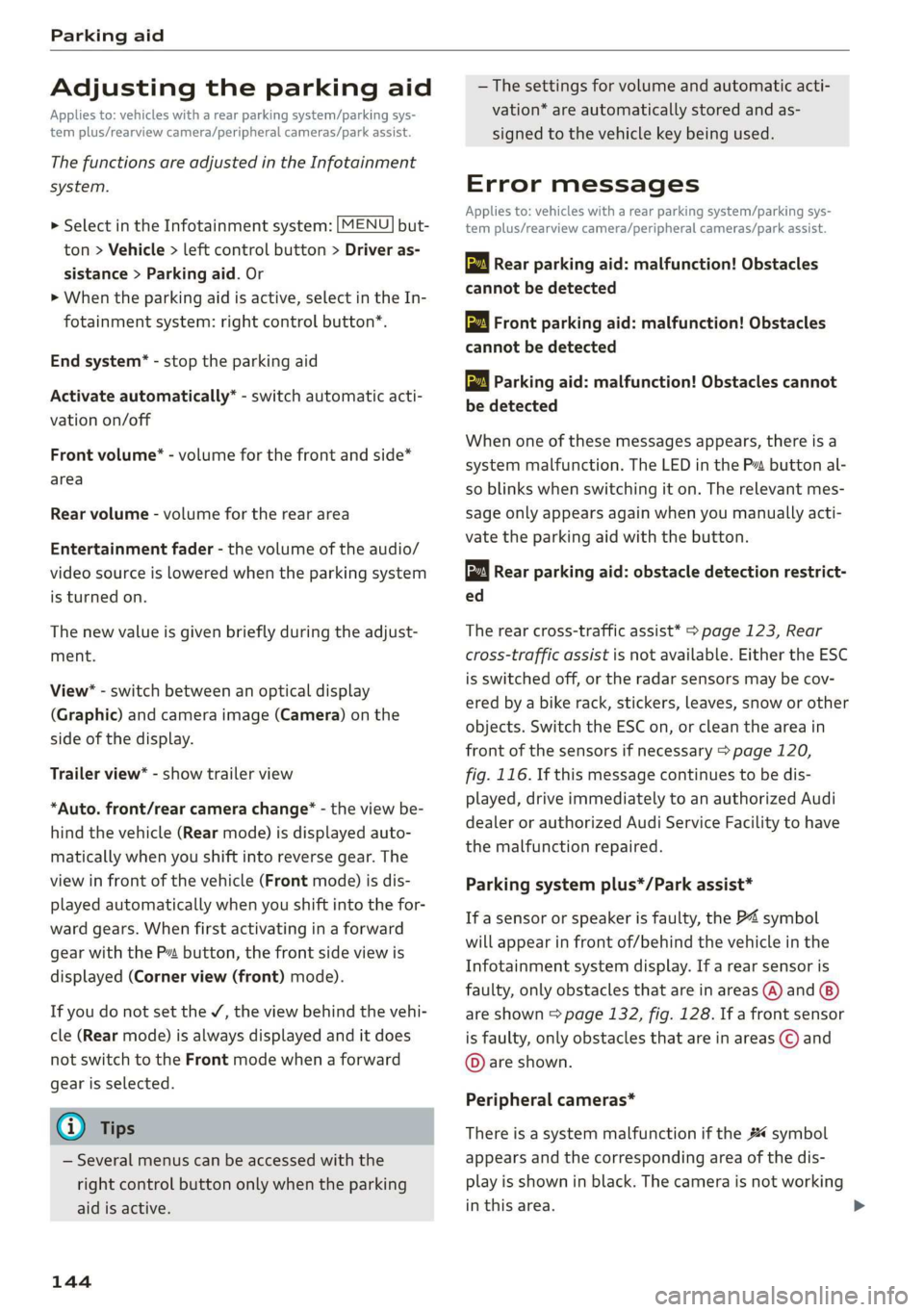
Adjustingtheparkingaid
Appliesto:vehicleswitharearparkingsystem/parkingsys-
templus/rearviewcamera/peripheralcameras/parkassist.
ThefunctionsareadjustedintheInfotainment
system.
> SelectintheInfotainmentsystem:[MENU]but-
ton>Vehicle> leftcontrolbutton>Driveras-
sistance>Parkingaid.Or
>Whentheparkingaidisactive,selectintheIn-
fotainmentsystem:rightcontrolbutton*.
Endsystem*-stoptheparkingaid
Activateautomatically*-switchautomaticacti-
vationon/off
Frontvolume*-volumeforthefrontandside*
area
Rearvolume-volumeforthereararea
Entertainmentfader-thevolumeoftheaudio/
videosourceisLoweredwhentheparkingsystem
isturnedon.
Thenewvalueisgivenbrieflyduringtheadjust-
ment.
View*-switchbetweenanopticaldisplay
(Graphic)andcameraimage(Camera)onthe
sideofthedisplay.
Trailerview*-showtrailerview
*Auto.front/rearcamerachange*-theviewbe-
hindthevehicle(Rearmode)isdisplayedauto-
maticallywhenyoushiftintoreversegear.The
viewinfront ofthevehicle(Frontmode)isdis-
playedautomaticallywhenyoushiftintothefor-
wardgears.Whenfirstactivatinginaforward
gearwiththeP”button,thefrontsideviewis
displayed(Cornerview(front)mode).
IfyoudonotsettheV,theviewbehindthevehi-
cle(Rearmode)isalwaysdisplayedanditdoes
notswitchtothe Frontmodewhenaforward
gearisselected.
@)Tips
—Severalmenuscanbeaccessedwiththe
rightcontrolbuttononlywhentheparking
aidisactive.
144
— Thesettingsforvolumeandautomaticacti-
vation*areautomaticallystoredandas-
signedtothevehiclekeybeingused.
Errormessages
Appliesto:vehicleswitharearparkingsystem/parkingsys-
templus/rearviewcamera/peripheralcameras/parkassist.
wwRearparkingaid:malfunction!Obstacles
cannotbedetected
wwFront parkingaid:malfunction!Obstacles
cannotbedetected
wmParkingaid:malfunction!Obstaclescannot
bedetected
Whenoneofthesemessagesappears,thereisa
systemmalfunction.The LEDintheP”buttonal-
soblinkswhenswitchingiton.Therelevantmes-
sageonlyappearsagainwhenyoumanuallyacti-
vatetheparkingaidwiththebutton.
Rearparkingaid:obstacledetectionrestrict-
ed
Therearcross-trafficassist*>page123,Rear
cross-trafficassistisnotavailable.EithertheESC
isswitchedoff,ortheradarsensorsmaybecov-
ered byabikerack,stickers,leaves,snoworother
objects.SwitchtheESCon,orcleantheareain
frontofthesensorsifnecessary>page120,
fig.116.Ifthismessagecontinuestobedis-
played,driveimmediatelytoanauthorizedAudi
dealerorauthorizedAudiServiceFacilitytohave
themalfunctionrepaired.
Parkingsystemplus*/Parkassist*
If asensororspeakerisfaulty,theP4symbol
willappearinfrontof/behindthevehicleinthe
Infotainmentsystemdisplay.If arearsensoris
faulty,onlyobstaclesthatareinareas(@)and
areshown>page132,fig. 128.Ifafrontsensor
isfaulty,onlyobstaclesthatareinareas©and
©areshown.
Peripheralcameras*
Thereisasystemmalfunctionifthe#«symbol
appearsandthecorrespondingareaofthedis-
playisshowninblack.Thecameraisnotworking
inthisarea.
Page 156 of 394
MultiMediaInterface
—Switchingoffmanually:pressandholdthe
On/Offknob@)>fig.155untiltheMMI
switchesoff.IftheMMIhasbeenswitchedoff
manually,itdoesnotswitchonagainautomati-
callythenexttimetheignitionisswitchedon.
Additionalfunctions:
—Adjustingthevolume:turntheOn/Offknob@
>fig.155.
—Muting:presstheOn/Offknob@°fig.155
briefly.
—Selectingtheprevious/nextfunction(forex-
ample,aradiostation/track):presstheOn/Off
knob@®fig.155brieflytowardtheleftKdor
rightDo.
—Fastforwarding/rewinding(forexample
songs):pressandholdtheOn/Offknob@)
=>fig.155towardtheleftKdorrightPel.
ZAWARNING
Adjustthevolumeoftheaudiosystemsothat
signalsfromoutsidethevehicle,suchas po-
liceandfiresirens,canbeheardeasilyatall
times.
G@)Tips
TheMMIswitchesoffautomaticallyiftheen-
gineisnotrunningandthevehiclebatteryis
low.
Infotainmentsystem
display
Switchingon/off
TheInfotainmentsystemdisplayautomatically
extendsandretractswhenyouswitchtheigni-
tiononandoff.
>Whenitisextended,presstheLo]buttonto
switchtheInfotainmentsystemdisplayonor
off.
WhentheMMIisswitchedonandthedisplayis
switchedoff,youcanoperatecertainfunctions
usingtheOn/OffknobwiththeMMIjoystick
function>page153.
154
G)Tips
Theremaybedelayswhenswitchingonthe
display.
celmurlClmelmelevee(rs
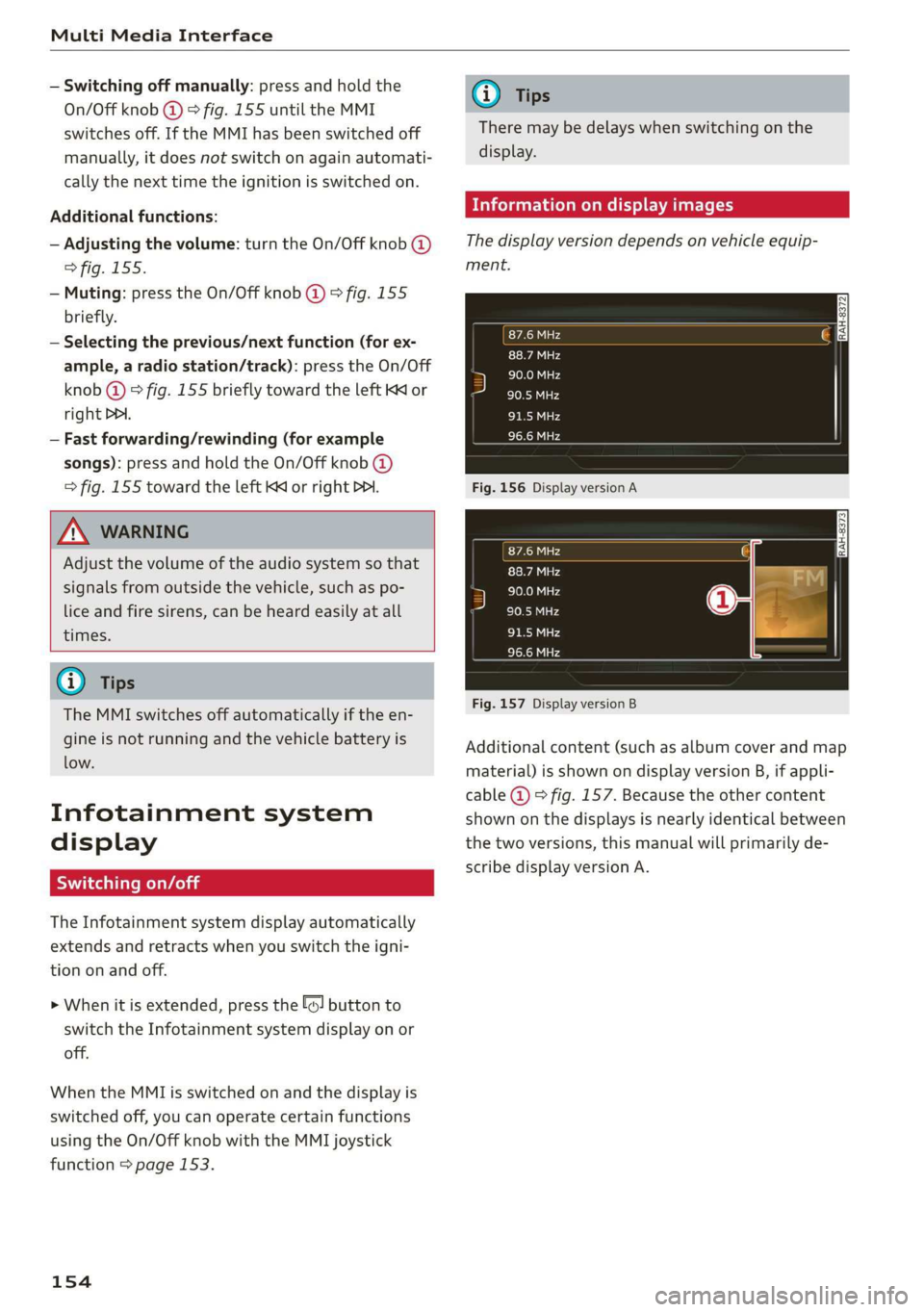
Thedisplayversiondependsonvehicleequip-
ment.
Fig.156DisplayversionA
Fig.157DisplayversionB
Additionalcontent(suchasalbumcoverandmap
material)isshownondisplayversionB,ifappli-
cable@)©fig.157.Becausetheothercontent
shownonthedisplaysisnearlyidenticalbetween
thetwoversions,thismanualwillprimarilyde-
scribedisplayversionA.
Page 165 of 394
4M0012721BG
MultiMediaInterface
resultslist.Forexample,intheTelephone*
menu,writetheinitialsofthecontactbeing
searched,separatedbyaspace.
Selectingtheinputsuggestiontocomplete
theentry
Requirement:aninputsuggestiontocomplete
theentry*@)>fig.170mustbedisplayed.
>MMItouchinput*:pressthecontrolknob.Or:
Selectinganentryfromtheresultslist
Requirement:atleastoneentrymustbedis-
playedintheresultslist@)9fig.170.
>MMItouchinput*:turnthecontrolknobtothe
right.Selectandconfirm anentryfromthelist.
>Spellerinput:selectandconfirm[LIST]@,
=>page161,fig.169.Or:pushthecontrolknob
down.Selectandconfirm anentryfromthe
list.
pressontheMMItouchcontrolpad*.
>Spellerinput:pushthecontrolknobup.
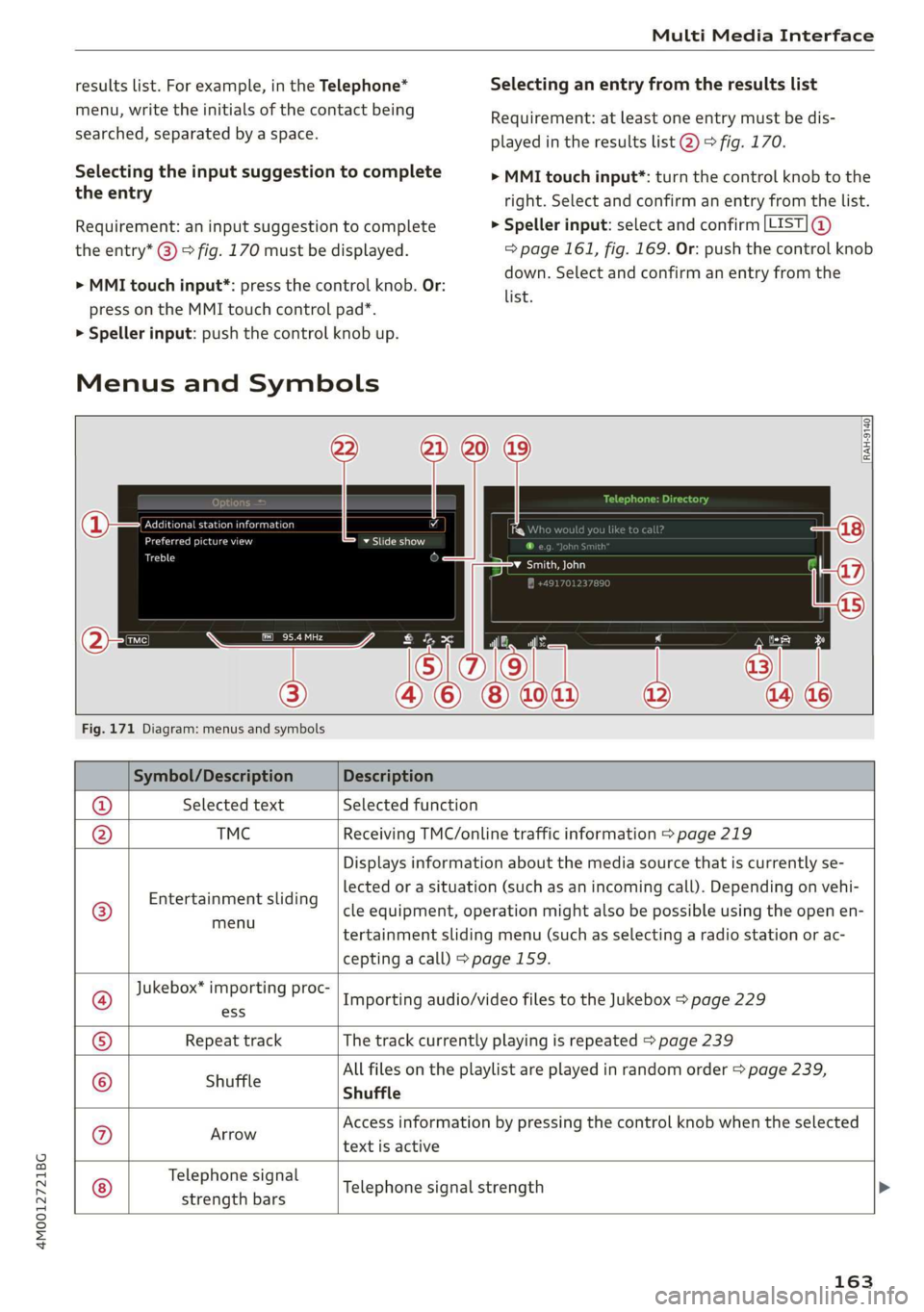
MenusandSymbols
Teareeeance)
ecucehstn
ome
Ct
¥Slideshow
Fig.171Diagram:menusandsymbols
Symbol/DescriptionDescription
®SelectedtextSelectedfunction
@TMCReceivingTMC/onlinetrafficinformation>page219
©
Entertainmentsliding
menu
Displaysinformationaboutthemediasourcethatiscurrentlyse-
lectedorasituation(such asanincomingcall).Dependingonvehi-
cleequipment,operationmightalsobepossibleusingtheopenen-
tertainmentslidingmenu(suchasselectingaradiostationorac-
ceptingacall)>page159.
Jukebox*importingproc-
Importingaudio/videofilestotheJukebox>page229
®ess
©RepeattrackThetrackcurrentlyplayingisrepeated>page239
Allfilesontheplaylistareplayedinrandomorder>page239,
©ShuffleShuffle
®arrowAccessinformationbypressingthecontrolknobwhentheselected
textisactive
©
Telephonesignal
strengthbars
Telephonesignalstrength
163
Page 166 of 394
MultiMediaInterface
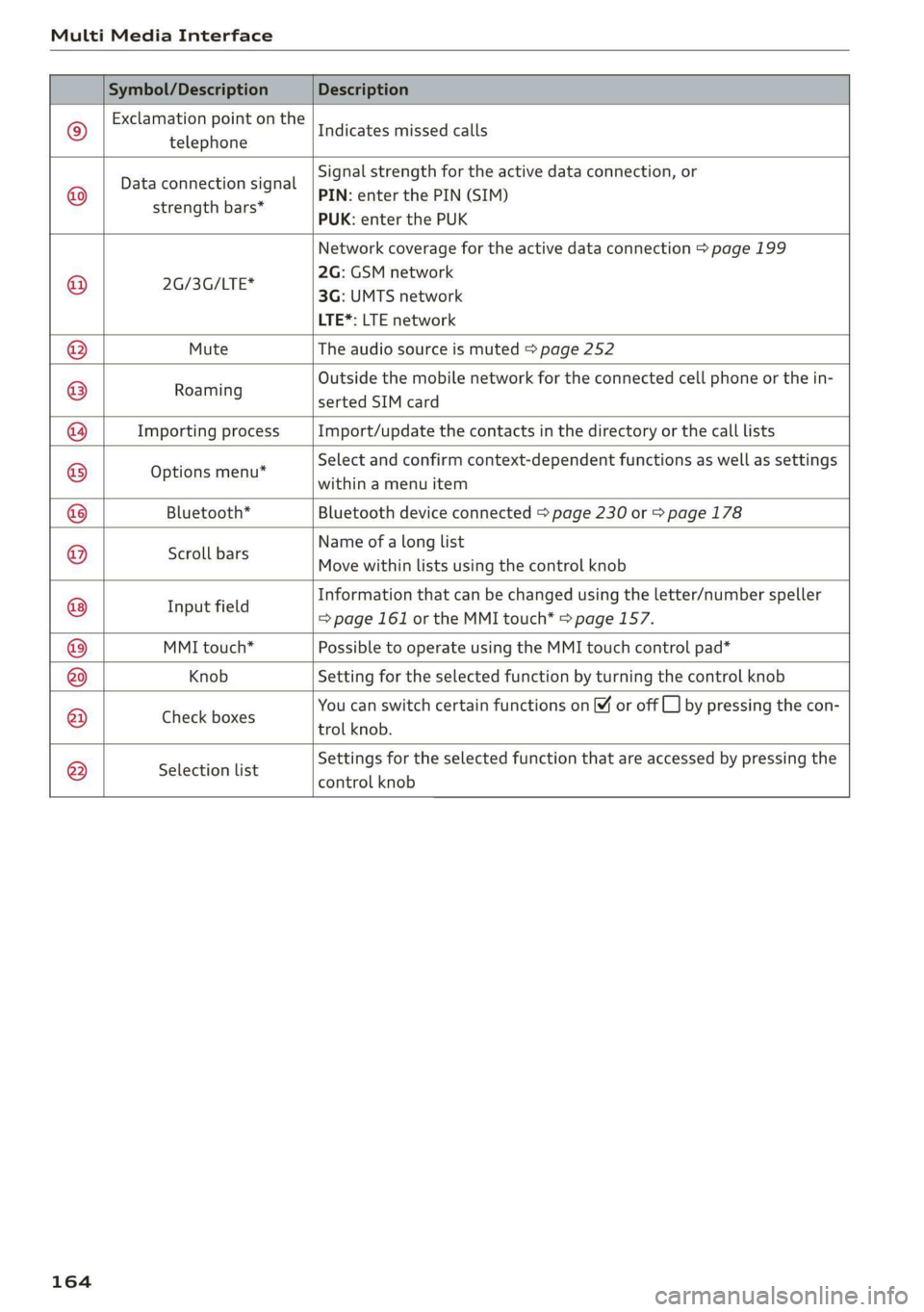
Symbol/DescriptionDescription
©
Exclamationpointonthe
telephone
Indicatesmissedcalls
©
Dataconnectionsignal
strengthbars*
Signalstrengthfortheactivedataconnection,or
PIN:enterthePIN(SIM)
PUK:enterthePUK
Networkcoveragefortheactivedataconnection>page199
2G:GSMnetwork
x
aSSeTIE3G:UMTSnetwork
LTE*:LTEnetwork
MuteTheaudiosourceismuted>page252
:Outside themobilenetworkfortheconnectedcellphoneorthein-
Roaming
sertedSIMcard
ImportingprocessImport/updatethecontactsinthedirectoryorthecalllists
Optionsmenu*
Selectandconfirmcontext-dependentfunctionsaswellas settings
withinamenuitem
Bluetooth*Bluetoothdeviceconnected>page230or>page178
Scrollbars
Nameofalonglist
Movewithinlistsusingthecontrolknob
®
|
©
|@|
©
|©)
©
|O|
©
Informationthatcanbechangedusingtheletter/numberspeller
aie=page161ortheMMItouch*=page157.
MMItouch*PossibletooperateusingtheMMItouchcontrolpad*
KnobSettingfortheselectedfunctionbyturningthecontrolknob
; 3 ;SF5
CheckboxesYoucanswitchcertainfunctionson[¥oroffL_]bypressingthecon
trolknob.
®
|
®
|O|©
Selectionlist
Settingsfortheselectedfunctionthatareaccessedbypressingthe
controlknob
164
Page 167 of 394
4M0012721BG
Multifunctionsteeringwheel
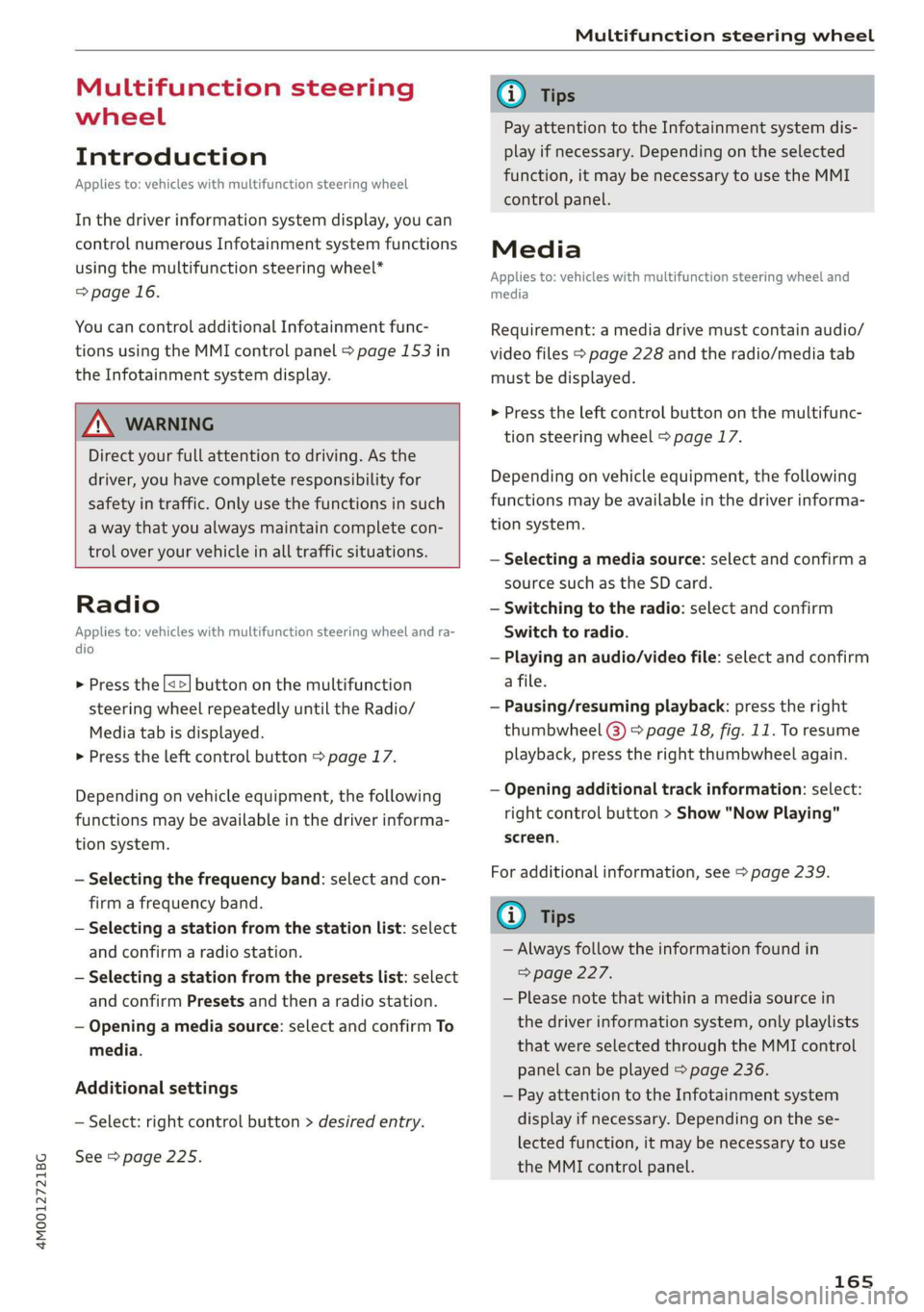
Multifunctionsteering
wheel
Introduction
Appliesto:vehicleswith multifunctionsteeringwheel
Inthedriverinformationsystemdisplay,youcan
controlnumerousInfotainmentsystemfunctions
usingthemultifunctionsteeringwheel*
=>page16.
Youcancontrol additionalInfotainmentfunc-
tionsusingtheMMIcontrolpanel>page153in
theInfotainmentsystemdisplay.
Z\WARNING
Directyourfullattentiontodriving.Asthe
driver,youhavecompleteresponsibilityfor
safetyintraffic.Only usethefunctionsinsuch
awaythatyoualwaysmaintaincompletecon-
troloveryourvehicleinalltrafficsituations.
Radio
Appliesto:vehicleswith multifunctionsteeringwheelandra-
dio
>Pressthe[<>]buttononthemultifunction
steeringwheelrepeatedlyuntiltheRadio/
Mediatabisdisplayed.
>Presstheleftcontrolbutton>page17.
Dependingonvehicleequipment,thefollowing
functions
maybeavailableinthedriverinforma-
tionsystem.
—Selectingthefrequencyband:selectandcon-
firmafrequencyband.
—Selectingastationfromthestationlist:select
andconfirmaradiostation.
—Selectingastationfromthepresetslist:select
andconfirmPresetsandthenaradiostation.
—Openingamediasource:selectandconfirmTo
media.
Additionalsettings
—Select:rightcontrolbutton>desiredentry.
See>page225.
@Tips
PayattentiontotheInfotainmentsystemdis-
playifnecessary.Dependingontheselected
function,itmaybenecessarytouse theMMI
controlpanel.
Media
Appliesto:vehicleswithmultifunctionsteeringwheeland
media
Requirement:amediadrivemustcontainaudio/
videofiles>page228andtheradio/mediatab
mustbedisplayed.
>Presstheleftcontrolbuttononthemultifunc-
tionsteeringwheel>page17.
Depending onvehicleequipment,thefollowing
functionsmaybeavailableinthedriverinforma-
tionsystem.
—Selectingamediasource:selectandconfirma
sourcesuchastheSDcard.
—Switchingtotheradio:selectandconfirm
Switchtoradio.
—Playinganaudio/videofile:selectandconfirm
afile.
—Pausing/resumingplayback:presstheright
thumbwheel@)>page18,fig.11.Toresume
playback,presstherightthumbwheelagain.
—Openingadditionaltrackinformation:select:
rightcontrolbutton>Show"NowPlaying"
screen.
Foradditionalinformation,see>page239.
@Tips
—Alwaysfollowtheinformationfoundin
>page227.
—Pleasenotethatwithinamediasourcein
thedriverinformationsystem,onlyplaylists
thatwereselectedthroughtheMMIcontrol
panelcanbeplayed=page236.
—PayattentiontotheInfotainmentsystem
displayifnecessary.Dependingonthese-
lectedfunction,itmaybenecessarytouse
the
MMIcontrolpanel.
165
Page 173 of 394
4M0012721BG
Voicerecognitionsystem
Voicerecognitionsystem
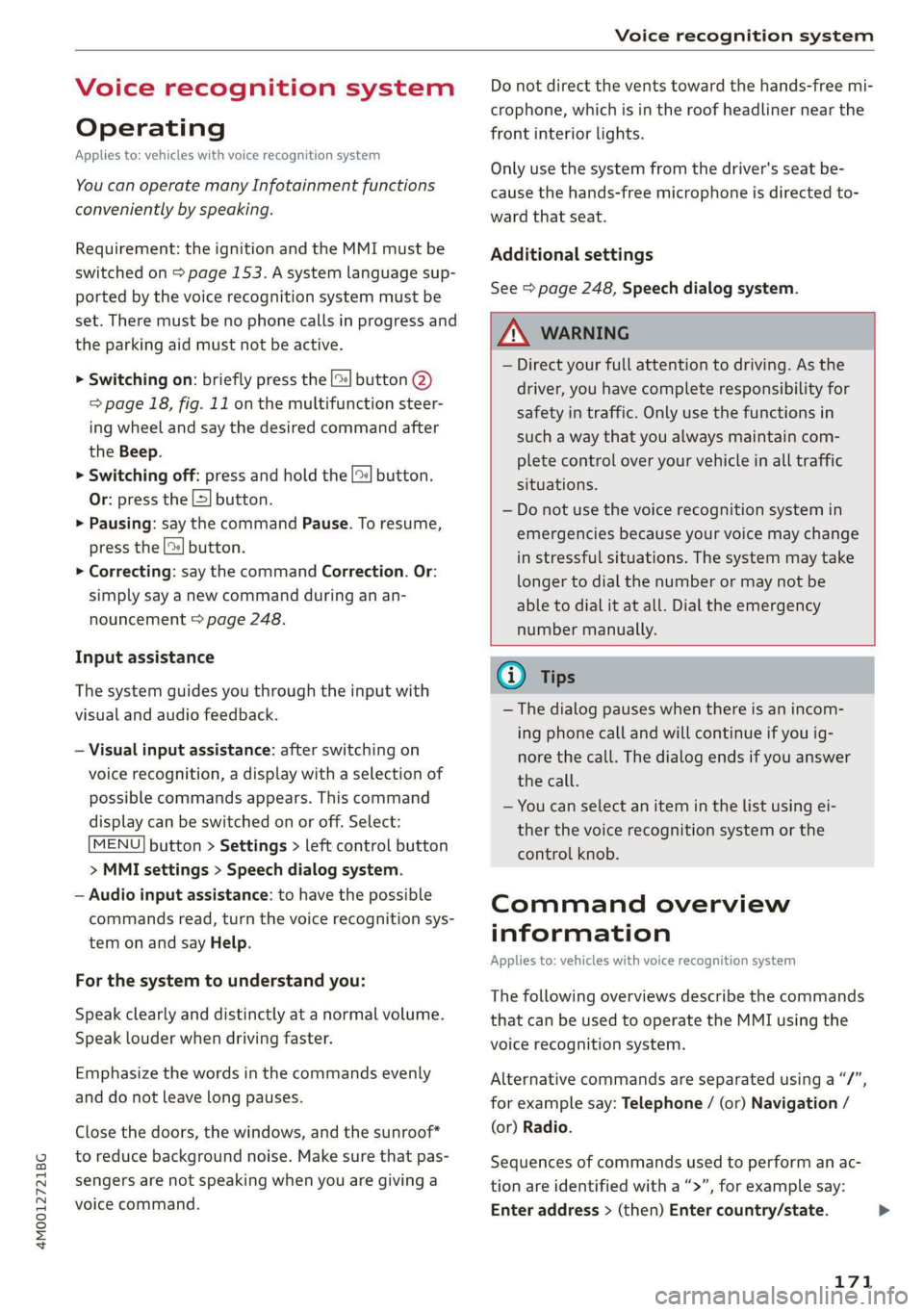
Operating
Appliesto:vehicleswithvoicerecognitionsystem
YoucanoperatemanyInfotainmentfunctions
convenientlybyspeaking.
Requirement:theignitionandtheMMImustbe
switched
on>page153.Asystemlanguagesup-
portedbythevoicerecognitionsystemmustbe
set.Theremustbenophonecallsinprogressand
theparkingaidmustnotbeactive.
>Switchingon:brieflypressthe[2]button@)
=>page18,fig.11onthemultifunctionsteer-
ing
wheelandsaythedesiredcommandafter
theBeep.
>Switchingoff:pressandholdthe|]button.
Or:pressthe|S]button.
>Pausing:saythecommandPause.Toresume,
pressthe|]button.
>Correcting:saythecommandCorrection.Or:
simplysayanewcommandduringanan-
nouncement>page248.
Inputassistance
Thesystemguidesyouthroughtheinputwith
visualandaudiofeedback.
—Visualinputassistance:afterswitchingon
voicerecognition,adisplaywithaselectionof
possiblecommandsappears.Thiscommand
displaycanbe switchedonoroff.Select:
MENU]button>Settings>leftcontrolbutton
>MMIsettings>Speechdialogsystem.
—Audioinputassistance: tohavethepossible
commandsread,turnthevoicerecognitionsys-
temonandsayHelp.
Forthesystemtounderstandyou:
Speakclearlyanddistinctly atanormalvolume.
Speaklouderwhendrivingfaster.
Emphasizethewordsinthecommandsevenly
anddonotleavelongpauses.
Closethedoors,thewindows,andthesunroof*
toreducebackgroundnoise.Makesurethatpas-
sengersarenotspeakingwhenyouaregivinga
voicecommand.
Donotdirecttheventstowardthehands-freemi-
crophone,whichisintheroofheadlinernearthe
frontinteriorlights.
Onlyusethesystemfromthedriver'sseatbe-
causethehands-freemicrophoneisdirectedto-
wardthatseat.
Additionalsettings
See>page248,Speechdialogsystem.
ZAWARNING
—Directyourfullattentiontodriving.Asthe
driver,youhavecompleteresponsibilityfor
safetyintraffic.Only usethefunctionsin
suchawaythatyoualwaysmaintaincom-
pletecontroloveryourvehicleinalltraffic
situations.
—Donotuse thevoicerecognitionsystemin
emergenciesbecauseyourvoicemaychange
instressfulsituations.Thesystemmaytake
longertodialthenumberormaynot be
abletodialitatall.Dialtheemergency
numbermanually.
G)Tips
—Thedialogpauseswhenthereisanincom-
ingphonecallandwillcontinueifyouig-
norethecall.Thedialogendsifyouanswer
thecall.
—Youcanselectan iteminthelistusingei-
therthevoicerecognitionsystemorthe
controlknob.
Commandoverview
information
Appliesto:vehicleswithvoicerecognitionsystem
Thefollowingoverviewsdescribethecommands
thatcan beusedtooperatetheMMIusingthe
voicerecognitionsystem.
Alternativecommandsareseparatedusinga“/”,
forexamplesay:Telephone/(or)Navigation/
(or)Radio.
Sequencesofcommandsusedtoperformanac-
tionareidentifiedwitha“>”,forexamplesay:
Enteraddress>(then)Entercountry/state.
171
Page 178 of 394
Voicerecognitionsystem
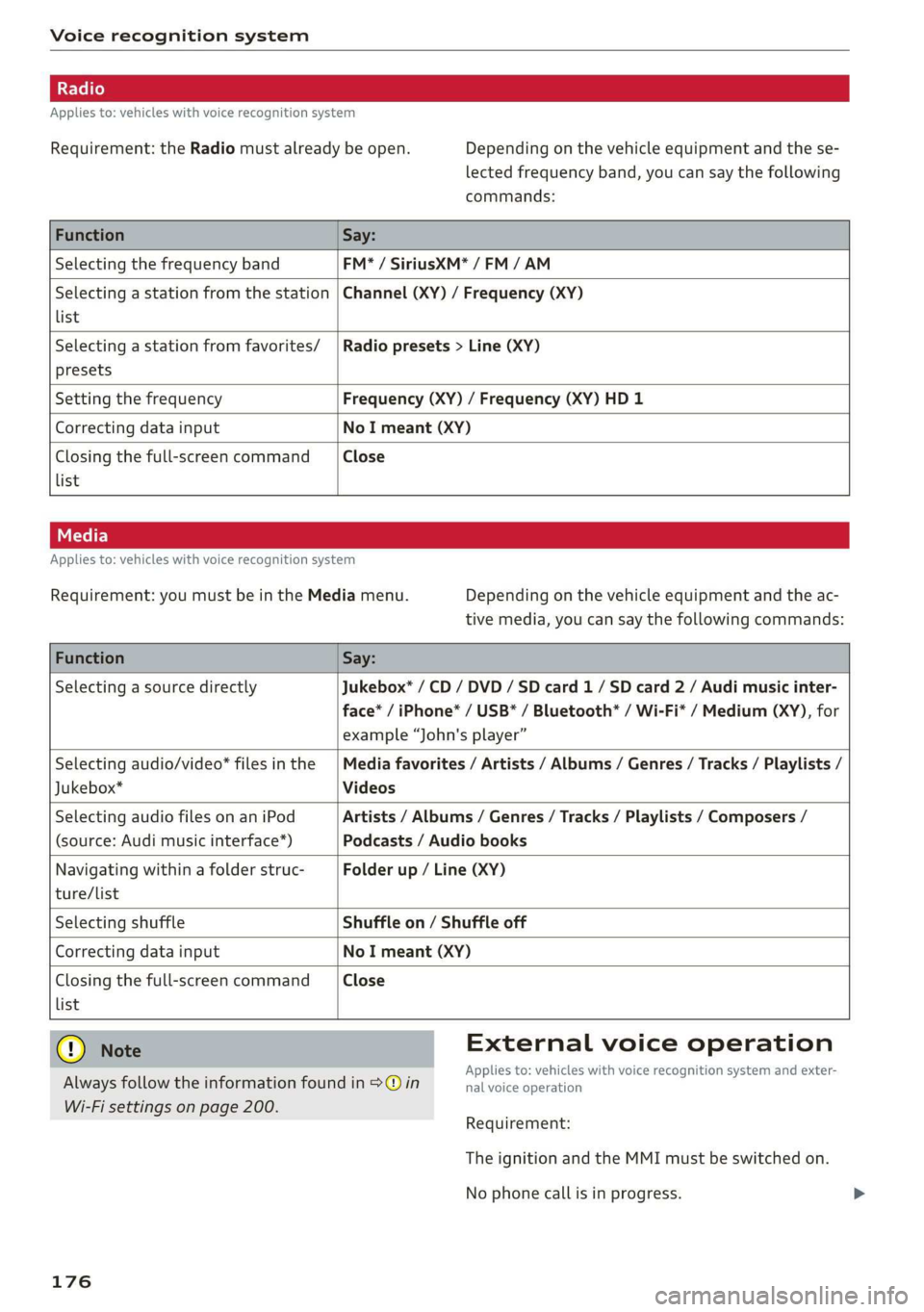
Appliesto:vehicleswithvoicerecognitionsystem
Requirement:theRadiomustalreadybeopen.Dependingonthevehicleequipmentandthese-
lectedfrequencyband,youcansaythefollowing
commands:
FunctionSay:
SelectingthefrequencybandFM*/SiriusXM*/FM/AM
Selectingastationfromthestation
list
Channel(XY)/Frequency(XY)
Selectingastationfromfavorites/
presets
Radiopresets>Line(XY)
SettingthefrequencyFrequency(XY)/Frequency(XY)HD1
CorrectingdatainputNoImeant(XY)
Closingthefull-screencommand
list
Close
Appliesto:vehicleswithvoicerecognitionsystem
Requirement:youmustbeintheMediamenu.Dependingonthevehicleequipmentandtheac-
tivemedia,youcansaythefollowingcommands:
FunctionSay:
SelectingasourcedirectlyJukebox*/CD/DVD/SDcard1/ SDcard2/Audimusicinter-
face*/iPhone*/USB*/Bluetooth*/Wi-Fi*/Medium(XY),for
example“John'splayer”
Selectingaudio/video*filesinthe
Jukebox*
Mediafavorites/Artists/Albums/Genres/Tracks/Playlists/
Videos
SelectingaudiofilesonaniPod
(source:Audimusicinterface*)
Artists/Albums/Genres/Tracks/Playlists/Composers/
Podcasts/Audiobooks
Navigatingwithinafolderstruc-
ture/list
Folderup/Line(XY)
list
SelectingshuffleShuffleon/Shuffleoff
CorrectingdatainputNoImeant(XY)
Closingthefull-screencommandClose
@®)Note
Alwaysfollowtheinformationfoundin>@in
Wi-Fisettingsonpage200.
176
Externalvoiceoperation
Appliesto:vehicleswithvoicerecognitionsystem andexter-
nalvoiceoperation
Requirement:
TheignitionandtheMMImustbe switchedon.
Nophonecallisinprogress.
Page 203 of 394
4M0012721BG
Audiconnect
—Appliesto:embeddedSIMcardusage:The
connectioncostsforAudiconnectInfotain-
mentservicesareincludedinthepriceof
AudiconnectInfotainment.Pleasenote
thatchargesmayapplywhenusingcertain
services.Forexample,thisappliestoInter-
netradio/podcastsorforservicesthatuse
theWi-Fihotspot,suchasonlinemedia
sources.Depending onthecountry,data
plansmayneedtobepurchasedforthese
services>page201.Foradditionalinfor-
mation,seewww.audiusa.com/myaudi.
—Youareresponsibleforallprecautionstaken
fordataprotection,anti-virusprotection,
andprotectionagainstlossofdataonmo-
biledevicesthatareusedtoaccesstheIn-
ternetthroughtheWi-Fihotspot.
@Tips
InvehicleswithoutAudiconnectInfotain-
ment,theuseoftheWi-Fihotspotisonly
possiblefortheWi-Fiaudioplayer*.Adata
connectiontotheInternetcannotbeestab-
lished.
Dataplans)
Appliesto:vehicleswith dataplans
Requirement:YoumusthavearegisteredmyAudi
accountatwww.audiusa.com/myaudi.Yourvehi-
clemustberegisteredinyourmyAudiaccount.
Youcanpurchasedataplansatwww.audiusa.
com/myaudi.
Troubleshooting
Appliesto:vehicleswithAudiconnectInfotainment
ZAWARNING
—Asthedriver,donotallowusageoftheWi-
Fihotspottodistractyoufromdriving,as
thiscouldincreasetheriskofanaccident.
—Itisonlysafe tousetablets,laptops,mobile
devices,andothersimilardeviceswhenthe
vehicleisstationarybecause,likeallloose
objects,theycouldbethrownaroundthein-
sideofthevehicleinacrashandcauseseri-
ousinjuries.Storethesetypesofdevicesse-
curelywhiledriving.
—Donotuseanywirelessdevicesonthefront
seatswithinrangeoftheairbagswhiledriv-
ing.Also readthewarningsinthechapter
=>page272,Frontairbags.
()Note
ReadtheinformationaboutAudiconnect,and
besure tonotetheconnectivitycostssection
=>)inWi-Fisettingsonpage200.
@)Tips
—Pleasenotethatanyvehiclepassengercan
deletetheSIMowner.
—Theassociatedvehicleisnotautomatically
deletedfromthecustomerportalforthe
cellphoneserviceproviderwhenyoudelete
theSIMownerinthevehicle.Ifsellingyour
vehicle,youshoulddeletethevehiclefrom
thecustomerportalforthecellphoneserv-
iceproviderto avoidbeingchargedforaddi-
tionalpurchases.
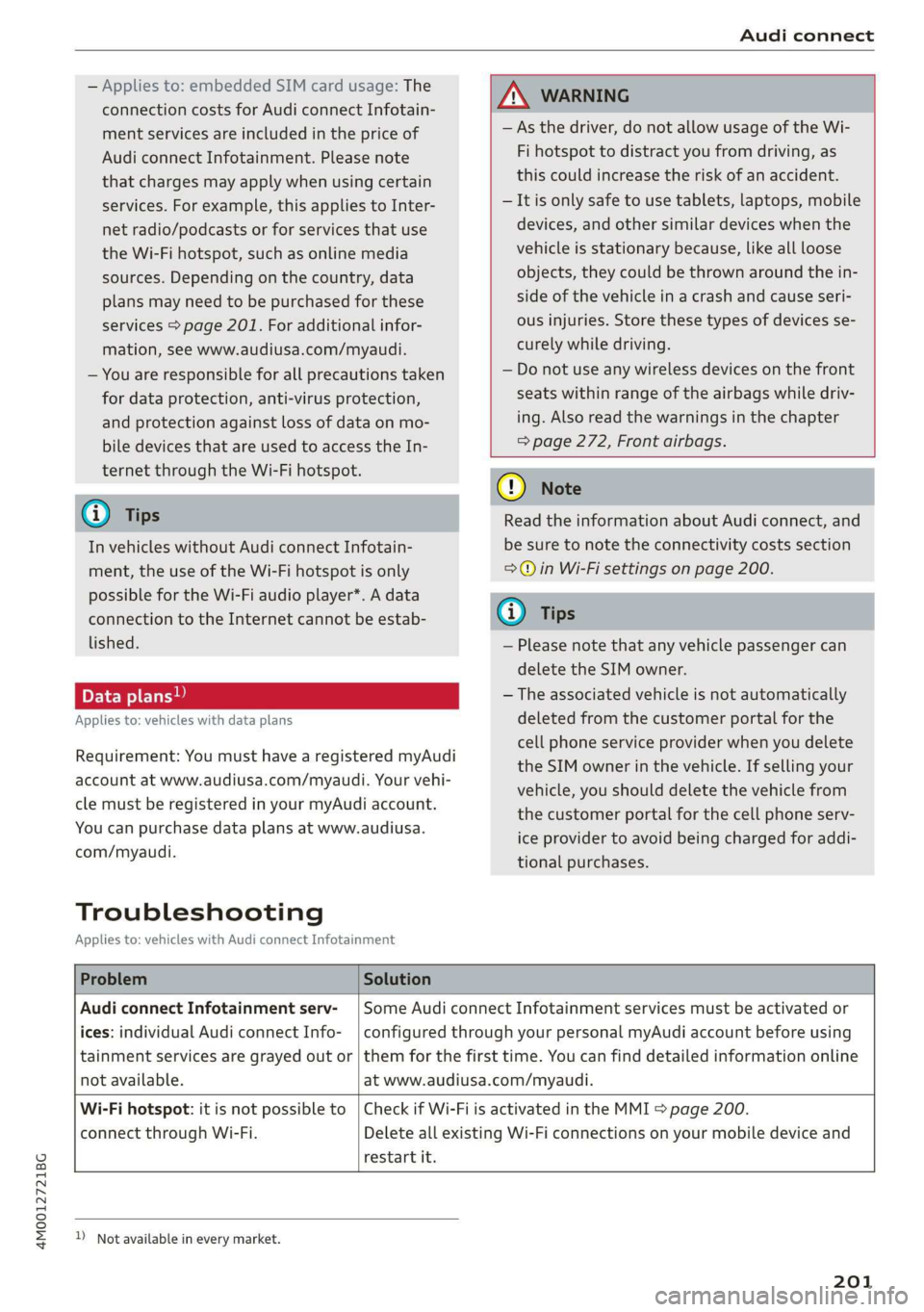
ProblemSolution
AudiconnectInfotainmentserv-
ices:individualAudiconnectInfo-
notavailable.
SomeAudiconnectInfotainmentservicesmustbeactivatedor
configuredthroughyourpersonalmyAudiaccountbeforeusing
tainmentservicesaregrayed outor|themforthefirsttime.Youcanfinddetailedinformationonline
atwww.audiusa.com/myaudi.
Wi-Fihotspot:itisnotpossible to
connectthroughWi-Fi.
restartit.
CheckifWi-FiisactivatedintheMMI>page200.
DeleteallexistingWi-Ficonnectionsonyourmobiledeviceand
))_Notavailableineverymarket.
201
Page 207 of 394
4M0012721BG
Navigation
Navigation
Openingnavigation
Appliesto:vehicleswithnavigationsystem
Thenavigationsystemdirectsyoutoyourdesti-
nation,aroundtrafficincidents,andonalterna-
tiveroutes,ifdesired.
Homeaddress
2)Gasstation
4
Senet
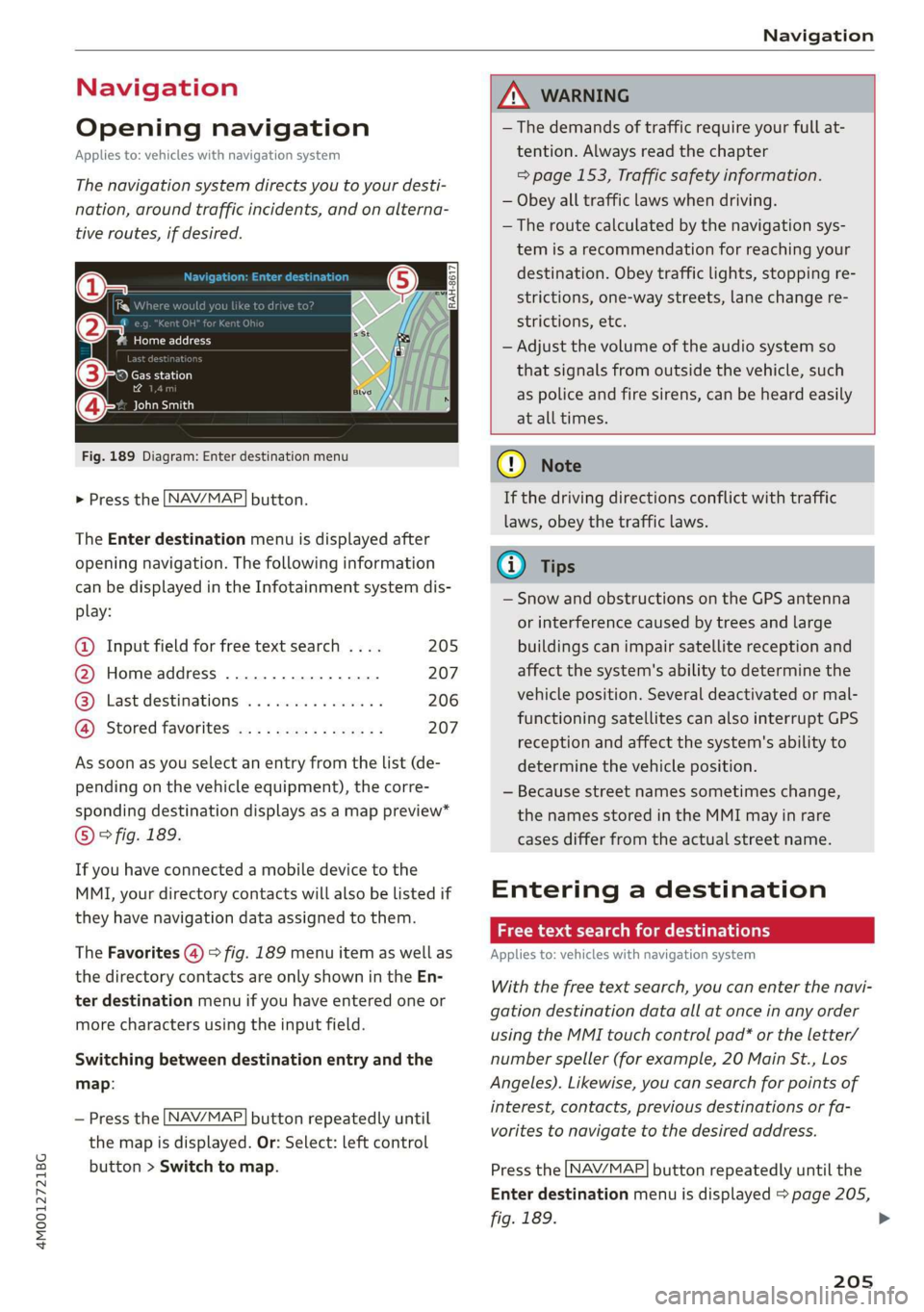
Fig.189Diagram:Enterdestinationmenu
NAV/MAP. >Pressthebutton.
TheEnterdestinationmenuisdisplayedafter
openingnavigation.Thefollowinginformation
canbedisplayedintheInfotainmentsystemdis-
play:
@Inputfieldforfreetextsearch....205
@Homeaddress.................207
@®Lastdestinations...............206
@Storedfavoritescos:ncesynewss207
Assoonasyouselectanentryfromthelist(de-
pendingonthevehicleequipment),thecorre-
spondingdestinationdisplaysasamappreview*
©?fig.189.
Ifyouhaveconnectedamobiledevicetothe
MMI,yourdirectorycontactswillalsobelistedif
they havenavigationdataassignedtothem.
TheFavorites(4)>fig.189menuitemaswellas
thedirectorycontactsareonlyshownintheEn-
terdestinationmenuifyouhaveenteredoneor
morecharactersusingtheinputfield.
Switchingbetweendestinationentryandthe
map:
NAV/MAP —Pressthebuttonrepeatedlyuntil
themapisdisplayed.Or:Select:leftcontrol
button>Switchtomap.
ZAWARNING
— Thedemandsoftrafficrequireyourfullat-
tention.Alwaysreadthechapter
=>page153,Trafficsafetyinformation.
—Obeyalltrafficlawswhendriving.
— Theroutecalculatedbythenavigationsys-
temisarecommendationforreachingyour
destination.Obeytrafficlights,stoppingre-
strictions,one-waystreets,lanechangere-
strictions,etc.
—Adjustthevolumeoftheaudiosystemso
thatsignalsfromoutsidethevehicle,such
aspoliceandfiresirens,can beheardeasily
atalltimes.
C)Note
Ifthedrivingdirectionsconflictwithtraffic
laws,obeythetrafficlaws.
G@)Tips
—SnowandobstructionsontheGPSantenna
or interferencecausedbytreesandlarge
buildingscanimpairsatellitereceptionand
affectthesystem'sabilitytodeterminethe
vehicleposition.Severaldeactivatedormal-
functioningsatellitescanalsointerruptGPS
receptionandaffectthesystem'sabilityto
determinethevehicleposition.
—Becausestreetnamessometimeschange,
thenamesstoredintheMMImayinrare
casesdifferfromtheactualstreetname.
Enteringadestination
Freetextsearchfordestinations
Appliesto:vehicleswithnavigationsystem
Withthefreetextsearch,youcanenterthenavi-
gationdestinationdataallatonceinanyorder
usingtheMMItouchcontrolpad*ortheletter/
numberspeller(forexample,20MainSt.,Los
Angeles).Likewise,youcansearchforpointsof
interest,contacts,previousdestinationsorfa-
voritestonavigatetothedesiredaddress.
NAV/MAP Pressthebuttonrepeatedlyuntilthe
Enterdestinationmenuisdisplayed>page205,
fig.189.
205
>
Page 229 of 394
4M0012721BG
Media
Media
Introduction
Therearevariousmediadrivesandconnections
availableintheMMI.Forexample,youcanplay
audio/video*filesfromtheJukebox*orconnect
yourmobiledevicetotheAudimusicinterface*
andoperateitthroughtheMMI.
Notes
Mediaandformatrestrictions:theMMI(includ-
ingtheSDcardreaderandtheUSBstoragede-
viceconnection*)wastestedwithavarietyof
productsandmediaavailableinthemarket.
However,theremaybecaseswhereindividualde-
vicesormediaandaudio/video*filesmaynot be
recognized,mayplayonlywithrestrictionsor
maynotplayatall.
DigitalRightsManagement:pleasenotethat
theaudio/video*filesaresubjecttocopyright
protection.
Themediadrivesdonotplayfilesthatarepro-
tectedbyDRMandthatareidentifiedwiththe
symbolfi.
Datasecurity:neverstoreimportantdataonSD
cards,theJukebox*,CDs/DVDsormobiledevices.
AudiAGisnotresponsiblefordamagedorlost
filesandmedia.
Loadingtimes:themorefiles/folders/playlists
thatareonastoragemedium,thelongeritwill
taketo loadtheaudio/video*files.Audirecom-
mendsusingstoragemediathatonlycontainau-
dio/videofiles*.To decreasethetimeittakesto
loadaudio/videofiles*,createsubfolders(forex-
ample,fortheartistoralbum).Theloadingtime
willalsoincreasewhenimportingfiles.
Additionalinformation:whenplaying,audio
filesareautomaticallydisplayedwithanyaddi-
tionalinformationthatisstored(suchasthear-
tist,trackandalbumcover).Ifthisinformationis
notavailableonthestoragemedium,theMMI
willchecktheGracenotemetadatadatabase.
However,insomecases,theadditionalinforma-
tionmaynotbedisplayed.
Restrictedfunctionality:resettheMediaset-
tingstothefactorydefaultsettingsiffunctional-
ityisrestricted>page248.
Iffunctionalityisrestricted,resettheJukebox*
tothefactorydefaultsettings>page248.
Forinformationaboutthepropertiesofsupport-
edmediaandfileformats,see>page241.
CG)Note
Alwaysfollowtheinformationfoundin>@in
Wi-Fisettingsonpage200.
CD/DVDoperation
CD/DVDandformatrestrictions:thefunctionali-
tyofindividualstoragemediamaybelimiteddue
tothevarietyofblankCDs/DVDsavailable and
thevariouscapacities.AudioCDsorvideoDVDs
withcopyprotection,CDs/DVDsthatdonotcon-
formtothestandard,andmultisessionCDsmay
havelimitedplaybackormaynotplayatall.Audi
recommendsfinalizingtherecordingprocess
whencreatingmultisession CDs.Multisession
DVDsarenotsupported.
UsingCDs/DVDs,theCDdrive ortheDVDdrive:
toensurecorrect,high-qualityplaybackandto
preventdamagetothedriveordiscreadinger-
rors,alwaysstoreCDs/DVDsinaprotective
sleeveanddonotexposethemtodirectsunlight.
Donotuse:
—Damaged,dirtyorscratchedCDs/DVDs
—
SingleCDs/DVDswith3in(8cm)diameter
—CD/DVDsthatarenotround
—CDs/DVDswithlabels
—Protectiverings
—CleaningCDs
Thermalprotectionswitch:CD/DVDplayback
maybetemporarilyunavailableifoutsidetem-
peraturesareextremelyhotorcold.Athermal
protectionswitchisinstalledtoprotectthe
CD/DVDandthelaser.
Laserdevices:laserdevicesare dividedintosafe-
tyclasses1to4inaccordancewithDINIEC76
227
>