change wheel AUDI Q7 2019 Owner´s Manual
[x] Cancel search | Manufacturer: AUDI, Model Year: 2019, Model line: Q7, Model: AUDI Q7 2019Pages: 394, PDF Size: 105.97 MB
Page 122 of 394
Assistsystems
aboutdetectedvehiclesthatithasclassifiedas
critical.
iG)Tips
Youcanadjustthebrightnessonofthedis-
playontherearviewmirror>page121.
CeeaeLo}
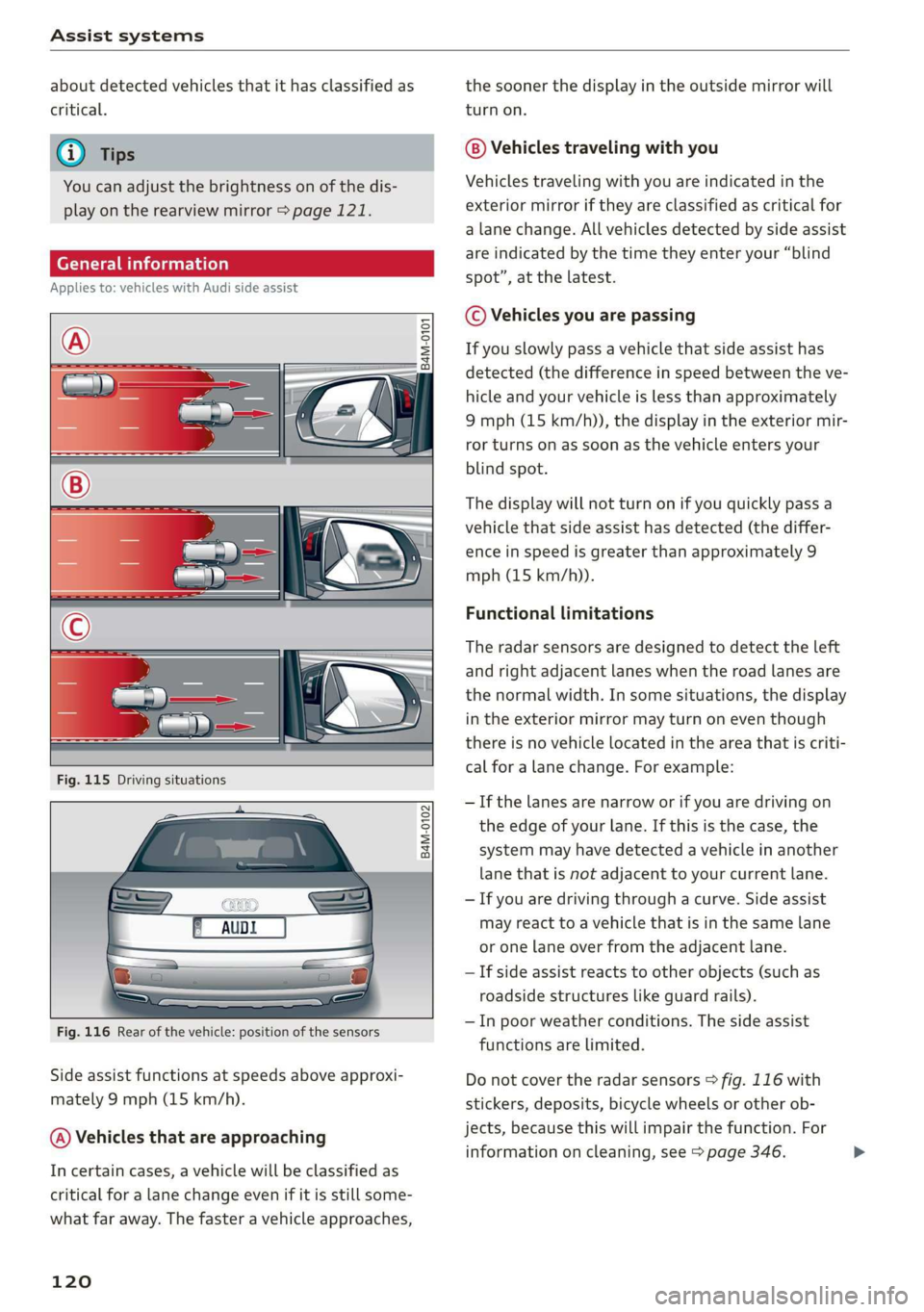
Appliesto:vehicleswithAudisideassist
S
2 =
+oO
B4M-0102
Fig.116Rearofthevehicle:positionofthesensors
Sideassistfunctionsatspeedsaboveapproxi-
mately9mph(15km/h).
@)Vehiclesthatareapproaching
Incertaincases,avehiclewillbeclassifiedas
criticalforalanechangeevenifitisstillsome-
whatfaraway.Thefasteravehicleapproaches,
120
thesoonerthedisplayintheoutsidemirrorwill
turnon.
Vehiclestravelingwithyou
Vehiclestravelingwithyouareindicatedinthe
exteriormirroriftheyareclassifiedascriticalfor
alane change.Allvehiclesdetectedbysideassist
areindicatedbythetimetheyenteryour“blind
spot”,atthelatest.
©Vehiclesyouarepassing
Ifyouslowlypassavehiclethatsideassisthas
detected(thedifferenceinspeedbetweentheve-
hicleandyourvehicleislessthanapproximately
9mph(15km/h)),thedisplayintheexteriormir-
rorturnsonassoonasthevehicleentersyour
blindspot.
Thedisplaywillnotturnonifyouquicklypassa
vehiclethatsideassisthasdetected(thediffer-
enceinspeedisgreaterthanapproximately9
mph(15km/h)).
Functionallimitations
Theradarsensorsaredesignedtodetecttheleft
andrightadjacentlaneswhentheroadlanesare
thenormalwidth.Insomesituations,thedisplay
intheexteriormirrormayturnoneventhough
thereisnovehiclelocatedintheareathatiscriti-
calforalanechange.Forexample:
—Ifthelanesarenarroworifyouaredrivingon
theedgeofyourlane.Ifthisisthecase,the
systemmayhavedetectedavehicleinanother
lanethatisnotadjacenttoyourcurrentlane.
—Ifyouaredrivingthroughacurve.Sideassist
mayreacttoavehiclethatisinthesamelane
oronelaneoverfromtheadjacentlane.
—Ifsideassistreactstootherobjects(such as
roadsidestructureslikeguardrails).
—Inpoorweatherconditions.Thesideassist
functionsarelimited.
Donotcovertheradarsensors>fig.116with
stickers,deposits,bicyclewheelsorotherob-
jects,becausethiswillimpairthefunction.For
informationoncleaning,see>page346.>
Page 123 of 394
Assistsystems
AWARNINGSwitchingonandoff
Appliesto:vehicleswithAudisideassist
—Alwayspayattentiontotrafficandtothe
areaaroundyourvehicle.SideassistcannotThesystemcanbe switchedon/offintheInfo-
replaceadriver'sattention.Thedriveralonetainmentsystem.
isalwaysresponsibleforlanechangesand
similardrivingmaneuvers.
>SelectintheInfotainmentsystem:[MENU]but-
ton>Vehicle>leftcontrolbutton>Driveras-
sistance>Audisideassist.Offswitchesthe
—Insomesituations,thesystemmaynot
functionoritsfunctionmaybelimited.Forsystemoff.
example:
—IfvehiclesareapproachingorbeingleftIfthesystemisactivated,thedisplaysintheex-
behindveryquickly.Thedisplaymaynotteriormirrorswillturnonbrieflywhentheigni-
turnonintime.tionisswitchedon.
—Inpoorweatherconditionssuchasheavy)
rain,snoworheavymist.@Tips
—Onverywidelanes,intightcurves,orifWhenyouswitchsideassistonoroff,theexit
thereisariseintheroadsurface.Vehicleswarningsystemactivatesordeactivates
intheadjacentlanemaynot be detected=>page122.
becausetheyareoutsideofthesensor
range.Settingthedisplaybrightness
4M0012721BG
Appliesto:vehicleswith Audisideassist
@)Note
ThedisplaybrightnesscanbeadjustedintheIn-
Thesensorscanbedisplacedbyimpactsorfotainmentsystem.
damagetothebumper,wheelhousingand
underbody.Thiscanimpair thesystem.Have»SelectintheInfotainmentsystem:[MENU]but-
anauthorizedAudidealerorauthorizedAuditon>Vehicle>leftcontrolbutton>Driveras-
ServiceFacilitychecktheirfunction.sistance>Audisideassist.
@)TipsThedisplaybrightnessadjustsautomaticallyto
thebrightness ofthesurroundings,bothinthe
informationandinthewarningstage.Invery
darkorverybrightsurroundings,theautomatic
adjustmentwillsetthedisplay totheminimum
ormaximumlevel.Insuchcases,youmaynotice
nochangewhenadjustingthebrightness, orthe
changemayonlybenoticeableoncethesur-
roundingschange.
—Thesesystemsarenotavailableintrailer
towingmode.Thereisnoguaranteethesys-
temswillswitchoffwhenusingaretrofitted
trailerhitch.Donot use thesefunctions
whentowingatrailer.
—Ifthewindowglassinthedriver'sdooror
front
passenger'sdoorhasbeentinted,the
displayintheexteriormirrormaybeincor-
aes.Adjustthebrightnesstoalevelwherethedisplay
—Foranexplanationonconformitywiththeintheinformationstagewillnotdisruptyour
FCCregulationsintheUnitedStatesandtheviewahead.Ifyouchangethebrightness,thedis-
IndustryCanadaregulations,seeplayintheexteriormirrorwillbrieflyshowthe
>page373.brightnesslevelintheinformationstage.The
brightnessofthewarningstageislinkedtothe
brightnessintheinformationstageandisadjust-
edalongwiththeinformationstage.>
121
Page 130 of 394
Assistsystems
Airsuspension
Appliesto:vehicleswithairsuspension
The
airsuspensionisanelectronically-controlled
suspensionandlevelingsystem.Thefirmnessof
thesuspensionwilladapttothedrivingcondi-
tionsandthedrivingsituation.Thesystembalan-
cesoutchangesinload.Thevehiclelevelwillalso
adaptgraduallytothevehiclespeedinorderto
reduce thewindresistanceathighspeedsandin-
creasethegroundclearanceatlowspeeds.The
settingsdependontheselectedAudidrivese-
lect*mode.
Steering
Thepowersteeringadapts.Indirectsteeringthat
moveseasilyasinComfortmodeisespecially
suitedtolongdrivesonhighways.TheDynamic
modeprovidessporty,directsteering.
All-wheelsteering*
All-wheelsteeringincreasesdrivingcomfortby
providingadditionalsteeringabilityattherear
axle.Steeringintheoppositedirectionatlow
speedsdecreasestheturningradius.Steeringin
thesamedirectionathighspeeds improvesthe
responsetimewhileincreasingdrivingstabilityat
thesametime.
Sportdifferential*
Asacomponentoftheallwheeldrivesystem
(quattro)>page151,thesportdifferentialdis-
tributesthedrivingpowertotherearaxlede-
pendingonthesituation.Thedistributionof
powervariesdependingontheselectedmode
frommoderate(Comfort)tosporty(Dynamic).
Thegoalisahighlevelofagilityandabilitytoac-
celerateoncurves.Thevehicleisveryresponsive
tosteering.
Adaptivecruisecontrol(ACC)*
Thebehaviorwhenacceleratingcanbeadjusted
fromcomfortabletosporty,dependingonthe
driveselectmode.Adaptivecruisecontrolalso
respondstothedrivingbehaviorofthevehicle
aheadinamoreconservativeorsportymanner.
128
Enginesound*
Theenginesoundadaptstothecurrentmode
andcan besubtletosporty.
C@)Note
Appliesto:vehicleswithairsuspension
—
Makesurethereisenoughclearanceabove
andbelowthevehiclewhenparking.The
heightofthevehicle(groundclearance)can
changeonceitisparkedduetotemperature
fluctuations,changestotheload condi-
tions,andchangestothedrivingmodes.
—
Whentransportingthevehicleonacarcar-
rier,train,ship,orbyothermeans,onlyse-
curethevehicleattheoutercircumference
ofthetires(thetreadsurface).Securingthe
vehicleattheaxlecomponents,suspension
struts,ortowingeyesisnotpermittedbe-
causethepressureintheairsuspension
strutscanchangeduringtransport.Theve-
hiclemightnot besecuredsufficientlyifthis
happens.
@Tips
The"S"selectorleverpositionautomatically
engageswhentheDynamicmodeisselected.
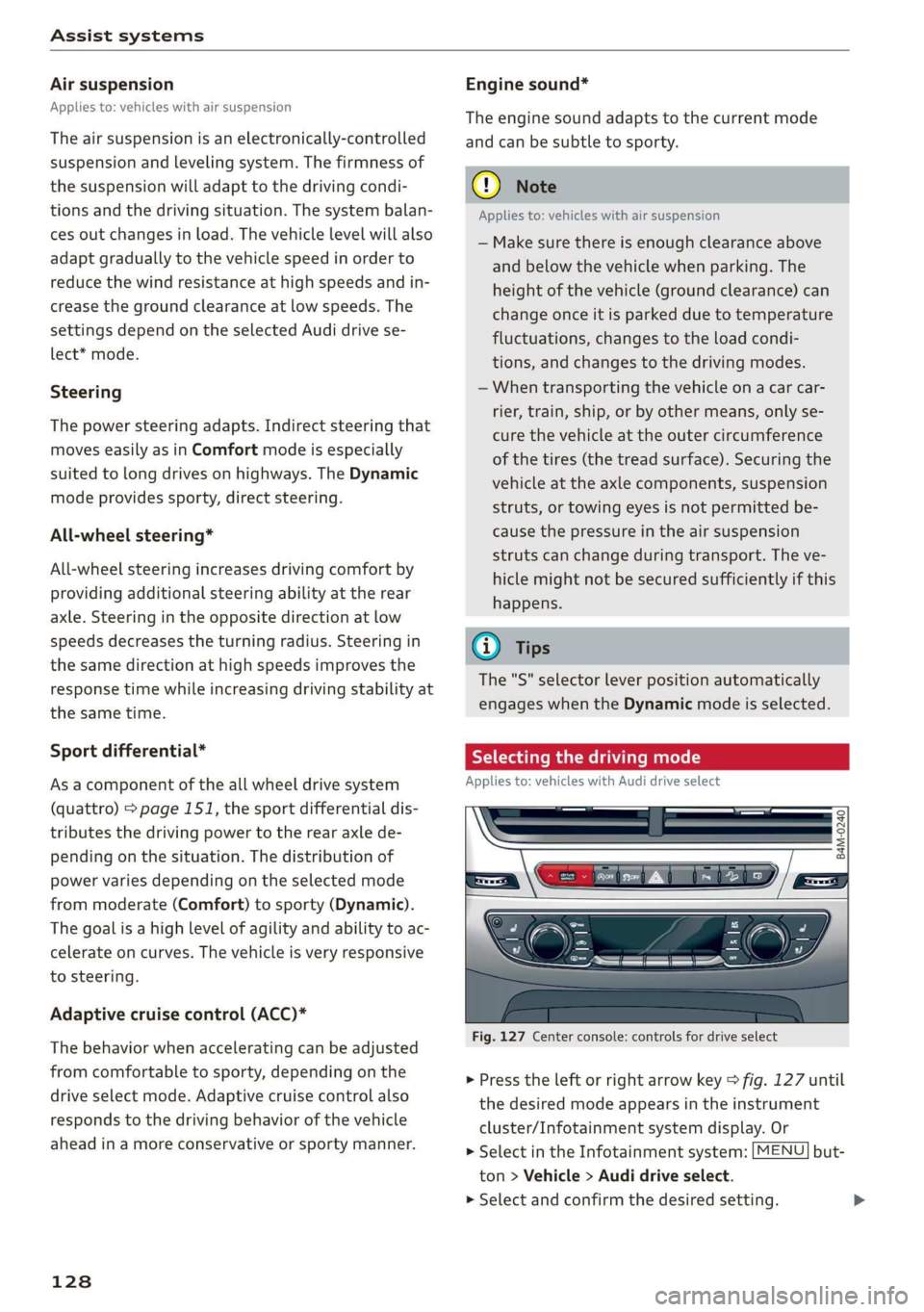
Selectingthedrivingmode
Appliesto:vehicleswithAudidriveselect
B4M-0240
Fig.127Centerconsole:controlsfordriveselect
>Presstheleftorrightarrowkey>fig.127until
thedesiredmodeappearsintheinstrument
cluster/Infotainmentsystemdisplay.Or
>SelectintheInfotainmentsystem:[MENU]but-
ton>Vehicle>Audidriveselect.
>Selectandconfirmthedesiredsetting.
Page 131 of 394
4M0012721BG
Assistsystems
Youcanchangethedrivingmodewhenthevehi-
cleisstationaryorwhiledriving.Iftrafficper-
mits, afterchangingmodes, brieflyremoveyour
footfromtheacceleratorpedalsothatthere-
centlyselectedmodeisalsoactivatedfortheen-
gine.
Offroad*orLift/Offroad*-activatesoffroad
functionstosupportdrivingonroughterrain.The
engine,transmissionandsteeringadjustandthe
Start/Stopsystem*switchesoff.Appliestoair
suspension*:thevehiclealsoliftsforpassing
overobstaclestomaintainmaximumground
clearance.
Allroad*-onlyforairsuspension*:thevehicle
liftstomaintainhighergroundclearancefordif-
ficultstretchesofroad.
Comfort-providesacomfort-orientedvehicle
setupandissuitedforlongdrivesonhighways.
Auto-providesanoverallcomfortableyetdy-
namicdrivingfeelandissuitedforeverydayuse.
Dynamic-givesthedriverasportydrivingfeel
andissuited toasportydrivingstyle.
Individual->page129.
AdjustingtheIndividualmode
Appliesto:vehicleswithAudidriveselect
Youcanadjustthevehiclesettingstoyourpersonalpreferences.
>SelectintheInfotainmentsystem:[MENU]but-
ton>Vehicle>Audidrive select>Individual>
rightcontrolbutton.
Afteryouhaveclosedthesettings,youwillauto-
maticallydriveintheIndividualmode.
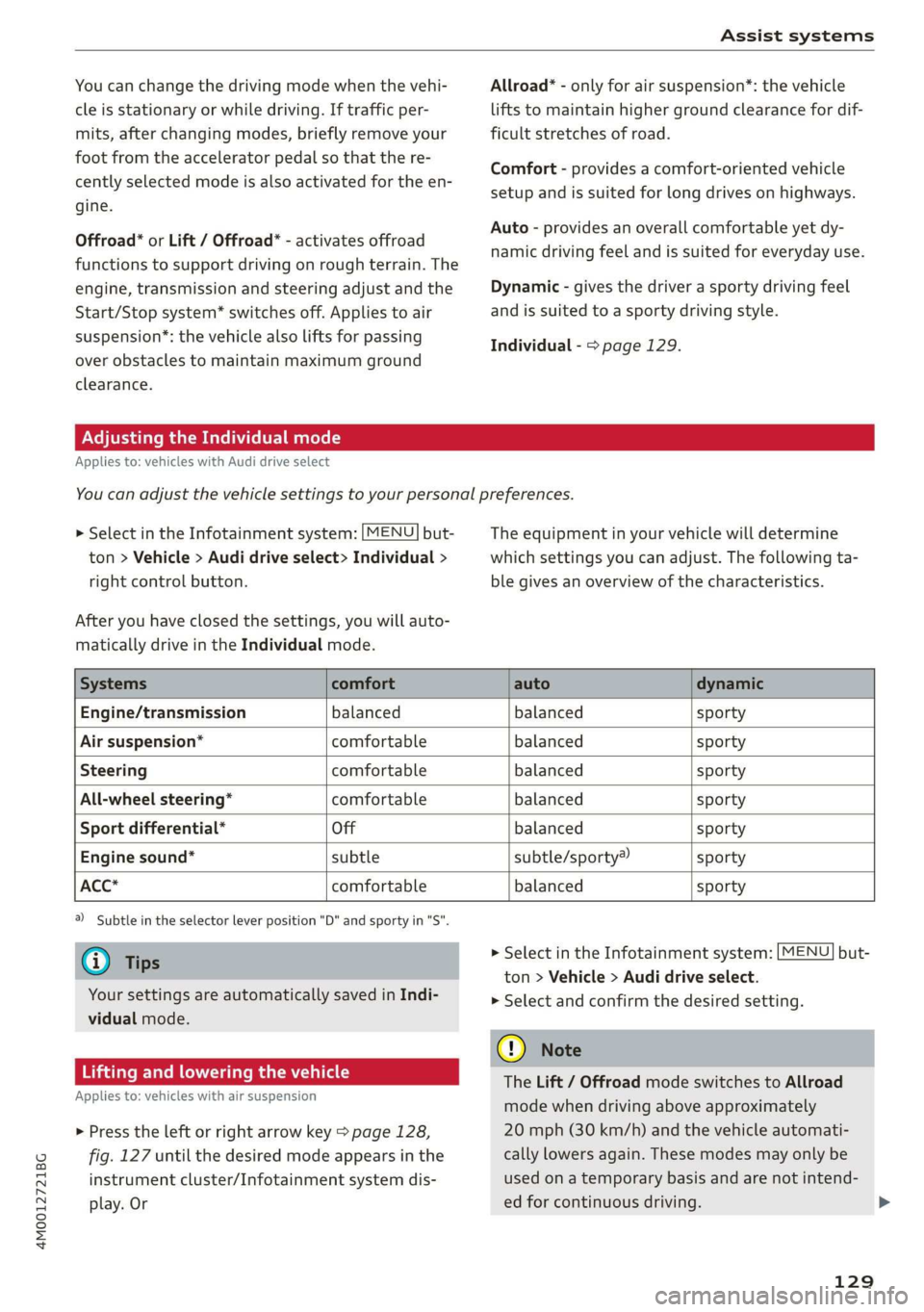
Theequipmentinyourvehiclewilldetermine
whichsettingsyoucanadjust.Thefollowingta-
blegivesanoverviewofthecharacteristics.
Systemscomfortautodynamic
Engine/transmissionbalancedbalancedsporty
Airsuspension*comfortablebalancedsporty
Steeringcomfortablebalancedsporty
All-wheelsteering*comfortablebalancedsporty
Sportdifferential*Offbalancedsporty
Enginesound*subtlesubtle/sporty®sporty
ACC*comfortablebalancedsporty
)Subtleintheselectorleverposition"D"andsportyin"S".
@Tips
Yoursettings areautomaticallysavedinIndi-
vidualmode.
Liftingandloweringthevehicle
Appliesto:vehicleswithairsuspension
>Presstheleftorrightarrowkey>page128,
fig.127untilthedesiredmodeappearsinthe
instrumentcluster/Infotainmentsystemdis-
play.Or
>SelectintheInfotainmentsystem:[MENU]but-
ton>Vehicle>Audidriveselect.
>
Selectandconfirmthedesiredsetting.
C)Note
TheLift/OffroadmodeswitchestoAllroad
modewhendrivingaboveapproximately
20mph(30km/h)andthevehicleautomati-
callylowersagain.Thesemodesmayonlybe
usedonatemporarybasisandarenotintend-
edforcontinuousdriving.
129
Page 133 of 394

4M0012721BG
Parkingaid
Parkingaid
Generalinformation
Appliesto:vehicleswitharearparkingsystem/parkingsys-
templus/rearviewcamera/peripheralcameras/parkassist.
Dependingonyourvehicle'sequipment,various
parkingaidswillhelpyouwhenparkingandma-
neuvering.
Therearparkingsystemisanaudible parkingaid
thatwarnsyouofobstaclesbehindthevehicle
=>page132.
Theparkingsystemplusassistsyouwhilepark-
ingusingaudioandvisualsignalstowarnyou
aboutobjectsdetectedinfrontof,behind,andat
thesides*ofthevehicle>page132.
Therearviewcamerashowstheareabehindthe
vehicleintheInfotainmentsystemdisplay.The
linesintherearviewcameraimagehelpyouto
parkormaneuver>page134.
Theperipheralcamerasgivevariousviewsto
helpyouwhenparkingormaneuvering
=page136.Theparkingsystemplusfunctions
arealsoavailable>page132.
Parkassisthelpsyoutolocatesuitableparking
spaceswhenparallelorperpendicularparking,
andalsohelpswhenleavingaparallelparking
space>page139.
ingsystemmaybe impairedasaresult.
HaveanauthorizedAudidealerorauthor-
izedAudiServiceFacilitychecktheirfunc-
tion.
ZA\WARNING
—Alwayslookfortrafficandcheckthearea
aroundyourvehiclebylookingatitdirectly
aswell.Theparkingsystemcannotreplace
thedriver'sattention.Thedriverisalways
responsiblewhenenteringorexitingapark-
ingspaceandduringsimilarmaneuvers.
—Pleasenotethatsomesurfaces,suchas
clothing,arenotdetectedbythesystem.
—Sensorsandcamerashaveblindspotsin
whichpeopleandobjectscannotbedetect-
ed.Beespeciallycautiousofsmallchildren
andanimals.
—Alwayskeepyoureyesonthevehicle'ssur-
roundings,usingtherearviewmirroraswell.
— Thesensorscanbedisplacedbyimpactsor
damagetotheradiatorgrille,bumper,
wheelhousingandtheunderbody.Thepark-
@)Note
—Someobjectsarenotdetectedordisplayed
bythesystemundercertaincircumstances:
—objectssuchasbarrierchains,trailerdraw
bars,verticalpolesorfences
—objectsabovethesensorssuchaswallex-
tensions
—objectswithcertainsurfacesorstructures
suchaschainlinkfencesorpowdersnow
—Ifyoucontinuedrivingclosertoalowob-
ject,itmaydisappearfromthe sensor
range.NotethatyouwillnoLongerbe
warnedaboutthisobstacle.
—Maintainenoughdistancefromthecurbto
reducetheriskofdamagetotherims.
@)Tips
—Thesystemmayprovideawarningeven
thoughtherearenoobstaclesinthecover-
ageareainsomesituations,suchas:
—certainroadsurfacesor whenthereistall
grass
—externalultrasonicsourcessuchasfrom
cleaningvehicles
—inheavyrain,snow,orthickvehicleex-
haust
—Werecommendthatyoupracticeparkingin
atraffic-freelocationorparkinglottobe-
comefamiliarwiththesystem.Practice
parkingingoodlightand weathercondi-
tions.
—Youcanchangethevolumeofthesignals
andthedisplay>page144.
—Whatappearsintheinfotainmentdisplayis
somewhattime-delayed.
—Thesensorsmustbekeptcleanandfreeof
snowandicefortheparkingaidtooperate.
131
Page 138 of 394
Parkingaid
>Turn theInfotainmentsystemonandshiftinto
reversegear.
>Theorangeorientationlines@showthevehi-
cle'sdirectionoftravel.Turn thesteeringwheel
untiltheorangeorientationlinesalignwiththe
parkingspace>fig.134.Usethemarkings@)
tohelpyouestimatethedistancetoanobsta-
cle.Eachmarkingrepresentsapproximately3ft
(1m).Thebluearearepresentsanextensionof
thevehicle'soutlinebyapproximately16ft(5
meters)totherear.
>Whiledrivinginreversegear,adjustthesteer-
ingwheelangletofittheparkingspaceusing
theorangeorientationlinesforassistance>A\
inGeneralinformationonpage134,>@)in
Generalinformationonpage135.Area@)rep-
resentstherearbumper.Attheverylatest,
stopthevehiclewhentheredorientationline
@bordersanobject.
NirliCimUCW
Appliesto:vehicleswith rearviewcamera/peripheralcameras
andtrailerhitch
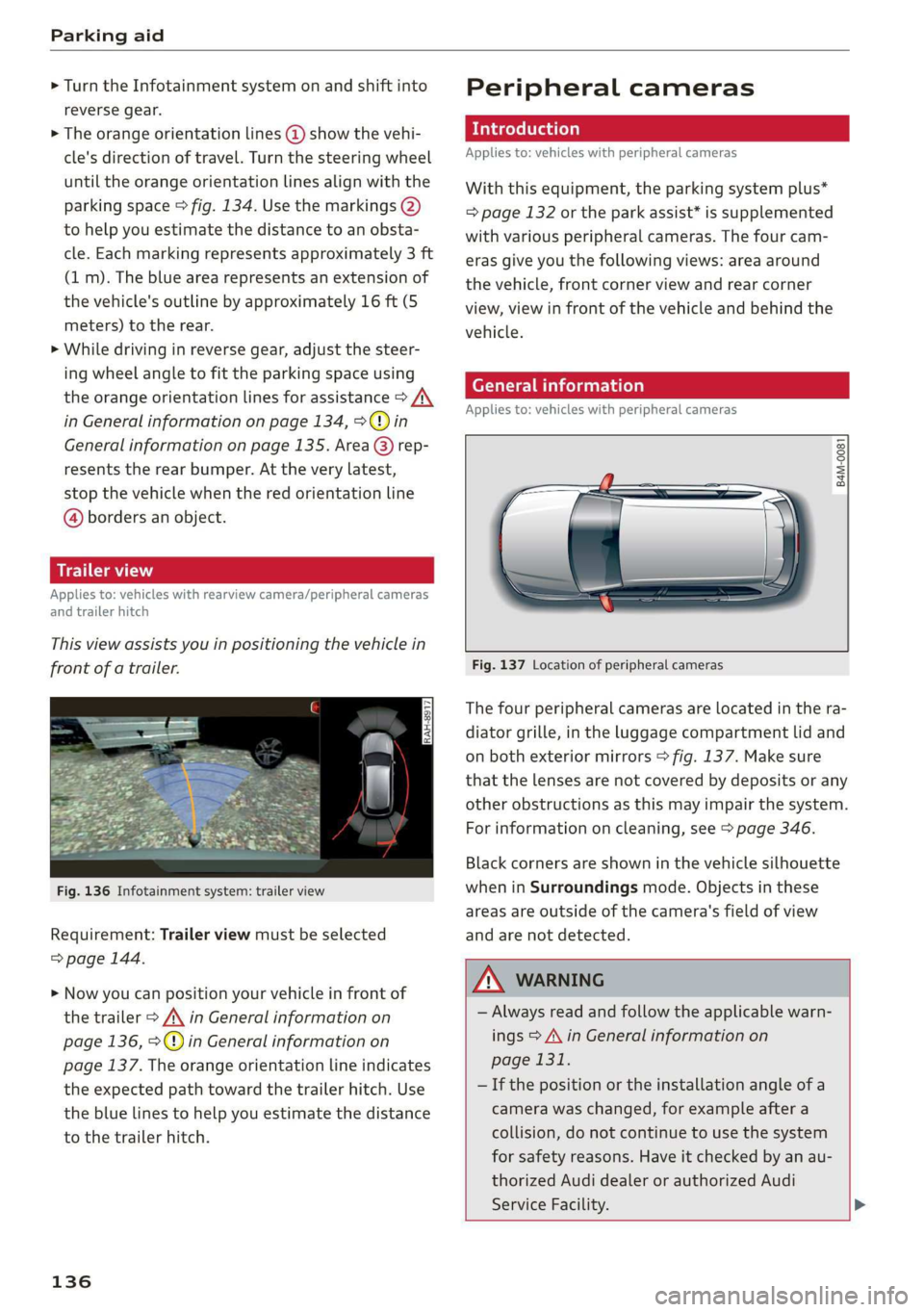
Thisviewassistsyouinpositioningthevehiclein
frontofatrailer.
Fig.136Infotainmentsystem:trailerview
Requirement:Trailerviewmustbeselected
=>page144.
>Nowyoucanpositionyourvehicleinfrontof
thetrailer>/\inGeneralinformationon
page136,>@)inGeneralinformationon
page137.Theorangeorientationlineindicates
theexpectedpathtowardthetrailerhitch.Use
thebluelinestohelpyouestimatethedistance
tothetrailerhitch.
136
Peripheralcameras
Introduction
Appliesto:vehicleswithperipheralcameras
Withthisequipment,theparkingsystemplus*
=page132ortheparkassist*issupplemented
withvariousperipheralcameras.Thefourcam-
erasgiveyouthefollowingviews:areaaround
thevehicle,frontcornerviewandrearcorner
view,viewinfrontofthevehicleandbehindthe
vehicle.
Generalinformation
Appliesto:vehicleswithperipheralcameras
B4M-0081
Fig.137Locationofperipheralcameras
Thefourperipheralcamerasarelocatedinthera-
diatorgrille,intheluggagecompartmentlidand
onbothexteriormirrors>fig.137.Makesure
thatthelensesarenotcoveredbydepositsorany
otherobstructionsasthismayimpairthesystem.
Forinformationoncleaning,see>page346.
Blackcornersareshowninthevehiclesilhouette
wheninSurroundingsmode.Objectsinthese
areasareoutsideofthecamera'sfieldofview
andarenotdetected.
Z\WARNING
—Alwaysreadandfollowtheapplicablewarn-
ings>A\inGeneralinformationon
page131.
—Ifthepositionortheinstallationangleofa
camerawaschanged,forexampleaftera
collision,donotcontinuetouse thesystem
forsafety reasons.Haveitcheckedby anau-
thorizedAudidealerorauthorizedAudi
ServiceFacility.>
Page 142 of 394
Parkingaid
system.Forinformationoncleaning,see
=>page346.
Whenparkingspacesaresmall,theparkingsys-
temsignalsacontinuoustonewhenanobstacle
islessthanapproximately0.7feet(0.20m)
away.Donotcontinuedrivingfarther.
ZAWARNING
—Alwaysreadandfollowtheapplicablewarn-
ings>A\inGeneralinformationon
page131.
—Pleasenotethat parkassistonlycontrols
thesteering.Thedriverisalwaysresponsi-
bleforbrakingandaccelerating.
— Thedrivermustdecideiftheparkingspace
displayedissuitableforthevehicle.
—Thevehiclewillchangepositionwhenpark-
ing.Makesureyoudonotendangeranyoth-
erdrivers.
—Whenusingparkassisttodriveintoorout
ofaparkingspace,thesteeringwheelturns
quicklyonitsown.Reachingintothesteer-
ing
wheelspokeswhilethisishappeningcan
resultininjury.
—Youcannotparkwith parkassistwhenyou
aretowingatrailerorhavetheconnectorin-
sertedinthetrailersocket.
Sleemela
Appliesto:vehicleswithparkassist
B4M-0084
@)Note
—Alwaysreadandfollowtheapplicablewarn-
ings>@inGeneralinformationon
page131.
—Parkassistguidesthevehicleeitheraway
fromcurbsorontothemifothervehicles
areparkedonthecurb.Makesurethatyour
vehicle'stiresandrimsarenotdamaged.
Takeoversteeringattherighttime.
—Certainconditionsaroundtheparkingspace
mayresultinthevehiclenotbeingparked
asexpected.
—Objectssuchaspillarsorposts.
—Groundcoveringsuchasgravel,snowor
ice
G)Tips
— TheElectronicStabilizationControl(ESC)
mustnotbe switchedoffduringtheparking
process>page147.
—Parkingintightcurveswith parkassistis
notpossible.
140
Fig.147Centerconsole:Parkassistbutton
Fig.148Infotainment:Searchingforparkingspaces
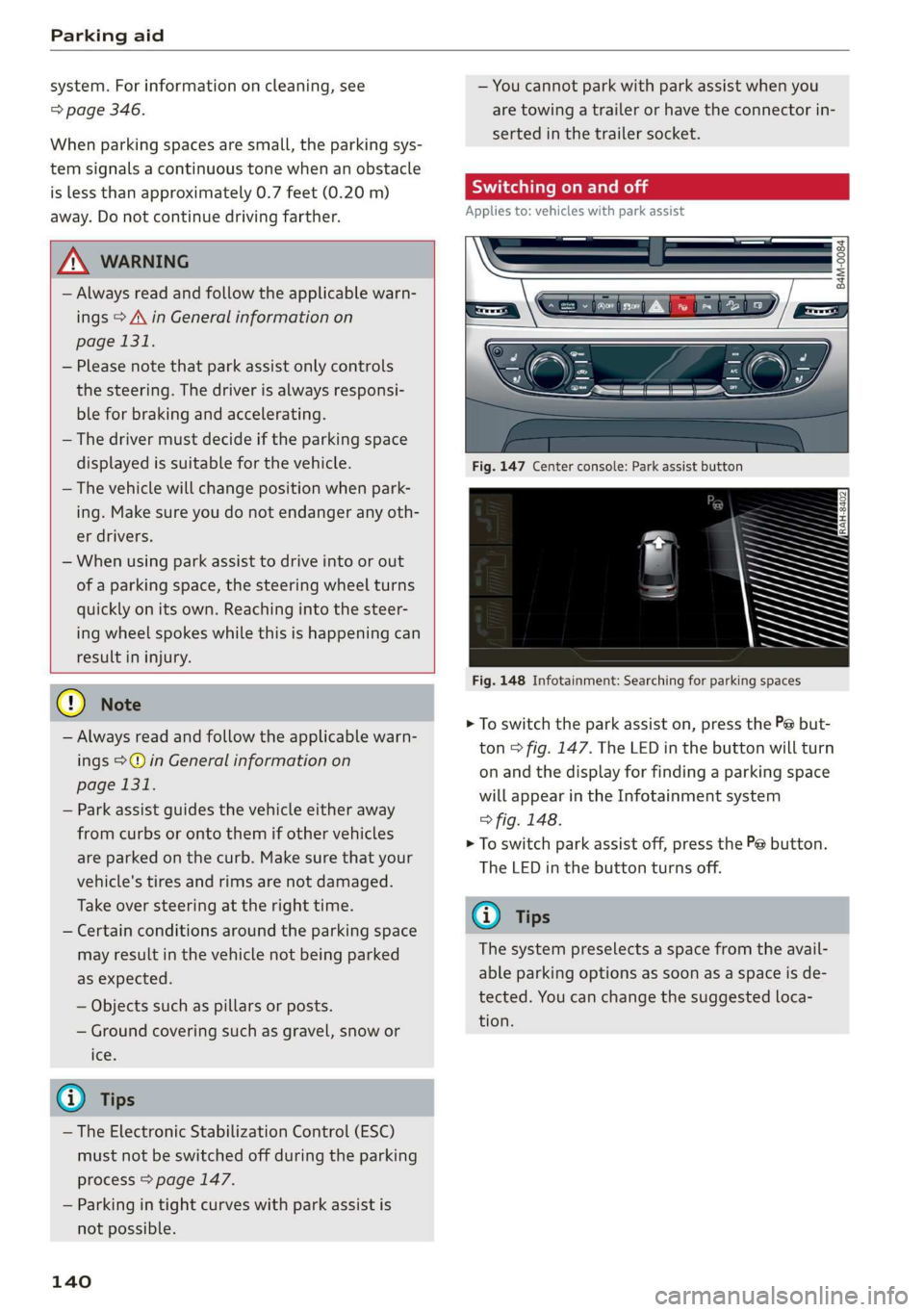
>Toswitchtheparkassiston,pressthePebut-
ton>fig.147.The LEDinthebuttonwillturn
onandthedisplayforfindingaparkingspace
willappearintheInfotainmentsystem
>fig.148.
>Toswitchparkassistoff,pressthePebutton.
TheLEDinthebuttonturnsoff.
G)Tips
Thesystempreselectsaspacefromtheavail-
ableparkingoptionsassoonasaspaceisde-
tected.Youcanchangethesuggestedloca-
tion.
Page 170 of 394
Multifunctionsteeringwheel
Mapviewwithrouteguidancestarted
Appliesto:vehicleswithnavigationsystemandmapview
Dependingonthevehicleequipment,youcanal-
sohavetheactiverouteguidancedisplayinthe
mapview*inthedriverinformationsystem.
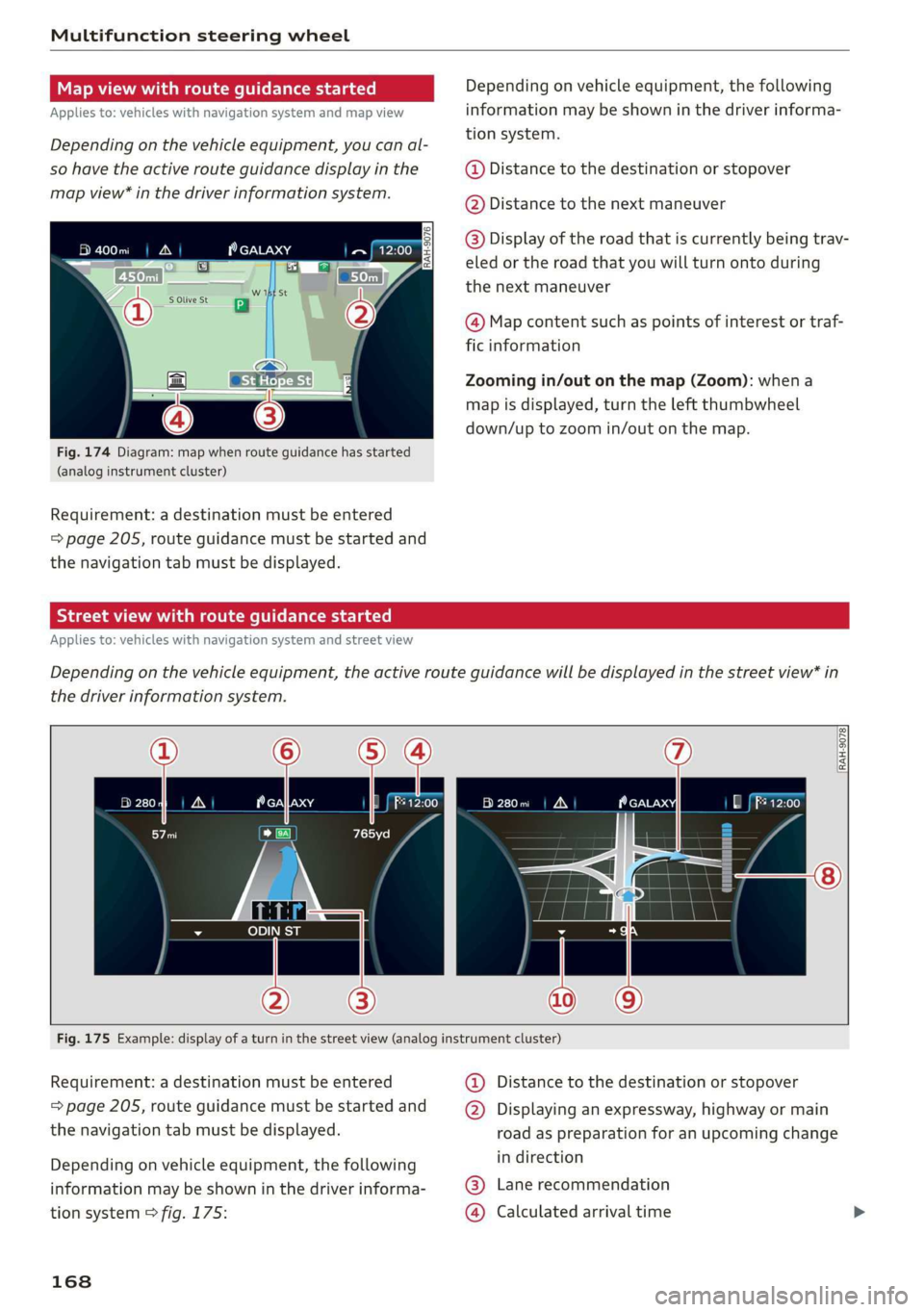
Fig.174Diagram:mapwhenrouteguidancehasstarted
(analoginstrumentcluster)
Requirement:adestinationmustbeentered
=page205,routeguidancemustbestartedand
thenavigationtabmustbedisplayed.
Dependingonvehicleequipment,thefollowing
informationmaybeshowninthedriverinforma-
tionsystem.
@Distancetothedestinationorstopover
@Distancetothenextmaneuver
@Display oftheroadthatiscurrentlybeingtrav-
eled ortheroad thatyouwillturnontoduring
the
nextmaneuver
@Mapcontentsuchaspointsofinterestortraf-
ficinformation
Zoomingin/outonthemap(Zoom):whena
mapisdisplayed,turntheleftthumbwheel
down/uptozoomin/outonthemap.
Streetviewwithrouteguidancestarted
Appliesto:vehicleswithnavigationsystemandstreetview
Dependingonthevehicleequipment,theactiverouteguidancewillbedisplayedinthestreetview*in
thedriverinformationsystem.
RAH-9078
280m|A
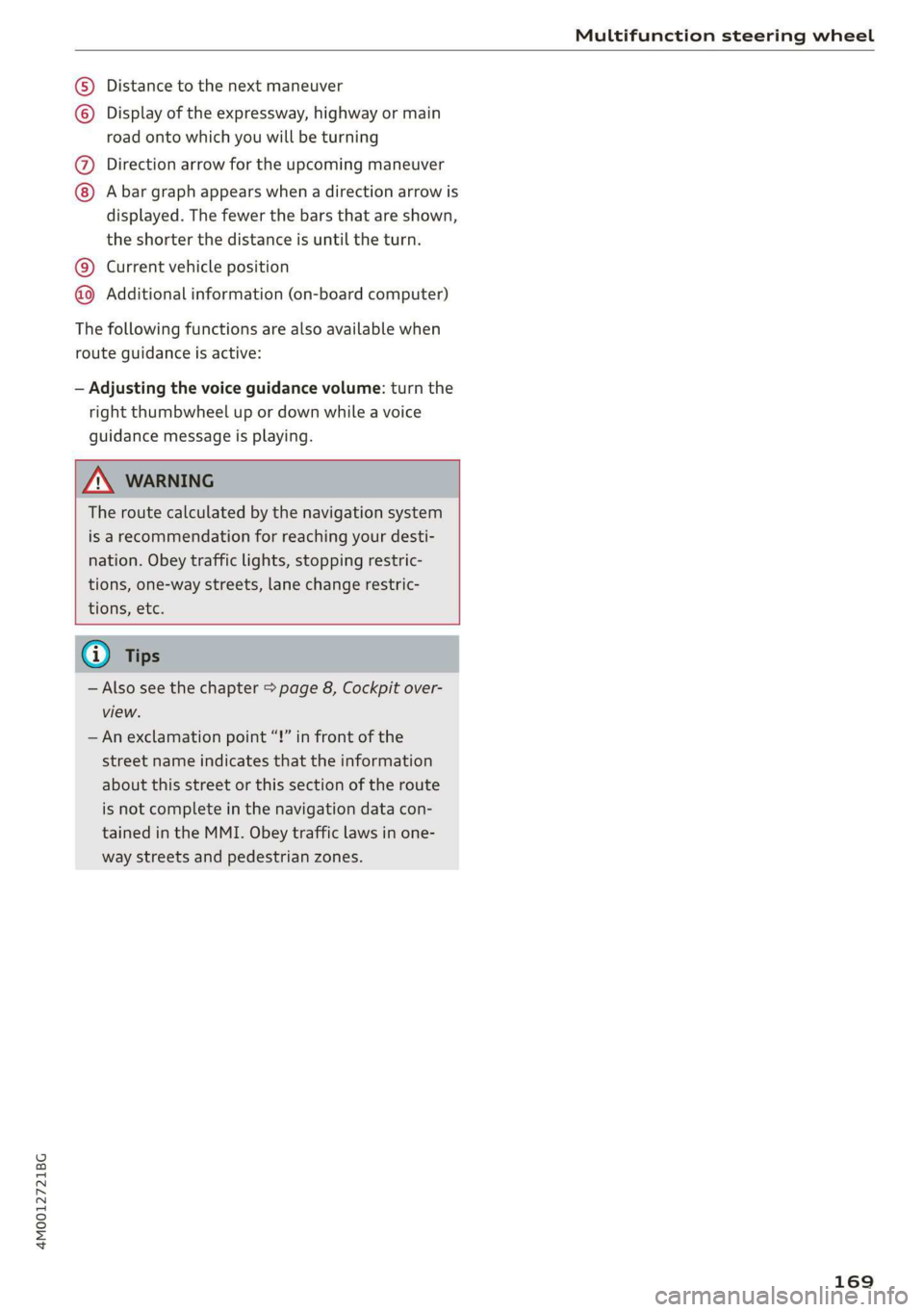
Fig.175Example:displayofaturninthestreetview(analoginstrumentcluster)
Requirement:adestinationmustbe entered
=page205,routeguidancemustbestartedand
thenavigationtabmustbedisplayed.
Dependingonvehicleequipment,thefollowing
informationmaybeshowninthedriverinforma-
tionsystem>fig.175:
168
@Distancetothedestinationorstopover
@®Displayinganexpressway,highwayormain
roadaspreparationforanupcomingchange
indirection
Lanerecommendation
Calculatedarrivaltime©®
Page 171 of 394
4M0012721BG
Multifunctionsteeringwheel
Distancetothenextmaneuver
Displayoftheexpressway,highwayormain
roadontowhichyouwillbeturning
Directionarrowfortheupcomingmaneuver
©8
©
Abargraphappearswhenadirectionarrowis
displayed.Thefewerthebarsthatareshown,
theshorterthedistanceisuntiltheturn.
Currentvehicleposition@
@Additionalinformation(on-boardcomputer)
Thefollowingfunctionsarealsoavailablewhen
routeguidanceisactive:
—Adjustingthevoiceguidancevolume:turnthe
rightthumbwheelupordownwhileavoice
guidancemessageisplaying.
Z\WARNING
Theroutecalculatedbythenavigationsystem
isarecommendationforreachingyourdesti-
nation.Obeytrafficlights,stoppingrestric-
tions,one-waystreets,lanechangerestric-
tions,etc.
G)Tips
—Alsosee thechapter>page8,Cockpitover-
view.
—Anexclamationpoint“!”infront ofthe
streetnameindicatesthattheinformation
aboutthisstreetorthissectionoftheroute
isnotcompleteinthenavigationdatacon-
tainedintheMMI.Obeytrafficlawsinone-
waystreetsandpedestrianzones.
169
Page 173 of 394
4M0012721BG
Voicerecognitionsystem
Voicerecognitionsystem
Operating
Appliesto:vehicleswithvoicerecognitionsystem
YoucanoperatemanyInfotainmentfunctions
convenientlybyspeaking.
Requirement:theignitionandtheMMImustbe
switched
on>page153.Asystemlanguagesup-
portedbythevoicerecognitionsystemmustbe
set.Theremustbenophonecallsinprogressand
theparkingaidmustnotbeactive.
>Switchingon:brieflypressthe[2]button@)
=>page18,fig.11onthemultifunctionsteer-
ing
wheelandsaythedesiredcommandafter
theBeep.
>Switchingoff:pressandholdthe|]button.
Or:pressthe|S]button.
>Pausing:saythecommandPause.Toresume,
pressthe|]button.
>Correcting:saythecommandCorrection.Or:
simplysayanewcommandduringanan-
nouncement>page248.
Inputassistance
Thesystemguidesyouthroughtheinputwith
visualandaudiofeedback.
—Visualinputassistance:afterswitchingon
voicerecognition,adisplaywithaselectionof
possiblecommandsappears.Thiscommand
displaycanbe switchedonoroff.Select:
MENU]button>Settings>leftcontrolbutton
>MMIsettings>Speechdialogsystem.
—Audioinputassistance: tohavethepossible
commandsread,turnthevoicerecognitionsys-
temonandsayHelp.
Forthesystemtounderstandyou:
Speakclearlyanddistinctly atanormalvolume.
Speaklouderwhendrivingfaster.
Emphasizethewordsinthecommandsevenly
anddonotleavelongpauses.
Closethedoors,thewindows,andthesunroof*
toreducebackgroundnoise.Makesurethatpas-
sengersarenotspeakingwhenyouaregivinga
voicecommand.
Donotdirecttheventstowardthehands-freemi-
crophone,whichisintheroofheadlinernearthe
frontinteriorlights.
Onlyusethesystemfromthedriver'sseatbe-
causethehands-freemicrophoneisdirectedto-
wardthatseat.
Additionalsettings
See>page248,Speechdialogsystem.
ZAWARNING
—Directyourfullattentiontodriving.Asthe
driver,youhavecompleteresponsibilityfor
safetyintraffic.Only usethefunctionsin
suchawaythatyoualwaysmaintaincom-
pletecontroloveryourvehicleinalltraffic
situations.
—Donotuse thevoicerecognitionsystemin
emergenciesbecauseyourvoicemaychange
instressfulsituations.Thesystemmaytake
longertodialthenumberormaynot be
abletodialitatall.Dialtheemergency
numbermanually.
G)Tips
—Thedialogpauseswhenthereisanincom-
ingphonecallandwillcontinueifyouig-
norethecall.Thedialogendsifyouanswer
thecall.
—Youcanselectan iteminthelistusingei-
therthevoicerecognitionsystemorthe
controlknob.
Commandoverview
information
Appliesto:vehicleswithvoicerecognitionsystem
Thefollowingoverviewsdescribethecommands
thatcan beusedtooperatetheMMIusingthe
voicerecognitionsystem.
Alternativecommandsareseparatedusinga“/”,
forexamplesay:Telephone/(or)Navigation/
(or)Radio.
Sequencesofcommandsusedtoperformanac-
tionareidentifiedwitha“>”,forexamplesay:
Enteraddress>(then)Entercountry/state.
171