ECO mode AUDI Q7 2019 Owner´s Manual
[x] Cancel search | Manufacturer: AUDI, Model Year: 2019, Model line: Q7, Model: AUDI Q7 2019Pages: 394, PDF Size: 105.97 MB
Page 138 of 394
Parkingaid
>Turn theInfotainmentsystemonandshiftinto
reversegear.
>Theorangeorientationlines@showthevehi-
cle'sdirectionoftravel.Turn thesteeringwheel
untiltheorangeorientationlinesalignwiththe
parkingspace>fig.134.Usethemarkings@)
tohelpyouestimatethedistancetoanobsta-
cle.Eachmarkingrepresentsapproximately3ft
(1m).Thebluearearepresentsanextensionof
thevehicle'soutlinebyapproximately16ft(5
meters)totherear.
>Whiledrivinginreversegear,adjustthesteer-
ingwheelangletofittheparkingspaceusing
theorangeorientationlinesforassistance>A\
inGeneralinformationonpage134,>@)in
Generalinformationonpage135.Area@)rep-
resentstherearbumper.Attheverylatest,
stopthevehiclewhentheredorientationline
@bordersanobject.
NirliCimUCW
Appliesto:vehicleswith rearviewcamera/peripheralcameras
andtrailerhitch
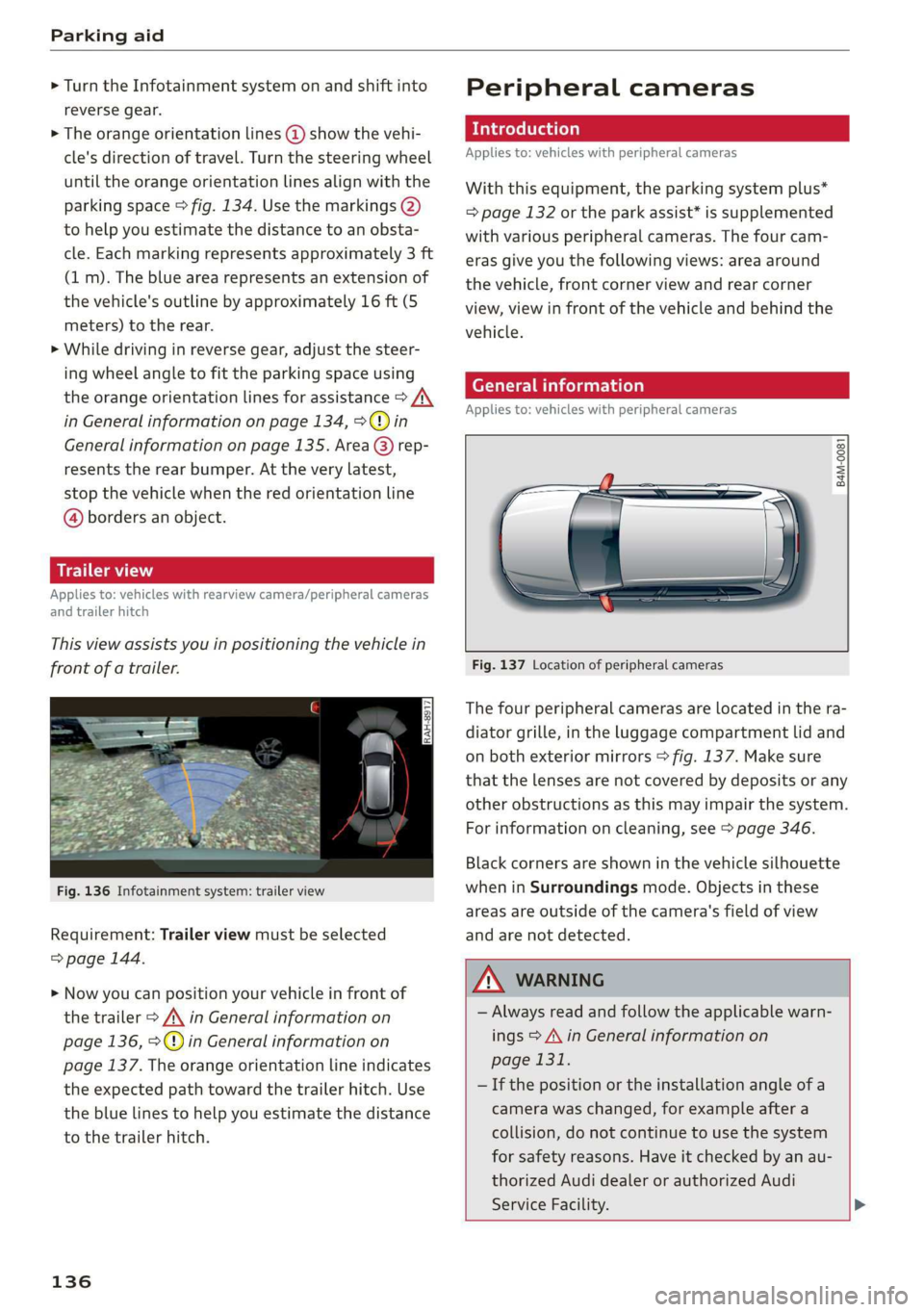
Thisviewassistsyouinpositioningthevehiclein
frontofatrailer.
Fig.136Infotainmentsystem:trailerview
Requirement:Trailerviewmustbeselected
=>page144.
>Nowyoucanpositionyourvehicleinfrontof
thetrailer>/\inGeneralinformationon
page136,>@)inGeneralinformationon
page137.Theorangeorientationlineindicates
theexpectedpathtowardthetrailerhitch.Use
thebluelinestohelpyouestimatethedistance
tothetrailerhitch.
136
Peripheralcameras
Introduction
Appliesto:vehicleswithperipheralcameras
Withthisequipment,theparkingsystemplus*
=page132ortheparkassist*issupplemented
withvariousperipheralcameras.Thefourcam-
erasgiveyouthefollowingviews:areaaround
thevehicle,frontcornerviewandrearcorner
view,viewinfrontofthevehicleandbehindthe
vehicle.
Generalinformation
Appliesto:vehicleswithperipheralcameras
B4M-0081
Fig.137Locationofperipheralcameras
Thefourperipheralcamerasarelocatedinthera-
diatorgrille,intheluggagecompartmentlidand
onbothexteriormirrors>fig.137.Makesure
thatthelensesarenotcoveredbydepositsorany
otherobstructionsasthismayimpairthesystem.
Forinformationoncleaning,see>page346.
Blackcornersareshowninthevehiclesilhouette
wheninSurroundingsmode.Objectsinthese
areasareoutsideofthecamera'sfieldofview
andarenotdetected.
Z\WARNING
—Alwaysreadandfollowtheapplicablewarn-
ings>A\inGeneralinformationon
page131.
—Ifthepositionortheinstallationangleofa
camerawaschanged,forexampleaftera
collision,donotcontinuetouse thesystem
forsafety reasons.Haveitcheckedby anau-
thorizedAudidealerorauthorizedAudi
ServiceFacility.>
Page 139 of 394
4M0012721BG
Parkingaid
—Keepinmindthattheimageinthedisplayis
incorrectiftheexteriormirrorhousinghas
beenmovedoutofplace.
—Onlyuse theimagesprovidedby thecamera
ontherearofthevehiclewhentheluggage
compartmentlidiscompletelyclosed.Make
sureanyobjectsyoumayhavemountedon
theluggagecompartmentliddonotblock
therearviewcamera.
— Theareaaroundthevehicleisshownusing
thecameraimages.Thevehicleimageis
shownbythesystem.Objectsandobstacles
abovethecameraarenotdisplayed.
—Cameralensesenlargeanddistortthefield
ofvision.Theobjectsappearbothaltered
andinaccurateonthescreen.
—Appliesto:vehicleswithairsuspension:the
accuracyoftheorientationlinesandblue
surfacesdecreaseswhenthevehicleis
raised/lowered>page127.
@)Note
—Alwaysreadandfollowtheapplicablewarn-
ings>@inGeneralinformationon
page131.
— TheInfotainmentdisplayshowsthedirec-
tioninwhichtherearofthevehicleistravel-
ingbasedonthesteeringwheelangle.The
frontofthevehicleswings outmorethan
therearofthevehicle.Maintainplentyof
distanceso thatanexteriormirrororacor-
nerofthevehicledoesnotcollidewithany
obstacles.
G)Tips
—Ifthe2/&8/
grayedout,thenthepowerexteriormirrors
werefoldedinorthedriver'sdoor/front
passenger'sdoor/luggagecompartmentlid
wasopened.
—Thereisnodistancewarningfortherear
andthesides*whentrailertowingmodeis
detected.Thefrontsensorsremainactivat-
ed.Thevisualdisplayswitchestotrailer
mode.Therearviewcameraimagewillnot
showtheorientationlinesandthebluesur-
faces.Thereisnoguaranteethefunctions
willswitchoffwhenusingaretrofittedtrail-
erhitch.
ice
Appliesto:vehicleswithperipheralcameras
Fig.138Infotainmentsystem:selectthemode
Switchingonandoff
Requirement:thevehiclespeedmustbeunder
approximately6mph(10km/h).
>PressthePsbuttoninthecenterconsole
=>page133,fig.130.Ashortconfirmation
tonesoundsandtheLEDinthebuttonturns
on.
Switchingonautomatically
Thesystemswitchesonautomaticallywhenre-
versegearisengagedwhiletheengineisrun-
ning.Abrieftonewillsound.
Switchingoffautomatically
Thesystemswitchesoffautomaticallywhendriv-
ingforwardfasterthan6mph(10km/h).
Selectingthemode
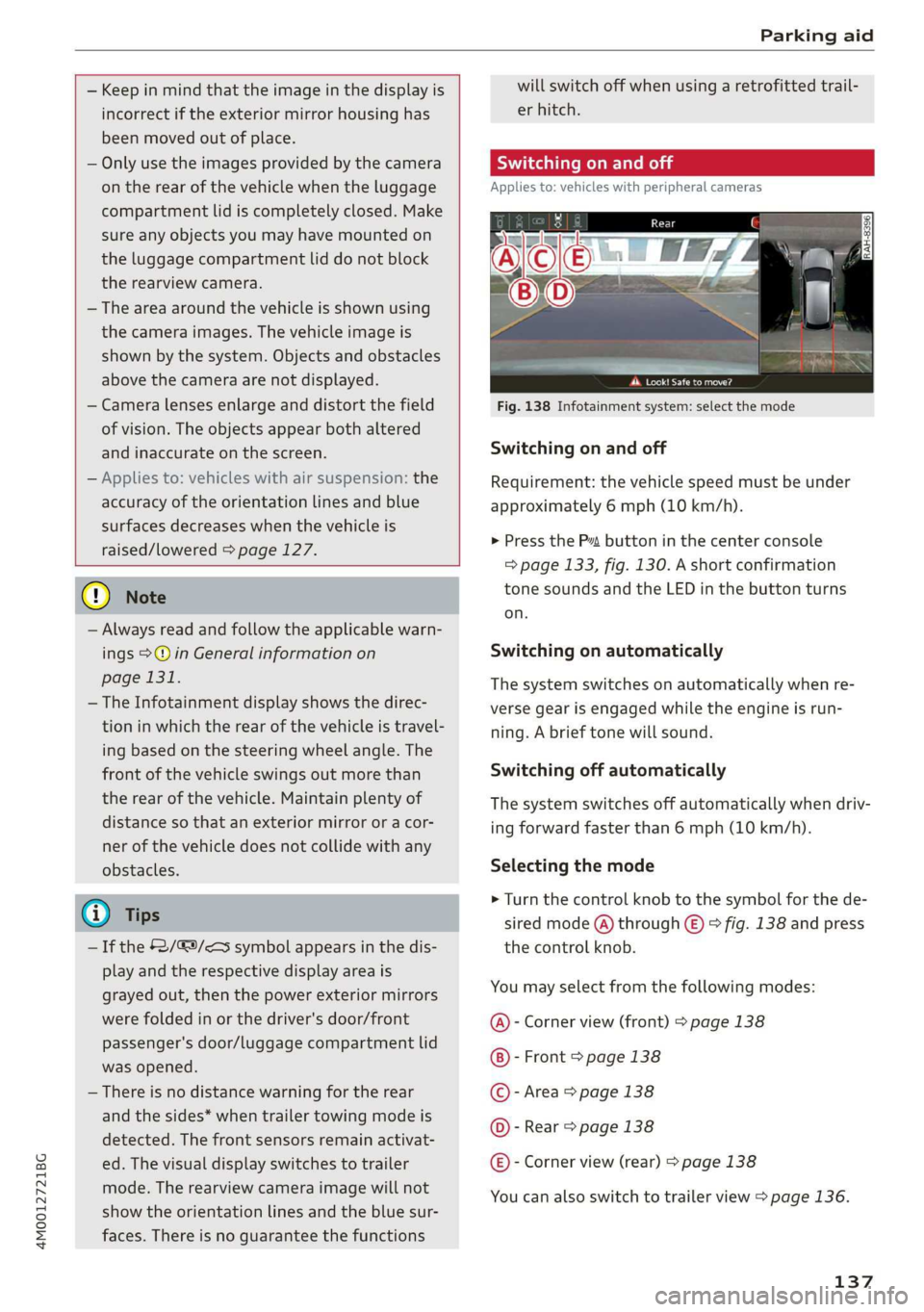
>Turn thecontrolknobtothesymbolforthede-
siredmode(A)through©)>fig.138andpress
thecontrolknob.
Youmayselectfromthefollowingmodes:
@-Cornerview(front)>page138
-Front>page138
©-Area>page138
@©-Rear>page138
@®-Cornerview(rear)>page138
Youcanalsoswitchtotrailerview>page136.
137
Page 140 of 394
Parkingaid
(erent
Appliesto:vehicleswithperipheralcameras
Cornerview(front)
=
JRAH-8730)
Erickata
Peeure)
Fig.140Infotainmentsystem:Cornerview(rear)
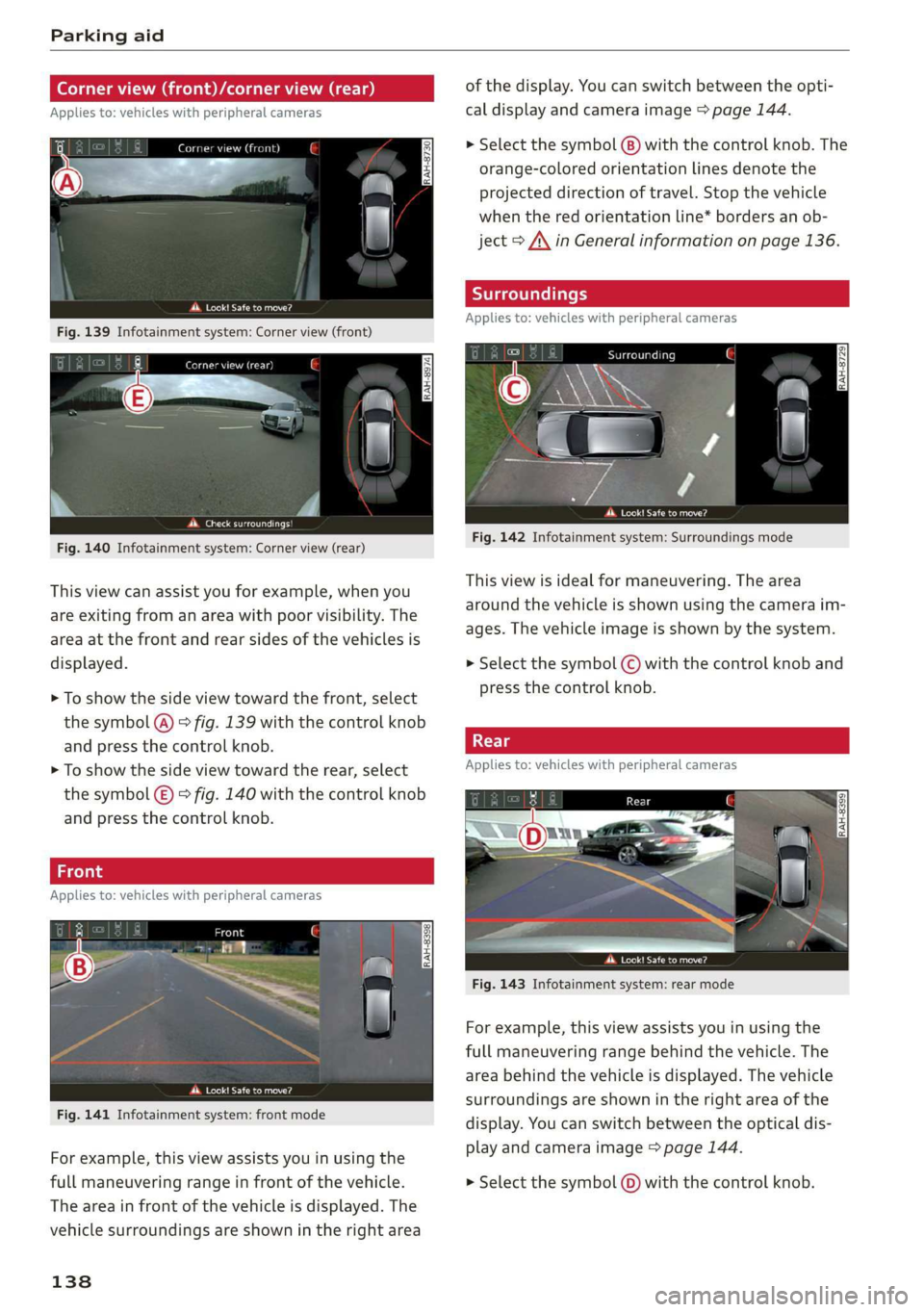
Thisviewcanassistyouforexample,whenyou
areexitingfromanareawithpoorvisibility.The
areaatthefrontandrearsidesofthevehiclesis
displayed.
>Toshowthesideviewtowardthefront,select
thesymbol(@)>fig.139withthecontrolknob
and
pressthecontrolknob.
>Toshowthesideviewtowardtherear,select
thesymbol(E)>fig.140withthecontrolknob
and
pressthecontrolknob.
Fron’
Appliesto:vehicleswithperipheralcameras
eet
Fig.141Infotainmentsystem:frontmode
Forexample,thisviewassistsyouinusingthe
fullmaneuveringrangeinfrontofthevehicle.
Theareainfrontofthevehicleisdisplayed.The
vehiclesurroundingsareshownintherightarea
138
ofthedisplay.Youcanswitchbetweentheopti-
caldisplayandcameraimage>page144.
>Selectthesymbol@)withthecontrolknob.The
orange-coloredorientationlinesdenotethe
projecteddirectionoftravel.Stopthevehicle
whentheredorientationline*bordersanob-
ject>A\inGeneralinformationonpage136.
Appliesto:vehicleswithperipheralcameras
pWeaeta
Fig.142Infotainmentsystem:Surroundingsmode
Thisviewisidealformaneuvering.Thearea
aroundthevehicleisshownusingthecameraim-
ages.Thevehicleimageisshownby thesystem.
>Selectthesymbol
pressthecontrolknob.
Appliesto:vehicleswithperipheralcameras
were
Fig.143Infotainmentsystem:rearmode
Forexample,thisviewassistsyouinusingthe
fullmaneuveringrangebehindthevehicle.The
areabehindthevehicleisdisplayed.Thevehicle
surroundingsareshownintherightareaofthe
display.Youcanswitchbetweentheopticaldis-
playandcameraimage>page144.
>Selectthesymbol(0)withthecontrolknob.
Page 143 of 394
4M0012721BG
Parkingaid
Parkingspacesearch
Appliesto:vehicleswithparkassist
Fig.150Infotainment:indicatortocontinuedrivinginre-
verse
Parallelparkingisdescribedhere.Theprocessis
thesameforperpendicularparking.
Searchingforparkingspaces
>Driveforwardtotherowofparkingspacesata
lowspeed.Forthebestparkingresults,theve-
hicleshould beapproximately3feet(1m)from
therowofparkingspaces.
>Theparkingspacesearchisfirstdoneonone
sideofthelane.Toswitchthesideforthepark-
ingspacesearch,activatetheturnsignalfor
thatside.
Selectingtheparkingspace
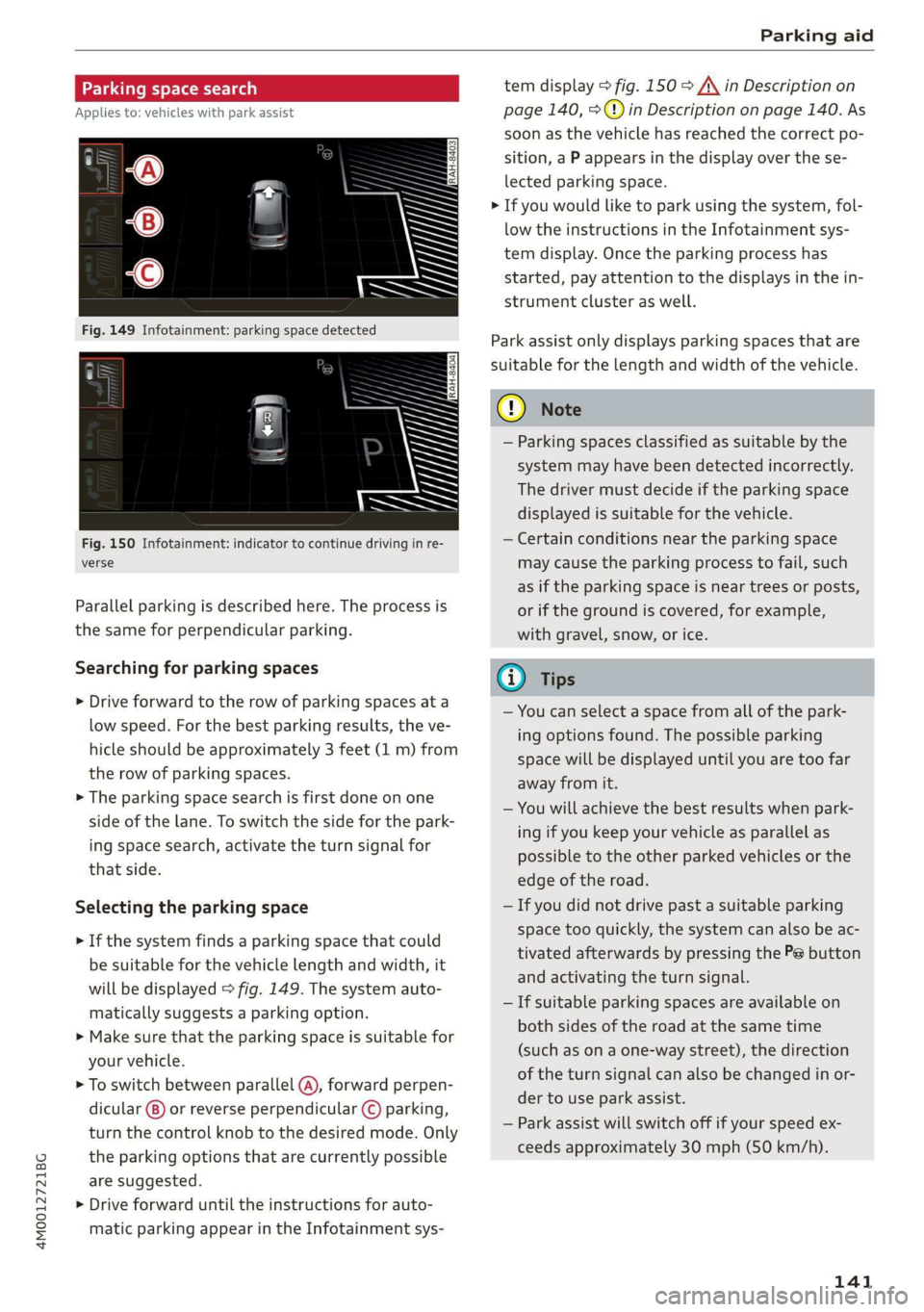
>Ifthesystemfindsaparkingspacethatcould
besuitableforthevehiclelengthandwidth,it
willbedisplayed>fig.149.Thesystemauto-
maticallysuggestsaparkingoption.
>Makesurethattheparkingspaceissuitablefor
yourvehicle.
>Toswitchbetweenparallel(@),forwardperpen-
dicular()or reverseperpendicular©parking,
turnthecontrolknobtothedesiredmode.Only
theparkingoptionsthatarecurrentlypossible
aresuggested.
>Driveforwarduntiltheinstructionsforauto-
maticparkingappearintheInfotainmentsys-
temdisplay>fig.150>A\inDescriptionon
page140,>@)inDescriptiononpage140.As
soonasthevehiclehas reachedthecorrectpo-
sition,aPappearsinthedisplayoverthese-
lectedparkingspace.
>Ifyouwouldliketoparkusingthesystem,fol-
lowtheinstructionsintheInfotainmentsys-
temdisplay.Oncetheparkingprocesshas
started,payattentiontothedisplaysinthein-
strumentclusteraswell.
Parkassistonlydisplaysparkingspacesthatare
suitableforthelengthandwidthofthevehicle.
@)Note
—Parkingspacesclassifiedassuitablebythe
systemmayhavebeendetectedincorrectly.
Thedrivermustdecideiftheparkingspace
displayedissuitableforthevehicle.
—Certainconditionsnear theparkingspace
maycausetheparkingprocesstofail, such
asiftheparkingspaceisneartreesorposts,
orifthegroundiscovered,forexample,
withgravel,snow,orice.
@)Tips
—Youcanselectaspacefromallofthepark-
ingoptionsfound.Thepossibleparking
spacewillbedisplayeduntilyouaretoofar
awayfromit.
—Youwillachievethebestresultswhenpark-
ingifyoukeepyourvehicleasparallelas
possibletotheotherparkedvehiclesorthe
edgeoftheroad.
—Ifyoudidnotdrivepastasuitableparking
space tooquickly,thesystemcanalsobeac-
tivatedafterwardsbypressingthePebutton
andactivatingtheturnsignal.
—Ifsuitableparkingspacesareavailableon
bothsidesoftheroadatthesametime
(such asonaone-waystreet),thedirection
oftheturnsignalcanalsobechangedinor-
dertouseparkassist.
—Parkassistwillswitchoffifyourspeedex-
ceedsapproximately30mph(50km/h).
141
Page 145 of 394
4M0012721BG
Parkingaid
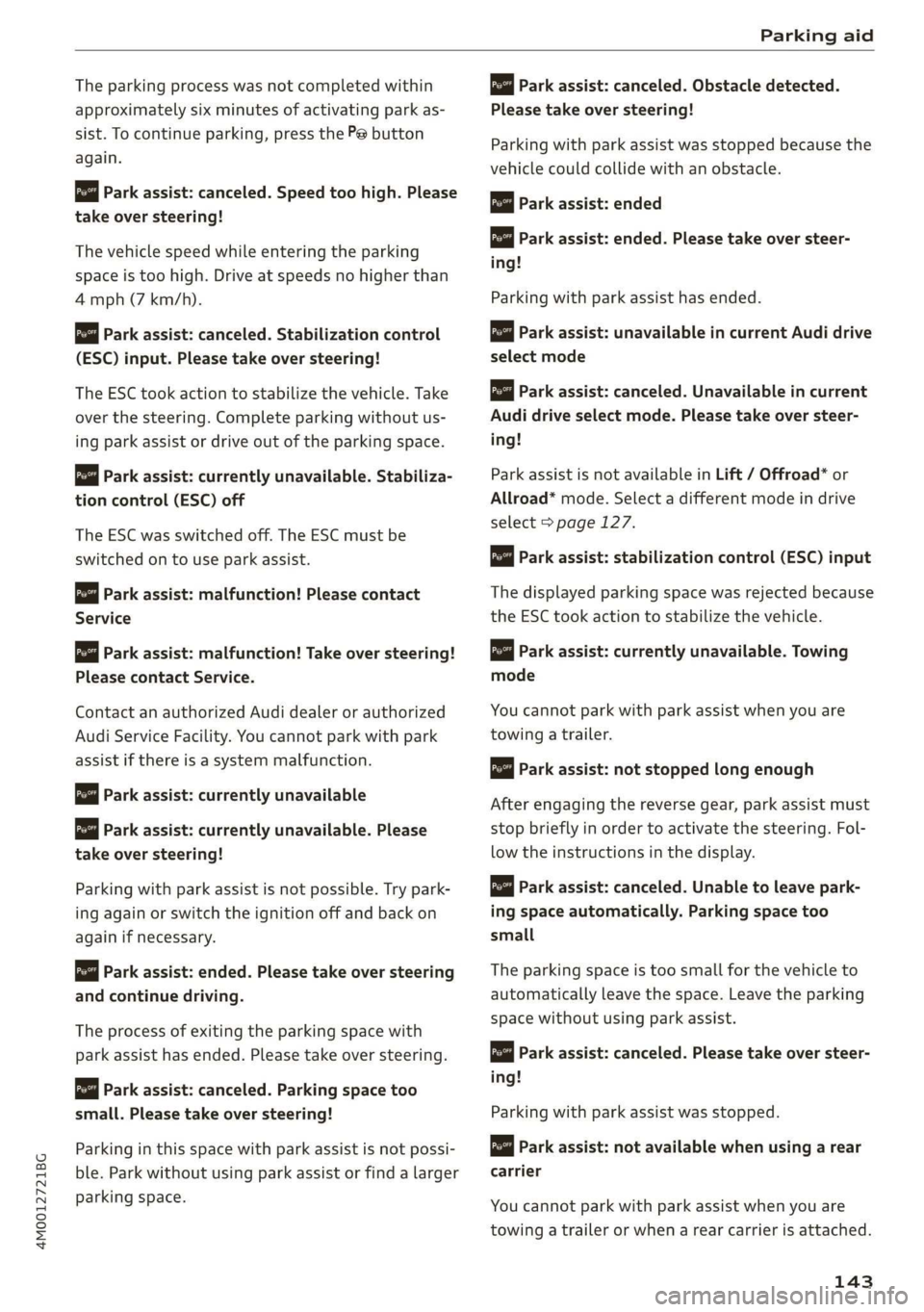
Theparkingprocesswasnotcompletedwithin
approximatelysixminutesofactivatingparkas-
sist.Tocontinueparking, pressthePebutton
again.
Parkassist:canceled.Speedtoohigh.Please
take oversteering!
Thevehiclespeedwhileenteringtheparking
spaceistoohigh.Driveatspeedsnohigherthan
4mph(7km/h).
Parkassist:canceled.Stabilizationcontrol
(ESC)input.Pleasetakeoversteering!
The ESCtookactiontostabilizethevehicle.Take
overthesteering.Completeparkingwithoutus-
ingparkassistordriveoutoftheparkingspace.
roe"Parkassist:currentlyunavailable.Stabiliza-
tioncontrol(ESC)off
The ESCwasswitchedoff.The ESCmustbe
switched
ontouseparkassist.
pomParkassist:malfunction!Pleasecontact
Service
Parkassist:malfunction!Takeoversteering!
PleasecontactService.
Contact anauthorizedAudidealerorauthorized
AudiServiceFacility.Youcannotparkwithpark
assistifthereisasystemmalfunction.
Parkassist:currentlyunavailable
Parkassist:currentlyunavailable.Please
takeoversteering!
Parkingwithparkassistisnotpossible.Trypark-
ingagainorswitchtheignitionoffandbackon
againifnecessary.
Parkassist:ended.Pleasetakeoversteering
andcontinuedriving.
Theprocessofexitingtheparkingspacewith
park
assisthasended.Pleasetakeoversteering.
Parkassist:canceled.Parkingspacetoo
small.Pleasetake oversteering!
Parkinginthisspacewithparkassistisnotpossi-
ble.Parkwithoutusingparkassistorfindalarger
parkingspace.
ro"Parkassist:canceled.Obstacledetected.
Please
takeoversteering!
Parkingwith parkassistwasstopped becausethe
vehiclecouldcollidewithanobstacle.
Parkassist:ended
iParkassist:ended.Pleasetakeoversteer-
ing!
Parkingwith parkassisthasended.
Parkassist:unavailableincurrentAudidrive
selectmode
Parkassist:canceled.Unavailableincurrent
Audidriveselectmode.Pleasetakeoversteer-
ing!
ParkassistisnotavailableinLift/Offroad*or
Allroad*mode.Selectadifferentmodeindrive
select>page127.
Parkassist:stabilizationcontrol(ESC)input
Thedisplayedparkingspacewasrejectedbecause
theESCtookactiontostabilizethevehicle.
Parkassist:currently unavailable.Towing
mode
Youcannotparkwith parkassistwhenyouare
towingatrailer.
Parkassist:notstoppedlongenough
Afterengagingthereversegear,parkassistmust
stopbrieflyinordertoactivatethesteering.Fol-
lowtheinstructionsinthedisplay.
Parkassist:canceled.Unabletoleave park-
ingspaceautomatically.Parkingspacetoo
small
Theparkingspaceistoosmallforthevehicleto
automaticallyleavethespace.Leavetheparking
spacewithoutusingparkassist.
rao"|Parkassist:canceled.Pleasetakeoversteer-
ing!
Parkingwithparkassistwasstopped.
Parkassist:notavailablewhenusingarear
carrier
Youcannotparkwith parkassistwhenyouare
towingatrailerorwhenarearcarrierisattached.
143
Page 146 of 394
Parkingaid
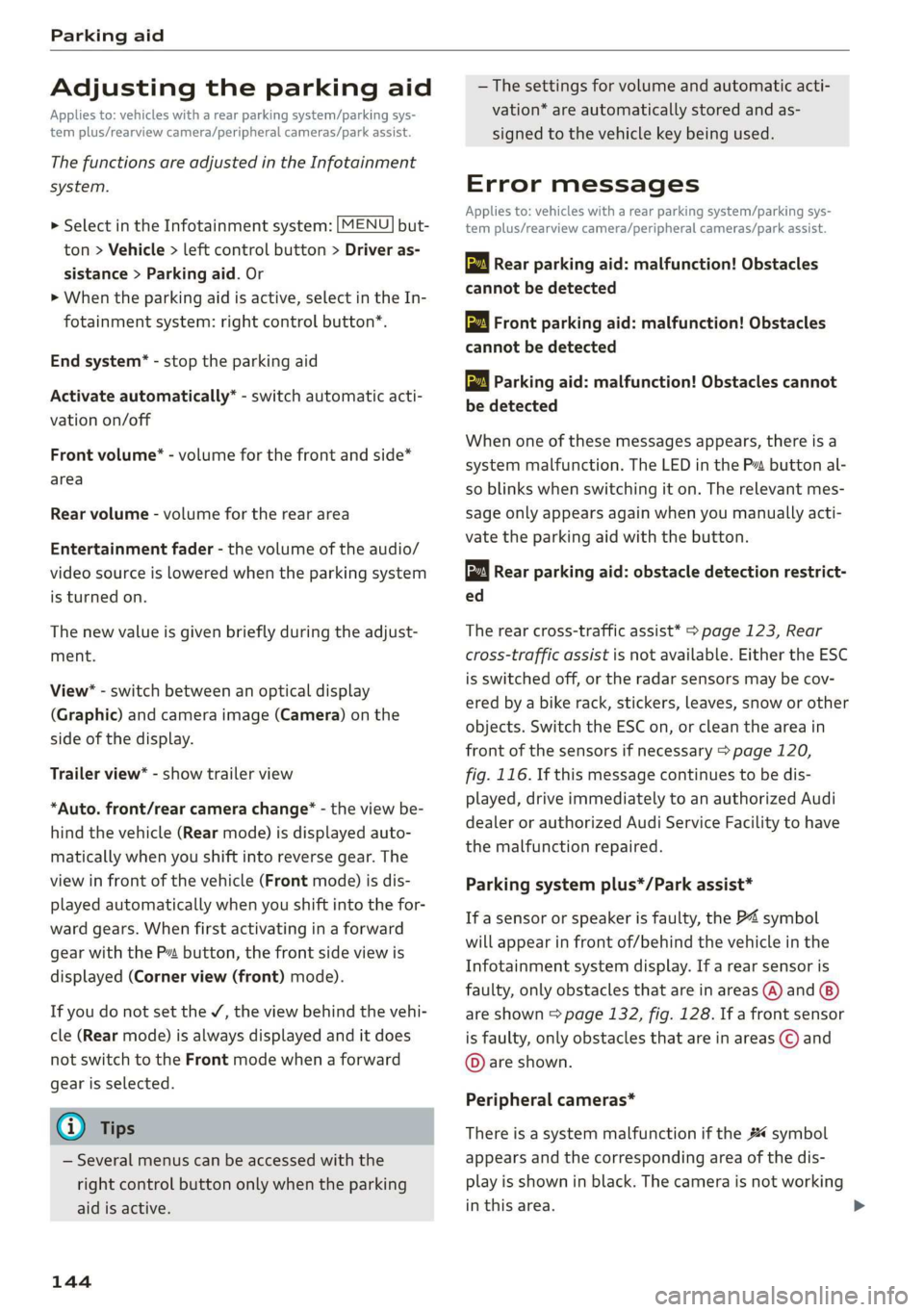
Adjustingtheparkingaid
Appliesto:vehicleswitharearparkingsystem/parkingsys-
templus/rearviewcamera/peripheralcameras/parkassist.
ThefunctionsareadjustedintheInfotainment
system.
> SelectintheInfotainmentsystem:[MENU]but-
ton>Vehicle> leftcontrolbutton>Driveras-
sistance>Parkingaid.Or
>Whentheparkingaidisactive,selectintheIn-
fotainmentsystem:rightcontrolbutton*.
Endsystem*-stoptheparkingaid
Activateautomatically*-switchautomaticacti-
vationon/off
Frontvolume*-volumeforthefrontandside*
area
Rearvolume-volumeforthereararea
Entertainmentfader-thevolumeoftheaudio/
videosourceisLoweredwhentheparkingsystem
isturnedon.
Thenewvalueisgivenbrieflyduringtheadjust-
ment.
View*-switchbetweenanopticaldisplay
(Graphic)andcameraimage(Camera)onthe
sideofthedisplay.
Trailerview*-showtrailerview
*Auto.front/rearcamerachange*-theviewbe-
hindthevehicle(Rearmode)isdisplayedauto-
maticallywhenyoushiftintoreversegear.The
viewinfront ofthevehicle(Frontmode)isdis-
playedautomaticallywhenyoushiftintothefor-
wardgears.Whenfirstactivatinginaforward
gearwiththeP”button,thefrontsideviewis
displayed(Cornerview(front)mode).
IfyoudonotsettheV,theviewbehindthevehi-
cle(Rearmode)isalwaysdisplayedanditdoes
notswitchtothe Frontmodewhenaforward
gearisselected.
@)Tips
—Severalmenuscanbeaccessedwiththe
rightcontrolbuttononlywhentheparking
aidisactive.
144
— Thesettingsforvolumeandautomaticacti-
vation*areautomaticallystoredandas-
signedtothevehiclekeybeingused.
Errormessages
Appliesto:vehicleswitharearparkingsystem/parkingsys-
templus/rearviewcamera/peripheralcameras/parkassist.
wwRearparkingaid:malfunction!Obstacles
cannotbedetected
wwFront parkingaid:malfunction!Obstacles
cannotbedetected
wmParkingaid:malfunction!Obstaclescannot
bedetected
Whenoneofthesemessagesappears,thereisa
systemmalfunction.The LEDintheP”buttonal-
soblinkswhenswitchingiton.Therelevantmes-
sageonlyappearsagainwhenyoumanuallyacti-
vatetheparkingaidwiththebutton.
Rearparkingaid:obstacledetectionrestrict-
ed
Therearcross-trafficassist*>page123,Rear
cross-trafficassistisnotavailable.EithertheESC
isswitchedoff,ortheradarsensorsmaybecov-
ered byabikerack,stickers,leaves,snoworother
objects.SwitchtheESCon,orcleantheareain
frontofthesensorsifnecessary>page120,
fig.116.Ifthismessagecontinuestobedis-
played,driveimmediatelytoanauthorizedAudi
dealerorauthorizedAudiServiceFacilitytohave
themalfunctionrepaired.
Parkingsystemplus*/Parkassist*
If asensororspeakerisfaulty,theP4symbol
willappearinfrontof/behindthevehicleinthe
Infotainmentsystemdisplay.If arearsensoris
faulty,onlyobstaclesthatareinareas(@)and
areshown>page132,fig. 128.Ifafrontsensor
isfaulty,onlyobstaclesthatareinareas©and
©areshown.
Peripheralcameras*
Thereisasystemmalfunctionifthe#«symbol
appearsandthecorrespondingareaofthedis-
playisshowninblack.Thecameraisnotworking
inthisarea.
Page 149 of 394
4M0012721BG
IntelligentTechnology
itsintegratedsystemscannotalwayspre-
ventcollisions-thereisstillariskofacci-
dents!
—Presstheacceleratorpedalcarefullywhen
acceleratingonsmooth,slipperysurfaces
suchasiceandsnow.Thedrivewheelscan
spinevenwhenthesecontrolsystemsarein-
stalledandthiscanaffectdrivingstability
andincreasetheriskofacollision.
@Tips
— TheABSandASRonlyfunctioncorrectly
whenallfourwheelshaveasimilarwear
condition.Differenttiresizescanleadtoa
reductioninenginepower.
—Youmayhearnoiseswhenthesystemsde-
scribedareworking.
—Wheninstallingroofracksystemsonthe
roofrail,theESCusessensorstoadaptit-
selftoadifferentcenterofgravity.
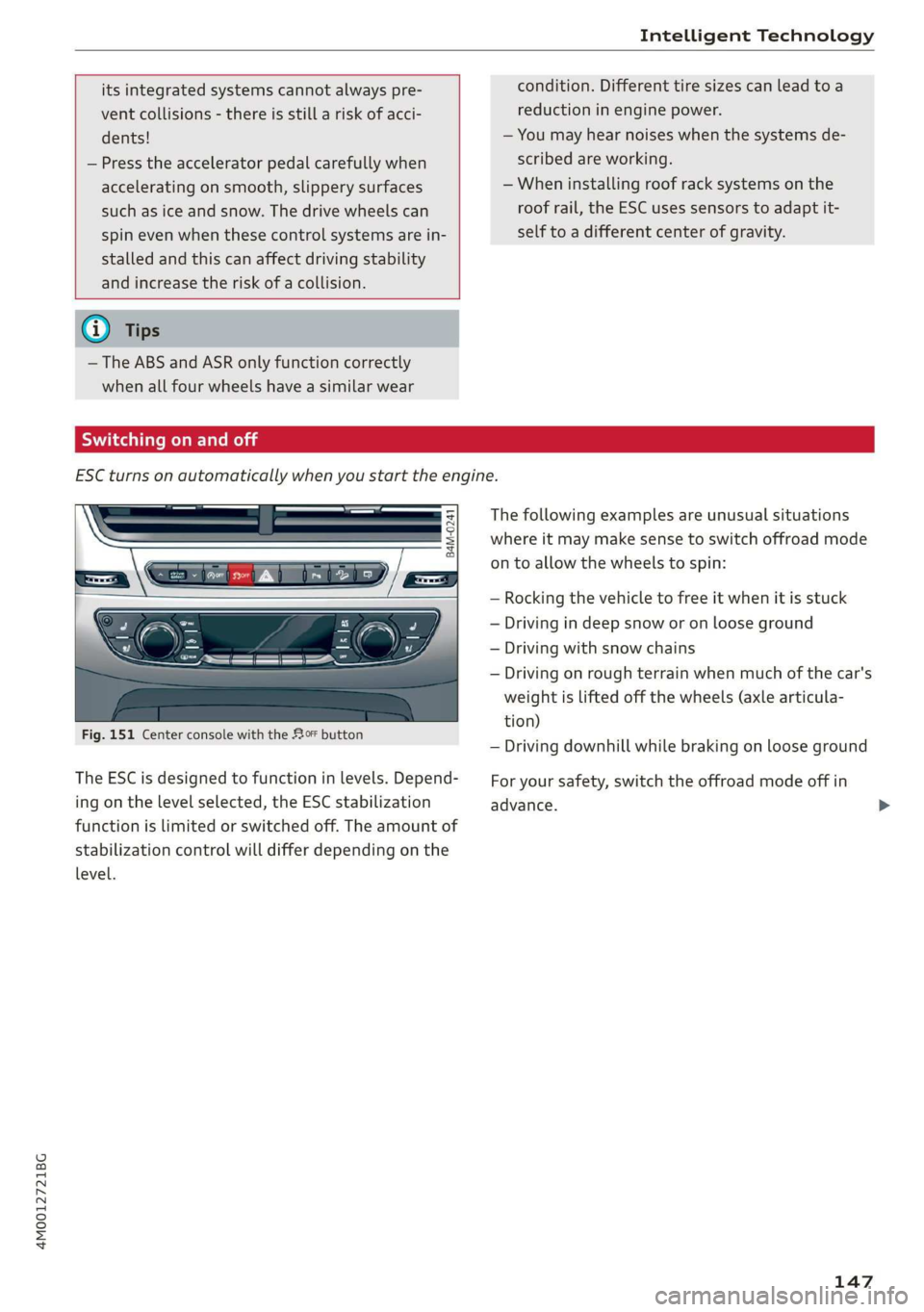
Switchingonandoff
ESCturnsonautomaticallywhenyoustarttheengine.
B4M-0241
Fig.151Centerconsolewiththe#0button
The ESCisdesignedtofunctioninlevels.Depend-
ingonthelevelselected,theESCstabilization
functionislimitedorswitchedoff.Theamountof
stabilizationcontrolwilldifferdependingonthe
level.
Thefollowingexamplesareunusualsituations
whereitmaymakesensetoswitchoffroadmode
ontoallowthewheelstospin:
—Rocking thevehicletofreeitwhenitisstuck
—Drivingindeepsnoworonlooseground
—Drivingwithsnowchains
—Drivingonroughterrainwhenmuchofthecar's
weightisliftedoffthewheels(axlearticula-
tion)
—Drivingdownhillwhilebrakingonlooseground
Foryoursafety,switchtheoffroadmodeoffin
advance.
147
Page 150 of 394
IntelligentTechnology
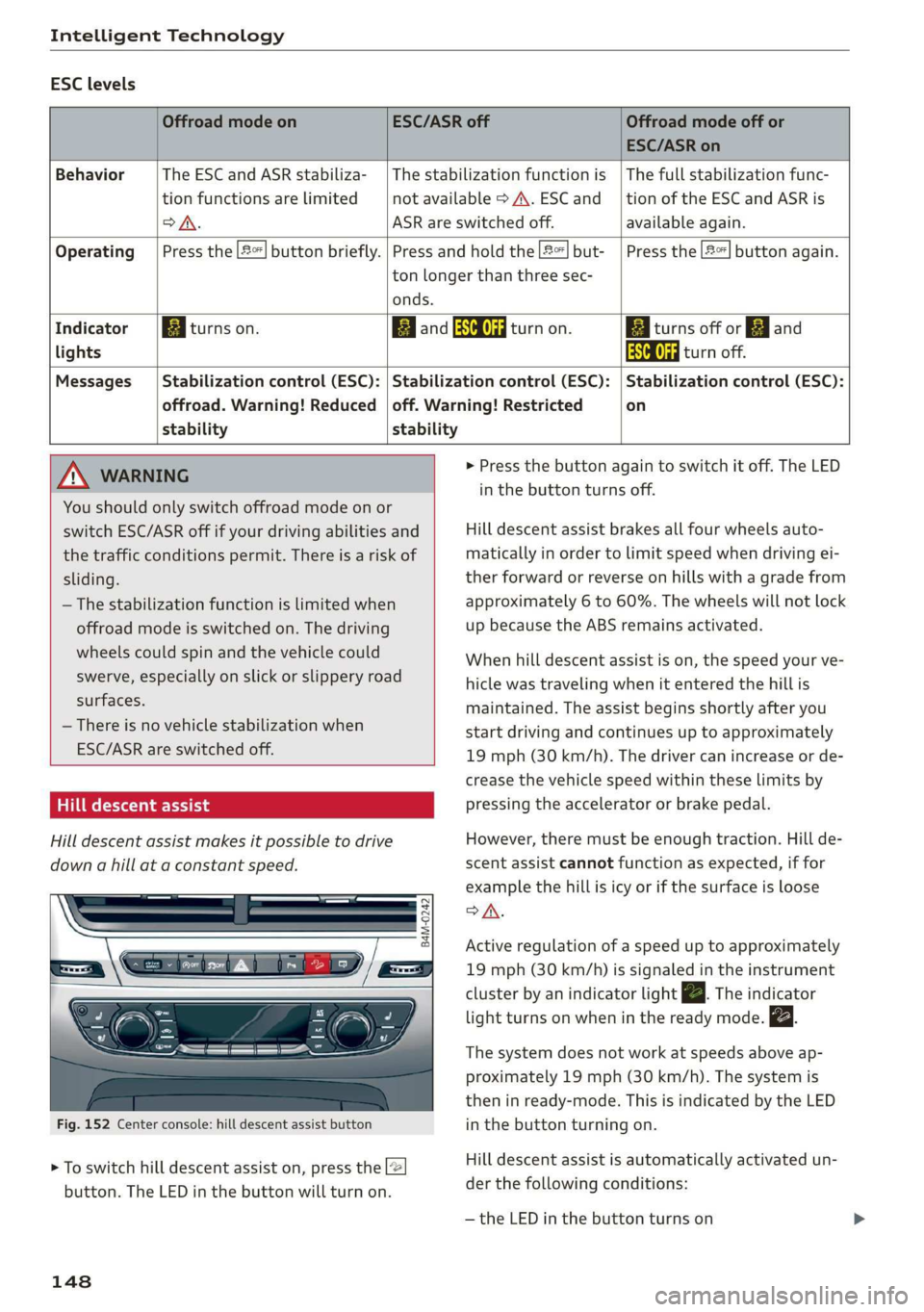
ESClevels
OffroadmodeonESC/ASRoffOffroadmodeoffor
ESC/ASRon
BehaviorThe ESC andASRstabiliza-|Thestabilizationfunctionis|Thefullstabilizationfunc-
tionfunctionsarelimitednotavailable>A\.ESCand__|tionoftheESCandASRis
oA.ASRareswitchedoff.available again.
Operating|Pressthe|#%]buttonbriefly.|Pressandholdthe2]but-|Pressthe|2%]buttonagain.
tonlongerthanthreesec-
onds.
IndicatorBiturnson.EganESCOFFRattanon.BiiturnsofforEjand
lightsAaaturnoff.
Messages__|Stabilizationcontrol(ESC):|Stabilizationcontrol(ESC):|Stabilizationcontrol(ESC):
offroad.Warning!Reduced|off.Warning!Restrictedon
stabilitystability
MNWARNING>Pressthebuttonagaintoswitchitoff.TheLED
You
shouldonlyswitchoffroadmodeonor
switchESC/ASRoffifyourdrivingabilitiesand
thetrafficconditionspermit.Thereisariskof
sliding.
—Thestabilizationfunctionislimitedwhen
offroadmodeisswitchedon.Thedriving
wheelscouldspinandthevehiclecould
swerve,especiallyonslickorslipperyroad
surfaces.
—Thereisnovehiclestabilizationwhen
ESC/ASRareswitchedoff.
Hilldescentassist
Hilldescentassistmakesitpossibletodrive
downahillataconstantspeed.
B4M-0242
Fig.152Centerconsole:hilldescentassistbutton
>Toswitchhilldescentassiston,pressthe2
button.TheLEDinthebuttonwillturnon.
148
inthebuttonturnsoff.
Hilldescentassistbrakesallfourwheelsauto-
maticallyinordertolimitspeedwhendrivingei-
therforwardorreverseonhillswithagradefrom
approximately6to60%.Thewheelswillnotlock
upbecausetheABSremainsactivated.
Whenhilldescentassistison,thespeedyourve-
hiclewastravelingwhenitenteredthehillis
maintained.Theassistbeginsshortlyafteryou
startdrivingandcontinuesuptoapproximately
19mph(30km/h).Thedrivercanincreaseorde-
creasethevehiclespeedwithintheselimitsby
pressingtheacceleratororbrakepedal.
However,theremustbeenoughtraction.Hillde-
scentassistcannotfunctionasexpected,iffor
examplethehillisicyorifthesurfaceisloose
SA.
Activeregulationofaspeeduptoapproximately
19mph(30km/h)issignaledintheinstrument
clusterby anindicatorlightZBTheindicator
lightturnsonwheninthereadymode.
Thesystemdoesnotworkatspeedsaboveap-
proximately19mph(30 km/h).Thesystemis
theninready-mode.ThisisindicatedbytheLED
inthebuttonturningon.
Hilldescentassistisautomaticallyactivatedun-
der thefollowingconditions:
—theLEDinthe buttonturnson
Page 153 of 394
4M0012721BG
IntelligentTechnology
Allwheeldrive(quattro)
Theall-wheeldrivesystemdistributesthedriving
powervariablytothefrontandrearaxletoim-
provethedrivingcharacteristics.Itworkstogeth-
erwithselectivewheeltorquecontrol,whichcan
activatewhendrivingthroughcurves
=>page146.
Theallwheeldriveconceptisdesignedforhigh
enginepower.Yourvehicleisexceptionallypow-
erfulandhasexcellentdrivingcharacteristics
bothundernormaldrivingconditionsandon
snowandice.Alwaysreadandfollowsafetypre-
cautions>A\.
Z\WARNING
—Eveninvehicleswithallwheeldrive,you
shouldadaptyourdrivingstyletothecur-
rentroadandtrafficconditionstoreduce
theriskofanaccident.
— Thebrakingabilityofyourvehicleislimited
tothetractionofthewheels.In thisway,it
isnotdifferentfromatwowheeldrivevehi-
cle.Donotdrivetoofastbecausethisin-
creasestheriskofanaccident.
—Notethatonwetstreets,thefrontwheels
can“hydroplane’”ifdrivingatspeedsthat
aretoohigh.Unlikefrontwheeldrivevehi-
cles,theengineRPMdoesnotincreasesud-
denlywhenthevehiclebeginshydroplaning.
Adaptyourspeedtotheroadconditionsto
reducetheriskofanaccident.
Sykemetals
Appliesto:Vehicleswith sportdifferential
Thesportdifferentialdistributesthedrivepower
totherearaxlebasedonthesituation.Thegoal
isahighlevelofagilityandabilitytoaccelerate
oncurves.Thevehicleisvery responsivetosteer-
ing.ThesettingsdependontheselectedAudi
driveselect*mode.
Energymanagement
Yourvehicleisequippedwithanintelligentener-
gymanagementsystemfordistributingelectrici-
ty.Thissignificantlyimprovesthestartingability
andincreasesthevehiclebatterylife.
@)Tips
—Ifyoudriveshortdistancesfrequently,the
vehiclebatterymaynotchargeenough
whiledriving.Asaresult,conveniencefunc-
tionsforelectricalequipmentmaybetem-
porarilyunavailable.
—Thevehiclebatterywillgraduallydrainif
thevehicleisnotdrivenforlongperiodsof
time,orifelectricalequipmentisused
whentheengineisnotrunning.Toensure
thatthevehiclecanstillbestarted,the
electricalequipmentwillbelimitedor
switchedoff.
Noticeaboutdata
recordedbytheEvent
DataRecorderand
vehiclecontrolmodules
EventDataRecorder
Thisvehicleisequippedwithan Event DataRe-
corder(EDR).ThemainpurposeofanEDRisto
record,incertaincrashornearcrash-likesitua-
tions,
suchasanairbagdeploymentorhittinga
roadobstacle,datathatwillassistinunderstand-
inghowavehicle'ssystemsperformed.TheEDR
isdesignedto recorddatarelatedtovehicledy-
namics andsafetysystemsforashortperiodof
time,typically30secondsorless.TheEDRinthis
vehicleisdesignedtorecordsuchdataas:
—Howvarioussystemsinyourvehiclewereoper-
ating;
—Whetherornot thedriverandpassengersafety
beltswerebuckled/fastened;
—Howfar(ifatall)thedriverwasdepressingthe
acceleratorand/orbrakepedal;and,
—Howfastthevehiclewastraveling.
Thesedatacanhelpprovideabetterunderstand-
ingofthecircumstancesinwhichcrashesandin-
juriesoccur.NOTE:EDRdataarerecordedbyyour
vehicleonlyifanon-trivialcrashsituationoccurs;
nodataarerecordedbytheEDRundernormal
drivingconditionsandnopersonaldata(e.g.,
151
>
Page 195 of 394
4M0012721BG
Audiconnect
Audiconnect
Introduction
Dependingonthecountryandthevehicleequip-
ment,thefollowing functionsmaybeavailable:
—AudiconnectInfotainment
—Audiconnectvehiclecontrol
@)Tips
—AUDIAGprovidesaccesstoservicesfrom
thirdpartyproviders.Permanentavailability
cannotbe guaranteed,becausethatde-
pendsonthethirdpartyprovider.
—YoucanalsofindmoreinformationonAudi
connectonlineatwww.audiusa.com.
Audiconnect
Infotainment
Appliesto:vehicleswithAudiconnectInfotainment
WithAudiconnectInfotainmentservices,online
informationistransmitteddirectlytothevehicle.
AnInternetconnectionisrequiredtouseAudi
connectInfotainment.Dependingonthecountry
andthevehicleequipment,thefollowingoptions
maybeavailable:
Z\WARNING
To reducetheriskofanaccident,onlyuseAu-
diconnectInfotainmentserviceswhenroad
andtrafficconditionspermit.Alwaysreadand
followthenotesin>page153,Trafficsafety
information.
G)Tips
— ThedataconnectionforAudiconnectInfo-
tainmentservicesispre-configuredatthe
factory.Youcanchangethedataconnection
settingsatanytimeifyouneedtochange
theconfiguration>page199.
—UseoftheLTE*mobilenetworkstandardis
notavailableineverycountry.Contactan
authorizedAudidealerorauthorizedAudi
ServiceFacilityoryourcellphoneservice
providerforadditionalinformation.
—AudiconnectInfotainmentservicesareonly
availablewithinthecellphonenetworkcov-
eragefromyourcellphoneserviceprovider.
—Availability,scope,providers,screendisplay,
andcostsofservicesmayvarydependingon
thecountry,model,modelyear,enddevice
andrates.
EmbeddedSIMcard
Appliesto:vehicleswith AudiconnectInfotainmentandan
embeddedSIMcard
ThedataconnectionforAudiconnectInfotain-
mentservicesismadethroughanembeddedSIM
card(eSIMcard)thatisinstalledinthevehicle.
Youcan usetheAudiconnectInfotainmentserv-
icesimmediately.
()Note
—TheconnectioncostsforAudiconnectInfo-
tainmentservicesareincludedintheprice
ofAudiconnectInfotainment.Pleasenote
thatchargesmayapplywhenusingcertain
services.Forexample,thisappliestoInter-
netradio/podcastsorforservicesthatuse
theWi-Fihotspot,suchasonlinemedia
sources.Dependingonthecountry,data
plansmayneedtobepurchasedforthese
services>page201.Foradditionalinfor-
mation,seewww.audiusa.com/myaudi.
—Incertainsituations,theWi-Fihotspotdata
connectionmaybeestablishedasareplace-
mentfortheSIMcardonyourWi-Fidevice.
Thisfeaturedependsontheconfiguration
ofyourWi-Fideviceandoperatingsystem.
Thiscouldresultinfeesdependingonyour
cellphoneserviceprovider,especiallyifyou
areusingthisfeaturewhileabroad.Aflat
ratedataplanisstronglyrecommended.For
moreinformation,contactyourcellphone
serviceproviderorrefertotheowner'sman-
ualforyourWi-Fidevice.
193