warning light AUDI Q7 2019 Owner´s Manual
[x] Cancel search | Manufacturer: AUDI, Model Year: 2019, Model line: Q7, Model: AUDI Q7 2019Pages: 394, PDF Size: 105.97 MB
Page 127 of 394
4M0012721BG
Assistsystems
approximately1000feet(300m).Thethermal
imagedetectedbythecameraisshowninthein-
strumentclusterdisplay.Warmareasappear
lighterandcoldareasappeardarker.
Appliesto:vehicleswithnightvision assist
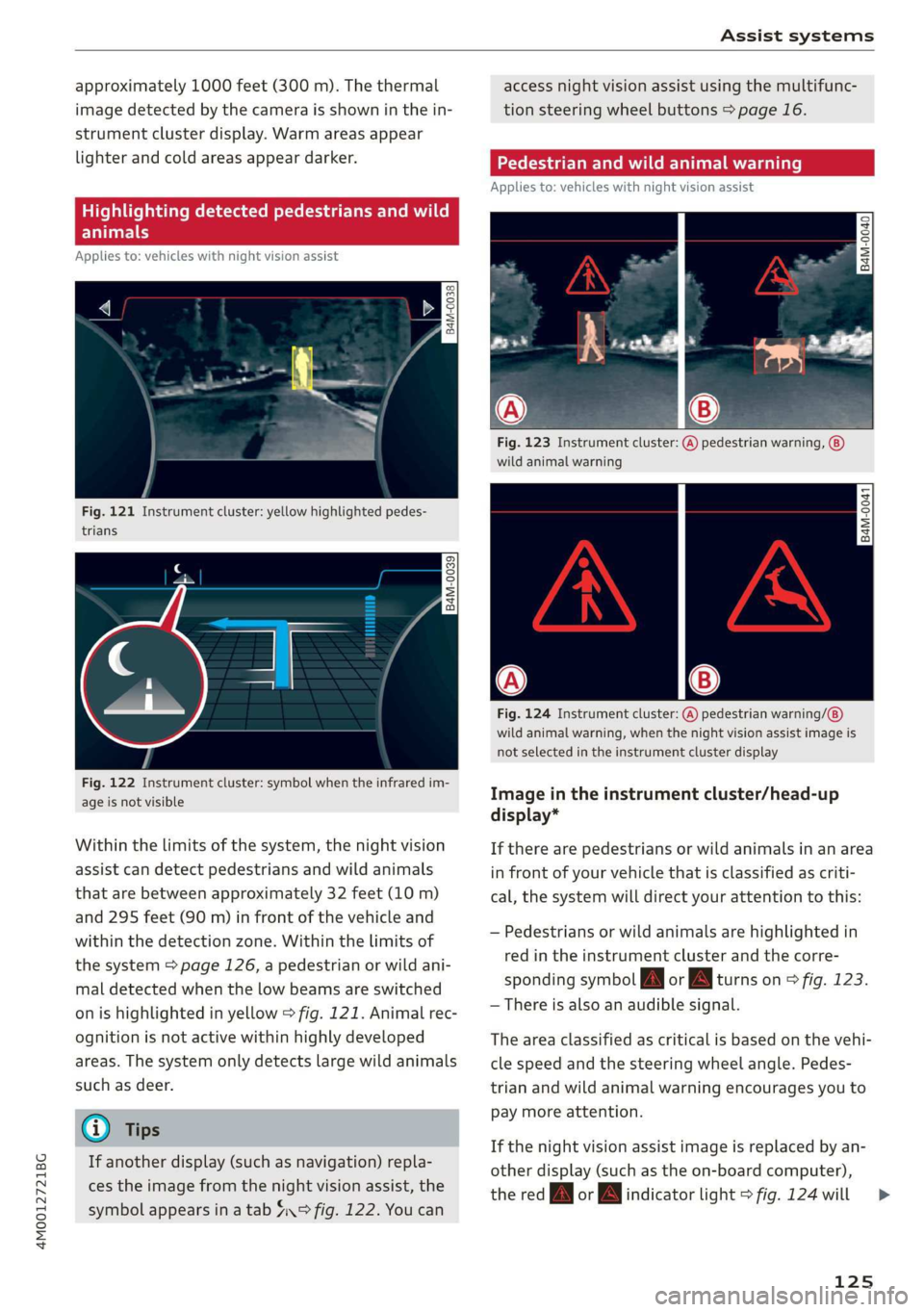
Fig.121Instrumentcluster:yellowhighlightedpedes-
trians
B4M-0039
Fig.122Instrumentcluster:symbolwhentheinfraredim-
ageisnotvisible
Withinthelimitsofthesystem,thenightvision
assistcandetectpedestriansandwildanimals
thatarebetweenapproximately32feet(10m)
and295feet(90m)infront ofthevehicleand
withinthedetectionzone.Withinthelimitsof
thesystem=>page126,apedestrianorwildani-
maldetectedwhenthelowbeamsareswitched
onishighlightedinyellow>fig.121.Animalrec-
ognitionisnotactivewithinhighlydeveloped
areas.Thesystemonlydetectslargewildanimals
suchasdeer.
@)Tips
Ifanotherdisplay(suchasnavigation)repla-
cestheimagefromthenightvisionassist,the
symbolappearsinatab4°fig.122.Youcan
accessnightvision assistusingthemultifunc-
tionsteeringwheelbuttons>page16.
Appliesto:vehicleswithnightvision assist
Fig.123Instrumentcluster:(A)pedestrianwarning,
wildanimalwarning
B4M-0041
Fig.124Instrumentcluster:
wildanimalwarning,whenthenightvisionassistimageis
notselectedintheinstrumentclusterdisplay
pedestrianwarning/
Imageintheinstrumentcluster/head-up
display*
Iftherearepedestriansorwildanimalsinanarea
infront ofyourvehiclethatisclassifiedascriti-
cal,thesystemwilldirectyourattentiontothis:
—Pedestriansor wildanimalsarehighlightedin
redintheinstrumentclusterandthecorre-
spondingsymbolJMorBMturnson>fig.123.
—Thereisalsoanaudiblesignal.
Theareaclassifiedascriticalisbasedonthevehi-
clespeedandthesteeringwheelangle.Pedes-
trianandwildanimalwarningencouragesyouto
paymoreattention.
Ifthenightvision assistimageisreplacedbyan-
otherdisplay(suchastheon-boardcomputer),
theredfayorindicatorlight>fig.124will
125
>
Page 128 of 394
Assistsystems
appearifthereisapedestrianorwildanimal
warning.
Ifthehead-updisplay*isswitchedonandthe
nightvisionassistcontentisactivated,/\|orA
willappearinthehead-updisplay”.
Markinglight*
Todirectthedriver'sattentiontoapedestrian,
theheadlightscanflashonthepedestrianthree
timesinarowwhenthereisapedestrianwarn-
ing.
Thisoccursatspeedsaboveapproximately
35mph(60km/h)ifyouareoutsideofilluminat-
edareasandnodetectedvehiclesareshown.The
highbeamassistant*controlsthemarking
light*>page43.
Themarkinglightisnotusedforwildanimals.
Generalinformation
Appliesto:vehicleswithnightvisionassist
y t3 2
= +
a
a
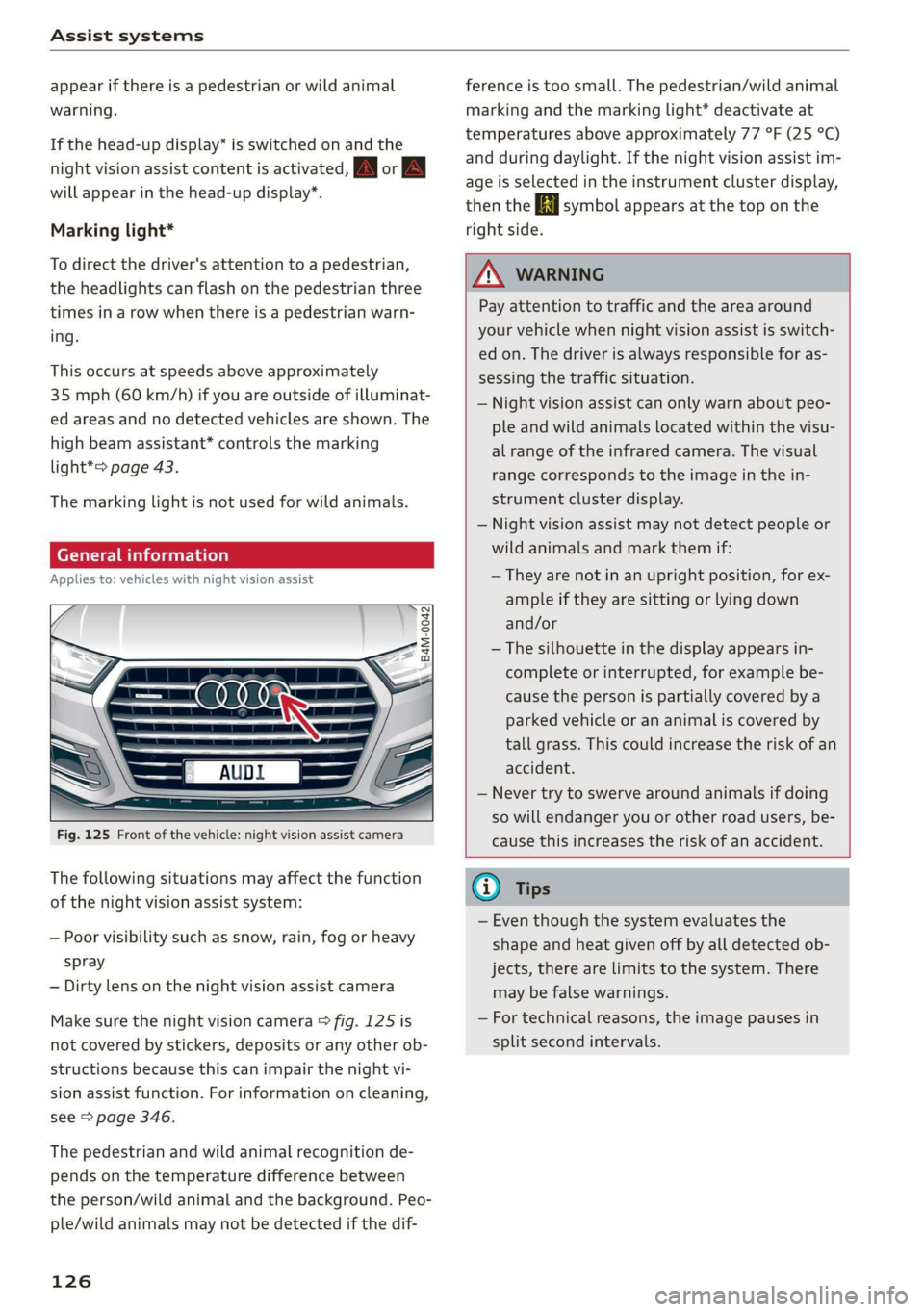
Fig.125Frontofthevehicle:nightvision assistcamera
Thefollowingsituationsmayaffectthefunction
ofthenightvisionassistsystem:
—Poorvisibilitysuchassnow,rain,fogorheavy
spray
—Dirtylensonthenightvisionassistcamera
Makesurethenightvisioncamera>fig.125is
notcoveredbystickers,depositsoranyotherob-
structionsbecausethiscanimpair thenightvi-
sionassistfunction.Forinformationoncleaning,
see>page346.
Thepedestrianandwildanimalrecognitionde-
pendsonthetemperaturedifferencebetween
theperson/wildanimalandthebackground.Peo-
ple/wildanimalsmaynotbedetectedifthedif-
126
ferenceistoosmall.Thepedestrian/wildanimal
markingandthemarkinglight*deactivateat
temperaturesaboveapproximately77°F(25°C)
andduringdaylight.Ifthenightvision assistim-
ageisselectedintheinstrumentclusterdisplay,
thentheBisymbolappearsatthetoponthe
rightside.
ZA\WARNING
Payattentiontotrafficandtheareaaround
yourvehiclewhennightvisionassistisswitch-
edon.Thedriverisalwaysresponsibleforas-
sessingthetrafficsituation.
—Nightvision assistcanonlywarnaboutpeo-
pleandwildanimalslocatedwithinthevisu-
alrangeoftheinfraredcamera.Thevisual
rangecorrespondstotheimageinthein-
strumentclusterdisplay.
—Nightvision assistmaynotdetectpeopleor
wildanimalsandmarkthemif:
—Theyarenotinanuprightposition,forex-
ampleiftheyaresittingorlyingdown
and/or
—Thesilhouetteinthedisplayappearsin-
completeorinterrupted,forexamplebe-
causethepersonispartiallycoveredbya
parkedvehicleorananimaliscoveredby
tallgrass.Thiscouldincreasetheriskofan
accident.
—Nevertrytoswerve aroundanimalsifdoing
sowillendangeryouorotherroadusers,be-
causethisincreasestheriskofanaccident.
(i)Tips
—Eventhoughthesystemevaluatesthe
shapeandheatgivenoffbyalldetectedob-
jects,therearelimitstothesystem.There
maybefalsewarnings.
—Fortechnicalreasons,theimagepausesin
splitsecondintervals.
Page 129 of 394
4M0012721BG
Assistsystems
Switchingonandoff
Appliesto:vehicleswithnightvision assist
io+
Ss
2
=¥a
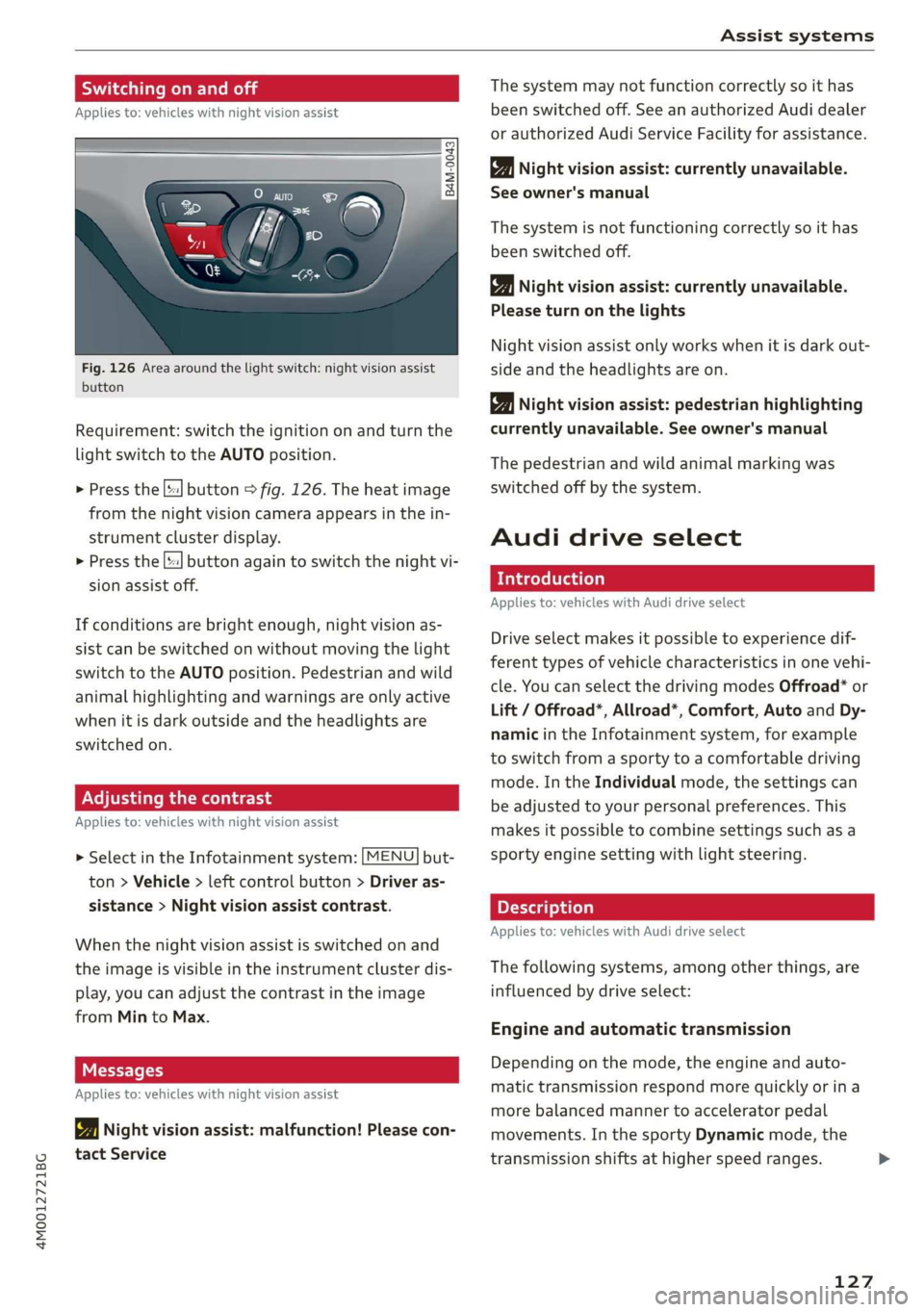
Fig.126Areaaroundthelightswitch:nightvision assist
button
Requirement:switchtheignitiononandturnthe
lightswitchtotheAUTOposition.
>Pressthe[|button>fig.126.Theheatimage
fromthenightvisioncameraappearsinthein-
strumentclusterdisplay.
>
Pressthe||buttonagaintoswitchthenightvi-
sionassistoff.
Ifconditionsare brightenough,nightvisionas-
sistcanbe switchedonwithoutmovingthelight
switchtotheAUTOposition.Pedestrianandwild
animalhighlightingandwarningsareonlyactive
whenitisdarkoutsideandtheheadlightsare
switchedon.
ONCmae9
Appliesto:vehicleswithnightvisionassist
>SelectintheInfotainmentsystem:[MENU]but-
ton>Vehicle> leftcontrolbutton>Driveras-
sistance>Nightvisionassistcontrast.
Whenthenightvisionassistisswitchedon and
theimageisvisibleintheinstrumentclusterdis-
play,youcanadjustthecontrastintheimage
fromMintoMax.
Messages
Appliesto:vehicleswithnightvisionassist
1Nightvisionassist:malfunction!Pleasecon-
tactService
Thesystemmaynotfunctioncorrectlysoithas
beenswitchedoff.SeeanauthorizedAudidealer
orauthorizedAudiServiceFacilityforassistance.
Nightvisionassist:currentlyunavailable.
Seeowner'smanual
Thesystemisnotfunctioningcorrectlysoithas
beenswitchedoff.
Nightvisionassist:currentlyunavailable.
Pleaseturnonthelights
Nightvision assistonlyworkswhenitisdarkout-
sideandtheheadlightsare on.
Nightvisionassist:pedestrianhighlighting
currentlyunavailable.Seeowner'smanual
Thepedestrianandwildanimalmarkingwas
switchedoffbythesystem.
Audidriveselect
Introduction
Appliesto:vehicleswithAudidriveselect
Driveselectmakesitpossibletoexperiencedif-
ferenttypesofvehiclecharacteristicsinonevehi-
cle.YoucanselectthedrivingmodesOffroad*or
Lift/Offroad*,Allroad*,Comfort,AutoandDy-
namicintheInfotainmentsystem,forexample
toswitchfromasportytoacomfortabledriving
mode.IntheIndividualmode,thesettingscan
beadjustedtoyourpersonalpreferences.This
makesitpossibletocombinesettingssuchasa
sportyenginesettingwithlightsteering.
Appliesto:vehicleswith Audidriveselect
Thefollowingsystems,amongotherthings,are
influencedbydriveselect:
Engineandautomatictransmission
Depending onthemode,theengineandauto-
matictransmissionrespondmorequicklyorina
morebalancedmannertoacceleratorpedal
movements.Inthe sportyDynamicmode,the
transmissionshiftsathigherspeedranges.
127
Page 133 of 394

4M0012721BG
Parkingaid
Parkingaid
Generalinformation
Appliesto:vehicleswitharearparkingsystem/parkingsys-
templus/rearviewcamera/peripheralcameras/parkassist.
Dependingonyourvehicle'sequipment,various
parkingaidswillhelpyouwhenparkingandma-
neuvering.
Therearparkingsystemisanaudible parkingaid
thatwarnsyouofobstaclesbehindthevehicle
=>page132.
Theparkingsystemplusassistsyouwhilepark-
ingusingaudioandvisualsignalstowarnyou
aboutobjectsdetectedinfrontof,behind,andat
thesides*ofthevehicle>page132.
Therearviewcamerashowstheareabehindthe
vehicleintheInfotainmentsystemdisplay.The
linesintherearviewcameraimagehelpyouto
parkormaneuver>page134.
Theperipheralcamerasgivevariousviewsto
helpyouwhenparkingormaneuvering
=page136.Theparkingsystemplusfunctions
arealsoavailable>page132.
Parkassisthelpsyoutolocatesuitableparking
spaceswhenparallelorperpendicularparking,
andalsohelpswhenleavingaparallelparking
space>page139.
ingsystemmaybe impairedasaresult.
HaveanauthorizedAudidealerorauthor-
izedAudiServiceFacilitychecktheirfunc-
tion.
ZA\WARNING
—Alwayslookfortrafficandcheckthearea
aroundyourvehiclebylookingatitdirectly
aswell.Theparkingsystemcannotreplace
thedriver'sattention.Thedriverisalways
responsiblewhenenteringorexitingapark-
ingspaceandduringsimilarmaneuvers.
—Pleasenotethatsomesurfaces,suchas
clothing,arenotdetectedbythesystem.
—Sensorsandcamerashaveblindspotsin
whichpeopleandobjectscannotbedetect-
ed.Beespeciallycautiousofsmallchildren
andanimals.
—Alwayskeepyoureyesonthevehicle'ssur-
roundings,usingtherearviewmirroraswell.
— Thesensorscanbedisplacedbyimpactsor
damagetotheradiatorgrille,bumper,
wheelhousingandtheunderbody.Thepark-
@)Note
—Someobjectsarenotdetectedordisplayed
bythesystemundercertaincircumstances:
—objectssuchasbarrierchains,trailerdraw
bars,verticalpolesorfences
—objectsabovethesensorssuchaswallex-
tensions
—objectswithcertainsurfacesorstructures
suchaschainlinkfencesorpowdersnow
—Ifyoucontinuedrivingclosertoalowob-
ject,itmaydisappearfromthe sensor
range.NotethatyouwillnoLongerbe
warnedaboutthisobstacle.
—Maintainenoughdistancefromthecurbto
reducetheriskofdamagetotherims.
@)Tips
—Thesystemmayprovideawarningeven
thoughtherearenoobstaclesinthecover-
ageareainsomesituations,suchas:
—certainroadsurfacesor whenthereistall
grass
—externalultrasonicsourcessuchasfrom
cleaningvehicles
—inheavyrain,snow,orthickvehicleex-
haust
—Werecommendthatyoupracticeparkingin
atraffic-freelocationorparkinglottobe-
comefamiliarwiththesystem.Practice
parkingingoodlightand weathercondi-
tions.
—Youcanchangethevolumeofthesignals
andthedisplay>page144.
—Whatappearsintheinfotainmentdisplayis
somewhattime-delayed.
—Thesensorsmustbekeptcleanandfreeof
snowandicefortheparkingaidtooperate.
131
Page 148 of 394
IntelligentTechnology
IntelligentTechnology
ElectronicStabilization
Control(ESC)
ElectronicStabilizationControl(ESC)supports
driversafety.Itreducestheriskofslippingand
improvesdrivingstability.ESCdetectscriticalsit-
uations,suchasifthevehicleisoversteeringor
understeering,orifthewheelsare spinning.The
brakesareappliedortheenginetorqueisre-
ducedinordertostabilizethevehicle.Whenthe
ESCengages,theBindicatorlightblinksinthe
instrumentcluster.
ThefollowingsystemsareintegratedintheESC:
Anti-lockbrakingsystem(ABS)
ABSpreventsthewheelsfromlockingwhenbrak-
ing.Thevehiclecanstillbesteeredevenduring
hardbraking.Applysteadypressuretothebrake
pedal.Donotpumpthepedal.Apulsinginthe
brakepedalindicatesthatthesystemisacting to
stabilizethevehicle.
Brakeassistsystem
Thebrakeassistsystemcandecreasebrakingdis-
tance.Itincreasesbrakingpowerwhenthe driver
pressesthebrakepedalquicklyinemergencysit-
uations.Youmustpressandholdthebrakepedal
untilthedangeroussituationisover.Invehicles
withadaptivecruisecontrol*,thebrakeassist
systemismoresensitiveifthedistancedetected
tothevehicledrivingaheadistoosmall.
Onvehicleswithactivatedandfunctioningnight
visionassist*,thebrakeassistsystemcanre-
spondmoresensitivelyifthereisawarning.
Anti-SlipRegulation(ASR)
ASRreducesenginepowerwhenthedrivewheels
beginspinningandadaptstheforcetotheroad
conditions.Thismakesiteasiertostart,acceler-
ateanddriveuphills.
ElectronicDifferentialLock(EDL)
TheEDLappliesthebrakestowheelsthatare
slippingandtransfersthedrivepowertotheoth-
146
erwheels.Thisfunctionisnotavailableathigher
speeds.
Inextremecases,EDLautomaticallyswitchesoff
tokeepthebrakeonthebrakedwheelfromover-
heating.Thevehicleisstillfunctioningcorrectly.
EDLwillswitchonagainautomaticallywhencon-
ditionshavereturnedtonormal.
Powersteering
The ESCcanalsosupportvehiclestability
throughsteering.
Selectivewheeltorquecontrol
Selectivewheeltorquecontrolisusedwhendriv-
ingoncurves.Brakingistargetedtowardthe
wheelsontheinsideofthecurveasneeded.This
allowsmoreprecisedrivingincurves.
Automaticpost-collisionbrakingsystem
The“automaticpost-collisionbrakingsystem”
canhelptoreducetheriskofslidingandofaddi-
tionalcollisionsafteranaccident.Iftheairbag
controlmoduledetectsacollision,thevehicleis
brakedbytheESC.
Thevehicledoesnotbrakeautomaticallyifoneof
thefollowingoccurs:
—Thedriverpressestheacceleratorpedal,
—TheESC,thebrakesystem,orthevehicleelec-
tricalsystemisnotfunctioning
ZAWARNING
— The ESCanditsintegratedsystemscannot
overcomethe limitsimposedbynatural
physicallaws.Thisisespeciallyimportanton
slipperyorwetroads.Ifthesystemsbegin
actingtostabilizeyourvehicle,youshould
immediatelyalteryourspeedtomatchthe
roadandtrafficconditions.Donotletthein-
creasedsafetyprovidedtemptyouintotak-
ingrisks.Thiscouldincreaseyourriskofa
collision.
—Pleasenotetheriskofacollisionincreases
when
drivingfast,especiallythroughcurves
andonslipperyorwetroads,andwhendriv-
ingtooclosetoobjectsahead.The ESC and
Page 150 of 394
IntelligentTechnology
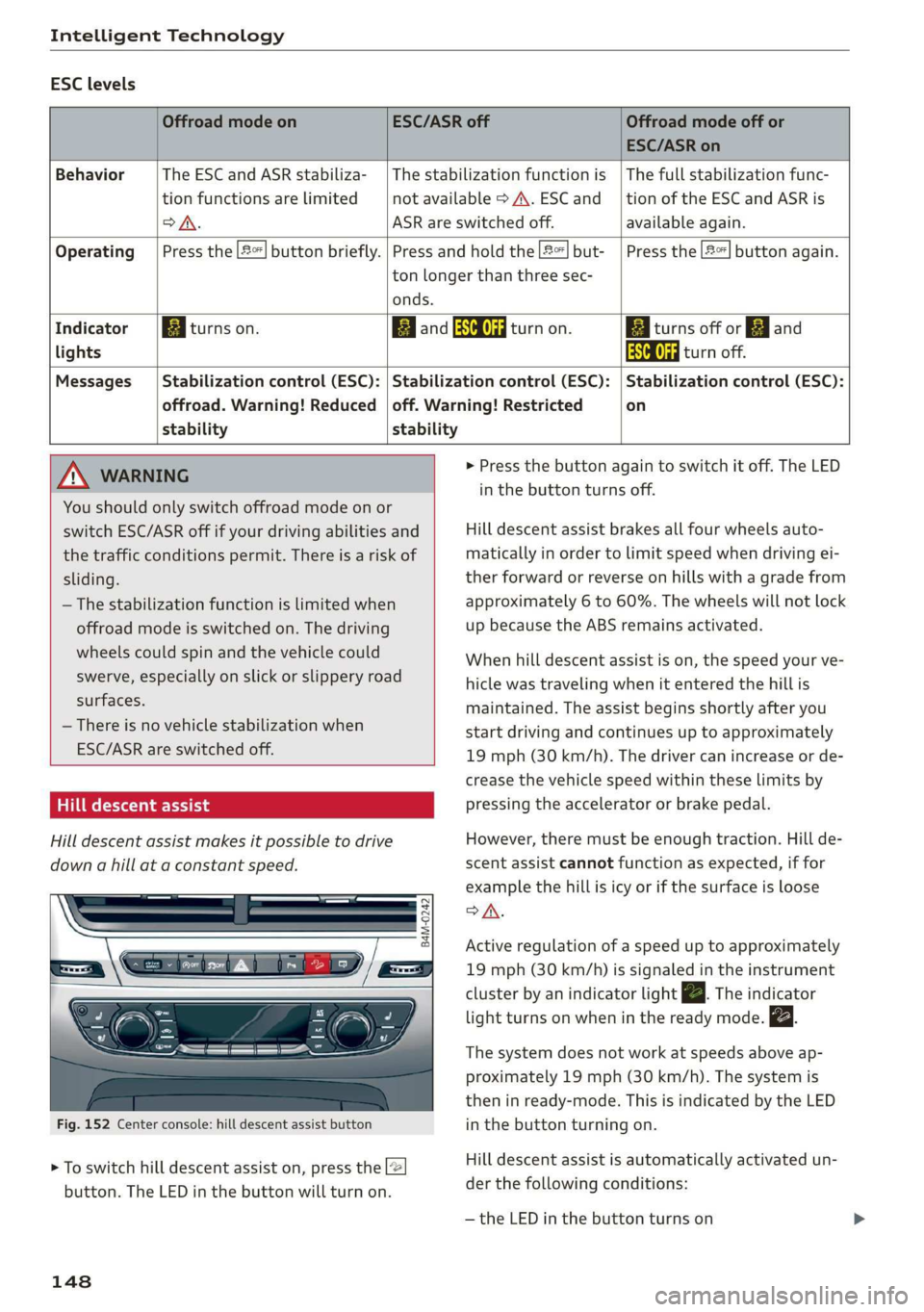
ESClevels
OffroadmodeonESC/ASRoffOffroadmodeoffor
ESC/ASRon
BehaviorThe ESC andASRstabiliza-|Thestabilizationfunctionis|Thefullstabilizationfunc-
tionfunctionsarelimitednotavailable>A\.ESCand__|tionoftheESCandASRis
oA.ASRareswitchedoff.available again.
Operating|Pressthe|#%]buttonbriefly.|Pressandholdthe2]but-|Pressthe|2%]buttonagain.
tonlongerthanthreesec-
onds.
IndicatorBiturnson.EganESCOFFRattanon.BiiturnsofforEjand
lightsAaaturnoff.
Messages__|Stabilizationcontrol(ESC):|Stabilizationcontrol(ESC):|Stabilizationcontrol(ESC):
offroad.Warning!Reduced|off.Warning!Restrictedon
stabilitystability
MNWARNING>Pressthebuttonagaintoswitchitoff.TheLED
You
shouldonlyswitchoffroadmodeonor
switchESC/ASRoffifyourdrivingabilitiesand
thetrafficconditionspermit.Thereisariskof
sliding.
—Thestabilizationfunctionislimitedwhen
offroadmodeisswitchedon.Thedriving
wheelscouldspinandthevehiclecould
swerve,especiallyonslickorslipperyroad
surfaces.
—Thereisnovehiclestabilizationwhen
ESC/ASRareswitchedoff.
Hilldescentassist
Hilldescentassistmakesitpossibletodrive
downahillataconstantspeed.
B4M-0242
Fig.152Centerconsole:hilldescentassistbutton
>Toswitchhilldescentassiston,pressthe2
button.TheLEDinthebuttonwillturnon.
148
inthebuttonturnsoff.
Hilldescentassistbrakesallfourwheelsauto-
maticallyinordertolimitspeedwhendrivingei-
therforwardorreverseonhillswithagradefrom
approximately6to60%.Thewheelswillnotlock
upbecausetheABSremainsactivated.
Whenhilldescentassistison,thespeedyourve-
hiclewastravelingwhenitenteredthehillis
maintained.Theassistbeginsshortlyafteryou
startdrivingandcontinuesuptoapproximately
19mph(30km/h).Thedrivercanincreaseorde-
creasethevehiclespeedwithintheselimitsby
pressingtheacceleratororbrakepedal.
However,theremustbeenoughtraction.Hillde-
scentassistcannotfunctionasexpected,iffor
examplethehillisicyorifthesurfaceisloose
SA.
Activeregulationofaspeeduptoapproximately
19mph(30km/h)issignaledintheinstrument
clusterby anindicatorlightZBTheindicator
lightturnsonwheninthereadymode.
Thesystemdoesnotworkatspeedsaboveap-
proximately19mph(30 km/h).Thesystemis
theninready-mode.ThisisindicatedbytheLED
inthebuttonturningon.
Hilldescentassistisautomaticallyactivatedun-
der thefollowingconditions:
—theLEDinthe buttonturnson
Page 151 of 394
4M0012721BG
IntelligentTechnology
—thevehiclespeedislowerthan19mph(30
km/h)
—thehillangleisatleastapproximately6%
Z\WARNING
—Bereadytoapply thebrakesatalltimes
whenusingthehillholdassist.
—Alwaysadjustthespeedtothevisibility,
weather,road,andtrafficconditions.The
systemcannotreplacethedriver'satten-
tion.
— Thesystemcannotmaintainaconstantvehi-
clespeedinallsituations,forexamplewhen
onsmoothorslipperyground.Thiscanin-
creasetheriskofanaccident.
Brakes
Newbrakepads
Newbrakepadsdonotachievetheirfullbraking
effectduringthefirst250mi(400km).They
mustbe“brokenin”first.However,youcancom-
pensatefortheslightlyreducedbrakingforceby
pressingfirmlyonthebrakepedal.Avoidheavy
brakingduringthebreak-inperiod.
Brakepadweardependslargelyonthewaythe
vehicleisdrivenandonoperatingconditions.
Brakepadwearincreaseswhendrivingfrequently
inthecityorshortdistancesorwhenusingavery
sportydrivingstyle.
Operatingnoise
Noisesmayoccurwhenbrakingdependingonthe
speed,brakingforce,andoutsideconditionssuch
astemperatureandhumidity.
Wetconditionsorroadsalt
Incertainsituations,forexampleafterdriving
throughwater,inheavyrain,orafterwashing
yourcar,thebrakingeffectmaybereduceddue
tomoistureoriceonthebrakerotorsandbrake
pads.Thebrakesmustbe“dried”firstwithafew
carefulbrakeapplications.
Whendrivingathigherspeedswhilethewind-
shieldwipersareswitchedon,thebrakepadsare
brieflypressedagainstthebrakerotors.Thisac-
tion,whichisnotfeltby thedriver,happensat
regularintervalsandensuresabetterreaction
timeforthe brakesinwetweather.
Thebrakingeffectcanalsobereducedifyouare
drivingonsaltedroadsandyoudonotapplythe
brakesforlongperiodsoftime.Thelayerofsalt
onthebrakerotorsandpadsmustbewornoff
firstwhenthebrakesareapplied.
Corrosion
Leavingthevehicleparkedforlongperiodsof
time,lowmileageonthevehicle,andavoiding
heavybrakingcancontributetocorrosiononthe
brakerotorsandtodirtybrakepads.
Ifyouusuallyavoidheavybrakingorifthereis
corrosionpresent,occasionalheavybrakingat
highspeedsisrecommendedtocleanthebrake
rotorsandpads>A.
Brakesystemmalfunction
Ifyounoticethatthebrakepedalsuddenlygoes
downfarthertowardthefloorwhenyoupressit,
thenabrakecircuitinthedual-circuitbrakesys-
temmayhavemalfunctioned.Drivetoanauthor-
izedAudidealerorauthorizedAudiServiceFacili-
tyimmediatelytohavetheproblemcorrected.
Onthewaythere,drivewithreducedspeedand
keepinmindthatyouwillneedalongerdistance
tostopandyouwillneedtopressthebrake pedal
harder.
Lowbrakefluidlevel
Whenthebrakefluidlevelislow,malfunctionsin
thebrakesystemmayoccur.Thebrakefluidlevel
iselectronicallymonitored.
Brakebooster
Thebrakeboosteramplifiesthepressureyouap-
plytothebrakepedal.
Z\WARNING
—Onlyapplythe brakesforthepurposeof
cleaningthebrakesystemwhenroadand
trafficconditionspermit.Youmustnoten-
dangerotherroadusersandincreasethe
riskofanaccident.
—Duetotheriskofinjury,onlyhaveanau-
thorizedAudidealerorauthorizedAudi
149
Page 171 of 394
4M0012721BG
Multifunctionsteeringwheel
Distancetothenextmaneuver
Displayoftheexpressway,highwayormain
roadontowhichyouwillbeturning
Directionarrowfortheupcomingmaneuver
©8
©
Abargraphappearswhenadirectionarrowis
displayed.Thefewerthebarsthatareshown,
theshorterthedistanceisuntiltheturn.
Currentvehicleposition@
@Additionalinformation(on-boardcomputer)
Thefollowingfunctionsarealsoavailablewhen
routeguidanceisactive:
—Adjustingthevoiceguidancevolume:turnthe
rightthumbwheelupordownwhileavoice
guidancemessageisplaying.
Z\WARNING
Theroutecalculatedbythenavigationsystem
isarecommendationforreachingyourdesti-
nation.Obeytrafficlights,stoppingrestric-
tions,one-waystreets,lanechangerestric-
tions,etc.
G)Tips
—Alsosee thechapter>page8,Cockpitover-
view.
—Anexclamationpoint“!”infront ofthe
streetnameindicatesthattheinformation
aboutthisstreetorthissectionoftheroute
isnotcompleteinthenavigationdatacon-
tainedintheMMI.Obeytrafficlawsinone-
waystreetsandpedestrianzones.
169
Page 173 of 394
4M0012721BG
Voicerecognitionsystem
Voicerecognitionsystem
Operating
Appliesto:vehicleswithvoicerecognitionsystem
YoucanoperatemanyInfotainmentfunctions
convenientlybyspeaking.
Requirement:theignitionandtheMMImustbe
switched
on>page153.Asystemlanguagesup-
portedbythevoicerecognitionsystemmustbe
set.Theremustbenophonecallsinprogressand
theparkingaidmustnotbeactive.
>Switchingon:brieflypressthe[2]button@)
=>page18,fig.11onthemultifunctionsteer-
ing
wheelandsaythedesiredcommandafter
theBeep.
>Switchingoff:pressandholdthe|]button.
Or:pressthe|S]button.
>Pausing:saythecommandPause.Toresume,
pressthe|]button.
>Correcting:saythecommandCorrection.Or:
simplysayanewcommandduringanan-
nouncement>page248.
Inputassistance
Thesystemguidesyouthroughtheinputwith
visualandaudiofeedback.
—Visualinputassistance:afterswitchingon
voicerecognition,adisplaywithaselectionof
possiblecommandsappears.Thiscommand
displaycanbe switchedonoroff.Select:
MENU]button>Settings>leftcontrolbutton
>MMIsettings>Speechdialogsystem.
—Audioinputassistance: tohavethepossible
commandsread,turnthevoicerecognitionsys-
temonandsayHelp.
Forthesystemtounderstandyou:
Speakclearlyanddistinctly atanormalvolume.
Speaklouderwhendrivingfaster.
Emphasizethewordsinthecommandsevenly
anddonotleavelongpauses.
Closethedoors,thewindows,andthesunroof*
toreducebackgroundnoise.Makesurethatpas-
sengersarenotspeakingwhenyouaregivinga
voicecommand.
Donotdirecttheventstowardthehands-freemi-
crophone,whichisintheroofheadlinernearthe
frontinteriorlights.
Onlyusethesystemfromthedriver'sseatbe-
causethehands-freemicrophoneisdirectedto-
wardthatseat.
Additionalsettings
See>page248,Speechdialogsystem.
ZAWARNING
—Directyourfullattentiontodriving.Asthe
driver,youhavecompleteresponsibilityfor
safetyintraffic.Only usethefunctionsin
suchawaythatyoualwaysmaintaincom-
pletecontroloveryourvehicleinalltraffic
situations.
—Donotuse thevoicerecognitionsystemin
emergenciesbecauseyourvoicemaychange
instressfulsituations.Thesystemmaytake
longertodialthenumberormaynot be
abletodialitatall.Dialtheemergency
numbermanually.
G)Tips
—Thedialogpauseswhenthereisanincom-
ingphonecallandwillcontinueifyouig-
norethecall.Thedialogendsifyouanswer
thecall.
—Youcanselectan iteminthelistusingei-
therthevoicerecognitionsystemorthe
controlknob.
Commandoverview
information
Appliesto:vehicleswithvoicerecognitionsystem
Thefollowingoverviewsdescribethecommands
thatcan beusedtooperatetheMMIusingthe
voicerecognitionsystem.
Alternativecommandsareseparatedusinga“/”,
forexamplesay:Telephone/(or)Navigation/
(or)Radio.
Sequencesofcommandsusedtoperformanac-
tionareidentifiedwitha“>”,forexamplesay:
Enteraddress>(then)Entercountry/state.
171
Page 197 of 394
4M0012721BG
Audiconnect
Changesearcharea
Thesetsearchareacanbechangedatanytime.
Additionalinformationonsearchareascan be
foundunder>page208.
ClosingAudiconnectInfotainmentservices
Regardlessofthefunctionselected,youcan
closean AudiconnectInfotainmentserviceat
anytimeandreturn tothehomescreen.
Services
Appliesto:vehicleswithAudiconnectInfotainment
Dependingonthecountryandthevehicleequip-
ment,thefollowingservicesmaybeavailable:
Weather
Informationoncurrentweatherconditionsas
wellasweatherforecastsfortheselectedsearch
area.
> SelectandconfirmWeather.
News
>Select:Onlinenews>desirednewsfeed>a
headline.
IfyouloggedintomyAudiinyourvehicle
=page194,personalizednewsfeedscanbedis-
played.
Twitter
Requirement:Youmusthaveconnectedyourve-
hiclewithmyAudi>page194.Youmusthave
connectedyourmyAudiaccountwithTwitter.
YoucanonlyconnectoneTwitteraccountwith
yourmyAudiaccount.Notallsettingscanbead-
justedintheMMI.Somecanonlybeadjusted
throughtheTwitterwebsite.
> SelectTwitter>leftcontrolbutton>desired
function(forexample,Trends).
Travel(travelguide)
Requirement:themyAudiappmustbeinstalled
andopenonyourmobiledevice.Yourmobilede-
vicemustbeconnectedtothevehicleWi-Fihot-
spot>page200.
>Select:[MENU]button>Audiconnect>left
controlbutton>Informationcategory>Trav-
el.
Afteropeningthetravelguide,traveltipsinyour
areawillbedisplayedincludingcurrentratingsas
wellasthecorrespondingcategory.
>Toswitchcategories(forexample,barsnear-
by),select:leftcontrolbutton>selectacate-
gory.
Trafficlightinformation
See>page196.
ZAWARNING
—Itisonlysafe tousetablets,laptops,mobile
devicesandothersimilardeviceswhenthe
vehicleisstationarybecause,likeallloose
objects,theycouldbethrownaroundthein-
sideofthevehicleinacrashandcauseseri-
ousinjuries.Storethesetypesofdevicesse-
curelywhiledriving.
—Donotuseanywirelessdevicesonthefront
seatswithinrangeoftheairbagswhiledriv-
ing.Also readthewarningsinthechapter
=>page272,Frontairbags.
@)Note
ReadtheinformationaboutAudiconnect,and
besuretonotetheconnectivitycostssection
=>)inWi-Fisettingsonpage200.
195