ignition AUDI Q8 2021 Owner´s Manual
[x] Cancel search | Manufacturer: AUDI, Model Year: 2021, Model line: Q8, Model: AUDI Q8 2021Pages: 332, PDF Size: 118.76 MB
Page 296 of 332
Emergency assistance
anal eile alate)
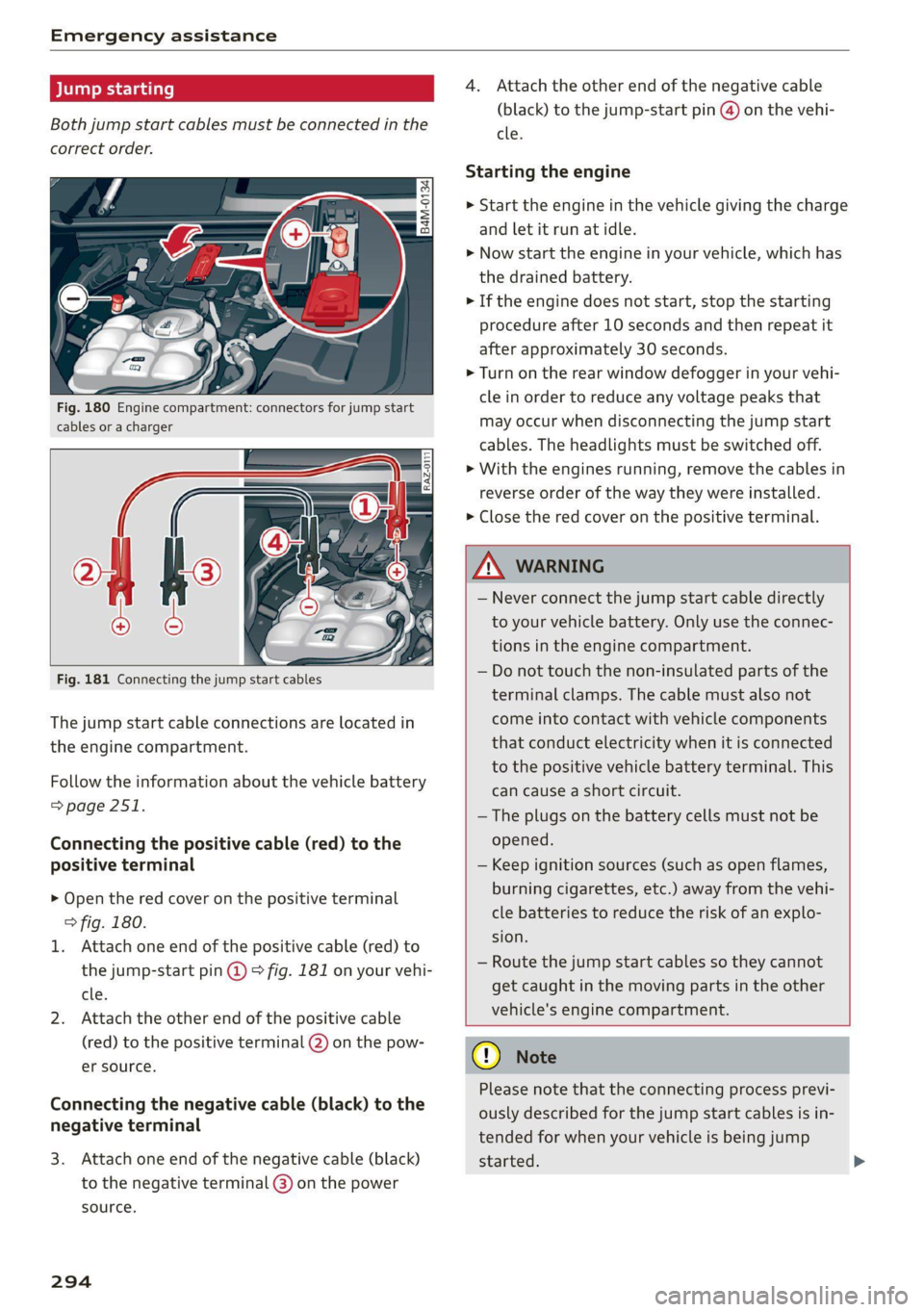
Both jump start cables must be connected in the
correct order.
Fig. 180 Engine compartment: connectors for jump start
cables or a charger
Fig. 181 Connecting the jump start cables
The jump start cable connections are located in
the engine compartment.
Follow the information about the vehicle battery
=> page 251.
Connecting the positive cable (red) to the
positive terminal
> Open the red cover on the positive terminal
fig. 180.
1. Attach one end of the positive cable (red) to
the jump-start pin @ 9° fig. 181 on your vehi-
cle.
2. Attach the other end of the positive cable
(red) to the positive terminal @ on the pow-
er source.
Connecting the negative cable (black) to the
negative terminal
3. Attach one end of the negative cable (black)
to the negative terminal @) on the power
source.
294
4. Attach the other end of the negative cable
(black) to the jump-start pin @ on the vehi-
cle.
Starting the engine
> Start the engine in the vehicle giving the charge
and let it run at idle.
> Now start the engine in your vehicle, which has
the drained battery.
> If the engine does not start, stop the starting
procedure after 10 seconds and then repeat it
after approximately 30 seconds.
> Turn on the rear window defogger in your vehi-
cle in order to reduce any voltage peaks that
may occur when disconnecting the jump start
cables. The headlights must be switched off.
> With the engines running, remove the cables in
reverse order of the way they were installed.
> Close the red cover on the positive terminal.
Z\ WARNING
— Never connect the jump start cable directly
to your vehicle battery. Only use the connec-
tions in the engine compartment.
— Do not touch the non-insulated parts of the
terminal clamps. The cable must also not
come into contact with vehicle components
that conduct electricity when it is connected
to the positive vehicle battery terminal. This
can cause a short circuit.
—The plugs on the battery cells must not be
opened.
— Keep ignition sources (such as open flames,
burning cigarettes, etc.) away from the vehi-
cle batteries to reduce the risk of an explo-
sion.
— Route the jump start cables so they cannot
get caught in the moving parts in the other
vehicle's engine compartment.
@) Note
Please note that the connecting process previ-
ously described for the jump start cables is in-
tended for when your vehicle is being jump
started.
Page 298 of 332
Emergency assistance
Preparations
> Only secure the towing cable or tow bar at the
designated towing loops > page 296,
=> page 297.
> Make sure the towing cable is not twisted. Oth-
erwise it could disconnect from the towing loop
while towing.
> Switch the emergency flashers on in both
vehicles > page 53. However, do not do this if it
prohibited by law.
Towing vehicle (front)
> Only start to drive when the towing cable is
taut.
> Press the brake pedal very carefully.
> Avoid sudden braking or driving maneuvers.
Vehicle being towed (rear)
> Make sure the ignition is switched on so that
the steering wheel is not locked and so that you
can use the turn signals, the horn, and the
windshield wipers if needed > /\.
> Switching it off before the vehicle has stopped
may impair the function of the brake booster
and power steering. You would then need to
use more force to steer and brake the vehicle.
> Release the parking brake > page 106.
> Select the “N” selector lever position.
> Make sure the towing cable is always taut.
Z\ WARNING
— Never tow a vehicle using a tow bar or tow-
ing cable if the vehicle does not have electri-
cal power.
— If the vehicle runs out of power while it is
being towed, stop towing the vehicle imme-
diately and consult an authorized Audi deal-
er or qualified repair facility.
296
Front towing loop
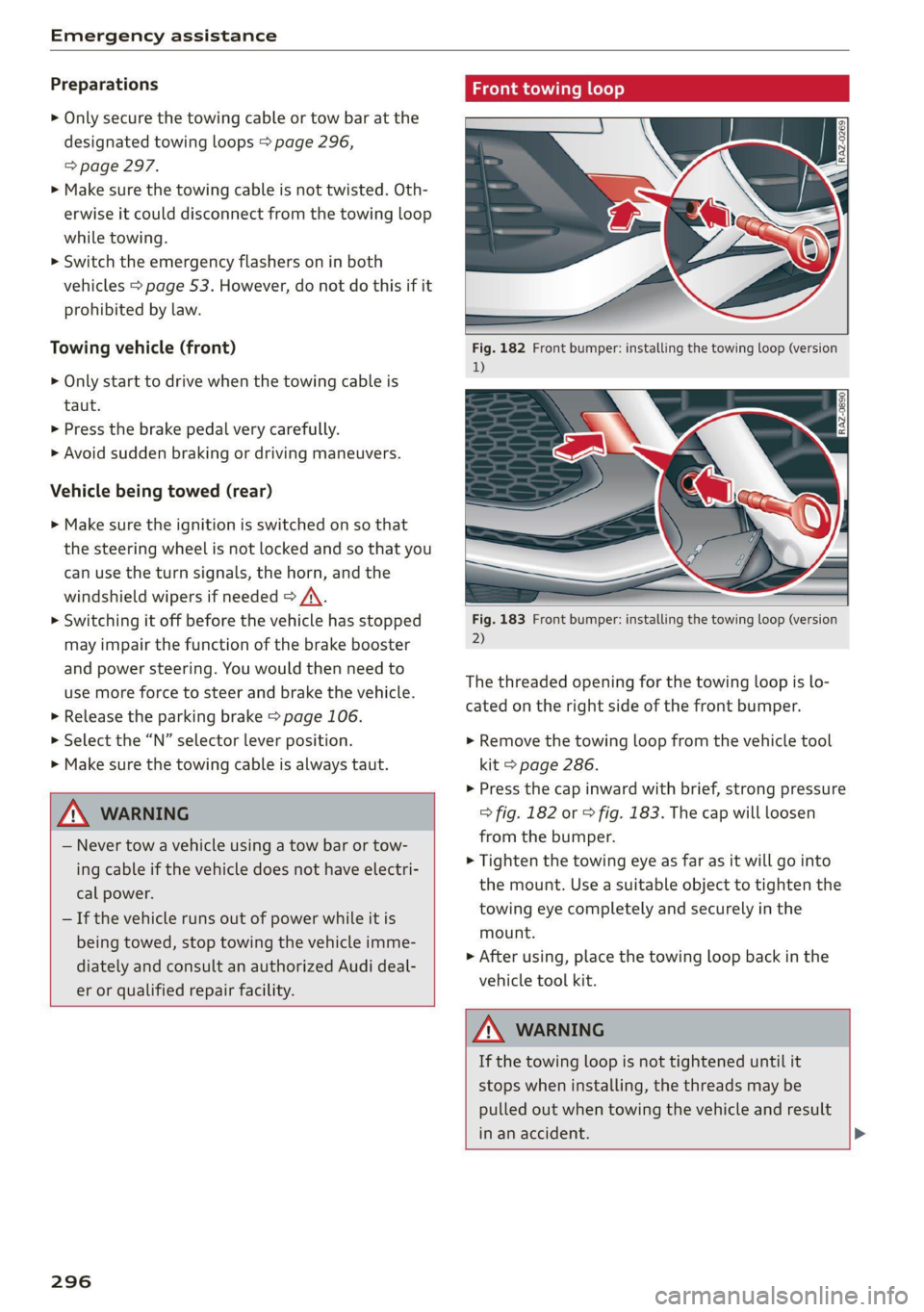
Fig. 182 Front bumper: installing the towing loop (version
1)
Fig. 183 Front bumper: installing the towing loop (version
2)
The threaded opening for the towing loop is lo-
cated on the right side of the front bumper.
» Remove the towing loop from the vehicle tool
kit > page 286.
>» Press the cap inward with brief, strong pressure
> fig. 182 or > fig. 183. The cap will loosen
from the bumper.
> Tighten the towing eye as far as it will go into
the mount. Use a suitable object to tighten the
towing eye completely and securely in the
mount.
> After using, place the towing loop back in the
vehicle tool kit.
ZA\ WARNING
If the towing loop is not tightened until it
stops when installing, the threads may be
pulled out when towing the vehicle and result
in an accident. >
Page 300 of 332
Fuses and bulbs
Fuses and bulbs
Fuses
oer mie
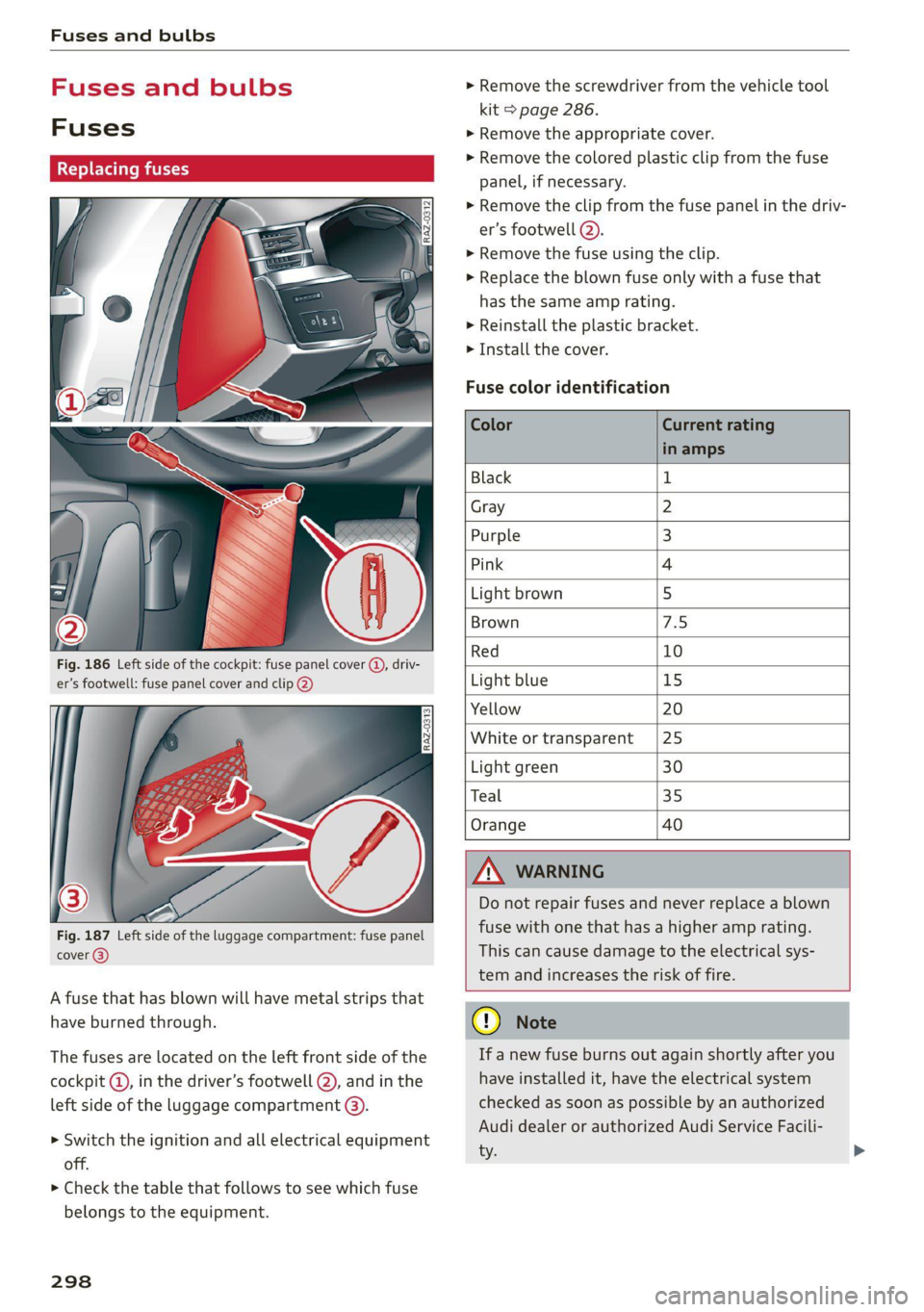
Fig. 186 Left side of the cockpit: fuse panel cover (@), driv-
er’s footwell: fuse panel cover and clip @)
Fig. 187 Left side of the luggage compartment: fuse panel
cover @)
A fuse that has blown will have metal strips that
have burned through.
The fuses are located on the left front side of the
cockpit @, in the driver’s footwell @), and in the
left side of the luggage compartment @).
> Switch the ignition and all electrical equipment
off.
> Check the table that follows to see which fuse
belongs to the equipment.
298
> Remove the screwdriver from the vehicle tool
kit > page 286.
> Remove the appropriate cover.
> Remove the colored plastic clip from the fuse
panel, if necessary.
> Remove the clip from the fuse panel in the driv-
er’s footwell (2).
> Remove the fuse using the clip.
> Replace the blown fuse only with a fuse that
has the same amp rating.
> Reinstall the plastic bracket.
> Install the cover.
Fuse color identification
Color Current rating
in amps
Black 1
Gray 2
Purple 3
Pink 4
Light brown 5
Brown 7.5
Red 10
Light blue 15
Yellow 20
White or transparent [25
Light green 30
Teal 35
Orange 40
ZA WARNING
Do not repair fuses and never replace a blown
fuse with one that has a higher amp rating.
This can cause damage to the electrical sys-
tem and increases the risk of fire.
@ Note
If a new fuse burns out again shortly after you
have installed it, have the electrical system
checked as soon as possible by an authorized
Audi dealer or authorized Audi Service Facili-
ty.
Page 301 of 332
4M8012721BF
Fuses and bulbs
@) Tips
— The following table does not list fuse loca-
tions that are not used.
— Some of the equipment listed in the follow-
ing tables applies only to certain model ver-
sions or certain optional equipment.
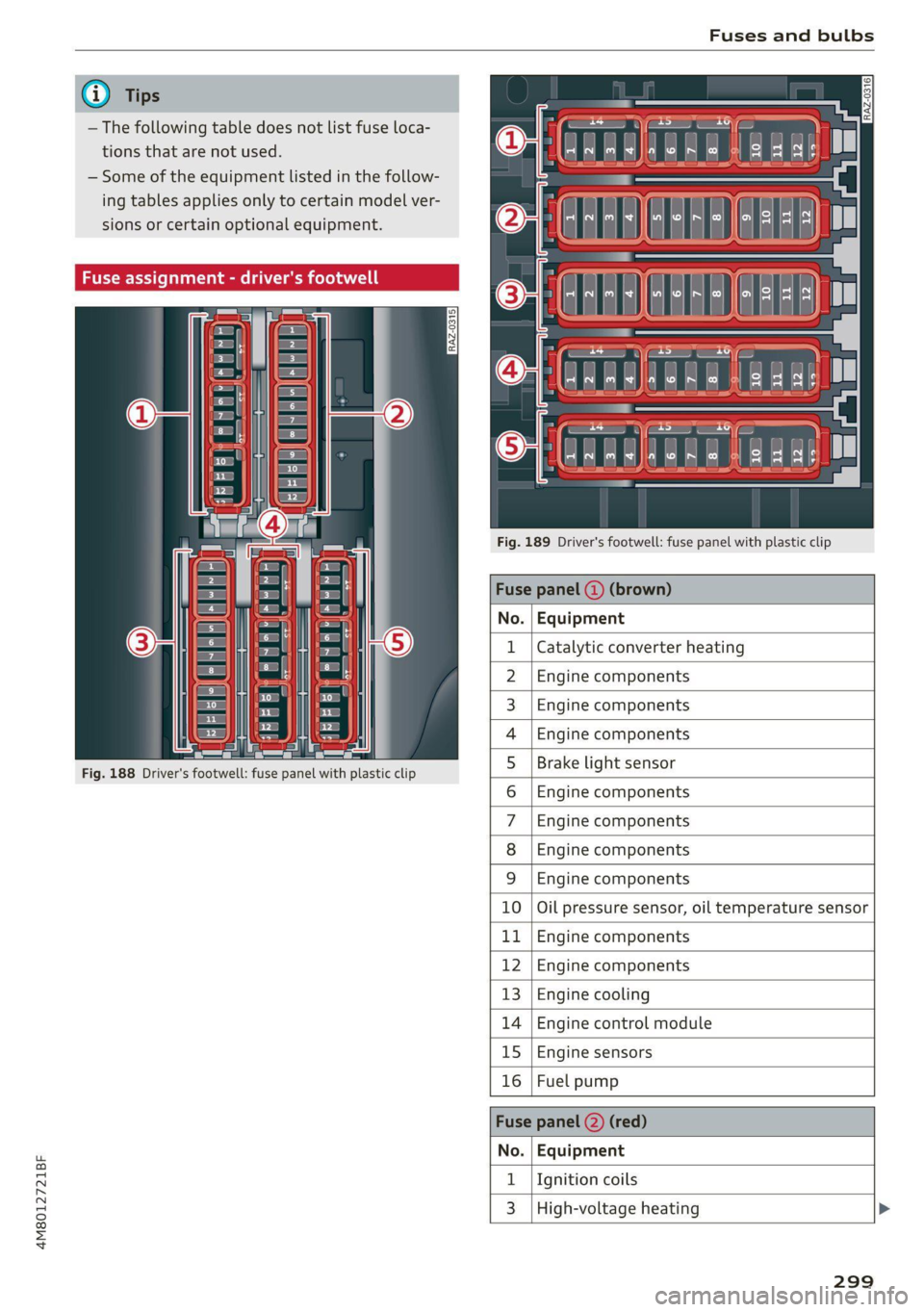
Fig. 189 Driver's footwell: fuse panel with plastic clip
Fuse panel (4) (brown)
No. | Equipment
Catalytic converter heating
Engine components
Engine components
Engine components
Fig. 188 Driver's footwell: fuse panel with plastic clip
Brake light sensor
Engine components
Engine components
Engine components
WlLOlINI
AD)
MW)
ASWIN/
PR
Engine components
BR Oo Oil pressure sensor, oil temperature sensor
b Bb Engine components
R N Engine components
H Ww Engine cooling
fa BR Engine control module
BR uw Engine sensors
Bb a Fuel pump
Fuse
No. | Equipment
1 | Ignition coils
3 | High-voltage heating
299
Page 306 of 332
Data privacy
typically 30 seconds or less. The EDR in this vehi-
cle is designed to record such data as:
— How various systems in your vehicle were oper-
ating;
— Whether or not the driver and passenger safety
belts were buckled/fastened;
— How far (if at all) the driver was depressing the
accelerator and/or brake pedal; and,
— How fast the vehicle was traveling.
These data can help provide a better understand-
ing of the circumstances in which crashes and in-
juries occur. NOTE: EDR data are recorded by your
vehicle only if a non-trivial crash situation occurs;
no data are recorded by the EDR under normal
driving conditions and no personal data (e.g.
name, gender, age, and crash location) are re-
corded. However, other parties, such as law en-
forcement, could combine the EDR data with the
type of personally identifying data routinely ac-
quired during a crash investigation.
To read data recorded by an EDR, special equip-
ment is required, and access to the vehicle or the
EDR is needed. In addition to the vehicle manu-
facturer, other parties, such as law enforcement,
that have the special equipment, can read the in-
formation if they have access to the vehicle or the
EDR.
Assist system monitor
This vehicle is equipped with an Assist System
Monitor (ASM). The ASM collects data that is not
stored by the EDR in the event of an accident. The
main task of the ASM is to make it possible to un-
derstand the role and the behavior of the assist
systems in these accident situations. In addition
to the data that the EDR stores, the ASM records
data related to the assist systems starting sever-
al seconds before the accident or near-accident.
The data collected by ASM depends on the equip-
ment and may include the following information:
status information of the assist systems (for ex-
ample, if they are switched on or off, system
events, etc.), control interventions (for example,
D_ System availability may be limited depending on the mar-
ket.
2) In preparation at the time of printing.
304
by ESC, ABS, Audi pre sense’, etc.), and assist
systems settings (such as speed settings).
Special devices and access to the vehicle or to the
ASM are necessary in order to read the data from
the ASM memory. In addition to the vehicle man-
ufacturer, third parties such as law enforcement
authorities can also read and analyze the stored
data if they have access to the vehicle or to the
ASM.
Data usage
Audi can read out the information stored in the
data memories or similar data, or give this infor-
mation to third parties, especially in the follow-
ing situations:
— If the vehicle owner or lessee agrees
— If there is an official request from the police
— Ifa court or authorities request it
If legally permitted, Audi can also use the data
for analysis of vehicle operation and safety per-
formance or provide this data to third parties for
research purposes.
Data memory for autonomous driving!)
Applies to: vehicles with data memory for autonomous driv-
ing
When park assist plus is active > page 170, data
is stored in a memory in the vehicle. This data is
continuously overwritten by more current data
after a few seconds. The data is erased when the
ignition is switched off.
In certain situations, such as if an airbag has
been triggered or a parking process was ended,
the corresponding technical data may be stored
in the data memory for autonomous driving. The
data memory for autonomous driving is a read-
only memory that has a limited amount of stor-
age space. If the storage space is full, the oldest
data will be overwritten with the newest data. >
Page 307 of 332
4M8012721BF
Data privacy
Exporting data
You can read out the data memory for autono-
mous driving and export this data to a USB stick.
The settings depend on the vehicle equipment.
Requirement: the vehicle must be stationary, the
automated systems must not be active, and the
ignition must be switched on. A USB stick must
be connected to the USB input.
» Applies to: MMI: Select on the home screen:
SETTINGS > Data management > Statistics.
> Follow the instructions in the MMI.
The export will be canceled if you switch menus,
for example.
Recorded data
— Driver interactions (such as the driver pressing
the brake pedal)
— Vehicle dynamics (such as speed)
— Status of automated systems
— Control requests
— Relevant measurements from monitoring the
surroundings
— Image data from monitoring the surroundings
— System status, timestamp, and vehicle location
when deactivating/activating park assist plus
You can find additional information in the MMI:
— Applies to: MMI: Select on the home screen:
SETTINGS > General > Legal notes > About the
data memory.
@) Tips
— The data is processed and stored locally in
the vehicle. It is not automatically transmit-
ted to Audi or other third parties, for exam-
ple through the cloud. The owner or driver is
responsible for the data. Audi does not have
access to it.
— For additional information and the evalua-
tion of data, please contact Audi Customer
Care.
Transmitted information
Data collection
Applies to: vehicles with data collection
Depending on the country, Audi may collect data
for the following purposes, for example: offer
and product optimization, public safety, provision
of Audi connect remote vehicle services, and
adaptation to customer expectations. For exam-
ple, various technical function data, environmen-
tal data, driving data, and usage data will be col-
lected for a specific purpose and forwarded to
Audi. The data will be sent from the vehicle at
the time the data was collected.
Applies to: MMI: You can find additional informa-
tion about data collection in the MMI. Select on
the home screen: SETTINGS > General > Legal
notes > About Audi connect.
If you would like to deny data transmission to
Audi, contact an authorized Audi dealer or au-
thorized Audi Service Facility for more informa-
tion. You also have the option to deactivate data
transmission within the privacy settings.
Privacy settings
Applies to: vehicles with Audi connect
> Applies to MMI: Select on the home screen:
SETTINGS > Privacy settings.
When using Audi connect services or during data
collection, data will be transmitted from the ve-
hicle.
> To display additional information about the pri-
vacy settings and the associated symbols in the
status bar, press @ in the MMI.
Requirement: the ignition must be switched on.
Setting the maximum privacy settings
When the Activate privacy mode function is
switched on, the data connection is deactivated
or sending of data is restricted, but all safety-re-
lated, legal, or contractually required Audi con-
nect
services remain activated. The majority of
the Audi connect services are deactivated.
305
Page 322 of 332
Index
Heating hwcses vs cscs vo orci we sees oo es oH oes 90
HFP
refer to Hands Free Profile............. 181
High beams
High beam assistant............00000ae 52
Highway lights...................5.0005 51
Hill descent assist.............0000 0008 109
Hill descemticomtrol. «seve + « anise a a mmo © © 108
Hill Hold assist « ccosace es wen v rane ve ramen oe 97
Home
refer to Home address.............04. 206
Hommesaddnessi, = sieves + nmawos «+ wines x 2 eens 206
HomeLink
refer to Garage door opener............. 48
Home screen... ... ee eee eee ee eee 19
FHORM « « sonst 6 o arate © oi come © a ane © senor 6
Hotspot
refer to Wi-Fi...........0 0.0 c eee eee 195
I
Ignition
Switching on and off...............0--- 95
Imbalance (wheels) ..............000005 265
Immobilizer
refer to Electronic immobilizer........... 39
Inclinometer...........-.0 0c eee eee eee 108
Indicator lights........ 0... eee eee eee 7
Inspection interval............-..2.200. 254
Instrument cluster......... 0.00. e eee ee 12
Adjusting the layout................... 13
Cleaning’: « ¢ saws so sews oy eeew ee ees ene 283
Engine code............... 0c eee eee 236
Failure... eee eee eee eee 12
On-board computer..............---65- 16
OPeratiigts » mesns s+ asses a 2 mmatews © x cemsene © 5 a 13
Service interval display................ 254
Software information..............005 236
Switching
tabs: « « sosies x + acuise 6 6 cxsueee ww enn 13
Switching the view...................0. 13
Vehicle TUNCtIONS ¢ esses ¢ ¢ exes be Sees be ee 16
Version information................-. 236
Instrument illumination................. 55
Integrated assistance...............00-. 20
Integrated Toll Module................. 132
Intelligent search
NaVigatiOntice « saeco 2 & sew o same @ 9 Bears 6 201
320
Interior lighting). «+ ccs + ween ev ween ee 54,55
Interior MONItOriNgss «saa. 6 wae as wave os 38
Intermittent mode (windshield wipers) ..... 57
International travel « « wsws s 2 gaa a x mews 196
Internet
fefer'to CONNECE se. 2 sie s ween ee ewe ee 192
Internet radio
refer to Online radio.............. 216, 217
Intersection assistant.................. 156
TONIZEf wes oo ssees o 2 srw 2 2 seem oo mR oo eo 92
iPhone
refer to Audi music interface........... 222
J
JUMPStartiNG cess 2 waves a v wees ao eeeuoes oo one 293
K
Ch ee ee ee 35, 39
Convenience opening and closing......... 47
Key replacement.........ceeeeeereeeee 39
Mechanical-key’s cccv. 2s ose v sera ee ewe 39
INGE RECOGMIZER « « cnsese 6 « ecnsece sn 6 sanaeae « © anseete 96
PANIC button..................0..0005 39
Replacing the battery.................. 41
Unlocking and locking..............0005 40
Vehicle code... 2.6.6... ee eee eee eee 39
Key user... 0... eee eee eee 33
Kick-down ... 2... eee eee eee eee 99
L
Lane assist
refer to Lane departure warning......... 147
refer to Lane guidance..............05 147
Lane departure warning................. 147
Cleaning the camera area.............. 281
Lane quidanc@sas . sees eevee a enews wee 140
Lap'timer’s « = sees ¢ 2 ean x 2 oes yo wees v8: 129.
FaSer Scanners « « aay a eegu 4 x ees x ROE 122
Cleaning wor = 2 wee se anne 2 pes oe wee © 2 x 282
LATCH (securing child safety seats)......... 78
Pane Controle»: + y sagu 2 eqs x worm & & By 100
Leather care and cleaning............... 283
Legal information
License subscriptions................. 236
Software information...............0 236