wheel AUDI Q8 2021 Owner´s Manual
[x] Cancel search | Manufacturer: AUDI, Model Year: 2021, Model line: Q8, Model: AUDI Q8 2021Pages: 332, PDF Size: 118.76 MB
Page 279 of 332

4M8012721BF
Wheels
illuminated. This sequence will continue upon
subsequent vehicle start-ups as long as the mal-
function exists.
When the malfunction indicator is illuminated,
the system may not be able to detect or signal
low tire pressure as intended. TPMS malfunctions
may occur for a variety of reasons, including the
installation of replacement or alternate tires or
wheels on the vehicle that prevent the TPMS
from functioning properly. Always check the
TPMS malfunction telltale after replacing one or
more tires or wheels on your vehicle to ensure
that the replacement or alternate tires and
wheels allow the TPMS to continue to function
properly.
General information
Applies to: vehicles with tire pressure monitoring system
The tire pressure monitoring system monitors
the pressure in the four tires when driving.
The system uses sensors that measure the tem-
perature and pressure in the tires. The data is
sent from these sensors to the control module by
radio frequency.
The tire pressure monitoring system shows the
current pressures and temperatures of the tires
in the MMI while driving > page 277. It also
compares the current tire pressures with the stor-
ed tire pressures and gives a warning in the driver
information system if the tire pressure is differ-
ent from what is stored > page 278.
The system does not detect if the stored tire
pressures match the recommended tire pres-
sures. You must store the tire pressures again in
each of the following situations > page 278:
— Each time the tire pressures change, for exam-
ple when the load in the vehicle changes
— After replacing a tire
— If wheels with new wheel sensors are used
Z\ WARNING
— The tire pressure monitoring system assists
the driver in monitoring tire pressures. The
driver is responsible for having the tires in-
flated to the correct pressure.
— Do not change the tire pressure when the
temperature of the tire is extremely high.
This could result in serious damage to the
tire and even cause the tire to burst, increas-
ing the risk of an accident.
— A tire with low pressure flexes more. This
heats the tire up too much. This could cause
the tread to separate and even cause the tire
to burst, increasing the risk of an accident.
— The tire pressure monitoring system does
not warn about damage or defects in the
tire construction that could cause the tire to
burst, for example. Inspect your tires regu-
larly.
G) Tips
—If tires are replaced, the sensors and valves
do not need to be removed or replaced. Only
replace the valve stem and, if necessary, the
valve and the wheel electronics. If you have
questions, see an authorized Audi dealer or
authorized Audi Service Facility.
—An incorrect display or a malfunction in the
tire pressure monitoring system can occur
after using the tire mobility kit*. Have the
sensors replaced by an authorized Audi
dealer or authorized Audi Service Facility.
— The system complies with United States FCC
regulations and ISED regulations
=> page 311.
Displaying tire pressures and temperatures
Applies to: vehicles with tire pressure monitoring system
Requirement: you must be driving the vehicle.
> Applies to MMI: Select on the home screen: VE-
HICLE > Settings & Service > Tire pressure
monitoring > Display tire pressure.
The current tire pressures are shown in green,
yellow, or red numbers:
— Green: the current tire pressure and the speci-
fied tire pressure are approximately the same.
— Yellow: the current tire pressure is lower than
the specified tire pressure.
— Red: the current tire pressure is much lower
than the specified tire pressure.
277
Page 280 of 332
Wheels
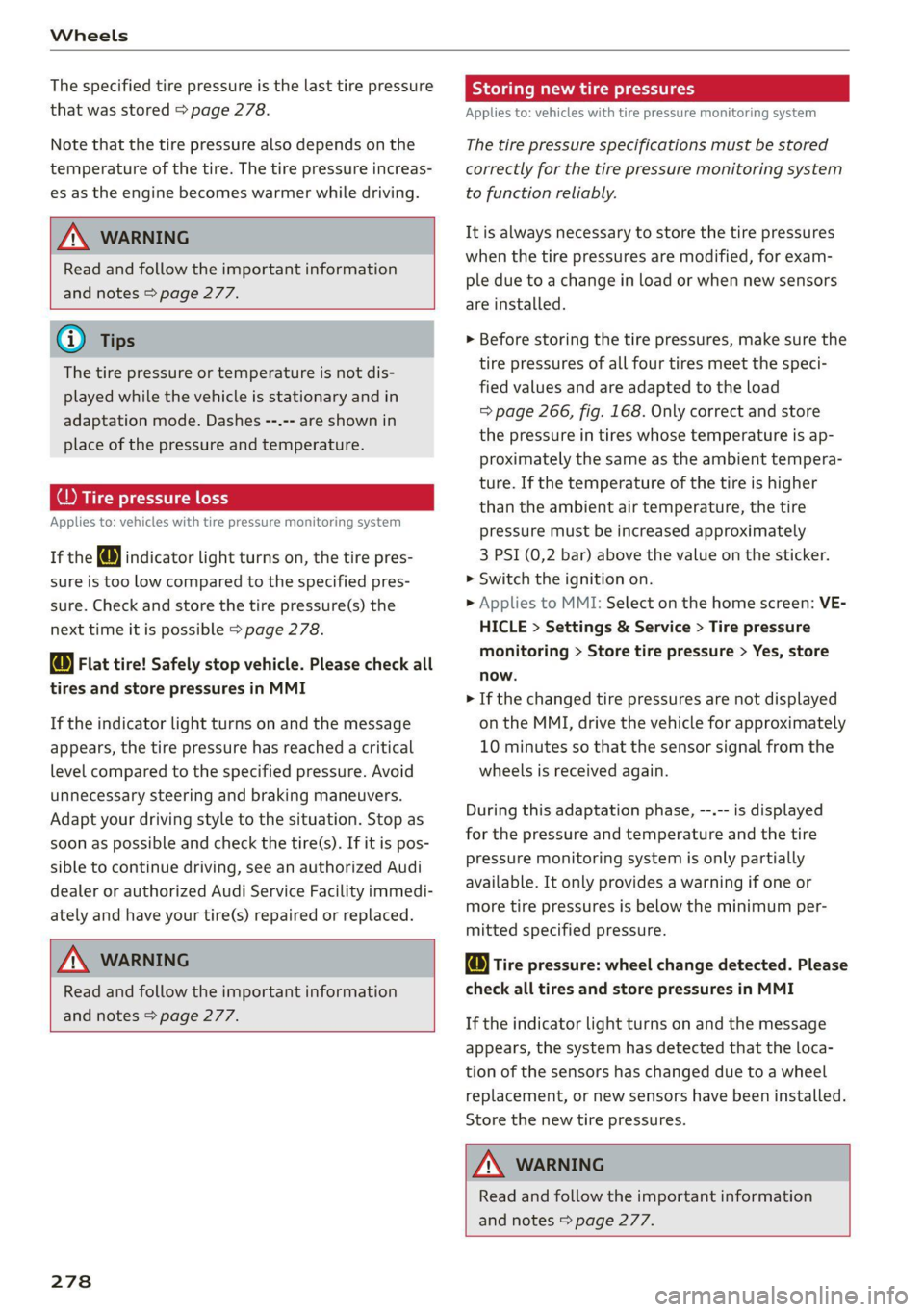
The specified tire pressure is the last tire pressure
that was stored > page 278.
Note that the tire pressure also depends on the
temperature of the tire. The tire pressure increas-
es as the engine becomes warmer while driving.
Z\ WARNING
Read and follow the important information
and notes > page 277.
@) Tips
The tire pressure or temperature is not dis-
played while the vehicle is stationary and in
adaptation mode. Dashes --.-- are shown in
place of the pressure and temperature.
OB iw sete ot
Applies to: vehicles with tire pressure monitoring system
If the @ indicator light turns on, the tire pres-
sure is too low compared to the specified pres-
sure. Check and store the tire pressure(s) the
next time it is possible > page 278.
® Flat tire! Safely stop vehicle. Please check all
tires and store pressures in MMI
If the indicator light turns on and the message
appears, the tire pressure has reached a critical
level compared to the specified pressure. Avoid
unnecessary steering and braking maneuvers.
Adapt your driving style to the situation. Stop as
soon as possible and check the tire(s). If it is pos-
sible to continue driving, see an authorized Audi
dealer or authorized Audi Service Facility immedi-
ately and have your tire(s) repaired or replaced.
Z\ WARNING
Read and follow the important information
and notes > page 277.
278
Storing new tire pressures
Applies to: vehicles with tire pressure monitoring system
The tire pressure specifications must be stored
correctly for the tire pressure monitoring system
to function reliably.
It is always necessary to store the tire pressures
when the tire pressures are modified, for exam-
ple due to a change in load or when new sensors
are installed.
> Before storing the tire pressures, make sure the
tire pressures of all four tires meet the speci-
fied values and are adapted to the load
=> page 266, fig. 168. Only correct and store
the pressure in tires whose temperature is ap-
proximately the same as the ambient tempera-
ture. If the temperature of the tire is higher
than the ambient air temperature, the tire
pressure must be increased approximately
3 PSI (0,2 bar) above the value on the sticker.
> Switch the ignition on.
> Applies to MMI: Select on the home screen: VE-
HICLE > Settings & Service > Tire pressure
monitoring > Store tire pressure > Yes, store
now.
> If the changed tire pressures are not displayed
on the MMI, drive the vehicle for approximately
10 minutes so that the sensor signal from the
wheels is received again.
During this adaptation phase, --.-- is displayed
for the pressure and temperature and the tire
pressure monitoring system is only partially
available. It only provides a warning if one or
more tire pressures is below the minimum per-
mitted specified pressure.
@ Tire pressure: wheel change detected. Please
check all tires and store pressures in MMI
If the indicator light turns on and the message
appears, the system has detected that the loca-
tion of the sensors has changed due to a wheel
replacement, or new sensors have been installed.
Store the new tire pressures.
ZA WARNING
Read and follow the important information
and notes > page 277.
Page 281 of 332
4M8012721BF
Wheels
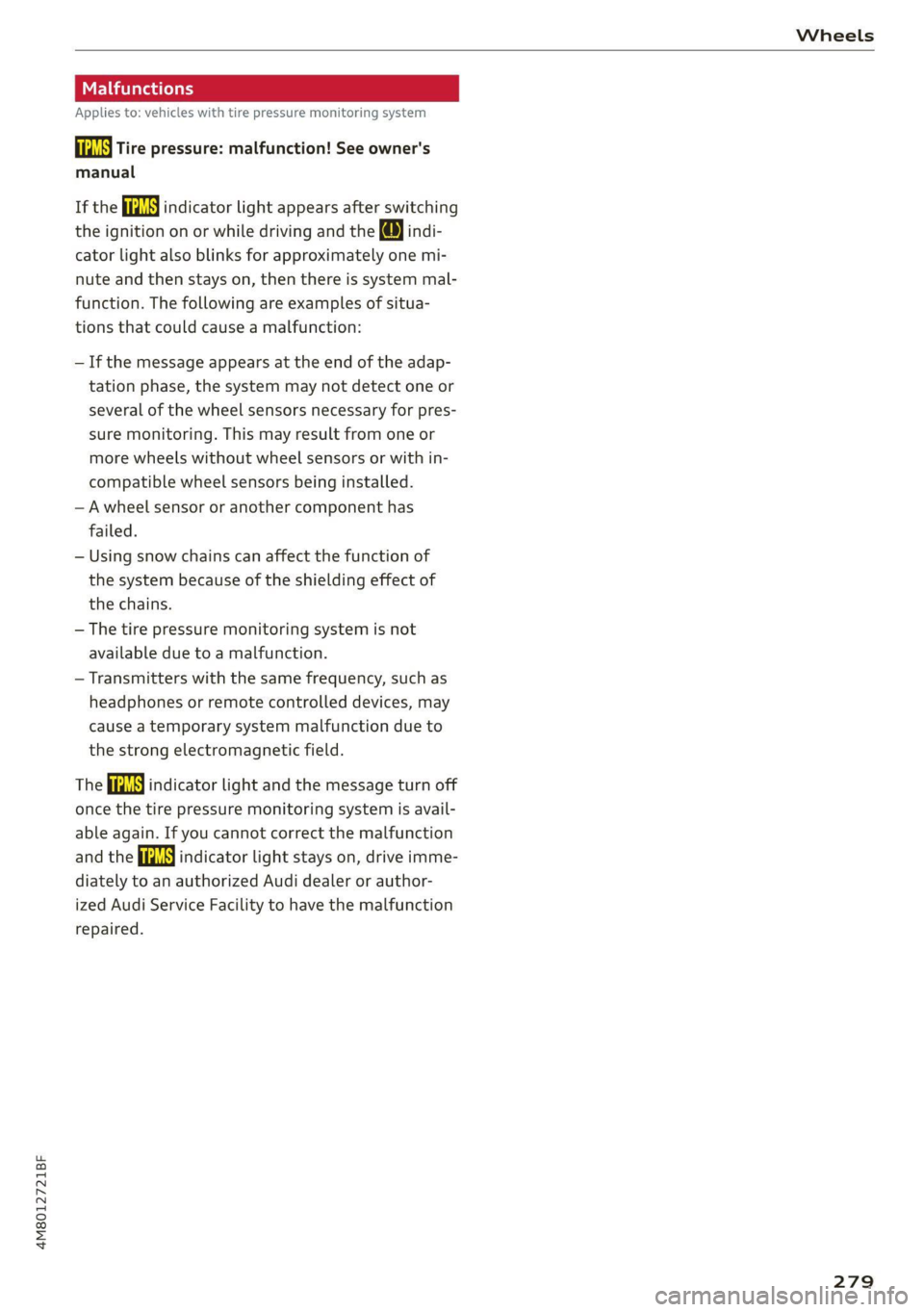
Applies to: vehicles with tire pressure monitoring system
ia Tire pressure: malfunction! See owner's
manual
If the iis indicator light appears after switching
the ignition on or while driving and the @ indi-
cator light also blinks for approximately one mi-
nute and then stays on, then there is system mal-
function. The following are examples of situa-
tions that could cause a malfunction:
— If the message appears at the end of the adap-
tation phase, the system may not detect one or
several of the wheel sensors necessary for pres-
sure monitoring. This may result from one or
more wheels without wheel sensors or with in-
compatible wheel sensors being installed.
—Awheel sensor or another component has
failed.
— Using snow chains can affect the function of
the system because of the shielding effect of
the chains.
— The tire pressure monitoring system is not
available due to a malfunction.
— Transmitters with the same frequency, such as
headphones or remote controlled devices, may
cause a temporary system malfunction due to
the strong electromagnetic field.
The ia indicator light and the message turn off
once the tire pressure monitoring system is avail-
able again. If you cannot correct the malfunction
and the iS indicator light stays on, drive imme-
diately to an authorized Audi dealer or author-
ized Audi Service Facility to have the malfunction
repaired.
279
Page 283 of 332
4M8012721BF
Care and cleaning
height and width of the inside of the car
wash.
ZA WARNING
—To reduce the risk of accidents, only wash
the vehicle when the ignition is off and fol-
low the instructions from the car wash oper-
ator.
—To reduce the risk of paint damage, do not
wash the vehicle in direct sunlight.
—To reduce the risk of damage, do not wash
decorative decals* with a pressure washer.
—To reduce the risk of damage to the surface,
do not use insect removing sponges, kitchen
sponges, or similar items.
— When washing matte finish painted vehicle
components:
—To reduce the risk of cuts, protect yourself
from sharp metal components when wash-
ing the underbody or the inside of the wheel
housings.
— After washing the vehicle, the braking effect
may be delayed due to moisture on the
brake rotors or ice in the winter. This in-
creases the risk of an accident. The brakes
must be dried with a few careful brake appli-
cations.
— To reduce the risk of damage to the sur-
face, do not use polishing agents or hard
wax.
— Never use protective wax. It can destroy
the matte finish effect.
@) Note — Do not place any stickers or magnetic
signs on vehicle components painted with
matte finish paint. The paint could be
damaged when the stickers or magnets
are removed.
— If you wash the vehicle in an automatic car
wash, you must fold the exterior mirrors in
to reduce the risk of damage to the mirrors.
Power folding exterior mirrors* must only
be folded in and out using the power folding (@) For the sake of the environment
function.
—To reduce the risk of damage to the rims
and tires, compare the width between the
wheels on your vehicle with the distance be-
tween the guide rails in the car wash.
—To reduce the risk of damage, compare the
height and width of your vehicle with the
Only wash the vehicle in facilities specially de-
signed for that purpose. This will reduce the
risk of dirty water contaminated with oil from
entering the sewer system.
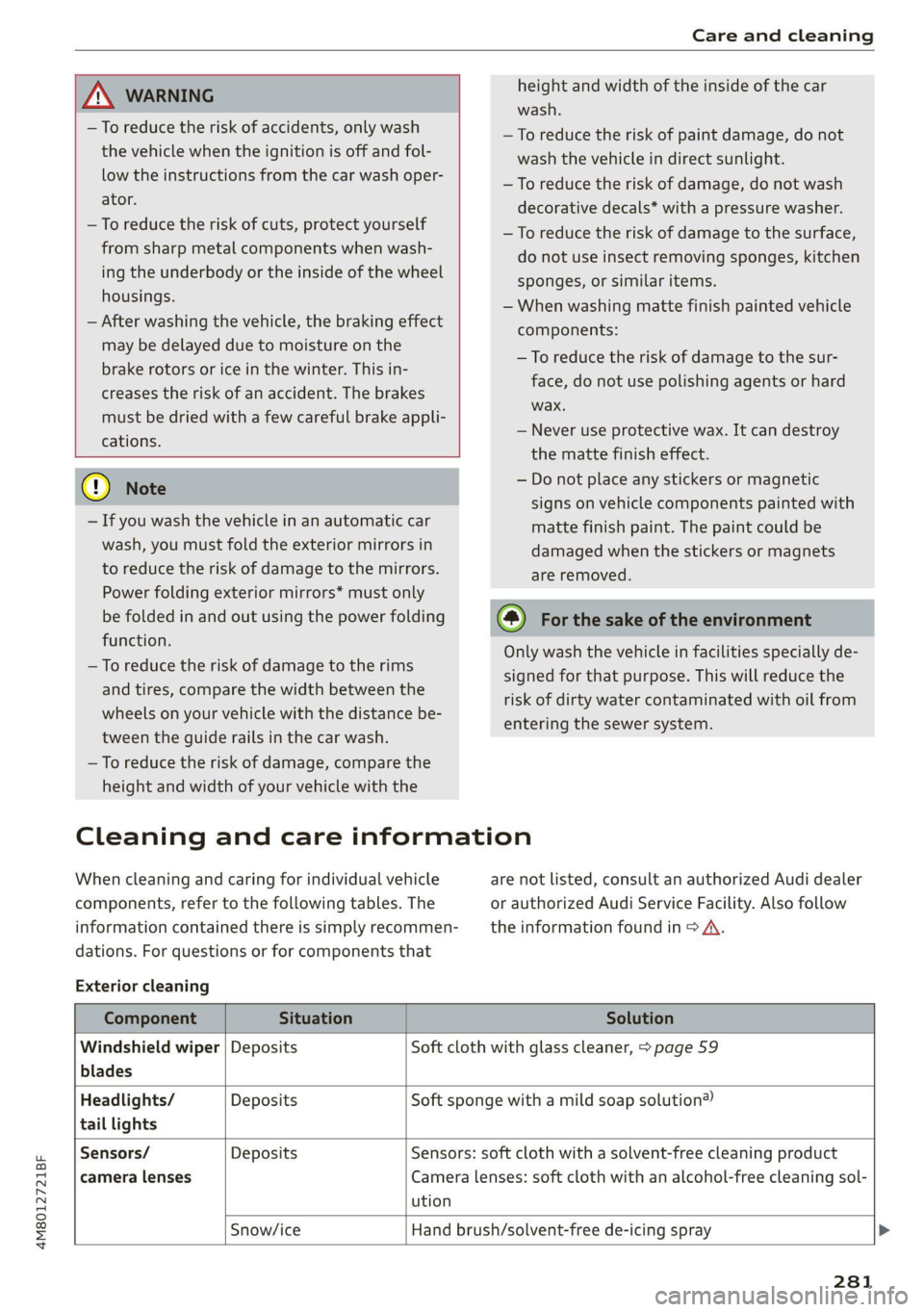
Cleaning and care information
When cleaning and caring for individual vehicle are not listed, consult an authorized Audi dealer
components, refer to the following tables. The or authorized Audi Service Facility. Also follow
information contained there is simply recommen- __ the information found in > A.
dations. For questions or for components that
Exterior cleaning
Component Situation Solution
Windshield wiper | Deposits Soft cloth with glass cleaner, > page 59
blades
Headlights/ Deposits Soft sponge with a mild soap solution®
tail lights
Sensors/ Deposits Sensors: soft cloth with a solvent-free cleaning product
camera lenses Camera lenses: soft cloth with an alcohol-free cleaning sol-
ution
Snow/ice Hand brush/solvent-free de-icing spray >
281
Page 284 of 332
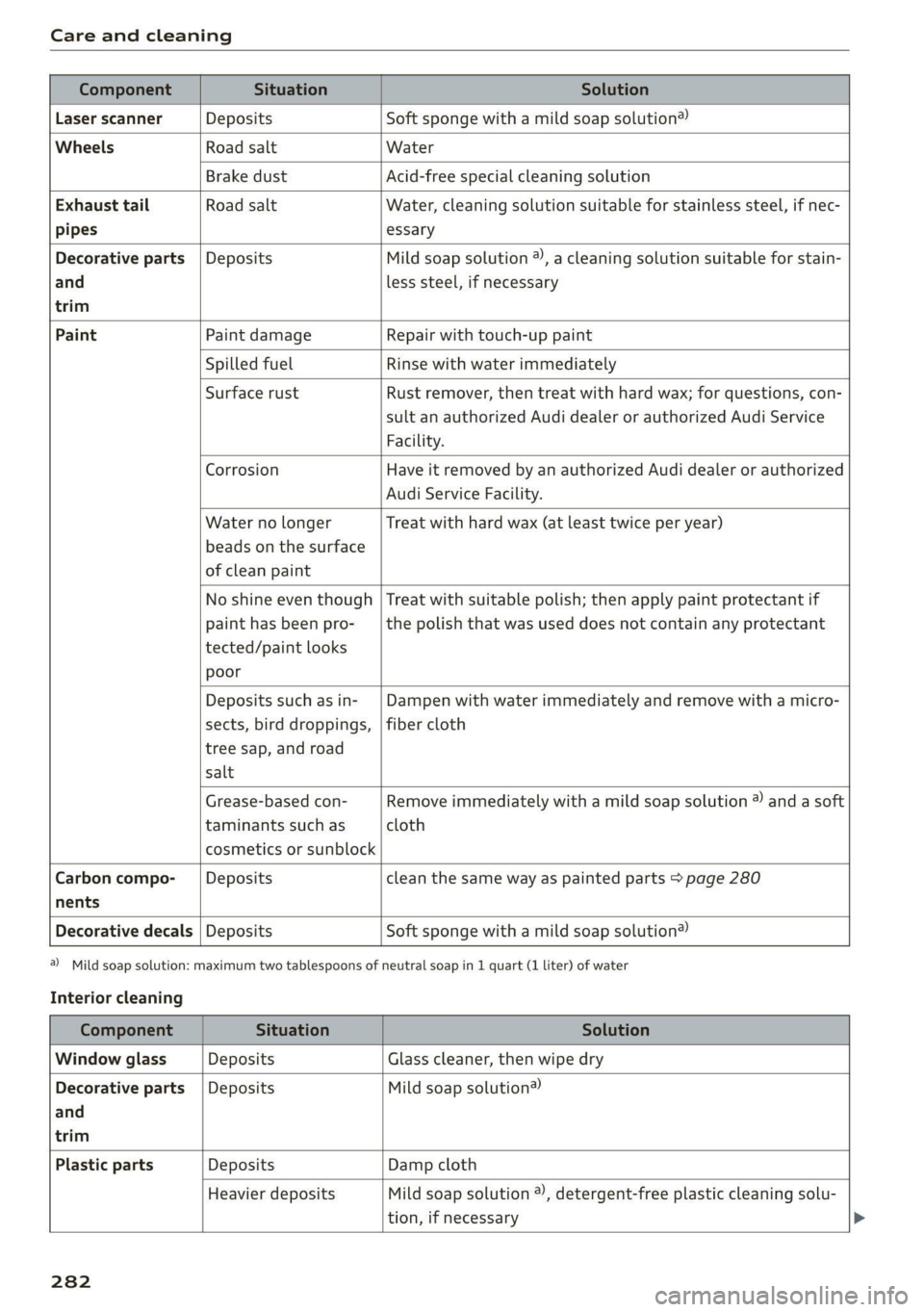
Care and cleaning
Component Situation Solution
Laser scanner Deposits Soft sponge with a mild soap solution®
Wheels Road salt Water
Brake dust Acid-free special cleaning solution
Exhaust tail Road salt Water, cleaning solution suitable for stainless steel, if nec-
pipes essary
Decorative parts | Deposits Mild soap solution ®, a cleaning solution suitable for stain-
and
trim
less steel, if necessary
Paint Paint damage Repair with touch-up paint
Spilled fuel Rinse with water immediately
Surface rust Rust remover, then treat with hard wax; for questions, con-
sult an authorized Audi dealer or authorized Audi Service
Facility.
Corrosion Have it removed by an authorized Audi dealer or authorized
Audi Service Facility.
Water no longer
beads on the surface
of clean paint
Treat with hard wax (at least twice per year)
No shine even though
paint has been pro-
tected/paint looks
poor
Treat with suitable polish; then apply paint protectant if
the polish that was used does not contain any protectant
Deposits such as in-
sects, bird droppings,
tree sap, and road
salt
Dampen with water immediately and remove with a micro-
fiber cloth
Grease-based con-
taminants such as
cosmetics or sunblock
Remove immediately with a mild soap solution ® and a soft
cloth
Carbon compo-__| Deposits clean the same way as painted parts > page 280
nents
Decorative decals | Deposits Soft sponge with a mild soap solution®
a) Mild soap solution: maximum two tablespoons of
Interior cleaning
neutral soap in 1 quart (1 liter) of water
Component Situation Solution
Window glass Deposits Glass cleaner, then wipe dry
Decorative parts | Deposits Mild soap solution®
and
trim
Plastic parts Deposits Damp cloth
Heavier deposits Mild soap solution @), detergent-free plastic cleaning solu-
tion, if necessary
282
Page 286 of 332
Care and cleaning
— Never clean the headlights or tail lights
with a dry cloth or sponge because the
lights could be damaged.
— Do not use any cleaning products that con-
tain alcohol, because they could cause
cracks to form.
— Wheels
— Never use any paint polish or other abra-
sive materials.
— Damage to the protective layer on the
rims, such as stone chips or scratches,
must be repaired immediately.
— Camera lenses
— Never use warm or hot water to remove
snow or ice from the camera lens. This
could cause the lens to crack.
— Never use abrasive cleaning materials or
alcohol to clean the camera lens. This
could cause scratches and cracks.
— Laser scanner
— Never use abrasive cleaning materials to
clean the laser scanner. This could cause
scratches and cracks.
— Door windows
— Remove snow and ice on windows and ex-
terior mirrors with a plastic scraper. To re-
duce the risk of scratches, move the scra-
per only in one direction and not back and
forth.
— Never remove snow or ice from door win-
dows and mirrors using warm or hot water
because this could cause cracks to form.
—To reduce the risk of damage to the rear
window defogger, do not apply any stick-
ers on the heating wires on the inside of
the window.
— Decorative parts and trim
— Never use chrome care or cleaning prod-
ucts.
— Paint
— To reduce the risk of scratches, the vehicle
must be free of dirt and dust before pol-
ishing or waxing.
—To prevent paint damage, do not polish or
wax the vehicle in direct sunlight.
—To reduce the risk of paint damage, do not
polish away rust spots.
284
— Remove cosmetics and sunscreen immedi-
ately because they could damage the
paint.
— Decorative decals
—To reduce the risk of damage, do not use
any rough powder or abrasive cleaning
products.
— To reduce the risk of damage, do not pol-
ish decorative decals that have a matte or
printed finish.
— Due to the risk of damage, do not use an
ice scraper to remove snow and ice on win-
dows with decorative decals on them.
— Displays and instrument cluster
— Make sure that the display and instrument
cluster are switched off and have cooled
down before cleaning. To switch off the
upper and lower display, select on the
MMI home screen: SETTINGS > Display &
brightness > MMI > Screen cleaning.
— Displays, the instrument cluster, and the
trim surrounding it must not be cleaned
with dry cleaning methods because they
could become scratched.
— Make sure no fluids enter the spaces be-
tween the instrument cluster and the
trim, because that could cause damage.
— Controls
— Make sure that no fluids enter the con-
trols, because this could cause damage.
— Safety belts
— Do not remove the safety belts to clean
them.
— Never clean safety belts or their compo-
nents with chemicals or with corrosive flu-
ids or solvents and never allow sharp ob-
jects to come into contact with the safety
belts. This could cause damage to the belt
webbing.
—If there is damage to the webbing, the
connections, the retractors, or the buck-
les, have them replaced by an authorized
Audi dealer or authorized Audi Service Fa-
cility.
— Textiles, artificial leather, and Alcantara
— Never treat artificial leather or Alcantara
with leather care products, solvents, floor >
Page 290 of 332
Emergency assistance
Inflating a tire
> Move the switch (8) > fig. 172 on the compres-
sor into position I.
> Inflate the tire to between 29 psi (200 kPA)
and 36 psi (250 kPA) and read the pressure on
the gauge.
> If this tire pressure is not reached, remove the
filler hose. Drive slowly approximately 33 feet
(10 m) forward or in reverse so that the sealant
can be distributed in the tire. Inflate the tire
again > A\.
Z\ WARNING
— Read and follow the manufacturer's safety
precautions on the compressor and in the in-
structions on the bottle of sealant.
— Ifa tire pressure of 29 psi (200 kPA) cannot
reached after inflating for 6 minutes, then
the tire is too severely damaged. Do not con-
tinue driving.
— If the tire cannot be repaired with the tire
sealant, see an authorized Audi dealer or au-
thorized Audi Service Facility for assistance.
G) Tips
Do not operate the compressor for more than
six minutes continuously, or it can overheat.
Once the compressor has cooled, you can con-
tinue to use it.
Completing
Applies to: vehicles with tire mobility kit
> Affix the sticker that says "max. 50 mph (max.
80 km/h)" that is provided with the tire mobili-
ty kit within the driver's field of vision.
> Stop the vehicle after driving for about 10 mi-
nutes and check the tire pressure.
> If the tire pressure is lower than 19 psi (130
kPA), then the tire is too severely damaged. Do
not continue driving.
ZA WARNING
Pay attention to the following after repairing
the tire:
— Do not drive faster than 50 mph (80 km/h).
— Avoid hard acceleration or braking and driv-
ing fast around curves.
— The vehicle may become more difficult to
control.
— If the tire is too severely damaged, see an
authorized Audi dealer or authorized Audi
Service Facility for assistance.
@) For the sake of the environment
You can give the used tire sealant bottle to an
authorized Audi dealer or authorized Audi
Service Facility for disposal.
@ Tips
Remember to obtain a new bottle of sealant
from an authorized Audi dealer or authorized
Audi Service Facility after repairing a tire.
Replacing wheels
You must complete the preparation before
changing a tire.
> Read and follow the important safety precau-
tions > page 286.
> Set the parking brake.
> Select the “P” position.
> When towing a trailer: disconnect the trailer
from your vehicle.
> Lay out the vehicle tool kit > page 286 and the
spare tire > page 292.
> Applies to: vehicles with air suspension: Select
on the home screen: VEHICLE > Settings &
Service > Air suspension: wheel change.
> Switch the ignition off.
A WARNING
— The vehicle must also be secured to prevent
it from rolling when using the vehicle jack*.
Use suitable objects to block the front and
back of the wheel that is diagonal from the
wheel with the flat tire.
— Applies to: vehicles with active roll stabiliza-
tion: Switch the ignition off because the sus-
pension regulation could change the vehicle |>
288
Page 291 of 332
4M8012721BF
Emergency assistance
height, which increases the risk of an acci-
Removing the caps
\e4
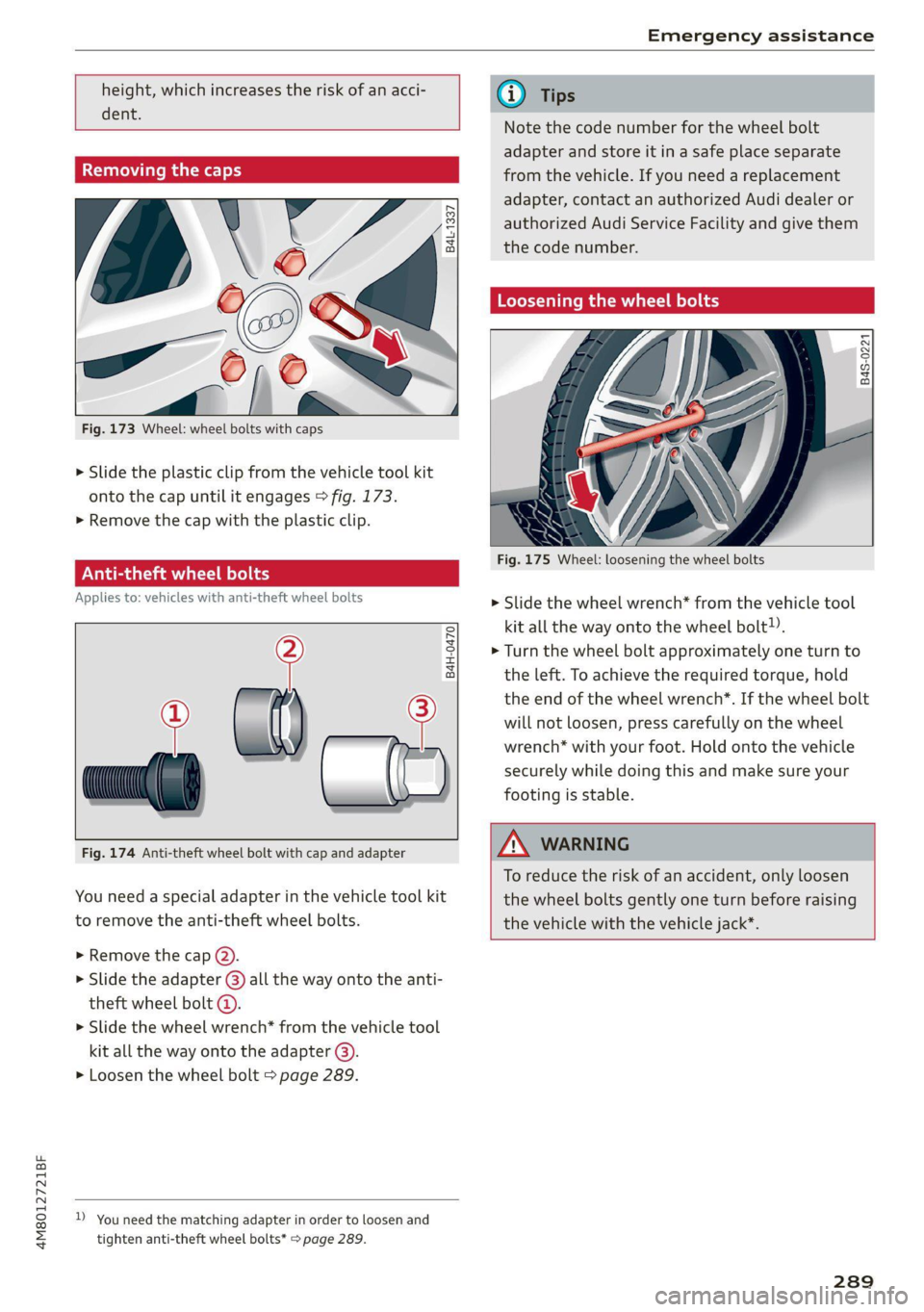
Fig. 173 Wheel: wheel bolts with caps
B4L-1337
> Slide the plastic clip from the vehicle tool kit
onto the cap until it engages > fig. 173.
> Remove the cap with the plastic clip.
ON tated 1 re)
Applies to: vehicles with anti-theft wheel bolts
B4H-0470
i ue
Fig. 174 Anti-theft wheel bolt with cap and adapter
You need a special adapter in the vehicle tool kit
to remove the anti-theft wheel bolts.
> Remove the cap (2).
> Slide the adapter @) all the way onto the anti-
theft wheel bolt @.
> Slide the wheel wrench* from the vehicle tool
kit all the way onto the adapter @).
> Loosen the wheel bolt > page 289.
D_ You need the matching adapter in order to loosen and
tighten anti-theft wheel bolts* > page 289.
@) Tips
Note the code number for the wheel bolt
adapter and store it in a safe place separate
from the vehicle. If you need a replacement
adapter, contact an authorized Audi dealer or
authorized Audi Service Facility and give them
the code number.
Loosening the wheel bolts
B4S-0221
SS Ws
Fig. 175 Wheel: loosening the wheel bolts
> Slide the wheel wrench* from the vehicle tool
kit all the way onto the wheel bolt).
> Turn the wheel bolt approximately one turn to
the left. To achieve the required torque, hold
the end of the wheel wrench*. If the wheel bolt
will not loosen, press carefully on the wheel
wrench* with your foot. Hold onto the vehicle
securely while doing this and make sure your
footing is stable.
ZA\ WARNING
To reduce the risk of an accident, only loosen
the wheel bolts gently one turn before raising
the
vehicle with the vehicle jack*.
289
Page 292 of 332
Emergency assistance
he vehicle
Applies to: vehicles with vehicle jack
RAZ-0258
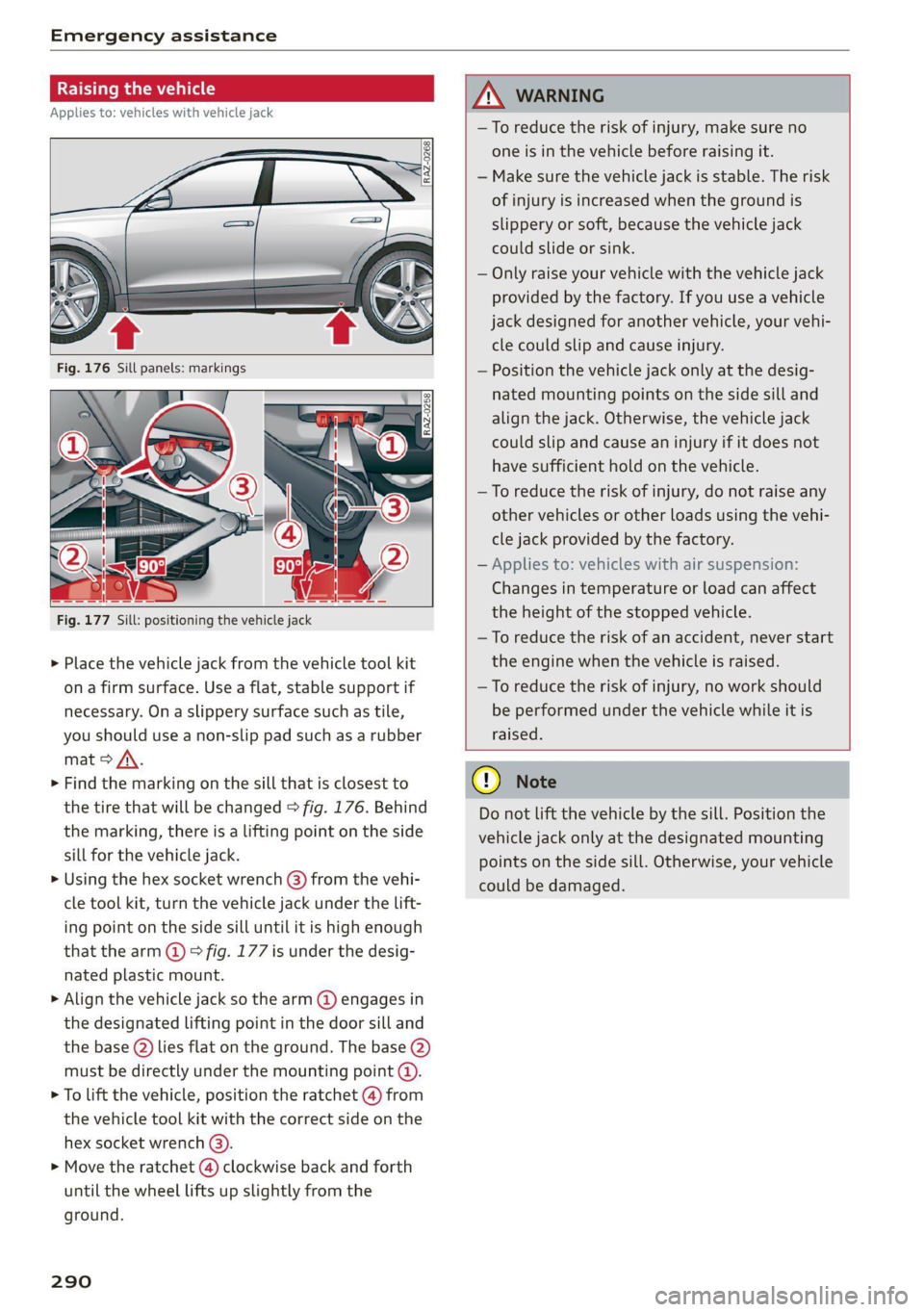
Fig. 177 Sill: positioning the vehicle jack
> Place the vehicle jack from the vehicle tool kit
ona firm surface. Use a flat, stable support if
necessary. On a slippery surface such as tile,
you should use a non-slip pad such as a rubber
mat > /\.
> Find the marking on the sill that is closest to
the tire that will be changed > fig. 176. Behind
the marking, there is a lifting point on the side
sill for the vehicle jack.
> Using the hex socket wrench (3) from the vehi-
cle tool kit, turn the vehicle jack under the lift-
ing point on the side sill until it is high enough
that the arm @ 9 fig. 177 is under the desig-
nated plastic mount.
> Align the vehicle jack so the arm @ engages in
the designated Lifting point in the door sill and
the base (2) lies flat on the ground. The base 2)
must be directly under the mounting point (@).
> To lift the vehicle, position the ratchet @) from
the vehicle tool kit with the correct side on the
hex socket wrench @).
> Move the ratchet (@) clockwise back and forth
until the wheel lifts up slightly from the
ground.
290
AN WARNING
—To reduce the risk of injury, make sure no
one is in the vehicle before raising it.
— Make sure the vehicle jack is stable. The risk
of injury is increased when the ground is
slippery or soft, because the vehicle jack
could slide or sink.
— Only raise your vehicle with the vehicle jack
provided by the factory. If you use a vehicle
jack designed for another vehicle, your vehi-
cle could slip and cause injury.
— Position the vehicle jack only at the desig-
nated mounting points on the side sill and
align the jack. Otherwise, the vehicle jack
could slip and cause an injury if it does not
have sufficient hold on the vehicle.
—To reduce the risk of injury, do not raise any
other vehicles or other loads using the vehi-
cle jack provided by the factory.
— Applies to: vehicles with air suspension:
Changes in temperature or load can affect
the height of the stopped vehicle.
—To reduce the risk of an accident, never start
the engine when the vehicle is raised.
—To reduce the risk of injury, no work should
be performed under the vehicle while it is
raised.
() Note
Do not lift the vehicle by the sill. Position the
vehicle jack only at the designated mounting
points on the side sill. Otherwise, your vehicle
could be damaged.
Page 293 of 332
4M8012721BF
Emergency assistance
Removing and installing a wheel
@ Rg Tt
“ 0 oO
B8K-1477
Removing a wheel
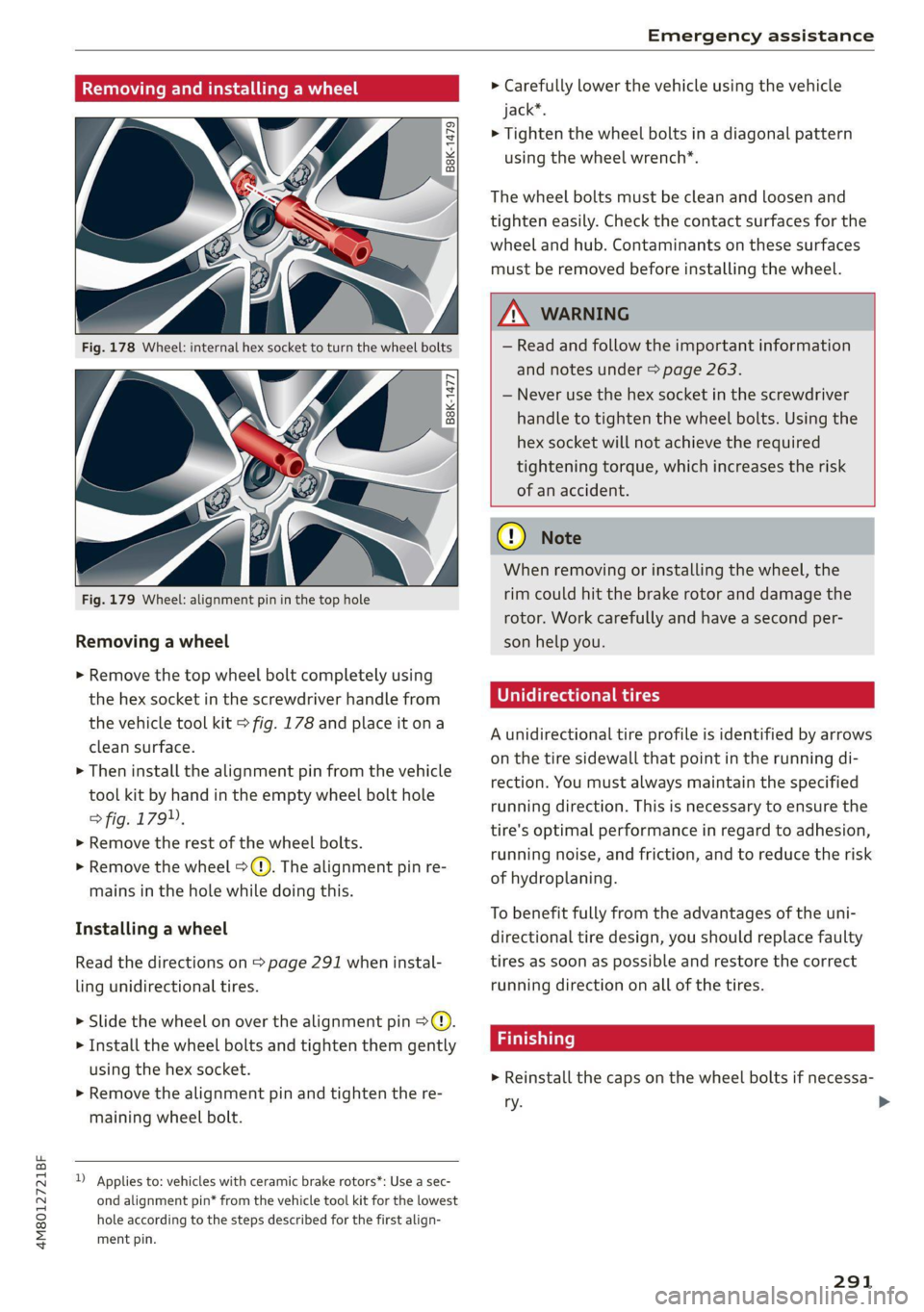
> Remove the top wheel bolt completely using
the hex socket in the screwdriver handle from
the vehicle tool kit > fig. 178 and place it ona
clean surface.
> Then install the alignment pin from the vehicle
tool kit by hand in the empty wheel bolt hole
> fig. 179”.
> Remove the rest of the wheel bolts.
> Remove the wheel >(). The alignment pin re-
mains in the hole while doing this.
Installing a wheel
Read the directions on > page 291 when instal-
ling unidirectional tires.
> Slide the wheel on over the alignment pin >@.
> Install the wheel bolts and tighten them gently
using the hex socket.
> Remove the alignment pin and tighten the re-
maining wheel bolt.
D Applies to: vehicles with ceramic brake rotors*: Use a sec-
ond alignment pin* from the vehicle tool kit for the lowest
hole according to the steps described for the first align-
ment pin.
> Carefully lower the vehicle using the vehicle
jack*.
> Tighten the wheel bolts in a diagonal pattern
using the wheel wrench*.
The wheel bolts must be clean and loosen and
tighten easily. Check the contact surfaces for the
wheel and hub. Contaminants on these surfaces
must be removed before installing the wheel.
ZX WARNING
— Read and follow the important information
and notes under > page 263.
— Never use the hex socket in the screwdriver
handle to tighten the wheel bolts. Using the
hex
socket will not achieve the required
tightening torque, which increases the risk
of an accident.
() Note
When removing or installing the wheel, the
rim could hit the brake rotor and damage the
rotor. Work carefully and have a second per-
son help you.
Unidirectional tires
A unidirectional tire profile is identified by arrows
on the tire sidewall that point in the running di-
rection. You must always maintain the specified
running direction. This is necessary to ensure the
tire's optimal performance in regard to adhesion,
running noise, and friction, and to reduce the risk
of
hydroplaning.
To benefit fully from the advantages of the uni-
directional tire design, you should replace faulty
tires as soon as possible and restore the correct
running direction on all of the tires.
> Reinstall the caps on the wheel bolts if necessa-
ry.
291