Start AUDI Q8 2021 Owner´s Manual
[x] Cancel search | Manufacturer: AUDI, Model Year: 2021, Model line: Q8, Model: AUDI Q8 2021Pages: 332, PDF Size: 118.76 MB
Page 42 of 332
Opening and closing
PANIC —To turn the alarm off, press the button
again.
Lost key/replacing a key
If a vehicle key is lost, contact an authorized Audi
dealer or authorized Audi Service Facility. Have
this vehicle key deactivated. It is important to
bring all keys with you.
If a key is lost, you should report it to your insur-
ance company.
Electronic immobilizer
The immobilizer prevents unauthorized use of
the vehicle.
In some cases, it may not be possible to start the
vehicle if there is a vehicle key from a different
vehicle manufacturer on the key chain.
Data in the vehicle key
When driving, service and maintenance-relevant
data is continuously stored in your vehicle key. An
authorized Audi dealer or authorized Audi Service
Facility can read out this data and tell you about
the work your vehicle needs.
ZA WARNING
Observe the safety precautions > page 35.
@) Note
Protect the key against high temperatures
and direct sunlight.
@ For the sake of the environment
XE Do not dispose of vehicle keys in household
trash. They contain materials that can be re-
cycled. Contact an authorized Audi dealer or
authorized Audi Service Facility for more in-
formation.
@) Tips
— The vehicle key function can be temporarily
disrupted by interference from transmitters
near the vehicle working in the same fre-
quency range (such as a mobile device or ra-
dio equipment). Always check if your vehicle
is locked.
40
— Applies to MMI: You can view the number of
keys programmed to the vehicle by selecting
on the home screen: VEHICLE > Settings &
Service > Vehicle information.
— The system complies with United States FCC
regulations and ISED regulations
=> page 311.
Unlocking and locking the vehicle
[RAZ-0025]
my
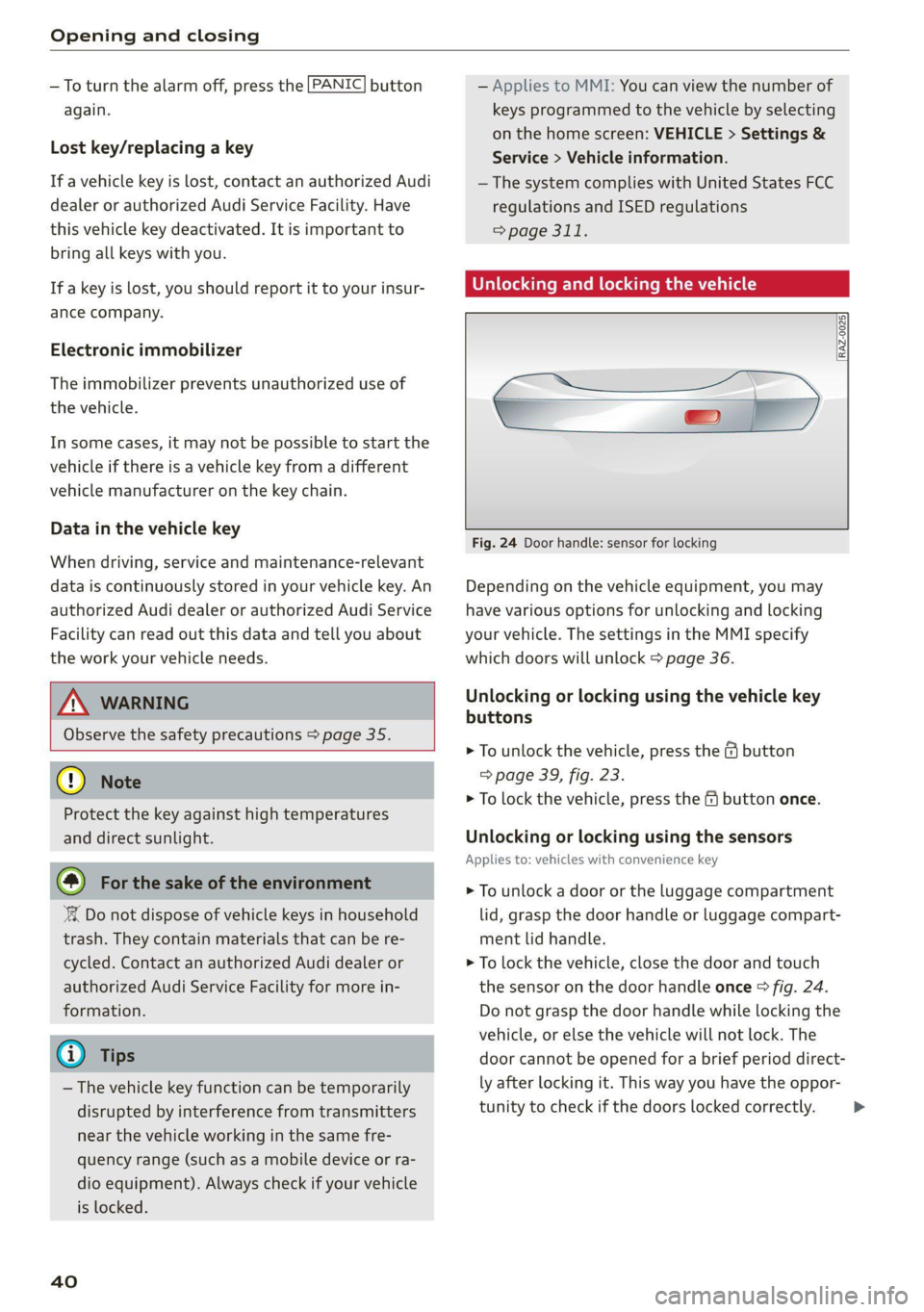
Fig. 24 Door handle: sensor for locking
Depending on the vehicle equipment, you may
have various options for unlocking and locking
your vehicle. The settings in the MMI specify
which doors will unlock > page 36.
Unlocking or locking using the vehicle key
buttons
> To unlock the vehicle, press the & button
=> page 39, fig. 23.
> To lock the vehicle, press the ff button once.
Unlocking or locking using the sensors
Applies to: vehicles with convenience key
> To unlock a door or the luggage compartment
lid, grasp the door handle or luggage compart-
ment lid handle.
> To lock the vehicle, close the door and touch
the sensor on the door handle once > fig. 24.
Do not grasp the door handle while locking the
vehicle, or else the vehicle will not lock. The
door cannot be opened for a brief period direct-
ly after locking it. This way you have the oppor-
tunity to check if the doors locked correctly. >
Page 52 of 332
Opening and closing
Location pairing
Applies to: vehicles with location pairing
For easier operation, you can program your sys-
tem's location.
Requirements: the respective hand transmitter
must be programmed > page 49 and the vehicle
must be located in front of the system.
> If you have programmed your system, follow
the instructions in the MMI. Or
If you would like to set up location pairing at an-
other time:
> Applies to: MMI: Select on the home screen:
VEHICLE > Settings & Service > Garage door
opener.
> Press the Z button.
> Press the 7 button for the system your vehicle
is facing.
> Select: Location pairing.
> Follow the instructions in the MMI.
Only a maximum of three systems can be dis-
played in the notification center > page 23. If
you would like to have all systems displayed,
press aa.
Renaming programmed systems
You can rename the programmed systems indi-
vidually (names may have a maximum of 10 char-
acters).
> If you have programmed your system, follow
the instructions in the MMI. Or
If you would like to change the name at another
time:
» Applies to: MMI: Select on the home screen:
VEHICLE > Settings & Service > Garage door
opener.
> Press the Z button.
> Press the 7 button for the system that you
would like to rename.
> Select: Rename. If necessary, delete the preset
name, such as Garage door opener 1.
> Follow the instructions in the MMI.
Deleting programmed systems
The programmed systems can be deleted individ-
ually or all at once.
sO
> Applies to: MMI: Select on the home screen:
VEHICLE > Settings & Service > Garage door
opener.
> Press the Z button.
> To delete an individual system, press the L]
button for the desired system. If the checkmark
Y is set, select: Delete.
> To delete all systems, select: All > Delete.
G) Tips
— Make sure the batteries in the hand trans-
mitter are charged before starting the pro-
gramming process.
— The programming process may take up to
30 seconds. It may be necessary for the
hand transmitter to be pressed again in the
meantime.
— The garage door opener may need to be
synchronized with the system after pro-
gramming. Follow the manufacturer's in-
structions for doing this.
G) Tips
In some cases, the system may need to be
programmed in a different mode (“D mode”).
— Switch the ignition on.
— Applies to: MMI: Select on the home screen:
VEHICLE > Settings & Service > Garage
door opener.
— Press and hold the desired button @).
— Select Yes, in D mode and follow the in-
structions on the MMI.
Page 66 of 332
Sitting correctly and safely
> To adjust the seat upward or downward, push
the rear section of the button @) upward or
downward.
> To adjust the seat surface, press the front part
of the button @ upward or downward.
Adjusting the backrests
> To move the backrest forward or backward,
press the button @) forward or backward.
Adjusting the lumbar support
> To adjust the lumbar support, press the button
@ in the desired direction.
Massage function
Switching the massage function on or off @). Set-
ting
the massage type and intensity > page 64.
ZA\ WARNING
The power front seats can also be adjusted
when the ignition is switched off. To reduce
the risk of injury, children should never be left
unattended in the vehicle.
ONC ma Rice SMa D |
Applies to: vehicles with seat settings in the MMI
Sa
(4.
RAZ-0589
—@
©=-c3
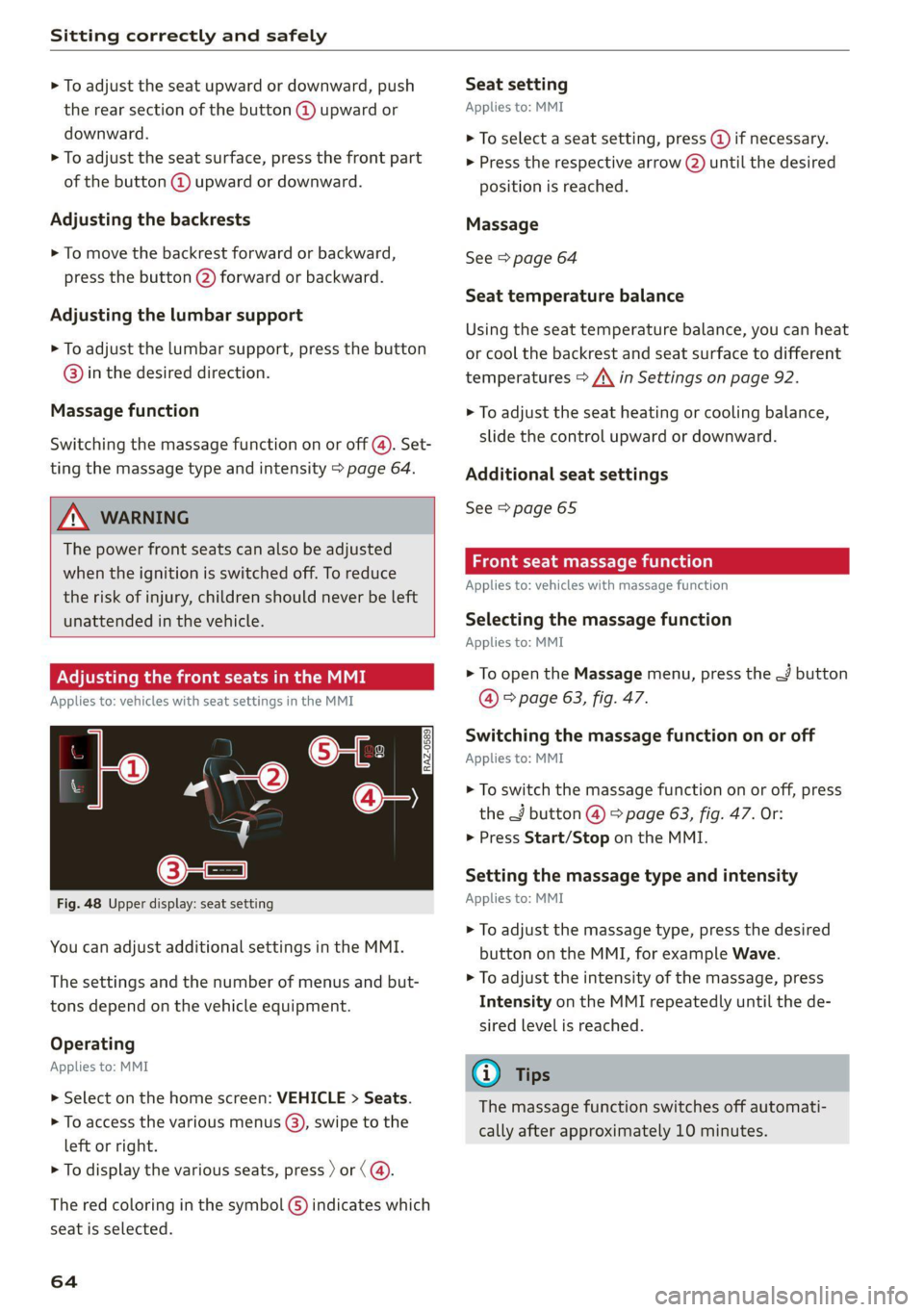
Fig. 48 Upper display: seat setting
You can adjust additional settings in the MMI.
The settings and the number of menus and but-
tons depend on the vehicle equipment.
Operating
Applies to: MMI
> Select on the home screen: VEHICLE > Seats.
> To access the various menus ®, swipe to the
left or right.
> To display the various seats, press ) or (@.
The red coloring in the symbol G) indicates which
seat is selected.
64
Seat setting
Applies to: MMI
> To select a seat setting, press (@ if necessary.
> Press the respective arrow (@) until the desired
position is reached.
Massage
See > page 64
Seat temperature balance
Using the seat temperature balance, you can heat
or cool the backrest and seat surface to different
temperatures > /\ in Settings on page 92.
> To adjust the seat heating or cooling balance,
slide the control upward or downward.
Additional seat settings
See > page 65
Front seat massage function
Applies to: vehicles with massage function
Selecting the massage function
Applies to: MMI
> To open the Massage menu, press the J button
@ © page 63, fig. 47.
Switching the massage function on or off
Applies to: MMI
> To switch the massage function on or off, press
the J button @ © page 63, fig. 47. Or:
> Press Start/Stop on the MMI.
Setting the massage type and intensity
Applies to: MMI
> To adjust the massage type, press the desired
button on the MMI, for example Wave.
> To adjust the intensity of the massage, press
Intensity on the MMI repeatedly until the de-
sired level is reached.
G) Tips
The massage function switches off automati-
cally after approximately 10 minutes.
Page 68 of 332
Sitting correctly and safely
Adjusting ory
Sl
B8R-0388
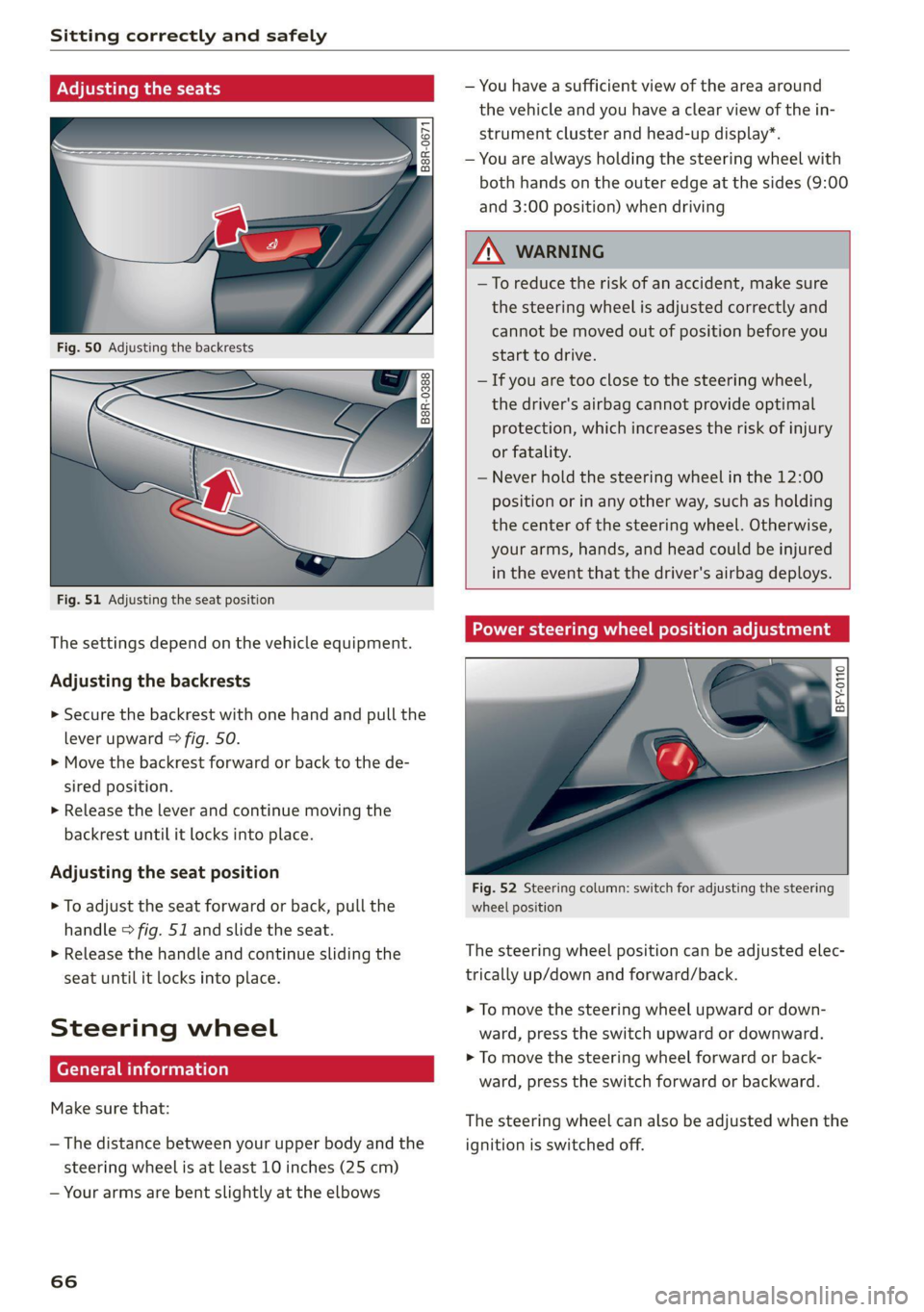
Fig. 51 Adjusting the seat position
The settings depend on the vehicle equipment.
Adjusting the backrests
> Secure the backrest with one hand and pull the
lever
upward > fig. 50.
> Move the backrest forward or back to the de-
sired position.
> Release the lever and continue moving the
backrest until it locks into place.
Adjusting the seat position
> To adjust the seat forward or back, pull the
handle > fig. 51 and slide the seat.
> Release the handle and continue sliding the
seat until it locks into place.
Steering wheel
erally)
Make sure that:
— The distance between your upper body and the
steering wheel is at least 10 inches (25 cm)
— Your arms are bent slightly at the elbows
66
— You have a sufficient view of the area around
the vehicle and you have a clear view of the in-
strument cluster and head-up display”.
— You are always holding the steering wheel with
both hands on the outer edge at the sides (9:00
and 3:00 position) when driving
ZA\ WARNING
— To reduce the risk of an accident, make sure
the steering wheel is adjusted correctly and
cannot be moved out of position before you
start to drive.
— If you are too close to the steering wheel,
the driver's airbag cannot provide optimal
protection, which increases the risk of injury
or fatality.
— Never hold the steering wheel in the 12:00
position or in any other way, such as holding
the center of the steering wheel. Otherwise,
your arms, hands, and head could be injured
in the event that the driver's airbag deploys.
Power steering wheel position adjustment
BFY.0110
:
Fig. 52 Steering column: switch for adjusting the steering
wheel position
The steering wheel position can be adjusted elec-
trically up/down and forward/back.
> To move the steering wheel upward or down-
ward, press the switch upward or downward.
> To move the steering wheel forward or back-
ward, press the switch forward or backward.
The steering wheel can also be adjusted when the
ignition is switched off.
Page 73 of 332
4M8012721BF
Sitting correctly and safely
PXe fetta eae im adel
Belt retractor lock
The safety belts on the rear seats and on the
front passenger seat are equipped with a belt re-
tractor lock.
> If you secure a child safety seat with a safety
belt, the belt retractor lock on the safety belt
may need to be activated. Follow the instruc-
tions from the child safety seat manufacturer.
> When a vehicle passenger has fastened a safety
belt, the belt retractor lock should not be acti-
vated. If the belt retractor lock has been acti-
vated unexpectedly, deactivate it.
Deactivating or activating the belt retractor lock
=> page 79.
Safety belt retractor
The safety belts are equipped with an automatic
belt retractor. This automatic retractor allows the
safety belt to be pulled all the way out when the
belt is pulled slowly. However, the automatic re-
tractor locks during sudden braking maneuvers.
It also locks the belts when accelerating, driving
uphill, and driving around curves.
Belt force limiter
Safety belts with belt force limiters reduce the
force placed on the body by the safety belts dur-
ing a collision.
Safety belt pretensioners
Safety belts may be tightened with reversible
belt tensioners when you start driving and in cer-
tain driving situations. If the safety belt is too
loose, it will be tightened so that the belt will
rest closer to the body.
In some collisions, pyrotechnic belt tensioners
may secure the safety belts so that they cannot
loosen. This reduces forward movement by the
vehicle passengers.
ZA WARNING
The pyrotechnic system can only provide pro-
tection during one collision. If the pyrotechnic
belt tensioners deploy, the pretensioning sys-
tem must be replaced by an authorized Audi
dealer or authorized Audi Service Facility.
(i) Tips
Smoke may be released when pyrotechnic belt
tensioners deploy. This is not a sign of a vehi-
cle fire.
Memory function
General information
Applies to: vehicles with memory function
With the memory function, you can save and call
up seat profiles using the memory buttons in the
door trim panel.
Depending on vehicle equipment, some settings
such as the driver’s seat and exterior mirror posi-
tion can be stored.
Storing and recalling a seat profile
Applies to: vehicles with memory function
The memory function buttons are located in the
door trim panel.
Storing a seat profile
>» Press the [SET] button. If the LED in the button
turns on, a seat profile can be stored.
> Push one of the numbered memory buttons. A
tone confirms that the settings were stored.
Accessing a seat profile
» While the driver’s or front passenger's door is
open and the ignition is switched off, press the
memory button once briefly. The seat will be
fully adjusted to the settings in the seat profile.
> If the driver's/front passenger's door is closed
or the ignition is switched on, press and hold
the memory button until the seat profile is
completely set.
ZX WARNING
— To reduce the risk of an accident, the seat
setting can only be recalled when the vehicle
is stationary. >
71
Page 87 of 332
4M8012721BF
Storage and convenience
> To pull the luggage compartment cover out,
hold the handle @ on the cover and pull it to-
ward the rear of the vehicle until it locks into
place audibly at the ends of the guide rails 2).
> To retract the luggage compartment cover, lift
it lightly and guide it slowly by hand toward the
front of the vehicle without letting it retract
quickly.
> To remove the luggage compartment cover,
pull both levers (3) firmly in the direction of the
arrow and remove the cover upward.
> To install the luggage compartment cover,
place the cover in the mounts on the side trim
panels on the left and right side.
> Push the cover downward until it clicks into
place.
lg gage compartment [coy ees
Applies to: vehicles with power luggage compartment cover
Qs
Z
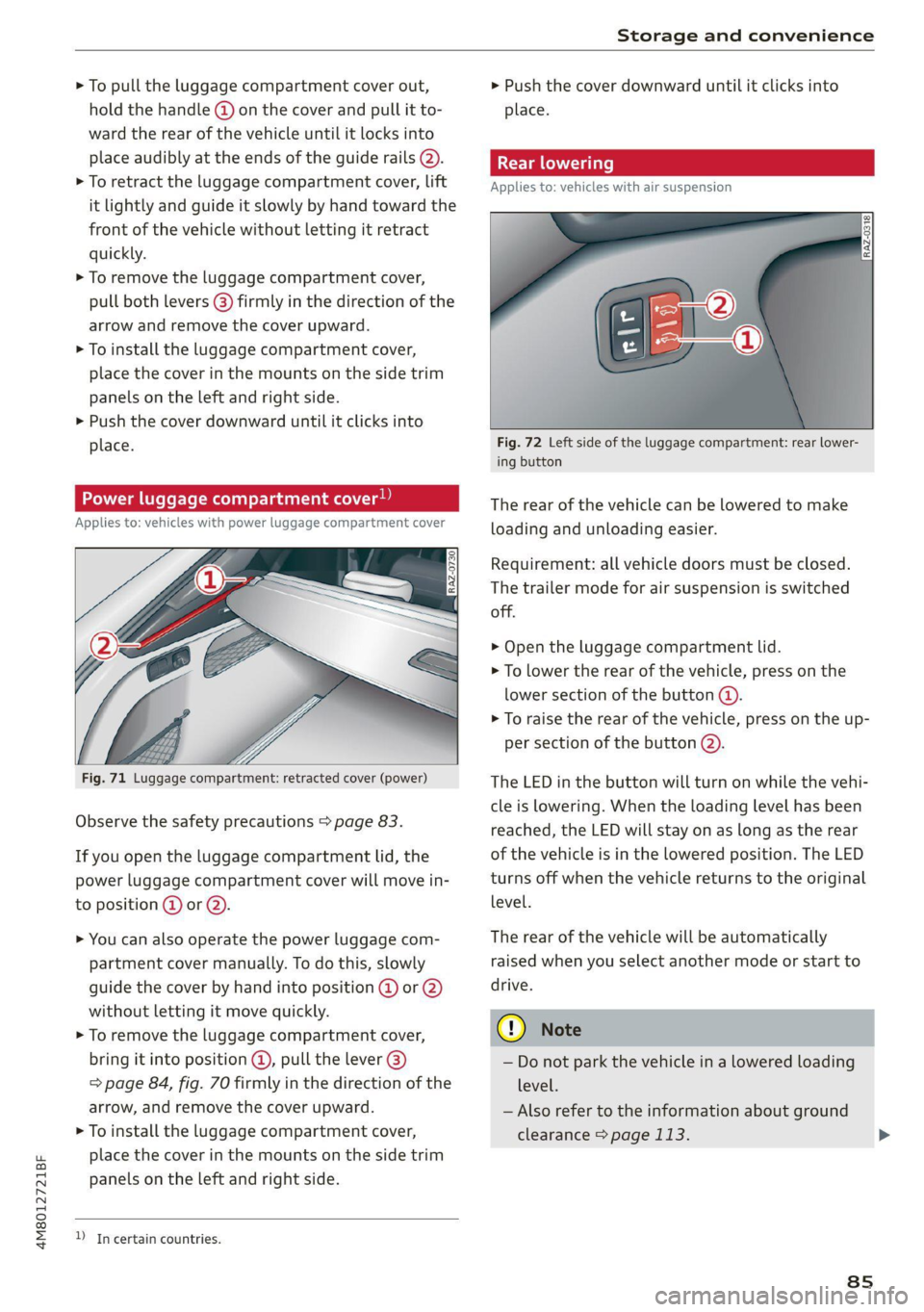
Fig. 71 Luggage compartment: retracted cover (power)
Observe the safety precautions > page 83.
If you open the luggage compartment lid, the
power luggage compartment cover will move in-
to position @ or Q).
> You can also operate the power luggage com-
partment cover manually. To do this, slowly
guide the cover by hand into position @ or 2)
without letting it move quickly.
> To remove the luggage compartment cover,
bring it into position @, pull the lever @)
=> page 84, fig. 70 firmly in the direction of the
arrow, and remove the cover upward.
> To install the luggage compartment cover,
place the cover in the mounts on the side trim
panels on the Left and right side.
D In certain countries.
> Push the cover downward until it clicks into
place.
Applies to: vehicles with air suspension
Fig. 72 Left side of the luggage compartment: rear lower-
ing button
The rear of the vehicle can be lowered to make
loading and unloading easier.
Requirement: all vehicle doors must be closed.
The trailer mode for air suspension is switched
off.
> Open the luggage compartment lid.
> To lower the rear of the vehicle, press on the
lower section of the button @).
> To raise the rear of the vehicle, press on the up-
per section of the button @).
The LED in the button will turn on while the vehi-
cle is lowering. When the loading level has been
reached, the LED will stay on as long as the rear
of the vehicle is in the lowered position. The LED
turns off when the vehicle returns to the original
level.
The rear of the vehicle will be automatically
raised when you select another mode or start to
drive.
©) Note
— Do not park the vehicle in a lowered loading
level.
— Also refer to the information about ground
clearance > page 113.
8s
Page 97 of 332
4M8012721BF
Driving
Driving
Starting the vehicle
pyr Told T ola (ela)
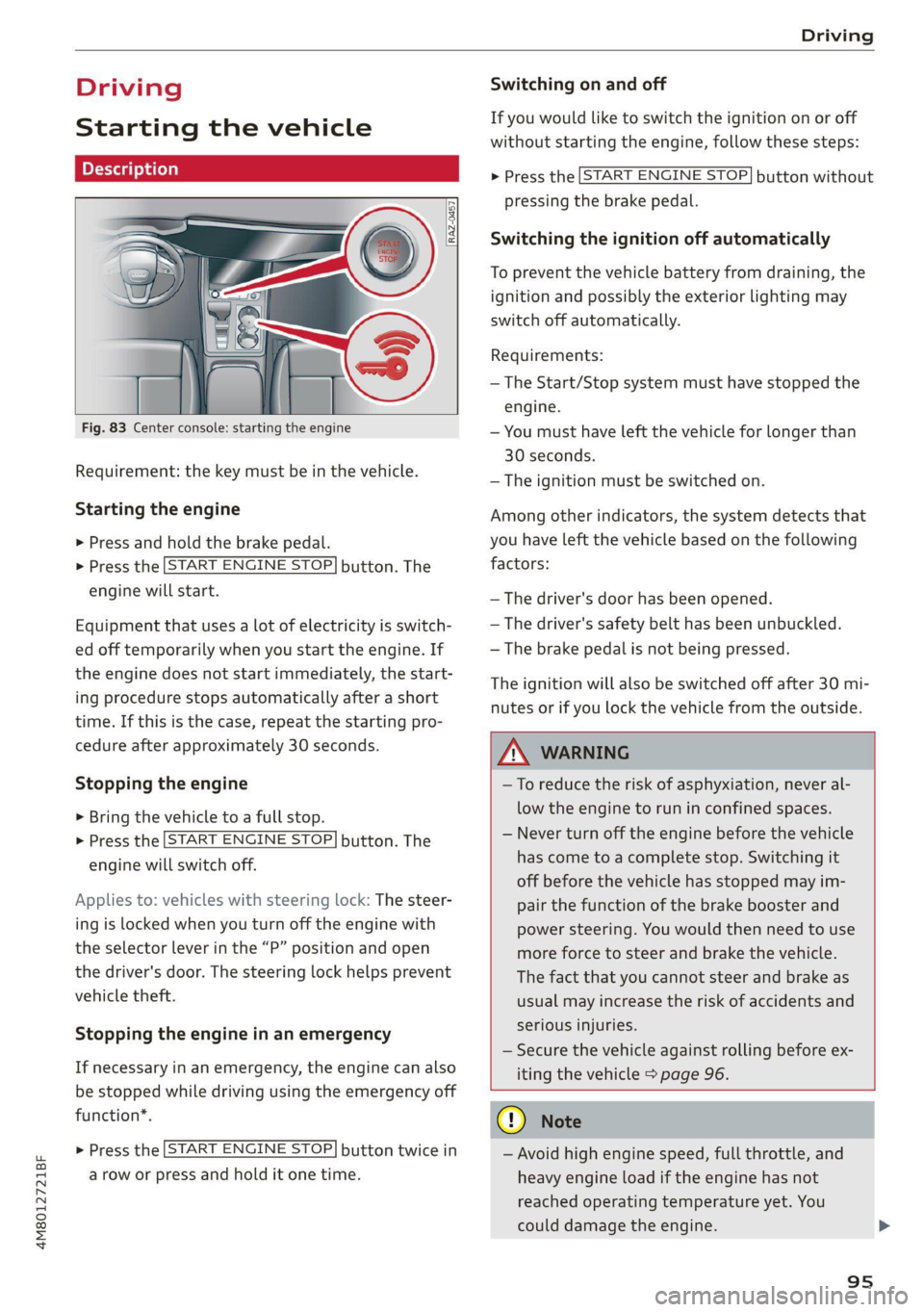
Fig. 83 Center console: starting the engine
Requirement: the key must be in the vehicle.
Starting the engine
> Press and hold the brake pedal.
> Press the [START ENGINE STOP] button. The
engine will start.
Equipment that uses a lot of electricity is switch-
ed off temporarily when you start the engine. If
the engine does not start immediately, the start-
ing procedure stops automatically after a short
time. If this is the case, repeat the starting pro-
cedure after approximately 30 seconds.
Stopping the engine
> Bring the vehicle to a full stop.
> Press the [START ENGINE STOP] button. The
engine will switch off.
Applies to: vehicles with steering lock: The steer-
ing is locked when you turn off the engine with
the selector lever in the “P” position and open
the driver's door. The steering lock helps prevent
vehicle theft.
Stopping the engine in an emergency
If necessary in an emergency, the engine can also
be stopped while driving using the emergency off
function*.
> Press the [START ENGINE STOP] button twice in
a row or press and hold it one time.
Switching on and off
If you would like to switch the ignition on or off
without starting the engine, follow these steps:
> Press the [START ENGINE STOP] button without
pressing the brake pedal.
Switching the ignition off automatically
To prevent the vehicle battery from draining, the
ignition and possibly the exterior lighting may
switch off automatically.
Requirements:
— The Start/Stop system must have stopped the
engine.
— You must have left the vehicle for longer than
30 seconds.
— The ignition must be switched on.
Among other indicators, the system detects that
you have left the vehicle based on the following
factors:
— The driver's door has been opened.
— The driver's safety belt has been unbuckled.
— The brake pedal is not being pressed.
The ignition will also be switched off after 30 mi-
nutes or if you lock the vehicle from the outside.
Z\ WARNING
—To reduce the risk of asphyxiation, never al-
low the engine to run in confined spaces.
— Never turn off the engine before the vehicle
has come to a complete stop. Switching it
off before the vehicle has stopped may im-
pair the function of the brake booster and
power steering. You would then need to use
more force to steer and brake the vehicle.
The fact that you cannot steer and brake as
usual may increase the risk of accidents and
serious injuries.
— Secure the vehicle against rolling before ex-
iting the vehicle > page 96.
CG) Note
— Avoid high engine speed, full throttle, and
heavy engine load if the engine has not
reached operating temperature yet. You
could damage the engine.
95
Page 98 of 332
Driving
— If the engine has been under heavy load for
an extended period of time, heat builds up
in the engine compartment after the engine
is switched off and there is a risk of damag-
ing the engine. For this reason, let the en-
gine run at idle for approximately two mi-
nutes before shutting it off.
G) Tips
— Brief noises are normal when starting and
stopping the vehicle and are no cause for
concern.
— For up to 10 minutes after stopping the en-
gine, the radiator fan may turn on again au-
tomatically or it may continue to run, even if
the ignition is switched off.
— It may not be possible to start the vehicle in
extremely low temperatures.
— Power will be fully available once the engine
is at operating temperature.
Messages
= Engine start system: malfunction! Please
contact Service
Do not switch the ignition off because you may
not be able to switch it on again. Drive to an au-
thorized Audi dealer or authorized Audi Service
Facility immediately to have the malfunction cor-
rected.
FJ Engine start system: malfunction! Please
contact Service
There is a malfunction in the engine start system.
Drive immediately to an authorized Audi dealer
or authorized Audi Service Facility to have the
malfunction repaired.
| Remote control key: key not detected. Is the
key
still in the vehicle?
The vehicle key was removed from the vehicle
while the engine is running. If the vehicle key is
no longer in the vehicle, you cannot switch the ig-
nition on or start the engine once you stop it. You
also cannot lock the vehicle from the outside.
Remote control key: hold back of key
against the designated area. See owner's man-
ual
96
The battery in the vehicle key may be drained or
there may be a malfunction. To start the vehicle,
you must also hold the vehicle key against the lo-
cation shown ?) > page 95, fig. 83.
If the malfunction remains, drive immediately to
an authorized Audi dealer or authorized Audi
Service Facility to have the malfunction correct-
ed.
When driving
Starting to drive, stopping, and parking
Starting from a stop
> Press and hold the brake pedal.
> Start the engine.
> Select a gear.
> Release the parking brake.
> Release the brake pedal. The vehicle may roll.
» Press the accelerator pedal to accelerate.
Securing the vehicle against rolling
Secure your vehicle to prevent it from rolling be-
fore exiting the vehicle.
> Set the parking brake.
> Select the “P” selector lever position.
> If parking on a steep road, turn the steering
wheel so that your vehicle will roll against the
curb in case it should start to move.
If one of these measures is not possible, for ex-
ample because there is no vehicle power, you
must secure your vehicle against rolling using ad-
ditional measures.
> Only park the vehicle on a level surface.
> Use suitable objects to block the front and rear
wheels.
Set the parking brake before selecting the “P” se-
lector lever position. This prevents too much
stress from being placed on the locking mecha-
nism when parking on a steep surface.
ZA WARNING
— Always set the parking brake when leaving
your vehicle, even if for a short period of >
Page 99 of 332
4M8012721BF
Driving
time. If the parking brake is not set, the ve-
hicle could roll away, increasing the risk of
an accident.
— Do not leave your vehicle unattended while
the engine is running, because this increases
the risk of an accident.
— If the parking brake is set, it can release au-
tomatically when the accelerator pedal is
pressed. To reduce the risk of an accident,
do not inadvertently press the accelerator
pedal and always shift into “P” when the ve-
hicle is stopped.
— If you leave the vehicle, switch the ignition
off and take the key with you. This is espe-
cially important when leaving persons or an-
imals in the vehicle. Otherwise, the vehicle
could start unintentionally, the parking
brake could release, or electronic equipment
could activate, which increases the risk of an
accident.
— No persons or animals should be left in a
locked vehicle. Locked doors make it more
difficult for emergency workers to enter the
vehicle, which puts lives at risk.
— If you do not begin driving immediately af-
ter releasing the brake pedal, your vehicle
may begin to roll backward. Press the brake
pedal
or set the parking brake immediately.
@) Note
If you have to stop on an incline, always press
the brake pedal to hold the vehicle in place to
reduce the risk of the vehicle rolling back-
ward. Do not try to hold the vehicle in place
by pressing and holding the accelerator pedal.
The transmission can overheat, which increas-
es the risk of damage.
Hill hold assist
If you take your foot off of the brake pedal when
driving on hills, the braking force will be held for
several seconds. At that time, you can start driv-
ing without the vehicle rolling backward.
Requirement: the driver's door must be closed,
the engine must be on, and the vehicle must be
traveling uphill.
> To activate hill hold assist, press and hold the
brake pedal for several seconds while the vehi-
cle is stationary.
ZA\ WARNING
— If you do not begin driving immediately af-
ter releasing the brake pedal, your vehicle
may begin to roll backward. Press the brake
pedal
or set the parking brake immediately.
— The hill hold assist cannot hold the vehicle
on inclines in every scenario (for example,
on slippery or icy ground).
Gears and driving programs
@
(2
[RAZ-0410)
R
t
N
tT.
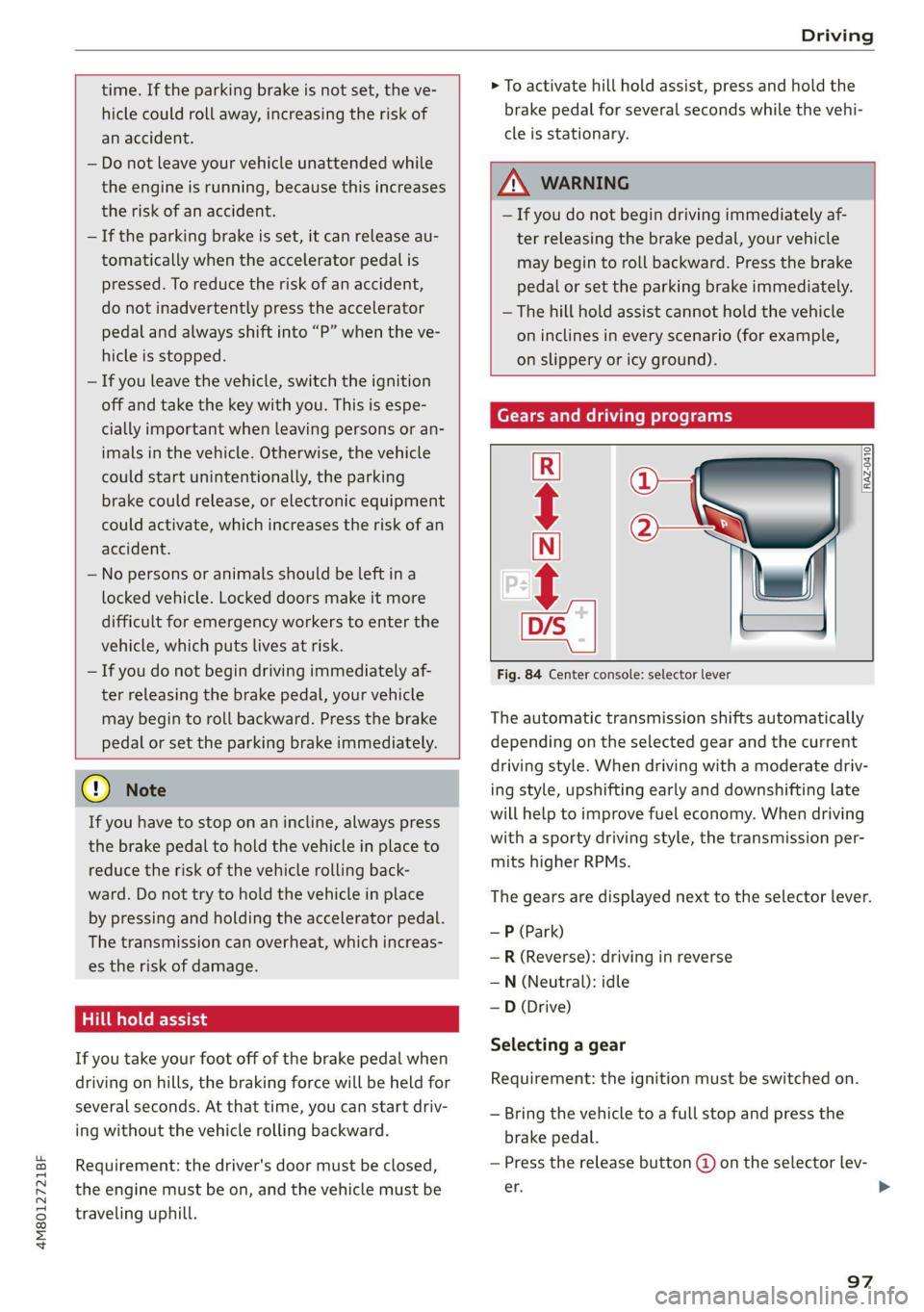
Fig. 84 Center console: selector lever
The automatic transmission shifts automatically
depending on the selected gear and the current
driving style. When driving with a moderate driv-
ing style, upshifting early and downshifting late
will help to improve fuel economy. When driving
with a sporty driving style, the transmission per-
mits higher RPMs.
The gears are displayed next to the selector lever.
—P (Park)
—R (Reverse): driving in reverse
—N (Neutral): idle
— D (Drive)
Selecting a gear
Requirement: the ignition must be switched on.
— Bring the vehicle to a full stop and press the
brake pedal.
— Press the release button @ on the selector lev-
er. >
97
Page 100 of 332
Driving
—To select the nearest gear, move the selector
lever forward or back until you feel the first
pressure point.
—To skip a gear (for example, move from “D” to
“R”), move the selector lever past the pressure
point in the desired direction.
— The label next to the selector lever for the se-
lected gear will light up.
“N” (Neutral) gear
In the “N” gear, power is not transmitted to the
driving wheels. Use the “N” gear in a car wash
(with conveyor belts), for example.
If you unintentionally select “N” while driving
(faster than 1 mph (2 km/h)), you can also shift
back to “D” without pressing the brake pedal.
For safety reasons, the vehicle cannot be locked
when the transmission is in the "N” gear.
“Pp” (Park) gear
Requirement: the ignition must be switched on.
The vehicle is secured from rolling away by the
parking lock when in the “P” gear.
— Bring the vehicle to a full stop and press the
brake pedal.
— Press the “P” button (2) on the selector lever.
— The “P” next to the selector lever will light up.
“P” engages automatically if you switch the en-
gine off while the “D” or “R” gear is selected. If
you switch the engine off in “N”, “P” will engage
automatically after approximately 30 minutes.
If you want to switch to another gear from “P”,
the engine must be running.
If you cannot shift out of “P”, for example be-
cause the vehicle has no power, you may need to
use the emergency release for the parking lock
=> page 100.
Selecting the driving program
Various driving programs can be selected when in
the “D” gear. The programs influence when the
transmission shifts and how the accelerator ped-
al responds.
The selected driving program is displayed in the
instrument cluster.
98
—D (Drive): normal driving mode
—S (Sport): sporty driving mode
If you select the dynamic mode in Audi drive se-
lect*, the “S” driving program will be activated.
When the ignition is switched off, the driving pro-
gram may be reset to “D”.
To switch between the current driving program
and “S”, push the selector lever toward the rear.
ZA\ WARNING
— Before you start driving, check if the label
for the desired selector lever position next
to the selector lever is lit up.
— Secure the vehicle against rolling before ex-
iting the vehicle > page 96.
— Power is still transmitted to the wheels
when the engine is running at idle. To pre-
vent the vehicle from “creeping”, you must
keep your foot on the brake in all selector
lever positions (except "P" and "N") when
the engine is running.
— To reduce the risk of an accident, do not
press the accelerator pedal when changing
gears if the vehicle is stationary and the en-
gine is running.
— Never select the “R" or "P” gears while driv-
ing. Doing so could cause an accident.
— The vehicle can roll even if the ignition is
switched off.
(i) Tips
If you shift between “D” and “R” within one
second, you do not need to press the brake
pedal. This makes it possible to “rock” if it is
stuck, for example.