Storage AUDI Q8 2021 Owner´s Manual
[x] Cancel search | Manufacturer: AUDI, Model Year: 2021, Model line: Q8, Model: AUDI Q8 2021Pages: 332, PDF Size: 118.76 MB
Page 185 of 332
4M8012721BF
Telephone
Disconnecting a mobile device
Applies to: vehicles with telephone
> To disconnect a Bluetooth device from the MMI,
use the Connected devices menu > page 235.
Using the Audi phone
box
General information
Applies to: vehicles with Audi phone box
oy
ae
[RAZ-170|
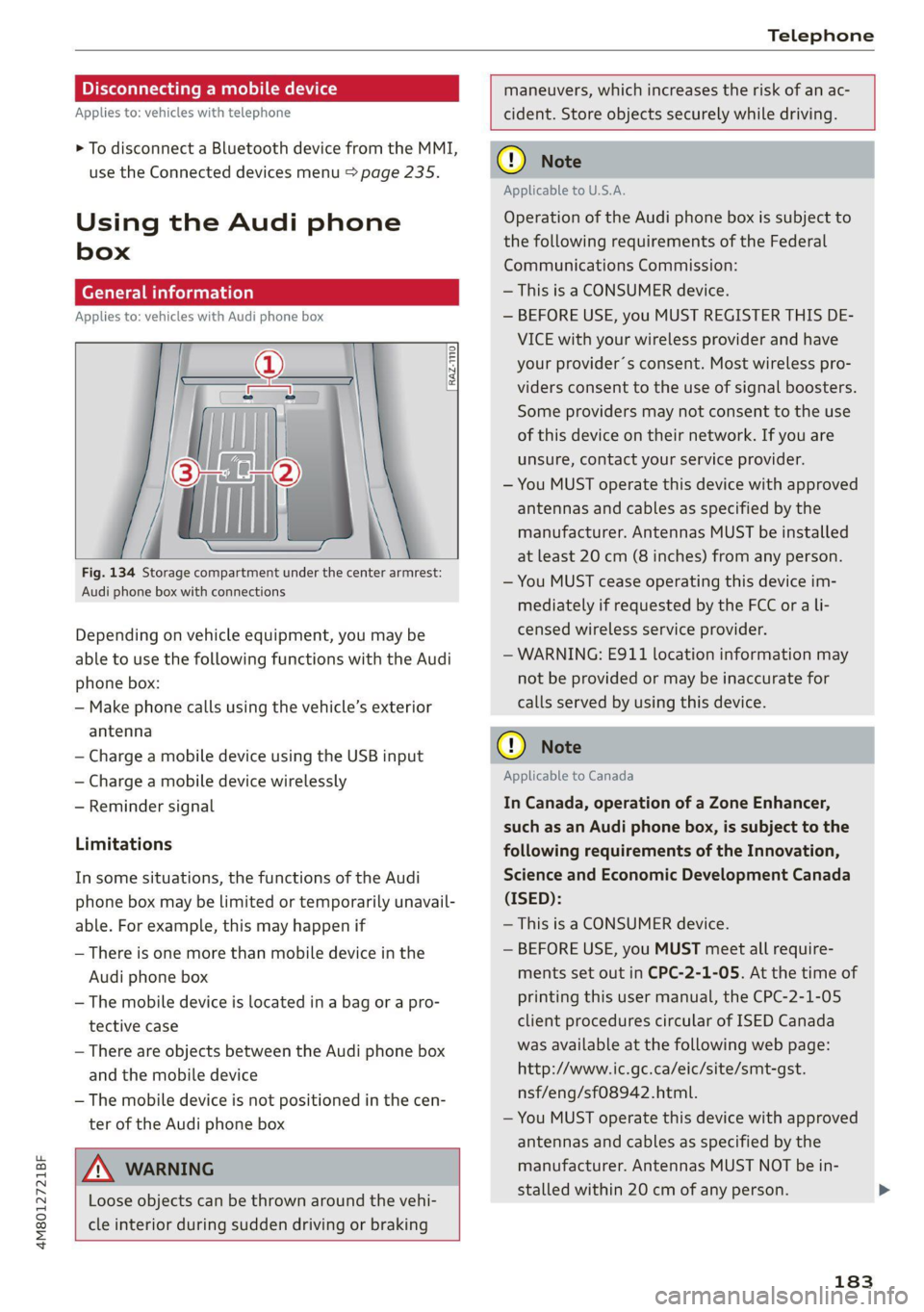
Fig. 134 Storage compartment under the center armrest:
Audi phone box with connections
Depending on vehicle equipment, you may be
able to use the following functions with the Audi
phone box:
— Make phone calls using the vehicle’s exterior
antenna
— Charge a mobile device using the USB input
— Charge a mobile device wirelessly
— Reminder signal
Limitations
In some situations, the functions of the Audi
phone box may be limited or temporarily unavail-
able. For example, this may happen if
— There is one more than mobile device in the
Audi phone box
— The mobile device is located in a bag or a pro-
tective case
— There are objects between the Audi phone box
and the mobile device
— The mobile device is not positioned in the cen-
ter of the Audi phone box
ZA\ WARNING
Loose objects can be thrown around the vehi-
cle interior during sudden driving or braking
maneuvers, which increases the risk of an ac-
cident. Store objects securely while driving.
() Note
Applicable to U.S.A.
Operation of the Audi phone box is subject to
the following requirements of the Federal
Communications Commission:
— This is a CONSUMER device.
— BEFORE USE, you MUST REGISTER THIS DE-
VICE with your wireless provider and have
your provider’s consent. Most wireless pro-
viders consent to the use of signal boosters.
Some providers may not consent to the use
of this device on their network. If you are
unsure, contact your service provider.
— You MUST operate this device with approved
antennas and cables as specified by the
manufacturer. Antennas MUST be installed
at least 20 cm (8 inches) from any person.
— You MUST cease operating this device im-
mediately if requested by the FCC or a li-
censed wireless service provider.
— WARNING: E911 location information may
not be provided or may be inaccurate for
calls served by using this device.
® Note
Applicable to Canada
In Canada, operation of a Zone Enhancer,
such as an Audi phone box, is subject to the
following requirements of the Innovation,
Science and Economic Development Canada
(ISED):
— This is a CONSUMER device.
— BEFORE USE, you MUST meet all require-
ments set out in CPC-2-1-05. At the time of
printing this user manual, the CPC-2-1-05
client procedures circular of ISED Canada
was available at the following web page:
http://www.ic.gc.ca/eic/site/smt-gst.
nsf/eng/sf08942.html.
— You MUST operate this device with approved
antennas
and cables as specified by the
manufacturer. Antennas MUST NOT be in-
stalled within 20 cm of any person.
183
Page 191 of 332
4M8012721BF
Telephone
— Decline with text message
— Edit voicemail number
Switching between two mobile devices
Requirement: phone 1 and phone 2 must be con-
nected to the MMI.
Switch telephones: the device name of the avail-
able mobile device is displayed. You can switch
the phone by pressing the button.
Ringtone and volume settings
— Ringtone and message volume: you can adjust
the volume using the slider.
— Ringtone: select a ringtone from the list.
— Microphone input level: you can adjust the in-
put Level of the microphone using the slider.
Data module serial number (IMEI)
Applies to: vehicles with data module
The serial number (IMEI) will be displayed.
Directory settings
Applies to: vehicles with telephone
> Applies to: MMI: Select on the home screen:
PHONE > Contacts > ©.
Switching between two mobile devices
Requirement: telephone 1 and telephone 2 must
be connected.
Switch telephones: the device name of the avail-
able mobile device is displayed. You can switch
the phone by pressing the button.
The directory for the selected phone will be dis-
played.
Hide grayed-out contacts
When this function is switched on, contacts that
have no phone numbers stored for them will be
hidden.
Sort order
You can sort the contacts by Last name or First
name.
Download contacts
Requirement: a mobile device must be connected
to the MMI.
To update the contacts in the MMI, you can man-
ually download your mobile device contacts. De-
pending on the mobile device, you may need to
disconnect and reconnect the Bluetooth connec-
tion to update the contacts.
Importing contacts
Requirement: a USB storage device must be con-
nected to the Audi music interface > page 222.
The USB storage device contains contacts in the
vCard format (.vcf). They must not be located in
sub-folders.
Applies to MMI: Select: Import contacts > Search
for import data > USB device 1/USB device 2 >
desired contacts or Select all contacts > Start
import.
(i) Tips
—The imported contacts are stored in the lo-
cal MMI memory.
— There should be no other files or folders on
the storage medium containing the contacts
to be imported.
— Apple devices and MTP devices (such as
smartphones) are not recognized as USB
storage devices.
Messages
Text messages
Applies to: vehicles with telephone
Requirement: your mobile device must be con-
nected to the MMI via Bluetooth Message Access
Profile (Bluetooth MAP).
> Applies to: MMI: Select on the home screen:
MESSAGES > (©) > e-mail (phone 1)/e-mail
(phone 2)*.
The following functions are available:
— New text message*
— Inbox
— Sent
— Outbox*
— Drafts*
— Deleted
User defined*
189
Page 222 of 332
Media
Media
General information
There may be different media sources and con-
nections available depending on the vehicle
equipment. For example, you can play media files
using a connected USB drive or connect your mo-
bile devices to the Audi music interface and oper-
ate them through the MMI.
Media and format restrictions: the MMI (includ-
ing the USB storage device connection) was test-
ed with a variety of products and media on the
market. However, there may be cases where indi-
vidual devices or media and audio/video files may
not be recognized, may play only with restric-
tions, or may not play at all.
Restricted functionality: reset the MMI to the
factory default settings if functionality is restrict-
ed > page 234.
Digital Rights Management: please note that
the
audio/video files are subject to copyright pro-
tection.
Files that are protected by DRM and are identi-
fied with the symbol f@ will not play.
Data security: never store important data on
CDs/DVDs or mobile devices. Audi is not responsi-
ble for damaged or lost files and media.
Loading times: the more files/folders/playlists
there are on a storage medium, the longer it will
take to load. To reduce the amount of time it
takes the audio/video files to load, use a storage
medium that only contains audio/video files, and
create subfolders (for example, for each artist or
album).
Additional information: when playing, audio
files are automatically displayed with any addi-
tional information that is stored (such as the ar-
tist, track and album cover). If this information is
not available on the medium, the MMI will revert
to the local Gracenote metadata database or
search online if necessary. See > page 228, On-
line additional data. However, in some cases, the
additional information may not be displayed.
220
@) Note
Read the information about Audi connect, and
be sure to note the connectivity costs section
=@ in General information on page 192.
DVD drive
General information
Applies to: vehicles with a DVD drive
The functionality of individual storage mediums
may be limited due to the variety of blank CDs/
DVDs available and the various capacities. Audio
CDs or video DVDs with copy protection, CDs/
DVDs that do not conform to the standard, and
multisession CDs may have limited playback or
may not play at all. Audi recommends finalizing
the recording process when creating multisession
CDs. Multisession DVDs are not supported.
(1) Note
To reduce the risk of damaging the drive and
data carriers:
— Always store data carriers in a protective
sleeve and do not expose them to direct
sunlight
— Do not use damaged, dirty, or laminated da-
ta carriers
— Do not use single CDs/-DVDs with a 3.1 inch
(8 cm) diameter, non-circular CDs/DVDs
(shaped CDs), cleaning CDs, and protective
rings
— Never force CDs/DVDs into the drive. Discs
are pulled in automatically.
G) Tips
The thermal protection switch stops playback
temporarily when outside temperatures are
too high.
Page 224 of 332
Media
» Applies to: MMI: Select on the home screen:
MEDIA > Source > Amazon Alexa.
@) Note
Read the information about Audi connect, and
be sure to note the connectivity costs section
=> page 192.
Multimedia connections
USB adapter cable
[RAH-9202
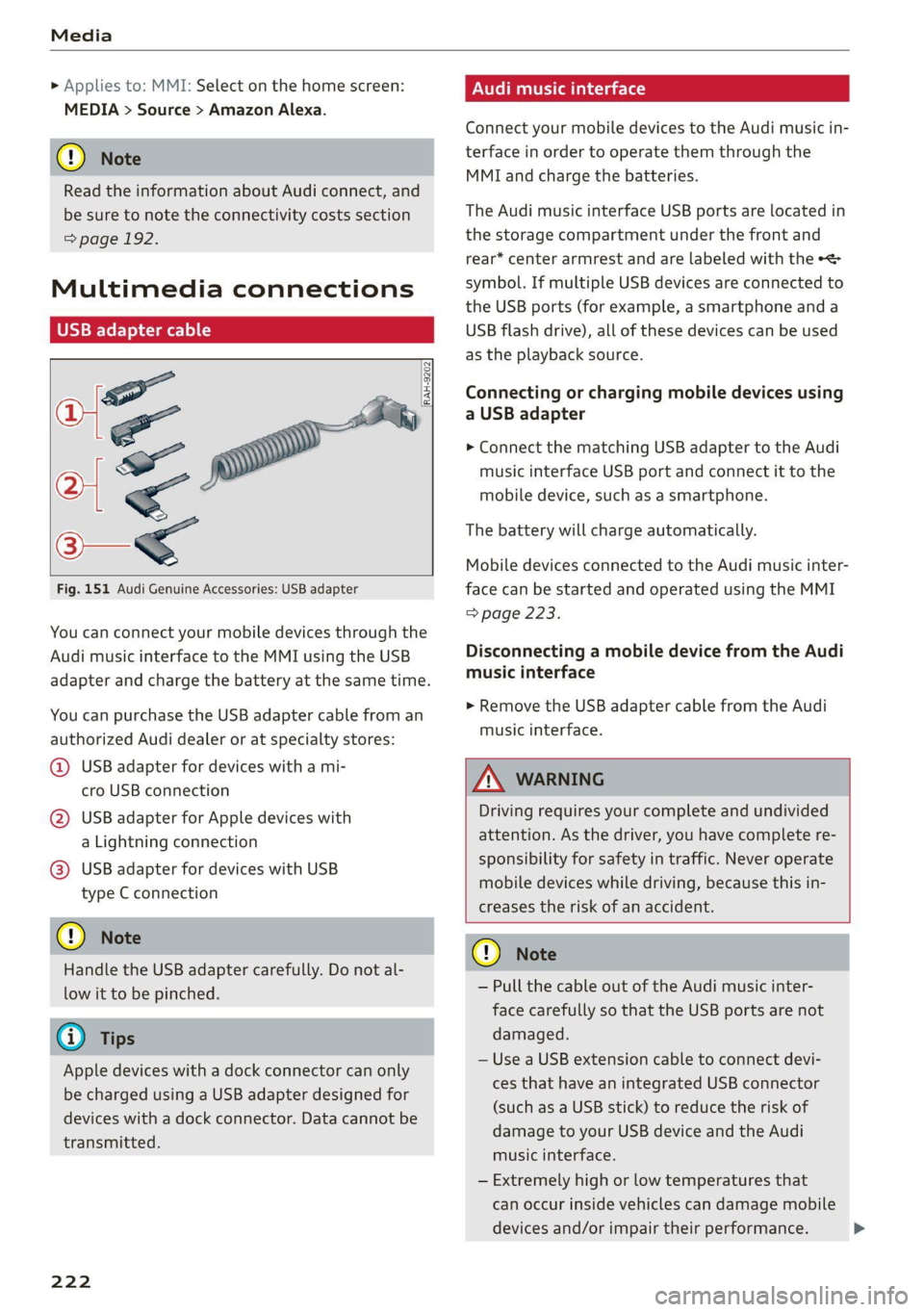
Fig. 151 Audi Genuine Accessories: USB adapter
You can connect your mobile devices through the
Audi music interface to the MMI using the USB
adapter and charge the battery at the same time.
You can purchase the USB adapter cable from an
authorized Audi dealer or at specialty stores:
@ USB adapter for devices with a mi-
cro USB connection
@ USB adapter for Apple devices with
a Lightning connection
@ USB adapter for devices with USB
type C connection
@) Note
Handle the USB adapter carefully. Do not al-
low it to be pinched.
G) Tips
Apple devices with a dock connector can only
be charged using a USB adapter designed for
devices with a dock connector. Data cannot be
transmitted.
222
ONU reat em Tale)
Connect your mobile devices to the Audi music in-
terface in order to operate them through the
MMI and charge the batteries.
The Audi music interface USB ports are located in
the storage compartment under the front and
rear* center armrest and are labeled with the +<
symbol. If multiple USB devices are connected to
the USB ports (for example, a smartphone and a
USB flash drive), all of these devices can be used
as the playback source.
Connecting or charging mobile devices using
a USB adapter
> Connect the matching USB adapter to the Audi
music interface USB port and connect it to the
mobile device, such as a smartphone.
The battery will charge automatically.
Mobile devices connected to the Audi music inter:
face can be started and operated using the MMI
=> page 223.
Disconnecting a mobile device from the Audi
music interface
> Remove the USB adapter cable from the Audi
music interface.
ZA\ WARNING
Driving requires your complete and undivided
attention. As the driver, you have complete re-
sponsibility for safety in traffic. Never operate
mobile devices while driving, because this in-
creases the risk of an accident.
@) Note
— Pull the cable out of the Audi music inter-
face carefully so that the USB ports are not
damaged.
— Use a USB extension cable to connect devi-
ces that have an integrated USB connector
(such as a USB stick) to reduce the risk of
damage to your USB device and the Audi
music interface.
— Extremely high or low temperatures that
can occur inside vehicles can damage mobile
devices and/or impair their performance.
Page 230 of 332
Media
Online additional data
Requirement: the MMI must be connected to the
Internet. A data plan must be available
=> page 196.
When the function is switched on, additional in-
formation (such as album cover, artist, track) will
be loaded depending on the availability from the
different providers.
DVD playback parental cntrl.
Playback of video DVDs can be restricted based
on age restrictions using parental control.
Displaying the DVD parental control menu
> Applies to: MMI: Select on the home screen:
MEDIA > ©} > DVD playback parental cntrl..
> Enter the PIN for parental control. The PIN set
at the factory is 1234.
> Press OK.
Switching the rating level on and off
Requirement: the DVD parental control menu
must be displayed.
> Select: DVD playback parental cntrl. > a rating
level (for example, level 5) > *, or
> To remove all restrictions, press Off.
Eight different protection levels can be set for
parental control. If you set the parental control
level at level 5, all DVDs from levels 1 - 5 can be
played. Video DVDs with a higher level will not
play.
Changing the PIN
Requirement: the DVD parental control menu
must be displayed.
> Select: Change PIN > enter a new PIN for pa-
rental control > OK.
> Repeat the entry and press OK.
G) Tips
— Not all video DVDs have parental control.
— The protection levels for the parental con-
trol are based on the US standards from the
Motion Picture Association of America
(MPAA). Note that the age levels for video
DVDs in European countries may differ.
— PIN entry for parental control will be locked
for approximately one minute if you enter
the incorrect PIN three times in a row. The
PIN can only be reset by an authorized Audi
dealer.
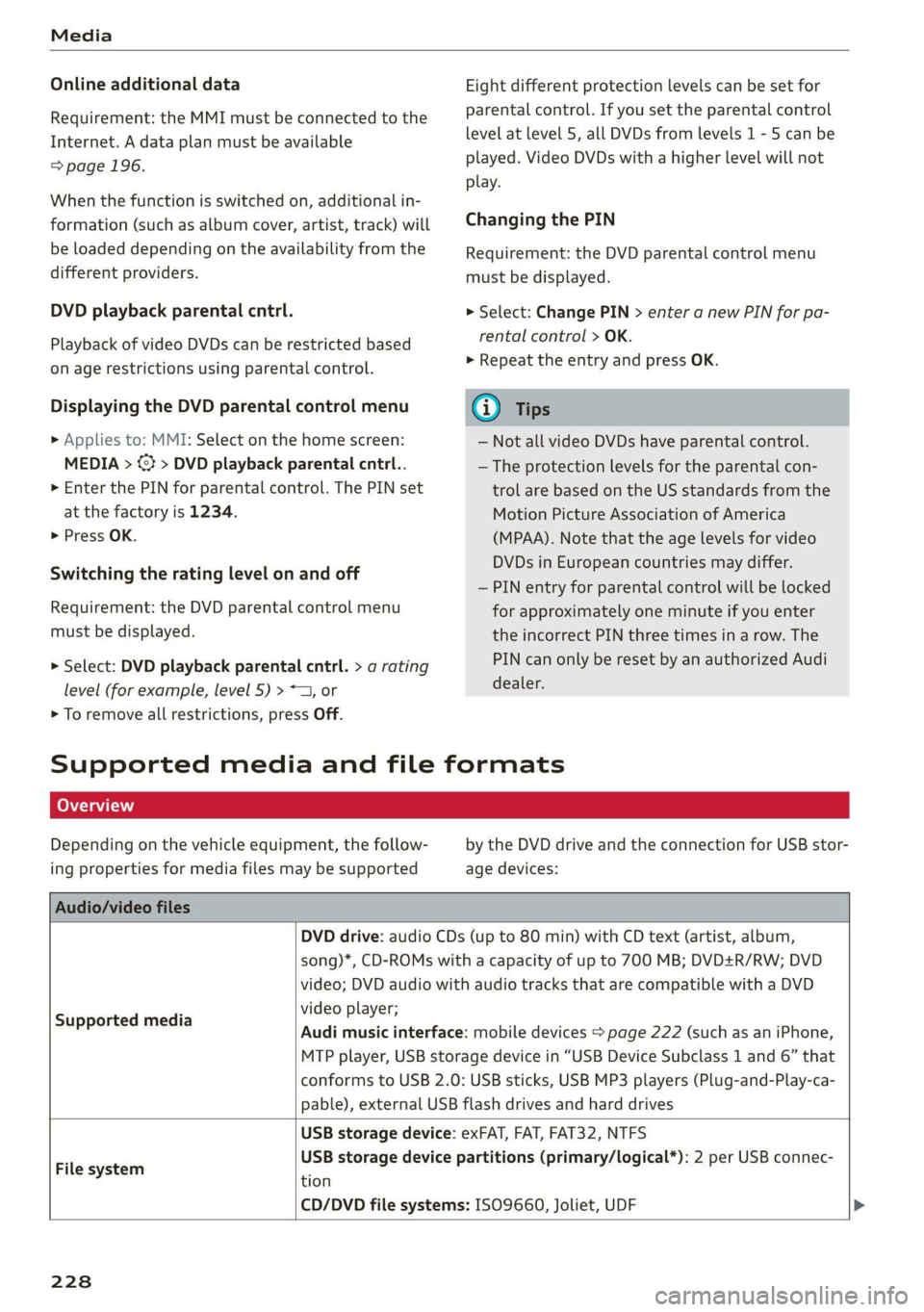
Supported media and file formats
OTe TN]
Depending on the vehicle equipment, the follow-
ing properties for media files may be supported
by the DVD drive and the connection for USB stor-
age devices:
Audio/video files
DVD drive: audio CDs (up to 80 min) with CD text (artist, album,
Supported media
song)*, CD-ROMs with a capacity of up to 700 MB; DVD+R/RW; DVD
video; DVD audio with audio tracks that are compatible with a DVD
video player;
Audi music interface: mobile devices > page 222 (such as an iPhone,
MTP player, USB storage device in “USB Device Subclass 1 and 6” that
conforms to USB 2.0: USB sticks, USB MP3 players (Plug-and-Play-ca-
pable), external USB flash drives and hard drives
File system
USB storage device: exFAT, FAT, FAT32, NTFS
USB storage device partitions (primary/logical*): 2 per USB connec-
tion
CD/DVD file systems: ISO9660, Joliet, UDF
228
Page 231 of 332
4M8012721BF
Media
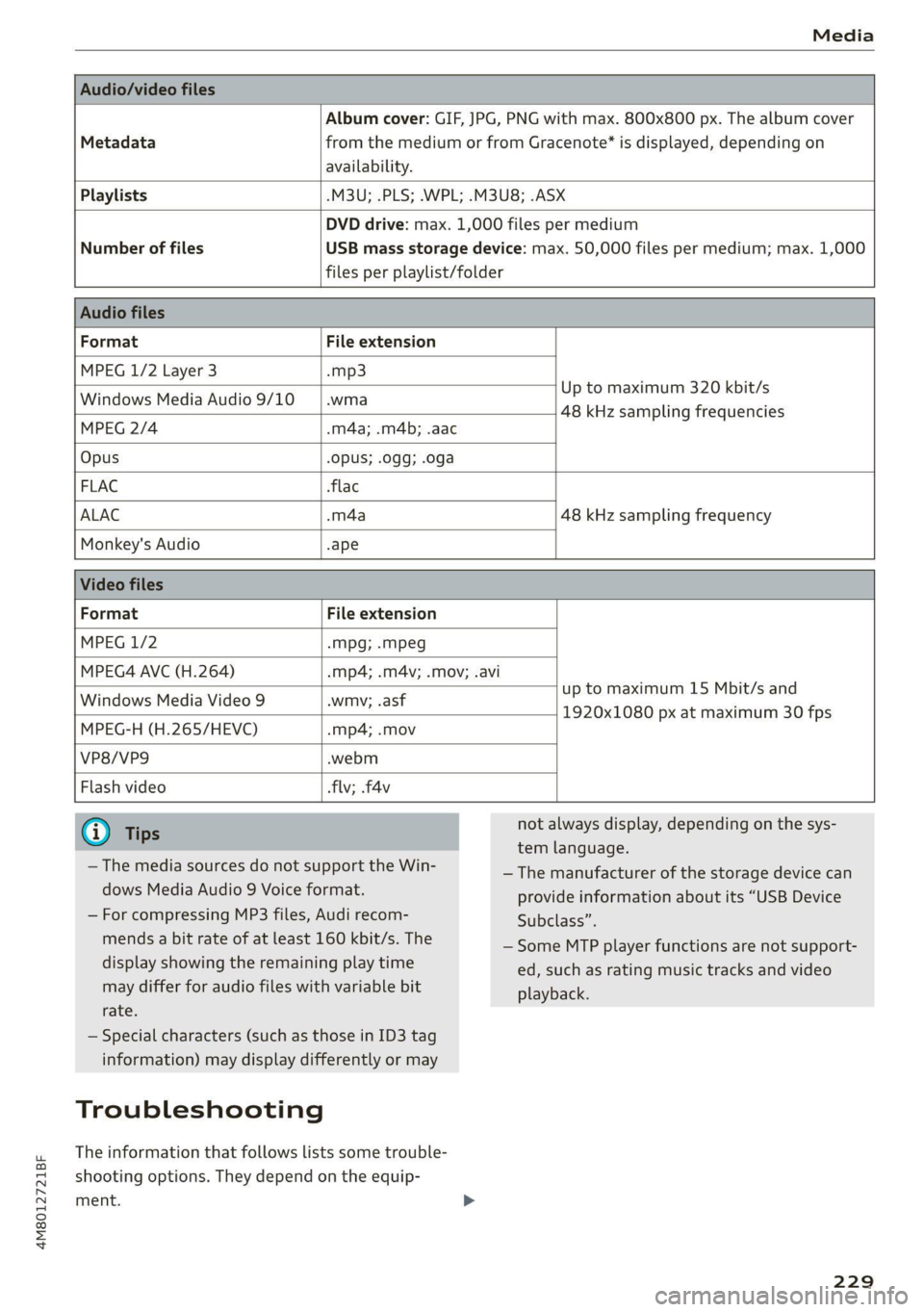
Album cover: GIF, JPG, PNG with max. 800x800 px. The album cover
Metadata from the medium or from Gracenote®* is displayed, depending on
availability.
Playlists -M3U; .PLS; .WPL; .M3U8; .ASX
Number of files
DVD drive: max. 1,000 files per medium
USB mass storage device: max. 50,000 files per medium; max. 1,000
files per playlist/folder
Format File extension
MPEG 1/2 Layer 3 -mp3
Windows Media Audio 9/10 .wma
Up to maximum 320 kbit/s
48 kHz sampling frequencies
MPEG 2/4 .m4a; .m4b; .aac
Opus Opus; .0gg; .oga
FLAC flac
ALAC -m4a 48 kHz sampling frequency
Monkey's Audio -ape
Format File extension
MPEG 1/2 -mpg; .mpeg
MPEG4 AVC (H.264) .mp4; .m4v; .mov; .avi
up to maximum 15 Mbit/s and
1920x1080 px at maximum 30 fps
Windows Media Video 9 .wmv; .asf
MPEG-H (H.265/HEVC) -mp4; .mov
VP8/VP9 .webm
Flash video flv; .f4v
— The media sources do not support the Win-
dows Media Audio 9 Voice format.
— For compressing MP3 files, Audi recom-
mends a bit rate of at least 160 kbit/s. The
display showing the remaining play time
may differ for audio files with variable bit
rate.
— Special characters (such as those in ID3 tag
information) may display differently or may
Troubleshooting
The information that follows lists some trouble-
shooting options. They depend on the equip-
ment. >
not always display, depending on the sys-
tem language.
— The manufacturer of the storage device can
provide information about its “USB Device
Subclass”.
—Some MTP player functions are not support-
ed, such as rating music tracks and video
playback.
229
Page 294 of 332
Emergency assistance
> Store the vehicle tool kit in its designated
place.
> If the removed wheel does not fit in the spare
wheel well, store it securely in the luggage
compartment > page 83.
> Check the tire pressure on the installed wheel
as soon as possible.
> Correct the tire pressure and store it in the MMI
=> page 276 or > page 278.
> The wheel bolt tightening specification must be
120 ft lbs (160 Nm). Have it checked as soon as
possible with a torque wrench. Drive carefully
until then.
> Have the faulty wheel replaced as quickly as
possible.
Collapsible spare tire
Applies to: vehicles with collapsible spare tire
The collapsible spare tire is intended for short-
term use only. Have the damaged tire checked
and replaced if necessary by an authorized Audi
dealer or authorized Audi Service Facility as soon
as possible.
There are some restrictions on the use of the col-
lapsible spare tire. The collapsible spare tire has
been designed specifically for your type of vehi-
cle. Do not replace it with the collapsible spare
tire from another type of vehicle.
The collapsible spare tire is located in the lug-
gage compartment under the cargo floor cover.
Requirement: the vehicle tool kit > page 286 and
the compressor must be laid out.
Removing
> Lift the cargo floor using the handle.
> Turn the handwheel counter-clockwise and re-
move it.
> Remove the collapsible spare tire.
You must inflate the collapsible spare tire before-
hand in order to use it.
Inflating
> Remove the valve cap from the collapsible
spare tire.
> Tighten the compressor hose on the collapsible
spare tire valve.
292
> Connect the compressor hose to a vehicle sock-
et and switch it on.
> Let the compressor run until the specified value
on the tire pressure sticker is reached
> page 266, fig. 168 >.
> Screw the valve cap back onto the valve.
Returning to storage
> To release air, turn the valve insert. See an au-
thorized Audi dealer or authorized Audi Service
Facility.
> Turn the valve insert back once the air has been
released.
> Wait several hours before placing the collapsi-
ble spare tire in the spare wheel well. Only then
will it fold down completely so that you can
store it securely.
> Then screw the valve cap back onto the valve.
> Secure the collapsible spare tire with the hand-
wheel.
> Fold the cargo floor cover back into place.
Snow chains
Using snow chains on the collapsible spare tire is
not permitted for technical reasons.
If you have to drive with snow chains and a rear
tire fails, mount the collapsible spare tire in place
of a front tire. Install the snow chains on the
front tire that you removed, and install that in
place of the rear tire that failed.
Z\ WARNING
— Only use the collapsible spare tire in emer-
gencies and drive very carefully, especially if
it is more than six years old.
— The compressor and the hose can become
very hot during operation which increases
the risk of burn injuries.
— After installing a collapsible spare tire, the
tire pressure must be checked as quickly as
possible to reduce the risk of an accident.
— Do not drive faster than 50 mph (80 km/h)
with the collapsible spare tire. Driving faster
than that increases the risk of an accident.
— To reduce the risk of an accident, avoid hard
acceleration or braking and driving fast
around curves with the collapsible spare
tire.
Page 306 of 332
Data privacy
typically 30 seconds or less. The EDR in this vehi-
cle is designed to record such data as:
— How various systems in your vehicle were oper-
ating;
— Whether or not the driver and passenger safety
belts were buckled/fastened;
— How far (if at all) the driver was depressing the
accelerator and/or brake pedal; and,
— How fast the vehicle was traveling.
These data can help provide a better understand-
ing of the circumstances in which crashes and in-
juries occur. NOTE: EDR data are recorded by your
vehicle only if a non-trivial crash situation occurs;
no data are recorded by the EDR under normal
driving conditions and no personal data (e.g.
name, gender, age, and crash location) are re-
corded. However, other parties, such as law en-
forcement, could combine the EDR data with the
type of personally identifying data routinely ac-
quired during a crash investigation.
To read data recorded by an EDR, special equip-
ment is required, and access to the vehicle or the
EDR is needed. In addition to the vehicle manu-
facturer, other parties, such as law enforcement,
that have the special equipment, can read the in-
formation if they have access to the vehicle or the
EDR.
Assist system monitor
This vehicle is equipped with an Assist System
Monitor (ASM). The ASM collects data that is not
stored by the EDR in the event of an accident. The
main task of the ASM is to make it possible to un-
derstand the role and the behavior of the assist
systems in these accident situations. In addition
to the data that the EDR stores, the ASM records
data related to the assist systems starting sever-
al seconds before the accident or near-accident.
The data collected by ASM depends on the equip-
ment and may include the following information:
status information of the assist systems (for ex-
ample, if they are switched on or off, system
events, etc.), control interventions (for example,
D_ System availability may be limited depending on the mar-
ket.
2) In preparation at the time of printing.
304
by ESC, ABS, Audi pre sense’, etc.), and assist
systems settings (such as speed settings).
Special devices and access to the vehicle or to the
ASM are necessary in order to read the data from
the ASM memory. In addition to the vehicle man-
ufacturer, third parties such as law enforcement
authorities can also read and analyze the stored
data if they have access to the vehicle or to the
ASM.
Data usage
Audi can read out the information stored in the
data memories or similar data, or give this infor-
mation to third parties, especially in the follow-
ing situations:
— If the vehicle owner or lessee agrees
— If there is an official request from the police
— Ifa court or authorities request it
If legally permitted, Audi can also use the data
for analysis of vehicle operation and safety per-
formance or provide this data to third parties for
research purposes.
Data memory for autonomous driving!)
Applies to: vehicles with data memory for autonomous driv-
ing
When park assist plus is active > page 170, data
is stored in a memory in the vehicle. This data is
continuously overwritten by more current data
after a few seconds. The data is erased when the
ignition is switched off.
In certain situations, such as if an airbag has
been triggered or a parking process was ended,
the corresponding technical data may be stored
in the data memory for autonomous driving. The
data memory for autonomous driving is a read-
only memory that has a limited amount of stor-
age space. If the storage space is full, the oldest
data will be overwritten with the newest data. >
Page 327 of 332
4M8012721BF
TAIMOZONC Lies « & socveee wo ceeneis ww ewes woo sere 233
Wi-Fi hotspot........ 0... eee eee 195
Setting the language................... 233
Setting the time..............2-.00000- 233
Shade
Rear window............0.00 000 e eee 57
Shift light indicator................0000. 15
SHIP PaAdlesian: » . smmcne x a mame © a wees © wotae 99
SRipearrier secon «2 sess xo enews ¥ x woesene a 8 owen 112
SHOP’: = sews sv sews 2 vane ee coe oH ine Fo 194
Shortcut
refer to ShortcutS........... 00 eee eee 24
SHOrteultst: « snes x canons a = ronson ov anes x ase 24
SHUT Gis 2 o ecu oe wes oe memow 2 mace 8 we 225
Side assists < swe + sane: gs seme a 2 ee a EY 153
Cleaning the sensors.............00005 281
SIM at sews. 6 v sons % 2 senses a seveee oa meee 193
Sliding/tilting sunroof
refer to Panoramic glass roof............ 47
Smart Favorites
refer to PresetS............0 0-00 e eee 215
Smartphone
refer to Telephone.............00ee eae 181
Snow chainS......... eee eee ee eee eee 273
Socket
refer to Power SOUrCceS ...... 0c ee eee neces 82
Software information
Legal information..................0- 236
Software version (MMI)
Version information...............04- 236
Sound
refer to Adjusting the sound............ 233
Speed limit information
refer to Traffic sign recognition......... 126
Speed limits
refer to Traffic sign recognition......... 126
SPEGAOMEtET = veux > oven © & eam G Eee ob 12
Speed warning system..........-..2-00. 126
Sport differential...................04. 115
Sport displays............ 0.0. e eee eee 15
Sporty driving..........-... ee eee eee eee 107
Start/Stop system. « « esses « « escene vw wiauers a 103
Messages... 1.22... cece eee eee eee 104
Switching offandon..............00 ee 103
Starting to drive: < s eccs se ese ss eeee se pee 96
Starting (engine) ...................005 103
SEONG sss oo esesvee a comnts v 6 astoone ¥ & sews Y 6 a
Audi drive select
also refer to Steering..........00.e008 114
Steering lock. ss ices cc eeee ec wee ees 95,114
Steering wheel
ACjUStING we ¢ = cases ¢ 2 eees eo eee ce ewe 66
Shift paddles... 1.2... . 0. eee eee eee eee 99
Steering wheel heating................. 93
also refer to Multifunction steering wheel. . 13
Steps for determining correct load limit... 271
Stopover (navigation) .................- 204
Stopping.......... 00... eee eee eee eee 96
Stopping the vehicle..............-..00. 96
SHOPPING ENGIME)) rm» sows ms sete «0 anne 103
StOMa Qe lis « o accra + 2 wwe wo cwevane @ ¥ cress © 0 ces 83
Storage compartment...............0005 83
Stored stations
refer to Presets...............-000 eee 215
Subtitles
DVD... eee eee ee 227
Sunshade
Rear side windows... ..........0000000e 46
Rear Wind Whew 2 o sews 2 3 wen 2 a meson oo em 57
Lo 0) 47
also refer to Panoramic glass roof........ 47
SUN VISOFS 2.6.1 eee ee eee 57
Suspension ..... 0.0... cece cece eee 112
Audi drive select............--.000005 112
Swapping calls.............-.0002-0 08 187
Swerve assist... 0.0... cece eee ee eee 152
Symbols
NAViGat Olin: « ¢ seme 7 x anes ¢ 5 oemR EB owe 204
Tratti Giese: 2 x ams 2 seein w 2 neuen mw ai Ho 209
also refer to Indicator lights.............. 7
SYNC (climate control system) ............ 91
SYStEMISECEINGS « swccens + a vccuaes v oreswee + seins 233
T
Tachometer ssa 2 e ivinei sw mamas « wavain « @ a 12,14
Tail lights
Cleaning. ........ 2. cece eee eee 281
Technnicalidatais © « awiviss wo ssovese « wecmme @ © cseicu 313.
Technical modifications................. 308
Telephones s ¢ saws = sews yo een es eee ve 181
Accepting/ending acall................ 187
Audi phone box.........-..0.--0e eee 183