door lock AUDI Q8 2021 Owner´s Manual
[x] Cancel search | Manufacturer: AUDI, Model Year: 2021, Model line: Q8, Model: AUDI Q8 2021Pages: 332, PDF Size: 118.76 MB
Page 43 of 332
4M8012721BF
Opening and closing
Unlocking and locking with the Audi connect
vehicle control service)’
Applies to: vehicles with Audi connect vehicle control
Requirement: Audi connect vehicle control serv-
ices must be set up > page 194, Audi connect ve-
hicle control services. The vehicle must be park-
ing and the ignition must be switched off.
ZA WARNING
Observe the safety precautions > page 35.
@) Tips
— Only use the vehicle key when you can see
the
vehicle.
— The vehicle can only be locked when the "P”
selector lever position is engaged.
— Do not use the vehicle key to lock and un-
lock when you are inside the vehicle. Other-
wise, you could trigger the anti-theft
alarm*. If this happens, press the @ unlock
button.
@) Tips
Applies to: vehicles with convenience key
— When unlocking or locking the vehicle, the
convenience key cannot be more than ap-
proximately 4 feet (1.5 m) away from the
door handle or luggage compartment.
— Unlocking with the convenience key (keyless
access) can be deactivated in the MMI sys-
tem > page 36.
—To prevent the vehicle battery from dis-
charging, the energy management gradual-
ly switches off convenience functions that
are not needed. You then may no longer be
able to unlock your vehicle with the sensors.
D In certain countries.
BS Tey ae-e am al a BC
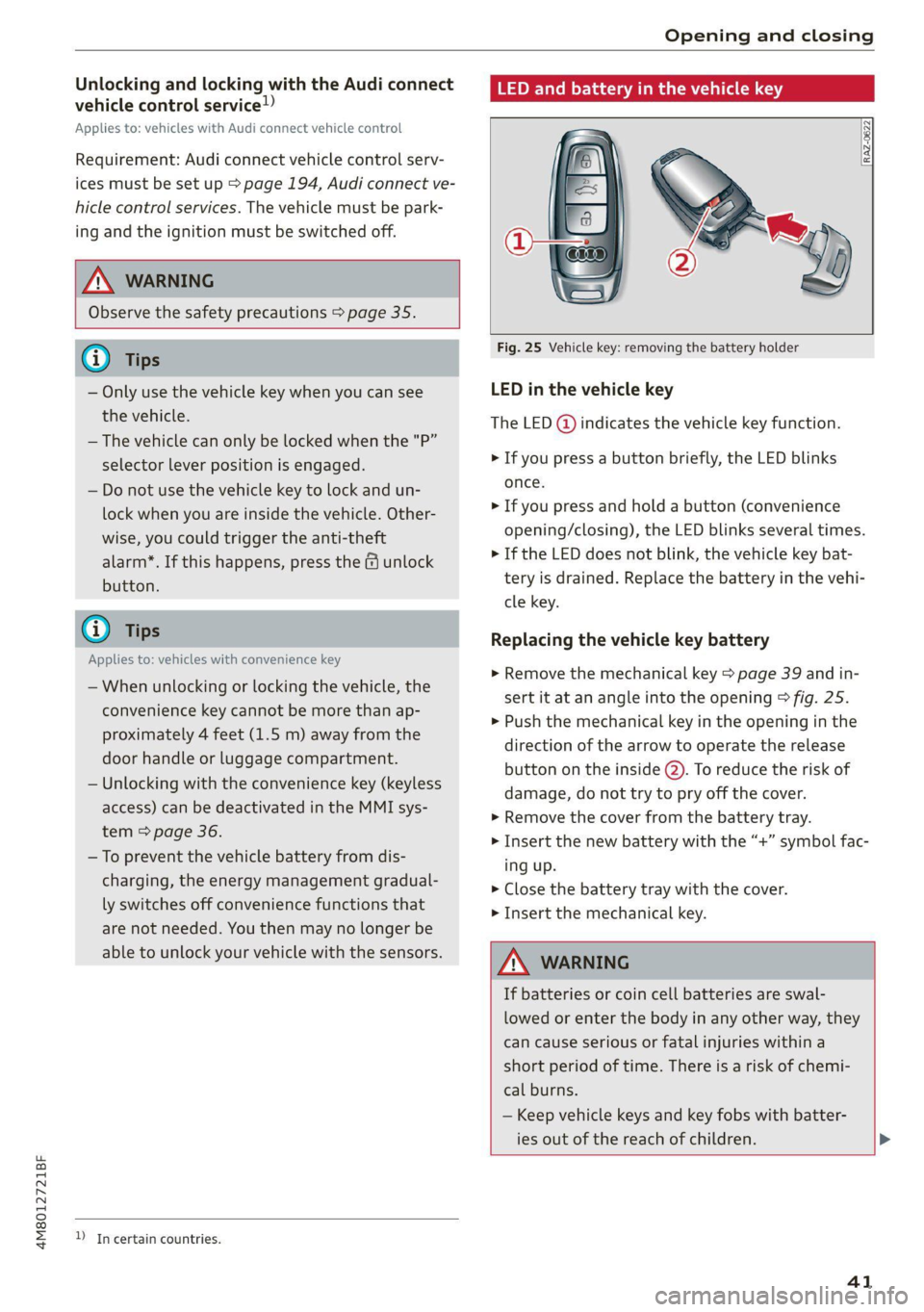
Fig. 25 Vehicle key: removing the battery holder
LED in the vehicle key
The LED (@) indicates the vehicle key function.
> If you press a button briefly, the LED blinks
once.
> If you press and hold a button (convenience
opening/closing), the LED blinks several times.
>» If the LED does not blink, the vehicle key bat-
tery is drained. Replace the battery in the vehi-
cle key.
Replacing the vehicle key battery
> Remove the mechanical key > page 39 and in-
sert it at an angle into the opening > fig. 25.
> Push the mechanical key in the opening in the
direction of the arrow to operate the release
button on the inside @). To reduce the risk of
damage, do not try to pry off the cover.
> Remove the cover from the battery tray.
> Insert the new battery with the “+” symbol fac-
ing up.
> Close the battery tray with the cover.
> Insert the mechanical key.
Z\ WARNING
If batteries or coin cell batteries are swal-
lowed or enter the body in any other way, they
can cause serious or fatal injuries within a
short period of time. There is a risk of chemi-
cal burns.
— Keep vehicle keys and key fobs with batter-
ies out of the reach of children. >
41
Page 44 of 332
Opening and closing
— Keep new or used batteries away from chil-
dren.
— If the battery compartment on a vehicle key
does not close securely, stop using the key
and keep it away from children.
— Seek medical attention immediately if you
suspect that a battery was swallowed or has
entered the body in any other way.
@ For the sake of the environment
Discharged batteries must be disposed of us-
ing
methods that will not harm the environ-
ment. Do not dispose of them in household
trash.
@ Tips
Replacement batteries for the vehicle key
must meet the same specifications as the
original battery.
Luggage compartment
lid
General information
— After closing the luggage compartment lid,
make sure that it is latched. The luggage
compartment lid could open suddenly while
driving, which would increase the risk of an
accident.
— Never drive with the luggage compartment
lid ajar or open, because poisonous gases
from the surrounding area can enter the ve-
hicle interior and increase the risk of asphyx-
iation.
— If there is a luggage rack (such as a bicycle
rack) on the luggage compartment lid, the
luggage compartment lid may not open
completely under certain circumstances or it
could close by itself if open due to the extra
weight. Therefore, the open luggage com-
partment lid must be given additional sup-
port or the cargo must first be removed
from the luggage rack.
— Applies to vehicles with power-operated or
sensor-controlled luggage compartment lid:
Pay careful attention when closing the lug-
gage compartment lid. Otherwise, you could
cause serious injury to yourself or others de-
spite the pinch protection.
ZA\ WARNING
— Applies to vehicles with anti-theft alarm sys-
tem: When the vehicle is locked from the
outside, no one - especially children - should
remain in the vehicle, because the windows
can no longer open from the inside
= page 38. Locked doors make it more diffi-
cult for emergency workers to enter the ve-
hicle, which puts lives at risk.
— Always close and lock the luggage compart-
ment lid and the doors when the vehicle is
not in use. Otherwise someone such as a
child could enter the vehicle through the
luggage compartment and become locked
inside it. To reduce the risk of injury, do not
allow children to play in or around the vehi-
cle.
— To reduce the risk of injuries by pinching,
make sure that no one is in the operating
area of the luggage compartment lid, in-
cluding the hinge areas and the upper and
lower edge of the luggage compartment lid.
42
@) Note
The luggage compartment lid can bump into
objects such as the garage ceiling when open-
ing and become damaged.
G) Tips
— When the vehicle is locked, the luggage
compartment lid can be unlocked separately
by pressing the “s button twice on the vehi-
cle key. The luggage compartment lid locks
automatically when it is closed again.
— The ability to open the luggage compart-
ment lid using the handle can be deactivat-
ed or activated in the MMI > page 36.
Page 45 of 332
4M8012721BF
Opening and closing
Opening and closing the luggage
compartment lid
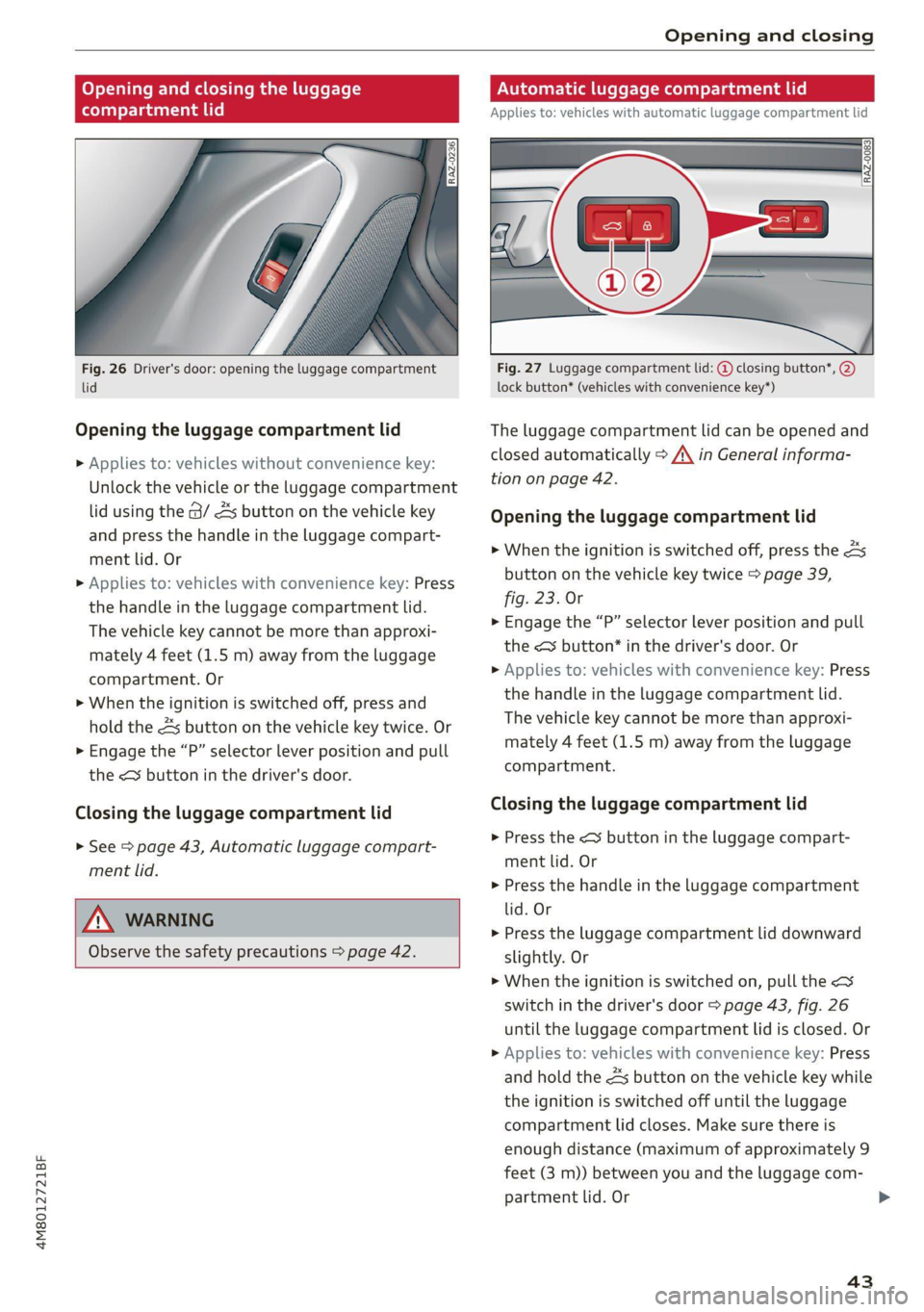
Fig. 26 Driver's door: opening the luggage compartment
lid
Opening the luggage compartment lid
> Applies to: vehicles without convenience key:
Unlock the vehicle or the luggage compartment
lid using the @/ As button on the vehicle key
and press the handle in the luggage compart-
ment lid. Or
> Applies to: vehicles with convenience key: Press
the handle in the luggage compartment lid.
The vehicle key cannot be more than approxi-
mately 4 feet (1.5 m) away from the luggage
compartment. Or
> When the ignition is switched off, press and
hold the 4s button on the vehicle key twice. Or
> Engage the “P” selector lever position and pull
the << button in the driver's door.
Closing the luggage compartment lid
> See > page 43, Automatic luggage compart-
ment lid.
ZX WARNING
Observe the safety precautions > page 42.
Automatic luggage compartment lid
Applies to: vehicles with automatic luggage compartment lid
RAZ-0083
Fig. 27 Luggage compartment lid: @ closing button*, @)
lock button* (vehicles with convenience key*)
The luggage compartment lid can be opened and
closed automatically > A\ in General informa-
tion on page 42.
Opening the luggage compartment lid
> When the ignition is switched off, press the 4s
button on the vehicle key twice > page 39,
fig. 23. Or
> Engage the “P” selector lever position and pull
the <3 button* in the driver's door. Or
> Applies to: vehicles with convenience key: Press
the handle in the luggage compartment lid.
The vehicle key cannot be more than approxi-
mately 4 feet (1.5 m) away from the luggage
compartment.
Closing the luggage compartment lid
> Press the < button in the luggage compart-
ment lid. Or
> Press the handle in the luggage compartment
lid. Or
> Press the luggage compartment lid downward
slightly. Or
> When the ignition is switched on, pull the <>
switch in the driver's door > page 43, fig. 26
until the luggage compartment lid is closed. Or
> Applies to: vehicles with convenience key: Press
and hold the 4s button on the vehicle key while
the ignition is switched off until the luggage
compartment lid closes. Make sure there is
enough distance (maximum of approximately 9
feet (3 m)) between you and the luggage com-
partment lid. Or
43
Page 47 of 332
Opening and closing
@ Tips
The luggage compartment lid will only open
or close )) if you perform the movement as
described. This prevents the luggage com-
partment lid from opening or closing due to
similar movements )), such as when you walk
between the rear of the vehicle and your ga-
rage door. In some situations, the function
may be limited or temporarily unavailable.
This may happen if:
— You are standing too close to the bumper or
too far away from it
— The luggage compartment lid was closed or
opened immediately beforehand
— You park close to a hedge and the branches
move back and forth under the vehicle for a
> Fold the backrest on the rear bench seat for-
ward > page 86.
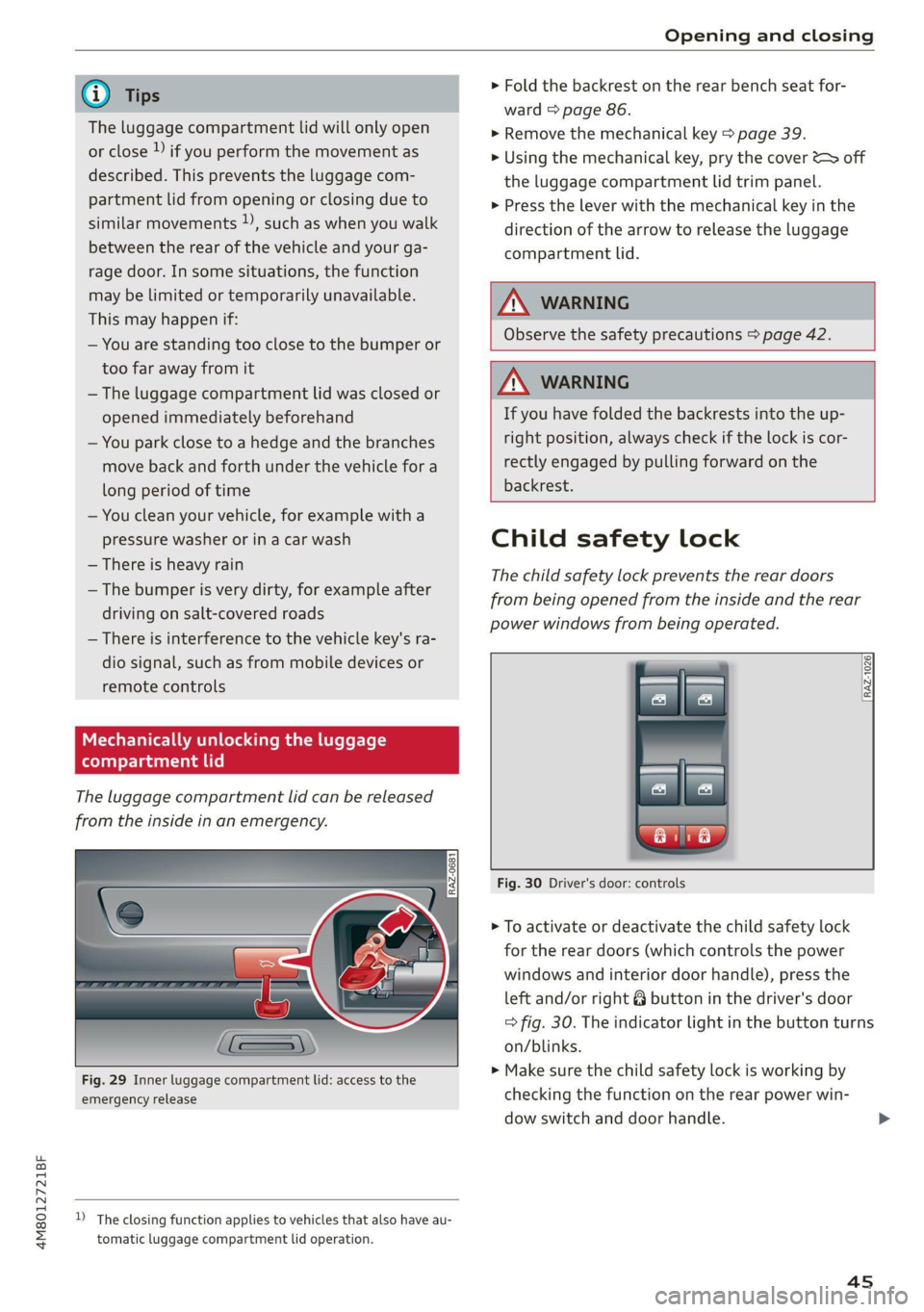
> Remove the mechanical key > page 39.
> Using the mechanical key, pry the cover &> off
the luggage compartment lid trim panel.
> Press the lever with the mechanical key in the
direction of the arrow to release the luggage
compartment lid.
|Z\. WARNING
Observe the safety precautions > page 42.
ZX WARNING
If you have folded the backrests into the up-
right position, always check if the lock is cor-
rectly engaged by pulling forward on the
4M8012721BF
backrest.
long period of time
— You clean your vehicle, for example with a
pressure washer or in a car wash
— There is heavy rain
— The bumper is very dirty, for example after
driving on salt-covered roads
— There is interference to the vehicle key's ra-
dio signal, such as from mobile devices or
remote controls
Mechanically unlocking the luggage
compartment lid
The luggage compartment lid can be released
from the inside in an emergency.
Child safety lock
The child safety lock prevents the rear doors
from being opened from the inside and the rear
power windows from being operated.
RAZ-1026:
Fig. 30 Driver's door: controls
> To activate or deactivate the child safety lock
for the rear doors (which controls the power
windows and interior door handle), press the
left and/or right 8 button in the driver's door
=> fig. 30. The indicator light in the button turns
on/blinks.
» Make sure the child safety lock is working by
checking the function on the rear power win-
dow switch and door handle.
Fig. 29 Inner luggage compartment lid: access to the
emergency release
D_ The closing function applies to vehicles that also have au-
tomatic luggage compartment lid operation.
4s
Page 48 of 332
Opening and closing
» Applies to: vehicles with controls for the cli-
mate control system in the rear and MMI: To al-
so restrict the operation of the climate control
system in the rear, select on the home screen:
SETTINGS > Display & brightness > Operation
in rear
When the child safety lock is switched on, the
following functions are disabled:
—The rear inner door handles
— The rear power windows
— The control panel* for the climate control sys-
tem in the rear
— The buttons in the rear for the sunshades*
Message in the instrument cluster display
@/ Child safety lock: malfunction! Please
contact Service
There is a malfunction in the child safety lock.
Press the @ button again.
If the message stays on, drive immediately to an
authorized Audi dealer or authorized Audi Service
Facility to have the malfunction repaired.
Z\ WARNING
— Observe the safety precautions > page 35.
—A malfunction in the child safety lock could
allow
the rear doors to be opened from the
inside, which increases the risk of an acci-
dent.
Power windows
o) Teme ma CCTM UUs Clue Lie]
STE
RAZ-0723
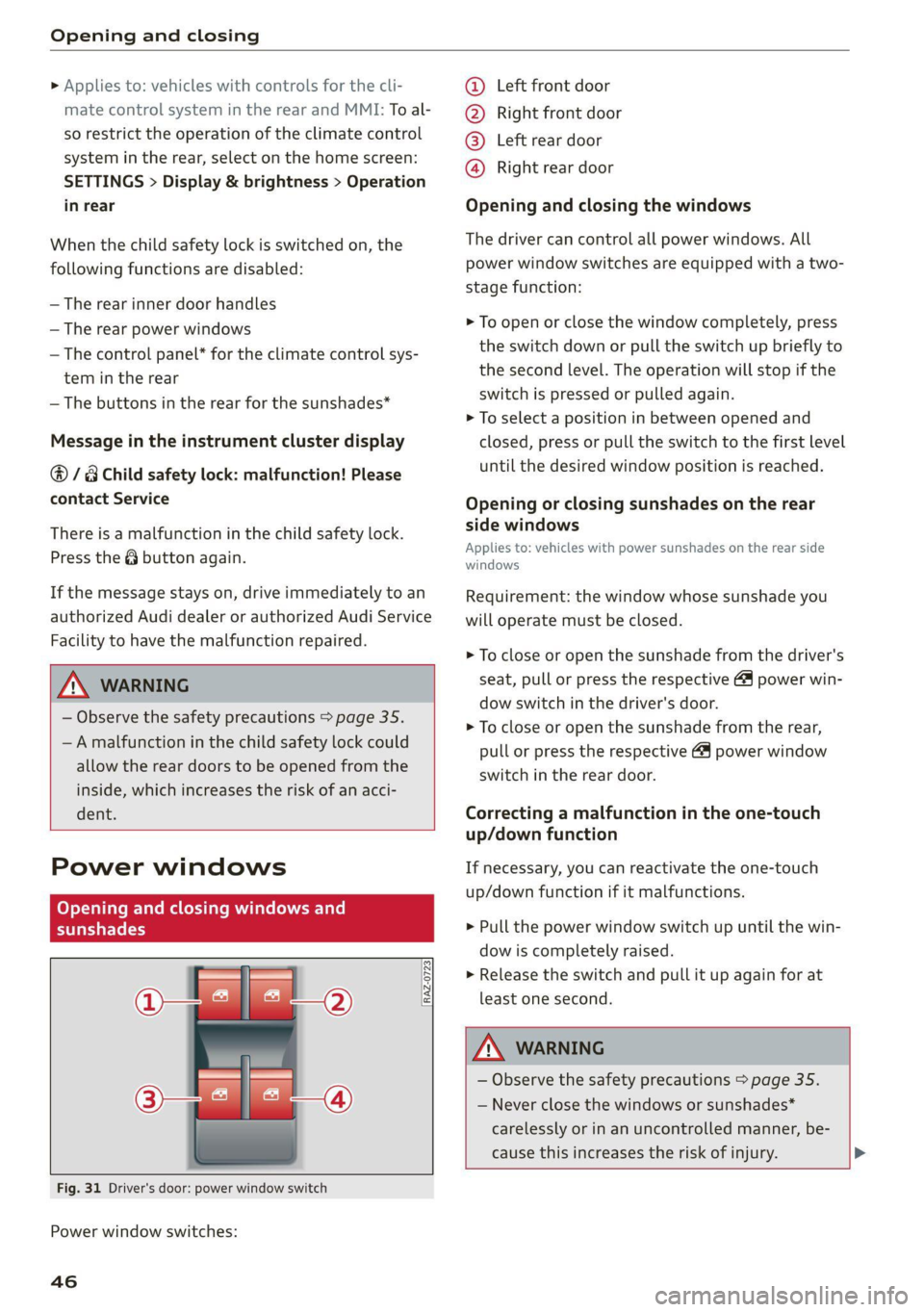
Fig. 31 Driver's door: power window switch
Power window switches:
46
©@ Left front door
@® Right front door
@® Left rear door
@® Right rear door
Opening and closing the windows
The driver can control all power windows. All
power window switches are equipped with a two-
stage function:
> To open or close the window completely, press
the switch down or pull the switch up briefly to
the second level. The operation will stop if the
switch is pressed or pulled again.
> To select a position in between opened and
closed, press or pull the switch to the first level
until the desired window position is reached.
Opening or closing sunshades on the rear
side windows
Applies to: vehicles with power sunshades on the rear side
windows
Requirement: the window whose sunshade you
will operate must be closed.
> To close or open the sunshade from the driver's
seat, pull or press the respective & power win-
dow switch in the driver's door.
> To close or open the sunshade from the rear,
pull or press the respective @ power window
switch in the rear door.
Correcting a malfunction in the one-touch
up/down function
If necessary, you can reactivate the one-touch
up/down function if it malfunctions.
> Pull the power window switch up until the win-
dow is completely raised.
> Release the switch and pull it up again for at
least one second.
ZA\ WARNING
— Observe the safety precautions > page 35.
— Never close the windows or sunshades*
carelessly or in an uncontrolled manner, be-
cause this increases the risk of injury. >
Page 49 of 332
4M8012721BF
Opening and closing
@) Tips
— The windows will automatically open slight-
ly when you open the doors.
— If the window in the driver's or front pas-
senger's door is completely open, it will
raise slightly when the door is opened. The
window will lower again when you close the
door.
— You can still open and close the windows for
several minutes after turning the ignition
off. The power windows do not switch off
until the driver's door or front passenger's
door has been opened.
— The power windows are equipped with pinch
protection. The automatic window may stop
closing and will open all the way again even
if no obstacle is detected. Pull the power
window switch up until the window is com-
pletely raised.
Convenience opening and closing
Applies to: vehicles with convenience key
Convenience opening or closing the windows
or panoramic glass roof*
You can set in the MMI if all windows or the roof*
should open or close all at once > page 36, Set-
ting the central locking system.
> Press and hold the & or ( button on the vehicle
key until all windows and the roof* have
reached the desired position > /A\.
> Touch the sensor* on the door handle until all
of the windows and the roof* are closed. Do not
place your hand in the door handle when doing
this.
When all of the windows and the roof* are
closed, the turn signals will flash once.
Convenience opening and closing the
sunshade*
Applies to: vehicles with power sunshade
You can open or close all of the sunshades at
once.
>» Press and hold the [=] button in the rear door.
ZX WARNING
— Never close the windows or panoramic glass
roof* carelessly or in an uncontrolled man-
ner, because this increases the risk of injury.
— For security reasons, the windows and the
panoramic glass roof* can only be opened
and closed with the vehicle key at a maxi-
mum distance of approximately 6.5 feet
(2 m) from the vehicle. Always pay attention
when using the f®) button to close the win-
dows and the panoramic glass roof* so that
no one is pinched. The closing process will
stop immediately when the fj button is re-
leased.
Panoramic glass roof
Operating the noramic glass roof
roof sunshade
Applies to: vehicles with panoramic glass roof and roof sun-
shade
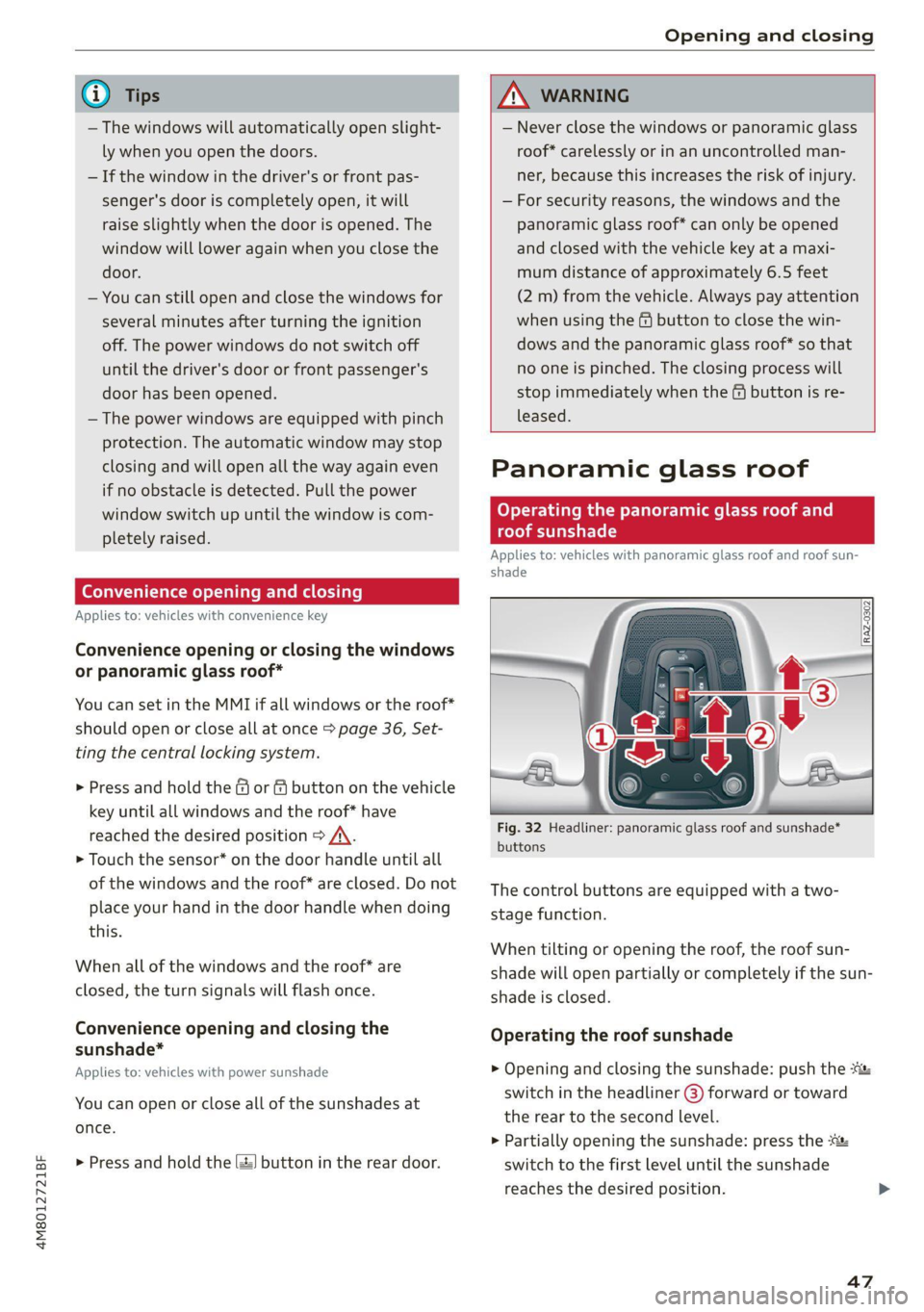
Fig. 32 Headliner: panoramic glass roof and sunshade*
buttons
The control buttons are equipped with a two-
stage function.
When tilting or opening the roof, the roof sun-
shade will open partially or completely if the sun-
shade is closed.
Operating the roof sunshade
> Opening and closing the sunshade: push the -&&
switch in the headliner @) forward or toward
the rear to the second level.
> Partially opening the sunshade: press the
switch to the first level until the sunshade
reaches the desired position.
47
Page 55 of 332
4M8012721BF
Lights and Vision
headlights are not switched on, the high beam
assistant will remain activated.
ZA WARNING
— Observe the safety precautions and note the
limits of the assist systems, sensors, and
cameras > page 121.
— High beam assistant is only intended to as-
sist the driver. The driver is responsible for
controlling the high beam headlights and
adjusting them to match the lighting and
visibility conditions.
— High beams can cause glare for other driv-
ers, which increases the risk of an accident.
For this reason, only use the high beams or
the headlight flasher when they will not cre-
ate glare for other drivers.
G@) Tips
Adhere to any local applicable regulations
when using the lighting equipment, for exam-
ple in regard to reducing glare for other driv-
ers. The driver is always responsible for adher-
ing to the regulations applicable in the coun-
try where the vehicle is being operated.
Adjusting the exterior lighting
You can adjust the exterior lighting separately.
The settings depend on the vehicle equipment.
» Applies to: MMI: Select on the home screen:
VEHICLE > Light & Visibility > Exterior light-
ing.
Automatic headlights
You can adjust the following settings in the Auto-
matic
headlights menu:
Activation time - You can adjust if the headlights
switch on Early, Medium, or Late based on the
sensitivity of the light sensor.
High beam assistant - You can switch the high
beam assistant on and off.
Entry/exit lighting
The Entry/exit lighting illuminates the area
around the vehicle when the vehicle is unlocked
or when the driver’s door is opened while the ig-
nition is off. The entry/exit lighting works when it
is dark and when the AUTO light function is
switched on. The front and rear daytime running
lights* switch on automatically each time the ve-
hicle is unlocked regardless of how bright it is
outside the vehicle.
Daytime running lights
USA models: The daytime running lights can be
switched on and off.
Canada models: The daytime running lights can-
not be switched off. The lights activate automati-
cally each time the ignition is switched on.
Emergency flashers
SI S|
IF) | |
cc|
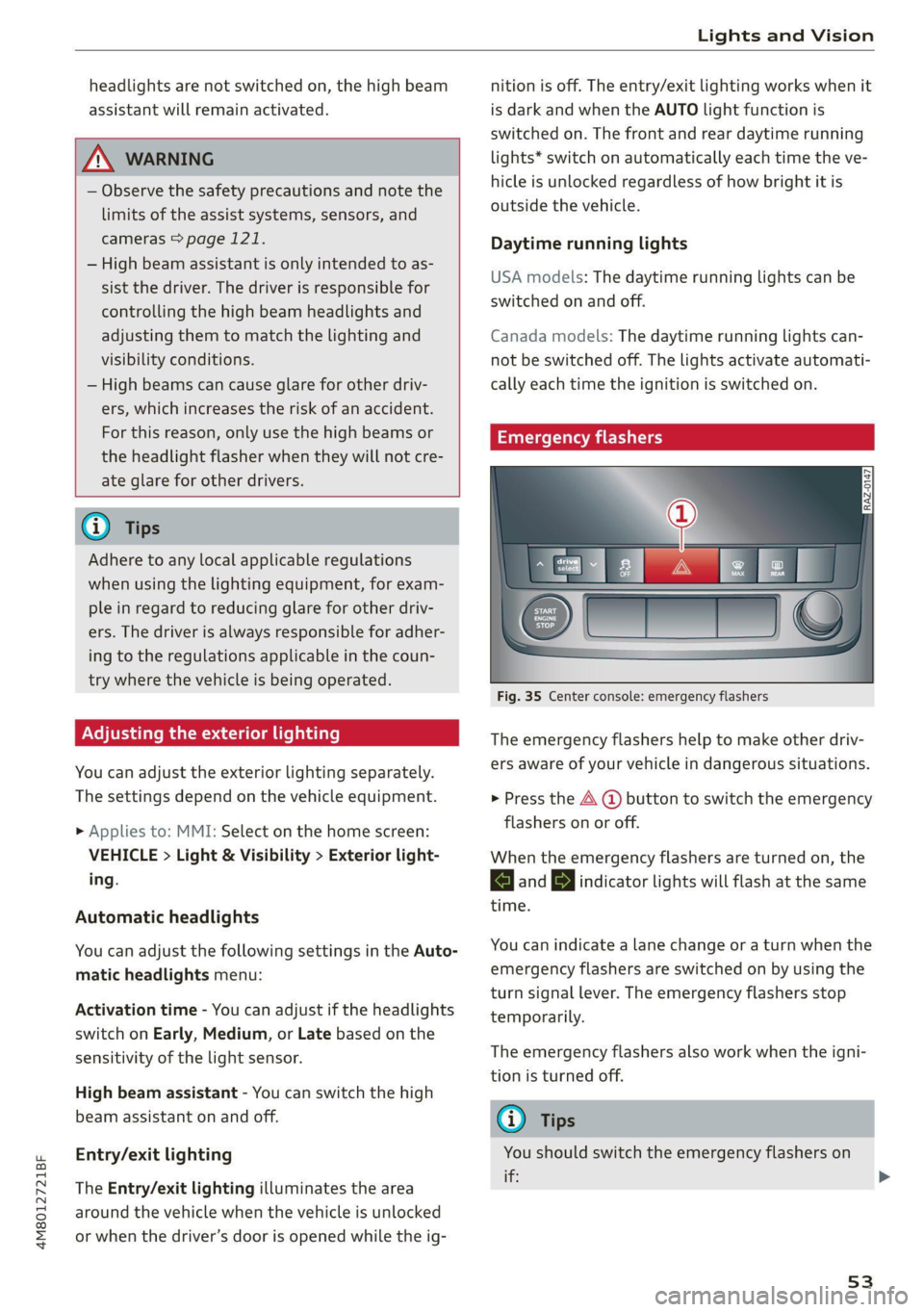
Fig. 35 Center console: emergency flashers
The emergency flashers help to make other driv-
ers aware of your vehicle in dangerous situations.
> Press the A @ button to switch the emergency
flashers on or off.
When the emergency flashers are turned on, the
a and By indicator lights will flash at the same
time.
You can indicate a lane change or a turn when the
emergency flashers are switched on by using the
turn signal lever. The emergency flashers stop
temporarily.
The emergency flashers also work when the igni-
tion is turned off.
G) Tips
You should switch the emergency flashers on
ite
53
Page 56 of 332

Lights and Vision
— you are the last car in a traffic jam so that
all other vehicles approaching from behind
can see your vehicle
— your vehicle has broken down or you are
having an emergency
— your vehicle is being towed or if you are tow-
ing another vehicle
Messages
If the 6; indicator light turns on, a bulb has
failed. The displayed message indicates the cause
and possible solutions. If one of the messages re-
mains on, drive immediately to an authorized
Audi dealer or authorized Audi Service Facility to
have the malfunction repaired.
By Audi adaptive light: malfunction! See own-
er's manual
Adaptive light* is not working. The headlights
still function. Drive immediately to an authorized
Audi dealer or authorized Audi Service Facility to
have the malfunction repaired.
High beam assistant: malfunction! See own-
er's manual
You can still switch the high beams on or off
manually. Drive immediately to an authorized
Audi dealer or authorized Audi Service Facility to
have the malfunction repaired.
High beam assistant: currently unavailable.
Camera view limited due to surroundings. See
owner's manual
This message appears if the camera's visual field
is blocked. The system will switch itself off. Try
switching the systems on later.
Automatic headlights: malfunction! See
owner's manual
The light/rain sensor is malfunctioning. When
the AUTO light function is on, the low beams will
remain switched on at all times for safety rea-
sons. Drive immediately to an authorized Audi
dealer or authorized Audi Service Facility to have
the malfunction repaired.
54
Interior lighting
Front interior lighting
Fig. 36 Headliner: interior lighting
Interior lighting buttons
axs* — Interior lighting on/off
4 - Door contact switch on/off. The interior light-
ing is controlled automatically.
Touch-sensitive reading lights
> To turn a reading light on or off, touch the sur-
face @ briefly.
> To activate the manual dimming function,
touch the surface @ when the light is switched
off and keep touching it until the desired
brightness is reached.
Rear interior lighting
3 2
NI
Fig. 37 Headliner: reading lights
Reading lights
> To switch the reading lamp on or off, press the
~¥ button @.
> To activate the manual dimming function*,
touch the surface while the light is switched off
“~¥@ and keep touching it until the desired
brightness is reached.
Page 57 of 332
4M8012721BF
Lights and Vision
Interior lighting
Applies to: vehicles with interior lighting
The ambient lighting turns on when the ignition
is switched on. The ambient lighting is deactivat-
ed when the lights are set to OFF.
You can adjust the interior lighting individually.
The settings depend on the vehicle equipment.
>» Applies to MMI: Select on the home screen: VE-
HICLE > Light & Visibility > Interior lighting.
You can choose from various color profiles, such
as Maritime.
Additional settings and profiles:
— Brightness: you can adjust the brightness for
all of the interior lighting.
— Individual: you can adjust the brightness and
color of the interior lighting separately, divided
into contour and surface lighting.
— Audi drive select: the contour and surface
lighting color changes depending on the select-
ed drive select* mode.
G) Tips
Depending on vehicle equipment, when the
drive select function is activated, the color of
the contour and surface lighting may briefly
change to red or blue when the interior tem-
perature is manually increased or decreased.
Display brightness
You can adjust the instrument and display illumi-
nation separately. The settings depend on the ve-
hicle equipment.
> Applies to MMI: select on the home screen:
SETTINGS > Display & brightness.
Possible settings in the MMI:
— Cockpit dimming
— Head-up display
—MMI
— Audi virtual cockpit
Vision
Adjusting exterior mirrors
RAZ-0150
© ©
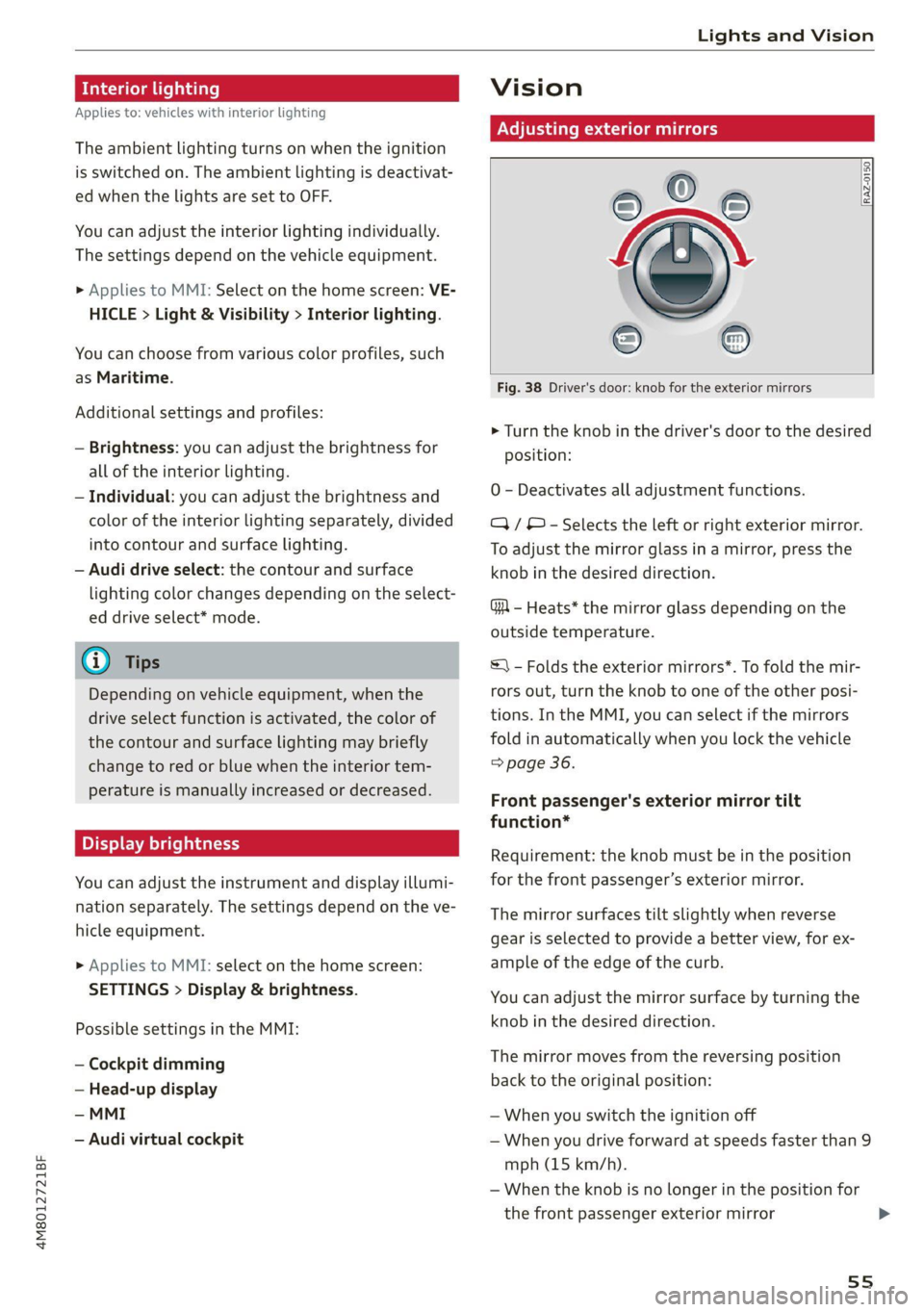
Fig. 38 Driver's door: knob for the exterior mirrors
> Turn the knob in the driver's door to the desired
position:
0 - Deactivates all adjustment functions.
Q/ © - Selects the left or right exterior mirror.
To adjust the mirror glass in a mirror, press the
knob in the desired direction.
GA - Heats* the mirror glass depending on the
outside temperature.
S) - Folds the exterior mirrors*. To fold the mir-
rors out, turn the knob to one of the other posi-
tions. In the MMI, you can select if the mirrors
fold in automatically when you lock the vehicle
=> page 36.
Front passenger's exterior mirror tilt
function*
Requirement: the knob must be in the position
for the front passenger’s exterior mirror.
The mirror surfaces tilt slightly when reverse
gear is selected to provide a better view, for ex-
ample of the edge of the curb.
You can adjust the mirror surface by turning the
knob in the desired direction.
The mirror moves from the reversing position
back to the original position:
— When you switch the ignition off
— When you drive forward at speeds faster than 9
mph (15 km/h).
— When the knob is no longer in the position for
the front passenger exterior mirror
55
>
Page 73 of 332
4M8012721BF
Sitting correctly and safely
PXe fetta eae im adel
Belt retractor lock
The safety belts on the rear seats and on the
front passenger seat are equipped with a belt re-
tractor lock.
> If you secure a child safety seat with a safety
belt, the belt retractor lock on the safety belt
may need to be activated. Follow the instruc-
tions from the child safety seat manufacturer.
> When a vehicle passenger has fastened a safety
belt, the belt retractor lock should not be acti-
vated. If the belt retractor lock has been acti-
vated unexpectedly, deactivate it.
Deactivating or activating the belt retractor lock
=> page 79.
Safety belt retractor
The safety belts are equipped with an automatic
belt retractor. This automatic retractor allows the
safety belt to be pulled all the way out when the
belt is pulled slowly. However, the automatic re-
tractor locks during sudden braking maneuvers.
It also locks the belts when accelerating, driving
uphill, and driving around curves.
Belt force limiter
Safety belts with belt force limiters reduce the
force placed on the body by the safety belts dur-
ing a collision.
Safety belt pretensioners
Safety belts may be tightened with reversible
belt tensioners when you start driving and in cer-
tain driving situations. If the safety belt is too
loose, it will be tightened so that the belt will
rest closer to the body.
In some collisions, pyrotechnic belt tensioners
may secure the safety belts so that they cannot
loosen. This reduces forward movement by the
vehicle passengers.
ZA WARNING
The pyrotechnic system can only provide pro-
tection during one collision. If the pyrotechnic
belt tensioners deploy, the pretensioning sys-
tem must be replaced by an authorized Audi
dealer or authorized Audi Service Facility.
(i) Tips
Smoke may be released when pyrotechnic belt
tensioners deploy. This is not a sign of a vehi-
cle fire.
Memory function
General information
Applies to: vehicles with memory function
With the memory function, you can save and call
up seat profiles using the memory buttons in the
door trim panel.
Depending on vehicle equipment, some settings
such as the driver’s seat and exterior mirror posi-
tion can be stored.
Storing and recalling a seat profile
Applies to: vehicles with memory function
The memory function buttons are located in the
door trim panel.
Storing a seat profile
>» Press the [SET] button. If the LED in the button
turns on, a seat profile can be stored.
> Push one of the numbered memory buttons. A
tone confirms that the settings were stored.
Accessing a seat profile
» While the driver’s or front passenger's door is
open and the ignition is switched off, press the
memory button once briefly. The seat will be
fully adjusted to the settings in the seat profile.
> If the driver's/front passenger's door is closed
or the ignition is switched on, press and hold
the memory button until the seat profile is
completely set.
ZX WARNING
— To reduce the risk of an accident, the seat
setting can only be recalled when the vehicle
is stationary. >
71