suspension AUDI Q8 2021 Owner´s Manual
[x] Cancel search | Manufacturer: AUDI, Model Year: 2021, Model line: Q8, Model: AUDI Q8 2021Pages: 332, PDF Size: 118.76 MB
Page 121 of 332
4M8012721BF
Trailer towing
in the trailer correctly will help to achieve this
weight. Having the tongue weight too low affects
the vehicle's handling.
You can determine the tongue weight using a
tongue weight scale, a bathroom scale, or a pub-
lic weigh station, for example.
The permitted tongue weight of your vehicle can
be found in the vehicle documentation or in
=> page 314.
Load distribution
Poor cargo load and distribution can negatively
impact vehicle handling. Load the trailer based
on the following criteria as much as possible:
— Store objects in the vehicle luggage compart-
ment, if possible. The vehicle should always
carry the heaviest possible load and the trailer
should have the lightest possible load.
— Distribute the load in the trailer so that the
heavy objects are as close to the axle as possi-
ble.
— Secure objects so that they do not slide.
— Utilize the maximum permitted tongue weight
if possible.
Tires
Set the tire pressure on your vehicle for a “full
load”; see the tire pressure sticker > page 266. If
necessary, also adjust the tire pressure on the
trailer according to the manufacturer's specifica-
tions.
The trailer and the vehicle should be equipped
with winter tires when driving in winter tempera-
tures.
Outside mirrors
If you cannot see the traffic behind the trailer
with the standard exterior mirrors, then you
must attach additional exterior mirrors. Adjust
them so you have a sufficient visibility behind
you.
Exterior lighting
Follow the legal regulations for lighting on your
trailer that are applicable in the country where
you are operating the vehicle. Contact an author-
ized Audi dealer or authorized Audi Service Facili-
ty for more information.
Before you start driving, check all lighting equip-
ment on the trailer while it is hitched to the vehi-
cle.
The headlight range control automatically ad-
justs the light range of the headlights.
Safety chains
Make sure the safety chains are correctly applied
when pulling a trailer. The chains should hang
enough so that the trailer can drive around
curves. However, they must not touch the
ground.
Air suspension
Applies to: vehicles with air suspension
The Audi drive select* comfort mode > page 111
must be selected before you adjust the tongue
weight on the trailer and hitch the trailer >,
> page 113.
The air suspension trailer mode must be switched
on.
Applies to MMI: select on the home screen: VE-
HICLE > Settings & Service > Air suspension:
trailer.
Switch trailer mode off again when you are no
longer towing a trailer.
For vehicles with a factory-installed trailer hitch,
the air suspension trailer mode will automatically
switch on if you connect the trailer connector to
the socket.
When using rear carrier systems that are mount-
ed directly on the trailer hitch ball head, you can
also switch trailer mode off manually.
If you must drive on roads that are in poor condi-
tion, you can raise the vehicle again after hitching
the trailer or after adjusting the tongue weight
> page 113.
You can also increase ground clearance by select-
ing the Audi drive select* offroad or allroad
modes > page 111.
119
Page 122 of 332

Trailer towing
Vehicle levels below the values set in the comfort
level will no longer be available, even if you are
lowering the vehicle manually.
ZA\ WARNING
Applies to: vehicles with air suspension
— Never turn off trailer mode while driving
when a trailer is hitched, because then the
restrictions for controlling the vehicle level
will be turned off.
— Driving with a trailer on unpaved roads when
the vehicle is raised may change the vehicle
handling. Adapt your speed.
— Note that the vehicle will lower automatical-
ly at certain speeds if you have lifted the ve-
hicle manually.
©) Note
— Applies to: vehicles with air suspension: Se-
lect the Audi drive select* comfort mode.
Otherwise, the tongue load specified for
your vehicle will no longer be applicable.
— Attachments retrofitted on the vehicle may
cause damage, especially on the trailer
hitch ball head. In cases of damage, have
the function checked by an authorized Audi
dealer or authorized Audi Service Facility.
G) Tips
— Block the wheels with chocks when parking
on inclines if the trailer is loaded.
— Audi recommends having the vehicle in-
spected between the inspection intervals if
you tow a trailer frequently.
— Avoid driving with a trailer during the vehi-
cle break-in period.
Driving with a trailer
Driving with a trailer requires extra caution.
Speed
Adhere to the legal speed limits. Follow the legal
regulations that are applicable in the country
where you are operating the vehicle.
As the speed increases, the driving stability of
the trailer decreases. Therefore you should not
120
exceed the maximum legal speed limit when
there are unfavorable road, weather, and/or wind
conditions. This especially applies when driving
downhill.
Hill
When you start driving uphill or downhill, trailers
may tilt or sway sooner than when driving ona
level surface. If small swaying movements have
already occurred, you can stabilize the trailer by
firmly braking immediately. Never attempt to
“straighten out” the trailer by accelerating.
Downshift before driving on hills to utilize the en-
gine braking effect > A\.
Brakes
When using a trailer with overrun brakes, first
brake gently then quickly. This reduces the risk of
jerking while braking if the trailer wheels lock up.
Engine coolant temperature
Pay attention specifically to the coolant tempera-
ture display when there are high outside temper-
atures, and when driving on long inclines
=> page 14. Shift to a higher gear in a timely man-
ner.
Z\ WARNING
Constant braking causes the brakes to over-
heat and can substantially reduce braking per-
formance, increase braking distance, or cause
complete failure of the brake system.
Page 166 of 332
Parking and maneuvering
Objects, animals, and people may only be
detected with limitations may not be detect-
ed at all. Always monitor the traffic and the
vehicle's surroundings directly and do not
become distracted.
@) Note
— The orange orientation lines @) show the di-
rection the rear of the vehicle will be travel-
ing, based on the steering wheel angle. The
front of the vehicle swings out more than
the rear of the vehicle. Maintain plenty of
distance so that an exterior mirror or a cor-
ner of the vehicle does not collide with any
obstacles.
— Keep enough distance from the curb to
avoid damage to the rims.
— Only use the images provided by the camera
on the rear of the vehicle when the luggage
compartment lid is completely closed. Make
sure any objects you may have mounted on
the luggage compartment lid do not block
the rearview camera.
G) Tips
— Applies to vehicles with air suspension: The
accuracy of the orientation lines and blue
surfaces on the camera display decreases
when the vehicle is raised or lowered with
the air suspension.
— There is no distance warning for the rear
and the sides* when trailer towing mode is
detected. The front sensors remain activat-
ed. The visual display switches to trailer
mode. There is no guarantee the functions
will be deactivated when using a retrofitted
trailer hitch.
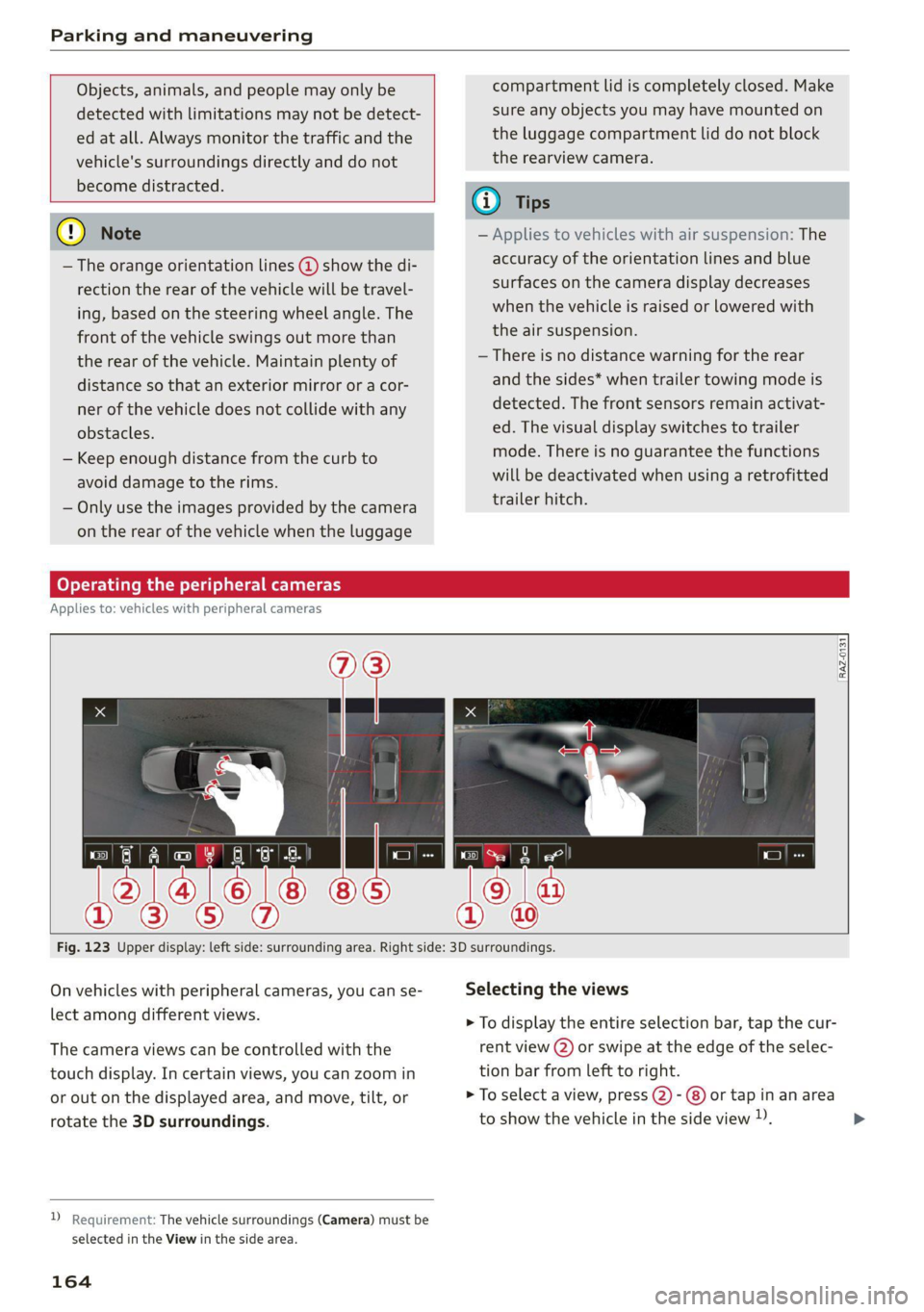
Operating the peripheral cameras
Applies to: vehicles with peripheral cameras
E
3
Fig. 123 Upper display: left side: surrounding area. Right side: 3D surroundings.
On vehicles with peripheral cameras, you can se- Selecting the views
lect among different views. > To display the entire selection bar, tap the cur-
The camera views can be controlled with the rent view (2) or swipe at the edge of the selec-
touch display. In certain views, you can zoom in tion bar from left to right.
or out on the displayed area, and move, tilt, or > To select a view, press (2)- @) or tap in an area
rotate the 3D surroundings. to show the vehicle in the side view )). >
2 Requirement: The vehicle surroundings (Camera) must be
selected in the View in the side area.
164
Page 174 of 332
Parking and maneuvering
— Park assist plus is an assist system. The driv-
er is still responsible for monitoring the ve-
hicle's surroundings and preventing colli-
sions when using the system.
— When using park assist plus to drive into or
out of a parking space, the steering wheel
turns quickly on its own. Reaching into the
steering wheel spokes while this is happen-
ing can result in injury.
— Sensors and cameras have spots in which
the surrounding area cannot be detected.
Objects, animals, and people may only be
detected with limitations may not be detect-
ed at all. Always monitor the traffic and the
vehicle's surroundings directly and do not
become distracted.
@) Tips
— You can reduce the speed specified by the
system at any time by pressing the brake
pedal.
— The system can incorrectly interpret parking
space barriers (such as parking curbs). Take
over the parking process = page 173 if the
vehicle is not completely inside the parking
space or if the vehicle tries to drive over the
parking space barrier.
— The image in the display is an enlarged and
distorted image. Under certain circumstan-
ces, objects may appear different and un-
clear on the display. This is especially true if
there are objects that do not touch the
ground, such as the bumper of a parked ve-
hicle or the rear of a truck. Drive with spe-
cial care and do not use the image if neces-
sary.
— Applies to vehicles with air suspension: The
accuracy of the orientation lines and green
surfaces in the display decreases when the
vehicle is raised or lowered with the air sus-
pension.
)_ system availability may be limited depending on the mar-
ket.
2) In preparation at the time of printing.
172
Exiting a parking space with park assist
Pye oa)
Applies to: vehicles with park assist plus
If you parked the vehicle in a parallel parking
space, park assist plus can help you drive out of
it.
> Start the engine.
> Press P@ in the lower display.
> Wait until a message appears on the upper dis-
play that requests you to select the direction to
travel in when exiting the parking space.
> Activate the turn signal on the desired side or
press that side next to the vehicle in the upper
display.
> Remove your hands from the steering wheel.
> Pay attention to the path of the vehicle. If the
traffic situation permits it, press and hold the
>>P] button @ > page 171, fig. 130 and re-
lease the brakes > A\.
> Pay attention to the path of the vehicle. If an
obstacle appears, interrupt the parking process
by releasing the [>>P] button. The vehicle re-
mains stopped.
> To resume the parking process, press and hold
the [>>P| button again.
> The process of exiting the parking space has
ended if additional corrective movements are
no longer necessary and the specified steering
wheel angle is sufficient to drive out of the
parking space. Resume control of the steering
wheel >@).
Pause park assist plus > page 173.
Z\ WARNING
— Observe the safety precautions and note the
limits of the assist systems, sensors, and
cameras > page 121.
— Press and hold the [>>P] button only if you
are sure that there are no obstacles in the
vehicle's path or under the vehicle, and that
no obstacles will move into the vehicle's
path. >
Page 275 of 332
4M8012721BF
Wheels
> Check the tire pressure after installing wheels
=> page 266.
The effectiveness of winter tires is reduced great-
ly when the tread is worn down to a depth of
0.16 in (4 mm). The characteristics of winter tires
also decrease greatly as the tire ages, regardless
of the remaining tread.
@) For the sake of the environment
Reinstall summer tires at the appropriate
time, because they provide better handling
when roads are free of snow and ice. Summer
tires cause less road noise, tire wear, and fuel
consumption.
@) Tips
You can also use all season tires instead of
winter tires. Please note that in some coun-
tries where winter tires are required, only win-
ter tires with the 4 symbol may be permit-
ted.
Tea
Snow chains improve both driving and braking in
winter road conditions.
> Only install snow chains on the rear wheels.
> Check and correct the seating of the snow
chains after driving a few feet, if necessary. Fol-
low the instructions from the manufacturer.
> Note the maximum speed of 30 mph
(50 km/h). Observe the local regulations.
Use of snow chains is only permitted with certain
rim/tire combinations due to technical reasons.
Check with an authorized Audi dealer or author-
ized Audi Service Facility to see if you may use
snow chains.
Use fine-mesh snow chains. They must not add
more than 0.40 inch (10.5 mm) in height, includ-
ing the chain lock.
You must remove the snow chains on roads with-
out snow. Otherwise, you could impair driving
ability and damage the tires.
ZA\ WARNING
Using incorrect snow chains or installing snow
chains incorrectly can result in loss of vehicle
control, which increases the risk of an acci-
dent.
(@) Note
— Snow chains can damage the rims and
wheel covers* if the chains come into direct
contact with them. Remove the wheel cov-
ers* first. Use coated snow chains.
— Do not install and use snow chains if there is
a malfunction in the air suspension*, be-
cause the vehicle height will be very low. If
you drive with snow chains anyway, the
wheel housings and other vehicle compo-
nents can be severely damaged.
G@) Tips
When using snow chains, it may be advisable
to limit the ESC > page 116.
Low-profile tires
Applies to: vehicles with low-profile tires
Compared to other tire/rim combinations, low-
profile tires offer a wider tread surface and a
larger rim diameter with shorter tire sidewalls.
This results in an agile driving style. However, it
may reduce the level of comfort and increase
road noise when driving on roads in poor condi-
tion.
Low-profile tires can become damaged more
quickly than standard tires when driving over
large bumps, potholes, manhole covers, and
curbs. Therefore, it is particularly important to
maintain the correct tire pressure > page 266.
To reduce the risk of damage to the tires and
rims, drive very carefully on poor roads.
Check your wheels regularly every 2,000 mi
(3,000 km) for damage. For example, check for
bulges/cracks on the tires or deformations/cracks
on the rims.
After
a heavy impact or damage, have the tires
and rims inspected or replaced immediately by
273
>
Page 290 of 332
Emergency assistance
Inflating a tire
> Move the switch (8) > fig. 172 on the compres-
sor into position I.
> Inflate the tire to between 29 psi (200 kPA)
and 36 psi (250 kPA) and read the pressure on
the gauge.
> If this tire pressure is not reached, remove the
filler hose. Drive slowly approximately 33 feet
(10 m) forward or in reverse so that the sealant
can be distributed in the tire. Inflate the tire
again > A\.
Z\ WARNING
— Read and follow the manufacturer's safety
precautions on the compressor and in the in-
structions on the bottle of sealant.
— Ifa tire pressure of 29 psi (200 kPA) cannot
reached after inflating for 6 minutes, then
the tire is too severely damaged. Do not con-
tinue driving.
— If the tire cannot be repaired with the tire
sealant, see an authorized Audi dealer or au-
thorized Audi Service Facility for assistance.
G) Tips
Do not operate the compressor for more than
six minutes continuously, or it can overheat.
Once the compressor has cooled, you can con-
tinue to use it.
Completing
Applies to: vehicles with tire mobility kit
> Affix the sticker that says "max. 50 mph (max.
80 km/h)" that is provided with the tire mobili-
ty kit within the driver's field of vision.
> Stop the vehicle after driving for about 10 mi-
nutes and check the tire pressure.
> If the tire pressure is lower than 19 psi (130
kPA), then the tire is too severely damaged. Do
not continue driving.
ZA WARNING
Pay attention to the following after repairing
the tire:
— Do not drive faster than 50 mph (80 km/h).
— Avoid hard acceleration or braking and driv-
ing fast around curves.
— The vehicle may become more difficult to
control.
— If the tire is too severely damaged, see an
authorized Audi dealer or authorized Audi
Service Facility for assistance.
@) For the sake of the environment
You can give the used tire sealant bottle to an
authorized Audi dealer or authorized Audi
Service Facility for disposal.
@ Tips
Remember to obtain a new bottle of sealant
from an authorized Audi dealer or authorized
Audi Service Facility after repairing a tire.
Replacing wheels
You must complete the preparation before
changing a tire.
> Read and follow the important safety precau-
tions > page 286.
> Set the parking brake.
> Select the “P” position.
> When towing a trailer: disconnect the trailer
from your vehicle.
> Lay out the vehicle tool kit > page 286 and the
spare tire > page 292.
> Applies to: vehicles with air suspension: Select
on the home screen: VEHICLE > Settings &
Service > Air suspension: wheel change.
> Switch the ignition off.
A WARNING
— The vehicle must also be secured to prevent
it from rolling when using the vehicle jack*.
Use suitable objects to block the front and
back of the wheel that is diagonal from the
wheel with the flat tire.
— Applies to: vehicles with active roll stabiliza-
tion: Switch the ignition off because the sus-
pension regulation could change the vehicle |>
288
Page 292 of 332
Emergency assistance
he vehicle
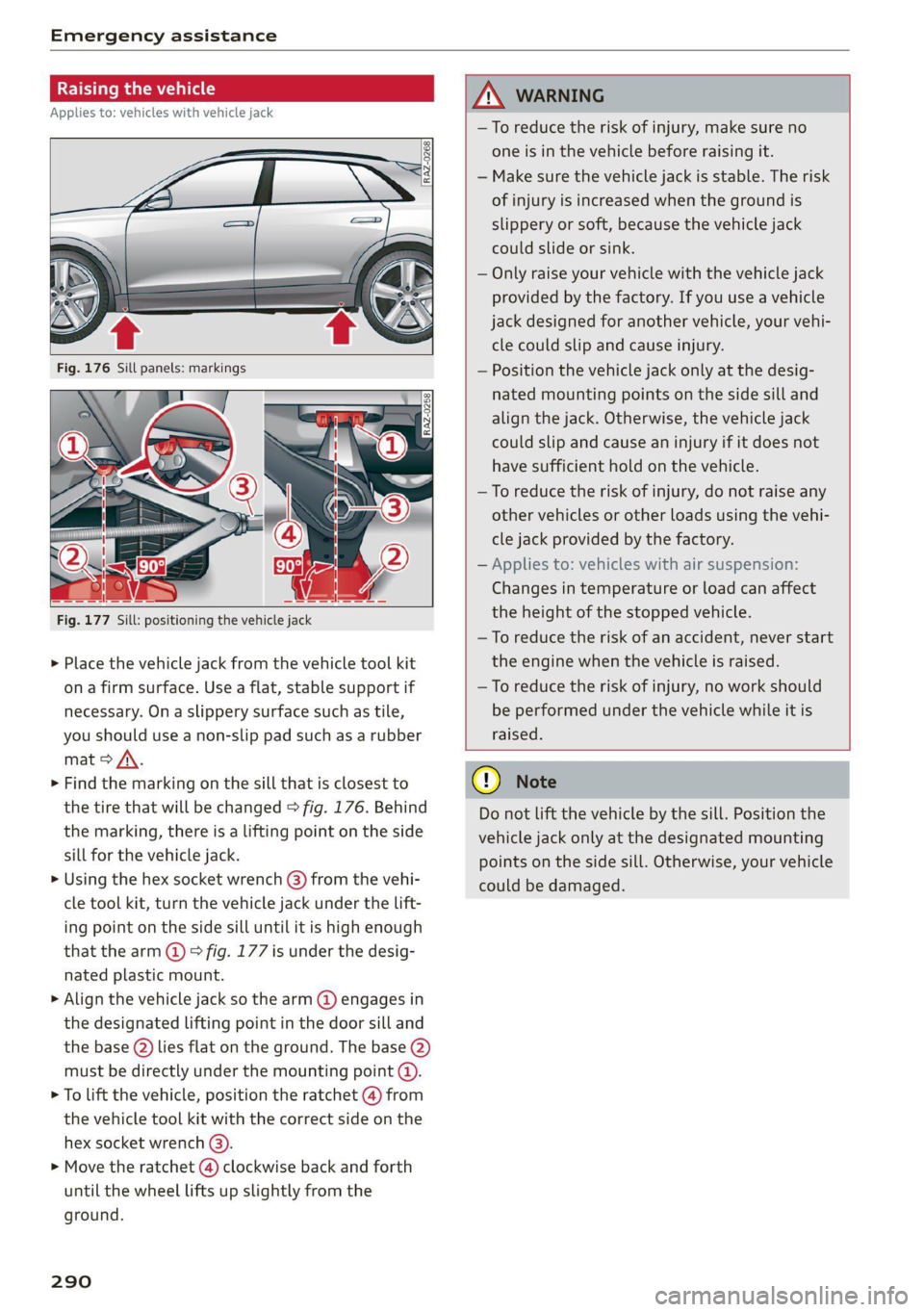
Applies to: vehicles with vehicle jack
RAZ-0258
Fig. 177 Sill: positioning the vehicle jack
> Place the vehicle jack from the vehicle tool kit
ona firm surface. Use a flat, stable support if
necessary. On a slippery surface such as tile,
you should use a non-slip pad such as a rubber
mat > /\.
> Find the marking on the sill that is closest to
the tire that will be changed > fig. 176. Behind
the marking, there is a lifting point on the side
sill for the vehicle jack.
> Using the hex socket wrench (3) from the vehi-
cle tool kit, turn the vehicle jack under the lift-
ing point on the side sill until it is high enough
that the arm @ 9 fig. 177 is under the desig-
nated plastic mount.
> Align the vehicle jack so the arm @ engages in
the designated Lifting point in the door sill and
the base (2) lies flat on the ground. The base 2)
must be directly under the mounting point (@).
> To lift the vehicle, position the ratchet @) from
the vehicle tool kit with the correct side on the
hex socket wrench @).
> Move the ratchet (@) clockwise back and forth
until the wheel lifts up slightly from the
ground.
290
AN WARNING
—To reduce the risk of injury, make sure no
one is in the vehicle before raising it.
— Make sure the vehicle jack is stable. The risk
of injury is increased when the ground is
slippery or soft, because the vehicle jack
could slide or sink.
— Only raise your vehicle with the vehicle jack
provided by the factory. If you use a vehicle
jack designed for another vehicle, your vehi-
cle could slip and cause injury.
— Position the vehicle jack only at the desig-
nated mounting points on the side sill and
align the jack. Otherwise, the vehicle jack
could slip and cause an injury if it does not
have sufficient hold on the vehicle.
—To reduce the risk of injury, do not raise any
other vehicles or other loads using the vehi-
cle jack provided by the factory.
— Applies to: vehicles with air suspension:
Changes in temperature or load can affect
the height of the stopped vehicle.
—To reduce the risk of an accident, never start
the engine when the vehicle is raised.
—To reduce the risk of injury, no work should
be performed under the vehicle while it is
raised.
() Note
Do not lift the vehicle by the sill. Position the
vehicle jack only at the designated mounting
points on the side sill. Otherwise, your vehicle
could be damaged.
Page 303 of 332
4M8012721BF
Fuses and bulbs
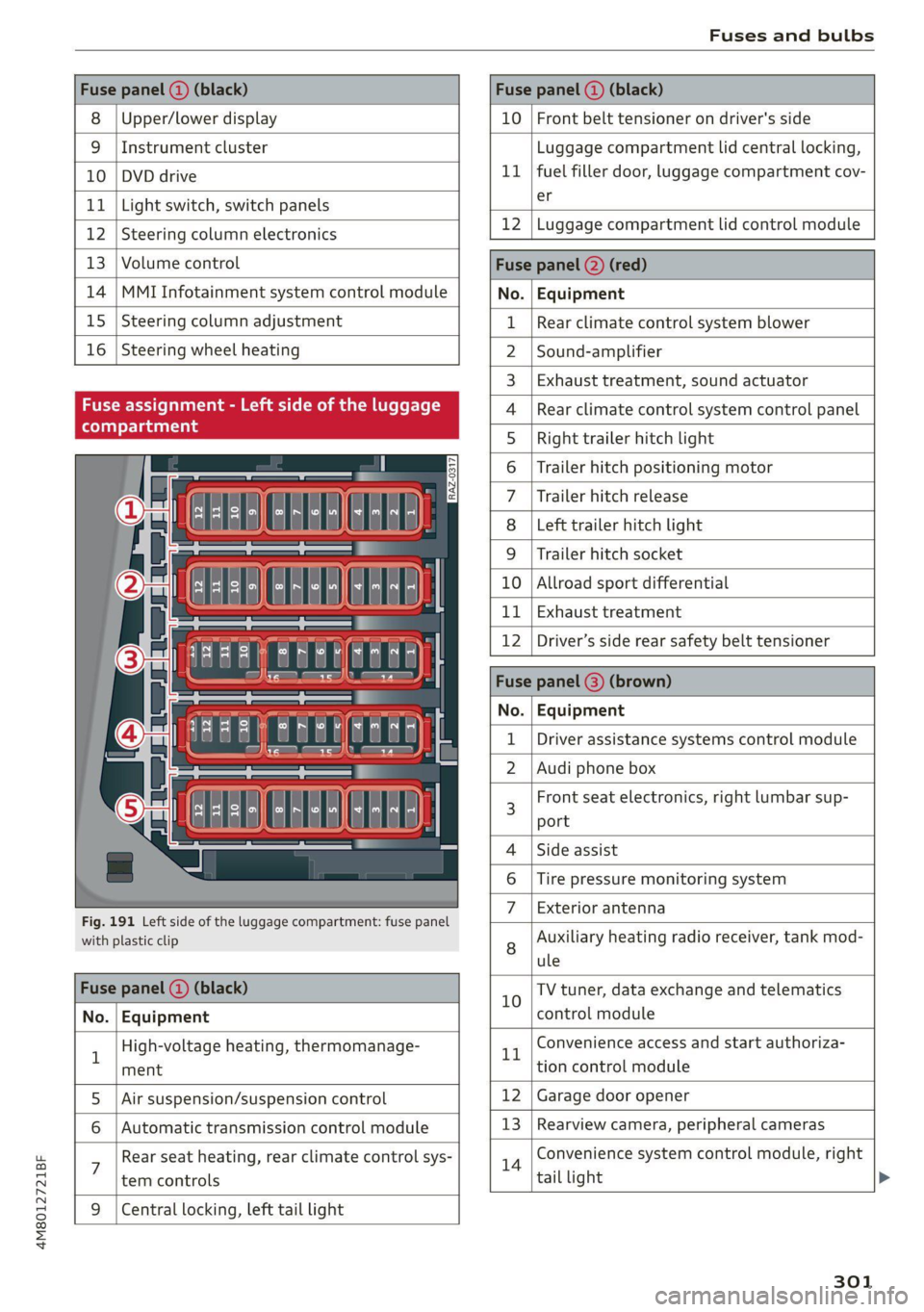
Fuse panel (a) (black) Fuse panel (2) (black)
8 |Upper/lower display 10 | Front belt tensioner on driver's side
9 |Instrument cluster Luggage compartment lid central locking,
10 | DVD drive 11 | fuel filler door, luggage compartment cov-
11 | Light switch, switch panels Sf
12 [Steering column electronics 12 |Luggage compartment lid control module
13 | Volume control Fuse panel (2) (red)
14 |MMI Infotainment system control module No. | Equipment
15 | Steering column adjustment 1 | Rear climate control system blower
16 | Steering wheel heating 2 |Sound-amplifier
3 | Exhaust treatment, sound actuator
Fuse assignment 4 |Rear climate control system control panel
ST 5 | Right trailer hitch light
6 | Trailer hitch positioning motor
7 |Trailer hitch release
8 |Left trailer hitch light
9 |Trailer hitch socket
10 |Allroad sport differential
11 | Exhaust treatment
12 |Driver’s side rear safety belt tensioner
Fuse panel @) (brown)
No. | Equipment
Driver assistance systems control module
2. |Audi phone box
« : E -| a fl r al i] " f E 3 Front seat electronics, right lumbar sup-
{ | aE ] | port
- 4 |Side assist
6 |Tire pressure monitoring system
Fig. 191 Left side of the luggage compartment: fuse panel 7 | Bxeharanitenina
with plastic clip 8 Auxiliary heating radio receiver, tank mod-
ule
Fuse panel (@) (black) 10 TV tuner, data exchange and telematics
No. | Equipment control module
1 High-voltage heating, thermomanage- rt Convenience access and start authoriza-
ment tion control module
5. |Air suspension/suspension control 12 | Garage door opener
6 | Automatic transmission control module 13 | Rearview camera, peripheral cameras
: Rear seat heating, rear climate control sys- 14 Convenience system control module, right
tem controls tail light
9 |Central locking, left tail light
301
Page 327 of 332
4M8012721BF
TAIMOZONC Lies « & socveee wo ceeneis ww ewes woo sere 233
Wi-Fi hotspot........ 0... eee eee 195
Setting the language................... 233
Setting the time..............2-.00000- 233
Shade
Rear window............0.00 000 e eee 57
Shift light indicator................0000. 15
SHIP PaAdlesian: » . smmcne x a mame © a wees © wotae 99
SRipearrier secon «2 sess xo enews ¥ x woesene a 8 owen 112
SHOP’: = sews sv sews 2 vane ee coe oH ine Fo 194
Shortcut
refer to ShortcutS........... 00 eee eee 24
SHOrteultst: « snes x canons a = ronson ov anes x ase 24
SHUT Gis 2 o ecu oe wes oe memow 2 mace 8 we 225
Side assists < swe + sane: gs seme a 2 ee a EY 153
Cleaning the sensors.............00005 281
SIM at sews. 6 v sons % 2 senses a seveee oa meee 193
Sliding/tilting sunroof
refer to Panoramic glass roof............ 47
Smart Favorites
refer to PresetS............0 0-00 e eee 215
Smartphone
refer to Telephone.............00ee eae 181
Snow chainS......... eee eee ee eee eee 273
Socket
refer to Power SOUrCceS ...... 0c ee eee neces 82
Software information
Legal information..................0- 236
Software version (MMI)
Version information...............04- 236
Sound
refer to Adjusting the sound............ 233
Speed limit information
refer to Traffic sign recognition......... 126
Speed limits
refer to Traffic sign recognition......... 126
SPEGAOMEtET = veux > oven © & eam G Eee ob 12
Speed warning system..........-..2-00. 126
Sport differential...................04. 115
Sport displays............ 0.0. e eee eee 15
Sporty driving..........-... ee eee eee eee 107
Start/Stop system. « « esses « « escene vw wiauers a 103
Messages... 1.22... cece eee eee eee 104
Switching offandon..............00 ee 103
Starting to drive: < s eccs se ese ss eeee se pee 96
Starting (engine) ...................005 103
SEONG sss oo esesvee a comnts v 6 astoone ¥ & sews Y 6 a
Audi drive select
also refer to Steering..........00.e008 114
Steering lock. ss ices cc eeee ec wee ees 95,114
Steering wheel
ACjUStING we ¢ = cases ¢ 2 eees eo eee ce ewe 66
Shift paddles... 1.2... . 0. eee eee eee eee 99
Steering wheel heating................. 93
also refer to Multifunction steering wheel. . 13
Steps for determining correct load limit... 271
Stopover (navigation) .................- 204
Stopping.......... 00... eee eee eee eee 96
Stopping the vehicle..............-..00. 96
SHOPPING ENGIME)) rm» sows ms sete «0 anne 103
StOMa Qe lis « o accra + 2 wwe wo cwevane @ ¥ cress © 0 ces 83
Storage compartment...............0005 83
Stored stations
refer to Presets...............-000 eee 215
Subtitles
DVD... eee eee ee 227
Sunshade
Rear side windows... ..........0000000e 46
Rear Wind Whew 2 o sews 2 3 wen 2 a meson oo em 57
Lo 0) 47
also refer to Panoramic glass roof........ 47
SUN VISOFS 2.6.1 eee ee eee 57
Suspension ..... 0.0... cece cece eee 112
Audi drive select............--.000005 112
Swapping calls.............-.0002-0 08 187
Swerve assist... 0.0... cece eee ee eee 152
Symbols
NAViGat Olin: « ¢ seme 7 x anes ¢ 5 oemR EB owe 204
Tratti Giese: 2 x ams 2 seein w 2 neuen mw ai Ho 209
also refer to Indicator lights.............. 7
SYNC (climate control system) ............ 91
SYStEMISECEINGS « swccens + a vccuaes v oreswee + seins 233
T
Tachometer ssa 2 e ivinei sw mamas « wavain « @ a 12,14
Tail lights
Cleaning. ........ 2. cece eee eee 281
Technnicalidatais © « awiviss wo ssovese « wecmme @ © cseicu 313.
Technical modifications................. 308
Telephones s ¢ saws = sews yo een es eee ve 181
Accepting/ending acall................ 187
Audi phone box.........-..0.--0e eee 183
Page 328 of 332
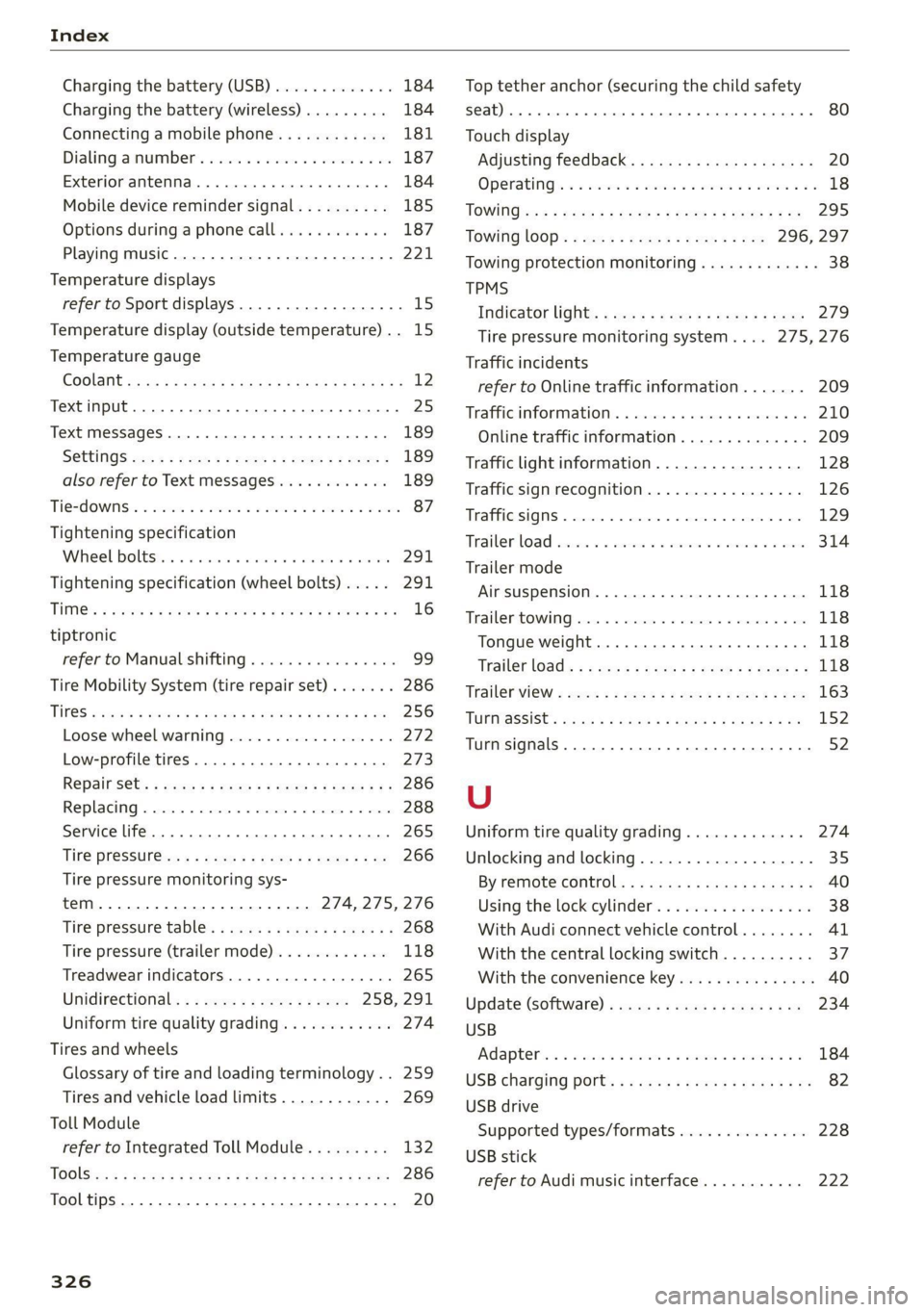
Index
Charging the battery (USB)............. 184
Charging the battery (wireless) ......... 184
Connecting a mobile phone............ 181
Dialing asnumbe t's e:csce e cco ee waneve ¥ 0 ene 187
Exterior antenna...............200005 184
Mobile device reminder signal.......... 185
Options during aphonecall............ 187
Playing music........ 0.0... eee ee eee 221
Temperature displays
refer to Sport displays...............00. 15
Temperature display (outside temperature).. 15
Temperature gauge
COOlANt sssan 2 » cqum 3 x aR ot Raw SB Meee Fe 12
Text input... 2... ee eee eee 25
Text MesSageS .....--. cee eee eee eee 189
SGttingS coms + waeu & x seeR ee NORE Ey NESE 189
also refer to Text messages............ 189
Tie2d OWNS: & soso oo sents 2 3 oes oo meme o Bem 87
Tightening specification
Wheel bolttstic si scsues emsie 6 « intaive a 6 amivine 291
Tightening specification (wheel bolts).... . 291
THM: » saees go sae ¢ © Rees oe eH ge eo eB 16
tiptronic
refer to Manual shifting................ 99
Tire Mobility System (tire repair set)....... 286
Tit@S e2cses s meses ¢ = waren 2 & weseS 3 & TE sg Re 256
Loose wheel warning.................. 272
Low-profile tires..............000 000. 273
RepainSets « awa « « worms s mem 9 be a Be 286
Replacing « srr « susnene x osercm wo sseeone o 5 wees 288
Service life... .......... 0... c eee eee 265
Tine PresSut@wes « news: = s gems & x Home EP ae 266
Tire pressure monitoring sys-
TEM eee 274, 275, 276
Tire pressure table: « sews = ¢ ses + ¢ seeps ¢ 268
Tire pressure (trailer mode)............ 118
Treadwear indicators............-..00- 265
Unidirectional; << ae. « s wees ce ewes 258, 291
Uniform tire quality grading............ 274
Tires and wheels
Glossary of tire and loading terminology.. 259
Tires and vehicle load limits............ 269
Toll Module
refer to Integrated Toll Module......... 132
TOGlSis:s s nace 2 & wea = & Seem FE Hee E x De 286
Tooltips......... 0... cee eee 20
326
Top tether anchor (securing the child safety
SQat) occ ce cee cece teen eee eee 80
Touch display
Adjusting feedback. ..............-.05. 20
OPeratinG)s « 2 vices «2 oem = 2 arene © woo vo 18
TOWI0Gise5 : wee 2 wees & x Here 5 epee 5 2 Bs 295
Towing lOOp< « ss<2 = seen < sae8 ¢ s oes 296, 297
Towing protection monitoring............. 38
TPMS
Indicator light:: « sss ¢ + sees se zeae ss ews 279
Tire pressure monitoring system.... 275,276
Traffic incidents
refer to Online traffic information....... 209
Trafficsin formations. « svesese » s sexe 1 amuse 0 0s 210
Online traffic information.............. 209
Traffic light information................ 128
Traffic sign recognition................. 126
Traffic SignS.. 0.0... eee eee eee eee 129
Trailerload cscs vs asccame vo avcnaiis ww ames ww anes 314
Trailer mode
Airsuspension..................0.005 118
Trailer towing.............. cee eee eee ee 118
Tongue weight .......... eee eee eae 118
‘Trailer load): + s see s nome & s were o x som ge 118
Trailerwiew « swan « » mess = uses x eee cs see 163
TUPMSSSISC:s sacs = 3 secne 3 8 Bane 3 2 aaceR 4 5 152
Turn signals. .... 0.0... sce eee eee eee 52
U
Uniform tire quality grading............. 274
Unlocking and locking.............-..0-- 35
BY remote control: «= scus
Using the lock cylinder................. 38
With Audi connect vehicle control........ 41
With the central locking switch.......... 37
With the convenience key............... 40
Update (software) .......... 0... e eee eee 234
USB
Ad aptel inc s wana cs won a 9 eseowa «9 wwe a oe 184
USB
charging ports « « even se cwen x nen ec ee 82
USB drive
Supported types/formats.............. 228
USB stick
refer to Audi music interface........... 222