voice AUDI Q8 2021 Owner´s Manual
[x] Cancel search | Manufacturer: AUDI, Model Year: 2021, Model line: Q8, Model: AUDI Q8 2021Pages: 332, PDF Size: 118.76 MB
Page 223 of 332
4M8012721BF
Media
DVD drive
Applies to: vehicles with a DVD drive
—
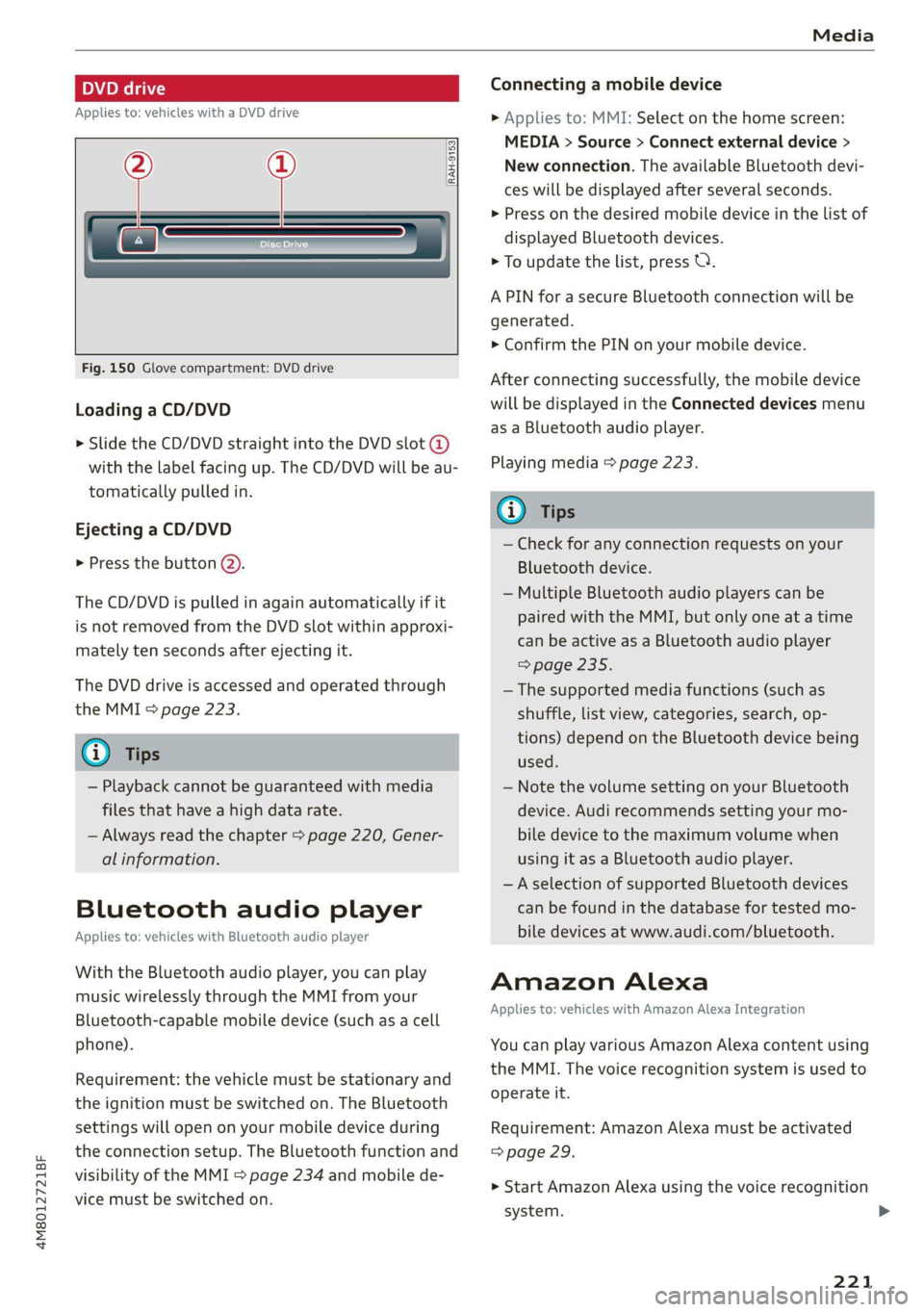
Fig. 150 Glove compartment: DVD drive
[RAH-9153,
Loading a CD/DVD
> Slide the CD/DVD straight into the DVD slot @
with the label facing up. The CD/DVD will be au-
tomatically pulled in.
Ejecting a CD/DVD
> Press the button (2).
The CD/DVD is pulled in again automatically if it
is
not removed from the DVD slot within approxi-
mately ten seconds after ejecting it.
The DVD drive is accessed and operated through
the MMI > page 223.
@) Tips
— Playback cannot be guaranteed with media
files that have a high data rate.
— Always read the chapter > page 220, Gener-
al information.
Bluetooth audio player
Applies to: vehicles with Bluetooth audio player
With the Bluetooth audio player, you can play
music wirelessly through the MMI from your
Bluetooth-capable mobile device (such as a cell
phone).
Requirement: the vehicle must be stationary and
the ignition must be switched on. The Bluetooth
settings will open on your mobile device during
the connection setup. The Bluetooth function and
visibility of the MMI > page 234 and mobile de-
vice must be switched on.
Connecting a mobile device
> Applies to: MMI: Select on the home screen:
MEDIA > Source > Connect external device >
New connection. The available Bluetooth devi-
ces will be displayed after several seconds.
> Press on the desired mobile device in the list of
displayed Bluetooth devices.
> To update the list, press OQ.
A PIN for a secure Bluetooth connection will be
generated.
> Confirm the PIN on your mobile device.
After
connecting successfully, the mobile device
will be displayed in the Connected devices menu
as a Bluetooth audio player.
Playing media > page 223.
@ Tips
— Check for any connection requests on your
Bluetooth device.
— Multiple Bluetooth audio players can be
paired with the MMI, but only one at a time
can be active as a Bluetooth audio player
=> page 235.
— The supported media functions (such as
shuffle, list view, categories, search, op-
tions) depend on the Bluetooth device being
used.
— Note the volume setting on your Bluetooth
device. Audi recommends setting your mo-
bile device to the maximum volume when
using it as a Bluetooth audio player.
—Aselection of supported Bluetooth devices
can be found in the database for tested mo-
bile devices at www.audi.com/bluetooth.
Amazon Alexa
Applies to: vehicles with Amazon Alexa Integration
You can play various Amazon Alexa content using
the MMI. The voice recognition system is used to
operate it.
Requirement: Amazon Alexa must be activated
=> page 29.
>» Start Amazon Alexa using the voice recognition
system.
221
>
Page 231 of 332
4M8012721BF
Media
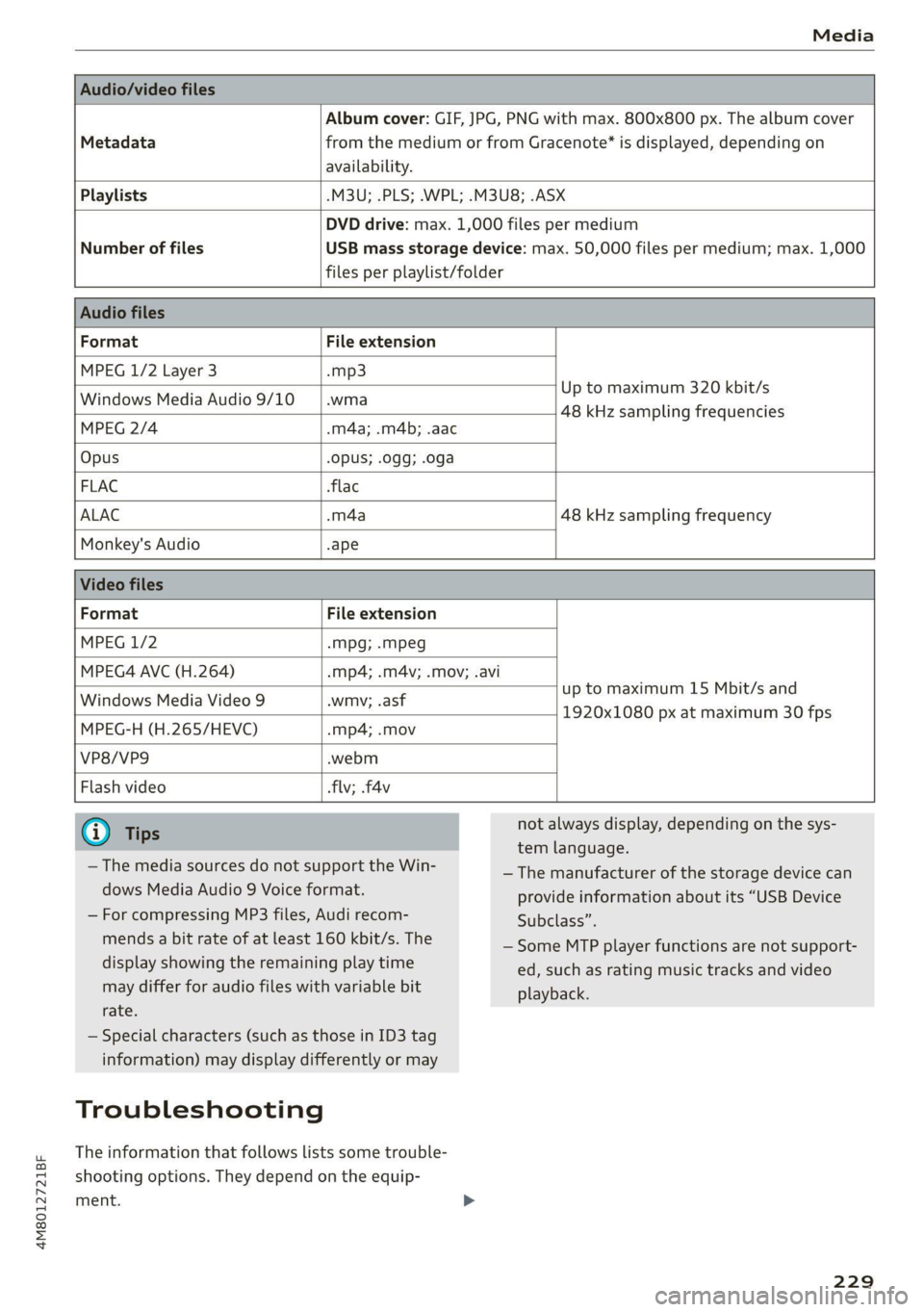
Album cover: GIF, JPG, PNG with max. 800x800 px. The album cover
Metadata from the medium or from Gracenote®* is displayed, depending on
availability.
Playlists -M3U; .PLS; .WPL; .M3U8; .ASX
Number of files
DVD drive: max. 1,000 files per medium
USB mass storage device: max. 50,000 files per medium; max. 1,000
files per playlist/folder
Format File extension
MPEG 1/2 Layer 3 -mp3
Windows Media Audio 9/10 .wma
Up to maximum 320 kbit/s
48 kHz sampling frequencies
MPEG 2/4 .m4a; .m4b; .aac
Opus Opus; .0gg; .oga
FLAC flac
ALAC -m4a 48 kHz sampling frequency
Monkey's Audio -ape
Format File extension
MPEG 1/2 -mpg; .mpeg
MPEG4 AVC (H.264) .mp4; .m4v; .mov; .avi
up to maximum 15 Mbit/s and
1920x1080 px at maximum 30 fps
Windows Media Video 9 .wmv; .asf
MPEG-H (H.265/HEVC) -mp4; .mov
VP8/VP9 .webm
Flash video flv; .f4v
— The media sources do not support the Win-
dows Media Audio 9 Voice format.
— For compressing MP3 files, Audi recom-
mends a bit rate of at least 160 kbit/s. The
display showing the remaining play time
may differ for audio files with variable bit
rate.
— Special characters (such as those in ID3 tag
information) may display differently or may
Troubleshooting
The information that follows lists some trouble-
shooting options. They depend on the equip-
ment. >
not always display, depending on the sys-
tem language.
— The manufacturer of the storage device can
provide information about its “USB Device
Subclass”.
—Some MTP player functions are not support-
ed, such as rating music tracks and video
playback.
229
Page 233 of 332
4M8012721BF
Audi smartphone interface
Audi smartphone
interface
Setup
Applies to: vehicles with Audi smartphone interface
You can connect your smartphone to the MMI
with a cable or wirelessly* using the Audi smart-
phone interface. Certain content on your smart-
phone is adapted in the MMI while driving and
can be operated through the MMI.
Requirement: the vehicle must be stationary and
the ignition must be switched on. iPhone genera-
tion 5 or higher with Lightning connector and iOS
7.1.2 operating system or higher, or smartphone
with Android Auto app and Android 5.0 Lollipop
operating system or higher.
> Applies to: MMI: Select on the home screen:
SETTINGS > Connected devices > Audi smart-
phone interface > New connection.
> Connect your smartphone to the Audi music in-
terface > page 222 using a USB adapter
=> page 222, fig. 151, or
> To connect your iPhone wireless*, switch on the
Bluetooth function and Wi-Fi on your iPhone.
Open the Apple CarPlay settings in your iPhone.
In the MMI, press on your iPhone in the list of
displayed devices.
> To update the list, press O.
> Follow the system instructions.
> Pay attention to any additional system prompts
on your smartphone, if applicable.
> Applies to: MMI: If you declined use of Apple
CarPlay or Android Auto the first time you con-
nected your smartphone, then select on the
home screen: SETTINGS > Connected devices >
Audi smartphone interface > a smartphone.
> Follow the system instructions.
Z\ WARNING
Driving requires your complete and undivided
attention. As the driver, you have complete re-
sponsibility for safety in traffic. Never operate
mobile devices while driving, because this in-
creases the risk of an accident.
CG) Note
Read the information about Audi connect, and
be sure to note the connectivity costs section
=> page 192.
G@) Tips
— The functions that can be used depend on
the following factors, among others:
— The brand of your smartphone
— The version of the operating system in
your smartphone
— The software version of the app used
— The USB adapter cable and correct connec-
tion
— Your cell phone service provider
— The customized settings on your smart-
phone
— One of the factors above or a combination
of any of them could cause your smart-
phone to be incompatible with the Audi
smartphone interface. Compatibility cannot
be guaranteed for all types of smartphones.
For more information and assistance, refer
to the user guide and the manufacturer of
your smartphone.
— Please note that you can only connect your
smartphone via the front Audi music inter-
face in order to use the Audi smartphone
terface.
in-
— Wireless Apple CarPlay* is not available in
all countries.
— Wireless Apple CarPlay* was a planned func-
tion at the time this manual was printed.
Wireless Apple CarPlay* is not available in
your vehicle.
— Wireless Apple CarPlay* is only possible i
vehicles without a navigation system or
without a detected vehicle position (GPS
n
da-
ta) if the following requirement is met: the
embedded SIM card for the vehicle must
logged into the mobile phone network
=> page 192.
be
— If the connected smartphone has voice con-
trol, you can operate your smartphone using
the external voice recognition system
=> page 29.
231
Page 235 of 332
4M8012721BF
Additional settings
Additional settings
System settings
Introduction
General settings are described in this chapter.
You can find specific settings in the chapters
about
those settings. The available settings de-
pend on the vehicle equipment.
Date and time
> Applies to: MMI: Select on the home screen:
SETTINGS > General > Date & time.
Possible settings:
— Automatically set date and time
— Date format
— Time format
— Automatic time zone
— Time zone
Measurement units
> Applies to: MMI: Select on the home screen:
SETTINGS > General > Measurement units.
Possible settings:
— Speed
— Distance
— Temperature
— Volume
— Pressure
— Consumption (engine)
Language and keyboard
> Applies to MMI: Select on the home screen:
SETTINGS > Language & keyboard.
Language
You can change the languages for the display,
navigation announcements, and the voice recog-
nition system.
Keyboard
See > page 25.
Requirement: an audio source must be active.
> Applies to MMI: Select on the home screen:
SETTINGS > Sound.
Possible settings:
— Treble
— Bass
— Balance/fader
— Speed dependent volume control
— Subwoofer
— Surround Level
Focus
You can optimize the sound distribution for vari-
ous locations in the vehicle.
3D effect
You can adjust the intensity of the 3D effect.
With the Medium setting, you will hear an opti-
mal 3D effect for all sources.
PUL eee ely
> Applies to: MMI: Select on the home screen:
SETTINGS > Announcements & tones.
Possible settings:
— Announcement volume
— Welcome sound
Z\ WARNING
Adjust the volume of the audio system so that
signals from outside the vehicle, such as po-
lice and fire sirens, can be heard easily at all
times.
@ Tips
The volume is automatically adjusted to a pre-
set level when the MMI is switched on.
233
Page 321 of 332
4M8012721BF
Index
External voice operation................. 29
F
Factory default settings
Multi Media Interface................. 234
EASE OUTS sissses ow snaawee 0 x sons #9 seme a 0 onennns 201
FAVORITOS! & o cowsms w 6 cman 6 8 semua & wexees & renee 22
Bluetooth. .............. 0... eee eee 236
NaVIG@EION:: « + swe 9 o eee 5 ¢ oem & e eee 202
Telephone wwe «x cain © aesee e+ ence oo eee 186
Federal Communications Commission (FCC) . 311
File formats (media drives).............. 228
FOg (WINdOWS)ixw: 5 2 came y 5 anew ay aeew 5 2 Re 92
Folding the rearseats...............0005 86
Footwell temperature.............2.0005 93
For the sake of the environment
Disposing of engine oil................ 247
FUeLIRG!s © anecsns so answers & v annum © ¥ seems WH avose 239
Leaks... i eee eee eee eee 243
Fragrance... ... ee eee eee eee 92,93
Free text search
Media....... cee eee eee eee ee 227
R&GiOiss = = seus = = saupe & = ems 4 neoRE ee 214
also refer to Intelligent search.......... 201
Freeze protection
Coolant... .. 0. eee eee eee 248
Windshield washer system............. 254
Frequency band..........-..00 eevee ee 212
also refer to Frequency band........... 212
Front center armrest ....... 000. cece ee eee 65
Front collision warning
refer to Audi pre sense front............ 149
Front passenger’s seat adjustment
PRON. « ssweece xo aceane wo axevene ao coenaie w 6 ace 65
Rear... eee eee eee 65
Front wiper blades
ChanGinG’s + x same sy eames ¢ a eae ¢ HER Fe 58
Cleaning « « cvs sv even oe enn oe ence oo 58
FUGls sce ¢ x cage x 2 eee 7 o we Ye eee ee 238
TAGAIEIVES «scones x 5 sures @ 2 sxenene © 8 ommrane oa ot 239
Current consumption................... 16
Fueldisplay sec: = s sees ey seen sy eee ge es 12
Fuel-tank. capacity’: « scsi oo cise a 0 caves « 314
Gasoline
Reducing fuel consumption............ 102
Fueling
Fuel filler door..... 0.0... cece eee eee ee 239
Fuel filler door emergency release....... 241
Fueltankcapacity'. « 5 con es cone a wanna « 314
Functions on demand...............0.4. 194
Functions that require a license.......... 194
also refer to Functions on demand....... 194
G
Garage door opener............--0ee eee 48
GarMeNthOokS scesiiss sv cevevee oo ances o a wees 9 0 2 83
GaSOlING cy « x wares & 2 meee = 2 eee 4 ¢ eee 4 8 238
Additives ...... 0... cece eee eee 239
Gasoline mixture ...............0000ee 238
GAWR
refer to Gross Axle Weight Rating (GAWR) . 314
Gears... eee 97
Glossary of tire and loading terminology... 259
Glove compartment..............000 eee 83
G meter
refer to Sport displays.................. 15
Gross Axle Weight Rating (GAWR)........ 314
Gross Vehicle Weight Rating (GVWR)...... 314
GVWR
refer to Gross Vehicle Weight
Rating (GVWR) « ssope « 2 wecne 2 2 ceuee & 2 ces 314
H
Hanastrees « « asms = eevee § = netR se HOR Se 182
Hatids Free Profiles « 2 swcas x x agus ¢ 2 ems 2 182
Head-up display
AGjUSUING was +» ences 3 ¢ swe yo ees oy eee = 27
Adjusting the brightness................ 55
Operating...............0 0. cece eee 27
Headlight range control................05 51
Headlights
ClOSNiNG’s = = cams ¢ 5 eas 7 o Seas tS ee Ea: 281
Headlight range control................ 51
Washer system... 1.2... 00. e cee ee eee 57
Washer system (filling washer fluid)... . . 254
Head restraints
ACIUSEINGisyes x = sewas 3 2 gas x & eewR = # aR x 67
Removing and installing................ 67
Heated rear window .........000 sees eeeeen 92
Heated steering wheel.................0. 93
319
Page 323 of 332
4M8012721BF
Index
Software:licensesi. « seins ss asros v0 ania © a 236
Version information.............-.00- 236
License plate bracket................0.. 310
Lifting points (vehicle jack).............. 290
Light/rain sensor
Headlights ............. 0.0 e eee eee ee 51
Intermittent mode (windshield wipers).... 57
Lighting
EXteriO?'s sees oo neem oo een 2 2 eon 2 ee 51
TAGE HOR so scans o 6 siaenve © wn sunctne ew axenene 6 0 « 54
LIQWES sscssia es seem ao waver 2 2 aeesiue @ ¥ arenie © ore 51
Listening to music
referto Media..................- 220, 223
LOAM) scssaree 1 « senor sc « saute st m seviwen mo stenoses 314
Localiusensss + + sean 2 0 ncawaws a o sesvew s avanawe ov ite 32
Locking and unlocking
By remote control..............-.00005 40
Using the lock cylinder; sass s saan a 2 nea 38
With the convenience key............... 40
Low beam headlights.................... 51
Lowering the rear of the vehicle........... 85
LTE
refer to Exterior antenna.............. 184
Luggage compartment.................. 83
Came Flea ensians x « escacn a «cnc we remo 6 ro 87
Cover (manual) ............-----.-5005 84
GOVEr (POWER) « sews « x meus x ¢ eae 5 eS Fe 85
Increasing the size.......... eee eee eee 86
Power SOUrCES ... 1. ee eee eee eee 82
also refer to Luggage compartment...... 83
Luggage compartment lid
Closing buttom:s « «csc eo secwsns = aeauans vo see 43
General information................00. 42
Mechanically unlocking...............-. 45
Openingiand Closings ss mais a & wea s & oe 43
Opening and closing with foot motion..... 44
Power opening and closing.............. 43
Lumbar support.............-.0002-000 63
M
Maintenance ........ 6c eee eee 308
Maintenance intervals.................5 254
Malfunction Indicator Lamp (MIL)........ 241
Maneuverassist sissies <3 cuces 2 3 somes 2 3 savers a 178
Manual shitting: «wees 2s ceos a ¢ eww so een 99
Map
Changing the scale.............0-0005 203
Display’: wasn x 2 warn s ¢ mews se BewE s 2 OS 205
Operating’. « & ssw ¥ sncasan ¥ wawens av memes a x 2 204
Setting the destination................ 203
MAP
refer to Message Access Profile......... 189
Map preview............0..0..0 eee eee 203
Map update............ cece ee eee eee 208
MYAUGLAPD = newer = : saws s 2 eam 2g gee x = 208
ONLINE & arises 2s sewre8e swans ao eRe ow imaUNm 208
USB connection............-..000005- 208
Massage function...............-000000) 63
Front... 2... ec ee 64
Mechanical key..... 0.00.00. 0c eee eee ee 39
Media... .... 0... cece eee eee ee eee 220, 223
DrivVGSiss ¢ = ness ¢ # Beas ¢ 8 HHS + AER at Bee 220
Supported formats.................-- 228
Media-center’. « = sew » ¢ swas x seme 2 x sete 224
Memory functiones: « s sees = ees ve een ce 71
Menu language
refer to Setting the language........... 233
Menu Pathisies « » sows x 2 wees © y eae 2 e emi es 19
Message Access Profile...........-..... 189
MessageS....... 22.00. ce eee eee eee eee 189
Mild hybrid drive system..........-...0- 102
Mirror compass... ... 02.0... e eee eee eee 60
Mirrors
Adjusting exterior mirrors............... 55
DIMMING « = ews & 2 cows xo cen + ees + Bere 56
NAINTEYEIMITNOR®. uss 2 < csename on asete # 9 anes © 57
MMI
refer to Multi Media Interface........... 20
Mobile device
referto Telephone ...........--eeeeee: 181
Mobile device reminder signal............ 185
Mountain passes......... 0. c ee eee aes 108
Mountain roads..............0 0000000 108
Multifunction steering wheel
Buttons ....... 2... eee eee 13,31
Operating’: = « sees = ssw so pee ae deem oe we 13
Programming buttons.................. 31
Voice recognition system............... 28
321
Page 324 of 332
Index
Multi Media Interface...............0005 20
Menus and symbols.............000-008 21
OPGrAtiNG's + ease x x eee ee Kae s 2 BemE o 18,21
Switching the displays on or off.......... 20
MUEING ies: 2 secon © a women & eee ooo oN Foo eae 31.
MYAUGI 5 = ees ss pews so pews s eames ee 32,193
myAudi navigation................. 200, 203
MYAUGI USERS ¢ sicts ss caus a x ens ds Bema sa: 32
N
Narrow areaS.... 22... cece eee eee 146
Natural leather care and cleaning......... 283
Navigation. ..............0..0..0.000. 200
BetteRhOUt@aas 2 x wean s a sana s age & s a 209
CallinGiesnis ¢ = scene v awe ov ween ee wm 8 oe 203
Changing the scale.............00000e 203
also refertoMap...........--.0e ee eee 204
Navigation database
Version information.............00005 236
Navigation (instrument cluster) .......... 206
Ns 83
SY, 310
Night vision assist...............-..0004 131
Cleaning the camera...............4.- 281
Notification center. ....... 0... cee eee eee 23
Oo
Octane rating (gasoline)................ 238
Odometer... .... cece eee eee eee 14
ReS@ttinGssssx « = sees ¢ ¢ ees 3 ieee ss res 14
Office address
refer to Business address.............. 206
Offroad
refer to Offroad driving................ 108
Offroad
driving ees = ¢ swwn 2 2 wen 2 2 were so wee 108
OFF (climate control system) ............-. 91
Oil
refer to Engine Oils: «sw s vases owen 2 245
On-board computer. .......5-.0. 00 eee ee 16
On Board Diagnostic System (OBD)... 241, 303
Online map
refer to Satellite map...............05 207
ONLINE RADIO « swcomss «2 sooness 6 w sevens wo ERE oo 216
also refer to Online radio.......... 216, 217
Online roadside assistance.............. 198
322
Online services
refer toconnect.........e eee eee eee 192
Online system update.................. 234
Online traffic information............... 209
OPEN Geers so ceseons 3 v cevvans ov sumsees & 2 sume Woe ORE 35
Automatic luggage compartment lid...... 43
Convenience opening...............0085 47
Fuel filler:dOOP ss: ics cane so eae oe eas ooo 239
HOOd .... cece eee eee 243
Luggage compartment lid............... 43
Luggage compartment lid with foot motion . 44
Panoramic glass roof.............2-200. 47
Sltishiade (OT) ss i s cows 4 c teen se ree ei 47
Sunshade (Windows): s «sso so ieee oo sossan 46
Windows..... 02.00.00. cece eee ee eee 46
Opening and closing
refer to Unlocking and locking........ 35,40
Operating
Head-up display.................00000. 27
InstruMeNt ClUster s sions & eines & wave ae ove 13
Multifunction steering wheel............ 13
Multi Media Interface............... 18,21
TEXtIN PUB iss 3 2 wien 3 wens a = acer os EM 6 eo 25
Touch display.......... 0.00 eee eee eee 18
Voice recognition system............... 28
Optional equipment number............. 313
Options
MeGidiwe = » zemy s meme ¢ eee « 5 ee et 227
R@GIO sxisacs 3 smisans @ o amivens & 0 orewaun 2 0 aera 8 217
Overview (cockpit) «6 cies ce cece sce nees eee 6
P
Paint COd@z»: = » saws x 2 wee sy eee a 2 ee 313
Paint damad@ws« z = sem es ewe se eee es oe 282
PANIC button. ..............-.0..00000 39
PANIC function... 0.0.0... c cece eee eee eee 39
Panoramic glass roof..............00000- 47
Convenience opening and closing......... 47
Emergency closing..........sceeseeeees 48
Quick opening................ eee eae 48
Parental control
DVD... eee eee eee 227
Park assist plus. ........ 0.0000 e eee eee 170
Parking ..... 0.6... cee cece eee ee 96
Page 329 of 332
4M8012721BF
Users
Local users... .. eee eee eee 32
MYAUGIUSES:: s « exes ge oem 5 e ees © eee 32
Using residual heat...............-.00005 92
V
Vanity Mirror... . 6... eee eee eee eee 57
Vehicle
ANGIE sca « esrsea s pew gs wowed a OR Zs 108
Gare/eleaning sii « came xo wena vo ewer oo 280
Dimensions ......... 0.00 c eee eee eee 313
Identification data................... 313
Qutof Service sis seas se ews oo wes eee 285
Raising.......... 0.0.2 e eee eee eee eee 290
StartinGisn s saves & 5 aaeNE @ 3 Hae FE OER gE me 95
TANS POT bss +s sree oo vac oo Ras wa Li2
Unlocking and locking.................. 40
Vehicle care... 2. eee eee 280
Vehicle control services..........-...--- 194
Vehicle data label................--0.00- 313
Vehicle identification number............ 313
Vehicle jack’: waca zs sews zs wows ve wees oy oe 286
Lifting Points: « css «2 wen oo enw vo wore 290
Tire change mode..............-.0 eee 288
Vehicle key... 0.0... cee eee eee eee ee 35,39
Vehiclerstartisystem « « ssces o 6 suse ee coma « « 104
Vehicle:tool:kitt. sis «eee oe ewe ss enw 9 286
Ventilation’: = 5 seas 2 ees 2 2 sere a 2 meee a 2 ne 90
VIEW BURTON: « » gcws x s nome © zeae § emis 5 13
VOiceMiail s = vex ¢ © sees ¢ = wee ee eR ee 187
Voice recognition system..............-.. 28
Externalicss = s eva « s eee oe sews e wenn a oe 29
QPeRabiNg 4 « cessaee a o smeens a 0 poner w grwnene a 6 cate 28
Ww
Warning lights
refer to Indicator lights.................. 7
Washing matte finish paint.............. 280
Wave band
refer to Frequency band............... 212
Weights ............. eee eee eee eee 314
Wheel bolts. ............ 0.0. c eee eae 271
ANt-Cheftieac « < sees = os seme ¢ Rew Eo eee 289
Tightening specification............... 291
Wheels . secs x x eos 2 a cecvme 2 x conan au caoasie 2 256
Cleaning 282
Glossary of tire and loading terminology.. 259
Loose wheel warning............+..... 272
Replacing......... 0... cee eee eee eee 288
Tire pressure monitoring system .... 275,276
Tires and vehicle load limits............ 269
Wheel wrenehis «nsw 2 ease ss wane ss were 286
Wi-Fi
HOtSPOESEEEINGS ie. 5 6 suse 6 & sassese 6 & urna 195
Using ahotspot...................00. 193
Wild animal recognition................ 131
Windows
Child safety lock...............0000 eee 45
Cleaning and removing ice............. 282
Convenience opening and closing......... 47
Defrosting........... 2. cece eee eee eee 92
Opening anid CLOSING secs vs wowy sy sees 4 es 46
POWer WINK OWSisn. so ssavie ov ares 6 eaves ves 46
Windshield
Cleaning........ 2... eee eee eee eee eee 57
also refer to Windshield. ............00% 57
Windshield washer system...........- 57,254
Reservoir capacity: « 2 ewe, s ¢ sau + ¢ seu 9 314
Windshield wipers.............5eeeeeee 57
Winter operation
Gar Washes « sows so caeces 2 esa 6 nom oo 280
Cooling systeM....... ee eee eee eee 248
Defrosting the windows................ 92
Rear window defogger..............--. 92
Removing ice from windows............ 282
Seat heating ......... 0.00. cece cece eee 92
SHOW CHAINS wong s songs 2 wee ga deme ox 273
Steering wheelheating................. 93
THES oe cee tee ee tees 272
Vehicle battery (12 Volt).............-. 252
Windshield washer system............. 254
WINKEF CINE cease se toon 3 3 wears 6 w sense aw 272
Wireless Apple CarPlay
refer to Audi smartphone interface...... 231
Wireless:charging eis. «6 esses +o cases oo evans 184
327